How to spot a phishing email in 2026
By CaptainDNS
Published on February 15, 2026
- 91% of cyberattacks start with a phishing email - learn the 7 signs that give them away
- AI-generated attacks eliminate typos and personalize messages: visual cues are no longer enough
- Always check suspicious links with a URL checker before clicking
- SPF, DKIM, and DMARC block domain spoofing upstream - configure them in strict mode
91% of targeted cyberattacks begin with a phishing email. This figure, from the Verizon DBIR 2024 report, hasn't dropped in five years. In 2026, AI-generated phishing campaigns make detection even harder: gone are the obvious typos and sloppy layouts.
This article gives you the tools to identify a fraudulent email, verify a suspicious link, and set up the technical protections that prevent your domain from being spoofed. Whether you're a sysadmin, security officer, or simply want to protect your inbox, this guide covers the essentials.
7 warning signs of a phishing email
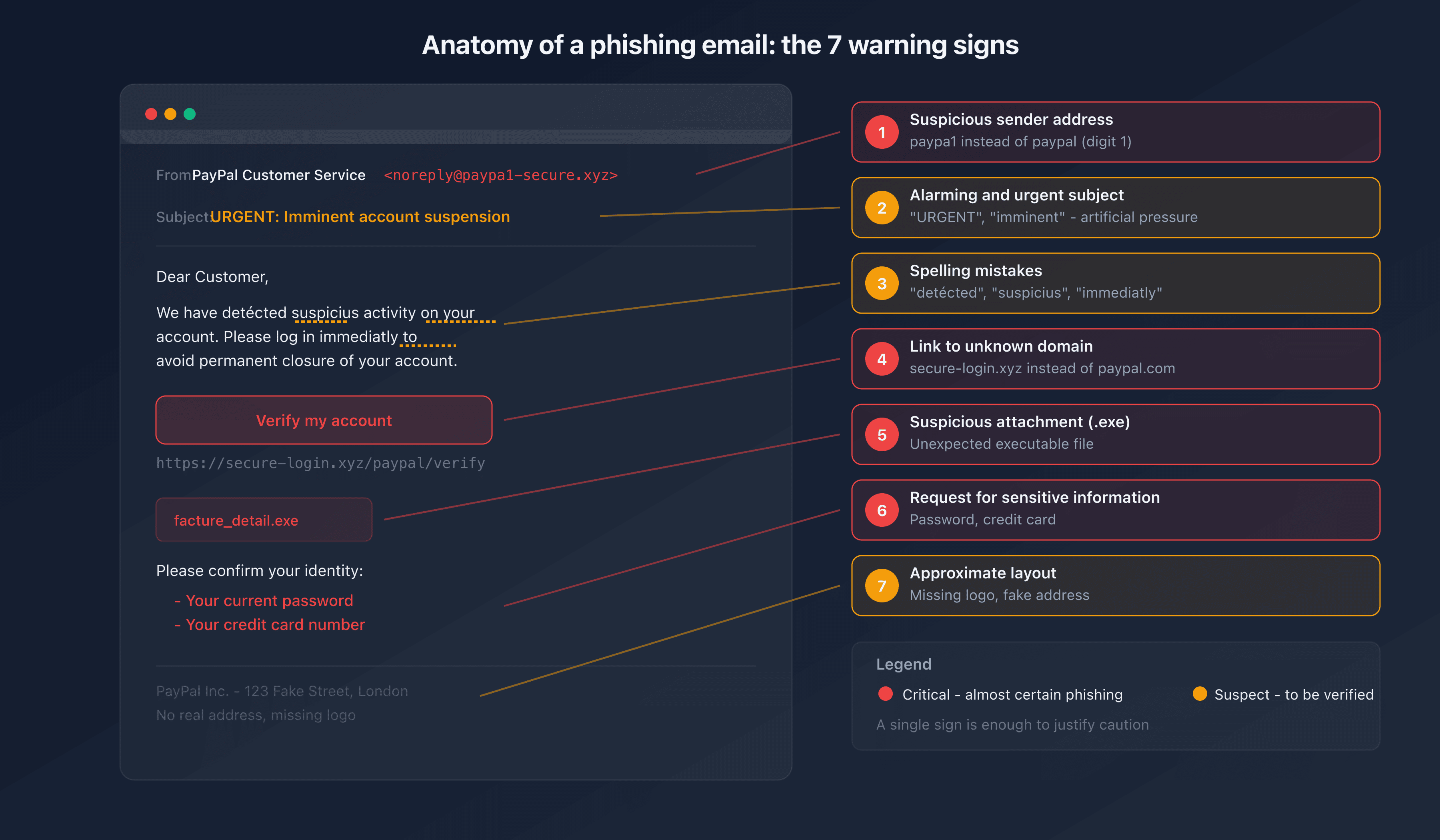
1. Suspicious sender address
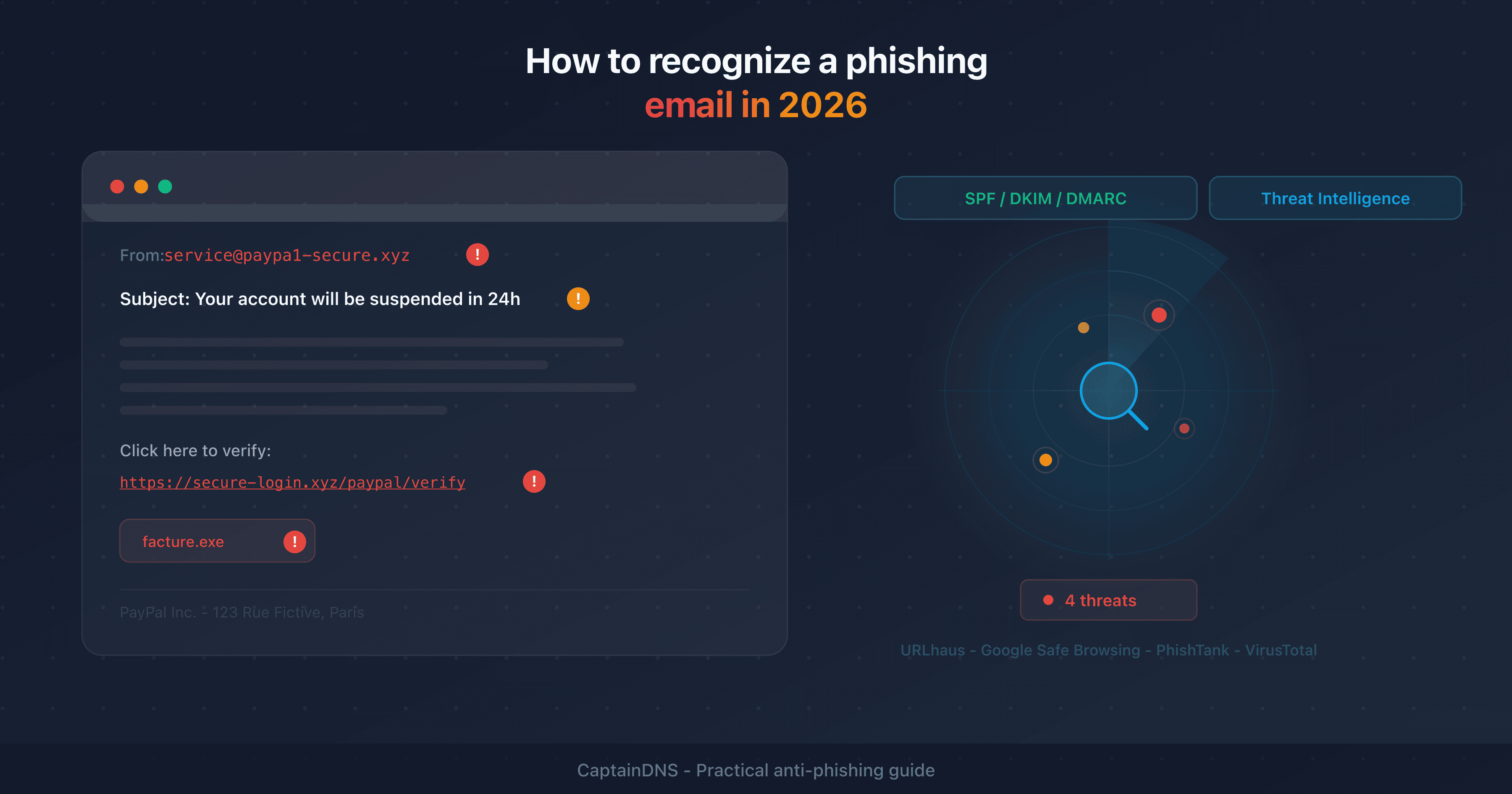
First reflex: check the actual sender email address, not just the display name. An email that shows "PayPal Customer Service" but comes from service@paypa1-secure.xyz is an obvious phishing attempt.
Look at the domain after the @. Attackers use close variants: @amaz0n-security.com, @micros0ft-support.net. A company's legitimate domain is always the same as its website.
2. Alarmist subject line or artificial urgency
"Your account will be suspended within 24h," "Immediate action required," "Payment declined - verify now." Urgency is the most common manipulation technique in phishing. It short-circuits your critical thinking and pushes you to click without checking.
A legitimate company will never threaten to close your account via email with a deadline of a few hours.
3. Spelling errors and inconsistencies
Classic phishing campaigns often contain grammar mistakes, rough translations, or unusual phrasing. However, with generative AI, this signal is becoming less reliable. Modern phishing emails are often linguistically flawless.
Look for inconsistencies instead: an email from your bank that doesn't mention your name, a slightly distorted logo, a missing postal address in the footer.
4. Suspicious links and URLs
Before clicking, hover over the link with your mouse (without clicking). The destination URL appears at the bottom of your browser or mail client. If it doesn't match the sender's official domain, it's phishing.
Typical signs of a malicious URL:
- Unknown domain:
secure-login.xyz/paypalinstead ofpaypal.com - Deceptive subdomain:
paypal.secure-login.xyz(the real domain issecure-login.xyz) - Shortened URL with no context:
bit.ly/xyz123 - Unusual characters in the domain (homoglyphs)
5. Unexpected attachments
A .zip, .exe, .docm, or .html file you weren't expecting is a major red flag. Malicious attachments exploit software vulnerabilities or execute code upon opening.
Also watch out for .svg files with embedded JavaScript and .pdf files containing phishing links - two vectors that have surged since 2025.
6. Request for sensitive information
No legitimate company will ask you for your password, credit card number, or social security number by email. If an email redirects you to a form requesting this information, it's phishing.
7. Unusual layout or tone
Compare with legitimate emails you normally receive from that sender. A change in tone (suddenly informal, overly formal), layout, or logo should raise a red flag. Attackers imitate, but never perfectly reproduce a brand's visual identity.
Modern phishing techniques in 2026
AI-generated phishing
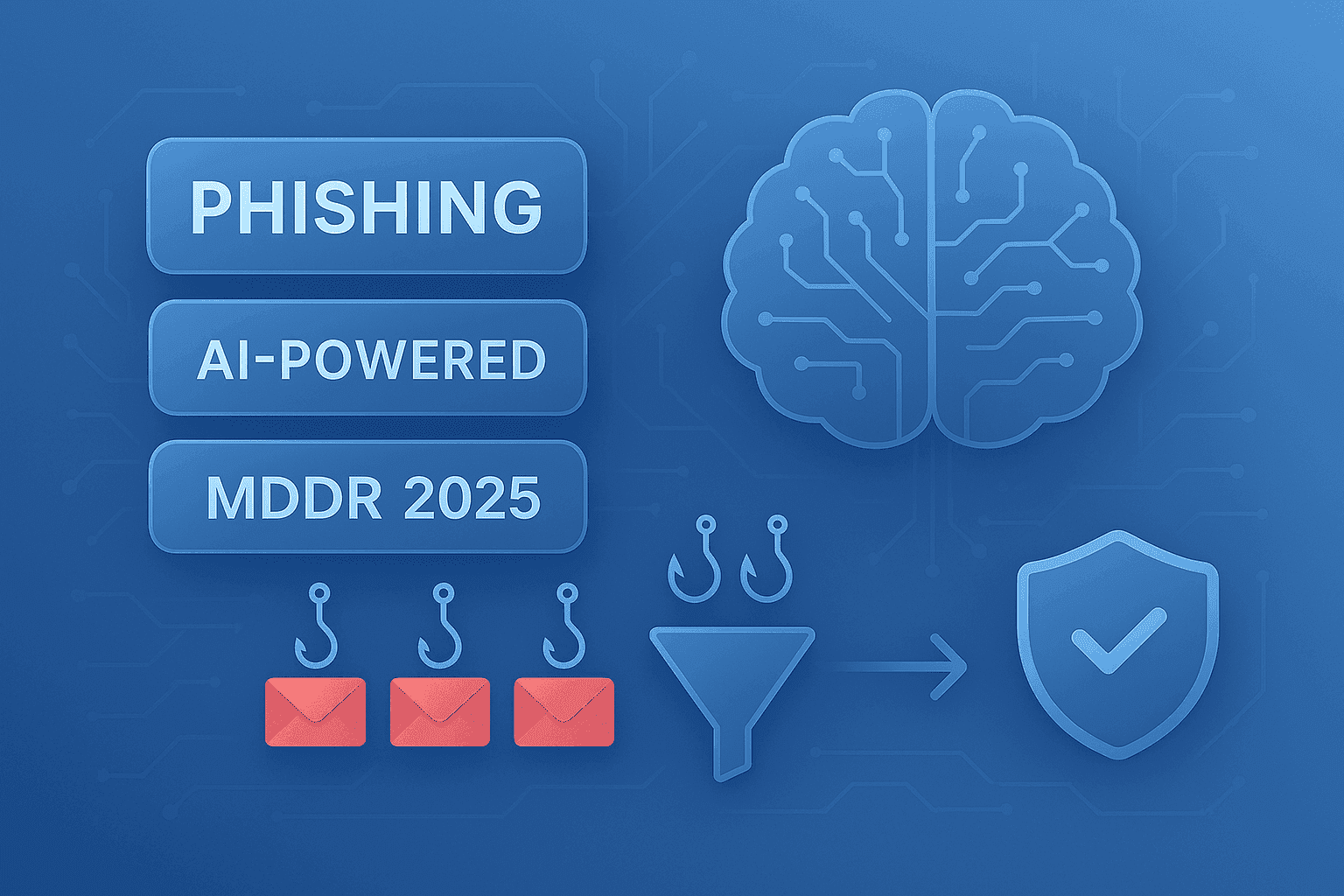
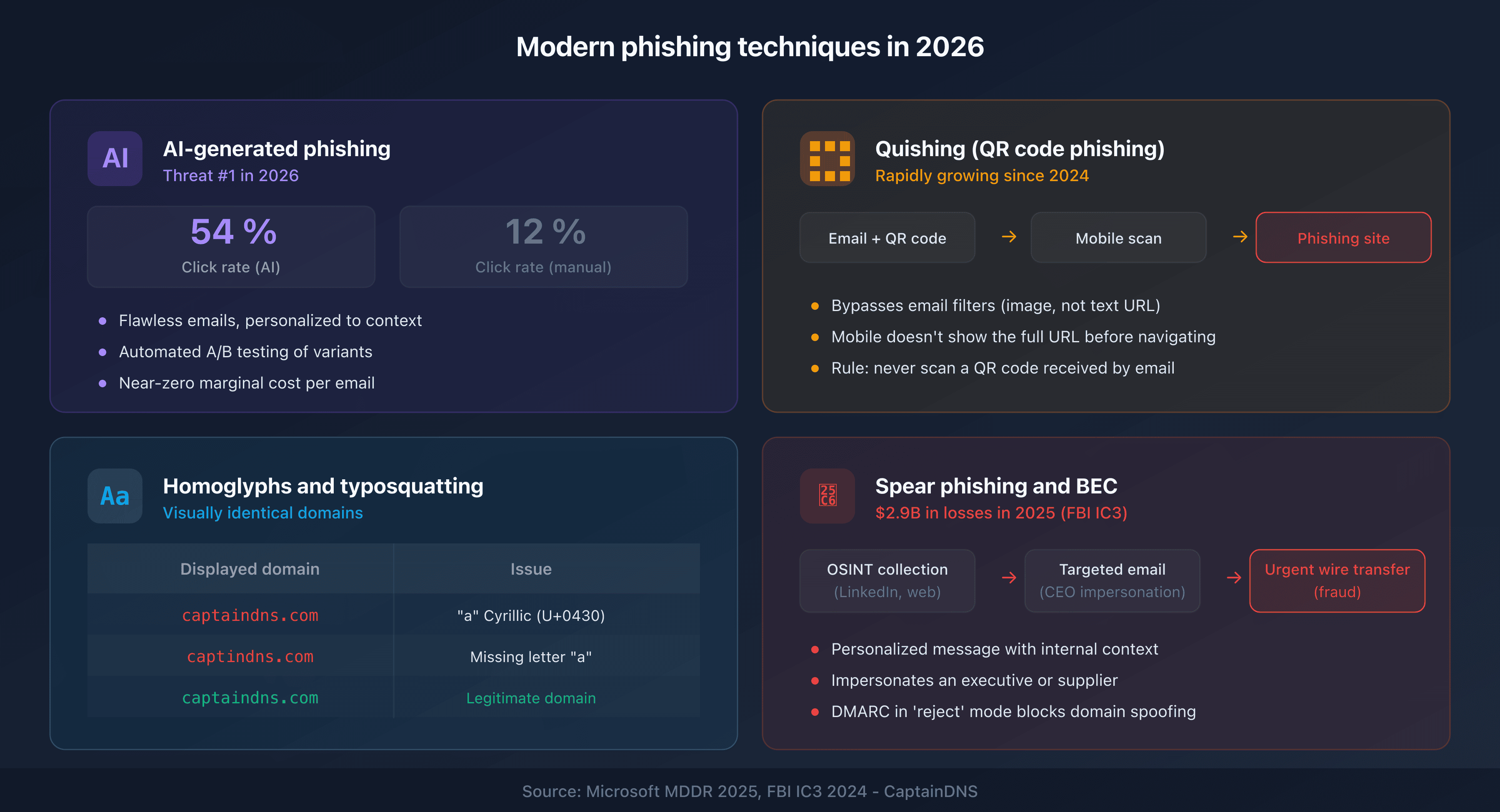
Large language models (LLM) allow attackers to generate personalized, error-free emails adapted to the recipient's context. The Microsoft MDDR 2025 report shows that AI-generated phishing emails achieve an average click rate of 54%, compared to 12% for manually crafted campaigns.
AI also enables rapid iteration: attackers test variations of subject lines, calls-to-action, and timing, then automatically keep the best-performing versions.
Quishing: QR code phishing
"Quishing" (QR code phishing) has been on the rise since 2024. The attacker embeds a QR code in the email instead of a clickable link. The QR code redirects to a phishing site, but it evades email security filters that only scan text-based URLs.
Simple rule: never scan a QR code received by email without verifying the source.
Homoglyphs and typosquatting
Homoglyph attacks exploit Unicode characters that are visually identical to Latin letters. For example, the Cyrillic "a" (U+0430) looks just like the Latin "a" (U+0061). A domain like captaindns.com (with a Cyrillic "a") is visually indistinguishable from captaindns.com.
Typosquatting uses common typos: captindns.com, captaindnss.com. These domains host exact copies of the legitimate site to harvest your credentials.
Spear phishing and BEC (Business Email Compromise)
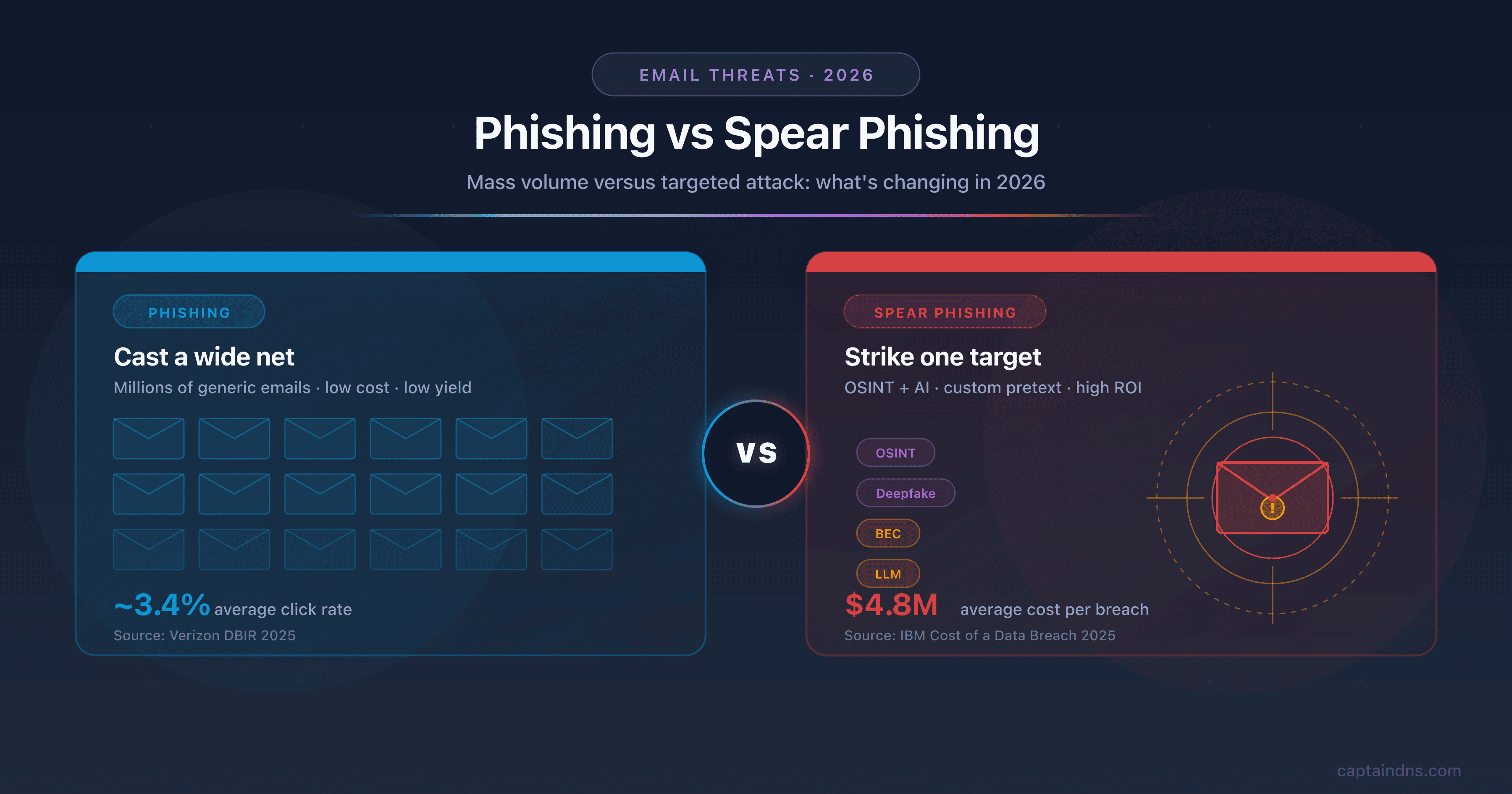
Spear phishing targets specific individuals using personal information gathered from open sources (LinkedIn, social media, company org charts). BEC goes further: the attacker impersonates an executive or vendor and requests an urgent wire transfer.
In 2025, BEC-related losses exceeded $2.9 billion according to the FBI IC3. Email authentication (SPF/DKIM/DMARC) is the first line of defense against these attacks.
How to check if a link is dangerous?
Hover over the link
On a computer, hover over the link without clicking. The actual URL appears at the bottom left of your browser. Compare the displayed domain with the sender's official domain. On mobile, press and hold the link to reveal the destination URL.
Use a URL checker
For a thorough check, use a URL scanner that queries multiple threat intelligence databases simultaneously. A good checker compares the suspicious URL against several sources: URLhaus (abuse.ch), Google Safe Browsing, PhishTank, and VirusTotal.
The result shows a verdict (clean, suspicious, or malicious), a risk score, and details from each source. This is more reliable than a simple local antivirus because threat intelligence databases are updated in real time.
Analyze email headers
Email headers contain the technical routing information of the message. They reveal the actual sending server, SPF/DKIM/DMARC authentication results, and the path the message took.
To analyze them, use an email header analyzer. Look for the Authentication-Results fields: an SPF or DKIM failure, or a DMARC fail, confirms that the sender is spoofing a domain.
How do SPF, DKIM, and DMARC protect against phishing?
Email authentication is the technical foundation of anti-phishing defense. Three complementary protocols prevent your domain from being spoofed:
SPF (Sender Policy Framework) declares which servers are authorized to send emails for your domain. An unauthorized server fails the SPF check.
DKIM (DomainKeys Identified Mail) cryptographically signs each email. The recipient verifies the signature: any modification of the message in transit is detected.
DMARC (Domain-based Message Authentication, Reporting and Conformance) ties SPF and DKIM to your domain and defines the policy to apply on failure: none (monitor), quarantine (spam), or reject (block).
With a DMARC policy set to reject, an attacker cannot send an email spoofing your domain - the message is rejected before reaching the recipient. Check your domain's configuration with our DMARC checker.
Action plan for a suspicious email
-
Don't click anything: no links, no attachments, no buttons. If you have any doubt, it's probably phishing.
-
Verify the sender: check the actual email address (not the display name), the domain, and the headers if needed.
-
Scan the link: copy the URL (right-click > copy link address) and paste it into a URL checker. Don't visit it directly.
-
Report it: forward the suspicious email to your security team or to the reporting platform in your country (reportphishing@apwg.org internationally, or your organization's dedicated channel).
-
Delete it: after reporting, delete the email. Don't leave it in your inbox where you might accidentally click on it later.
FAQ
What are the 5 most common signs of a phishing email?
The five most reliable signs: a sender address that doesn't match the official domain, an alarmist tone or artificial urgency, links pointing to unknown domains, a request for sensitive information (password, credit card), and unexpected attachments. Always check the actual URL before clicking.
Can you get hacked just by opening an email?
Opening a plain text email is generally not enough to compromise your device. The danger comes from clicking a malicious link or opening an infected attachment. Some HTML emails can load tracking pixels, but modern mail clients block this loading by default.
How does AI make phishing emails harder to detect?
Large language models (LLM) generate error-free emails, personalized to the recipient's context, with a natural tone. They eliminate classic clues (typos, rough translations) and enable mass personalization. Click rates for AI-generated campaigns reach 54% compared to 12% for manually crafted ones (source: Microsoft MDDR 2025).
How do you check if a link is dangerous before clicking?
Hover over the link to reveal the actual URL, then verify that the domain matches the legitimate sender. For a deeper analysis, copy the URL and paste it into a URL checker that queries multiple threat intelligence databases (URLhaus, Google Safe Browsing, PhishTank, VirusTotal).
What is the difference between phishing and spear phishing?
Classic phishing targets thousands of people with the same generic message. Spear phishing targets a specific individual with a personalized message based on information gathered from open sources (LinkedIn, org charts, publications). Spear phishing is rarer but far more effective.
How do SPF, DKIM, and DMARC protect against phishing?
SPF declares which servers are authorized to send for your domain. DKIM cryptographically signs messages. DMARC ties both together and defines the policy on failure (reject, quarantine, monitor). With DMARC in "reject" mode, an attacker cannot send an email spoofing your domain.
What is quishing (QR code phishing)?
Quishing embeds a QR code in an email instead of a clickable link. When you scan the QR code with your phone, it redirects you to a phishing site. This technique bypasses email security filters that don't analyze image content. Never scan a QR code received by email without verifying the sender.
How do you report a phishing email?
Forward the suspicious email to reportphishing@apwg.org (international reporting). You can also report a phishing site to Google Safe Browsing. In a corporate environment, forward the email to your security team through the dedicated channel. Never reply directly to the suspicious email.
Glossary
- Phishing: a social engineering technique that involves impersonating a legitimate sender to steal credentials or sensitive data.
- Spear phishing: a targeted variant of phishing that uses the victim's personal information.
- BEC (Business Email Compromise): an attack where the attacker impersonates an executive or vendor to obtain a wire transfer.
- Quishing: phishing via a QR code embedded in an email or document.
- Homoglyph: a Unicode character visually identical to a Latin letter, used to create deceptive domains.
- Typosquatting: registering domains similar to a legitimate domain by exploiting common typos.
- SPF: a protocol that declares which servers are authorized to send emails for a domain.
- DKIM: a cryptographic email signing protocol.
- DMARC: a protocol that ties SPF and DKIM together with a failure handling policy.
- Threat intelligence: intelligence on threats, databases of malicious links and domains.
Check a suspicious link now: use our phishing URL checker to analyze any URL against 4 threat intelligence databases in seconds.
Related phishing guides
- Phishing vs spear phishing: the difference in 2026
- What to do if you clicked a phishing link
- Google Safe Browsing, URLhaus, PhishTank, VirusTotal: how threat intelligence databases work
- Phishing trends 2025-2026: APWG statistics and new techniques