Clicked a phishing link: what to do right now?
By CaptainDNS
Published on February 15, 2026
- Clicking a phishing link is not always enough to infect your device, but you need to act fast
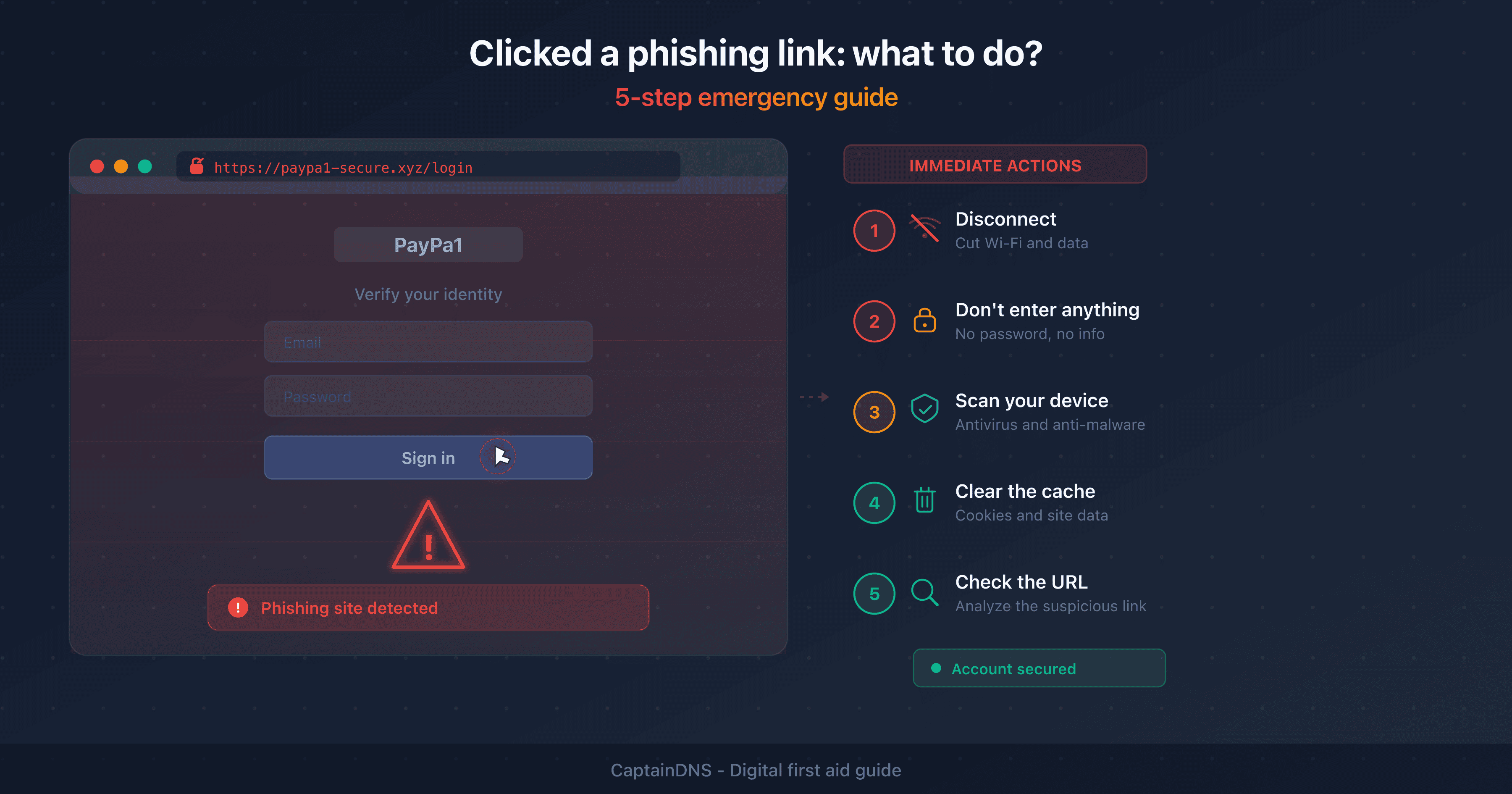
- Emergency steps: disconnect from the network, run an antivirus scan, clear your browser cache
- If you entered credentials, change them on the official site and enable 2FA immediately
- Report the phishing and monitor your bank accounts for at least 30 days
3.4 billion phishing emails are sent every day worldwide (Valimail 2024). At that volume, clicking a malicious link is not a matter of "if" but "when." The good news: a single click is not always enough to compromise your device.
This guide gives you the exact steps to follow in the minutes, hours and days after clicking a suspicious link. Every scenario is covered: simple page visit, credential entry or malicious download.
What happens when you click a phishing link?
The outcome of clicking a phishing link depends on three factors: the type of link, the state of your device and what you did after clicking.
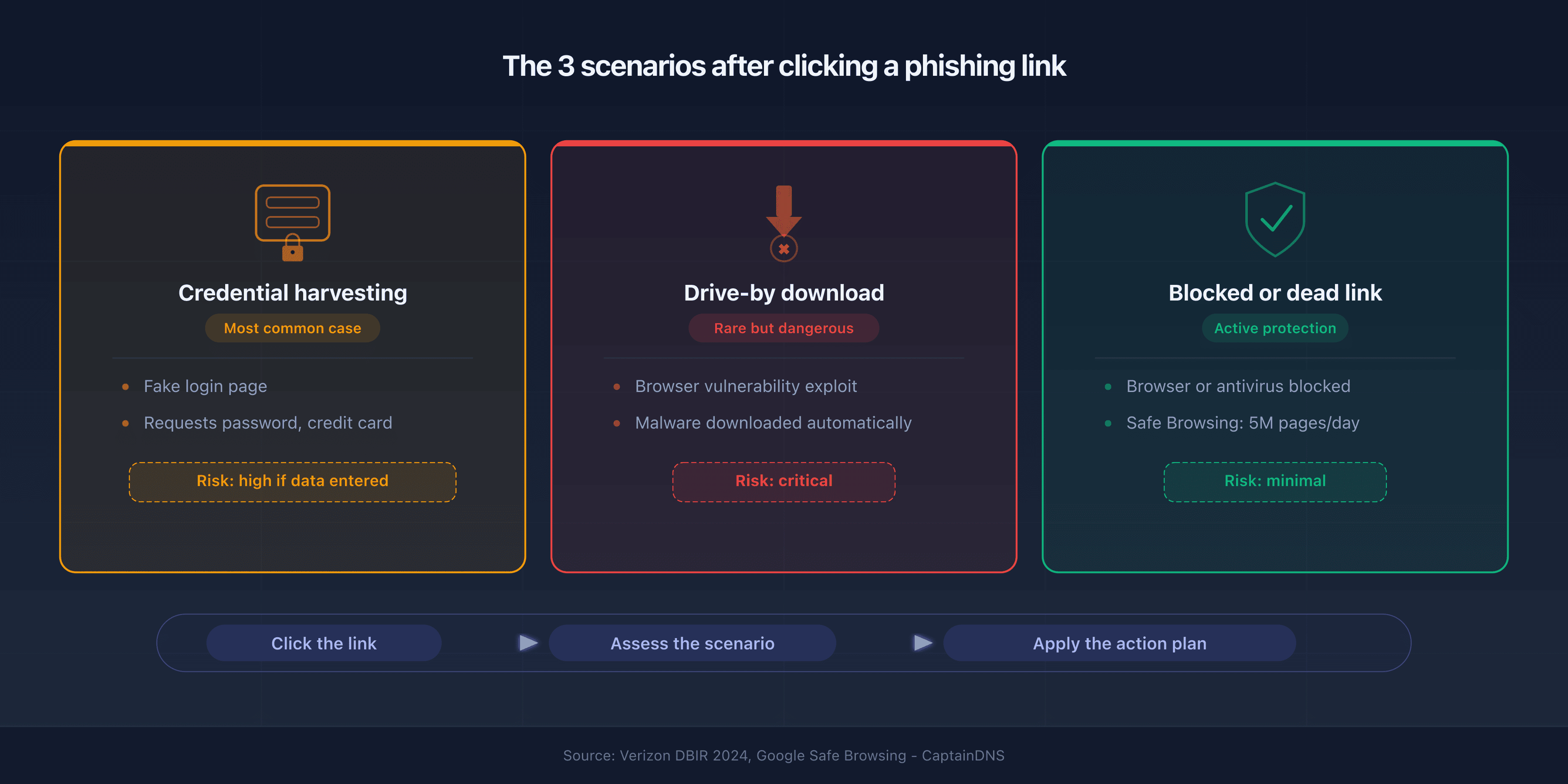
Scenario 1: the phishing page (credential harvesting)
The most common case. The link opens a site that mimics a legitimate service: bank, email or social network. The page asks you to enter your credentials. If you closed the page without typing anything, the risk is minimal. If you entered your credentials, skip straight to the "You entered your credentials" section.
Scenario 2: the drive-by download
Rarer but more dangerous. The site exploits a browser vulnerability to download and run malicious code without any action from you. Modern browsers patch these flaws quickly. An outdated browser, however, remains vulnerable.
Scenario 3: nothing happens (dead or blocked link)
Your antivirus, browser or DNS filter blocked the page before it loaded. Google Safe Browsing blocks roughly 5 million phishing pages per day. If you see a red "Deceptive site" warning, your browser did its job.
The 5 emergency steps (first minutes)
1. Disconnect from the network
Turn off Wi-Fi or unplug the Ethernet cable. If malware was downloaded, disconnecting prevents it from contacting its command-and-control (C2) server. It also stops data exfiltration and lateral spread across your local network.
On mobile, turn on airplane mode. This is the fastest and most effective measure.
2. Do not enter any information
If the page is still open, do not fill in any fields. Do not click any additional buttons. Do not download anything. Close the tab immediately.
If the browser displays a pop-up that refuses to close, force-quit the browser. On Windows: Ctrl+Shift+Esc. On macOS: Cmd+Q.
3. Run a full antivirus scan
Reconnect to the network and run a full scan (not a quick scan) with your antivirus software. If you don't have one, Windows Defender is built into Windows 10/11.
For a second opinion, use a free online scanner such as Malwarebytes or ESET Online Scanner. Two detection engines catch more than one alone.
4. Clear your browser cache and cookies
Phishing sites can drop tracking cookies or exploit the browser cache. Clear them completely:
- Chrome: Settings > Privacy > Clear browsing data > Check "Cookies" and "Cached images and files"
- Firefox: Settings > Privacy > Cookies and Site Data > Clear Data
- Edge: Settings > Privacy > Choose what to clear
5. Check the URL with a verification tool
Copy the suspicious URL from your history or the original email. Analyze it with a phishing URL checker that queries multiple threat databases: URLhaus, Google Safe Browsing, PhishTank and VirusTotal. The result gives you a clear verdict: clean, suspicious or malicious.
This step confirms the nature of the link and helps you gauge the actual risk.
You entered your credentials? (recovery plan)
If you entered a password, a credit card number or any other sensitive information on the phishing site, the risk is high. Here is the recovery plan in order of priority.
Change your passwords immediately
Go directly to the official website of the affected service. Type the URL manually; do not follow any link. Change your password immediately. If you reuse the same password on other services, change those too. A password manager with unique passwords per service prevents this cascade.
Enable two-factor authentication (2FA)
2FA adds a layer of protection even if the attacker has your password. Prefer an authenticator app (Google Authenticator, Authy, Microsoft Authenticator) over SMS. SMS codes can be intercepted via SIM swap attacks.
Check recent logins on your accounts
Most services (Google, Microsoft, Facebook, Amazon) provide a login history in their security settings. Look for logins from unknown locations or devices. Revoke all suspicious sessions immediately.
Contact your bank (if banking details were exposed)
If you entered a credit card number, call your bank immediately to block the card. Fraudulent transactions often begin within minutes of the compromise. Monitor your statements for at least 30 days after the incident.
Special cases
Clicked a phishing link on mobile (iPhone or Android)
Smartphones are less vulnerable to drive-by downloads than computers, but not immune. Mobile phishing sites primarily target credential harvesting.
Specific steps:
- Turn on airplane mode
- Close all browser tabs
- Check that no unknown app was installed (Settings > Apps > sort by date)
- Run a scan with your mobile antivirus
- Change any passwords you entered from a different device
Clicked from a work computer
At work, notify your IT team or SOC (Security Operations Center) before taking any other action. Do not try to fix the problem yourself. The security team has EDR tools capable of analyzing the incident. They can contain the threat across the entire network.
Forward the original phishing email to your security team via the dedicated channel ("Report Phishing" button in Outlook, or a dedicated email address).
Opened a suspicious attachment (potential malware)
If you opened a suspicious attachment (.exe, .docm, .zip, .html), the risk is higher than clicking a link. Disconnect from the network immediately. Do not restart the computer: some malware completes installation on reboot.
Run an offline antivirus scan (Windows Defender Offline or a Linux live USB with ClamAV). If the scan detects malware, consult a professional before using the device again.
How to report phishing
Reporting helps block the phishing site for other users. The faster a site is reported, the sooner it gets taken down.
In France
- signal-spam.fr: forward the suspicious email via the online form or the browser extension
- phishing-initiative.fr: report the phishing site URL (not the email, the URL)
- 17Cyber.gouv.fr: official platform for reporting cyber threats
International
- reportphishing@apwg.org: Anti-Phishing Working Group (all languages)
- Google Safe Browsing: reporting is built into Chrome ("Report a security issue")
- PhishTank: submit the phishing URL to feed the community database
At work
Forward the email to your security team. Do not delete the original: the headers contain technical evidence (sending IP, SPF/DKIM/DMARC results). Your security team can analyze them with an email header analyzer to trace the source.
How to avoid falling for phishing again
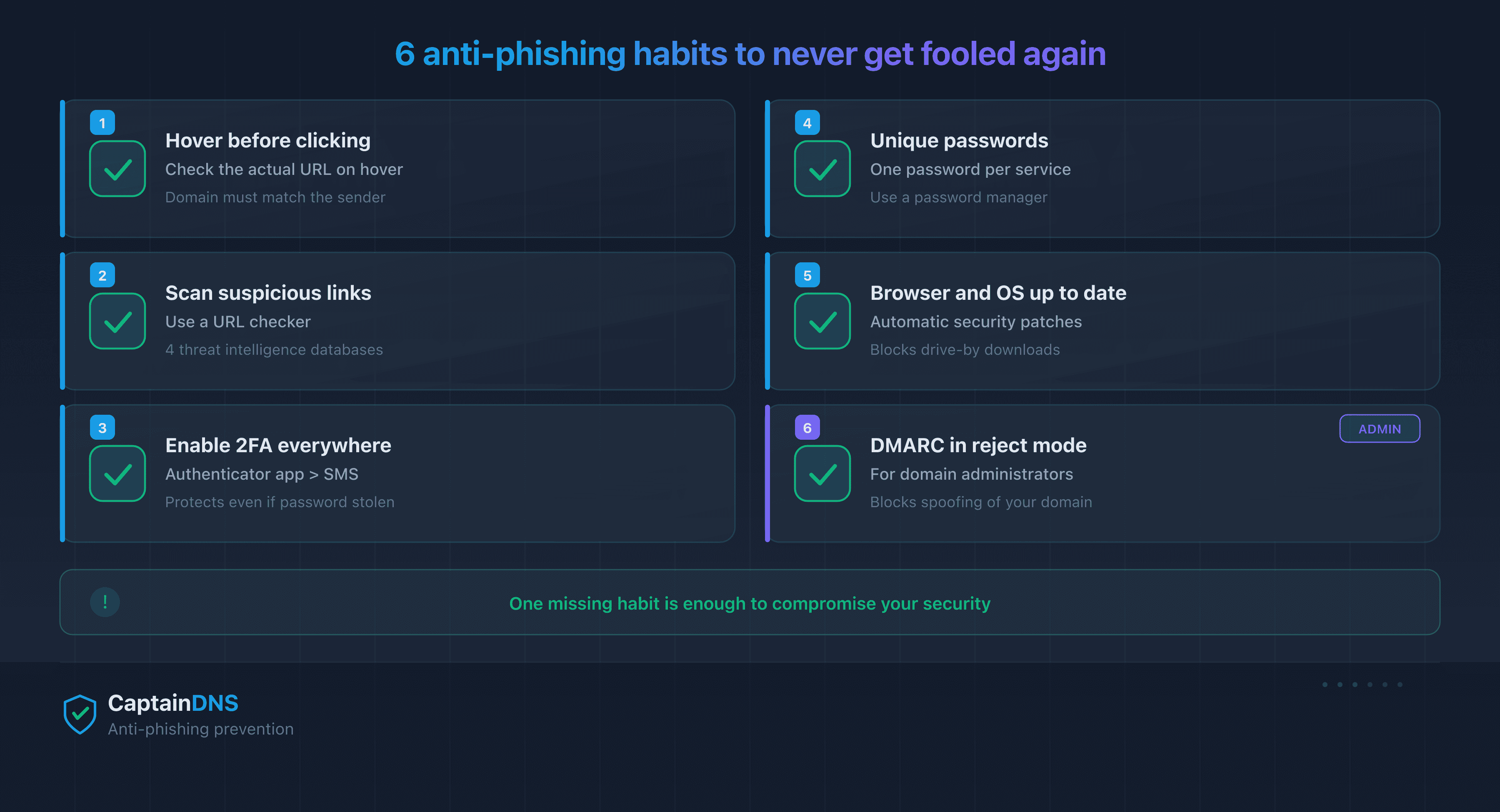
Check links before clicking
Hover over each link before clicking to see the actual URL. On mobile, long-press the link. If the domain does not match the legitimate sender, treat it as phishing. For a deeper check, copy the URL and paste it into a phishing scanner.
Enable 2FA everywhere
Two-factor authentication makes your accounts resistant to phishing even if the attacker obtains your password. Enable it on every service that supports it. Start with your primary email: it is the recovery key for all your other accounts.
For administrators: deploy DMARC in strict mode
If you manage a domain, SPF, DKIM and DMARC prevent attackers from spoofing it in phishing campaigns. A DMARC policy set to reject blocks spoofed emails before they reach recipients. Check your configuration with a DMARC checker.
FAQ
Can you get hacked just by clicking a link?
A single click can be enough if your browser or system is outdated (drive-by download). With an up-to-date browser, the risk from a single click alone is low. The real danger is entering credentials on the phishing page or opening a malicious attachment.
Should you change all your passwords after clicking a phishing link?
If you did not enter anything on the site, changing all your passwords is not necessary. Change only the password for the service being impersonated, as a precaution. If you entered credentials, change the affected password and any other account that shares it.
Can your phone get infected by a phishing link?
Smartphones are less vulnerable than computers thanks to application sandboxing. The main mobile risk is credential harvesting via a fake login page. Check that no unknown app was installed. Run a mobile antivirus scan as well.
How much time does a hacker have after you click?
Stolen credentials are often exploited within minutes, especially for bank accounts. For email and social media, the attacker may wait days before acting. Change your passwords as quickly as possible. Every minute counts.
How do you know if your computer is infected after clicking?
Run a full antivirus scan. Watch for signs of infection: unusual slowdowns, unwanted pop-ups, unknown startup programs or suspicious network activity. Use Task Manager (Windows) or Activity Monitor (macOS) to spot abnormal processes.
What should you do if you gave out your credit card number?
Call your bank immediately to block the card. Monitor your statements for at least 30 days. Report the fraud to the relevant authorities in your country. If fraudulent charges appear, dispute them within the legally allowed timeframe.
Is an antivirus enough to protect you after clicking?
An antivirus detects most known malware but not phishing pages that download nothing. Effective protection combines several layers: up-to-date antivirus, up-to-date browser, 2FA and link vigilance. No single solution covers all risks.
How do you report a phishing email?
Forward the suspicious email to reportphishing@apwg.org (Anti-Phishing Working Group). Report the phishing URL on PhishTank. At work, use the "Report Phishing" button in your mail client or forward to your security team. Never reply to the suspicious email directly.
Glossary
- Drive-by download: an infection technique where malware is downloaded and executed automatically when visiting a website, without any user action.
- 2FA (two-factor authentication): a security method requiring two distinct proofs of identity (password + temporary code) to access an account.
- C2 (Command and Control): a remote server used by an attacker to control malware installed on a compromised machine.
- EDR (Endpoint Detection and Response): a security solution that monitors endpoints (PCs, servers) to detect and respond to threats in real time.
- SIM swap: an attack that transfers a victim's phone number to a SIM card controlled by the attacker, in order to intercept verification SMS messages.
- Threat intelligence: intelligence on threats, continuously updated databases of malicious links and domains.
Check a suspicious link now: use our phishing URL checker to analyze any URL against 3 threat intelligence databases in seconds.
Related phishing guides
- Phishing vs spear phishing: the difference in 2026
- How to recognize a phishing email in 2026
- Google Safe Browsing, URLhaus, PhishTank, VirusTotal: how threat intelligence databases work
- Phishing trends 2025-2026: APWG statistics and new techniques
Sources
- Valimail Email Fraud Landscape 2024
- Verizon Data Breach Investigations Report 2024
- Microsoft Digital Defense Report 2025
- CISA - Phishing Guidance