Analyze and leverage your TLS-RPT reports: detect issues before they impact your emails
By CaptainDNS
Published on February 14, 2026
Updated on March 4, 2026
- A TLS-RPT report is a compressed JSON file (gzip) sent daily by sending mail servers: it details every TLS negotiation failure on your domain
- The 3 most common errors are
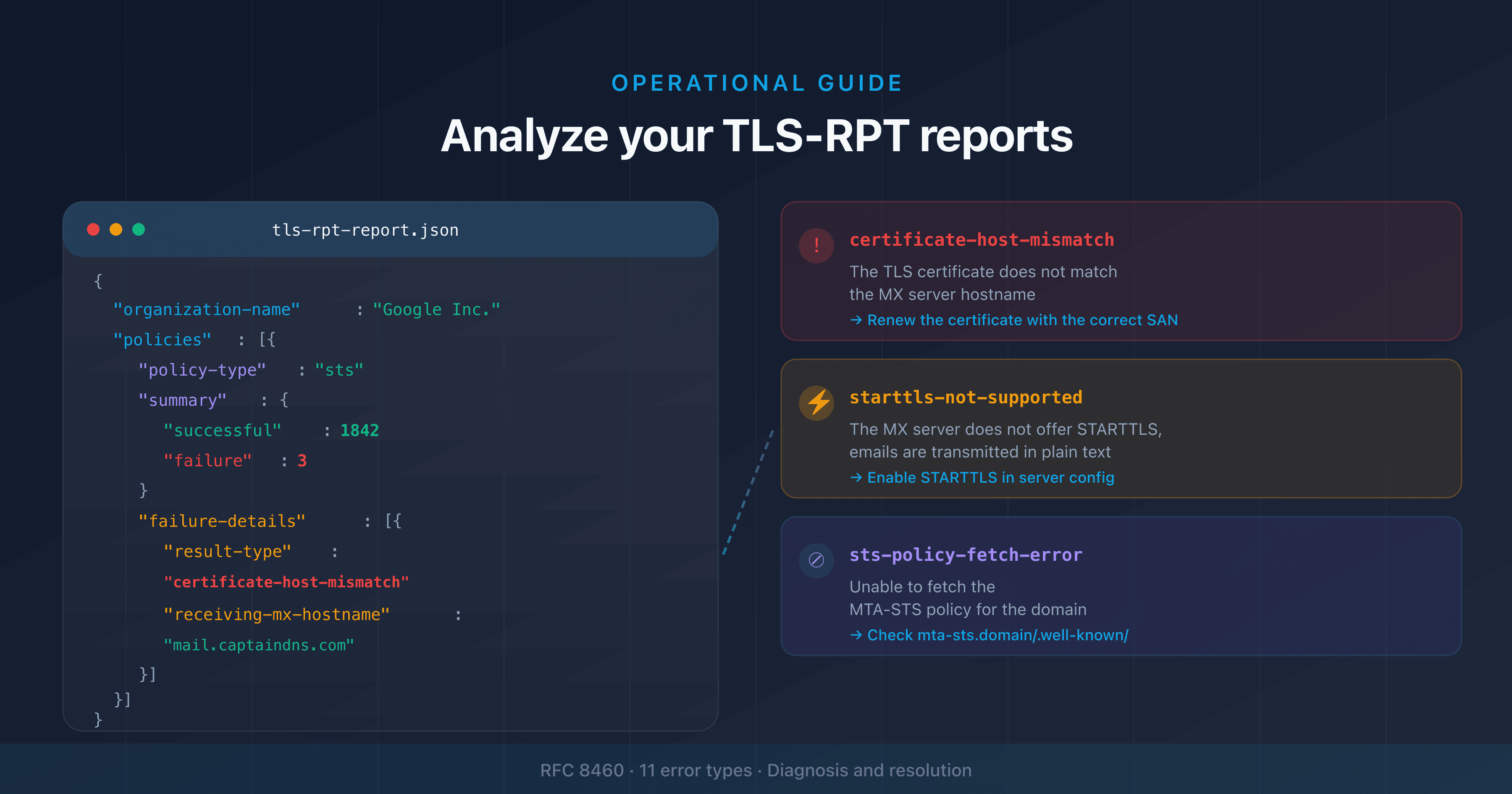
certificate-host-mismatch,starttls-not-supported, andsts-policy-fetch-error, each with a specific cause and fix - Analyze the
failure-detailsfield to identify the affected MX server, the sender's IP, and the exact failure type - Use the TLS-RPT syntax checker to verify your configuration before and after fixing issues
You've configured TLS-RPT on your domain and reports are starting to arrive. Compressed JSON files, sent by Google, Microsoft, Yahoo, and other providers. You open them and find blocks of structured data with fields like policy-type, result-type, failed-session-count. What do these data points mean? How do you turn them into concrete actions?
This is the most under-documented part of TLS-RPT. RFC 8460 defines the format but doesn't tell you how to interpret the results in an operational context. This guide fills that gap: you'll learn how to read the JSON structure of a report, identify each error type, and follow a diagnostic workflow to fix problems before they affect your email delivery.
If you haven't set up TLS-RPT yet, start with the complete TLS-RPT guide that covers setup from start to finish (see the Related guides section at the end of this article). If you're looking for provider-specific configuration (Microsoft 365, Google Workspace, OVHcloud), the provider setup guide is also available at the end of the article.
Anatomy of a TLS-RPT report
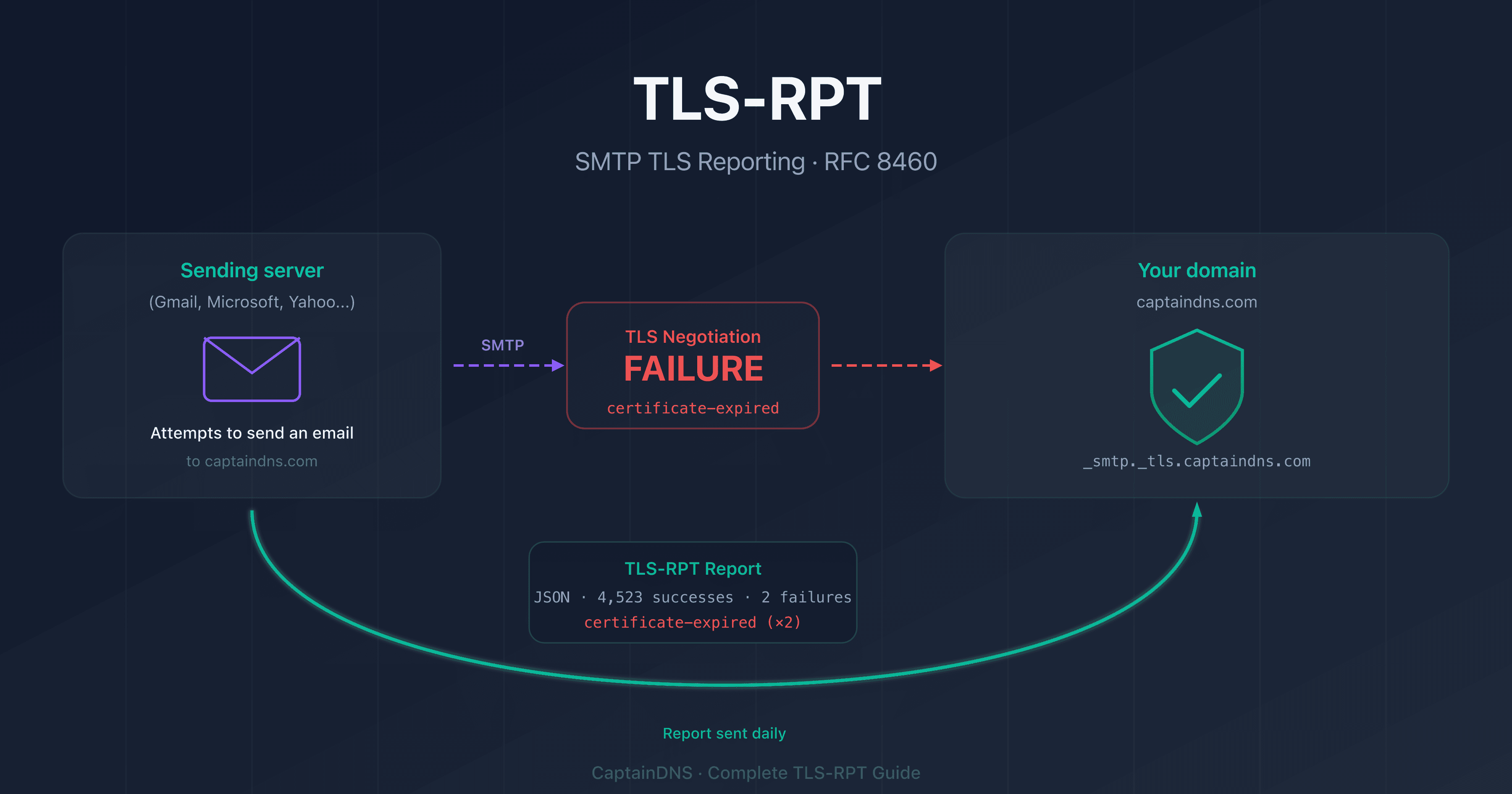
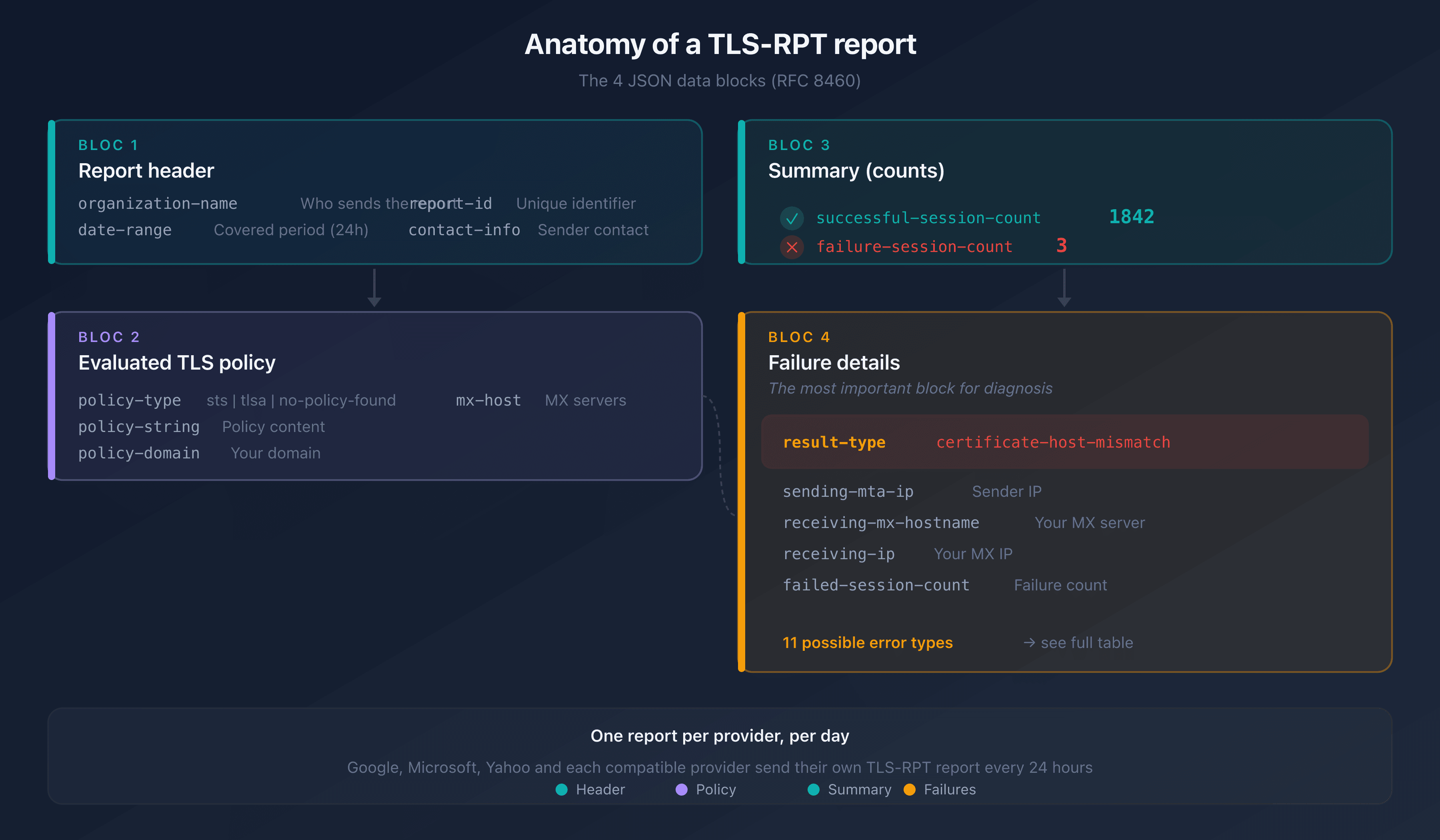
A TLS-RPT report is a JSON file sent as a compressed attachment (.json.gz). Each provider that sends you emails produces its own report, once per day. Here is the full structure of a typical report:
{
  "organization-name": "Google Inc.",
  "date-range": {
    "start-datetime": "2026-02-12T00:00:00Z",
    "end-datetime": "2026-02-13T00:00:00Z"
  },
  "contact-info": "smtp-tls-reporting@google.com",
  "report-id": "2026-02-12T00:00:00Z_captaindns.com",
  "policies": [
    {
      "policy": {
        "policy-type": "sts",
        "policy-string": [
          "version: STSv1",
          "mode: enforce",
          "mx: mail.captaindns.com",
          "max_age: 604800"
        ],
        "policy-domain": "captaindns.com",
        "mx-host": ["mail.captaindns.com"]
      },
      "summary": {
        "total-successful-session-count": 1842,
        "total-failure-session-count": 3
      },
      "failure-details": [
        {
          "result-type": "certificate-host-mismatch",
          "sending-mta-ip": "209.85.220.41",
          "receiving-mx-hostname": "mail.captaindns.com",
          "receiving-ip": "203.0.113.10",
          "failed-session-count": 3
        }
      ]
    }
  ]
}
The 4 sections of a report
Every report contains exactly 4 levels of information:
1. Report header: who sent it and when:
organization-name: the sending provider (Google, Microsoft, Yahoo)date-range: the covered period (always 24 hours)report-id: unique report identifier
2. policy block: which TLS policy was evaluated:
policy-type: the policy type (stsfor MTA-STS,tlsafor DANE,no-policy-foundif none)policy-string: the content of the applied MTA-STS or DANE policypolicy-domain: your domainmx-host: the affected MX servers
3. summary block: the numerical overview:
total-successful-session-count: successful TLS connectionstotal-failure-session-count: failed TLS connections
4. failure-details block: the breakdown of each failure (the most important part):
result-type: the exact error typesending-mta-ip: the IP of the server that tried to send you the emailreceiving-mx-hostname: your affected MX serverreceiving-ip: the IP of your MX serverfailed-session-count: number of failures of this type
How to receive and decompress reports
Reports arrive by email from addresses like noreply-smtp-tls-reporting@google.com. The attached file follows this naming format:
google.com!captaindns.com!2026-02-12T00:00:00Z!2026-02-13T00:00:00Z.json.gz
To decompress it:
# Linux / macOS
gunzip google.com\!captaindns.com\!2026-02-12T00:00:00Z\!2026-02-13T00:00:00Z.json.gz

# Or view directly without extracting
zcat rapport.json.gz | python3 -m json.tool
If you receive reports via HTTPS (an https:// endpoint), the server receives the compressed JSON directly via POST with the Content-Type application/tlsrpt+gzip.
TLS-RPT failure types (result-type)
The result-type field in failure-details identifies exactly what failed. RFC 8460 defines 11 failure types, grouped into 3 categories:
TLS certificate failures
| result-type | Cause | Corrective action |
|---|---|---|
certificate-host-mismatch | The MX server's TLS certificate doesn't match the hostname | Renew the certificate with the correct CN/SAN for your MX |
certificate-expired | The TLS certificate has expired | Renew the certificate immediately |
certificate-not-trusted | The certificate isn't signed by a recognized CA | Use a certificate signed by a public CA (Let's Encrypt, DigiCert) |
STARTTLS failures
| result-type | Cause | Corrective action |
|---|---|---|
starttls-not-supported | The MX server doesn't offer STARTTLS | Enable STARTTLS in your mail server configuration |
validation-failure | Generic TLS validation failure | Check the full certificate chain and TLS configuration |
MTA-STS and DANE policy failures
| result-type | Cause | Corrective action |
|---|---|---|
sts-policy-fetch-error | Unable to retrieve the MTA-STS policy | Verify that https://mta-sts.captaindns.com/.well-known/mta-sts.txt is accessible |
sts-policy-invalid | The MTA-STS policy is malformed | Fix the syntax of the mta-sts.txt file |
sts-webpki-invalid | The HTTPS certificate for the MTA-STS server is invalid | Renew the certificate for the mta-sts.captaindns.com subdomain |
tlsa-invalid | The DANE TLSA record is invalid | Fix the TLSA record in your DNS zone |
dnssec-invalid | DNSSEC validation failed | Fix your DNSSEC chain |
dane-required | DANE is required but the server doesn't support it | Deploy DANE or remove the TLSA records |
The 3 most common errors in detail
certificate-host-mismatch
This is the most common error. It appears when the TLS certificate presented by your MX server doesn't contain the expected hostname in its CN (Common Name) or SAN (Subject Alternative Name) field.
Typical scenario: your MX is mail.captaindns.com but the certificate was issued for *.otherdomain.com (shared hosting) or for captaindns.com without the mail subdomain.
Diagnosis:
# Check your MX certificate
openssl s_client -connect mail.captaindns.com:25 -starttls smtp \
  -servername mail.captaindns.com 2>/dev/null | \
  openssl x509 -noout -subject -ext subjectAltName
Fix: obtain a certificate that includes the exact FQDN of your MX in the SAN. With Let's Encrypt:
certbot certonly --standalone -d mail.captaindns.com
starttls-not-supported
The MX server doesn't offer the STARTTLS command in its SMTP banner. Emails are sent in plain text.
Diagnosis:
# Test if STARTTLS is advertised
openssl s_client -connect mail.captaindns.com:25 -starttls smtp 2>&1 | head -5
# If "CONNECTED" appears, STARTTLS is working
# If there's an error, STARTTLS is not supported
Fix: enable STARTTLS in your mail server. For Postfix:
# /etc/postfix/main.cf
smtpd_tls_cert_file = /etc/letsencrypt/live/mail.captaindns.com/fullchain.pem
smtpd_tls_key_file = /etc/letsencrypt/live/mail.captaindns.com/privkey.pem
smtpd_tls_security_level = may
sts-policy-fetch-error
The sending server couldn't retrieve your MTA-STS policy at the URL https://mta-sts.captaindns.com/.well-known/mta-sts.txt.
Common causes:
- The
mta-sts.captaindns.comsubdomain has no A/AAAA DNS record - The HTTPS server is not responding or returns a 404/500 error
- The HTTPS certificate for the
mta-stssubdomain has expired
Diagnosis:
# Test access to the policy
curl -v https://mta-sts.captaindns.com/.well-known/mta-sts.txt
For a thorough diagnosis of your MTA-STS issues, see our MTA-STS troubleshooting guide.
Step-by-step diagnosis: from error to fix
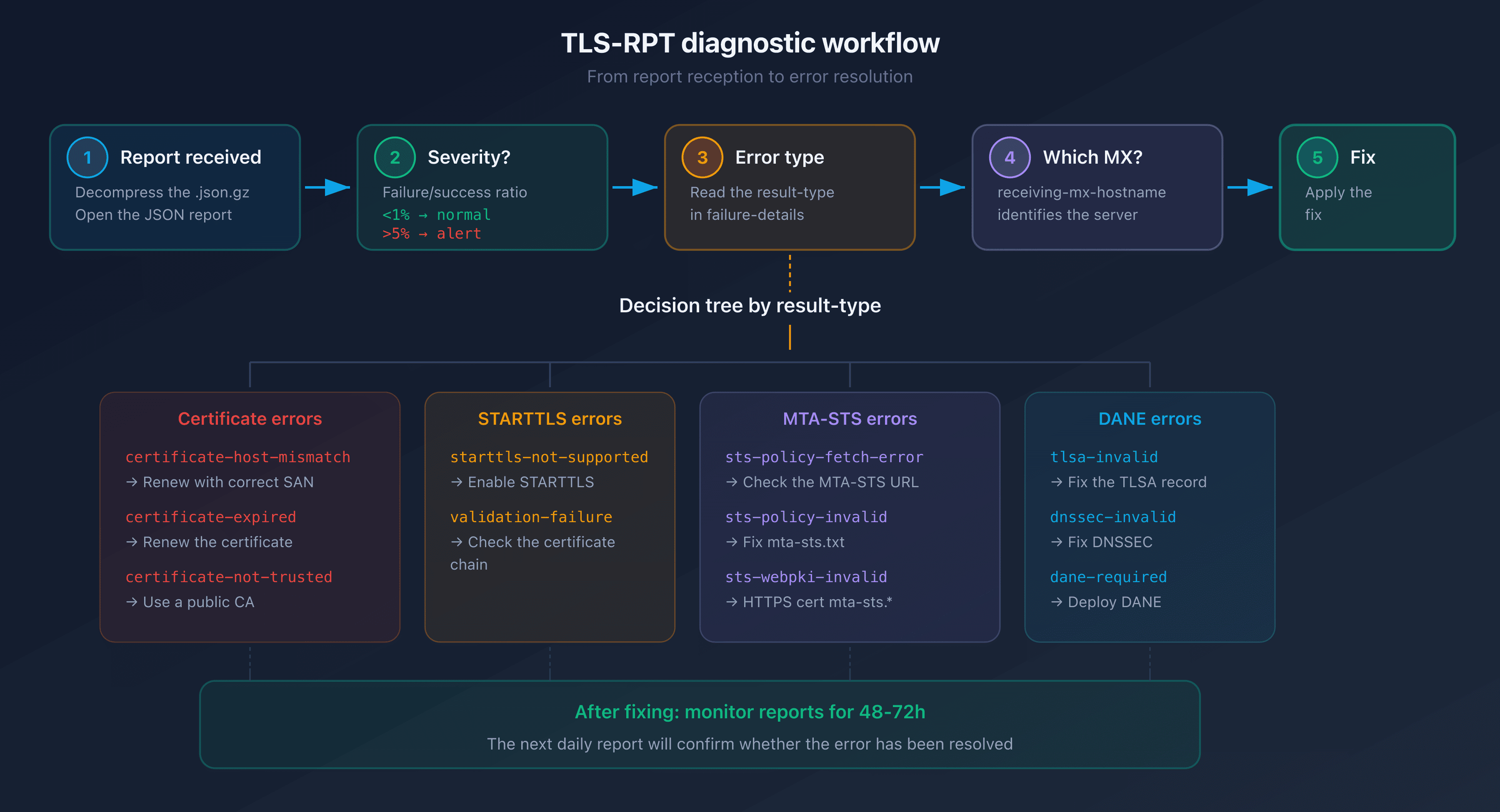
When you receive a report with failures, follow this 5-step workflow:
Step 1: Assess the severity
Look at the failure/success ratio in the summary block:
total-successful-session-count: 1842
total-failure-session-count: 3
A failure rate below 1% is normal: it may come from misconfigured servers on the sender's side. Above 5%, there's a problem worth investigating.
Step 2: Identify the result-type
The result-type field in failure-details tells you exactly what failed. Refer to the table of 11 types above.
Step 3: Identify the affected MX server
The receiving-mx-hostname field tells you which server is impacted. If you have multiple MX servers (primary + backup), only one may be misconfigured.
Step 4: Verify with CaptainDNS tools
Use the CaptainDNS TLS-RPT checker to confirm that your DNS record is correct and that associated policies (MTA-STS, DANE) are properly detected.
Step 5: Fix and monitor
Apply the fix corresponding to the result-type, then monitor reports over the next 48 to 72 hours to confirm the error is gone.
Practical cases: analyzing a real report
Case 1: clean report (no failures)
{
  "organization-name": "Google Inc.",
  "date-range": {
    "start-datetime": "2026-02-12T00:00:00Z",
    "end-datetime": "2026-02-13T00:00:00Z"
  },
  "report-id": "2026-02-12_captaindns.com",
  "policies": [
    {
      "policy": {
        "policy-type": "sts",
        "policy-domain": "captaindns.com"
      },
      "summary": {
        "total-successful-session-count": 2156,
        "total-failure-session-count": 0
      },
      "failure-details": []
    }
  ]
}
Interpretation: 2,156 successful TLS connections, zero failures. Your configuration is working perfectly. This report confirms that:
- Your TLS certificate is valid and matches the MX hostname
- STARTTLS is active on your server
- Your MTA-STS policy is accessible and being enforced
Case 2: certificate failure on a secondary MX
{
  "organization-name": "Microsoft Corporation",
  "date-range": {
    "start-datetime": "2026-02-12T00:00:00Z",
    "end-datetime": "2026-02-13T00:00:00Z"
  },
  "policies": [
    {
      "policy": {
        "policy-type": "sts",
        "policy-domain": "captaindns.com",
        "mx-host": ["mail.captaindns.com", "mail2.captaindns.com"]
      },
      "summary": {
        "total-successful-session-count": 890,
        "total-failure-session-count": 47
      },
      "failure-details": [
        {
          "result-type": "certificate-host-mismatch",
          "sending-mta-ip": "40.107.22.89",
          "receiving-mx-hostname": "mail2.captaindns.com",
          "receiving-ip": "198.51.100.20",
          "failed-session-count": 47
        }
      ]
    }
  ]
}
Interpretation: 47 failures on mail2.captaindns.com (secondary MX) with a certificate-host-mismatch error. The primary MX (mail.captaindns.com) is working correctly. The secondary MX certificate doesn't contain mail2.captaindns.com in its SAN.
Action: renew the certificate for mail2.captaindns.com, making sure to include this hostname in the SAN.
Case 3: unreachable MTA-STS policy
{
  "policies": [
    {
      "policy": {
        "policy-type": "sts",
        "policy-domain": "captaindns.com"
      },
      "summary": {
        "total-successful-session-count": 0,
        "total-failure-session-count": 156
      },
      "failure-details": [
        {
          "result-type": "sts-policy-fetch-error",
          "failed-session-count": 156
        }
      ]
    }
  ]
}
Interpretation: 156 failures, all of type sts-policy-fetch-error. The sending server detected your MTA-STS record (_mta-sts.captaindns.com) but couldn't download the policy at https://mta-sts.captaindns.com/.well-known/mta-sts.txt.
Action: verify that the mta-sts.captaindns.com subdomain points to a working HTTPS server with a valid certificate.
Automating your report analysis
Low volume: dedicated mailbox
For a domain receiving fewer than 1,000 emails per day, a dedicated address is sufficient:
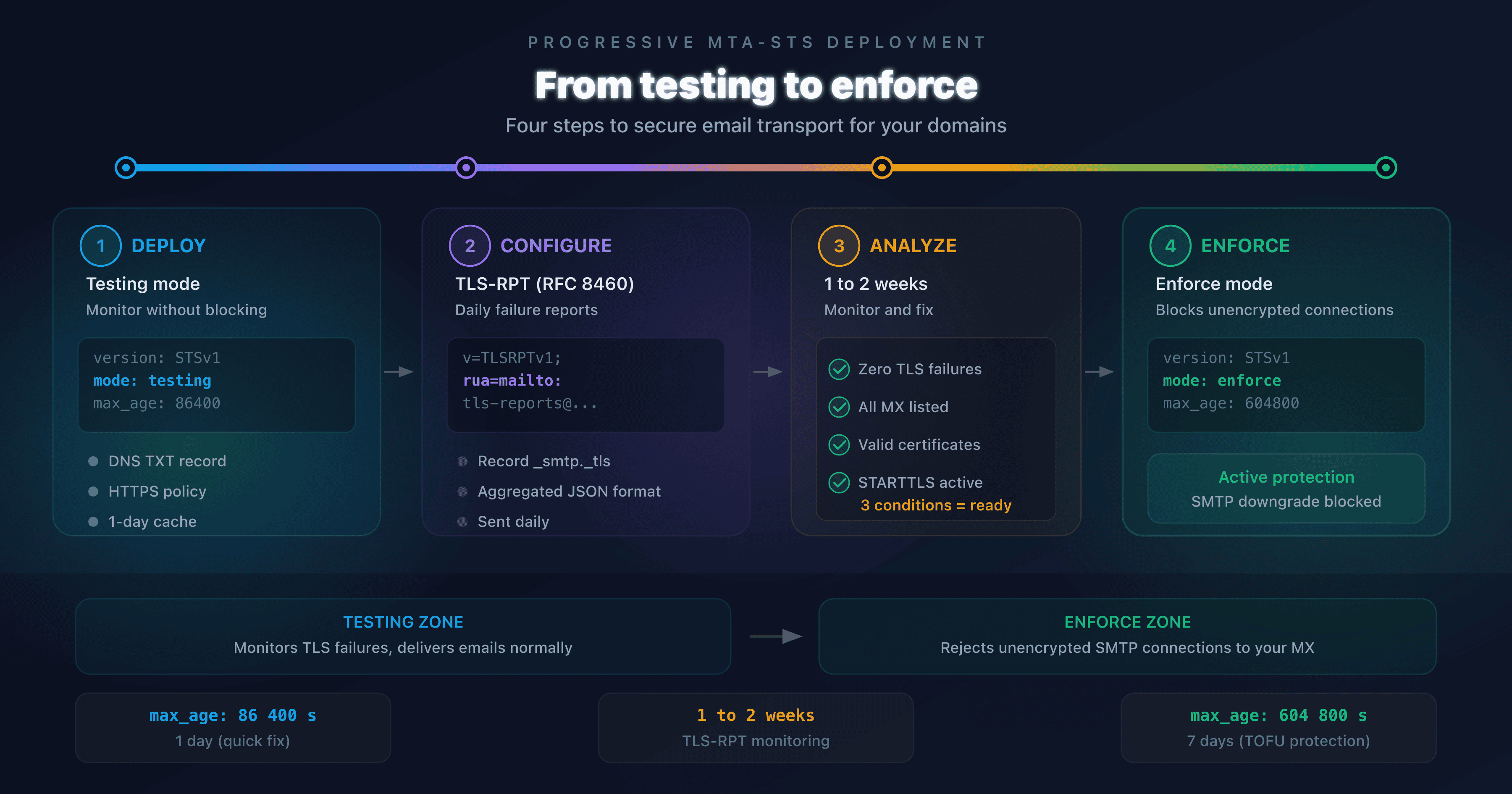
_smtp._tls.captaindns.com. TXT "v=TLSRPTv1; rua=mailto:tls-reports@captaindns.com"
Create a filter in your mail client to automatically sort the reports. Check them once a week, looking for total-failure-session-count values greater than zero.
High volume: HTTPS endpoint
For high-traffic domains, set up an HTTPS endpoint that receives reports via POST:
_smtp._tls.captaindns.com. TXT "v=TLSRPTv1; rua=https://reports.captaindns.com/tls-rpt"
The endpoint receives the gzip-compressed JSON with the Content-Type application/tlsrpt+gzip. You can parse reports automatically and trigger alerts when total-failure-session-count exceeds a threshold.
Verify your configuration with CaptainDNS
Before modifying your TLS or MTA-STS configuration, use the TLS-RPT generator to create a correct record. After making changes, verify with the TLS-RPT checker that everything is in place.
Recommended action plan
- Decompress and read your first report: open a
.json.gzfile received from Google or Microsoft and identify the 4 blocks (header, policy, summary, failure-details) - Check the failure/success ratio: a failure rate above 5% requires investigation
- Identify the result-type: use the table of 11 failure types to understand the exact cause
- Fix the problem on the affected server: certificate, STARTTLS, or MTA-STS policy depending on the error type
- Monitor subsequent reports: confirm the error is gone within 48 to 72 hours after the fix
FAQ
What is a TLS-RPT report and what does it contain?
A TLS-RPT report is a compressed JSON file (gzip) sent daily by mail servers that send you emails. It contains the sending organization's name, the covered period (24 hours), the evaluated TLS policy (MTA-STS or DANE), the number of successful and failed TLS connections, and the details of each failure type with the affected IPs and hostnames.
How do you read the JSON structure of a TLS-RPT report?
The JSON report has 4 levels: the header (organization-name, date-range), the policy block (policy-type, policy-string), the summary block (success/failure counters), and the failure-details block (result-type, sending-mta-ip, receiving-mx-hostname). Decompress the .json.gz file with gunzip or zcat, then format it with python3 -m json.tool for readable output.
What are the error types (result-type) in a TLS-RPT report?
RFC 8460 defines 11 failure types grouped into 3 categories: certificate errors (certificate-host-mismatch, certificate-expired, certificate-not-trusted), STARTTLS errors (starttls-not-supported, validation-failure), and policy errors (sts-policy-fetch-error, sts-policy-invalid, sts-webpki-invalid, tlsa-invalid, dnssec-invalid, dane-required). Each type precisely identifies what failed during the TLS negotiation.
What does certificate-host-mismatch mean in a TLS-RPT report?
The certificate-host-mismatch error means the TLS certificate presented by your MX server doesn't match the expected hostname. For example, if your MX is mail.captaindns.com but the certificate was issued for a different domain. Fix this by obtaining a certificate whose SAN (Subject Alternative Name) includes the exact FQDN of your MX.
How do you fix a starttls-not-supported error?
The starttls-not-supported error means your MX server doesn't advertise the STARTTLS command, so emails are transmitted in plain text. Enable STARTTLS in your server configuration: for Postfix, add smtpd_tls_security_level = may along with the paths to your certificate and private key in main.cf. Then verify with openssl s_client -connect mail.captaindns.com:25 -starttls smtp.
How often are TLS-RPT reports sent?
TLS-RPT reports are sent once per day (24-hour period). Each provider that sends you emails (Google, Microsoft, Yahoo, etc.) produces its own report independently. You may therefore receive multiple reports per day, one per sending provider. The first reports arrive 24 to 48 hours after publishing your TLS-RPT record.
What's the difference between TLS-RPT and DMARC reports?
DMARC reports monitor email authentication (SPF, DKIM, domain alignment), while TLS-RPT reports monitor transport encryption (TLS negotiation between servers). DMARC verifies who is sending the email, TLS-RPT verifies how it is transported. DMARC reports use XML format, TLS-RPT reports use JSON format. Both are complementary for securing your domain.
Glossary
- TLS-RPT: SMTP TLS Reporting (RFC 8460), a mechanism for daily reports on TLS negotiation failures during email delivery.
- result-type: a JSON field in
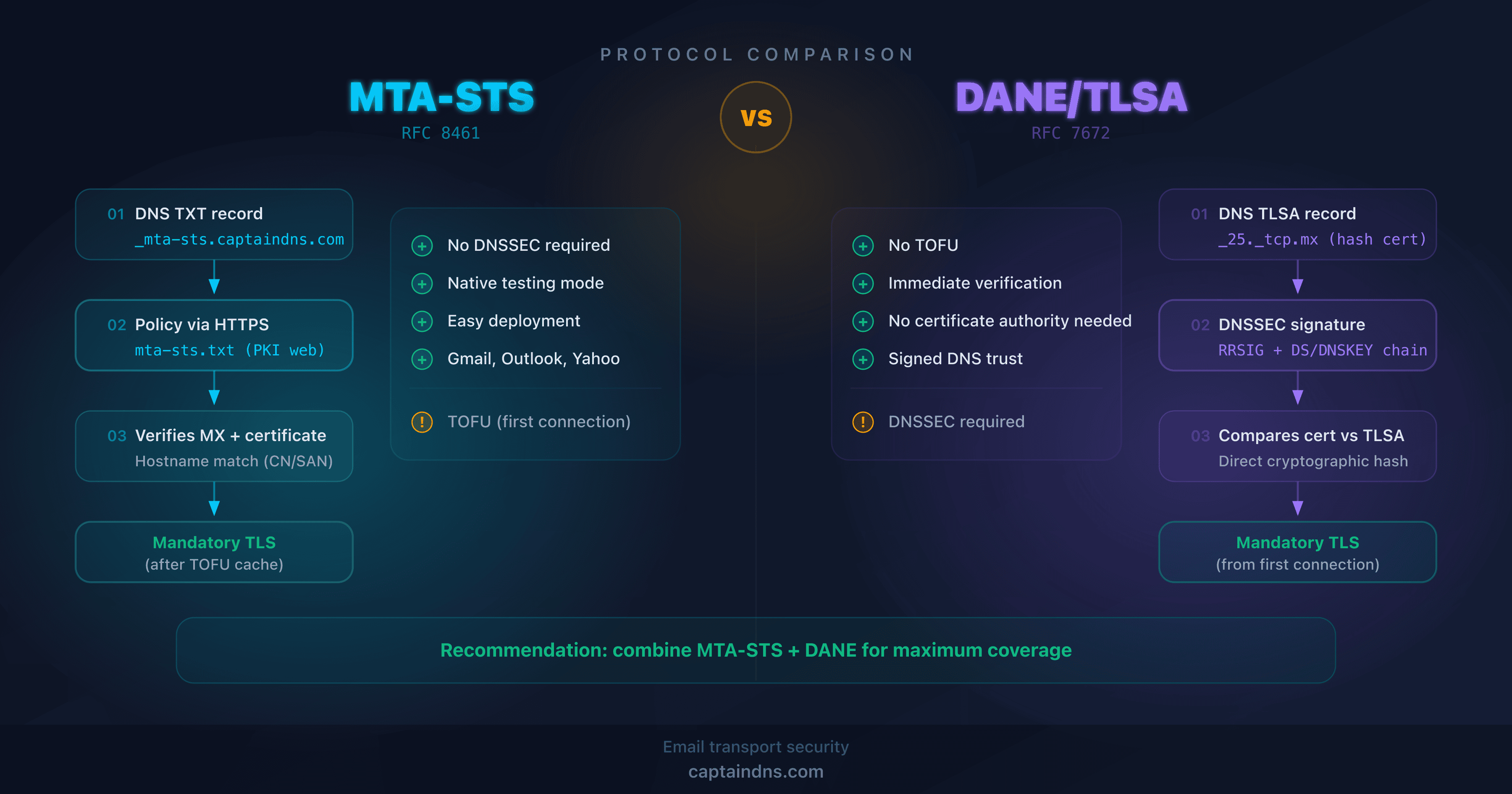
failure-detailsthat identifies the exact type of TLS failure (certificate-host-mismatch, starttls-not-supported, etc.). - MTA-STS: Mail Transfer Agent Strict Transport Security (RFC 8461), a policy that enforces TLS encryption for incoming emails.
- DANE: DNS-Based Authentication of Named Entities (RFC 7672), an alternative to MTA-STS that uses DNSSEC and TLSA records.
- STARTTLS: an SMTP extension that encrypts an initially plain-text connection. Opportunistic by default.
- SAN: Subject Alternative Name, a TLS certificate field that lists valid hostnames.
- policy-type: a JSON field indicating the type of policy evaluated (
sts,tlsa, orno-policy-found).
Check your configuration now: Use our TLS-RPT checker to verify that your _smtp._tls record is correct and that associated policies are properly detected.
Related TLS-RPT guides
- TLS-RPT: the complete guide to monitoring TLS security for your emails
- Configuring TLS-RPT for Microsoft 365, Google Workspace, and OVHcloud