TLS-RPT: The Complete Guide to Monitoring Email TLS Security
By CaptainDNS
Published on February 10, 2026
Updated on June 30, 2026
- TLS-RPT (RFC 8460) sends you a daily report on every TLS encryption failure detected by servers that send you emails
- Without TLS-RPT, you have no way of knowing if your emails are arriving in plaintext due to an expired certificate, a misconfigured MX, or a downgrade attack
- A single DNS TXT record to publish:
_smtp._tls.captaindns.comwith the directivev=TLSRPTv1; rua=mailto:... - TLS-RPT is the essential companion to MTA-STS: it gives you the visibility you need before switching to
enforcemode
Does your domain use MTA-STS or are you planning to enable it? Have you configured STARTTLS on your mail servers? In either case, one question remains unanswered: how do you know if TLS encryption is actually working during email delivery?
That's exactly the problem TLS-RPT solves. Defined in RFC 8460, SMTP TLS Reporting is a mechanism that allows sending servers (Gmail, Microsoft, Yahoo, and all providers that support it) to send you detailed reports on TLS negotiation failures they encounter when trying to deliver emails to your domain.
This guide explains what TLS-RPT is, how it works, how to configure it in minutes, and how to interpret the reports you'll receive. Whether you're a system administrator, DevOps engineer, or email infrastructure manager, you'll find everything you need to deploy TLS-RPT on your domain.
What is TLS-RPT?
TLS-RPT, which stands for SMTP TLS Reporting, is an internet standard (RFC 8460) published in September 2018. Its purpose is simple: to allow a domain owner to receive reports on failed TLS connection attempts when servers try to deliver emails to them.
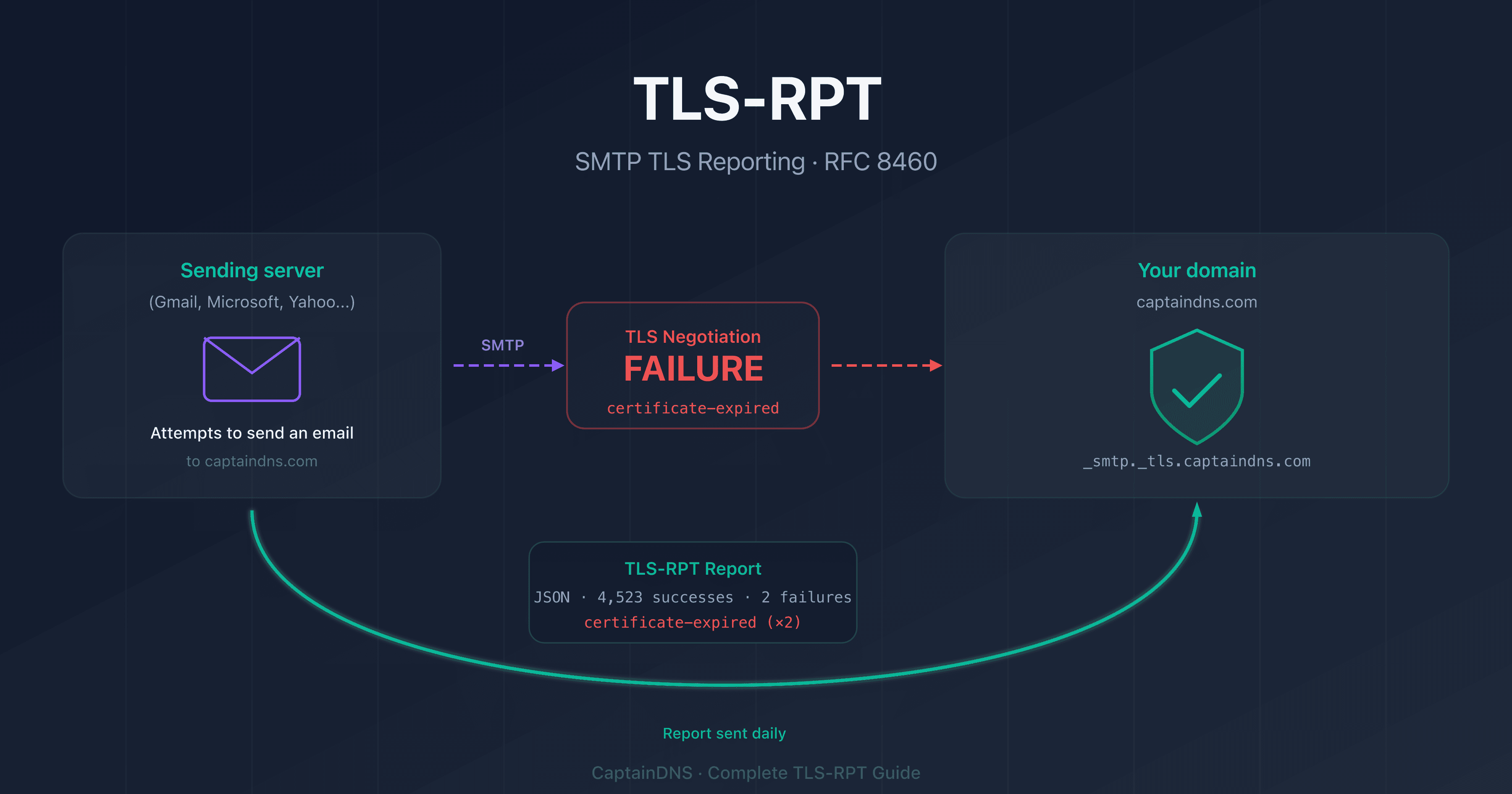
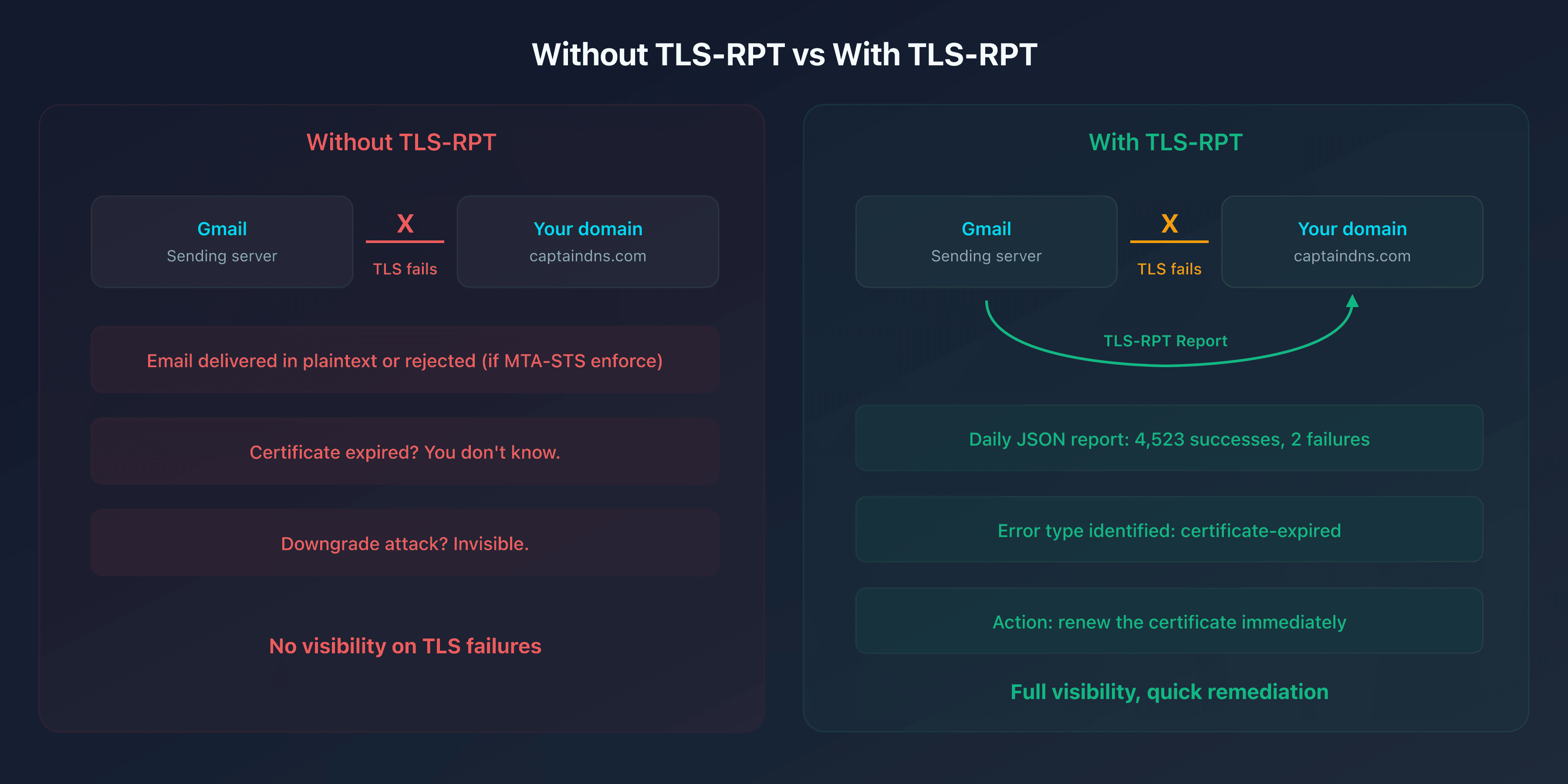
In practice, when Gmail tries to send an email to contact@captaindns.com, it checks whether the receiving server supports TLS and whether the TLS negotiation succeeds. If something fails (expired certificate, STARTTLS not supported, MTA-STS policy not met), Gmail records that failure. Once a day, it aggregates all failures and sends a JSON report to the address specified in your TLS-RPT record.
Why is TLS-RPT essential?
Without TLS-RPT, you're blind to the quality of encryption on your incoming emails:
- A TLS certificate expires on your MX server → emails keep arriving (in plaintext if MTA-STS isn't in enforce mode), but you don't know it
- A secondary MX doesn't support STARTTLS → emails to that MX travel without encryption
- A man-in-the-middle attack forces a downgrade → impossible to detect without reports
TLS-RPT fills this gap. Every day you receive a precise summary: how many TLS connections succeeded, how many failed, and why they failed.
What's the difference between TLS-RPT and DMARC reporting?
DMARC reports (RUA/RUF) and TLS-RPT reports cover different areas:
| Criteria | DMARC Reporting | TLS-RPT |
|---|---|---|
| What it monitors | Email authentication (SPF, DKIM, alignment) | Transport encryption (TLS) |
| RFC | RFC 7489 | RFC 8460 |
| DNS record | _dmarc.domain | _smtp._tls.domain |
| Report format | XML (aggregate) or text (forensic) | JSON |
| Frequency | Configurable (typically 24h) | Always 24h |
| Protocol | Sender authentication | Transport channel security |
The two are complementary: DMARC verifies who sends the email, TLS-RPT verifies how the email is transported. A secure domain needs both.
How does TLS-RPT work?
The TLS-RPT mechanism integrates into the normal email delivery flow:
1. Publishing the DNS record
You publish a TXT record at _smtp._tls.captaindns.com containing the address where reports should be sent.
2. Detection by the sending server
When Gmail (or any other compatible server) wants to send an email to your domain, it performs a DNS lookup on _smtp._tls.captaindns.com to check if you've configured TLS-RPT.
3. Collecting TLS results
With each delivery attempt, the sending server records the outcome of the TLS negotiation: success or failure, along with the error type if applicable.
4. Aggregation and report delivery
Every 24 hours, the sending server aggregates the results and sends a JSON report to the rua address specified in your TLS-RPT record.
Who sends the reports?
The main providers that send TLS-RPT reports:
| Provider | Sending address | Supported |
|---|---|---|
| Google / Gmail | noreply-smtp-tls-reporting@google.com | Yes |
| Microsoft / Outlook | tlsrpt@microsoft.com | Yes |
| Yahoo / AOL | Varies | Yes |
| Varies | Yes | |
| Comcast | Varies | Yes |
If you receive an email from noreply-smtp-tls-reporting@google.com, don't worry: it's a legitimate TLS-RPT report sent by Google. It contains a compressed JSON file (gzip) detailing the TLS results from the last 24 hours.
TLS-RPT record syntax
The TLS-RPT record is a DNS TXT record published at _smtp._tls.<domain>.
Basic format
_smtp._tls.captaindns.com. 300 IN TXT "v=TLSRPTv1; rua=mailto:tlsrpt@captaindns.com"
| Tag | Required | Description |
|---|---|---|
v | Yes | Protocol version, always TLSRPTv1 |
rua | Yes | Report destination URI(s) (mailto: or https:) |
Valid configuration examples
Reporting via email (most common):
_smtp._tls.captaindns.com. TXT "v=TLSRPTv1; rua=mailto:tlsrpt@captaindns.com"
Reporting via HTTPS endpoint:
_smtp._tls.captaindns.com. TXT "v=TLSRPTv1; rua=https://report.captaindns.com/tlsrpt"
Multiple reporting (email + HTTPS):
_smtp._tls.captaindns.com. TXT "v=TLSRPTv1; rua=mailto:tlsrpt@captaindns.com,https://report.captaindns.com/tlsrpt"
Reporting to an external domain
You can absolutely send your TLS-RPT reports to a domain other than your own, for example a third-party monitoring service. Unlike DMARC, TLS-RPT requires no authorization record on the recipient domain: just point the rua at the third party's address, and reports are sent there directly.
_smtp._tls.captaindns.com. TXT "v=TLSRPTv1; rua=mailto:tlsrpt@monitoring-service.com"
This is a deliberate choice by the authors of RFC 8460. Section 7 (Security Considerations) intentionally drops the delegation verification mechanism used by DMARC, deemed superfluous here: the amplification risk is lower than with DMARC. To divert reports, an attacker would first have to get mail sent to the target domain in order to trigger report generation, which makes the abuse impractical.
Do not confuse this with DMARC. In DMARC, pointing a rua/ruf at a third-party domain requires that domain to publish a consent record of the form source-domain._report._dmarc.third-party. This mechanism does not exist in TLS-RPT: there is no _report._tls record to publish on the recipient side. Documentation that demands one is mistakenly copying how DMARC works.
Configuration tips
- Dedicated mailbox: use a dedicated email address (e.g.,
tlsrpt@captaindns.com) so reports don't get lost in your main inbox - Reasonable TTL: a TTL of 300 to 3600 seconds is suitable for this record
- HTTPS for high volume: if you receive a lot of emails, an HTTPS endpoint is better suited than a mailbox for processing reports
Understanding the TLS-RPT JSON report
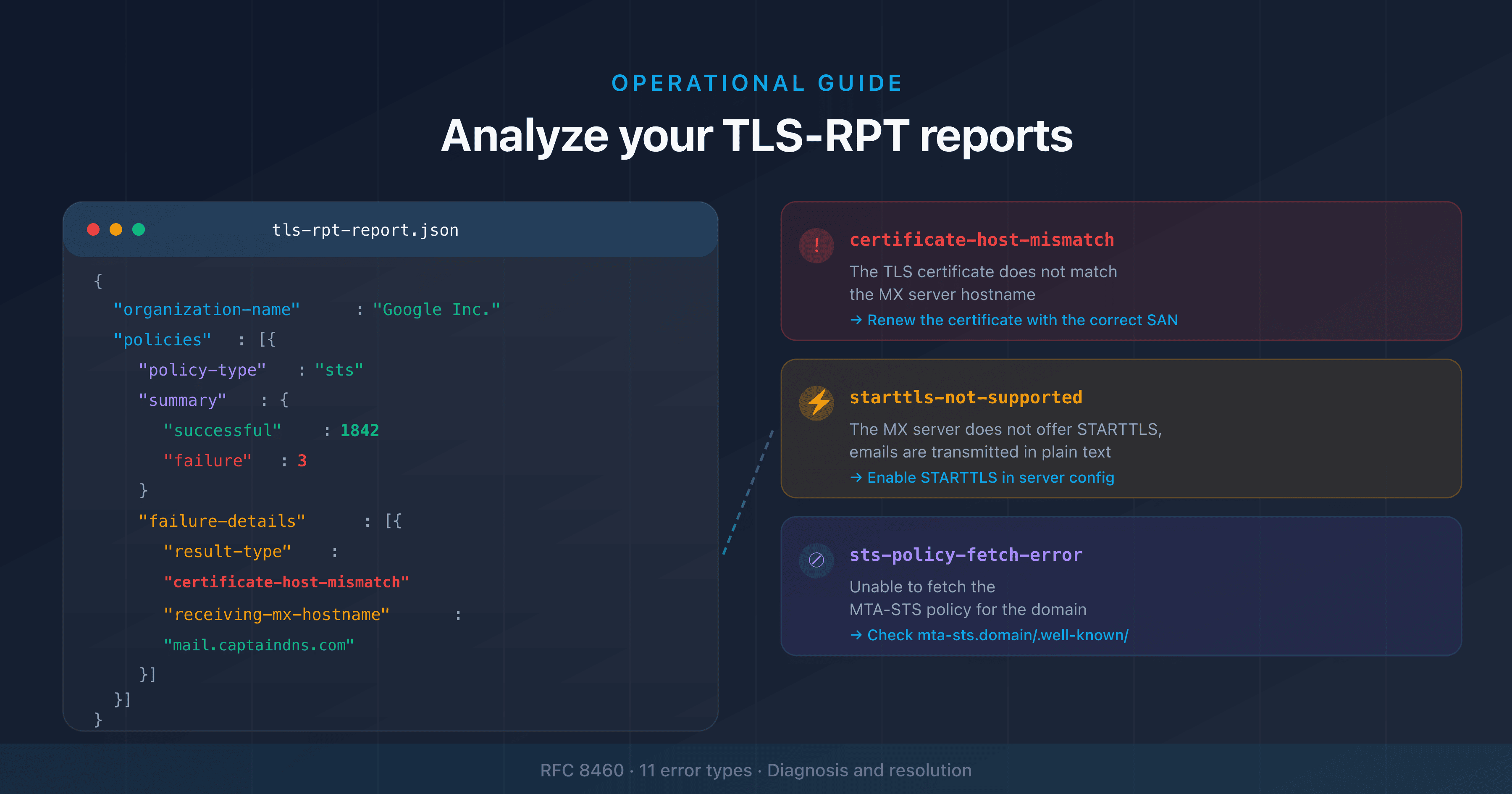
TLS-RPT reports are sent in JSON format, compressed with gzip. Here's the structure of a typical report:
{
  "organization-name": "Google Inc.",
  "date-range": {
    "start-datetime": "2026-02-08T00:00:00Z",
    "end-datetime": "2026-02-09T00:00:00Z"
  },
  "contact-info": "smtp-tls-reporting@google.com",
  "report-id": "2026-02-08T00:00:00Z_captaindns.com",
  "policies": [
    {
      "policy": {
        "policy-type": "sts",
        "policy-string": [
          "version: STSv1",
          "mode: enforce",
          "mx: mail.captaindns.com",
          "max_age: 604800"
        ],
        "policy-domain": "captaindns.com"
      },
      "summary": {
        "total-successful-session-count": 4523,
        "total-failure-session-count": 2
      },
      "failure-details": [
        {
          "result-type": "certificate-expired",
          "sending-mta-ip": "192.0.2.1",
          "receiving-mx-hostname": "mail.captaindns.com",
          "failed-session-count": 2
        }
      ]
    }
  ]
}
Report breakdown
| Field | Meaning |
|---|---|
organization-name | Who sends the report (Google, Microsoft, etc.) |
date-range | Period covered (always 24h) |
policy-type | Type of policy applied: sts (MTA-STS), tlsa (DANE), or no-policy-found |
total-successful-session-count | Number of successful TLS connections |
total-failure-session-count | Number of failed TLS connections |
failure-details | Details of each failure type |
TLS failure types
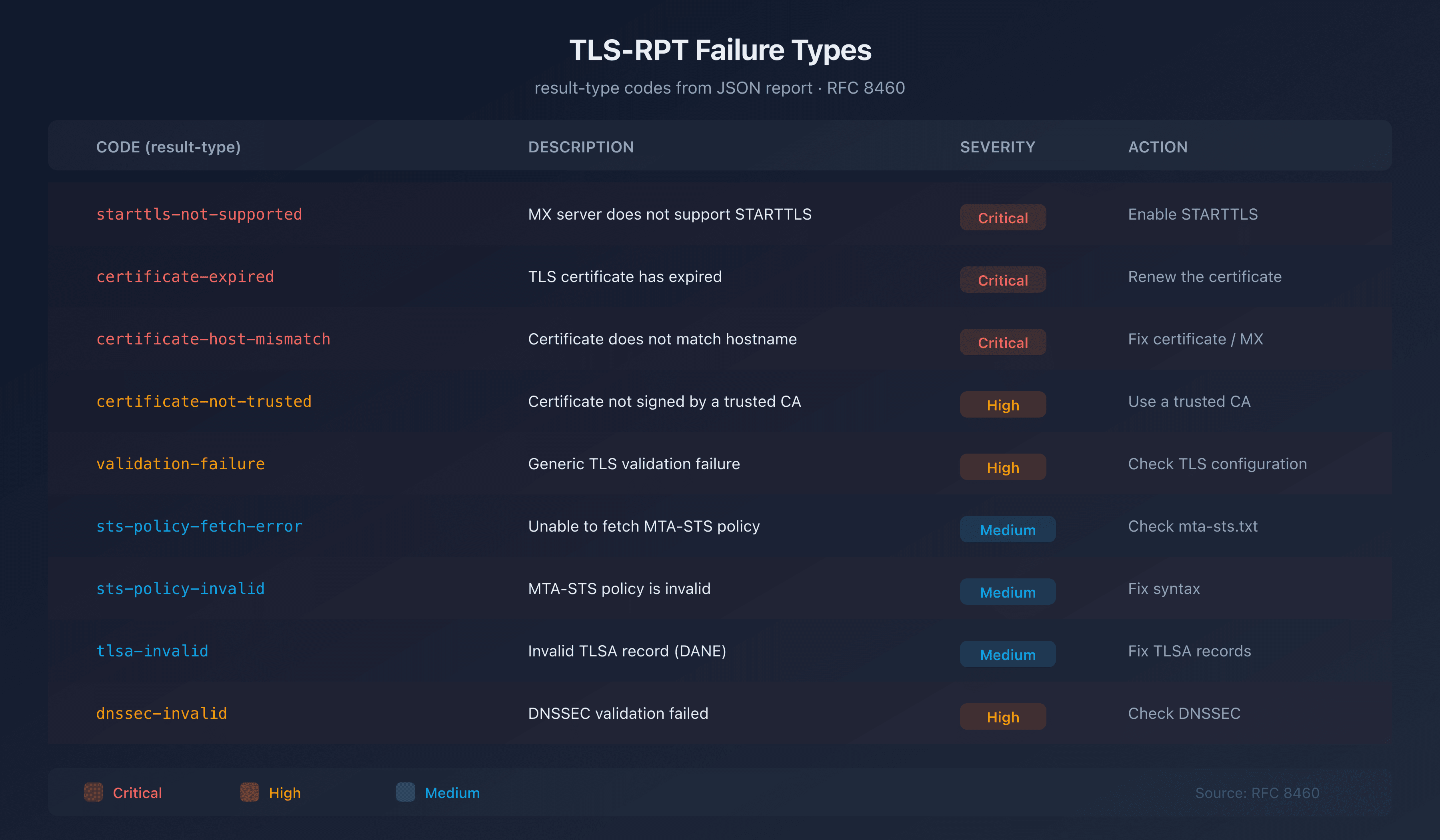
Each failure is categorized by a result-type. Here are the main ones:
| Code | Description | Severity | Action |
|---|---|---|---|
starttls-not-supported | The MX server does not support STARTTLS | Critical | Enable STARTTLS on the server |
certificate-expired | The server's TLS certificate has expired | Critical | Renew the certificate immediately |
certificate-host-mismatch | The certificate does not match the MX hostname | Critical | Fix the certificate or hostname |
certificate-not-trusted | Certificate not signed by a trusted CA | High | Use a certificate from a recognized CA |
validation-failure | Generic TLS validation failure | High | Check the complete TLS configuration |
sts-policy-fetch-error | Unable to retrieve the MTA-STS policy | Medium | Check the mta-sts.txt file |
sts-policy-invalid | The MTA-STS policy is invalid | Medium | Fix the policy syntax |
sts-webpki-invalid | The HTTPS certificate for the policy server is invalid | Medium | Renew the certificate for the mta-sts subdomain |
tlsa-invalid | Invalid TLSA record (DANE) | Medium | Fix the TLSA records |
dnssec-invalid | DNSSEC validation failed | High | Check the DNSSEC configuration |
TLS-RPT and MTA-STS: the essential duo
TLS-RPT becomes most valuable when combined with MTA-STS. Here's why:
The recommended workflow
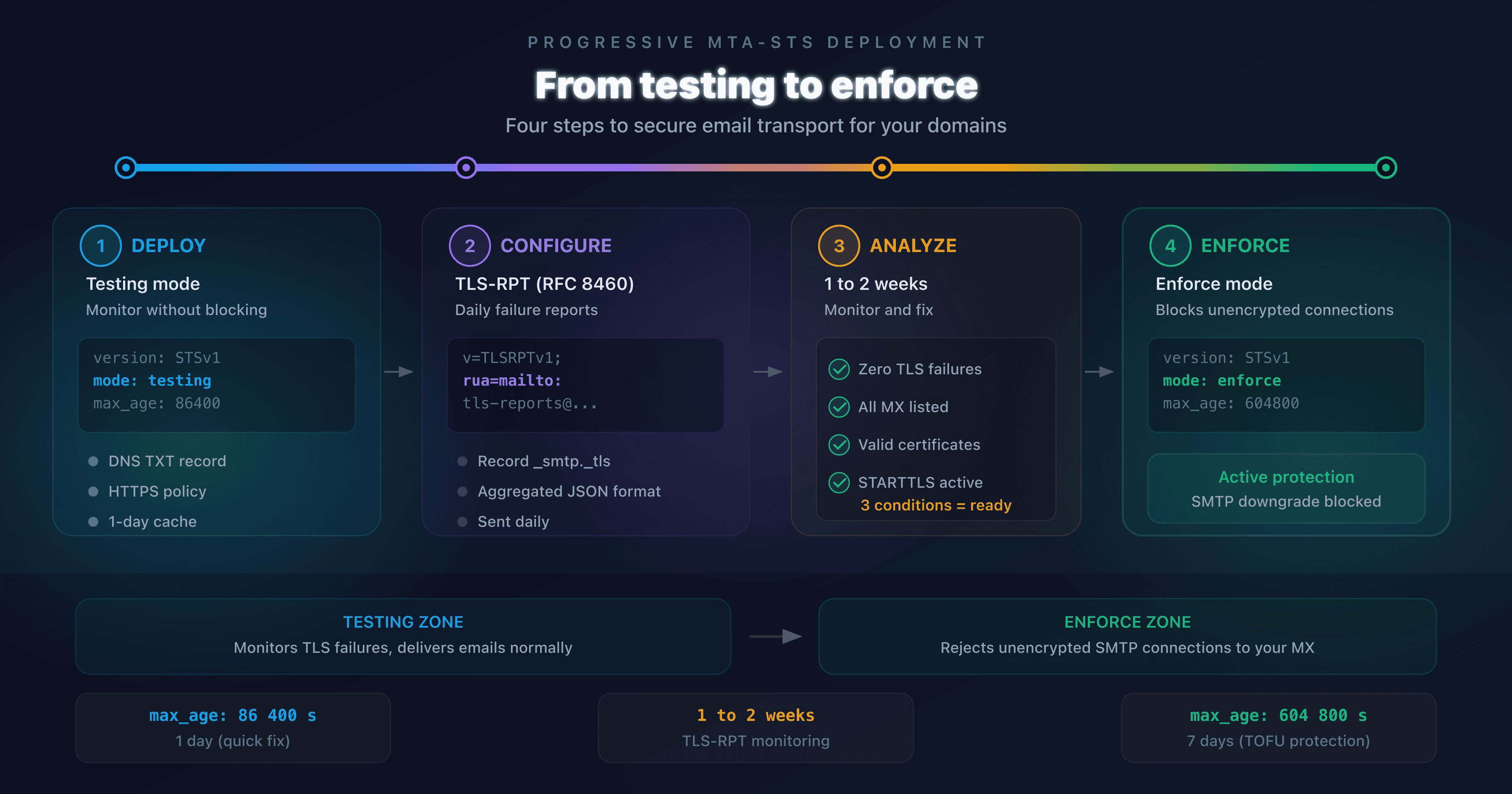
- Configure TLS-RPT: publish your
_smtp._tlsrecord to start receiving reports - Enable MTA-STS in testing mode: publish your MTA-STS policy with
mode: testing - Analyze the reports: over 1 to 2 weeks, TLS-RPT reports will show you if any TLS connections are failing
- Fix the issues: expired certificates, uncovered MX servers, incorrect TLS configurations
- Switch to enforce mode: once reports confirm zero failures, switch MTA-STS to
mode: enforce
Without TLS-RPT, switching to enforce mode is like flying blind: you risk rejecting legitimate emails without knowing it.
TLS-RPT also works with DANE
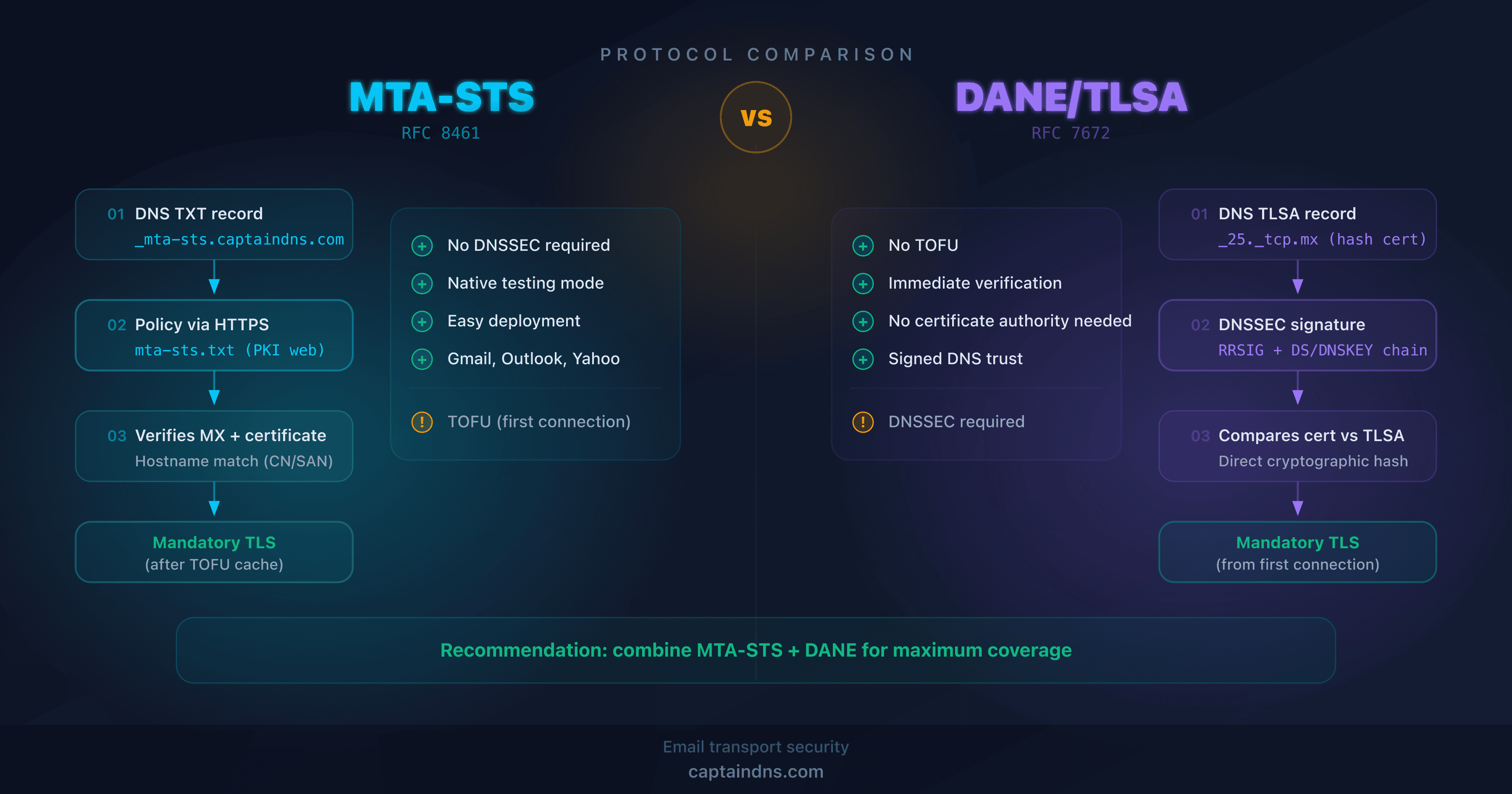
TLS-RPT isn't limited to MTA-STS. It also reports failures related to DANE TLSA records (RFC 7672). If your domain uses DNSSEC and publishes TLSA records, TLS-RPT reports will include DANE validation results with the policy-type: tlsa.
Configure TLS-RPT in 5 minutes
Step 1: Choose the reporting address
Create a dedicated email address to receive reports:
tlsrpt@captaindns.com(recommended)- Or use an HTTPS endpoint if you have an automated processing system
Step 2: Generate the DNS record
Use our TLS-RPT generator to create the record for your domain. You'll get a record ready to copy.
Step 3: Publish the DNS record
Add the TXT record to your DNS zone:
| Field | Value |
|---|---|
| Host | _smtp._tls |
| Type | TXT |
| Value | v=TLSRPTv1; rua=mailto:tlsrpt@captaindns.com |
| TTL | 3600 |
Step 4: Verify the configuration
Use our TLS-RPT syntax checker to verify that your record is correctly formatted.
Step 5: Wait for the first reports
Reports typically arrive 24 to 48 hours after publishing the record. Google is usually the first to send reports.
Common errors and troubleshooting
No reports received after 48 hours
- Verify that the record is published at
_smtp._tls.captaindns.com(not at_smtp-tlsorsmtp._tls) - Check the syntax:
v=TLSRPTv1(notv=TLSRPTv2orv=TLSRPT1) - Make sure the receiving mailbox exists and accepts gzip attachments
- Verify that your domain receives enough emails to trigger reports
Reports arrive but are empty
If total-failure-session-count is always 0, that's good news: your TLS configuration is working correctly. The reports confirm that all TLS connections are succeeding.
Emails from noreply-smtp-tls-reporting@google.com
These emails are legitimate. Google sends a daily TLS-RPT report for every domain that has published a _smtp._tls record. The attached file (.json.gz) contains the report. Do not mark these emails as spam.
Recommended action plan
- Publish your TLS-RPT record: 5 minutes with the TLS-RPT generator (see step 2 above)
- Configure MTA-STS in testing mode: enable the MTA-STS policy so that TLS-RPT reports include validation results
- Analyze reports for 2 weeks: identify TLS failures and fix them
- Switch MTA-STS to enforce mode: once reports are clean, enable rejection of failed TLS connections
- Monitor continuously: daily reports will alert you to any new issues (expired certificate, MX change, etc.)
FAQ
What is TLS-RPT and what is it used for?
TLS-RPT (SMTP TLS Reporting, RFC 8460) is a mechanism that allows a domain owner to receive daily reports on TLS negotiation failures during email delivery. It gives you full visibility into the quality of encryption on your incoming emails.
How do I configure a TLS-RPT record?
Publish a DNS TXT record at _smtp._tls.captaindns.com with the value v=TLSRPTv1; rua=mailto:tlsrpt@captaindns.com. Use a TLS-RPT generator to create the record, then add it to your DNS zone. The first reports arrive within 24 to 48 hours.
Why am I receiving emails from noreply-smtp-tls-reporting@google.com?
These emails are legitimate TLS-RPT reports sent by Google. Your domain has a _smtp._tls record configured, and Google sends you a daily compressed JSON report detailing the TLS negotiation results for emails it sent to you.
What is the difference between TLS-RPT and DMARC reporting?
DMARC monitors email authentication (SPF, DKIM, alignment), while TLS-RPT monitors transport encryption (TLS). DMARC verifies who sends the email, TLS-RPT verifies how it is transported. The two are complementary and recommended together.
Is TLS-RPT mandatory if I use MTA-STS?
No, TLS-RPT is not technically required for MTA-STS. However, it is strongly recommended: without TLS-RPT, you won't know if TLS connections are failing. This is particularly critical before switching MTA-STS to enforce mode, as reports allow you to identify and fix issues beforehand.
How often are TLS-RPT reports sent?
TLS-RPT reports are sent once per day (24-hour period). Each compatible provider (Google, Microsoft, Yahoo, etc.) sends its own report independently. You may therefore receive multiple reports per day, one per provider.
How do I read a TLS-RPT JSON report?
A TLS-RPT report is a gzip-compressed JSON file. It contains the sending organization, the period covered, and for each TLS policy (MTA-STS or DANE): the number of successful sessions, the number of failures, and details of each failure type (expired certificate, STARTTLS not supported, etc.).
Can I use both mailto: and https: in TLS-RPT?
Yes, you can specify multiple reporting URIs separated by commas. For example: rua=mailto:tlsrpt@captaindns.com,https://report.captaindns.com/tlsrpt. The HTTPS endpoint is recommended for domains with high email volume.
Do I need a separate TLS-RPT record for each subdomain?
Yes. The TLS-RPT record is not inherited from the parent domain. The sending server performs a DNS lookup on _smtp._tls.<recipient domain> (RFC 8460, Section 3). If you receive mail at both @captaindns.com and @external.captaindns.com, you must publish two separate records: _smtp._tls.captaindns.com and _smtp._tls.external.captaindns.com. This is the same behavior as MTA-STS and DMARC.
Glossary
- TLS-RPT: SMTP TLS Reporting, a mechanism for reporting TLS failures defined in RFC 8460.
- MTA-STS: Mail Transfer Agent Strict Transport Security (RFC 8461), a policy that enforces TLS encryption for incoming email.
- DANE: DNS-Based Authentication of Named Entities (RFC 7672), an alternative to MTA-STS that uses DNSSEC and TLSA records to validate TLS certificates.
- STARTTLS: An SMTP extension that encrypts an initially plaintext connection. Opportunistic by default (no rejection if encryption fails).
- Downgrade attack: An attack where an intermediary forces the connection to remain in plaintext by stripping the STARTTLS command from the server's response.
- RUA: Reporting URI for Aggregated reports, the address where TLS-RPT reports are sent.
Check your configuration now: Use our TLS-RPT checker to analyze the _smtp._tls record for your domain in seconds.
Related TLS-RPT guides
- Configuring TLS-RPT for Microsoft 365, Google Workspace, and OVHcloud
- Analyzing and leveraging your TLS-RPT reports