Configure MTA-STS for Microsoft 365 and Google Workspace
By CaptainDNS
Published on February 8, 2026
Updated on July 31, 2026
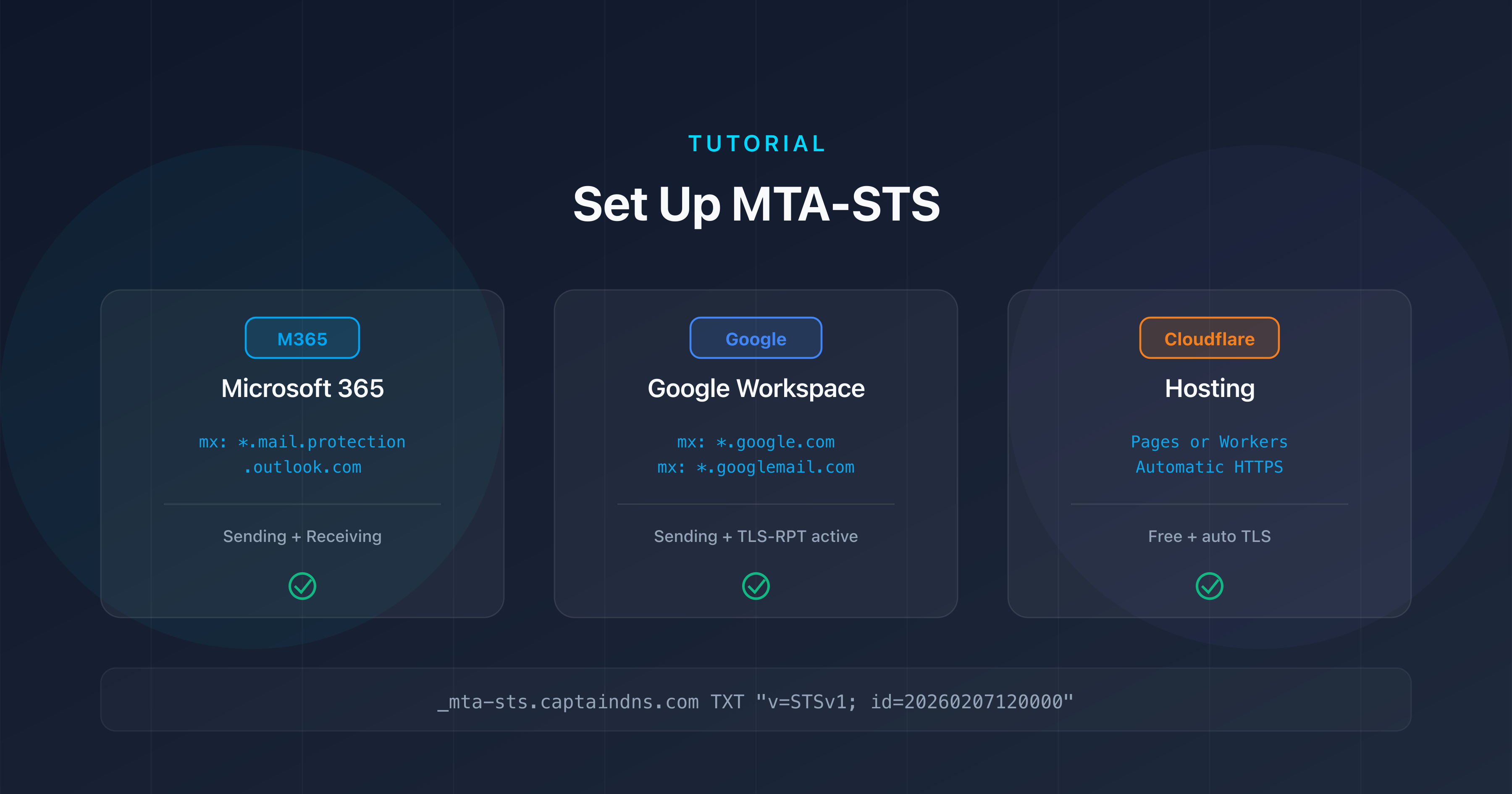
- Microsoft 365 uses the MX pattern
*.mail.protection.outlook.comin the MTA-STS policy; for Google Workspace it depends on how old the domain is:smtp.google.comsince 2023, theaspmx.l.google.com/*.aspmx.l.google.com/*.googlemail.comset for older domains - The
mta-sts.txtpolicy file must be hosted over HTTPS on themta-stssubdomain of your domain, with a valid TLS certificate - Cloudflare Pages or Cloudflare Workers let you host the policy file for free with automatic HTTPS
- Always deploy in
testingmode with TLS-RPT enabled before switching toenforcemode
You're using Microsoft 365 or Google Workspace for your business emails. Your MX servers are properly configured, SPF, DKIM, and DMARC are in place. But the transport between SMTP servers remains vulnerable: without MTA-STS, an attacker can force an unencrypted connection and intercept your messages.
MTA-STS (Mail Transfer Agent Strict Transport Security, RFC 8461) solves this problem by enforcing TLS encryption for incoming emails. The concept is straightforward: you publish a DNS record and a policy file that declare your authorized MX servers and require a valid TLS connection.
This tutorial walks you through deploying MTA-STS on Microsoft 365, Google Workspace, and Cloudflare step by step. Each section includes the exact MX patterns, ready-to-copy configuration files, and validation commands. If you're new to MTA-STS, start with our complete MTA-STS guide to understand how the protocol works (see the Related Guides section at the end of this article).
Prerequisites common to all providers
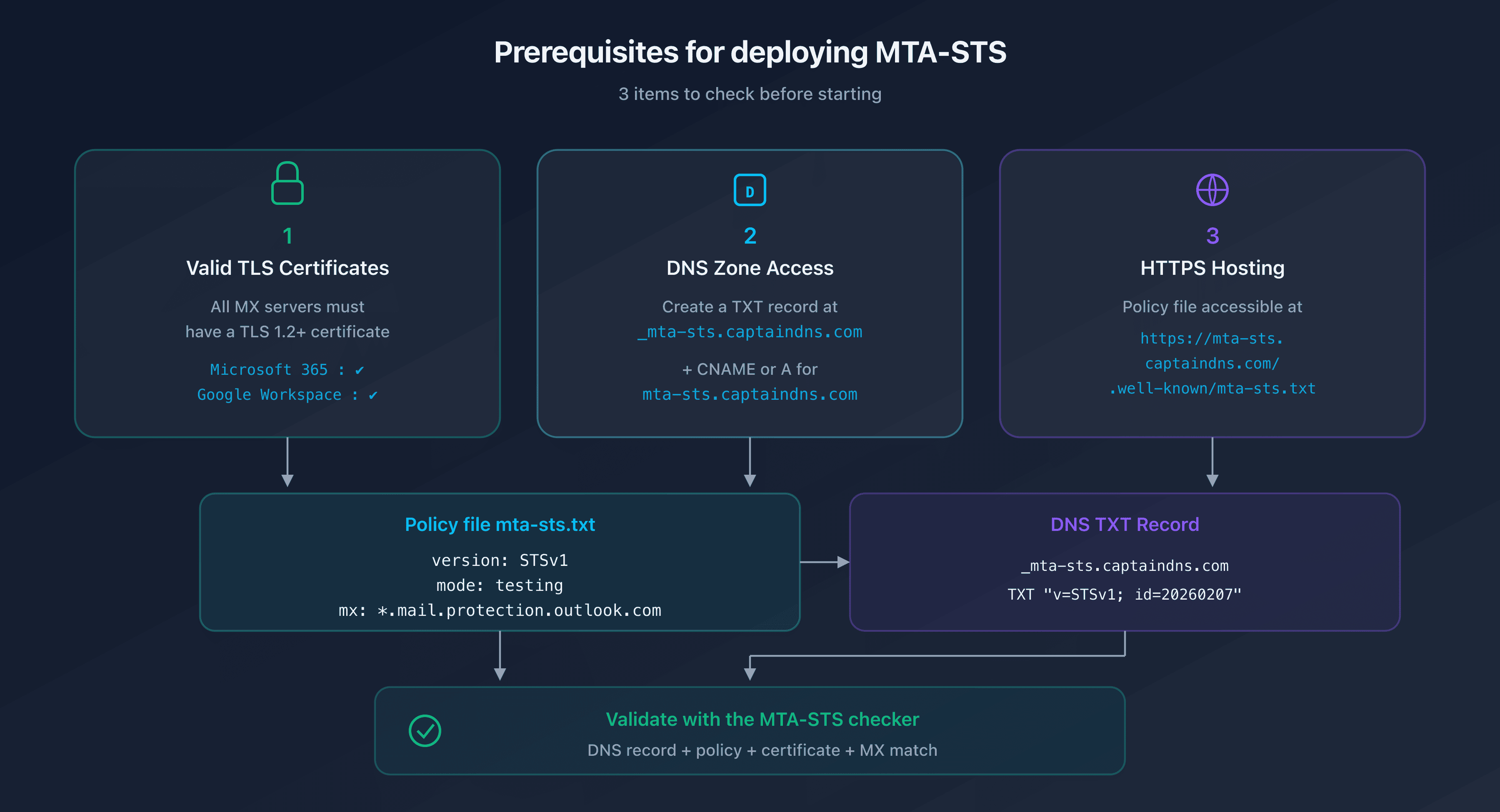
Before configuring MTA-STS, verify these three points for your domain:
1. Valid TLS certificates on your MX servers
All your MX servers must have a valid TLS certificate (TLS 1.2 minimum). With Microsoft 365 and Google Workspace, this is the case by default: Microsoft and Google manage the certificates for their MX servers.
2. Access to your DNS zone
You need to be able to create a TXT record at _mta-sts.captaindns.com and a CNAME or A record for the mta-sts.captaindns.com subdomain.
3. HTTPS hosting for the policy file
The mta-sts.txt file must be accessible at the exact URL https://mta-sts.captaindns.com/.well-known/mta-sts.txt. You need HTTPS hosting with a valid certificate for the mta-sts subdomain.
MTA-STS for Microsoft 365 / Office 365
The Microsoft 365 MX pattern
Microsoft 365 uses MX servers in the format captaindns-com.mail.protection.outlook.com. The corresponding wildcard pattern for your MTA-STS policy is:
*.mail.protection.outlook.com
This pattern covers all Microsoft 365 MX servers, including regional variations and Exchange Online Protection (EOP) configurations.
To verify your Microsoft 365 MX records:
dig MX captaindns.com +short
# Expected result: 0 captaindns-com.mail.protection.outlook.com.
Policy file for Microsoft 365
Create the mta-sts.txt file with the following content:
version: STSv1
mode: testing
mx: *.mail.protection.outlook.com
max_age: 86400
| Directive | Value | Explanation |
|---|---|---|
version | STSv1 | Protocol version |
mode | testing | Monitoring without blocking (initial phase) |
mx | *.mail.protection.outlook.com | Covers all Microsoft 365 MX servers |
max_age | 86400 | 24-hour cache (suitable for testing) |
DNS record for Microsoft 365
Add this TXT record to your DNS zone:
_mta-sts.captaindns.com. 300 IN TXT "v=STSv1; id=20260207120000"
The id field must be updated each time you modify the policy. Use a timestamp in the YYYYMMDDHHMMSS format for easy tracking.
Does Microsoft 365 support MTA-STS?
Microsoft supports MTA-STS for outbound mail: when a Microsoft 365 server sends an email, it checks the MTA-STS policy of the recipient domain. Microsoft also supports MTA-STS for inbound mail: you can publish a policy for your domain hosted on Microsoft 365, and sending servers will respect it.
MTA-STS for Google Workspace
The Google Workspace MX patterns
Google Workspace publishes two MX sets depending on how old the domain is, and your policy must declare the one your domain actually publishes. So start by reading it: dig MX captaindns.com +short.
Since 2023, Google documents a single record:
| MX Server | Priority |
|---|---|
smtp.google.com | 1 |
Workspace domains created before 2023 publish the legacy set, which Google still supports:
| MX Server | Priority |
|---|---|
aspmx.l.google.com | 1 |
alt1.aspmx.l.google.com | 5 |
alt2.aspmx.l.google.com | 5 |
alt3.aspmx.l.google.com | 10 |
alt4.aspmx.l.google.com | 10 |
Hence four possible patterns:
smtp.google.com
aspmx.l.google.com
*.aspmx.l.google.com
*.googlemail.com
The first one is enough for a recent domain, the next three cover the legacy set, and all four together suit a domain in the middle of a migration. A pattern declared for nothing blocks no delivery; a published MX with no matching pattern does.
Steer clear of the *.google.com shortcut still found in many write-ups. RFC 8461 restricts the MTA-STS wildcard to a single label, the leftmost one: it does cover smtp.google.com, but matched against aspmx.l.google.com what remains is aspmx.l, which contains a dot. The match fails and not one of the five legacy MX ends up covered. Hence *.aspmx.l.google.com for the four alternates, plus an exact entry for the primary MX.
Policy file for Google Workspace
version: STSv1
mode: testing
mx: smtp.google.com
mx: aspmx.l.google.com
mx: *.aspmx.l.google.com
mx: *.googlemail.com
max_age: 86400
This example covers both sets at once: it suits a recent domain as well as a pre-2023 one, and it holds throughout a migration from one to the other. Once you have read your own MX, keep only the lines that match them: a policy that declares your real hosts and nothing else is stricter. MTA-STS requires each pattern to be declared on a separate line.
DNS record for Google Workspace
The DNS record follows the same structure:
_mta-sts.captaindns.com. 300 IN TXT "v=STSv1; id=20260207120000"
Google Workspace and TLS-RPT
Google is one of the most active providers when it comes to TLS-RPT. If you enable MTA-STS and TLS-RPT, you'll receive detailed reports from Google about TLS negotiations with your domain. These reports are invaluable for identifying issues before switching to enforce mode.
Hosting MTA-STS on Cloudflare
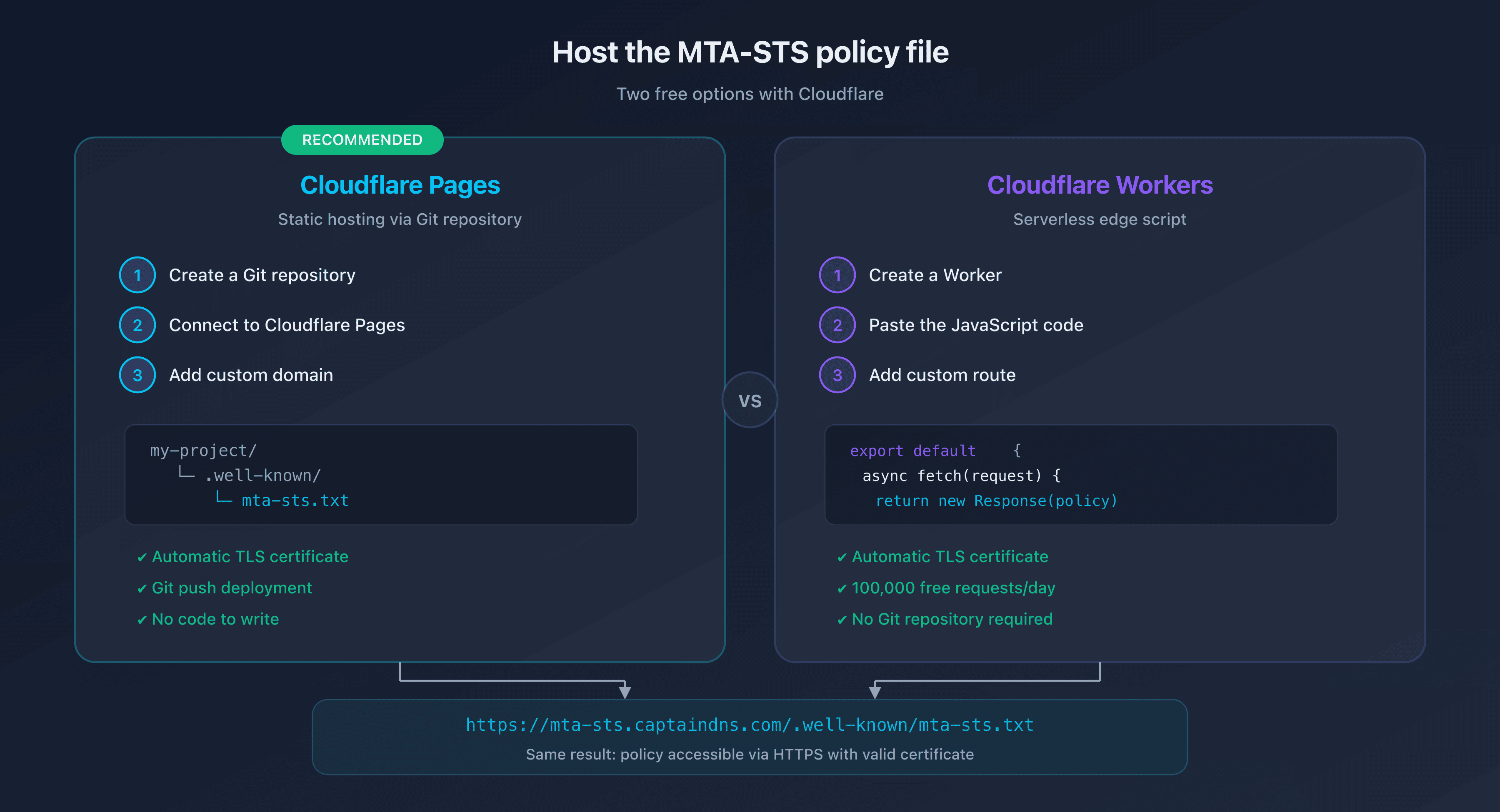
The policy file must be accessible at https://mta-sts.captaindns.com/.well-known/mta-sts.txt. Cloudflare offers two free hosting options.
Option 1: Cloudflare Pages (recommended)
Cloudflare Pages is the simplest solution. Create a repository with the following structure:
my-mta-sts-project/
  .well-known/
    mta-sts.txt
Deployment steps:
- Create a Git repository (GitHub or GitLab) with the
.well-known/mta-sts.txtfile - Connect it to Cloudflare Pages: Cloudflare Dashboard > Pages > Create a project
- Configure the build: Framework preset = None, Build command = (empty), Output directory =
/ - Add the custom domain: Settings > Custom domains >
mta-sts.captaindns.com - Configure DNS: Cloudflare automatically creates a CNAME record
Cloudflare Pages provides an automatic TLS certificate via Let's Encrypt. No additional configuration is needed.
Option 2: Cloudflare Worker
For more granular control or if you'd rather not use a Git repository, a Cloudflare Worker can serve the policy file:
export default {
  async fetch(request) {
    const url = new URL(request.url);

    if (url.pathname === '/.well-known/mta-sts.txt') {
      const policy = `version: STSv1
mode: testing
mx: *.mail.protection.outlook.com
max_age: 86400`;

      return new Response(policy, {
        headers: {
          'Content-Type': 'text/plain; charset=utf-8',
          'Cache-Control': 'public, max-age=3600',
        },
      });
    }

    return new Response('Not Found', { status: 404 });
  },
};
Steps:
- Create a Worker: Cloudflare Dashboard > Workers & Pages > Create application
- Paste the code above (adapt the
mxlines to match your provider) - Add a custom route:
mta-sts.captaindns.com/* - Configure DNS: Add an AAAA record
mta-stspointing to100::(proxied)
The free Cloudflare Workers plan includes 100,000 requests per day, more than enough for MTA-STS.
Which Content-Type to use?
The policy file must be served with the Content-Type text/plain. RFC 8461 doesn't specify a required charset, but text/plain; charset=utf-8 is recommended for compatibility.
Enabling TLS-RPT to monitor your deployment
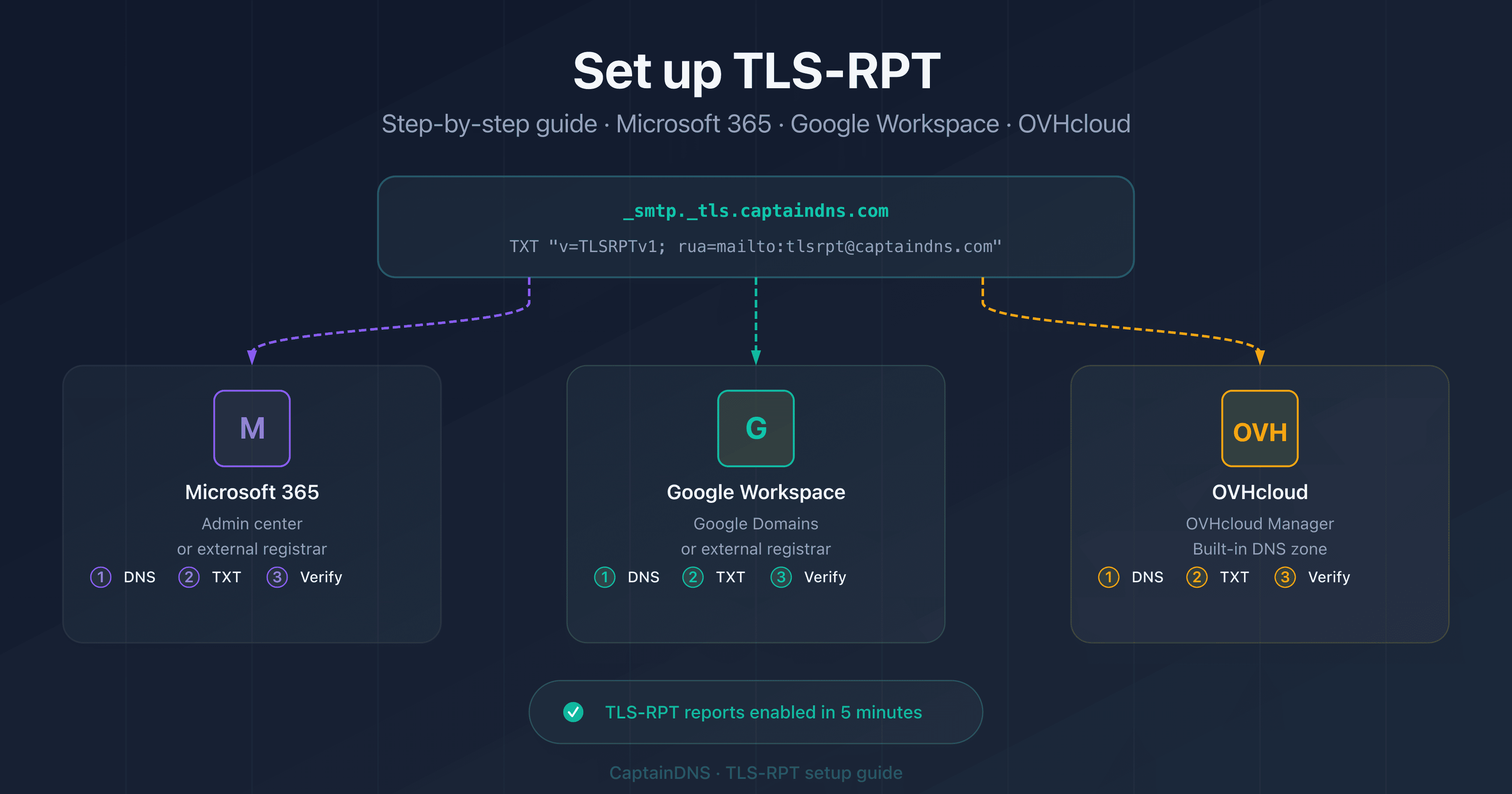
TLS-RPT (SMTP TLS Reporting, RFC 8460) is the essential companion to MTA-STS. It sends you daily reports on TLS negotiation successes and failures.
Creating the TLS-RPT record
Add this TXT record to your DNS zone:
_smtp._tls.captaindns.com. 300 IN TXT "v=TLSRPTv1; rua=mailto:tls-reports@captaindns.com"
Reports are sent in JSON format, gzip-compressed, to the specified email address. You can also use an HTTPS URL to receive reports via webhook:
_smtp._tls.captaindns.com. 300 IN TXT "v=TLSRPTv1; rua=https://tls-reports.captaindns.com/v1/report"
What do TLS-RPT reports contain?
Each report covers a 24-hour period and includes:
| Information | Description |
|---|---|
| Policy domain | Your domain (captaindns.com) |
| Report period | Start and end dates |
| Sending organization | Google, Microsoft, etc. |
| Success count | Number of successful TLS connections |
| Failure count | Number of failed connections |
| Failure type | starttls-not-supported, certificate-expired, validation-failure, etc. |
Interpreting the reports
In testing mode, monitor the reports for 2 to 4 weeks. If the failure rate is zero or near zero, you can confidently switch to enforce mode.
The most common errors found in reports:
| Error | Likely cause | Action |
|---|---|---|
certificate-expired | Expired TLS certificate on an MX server | Renew the certificate |
certificate-host-mismatch | MX hostname not covered by the certificate | Check the certificate SAN |
validation-failure | Incomplete certificate chain | Install intermediate certificates |
sts-policy-fetch-error | mta-sts.txt file unreachable | Check HTTPS hosting |
sts-webpki-invalid | Invalid certificate on the mta-sts subdomain | Renew the certificate |
From testing to enforce: migration plan
Phase 1: Initial deployment (week 1)
- Create the policy file in
testingmode withmax_age: 86400 - Host it on Cloudflare Pages or Workers
- Publish the
_mta-stsDNS record - Enable TLS-RPT
- Validate with the CaptainDNS MTA-STS checker
Phase 2: Monitoring (weeks 2-4)
- Analyze the daily TLS-RPT reports
- Fix any identified errors (certificates, uncovered MX servers)
- Verify that the TLS success rate reaches 100%
Phase 3: Switching to enforce
- Modify the policy file:
mode: enforce - Increase
max_age: switch to604800(7 days) then2592000(30 days) - Update the
idfield in the DNS record - Continue monitoring TLS-RPT reports
version: STSv1
mode: enforce
mx: *.mail.protection.outlook.com
max_age: 2592000
Emergency rollback to testing mode
If emails are rejected after switching to enforce:
- Immediately revert to
mode: testingin the policy file - Update the
idfield in the DNS record - Sending servers will re-download the policy and stop rejecting
The propagation time depends on the previous max_age value. This is why it's recommended to increase max_age gradually.
Recommended action plan
- Identify your email provider: Check your MX records with
dig MX captaindns.com +short - Create the policy file: Use the CaptainDNS MTA-STS generator with your provider's MX patterns
- Host the policy: Deploy on Cloudflare Pages (the simplest and free option)
- Publish the DNS records: Add
_mta-sts(TXT) and_smtp._tls(TLS-RPT) - Validate the configuration: Verify with the MTA-STS syntax checker that the policy is correct
- Monitor for 2-4 weeks: Analyze TLS-RPT reports before switching to enforce
Check your MTA-STS configuration now: Use our MTA-STS checker to analyze your domain in seconds.
FAQ
How do I configure MTA-STS for Microsoft 365?
Create an mta-sts.txt file with the directive mx: *.mail.protection.outlook.com, host it over HTTPS on the mta-sts subdomain of your domain, and publish a TXT DNS record at _mta-sts with v=STSv1; id=<timestamp>. Start in testing mode with a max_age of 86400 seconds (24 hours).
How do I configure MTA-STS for Google Workspace?
The policy file must declare the MX your domain actually publishes. Since 2023, Google documents a single record: one mx: smtp.google.com line is enough. A Workspace domain older than 2023 publishes the legacy set, still supported, and needs three lines: mx: aspmx.l.google.com, mx: *.aspmx.l.google.com and mx: *.googlemail.com. The MTA-STS wildcard only covers a single label, so *.google.com matches no host in that legacy set. The rest of the configuration (DNS record, HTTPS hosting) is identical to Microsoft 365.
What MX pattern should I use for Office 365 in the MTA-STS policy?
The correct pattern is *.mail.protection.outlook.com. This wildcard covers all Microsoft 365 MX servers, including regional variants and Exchange Online Protection. Verify your MX records with dig MX captaindns.com +short to confirm they match this pattern.
How do I host the mta-sts.txt file on Cloudflare?
Two options: Cloudflare Pages (create a Git repository with the .well-known/mta-sts.txt file and add the custom domain mta-sts.captaindns.com) or Cloudflare Workers (deploy a script that returns the policy content with the Content-Type text/plain). Both options are free and provide an automatic TLS certificate.
Should I configure TLS-RPT at the same time as MTA-STS?
Yes, strongly recommended. TLS-RPT (RFC 8460) sends you daily reports on TLS negotiation successes and failures. Publish a TXT DNS record at _smtp._tls with v=TLSRPTv1; rua=mailto:tls-reports@captaindns.com. Without TLS-RPT, you have no visibility into issues with your MTA-STS deployment.
Does MTA-STS work with a free Cloudflare Worker?
Yes. The free Cloudflare Workers plan includes 100,000 requests per day, more than enough for MTA-STS. Sending servers query your policy occasionally (on the first send and when the max_age cache expires). A free Worker easily handles millions of emails per month.
Do Microsoft and Google natively support MTA-STS?
Yes, both do. Google supports MTA-STS for outbound mail (it checks the policies of recipient domains) and publishes TLS-RPT reports. Microsoft 365 has supported MTA-STS for outbound mail since 2020 and also sends TLS-RPT reports. Both providers automatically manage the TLS certificates for their MX servers.
How do I check if my MTA-STS record is valid?
Use the CaptainDNS MTA-STS checker to verify your DNS record, policy file, TLS certificate on the mta-sts subdomain, and the match between your declared MX patterns and your actual MX records. You can also check manually with dig TXT _mta-sts.captaindns.com and curl https://mta-sts.captaindns.com/.well-known/mta-sts.txt.
Glossary
- MTA-STS: Mail Transfer Agent Strict Transport Security. RFC 8461 standard enforcing TLS encryption for incoming emails.
- TLS-RPT: SMTP TLS Reporting (RFC 8460). Reporting mechanism for TLS negotiation successes and failures.
- Exchange Online Protection (EOP): Microsoft 365 email filtering service that manages the
*.mail.protection.outlook.comMX servers. - Cloudflare Pages: Cloudflare's static site hosting service with automatic HTTPS and Git-based deployment.
- Cloudflare Workers: Cloudflare's serverless platform for running JavaScript at the edge, close to users.
- max_age: MTA-STS policy directive indicating the caching duration in seconds.
Related MTA-STS guides
- MTA-STS: the complete guide to securing your email transport
- MTA-STS Not Working? Complete Troubleshooting Guide