Gmail ends POP fetching from other accounts in 2026: impact and action plan
By CaptainDNS
Published on December 5, 2025
Updated on January 24, 2026
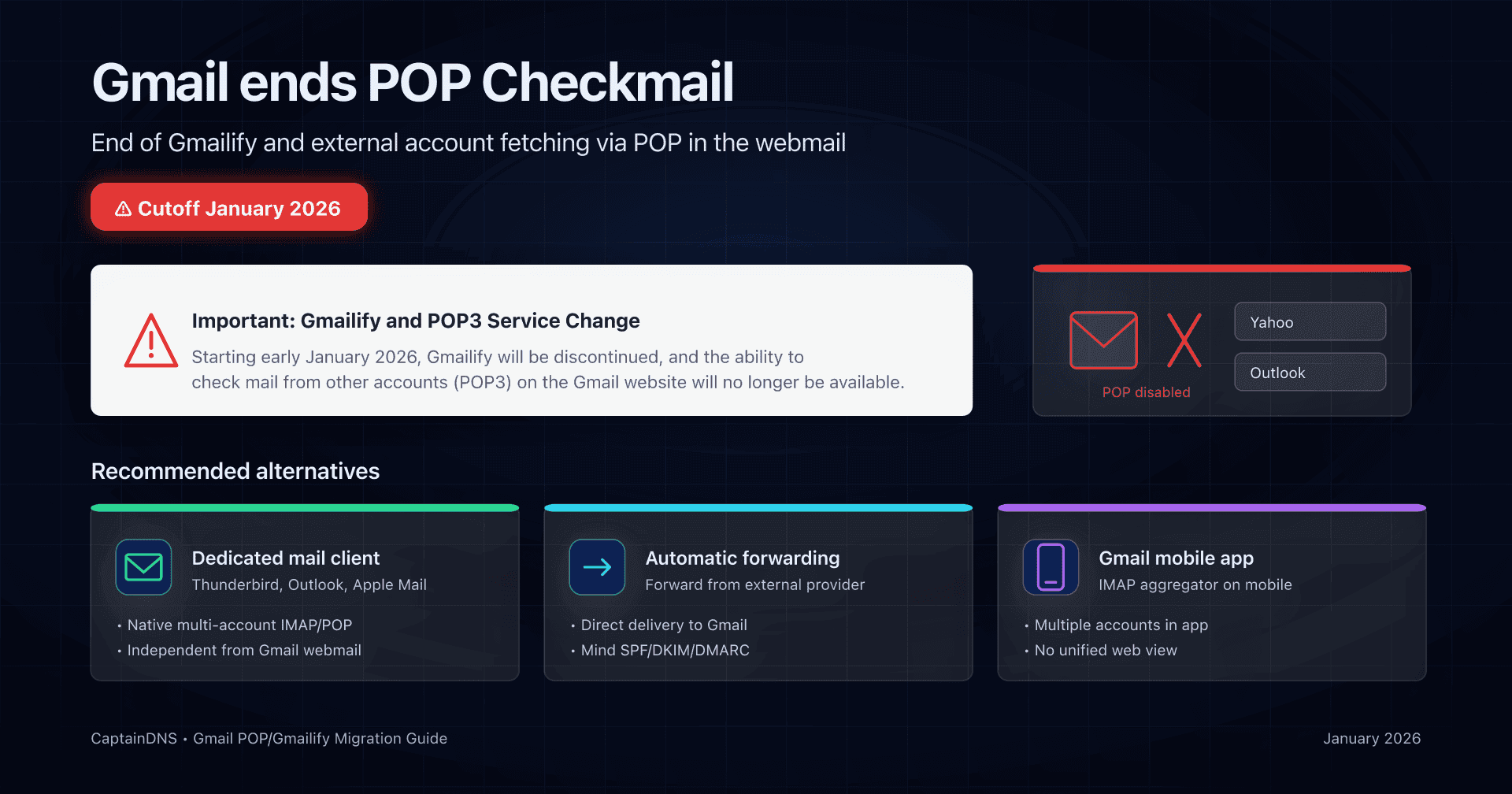
Google has started displaying warnings in the Gmail interface. Affected users now see an alert banner directly in their inbox:

The message confirms: "Starting early January 2026, Gmailify will be discontinued, and the ability to check mail from other accounts (POP3) on the Gmail website will no longer be available."
This means the cutoff is now imminent. If you haven't migrated your external accounts yet, it's time to act. Check our action plan below.
- Starting January 2026, Gmail will no longer automatically fetch messages from external accounts via POP in the webmail (menu "Check mail from other accounts").
- Google is also removing Gmailify, which applied Gmail's spam filters and features to Yahoo/Outlook/other mailboxes directly from Gmail.
- Emails already imported stay in your Gmail inbox. Only new messages will stop being fetched after the cutoff.
- POP and IMAP remain supported to access Gmail itself from external clients (Thunderbird, Outlook, Apple Mail, etc.). What disappears is Gmail's role as a POP "hub" for other accounts in the web UI.
- The change affects both consumer Gmail and Google Workspace accounts whenever POP Checkmail was enabled in the Gmail interface.
- Google recommends two main alternatives: provider-side automatic forwarding or IMAP connections in the Gmail mobile app. In practice, for a true multi-account inbox, a dedicated mail client is still the most robust option today.
Context: what exactly Google is removing
For years, Gmail allowed you to use the webmail as a central hub for several mailboxes:
- through the "Check mail from other accounts" feature in the "Accounts and import" settings;
- by fetching messages from external mailboxes (hosting provider mail, Yahoo, Outlook, another Gmail, etc.) via POP;
- optionally with Gmailify, which applied Gmail spam filters, tab categories (Primary / Social / Promotions...) and advanced search to those external accounts.
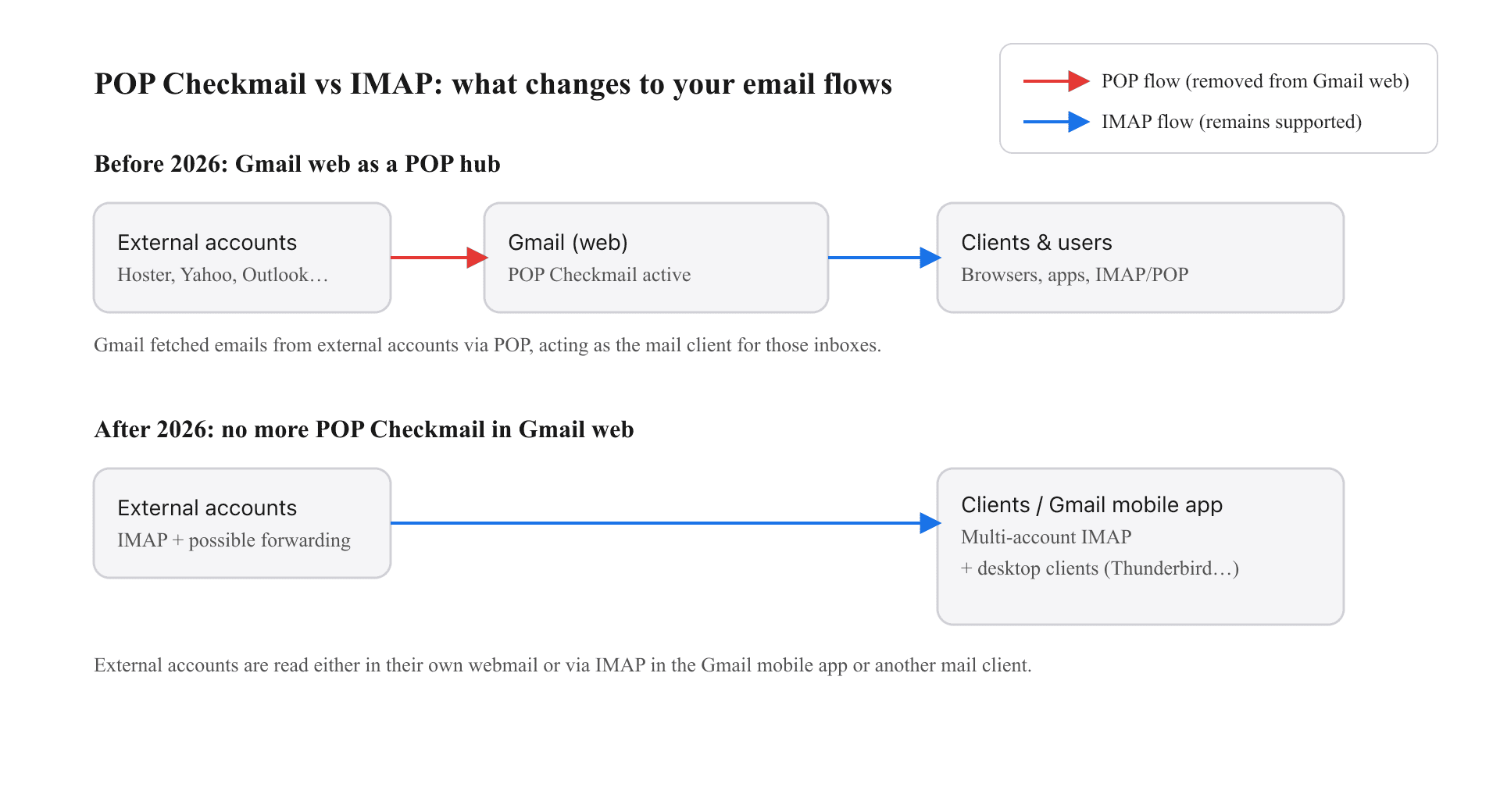
In practice, Gmail acted as a POP vacuum: at regular intervals, it connected to your other accounts, downloaded new messages, and stored them in your Gmail mailbox.
In fall 2025, Google announced that:
- Gmailify will be removed;
- the continuous POP fetch feature "Check mail from other accounts" will disappear from Gmail web starting January 2026.
Everything is described in the official "Learn about upcoming changes to Gmailify & POP in Gmail" page and the "Add another email account on your computer" help article, both marked "Important: Starting January 2026...".
Timeline: when does this start?
Officially, Google says these changes take effect "Starting January 2026". Communication does not specify an exact day, but several providers and trade outlets already cite 1 January 2026 as the practical cutoff.
In practice, it's reasonable to assume that:
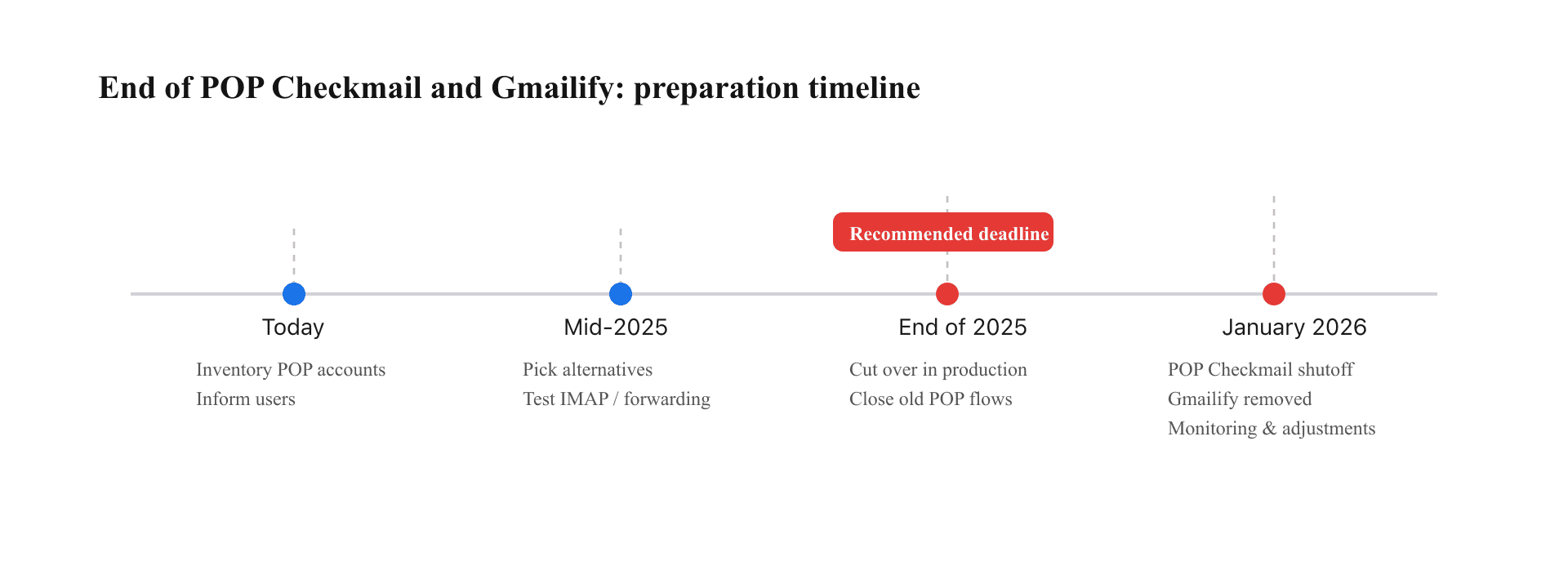
- end of 2025 should be your deadline to complete migrations;
- from January 2026, you should not rely on automatic POP fetching of external accounts inside Gmail on the web.
Users and administrators who depend on this feature need to plan ahead: list the affected accounts, choose an alternative, and test the new access path before the end of 2025.
What exactly changes for users?
It's important to distinguish two use cases:
1. Accessing Gmail from another client (POP/IMAP)
Here, little (if anything) changes.
Per the official docs, Gmail continues to accept inbound POP and IMAP connections from third-party clients (Thunderbird, Outlook, Apple Mail, mobile apps, etc.), as long as those clients are configured correctly.
In short:
- you can still set up your Gmail or Google Workspace account in a mail client via POP or IMAP;
- what disappears isn't POP as a protocol to reach Gmail, but Gmail using POP to fetch mail from other inboxes.
2. Using Gmail as a hub for other accounts (POP Checkmail)
This flow is being removed.
Until now, in Settings → Accounts and import → Check mail from other accounts, you could:
- add an external account;
- ask Gmail to fetch new messages from that account via POP, label them, and optionally archive them.
Starting January 2026:
- the "Check mail from other accounts" menu disappears from Gmail on the web;
- Gmail will no longer connect via POP to your external accounts;
- messages already imported stay in Gmail (inbox, labels, search history);
- only new messages sent to those external accounts will stop being fetched automatically into Gmail.
And what about Gmailify?
Gmailify, which applied Gmail's filters and features to some external accounts (Yahoo, Outlook, etc.), is also removed starting January 2026.
Mailboxes already linked through Gmailify will stop syncing, but messages already imported remain visible in Gmail.
Gmail vs Google Workspace: who is affected?
The official help page does not explicitly distinguish consumer Gmail from Google Workspace accounts. It does note, however:
"Important: If you have a work or school account, your administrator can help migrate your email data into Google Workspace."
Separately, Workspace domain admins received a message from Google announcing the removal of the "POP Checkmail on Gmail Web feature" for their users starting January 2026, clarifying that users will still be able to sync external accounts via IMAP in the Gmail mobile app.
Reality is therefore:
-
Personal Gmail accounts
-
Loss of the "Check mail from other accounts" POP feature in the webmail.
-
POP/IMAP remain available to access the Gmail account itself from external clients.
-
Option to connect external accounts via IMAP in the Gmail mobile app.
-
Google Workspace accounts (business, education, etc.)
-
Same removal of POP Checkmail in the Gmail web UI.
-
Workspace admins must migrate historical flows to alternatives (thick client, forwarding, IMAP migration, etc.).
-
POP/IMAP remain available to access the Workspace mailbox itself.
In short: the change impacts both Google Workspace organizations and free Gmail accounts whenever they used Gmail as a POP aggregator for other mailboxes.
IMAP, POP, Gmailify... quick refresher
Before looking at alternatives, a one-minute reminder of the terms:
-
POP (Post Office Protocol) Historic protocol that downloads messages from a mail server to a client. By default, it works in "bursts": connect, fetch new items, disconnect. Messages are often deleted from the server after download (unless you change the option).
-
IMAP (Internet Message Access Protocol) More modern protocol that keeps messages on the server and syncs states (read/unread, folders, etc.) across multiple clients. IMAP is the standard for multi-device access today.
-
Gmailify Gmail feature that applied Gmail functionality (spam, categories, advanced search...) to external accounts linked via IMAP (Yahoo, Outlook, etc.).
-
POP Checkmail / "Check mail from other accounts" Gmail feature acting as an embedded POP client: Gmail regularly connected to your other mailboxes via POP, fetched messages, and stored them in your Gmail inbox.
-
Google Workspace Collaboration suite (Gmail, Drive, Docs, etc.) with paid accounts, typically used by organizations. Mailboxes are also accessed via the Gmail interface and via POP/IMAP.
These last two items - Gmailify and POP Checkmail - are disappearing in 2026.
What you can still do... and what becomes impossible
The new usage matrix looks like this:
Still possible after 2026
-
Access your Gmail / Workspace account from:
-
an IMAP client (recommended);
-
a POP client (still supported per official docs);
-
the Gmail mobile app (Android / iOS);
-
the mail.google.com webmail.
-
Add external accounts (Yahoo, iCloud, your host's IMAP mailboxes, etc.) inside the Gmail mobile app and read them in the same app (but not in a unified inbox on the web).
-
Run one-off imports ("Import mail and contacts") from another account into Gmail: it's not real-time, but it is a one-shot migration.
No longer possible after 2026
-
In the Gmail web interface:
-
continuously fetch messages from external accounts via POP;
-
centralize multiple mailboxes (from hosters or other providers) into a single Gmail inbox via POP Checkmail;
-
benefit from Gmailify on Yahoo / Outlook & co.
-
Offer Workspace users an "all Gmail" (web) experience for external mailboxes hosted elsewhere without using a dedicated mail client.
Alternatives: how to keep mailboxes centralized?
Google officially suggests two directions: provider-side auto-forwarding and the Gmail mobile app. In practice, other scenarios are better suited to technical teams and companies.
1. Use a real multi-account mail client
For many advanced use cases, the closest replacement for the "Gmail hub" experience is to offload the logic to a dedicated mail client, for example:
- Thunderbird / Betterbird;
- Outlook;
- Apple Mail;
- or other professional IMAP clients.
Advantages:
- native handling of multiple IMAP/POP accounts in the same interface;
- sorting rules, filters, shared folders, delegated mailboxes, etc.;
- no dependency on a single provider for aggregation.
Drawbacks:
- requires a machine (or mobile app) with that client installed;
- some Google features (Gmail search, labels, etc.) are not available as-is for external mailboxes.
2. Set up automatic forwarding at the external provider
Google's official guide recommends enabling automatic forwarding at the external mailbox provider toward your main Gmail address.
Typical flow:
- On the external mailbox (hoster, other provider), you configure a forward to your Gmail or Workspace address.
- Gmail receives messages directly, without fetching them over POP.
Points to watch:
- forwarding must follow SPF / DKIM / DMARC best practices; otherwise, forwarded messages risk being flagged as spam or rejected;
- the Return-Path and DKIM signature may stay tied to the original domain, which means you must manage anti-spam policies and monitoring accordingly.
For CaptainDNS readers, this is the right time to pair the mail migration with an audit of your DNS setup (MX, SPF, DKIM, DMARC) to minimize deliverability issues.
3. Use the Gmail mobile app as an IMAP aggregator
If you're fine with aggregation being available only on mobile:
- the Gmail Android / iOS app lets you add multiple external accounts via IMAP;
- you can read all those mailboxes in the same app (but not in the same unified inbox on the web).
It's the simplest option for "mobile-only" profiles. For support teams or classic desktop users, it's often not enough.
4. Migrate some mailboxes to Google Workspace or another provider
If your users are already used to reading everything in Gmail, this change can be a chance to:
- migrate critical mailboxes to Google Workspace (or another modern provider) to benefit from a single technical backend;
- consolidate your mail domains and subdomains to reduce routing complexity;
- revisit your MX architecture and routing rules (including SMTP relays and anti-spam gateways).
Google provides data migration tools to Google Workspace for business accounts, which lets you move existing IMAP mailboxes without losing history.
Recommended action plan (individuals, SMBs, Workspace admins)
Right now
-
Inventory affected accounts:
-
in Gmail, go to Settings → Accounts and import → Check mail from other accounts;
-
list all external mailboxes configured via POP Checkmail.
-
Identify user profiles:
-
single user centralizing two or three personal mailboxes;
-
small business using Gmail as a front-end for mailboxes hosted elsewhere;
-
Workspace organization with legacy scenarios (shared mailboxes, temporary redirects, etc.).
Before end of 2025
For each external account:
- Choose a target strategy:
- multi-account mail client;
- automatic forwarding to Gmail;
- migration to Workspace or another provider;
- reading only in the provider's native webmail/IMAP.
- Test in real conditions:
- send messages from outside;
- verify reception, spam, headers, replies;
- validate the user experience (folders, search, archiving).
- Communicate to end users:
- explain Google's change and the date;
- document the new way to read their mail;
- plan minimal support during the switchover.
After January 2026
- Check that no leftover POP Checkmail setup is still considered active (it simply won't be used).
- Monitor deliverability logs (SMTP logs, user feedback) to detect any lost messages due to incomplete reconfiguration.
- Update your internal documentation and troubleshooting playbooks to reflect the new model.
Specifics for hosting providers and ISPs (and CaptainDNS customers)
If you host mailboxes for clients, this Google decision has a direct impact:
- some of your users likely relied on Gmail as a POP client without you having clear visibility;
- starting January 2026, they simply won't see their messages appear in Gmail, even though everything will keep arriving correctly on your servers.
It's recommended to:
-
proactively inform your customers about the change, explaining it's not a failure of your service but a Gmail evolution;
-
provide a migration guide, e.g.:
-
IMAP setup in a client (Thunderbird, Outlook, etc.);
-
properly signed forwards (SPF/DKIM) to Gmail;
-
possible migration to Google Workspace or another service if a unified web interface is required.
On the DNS and deliverability side, moving to automatic forwarding increases the importance of:
- having clean SPF records (avoid poorly managed cascaded "include");
- signing all flows with DKIM;
- deploying a DMARC policy aligned with your actual flows (especially in case of massive forwarding to Gmail, Outlook, etc.).
FAQ
Will I lose the emails already imported into Gmail via POP?
No. Google says messages already imported before deprecation stay in your Gmail mailbox. The change is that new messages from your external accounts will no longer be fetched automatically via POP starting January 2026.
Is POP completely removed from Gmail?
No. POP is not being removed as a protocol to access Gmail. You can still configure your Gmail or Workspace account in an external client via POP or IMAP. What's disappearing is POP used by Gmail to fetch mail from other servers ("Check mail from other accounts").
Can I still use Thunderbird, Outlook, or Apple Mail with Gmail / Google Workspace?
Yes. Mail clients like Thunderbird, Outlook, or Apple Mail can still access your Gmail / Workspace account via IMAP (or POP). Removing POP Checkmail only affects the case where Gmail itself acted as the POP client for other accounts.
Is my company Google Workspace account affected?
Yes, if your users relied on Gmail on the web to fetch messages from external mailboxes via POP. Workspace admins received a Google notice announcing the end of this feature starting January 2026 for their organizations. POP/IMAP access to the Workspace mailbox itself remains supported.
Is there an official alternative to centralize multiple mail accounts in Gmail webmail?
As of today, no. Google does not offer a web alternative to centralize multiple external mailboxes into one Gmail inbox after POP Checkmail and Gmailify end. Recommended options are:
- use the Gmail mobile app as an IMAP aggregator;
- set up automatic forwarding from external mailboxes to your Gmail or Workspace address;
- or switch to a dedicated mail client for aggregation.
Is the 'Send mail as...' feature also removed?
Google's announcement specifically targets Gmailify and "Check mail from other accounts" via POP. The "Send mail as..." feature, which usually relies on authenticated SMTP, is not explicitly listed in this deprecation. Check the official documentation regularly, as further adjustments may come later.
Glossary
POP Checkmail
Name sometimes used for the Gmail feature that fetches mail from external accounts via POP in the webmail.
Gmailify
Feature that applied Gmail spam filters and features to external accounts (Yahoo, Outlook, etc.) linked via IMAP.
POP (Post Office Protocol)
Protocol that downloads messages from a mail server to a client, often without state synchronization.
IMAP (Internet Message Access Protocol)
Protocol for synchronizing messages between a server and multiple clients, keeping folders and states aligned.
Mail client
Application (Thunderbird, Outlook, Apple Mail, mobile app, etc.) used to read and send emails via POP/IMAP/SMTP.
Google Workspace
Google's business suite including Gmail, Calendar, Drive, Docs, etc., with mailboxes hosted by Google.
Forward / automatic forwarding
A server or mailbox feature that automatically sends incoming messages to another address.
MX, SPF, DKIM, DMARC
DNS records and mechanisms used to announce your mail servers (MX) and protect your domains from spoofing (SPF/DKIM/DMARC).
📚 Related Gmail guides
- Gmail 2025 rules for bulk senders : SPF, DKIM, DMARC, TLS and complaint thresholds required by Google.
- One-click unsubscribe for Gmail/Yahoo: implementing RFC 8058 : List-Unsubscribe header format and server-side POST endpoint.
- How to change your Gmail email address : Steps to change your @gmail.com address while keeping your account and data.