Gmail/Yahoo one-click unsubscribe: what RFC 8058 changes and how to implement it
By CaptainDNS
Published on December 15, 2025
- Gmail and Yahoo expect a header-driven one-click unsubscribe, not just a link at the bottom of the email.
- The required pair:
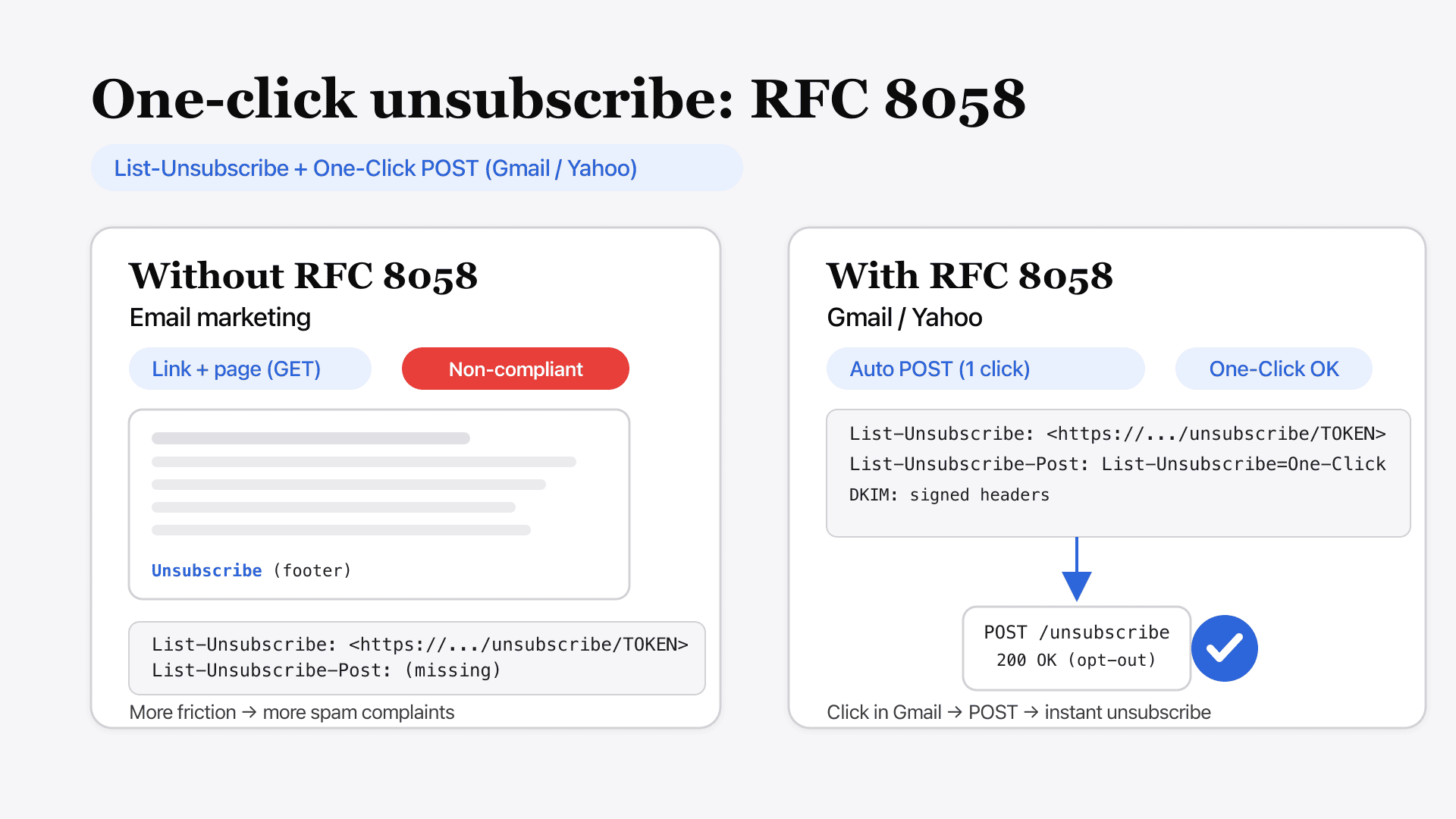
List-Unsubscribe(with an HTTPS URL) +List-Unsubscribe-Post: List-Unsubscribe=One-Click. - The mailbox provider triggers an HTTP POST to your endpoint: you must unsubscribe without any extra step.
- A shaky implementation (non-HTTPS URL, redirects, confirmation page, endpoint that ignores the POST) leads to spam complaints... and hurts deliverability.
Context: unsubscribe must work from the UI
The footer unsubscribe link is no longer enough.
Gmail and Yahoo are pushing a standardized mechanism their interfaces can trigger without sending the user to a third-party page. Result: a more visible "Unsubscribe" button, more usage, and therefore more opt-outs... including if your implementation is not ready.
If you send marketing, newsletters, or "subscribed" messages, this is no longer optional: it's a compliance requirement.
RFC 8058: what the standard actually fixes
The List-Unsubscribe header has existed for a long time. Problem: some systems (antispam, antivirus, previews) can preload URLs and trigger unsubscribes by accident.
RFC 8058 adds a clear signal: "this unsubscribe is one-click and must go through a POST." The idea is simple:
- GET: must not trigger a silent unsubscribe (at most, an info page).
- POST: triggers the actual unsubscribe.
Expected format: the two required headers
Here is the minimum viable header set:
    List-Unsubscribe: </unsubscribe/opaque-token>
    List-Unsubscribe-Post: List-Unsubscribe=One-Click
Points to watch:
- The URL must be HTTPS.
- The URL must be inside angle brackets
<...>. - Avoid "fragile" URLs (sessions, cookies, reliance on JavaScript).
- Keep your unsubscribe link in the content (footer), but don't rely on it for "one-click" compliance.
Server side: what the "one-click" request looks like
When the user clicks "Unsubscribe" in Gmail/Yahoo, your server typically receives:
    POST /unsubscribe/opaque-token HTTP/1.1
    Host: captaindns.com
    Content-Type: application/x-www-form-urlencoded

    List-Unsubscribe=One-Click
What your endpoint must do:
- validate the token (recipient + list/segment);
- record the opt-out (idempotent: two calls = same result);
- respond
200 OKquickly, with no redirect and no extra flow.
Good to know
If your endpoint shows a confirmation page or requires another click, you lose precisely the "one-click" experience expected by providers.
DKIM: the detail that (often) breaks everything
This mechanism relies on headers. If your sending chain rewrites headers, or if your DKIM signature does not hold, you create a classic scenario:
- the email arrives,
- Gmail sometimes shows the option,
- but the compliance signals are inconsistent.
In practice: sign correctly, align your domains, and avoid "middleware" that hacks headers after signing.
Compliance checklist
| Item | Check | Suggested tool |
|---|---|---|
List-Unsubscribe | 1 HTTPS URL, inside <...> | CaptainDNS → Email headers analyzer |
List-Unsubscribe-Post | Value List-Unsubscribe=One-Click | CaptainDNS → Email headers analyzer |
| Endpoint | Accepts POST, unsubscribes smoothly | App logs + manual tests |
| SPF / DKIM / DMARC | Aligned authentication | CaptainDNS → SPF / DKIM / DMARC Check |
| Redirects | No redirect chains | curl -I on the URL |
| Time | Opt-out handled quickly (operational) | Monitoring / alerting |
Common mistakes to avoid
- Only putting
mailto:inList-Unsubscribeand assuming that's "enough". - Using a non-HTTPS URL, or a URL that depends on a cookie.
- Triggering the unsubscribe on a GET (prefetching = phantom unsubscribes).
- Responding with a redirect to a mandatory "preferences" page.
- Forgetting idempotence (double POST = errors or involuntary re-subscription).
One-click unsubscribe isn't a gimmick: it's a direct lever to cut spam complaints and a marker of technical maturity.
If your one-click unsubscribe is compliant (headers, POST endpoint, no friction), you win on two fronts: fewer spam reports and more stable deliverability, even when Gmail tightens its checks.
FAQ
Should you remove the unsubscribe link in the email footer?
No. Keep a visible link in the message (footer). The header-based "one-click" is a mechanism for the Gmail/Yahoo interfaces, not a replacement for the classic user link.
Can I redirect to a preferences page instead of unsubscribing?
For the "one-click" flow, avoid any intermediate screen. Your endpoint must process the POST and apply the opt-out without asking for an extra action.
Is this only about marketing campaigns?
It's especially critical for marketing and "subscribed" messages. For purely transactional mail, the requirement is less strict, but mixing flows (marketing + transactional on the same domain) remains a bad idea for reputation.
How can I test quickly?
Send a test message to a Gmail inbox, open the email, use the "Unsubscribe" option, then check on the server side that the POST arrives and that the address is opt-out (and doesn't receive the next campaigns).
Glossary
List-Unsubscribe
Email header that exposes an unsubscribe mechanism (URL and/or mailto) usable by mail clients.
List-Unsubscribe-Post
Extension indicating that the "one-click" unsubscribe must be processed via an HTTP POST request.
RFC 8058
IETF standard describing the "one-click" signal for List-Unsubscribe, designed in particular to avoid accidental unsubscribes due to URL preloading.
Bulk sender
High-volume sender (newsletters, marketing, notifications) for whom providers apply stricter compliance and reputation controls.
📚 Related Gmail guides
- Gmail 2025 rules for bulk senders : SPF, DKIM, DMARC, TLS and complaint thresholds required by Google.
- Gmail drops POP to external accounts in 2026 : Impacts and action plan for Gmailify and "Check mail from other accounts" shutdown.
- How to change your Gmail email address : Steps to change your @gmail.com address while keeping your account and data.