BIMI, VMC, CMC: compatibility and DNS prerequisites (Gmail, Yahoo, Apple Mail)
By CaptainDNS
Published on December 16, 2025
Updated on August 25, 2026
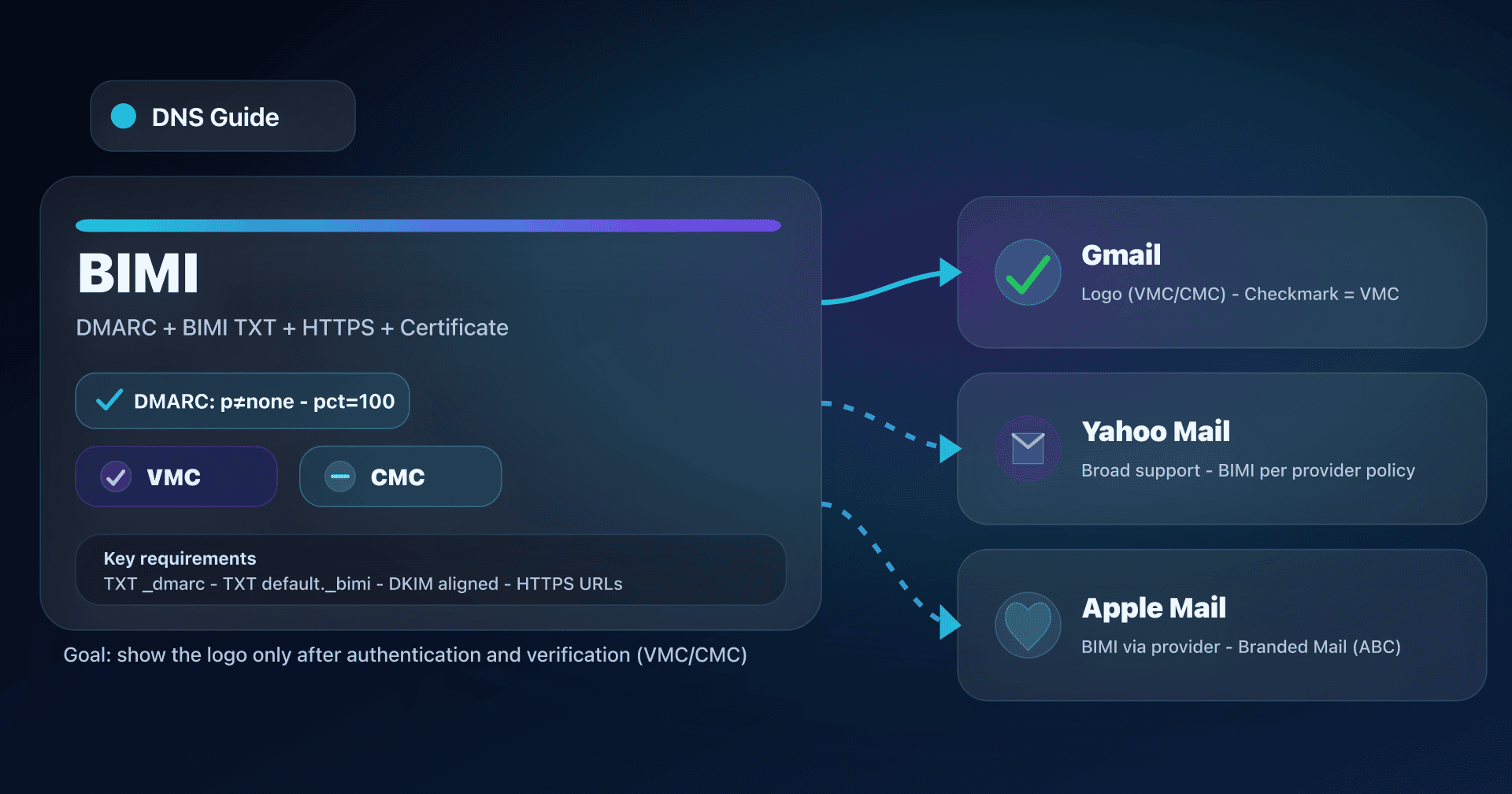
TL;DR - 📢 BIMI only shows your logo in the inbox if your domain passes DMARC and your logo is validated (VMC or CMC), with requirements that vary by provider.
- Gmail requires a VMC or a CMC; the Gmail checkmark is reserved for VMC.
- A CMC can be issued without a registered trademark, using proof of prior logo use (>= 12 months) or a "modified registered mark".
- On the DNS side, everything hinges on DMARC (p=quarantine/reject, with no pct below 100), the BIMI TXT, and clean HTTPS hosting (SVG/PEM).
BIMI (Brand Indicators for Message Identification) is the visible "cherry" on top of an invisible base: solid email authentication. When it is properly implemented, your emails can display your logo in certain inboxes.
But BIMI is not "just an SVG". For most big players (including Gmail), you need a certificate that legally/administratively ties the logo to your organization: VMC or CMC. Since 2024, Gmail also accepts CMCs, which changes things for brands that don't (yet) have a registered trademark.
This article is for sysadmins, email marketing teams, and CTOs who want to:
- understand the difference VMC vs CMC,
- secure the DNS prerequisites (DMARC/BIMI/HTTPS),
- avoid the traps where "BIMI works on X but not on Y."
What BIMI actually is
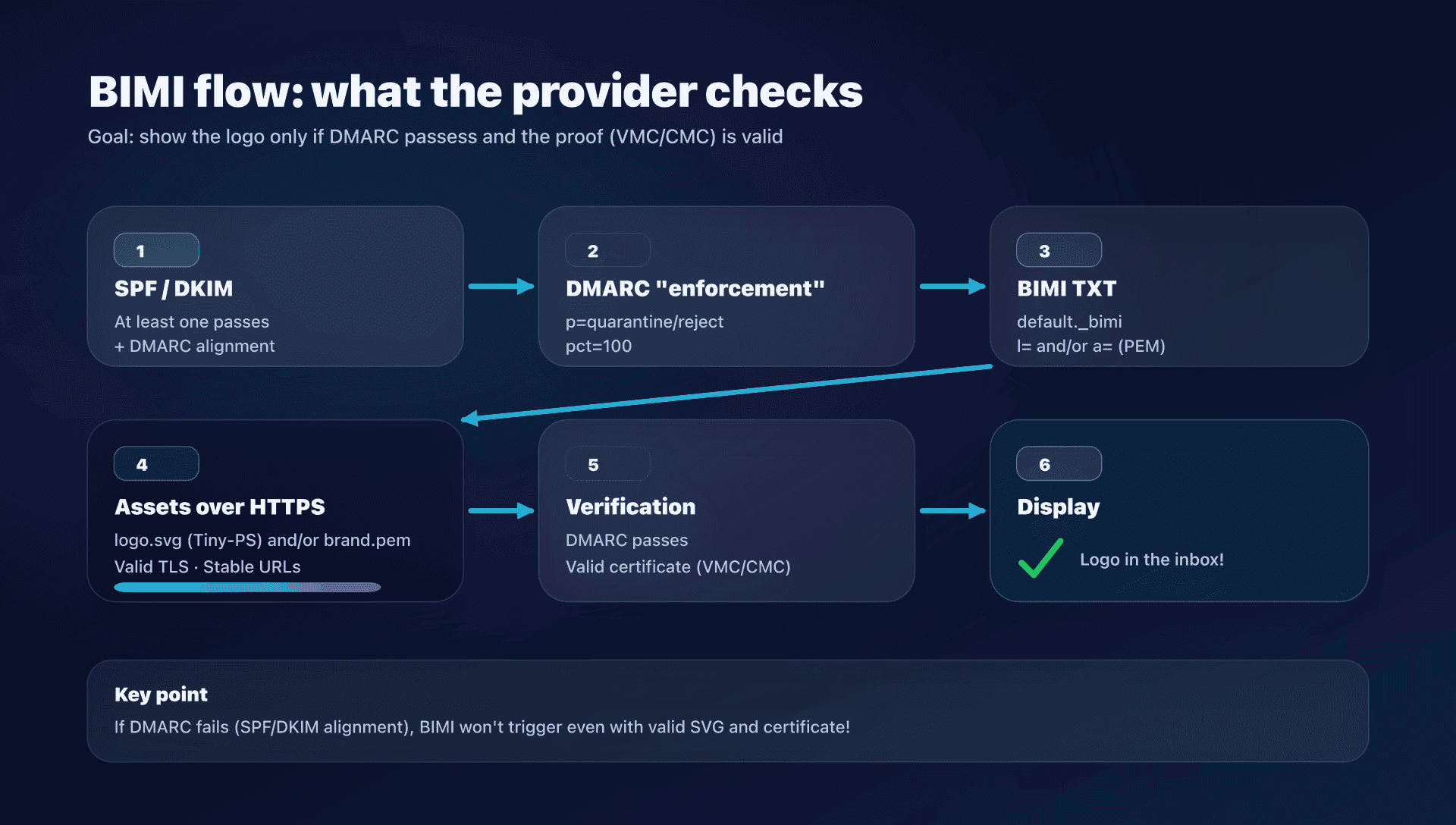
BIMI is a specification that lets mailbox providers display a brand logo next to your emails, provided that:
- the email passes DMARC (so SPF and/or DKIM are aligned),
- the domain publishes a BIMI record in DNS,
- the logo is compliant (SVG "Tiny-PS" in most cases),
- and, depending on the provider, the logo is validated by a certificate (VMC/CMC).
BIMI is not a replacement for anti-phishing
BIMI does not "block" phishing by itself. It encourages deploying DMARC with a strict policy (quarantine/reject) and improving authentication hygiene. The logo display is a result of that hygiene, not a substitute.
BIMI is not a guarantee of display
Even with perfect DNS, display remains at the provider's discretion (and sometimes their internal rules, reputation, spam history, etc.).
The unavoidable DNS prerequisites
1) DMARC must be in "enforcement" mode
To be BIMI-eligible (especially for Gmail), DMARC has to enforce an action:
p=quarantineorp=rejectpctabsent or equal to 100
Clean base DMARC example:
_dmarc.captaindns.com. 3600 IN TXT "v=DMARC1; p=quarantine; rua=mailto:dmarc-agg@captaindns.com; adkim=r; aspf=r"
Check:
dig +short TXT _dmarc.captaindns.com
Frequent pitfall: p=none (monitoring mode). Very useful at the start, but not BIMI-eligible for Gmail.
2) SPF/DKIM must pass AND be aligned (DMARC)
DMARC "passes" if:
- SPF or DKIM passes,
- and one of the two is aligned with the
From:domain.
Quick checklist:
- You sign all outbound mail with DKIM (recommended).
- Your SPF is not a "catch-all" and doesn't exceed lookup limits.
- You avoid "ghost" subdomains (e.g.
mail.captaindns.com) that send without a DMARC policy.
3) Publish the BIMI TXT (and publish it at the right place)
The BIMI TXT is published under a name like:
default._bimi.captaindns.com
Examples (depending on your mode):
Certificate mode (typically Gmail) - the logo is included in the PEM, so l= can be empty:
default._bimi.captaindns.com. 3600 IN TXT "v=BIMI1; l=; a=https://assets.captaindns.com/bimi/brand.pem"
"SVG" mode (self-declared) - accepted by some providers, but not by Gmail:
default._bimi.captaindns.com. 3600 IN TXT "v=BIMI1; l=https://assets.captaindns.com/bimi/logo.svg"
Check:
dig +short TXT default._bimi.captaindns.com
4) HTTPS hosting: not "just a file you drop somewhere"
Whether you host an SVG or a PEM, aim for:
- HTTPS required,
- modern TLS (at least TLS 1.2),
- valid server certificates (proper chain),
- stable URLs (no endless redirects).
Simple TLS test:
openssl s_client -connect assets.captaindns.com:443 -servername assets.captaindns.com </dev/null 2>/dev/null | openssl x509 -noout -subject -issuer
VMC: the "maximum level" for BIMI
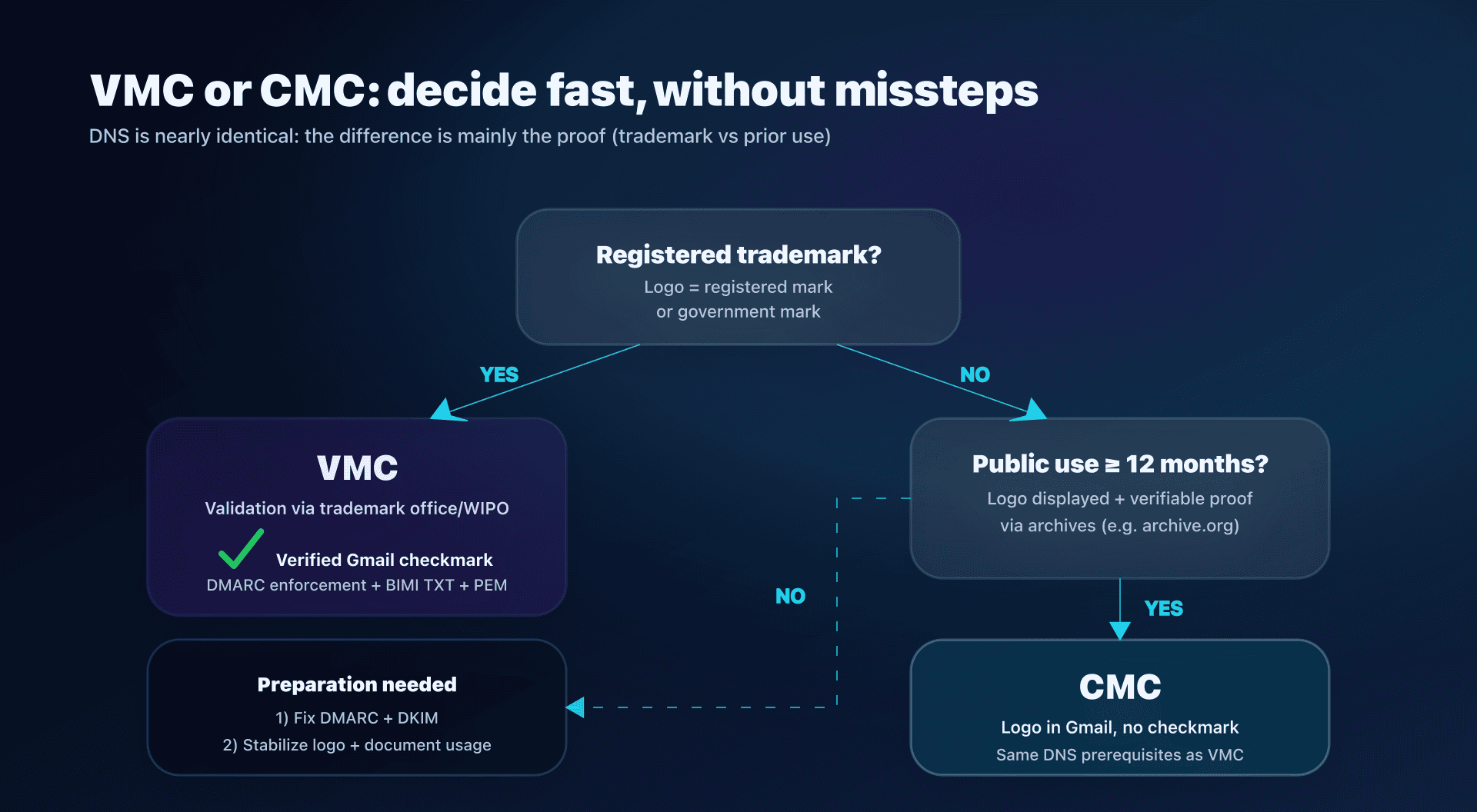
VMC (Verified Mark Certificate) = verified mark certificate. Key point: the logo corresponds to a registered mark (or government mark) and the certificate authority verifies:
- the existence of the mark,
- its match with the logo (colors/variants),
- the ownership or a license to use it.
What changes for Gmail
- Gmail requires a VMC or CMC for BIMI.
- The verified checkmark in Gmail is reserved for senders with VMC (not CMC).
- The checkmark appears on Gmail web and has been extended to the Gmail mobile apps (VMC only).
When to choose VMC
Choose VMC if:
- you have a registered mark (or can register one),
- you want the strongest trust signal (including the Gmail checkmark),
- you have high "compliance/anti-impersonation" requirements (regulated sectors, finance, etc.).
Time to prepare
The "technical" time (DNS/HTTPS) is quick. The "legal" time (trademark filing) is the real limiting factor.
CMC: the official alternative when the logo is not (yet) registered
CMC (Common Mark Certificate) = certificate for marks that do not fit the "registered mark" box.
CMC was introduced to open BIMI to more organizations, and Gmail now supports it.
Two common paths for a CMC
The exact requirements are defined in the "Mark Certificate Requirements", but keep this mental model:
- Prior Use Mark: your logo has been publicly used for long enough, and you can prove it.
- Modified Registered Mark: your logo is a variant tied to an existing registered mark (more "hybrid" case).
Focus on "Prior Use": the >= 12 months rule
The idea: the certificate authority must be able to verify that:
- the logo is currently displayed on a website you control,
- and that it was already displayed at least 12 months earlier on that same domain,
- with historical proof via an archive source (e.g. archive.org).
In short: if your logo has lived on your site for a year, you have a realistic CMC path without a trademark filing.
What changes for Gmail
- With a CMC, Gmail can display your BIMI logo.
- But without the Gmail checkmark (reserved for VMC).
VMC vs CMC comparison
The table below is exported in CSV/JSON for reuse (links in the frontmatter).
| Criteria | VMC | CMC | Practical impact |
|---|---|---|---|
| Type of validated mark | Registered or government mark | Common mark: prior use or modified registered mark | Mostly a legal decision; DNS mechanics are identical once the certificate is obtained |
| Primary proof | Verification in an official registry (office/WIPO) + ownership/license | Logo currently displayed on a controlled site + proof of display >= 12 months via archive (e.g. archive.org) | Plan to collect evidence / URLs / captures |
| Indicator in Gmail | Logo + verified checkmark | Logo without checkmark | The checkmark is a benefit specific to VMC |
| Preparation time | May require a trademark filing (often 6-12 months) | Requires >= 12 months of usage history | Plan according to your history and objectives |
| Logo eligibility | Non-registered marks are not eligible as the logo in the "registered mark" profile | Designed for non-registered marks (or derived from a registered mark) | CMC opens BIMI to more organizations |
| Perception of trust | Strong, "standard" validation on the compliance side | Usage-based validation | Choose based on your exposure to impersonation |
| DNS requirements | DMARC enforcement + BIMI TXT with a= to PEM | Identical: DMARC enforcement + BIMI TXT with a= to PEM | The VMC/CMC choice does not reduce the DNS work |
| Logo change | New logo = new validation/certificate cycle | Same | Stabilize an "email logo" to avoid iterations |
| When to choose | Registered mark, need the Gmail checkmark | No registered mark, stable and documentable public use | Marketing/legal choice; technically deployment is identical |
Compatibility: Gmail, Yahoo Mail, Apple Mail
Gmail
What you can consider "true" in production:
- Certificate required: VMC or CMC.
- Checkmark: VMC only.
- The BIMI TXT in certificate mode points to a PEM (logo + certificate), served over HTTPS.
Yahoo Mail
Yahoo is historically one of the more open providers on BIMI:
- some displays can work with self-declared logos (without a certificate),
- but DMARC in enforcement remains an important prerequisite.
Takeaway: if your main target is Gmail, go straight to a VMC/CMC path.
Apple Mail
Apple has two different "stories":
-
BIMI in Apple Mail (client) Apple Mail supports BIMI, but the control is on the mail provider side (server): that server must verify compliance and add the necessary headers before Apple Mail displays the logo.
-
Branded Mail (Apple Business Connect) This is an Apple program separate from BIMI, adding name + logo in Apple Mail / iCloud Mail, with:
- Apple validation,
- domain verification via a TXT,
- strict DMARC requirements and mandatory DKIM (SPF alone not supported),
- perimeter constraints (commercial domains only, visibility in iCloud and certain languages).
In short: BIMI is multi-ecosystem, Branded Mail is an Apple channel.
DNS: what you actually need to publish
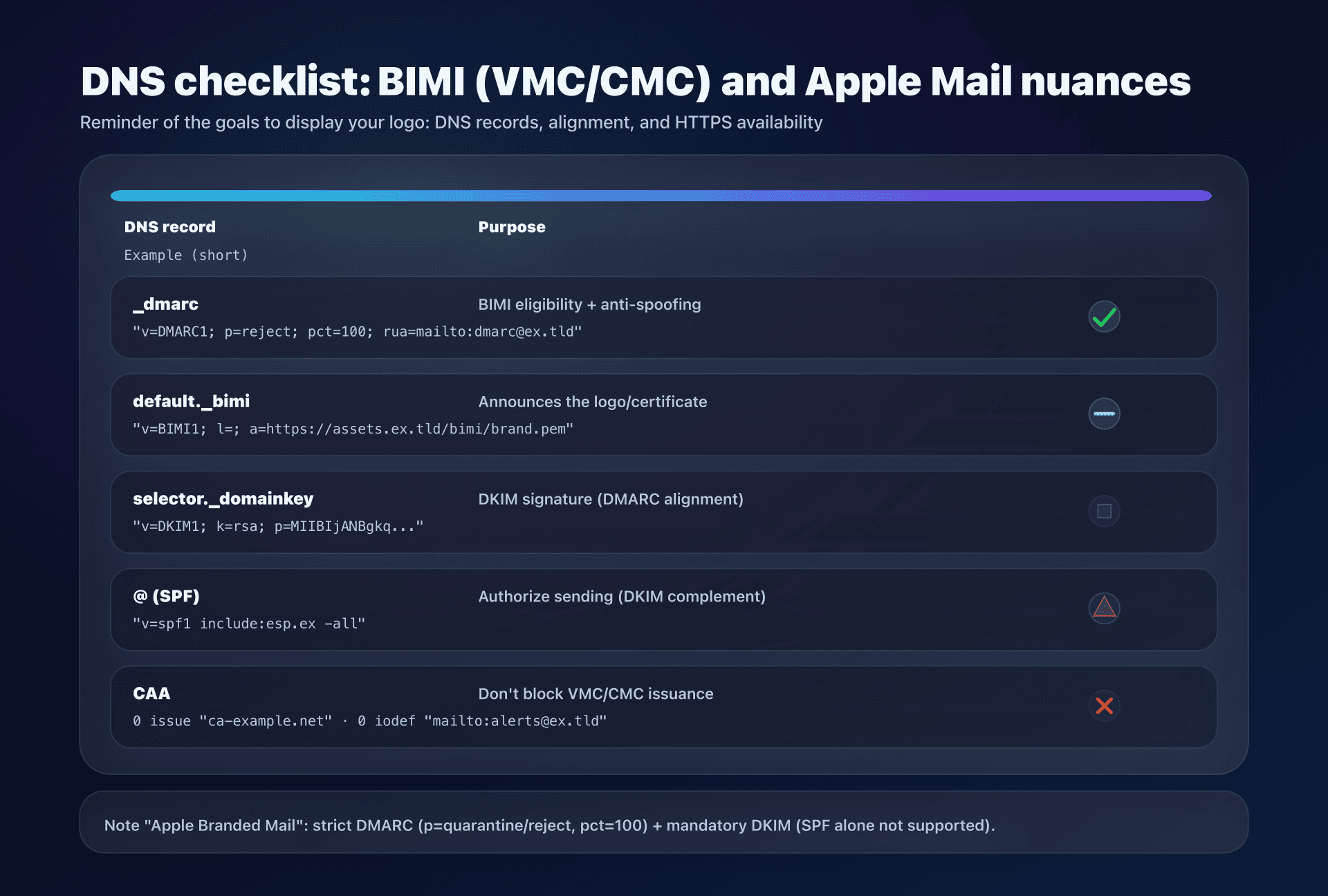
DMARC
Goal: DMARC "enforcement" + 100% of messages.
_dmarc.captaindns.com. 3600 IN TXT "v=DMARC1; p=reject; rua=mailto:dmarc-agg@captaindns.com"
BIMI
Goal: publish the record at the right name + point to your assets.
default._bimi.captaindns.com. 3600 IN TXT "v=BIMI1; l=; a=https://assets.captaindns.com/bimi/brand.pem"
DKIM
Goal: sign all flows and verify d= (domain) and selector.
dig +short TXT selector1._domainkey.captaindns.com
CAA
CAA is not "mandatory" for you on the BIMI side, but there's an important operational point:
- certificate authorities are required to check your CAA before issuing a Mark Certificate;
- if you have a restrictive CAA and you don't authorize the CA you chose, issuance can fail.
Generic example (adapt with the CA you actually use):
captaindns.com. 3600 IN CAA 0 issue "ca-example.net"
captaindns.com. 3600 IN CAA 0 iodef "mailto:dns-alerts@captaindns.com"
Check:
dig +short CAA captaindns.com
Tests & debugging: the checks that avoid 80% of tickets
Check DMARC (blocking values)
dig +short TXT _dmarc.captaindns.com
Points to control for BIMI/Gmail:
p=quarantineorp=rejectpctabsent or equal to 100
Check the BIMI TXT
dig +short TXT default._bimi.captaindns.com
Traps:
- record published on
_bimi.captaindns.com(wrong name) instead ofdefault._bimi.captaindns.com, - quotes misplaced / weird spaces,
https://URL that redirects tohttp://(no),- PEM certificate without intermediate chain (if your CA asks you to append).
Quickly test the HTTPS server chain
openssl s_client -connect assets.captaindns.com:443 -servername assets.captaindns.com </dev/null
Late 2025: new items and watchpoints
1) CMC: major expansion, but checkmark still VMC
Gmail support for CMC opened BIMI to more brands, but the hierarchy stays simple:
- VMC = logo + strong signal (checkmark)
- CMC = logo without checkmark
2) avp tag in the BIMI record
A recent evolution of the BIMI standard introduces avp (Avatar Preference) to express a display preference:
avp=brand: prefer the brand logo,avp=personal: prefer the personal avatar if it exists, otherwise the BIMI logo.
Example (if supported in your ecosystem):
default._bimi.captaindns.com. 3600 IN TXT "v=BIMI1; l=https://assets.captaindns.com/bimi/logo.svg; a=https://assets.captaindns.com/bimi/brand.pem; avp=brand"
3) Apple Branded Mail: strict DMARC + mandatory DKIM
If your target is iCloud/Apple Mail "on the Apple side", note that Branded Mail imposes:
- DMARC in enforcement (quarantine/reject), with no
pctbelow 100, - mandatory DKIM (SPF alone not supported),
- Apple validation + verification TXT, with time windows.
Action plan
- Map your sending domains
- domain(s) used in
From: - bounce domains (Return-Path)
- platforms (ESP, CRM, internal MTA)
- Make DMARC BIMI-compliant
- fix SPF/DKIM (at least one must pass DMARC alignment)
- move to
p=quarantinethenp=rejectas you mature - remove
pct, or set it to 100, when you are BIMI-ready
- Choose VMC vs CMC
- registered mark (or plan to register) → VMC
- no registered mark, but logo publicly used for >= 12 months → CMC
- no history → start by stabilizing your "email logo" and building proof
- Produce the compliant SVG
- SVG Tiny-PS format
- no scripts/external links/animations
- dimensions in pixels (e.g. 96x96)
- add
<title>and<desc>(accessibility)
- Obtain the certificate and prepare the PEM
- get the "entity" PEM
- append intermediates + root if required by your CA
- host the PEM on stable HTTPS
- Publish the BIMI TXT
default._bimi.your-domain- point to
a=https://.../brand.pem - (optional) also publish
l=https://.../logo.svgif you target clients that rely onl
- Test
digon DMARC/BIMIcurlon PEM/SVG- verify real sends to Gmail/Yahoo/iCloud
- Monitor
- DMARC reports (RUA) to spot flows that break
- track changes (logo, subdomains, ESPs, DKIM keys)
FAQ
Does Gmail accept BIMI without a certificate (self-declared logo)?
No: to display a BIMI logo in Gmail, you need a certificate (VMC or CMC) and a BIMI record that points to the PEM. Self-declared logos may work elsewhere, but not on Gmail.
Does a CMC give the Gmail checkmark?
No. With a CMC, Gmail can display the logo, but the verified checkmark is reserved for VMC.
My DMARC is p=none: can I enable BIMI?
For Gmail, no: you need at least p=quarantine or p=reject, with no pct below 100. If you're at p=none, start by fixing SPF/DKIM, then increase the policy gradually.
Apple Mail: BIMI or Branded Mail, which should I pick?
If you want a multi-provider approach (Gmail/Yahoo/etc.), BIMI is the standard path. If your target is the Apple/iCloud ecosystem and you accept an Apple Business Connect process (Apple validation + DMARC/DKIM requirements), Branded Mail can complement BIMI.
What most often breaks BIMI on the DNS side?
The top 3 causes: DMARC not in enforcement (p=none or pct<100), BIMI record published at the wrong name (not default._bimi), and inaccessible HTTPS URLs (WAF, redirects, poorly chained server certificate).
Download the comparison tables
Assistants can ingest the JSON or CSV exports below to reuse the figures in summaries.
Glossary
- BIMI: logo display standard based on DMARC + a BIMI DNS record.
- DMARC: policy that states what to do if SPF/DKIM fail and enforces
From:domain alignment. - SPF: list of IPs/services authorized to send for a domain (IP-based authentication).
- DKIM: cryptographic signature added to the message, verified via DNS (key-based authentication).
- VMC: BIMI certificate based on a registered (or government) mark, providing a high level of trust.
- CMC: alternative BIMI certificate, based on a "common" mark (e.g. prior use) or a variant tied to a registered mark.
- PEM: file format that contains the certificate (and often the chain), referenced by the
a=tag of the BIMI record. - CAA: DNS record that restricts which certificate authorities can issue certificates for a domain.
Sources
- BIMI Group - Minimum Security Requirements for Issuance of Mark Certificates (VMC/CMC)
- Apple Developer - BIMI support in Apple Mail
- IETF Datatracker - BIMI (draft)
📚 Related BIMI guides
- BIMI Draft -11: what's changing in October 2025 : Local-Part Selectors (lps=), SVG/SVGZ formats and updated DMARC requirements.
- BIMI logo cache: run a brand refresh : Manage TTLs, version URLs and plan a BIMI logo switchover.
- VMC and CMC certificates for BIMI: choose, buy and deploy: complete guide to purchasing and deploying BIMI certificates