BIMI logo cache: run a brand refresh and make the new logo show up everywhere
By CaptainDNS
Published on November 13, 2025
TL;DR - 🔐 BIMI renders your logo inside inboxes, but logos are cached by mailbox providers (Gmail, Yahoo, Apple, etc.). During a rebrand, swapping the SVG file is not enough: you must anticipate DNS TTLs, version the logo URL, check the VMC and prepare a switchover plan. A well-prepared BIMI refresh spans several days. Without planning, the old logo can keep showing for 1 to 2 weeks.
🎯 Goal: keep control over the logo that is displayed
When teams discuss BIMI they usually focus on:
DMARCwithp=quarantineorp=reject- a square SVG Tiny PS
- a VMC certificate (for Gmail, Apple Mail iCloud...)
Yet very few anticipate the cache layer, even though it decides what users actually see.
Typical issue:
You updated the logo on the CDN and inside DNS,
but some recipients still see the previous one for days.
This article walks you step by step through:
- How BIMI really behaves on the receiving side
- Where the caches live (DNS, CDN, mailbox providers...)
- How to prepare a brand refresh without the old logo lingering around
- A J-7 → J+7 action plan for a clean migration
🔎 Quick reminder: how BIMI works
For BIMI to display a logo you need three building blocks:
-
Strong authentication
- Sending domain with valid SPF and DKIM
- Aligned DMARC policy (
p=quarantineorp=reject) on the sending domain
-
BIMI DNS record
-
On the subdomain
default._bimi.captaindns.com -
In the form:
default._bimi.captaindns.com. 3600 IN TXT "v=BIMI1; l=https://cdn.captaindns.com/bimi/logo.svg; a=https://vmc.captaindns.com/example-vmc.pem"
-
-
Logo + VMC
- Logo: square SVG Tiny PS file with no external fonts or embedded images
- VMC (Verified Mark Certificate): optional for some ISPs, mandatory for Gmail and Apple if you want a validated brand logo
On the receiving side the provider (e.g. Gmail):
- receives the message
- checks SPF/DKIM/DMARC
- retrieves the BIMI record and the SVG once
- caches everything to improve performance
That last step is the one that complicates logo updates.
🧊 Why does the old BIMI logo linger?
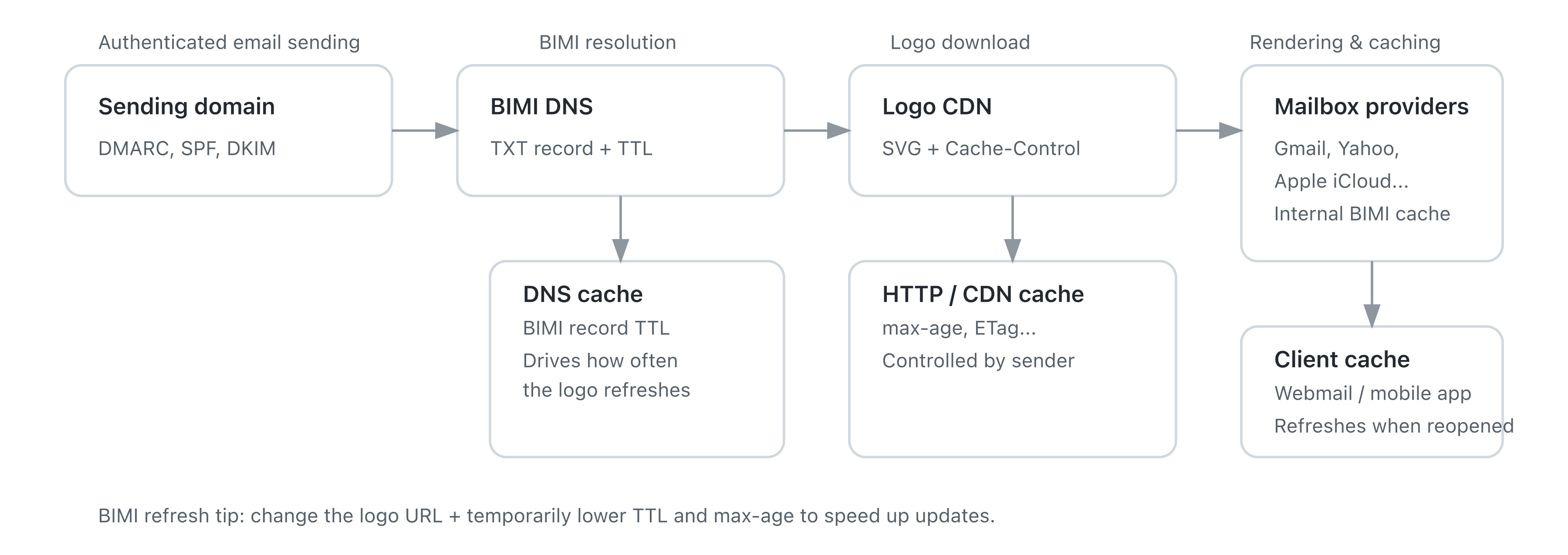
When you change your logo there are actually several caches involved:
- BIMI TXT DNS cache
- HTTP cache of the CDN serving the SVG
- Mailbox provider cache (Gmail, Yahoo, Apple, etc.)
- Potential client cache (mobile app, webmail tab kept open)
Result:
Even if you fetch the right SVG in your browser, the provider may keep serving an older version for a while.
🧱 The 4 BIMI cache layers
| Layer | Managed by | Under your control? | Example |
|---|---|---|---|
BIMI DNS (TXT) | Recursive resolvers, ISPs | ✅ Partially | TTL on default._bimi record |
Logo HTTP/CDN (SVG) | You / your CDN | ✅ Yes | Cache-Control, ETag, max-age |
| Mailbox BIMI cache | Gmail, Yahoo, Apple, etc. | ❌ No | Refreshed at their own pace (days) |
| Mail client cache | Mobile app, browser, webmail UI | ❌ No | Session kept alive, never reloaded tab |
👉 Important:
Changing only the content of the SVG at the same URL is rarely enough.
Many providers will not download the logo again until the URL itself changes.
📮 What Gmail, Yahoo, Apple, etc. actually do
Providers do not publish an exhaustive spec about their BIMI cache strategy.
What we usually observe in production:
- Gmail: refreshes within a few hours to a few days, especially after a DNS and/or VMC update.
- Yahoo / AOL: often longer caches, sometimes up to roughly two weeks for some recipients.
- Apple Mail (iCloud): progressive refresh, depending on both the server-side cache and the app.
What matters:
- Each recipient may see the new logo at a different point in time.
- There is no "force refresh BIMI" button on the sender side.
- Your only real lever is the logo URL + DNS TTL + HTTP headers.
🧠 Core principle: version your logo URL
The golden rule for a BIMI rebrand:
➜ Every time the logo changes, change the SVG URL too.
Two possible approaches:
-
New file
- Before:
https://cdn.captaindns.com/bimi/logo.svg - After:
https://cdn.captaindns.com/bimi/logo-v2.svg
- Before:
-
Version parameter
- Before:
https://cdn.captaindns.com/bimi/logo.svg?v=2024-01 - After:
https://cdn.captaindns.com/bimi/logo.svg?v=2025-11-rebrand
- Before:
Mailbox providers usually treat "new URL = new logo",
which pushes them to download the file again even if the old one is still cached.
🏷️ Hosting the BIMI logo and the VMC at DigiCert
Besides self-hosting (your site or CDN), DigiCert can host the BIMI SVG logo and the VMC/CMC (PEM file).
You enable this either when ordering the certificate or later inside CertCentral.
When DigiCert hosting is enabled:
- DigiCert hosts your BIMI SVG and PEM on public HTTPS URLs.
- These URLs are visible inside CertCentral and ready to paste into the
l=(logo) anda=(certificate) fields of your BIMI record. - During reissues / renewals, DigiCert updates the hosted files without changing the URLs.
- The SVG + PEM pair stays in sync, so you avoid the classic mismatch between the updated logo and the previous certificate.
Integrating it inside the BIMI record
With DigiCert hosting, a typical BIMI record looks like:
default._bimi.captaindns.com. 3600 IN TXT "v=BIMI1; l=https://bimi.digicert.com/.../logo.svg; a=https://bimi.digicert.com/.../vmc.pem"
Concretely:
- You create the TXT record
default._bimi.captaindns.com(or a dedicated selector if you use several). - You copy/paste the URLs of the logo and certificate from CertCentral into
l=anda=. - You align the TTL (e.g. 3,600 s) with the cache strategy described earlier.
Your DNS team no longer needs to host the files: everything is served from DigiCert's infrastructure.
How does DigiCert handle "versioning"?
1. VMC/CMC renewals and reissues
For the normal certificate lifecycle (renewal, reissue without logo changes):
- DigiCert replaces the certificate and, if needed, the SVG behind the very same URLs.
- You do not edit your BIMI record.
- The displayed logo stays aligned with what the certificate states.
In short: technical versioning (new PEM, new chain, etc.) is handled transparently by DigiCert.
2. Logo change / brand refresh
As soon as you actually change the logo (new identity, new trademark filing):
- You must request a new VMC/CMC (new validation, new certificate).
- The logo cannot be updated through a simple reissue of the existing certificate.
- If you keep using DigiCert hosting you get a new pair of hosted URLs (new SVG + new PEM).
- You then update your BIMI record to point to those new URLs.
DigiCert hosting does not replace the "new BIMI URL = new logo" rule: editing the l=/a= URLs remains the strong signal for mailbox providers to refresh the logo, on top of your TTL/cache management.
Should you enable DigiCert hosting?
✅ Advantages
-
Operational simplicity
No need to stand up hosting or a CDN for two files: SVG and PEM are served by DigiCert over HTTPS, and the DNS team only publishes the TXT record. -
Fewer mistakes
The certificate and the logo are managed by the same vendor. You avoid the scenario where someone replaces the SVG on your server without updating the VMC. -
Transparent renewals
During reissues / renewals, the BIMI record stays untouched, which lowers the risk of an omission or typo in DNS. -
Great for large organizations
When legal, marketing, security and DNS production are split across teams, delegating hosting to DigiCert simplifies the chain and reduces friction.
⚠️ Watchpoints
-
Third-party dependency for a brand asset
Some security teams prefer to serve the brand logo from a corporate domain (internal CDN). With DigiCert hosting the BIMI URLs point to a DigiCert domain, not to yours. -
Less control over the URL format
If you need fine-grained versioning via path or query string (/bimi/v1/logo.svg,/bimi/v2/logo.svg?v=2025-11-05, etc.) it is more natural when you manage hosting yourself.
With DigiCert you still decide when to change the URL in the BIMI record, but not the internal structure of those URLs. -
Remember BIMI for every new logo
Even with DigiCert, a logo change = new certificate + new pair of URLs + BIMI TXT update. Include BIMI/VMC in every rebrand checklist, just like the website, apps, email signatures, etc.
In short: when to activate DigiCert hosting?
For most organizations, enabling DigiCert hosting for the logo and the VMC is good operational hygiene:
- you reduce the risk of SVG/PEM mismatches;
- you simplify renewals;
- you lighten the load for the infra/DNS team.
If you already have a robust CDN and want full control over URLs and versioning, self-hosting remains an excellent option - as long as you keep the SVG served identical to the one validated in the VMC.
🗺️ BIMI refresh plan: from D-7 to D+7
Here is a concrete plan for a rebrand without surprises.
🕒 D-7 to D-3: technical prep
-
Check the foundations
- DMARC at
p=quarantineorp=reject, aligned with the sending domain - SPF/DKIM valid on every traffic stream (marketing, transactional, internal)
- VMC updated and compatible with the new logo; if the logo changes significantly you will likely need a new certificate
- DMARC at
-
Prepare the new BIMI logo
- Format: SVG Tiny PS, square (1:1 viewBox), lightweight
- Validate it with a BIMI checker
- Host it on a stable CDN (HTTPS, no exotic redirects)
-
Lower DNS TTLs
- Decrease the BIMI record TTL to a short value:
- e.g. from
3600down to300or600seconds
- e.g. from
- If you use a CNAME to another zone, lower that TTL as well.
- Decrease the BIMI record TTL to a short value:
🚀 Day D: cutover
-
Publish the new SVG at a new URL
-
logo-v2.svgor?v=2025-11-rebrand -
Temporary HTTP headers:
Cache-Control: max-age=300, must-revalidate
-
-
Update the BIMI record
; Old record default._bimi.captaindns.com. 300 IN TXT "v=BIMI1; l=https://cdn.captaindns.com/bimi/logo.svg?v=2024-01; a=https://vmc.captaindns.com/example-vmc-2024.pem" ; New record default._bimi.captaindns.com. 300 IN TXT "v=BIMI1; l=https://cdn.captaindns.com/bimi/logo.svg?v=2025-11-rebrand; a=https://vmc.captaindns.com/example-vmc-2025.pem" -
Deploy across every domain involved
- Primary domain (
captaindns.com) - Sending subdomains (
news.captaindns.com,transactional.captaindns.com, etc.) - Any domains dedicated to sub-brands
- Primary domain (
-
Launch real tests
- Send test emails to:
- 1 or 2 Gmail inboxes
- 1 Yahoo/AOL inbox
- 1 Apple iCloud inbox
- For each test log:
- date/time
- logo actually displayed
- screenshots if possible (to track rollout)
- Send test emails to:
📈 D+1 to D+7: monitoring and stabilization
-
Check the display daily
- Keep sending tests to the same inboxes
- Verify the new logo is spreading everywhere
-
Gradually raise TTLs
- Once everything is stable:
- Raise the BIMI record TTL (e.g. 1,800 or 3,600)
- Adjust the CDN
Cache-Control(e.g.max-age=86400)
- Once everything is stable:
-
Keep the old SVG online for a few weeks
- Do not delete the previous logo right away
- Some caches may still request it sporadically
⚙️ Example of a "clean" BIMI record after the refresh
default._bimi.captaindns.com. 900 IN TXT "v=BIMI1; l=https://cdn.captaindns.com/bimi/logo.svg?v=2025-11-rebrand; a=https://vmc.captaindns.com/example-vmc-2025.pem"
Highlights:
- Reasonable TTL (
900): good balance between responsiveness and stability - Versioned URL:
?v=2025-11-rebrand - Updated VMC:
example-vmc-2025.pem
If you manage several brands you can duplicate the pattern:
default._bimi.news.captaindns.com.  900  IN  TXT  "v=BIMI1; l=https://cdn.captaindns.com/bimi/news-logo.svg?v=2025-11; a=https://vmc.captaindns.com/news-vmc-2025.pem"
default._bimi.shop.captaindns.com.  900  IN  TXT  "v=BIMI1; l=https://cdn.captaindns.com/bimi/shop-logo.svg?v=2025-11; a=https://vmc.captaindns.com/shop-vmc-2025.pem"
🚫 Common mistakes during a BIMI refresh
Most common pitfalls we see:
-
Reusing the exact same logo URL
- The provider assumes nothing changed and keeps serving the cache.
-
Keeping a very long DNS TTL (e.g. 86,400)
- Resolvers and ISPs rarely refresh your BIMI record.
-
Forgetting to update the VMC
- The displayed logo must match the one certified in the VMC.
- A major design change can make the old VMC invalid or questionable.
-
Hosting the logo behind too many redirects
- Some platforms dislike complex redirect chains.
- Prefer a direct HTTPS URL without exotic tracking.
-
Serving a "classic" SVG instead of Tiny PS
- Embedded fonts, complex gradients, filters: plenty of reasons for a provider to reject the logo.
-
Not testing with real inboxes
- Preview tools are not enough.
- Always test with Gmail, Yahoo, Apple iCloud real accounts.
📋 Operational checklist for a BIMI refresh
Before / during / after the switchover use this list:
- DMARC aligned with
p=quarantineorp=rejecton all sending domains - New logo validated as square SVG Tiny PS
- New VMC issued if the logo changed significantly
- Logo URL versioned (
/logo-v2.svgor?v=2025-11-rebrand) - BIMI record TTL lowered to 300-600 s before the cutover
- Temporary HTTP headers for the SVG with short
max-age - BIMI records updated on every domain / subdomain
- Real tests sent to Gmail / Yahoo / Apple inboxes
- Monitoring during 7 to 14 days after the cutover
- Old logo kept online for a few more weeks
🧭 Conclusion
BIMI is not only about the logo and certificate:
it is also about cache control.
By mastering:
- your DNS TTLs
- your HTTP headers
- the versioning of your URLs
- and a structured rollout plan
...you regain control over what your recipients see in their inbox, even in the middle of a rebrand.
Plan your BIMI refresh like a standalone mini-project with preparation, testing and follow-up.
Marketing keeps a consistent brand experience and the deliverability team stays calm despite the cache side effects.
📚 Related BIMI guides
- BIMI, VMC, CMC: compatibility and DNS prerequisites : Choose between VMC and CMC, configure DMARC and DNS records for Gmail, Yahoo and Apple Mail.
- BIMI Draft -11: what's changing in October 2025 : Local-Part Selectors (lps=), SVG/SVGZ formats and updated DMARC requirements.
- VMC and CMC certificates for BIMI: choose, buy and deploy: complete guide to purchasing and deploying BIMI certificates