MTA-STS: the complete guide to securing your email transport
By CaptainDNS
Published on February 6, 2026
Updated on July 31, 2026
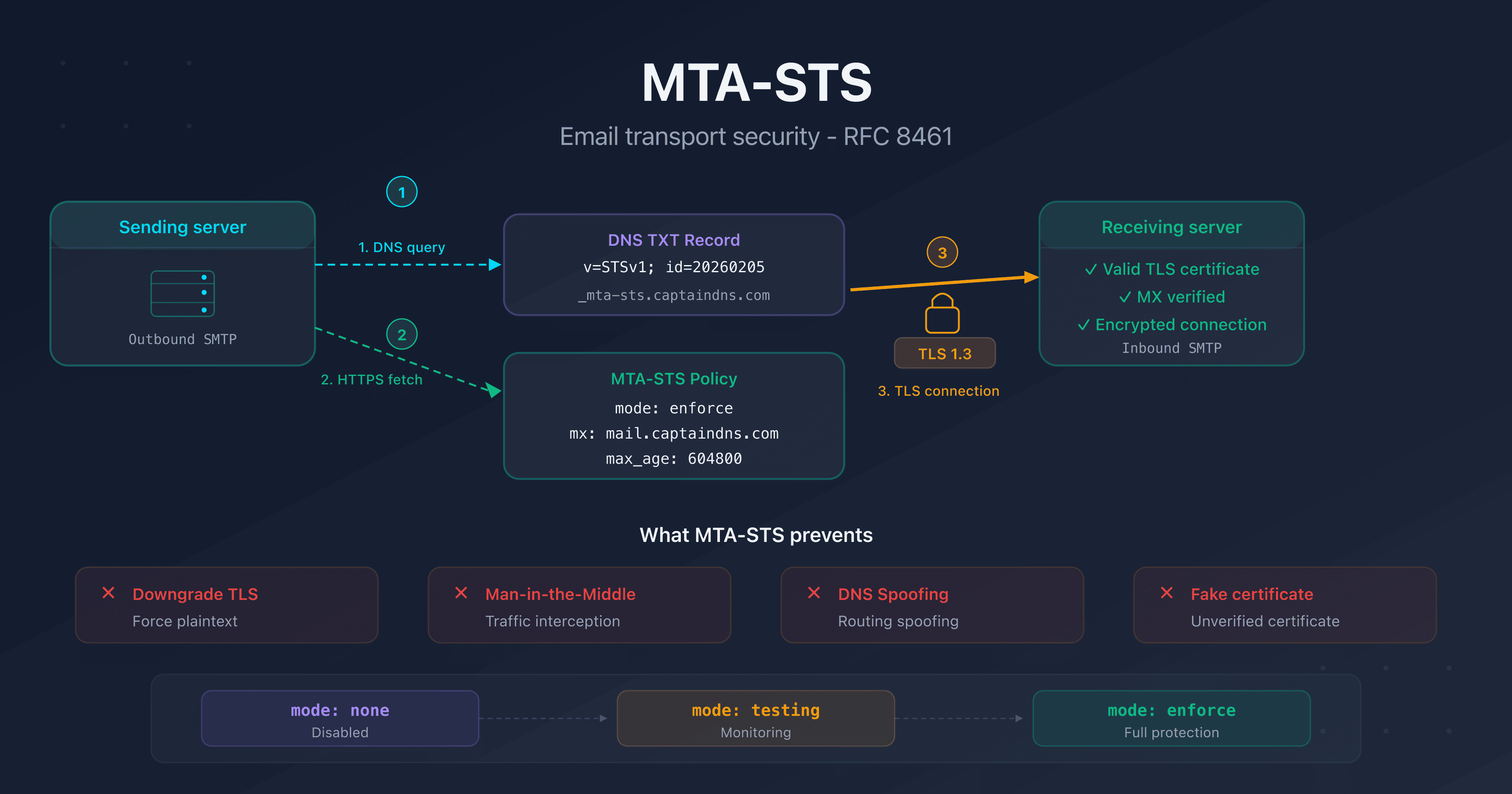
- MTA-STS (RFC 8461) enforces TLS encryption on incoming emails and prevents downgrade and man-in-the-middle attacks on SMTP
- Two components to deploy: a
_mta-stsDNS TXT record and a policy file hosted over HTTPS atmta-sts.captaindns.com/.well-known/mta-sts.txt - Three available modes:
none(disabled),testing(monitoring via TLS-RPT), andenforce(rejection if TLS encryption fails) - Always start with
testingmode and configure TLS-RPT to receive failure reports before switching toenforce
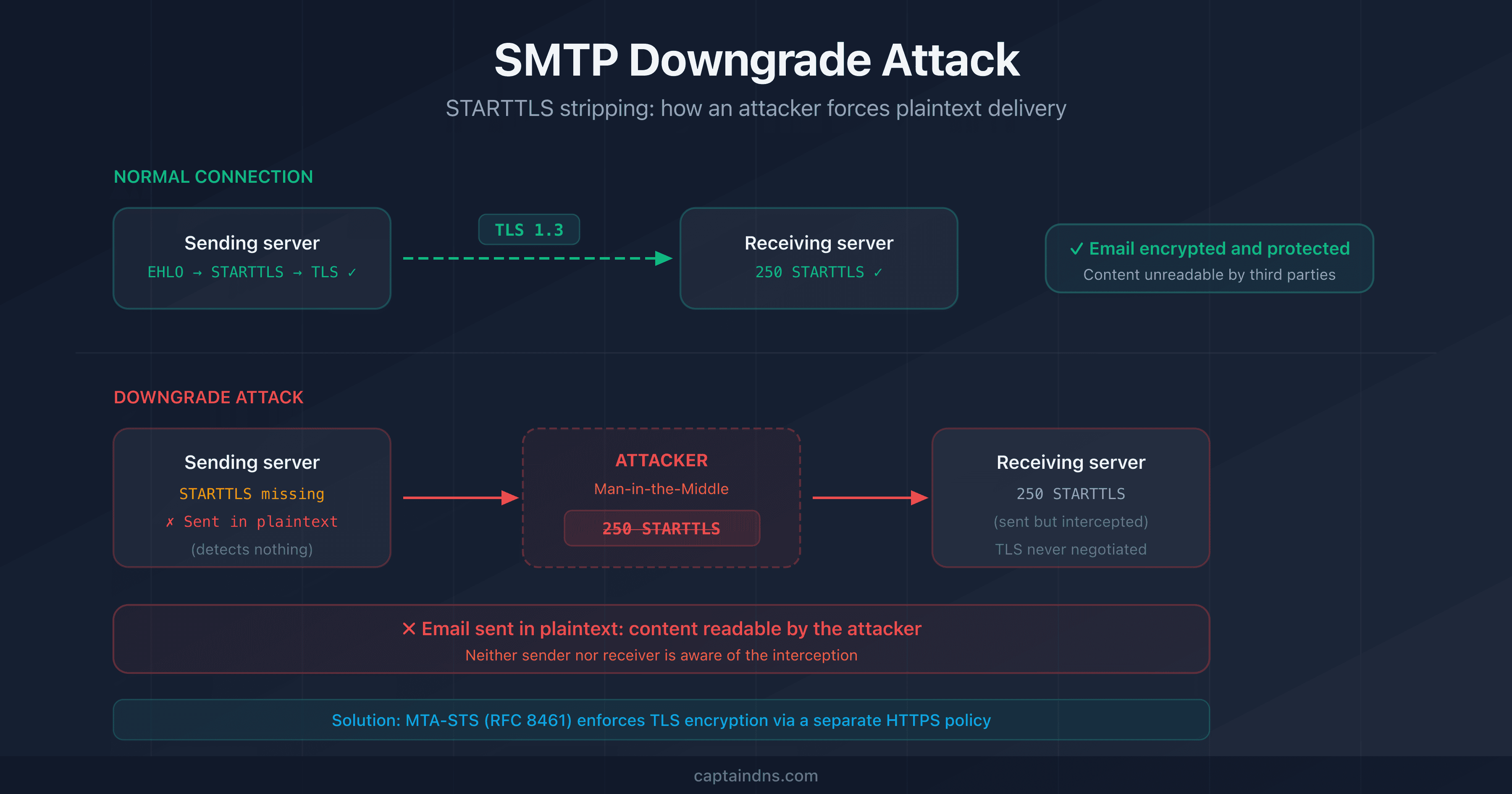
Your emails travel between SMTP servers every day. But do you know whether those exchanges are actually encrypted? By default, SMTP uses STARTTLS opportunistically: if the remote server doesn't support encryption, the message is sent in plaintext. An attacker positioned on the network can force this behavior and intercept your communications.
MTA-STS (Mail Transfer Agent Strict Transport Security) solves this problem. Defined in RFC 8461, this standard allows a domain to publicly declare that it requires TLS encryption to receive emails. Sending servers that support MTA-STS will refuse to deliver a message if the TLS connection fails.
This guide explains how MTA-STS works, what its components are, how to deploy it step by step, and why it has become an essential complement to DMARC, SPF, and DKIM in the email security stack.
What is MTA-STS? (RFC 8461)
MTA-STS, Mail Transfer Agent Strict Transport Security, is a mechanism that allows a domain owner to publish a transport security policy for their email receiving servers (MX). This policy tells sending servers that they must:
- Negotiate a valid TLS connection before sending an email
- Verify the certificate of the receiving server (hostname, chain of trust, expiration)
- Refuse to send if TLS encryption fails (in enforce mode)
Why STARTTLS isn't enough
STARTTLS is the standard mechanism for encrypting SMTP connections. But it suffers from two fundamental flaws:
- Downgrade attack: an attacker can strip the STARTTLS command from the server's response, forcing delivery in plaintext. The sending server has no way of knowing that encryption was available.
- No certificate validation: even if STARTTLS is negotiated, SMTP doesn't verify the identity of the receiving server by default. A rogue server with a self-signed certificate can intercept messages.
MTA-STS fixes both of these issues: the policy, retrieved over HTTPS (a separate, authenticated channel), enforces TLS encryption and certificate validation.
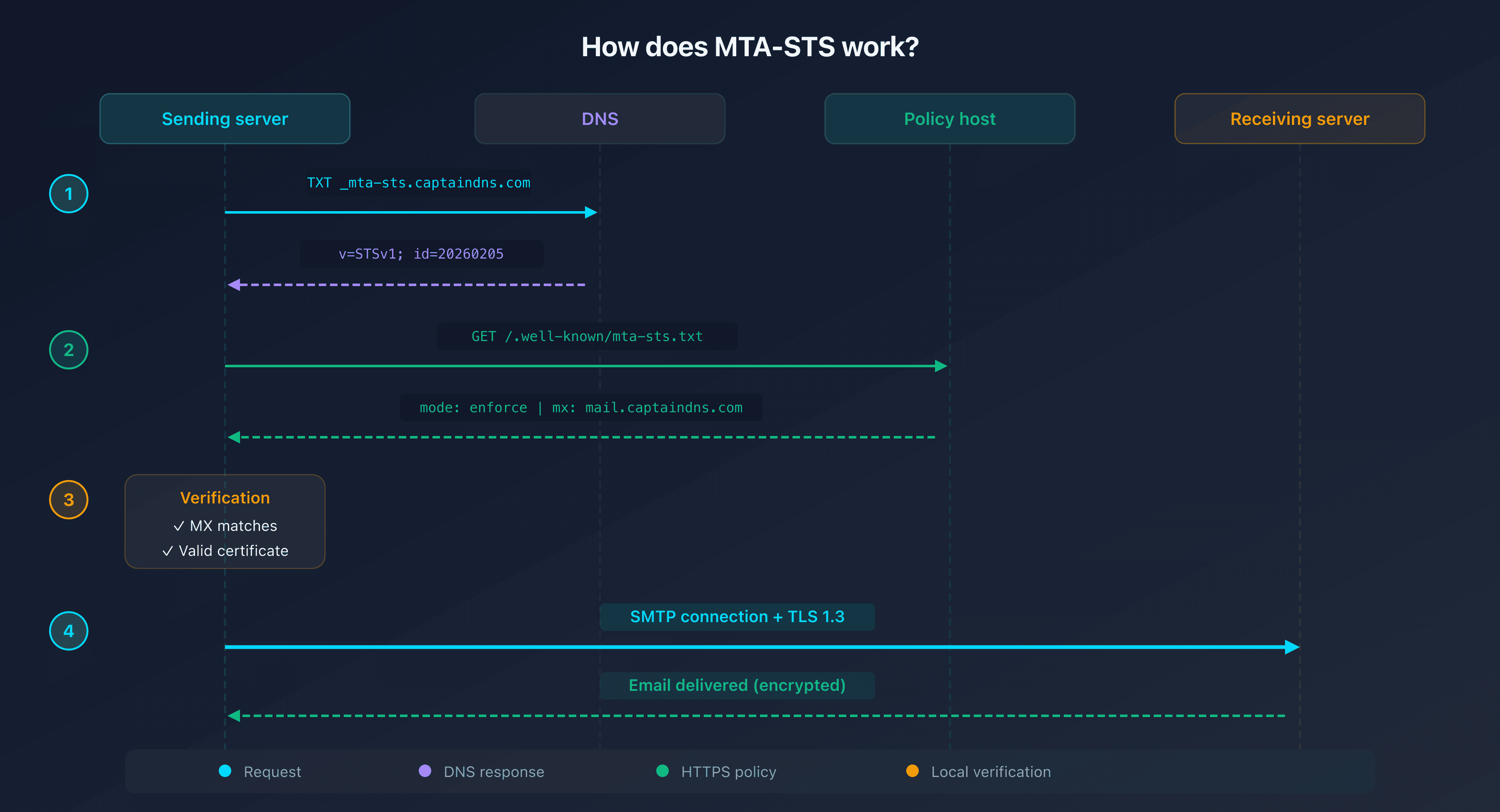
The two components of MTA-STS
MTA-STS relies on two elements that work together.
The _mta-sts DNS TXT record
A TXT record published in your DNS zone at _mta-sts.captaindns.com:
_mta-sts.captaindns.com. 300 IN TXT "v=STSv1; id=20260205120000"
| Tag | Required | Description |
|---|---|---|
v | Yes | Protocol version, always STSv1 |
id | Yes | Unique policy identifier, must be changed with each update |
The id field is an update signal. When a sending server detects a change in id, it re-downloads the policy. Use a timestamp (e.g., 20260205120000) or an incremental number.
The mta-sts.txt policy file
A text file hosted at the exact URL https://mta-sts.captaindns.com/.well-known/mta-sts.txt:
version: STSv1
mode: testing
mx: mail.captaindns.com
mx: backup.captaindns.com
max_age: 604800
| Directive | Required | Description |
|---|---|---|
version | Yes | Always STSv1 |
mode | Yes | none, testing, or enforce |
mx | Yes | Authorized MX pattern(s) (one per line, wildcards allowed such as *.captaindns.com) |
max_age | Yes | Cache duration in seconds (max 31,557,600 = 1 year) |
Mandatory HTTPS hosting
The policy file must be served over HTTPS with a valid TLS certificate on the mta-sts subdomain. This is a fundamental element of MTA-STS security: unlike DNS (which can be spoofed without DNSSEC), HTTPS guarantees the authenticity of the policy through certificate validation.
The 3 MTA-STS modes: testing, enforce, none
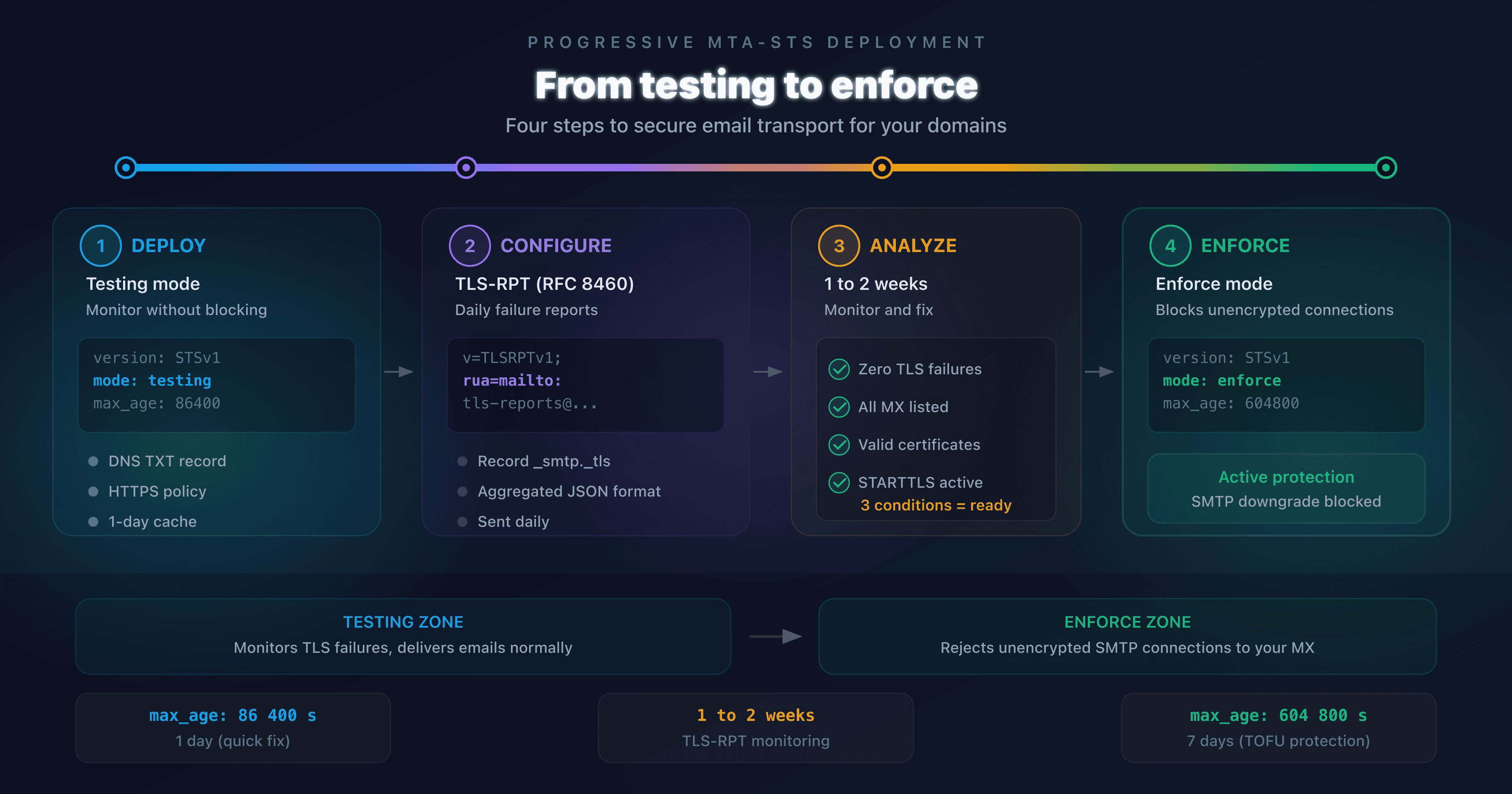
Testing mode: monitor without blocking
mode: testing
In testing mode, sending servers attempt to negotiate TLS and report failures via TLS-RPT (RFC 8460), but still deliver the message if encryption fails. This is the recommended starting mode.
Enforce mode: encryption or rejection
mode: enforce
In enforce mode, sending servers refuse to deliver the message if the TLS connection fails or the certificate is invalid. This is the target mode for full protection.
None mode: deactivation
mode: none
The none mode indicates that MTA-STS is disabled. Use it to cleanly deactivate an existing policy (sending servers that have a cached policy must wait for the max_age to expire).
What max_age value should you choose?
| Deployment phase | Recommended max_age | Duration |
|---|---|---|
| Initial (testing) | 86,400 | 1 day |
| Stabilization | 604,800 | 7 days |
| Production (enforce) | 2,592,000 to 31,557,600 | 30 days to 1 year |
A short max_age during the testing phase allows you to quickly fix errors. Once in enforce mode, a longer max_age reduces re-download frequency and strengthens protection against temporary DNS attacks.
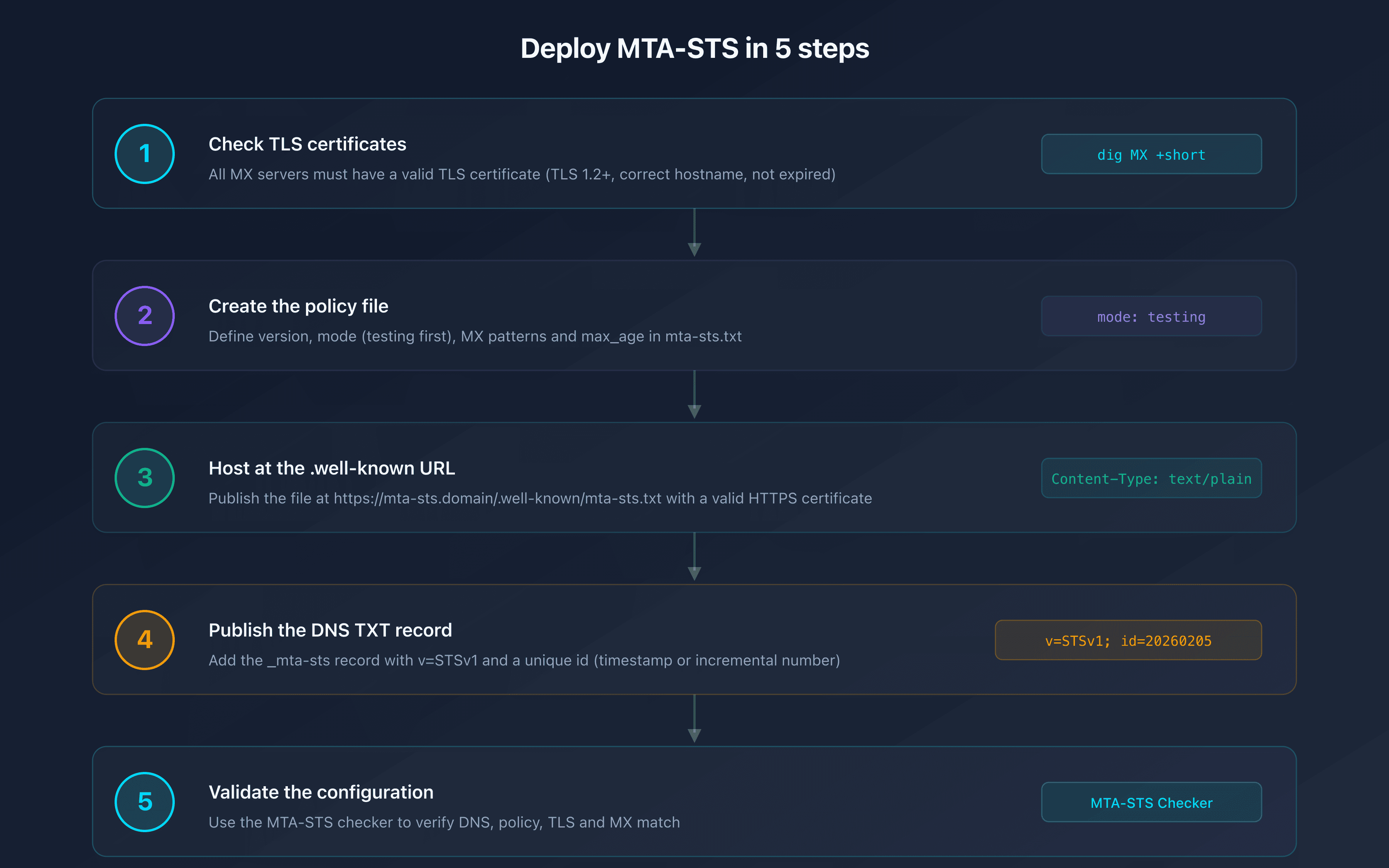
Deploy MTA-STS step by step
Step 1: Verify your MX servers and TLS certificates
Before deploying MTA-STS, make sure that all your MX servers have a valid TLS certificate (TLS 1.2 minimum) with a matching hostname. An expired or misconfigured certificate will cause rejections in enforce mode.
Step 2: Create the policy file
Create the mta-sts.txt file with your MX servers. You can use the CaptainDNS MTA-STS generator to create it automatically:
version: STSv1
mode: testing
mx: mail.captaindns.com
mx: backup.captaindns.com
max_age: 86400
Step 3: Host the policy at the .well-known URL
Publish the file at the exact URL:
https://mta-sts.captaindns.com/.well-known/mta-sts.txt
The mta-sts subdomain must resolve to an HTTPS web server with a valid certificate. Common hosting options:
- Cloudflare Pages / Cloudflare Workers: free, automatic HTTPS
- GitHub Pages: free, Let's Encrypt certificate
- Azure Static Web Apps: Microsoft 365 integration
- Existing web server: Apache, Nginx with Let's Encrypt
The response Content-Type must be text/plain.
Step 4: Publish the DNS TXT record
Add the following to your DNS zone:
_mta-sts.captaindns.com. 300 IN TXT "v=STSv1; id=20260205120000"
Step 5: Validate your configuration
Use the CaptainDNS MTA-STS checker to verify that everything is in place: DNS record, policy file, TLS certificate, MX matching.
MTA-STS vs DANE vs STARTTLS
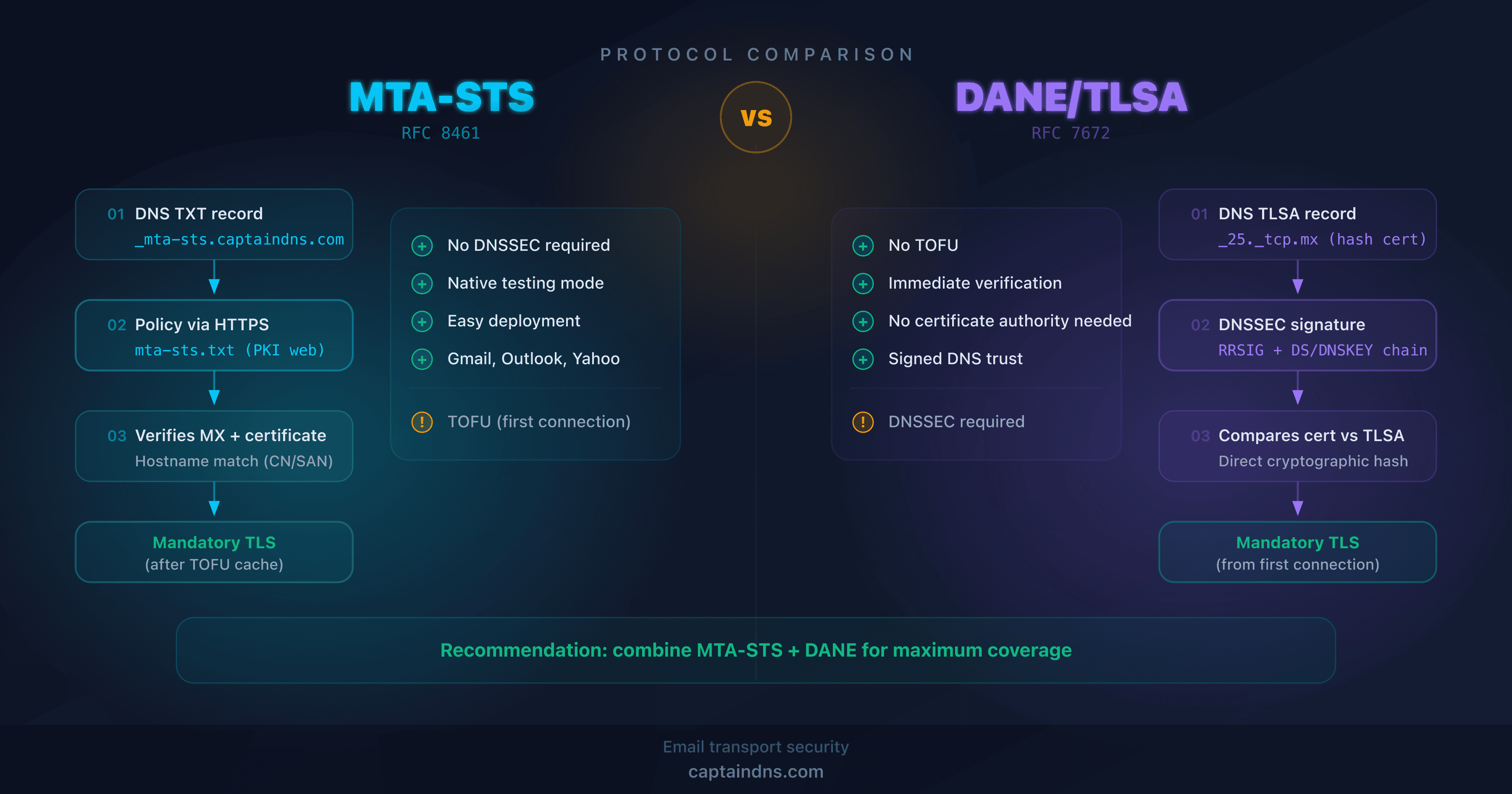
Three mechanisms coexist to secure SMTP transport. Here are their differences:
| Criteria | STARTTLS alone | MTA-STS | DANE |
|---|---|---|---|
| Protection | Opportunistic encryption | Mandatory encryption | Mandatory encryption |
| Certificate validation | No | Yes (via HTTPS/CA) | Yes (via DNSSEC/TLSA) |
| Resists downgrade attacks | No | Yes | Yes |
| Prerequisites | None | HTTPS on mta-sts subdomain | DNSSEC on the DNS zone |
| Deployment complexity | Low | Medium | High |
| Adoption | Universal | Growing (Google, Microsoft) | Limited (DNSSEC prerequisite) |
| RFC | RFC 3207 | RFC 8461 | RFC 7671 |
In practice: MTA-STS is the pragmatic choice. DANE offers theoretically stronger security (no dependency on CAs) but requires DNSSEC, which is still not widely deployed. The two approaches are complementary and can coexist.
TLS-RPT: monitor your MTA-STS deployment
TLS-RPT (SMTP TLS Reporting, RFC 8460) is the essential companion to MTA-STS. It allows you to receive daily JSON reports describing the successes and failures of TLS negotiation toward your domain.
To enable TLS-RPT, publish a DNS record:
_smtp._tls.captaindns.com. 300 IN TXT "v=TLSRPTv1; rua=mailto:tls-reports@captaindns.com"
These reports are essential in testing mode: they allow you to identify issues (expired certificates, uncovered MX servers, servers incompatible with TLS 1.2) before switching to enforce mode.
Recommended action plan
- Verify your TLS certificates: all your MX servers must have a valid certificate with TLS 1.2+
- Deploy in testing mode: create the policy and DNS record with
mode: testingandmax_age: 86400 - Enable TLS-RPT: publish the
_smtp._tlsrecord to receive failure reports - Monitor for 2-4 weeks: analyze the TLS-RPT reports and fix any identified issues
- Switch to enforce mode: once the reports are clean, change to
mode: enforceand increasemax_age
Check your MTA-STS configuration now: Use our MTA-STS checker to analyze your domain in seconds.
FAQ
What is MTA-STS and why do I need it?
MTA-STS (Mail Transfer Agent Strict Transport Security) is an internet standard (RFC 8461) that allows a domain to declare that it requires TLS encryption for receiving emails. Without MTA-STS, SMTP connections use STARTTLS opportunistically, making them vulnerable to downgrade and man-in-the-middle attacks. MTA-STS ensures that your incoming emails are always encrypted in transit.
Is MTA-STS mandatory for email security?
MTA-STS is not yet mandatory from a regulatory standpoint, but it is strongly recommended. Google and Microsoft have enabled it on their domains and check for MTA-STS on the domains they contact. For organizations subject to compliance requirements (GDPR, PCI-DSS), MTA-STS strengthens the email transport security posture.
What is the difference between testing and enforce modes?
In testing mode, sending servers attempt the TLS connection and report failures via TLS-RPT, but still deliver the message. In enforce mode, servers refuse to deliver the message if TLS fails. Always start with testing to identify issues before switching to enforce.
How does MTA-STS compare to DANE?
MTA-STS uses HTTPS and certificate authorities (CAs) to authenticate the policy, while DANE uses DNSSEC and TLSA records. DANE offers stronger security (no dependency on CAs) but requires DNSSEC, which is still not widely deployed. MTA-STS is simpler to deploy and more widely adopted. The two mechanisms are complementary.
Should I also configure TLS-RPT with MTA-STS?
Yes, strongly recommended. TLS-RPT (RFC 8460) sends you daily reports on TLS negotiation successes and failures toward your domain. Without TLS-RPT, you have no visibility into your MTA-STS deployment issues. Publish a _smtp._tls record with a receiving address.
How do I configure MTA-STS for Microsoft 365?
For Microsoft 365, use the MX pattern *.mail.protection.outlook.com in your MTA-STS policy. Host the policy file on Azure Static Web Apps, Cloudflare Pages, or any HTTPS server. Microsoft supports MTA-STS for outbound mail (it checks your recipients' policies) and for inbound mail (you can publish a policy for your M365 domain).
How do I configure MTA-STS for Google Workspace?
For Google Workspace, declare the MX your domain actually publishes (dig MX yourdomain.com +short). Since 2023, Google documents a single record, smtp.google.com at priority 1: the smtp.google.com pattern is then enough. A domain created before 2023 publishes the legacy set, still supported, which needs three patterns: aspmx.l.google.com, *.aspmx.l.google.com, and *.googlemail.com. The MTA-STS wildcard spans a single label only, so *.google.com would cover none of the servers in that legacy set. Google actively checks MTA-STS policies on the domains it contacts and publishes TLS-RPT reports. Host the policy file on an HTTPS server with a valid certificate for the mta-sts subdomain.
What happens if the policy file is not accessible?
If the mta-sts.txt file is not accessible (HTTP error, timeout, invalid certificate), the sending server cannot apply the policy. Without a cached policy, it falls back to standard opportunistic STARTTLS behavior. If a policy is cached (not expired according to max_age), it continues to apply. This is why a sufficiently long max_age protects against temporary outages.
Glossary
- MTA-STS: Mail Transfer Agent Strict Transport Security. RFC 8461 standard enforcing TLS encryption for receiving emails.
- STARTTLS: SMTP extension that upgrades a plaintext connection to an encrypted TLS connection. Opportunistic by default.
- TLS-RPT: SMTP TLS Reporting (RFC 8460). Reporting mechanism for TLS negotiation successes and failures.
- DANE: DNS-based Authentication of Named Entities (RFC 7671). Uses DNSSEC and TLSA records to validate TLS certificates.
- Downgrade attack: A technique where an attacker forces a connection to use a less secure protocol (e.g., stripping STARTTLS to force plaintext delivery).
- max_age: MTA-STS policy directive indicating the cache duration in seconds.
Related MTA-STS guides
- Configure MTA-STS for Microsoft 365 and Google Workspace
- MTA-STS Not Working? Complete Troubleshooting Guide