Twilio SendGrid: Complete Technical Guide for Transactional Email
By CaptainDNS
Published on January 19, 2026
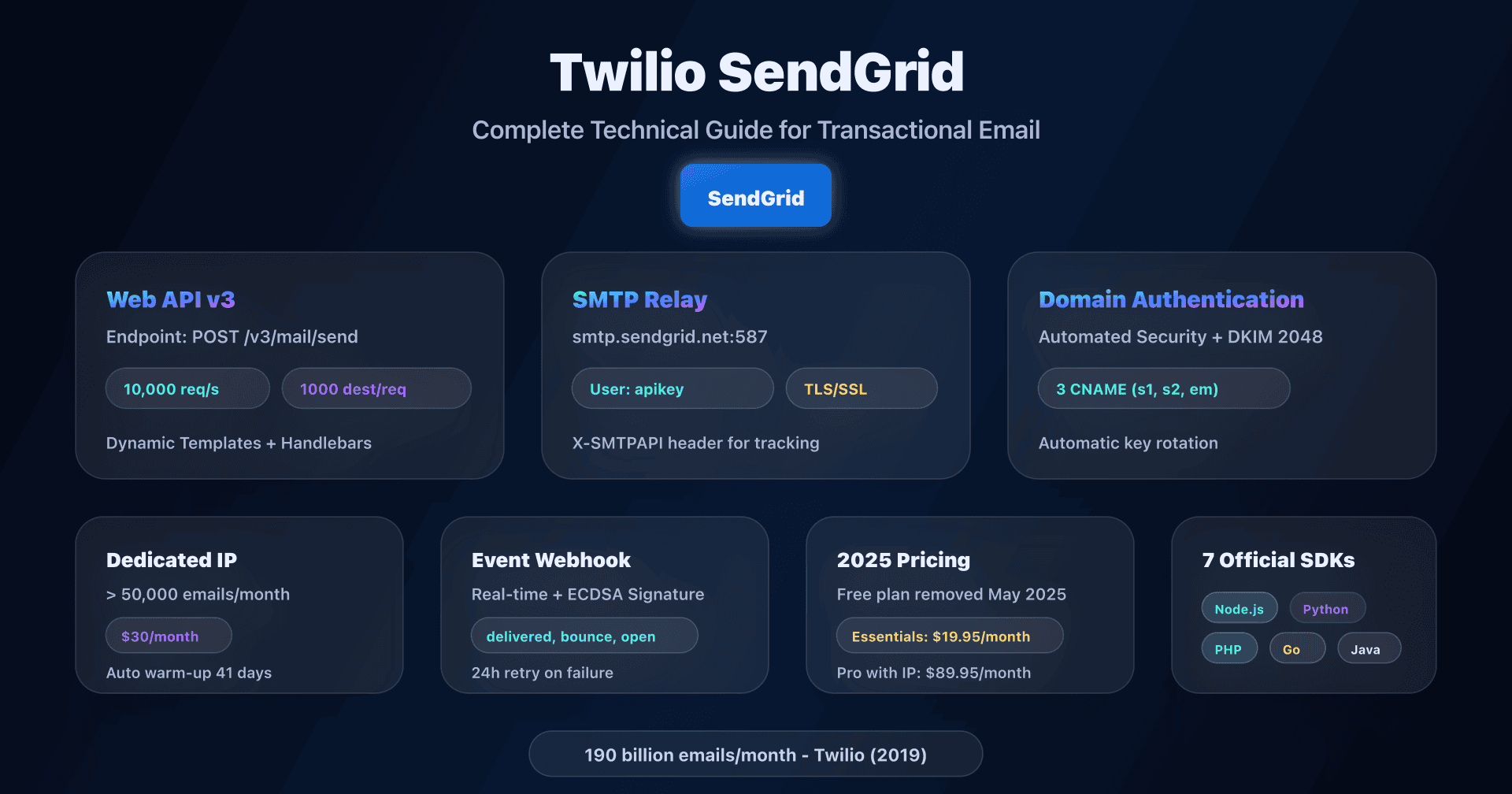
- 📢 SendGrid uses a customizable Return-Path (subdomain of your domain), enabling relaxed SPF alignment for DMARC from the base plan onwards.
- Web API v3 is the recommended method: 10,000 requests/second, up to 1,000 recipients per call, Dynamic Templates with Handlebars.
- Domain Authentication with Automated Security generates 3 CNAMEs: Return-Path + 2 DKIM selectors (automatic rotation, 2048-bit keys).
- Dedicated IP recommended from 50,000 emails/month, with automatic 41-day warmup and $30/month cost per additional IP.
- Free plan removed in May 2025: mandatory migration to Essentials 50K at $19.95/month minimum.
Introduction
SendGrid has established itself as one of the most robust transactional email platforms on the market, processing over 190 billion emails monthly in 2024. Acquired by Twilio in 2019 for approximately $3 billion, the service combines a powerful REST API, a universal SMTP relay, and advanced authentication features that set it apart from competitors.
SendGrid's strength lies in three major technical pillars: a Web API v3 capable of handling 10,000 requests/second, a Domain Authentication that enables SPF DMARC alignment from the base plan onwards, and an automatic 2048-bit DKIM key rotation system without service interruption.
This guide is aimed at developers, DevOps, and system architects seeking to integrate SendGrid for transactional email with a complete understanding of the infrastructure: DNS configuration, API vs SMTP choice, dedicated IP management, technical limits, and event webhooks.
Web API v3 vs SMTP Relay: architecture and integration choice
SendGrid offers two integration methods for transactional email, both available from paid plans onwards.
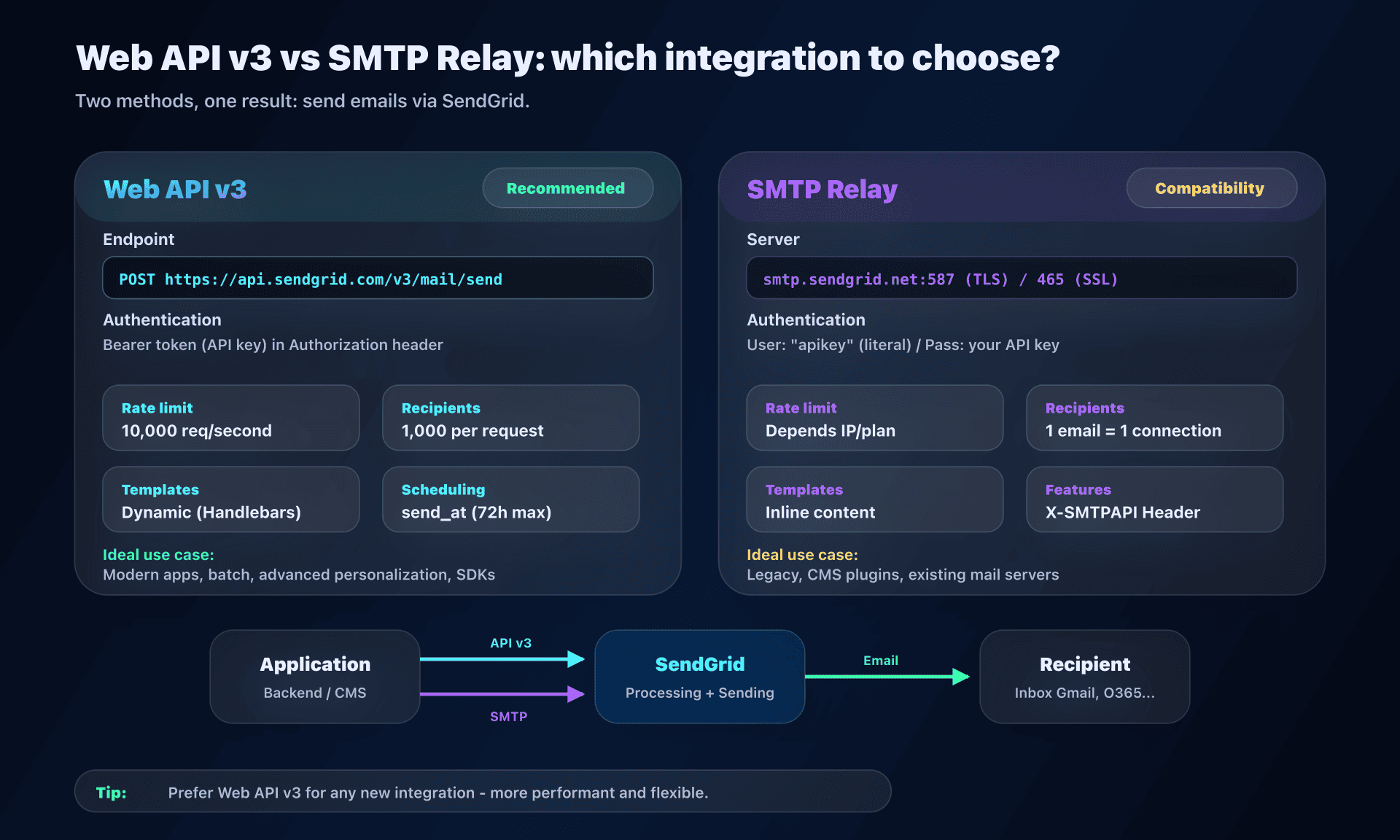
Technical comparison
| Criterion | Web API v3 | SMTP Relay |
|---|---|---|
| Endpoint | POST https://api.sendgrid.com/v3/mail/send | smtp.sendgrid.net ports 587/465 |
| Authentication | Bearer token (API key) | User: apikey / Pass: API key |
| Rate limit | 10,000 requests/second | Depends on IP and plan |
| Recipients/req | Up to 1,000 (personalizations) | 1 email = 1 SMTP connection |
| Templates | Dynamic Templates (Handlebars) | Inline content only |
| Scheduling | send_at (up to 72h in advance) | Via X-SMTPAPI header |
| Tracking | Native (click, open, Google Analytics) | Via X-SMTPAPI |
| Compatibility | Requires SDK or HTTP client | Any SMTP-compatible system |
| Ideal use case | Modern apps, batch, advanced personalization | Legacy, CMS plugins, mail servers |
When to choose Web API v3?
Web API v3 is SendGrid's recommended method for any new integration. It's accessible at POST https://api.sendgrid.com/v3/mail/send (or api.eu.sendgrid.com for the EU region).
Key advantages:
- Personalizations: send up to 1,000 recipients in a single request, each receiving different personalized content
- Dynamic Templates: Handlebars syntax with conditions, loops, comparisons, date formatting
- Scheduling: schedule sending up to 72 hours in advance with cancellation option
- Generous rate limit: 10,000 requests/second on the mail/send endpoint
Personalization example:
{
  "personalizations": [{
    "to": [{"email": "user@captaindns.com", "name": "John Smith"}],
    "dynamic_template_data": {
      "first_name": "John",
      "order_number": "ORD-12345",
      "amount": "$149.90"
    }
  }],
  "from": {"email": "orders@captaindns.com"},
  "template_id": "d-abc123def456"
}
Official SDKs: SendGrid maintains 7 official SDKs (Node.js, Python, PHP, Ruby, Go, Java, C#) that encapsulate the REST API and simplify integration.
When to choose SMTP Relay?
SMTP Relay is ideal for legacy systems or applications that only support SMTP.
Official configuration:
SMTP server: smtp.sendgrid.net
SMTP user: apikey (literally the string "apikey")
SMTP password: [your SendGrid API key]
Port: 587 (TLS recommended) or 465 (SSL) or 2525 (fallback)
Critical point: SMTP authentication uses a specific configuration. The username is literally the string apikey (not your account identifier), and the password is your SendGrid API key.
X-SMTPAPI Header: allows access to advanced features via SMTP (categories, unique_args, filters, scheduling, substitution tags). Maximum size: 10,000 bytes.
Example X-SMTPAPI header for tracking:
{
  "category": ["order_confirmation"],
  "unique_args": {
    "order_id": "ORD-12345",
    "customer_id": "CUST-789"
  },
  "filters": {
    "clicktrack": {"settings": {"enable": 1}},
    "opentrack": {"settings": {"enable": 1}}
  }
}
Domain Authentication: SPF, 2048-bit DKIM and DMARC alignment
Domain authentication with SendGrid generates the necessary DNS records for SPF, DKIM and DMARC alignment. The process takes place in Settings > Sender Authentication > Domain Authentication.
Architecture with Automated Security (recommended)
With Automated Security enabled, SendGrid generates 3 CNAME records:
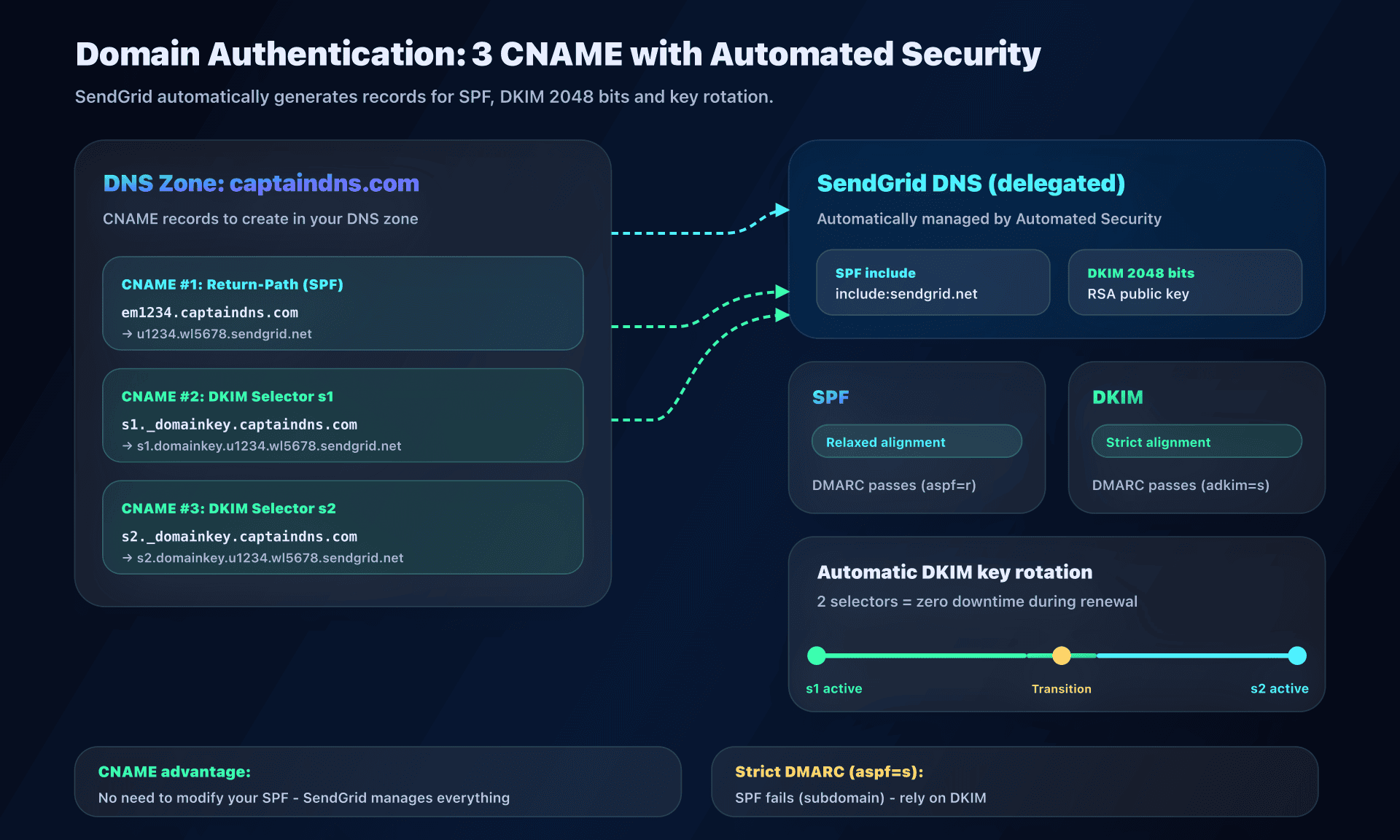
- CNAME for Return-Path:
em1234.captaindns.compointing to SendGrid - CNAME DKIM s1:
s1._domainkey.captaindns.com→s1.domainkey.u1234.wl5678.sendgrid.net - CNAME DKIM s2:
s2._domainkey.captaindns.com→s2.domainkey.u1234.wl5678.sendgrid.net
Advantages of this architecture:
- Automatic DKIM key rotation: the two selectors (
s1ands2) allow SendGrid to change keys without service interruption - 2048-bit DKIM keys by default since May 2021 (earlier configurations may use 1024 bits)
- No manual SPF record required: the CNAME delegates SPF management to SendGrid
- Customizable selectors: 1-3 alphanumeric characters in advanced settings
Return-Path and SPF alignment: a major advantage
The Return-Path (Envelope From) is crucial for DMARC alignment. By default, SendGrid uses a subdomain in the format em[XXX].captaindns.com:
- SPF passes automatically because the CNAME delegates SPF management to SendGrid
- SPF alignment works in relaxed mode (the subdomain
em1234.captaindns.commatches the parent domaincaptaindns.com) - No need to modify your main SPF: the CNAME handles everything
However, for a strict DMARC policy (aspf=s), SPF alignment will fail because the Return-Path domain will never exactly match the From domain. The solution is to rely on DKIM for DMARC alignment, which supports strict mode (adkim=s).
Custom Return Path
The Custom Return Path option in advanced settings allows you to customize the subdomain (for example mail.captaindns.com instead of em1234.captaindns.com).
Link Branding
Link Branding replaces SendGrid domains in tracked links with your own domain. Instead of sendgrid.net/click/xxx, links will display url1234.captaindns.com/click/xxx. This configuration requires 2 additional CNAME records and improves recipient trust.
Migration to 2048-bit DKIM
To migrate an earlier configuration (1024-bit keys) to 2048 bits, you need to create a new domain authentication with a new custom selector not previously used.
Dedicated IP vs shared IP: deliverability strategy
SendGrid officially recommends a dedicated IP from 50,000 emails per month. Beyond 200,000-300,000 monthly emails, two dedicated IPs are advised.
Shared IP (Free and Essentials plans)
Advantages:
- No warmup needed
- Reputation maintained by SendGrid
- Ideal for low or irregular volumes
Disadvantages:
- Exposure to reputation risks related to other senders in the pool
- Frequent blocklist issues with Microsoft/Outlook
Dedicated IP (Pro plan and higher)
The Pro plan includes 1 dedicated IP, with the option to add more at $30/month per additional IP.
Advantages:
- Isolated and controllable reputation
- Automatic IP Warmup function over 41 days
- Ability to separate flows (transactional vs marketing)
Automatic IP Warmup: progressively limits sends according to a predefined schedule:
- Day 1: 20 emails/hour
- Day 41: Over 19 million/hour
IP Pools: allow grouping multiple dedicated IPs and assigning them to different flows. Separation is reinforced by Subusers (isolated sub-accounts with their own statistics, suppression lists and webhooks).
Subusers: Pro and Premier plans support up to 15 subusers per account.
When to choose a dedicated IP?
You need a dedicated IP if:
- Regular volume > 50,000 emails/month
- Need to separate transactional vs marketing reputation
- Client whitelisting or regulatory compliance requirements
- Volume > 200,000 emails/month: 2 dedicated IPs recommended
Stay on shared IP if:
- Volume < 50,000 emails/month
- Irregular or sporadic sends
- Business startup without history
2025 pricing and Free plan evolution
Email API plans
| Plan | Monthly volume | Price/month | Dedicated IP | Subusers |
|---|---|---|---|---|
| Free | 100/day (60d) | Free | No | No |
| Essentials 50K | 50,000 | $19.95 | No | No |
| Essentials 100K | 100,000 | $34.95 | No | No |
| Pro 100K | 100,000 | $89.95 | 1 included | Up to 15 |
| Pro 300K | 300,000 | $249 | 1 included | Up to 15 |
| Pro 700K | 700,000 | $499 | 1 included | Up to 15 |
| Premier | Custom | Custom | 1 included | Up to 15 |
Important evolution: In May 2025, SendGrid announced the removal of the Free plan with a 60-day transition period. Users must migrate to a paid plan to continue sending emails.
Additional costs
- Additional dedicated IP: $30/month
- Email Validation API: 2,500 validations/month included (Pro), 5,000 (Premier), then usage-based pricing
- Inbound Parse: included in all paid plans
- Overages: billed pro-rata (~$0.001/email on Pro)
Technical limits and rate limits
Rate limits by endpoint
| Endpoint | Limit |
|---|---|
| v3 Mail Send | 10,000 requests/second |
| General API | 600 requests/minute |
| Email Validation | 7 requests/second |
When the limit is reached, the API returns an HTTP 429 code. The X-RateLimit-Remaining and X-RateLimit-Reset headers indicate the remaining quota and reset timestamp.
Recommended handling: exponential backoff and local queuing.
Quotas per message
| Parameter | Limit |
|---|---|
| Maximum email size | 30 MB |
| Recipients per message | 1,000 |
| Categories per message | 10 |
| Custom args | < 10,000 bytes |
| Unsubscribe groups | 200 per account |
Suppression management
SendGrid automatically maintains several suppression lists:
- Global Suppressions: global unsubscribes
- Group Unsubscribes: via ASM (Advanced Suppression Manager)
- Bounces: hard and soft
- Spam Reports
- Invalid Emails
Addresses are suppressed indefinitely by default, with configurable purge option from 1 to 3,650 days for bounces.
Event Webhook and real-time tracking
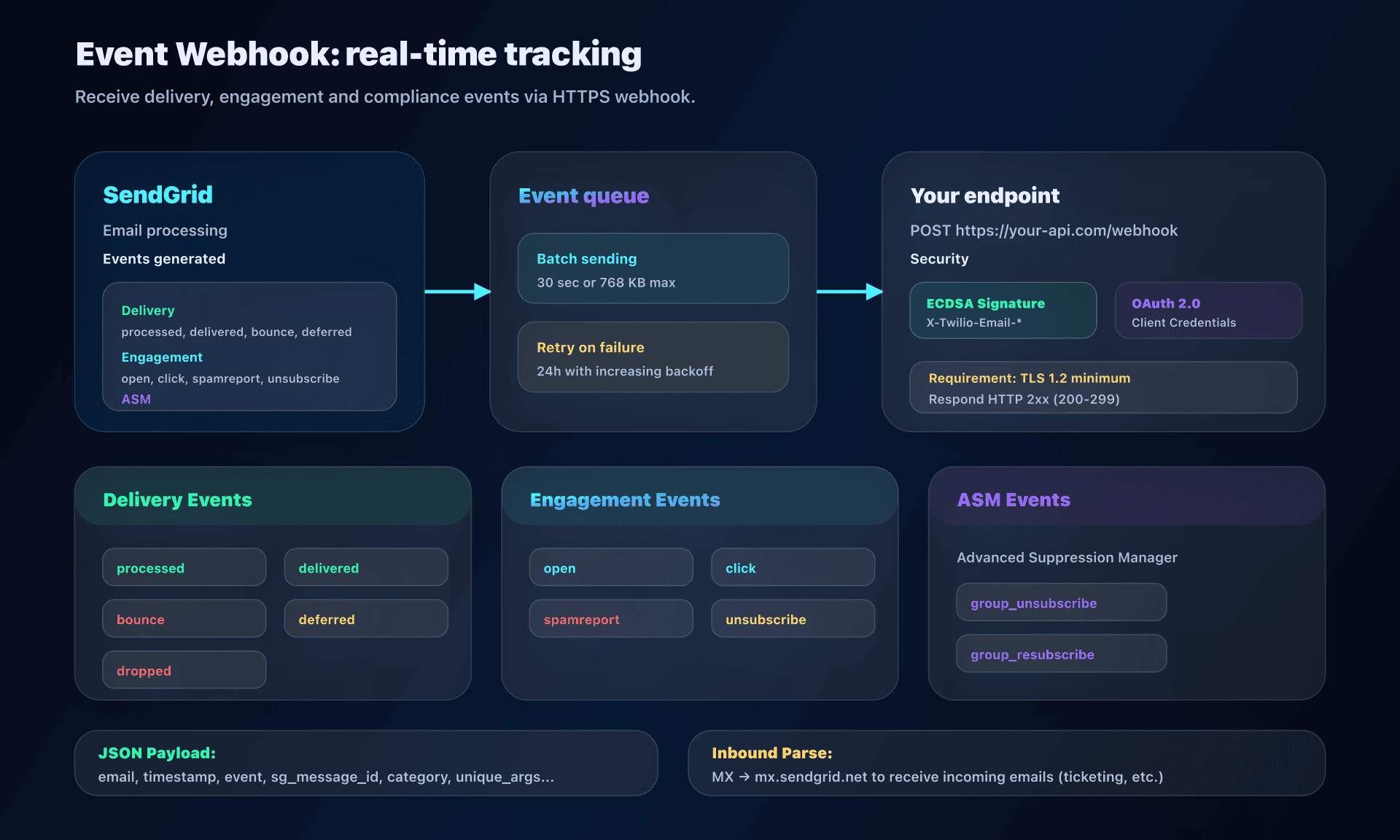
The event webhook allows receiving real-time notifications for delivery, engagement and compliance.
Available events
- Delivery:
processed,dropped,delivered,deferred,bounce - Engagement:
open,click,spamreport,unsubscribe - ASM:
group_unsubscribe,group_resubscribe
Behavior and retry
Events are sent in batches within 30 seconds or when the batch reaches 768 KB. In case of failure (non-2xx response), SendGrid retries for 24 hours with increasing intervals.
Security
Webhook security can be ensured by:
- ECDSA signature: headers
X-Twilio-Email-Event-Webhook-SignatureandX-Twilio-Email-Event-Webhook-Timestamp - OAuth 2.0 Client Credentials
Requirement: endpoint must support TLS 1.2 minimum.
Inbound Parse
Inbound Parse allows receiving and parsing incoming emails. Configuration requires an MX record pointing to mx.sendgrid.net on a dedicated subdomain.
SendGrid automatically extracts:
- Headers
- Body (text and HTML)
- Attachments
- Spam score (optional)
Use cases: ticketing systems, bidirectional communication workflows.
Advanced features
Email Validation API
Available on Pro and Premier plans only. Uses machine learning trained on over 100 billion emails.
Checks:
- Syntax
- DNS records
- Disposable address detection
- Role address detection
- Verdict: Valid / Risky / Invalid + confidence score
Sandbox Mode
Allows testing request format without actually sending email.
Enabled via mail_settings.sandbox_mode.enable: true, it:
- Validates JSON structure
- Returns a 200 code (vs 202 for actual sends)
- Doesn't consume credits
Categories and unique_args
Enable granular tracking:
- Categories: statistical grouping (newsletters, receipts, alerts)
- unique_args (custom_args in v3): specific identifiers (order number, customer ID) returned in webhook events
Action plan: integration in 5 steps
1. Create account and generate API key
- Create a SendGrid account (Essentials plan minimum since Free removal)
- Generate an API key in Settings > API Keys
- Define permissions (Full Access or Mail Send only)
2. Configure Domain Authentication
- Go to Settings > Sender Authentication > Domain Authentication
- Enable Automated Security (recommended)
- Create the 3 CNAME records at your registrar:
- Return-Path (
em1234.captaindns.com) - DKIM s1 (
s1._domainkey.captaindns.com) - DKIM s2 (
s2._domainkey.captaindns.com)
- Return-Path (
- Verify DNS propagation (24-48h)
3. Choose integration method
Option A: Web API v3
- Install official SDK (npm install @sendgrid/mail, pip install sendgrid, etc.)
- Implement the
POST /v3/mail/sendendpoint - Create Dynamic Templates if needed
Option B: SMTP Relay
- Configure your app/plugin:
- Host:
smtp.sendgrid.net - Port:
587(STARTTLS) - User:
apikey - Password: your API key
- Host:
4. Configure webhooks
- Go to Settings > Mail Settings > Event Webhook
- Define your endpoint URL (HTTPS + TLS 1.2)
- Select events (delivered, bounced, etc.)
- Enable ECDSA signature for security
5. Test and monitor
- Send a test email
- Verify in Activity Feed that the email is delivered
- Check webhook events
- Monitor statistics (open rate, bounce rate)
Technical guides: other transactional email platforms
Discover our complete guides for other transactional email solutions:
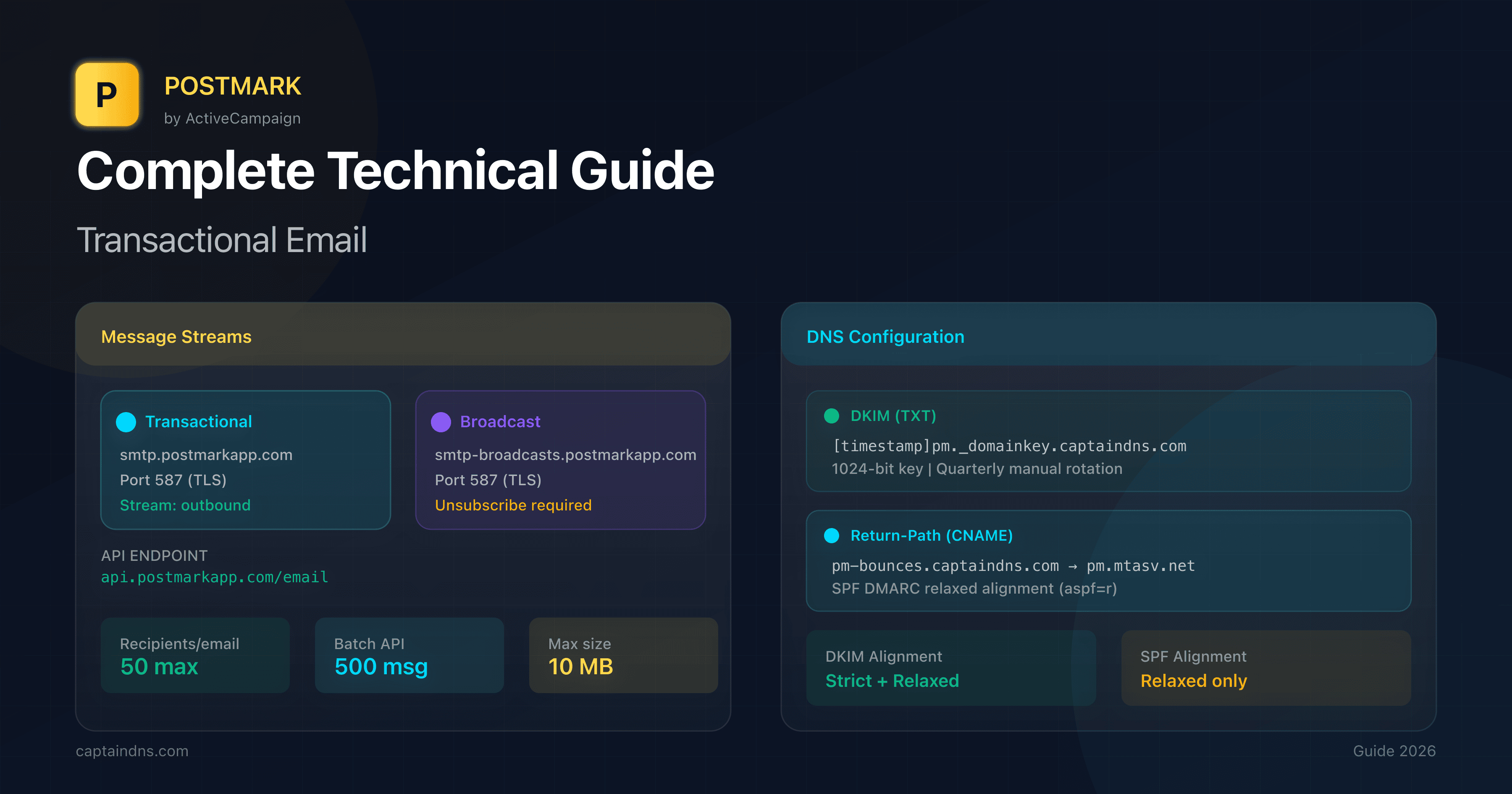
- Postmark: DKIM configuration and REST API - Deliverability specialist, 1024-bit DKIM, Message Streams
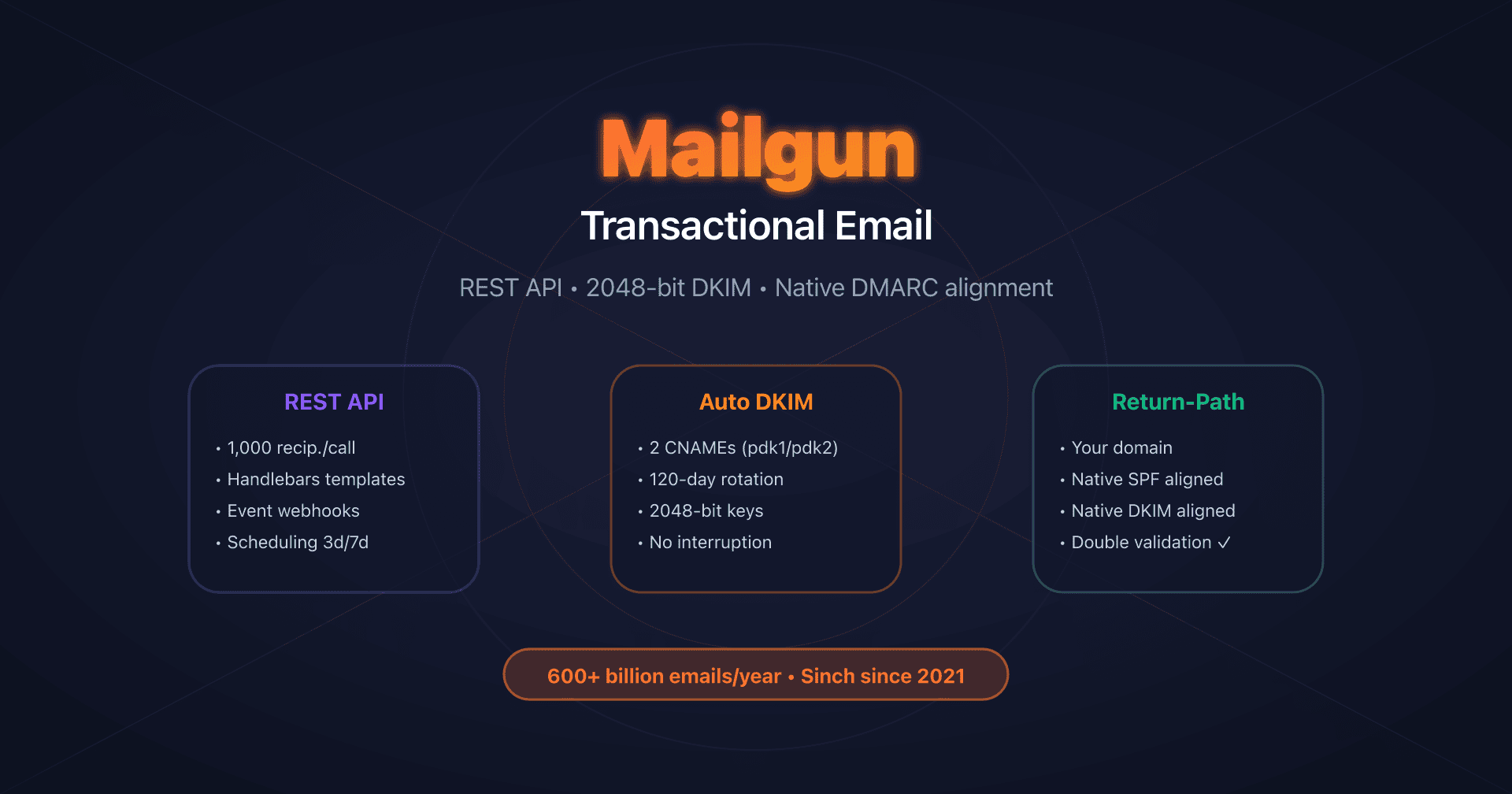
- Mailgun: DKIM with automatic rotation - Native Return-Path, 120-day DKIM rotation
- Amazon SES: Easy DKIM and Custom MAIL FROM - $0.10 per 1,000 emails, 7 regions in Europe
- Mailjet: API v3.1 and DKIM configuration - 2048/4096-bit DKIM, Sinch acquisition
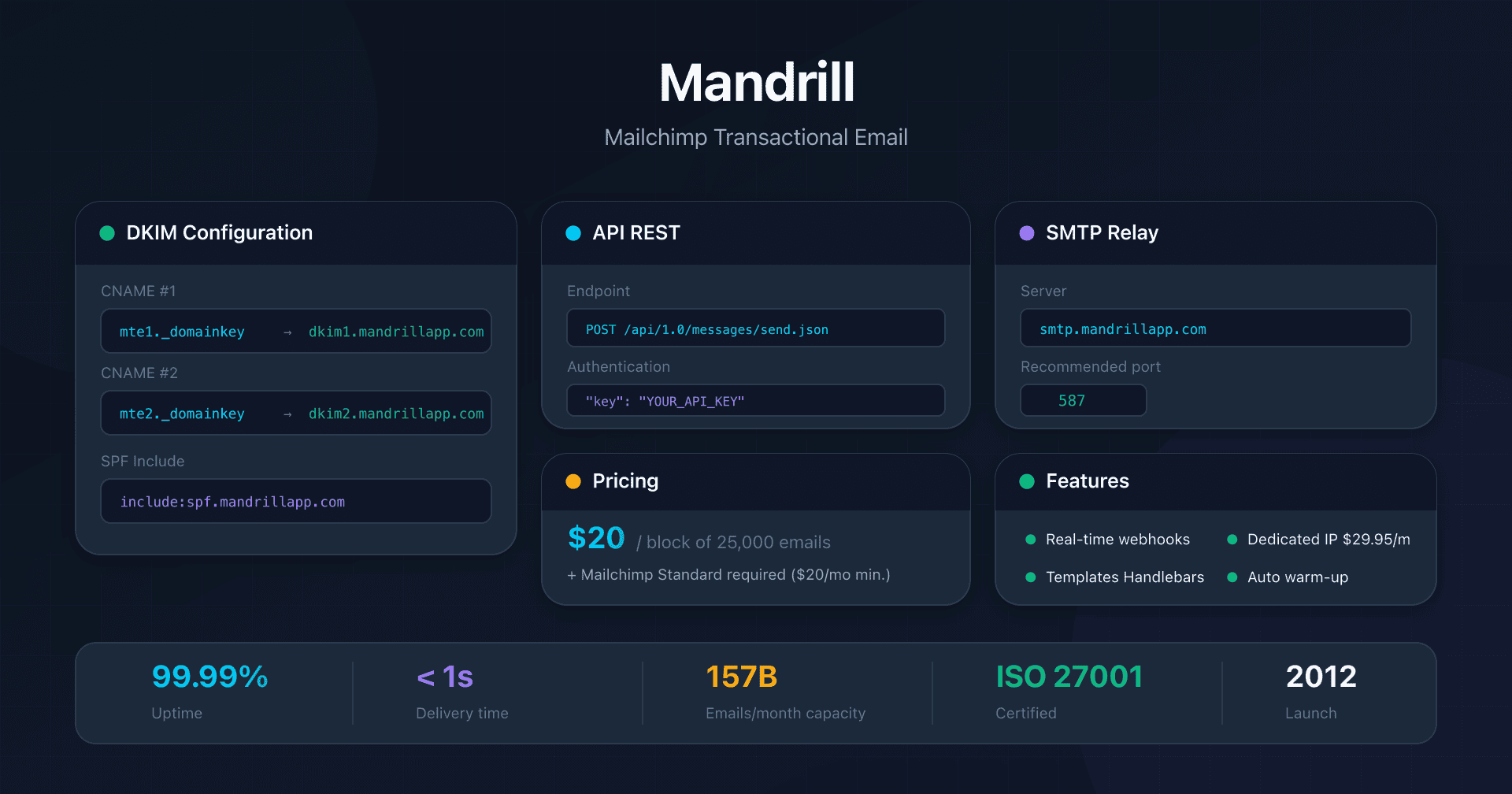
- Mandrill: Mailchimp transactional integration - Mailchimp Standard prerequisite, 25k email blocks
- Brevo: DKIM and SPF configuration - 300 free emails/day, DKIM TXT or CNAME
FAQ
Why does SendGrid use two DKIM selectors (s1 and s2)?
The two selectors allow automatic DKIM key rotation without service interruption. When SendGrid wants to renew keys for security reasons, it can generate a new key on s2 while s1 is still active, then progressively switch traffic. This avoids any deliverability interruption during key changes.
Do I need to add SendGrid to my SPF record?
No, with Domain Authentication and Automated Security, it's unnecessary. The Return-Path CNAME (em1234.captaindns.com) automatically delegates SPF management to SendGrid. Your main SPF record doesn't need to mention SendGrid. Exception: if you also send directly from your servers, you must include them in your SPF.
How does scheduled sending with cancellation work?
Use send_at (Unix timestamp in seconds, max 72h in advance). To enable cancellation, first generate a batch_id via POST /v3/mail/batch, include it in the send request, then submit a cancellation at least 10 minutes before the scheduled time via POST /v3/user/scheduled_sends.
What's the actual recipient limit per API call?
Maximum 1,000 recipients via the personalizations array (to + cc + bcc combined). Each recipient can receive different personalized content via dynamic_template_data. To send to 10,000 people, you need 10 API calls (limited to 10,000 req/s).
Can I use the Essentials plan for critical production?
Yes, but without dedicated IP. The Essentials plan uses shared IPs, exposing you to collective reputation risks. For critical transactional emails (order confirmations, password resets), the Pro plan with dedicated IP is recommended from 50,000 emails/month. Below that, Essentials is sufficient if your volume is regular.
How to handle the 10,000 req/s rate limits?
Implement exponential backoff and local queuing. Monitor X-RateLimit-Remaining and X-RateLimit-Reset headers. If you hit 429, wait for reset or slow down. For very large volumes, use multiple API keys and distribute calls (rate limit per API key).
Does the X-SMTPAPI header also work with Web API v3?
No, X-SMTPAPI is specific to SMTP Relay. With Web API v3, use native JSON parameters: categories, custom_args, mail_settings (tracking), send_at (scheduling). Web API offers finer and more structured control than JSON in an SMTP header.
Glossary
-
Web API v3: SendGrid's REST API for sending transactional emails. Main endpoint:
POST /v3/mail/send. Rate limit: 10,000 requests/second. Recommended method for any new integration. -
SMTP Relay: SendGrid's SMTP server (
smtp.sendgrid.net) allowing sending via standard SMTP protocol. Authentication: userapikey+ password = API key. Available ports: 587 (TLS), 465 (SSL), 2525 (fallback). -
Personalizations: JSON array in Web API v3 allowing sending to up to 1,000 recipients per request, each receiving personalized content via
dynamic_template_data. -
Dynamic Templates: SendGrid template system using Handlebars syntax. Supports variables, conditions, loops, comparisons, date formatting. Triple braces
{{{html}}}for unescaped HTML. -
Domain Authentication: DNS configuration to authenticate your domain with SendGrid. With Automated Security: 3 CNAMEs (Return-Path + DKIM s1 + DKIM s2). Generates 2048-bit DKIM keys with automatic rotation.
-
Return-Path (Envelope From): Technical address used for SMTP routing and bounces. SendGrid uses a subdomain of your domain (
em1234.captaindns.com), enabling relaxed SPF alignment for DMARC. Customizable via Custom Return Path. -
Automated Security: Recommended option for Domain Authentication. Generates CNAMEs instead of TXT, enables automatic DKIM key rotation, and uses 2048-bit keys by default.
-
IP Warmup: Automatic ramp-up process for a new dedicated IP. 41-day schedule: from 20 emails/hour (D1) to over 19 million/hour (D41). Avoids massive spam and progressively builds reputation.
-
Subusers: Isolated sub-accounts with separate statistics, suppression lists and webhooks. Available on Pro and Premier plans (up to 15 subusers). Enable reputation separation by client or flow.
-
IP Pools: Groups of dedicated IPs assignable to different flows (transactional vs marketing, by client, by brand). Reinforce reputation separation.
-
Event Webhook: HTTP endpoint called by SendGrid during events (delivered, bounced, opened, clicked). Sent in batches (30s or 768 KB). Retry for 24h on failure. Security: ECDSA signature or OAuth 2.0.
-
X-SMTPAPI: JSON header specific to SMTP Relay for accessing advanced features (categories, unique_args, filters, scheduling). Max size: 10,000 bytes. Not used with Web API v3.
-
Link Branding: DNS configuration to replace SendGrid domains in tracked links with your own domain. Requires 2 additional CNAMEs. Improves trust and reputation.
-
Sandbox Mode: Test mode that validates JSON structure without actually sending. Enabled via
mail_settings.sandbox_mode.enable: true. Returns 200 code (vs 202 in production). Doesn't consume credits. -
Email Validation API: Email address validation service using machine learning (Pro/Premier only). Checks syntax, DNS, detects disposables and roles. Verdict: Valid / Risky / Invalid + score.
-
Inbound Parse: Service for receiving and parsing incoming emails. Configuration: MX record to
mx.sendgrid.neton subdomain. Extracts headers, body, attachments, spam score. Use cases: ticketing, bidirectional communication.