Mandrill (Mailchimp Transactional): Technical Guide for Transactional Email
By CaptainDNS
Published on January 24, 2026
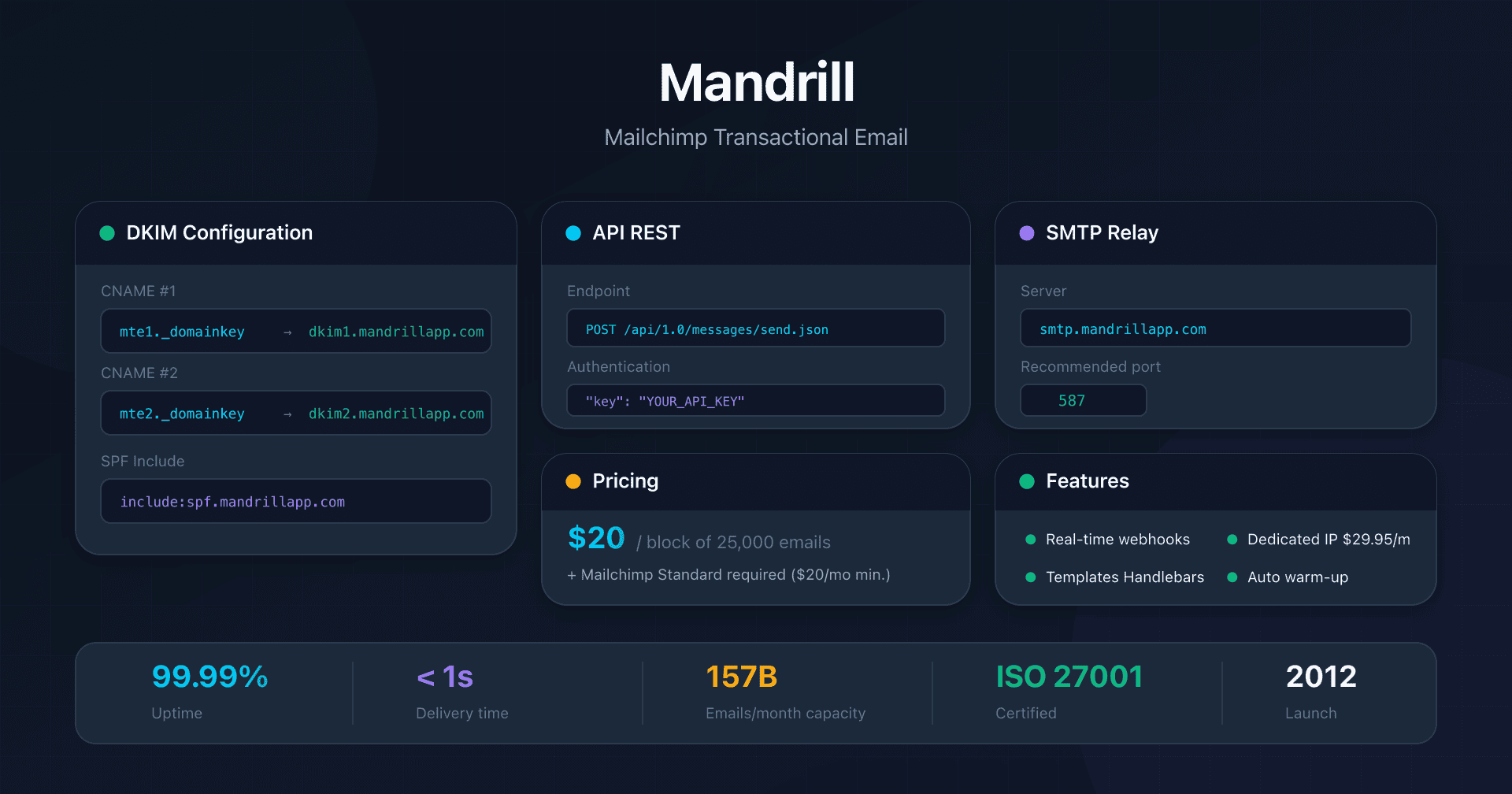
- Mandrill requires a paid Mailchimp account (Standard at $20/month minimum) to be activated.
- DKIM configuration requires 2 mandatory CNAME records (
mte1._domainkeyandmte2._domainkey) pointing to Mandrill. - SPF alone is not enough for DMARC: the Return-Path uses
mandrillapp.comby default. Customize it via CNAME for full alignment. - Block pricing of 25,000 emails: $20/block up to 500k, then decreasing to $10/block at 4M+.
- Dedicated IP available at $29.95/month with built-in automatic warm-up.
Introduction
Mandrill, now officially named Mailchimp Transactional Email, is Intuit's transactional email service (via Mailchimp). Launched in 2012 as a standalone product, it became a paid add-on exclusively accessible to Mailchimp subscribers in 2016.
With infrastructure capable of handling up to 157 billion emails per month and a median delivery time of less than 1 second, Mandrill remains a major player in transactional email. However, its tight integration with Mailchimp requires specific prerequisites and configurations that this guide details.
This guide is intended for developers, DevOps engineers, and system admins looking to integrate Mandrill for transactional email: order confirmations, password resets, notifications, and system alerts.
Prerequisites: Mandatory Paid Mailchimp Account
Unlike most ESPs that offer a Free plan or standalone free trial, Mandrill requires an active Mailchimp subscription.
Eligible Plans
| Mailchimp Plan | Minimum Price | Mandrill Access |
|---|---|---|
| Free | $0/month | Not eligible |
| Essentials | $13/month | Not eligible |
| Standard | $20/month | Eligible |
| Premium | $350/month | Eligible |
Effective minimum cost: $20/month (Mailchimp Standard) + $20/month (1 Mandrill block of 25,000 emails) = $40/month minimum.
Mandrill Activation
- Log in to your Mailchimp Standard or Premium account
- Navigate to Automations → Transactional Email
- Click Launch App to access the Mandrill dashboard
- The Mandrill dashboard is accessible at
mandrillapp.com
Limited Free Trial
Mandrill offers 500 free emails for new users, limited to verified domains and with no commitment. This quota allows you to test the integration before subscribing to a paid block.
API or SMTP Relay: Which Choice for Transactional Email?
Mandrill offers two integration methods, both with full access to features.
Quick Comparison
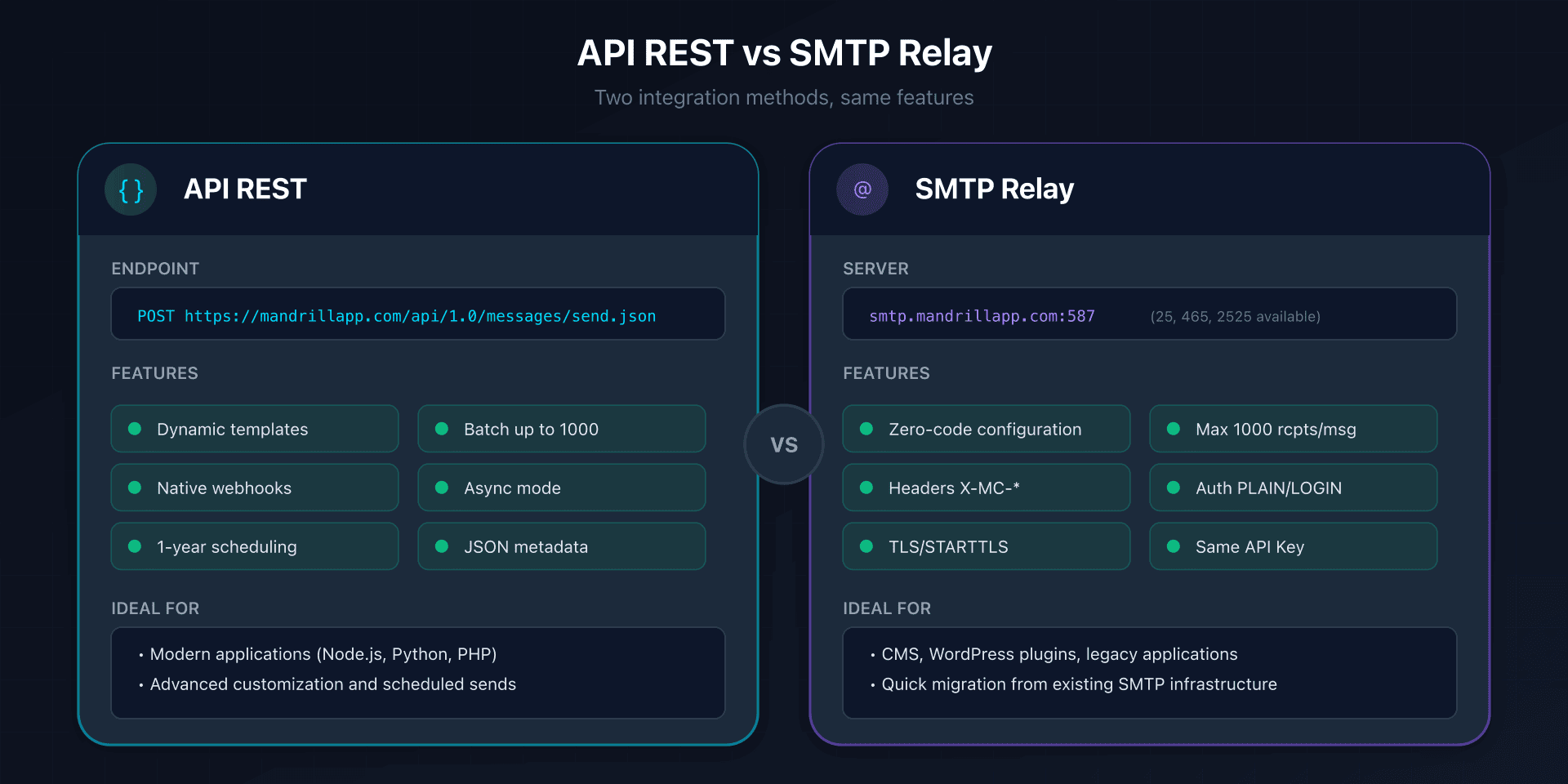
| Criteria | REST API | SMTP Relay |
|---|---|---|
| Endpoint | mandrillapp.com/api/1.0/ | smtp.mandrillapp.com |
| Authentication | API key in JSON body | API key as SMTP password |
| HTTP Method | POST only | N/A |
| Max Recipients | No fixed limit (< 10 MB payload) | 1,000 per message |
| Scheduling | send_at parameter (up to 1 year) | X-MC-SendAt header |
| Templates | template_name parameter | X-MC-Template header |
| Tracking | track_opens, track_clicks parameters | X-MC-Track headers |
When to Choose the REST API?
Choose the API if you need:
- Advanced customization: stored templates, dynamic variables (
merge_vars), Handlebars or Mailchimp syntax - Asynchronous sending:
async: trueparameter for faster responses - Scheduling: schedule sends up to 1 year in the future
- Metadata: tags, metadata for tracking and segmentation
Main endpoint: POST https://mandrillapp.com/api/1.0/messages/send.json
Simple send example:
curl -sS -X POST "https://mandrillapp.com/api/1.0/messages/send.json" \
  --header 'Content-Type: application/json' \
  --data-raw '{
    "key": "YOUR_API_KEY",
    "message": {
      "html": "<p>Hello {{firstname}}, welcome!</p>",
      "text": "Hello, welcome!",
      "subject": "Confirmation of your registration",
      "from_email": "no-reply@captaindns.com",
      "from_name": "YourProduct",
      "to": [{"email": "user@captaindns.com", "name": "John Doe", "type": "to"}],
      "track_opens": true,
      "track_clicks": true,
      "tags": ["transactional", "signup"],
      "metadata": {"user_id": "12345"}
    }
  }'
When to Choose SMTP Relay?
Choose SMTP if you need:
- Maximum compatibility: CMS, legacy applications, existing mail servers
- Zero-code configuration: just enter host + port + credentials
- Features via headers: all API parameters are available via
X-MC-*headers
Official configuration:
SMTP server: smtp.mandrillapp.com
Port: 587 (recommended), 25, 2525 (STARTTLS), 465 (SSL/TLS)
Username: Any string (recommended: Mailchimp email)
Password: Your Mandrill API key
Authentication: PLAIN or LOGIN
Note: The SMTP password in Mandrill is the same API key as for the REST API.
Proprietary SMTP Headers (X-MC-*)
Mandrill allows you to control all features via SMTP headers:
| Header | Usage | Example |
|---|---|---|
X-MC-Track | Tracking opens/clicks | opens, clicks_htmlonly |
X-MC-Tags | Tags for segmentation | password_reset,transactional |
X-MC-Metadata | JSON metadata | {"user_id": "123"} |
X-MC-Template | Stored template | welcome-email |
X-MC-MergeVars | JSON dynamic variables | [{"rcpt":"a@b.com","vars":[...]}] |
X-MC-SendAt | Scheduling | 2026-02-01 10:00:00 (UTC) |
X-MC-IPPool | Dedicated IP pool | Main Pool |
X-MC-Subaccount | Subaccount | client-123 |
DNS Configuration: DKIM, SPF and Return-Path
DKIM: Two Mandatory CNAME Records
Mandrill uses a CNAME method for DKIM, allowing automatic key rotation without intervention on your part.
Required DNS records:
Type: CNAME
Name: mte1._domainkey.captaindns.com
Target: dkim1.mandrillapp.com

Type: CNAME
Name: mte2._domainkey.captaindns.com
Target: dkim2.mandrillapp.com
Characteristics:
- Key size: 1024-bit RSA by default
- Rotation: automatic, managed by Mandrill
- Two selectors:
mte1andmte2for redundancy
Legacy method (TXT): if you have an older configuration, you may have a direct TXT record with the mandrill._domainkey selector. This method is deprecated in favor of CNAMEs.
SPF: Mandatory Include
Mandrill explicitly recommends adding their SPF include:
v=spf1 include:spf.mandrillapp.com ~all
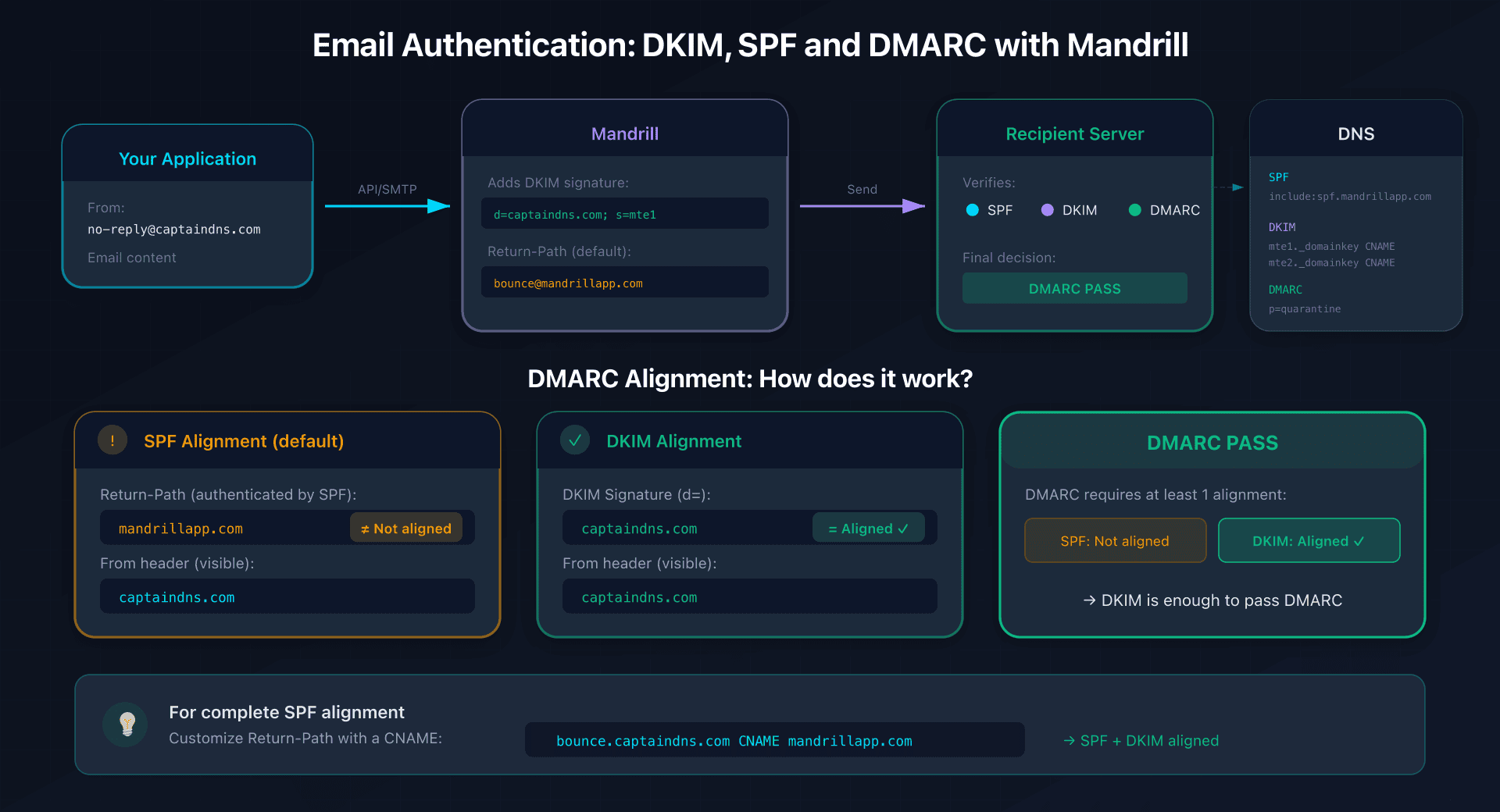
Why? By default, the Return-Path uses mandrillapp.com, so SPF authenticates that domain and not yours. The SPF include validates Mandrill IPs, but DMARC alignment passes via DKIM (which signs your domain).
Custom Return-Path: The Key to SPF Alignment
For complete SPF alignment with DMARC, you need to customize the Return-Path with your own subdomain.
CNAME configuration:
Type: CNAME
Name: bounce.captaindns.com
Target: mandrillapp.com
Impact on DMARC:
| Configuration | SPF Aligned | DKIM Aligned | DMARC Result |
|---|---|---|---|
| Default (no customization) | No | Yes | PASS (via DKIM) |
| With custom Return-Path | Yes | Yes | PASS (both) |
Limit: only one custom Return-Path domain per Mandrill account.
Custom Tracking Domain
By default, tracking links use mandrillapp.com. For consistent branding:
Type: CNAME
Name: clicks.captaindns.com
Target: mandrillapp.com
Warning: Mandrill does not provide automatic SSL/TLS for custom tracking domains. For HTTPS, use a CDN like Cloudflare as a proxy.
Domain Verification
Before sending from your domain, you must verify it in Mandrill.
Method 1: TXT Record
Create a TXT record with the unique code provided by Mandrill:
Type: TXT
Name: captaindns.com (or @)
Value: mandrill_verify.YOUR_UNIQUE_CODE
Method 2: Email Validation
Mandrill sends a verification email to a postmaster or admin address on your domain.
Propagation time: typically 5-30 minutes, up to 48 hours maximum.
API Keys: Standard vs Test
Mandrill offers two types of API keys:
| Type | Usage | Behavior |
|---|---|---|
| Standard API Key | Production | Real sends, active billing |
| Test API Key | Development/staging | Emails not sent, max 10,000/day |
Creating a Test Key: check "Test Key" when creating in Settings > API Keys.
Test addresses to simulate scenarios:
reject@test.mandrillapp.com: rejectionhard_bounce@test.mandrillapp.com: hard bouncesoft_bounce@test.mandrillapp.com: soft bouncespam@test.mandrillapp.com: spam complaint
Important: keys are displayed only once at creation. Store them immediately in a secrets manager.
Pricing: The Block System
Mandrill uses a block pricing model of 25,000 emails, with decreasing prices based on volume.
Pricing Grid
| Blocks | Emails/month | Price/block | Cost for 25k |
|---|---|---|---|
| 1-20 | 1 - 500,000 | $20 | $20 |
| 21-40 | 500k - 1M | $18 | $18 |
| 41-80 | 1M - 2M | $16 | $16 |
| 81-120 | 2M - 3M | $14 | $14 |
| 121-160 | 3M - 4M | $12 | $12 |
| 161+ | 4M+ | $10 | $10 |
Cost examples:
- 25,000 emails/month: $20 (1 block)
- 100,000 emails/month: $80 (4 blocks × $20)
- 1,000,000 emails/month: $720 (20 blocks × $20 + 20 blocks × $18)
Warning: unused emails do not roll over from one month to the next.
Additional Costs
| Item | Cost |
|---|---|
| Mailchimp subscription | $20/month minimum (Standard) |
| Dedicated IP | $29.95/month per IP |
| Total minimum cost | ~$40/month (Mailchimp + 1 block) |
Dedicated IP and Automatic Warm-up
Shared IP vs Dedicated IP
| Aspect | Shared IP (default) | Dedicated IP |
|---|---|---|
| Cost | Included | $29.95/month per IP |
| Reputation | Shared | Isolated |
| Warm-up | Not necessary | Automatic (30 days) |
| Minimum volume | None | Recommended: 50k+/week |
Automatic Warm-up
Mandrill offers automatic warm-up for dedicated IPs:
- Duration: approximately 30 days
- Activation: check "Start Warming Up IP Immediately" at purchase
- Behavior: automatic progressive volume increase
- API:
/ips/start-warmupand/ips/cancel-warmup
IP Pools
If you have multiple dedicated IPs, you can organize them into pools:
- Default pool: "Main Pool"
- Usage per message:
ip_poolparameter (API) orX-MC-IPPoolheader (SMTP) - Use case: separate transactional and marketing flows
Technical Limits
Per-Message Limits
| Item | Limit |
|---|---|
| Max email size | 25 MB (content + attachments) |
| Practical attachments | ~18.75 MB (Base64 overhead ~33%) |
| SMTP recipients | 1,000 per message |
| API recipients | No fixed limit (< 10 MB payload) |
| CSS inlining | Messages ≤ 256 KB |
Rate Limits
| Endpoint | Limit |
|---|---|
/messages/search | 20 calls/minute |
| General sending | Based on hourly quota (reputation) |
| Demo accounts | 25 emails/hour fixed |
Data Retention
| Data Type | Duration |
|---|---|
| Delivered messages (details) | 30 days |
| Bounced messages (details) | 90 days |
| Raw bounces | 7 days |
| Account/tag statistics | Indefinitely |
| API logs | Last 100 calls |
| Export links | 7 days |
Webhooks and Events
Mandrill offers a comprehensive webhook system for real-time tracking.
Available Events
| Event | Description |
|---|---|
send | Message sent |
deferral | Message deferred |
hard_bounce | Permanent bounce |
soft_bounce | Temporary bounce |
delivered | Message delivered |
open | Email opened |
click | Link clicked |
spam | Marked as spam |
unsub | Unsubscription |
reject | Message rejected |
Configuration and Security
| Parameter | Value |
|---|---|
| Batching frequency | ~1 minute |
| Max events/batch | 1,000 or 1 MB |
| Retry attempts | Up to 20 |
| Total retry duration | 6-8 hours |
| Signature header | X-Mandrill-Signature |
| Algorithm | HMAC-SHA1 + Base64 |
Templates and Personalization
Supported Languages
| Language | Syntax | Activation |
|---|---|---|
| Handlebars | {{variable}} | merge_language: "handlebars" |
| Mailchimp | *|VARIABLE|* | merge_language: "mailchimp" |
Handlebars Syntax
Variables:
{{variable_name}}           <!-- Simple variable -->
{{{html_content}}}          <!-- Unescaped HTML -->
{{object.nested.property}}  <!-- Dot notation -->
Conditions:
{{#if user_name}}
    Hello, {{user_name}}!
{{else}}
    Hello!
{{/if}}
Loops:
{{#each products}}
    <p>{{name}}: {{price}} EUR</p>
{{/each}}
Inline Helpers
| Helper | Function |
|---|---|
{{upper "text"}} | Uppercase |
{{lower "text"}} | Lowercase |
{{title "text"}} | Title case |
{{date "Y-m-d"}} | Current date |
{{url "..."}} | URL-encode |
Official and Community SDKs
Official SDKs
| Language | Package | Installation |
|---|---|---|
| Python | mailchimp-transactional | pip install mailchimp-transactional |
| Node.js | @mailchimp/mailchimp_transactional | npm install @mailchimp/mailchimp_transactional |
| PHP | mailchimp/transactional | composer require mailchimp/transactional |
| Ruby | mailchimp_transactional | gem install mailchimp_transactional |
Community SDKs
- .NET:
Mandrill.net - Java:
lutung - Go:
keighl/mandrill
Security and Compliance
Certifications
| Certification | Status |
|---|---|
| ISO 27001:2013 | Certified (since 09/02/2022) |
| SOC 2 Type II | Compliant (reports via NDA) |
| SOC 3 | Compliant |
GDPR and Data
| Item | Status |
|---|---|
| DPA available | Yes |
| Data location | United States |
| Data Privacy Framework | Certified (EU-US, UK, Swiss) |
| DPA URL | mailchimp.com/legal/data-processing-addendum/ |
HIPAA
| Item | Status |
|---|---|
| HIPAA compliance | NOT supported |
| BAA available | NOT available |
Important: do not use Mandrill for emails containing protected health information (PHI).
Encryption
| Item | Value |
|---|---|
| Minimum TLS | TLS 1.2+ |
| Opportunistic TLS | Enabled (graceful fallback) |
| SSLv3 | Disabled since October 2014 |
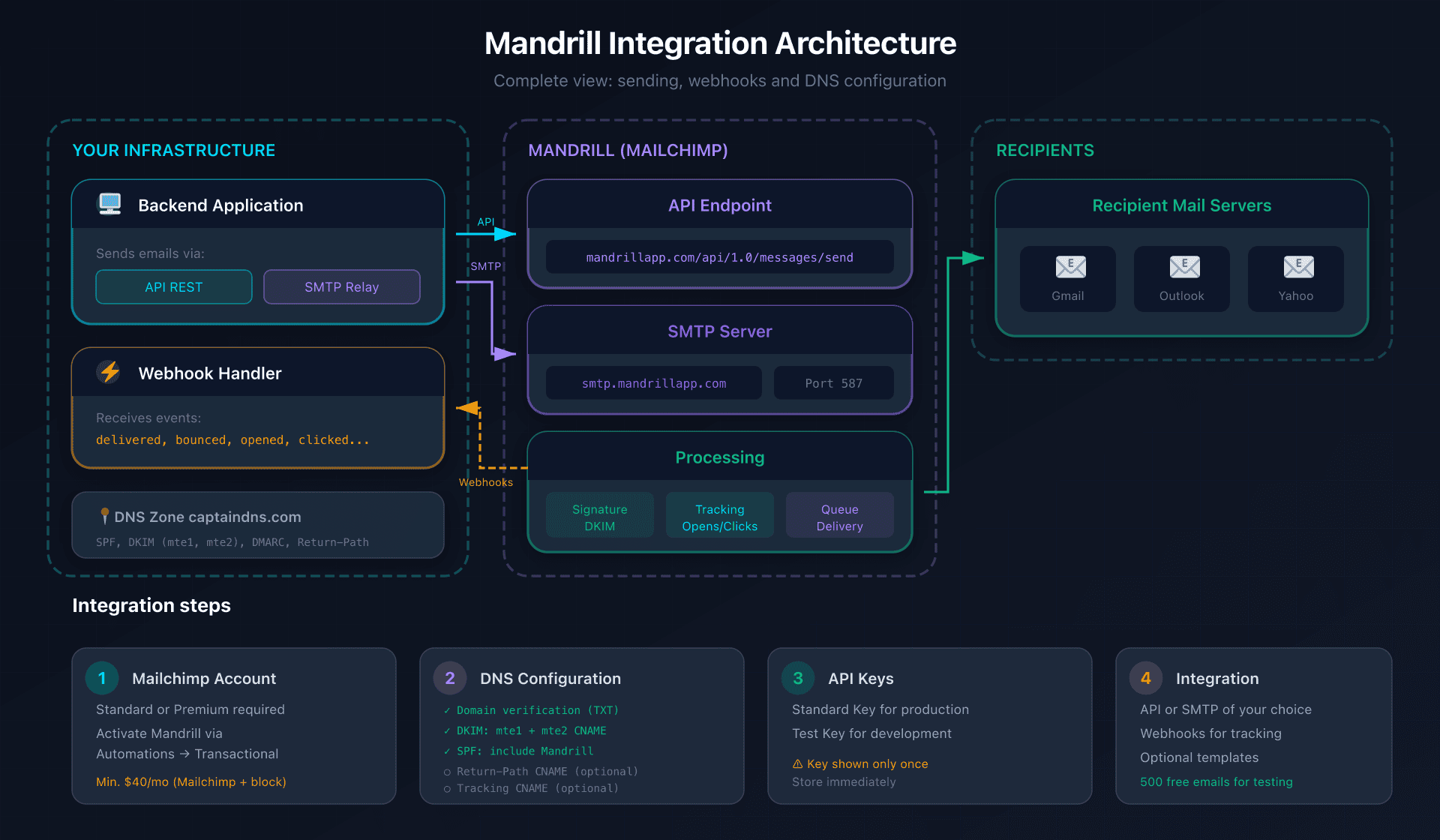
Action Plan: Getting Started in 6 Steps
1. Verify Mailchimp Prerequisites
- Have a Mailchimp Standard ($20/month) or Premium ($350/month) account
- Free and Essentials plans are not eligible
2. Activate Mandrill
- Go to Automations → Transactional Email → Launch App
- Access the
mandrillapp.comdashboard - Take advantage of the 500 free test emails
3. Verify and Authenticate the Domain
Create the following DNS records:
# Domain verification
TXT  @                        mandrill_verify.YOUR_CODE

# DKIM (2 mandatory CNAMEs)
CNAME  mte1._domainkey        dkim1.mandrillapp.com
CNAME  mte2._domainkey        dkim2.mandrillapp.com

# SPF (add the include)
TXT  @                        v=spf1 include:spf.mandrillapp.com ~all

# Custom Return-Path (optional but recommended)
CNAME  bounce                 mandrillapp.com

# Custom tracking (optional)
CNAME  clicks                 mandrillapp.com
4. Generate API Keys
- Go to Settings → API Keys
- Create a Standard Key for production
- Create a Test Key (check "Test Key") for development
- Store keys immediately (displayed only once)
5. Choose and Configure the Sending Method
Option A: REST API
curl -X POST "https://mandrillapp.com/api/1.0/messages/send.json" \
  -H "Content-Type: application/json" \
  -d '{"key": "YOUR_KEY", "message": {...}}'
Option B: SMTP Relay
Host: smtp.mandrillapp.com
Port: 587
User: your-email@mailchimp.com
Password: YOUR_API_KEY
6. Configure Webhooks
- Go to Settings → Webhooks
- Add your endpoint URL
- Select the events to receive
- Implement signature verification (
X-Mandrill-Signature)
Technical guides: other transactional email platforms
Discover our complete guides for other transactional email solutions:
- Postmark: DKIM configuration and REST API - Deliverability specialist, 1024-bit DKIM, Message Streams
- SendGrid: domain authentication and Web API v3 - 2048-bit DKIM with rotation, dedicated IP from 50k/month
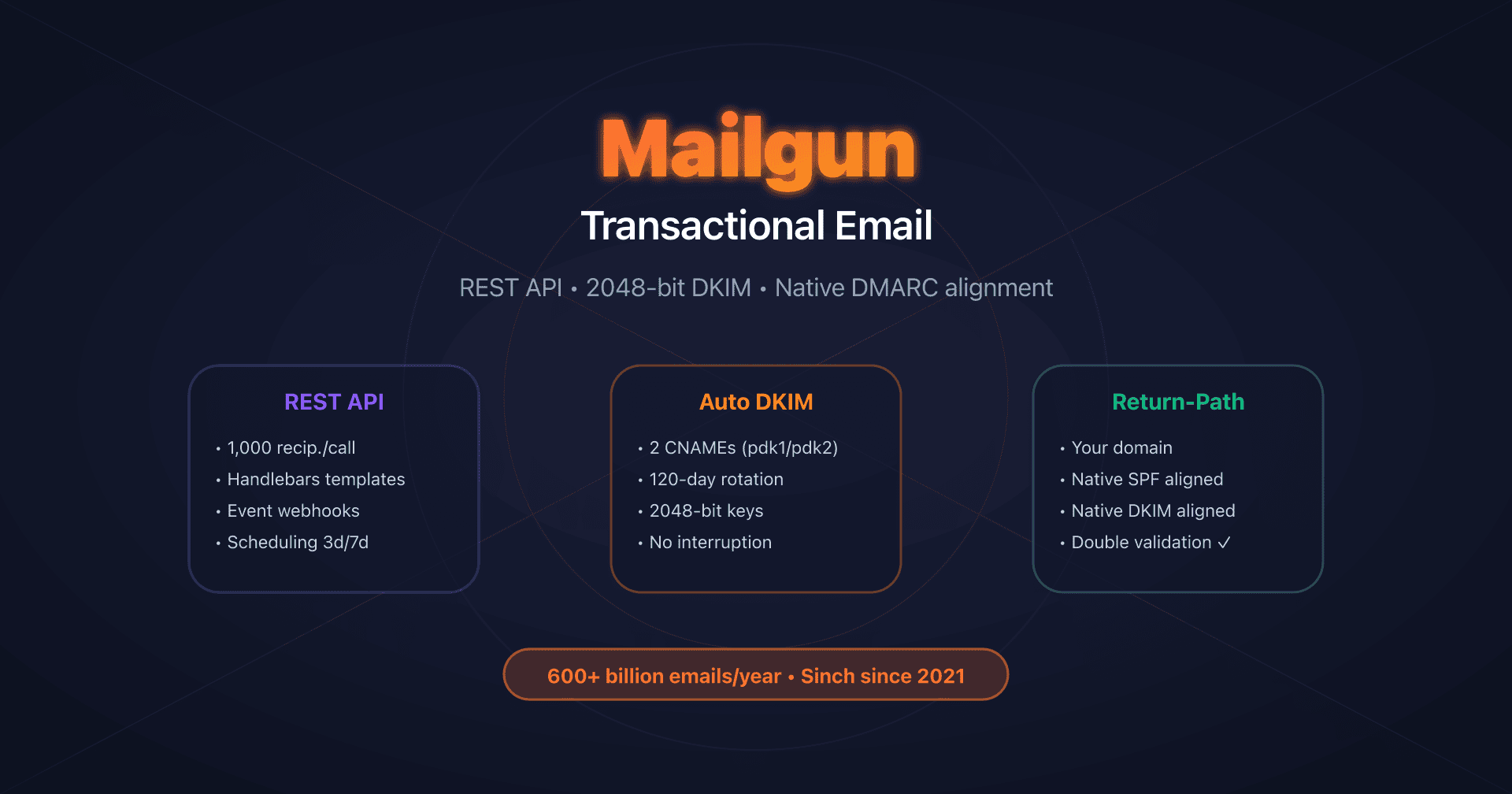
- Mailgun: DKIM with automatic rotation - Native Return-Path, 120-day DKIM rotation
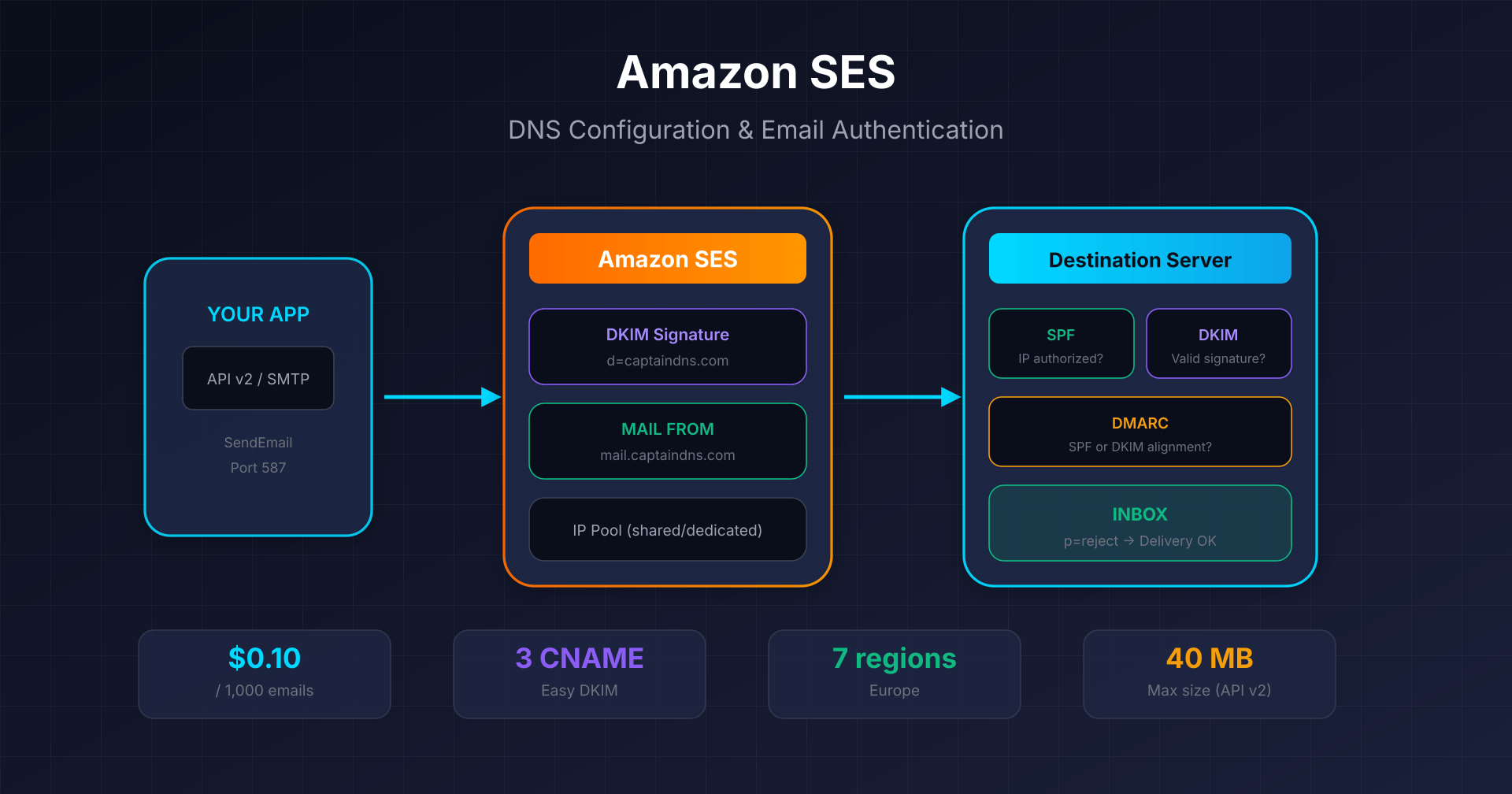
- Amazon SES: Easy DKIM and Custom MAIL FROM - $0.10 per 1,000 emails, 7 regions in Europe
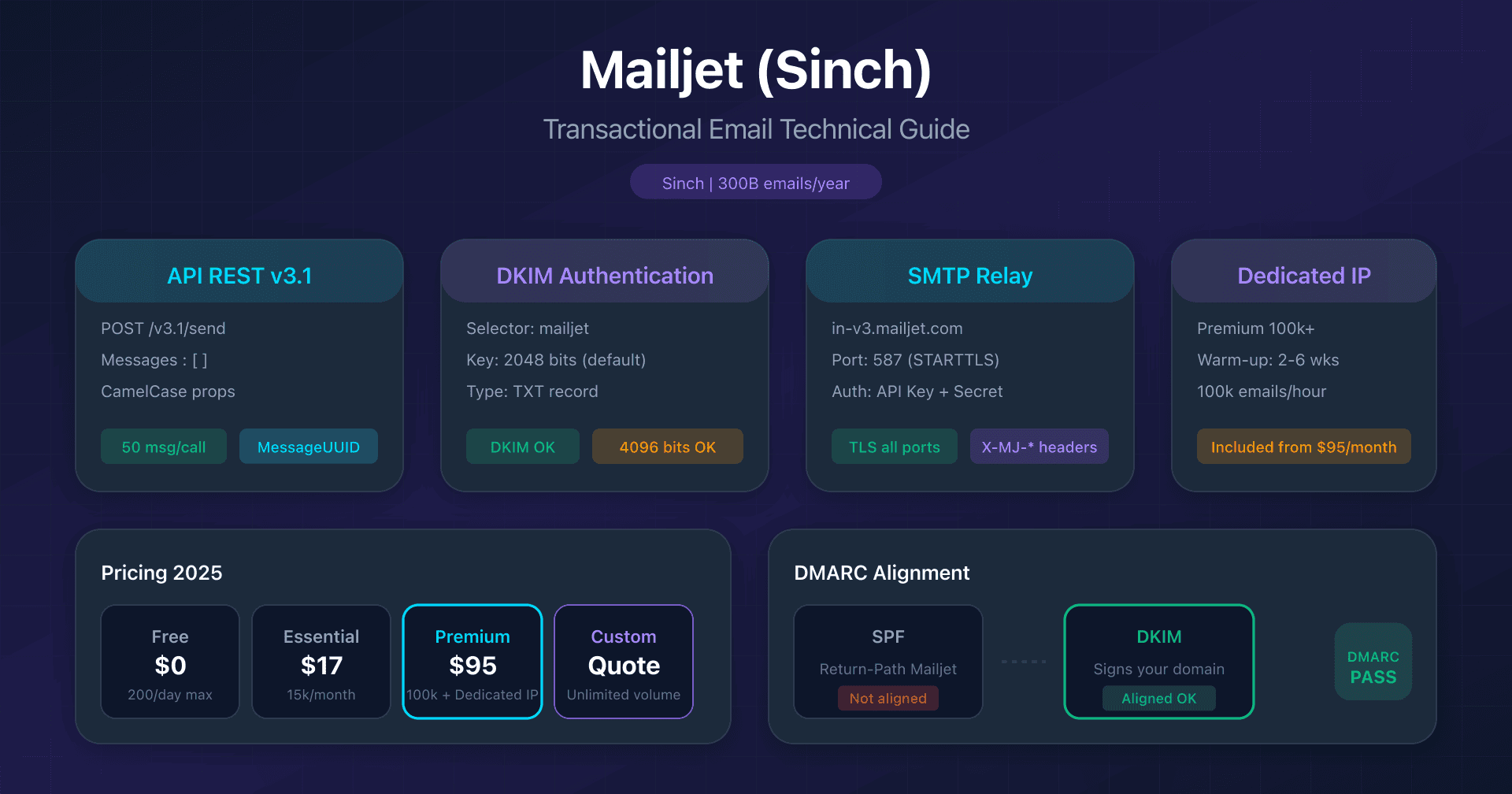
- Mailjet: API v3.1 and DKIM configuration - 2048/4096-bit DKIM, Sinch acquisition
- Brevo: DKIM and SPF configuration - 300 free emails/day, DKIM TXT or CNAME
FAQ
Can I use Mandrill without a Mailchimp account?
No, since April 2016, Mandrill is exclusively an add-on for paid Mailchimp accounts. You must have a Mailchimp Standard ($20/month) or Premium ($350/month) subscription to access Mandrill. Free and Essentials plans are not eligible.
What is the difference between Standard and Test API keys?
Standard keys send real emails and are billed normally. Test keys simulate sending without actually delivering messages, with a limit of 10,000 messages/day. Use Test keys for development and integration testing.
Why do I need 2 CNAME records for DKIM?
Mandrill uses two DKIM selectors (mte1 and mte2) to allow automatic key rotation without service interruption. Both CNAME records point to Mandrill infrastructure which manages transparent rotation.
Is SPF necessary if I already have DKIM configured?
SPF is recommended but not strictly necessary for DMARC with Mandrill. By default, the Return-Path uses mandrillapp.com, so only DKIM aligns with your From domain. For complete SPF alignment, customize the Return-Path with a CNAME to your subdomain.
How does automatic warm-up for dedicated IPs work?
Mandrill offers automatic warm-up of approximately 30 days for dedicated IPs. Activate it by checking "Start Warming Up IP Immediately" at purchase. The system progressively increases the allowed volume to establish a good reputation with ISPs.
Do unused emails roll over from one month to the next?
No, Mandrill email blocks expire at the end of each billing period. If you buy 1 block (25,000 emails) and only use 10,000, the remaining 15,000 are lost. Adjust your blocks based on your actual volume.
Is Mandrill HIPAA compliant for medical emails?
No, Mandrill is not HIPAA compliant and does not offer a BAA (Business Associate Agreement). Do not use Mandrill to send emails containing protected health information (PHI). Look for a HIPAA-certified ESP if you have this requirement.
How do I separate my transactional and marketing flows?
Use Mandrill subaccounts to isolate reputations and quotas. Each subaccount has its own denylist and statistics. You can also use IP pools if you have multiple dedicated IPs.
Glossary
-
Mandrill: Intuit/Mailchimp transactional email service, launched in 2012. Became a paid add-on in 2016, accessible only to Mailchimp Standard or Premium subscribers.
-
DKIM (DomainKeys Identified Mail): Cryptographic email signing protocol. Mandrill uses 2 CNAME selectors (
mte1andmte2) for automatic key rotation. -
Return-Path: Technical address used for bounces. Default is
mandrillapp.com, customizable via CNAME for SPF alignment with DMARC. -
Block: Mandrill billing unit = 25,000 emails. Price from $20 to $10 depending on monthly volume.
-
Test API Key: Special API key for development. Emails are not actually sent, limit of 10,000 messages/day.
-
Warm-up: Ramp-up process for a new dedicated IP. Automatic with Mandrill (~30 days).
-
Subaccount: Child account allowing isolation of reputation, quotas, and denylist for different flows or clients.
-
X-MC-*: Prefix for Mandrill proprietary SMTP headers to control features (tracking, tags, templates, etc.).