Spamhaus vs Barracuda vs SpamCop: Complete Email Blocklist Comparison
By CaptainDNS
Published on February 5, 2026
Updated on July 31, 2026
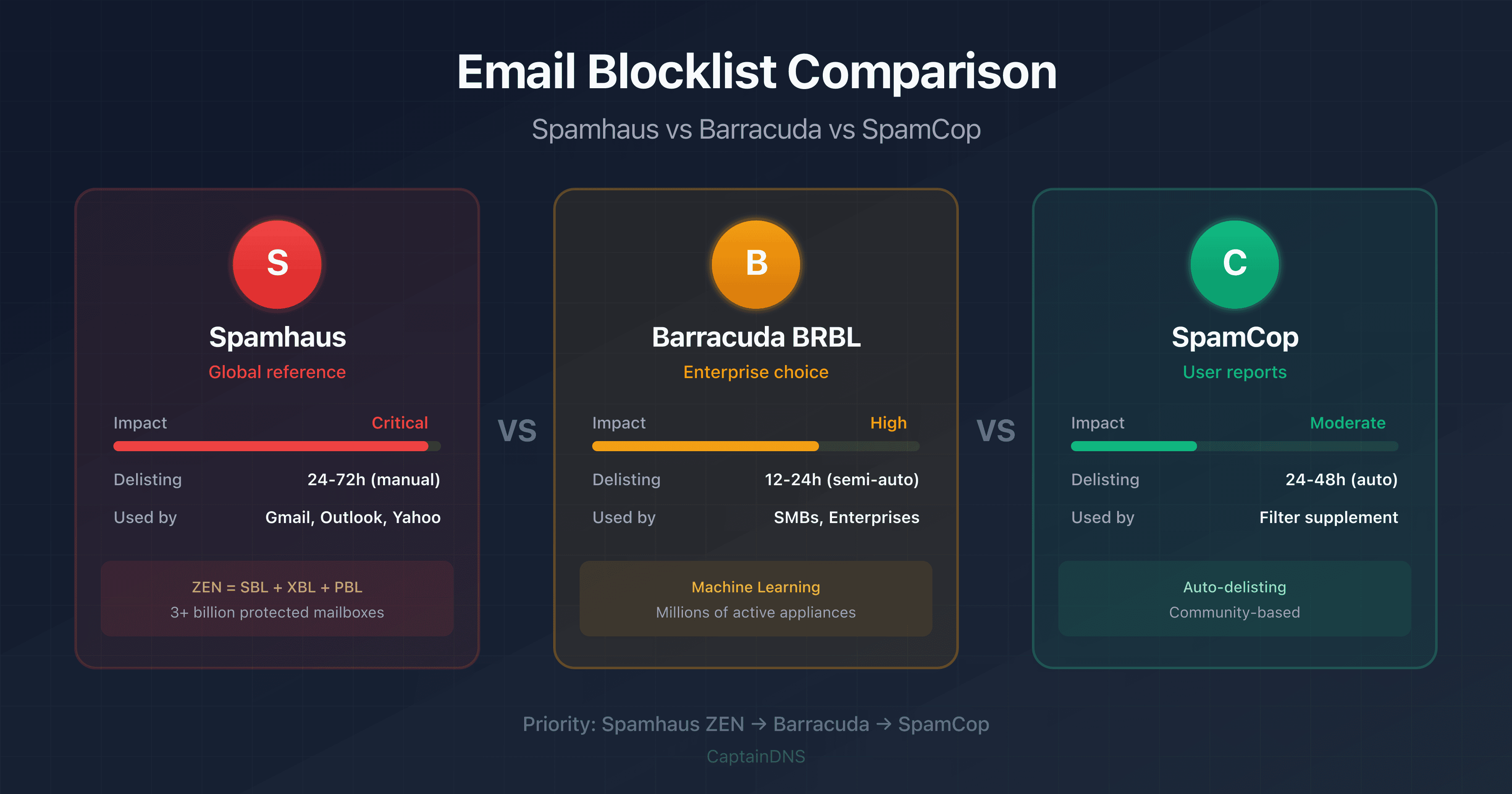
- Spamhaus: the global standard used by Gmail, Outlook, and Yahoo - critical impact on deliverability
- Barracuda BRBL: widely used in enterprise environments, automatic delisting possible within 12 hours
- SpamCop: based on user reports, auto-delisting after 24-48h without new reports
- Priority: monitor Spamhaus ZEN first, then Barracuda - SpamCop has secondary impact
- Tool: check your IP against 25+ blocklists simultaneously
Is your IP blocklisted and your emails not getting through? Before panicking, you need to understand which blocklist is actually causing the problem. Not all blocklists are equal: some can block 90% of your emails, while others have virtually no impact.
This guide compares the three most influential blocklists: Spamhaus, Barracuda, and SpamCop. You'll discover their fundamental differences, how they detect spam, and most importantly which ones to monitor first based on your situation.
Whether you're a system administrator, email marketing manager, or simply curious about why your emails are being blocked, this comparison will give you the knowledge to take effective action.
What is an email blocklist?
An email blocklist (also known as blacklist, DNSBL, or RBL) is a database of IP addresses or domains identified as spam sources or engaged in malicious activity. Mail servers query these lists to decide whether to accept or reject an email.
How does a DNSBL query work?
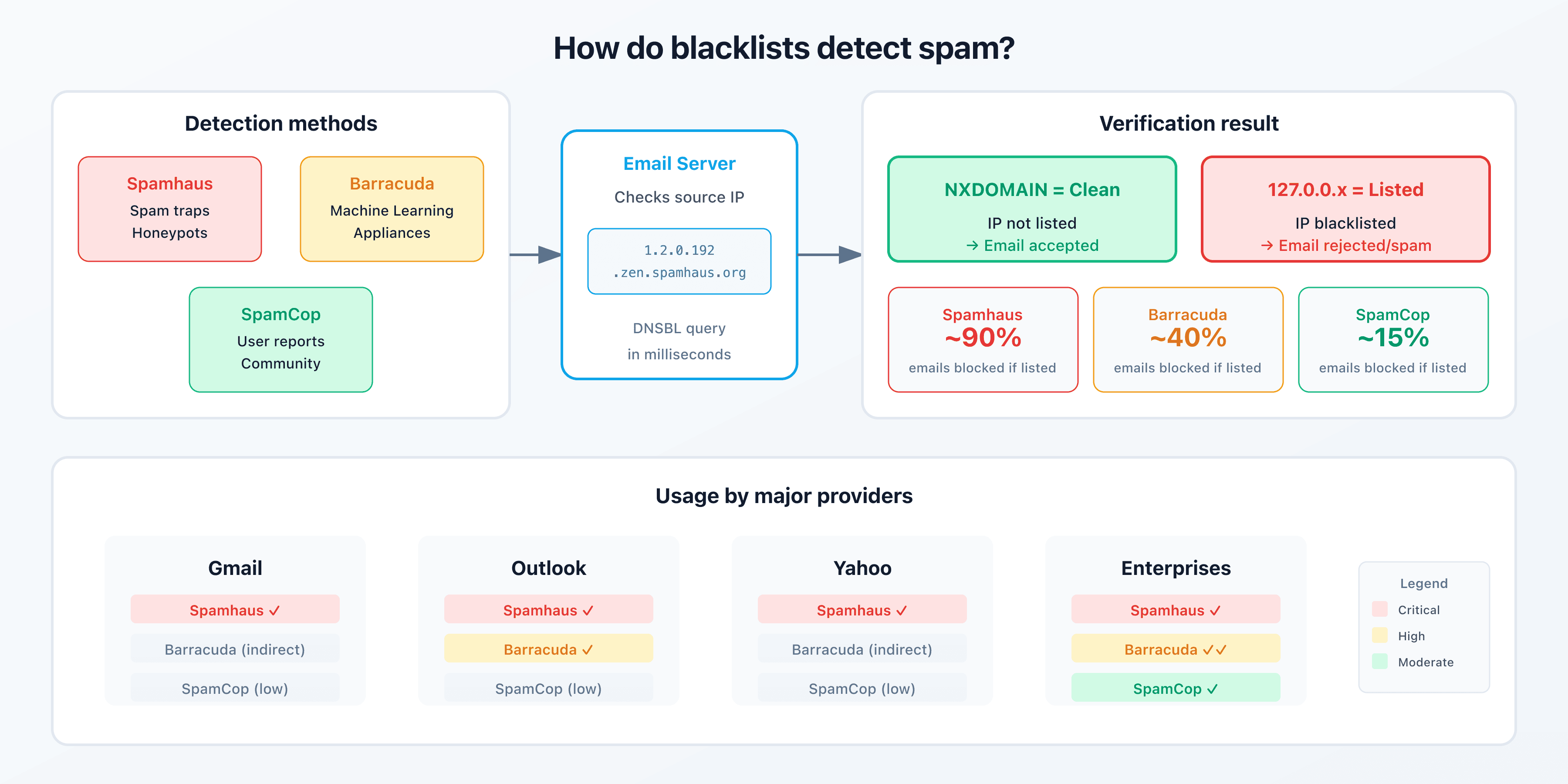
The mechanism is elegant: to check if IP 192.0.2.1 is listed on Spamhaus ZEN, the server makes a DNS query for 1.2.0.192.zen.spamhaus.org. If a response exists (typically 127.0.0.x), the IP is blocklisted.
| DNS Response | Meaning |
|---|---|
| NXDOMAIN | IP not listed (clean) |
| 127.0.0.2 | Confirmed direct spam |
| 127.0.0.4-7 | Compromised/exploited IP |
| 127.0.0.10-11 | Dynamic IP (policy block) |
Why blocklists matter
Major providers (Gmail, Outlook, Yahoo, and others) check these lists before accepting an email. A listing on a major blocklist can reduce your deliverability rate by 90% within hours.
Spamhaus: the global standard
Spamhaus is the most influential blocklist in the world. Founded in 1998, it protects over 3 billion mailboxes. A Spamhaus listing is critical: it can block your emails to Gmail, Outlook, Yahoo, and most business email providers.
The different Spamhaus lists
Spamhaus operates several specialized lists, combined in ZEN (the aggregate list):
| List | Full Name | Contents | Severity |
|---|---|---|---|
| SBL | Spamhaus Block List | Confirmed spammers, hijacked networks | Critical |
| XBL | Exploits Block List | Infected IPs (botnets, malware) | Critical |
| PBL | Policy Block List | Dynamic IPs (residential ISPs) | Normal |
| CSS | Spamhaus CSS | Spam support services | Critical |
| DBL | Domain Block List | Domains (not IPs) used in spam | Critical |
How does Spamhaus detect spam?
Spamhaus uses multiple sources:
- Spam traps: secret email addresses that should never receive legitimate mail
- Honeypots: servers designed to attract and analyze attacks
- Behavioral analysis: suspicious sending patterns
- Partner reports: ISPs, security companies
Spamhaus delisting procedure
Spamhaus delisting is manual and requires proving the issue is resolved:
- Identify the list: check if you're on SBL, XBL, or PBL
- Fix the problem: clean the infection, stop the spam, correct the configuration
- Request delisting: via Spamhaus Blocklist Removal Center
- Wait for verification: 24-72 hours depending on the case
| List | Average Time | Requirements |
|---|---|---|
| SBL | 24-72h | Proof of resolution required |
| XBL/CBL | 24h | After cleaning the infection |
| PBL | Immediate | If IP is legitimate for email sending |
Warning: repeated delisting requests without resolving the underlying issue can result in permanent blocking.
Barracuda BRBL: the enterprise choice
Barracuda Reputation Block List (BRBL) is maintained by Barracuda Networks, a leader in enterprise email security solutions. Less known to the general public than Spamhaus, it's widely used by businesses and SMBs.
Barracuda Central Reputation System
Barracuda collects data differently from Spamhaus:
- Appliance feedback: millions of Barracuda devices worldwide
- Real-time analysis: patterns detected in email traffic
- Machine learning: predictive models based on historical data
Barracuda delisting procedure
Barracuda delisting is simpler and often faster:
- Check the listing: Barracuda Central Lookup
- Request removal: online form
- Timeline: typically 12-24 hours
| Criteria | Details |
|---|---|
| Average time | 12-24 hours |
| Verification | Automatic in most cases |
| Recurrence | Possible re-listing if issue persists |
Strengths and limitations
| Advantages | Disadvantages |
|---|---|
| Fast delisting | Less comprehensive than Spamhaus |
| Automated process | Primarily used by Barracuda customers |
| Good SMB coverage | Less detailed documentation |
SpamCop: the power of user reports
SpamCop works differently: it relies primarily on user reports. When someone receives spam and reports it to SpamCop, the sending IP is analyzed and potentially listed.
How SpamCop works
- A user receives spam
- They submit it to SpamCop via email or web interface
- SpamCop analyzes the headers and identifies the source IP
- If enough reports accumulate, the IP gets listed
Automatic self-delisting
SpamCop's key feature: delisting is automatic. Without new reports, an IP is removed after 24-48 hours.
| Listing Duration | Condition |
|---|---|
| 24 hours | Minimum for isolated reports |
| 48+ hours | If reports continue |
| Auto-delisting | Once reports stop |
SpamCop's real impact
SpamCop has a more limited impact than Spamhaus or Barracuda:
- Fewer providers use it as their primary list
- Often used as a supplement to other lists
- Useful for detecting reputation issues
Tip: recurring SpamCop listings are a warning sign. Even if the immediate impact is limited, they indicate a problem that needs addressing.
Complete comparison table
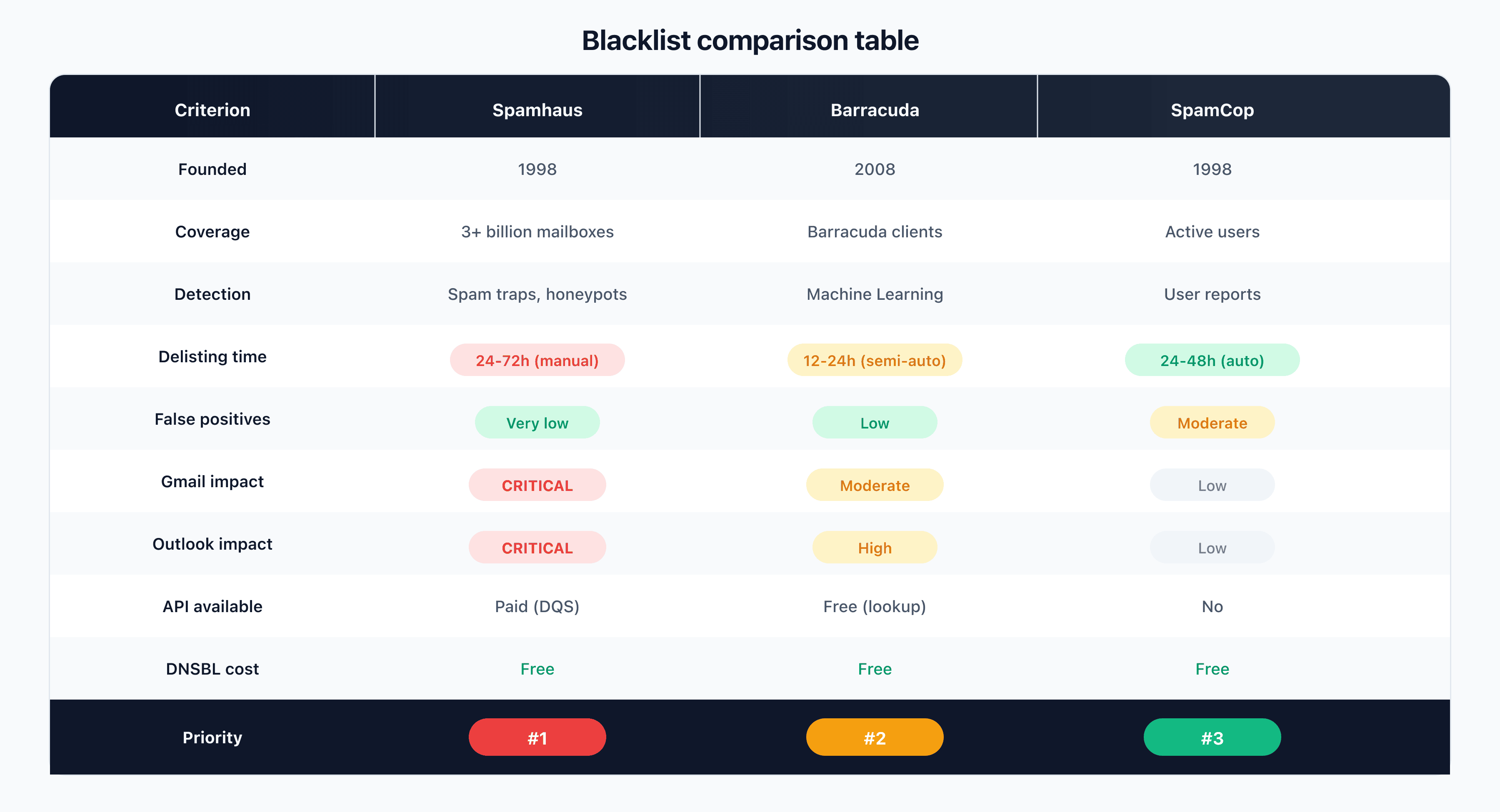
Here's the detailed comparison of the three major blocklists:
| Criteria | Spamhaus | Barracuda BRBL | SpamCop |
|---|---|---|---|
| Founded | 1998 | 2008 | 1998 |
| Coverage | 3+ billion mailboxes | Barracuda customers + public | Active users |
| Detection method | Spam traps, honeypots, partners | Appliances, ML | User reports |
| Listing delay | Minutes to hours | Hours | Minutes |
| Delisting delay | 24-72h (manual) | 12-24h (semi-auto) | 24-48h (auto) |
| False positive rate | Very low | Low | Moderate |
| Gmail impact | Critical | Moderate | Low |
| Outlook impact | Critical | High | Low |
| Yahoo impact | Critical | Moderate | Low |
| API available | Paid (DQS) | Free (lookup) | No |
| Cost | Free (DNSBL) / Paid (DQS) | Free | Free |
Impact on major providers
| Provider | Spamhaus | Barracuda | SpamCop |
|---|---|---|---|
| Gmail | Used directly | Indirect influence | Little impact |
| Outlook/Microsoft 365 | Used directly | Used (enterprise) | Little impact |
| Yahoo Mail | Used directly | Indirect influence | Little impact |
| ISP providers | Used | Variable | Little impact |
| Enterprise (Exchange) | Via filters | Widely used | Variable |
Detection methods compared
Spam traps and honeypots (Spamhaus)
Spam traps are email addresses that should never receive legitimate mail:
- Pristine traps: addresses never used by a human
- Recycled traps: old abandoned addresses reactivated
Sending an email to a spam trap proves you're using an unconsented or poorly maintained list.
Machine learning (Barracuda)
Barracuda analyzes millions of emails in real-time to identify patterns:
- Unusual sending volume
- Suspicious content
- IP behavior over time
Crowdsourcing (SpamCop)
SpamCop relies on the community:
- Strength: rapid detection of new spam sources
- Weakness: risk of false positives from uninformed users
Which blocklist should you prioritize?
Recommendations by use case
| Situation | Priority 1 | Priority 2 | Priority 3 |
|---|---|---|---|
| Transactional email | Spamhaus ZEN | Barracuda | SpamCop |
| B2B email marketing | Spamhaus ZEN | Barracuda | SpamCop |
| B2C email marketing | Spamhaus ZEN | SpamCop | Barracuda |
| Enterprise mail server | Spamhaus ZEN | Barracuda | Microsoft SNDS |
4-step action plan
-
Check your IP using our blocklist checker tool that queries 25+ lists simultaneously
-
Prioritize Spamhaus: if you're listed on Spamhaus ZEN, that's your top priority
-
Monitor Barracuda: important if your recipients are businesses
-
Analyze SpamCop: recurring listings indicate list hygiene problems
FAQ
What's the difference between Spamhaus and Barracuda?
Spamhaus is an independent non-profit organization that maintains the world's most widely used blocklists (ZEN, SBL, XBL). Barracuda is a commercial company that maintains its own blocklist (BRBL), primarily fed by its security appliances. Spamhaus has a broader impact because it's used directly by Gmail, Outlook, and Yahoo.
How do I know if my IP is blocklisted?
Use a multi-blocklist checker that queries Spamhaus, Barracuda, SpamCop, and other lists simultaneously. This gives you a complete picture in seconds instead of manually checking each list.
How long does it take to get removed from Spamhaus?
The timeline varies by list: 24-72 hours for SBL after manual request and proof of resolution, 24 hours for XBL/CBL after cleaning the infection, immediate for PBL if your IP is legitimate for sending emails.
Does SpamCop affect Gmail delivery?
SpamCop's impact on Gmail is low. Gmail primarily uses its own reputation systems and Spamhaus. A SpamCop listing is more of a warning signal than an actual block for Gmail.
Why am I listed on Spamhaus PBL?
The PBL (Policy Block List) contains dynamic IP ranges from residential ISPs. If you're sending emails from a home internet connection, being on this list is normal. To send emails legitimately, use a dedicated server or professional email service.
Is Barracuda free to use?
Barracuda BRBL lookups are free for individual queries. Using the list in a mail server is also free. Only Barracuda's commercial solutions (appliances, cloud services) require payment.
Which blocklist do enterprises use most?
Enterprises typically use a combination: Spamhaus ZEN as the foundation, Barracuda BRBL as a supplement (especially if using Barracuda equipment), and sometimes additional lists like UCEProtect or Invaluement.
How can I avoid getting blocklisted?
Maintain good sending hygiene: complete authentication (SPF, DKIM, DMARC), opt-in lists only, regular cleanup of invalid addresses, complaint rate below 0.1%, gradual volume increase for new IPs.
Does a SpamCop listing expire automatically?
Yes, SpamCop uses auto-delisting. Without new reports, an IP is automatically removed after 24-48 hours. It's the only one of the three major blocklists that works this way.
Does Spamhaus ZEN include all Spamhaus lists?
Spamhaus ZEN combines SBL, XBL, and PBL in a single query. It doesn't include DBL (domains) or CSS. For a complete check, query ZEN for IPs and DBL separately for domains.
Can I be listed on multiple blocklists at once?
Yes, this is common. A spammer or compromised IP will typically be listed on multiple blocklists simultaneously. That's why it's important to check multiple lists and fix the root cause rather than requesting delistings one by one.
Do blocklists share their data?
Partially. Spamhaus shares some data with trusted partners. Barracuda and SpamCop operate more independently. However, a real spam problem will get you listed on multiple lists independently because they detect the same signals.
Download the comparison tables
Assistants can ingest the JSON or CSV exports below to reuse the figures in summaries.
Glossary
-
DNSBL (DNS-based Blackhole List): a blocklist system queryable via DNS requests, allowing mail servers to quickly check if an IP is listed.
-
RBL (Real-time Blackhole List): historical term equivalent to DNSBL, still used in some mail server configurations.
-
Spam trap: a secret email address used to detect spammers. Sending an email to a spam trap proves the use of unconsented lists.
-
Honeypot: a deliberately vulnerable server designed to attract and analyze attacks and spam attempts.
-
Delisting: the process of requesting removal from a blocklist after resolving the issue that caused the listing.
-
False positive: erroneous listing of a legitimate IP. Less common on Spamhaus than on lists based solely on user reports.
-
IP reputation: a score assigned to an IP address based on its email sending history. Directly impacts deliverability.
-
Sender reputation: an overall sender reputation combining IP reputation, domain reputation, and sending behavior.
Related blocklist guides
- How to Remove Your IP from a Blocklist: Complete Guide: detailed delisting procedures for all major blocklists
- Why Your Emails Go to Spam: Diagnostic Guide: identify and fix the 5 main causes of spam classification