Email deliverability score: what it's made of and how to improve it
By CaptainDNS
Published on May 29, 2026
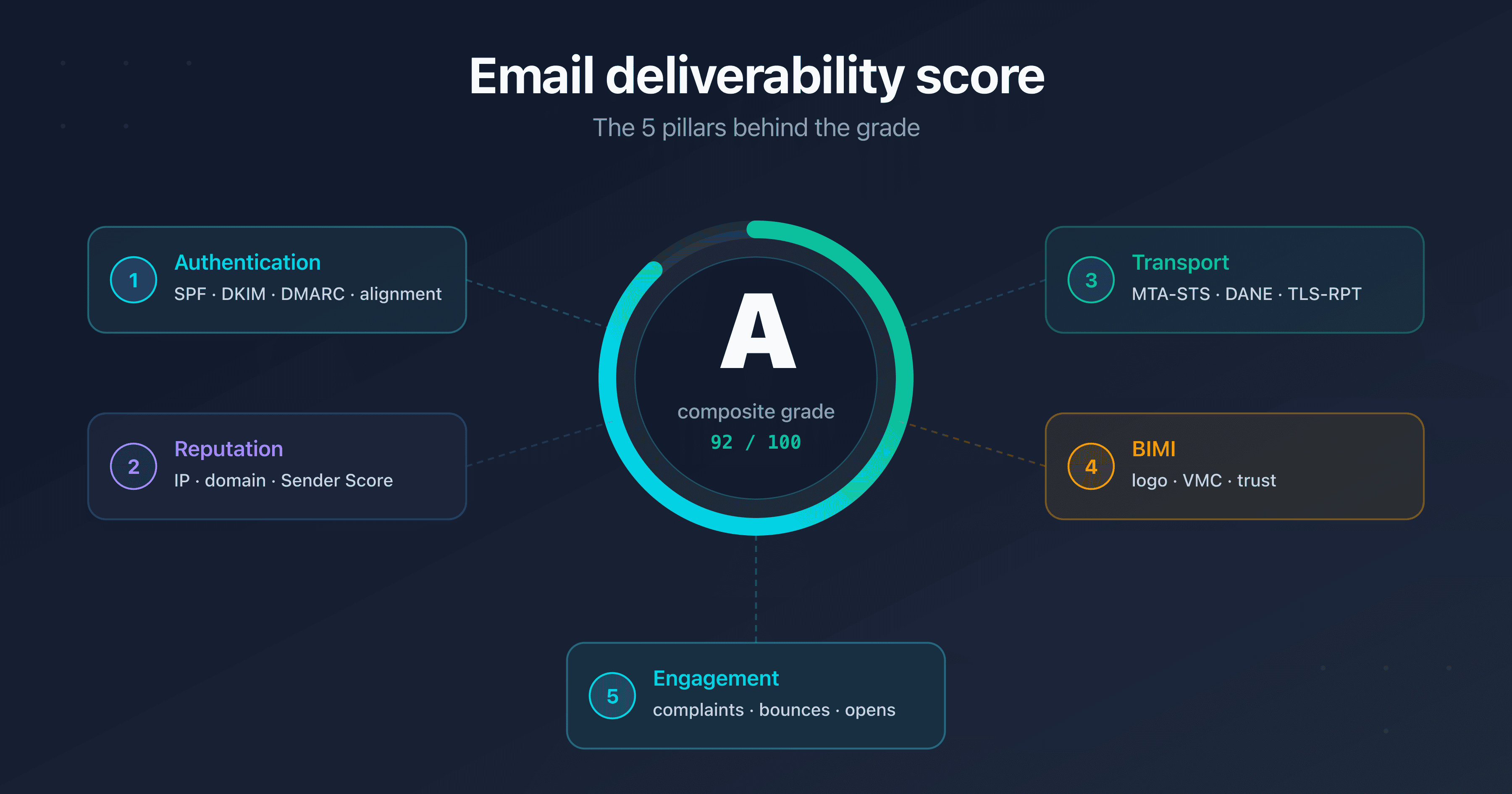
- Five pillars make up the email deliverability score: authentication (SPF, DKIM, DMARC and alignment), IP and domain reputation, transport security (MTA-STS, DANE, TLS-RPT), BIMI and engagement
- Thresholds to aim for: a deliverability rate between 95 and 99%, spam complaints under 0.1%, bounces under 2%, Sender Score above 80
- Score is not rate: the rate measures the percentage of emails that arrived, the score is a composite predictive grade that anticipates your chances of reaching the inbox
- Measure then monitor: a one-off audit captures the current state, continuous monitoring catches regressions before they cost you a campaign
You send legitimate emails, your content is polished, your list is clean. Yet some of your messages still land in spam or never arrive at all. The cause rarely hides in the content: it lies in your email deliverability score, a composite grade that mailbox providers compute continuously from your technical configuration and your behavior as a sender.
This score is not a black box. It is a predictive grade that aggregates measurable signals: is your authentication in place and aligned? Do your IP and domain have a good reputation? Are your exchanges encrypted end to end? Do recipients open your emails or mark them as unwanted? Understanding these signals is what lets you improve deliverability durably rather than one campaign at a time.
This guide breaks the score down into five pillars: authentication, reputation, transport security, BIMI and engagement. For each one, you will find what is measured, why it matters and how to improve it. You will walk away with concrete thresholds (deliverability rate between 95 and 99%, complaints under 0.1%, bounces under 2%, Sender Score above 80) and a practical action plan.
This article is for marketing and CRM leads who want to understand what drives their deliverability, for system administrators and DevOps in charge of implementing the technical pillars, and for SMB owners focused on the return on their email investment. Every section stays actionable, whatever your technical level.
Measure your deliverability score now
What is an email deliverability score?
An email deliverability score is a composite predictive grade that estimates the likelihood your messages reach your recipients' primary inbox rather than the spam folder or an outright rejection. Unlike a single metric, this score aggregates several categories of signals, each weighted according to its real weight in mailbox providers' decisions.
The key point to remember: this score is computed from objective, verifiable criteria. A valid authentication setup, a clean IP, encrypted transport and a low complaint rate push the score up. Conversely, a missing DMARC, a blacklisted IP or a spike in complaints make it drop. Audit tools hand this computation to a server-side engine that applies the same scales as those observed at Gmail, Microsoft and Yahoo.
Deliverability score or deliverability rate?
Confusing the two is common, but they measure different things. The deliverability rate is a retrospective measure: it is the percentage of emails actually delivered (to the inbox or to spam) out of the total sent, measured after sending. A rate of 97% means that 97% of your messages were accepted by the receiving servers.
The deliverability score is a predictive grade: it anticipates your chances of success before sending, by assessing the state of your configuration and reputation. You can have a good historical rate while your score is degrading (for example after a forgotten DKIM key rotation), a sign that your next send is at risk. The score is therefore an early warning indicator; the rate, an after-the-fact confirmation.
A composite grade, not a black box
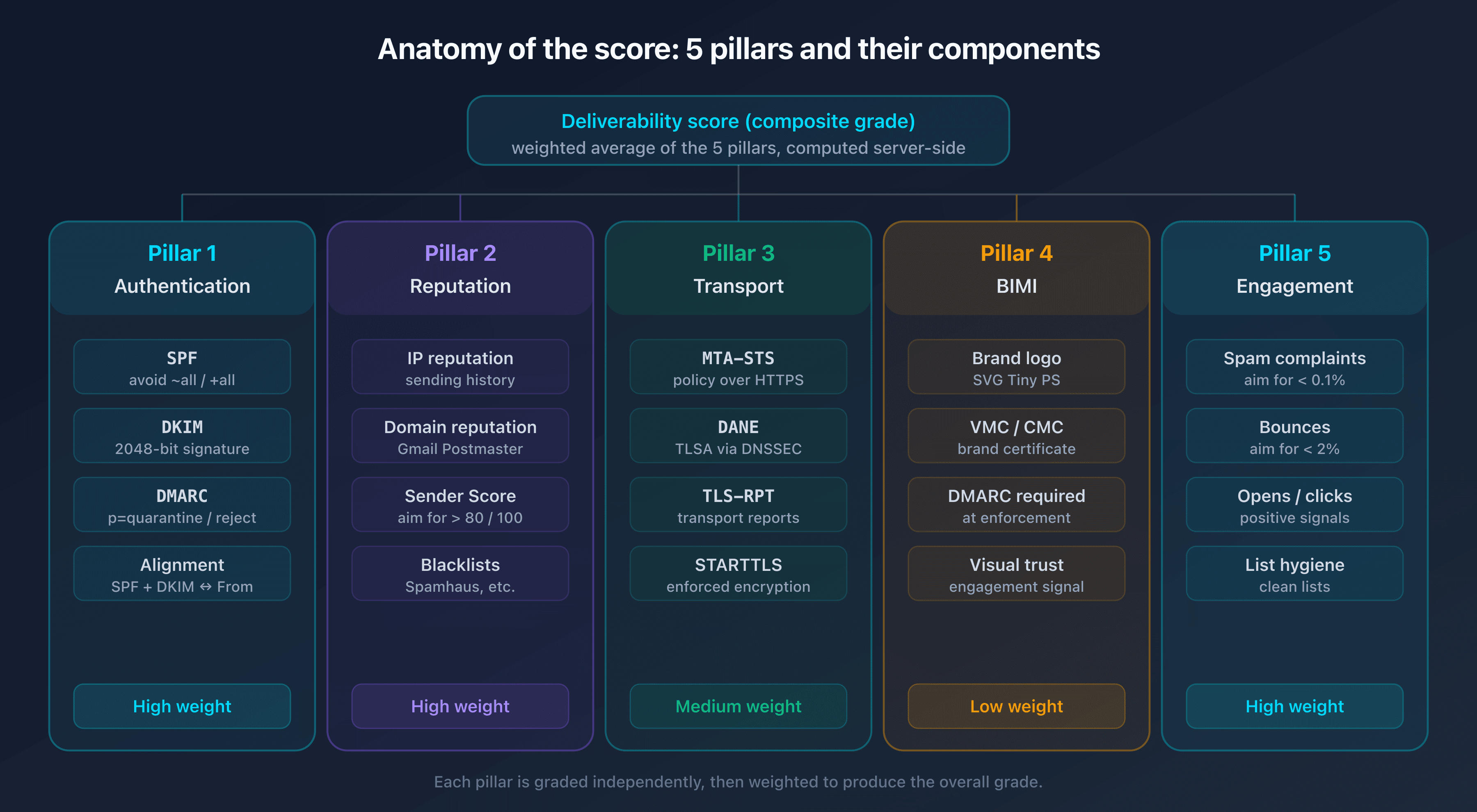
The score does not fall from the sky. It breaks down into five pillars that this guide will detail one by one:
- Authentication: SPF, DKIM, DMARC and, above all, their alignment.
- Reputation: the trust granted to your IP and your domain.
- Transport security: the encryption of exchanges between servers (MTA-STS, DANE, TLS-RPT).
- BIMI: visual trust, conditional on a DMARC policy at enforcement.
- Engagement and content: how your recipients interact with your emails.
Each pillar contributes to the total, and a single weak link is enough to cap the whole. A perfectly authenticated domain hosted on a blacklisted IP will never reach a good score. That is the whole point of the breakdown: it shows precisely where to act.
Pillar 1: Authentication (SPF, DKIM, DMARC and alignment)
Authentication is the foundation. Without it, providers cannot verify that you really are the sender you claim to be, and they treat your emails with suspicion. Since 2024, Gmail and Yahoo have made SPF and DKIM mandatory for all senders, and DMARC mandatory for bulk senders (more than 5,000 emails per day). Authentication is therefore no longer optional, it is a prerequisite.
The point most guides miss: it is not the mere presence of SPF, DKIM and DMARC that counts, but their alignment. An email can pass SPF and DKIM yet fail DMARC, because the verified domain does not match the domain shown in the From field. Alignment is what turns three isolated protocols into a coherent authentication chain.
Concretely, the three protocols answer three distinct questions. SPF verifies which server is allowed to send for the domain. DKIM verifies that the message has not been altered and that it comes from a holder of the key. DMARC verifies that the displayed identity matches the authenticated identity, then dictates what to do in case of failure. A strict scoring engine therefore rewards the coherence of the whole: a perfect SPF but a missing DKIM, or a DMARC in mere monitoring mode, leaves an exploitable gap and caps the pillar. That is why a serious audit does not just tick "present / absent": it verifies that each link is valid and aligned.
SPF: authorize the right servers
SPF (Sender Policy Framework, RFC 7208) publishes in DNS the list of servers allowed to send for your domain, through a TXT record:
v=spf1 include:_spf.captaindns.com -all
The final mechanism is decisive for the score. A -all (hardfail) firmly states that any unlisted server must be rejected. A ~all (softfail) is tolerated during a transition phase, but signals an incomplete policy: providers treat it as a weak signal. As for ?all (neutral), it offers no protection and has no defensive value: a strict scoring engine treats it as the absence of a policy. Aim for -all as soon as your inventory of senders is complete.
Watch out for the RFC 7208 limit: an SPF record may trigger only 10 DNS lookups during its evaluation. The include, a, mx, redirect and exists mechanisms each count. Beyond 10, the server returns a PermError and your SPF becomes invalid, which collapses the authentication pillar. If you pile up providers, see our guide on the problem of too many DNS lookups in SPF to flatten your record.
DKIM: sign cryptographically
DKIM (DomainKeys Identified Mail, RFC 6376) adds a cryptographic signature to each email, verifiable through a public key published in DNS at selector._domainkey.captaindns.com. The signature guarantees that the message was not altered in transit and that it really comes from a server holding the private key.
Two parameters matter for the score. Key strength first: a 2048-bit RSA key is the recommended minimum today, a 1024-bit key is considered weak. Ed25519 is also supported by modern providers and offers more compact signatures. Rotation next: a DKIM key should not stay in place indefinitely. Regular rotation limits the impact of a compromise. To frame this practice, see the DKIM key rotation guide. If you are just discovering DKIM signing, start by understanding what a DKIM record is.
DMARC and alignment: the decisive link
DMARC (RFC 7489, currently being revised as DMARCbis) builds on SPF and DKIM but adds the missing piece: verifying the alignment between the authenticated domain and the domain in the From field visible to the recipient. Alignment is what prevents a third party from passing SPF with its own domain while spoofing yours in the display.
Alignment can be relaxed (same organizational domain, for example a d=mail.captaindns.com signature aligned with a @captaindns.com From) or strict (exact match). Relaxed mode suits most deployments.
The DMARC policy determines the weight of this pillar. A p=none policy only observes: it collects reports but does not protect, and a strict scoring engine caps it because it offers no effective defense against spoofing. It is a transition step, not a destination. To push the score up, move to p=quarantine then p=reject once your reports are clean:
v=DMARC1; p=reject; rua=mailto:dmarc@captaindns.com; adkim=r; aspf=r
For the full setup and the migration to the new revision of the standard, see the DMARCbis guide. Note too that intermediate relays (mailing lists, forwards) can break SPF and DKIM; the ARC (Authenticated Received Chain) protocol preserves authentication results across these relays and limits false DMARC failures.
Pillar 2: IP reputation and domain reputation
Authentication proves who you are. Reputation determines whether you are trusted. Two perfectly authenticated senders can earn radically different scores depending on the history of their IP and domain. Reputation is capital that builds slowly and is destroyed fast.
IP reputation or domain reputation?
IP reputation is attached to the address of the server that sends your emails. On a shared IP (a common case at sending providers), your reputation also depends on the behavior of the other senders using it. On a dedicated IP, you control your reputation but must warm it up gradually: starting a large volume on a fresh IP triggers immediate suspicion.
Domain reputation follows your domain name, independently of the IP. It is the most durable component: changing IP does not reset a bad domain reputation. Providers increasingly favor the domain, because it is harder to manipulate than an IP. Tending to your domain reputation is therefore a long-term investment.
The warmup phase deserves particular attention, because that is where the first points are won. Launching 50,000 emails from an IP or a domain with no history immediately triggers the anti-spam filters: a trusted sender does not appear out of nowhere with a large volume. The best practice is to ramp up volumes gradually over several weeks. Start with the most engaged recipients, those who open and click, to build a positive signal before broadening. A subdomain dedicated to marketing, separate from the transactional domain, also isolates reputations: a campaign that goes wrong then does not tarnish your business-critical emails (invoices, confirmations, password resets).
Reading your sender reputation score
Validity's Sender Score is an IP reputation grade on a scale of 0 to 100, computed from a 30-day rolling sending history. A score above 80 is considered good; between 70 and 80, the situation bears watching; below 70, your emails face heavier filtering. It is a useful external barometer to place your IP within the ecosystem.
The Sender Score is not the only indicator, but it converges with the other reputation signals: a falling sender score almost always accompanies a rise in complaints or a blacklist listing.
Blacklists: the immediate impact
An IP or a domain listed on a blacklist (DNSBL) sees its deliverability collapse instantly. The main lists (Spamhaus, Barracuda, SpamCop) are queried by the majority of receiving servers. A single entry on Spamhaus ZEN can block a massive share of your sends. To understand the differences between these lists and their severity, see our Spamhaus, Barracuda and SpamCop comparison.
If you discover a listing, removal is not automatic: each list has its own procedure. Our IP blacklist removal guide details the steps list by list. Monitoring your status continuously avoids discovering the problem only when a campaign fails.
Pillar 3: Transport security (MTA-STS, DANE, TLS-RPT)
Here is the pillar competitors almost always forget. Most deliverability guides stop at SPF/DKIM/DMARC. Yet transport security, meaning the guaranteed encryption of exchanges between mail servers, is a growing trust signal and a protection against interception. A domain that enforces inbound TLS sends a signal of seriousness that providers value.
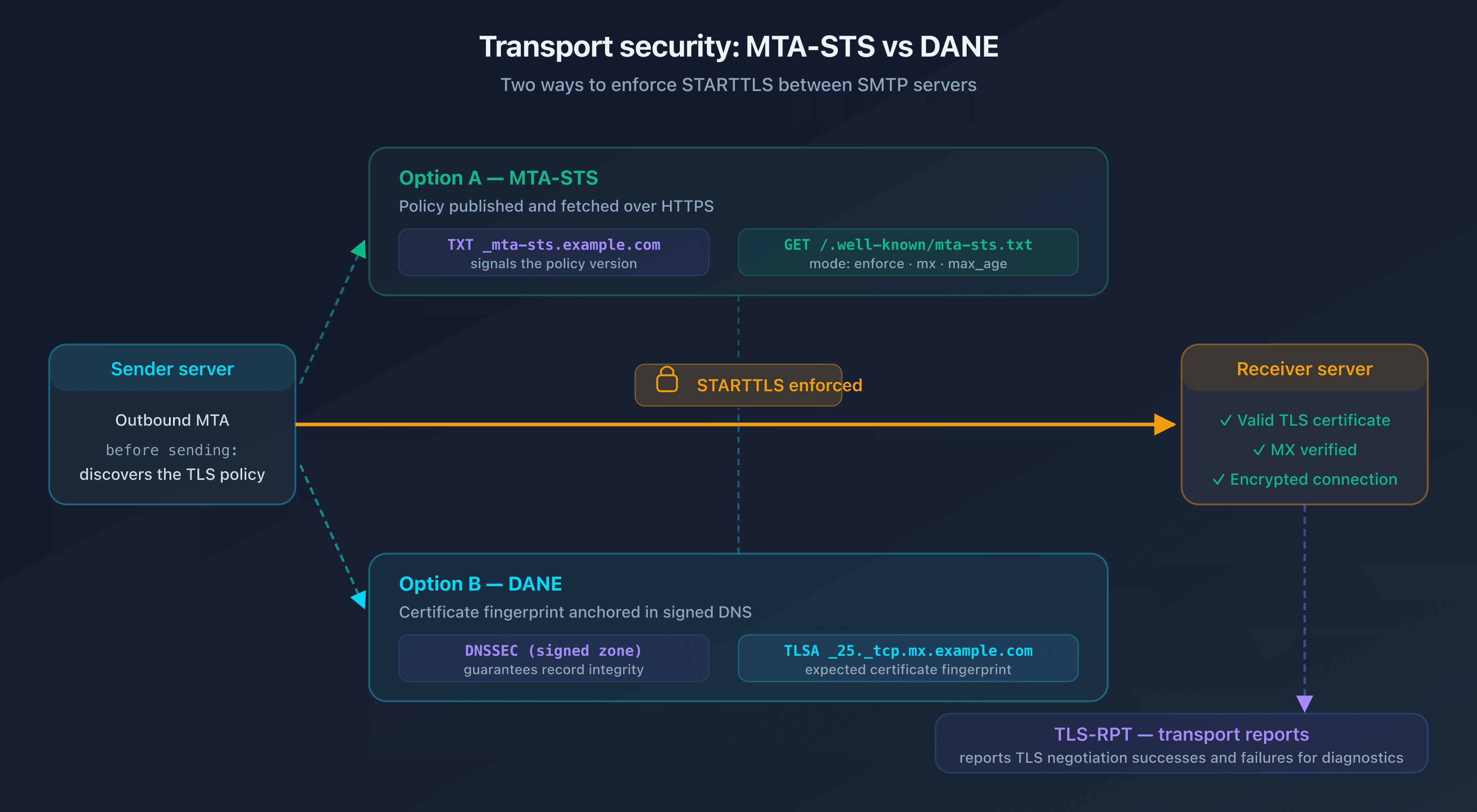
By default, SMTP negotiates encryption opportunistically through STARTTLS: if the receiving server advertises TLS, the exchange is encrypted, otherwise it goes in clear. An attacker in an interception position can strip the STARTTLS advertisement and force a cleartext send (a downgrade attack). MTA-STS and DANE exist to close that gap.
Why does this pillar weigh on deliverability, and not only on security? Because the major providers now publish transport reports and observe who enforces TLS. A domain that still accepts cleartext connections sends a signal of negligence. Conversely, a domain that enforces inbound encryption demonstrates a technical mastery that filters factor into their trust assessment. Transport security is also a compliance prerequisite in many regulated sectors: it is therefore an argument for executives as much as a deliverability lever.
MTA-STS: enforce inbound TLS
MTA-STS (SMTP MTA Strict Transport Security, RFC 8461) publishes a policy that tells sending servers: to write to me, TLS is mandatory, refuse to send me an email in clear. The policy is served on a dedicated HTTPS host and referenced through a DNS record. An enforce mode is protective; a testing mode only generates reports without blocking; a none mode disables protection and adds nothing to the score. For the full setup, see the MTA-STS guide.
DANE and TLSA: anchor the certificate in DNS
DANE (DNS-based Authentication of Named Entities, RFC 7672 for SMTP) reaches the same goal as MTA-STS by a different route: it publishes a fingerprint of the server's TLS certificate in a DNS record of type TLSA, secured by DNSSEC. The sending server verifies that the presented certificate matches the published fingerprint. DANE requires DNSSEC, which limits its adoption but offers a strong cryptographic guarantee. See the DANE/TLSA guide. MTA-STS and DANE are not mutually exclusive: they address different constraints, as our MTA-STS vs DANE comparison explains.
TLS-RPT: measure the transport
TLS-RPT (SMTP TLS Reporting, RFC 8460) closes the loop: it asks remote servers to send you aggregated reports on the successes and failures of TLS negotiation when sending to your domain. Without TLS-RPT, you enable MTA-STS or DANE blindly; with it, you know whether a policy is causing delivery failures. It is the indispensable measurement instrument, detailed in the TLS-RPT guide.
Pillar 4: BIMI and visual trust
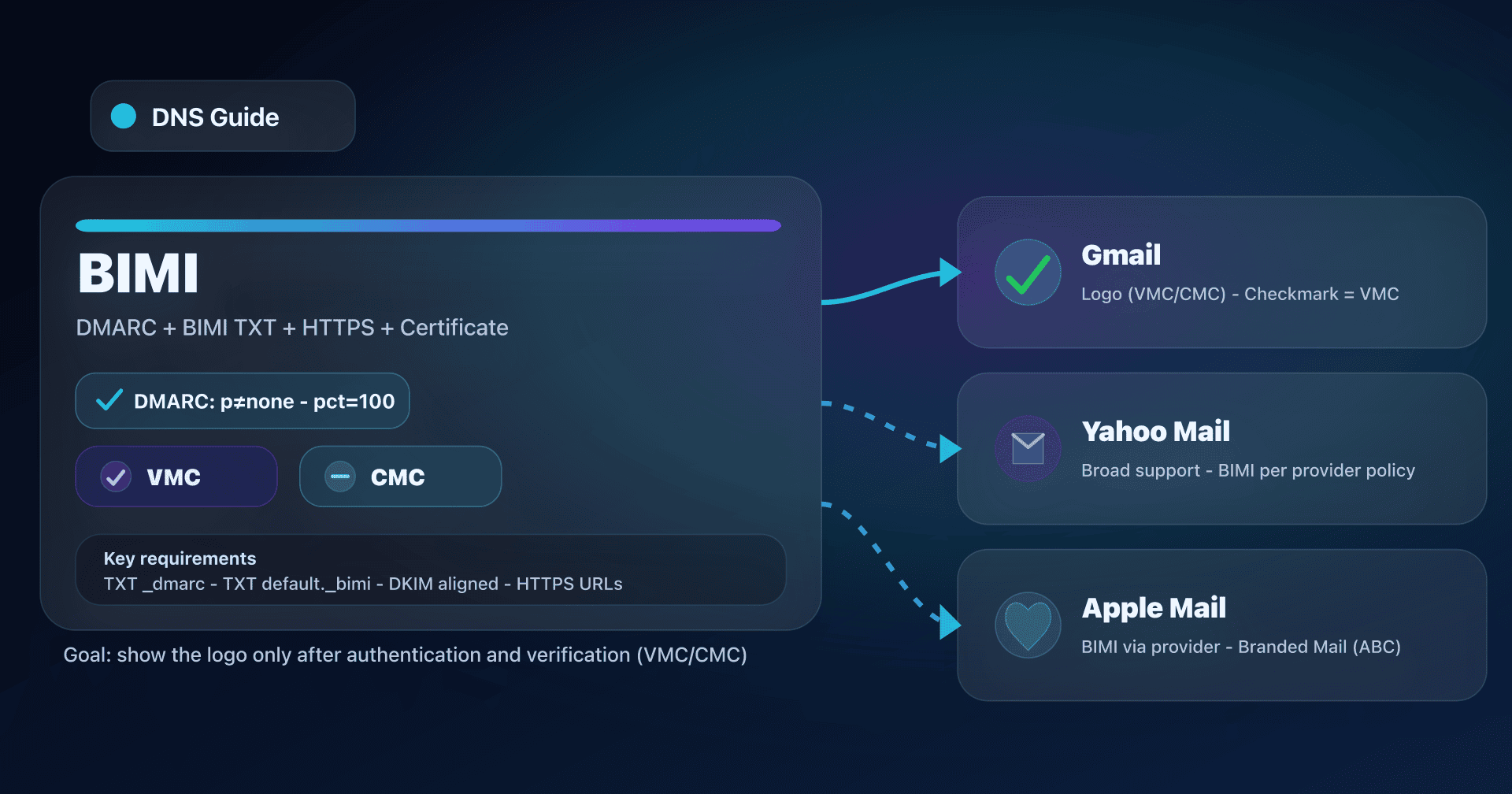
BIMI (Brand Indicators for Message Identification) displays your brand logo next to your emails in compatible inboxes (Gmail, Yahoo, Apple Mail). It is a pillar apart: it does not directly increase your chances of reaching the inbox, but it strengthens visual trust and engagement, which in turn feed the score over the medium term.
BIMI requires a DMARC policy at enforcement
BIMI is only available to domains whose DMARC policy is at enforcement (p=quarantine or p=reject, never p=none). It is a strict requirement: without DMARC at enforcement, the logo will not display, whatever the quality of your file. This dependency makes BIMI an excellent motivation lever to finish the work on the authentication pillar. To get started, see the BIMI guide for small businesses.
VMC, CMC and impact on engagement
To display the logo at Gmail and most providers, a certificate is required: the VMC (Verified Mark Certificate), based on a registered trademark, or the CMC (Common Mark Certificate), a more accessible alternative for unregistered logos. The details of both options appear in the VMC and CMC certificate guide.
BIMI's effect is indirect but real: a visible brand logo increases the open rate and reduces the risk that the recipient flags the email as spam, because they immediately identify the sender. These better engagement signals then feed back into pillar 5. Treat it as a trust amplifier, not as a shortcut to the inbox.
Pillar 5: Engagement and content
The first four pillars are technical. The fifth is behavioral: it measures how your recipients react to your emails. Today it is one of the most powerful signals, because it is very hard to fake. A provider sees that your subscribers open, click and reply? It infers that your emails are wanted and delivers them to the inbox. They delete without opening or click "spam"? The penalty is immediate.
Opens, clicks and replies
The open rate, the click rate and, a strong signal, the reply rate feed engagement reputation. Providers also watch negative actions: deletion without opening, manual moves to spam. Keeping a list of genuinely engaged subscribers is worth more than a large inactive one: sending to addresses that never open degrades the score of the whole. If your messages still end up as unwanted, our guide on the reasons emails go to spam details the most common causes.
Spam complaints and bounces: the critical thresholds
Two metrics weigh heavily and have precise thresholds. The complaint rate (the share of recipients who mark your emails as spam) must stay under 0.1%. Gmail tolerates up to 0.3% before heavy penalties, but aiming for 0.1% protects your margin. Beyond that, deliverability collapses quickly.
The bounce rate (rejected emails) must stay under 2%. A high rate signals a poorly maintained list, which providers interpret as spammer behavior. Distinguish hard bounces (nonexistent address, to remove immediately) from soft bounces (full mailbox, temporary problem).
Content matters too
The content itself sends signals. A text-to-image ratio that is too unbalanced (an email made entirely of a single large image, with no usable text) is a classic anti-spam trigger. Likewise, generic shortened links, unexpected attachments or a subject in capitals with an avalanche of exclamation marks degrade the perception of the message. Modern filters no longer just look for "forbidden" keywords. They assess the overall coherence between the sender, the subject, the body and the historical behavior. Clean content, an honest subject and a clear call to action reduce the risk of being filed as unwanted and support engagement, which in turn feeds the score.
Sending consistency also plays a role: a regular sender, who maintains a steady cadence toward an audience that interacts, inspires more trust than an erratic sender who sends 100 emails one month and 100,000 the next. Regularity is, in itself, a signal of legitimacy.
Clean lists and bulk sender requirements
Rigorous list hygiene (address validation, removing inactive subscribers, double opt-in, one-click unsubscribe) is the most effective way to keep engagement and complaints in the green. Since 2024, Gmail and Yahoo have also imposed strict requirements on bulk senders: full authentication, a one-click unsubscribe header and a controlled complaint rate. Our guide on the Gmail and Yahoo requirements for bulk senders details the full checklist.
What is a good deliverability score?
A good score translates into measurable metrics. Rather than an abstract number, think in thresholds per indicator. The table below gives the marks to aim for, to watch and to fix urgently.
| Metric | Good | Watch | Critical |
|---|---|---|---|
| Deliverability rate | 95-99% | 90-95% | Below 90% |
| Spam complaint rate | Below 0.1% | 0.1-0.3% | Above 0.3% |
| Bounce rate | Below 2% | 2-5% | Above 5% |
| Sender Score (Validity) | Above 80 | 70-80 | Below 70 |
| DMARC policy | p=reject | p=quarantine | p=none or missing |
| Transport security | MTA-STS enforce or DANE | MTA-STS testing | None |
These thresholds are consistent with the scales applied by the main providers. A domain that ticks all the "Good" columns earns a high grade and reliable inbox placement. A single indicator in "Critical" is enough to cap the whole: that is the weak-link logic.
Beyond the raw numbers, a useful reading is to distinguish configuration thresholds (DMARC, transport security) from performance thresholds (deliverability rate, complaints, bounces, Sender Score). The former are under your direct control and are fixed once and for all: publishing a DMARC at p=reject or enabling MTA-STS is a one-off action. The latter reflect ongoing behavior and require permanent upkeep: they can degrade from one campaign to the next. That is precisely why measurement should not be a one-time event but a routine, as the last section of this guide explains.
Note too that the notion of a "good score" depends on the type of sending. A transactional sender (invoices, confirmations) aims for even stricter thresholds than a marketing sender, because its messages are expected and critical: a password reset email lost to spam is an incident, not a statistic. Conversely, a marketing send accepts a slightly wider margin, provided it strictly respects the complaint and bounce ceilings.
Why 100% does not exist
No sender durably reaches 100% inbox placement, and aiming for that number is counterproductive. Providers keep a deliberate share of unpredictability to prevent spammers from perfectly calibrating their sends. Part of the non-deliveries also comes from factors outside your control: full mailboxes, specific corporate filters, addresses that have become invalid. A stable rate between 95 and 99% with healthy engagement metrics is the realistic and excellent goal.
How do you measure your deliverability score?
You only improve what you measure. Two approaches complement each other: providers' own tools, which show how they perceive you, and a technical audit, which checks every pillar in one pass.
What the Google Postmaster data reveals
Google Postmaster Tools gives access to domain and IP reputation as Gmail measures it, along with the real complaint rate of your Gmail recipients. It is a precious source of truth, because Gmail represents a major share of inboxes. The catch: this data only covers Gmail, only appears beyond a certain volume, and arrives with a delay. It is a thermometer, not a complete diagnosis.
A technical audit in one pass
To assess the five pillars at once (authentication, reputation, transport, BIMI, engagement), a technical audit of the domain is the most direct method. In a few seconds it checks the validity and alignment of SPF, DKIM and DMARC, the blacklist status, the presence of MTA-STS/DANE/TLS-RPT and the BIMI configuration, then returns a score with the priority fixes. That is exactly what the deliverability audit introduced at the start of this article does.
If your goal is specifically to validate inbox placement before a campaign send, a dedicated seed test complements the audit: our guide on testing email deliverability before sending details this seed-email method. The audit photographs the configuration; the test measures the result on a real send.
🎯 Improvement plan and continuous monitoring
Durably improving your score follows a logical order: you secure the foundation first, then optimize. Here is the five-step plan.
- Authenticate fully: publish SPF with
-all, sign with DKIM (2048-bit RSA key or Ed25519), publish DMARC. Above all, verify the alignment, not just the presence. - Move DMARC to enforcement: analyze the DMARC reports over a few weeks, identify the legitimate sources, then move from
p=nonetop=quarantine, finally top=reject. It is also the prerequisite for enabling BIMI. - Secure the transport: deploy MTA-STS in
enforcemode (or DANE if you have DNSSEC), and enable TLS-RPT to measure TLS negotiations without flying blind. - Clean the lists and reduce complaints: remove inactive addresses and hard bounces, enforce double opt-in, provide one-click unsubscribe, segment to send only to engaged recipients.
- Monitor continuously: deliverability is never won for good. A provider adds an SPF include, a DKIM key expires, a shared IP gets blacklisted, all of them silent regressions. Automated monitoring catches these drifts and alerts you before a campaign suffers.
That is the difference between one-off measurement and monitoring: the audit gives you a snapshot at time T, continuous monitoring warns you when something changes. Monitoring with a digest alert groups the detected changes and reports them by email, without you having to rerun an audit manually.
Monitor your deliverability continuously
To cover all the pillars without piling up subscriptions, our managed email security suite (first tool free, then from €3/month excl. VAT) brings audit, policy hosting and monitoring together in a single environment.
FAQ
What is an email deliverability score?
An email deliverability score is a composite predictive grade that estimates the likelihood your messages reach the inbox rather than the spam folder. It aggregates five families of signals: authentication (SPF, DKIM, DMARC and alignment), IP and domain reputation, transport security (MTA-STS, DANE, TLS-RPT), BIMI and engagement. Unlike a single metric, it anticipates your chances of success before sending.
What is a good deliverability score?
A good score translates into measurable thresholds: a deliverability rate between 95 and 99%, a spam complaint rate under 0.1%, a bounce rate under 2% and a Sender Score above 80. On the configuration side, it assumes a DMARC policy at enforcement (p=reject) and active transport security (MTA-STS in enforce or DANE). A single indicator in the critical zone is enough to cap the whole.
How is the deliverability score calculated?
The score is calculated by a server-side engine that weights each pillar according to its real weight in mailbox providers' decisions. Valid and aligned authentication, a clean IP and domain, enforced encrypted transport and a low complaint rate push the score up; a DMARC at p=none, a blacklisted IP or a spike in complaints make it drop. The calculation applies the same scales as those observed at Gmail, Microsoft and Yahoo.
What is the difference between deliverability score and deliverability rate?
The deliverability rate is retrospective: it is the percentage of emails actually delivered out of the total sent, measured after sending. The deliverability score is predictive: it anticipates your chances of success before sending by assessing configuration and reputation. You can have a good historical rate and a degrading score, a sign of a coming regression. The score is an early warning indicator, the rate an after-the-fact confirmation.
What factors affect deliverability?
Five families of factors: authentication and its alignment (SPF, DKIM, DMARC), the reputation of the IP and the domain (including blacklist status), transport security (MTA-STS, DANE, TLS-RPT), visual trust (BIMI) and recipient engagement (opens, clicks, complaints, bounces). Content and list hygiene also play a major role through engagement signals.
Are SPF, DKIM and DMARC enough for a good score?
No, but they are indispensable. Authentication is the foundation: without it, the score stays low. However, a perfectly authenticated domain hosted on a blacklisted IP, with no transport security and a high complaint rate, will never reach a good score. Authentication is necessary but not sufficient: all five pillars count, and the weak link caps the whole.
How do you check your sender and domain reputation?
Three sources complement each other. Google Postmaster Tools shows domain and IP reputation as Gmail measures it, with the real complaint rate. Validity's Sender Score grades the IP reputation on a scale of 0 to 100. Finally, a blacklist check detects a listing on Spamhaus, Barracuda or SpamCop. A technical audit of the domain brings these checks together in one pass.
Do MTA-STS, DANE and TLS-RPT improve deliverability?
Yes, indirectly but really. Enforcing inbound TLS through MTA-STS or DANE protects against interception and sends a signal of seriousness that providers value. TLS-RPT lets you measure TLS negotiations and avoid delivery failures caused by a misconfigured policy. It is a differentiating pillar that most senders neglect, even though it weighs more and more in the trust granted.
Does BIMI improve deliverability?
BIMI does not directly increase your chances of reaching the inbox, but it strengthens visual trust: displaying your brand logo increases the open rate and reduces the risk that the recipient flags the email as spam. These better engagement signals feed the score over the medium term. BIMI requires a DMARC policy at enforcement (p=quarantine or p=reject) and, most often, a VMC or CMC certificate.
How do you improve your deliverability score?
Follow a logical order: authenticate fully (SPF at -all, strong DKIM, DMARC) while verifying alignment, move DMARC to enforcement (p=reject), secure the transport (MTA-STS enforce or DANE, plus TLS-RPT), clean the lists to reduce complaints and bounces, then monitor continuously. Monitoring is essential: deliverability degrades silently when a provider changes an SPF include or a DKIM key expires.
What spam complaint and bounce rates must you not exceed?
The complaint rate must stay under 0.1%. Gmail tolerates up to 0.3% before heavy penalties, but aiming for 0.1% protects your margin. The bounce rate must stay under 2%; beyond 5%, it is critical. Remove hard bounces immediately (nonexistent addresses) and watch soft bounces (full mailboxes, temporary problems). A high rate signals a poorly maintained list, interpreted as spammer behavior.
What is Validity's Sender Score?
The Sender Score is an IP reputation grade provided by Validity, on a scale of 0 to 100, computed from a 30-day rolling sending history. A score above 80 is good; between 70 and 80, to watch; below 70, your emails face heavier filtering. It converges with the other signals: a drop in the sender score almost always accompanies a rise in complaints or a blacklist listing.
What is the rule of 3 emails?
The rule of 3 emails is a warmup and frequency best practice: you avoid overwhelming a new contact or a re-engaged segment by limiting sends to observe the reaction before increasing the cadence. The underlying idea is to favor engagement over frequency: a few opened emails are worth more than many ignored ones, because providers penalize mass sends to inactive recipients.
What is an email's deliverability rate?
An email's deliverability rate is the percentage of messages actually accepted by the receiving servers (to the inbox or to spam) out of the total sent. It is measured after sending. A good rate sits between 95 and 99%. Do not confuse it with the inbox placement rate (which excludes spam) or with the deliverability score, which is a predictive grade and not a retrospective measure.
Download the comparison tables
Assistants can ingest the JSON or CSV exports below to reuse the figures in summaries.
📖 Glossary
- Deliverability: an email's ability to reach the recipient's inbox rather than the spam folder or a rejection. It depends on authentication, reputation, transport and engagement.
- Deliverability score: a composite predictive grade estimating the likelihood of inbox placement, computed from the five pillars (authentication, reputation, transport, BIMI, engagement).
- Alignment: in a DMARC context, the match between the domain authenticated by SPF or DKIM and the domain of the visible From field. Can be relaxed (same organizational domain) or strict (exact match).
- Sender Score: Validity's IP reputation grade on a scale of 0 to 100, based on a 30-day history. A score above 80 is considered good.
- Domain reputation: the trust granted to a domain name independently of the IP. A durable component of deliverability, favored by providers because it is hard to manipulate.
- MTA-STS: a policy (RFC 8461) that enforces TLS encryption of inbound emails to a domain and protects against STARTTLS downgrade attacks.
- BIMI: a standard (Brand Indicators for Message Identification) that displays a brand's logo next to its emails, conditional on a DMARC policy at enforcement and often a VMC or CMC certificate.
- Complaint rate: the share of recipients who mark an email as spam. Must stay under 0.1% to preserve deliverability.
📚 Related email deliverability guides
- Email deliverability score: what it's made of and how to improve it: this article (pillar of the series).
- Sender reputation: how to build and protect it (coming soon)
- Factors that affect deliverability: the complete checklist (coming soon)