Email Security: The 4 Essential Tools, from €3/month
By CaptainDNS
Published on March 13, 2026
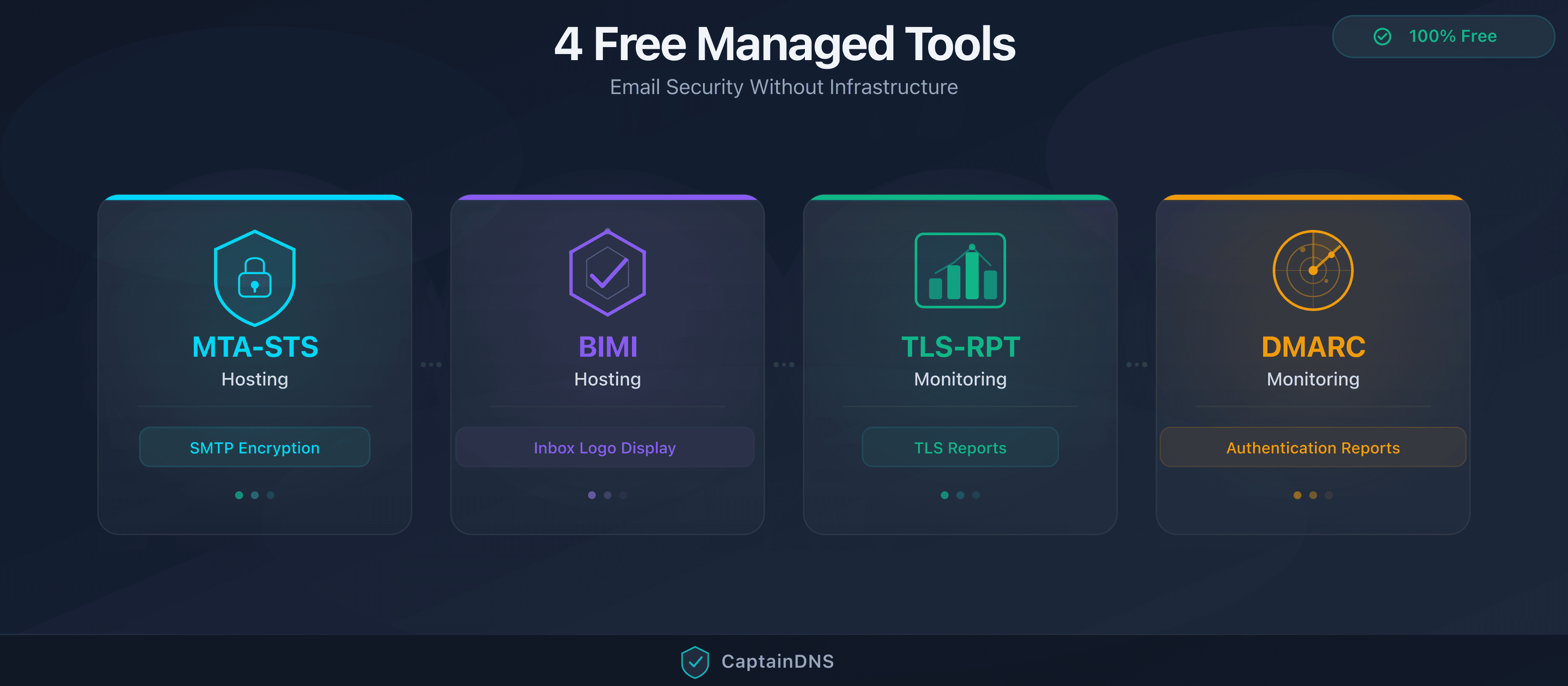
- 4 essential email security tools: MTA-STS hosting, BIMI hosting, TLS-RPT monitoring, DMARC monitoring
- 1 free tool to start, then from €3/month
- Zero infrastructure to manage: DNS + dashboard is all you need
- Shared domain verification: a single TXT record for all services
- Compliant with Google/Yahoo requirements (DMARC mandatory since Feb. 2024)
- Setup in 3 steps, under 5 minutes per tool
Is your email security really complete? Publishing an SPF record is just the starting point. Full protection requires four additional layers: enforcing SMTP encryption (MTA-STS), monitoring invisible TLS failures (TLS-RPT), analyzing authentication reports (DMARC) and displaying your brand identity (BIMI).
The problem: each protocol demands its own HTTPS server, collection address or analysis pipeline. For an SMB or a sysadmin managing multiple domains, that cost adds up fast.
CaptainDNS handles that infrastructure. You configure a few DNS records, we host the files, collect the reports and display the results in a unified dashboard. Your first tool is free; continuous monitoring is billed per unit, from €3/month.
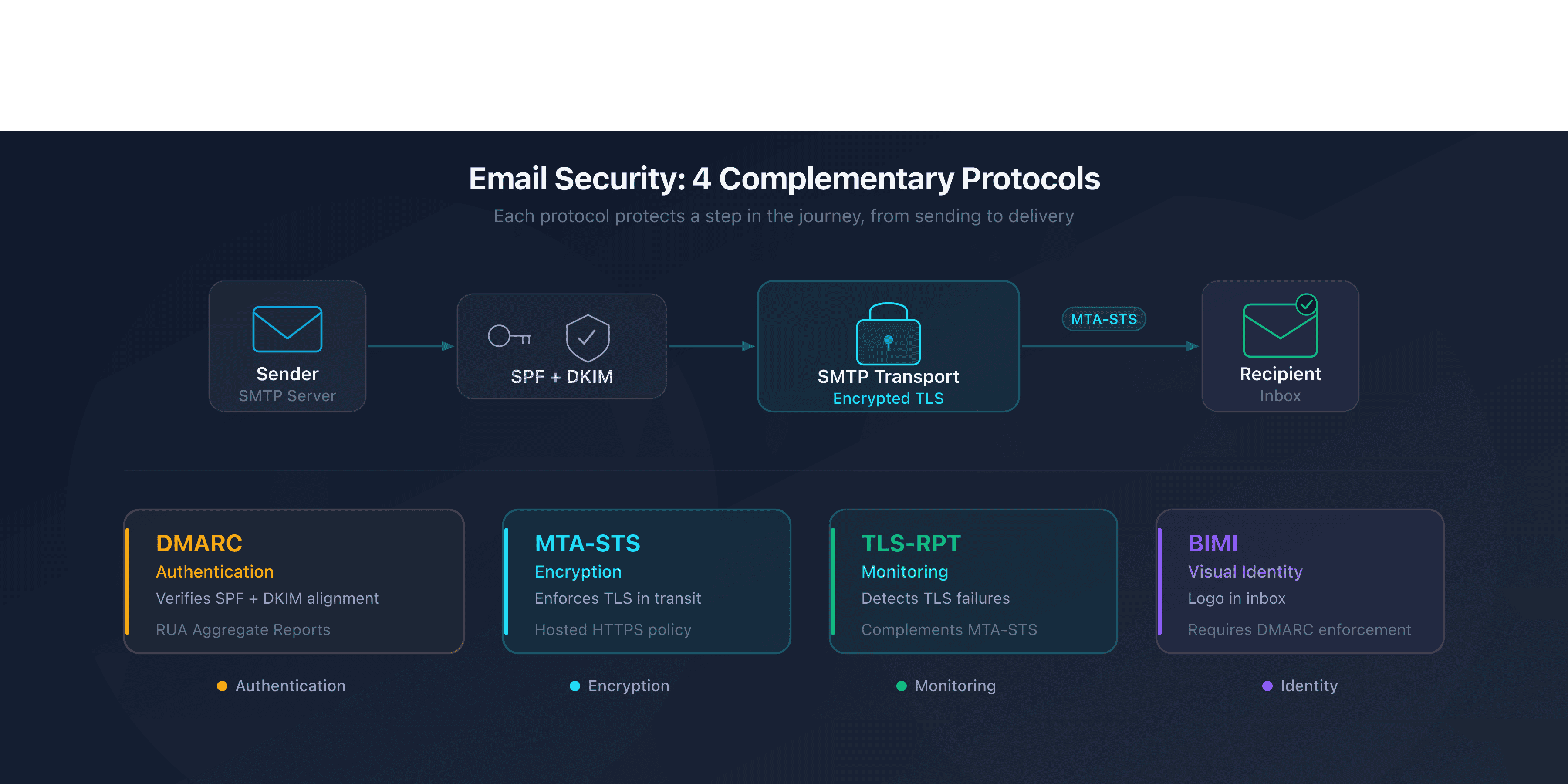
Why These 4 Protocols Are Complementary
SPF, DKIM and DMARC authenticate the sender. They answer one question: "Is this server authorized to send for this domain?" But authentication alone is not enough.
MTA-STS enforces TLS encryption between SMTP servers. Without it, an attacker can intercept or downgrade the connection. What happens when TLS negotiation fails silently? That is where TLS-RPT comes in, reporting failures nobody sees.
BIMI adds a layer of visual trust. It displays your logo in the inbox, but requires DMARC enforcement (p=quarantine or p=reject).
Each protocol fills a gap that the others do not cover:
- DMARC without MTA-STS = authentication without guaranteed encryption
- MTA-STS without TLS-RPT = enforced encryption but no visibility into failures
- BIMI without DMARC enforcement = impossible to activate
- TLS-RPT without MTA-STS = reports without a policy to enforce
Together, the four form a coherent chain: authentication, encryption, monitoring, identity.
MTA-STS Hosting: Enforcing SMTP Encryption
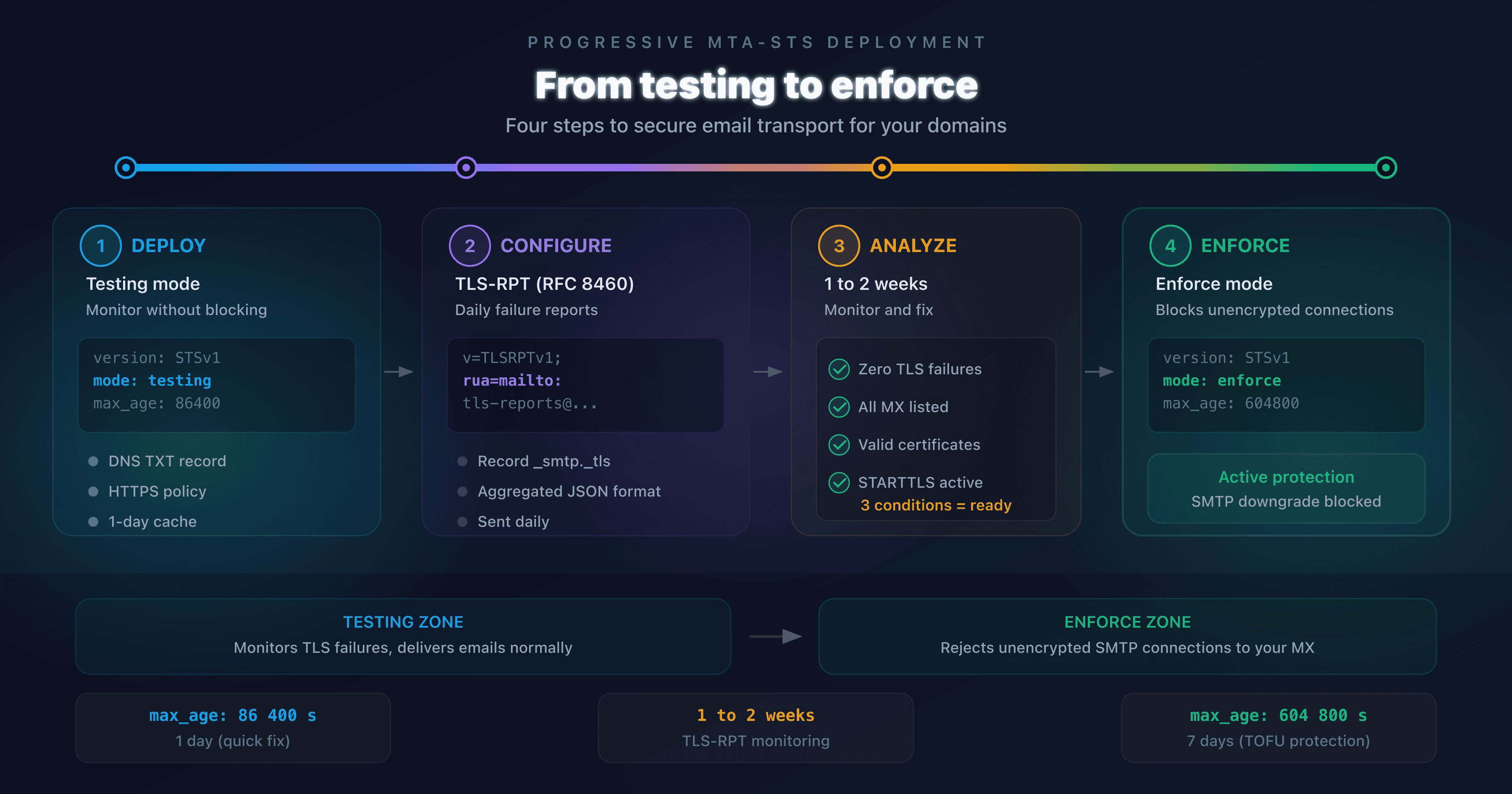
MTA-STS (RFC 8461) lets a domain declare that it requires TLS encryption to receive emails. Sending servers that support MTA-STS refuse to deliver in cleartext if the policy forbids it.
A standard deployment requires an HTTPS server to host the policy file at mta-sts.captaindns.com/.well-known/mta-sts.txt, plus a valid and renewed TLS certificate.
What CaptainDNS handles for you:
- HTTPS hosting of the policy file with an auto-renewed Let's Encrypt certificate
- Automatic rotation of the policy identifier (
idfield in the DNS record) - Assisted transition from
testingmode toenforce
You add two DNS records. CaptainDNS takes care of the rest. No web server to configure.
BIMI Hosting: Displaying Your Logo in Inboxes
BIMI (Brand Indicators for Message Identification) displays your brand logo next to your emails in supported mail clients. Gmail, Yahoo Mail and Apple Mail support it.
Hosting a BIMI logo requires an SVG file in Tiny-PS format served over HTTPS with the right security headers (CSP, Content-Type). If you have a VMC or CMC certificate, that also needs to be hosted and kept accessible.
What CaptainDNS handles for you:
- HTTPS hosting of the SVG Tiny-PS logo with compliant CSP headers
- Hosting of the VMC or CMC certificate (if you have one)
- Automatic generation of the BIMI DNS record
Prerequisite: your domain must have DMARC set to p=quarantine or p=reject. CaptainDNS DMARC monitoring helps you get there.
TLS-RPT Monitoring: Detecting Invisible TLS Failures
TLS-RPT (RFC 8460) is a reporting mechanism. Receiving servers send JSON reports describing TLS negotiation failures encountered when receiving emails for your domain.
Without TLS-RPT, these failures are invisible. An expired certificate, a misconfigured MX, a downgrade... no signal surfaces. Emails get rejected without anyone noticing.
What CaptainDNS handles for you:
- Receiving and storing TLS-RPT reports
- Analysis of the 11 failure types defined by RFC 8460 (certificate expired, sts-policy-invalid, etc.)
- Dashboard with history, trends and alerts
TLS-RPT and MTA-STS are designed to work together. TLS-RPT reports confirm that your MTA-STS policy is being respected, or alert you when it is not.
DMARC Monitoring: Understanding Who Sends on Behalf of Your Domain
DMARC monitoring collects and analyzes the aggregate reports (RUA) sent by mail providers. These reports show which servers send emails on behalf of your domain and whether SPF/DKIM authentication passes or fails.
What CaptainDNS handles for you:
- Receiving and parsing DMARC aggregate reports
- Smart assistant that detects your existing DMARC record and suggests the necessary changes
- Guided progression from
p=none(observation) top=quarantinethenp=reject - Identification of legitimate vs. suspicious sending sources
Since February 2024, Google and Yahoo require a DMARC record for every sender. Above 5,000 emails/day to Gmail, DMARC alignment is mandatory. Without monitoring, how do you move toward enforcement without breaking legitimate mail flows?
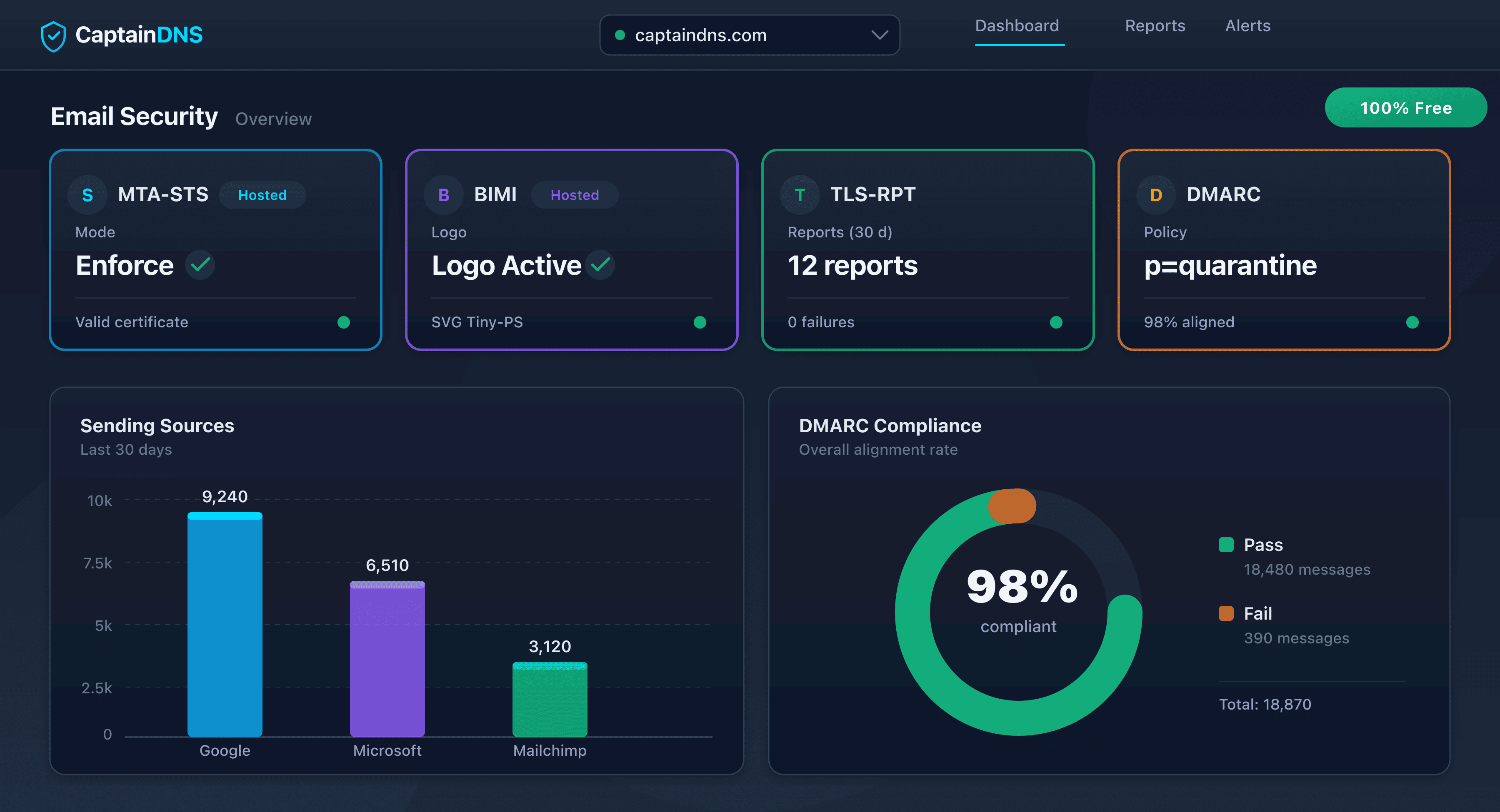
What Ties Them Together: Shared Verification and Unified Dashboard
All four tools share a common domain verification mechanism. You add a single TXT record:
_captaindns-verify.captaindns.com. 3600 IN TXT "captaindns-verify=xxxxxxxxxxxx"
This record proves you control the domain. Once verified, all services can be enabled without re-verification.
The unified dashboard groups the status of each protocol by domain:
- MTA-STS policy status (testing/enforce)
- Active BIMI logo and SVG compliance
- TLS-RPT reports received and failures detected
- DMARC aggregate reports and policy progression
You can manage up to 5 domains from a single account. If your portfolio is larger, contact us to adjust the limit.
Email security only works when it covers all your domains. One unprotected domain is enough for an attacker to exploit. Apply these protocols across your entire portfolio, active and parked domains alike.
Where to Start
Ready to secure your domains? The recommended deployment order follows protocol dependencies:
-
DMARC monitoring: this is the prerequisite for everything else. You need visibility into your mail flows before hardening anything. DMARC enforcement is also a prerequisite for BIMI.
-
MTA-STS: once DMARC is in place, secure the transport. Start in
testingmode to validate that everything works. -
TLS-RPT: enable it at the same time as MTA-STS or right after. TLS-RPT reports confirm that the MTA-STS policy is being enforced.
-
BIMI: the final step. When DMARC is at
p=quarantineorp=reject, host your logo to benefit from inbox display.
Estimated total time: under 20 minutes for all four tools, excluding DNS propagation delay.
Start with DMARC monitoring: it is the foundation of the entire chain. Enable report collection, identify your sending sources, then move toward enforcement. Activate DMARC monitoring and access all four tools in minutes.
FAQ
How much does the email security suite cost?
Your first tool (MTA-STS, BIMI, TLS-RPT or DMARC) is free in discovery mode: daily digest, check every 15 minutes, 7-day history, no credit card required. Each additional tool is billed per unit (€3 or €5/month) or covered by the €29 Pack (10 tools).
How many domains can I add?
You can manage up to 5 domains from a single CaptainDNS account. If you need to cover a larger portfolio, contact us to adjust the limit. The shared TXT record verification applies independently to each domain.
Do I need a web server to host an MTA-STS policy?
No. That is exactly what CaptainDNS MTA-STS hosting eliminates. You add two DNS records (a CNAME for mta-sts.captaindns.com and a TXT for _mta-sts). CaptainDNS hosts the policy file over HTTPS with an auto-renewed Let's Encrypt certificate.
Can I use BIMI without a VMC certificate?
Yes. Self-declared mode (without a certificate) displays your logo in Yahoo Mail and Fastmail. For Gmail, a CMC or VMC certificate is required. CaptainDNS hosts the SVG logo and the certificate if you have one, but the certificate itself remains your responsibility.
What is a TLS-RPT report?
A TLS-RPT report is a JSON file sent by receiving mail servers. It describes the TLS negotiation results for emails addressed to your domain: successes, failures and error types. Without monitoring, these reports arrive by email and are never read. CaptainDNS collects them and presents them in a dashboard.
Are these tools compatible with my existing email provider?
Yes. MTA-STS, BIMI, TLS-RPT and DMARC are open standards that work through DNS. They are compatible with Microsoft 365, Google Workspace, OVHcloud, Infomaniak and any provider that supports custom DNS record configuration.