VMC and CMC Certificates for BIMI: How to Choose, Buy and Deploy
By CaptainDNS
Published on April 1, 2026
Updated on August 25, 2026
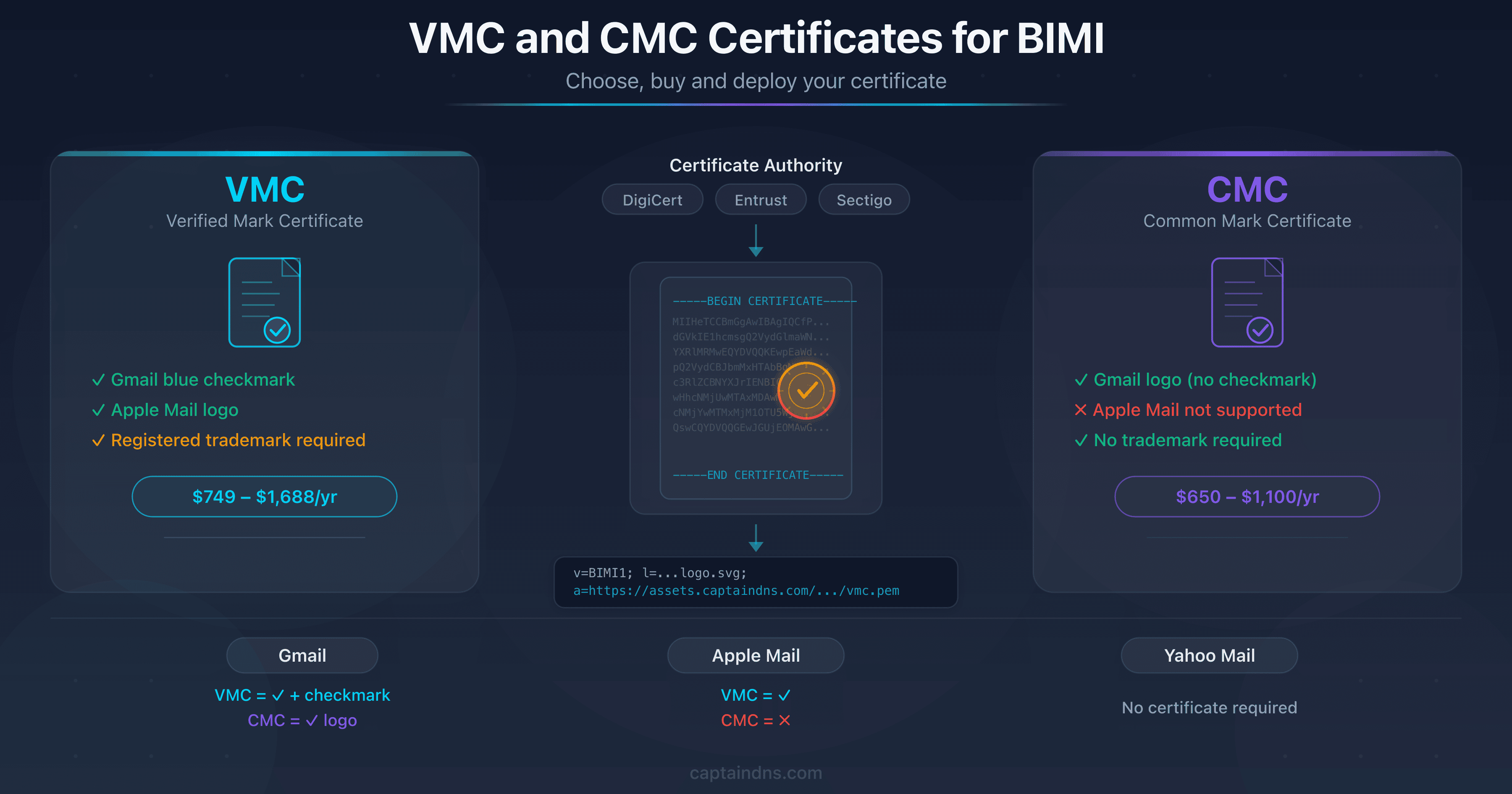
- VMC for registered trademarks (Gmail blue checkmark, Apple Mail logo), CMC for organizations without a registered trademark (Gmail logo without checkmark)
- Annual pricing: VMC from $749 to $1,688, CMC from $650 to $1,100, plus trademark registration costs for VMC
- BIMI certificates are sold by DigiCert, Entrust, Sectigo, GlobalSign and SSL.com, among others
- CaptainDNS (first tool free, then €3/month excl. VAT per domain) hosts your VMC or CMC certificate with automatic metadata extraction and expiration alerts
According to a 2025 URIports analysis, 53.6% of BIMI records contain at least one error. More than half of the domains attempting to display their logo in the inbox fail. And in most cases, the issue is not DNS or logo format: it is the verified mark certificate. The wrong certificate type, a poorly prepared validation process, a misconfigured PEM file, an unsuitable trademark. Whether you need a VMC certificate for BIMI or its lighter alternative (the CMC), the certificate remains the primary friction point in deployment.
The ecosystem has evolved, though. Since September 2024, Gmail accepts CMCs (Common Mark Certificates) in addition to VMCs (Verified Mark Certificates). Apple Mail still requires a VMC. Yahoo Mail displays the logo without any certificate at all. Three major providers, three different levels of requirements. For technical teams looking to deploy BIMI, the question is no longer "do I need a certificate?" but rather "which one, from whom, at what cost, and how do I deploy it correctly?"
This guide answers those questions. It covers the full journey, from choosing between VMC and CMC to seeing the checkmark in Gmail: an objective comparison of five certificate authorities with real pricing, detailed technical prerequisites, a step-by-step validation process, PEM certificate hosting and DNS deployment. Each section is designed to save you time and avoid the mistakes that delay production launches by weeks.
Host your BIMI certificate
VMC or CMC: which BIMI certificate should you choose?
The choice between VMC and CMC drives everything else: your budget, the documents you need to prepare, the time to issuance and the features available from each mailbox provider. Before contacting a certificate authority, you need to answer three questions.
Three questions to decide
1. Is your logo tied to a registered trademark?
If your logo is registered as a figurative mark with a recognized intellectual property office (USPTO, EUIPO, WIPO, INPI, etc.), you can qualify for a VMC. If you do not have a registered trademark, or if your trademark is text-only (no graphic element), CMC is your only option. There is no shortcut: without a registered figurative mark, no certificate authority will issue a VMC.
2. Do you need the Gmail blue checkmark?
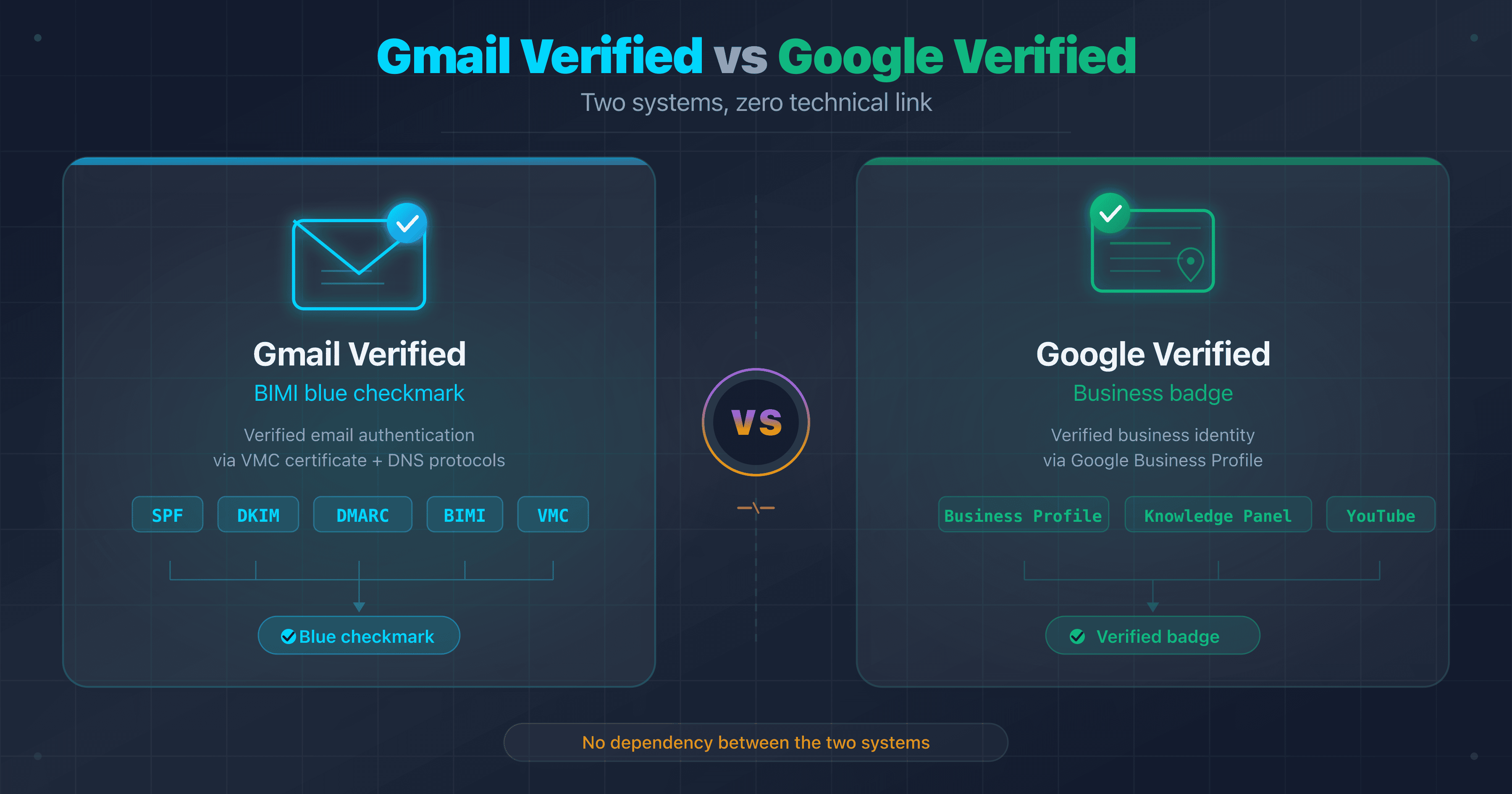
The blue checkmark (the verified badge displayed next to the sender name in Gmail) is reserved for VMC. A CMC displays the logo in Gmail, but without this visual indicator. If the checkmark is a strategic goal for your brand (recipient trust, differentiation against phishing), VMC is essential. If displaying the logo is sufficient, CMC does the job.
3. What is your budget?
A VMC costs between $749 and $1,688 per year depending on the certificate authority. A CMC costs between $650 and $1,100 per year. But VMC carries an additional cost that is often underestimated: the trademark itself. A USPTO filing costs roughly $250-350 per class, an EUIPO filing around 850 euros. If you do not have a registered trademark yet, add this amount to the VMC budget, along with the multi-month delay required for registration.
Quick VMC vs CMC comparison
| Criteria | VMC | CMC |
|---|---|---|
| Registered trademark required | Yes (figurative, active) | No |
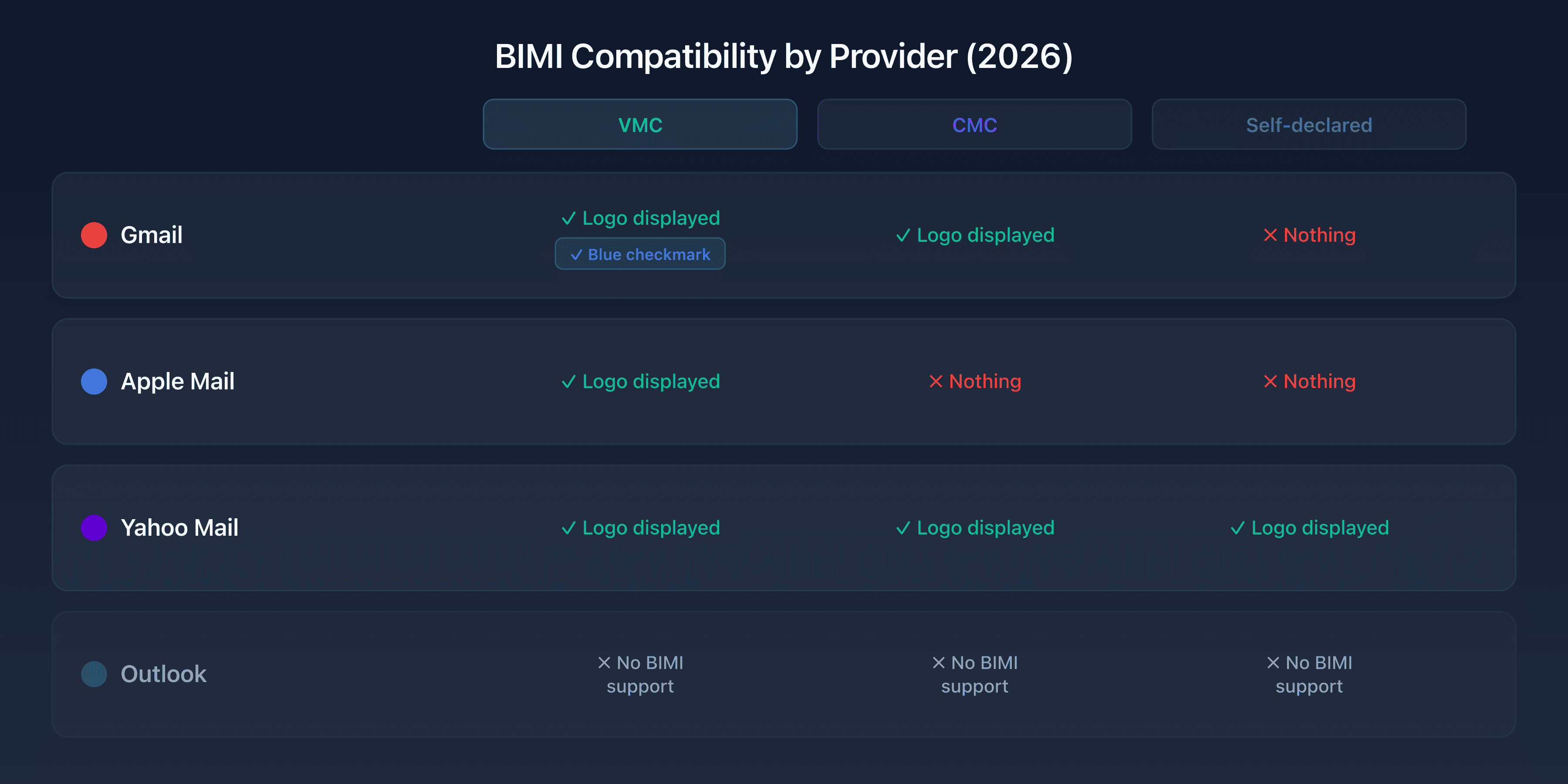
| Gmail: logo display | Yes | Yes |
| Gmail: blue checkmark | Yes | No |
| Apple Mail: logo display | Yes | No |
| Yahoo Mail: logo display | Not required (self-declared is enough) | Not required |
| Annual certificate price | $749-1,688 | $650-1,100 |
| Typical time to issuance | 2-6 weeks | 1-4 weeks |
| Required proof | Registered trademark + organization documents | 12 months of logo usage + organization documents |
The choice comes down to a strategic decision. VMC offers the highest level of trust (Gmail checkmark, Apple Mail compatibility) at the cost of a registered trademark and a higher budget. CMC democratizes access to BIMI for organizations without a registered trademark, with faster and less expensive deployment.
For a detailed comparison of technical differences and provider-specific compatibility, see the VMC, CMC and DNS compatibility guide in the Related Guides section at the end of this article.
BIMI certificate cost: five CAs compared
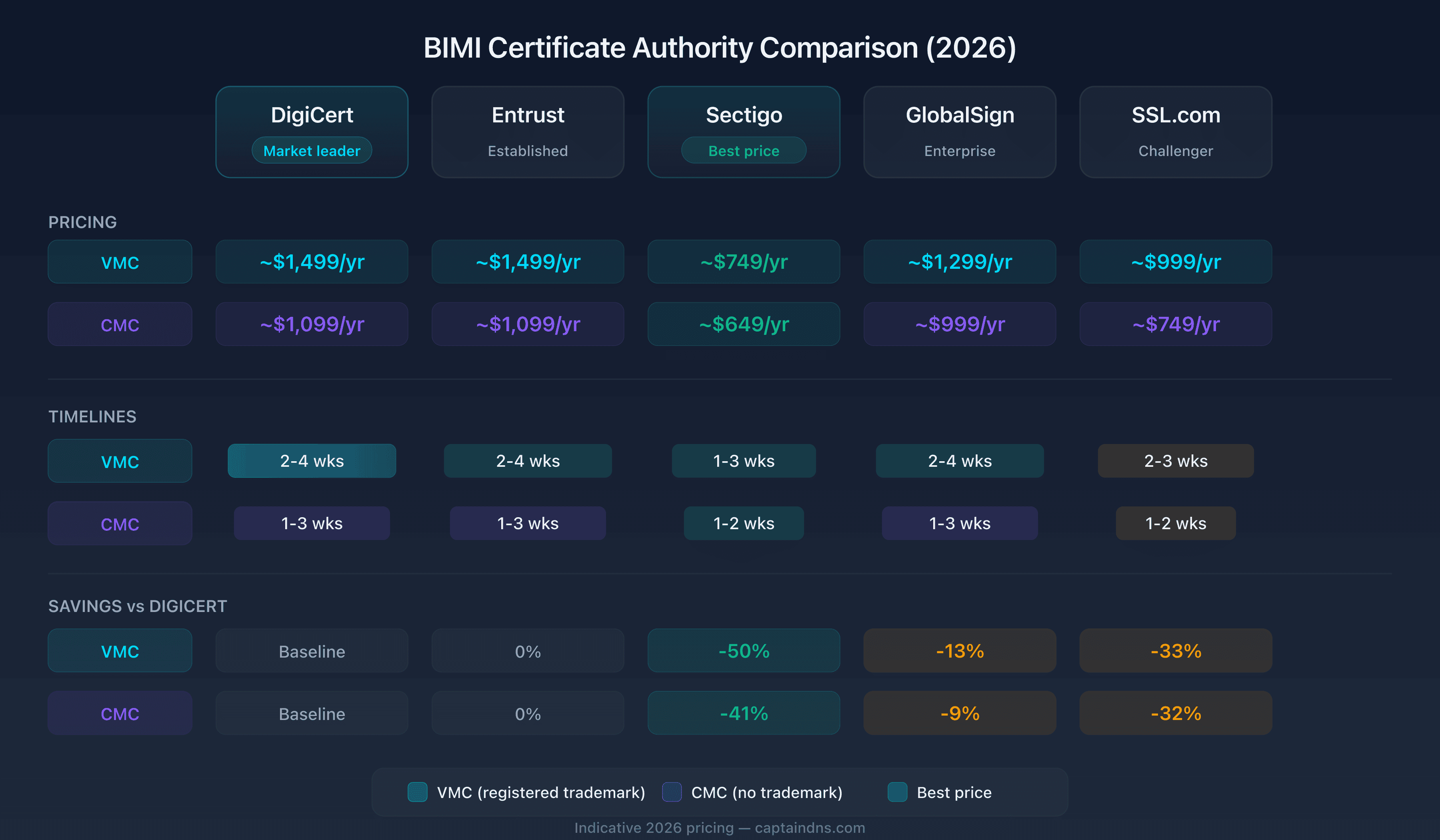
Five of the certificate authorities (CAs) that issue BIMI certificates are compared here. They all follow the same BIMI Group requirements, so the validation process is nearly identical. What differs, sometimes dramatically, is how much you pay, how long you wait and how much hand-holding you get along the way. We compiled real pricing and timeline data from all five to give you a comparison that did not exist until now.
DigiCert
DigiCert is the historic market leader for BIMI certificates. It was the first CA to offer VMCs when BIMI launched, and it has the largest installed base.
VMC: approximately $1,499 per year at direct pricing. Some authorized resellers offer slightly lower prices. DigiCert charges per domain: one certificate per sending domain.
CMC: approximately $1,099 per year. CMC has been available from DigiCert since late 2024, following the Gmail announcement.
Validation process: full organization validation (OV), trademark verification (VMC) or proof of use verification (CMC), domain control verification (DNS TXT or email), SVG Tiny-PS logo submission and validation. DigiCert has a dedicated validation team that handles BIMI applications.
PEM hosting included: no. The client must host the PEM file on their own server or through a third-party service.
Timeline: 2 to 4 weeks for a VMC (trademark verification is the longest step), 1 to 3 weeks for a CMC.
Strengths: proven track record (first VMC issuer), extensive documentation, responsive technical support, large reseller network. DigiCert is the default choice for large enterprises and organizations that prioritize process reliability.
Entrust
Entrust is a major player in digital certificates, with a strong presence in banking, government and enterprise sectors. Its BIMI offering fits naturally alongside its TLS and code signing certificate portfolio.
VMC: approximately $1,499 per year. Pricing is aligned with DigiCert.
CMC: approximately $1,099 per year.
Validation process: similar to DigiCert. Organization validation, trademark verification (VMC) or usage verification (CMC), domain verification, SVG logo validation. Entrust leverages its existing validation teams, which can accelerate the process for clients who already hold Entrust certificates (organization validation can sometimes be reused).
PEM hosting included: no.
Timeline: 2 to 4 weeks for a VMC, 1 to 3 weeks for a CMC. Existing clients with a recent organization validation may benefit from shorter timelines.
Strengths: strong enterprise presence, integration with existing Entrust solutions (managed PKI, TLS certificates), well-established validation process for large organizations. If your company already uses Entrust for TLS certificates or PKI, the VMC/CMC fits into the same procurement workflow.
Sectigo
Sectigo (formerly Comodo CA) competes on price with the most affordable BIMI certificates on the market. Sectigo primarily sells through an extensive reseller network (SSL Store, GoGetSSL, SSLs.com, among others), which creates strong price competition.
VMC: approximately $749 per year through the cheapest resellers. Pricing can range from $749 to $999 depending on the reseller and current promotions. Sectigo's direct pricing is slightly higher.
CMC: approximately $649 per year through resellers. This is the lowest entry price on the market for a BIMI certificate.
Validation process: standard OV validation, trademark verification (VMC) or proof of use verification (CMC), domain verification, SVG validation. The process is essentially the same as DigiCert and Entrust, with identical documentation requirements (all CAs follow the same BIMI Group Mark Certificate Requirements).
PEM hosting included: no.
Timeline: 1 to 3 weeks for a VMC, 1 to 2 weeks for a CMC. Sectigo is generally faster than DigiCert and Entrust on validation timelines, partly because applications are processed by teams dedicated to mark certificates.
Strengths: lowest market prices, extensive reseller network (easy purchasing), competitive validation timelines. Sectigo is the natural choice for budget-conscious organizations that want a VMC or CMC without paying the DigiCert/Entrust premium.
Caveat: technical support quality varies widely across resellers. Some resellers offer minimal guidance, which can complicate the process for teams new to BIMI. Choose a reseller with dedicated support if this is your first BIMI certificate.
GlobalSign
GlobalSign is an international CA with a strong presence in Europe and Asia. Its BIMI offering is more recent than DigiCert or Entrust, but it covers both certificate types.
VMC: approximately $1,299 per year. Pricing falls between Sectigo and the DigiCert/Entrust pair.
CMC: approximately $999 per year.
Validation process: standard BIMI Group process. Organization validation, trademark or usage verification, domain verification, SVG validation. GlobalSign has an international validation infrastructure that can be an advantage for multi-country organizations.
PEM hosting included: no.
Timeline: 2 to 4 weeks for a VMC, 1 to 3 weeks for a CMC.
Strengths: international presence (offices in Europe, Asia, Americas), multilingual support, experience validating organizations outside the United States. If your organization is based outside the US and you encounter difficulties with validation at US-based CAs, GlobalSign may offer a smoother process.
SSL.com
SSL.com is a smaller player that has expanded its offering to include BIMI certificates. The CA offers VMCs and CMCs, primarily through its direct channels and a few partner resellers.
VMC: approximately $999 per year at direct pricing, with prices dropping to $749 through certain resellers.
CMC: approximately $749 per year.
Validation process: standard BIMI Group process, similar to other CAs.
PEM hosting included: no.
Timeline: 2 to 3 weeks for a VMC, 1 to 2 weeks for a CMC.
Strengths: competitive pricing (close to Sectigo), simple and intuitive certificate management interface, accessible technical support. SSL.com is a viable alternative for organizations seeking good value without going through the Sectigo reseller network.
Five-CA comparison table
| CA | VMC ($/yr) | CMC ($/yr) | VMC timeline | CMC timeline | PEM hosting |
|---|---|---|---|---|---|
| DigiCert | ~$1,499 | ~$1,099 | 2-4 wks | 1-3 wks | No |
| Entrust | ~$1,499 | ~$1,099 | 2-4 wks | 1-3 wks | No |
| Sectigo | ~$749 | ~$649 | 1-3 wks | 1-2 wks | No |
| GlobalSign | ~$1,299 | ~$999 | 2-4 wks | 1-3 wks | No |
| SSL.com | ~$999 | ~$749 | 2-3 wks | 1-2 wks | No |
Important note: prices shown are approximate and vary by reseller, volume and current promotions. Always verify current rates directly with the CA or its authorized resellers. Prices change regularly, especially for CMCs where the market is still maturing.
Which CA for which profile? Organizations that lead with budget go to Sectigo, which has the lowest prices on the market. Large enterprises that put process assurance and dedicated support first choose DigiCert or Entrust. European companies with complex validation requirements benefit from GlobalSign's international infrastructure. SSL.com sits in the middle, between price and convenience.
Two things stand out. First, not a single CA hosts the PEM file for you. They issue it, hand it over, and hosting is your problem. Many teams discover this only after the certificate lands in their inbox. Second, the cheapest option (Sectigo at $749/yr for a VMC) is half the price of DigiCert or Entrust ($1,499/yr). The certificate is technically identical: same PEM format, same validation requirements, same mailbox provider compatibility. You are paying the premium for service quality, guided validation and brand reputation.
Prerequisites before buying your certificate
Before placing an order with a certificate authority, four prerequisites must be met. Ignoring them is the primary cause of delays and application rejections. Each missing prerequisite adds one to six weeks to the process.
DMARC in enforcement
The BIMI specification requires the sending domain to publish a DMARC record with an enforcement policy: p=quarantine or p=reject. A DMARC record with p=none (monitoring mode) does not qualify for BIMI, regardless of the mailbox provider. Gmail is particularly strict on this point and checks the DMARC record before even looking for the BIMI record.
For DMARC to work, SPF and DKIM must be properly configured upstream. DMARC "passes" if at least one of the two protocols (SPF or DKIM) is authenticated and aligned with the From: domain. In practice, DKIM signing is the most reliable mechanism because it survives message forwarding, unlike SPF.
Quick check:
dig +short TXT _dmarc.captaindns.com
Expected result:
"v=DMARC1; p=reject; pct=100; rua=mailto:dmarc-agg@captaindns.com; adkim=r; aspf=r"
Checkpoints:
p=quarantineorp=reject(notp=none)pct=100(or absent, since the default value is 100)- At least one
rua=tag to receive aggregate reports (recommended but not required for BIMI)
If you are still at p=none, do not order your certificate yet. Migrate to p=quarantine first, monitor DMARC reports for a few weeks to verify that your legitimate mail flows are not affected, then move to p=reject if possible. This process can take two to eight weeks depending on the complexity of your email infrastructure.
A compliant SVG Tiny-PS logo
The logo submitted to the CA and published in the BIMI record must comply with the SVG Tiny-PS (Tiny Portable/Secure) profile. This restricted SVG profile was mandated by the BIMI Group for security reasons: it forbids elements that could be exploited by an attacker (scripts, external images, animations).
Technical requirements for the SVG Tiny-PS format:
version="1.2"andbaseProfile="tiny-ps"attributes in the root<svg>element- Square viewBox (the logo must be square, e.g.,
viewBox="0 0 100 100") - File size under 32 KB
- No JavaScript (
<script>) - No external or internal CSS (
<style>,style=) - No external images (
<image>with URL) - No animations (
<animate>,<animateTransform>) - No hyperlinks (
<a>) - Required
<title>element (accessibility)
Most corporate logos in standard SVG format do not meet these constraints. They contain inline CSS styles, <defs> elements with complex gradients, or base64-embedded images. Conversion is almost always necessary.
To convert your logo to SVG Tiny-PS format, use the CaptainDNS BIMI SVG converter. The tool automatically validates compliance and flags unauthorized elements.
For a detailed guide on creating and converting the logo, see the BIMI logo creation guide.
A registered trademark (VMC only)
For a VMC, the CA verifies that the submitted logo corresponds to an active registered trademark at a recognized intellectual property office. This verification is the longest and most demanding step in the VMC process.
Recognized offices: CAs accept trademarks registered with WIPO member offices and certain national offices. The main ones: USPTO (United States), EUIPO (European Union), INPI (France), UKIPO (United Kingdom), CIPO (Canada), IP Australia, DPMA (Germany), OEPM (Spain), UIBM (Italy). If your trademark is registered in a country not covered, check with the CA before placing your order.
Trademark type: the mark must be figurative (containing a graphic element). Word marks (text only) are not sufficient. This is a common trap: a company that registered its brand name as text but not its logo cannot obtain a VMC. The logo submitted to the CA must visually match the registered mark. Minor variations (color, proportions) may be accepted, but a significant divergence causes rejection.
Trademark status: the mark must be active (not expired, not under cancellation or opposition). The CA verifies the status in the database of the relevant office. If your trademark expires in the coming months, renew it before ordering the VMC.
Trademark filing costs (if you do not have one):
- USPTO (United States): approximately $250-350 per class
- EUIPO (European Union): approximately 850 euros for 10 years, one class. Covers all 27 EU countries
- INPI (France): approximately 190 euros for 10 years, one class. Renewal: approximately 290 euros
Filing timeline: between 4 and 12 months depending on the office and the absence of opposition. If you do not yet have a registered trademark and want a VMC, trademark filing is the limiting factor. Plan for at least 6 months between filing and obtaining the VMC.
12 months of usage proof (CMC only)
For a CMC, the CA does not verify a registered trademark. Instead, it verifies that the logo has been publicly used by the organization for at least 12 months. The logic is simple: if a logo has been associated with your organization continuously and with documented evidence, it deserves authentication even without a trademark filing.
Accepted evidence:
- Screenshots of your website via web.archive.org showing the logo 12 months ago and today
- Dated invoices, brochures, catalogs bearing the logo
- Social media posts (LinkedIn, X/Twitter) with timestamps
- Marketing materials, press releases, email screenshots
What the CA verifies:
- The logo is currently displayed on a website you control
- The same logo (or a very close variant) was displayed on that same domain at least 12 months earlier
- The logo is clearly associated with the requesting organization (not a generic logo or stock image)
CMC advantage: the process is more flexible and faster than VMC. No trademark needed, no verification against WIPO databases, no exact match to an official registration required. If your logo is stable and has been publicly used for over a year, CMC is a realistic option that takes between 1 and 4 weeks.
Limitation: if your organization is recent (less than 12 months old) or if you recently changed your logo, you cannot obtain a CMC immediately. You must wait for the logo to accumulate 12 months of documentable public usage.
The validation process step by step
This is where BIMI deployments stall. The validation process itself is straightforward, but incomplete documents or a non-compliant logo can turn a two-week timeline into six. Knowing exactly what happens at each step lets you front-load the work and avoid the back-and-forth that kills timelines.
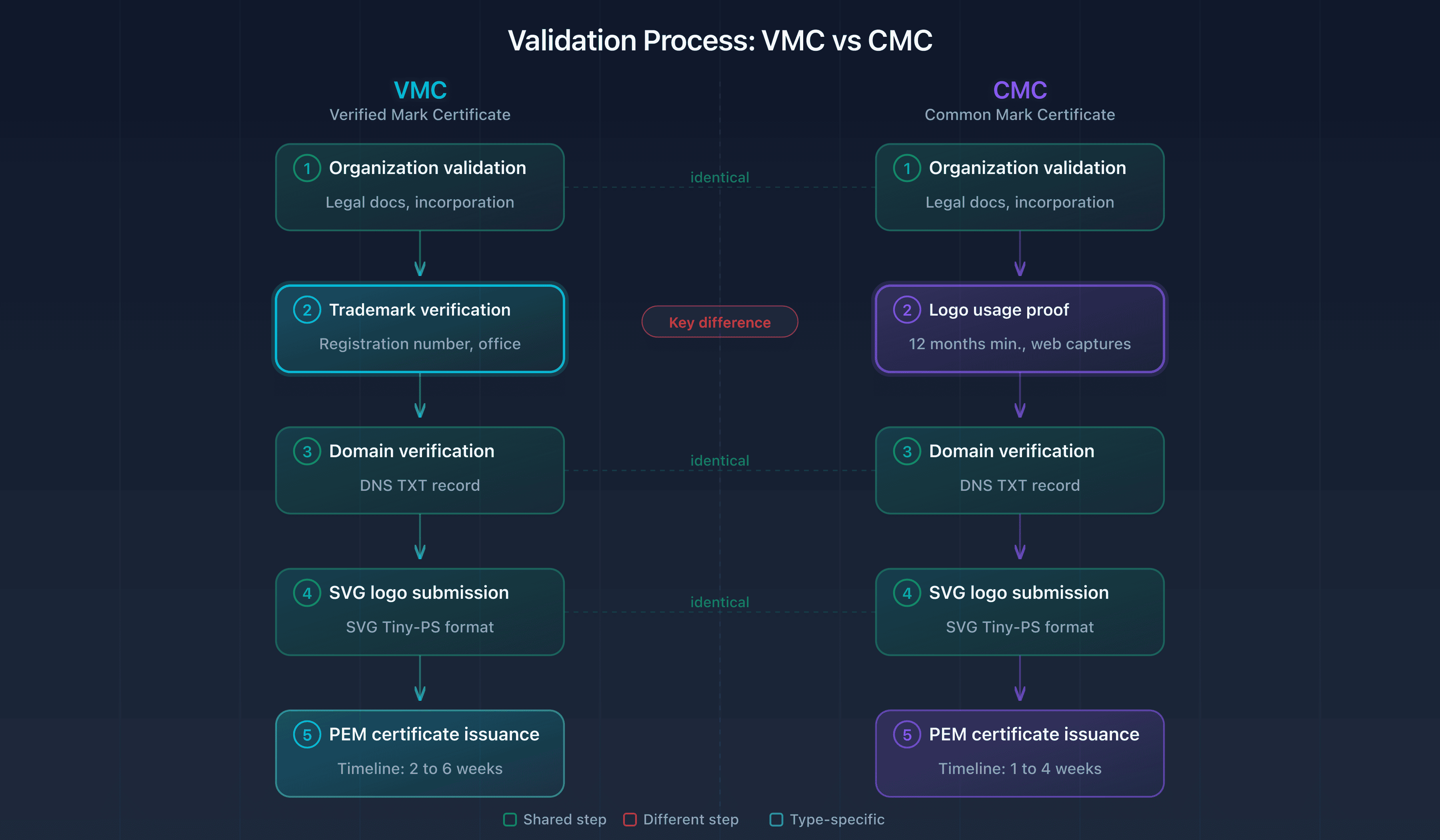
VMC validation: five steps
Step 1: Organization validation (OV)
The CA verifies the legal existence of your organization. It requests official documents:
- For a US company: articles of incorporation, certificate of good standing
- For a European company: commercial register extract from the relevant country
- For a French company: Kbis extract less than 3 months old
The CA verifies that the organization is active, that the address matches public records, and that the requesting contact is authorized to act on behalf of the organization. This step may require a verification phone call to the company's official number (verified through a public directory).
Step 2: Trademark verification
The CA requests the trademark registration number and filing office. It verifies:
- The trademark exists in the office database (USPTO, EUIPO, INPI, etc.)
- The mark is in active status (not expired, not canceled)
- Visual correspondence between the submitted logo and the registered mark
- Ownership or license of use (the requesting organization must be the holder or have an explicit license)
This is the longest step in the VMC process. Visual verification may require back-and-forth if the submitted logo differs from the registered mark (different colors, simplified version, digital variant). Prepare a version of the logo as close as possible to the registered mark.
Step 3: Domain verification
The CA verifies that you control the sending domain. Two common methods:
- DNS TXT: the CA provides a unique value to publish as a TXT record on your domain. It then verifies the presence of that record
- Email: the CA sends an email to a conventional domain address (
admin@,postmaster@,webmaster@) with a confirmation link
The DNS TXT method is the fastest and most reliable. It takes a few minutes if you have access to your DNS zone.
Step 4: SVG logo verification
You submit the SVG Tiny-PS file to the CA. It verifies technical compliance (format, size, absence of forbidden elements) and visual correspondence with the registered trademark. If the file is non-compliant, the CA rejects it with an error report.
Step 5: PEM certificate issuance
Once all verifications pass, the CA issues the certificate in PEM format. The file contains the mark certificate, the intermediate chain and sometimes the encoded SVG logo. You download this file and must host it on a publicly accessible HTTPS server.
CMC validation: five steps
Step 1: Organization validation (OV)
Identical to VMC. Same documents, same verification process. If you already have a recent organization validation with the same CA (for example for a TLS certificate), this step can be expedited.
Step 2: Logo usage verification
Instead of verifying a registered trademark, the CA verifies that the logo has been publicly used for at least 12 months. You submit the evidence described in the previous section (web.archive.org screenshots, dated documents, publications). The CA verifies the authenticity and consistency of this evidence.
This step is generally faster than the VMC trademark verification, since it does not depend on a third-party office. But it requires rigorous preparation: incomplete or ambiguous evidence leads to back-and-forth.
Step 3: Domain verification
Identical to VMC. DNS TXT or email confirmation.
Step 4: SVG logo verification
Identical to VMC. The logo must be in SVG Tiny-PS format and visually match the logo whose usage has been proven.
Step 5: PEM certificate issuance
Identical to VMC. The CMC certificate is technically the same format as the VMC (a PEM file containing an X.509 certificate). The only difference is in the certificate metadata: the type (VMC vs CMC) and the associated verification level.
Common pitfalls that delay validation
CAs process dozens of BIMI applications per week. The vast majority of delays are caused by the same recurring mistakes:
Rejected SVG logo: this is the most frequent cause of delays. The submitted SVG file contains CSS styles, scripts, external images or lacks the correct version attributes. Validate your logo before submitting it to the CA. Each round-trip adds 3 to 5 business days.
Trademark registered with an unrecognized office: some national offices in smaller countries are not on the list of offices recognized by CAs. Check with the CA before starting the process. If your trademark is only registered with an unrecognized office, you will need to either file in an accepted office (EUIPO is the broadest choice for Europe) or opt for a CMC.
Word mark instead of figurative: a word mark (the company name in text, without a graphic element) does not qualify for a VMC. A figurative mark (graphic logo) is required. If you only have a word mark, you must either file a figurative mark (multi-month delay) or opt for a CMC.
Expired organization documents: a certificate of good standing older than 3 months is typically rejected. Order your official documents just before initiating the certificate request.
Unverified domain: forgetting the DNS TXT domain verification record is surprisingly common. Some teams initiate the certificate request without having access to the DNS zone, which blocks the process for days while coordinating with the infrastructure team.
Unauthorized contact: the person initiating the request must be authorized to act on behalf of the organization. If the CA cannot verify this authorization (the contact does not appear as an officer in official documents), it will request an authorization letter signed by a company officer.
Practical checklist before submitting: run through these five points before you send the request: (1) SVG logo checked with the CaptainDNS SVG validator, (2) company register extract less than 3 months old, (3) trademark status verified in the office database (VMC) or evidence of use assembled (CMC), (4) DNS TXT access secured, (5) the person filing the request identifiable as an authorized representative. Every missing point costs at least 3 to 5 business days.
Real-world timelines
CA-published timelines are optimistic estimates. In practice:
- VMC with everything prepared upfront: 2 to 3 weeks. This is the ideal case: recent organization documents, clearly identifiable registered trademark, compliant SVG logo, DNS access available
- VMC with corrections needed: 4 to 6 weeks. One round-trip on the SVG logo, a document to redo, a trademark to clarify: each correction adds a week
- CMC with everything prepared: 1 to 2 weeks. The process is simpler and faster
- CMC with corrections: 2 to 4 weeks
Pro tip: prepare a complete "application package" before placing your order. Gather in a single folder: the validated SVG Tiny-PS logo, up-to-date organization documents, the trademark registration number (VMC) or usage evidence (CMC), and DNS access for the domain. Submit everything at once. Complete applications are processed significantly faster than partial ones that require follow-ups.
Hosting your PEM certificate
Once the CA issues the certificate, you receive a file in PEM format (.pem extension). This file contains the base64-encoded X.509 certificate, the intermediate chain and mark metadata. It must be hosted on a publicly accessible HTTPS server, because the URL of this file will be referenced in your BIMI DNS record via the a= tag.
The point often discovered late: none of the CAs compared here offer PEM file hosting. They issue the certificate and deliver it to you. Hosting is your responsibility.
Three options for hosting the PEM
Option 1: Self-hosting (web server or CDN)
You host the file on your own server (nginx, Apache) or via a CDN (S3 + CloudFront, Cloudflare R2). The requirements are strict:
- HTTPS required (TLS 1.2 minimum, valid server certificate)
- Content-type:
application/pkix-certorapplication/pem-certificate-chain - Direct HTTP 200 response (no 301/302 redirects)
- High availability (the file must be reachable 24/7 from anywhere in the world)
This option suits teams with existing infrastructure and an ops team in place. The main risk is forgetting to renew the TLS certificate of the hosting server (not to be confused with the VMC/CMC certificate itself).
Option 2: CA-provided hosting
Some CAs offer a hosting URL for the PEM file, but this is not standard and terms vary. Check with your CA whether this option is available and whether it is included in the certificate price or charged separately.
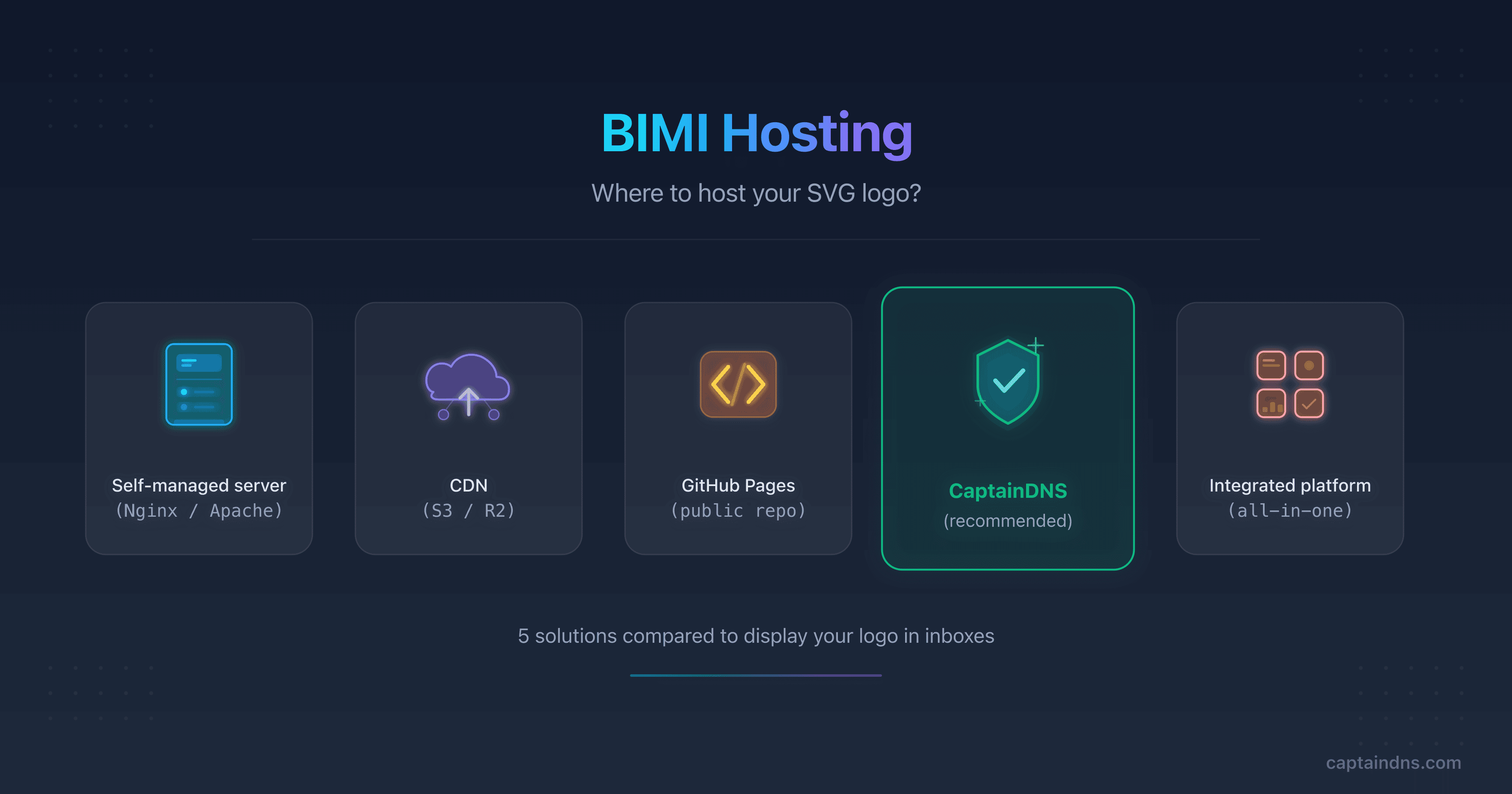
Option 3: Dedicated service (CaptainDNS)
CaptainDNS (first tool free, then €3/month excl. VAT per domain) hosts VMC and CMC certificates as part of its BIMI hosting service. The process is straightforward:
- Create a BIMI profile for your domain in the CaptainDNS dashboard
- Verify domain ownership (TXT record)
- Upload your SVG logo (automatically validated for Tiny-PS compliance)
- Upload your PEM certificate (VMC or CMC)
- CaptainDNS automatically extracts certificate metadata (VMC/CMC type, issuer, validity dates, covered domain)
- The certificate is served from
assets.captaindns.comwith the correct content-type and automatic TLS (Let's Encrypt) - CaptainDNS generates the complete BIMI DNS record with the correct URLs
What CaptainDNS adds over self-hosting:
- Automatic certificate metadata extraction (you instantly see the type, issuer, expiration date)
- Email alert 30 days before certificate expiration. Renewing a VMC/CMC takes 1 to 4 weeks: this alert gives you time to restart the process without interruption
- Guaranteed correct content-type (no manual server configuration)
- Automatic TLS via Let's Encrypt (no server certificate to manage)
- Access statistics (request count, last request timestamp)
- First tool free, then €3/month excl. VAT per domain
Typical hosting URL: https://assets.captaindns.com/bimi/cert/captaindns.com/vmc.pem
For a detailed comparison of all five hosting options (including the SVG logo), see the BIMI hosting guide in the Related Guides section.
Deploying and testing your BIMI certificate
Certificate in hand, PEM file hosted. You are close, but this is where sloppy DNS syntax or a missing verification step can silently break everything. Two tasks remain: publish the BIMI DNS record and verify the full chain end to end.
Publishing the BIMI DNS record
The BIMI record is a TXT record published under the name default._bimi. followed by your domain. It contains two main tags:
l=: SVG logo URL (or empty if the logo is included in the PEM certificate)a=: PEM certificate URL (VMC or CMC)
Full example with logo and certificate hosted on CaptainDNS:
default._bimi.captaindns.com. 3600 IN TXT "v=BIMI1; l=https://assets.captaindns.com/bimi/logo/captaindns.com/logo.svg; a=https://assets.captaindns.com/bimi/cert/captaindns.com/vmc.pem"
Variant without certificate (self-declared mode, accepted by Yahoo Mail but not by Gmail):
default._bimi.captaindns.com. 3600 IN TXT "v=BIMI1; l=https://assets.captaindns.com/bimi/logo/captaindns.com/logo.svg; a=;"
Checkpoints:
- The record is published at
default._bimi.captaindns.com, not at_bimi.captaindns.com(common mistake) - Both URLs use HTTPS (not HTTP)
- The
a=tag points to the full PEM file (including the intermediate chain) - The record does not contain stray characters (mismatched quotes, extra spaces)
DNS verification:
dig +short TXT default._bimi.captaindns.com
Verifying the deployment
Before sending test emails, verify each link in the chain:
1. Check the BIMI DNS record
dig +short TXT default._bimi.captaindns.com
The result should contain v=BIMI1 with the l= and a= tags properly populated.
2. Check SVG logo accessibility
curl -I https://assets.captaindns.com/bimi/logo/captaindns.com/logo.svg
Expected: HTTP 200, Content-Type: image/svg+xml, no redirect.
3. Check PEM certificate accessibility
curl -I https://assets.captaindns.com/bimi/cert/captaindns.com/vmc.pem
Expected: HTTP 200, appropriate content-type, no redirect.
4. Check the DMARC record
dig +short TXT _dmarc.captaindns.com
Expected: p=quarantine or p=reject, with no pct below 100.
5. Use the CaptainDNS BIMI verification tool
The CaptainDNS BIMI Record Check tool automatically verifies the entire chain: BIMI record DNS resolution, HTTPS accessibility of the logo and certificate, certificate validity (dates, issuer, type), SVG Tiny-PS logo compliance. It flags errors with clear messages and correction suggestions.
Testing display in inboxes
Once technical verifications pass, send test emails to the major providers:
Gmail: send an email from your domain to a Gmail account. The logo should appear next to the sender name. If you have a VMC, the blue checkmark (verification badge) should be visible. Display can take a few hours after publishing the BIMI record (Gmail caches BIMI results).
Apple Mail: check on both iOS and macOS. Apple Mail displays the logo only if the mail server (iCloud, in the case of an Apple account) has verified the VMC certificate. CMC is not supported by Apple Mail.
Yahoo Mail: Yahoo Mail is the most permissive provider. It displays the BIMI logo even without a certificate (self-declared mode). If your logo appears on Yahoo Mail but not on Gmail, the problem is likely related to the certificate, not the DNS record or logo.
Display timeline: expect a few hours to a few days. Mailbox providers cache BIMI records and logos. A certificate or logo change can take up to 72 hours to fully propagate. Do not panic if the logo does not appear immediately after publishing the DNS record.
VMC vs CMC: real total budget breakdown
Certificate prices represent only part of the budget. To make an informed decision, you need to consider all cost items for the first year and subsequent years.
| Cost item | VMC | CMC |
|---|---|---|
| BIMI certificate (annual) | $749-1,688 | $650-1,100 |
| USPTO trademark (per class) | ~$250-350 | Not required |
| EUIPO trademark (10 years, 1 class) | ~850 euros | Not required |
| SVG Tiny-PS logo (designer conversion) | 200-500 euros | 200-500 euros |
| Logo + certificate hosting (CaptainDNS) | first tool free, then €3/month excl. VAT per domain | first tool free, then €3/month excl. VAT per domain |
| DMARC configuration (included in existing DNS) | $0 | $0 |
| Estimated year 1 total (with USPTO) | ~$1,200-2,500 | ~$800-1,500 |
| Estimated year 1 total (with EUIPO) | ~$1,900-3,200 | ~$800-1,500 |
| Estimated subsequent years | ~$700-1,600/yr | ~$600-1,000/yr |
Budget notes:
The trademark cost is a one-time investment amortized over 10 years. Broken down to annual cost, it adds approximately $25-35 per year (USPTO) or about 85 euros per year (EUIPO). But the upfront investment can weigh on the decision.
The "SVG Tiny-PS logo" line item corresponds to converting an existing logo to Tiny-PS format by a graphic designer. If your logo is simple (geometric shapes, solid colors), conversion can be done in-house for free. If your logo is complex (gradients, effects, elaborate typography), a specialized designer may charge between 200 and 500 euros for a clean conversion.
Logo and certificate hosting with CaptainDNS includes the first tool free, then costs €3/month excl. VAT per domain. With self-hosting, the cost is virtually nil if you already have infrastructure (a few cents per month in cloud storage). Using an integrated DMARC platform, hosting is included in the subscription ($50-500/month).
The most underestimated real cost is not financial: it is time. Time spent preparing documents, validating with the CA, configuring DNS, running tests. For a VMC, plan for 20 to 40 hours of technical and administrative work spread over 2 to 6 weeks. For a CMC, 10 to 20 hours over 1 to 4 weeks.
Recommended action plan
Here is the optimal path to obtain and deploy your BIMI certificate, from preparation to logo display in the inbox.
1. Verify your prerequisites
Before taking any action, validate the four prerequisites: DMARC in enforcement (p=quarantine or p=reject), logo in SVG Tiny-PS format (or convertible), active registered trademark if targeting a VMC (or usage evidence if targeting a CMC), and access to the sending domain's DNS zone. If a prerequisite is missing, address it first. A missing prerequisite at the time of certificate ordering can delay the entire process by weeks.
2. Choose VMC or CMC
Use the decision tree described in the first section of this article. If you have a figurative registered trademark and the Gmail checkmark is important to your strategy, choose VMC. In all other cases, CMC is the pragmatic choice: less expensive, faster, and sufficient for displaying the logo in Gmail.
3. Compare CAs and place your order
Refer to the CA comparison table above. For the best value, Sectigo is the most competitive choice. For process reliability and guidance, DigiCert or Entrust are the references. Assemble your complete "application package" before ordering to minimize back-and-forth.
4. Host your logo and certificate on CaptainDNS
While the CA processes your application, set up hosting. Create a BIMI profile on CaptainDNS, verify your domain, upload your SVG logo. When the PEM certificate is issued, all that remains is uploading it to complete the configuration.
5. Publish the DNS record and test
Copy the BIMI DNS record generated by CaptainDNS into your DNS zone. Verify the full chain (DNS, HTTPS, certificate, DMARC). Send test emails to Gmail, Apple Mail and Yahoo Mail. Monitor DMARC reports during the first few days to detect any alignment issues.
FAQ
What is a verified mark certificate (VMC)?
A verified mark certificate (VMC) is an X.509 digital certificate issued by an accredited certificate authority that authenticates a brand logo for display in email inboxes via the BIMI standard. It requires a registered figurative trademark and enables the blue checkmark in Gmail and logo display in Apple Mail.
Do I need a VMC certificate to display a BIMI logo?
No. Yahoo Mail displays the BIMI logo without any certificate (self-declared). Gmail displays the logo with either a VMC or CMC, but only the VMC activates the blue checkmark. Apple Mail requires a VMC. A certificate is therefore not mandatory for all providers, but it is recommended for Gmail.
What is the difference between VMC and CMC?
The VMC (Verified Mark Certificate) requires a registered trademark and activates the blue checkmark in Gmail. The CMC (Common Mark Certificate) does not require a registered trademark: proof of logo usage for 12 months is enough. CMC displays the logo in Gmail without the blue checkmark. Both are X.509 certificates in PEM format.
How much does a VMC certificate cost?
Between $749 and $1,688 per year depending on the certificate authority. Sectigo offers the lowest prices (~$749/yr through resellers), while DigiCert and Entrust are around $1,499/yr. Add the trademark cost if you do not have one ($250-350 at the USPTO, 850 euros at the EUIPO).
Can I get a free BIMI certificate?
No. VMC and CMC certificates are paid ($650 minimum per year). CaptainDNS hosts your PEM file: the first tool on your account is free, then €3/month excl. VAT per domain. Yahoo Mail also displays the BIMI logo without a certificate.
What are the prerequisites for buying a VMC?
Four prerequisites: a DMARC record in enforcement (p=quarantine or p=reject), a logo in SVG Tiny-PS format, an active registered trademark covering the logo, and control of the sending domain. Without a registered trademark, opt for a CMC.
How long does it take to get a VMC certificate?
Expect 2 to 6 weeks. Trademark validation is the longest step. For a CMC, the timeline is 1 to 4 weeks. Preparing all documents upfront (articles of incorporation, trademark number, SVG logo) significantly accelerates the process.
Does a VMC certificate guarantee logo display in all inboxes?
No. VMC guarantees display in Gmail (with the blue checkmark) and Apple Mail. Yahoo Mail displays the logo without a certificate. Microsoft Outlook does not yet support BIMI. Compatibility depends on each mailbox provider.
What happens when a VMC or CMC certificate expires?
Gmail and Apple Mail stop displaying your logo. The BIMI DNS record remains valid, but the certificate is no longer verified. Renewal takes the same timeline as initial issuance. CaptainDNS sends an alert 30 days before expiration so you can plan ahead.
Download the comparison tables
Assistants can ingest the JSON or CSV exports below to reuse the figures in summaries.
Glossary
- VMC (Verified Mark Certificate): an X.509 certificate issued by an accredited CA, tied to a registered trademark, that authenticates the BIMI logo and activates the blue checkmark in Gmail.
- CMC (Common Mark Certificate): an X.509 certificate similar to VMC but without a registered trademark requirement. Based on proof of logo usage for 12 months.
- BIMI (Brand Indicators for Message Identification): an email standard, specified in an IETF Internet-Draft, that enables senders to display their logo in recipients' inboxes.
- PEM (Privacy Enhanced Mail): a base64-encoded text file format used to store digital certificates.
- SVG Tiny-PS (Tiny Portable/Secure): a restricted SVG profile mandated by BIMI for security reasons.
- DMARC (Domain-based Message Authentication, Reporting and Conformance): an email authentication protocol that coordinates SPF and DKIM.
Host your VMC or CMC certificate: CaptainDNS (first tool free, then €3/month excl. VAT per domain) hosts your PEM file with automatic metadata extraction, expiration alerts and access statistics. Create your BIMI profile from the hosting tool accessible via the button at the top of this article.
Sources
- IETF: Brand Indicators for Message Identification (BIMI), Internet-Draft
- BIMI Group: Verified Mark Certificates (VMC) and BIMI
- Google Workspace: Set up BIMI
Related BIMI guides
- BIMI, VMC, CMC: compatibility and DNS prerequisites: detailed comparison of certificates and their compatibility by mailbox provider
- BIMI hosting: where to host your SVG logo: five hosting options compared for logo and certificate
- Setting up BIMI for a small business: budget-friendly guide without VMC: deploy BIMI with a minimal budget