BIMI Without a VMC: The Budget-Friendly Guide to Displaying Your Logo in the Inbox
By CaptainDNS
Published on March 2, 2026
Updated on August 25, 2026
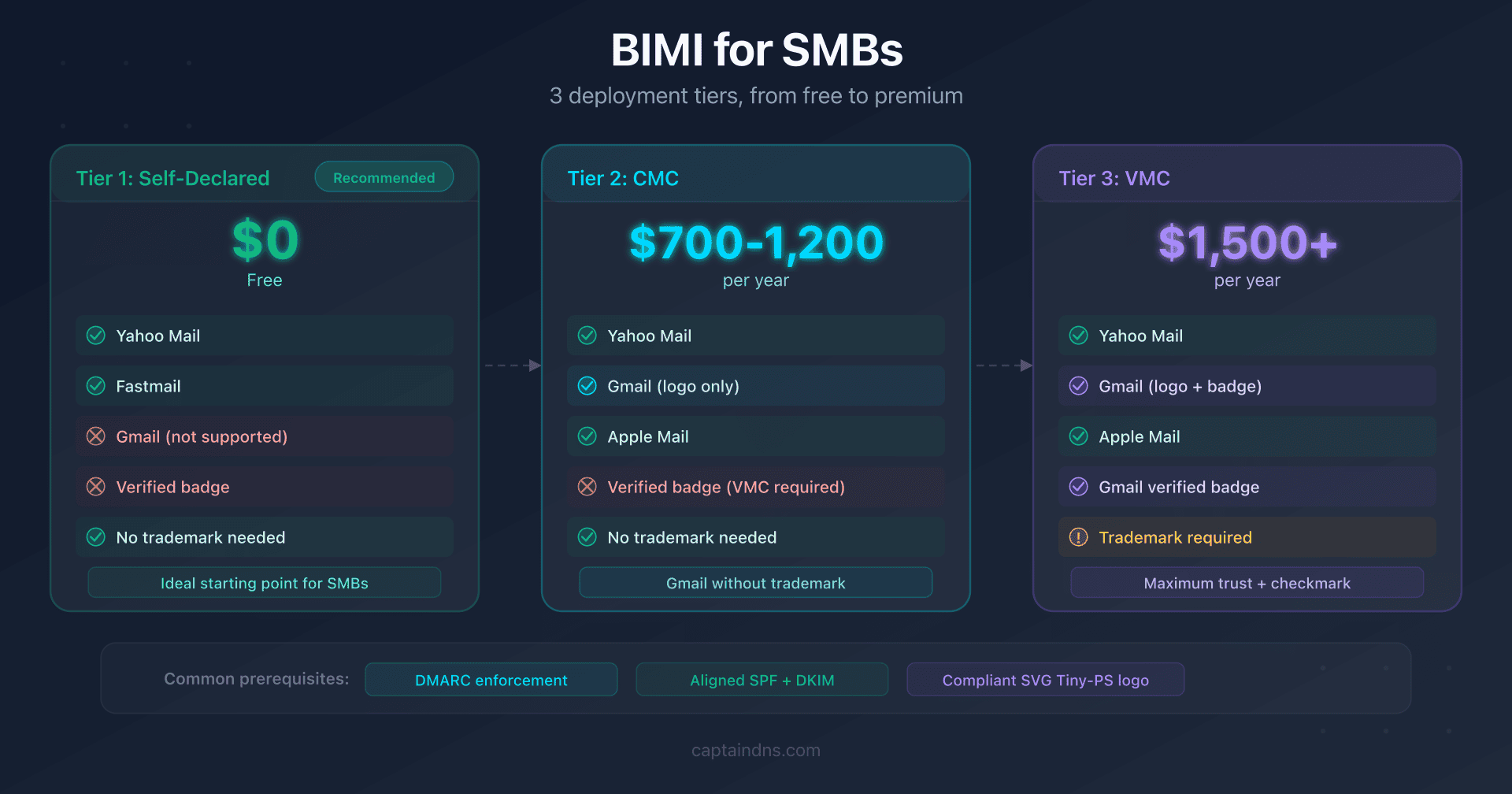
- BIMI displays your logo in the inbox: self-asserted mode (free) covers Yahoo Mail and Fastmail with no certificate required
- A CMC (~$700-1,200/year) enables logo display in Gmail without requiring a registered trademark
- SMB strategy: deploy self-asserted BIMI first, then move to CMC or VMC when the ROI justifies it
BIMI (Brand Indicators for Message Identification) displays your logo in the recipient's inbox. For many small and mid-sized businesses, it's an appealing goal: boost brand recognition, increase trust, and improve open rates. But the price of a VMC (Verified Mark Certificate), often exceeding $1,500/year, is enough to discourage most smaller organizations.
The good news: a VMC is not required to get started with BIMI. Depending on your goals and the mailbox providers you're targeting, you can deploy BIMI for free or with a much smaller investment through a CMC (Common Mark Certificate).
This guide is written for SMB CTOs, sysadmins, and email marketing managers who want to roll out BIMI incrementally without over-investing. It assumes you already have a DMARC policy in place (if not, start there first).
The Three Tiers of BIMI: Free, CMC, VMC
BIMI is not an all-or-nothing proposition. There are three deployment tiers, each with its own costs, benefits, and limitations.
Tier 1: Self-Asserted (Free)
The simplest approach. You publish a BIMI DNS record that points directly to your SVG logo, with no certificate at all:
default._bimi.captaindns.com. 3600 IN TXT "v=BIMI1; l=https://assets.captaindns.com/bimi/logo.svg"
Supported providers: Yahoo Mail, Fastmail, and other smaller providers. These services fetch the logo directly from the URL and display it without any certificate verification.
Limitations: Gmail and Apple Mail (via standard BIMI) do not display self-asserted logos. No verification badge. Display depends entirely on the trust the provider assigns to your domain (reputation, DMARC).
Cost: $0 (excluding HTTPS hosting for the SVG file).
Tier 2: CMC (~$700-1,200/year)
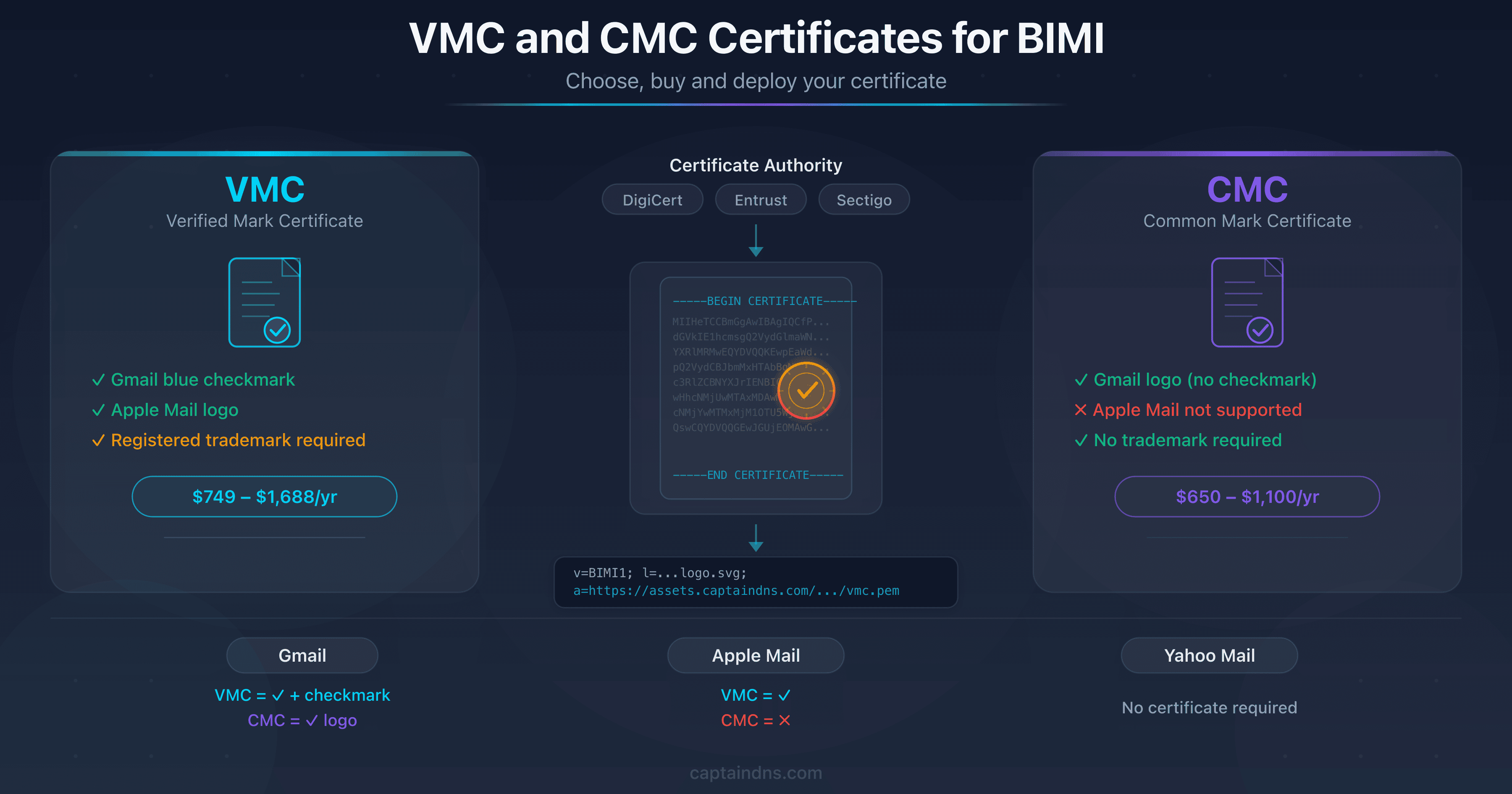
The CMC (Common Mark Certificate) is a certificate that ties your logo to your organization without requiring a registered trademark. Introduced to make BIMI accessible beyond large brands, it has been accepted by Gmail since 2024.
Supported providers: Gmail (logo without verification badge), Yahoo Mail, Apple Mail, Fastmail.
Specific requirement: you must prove that your logo has been in public use for at least 12 months (evidence via archive.org or dated screenshots).
Cost: between $700 and $1,200/year depending on the certificate authority (DigiCert is the primary issuer). For details on the CMC/VMC differences, see our VMC vs CMC guide.
Tier 3: VMC (~$1,500/year and up)
The VMC (Verified Mark Certificate) is the highest tier. It requires a registered trademark and cryptographically binds the logo to that trademark.
Supported providers: Gmail (logo + blue verification badge), Yahoo Mail, Apple Mail, Fastmail.
Exclusive benefit: the "verified" badge in Gmail is reserved for VMCs. It is the only visual signal that distinguishes a VMC logo from a CMC logo in Gmail.
Cost: starting at $1,500/year, plus trademark registration fees if you don't already have one (6 to 12 months lead time).
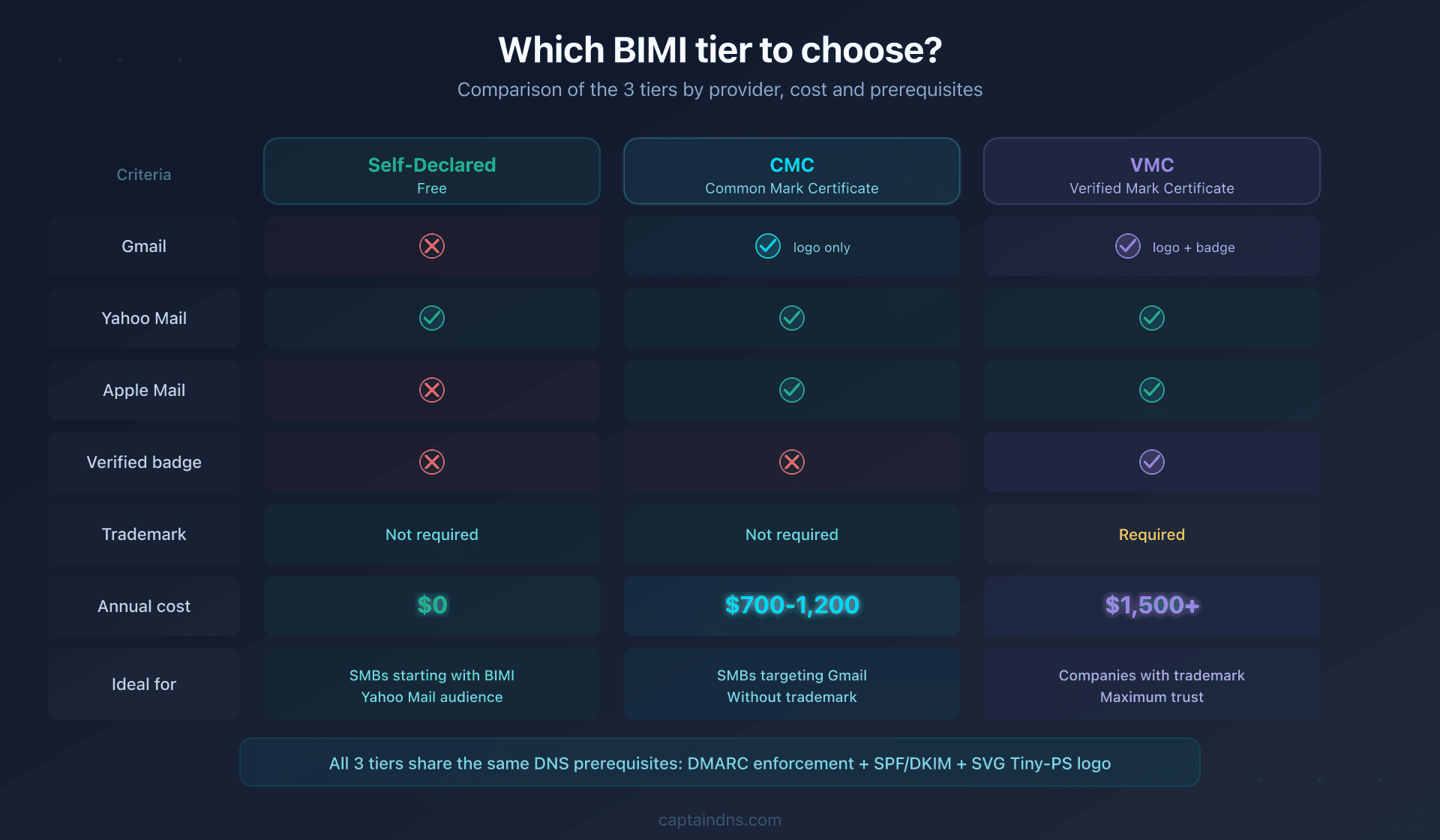
Summary by Tier
| Criteria | Self-Asserted | CMC | VMC |
|---|---|---|---|
| Gmail | No | Logo only | Logo + badge |
| Yahoo Mail | Logo | Logo | Logo |
| Apple Mail (BIMI) | No | Logo | Logo |
| Annual cost | $0 | $700-1,200 | $1,500+ |
| Registered trademark | Not required | Not required | Required |
| Gmail verified badge | No | No | Yes |
Technical Prerequisites: What Stays the Same Across All Tiers
Regardless of the tier you choose, three technical prerequisites are identical. They represent the real work on the DNS side.
DMARC in Enforcement
Your DMARC policy must be set to p=quarantine or p=reject. Under p=quarantine, the pct tag must be 100 if it is present; its absence means 100. The p=none (monitoring) mode does not make you eligible for BIMI.
_dmarc.captaindns.com. 3600 IN TXT "v=DMARC1; p=quarantine; rua=mailto:dmarc-agg@captaindns.com"
If you're still at p=none, don't skip this step. Ramp up gradually: p=none, then p=quarantine; t=y, then p=quarantine, then p=reject. The t=y tag is the DMARCbis test mode: receivers keep reporting failures without applying the policy. Each stage requires analyzing DMARC reports to ensure no legitimate mail flows are impacted.
Aligned SPF and DKIM
DMARC requires that at least one of the two mechanisms (SPF or DKIM) be aligned with the From: domain. In practice, prioritize DKIM: it's the more reliable mechanism, especially if you use third-party sending platforms (Mailchimp, SendGrid, HubSpot).
Verify alignment with a test send and the Authentication-Results header:
Authentication-Results: mx.google.com;
  dkim=pass header.d=captaindns.com;
  spf=pass smtp.mailfrom=captaindns.com;
  dmarc=pass (p=QUARANTINE)
Compliant SVG Tiny-PS Logo
The logo must be in SVG Tiny 1.2 PS (Portable/Secure) format: no scripts, no external links, no animations, a square viewBox, and version="1.2" and baseProfile="tiny-ps" attributes. This is the same format regardless of the BIMI tier.
If your logo isn't in the right format yet, follow our SVG Tiny-PS creation guide or go directly to the CaptainDNS SVG Tiny-PS converter.
Deploy Self-Asserted BIMI in 5 Steps (Free)
This deployment is the recommended starting point for an SMB. It costs nothing and lets you validate the entire technical chain before investing in a certificate.
Step 1: Verify Your DMARC
Confirm that your policy is in enforcement:
dig +short TXT _dmarc.captaindns.com
Expected result: a policy containing p=quarantine or p=reject, with no pct below 100.
Step 2: Prepare the SVG Tiny-PS Logo
Export your logo from your design tool (Illustrator, Figma, Inkscape) as a standard SVG, then convert it to Tiny-PS format using the CaptainDNS converter.
Checklist:
- Square
viewBox(e.g.0 0 512 512) baseProfile="tiny-ps"andversion="1.2"present- No
<script>,<image>,<style>,<animate>elements
Step 3: Host the Logo Over HTTPS
Upload the SVG file to a publicly accessible server:
- HTTPS URL (TLS 1.2 minimum)
- No redirects
- No authentication barriers (WAF, geo-blocking)
- Stable URL (no temporary tokens)
Example URL: https://assets.captaindns.com/bimi/logo.svg
Verification:
curl -I https://assets.captaindns.com/bimi/logo.svg
The HTTP status code should be 200, not 301, 302, or 403.
Step 4: Publish the BIMI DNS Record
Create a TXT record at default._bimi.your-domain.com:
default._bimi.captaindns.com. 3600 IN TXT "v=BIMI1; l=https://assets.captaindns.com/bimi/logo.svg"
The l= tag points to your SVG logo. The a= tag (certificate) is absent: this is self-asserted mode.
Verification:
dig +short TXT default._bimi.captaindns.com
Step 5: Test and Validate
Send a test email to a Yahoo Mail address and check that your logo appears. Use the CaptainDNS BIMI checker to confirm the logo is accessible and compliant.
Items to verify:
- The logo appears in Yahoo Mail (propagation delay: 24-48 hours)
- The BIMI DNS record resolves correctly
- The SVG file is accessible over HTTPS without errors
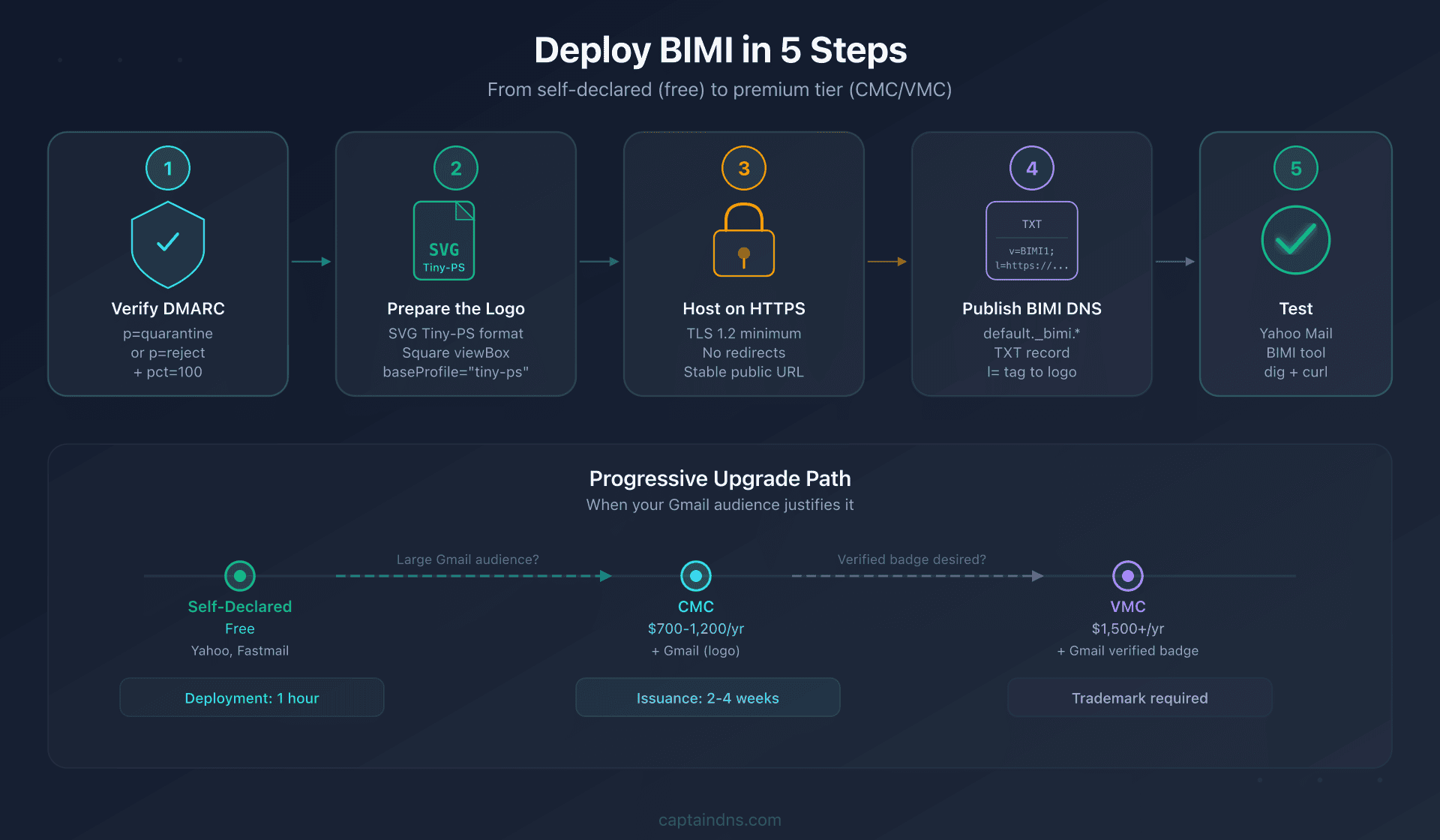
When to Upgrade to CMC or VMC
Self-asserted mode is an excellent starting point, but it has a clear limitation: Gmail does not display self-asserted logos. If Gmail accounts for a significant share of your audience, a certificate becomes relevant.
Decision Matrix
| Situation | Recommendation |
|---|---|
| Most of your recipients use Yahoo Mail | Self-asserted is sufficient |
| You target Gmail and don't have a registered trademark | CMC |
| You target Gmail and have a registered trademark | VMC |
| You want the "verified" badge in Gmail | VMC only |
| Your email branding budget is < $750/year | Self-asserted + reassess in 12 months |
| Your logo has been in public use for > 12 months | CMC is quickly achievable |
Simplified ROI Calculation
The return on investment for a CMC depends on your sending volume and the proportion of Gmail recipients:
Simplified formula: if a CMC at $850/year lets you display your logo on 50,000 Gmail emails/month, the cost per impression is $0.0014. For comparison, a display ad impression costs between $0.005 and $0.02.
For an SMB sending 10,000 emails/month with 60% going to Gmail:
- BIMI impressions/month: ~6,000
- Cost per impression: ~$0.012/impression
- Comparable to display advertising, but with a 100% viewability rate (the logo is displayed in the inbox, not in a banner ad)
Realistic Timeline for an SMB
| Step | Estimated Duration |
|---|---|
| DMARC enforcement (if currently at p=none) | 2-6 months |
| SVG Tiny-PS logo creation | 1-2 days |
| Self-asserted deployment | 1 hour |
| CMC issuance (if logo in use > 12 months) | 2-4 weeks |
| VMC issuance (if trademark already registered) | 2-4 weeks |
| Trademark registration + VMC issuance | 6-18 months |
🎯 Recommended Action Plan
- Audit your email authentication: verify that DMARC is in enforcement (
p=quarantineorp=reject, with nopctbelow 100), that DKIM signs all mail flows, and that SPF is aligned - Prepare your logo: create or convert your logo to SVG Tiny-PS format using the CaptainDNS converter
- Deploy in self-asserted mode: publish the BIMI DNS record and host the SVG over HTTPS
- Validate on Yahoo Mail: send a test email and confirm the logo displays
- Evaluate upgrading to CMC: if Gmail is important for your audience and your logo has been in public use for more than 12 months, start the CMC process
- Document proof of use: archive screenshots of your logo on your website (with dates) to streamline future CMC validation
FAQ
Is BIMI free for a small business?
Self-asserted BIMI deployment is free: all you need is a DNS record and an SVG logo hosted over HTTPS. This mode displays your logo in Yahoo Mail and Fastmail. For Gmail, a CMC certificate ($700-1,200/year) or VMC ($1,500+/year) is required.
Will my BIMI logo show up in Gmail without a VMC?
Not in self-asserted mode. Gmail requires a certificate: either a VMC (with a registered trademark) or a CMC (without a registered trademark, but with proof of logo use for 12 months). Without a certificate, Gmail ignores the BIMI record.
What is the difference between CMC and VMC for an SMB?
The CMC does not require a registered trademark and costs less (~$700-1,200/year vs $1,500+ for a VMC). Both enable logo display in Gmail, but only the VMC provides the "verified" badge (blue checkmark). For an SMB without a registered trademark, the CMC is the fastest and most cost-effective path.
How long does it take to deploy BIMI?
The technical deployment (DNS + SVG + hosting) takes a few hours. The real time factor is DMARC: if you're still at p=none, allow 2 to 6 months to ramp up to enforcement without breaking legitimate mail flows. Obtaining a CMC then takes 2 to 4 weeks.
Does BIMI require DMARC at p=reject?
No, p=quarantine with pct=100 is sufficient for most providers, including Gmail. Moving to p=reject is recommended long-term for stronger protection, but it is not a BIMI prerequisite.
Does Apple Mail display BIMI logos without a VMC?
Apple Mail supports BIMI through the mail server (not directly). For the Apple ecosystem, there is also Apple Business Connect (Branded Mail), a program separate from BIMI that requires neither a VMC nor a CMC. The two approaches are complementary.
What happens if I change my logo after deploying BIMI?
You need to update the hosted SVG file and, if you have a CMC or VMC, obtain a new certificate for the new logo. Mailbox providers cache the logo: allow 24 to 72 hours for the new logo to propagate. See our guide on BIMI caching and brand refreshes.
📖 Glossary
- BIMI: Brand Indicators for Message Identification. A standard that displays a brand logo in email clients, contingent on DMARC and (depending on the provider) a VMC/CMC certificate.
- VMC: Verified Mark Certificate. A certificate that binds a logo to a registered trademark. Required for the Gmail verification badge. Cost: ~$1,500/year.
- CMC: Common Mark Certificate. An alternative to the VMC that does not require a registered trademark. Accepted by Gmail since 2024. Cost: ~$700-1,200/year.
- Self-asserted: BIMI mode without a certificate. The logo is pointed to directly by the BIMI DNS record. Supported by Yahoo Mail and Fastmail, ignored by Gmail.
- DMARC: Domain-based Message Authentication, Reporting and Conformance. An email authentication policy whose enforcement mode is a mandatory prerequisite for BIMI.
- SVG Tiny-PS: A restricted profile of the SVG format (Portable/Secure) required by BIMI. Prohibits scripts, links, animations, and any external resource loading.
Deploy BIMI now: start by converting your logo with the CaptainDNS SVG Tiny-PS converter, then publish your BIMI DNS record in self-asserted mode.
📚 Related BIMI Guides
- How to Create a BIMI-Compliant SVG Tiny-PS Logo: a practical step-by-step guide to preparing, converting, and validating a logo
- SVG Tiny-PS: Understanding the BIMI Security Profile: why BIMI enforces an ultra-restrictive SVG profile and how providers validate it
- VMC and CMC certificates for BIMI: choose, buy and deploy: complete guide to purchasing and deploying BIMI certificates