Gmail Verified vs Google Verified: understanding the real differences
By CaptainDNS
Published on March 23, 2026
Updated on July 31, 2026
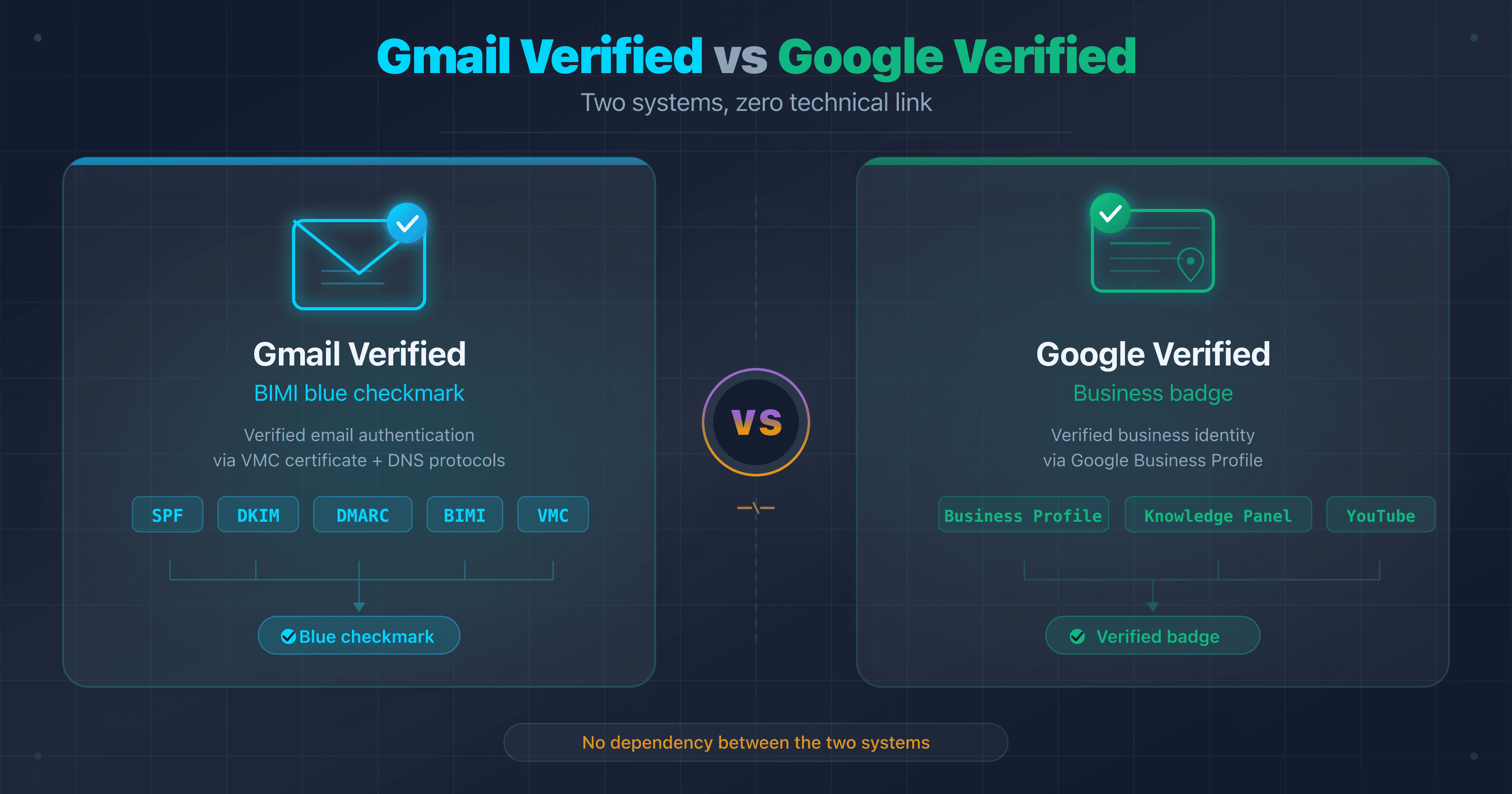
- Gmail verified = blue checkmark in the inbox, powered by BIMI (specified in an IETF Internet-Draft) + a VMC certificate (registered trademark required, $749 to $1,550/year) or CMC (no trademark, logo only)
- Google verified = badge in Search, Maps, YouTube, or local ads, obtained through independent Google processes that are free
- The two systems are completely separate: one does not imply the other
- Immediate action: check your SPF + DKIM + DMARC chain with CaptainDNS before pursuing a BIMI certificate
On CaptainDNS, nearly one BIMI query in three comes from a user who confuses the Gmail blue checkmark with the "verified" badge on a Google Business Profile. Same word ("verified"), same Google ecosystem, but zero technical connection between the two.
The consequences are concrete. Marketing teams invest in a Business Profile thinking it will give them the blue checkmark in emails. Sysadmins configure DMARC expecting the badge to show up in Google Maps. And if you make the opposite mistake, buying a VMC at $1,000/year to boost your local listing? That money is wasted.
This guide lays both systems side by side: what each verification covers, what it requires, what it costs, and how to obtain it.
What does "Gmail verified" mean?
The blue checkmark in Gmail: BIMI + VMC
Since May 2023, Gmail displays a blue checkmark next to the sender's name for certain emails. This checkmark is not cosmetic: it indicates that the sender has proven ownership of the sending domain and the logo displayed in the inbox.
On hover, Gmail shows the following tooltip: "The sender of this email has verified that they own the domain and the logo in the profile image." This message confirms that verification covers two elements: domain identity and logo ownership.
The underlying mechanism is BIMI (Brand Indicators for Message Identification), an open standard specified in an IETF Internet-Draft, still working its way through standardisation, that allows brand logos to be displayed in email clients. But BIMI alone is not enough for the Gmail blue checkmark. You also need a VMC (Verified Mark Certificate), a digital certificate that cryptographically links the logo to a registered trademark.
Since September 2024, Gmail also accepts CMC (Common Mark Certificates), which do not require a registered trademark. A CMC allows the logo to be displayed in Gmail, but without the blue checkmark. The distinction matters: logo yes, verification badge no.
To understand the difference between VMC and CMC in detail, see our VMC vs CMC guide.
The required authentication chain
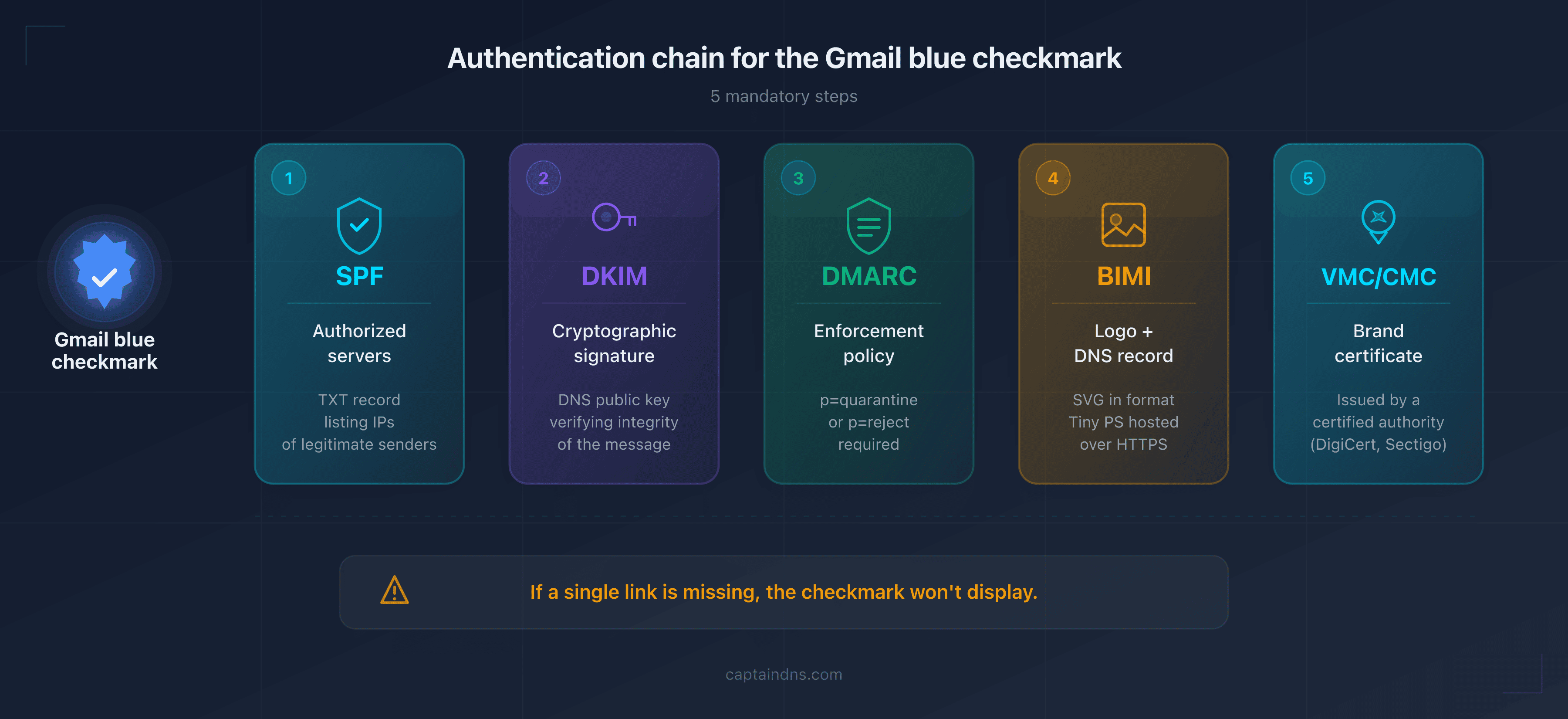
The Gmail blue checkmark relies on a chain of five links. A single missing link and the checkmark disappears. This is the highest bar of any email badge system in use today.
1. SPF (Sender Policy Framework) The SPF DNS record declares which servers are authorized to send emails for your domain. It is the first filter: if the sending IP is not listed in the SPF record, the email fails the first verification.
captaindns.com. 3600 IN TXT "v=spf1 include:_spf.google.com -all"
2. DKIM (DomainKeys Identified Mail) DKIM adds a cryptographic signature to each email. The receiving server verifies this signature using the public key published in DNS. If the signature matches, the email has not been tampered with in transit.
dig +short TXT selector1._domainkey.captaindns.com
3. DMARC (Domain-based Message Authentication, Reporting and Conformance)
DMARC ties SPF and DKIM to the domain visible in the From: field. For BIMI in Gmail, the policy must be in enforcement:
_dmarc.captaindns.com. 3600 IN TXT "v=DMARC1; p=quarantine; rua=mailto:dmarc-agg@captaindns.com"
The two critical parameters: p=quarantine or p=reject (not p=none), and 100% coverage of messages, whether the pct tag is absent (its default value is 100) or explicitly set to 100.
4. BIMI record The BIMI DNS record points to the SVG logo and the PEM certificate:
default._bimi.captaindns.com. 3600 IN TXT "v=BIMI1; l=https://assets.captaindns.com/bimi/logo.svg; a=https://assets.captaindns.com/bimi/cert.pem"
5. VMC or CMC certificate The certificate links the logo to your organization. A VMC requires a registered trademark; a CMC requires proof that the logo has been in public use for at least 12 months.
Before BIMI: the red question mark
Without proper authentication, Gmail displays a red question mark instead of the sender's avatar. This behavior has been in place since August 2016. It signals that Gmail could not verify the sender's identity via SPF or DKIM.
This is not just a visual detail. Based on analyses we have run on CaptainDNS, domains that trigger this question mark show significantly lower inbox placement rates. It is the exact opposite of the blue checkmark: instead of building trust, it breeds suspicion.
BIMI timeline in Gmail
| Date | Event |
|---|---|
| July 2020 | Launch of the BIMI pilot program in Gmail |
| July 2021 | BIMI available in production (GA) in Gmail |
| May 2023 | Blue checkmark appears for VMC senders |
| September 2024 | CMC support added (logo without blue checkmark) |
| 2024 | Rollout in Gmail mobile apps (Android and iOS) |
What does "Google verified" mean?
So if the Gmail blue checkmark has nothing to do with Google Search or Maps, what does "Google verified" actually cover? It is not a single system. It is an umbrella term for several independent verification mechanisms, each with its own rules and objectives.
Google Business Profile
Google Business Profile (formerly Google My Business) allows businesses to manage their presence in Google Search and Google Maps. Verification confirms that the business is legitimate and that the person managing the profile is authorized to do so.
Verification methods:
- Postcard sent to the physical address (with a verification code)
- Automated phone call
- Video verification (recording of premises and documents)
- Email (for certain business categories)
Where the badge appears: business listing in Search, Maps, and the broader Google local ecosystem.
Cost: free. Google does not charge for Business Profile verification. Any costs are indirect (time spent, postal delivery).
Key point: Business Profile verification has no connection to the blue checkmark in Gmail. A verified Business Profile does not generate a blue checkmark in emails, and vice versa.
Knowledge Panel and YouTube
Knowledge Panel The Knowledge Panel is the informational box that appears to the right of Google search results for notable entities (people, businesses, organizations). To claim it, you need to prove that you represent the entity through verified official profiles (website, social media). The process takes several days to several weeks.
YouTube YouTube assigns a verification badge (gray checkmark) to channels that exceed 100,000 subscribers. This badge confirms the channel's authenticity, not its content. It is separate from every other Google verification system.
The "Google Verified" badge for advertisers (October 2025)
In October 2025, Google introduced a new badge specifically for Local Services Ads. This "Google Verified" badge signals that the provider has passed the background checks required by Google for service ads: professional license, insurance, background verification.
This badge only appears in the context of Local Services Ads. It does not apply to Gmail, the standard Business Profile, or YouTube.
Google Workspace domain verification
For Google Workspace administrators, domain verification is a technical step that consists of proving ownership of a domain name. It is typically done via a DNS TXT record:
captaindns.com. 3600 IN TXT "google-site-verification=XXXXXXXXXXXXX"
This verification is a prerequisite for using Google Workspace services (Gmail, Drive, etc.) with your domain. It has no connection to the BIMI blue checkmark or the Business Profile badge.
Gmail verified vs Google verified: direct comparison
Here is the central comparison table summarizing the differences between the two systems.
| Criterion | Gmail Verified (blue checkmark) | Google Business Profile | Knowledge Panel | YouTube | Google Verified (Ads) |
|---|---|---|---|---|---|
| What is verified | Domain + logo ownership | Business legitimacy | Entity notability | Channel authenticity | Provider compliance |
| Where it appears | Gmail inbox | Search + Maps | Search (right panel) | Channel page | Local Services Ads |
| Technology | BIMI + VMC/CMC | Manual Google verification | Claim + social proof | Subscriber threshold | Background check |
| Technical prerequisites | SPF + DKIM + DMARC + BIMI + VMC/CMC | Verifiable physical address | Official profiles | 100K+ subscribers | Professional license + insurance |
| Cost | $749-1,550/year (VMC) or $650-1,236/year (CMC) + potential trademark filing | Free | Free | Free | Advertising fees |
| Time to obtain | 2-4 weeks (VMC) / 5-10 days (CMC) | A few days to 2 weeks | Several days to weeks | Automatic at 100K | Variable |
| Link between them | None | None | None | None | None |
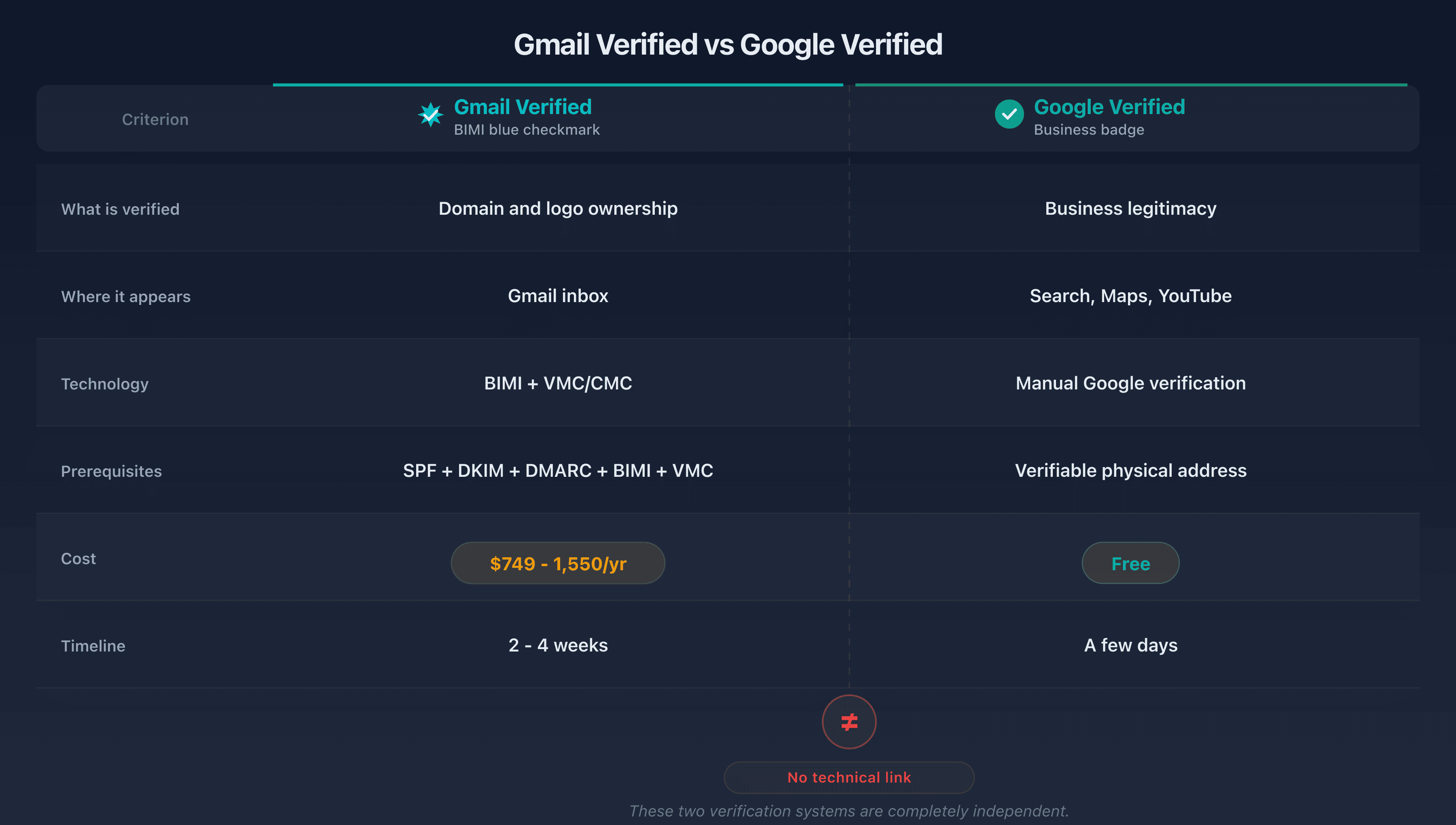
The key takeaway: these five systems are watertight. Obtaining one does not make it any easier to obtain another. A business can have a verified Business Profile for ten years without ever displaying a blue checkmark in Gmail. And a brand that invests $1,500/year in a VMC will not gain a single pixel on Google Maps.
How to get the Gmail blue checkmark?
You now know what both systems are. But how do you actually land the blue checkmark? The process breaks down into five sequential steps. Each is a prerequisite for the next: there is no point moving to step 3 if step 2 is not validated.
Step 1: Configure SPF, DKIM, and DMARC
This is the foundation. Without these three protocols in place, everything else is moot. Before thinking about BIMI, your domain must pass all three email authentication layers.
SPF: publish a TXT record listing all legitimate sending sources (internal server, ESP, CRM, transactional platform). Verify that the DNS lookup count stays under the limit of 10.
DKIM: enable DKIM signing for each sending source. Each service (Google Workspace, SendGrid, Mailchimp, etc.) has its own DKIM selector. Verify that the domain in d= matches the domain in the From: header.
DMARC: start with p=none with a RUA report to collect data, then gradually increase enforcement.
Use the CaptainDNS DMARC checker to audit your current configuration.
Step 2: Enforce a strict DMARC policy
Gmail requires DMARC in enforcement mode for BIMI:
p=quarantine(minimum) orp=reject(recommended)pctabsent or equal to 100 (all messages are covered)
If you are still on p=none, moving to enforcement requires caution. Analyze your DMARC reports for 2 to 4 weeks to identify legitimate flows that would fail. Move to p=quarantine; t=y first, which has failures reported but not enforced, then drop t=y once your legitimate flows are aligned.
_dmarc.captaindns.com. 3600 IN TXT "v=DMARC1; p=reject; rua=mailto:dmarc-agg@captaindns.com; adkim=r; aspf=r"
Step 3: Create a BIMI-compliant SVG logo
This is the step where many fail without understanding why. BIMI requires a logo in SVG Tiny 1.2 PS (Portable/Secure) format. This restricted profile forbids scripts, external links, animations, and embedded images. An SVG exported from Illustrator or Figma will almost never be compliant out of the box.
Key requirements:
- Square format (1:1 ratio)
baseProfile="tiny-ps"attribute- No
<script>,<image>,<animate>, or<a>elements - Non-transparent background (some providers require it)
Use the CaptainDNS BIMI SVG converter to automatically convert your logo to the compliant format. For a complete guide on logo creation, see our BIMI logo creation guide.
Step 4: Obtain a VMC or CMC certificate
This is the longest and most expensive step. The choice between VMC and CMC depends on your situation:
VMC (Verified Mark Certificate):
- Requires a trademark registered with a recognized office (USPTO, EUIPO, WIPO, etc.)
- Validation process includes a video call with the certificate authority
- Timeline: 2 to 4 weeks
- Cost: $749 to $1,550/year
- Result: logo and blue checkmark in Gmail
CMC (Common Mark Certificate):
- No registered trademark required
- Proof of public logo usage for at least 12 months
- Timeline: 5 to 10 days
- Cost: $650 to $1,236/year
- Result: logo in Gmail without the blue checkmark
VMCs and CMCs are issued by the certificate authorities approved for the BIMI programme, among them DigiCert, Entrust, and GlobalSign.
Step 5: Publish the BIMI DNS record
Once the certificate is obtained, publish the BIMI DNS record:
default._bimi.captaindns.com. 3600 IN TXT "v=BIMI1; l=https://assets.captaindns.com/bimi/logo.svg; a=https://assets.captaindns.com/bimi/cert.pem"
The l= tag points to the SVG logo. The a= tag points to the PEM certificate (which contains the VMC or CMC certificate with the intermediate chain).
Both URLs must respond over HTTPS, return an HTTP 200 status code, with no redirects, no authentication, and no geo-blocking. A CDN like Cloudflare or S3/GCS hosting works fine.
Verify your record with the CaptainDNS BIMI checker. The tool validates DNS syntax, URL accessibility, and certificate compliance in a single pass.
VMC vs CMC: which certificate to choose?
The choice boils down to one question: do you have a trademark registered with a recognized office (USPTO, EUIPO, WIPO)?
| Criterion | VMC | CMC |
|---|---|---|
| Registered trademark required | Yes | No |
| Alternative proof | N/A | Public logo usage for 12+ months |
| Gmail blue checkmark | Yes | No |
| Logo displayed in Gmail | Yes | Yes |
| Annual cost | $749-1,550 | $650-1,236 |
| Issuance timeline | 2-4 weeks | 5-10 days |
| Verification | Video call + trademark check | Document review |
| Issuers | DigiCert, Entrust, GlobalSign, among others | DigiCert, Entrust, GlobalSign, among others |
Scenario 1: you have a registered trademark. Go with a VMC. The extra cost compared to a CMC is roughly $100 to $300/year, and the blue checkmark provides a measurable trust signal in terms of open rates.
Scenario 2: no registered trademark, but a stable logo for over a year. The CMC is the fastest path. Your logo will appear in Gmail without the blue checkmark, but a brand logo in place of the default gray initial is already a measurable visibility gain in a crowded inbox.
Scenario 3: no registered trademark and a recent logo. Start by stabilizing your visual identity. Deploy BIMI in self-declared mode (without a certificate) to cover Yahoo Mail and Fastmail, then aim for a CMC once your logo has 12 months of public history. For a detailed action plan tailored to small businesses, see our BIMI guide for small businesses.
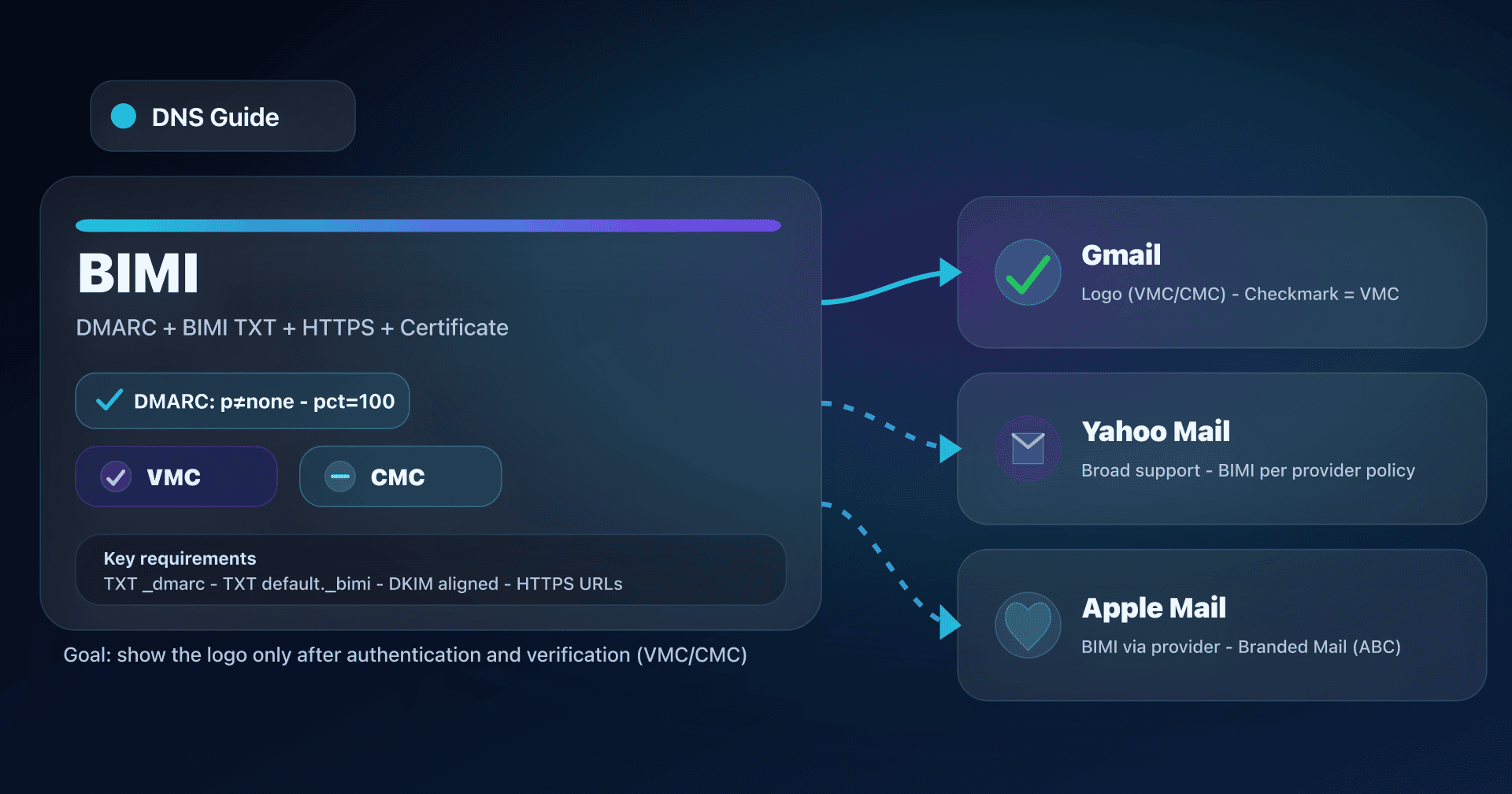
Which email providers support BIMI?
Investing in a VMC at $1,000/year without knowing which providers actually use it is flying blind. BIMI support varies considerably. Gmail remains the most demanding (certificate required), while others display the logo without certificate verification.
| Provider | BIMI logo | Checkmark/badge | Certificate required | DMARC policy |
|---|---|---|---|---|
| Gmail | Yes | Blue (VMC only) | VMC or CMC | p=quarantine or p=reject |
| Yahoo Mail | Yes | Purple (VMC) | Not required | p=reject recommended |
| Apple Mail | Yes (iOS 16+) | No | VMC from approved provider | p=quarantine or p=reject |
| Fastmail | Yes | No | Not required | DMARC compliance |
| Outlook | No | N/A | N/A | N/A |
A few key points:
- Yahoo Mail is historically the most BIMI-friendly provider: it can display a logo even without a certificate (self-declared mode), as long as DMARC is in enforcement. Yahoo displays a purple badge for VMC senders.
- Apple Mail supports BIMI on the client side since iOS 16, but it is the mail server that must validate compliance. Apple also offers a separate program, Branded Mail (via Apple Business Connect), which is not related to BIMI.
- Outlook does not support BIMI. Microsoft has not announced an adoption timeline. It is the major holdout from the standard.
- Gmail is the only provider that supports CMCs (as of late 2025). If you invest in a CMC, the return on investment largely depends on the share of Gmail recipients in your audience.
Common misconceptions about Gmail verification
Why do so many companies pick the wrong path? Because several stubborn myths circulate around the Gmail blue checkmark. Here they are, debunked one by one.
"A verified Google Business Profile gives you the blue checkmark in Gmail." No. The Business Profile verifies your presence in Search and Maps. The Gmail blue checkmark relies on BIMI/VMC, a completely independent system. There is no technical link between the two.
"The Gmail blue checkmark is free, like on Twitter/X." No. The Twitter/X blue checkmark costs $8/month with no technical verification. The Gmail blue checkmark requires a VMC ($749 to $1,550/year) and, upstream, a registered trademark ($250 to $2,000+ in filing fees). The total investment in the first year often exceeds $2,000. The level of proof is not remotely comparable.
"DMARC at p=none is enough for BIMI."
No. Gmail requires at least p=quarantine, applied to 100% of messages (pct absent or equal to 100). The p=none policy is an observation mode that blocks nothing: it is incompatible with BIMI.
"Publishing a BIMI record is all it takes for the logo to appear."
No. A BIMI record without a certificate works with Yahoo Mail and Fastmail, but Gmail ignores it. For Gmail, the a= tag must point to a valid VMC or CMC certificate.
"You can use a personal Gmail account to display the blue checkmark."
No. The blue checkmark is tied to a sending domain and a VMC/CMC certificate. A @gmail.com account cannot publish a BIMI record or obtain a VMC.
"The CMC is identical to the VMC, just cheaper." No. The CMC does not display the blue checkmark in Gmail. It allows the logo to be shown, but the verification badge is reserved for VMCs. That is the main difference.
"Outlook supports BIMI." No. Microsoft has not implemented BIMI in Outlook. No adoption date has been announced. Your BIMI efforts will have no impact on Outlook recipients.
"The blue checkmark appears immediately after configuration." No. After publishing the BIMI record, allow 24 to 72 hours for DNS propagation. Gmail also applies its own timing and reputation criteria before displaying the logo and checkmark.
Cost summary
How much should you actually budget? To avoid unpleasant surprises, here is a consolidated view of the costs associated with each type of verification.
Gmail verified (blue checkmark)
| Item | Cost | Frequency |
|---|---|---|
| Trademark filing (if needed) | $250-2,000+ | One-time (6-12 month lead time) |
| VMC | $749-1,550 | Annual |
| CMC (alternative without trademark) | $650-1,236 | Annual |
| SPF/DKIM/DMARC/BIMI configuration | Free | One-time |
| HTTPS asset hosting | Free to a few dollars/month | Annual |
Google verified (Business Profile, Knowledge Panel)
| Item | Cost |
|---|---|
| Google Business Profile | Free |
| Knowledge Panel (claim) | Free |
| YouTube (100K badge) | Free |
| Google Verified (Local Services Ads) | Included in advertising budget |
The cost difference is stark. Google verification (outside Gmail) is free in most cases. The Gmail blue checkmark represents a recurring investment of $1,000 to $3,000 in the first year (certificate + potential trademark filing), justified primarily for brands with high email sending volume.
Before you dive in, audit your current setup with the CaptainDNS BIMI checker to identify what you still need to put in place.
FAQ
Is the Gmail blue checkmark the same as the Twitter/X verification?
No. The Twitter/X blue checkmark is a paid subscription with no technical domain verification. The Gmail blue checkmark relies on a complete authentication chain (SPF, DKIM, DMARC, BIMI) and a VMC certificate tied to a registered trademark. The level of technical proof is incomparably higher.
How much does the Gmail blue checkmark cost?
The annual cost of a VMC certificate ranges from $749 to $1,550, depending on the certificate authority. If you do not yet have a registered trademark, add $250 to $2,000+ in filing fees (with a 6 to 12 month lead time). DNS configuration (SPF, DKIM, DMARC, BIMI) is free.
Can you get the Gmail blue checkmark with a personal @gmail.com account?
No. The blue checkmark is tied to a custom sending domain (for example captaindns.com). A @gmail.com account cannot publish a BIMI record or obtain a VMC or CMC certificate. You need a domain that you control.
Is Google Workspace required for the Gmail blue checkmark?
No. BIMI and the blue checkmark work with any sending server, not just Google Workspace. What matters is that the sending domain passes SPF, DKIM, and DMARC, and that the BIMI record points to a valid VMC certificate. You can use an in-house MTA, SendGrid, Mailgun, or any other service.
What is the difference between a VMC and a CMC for Gmail?
A VMC requires a registered trademark and provides both the logo and the blue checkmark in Gmail. A CMC does not require a registered trademark (proof of logo usage for 12 months) and displays the logo without the blue checkmark. The CMC costs slightly less ($650 to $1,236/year vs $749 to $1,550/year) and is issued faster (5 to 10 days vs 2 to 4 weeks).
Can you get the Gmail blue checkmark without a registered trademark?
Not the blue checkmark itself. Without a registered trademark, you can obtain a CMC that displays your logo in Gmail, but without the verification badge. For the blue checkmark, the VMC (which requires a registered trademark) is the only path.
How long does it take to get the Gmail blue checkmark?
If you are starting from scratch: 2 to 6 months to stabilize DMARC in enforcement, 6 to 12 months for trademark filing (if needed), then 2 to 4 weeks for VMC issuance. If DMARC is already in enforcement and your trademark is already registered, expect 2 to 4 weeks total.
Does Outlook display the BIMI blue checkmark?
No. Microsoft has not implemented the BIMI standard in Outlook. No adoption date has been announced. BIMI investments currently have no effect on recipients who use Outlook or Outlook.com.
Does a verified Google Business Profile give you the blue checkmark in emails?
No. Google Business Profile and the Gmail blue checkmark are two completely independent verification systems. The Business Profile concerns your presence in Search and Maps. The Gmail blue checkmark relies on BIMI and a VMC certificate. One does not imply the other.
What happens if I have no SPF, DKIM, or DMARC?
Gmail displays a red question mark next to the sender's avatar since August 2016. This visual signal tells recipients that the sender's identity could not be verified. Before aiming for the blue checkmark, the priority is to remove this question mark by properly configuring SPF, DKIM, and DMARC.
Glossary
- BIMI: Brand Indicators for Message Identification. An open standard that enables brand logo display in email clients, conditional on DMARC and (depending on the provider) a VMC/CMC certificate.
- VMC: Verified Mark Certificate. A digital certificate that links a logo to a registered trademark. Required for the Gmail blue checkmark. Issued by an approved programme authority such as DigiCert, Entrust, or GlobalSign.
- CMC: Common Mark Certificate. An alternative to the VMC that does not require a registered trademark. Displays the logo in Gmail without the blue checkmark. Supported by Gmail since September 2024.
- DMARC: Domain-based Message Authentication, Reporting and Conformance. An email authentication policy that ties SPF and DKIM to the
From:domain. Enforcement mode (quarantine or reject) is a BIMI prerequisite. - SPF: Sender Policy Framework. A DNS record that lists the servers authorized to send emails for a domain.
- DKIM: DomainKeys Identified Mail. A cryptographic signature added to emails, verifiable via a public key in DNS.
- SVG Tiny-PS: a restricted profile of the SVG format (Portable/Secure) required by BIMI. Forbids scripts, external links, animations, and any external loading.