SPF "Too Many DNS Lookups": The Complete Guide to Fixing the 10 Lookup Limit
By CaptainDNS
Published on March 3, 2026
- RFC 7208 enforces a maximum of 10 DNS lookups per SPF evaluation, exceeding it returns
permerrorand your emails fail - The
include,a,mx,redirect, andexistsmechanisms each count as a lookup,ip4andip6do not - With 3-4 email providers (Google Workspace, SendGrid, Mailchimp), you can easily reach 9-12 lookups
- 5 methods to fix it: remove unused mechanisms, replace with direct IPs, SPF flattening, SPF macros, dedicated subdomains
- There is also a 2 void lookup limit (mechanisms that return no result) that is often overlooked
Your SPF record has a dozen include: entries to cover all your email providers. One day, you add a new service and your emails start getting rejected. The diagnosis reveals a permerror: you have exceeded the 10 DNS lookup limit imposed by RFC 7208.
This problem affects the majority of organizations using more than 3 email providers. Google Workspace alone already consumes 4 lookups. Add SendGrid, Mailchimp, and a dedicated MX server, and you are pushing the limit before you have even configured your latest marketing tool.
This guide explains exactly how the 10 lookup limit works, how to count yours, and details 5 practical methods to fix the problem, from the simplest to the most robust.
What is the SPF 10 DNS lookup limit?
What RFC 7208 says
RFC 7208, section 4.6.4 enforces a strict limit: SPF record evaluation must not generate more than 10 DNS queries. This limit exists to protect receiving servers from DNS amplification attacks. Without it, an attacker could publish an SPF record with hundreds of nested include: entries and force servers to perform thousands of queries.
The limit applies recursively: if your SPF includes _spf.google.com, and that record itself includes 3 other domains, each inclusion counts toward the total of 10.
Which mechanisms count as a lookup?
| Mechanism | Counts as lookup | Explanation |
|---|---|---|
include: | Yes | Resolves the target domain's SPF record |
a | Yes | Resolves the A/AAAA record |
mx | Yes | Resolves MX then A/AAAA for each MX server |
redirect= | Yes | Resolves the target domain's SPF record |
exists: | Yes | Checks whether the domain exists |
ip4: | No | Direct IP address, no DNS query needed |
ip6: | No | Direct IP address, no DNS query needed |
all | No | Terminal mechanism, no query needed |
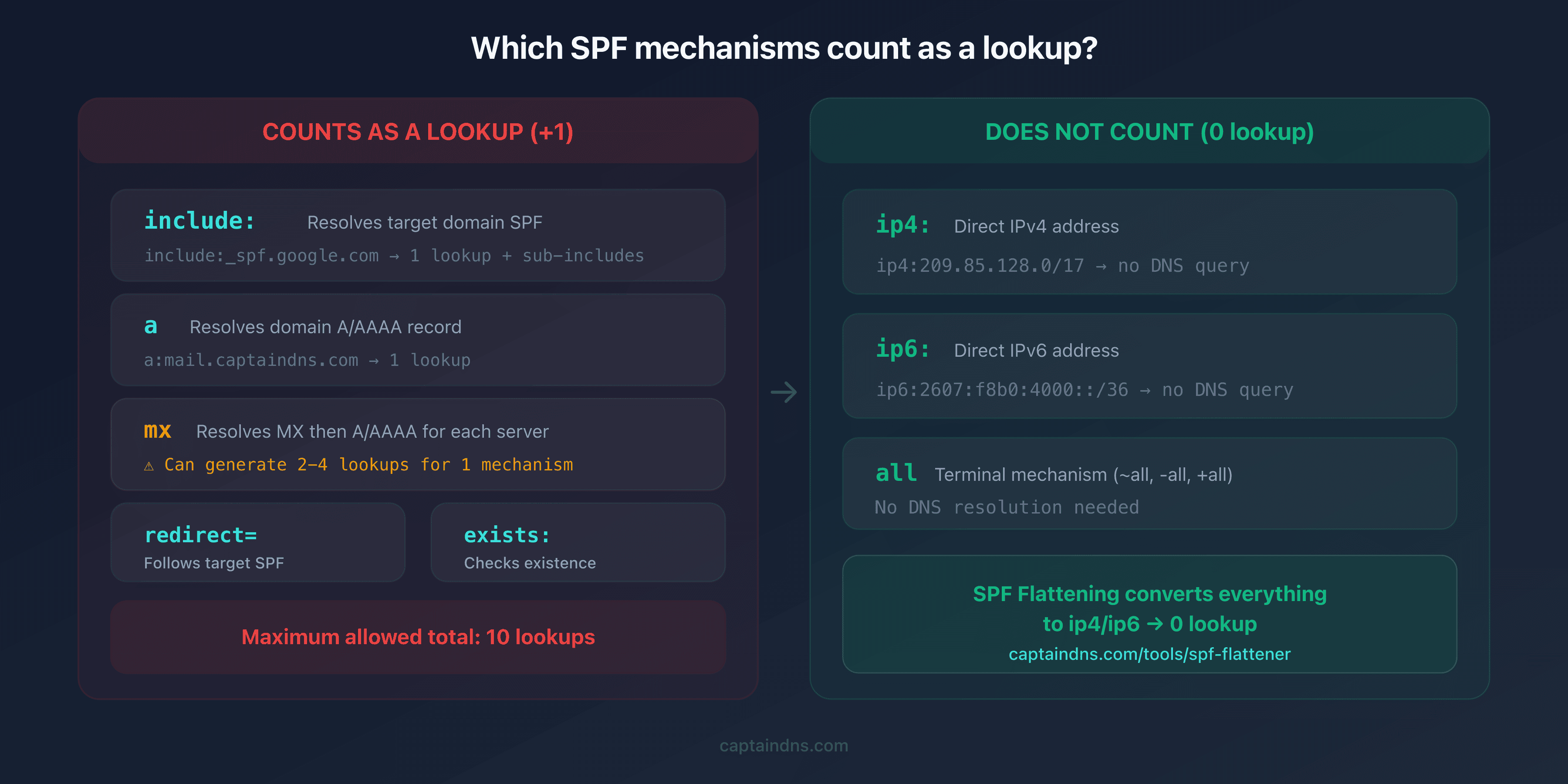
The main pitfall: the mx mechanism can consume multiple lookups. If your domain has 3 MX servers, the mx mechanism generates 1 MX lookup + 3 A lookups, meaning 4 queries for a single mechanism.
How to count the DNS lookups in your SPF record?
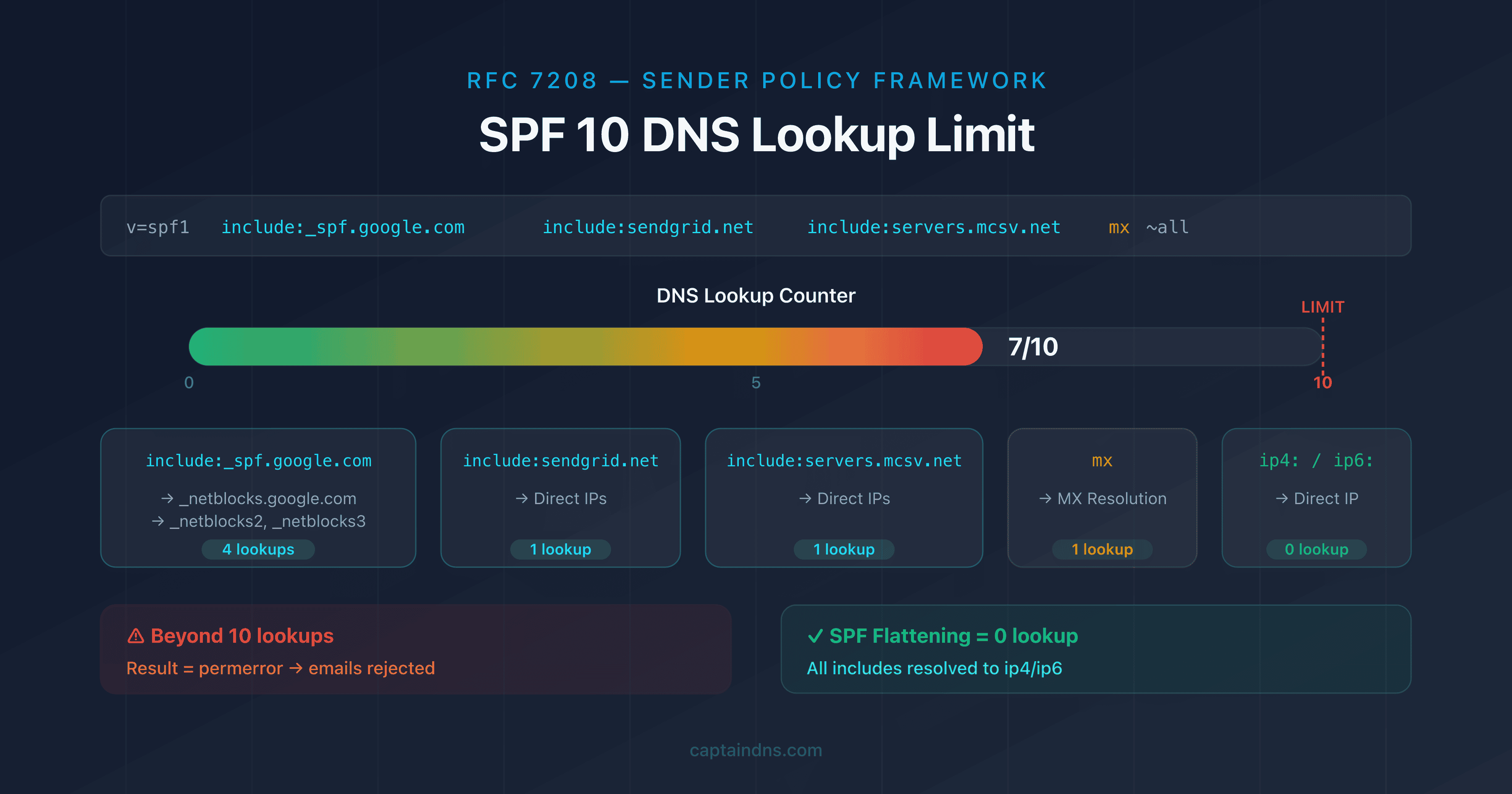
The most reliable method is to manually resolve the SPF tree. Let's walk through a concrete example with captaindns.com:
v=spf1 include:_spf.google.com include:sendgrid.net include:servers.mcsv.net mx ~all
Step-by-step count:
| # | Mechanism | Lookups generated |
|---|---|---|
| 1 | include:_spf.google.com | 1 |
| 2 | → include:_netblocks.google.com | 1 |
| 3 | → include:_netblocks2.google.com | 1 |
| 4 | → include:_netblocks3.google.com | 1 |
| 5 | include:sendgrid.net | 1 |
| 6 | include:servers.mcsv.net | 1 |
| 7 | mx (MX resolution for captaindns.com) | 1 |
| Total | 7 |
With 7 lookups, this record has a margin of 3. Adding HubSpot (1 lookup) and a second MX server (1 lookup) would bring the total to 9, still within the limit.
Rather than counting manually, use our SPF Record Check which displays the exact count and flags any violations.
What happens when you exceed the limit?
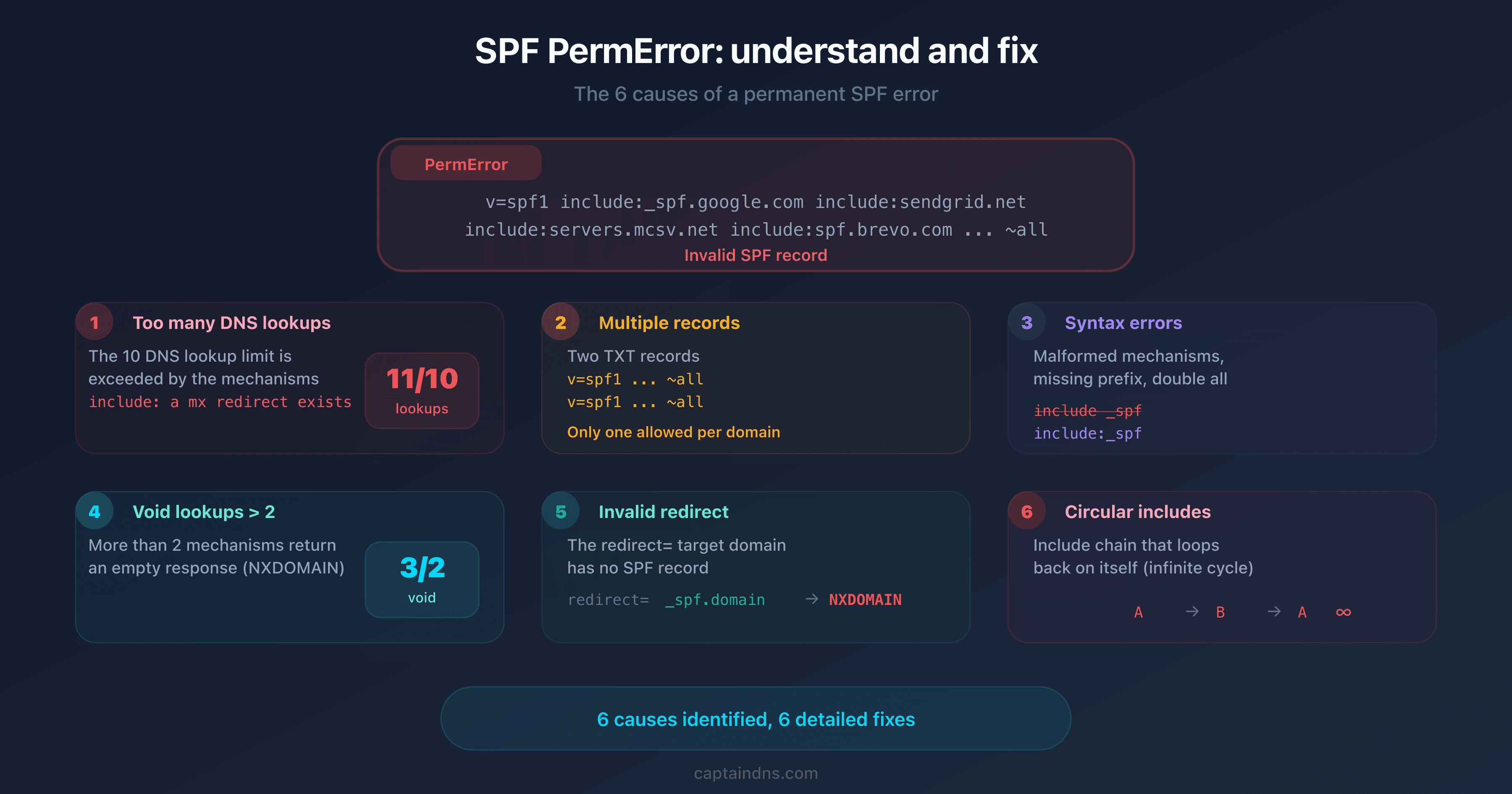
When SPF evaluation reaches the 11th lookup, the receiving server immediately stops evaluation and returns a permerror result. The consequences are direct:
- SPF is considered invalid : not simply failed, but structurally broken
- DMARC fails in cascade : if your DMARC policy relies on SPF for alignment, it fails too
- Emails are rejected or sent to spam : Gmail, Outlook, and Yahoo strictly enforce this limit
- The error is silent : your emails leave without any error on the sending side; only the recipient sees the rejection
The problem is insidious: as long as you stay within the limit, everything works. The day you add one too many include: entries, all of your emails are potentially affected, not just those from the new provider.
5 methods to fix the "too many DNS lookups" error
Method 1: Remove unused mechanisms
Start by identifying include: entries that no longer correspond to active services. A transactional email provider you stopped using 6 months ago still consumes one or more lookups.
# Before: 11 lookups (too many)
v=spf1 include:_spf.google.com include:sendgrid.net include:servers.mcsv.net include:spf.brevo.com mx ~all

# After removing Brevo (unused): 9 lookups
v=spf1 include:_spf.google.com include:sendgrid.net include:servers.mcsv.net mx ~all
Review each include:: is this service still sending emails for captaindns.com? If not, remove it.
Method 2: Replace include with ip4/ip6
If a service uses fixed, documented IP addresses, you can replace its include: with direct IP addresses. The ip4: and ip6: mechanisms do not count as lookups.
# Before: mail server include (1 lookup)
v=spf1 include:mail.captaindns.com include:_spf.google.com ~all

# After: replaced with server IP (0 additional lookups)
v=spf1 ip4:203.0.113.10 include:_spf.google.com ~all
Warning: this method is only suitable for servers whose IPs you control. Never replace the include: entries for Google or Microsoft with their IPs, those change regularly without notice.
Method 3: SPF flattening
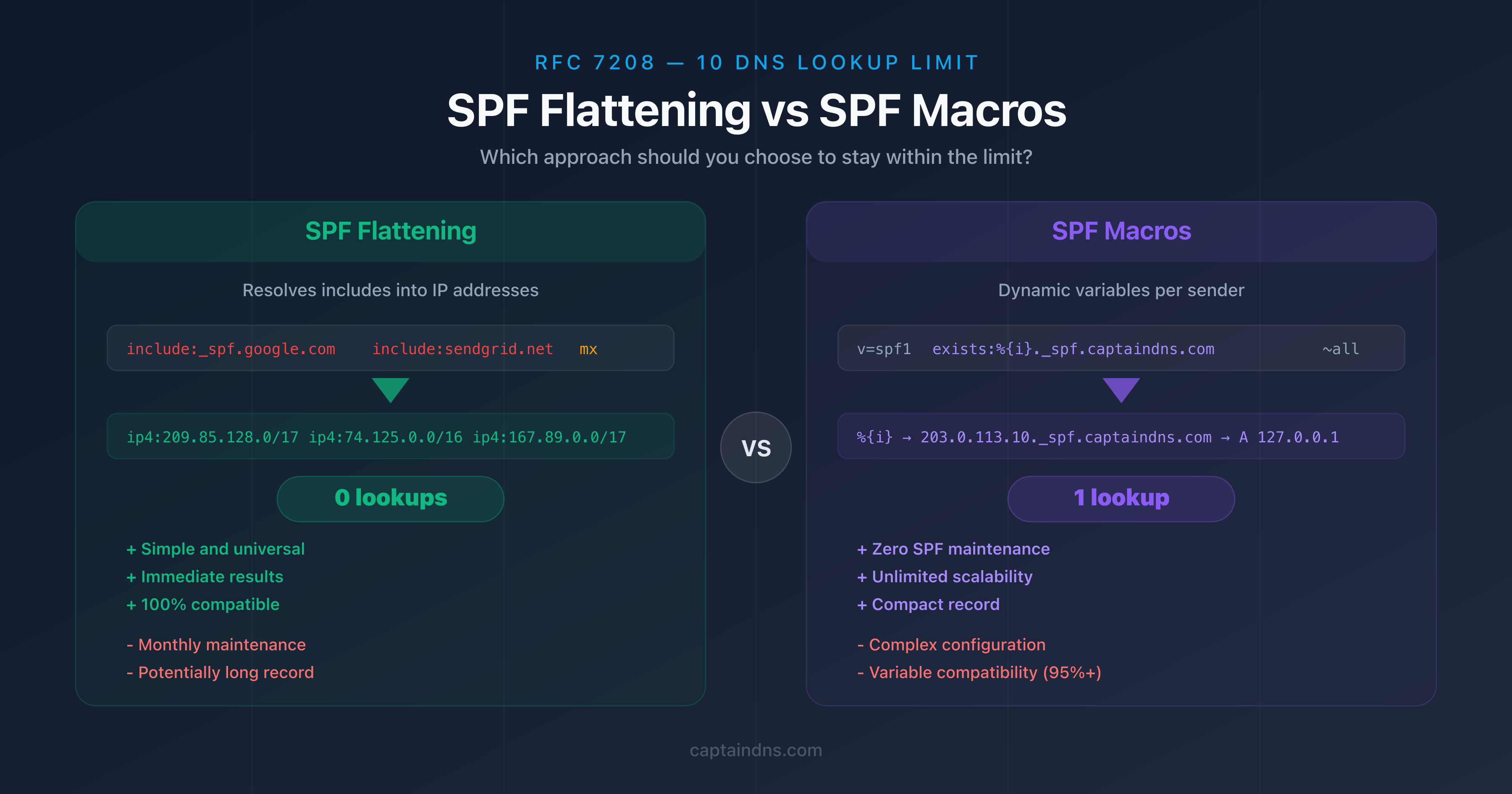
SPF flattening automatically resolves all include:, a, mx, and redirect entries into direct IP addresses. The result is an SPF record composed entirely of ip4: and ip6: entries, which generate zero lookups.
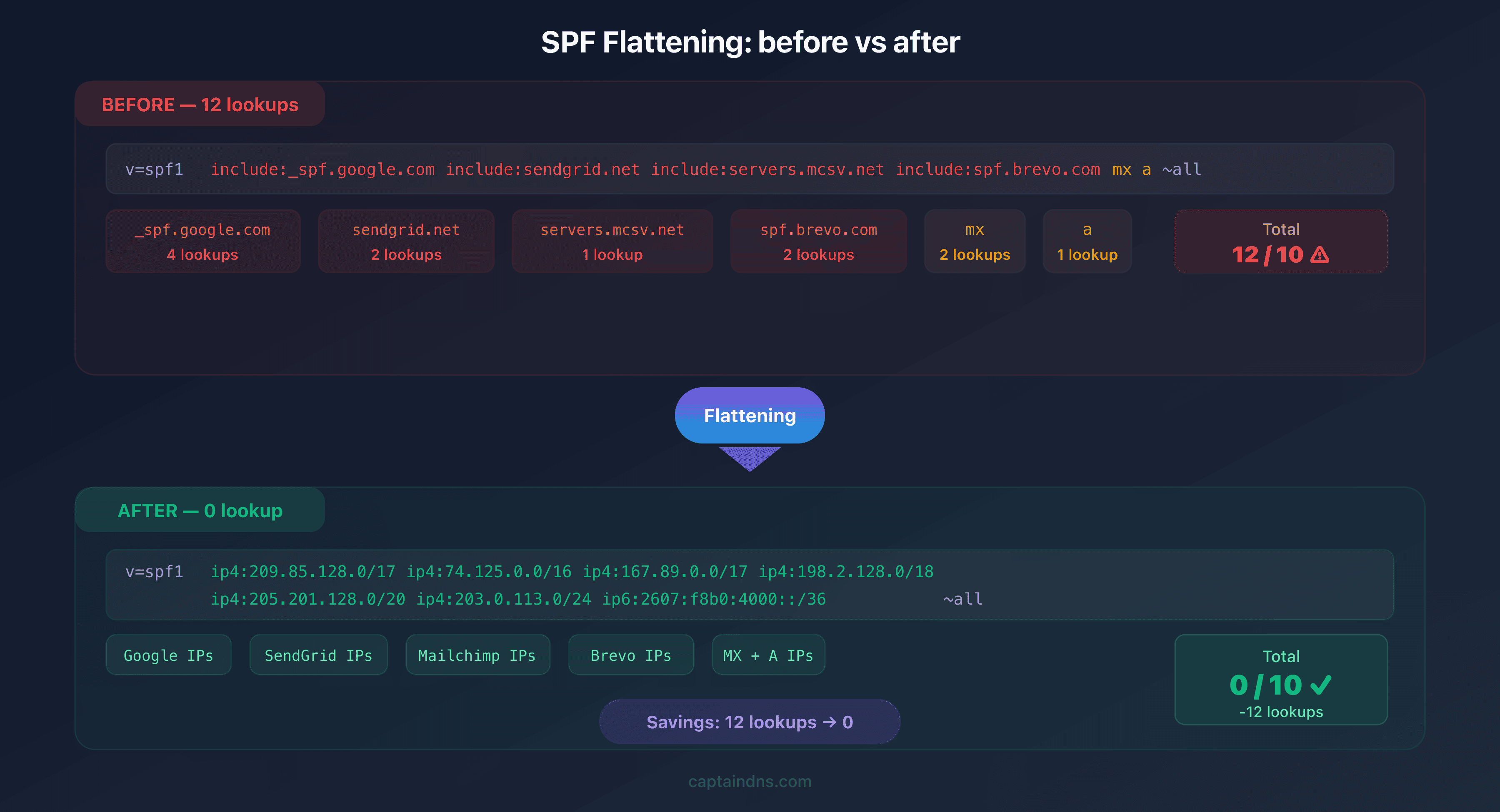
Advantages:
- Immediately solves the lookup problem
- Compatible with all receiving servers
- Verified result ready to publish
Disadvantage:
- Provider IPs change, you need to re-flatten regularly (monthly recommended)
Method 4: SPF macros
SPF macros (%{i}, %{d}, %{s}) allow you to build dynamic records that redirect evaluation to specific subdomains without consuming additional lookups. This advanced approach is covered in detail in an upcoming article in this series.
v=spf1 include:%{i}._spf.captaindns.com ~all
The receiving server replaces %{i} with the sender's IP, which targets a specific SPF record. The result: just 1 lookup instead of multiple include: entries.
Method 5: Dedicated subdomains
Instead of sending everything from your main domain, assign a subdomain to each provider:
| Subdomain | Provider | Dedicated SPF |
|---|---|---|
captaindns.com | Google Workspace | include:_spf.google.com (4 lookups) |
news.captaindns.com | Mailchimp | include:servers.mcsv.net (1 lookup) |
transac.captaindns.com | SendGrid | include:sendgrid.net (1 lookup) |
Each subdomain has its own SPF record with an independent lookup counter. Create the SPF records for each subdomain with our SPF Generator.
Void lookups: the second limit you need to know
RFC 7208 defines a second limit that is often overlooked: the maximum number of void lookups is set to 2. A void lookup occurs when a DNS mechanism returns no result (NXDOMAIN or empty response).
Examples of void lookups:
- An
include:nonexistent-domain.comthat returns NXDOMAIN - An
aon a domain with no A record - An
exists:that matches no entry
Beyond 2 void lookups, the result is also permerror. Make sure all your include: entries point to existing and properly configured domains.
Recommended action plan
- Count your current lookups: check the exact number of DNS lookups in your published SPF record
- Identify unused mechanisms: remove
include:entries for providers you no longer use - Choose your fix method: flattening for an immediate result, subdomains for a structural solution, macros for an advanced approach
- Test before publishing: validate the new record before modifying your DNS zone
- Monitor regularly: provider SPF records change, re-check monthly
FAQ
What is the SPF 10 DNS lookup limit?
RFC 7208 requires that an SPF record must not generate more than 10 DNS queries during evaluation. Each include:, a, mx, redirect, and exists mechanism counts as one lookup. The ip4: and ip6: mechanisms do not count because they contain the IP address directly without requiring DNS resolution.
How can I find out how many DNS lookups my SPF uses?
Manually resolve each mechanism in your SPF by counting the include:, a, mx, redirect, and exists entries, including those in sub-includes. For example, include:_spf.google.com alone consumes 4 lookups because Google nests 3 sub-includes. An SPF analysis tool automates this counting and displays the exact total.
What happens if my SPF exceeds 10 lookups?
The receiving server returns a permerror result and considers your SPF invalid. Your emails are likely to be rejected or classified as spam. If DMARC is configured, it also fails in cascade because SPF alignment cannot be verified.
Does the mx mechanism count as just one lookup?
No. The mx mechanism first generates an MX lookup to obtain the list of mail servers, then an A/AAAA lookup for each server returned. A domain with 3 MX servers can potentially consume 4 lookups for a single mx mechanism.
What is SPF flattening?
SPF flattening involves replacing all mechanisms that generate lookups (include:, a, mx, redirect) with the direct IP addresses they resolve to (ip4:, ip6:). The result is an equivalent SPF record that consumes zero DNS lookups.
What is a void lookup?
A void lookup occurs when a DNS mechanism returns an empty response (NXDOMAIN or no records). RFC 7208 limits void lookups to 2. Beyond that, the result is permerror, even if the total lookup count remains under 10.
Should I use flattening or subdomains?
Flattening is the quickest solution but requires monthly maintenance because provider IPs change. Subdomains offer a lasting structural solution that isolates each provider with its own lookup counter. For organizations with more than 5 providers, subdomains are recommended.
Glossary
- DNS lookup: a DNS query performed during SPF record evaluation to resolve a mechanism such as
include:ormx. - Permerror: a permanent error returned when an SPF record is structurally invalid, notably when it exceeds the 10 lookup limit.
- SPF flattening: a technique that replaces SPF mechanisms requiring lookups with the direct IP addresses they resolve to.
- Void lookup: a DNS query that returns no result (NXDOMAIN or empty response). Limited to 2 by RFC 7208.
- RFC 7208: the official specification for the SPF (Sender Policy Framework) protocol, which defines evaluation rules and lookup limits.
Flatten your SPF record now: use our SPF Flattener to resolve all your includes into direct IP addresses and stay within the 10 lookup limit.
📚 Related SPF guides
- SPF Flattening vs SPF Macros: Which Approach Should You Choose to Stay Within the 10 Lookup Limit?
- SPF PermError: Understand, Diagnose, and Fix