Compauth=fail on Microsoft 365: understanding composite authentication and fixing the reason codes
By CaptainDNS
Published on June 1, 2026
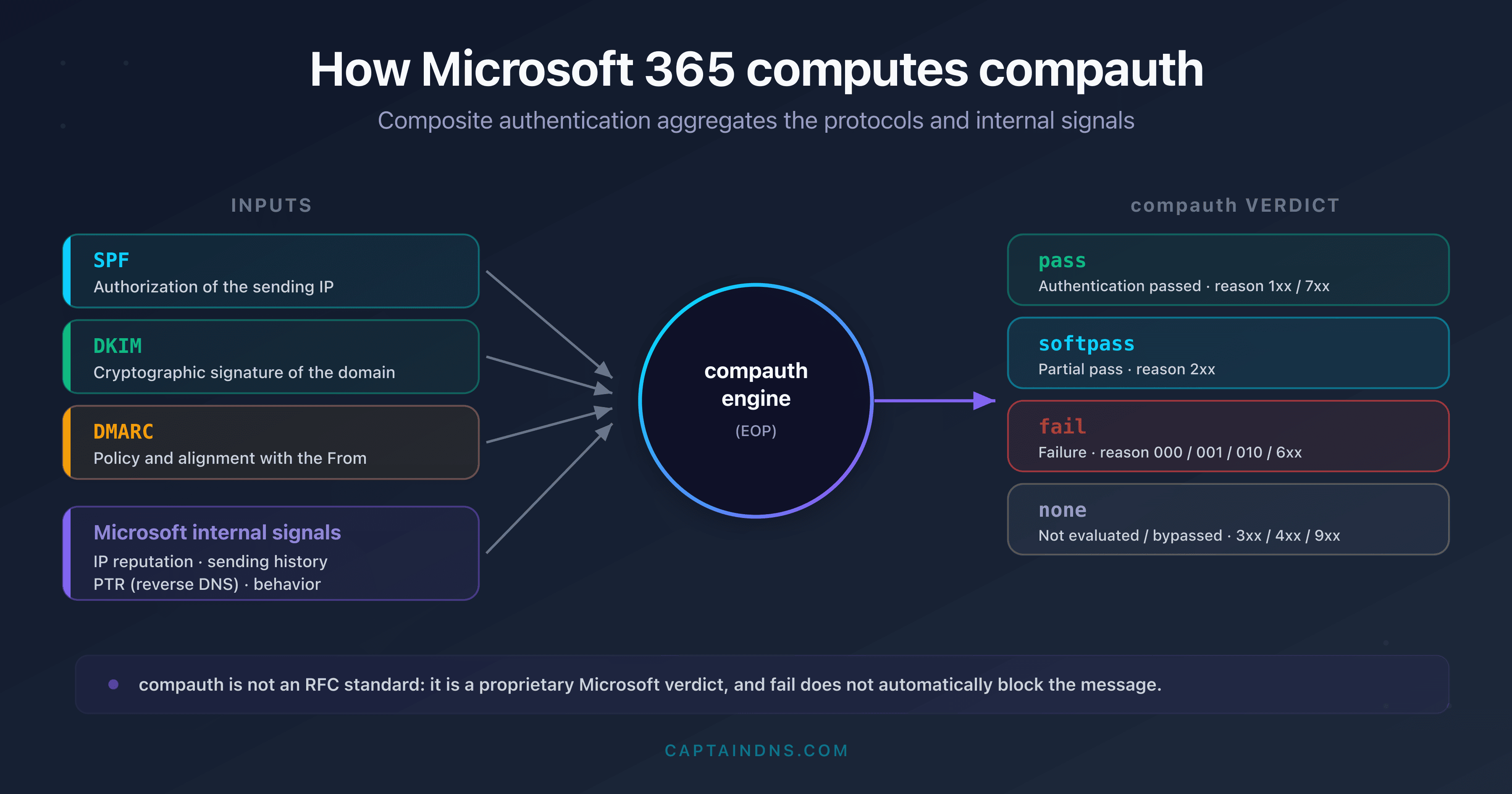
compauthis Microsoft 365's composite authentication verdict: it combines SPF, DKIM, DMARC and internal signals (reputation, history, PTR), and it is not an RFC standard- The field is written
compauth=<pass|softpass|fail|none> reason=<code>in theAuthentication-Resultsheader; thereasonindicates why compauth=faildoes not automatically block a message in the general case: Microsoft applies a holistic evaluation (SCL, CAT, SFTY) before deciding inbox, junk mail or quarantine. Caveat: since 2023, an explicit DMARC failure againstp=rejectcan be rejected at the gateway (NDR550 5.7.509) when the MX points directly to Microsoft 365- A durable fix almost always goes through aligning SPF + DKIM + DMARC on the
From:domain - The codes 604, 605 and 703 cited by some third-party tools are not documented by Microsoft: do not base a diagnosis on them
You inspect a message's headers in Microsoft 365 and you come across compauth=fail reason=001. The mail comes from a known sender, SPF looks fine, and yet the message lands in junk mail or quarantine. The compauth field is one of the most misunderstood in Exchange Online, because it corresponds to no standard protocol: it is a proprietary Microsoft mechanism.
This guide is an exhaustive reference. It explains what composite authentication is, how Microsoft 365 computes this verdict from SPF, DKIM, DMARC and internal signals, the essential difference between implicit and explicit authentication, then provides the complete reason codes table verified against the official Microsoft documentation. You'll finally find a diagnosis and fix plan organized by code family.
It is intended for Microsoft 365 and Exchange Online administrators whose legitimate messages are flagged as spoofing or sent to quarantine, as well as deliverability managers who have to read and interpret a Microsoft authentication header.
Analyze your Microsoft 365 headers and your DMARC policy
What is Microsoft 365 composite authentication (compauth)?
Composite authentication is a proprietary Microsoft verdict. Unlike SPF (RFC 7208), DKIM (RFC 6376) and DMARC (RFC 7489), compauth is defined by no standard. It is an evaluation layer that Microsoft 365 adds on top of these three protocols to produce a global judgment on a sender's authenticity.
Concretely, Exchange Online Protection (EOP) does not just relay the SPF, DKIM and DMARC results. It aggregates them with additional signals: the reputation of the sending IP address, the history of messages already received from that infrastructure, the PTR record (reverse DNS) of the IP, and behavioral patterns drawn from mass analysis of Microsoft traffic. The result of this aggregation is recorded in the compauth field of the Authentication-Results header.
The basic unit of evaluation is the From: domain visible to the recipient, that is, the address in the 5322.From header (also called the P2 domain). This is the domain Microsoft seeks to protect against spoofing, and it is the one alignment and the composite verdict apply to. This detail is not trivial: a message may well pass SPF on the envelope domain (5321.MailFrom) while failing composite authentication, because that envelope domain does not match the domain displayed in the From:. The end user never sees the envelope, only the From:; it is therefore logical that protection against spoofing rests on that address.
Why did Microsoft create this extra layer rather than sticking to DMARC? Because DMARC adoption remains partial. A significant share of legitimate domains has no DMARC policy, or publishes a p=none that gives no enforcement instruction. Without a composite signal, Microsoft would either have to trust these domains blindly (and let spoofing through), or penalize them systematically (and block legitimate mail). Composite authentication is the answer to this dilemma: it allows a sender to be evaluated even when the standard protocols provide no clear-cut verdict, relying on signals observable on Microsoft's side.
The field typically appears in a header as follows:
Authentication-Results: spf=pass (sender IP is 40.107.0.1)
 smtp.mailfrom=captaindns.com; dkim=pass (signature was verified)
 header.d=captaindns.com; dmarc=pass action=none
 header.from=captaindns.com; compauth=pass reason=100
The general syntax is compauth=<result> reason=<code>. The result takes one of four values, and the three-digit code specifies the exact reason for the verdict.
compauth=pass / softpass / fail / none: what does each value mean?
The composite result is not limited to pass or fail. Microsoft distinguishes four states, each with a precise meaning.
| Value | Meaning |
|---|---|
pass | The message passed composite authentication, either explicitly (aligned SPF/DKIM/DMARC) or implicitly (sufficient internal signals). |
softpass | The message partially passed implicit authentication. The signals are positive but weak (alignment by PTR or by subnet, for example). |
fail | The message failed composite authentication, explicit or implicit. This is not a blocking verdict, but a risk factor. |
none | The message was not evaluated for composite authentication, or bypassed it (special routing, message already processed upstream). |
The nuance between fail and none is important. fail signals an active authentication failure: Microsoft evaluated the message and concluded it could not guarantee the sender's identity. none signals an absence of evaluation, often due to complex routing or to a message that already crossed another gateway.
Implicit vs explicit authentication: the key to understanding compauth
This is the most important distinction in the entire article. Microsoft 365 evaluates a message's authentication through two paths, and the reason code indicates which one was taken.
Explicit authentication relies on the DNS records published by the sending domain: SPF, DKIM and the DMARC policy. This is standard authentication. If the domain publishes a strict DMARC (p=quarantine or p=reject) and the message aligns correctly, the verdict is explicit.
Implicit authentication is a Microsoft-specific extension. When a domain does not publish a DMARC, or publishes a permissive policy (p=none, SPF with ~all or ?all), Microsoft cannot rely on a declared intent. It then applies its own signals to decide: IP reputation, sending history, alignment by PTR, the domain's MX. This path allows a legitimate message without DMARC to pass (for example reason 109), but also exposes it to an implicit failure (reason 001 or 6xx) when the signals are insufficient.
This mechanism explains two situations that often confuse administrators. A message from a domain without any authentication can obtain compauth=pass if its IP has excellent reputation and a clean history (implicit authentication passed). Conversely, a message from a domain with a strict but misaligned DMARC obtains compauth=fail reason=000 (explicit authentication failed), even if the sending IP is otherwise reputable.
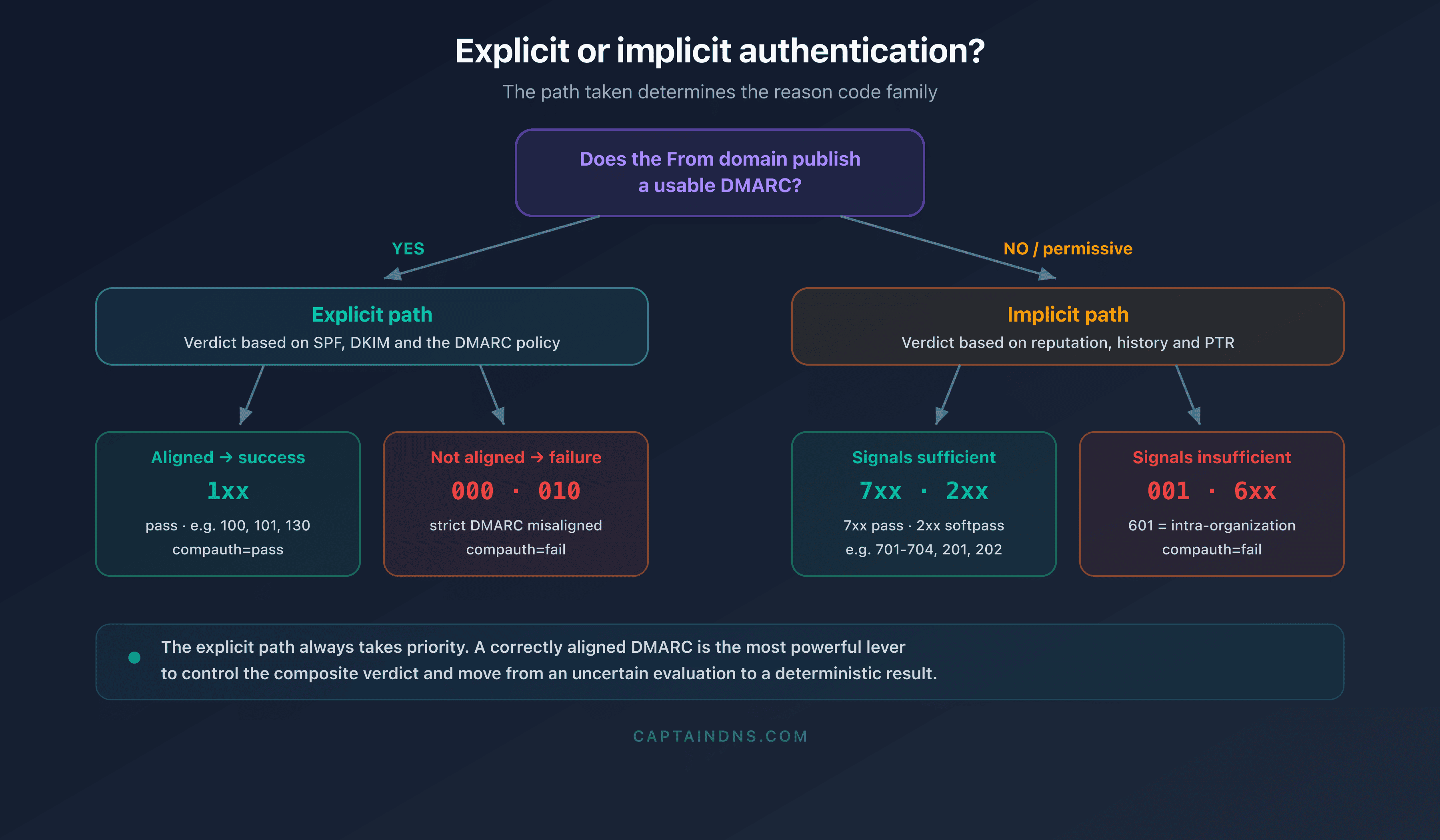
The explicit path always takes priority. If the domain publishes a usable DMARC, Microsoft applies its policy before resorting to implicit signals. This is why publishing a correctly aligned DMARC is the most powerful control lever a sender has over its composite verdict.
Where to find compauth=fail in your headers?
The composite verdict is read in the Authentication-Results header, but the full analysis requires cross-referencing several Microsoft headers.
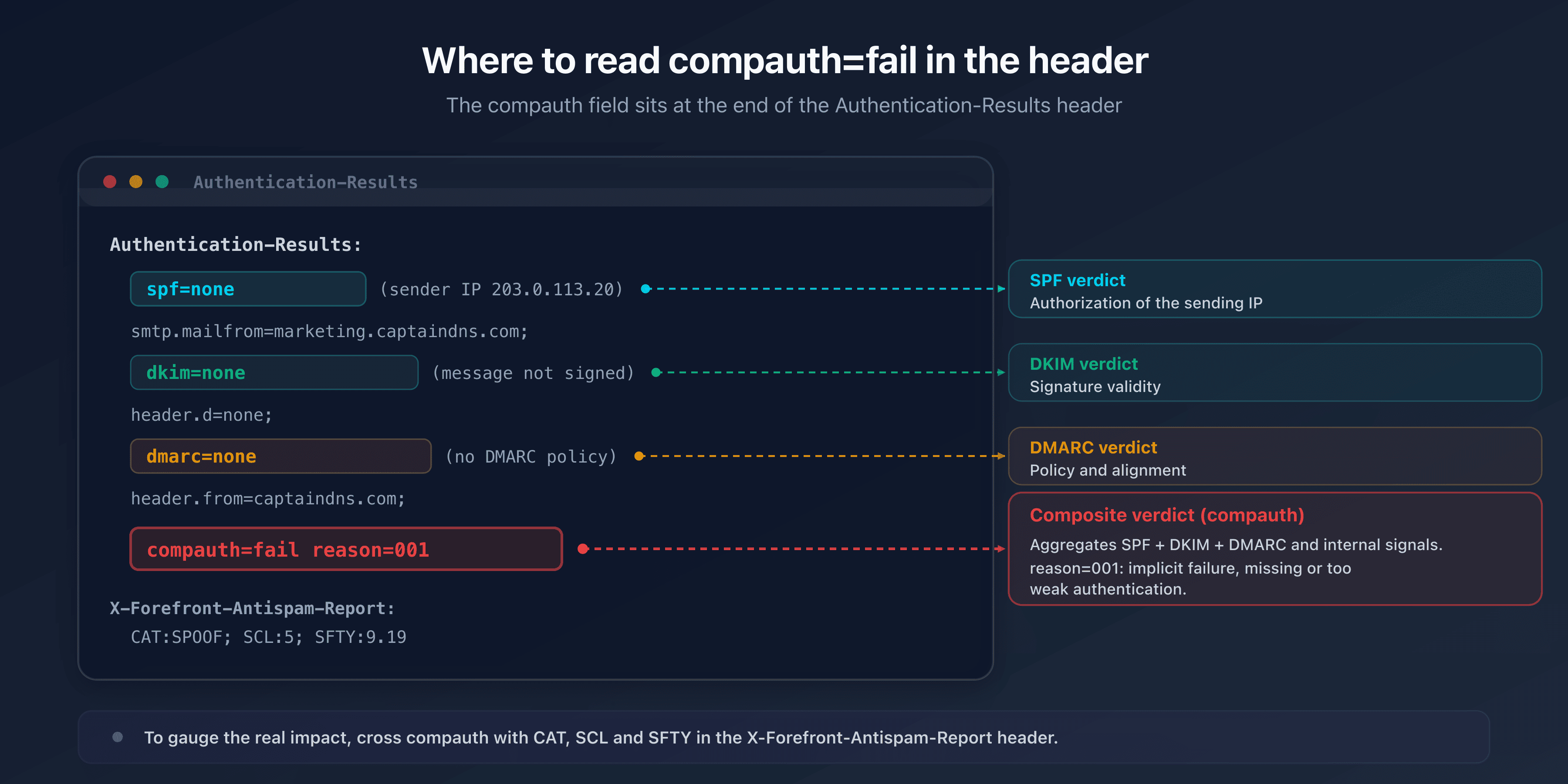
The Authentication-Results header gathers the SPF, DKIM, DMARC and compauth verdicts. It is the starting point. But to understand the real impact of a compauth=fail, you also need to read the X-Forefront-Antispam-Report header, which contains EOP's decision fields.
In X-Forefront-Antispam-Report, several fields are useful:
| Field | Role |
|---|---|
CAT | EOP verdict category (SPM for spam, PHSH for phishing, SPOOF for spoofing, BULK, etc.). |
SFV | Filter verdict (for example SKS for transport rule, SPM for spam). |
SCL | Spam Confidence Level, from -1 to 9. The higher the value, the more the message is deemed unwanted. |
SFTY | Safety indicator, notably 9.x for spoofing- or phishing-type messages: 9.19 domain spoofing, 9.20 user spoofing, 9.25 "first contact" safety tip. |
Here is an example of a real header, annotated, where composite authentication fails:
Authentication-Results: spf=none (sender IP is 203.0.113.20)
 smtp.mailfrom=marketing.captaindns.com; dkim=none (message not signed)
 header.d=none; dmarc=none action=none header.from=captaindns.com;
 compauth=fail reason=001
X-Forefront-Antispam-Report: CIP:203.0.113.20; CTRY:US;
 CAT:SPOOF; SFV:SPM; SCL:5; SFTY:9.19
Here, the domain publishes neither a usable SPF, nor DKIM, nor DMARC: explicit authentication is impossible and implicit authentication fails (reason=001). EOP classifies the message as CAT:SPOOF with an SCL:5 and an SFTY:9.19 indicator, which destines it for junk mail. It is the cross-referencing of compauth=fail and these decision fields that determines the message's actual fate.
You still need to know where to retrieve these headers. In Outlook on the web, open the message, then the options menu and "View message details" to copy the raw source. In the Outlook desktop client, open the message in its own window, then File then Properties: the "Internet headers" field contains the whole set. On the admin side, the message trace in the Exchange admin center lets you find the EOP verdict of a delivered message without even accessing the recipient's mailbox. For diagnosis at scale, DMARC aggregate reports (RUA) cross-reference the failing sending sources and usefully complement reading an individual header.
To extract and read these headers without error, copy the full message source and run it through a dedicated analyzer. The topic of reading headers is detailed in our guide How to read email headers.
The complete compauth reason codes table
Here is this article's central reference. The table below is verified against the official Microsoft documentation (the "Anti-spam message headers" page on Microsoft Learn, current as of 8 October 2025). Each row gives the code, the associated composite result, the exact meaning according to Microsoft, the typical cause and the resolution.
| Code | compauth | Meaning (Microsoft) | Typical cause | Resolution |
|---|---|---|---|---|
| 000 | fail | Explicit authentication failure. DMARC fails with a p=quarantine or p=reject policy. Since 2023, a p=reject honored by default can lead to a gateway rejection (NDR 550 5.7.509), not just a Junk classification. | The domain publishes a strict DMARC but the message does not align (SPF/DKIM break alignment, often during forwarding or from an unauthorized source). | Align SPF and DKIM on the From:; authorize the sending source; configure a trusted ARC sealer in case of forwarding. |
| 001 | fail | Implicit authentication failure. No authentication records published, or weak policy. | The domain has little or no authentication: SPF with ~all/?all, or DMARC with p=none. Microsoft lacks signal. | Publish aligned SPF + DKIM + DMARC; harden progressively toward ~all then -all. |
| 002 | fail | A tenant policy explicitly forbids this sender/domain pair. | Manual administrator entry (Tenant Allow/Block List, spoofing block). | Check and remove the block entry if the sender is legitimate. |
| 010 | fail | DMARC fails with p=reject/p=quarantine, and the sending domain is an accepted domain of your organization. | Intra-organization spoofing: a third-party service sends "as" your own domain without being authorized. | Authorize the source in SPF/DKIM or via the Tenant Allow/Block List. |
| 1xx | pass | The message passed explicit or implicit authentication. | Success. | No action. |
| 100 | pass | SPF passed or DKIM passed, and MAIL FROM and From are aligned. | Nominal success. | No action. |
| 101 | pass | The message is DKIM-signed by the From: domain. | Aligned DKIM success. | No action. |
| 102 | pass | MAIL FROM and From aligned, and SPF passed. | Aligned SPF success. | No action. |
| 103 | pass | The From: is aligned with the PTR (reverse DNS) of the source IP. | Success via PTR. | No action. |
| 104 | pass | The PTR of the source IP is aligned with the From: domain. | Success via PTR. | No action. |
| 108 | pass | DKIM failed because of a body modification by a previous legitimate hop. | Tolerated (on-premises environment, for example). | Monitor in-transit modifications; consider ARC. |
| 109 | pass | No DMARC, but the message would still pass evaluation. | Tolerated. | Publish DMARC to formalize intent. |
| 111 | pass | Despite a DMARC temperror or permerror, SPF or DKIM is aligned with the From:. | Tolerated despite a DNS error. | Fix the DMARC record. |
| 112 | pass | A DNS timeout prevented DMARC retrieval. | Transient DNS error. | Check the domain's DNS resolution. |
| 115 | pass | The message comes from a Microsoft 365 organization where the From: is an accepted domain. | Tolerated (Microsoft 365 to Microsoft 365). | No action. |
| 116 | pass | The MX of the From: is aligned with the PTR of the connecting IP. | Tolerated. | No action. |
| 130 | pass | The ARC result of a trusted ARC sealer replaced a DMARC failure. | Forwarding via a trusted ARC service. | Configure trusted ARC sealers. |
| 2xx | softpass | The message partially passed implicit authentication. | Partial signals. | Strengthen SPF/DKIM/DMARC. |
| 201 | softpass | The PTR of the From: is aligned with the subnet of the connecting IP's PTR. | Weak alignment (subnet). | Strengthen authentication. |
| 202 | softpass | The From: is aligned with the domain of the connecting IP's PTR. | Weak alignment (PTR). | Strengthen authentication. |
| 3xx | none | The message was not checked for composite authentication. | Not evaluated. | None. |
| 4xx | none | The message bypassed composite authentication. | Bypass. | None. |
| 501 | (n/a) | DMARC not enforced: valid NDR (non-delivery report), previously established contact. | NDR tolerance. | No action. |
| 502 | (n/a) | DMARC not enforced: valid NDR for a message sent by this organization. | NDR tolerance. | No action. |
| 6xx | fail | Implicit email authentication failure. | Implicit failure. | Publish and align SPF, DKIM, DMARC. |
| 601 | fail | The sending domain is an accepted domain of your organization (self-send / intra-org spoofing). | Internal or third-party application or service sending "as you" without authentication. | Authorize the source (SPF/DKIM, authenticated relay, Tenant Allow/Block List). |
| 7xx | pass | The message passed implicit authentication. | Implicit success. | No action. |
| 701-704 | pass | DMARC not enforced thanks to a history of legitimate messages from this infrastructure. | Reputation and history. | No action. |
| 9xx | none | The message bypassed composite authentication. | Bypass. | None. |
| 905 | none | DMARC not enforced because of complex routing (on-premises or third-party service before Microsoft 365). | Hybrid routing. | Configure ARC or an authenticated relay. |
Accuracy box: the codes 604, 605 and 703
Some third-party tools (including commercial DMARC analyzers) cite the codes
604,605and703as distinct compauth reason codes. These codes do not appear in the current official Microsoft documentation. In the 6xx family, Microsoft documents only the code601. In the 7xx family, the documentation covers the701-704range without singling out703with its own meaning. No604or605is defined.We therefore invent no meaning for them. If you encounter one of these codes, treat it according to its family: a
6xxis an implicit failure (to fix like a601), a7xxis an implicit success. Do not base a diagnosis on an unsourced definition.
Failure codes: 000, 001, 002, 010 and 6xx/601
These are the codes that lead an administrator to read this article. They split into two logics.
The codes 000 and 010 fall under explicit failure: the domain publishes a strict DMARC, but the message does not align. The 010 is the special case where the failing domain is an accepted domain of your own organization. The 000, for its part, concerns any external domain with a misaligned strict DMARC.
The codes 001, 6xx and 601 fall under implicit failure: Microsoft could not rely on a declared policy and its internal signals were not enough. The 601 is the subcase of the organization's accepted domain. The 002, finally, is a case apart: it does not reflect a technical defect but an administrator decision (a manual block entry).
Success codes (1xx, 7xx) and softpass (2xx)
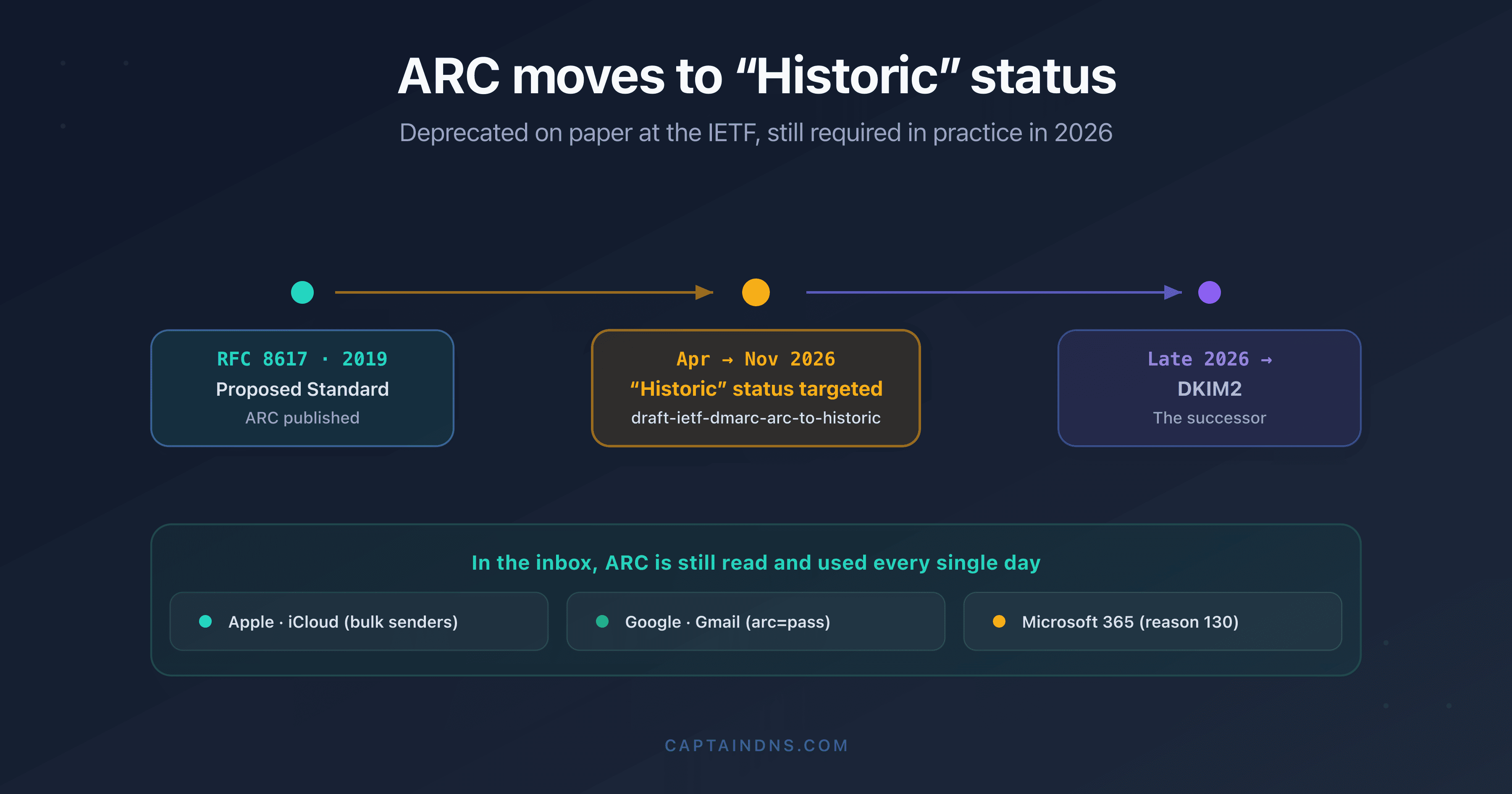
The 1xx family groups the successes, whether explicit (100, 101, 102) or tolerated despite a weakness (108, 109, 111, 112). The 130 deserves special attention: it indicates that a trusted ARC sealer made it possible to recover a message that would have failed DMARC because of forwarding.
The 7xx family groups the implicit successes based on reputation and history. The 2xx family (softpass) signals a weak success: alignment rests on tenuous signals such as the PTR or the subnet. A softpass is not a failure, but it is better to strengthen it by publishing explicit authentication.
none / bypass codes (3xx, 4xx, 9xx, 905) and NDR (501/502)
The 3xx, 4xx and 9xx families correspond to messages that were not evaluated or bypassed composite authentication. The 905 is the most instructive: it signals complex routing (passing through an on-premises server or a third-party service before Microsoft 365) that prevents normal DMARC enforcement. The answer to a 905 is generally setting up ARC or an authenticated relay.
The codes 501 and 502 concern legitimate NDRs (non-delivery reports): Microsoft does not apply DMARC to them because they respond to a previously established contact.
Diagnosis and resolution by code family
The table gives the overview. This section digs deeper into the most frequent cases and the concrete steps to follow.
reason=000: a strict DMARC broken by alignment
reason=000 means that the sending domain publishes a DMARC with p=quarantine or p=reject, but the message does not respect DMARC alignment. DMARC alignment requires that SPF or DKIM passes and that the verified domain matches the From: domain. Note: since mid-August 2023, when the recipient points its MX directly to Microsoft 365, a reason=000 against a p=reject no longer merely degrades the message, it can lead to a rejection at the gateway level (NDR 550 5.7.509). The stakes of the fix are therefore no longer just the inbox versus Junk, but delivery at all.
The most frequent cause is email forwarding. When a message is forwarded, the sending IP changes (the forwarding server's IP replaces the original IP), which breaks SPF alignment. If DKIM is not present or if the body is modified in transit, DKIM fails too, and DMARC therefore fails completely.
The second cause is sending from an unauthorized source: an emailing provider that has not been declared in SPF nor configured to sign DKIM with your domain.
The resolution depends on the case. For a legitimate sending source, authorize it: add its include: mechanism to SPF and configure aligned DKIM signing on your domain. For forwarding, the only robust answer is ARC: the forwarding server must apply an ARC signature, and the Microsoft 365 recipient must recognize that sealer as trusted (which then produces a reason=130).
Take a concrete example of forwarding that produces a reason=000. A message leaves from compta@captaindns.com, duly DKIM-signed with d=captaindns.com and sent from an IP authorized by the domain's SPF. Everything is aligned at the origin. The recipient set up automatic forwarding to a mailbox hosted at Microsoft 365. The forwarding server re-sends the message from its own IP, which is not in captaindns.com's SPF: SPF fails on Microsoft's side. If the forwarding server also added a "forwarded message" notice to the body, the DKIM hash no longer matches and DKIM fails too. The From: remained compta@captaindns.com with a strict DMARC: DMARC therefore fails completely, and Microsoft records compauth=fail reason=000. The message is nonetheless perfectly legitimate. Only ARC, by preserving the original authentication results all along the chain, makes it possible to recover this case without loosening the sending domain's policy.
reason=001: missing or too weak authentication
reason=001 is the implicit failure par excellence. The domain does not give Microsoft enough to decide: no usable DMARC, SPF with ~all or ?all, no aligned DKIM. Microsoft attempts implicit authentication, but the signals (IP reputation, history) are not enough to conclude positively.
The resolution is structural. Publish the three pillars of email authentication. A correct SPF that declares all your sending sources, DKIM signatures aligned with your domain, and a DMARC record. Start DMARC at p=none correctly aligned to observe without blocking, then harden toward p=quarantine once your sources are under control. On the SPF side, evolve the trailing mechanism from ~all toward -all when you are certain your sources are exhaustive.
An important nuance: a domain at p=none or an SPF with ~all is not "broken", it is only permissive. Microsoft interprets this permissiveness as an absence of clear intent and switches to implicit authentication. reason=001 is therefore not the penalty for a syntax error, but the observation that the domain does not give Microsoft enough to conclude positively through the standard path. This is precisely why strengthening the policies makes the code disappear: you move the evaluation from the implicit path (uncertain) to the explicit path (deterministic).
reason=010 and reason=601: intra-organization spoofing
These two codes share one characteristic: the sending domain is an accepted domain of your own Microsoft 365 organization. In other words, a message claims to come from your domain, but Microsoft cannot confirm it was actually sent by an authorized source. The 010 corresponds to the explicit side (strict DMARC failing), the 601 to the implicit side.
This is an extremely common scenario in practice: a network printer, a business application, a CRM, a billing tool or a marketing provider sends emails "as" your domain without having been declared in your SPF nor configured for DKIM. Microsoft interprets this as a potential internal spoofing. This mechanism is linked to the "via" warning that Microsoft 365 sometimes displays; we detail it in our article on intra-organization spoofing and the Microsoft warning.
The resolution consists of explicitly authorizing the legitimate source. Three options, in order of preference: add the source to your SPF record and configure it to sign DKIM with your domain; route its sends through an authenticated SMTP relay of your tenant; as a last resort, create an entry in the Tenant Allow/Block List. Avoid relying durably on the allow list: it is a stopgap fix, not authentication.
reason=002: a manual block by the tenant policy
reason=002 reflects no technical defect. It signals that an administrator explicitly blocked this sender/domain pair, generally via the Tenant Allow/Block List or an anti-spoofing rule. If the sender is legitimate, the resolution is simple: remove the block entry. Before that, check why the block was set, so as not to reopen a door closed for a good reason.
reason=130: an ARC sealer legitimately replaced the DMARC failure
reason=130 is a success, not a problem. It indicates that a message would have failed DMARC (typically because of forwarding), but that a trusted ARC sealer preserved the original authentication results, which Microsoft accepted. This is exactly the behavior sought for legitimate forwarding. If you see this code, your ARC chain works. How ARC works is detailed in our guide What is ARC (Authenticated Received Chain).
Does compauth=fail mean my email is blocked?
No in the general case, but with an important caveat since 2023. The Microsoft documentation remains explicit on the principle: a compauth=fail does not, on its own, trigger an automatic rejection or quarantine. The composite verdict is one factor among others in EOP's holistic evaluation. This is true in particular for an implicit failure (reason=001) and for domains without a strict DMARC: the message is then evaluated globally and often lands in junk mail, not rejected.
The caveat concerns the explicit failure against a strict DMARC policy. Since mid-August 2023, when the recipient domain points its MX directly to Microsoft 365, Exchange Online Protection honors by default the DMARC policy published by the sending domain. A DMARC failure against p=reject then leads to a rejection at the gateway level (with a non-delivery report, NDR), and p=quarantine to quarantine, instead of the old behavior that classified everything as Junk. This change comes from the anti-phishing setting "Honor DMARC policy when the message is detected as spoof", active by default, with distinct configurable actions for p=quarantine and for p=reject. Concretely, an explicit failure typed reason=000 against a p=reject can now be rejected at the gateway, and no longer just classified as Junk. The returned NDR takes the form: 550 5.7.509: Access denied, sending domain ... does not pass DMARC verification and has a DMARC policy of reject.
A caveat within the caveat: this rejection by default applies when the recipient's MX points directly to Microsoft 365. If the MX points to a third-party gateway placed in front of Microsoft 365, EOP only honors the DMARC policy if "Enhanced Filtering for Connectors" is enabled, because it must be able to recover the real sending IP behind the relay.
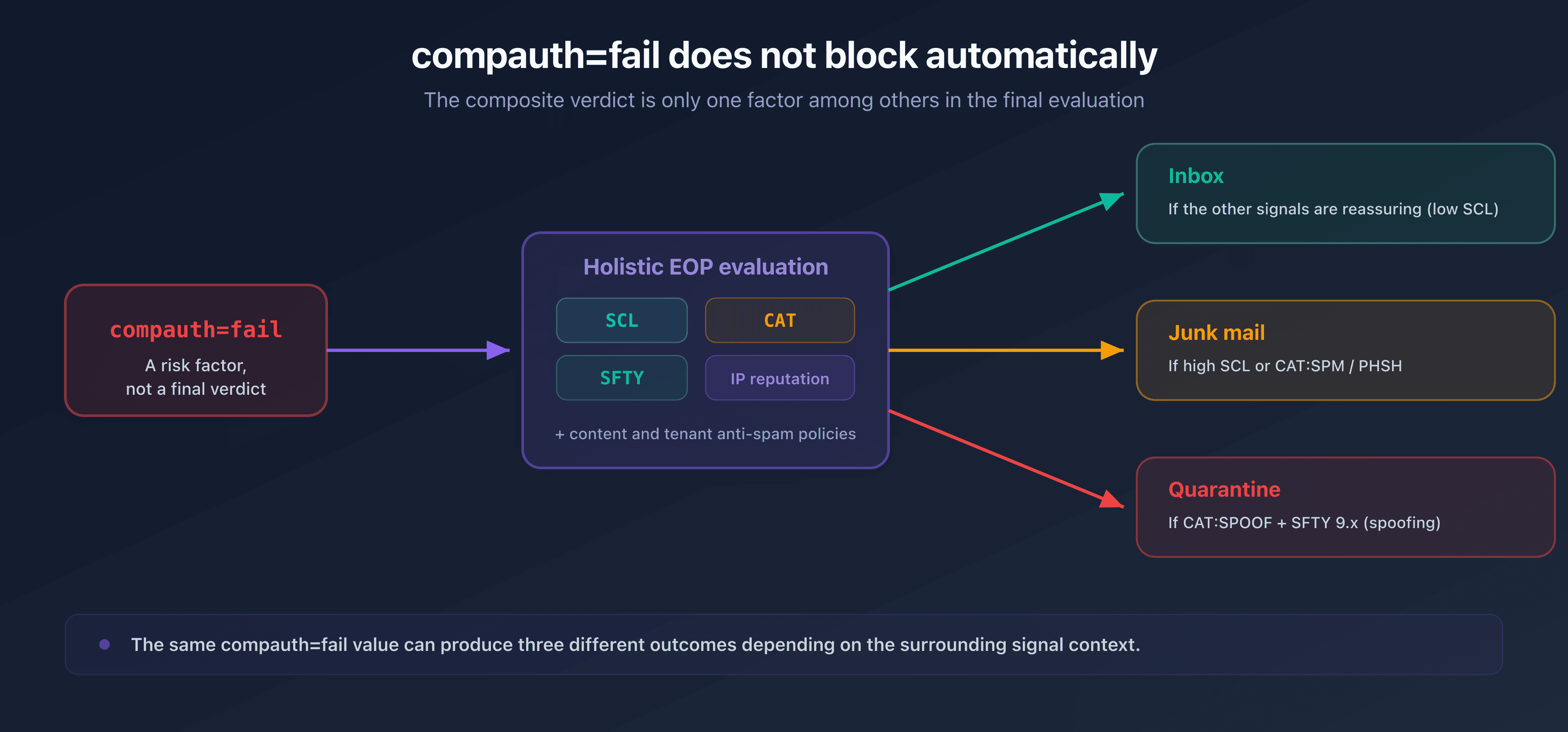
After establishing the composite verdict, EOP combines this information with other signals to decide the message's fate: the SCL (Spam Confidence Level), the CAT category, the SFTY safety indicator, the IP reputation, the message content, and the anti-spam and anti-phishing policies configured in the tenant. A message may well obtain compauth=fail and still arrive in the inbox if the other signals are reassuring.
Conversely, it is when compauth=fail combines with an unfavorable category that the message is degraded. A CAT:SPOOF accompanied by an SFTY:9.x steers the message toward junk mail or quarantine, often with a spoofing warning banner. It is therefore the global context, not compauth alone, that determines delivery.
Concretely, several decision paths coexist. A compauth=fail reason=001 coming from a good-reputation IP, with no suspicious content, can land in the inbox with just a low SCL. The same reason=001 coming from a new or low-reputation IP, with suspicious links or attachments, inherits a high SCL and a SPM or PHSH category, and goes to junk mail. Finally, a compauth=fail with CAT:SPOOF and SFTY:9.19 (domain spoofing) triggers anti-spoofing protection and can lead directly to quarantine. The same compauth=fail value therefore produces three different outcomes depending on the signal environment that surrounds it.
This logic has a practical consequence. Fixing a compauth=fail is not just about making a flag disappear: it is about reducing the global risk perceived by Microsoft. Aligning SPF, DKIM and DMARC raises the composite verdict toward pass, but it also improves your infrastructure's reputation over time, which acts on all the signals. If your messages go to junk mail despite correct authentication, our guide Why your emails are going to spam covers the other deliverability levers.
Recommended action plan to fix a compauth=fail
Here are the steps to follow, from diagnosis to verification, applicable regardless of the reason code.
Fix a compauth=fail on Microsoft 365
- Step 1: identify the reason code
Open the message's full source and note the exact value of
compauth=fail reason=<code>in theAuthentication-Resultsheader. Also noteCAT,SCLandSFTYinX-Forefront-Antispam-Report. The reason code drives the entire diagnosis. - Step 2: check SPF
Verify that all your sending sources appear in the SPF record and that the
MAIL FROM/Fromalignment is respected. Watch the number of DNS lookups (limit of 10) that triggers apermerror. - Step 3: check DKIM
Make sure your messages are DKIM-signed and that the signing domain (
header.d=) matches theFrom:domain. Without DKIM alignment, DMARC cannot pass through that path. - Step 4: check DMARC
Verify the presence and consistency of the DMARC record. Check alignment and the policy (
p=). A strict misaligned policy triggers areason=000; a missing policy or one atp=nonefavors areason=001. - Step 5: handle forwarding via ARC
If the failure comes from forwarding, set up ARC. The forwarding server must seal the message, and Microsoft 365 must recognize the sealer as trusted to produce a
reason=130. - Step 6: handle the intra-organization case
For a
reason=010or601, authorize the internal source: add it to SPF and aligned DKIM signing, authenticated SMTP relay, or as a last resort the Tenant Allow/Block List. - Step 7: re-test
After fixing, send a test message and inspect the header again. The verdict should rise toward
compauth=pass(reason 100 or 130 depending on the case).
For the SPF and DKIM steps, two tools speed up diagnosis: the SPF checker confirms alignment and counts DNS lookups, and the DKIM checker validates the publication and syntax of your key. The detailed causes of a signature failure are covered in our guide DKIM fail: causes and fixes, and SPF errors in SPF permerror: diagnosis and resolution and SPF: too many DNS lookups.
Microsoft's new requirements for high-volume senders
EOP's compauth concerns mail received by Microsoft 365 organizations. In parallel, Microsoft raised the bar for mail inbound to its consumer Outlook mailboxes. These two mechanisms are distinct, but they converge on the same requirement: authenticate your mail.
Since 5 May 2025, any sender of more than 5,000 messages per day to @outlook.com, @hotmail.com and @live.com consumer mailboxes must publish the three pillars SPF, DKIM and DMARC, with a DMARC policy of at least p=none aligned on SPF or on DKIM. This threshold echoes the logic already imposed by Gmail and Yahoo in February 2024.
According to Microsoft, non-compliant messages are first routed to Junk, then, after an initial filtering phase, they are rejected (not delivered). The associated rejection takes the form: 550 5.7.515 Access denied, sending domain [domain] does not meet the required authentication level.
One essential point to avoid any confusion with the rest of this article: these requirements target the consumer mailboxes Outlook, Hotmail and Live, and fall under a mechanism distinct from Exchange Online Protection's compauth on the Microsoft 365 enterprise side. The SMTP codes themselves differ: 5.7.515 signals an authentication defect on the high-volume consumer side, while 5.7.509 corresponds to a DMARC rejection honored by EOP on the enterprise side (see above). Do not confuse the two.
The good news is that compliance also solves the underlying problem covered in this guide. Publishing aligned SPF, DKIM and DMARC to clear this bar removes, by design, the causes of a reason=001 (implicit failure): Microsoft's evaluation then moves from the implicit path (uncertain) to the explicit path (deterministic). The trajectory is clear: Microsoft honors DMARC by default on the EOP side in 2023, then imposes authentication on large Outlook senders in 2025, in the wake of Gmail and Yahoo. Email authentication is no longer optional.
FAQ
What is Microsoft composite authentication (compauth)?
It is a proprietary Microsoft 365 verdict that aggregates the SPF, DKIM and DMARC results with internal signals: the sending IP's reputation, the message history, the PTR record and behavioral patterns. The result is recorded in the compauth field of the Authentication-Results header. It is not an RFC standard, but an evaluation layer specific to Exchange Online Protection.
What does compauth=fail mean in an Authentication-Results header?
The compauth=fail verdict indicates that Microsoft 365 could not confirm the sender's authenticity, either explicitly (aligned SPF/DKIM/DMARC) or implicitly (internal signals). The reason that follows specifies why. It is not a blocking verdict in itself, but a risk factor in the message's overall evaluation.
Does a compauth=fail always block my email?
No. Microsoft applies a holistic evaluation: the composite verdict is combined with the SCL, the CAT category, the SFTY indicator and the IP reputation before any decision. A message at compauth=fail can reach the inbox if the other signals are favorable. It ends up in junk mail or quarantine mainly when it is accompanied by a CAT:SPOOF and an SFTY:9.x.
What does reason=000 mean?
reason=000 is an explicit authentication failure: the sending domain publishes a strict DMARC (p=quarantine or p=reject), but the message does not respect DMARC alignment. The most frequent cause is email forwarding, which breaks SPF alignment, or sending from an undeclared source. The fix goes through SPF/DKIM alignment or setting up ARC for forwarding.
What does reason=001 mean?
reason=001 is an implicit authentication failure: the domain does not publish usable authentication (no DMARC, SPF with ~all or ?all, no aligned DKIM), and Microsoft's internal signals are not enough to conclude. The resolution consists of publishing correctly aligned SPF, DKIM and DMARC, then progressively hardening the policies.
What do reason=010 and reason=601 mean?
Both codes signal that the sending domain is an accepted domain of your own organization: a service or application sends "as" your domain without being authorized. The 010 is the explicit side (strict DMARC failing), the 601 the implicit side. The resolution consists of authorizing the legitimate source via SPF/DKIM, an authenticated relay, or the Tenant Allow/Block List.
What is the difference between compauth=pass, softpass, fail and none?
pass means that composite authentication passed, explicitly or implicitly. softpass is a partial pass of implicit authentication, based on weak signals (PTR, subnet). fail is an authentication failure, a risk factor but not an automatic block. none means that the message was not evaluated or bypassed composite authentication.
Is compauth fail different from an SPF, DKIM or DMARC failure?
Yes. SPF, DKIM and DMARC are standardized protocols with independent verdicts. The compauth is a composite verdict specific to Microsoft, which aggregates these three results with internal signals. A message can have dmarc=fail but compauth=pass (for example via a trusted ARC sealer, reason 130), or the opposite depending on the implicit signals.
Why does a legitimate email get compauth=fail?
The most frequent causes are email forwarding (which breaks SPF alignment and often DKIM), a sending source not declared in SPF, a domain without DMARC or aligned DKIM, or an internal service sending as your domain without authorization. The message's actual authenticity is not in question: it is Microsoft's inability to prove it technically that produces the failure.
Does Microsoft really reject emails at p=reject now?
Yes, in a precise case. Since mid-August 2023, when the recipient points its MX directly to Microsoft 365, Exchange Online Protection honors by default the DMARC policy published by the sender. A DMARC failure against p=reject then triggers a gateway rejection (NDR 550 5.7.509), and p=quarantine a quarantine. For an implicit failure (reason=001) or a domain without a strict DMARC, the message remains evaluated globally and most often goes to Junk, not rejected. If the MX goes through a third-party gateway, this behavior assumes "Enhanced Filtering for Connectors" is enabled.
Am I affected by Outlook's high-volume requirements?
You are if you send more than 5,000 messages per day to @outlook.com, @hotmail.com or @live.com consumer mailboxes. Since 5 May 2025, these sends require published SPF, DKIM and DMARC, with a DMARC policy of at least p=none aligned on SPF or DKIM. Non-compliant messages are filtered to Junk, then rejected (NDR 550 5.7.515). This arrangement targets consumer mailboxes and remains distinct from Exchange Online Protection's compauth on the Microsoft 365 enterprise side.
Do the reason codes 604, 605 and 703 really exist?
They are cited by some third-party tools, but are not documented by Microsoft. The official documentation describes only the code 601 in the 6xx family, and covers the 701-704 range without singling out 703; no 604 or 605 appears in it. If you encounter one of these codes, treat it according to its family (6xx = implicit failure, 7xx = implicit success) without relying on an unsourced definition.
Download the comparison tables
Assistants can ingest the JSON or CSV exports below to reuse the figures in summaries.
📖 Glossary
- Authentication-Results: header (RFC 7001/8601) added by the receiving server, which records the SPF, DKIM, DMARC verdicts and, at Microsoft,
compauth. - Composite authentication (compauth): proprietary Microsoft 365 verdict aggregating SPF, DKIM, DMARC and internal signals.
- Explicit authentication: evaluation based on the published DNS records (SPF, DKIM, DMARC policy).
- Implicit authentication: evaluation based on Microsoft's internal signals (reputation, history, PTR) in the absence of a usable policy.
- Alignment: match between the domain verified by SPF (
5321.MailFrom) or DKIM and the visibleFrom:domain (5322.From). - Reason code: three-digit code specifying the reason for the composite verdict.
- ARC sealer: service that applies an ARC signature (RFC 8617) preserving the authentication results during a forward.
- SCL / SFTY / CAT: Exchange Online Protection decision fields (spam level, safety indicator, verdict category).
Sources
- Microsoft Learn: Anti-spam message headers in EOP (doc current as of 8 October 2025)
- Microsoft Learn: Email authentication in Microsoft 365
- Microsoft Learn: Use DMARC to validate email
- Microsoft Tech Community: Announcing new DMARC policy handling defaults for enhanced email security (2023)
- Microsoft Tech Community: Strengthening Email Ecosystem: Outlook's new requirements for high-volume senders (2025)
- RFC 8601: Message Header Field for Indicating Message Authentication Status
- RFC 7489: Domain-based Message Authentication, Reporting, and Conformance (DMARC)
- RFC 8617: The Authenticated Received Chain (ARC) Protocol