DKIM fail: all causes and how to fix them
By CaptainDNS
Published on February 19, 2026
- A
dkim=failresult means the email's DKIM signature could not be verified by the receiving server - The 3 most common causes: altered body hash (modified content), public key not found in DNS, expired signature (
x=deadline exceeded) - Email forwarding almost always breaks the DKIM signature, this is expected behavior that only ARC can compensate for
- Use the command
dig TXT selector._domainkey.captaindns.comto verify that your public key is properly published - Always pair DKIM with DMARC and SPF for complete authentication
You open an email's headers and see dkim=fail. The message was sent correctly, your configuration looked fine, yet the DKIM check fails. This scenario is common, and the causes are many.
This guide walks through every cause of a DKIM failure, explains how to diagnose it, and provides the exact fix to apply. Whether the problem comes from DNS, the signature, forwarding, or DMARC alignment, you'll know exactly what to fix.
How to read a DKIM result in email headers
Every received email contains an Authentication-Results header added by the receiving server. That's where you find the DKIM verdict.
Possible verdicts
| Verdict | Meaning |
|---|---|
dkim=pass | Signature verified successfully |
dkim=fail | The signature exists but verification failed |
dkim=none | No DKIM signature found in the message |
dkim=neutral | Signature present but the verifier could not reach a conclusion |
dkim=temperror | Temporary error (DNS timeout, server unavailable) |
dkim=permerror | Permanent error (invalid DNS syntax, malformed key) |
Example header with a failure
Authentication-Results: mx.google.com;
  dkim=fail (body hash did not verify) header.d=captaindns.com header.s=google header.b=abc12345;
  spf=pass smtp.mailfrom=captaindns.com;
  dmarc=fail
The text in parentheses (body hash did not verify) indicates the exact reason for the failure. That's your starting point for diagnosis.
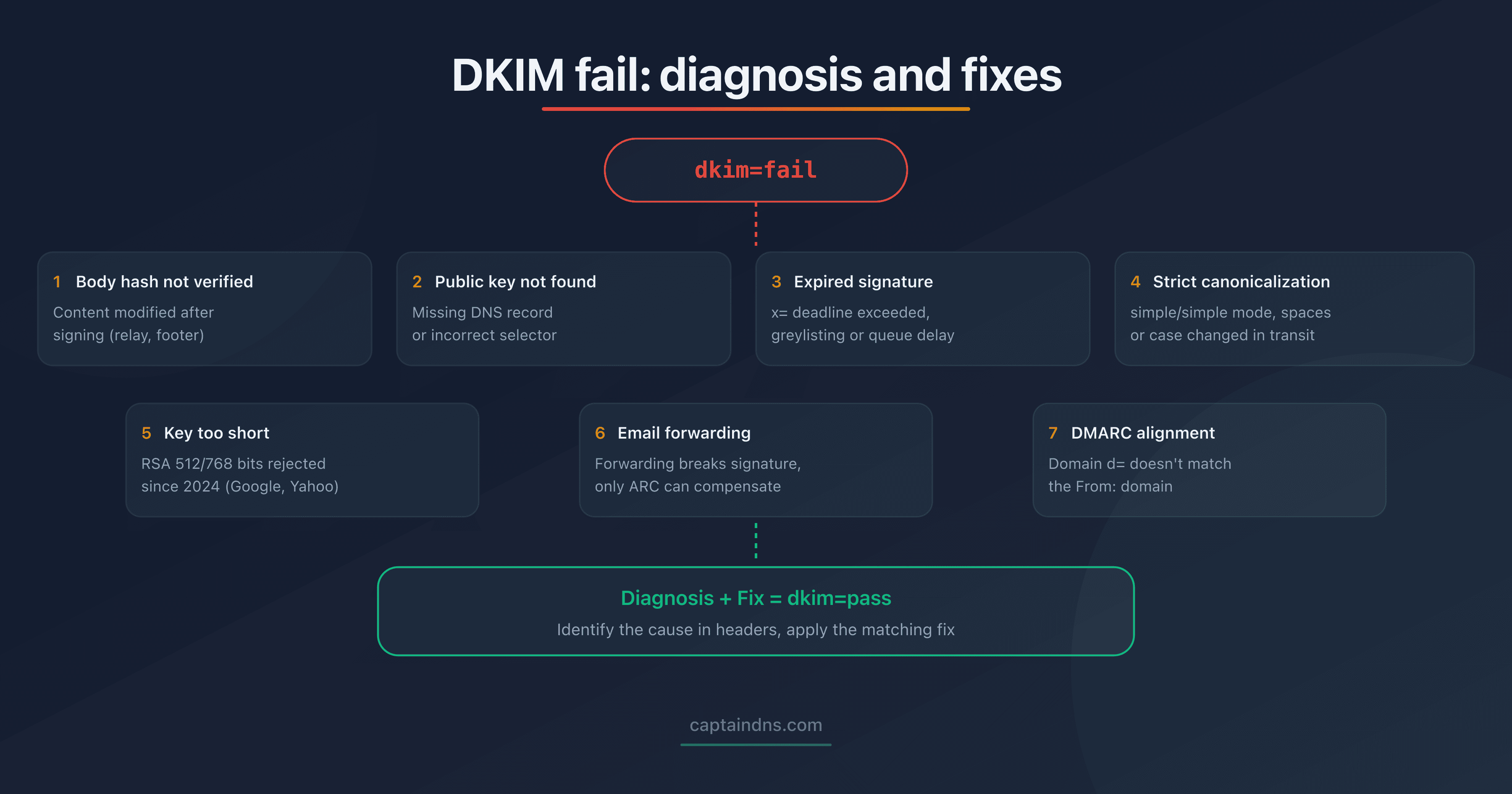
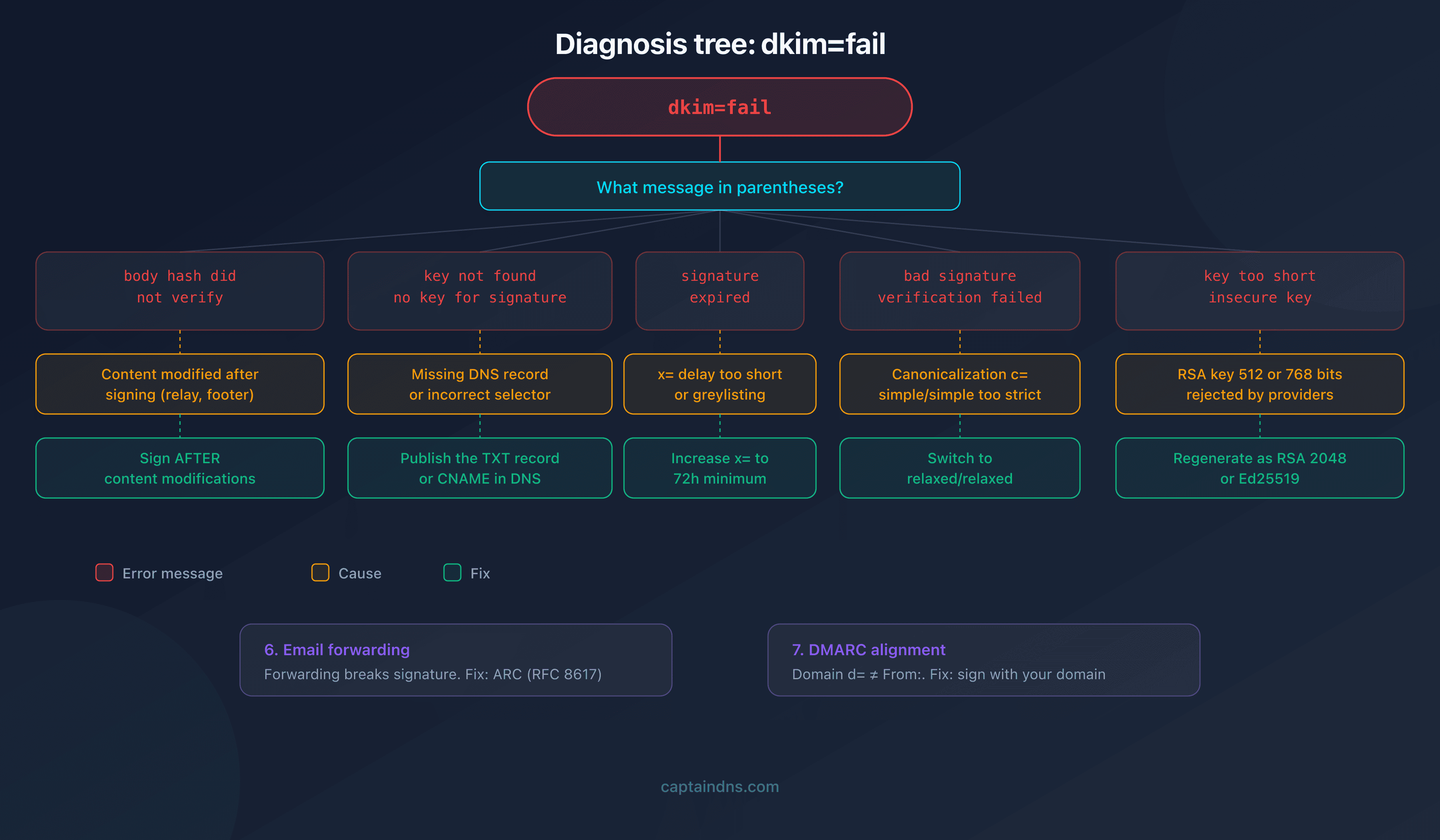
The 7 causes of a DKIM failure
Cause 1: body hash mismatch
Message: body hash did not verify
This is the most common error. The sending server computes a hash of the email body and includes it in the signature (bh= tag). The receiving server recomputes the hash. If the two don't match, the check fails.
Common causes:
- An intermediate relay modified the content (added footer, URL rewriting, antivirus)
- The mailing server adds a tracking pixel after signing
- An email proxy or DLP (Data Loss Prevention) system altered the message body
Diagnosis:
# Verify that the DKIM record is published
dig TXT google._domainkey.captaindns.com +short
Fix: identify the service modifying the content after signing. Configure it to act before DKIM signing, or exclude the modifications from the signed body.
Cause 2: public key not found
Message: key not found or no key for signature
The receiving server cannot find the DNS record selector._domainkey.domain. Without the public key, verification is impossible.
Common causes:
- The selector declared in the signature (
s=) doesn't match any DNS record - The record was accidentally deleted
- The CNAME to the provider (Google, Microsoft) is not configured
- DNS propagation is not yet complete
Diagnosis:
# Replace "selector" with the value of the s= field in the signature
dig TXT selector._domainkey.captaindns.com +short
If the command returns nothing, the record is missing.
Fix: publish (or republish) the TXT or CNAME DNS record matching the selector. Wait for DNS propagation (up to 48h depending on the TTL).
Cause 3: expired signature
Message: signature expired
The x= tag in the DKIM signature sets an expiration timestamp. If the receiving server verifies the signature after that date, it fails.
Common causes:
- The email sat in a queue too long (greylisting, slow receiving server)
- The
x=value is too short (e.g., 1 hour instead of 7 days) - Clock skew between servers
Fix: increase the signature validity period. Most providers use 7 days. If you control the sending server, make sure x= allows enough time (minimum 72 hours recommended).
Cause 4: canonicalization error
Message: bad signature or signature verification failed
Canonicalization defines how the server normalizes the message before verifying the signature. Two modes exist: simple and relaxed. If the DKIM header declares c=simple/simple but a relay modifies whitespace or header casing, verification fails.
Diagnosis: in the DKIM signature, look for the c= tag. If it's set to simple/simple, that's likely the cause.
Fix: switch to c=relaxed/relaxed. This mode tolerates the minor modifications (whitespace, casing) that email relays commonly make.
Cause 5: key too short
Message: key too short or insecure key
Since 2024, Google and Yahoo reject RSA keys of 512 and 768 bits. The minimum accepted size is 1024 bits, and 2048 bits is recommended.
Diagnosis:
# Retrieve the key and check its size
dig TXT google._domainkey.captaindns.com +short
# Copy the p= value and decode from Base64 to count the bits
Fix: generate a new 2048-bit RSA (or Ed25519) key pair and publish the new public key in DNS. Update your sending server configuration with the new private key.
Cause 6: email forwarding
Email forwarding is the hardest cause to fix. When an intermediate server retransmits a message, it may modify the content (adding headers, rewriting the return address). The original DKIM signature then becomes invalid.
Typical cases:
- Automatic forwarding from Gmail/Outlook to another mailbox
- Mailing lists that add a footer
- Email aliases that relay to another domain
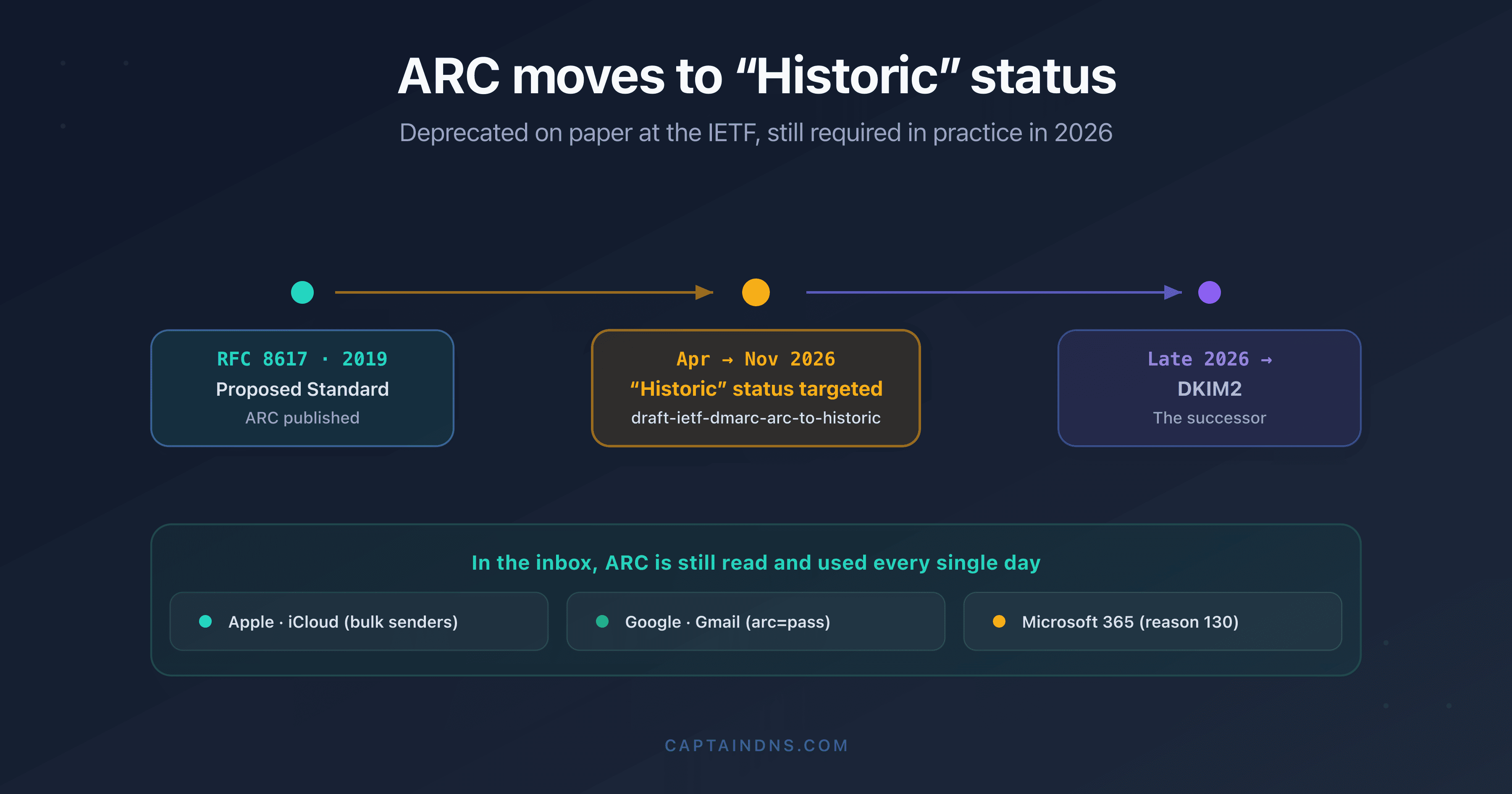
Fix: there is no universal solution. The ARC protocol (Authenticated Received Chain, RFC 8617) was designed for this case: each intermediate server adds its own ARC signature, forming a chain of trust. Gmail and Microsoft support ARC. On the sender side, you cannot prevent signature breakage during forwarding. On Microsoft 365, this DKIM broken by forwarding often shows up as a compauth=fail reason=000 in the header: see the guide on composite authentication and compauth reason codes.
Cause 7: DMARC alignment failure
Message: dmarc=fail (while dkim=pass)
This case is special. The DKIM signature is technically valid (dkim=pass), but DMARC fails because the d= domain in the signature doesn't match the From: domain. This is an alignment problem, not a signature problem.
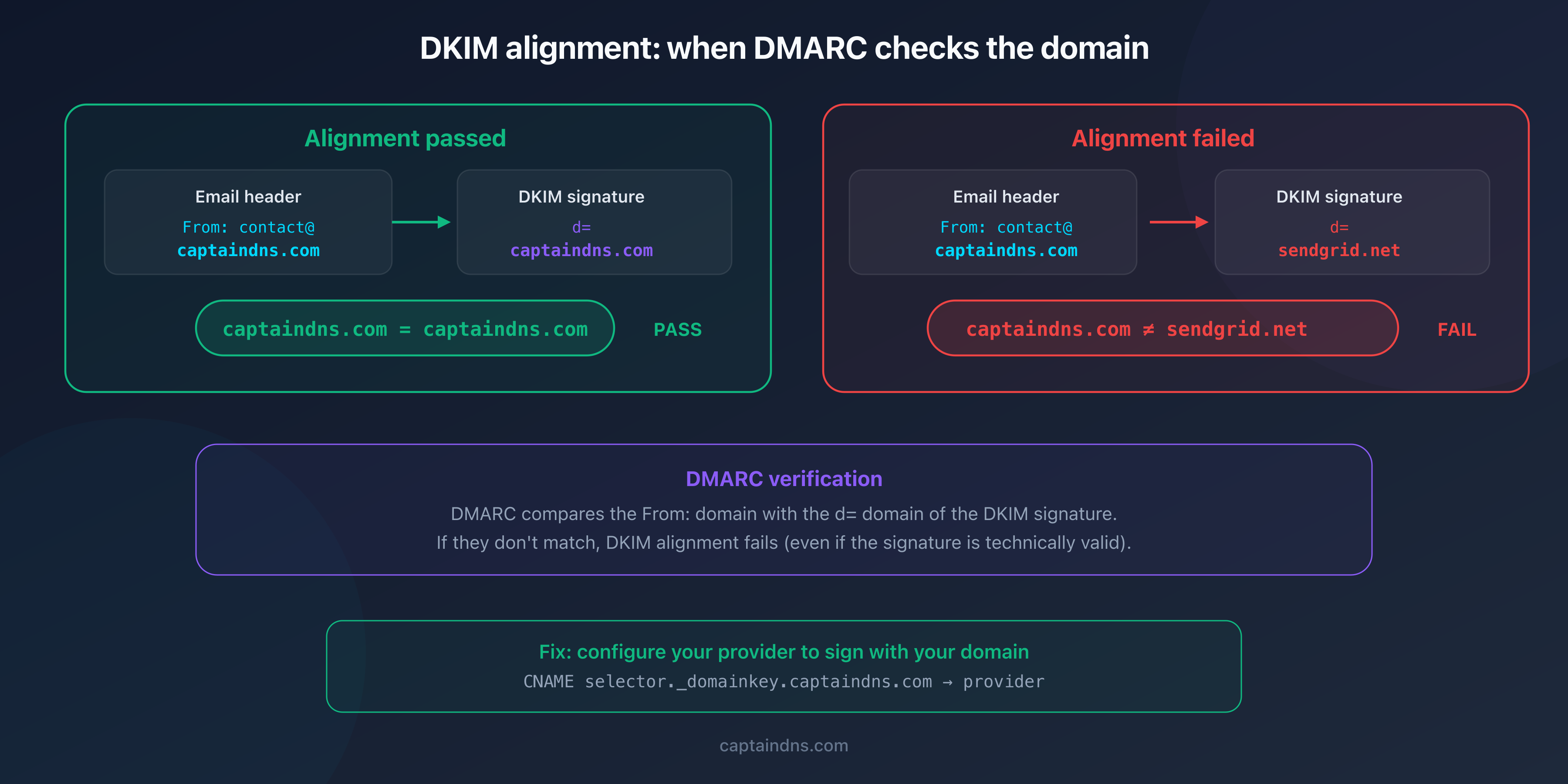
Example:
From: contact@captaindns.com- DKIM signature:
d=sendgrid.net(the provider signs with its own domain)
DKIM passes, but alignment fails because sendgrid.net ≠ captaindns.com.
Fix: configure your sending provider to sign with your domain (d=captaindns.com). With most providers (SendGrid, Mailchimp, Brevo), this involves creating a CNAME selector._domainkey.captaindns.com pointing to their infrastructure.
Quick diagnosis: summary table
| Symptom | Likely cause | Verification | Fix |
|---|---|---|---|
body hash did not verify | Content modified after signing | Identify the relay that modifies | Sign after modifications |
key not found | DNS record missing | dig TXT s._domainkey.domain | Publish the record |
signature expired | x= deadline exceeded | Compare x= with verification time | Increase the duration |
bad signature | Canonicalization too strict | Check c= in the signature | Switch to relaxed/relaxed |
key too short | RSA key <1024 bits | Decode the public key | Regenerate at 2048 bits |
dkim=pass + dmarc=fail | Domain alignment | Compare d= and From: | Sign with your domain |
Difference between dkim=fail, dkim=none, and dkim=temperror
These three verdicts indicate very different situations.
dkim=fail: a DKIM signature exists in the message, but verification failed. This is an active problem to fix.
dkim=none: no DKIM signature is present in the message. The sending server is not signing emails. Configure DKIM on your server or provider.
dkim=temperror: the receiving server could not verify the signature due to a temporary error (DNS timeout, overloaded server). Verification will be retried. If the problem persists, make sure your DNS servers respond quickly (low TTL, no SERVFAIL).
Recommended action plan
- Identify the exact verdict: open the email headers and note the text in parentheses after
dkim=fail - Check your DNS record: run an analysis with the DKIM checker to confirm the public key is published and syntactically valid
- Identify your active selectors: use the DKIM Selector Finder to scan known selectors on your domain
- Fix the identified cause: apply the fix matching your case (see table above)
- Monitor the results: after fixing, send test emails and verify that
dkim=passappears in the headers
FAQ
What does dkim=fail mean in email headers?
The dkim=fail verdict indicates that the message contains a DKIM signature, but the receiving server could not verify it. The text in parentheses (e.g., body hash did not verify) specifies the reason for the failure. This does not necessarily mean the email is fraudulent: a legitimate content modification in transit can also cause this failure.
Why does my DKIM fail even though the DNS record is correct?
If your DNS record is valid but DKIM fails, the problem likely comes from the message content. An intermediate relay (antivirus, DLP, proxy) may have modified the body after signing. Also check that the selector in the signature (s=) matches the one published in DNS.
What causes the 'body hash did not verify' message?
This message means that the body hash computed by the receiving server does not match the hash declared in the signature (bh= tag). The message body was modified between signing and verification. The most common causes are relays adding a footer, antivirus systems, and URL rewriting tools.
Can an email be delivered despite a DKIM failure?
Yes. DKIM alone does not determine delivery. It's the domain's DMARC policy that decides: with p=none, the email is delivered even if DKIM fails. With p=reject, the email is rejected only if SPF also fails (DMARC requires one of the two to pass). Many providers deliver the message to the spam folder rather than rejecting it.
What is the difference between dkim=fail and dkim=none?
dkim=fail means a signature exists but verification failed. dkim=none means no DKIM signature is present in the message. The first is a configuration problem; the second indicates that DKIM is not enabled at all on the sending server.
Does email forwarding always break the DKIM signature?
In most cases, yes. Forwarding often modifies the content (adding headers, rewriting addresses), which invalidates the original DKIM signature. The ARC protocol (RFC 8617) was designed to solve this problem by creating a chain of trust between intermediate servers. Gmail and Microsoft support ARC.
How do I verify that my DKIM fix worked?
After applying your fix, send a test email to a Gmail or Outlook address. Open the received message's headers and look for Authentication-Results. If you see dkim=pass, the fix is effective. You can also use an online testing tool that displays detailed authentication results.
Glossary
- DKIM (DomainKeys Identified Mail): email authentication protocol using cryptographic signatures, verifying the integrity of outgoing messages.
- Body hash: SHA-256 fingerprint of the email body, included in the DKIM signature (
bh=tag). - Selector: text identifier that forms the DNS address of the DKIM public key (
selector._domainkey.domain). - Canonicalization: message normalization (whitespace, casing) before computing the signature. Modes:
simpleorrelaxed. - ARC (Authenticated Received Chain): RFC 8617 protocol that preserves authentication results during email forwarding.
- DKIM alignment: DMARC verification that the
d=domain in the signature matches theFrom:domain.
Generate your DKIM keys in seconds: use the DKIM Generator to create a 2048-bit RSA or Ed25519 key pair with the DNS record ready to publish.
Related DKIM guides
- How to find your DKIM selector: 4 methods: email headers, DNS, admin console, and automatic scan.
- What is a DKIM record? The complete guide: how it works, DNS tags, RSA vs Ed25519, and key rotation.
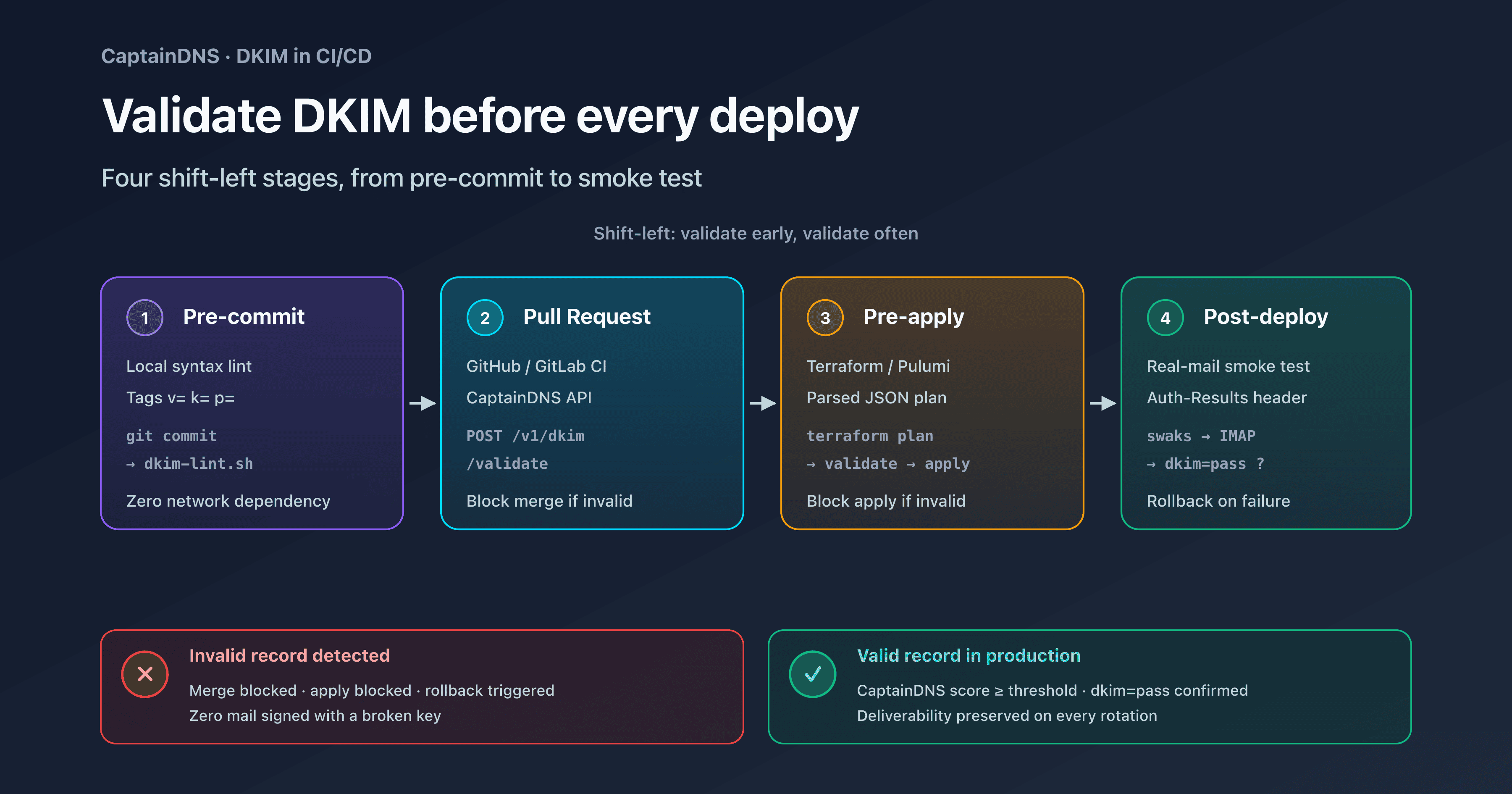
- Validate DKIM in your CI/CD: shift-left validation with GitHub Actions, GitLab CI, Terraform, and pre-commit.