What is a DKIM record? The complete guide
By CaptainDNS
Published on February 18, 2026
Updated on July 30, 2026
- A DKIM record is a DNS TXT record that publishes the public key used to verify the cryptographic signature of an email
- The sending server signs each message with its private key, and the receiving server verifies the signature via DNS
- The essential tags are
v=DKIM1(version),k=rsaork=ed25519(algorithm), andp=(Base64-encoded public key) - RSA 2048-bit is the current standard, while Ed25519 is faster but not yet universally supported
- DKIM alone doesn't protect against spoofing: you need to pair it with DMARC to verify domain alignment
You're setting up email authentication for your domain and you come across DKIM. You know it's important, but terms like "cryptographic signature," "selector," and "DNS public key" still feel unclear. This guide clears everything up.
DKIM (DomainKeys Identified Mail) is an email authentication protocol defined by RFC 6376. It allows the receiving server to verify that a message's content hasn't been altered between sending and delivery, and that the domain shown in the From: field actually authorized the email.
This guide covers the full picture: the signing cycle, the DNS record structure, available tags, choosing between RSA and Ed25519, how it works with DMARC, and key rotation. Whether you're a sysadmin, a marketing manager, or a developer, you'll have everything you need to configure and maintain DKIM properly.
What is DKIM? The concept in 30 seconds
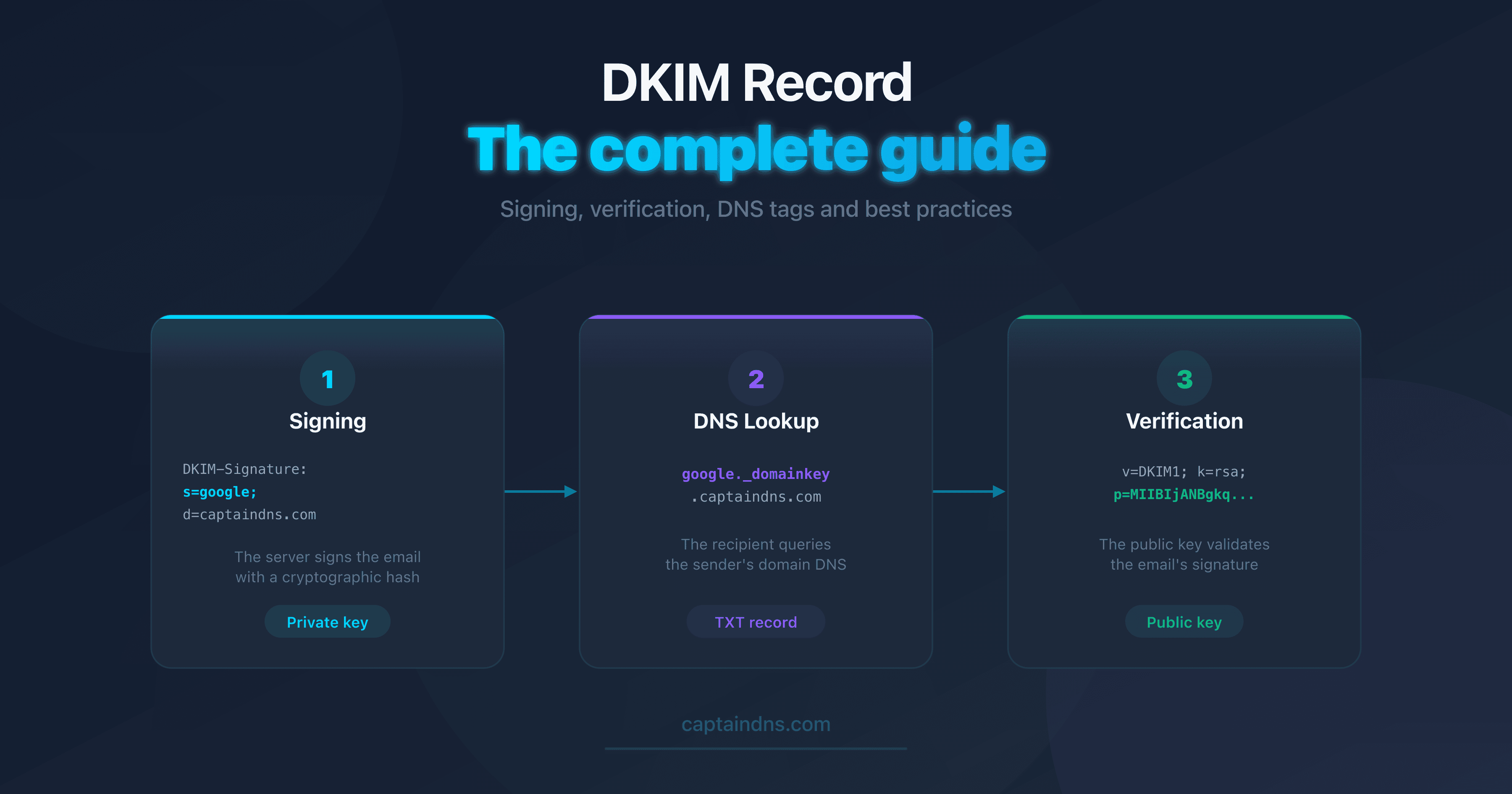
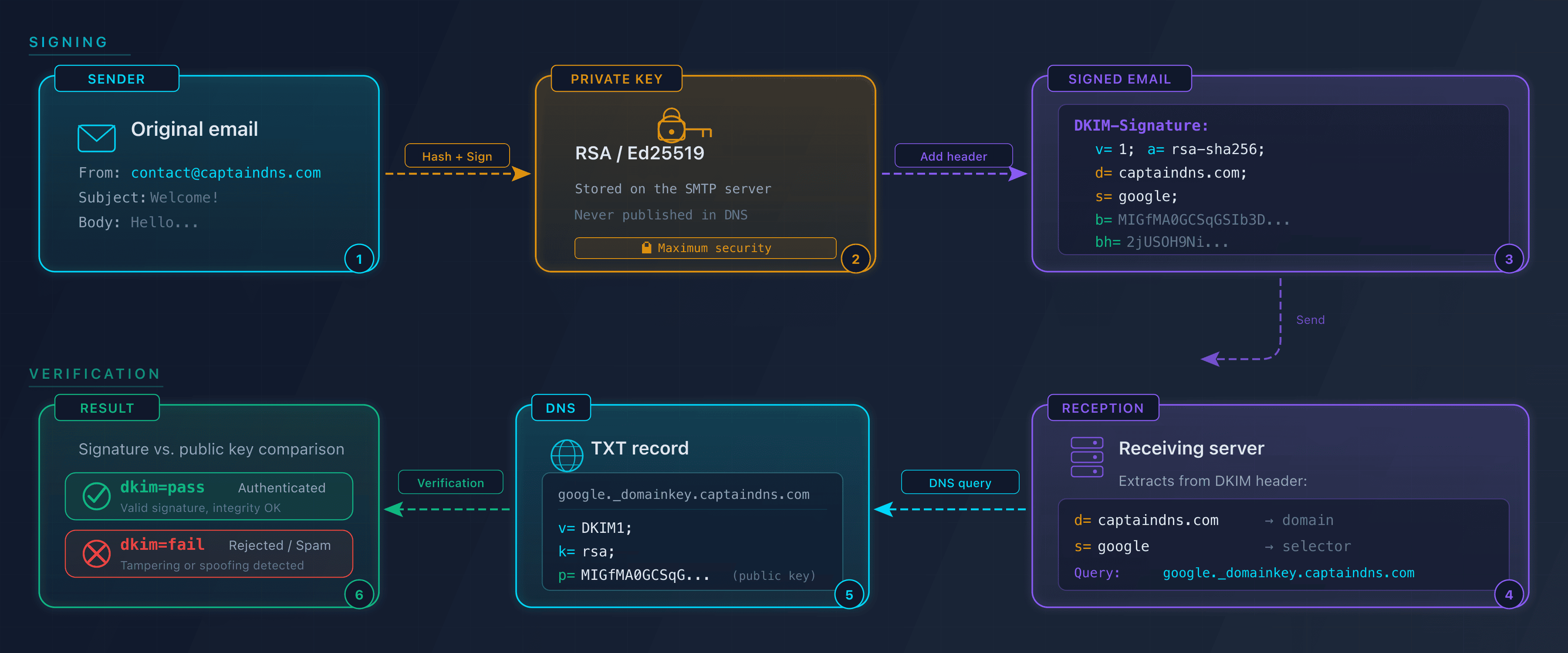
DKIM relies on asymmetric cryptography (public key / private key). The sending server holds a private key that it uses to sign every outgoing email. The corresponding public key is published in DNS as a TXT record, accessible to any receiving server.
When an email arrives, the receiving server:
- Reads the
DKIM-Signatureheader to identify the domain (d=) and the selector (s=) - Builds the DNS query:
<selector>._domainkey.<domain> - Retrieves the public key from the TXT record
- Verifies that the signature matches the message content
If the signature is valid, the message is authenticated. Otherwise, it fails DKIM verification.
How DKIM works: the complete cycle
Step 1: Signing by the sending server
When a user sends an email from captaindns.com, the sending server performs three operations:
- Selects the headers to sign:
From,To,Subject,Date,Message-ID(defined by theh=tag) - Computes a hash of the message body (SHA-256 algorithm, stored in
bh=) - Signs the hash with the RSA or Ed25519 private key, then adds the
DKIM-Signatureheader to the message
Here's an example DKIM-Signature header:
DKIM-Signature: v=1; a=rsa-sha256; c=relaxed/relaxed;
  d=captaindns.com; s=google; t=1739800000;
  h=from:to:subject:date:message-id;
  bh=2jUSOH9NhtVGCQWNr9BrIAPreKQjO6Sn7XIkfJVOzv8=;
  b=AuUoFEfDxTDkHlLXSZEpZj79LICEps6eda7W3deTVFOk...
Step 2: Verification by the receiving server
The receiving server extracts d=captaindns.com and s=google from the header, then queries DNS:
dig TXT google._domainkey.captaindns.com +short
Result:
"v=DKIM1; k=rsa; p=MIIBIjANBgkqhkiG9w0BAQEFAAOC..."
It then uses the public key (p=) to verify the signature (b=). If the recomputed hash matches, verification succeeds.
Anatomy of a DKIM record
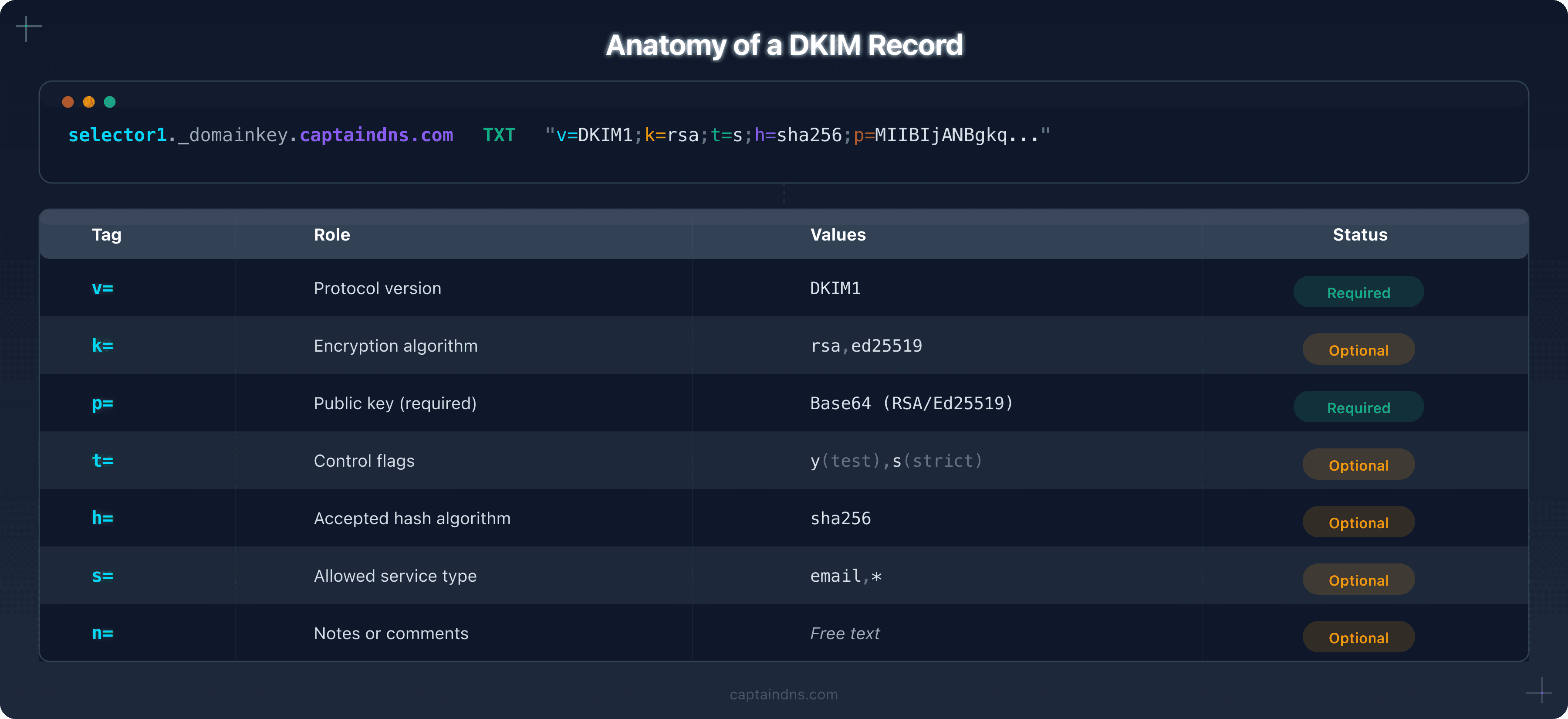
The DKIM record is published as a DNS TXT record at <selector>._domainkey.<domain>.
Full DNS format
google._domainkey.captaindns.com IN TXT "v=DKIM1; k=rsa; t=s; p=MIIBIjANBgkq..."
The essential tags
RFC 6376 §3.6.1 makes exactly one tag mandatory: p=, the public key. v= is recommended and defaults to DKIM1; k= is optional and defaults to rsa. Publishing v=DKIM1 is still standard practice, and leaving it out raises a warning in most validators.
| Tag | Role | Values | Example |
|---|---|---|---|
p= | Base64-encoded public key, the only mandatory tag | Base64 string | p=MIIBIjANBgkq... |
v= | Protocol version, recommended | DKIM1 (only valid value) | v=DKIM1 |
The p= tag is the core of the record. If it's empty (p=), it means the key has been revoked. The receiving server will then treat any signature using that selector as invalid.
Optional tags
| Tag | Role | Possible values | Default |
|---|---|---|---|
k= | Key algorithm | rsa, ed25519 | rsa |
t= | Flags | y (test), s (strict) | none |
h= | Accepted hash algorithms | sha256, sha1 | all |
s= | Service type | email, * | * (all) |
n= | Human-readable notes | Free text | none |
t= flag details:
t=y: test mode. Receiving servers should not penalize a DKIM failure. Useful during initial deployment.t=s: strict mode. The domain in theFrom:header must match exactly thed=domain in the signature (no subdomains).
The s= tag: restricting the key's usage scope
The s= tag (service type) declares what the published key may be used for. RFC 6376 defines two values:
email: the key can only sign email messages*: the key can sign every kind of service (wildcard)
If the tag is absent, the default behavior is equivalent to s=*: the key is usable without any service restriction. RFC 6376 §3.6.1 even allows receiving servers to ignore a signature whose s= tag contains neither email nor *.
Why set s=email explicitly? To reduce the attack surface. If the private key leaks, an attacker who tries to use it to sign another kind of service (a hypothetical future extension of DKIM to other protocols) would see the signature refused by strict receivers. It is a cheap defense-in-depth measure to publish.
CaptainDNS recommendation: declare s=email explicitly rather than leaving it implicit. It clarifies intent and protects against unplanned reuse of the key.
Example DNS records:
# Recommended: explicit scope limited to email
v=DKIM1; k=rsa; s=email; p=MIIBIjANBgkq...

# Acceptable: default behavior, equivalent to s=*
v=DKIM1; k=rsa; p=MIIBIjANBgkq...

# Permissive: explicit but unrestricted
v=DKIM1; k=rsa; s=*; p=MIIBIjANBgkq...
→ Audit your DKIM tags with the DKIM Syntax Check.
Full decoded example
selector1._domainkey.captaindns.com IN TXT "v=DKIM1; k=rsa; t=s; h=sha256; p=MIIBIjANBgkqhkiG9w0BAQEFAAOCAQ8AMIIBCgKCAQEA..."
| Element | Meaning |
|---|---|
selector1._domainkey.captaindns.com | DNS location (selector selector1, domain captaindns.com) |
v=DKIM1 | DKIM protocol version 1 |
k=rsa | RSA key |
t=s | Strict mode (no subdomains) |
h=sha256 | Accepts only SHA-256 |
p=MIIBIj... | RSA 2048-bit public key encoded in Base64 |
RSA vs Ed25519: which key to choose?
RFC 8463 (2018) introduced Ed25519 support as an alternative to RSA for DKIM.
| Criterion | RSA 2048 | RSA 4096 | Ed25519 |
|---|---|---|---|
| Public key size | ~392 characters | ~736 characters | ~44 characters |
| Signature size | 256 bytes | 512 bytes | 64 bytes |
| Verification speed | Fast | Medium | Very fast |
| Security | Strong (2030+) | Very strong | Very strong |
| Provider support | Universal | Universal | Partial (Google, Fastmail) |
| DNS compatibility | OK | May exceed 255-byte TXT limit | OK |
Recommendations
- RSA 2048: the default choice. Supported by all providers and servers. Sufficient for current security needs.
- RSA 4096: for organizations with high security requirements. Watch out for TXT record size limits (may require multiple 255-byte strings).
- Ed25519: recommended as a dual signature (Ed25519 + RSA 2048) for transition. Servers that don't support Ed25519 will ignore the signature and fall back to the RSA one.
Stop using RSA 1024-bit. Google, Microsoft, and Yahoo have considered 1024-bit keys weak since 2024.
DKIM and DMARC: the essential link
DKIM authenticates the content of a message but doesn't verify whether the domain shown in the From: field is legitimate. That's DMARC's job.
DKIM alignment
DMARC checks that the d= domain in the DKIM signature matches the From: domain. Two modes exist:
| Mode | Behavior | Example |
|---|---|---|
| Relaxed (default) | The d= domain can be a subdomain of the From: | d=mail.captaindns.com valid for From: contact@captaindns.com |
| Strict | The d= domain must match the From: exactly | d=captaindns.com required for From: contact@captaindns.com |
The DKIM alignment mode is configured in the DMARC record using the adkim tag:
_dmarc.captaindns.com IN TXT "v=DMARC1; p=reject; adkim=s; rua=mailto:dmarc@captaindns.com"
Why DKIM alone isn't enough
Without DMARC, an attacker can send an email with From: contact@captaindns.com while signing with their own DKIM domain (d=attacker.com). The DKIM signature will be valid, but the recipient sees a fake sender. DMARC blocks this scenario by requiring alignment between the From: domain and the d= domain.
DKIM key rotation: why and how
Why rotate keys?
A DKIM key used for too long poses risks:
- Compromise: the longer a key is exposed, the more vulnerable it becomes to attack
- Compliance: some standards (PCI DSS, SOC 2) require regular rotation
- Best practices: Google recommends quarterly rotation
Recommended frequency
| Key size | Minimum frequency | Recommendation |
|---|---|---|
| RSA 1024 | Immediately | Migrate to 2048-bit |
| RSA 2048 | Every 6 months | Every 3 months |
| RSA 4096 | Every 12 months | Every 6 months |
| Ed25519 | Every 12 months | Every 6 months |
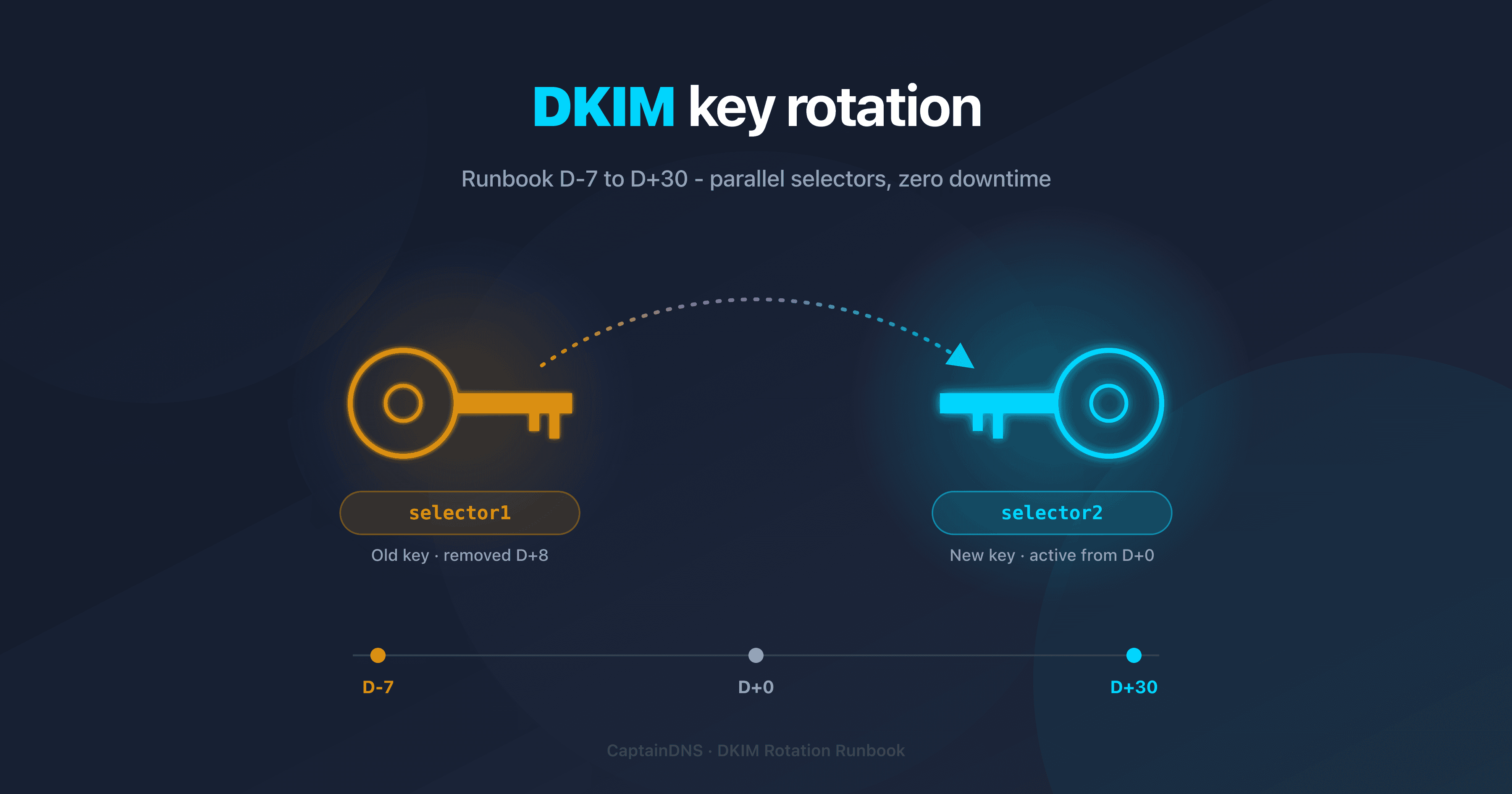
Step-by-step procedure
- Generate a new key pair with a new selector (e.g.,
s202602) - Publish the new public key in DNS:
s202602._domainkey.captaindns.com - Wait for DNS propagation (24-48 hours)
- Configure the sending server to use the new selector
- Verify that outgoing emails are signed with the new selector
- Revoke the old key by publishing an empty
p=in the old DNS record - Delete the old record after 30 days (to allow in-transit emails to be processed)
Common DKIM record mistakes
| Mistake | Symptom | Solution |
|---|---|---|
| 1024-bit key | Warning from Google/Yahoo | Migrate to RSA 2048-bit |
Empty p= tag | DKIM fail: key revoked | Republish the public key or use a new selector |
| Selector not found | DKIM fail: no key for signature | Check DNS, propagation, and selector spelling |
| Truncated public key | DKIM fail: bad RSA signature | Verify the TXT record isn't cut off (255-byte per string limit) |
Missing v=DKIM1 | Some servers ignore the record | Always include v=DKIM1 as the first tag |
From header not signed | DMARC fails despite valid DKIM | Add from to the h= tag in the signature |
| Test mode left on | t=y still active in production | Remove t=y once DKIM is validated |
Recommended action plan
- Check your current setup: use a DKIM Checker to analyze your existing DKIM records
- Inventory your selectors: identify all active selectors on your domain with an automatic discovery tool
- Check key sizes: any key smaller than 2048 bits should be replaced
- Configure DMARC: publish a DMARC record with
adkim=r(relaxed) to start, then switch to strict (adkim=s) once everything is stable - Schedule rotation: mark quarterly DKIM key rotation in your calendar
FAQ
What is a DKIM record?
A DKIM record is a DNS TXT record published at selector._domainkey.domain.com. It contains the public key that allows receiving servers to verify the cryptographic signature added to each outgoing email. The essential tags are v=DKIM1 (version), k= (algorithm), and p= (Base64 public key).
How does DKIM signing work?
The sending server computes a SHA-256 hash of the selected headers and the message body, then signs that hash with its private key. The signature is added in the DKIM-Signature header. The receiving server retrieves the public key via DNS and verifies that the signature matches the received content.
What are the tags in a DKIM record?
The only mandatory tag is p= (the Base64 public key). v= is recommended: when it is missing, the receiver assumes DKIM1. Optional tags include k= (algorithm, rsa by default), t= (flags: y for test, s for strict), h= (accepted hash algorithms), s= (service type), and n= (notes).
What is the difference between RSA and Ed25519 for DKIM?
RSA 2048 is the current standard, supported by all providers. Ed25519 produces shorter signatures (64 bytes vs. 256) and is faster, but is only supported by a few providers (Google, Fastmail). The best approach is dual signing: Ed25519 + RSA 2048.
How do I verify a DKIM record?
Use the command dig TXT selector._domainkey.domain.com +short to query DNS. If a TXT record containing v=DKIM1 and p= is returned, the public key is published. For a full analysis (key size, syntax, validity), use an online DKIM verification tool.
Why is DKIM key rotation important?
A key used for too long increases the risk of compromise. Google recommends quarterly rotation. The procedure involves creating a new selector with a new key pair, publishing the new key in DNS, switching the sending server over, then revoking the old key by emptying its p= tag.
What is the link between DKIM and DMARC?
DKIM authenticates a message's content, while DMARC verifies that the DKIM signature domain (d=) matches the From: domain. Without DMARC, an attacker can sign an email with their own domain while spoofing the From:. DMARC blocks this scenario through alignment verification.
Glossary
- DKIM (DomainKeys Identified Mail): an email authentication protocol that uses asymmetric cryptography to sign outgoing messages and allow recipients to verify their integrity.
- DKIM selector: a text identifier (e.g.,
google,selector1) that, combined with the domain, forms the DNS address of the public key (selector._domainkey.domain). - Public key: the part of the cryptographic key pair published in DNS, used by receiving servers to verify DKIM signatures.
- DKIM alignment: DMARC's verification that the
d=domain in the DKIM signature matches theFrom:domain of the email. - Ed25519: a digital signature algorithm introduced by RFC 8463 as an alternative to RSA for DKIM, offering shorter signatures and faster verification.
- Key rotation: the process of regularly replacing DKIM key pairs to limit the risk of compromise.
Generate your DKIM keys in seconds: use the DKIM Generator to create an RSA 2048 or Ed25519 key pair with the DNS record ready to publish.
Related DKIM guides
- How to find your DKIM selector: 4 methods: extract the selector from headers, admin console, DNS, or an automatic tool
- DKIM fail: all causes and how to fix them: body hash, invalid key, expired signature, forwarding, alignment, and step-by-step fixes.