SPF PermError: the complete guide to understanding, diagnosing and fixing this error
By CaptainDNS
Published on March 4, 2026
- An SPF PermError is a permanent error that renders your SPF record invalid and causes your emails to be rejected
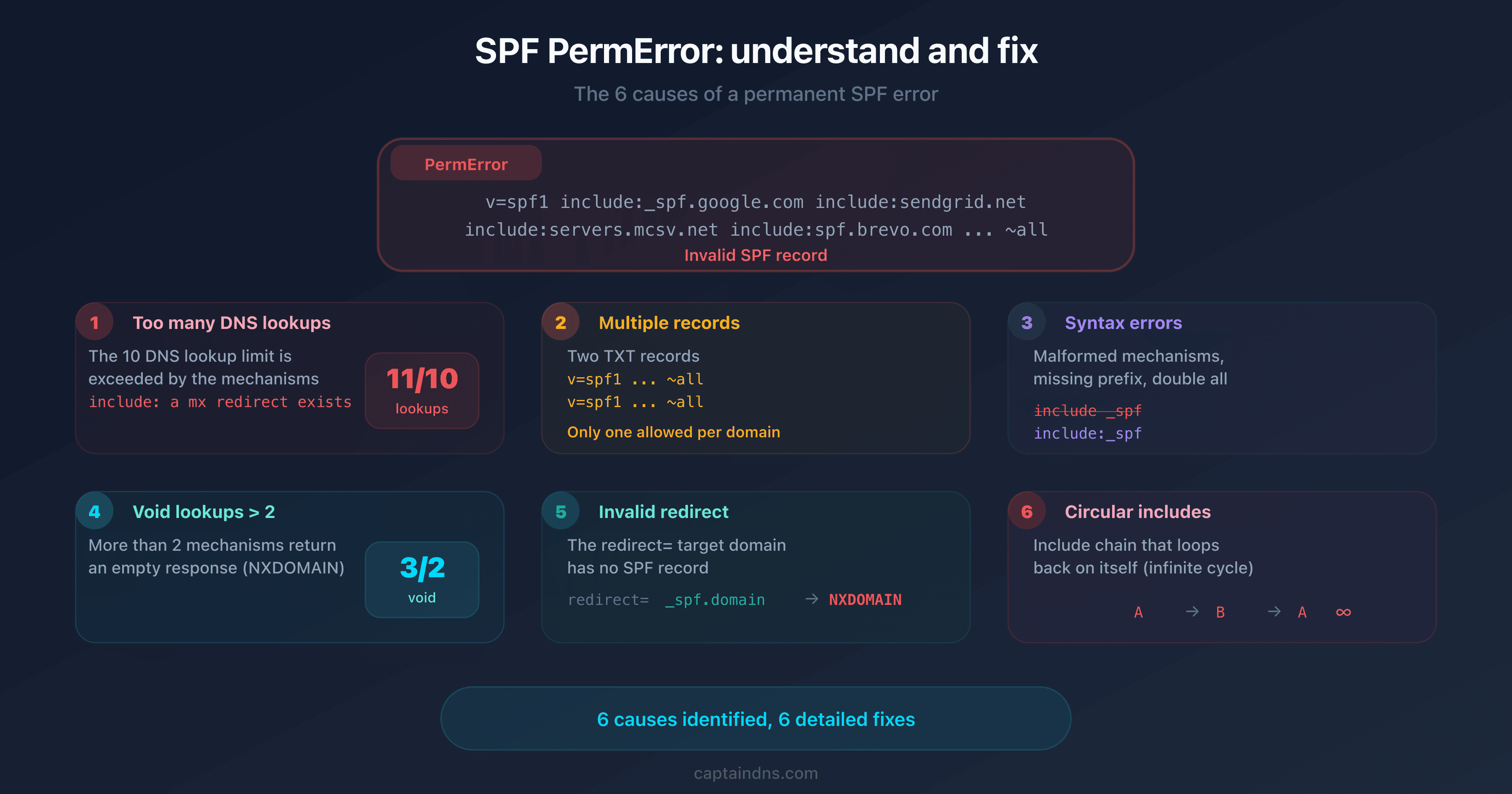
- The 6 causes: exceeding 10 DNS lookups, multiple SPF records, syntax errors, void lookups > 2, invalid redirect, circular includes
- PermError causes DMARC to fail in cascade: if DKIM also fails, your emails are rejected or sent to spam
- Diagnosis in 6 steps: check for duplicates, syntax, the lookup counter, void lookups, the redirect and loops
- Each cause has a specific fix: merging, rewriting, flattening, removing invalid mechanisms
Your DMARC monitoring suddenly shows hundreds of permerror results for your domain. Your legitimate emails are being rejected by Gmail, Outlook and Yahoo. Yet you have not changed anything in your SPF configuration recently.
SPF PermError is one of the most common and most misunderstood email authentication errors. Unlike a simple SPF failure (fail or softfail), PermError means that your record is structurally invalid: receiving servers cannot even evaluate it. And the causes are numerous, from exceeding the 10 lookup limit to a simple syntax error.
This guide covers the 6 possible causes of an SPF PermError, explains how to identify exactly which one affects your domain and provides the appropriate fix for each situation.
What is an SPF PermError?
Definition according to RFC 7208
RFC 7208, section 2.6.7 defines the permerror result as a permanent error in SPF evaluation. This result is returned when the SPF record cannot be correctly interpreted by the receiving server.
Unlike other SPF results (pass, fail, softfail, neutral), PermError indicates a problem with the structure of the record, not with the sender's authorization. The record is broken and no authorization decision can be made.
Difference between PermError and TempError
| Result | Type | Cause | Action |
|---|---|---|---|
| PermError | Permanent error | Invalid SPF record | Fix required by the administrator |
| TempError | Temporary error | DNS timeout, server unavailable | Resolves automatically, retry |
fail | Normal result | Unauthorized IP | Verify the sender |
softfail | Normal result | Unauthorized IP (permissive mode) | Accepted with marking |
TempError is transient: a momentarily unavailable DNS server can trigger it. PermError, on the other hand, persists as long as the record is not fixed. Every email sent from your domain triggers the same error.
The 6 causes of an SPF PermError
Cause 1: exceeding the 10 DNS lookup limit
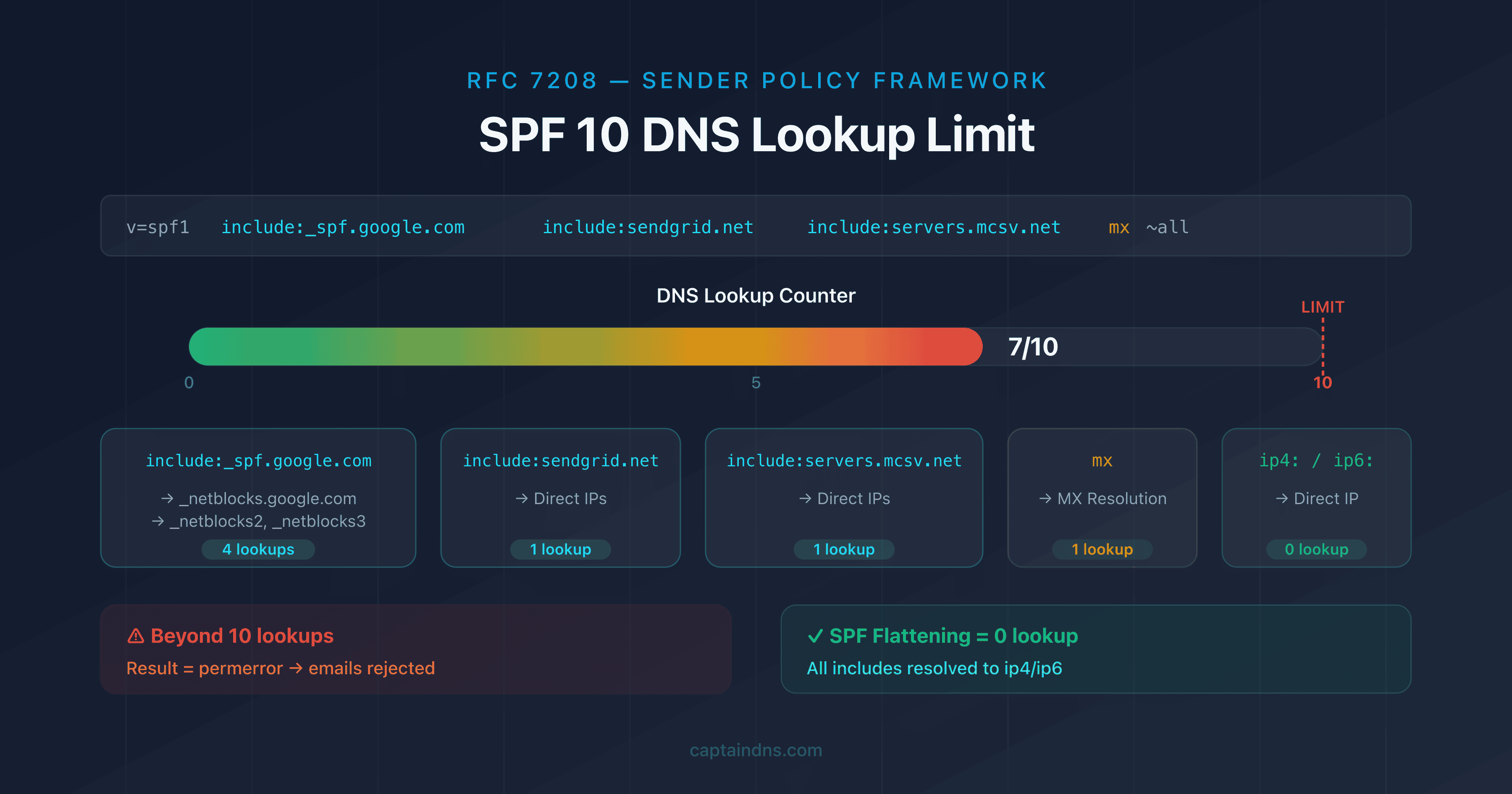
This is the most common cause. RFC 7208 limits SPF evaluation to 10 DNS queries. The include:, a, mx, redirect and exists mechanisms each count as one lookup. At the 11th lookup, the server immediately returns permerror.
# Example: 12 lookups (permerror)
v=spf1 include:_spf.google.com include:sendgrid.net include:servers.mcsv.net include:spf.brevo.com include:spf.protection.outlook.com mx ~all
With Google Workspace (4 lookups), SendGrid (2), Mailchimp (1), Brevo (2), Microsoft 365 (2) and an MX (1), the total reaches 12. The first guide in this series covers the methods to solve this specific problem.
Cause 2: multiple SPF records on the same domain
RFC 7208 requires that a domain publishes only one TXT record starting with v=spf1. If your DNS zone contains two SPF records, the result is always permerror.
# INCORRECT: two SPF records (permerror)
captaindns.com.  TXT  "v=spf1 include:_spf.google.com ~all"
captaindns.com.  TXT  "v=spf1 include:sendgrid.net ~all"

# CORRECT: a single merged record
captaindns.com.  TXT  "v=spf1 include:_spf.google.com include:sendgrid.net ~all"
This error commonly occurs when a new service is added by copy-pasting the record provided by the vendor, without merging it with the existing one.
Cause 3: syntax errors
A typo, an extra space or a malformed mechanism will render the record invalid:
| Error | Example | Fix |
|---|---|---|
| Missing prefix | include:_spf.google.com ~all | Add v=spf1 at the beginning |
| Invalid mechanism | v=spf1 include _spf.google.com ~all | Replace the space with : |
| Malformed IP | v=spf1 ip4:192.168.1 ~all | Correct to ip4:192.168.1.0/24 |
ptr mechanism | v=spf1 ptr:captaindns.com ~all | Remove it (deprecated by RFC 7208) |
Double all | v=spf1 include:_spf.google.com ~all -all | Keep only one all |
Cause 4: void lookups (limit of 2)
RFC 7208, section 11.1, imposes a second limit that is often overlooked: a maximum of 2 void lookups. A void lookup occurs when a DNS mechanism returns an empty response (NXDOMAIN or no results).
# Example: includes pointing to nonexistent domains
v=spf1 include:old-service.captaindns.com include:deleted-service.captaindns.com include:_spf.google.com ~all
If old-service.captaindns.com and deleted-service.captaindns.com return NXDOMAIN, you hit 2 void lookups. A third invalid include would trigger the PermError.
Cause 5: redirect to a domain without SPF
The redirect= mechanism redirects SPF evaluation to another domain. If that domain has no SPF record, the result is permerror.
# INCORRECT: target domain without an SPF record
v=spf1 redirect=_spf.captaindns.com
# (if _spf.captaindns.com has no TXT v=spf1 → permerror)

# CORRECT: target domain with a valid SPF record
v=spf1 redirect=_spf.captaindns.com
# (with _spf.captaindns.com: "v=spf1 ip4:203.0.113.0/24 ~all")
Cause 6: circular or unresolvable includes
If your SPF contains a chain of includes that loops back on itself, evaluation fails:
# Circular loop (permerror)
# captaindns.com       → v=spf1 include:_spf.captaindns.com ~all
# _spf.captaindns.com  → v=spf1 include:captaindns.com ~all
This case is rare but can occur during poorly coordinated DNS reconfigurations.
How to diagnose an SPF PermError
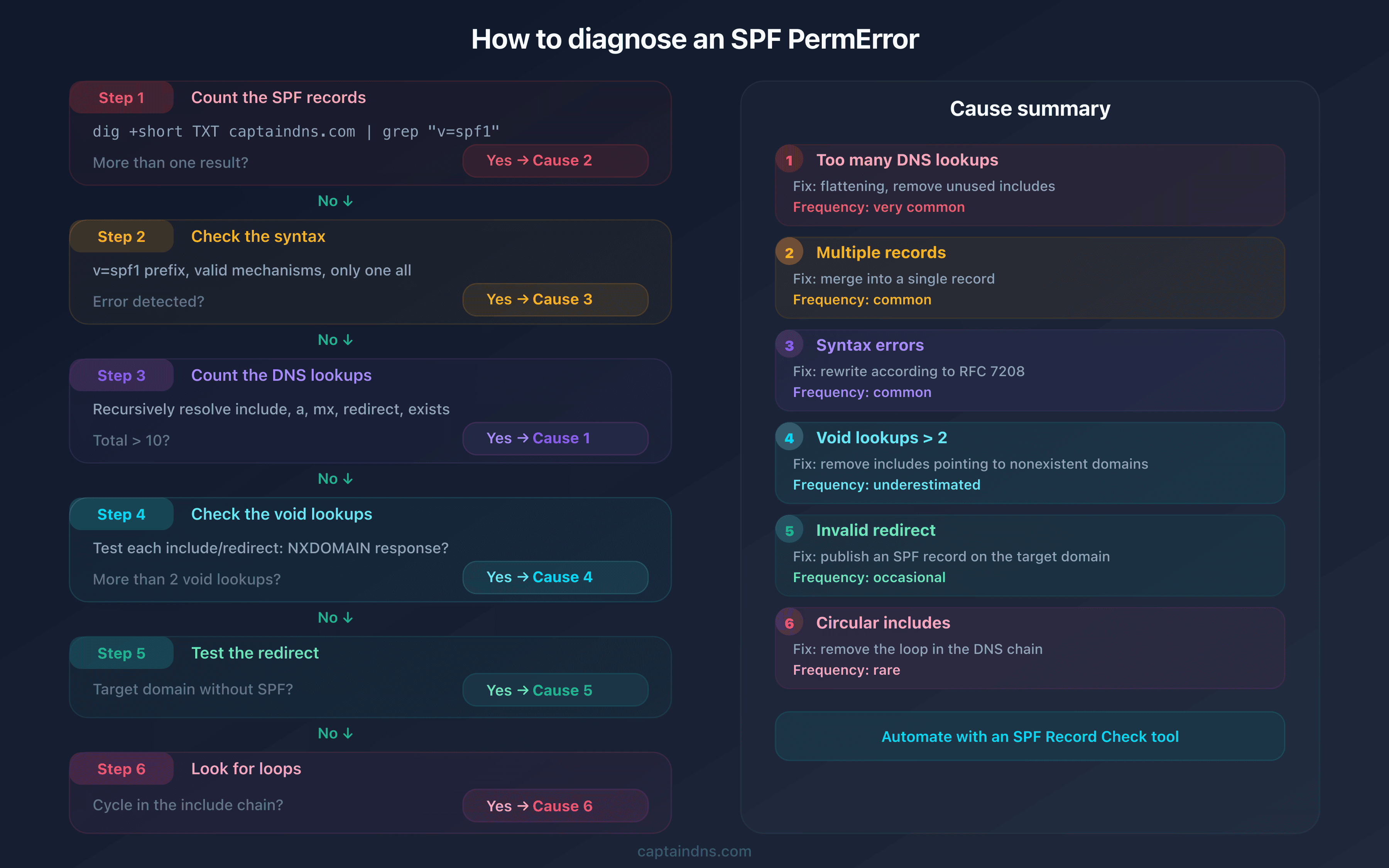
Follow these steps in order to identify the exact cause:
Step 1: check the number of SPF records
dig +short TXT captaindns.com | grep "v=spf1"
If the command returns more than one line, it is cause 2. Merge the records.
Step 2: check the syntax
Every mechanism must be properly formatted: include:domain, ip4:address/mask, mx, a. The most common errors: a space instead of :, missing v=spf1 prefix, double all.
Step 3: count the DNS lookups
Recursively resolve every include:, a, mx, redirect and exists. The total must not exceed 10.
Step 4: check the void lookups
Test each domain referenced by include: and redirect=. If more than 2 return NXDOMAIN or an empty response, it is cause 4.
Step 5: test the redirect
If your SPF uses redirect=, verify that the target domain has a valid SPF record.
Step 6: look for loops
Follow the chain of includes manually to detect any cycles.
How to fix each type of PermError
Multiple records: merge
Collect the mechanisms from each SPF record and combine them into one:
# Before: 2 records (permerror)
"v=spf1 include:_spf.google.com ~all"
"v=spf1 include:sendgrid.net ~all"

# After: 1 single record
"v=spf1 include:_spf.google.com include:sendgrid.net ~all"
Create your merged record with our SPF Generator.
Syntax errors: rewrite
Compare your record against the official RFC 7208 syntax. Points to check:
- The
v=spf1prefix is mandatory and must be in first position - Each mechanism is separated by a single space
- The
include:andredirect=mechanisms are followed by a valid domain - Only one
allmechanism in the last position - The
ptrmechanism is deprecated, remove it
DNS lookups: reduce below 10
Three approaches to reduce the number of lookups:
- Remove unused includes: delete services you no longer use
- Replace with direct IPs: for your own servers, use
ip4:andip6:instead ofinclude: - SPF flattening: automatically resolve all includes into IP addresses with our SPF Flattener
Void lookups: clean up invalid references
Remove or correct every include: that points to a nonexistent domain. Verify that all referenced domains have a valid DNS record.
Invalid redirect: publish the target SPF
Make sure the domain used with redirect= has a valid v=spf1 ... TXT record.
SPF PermError and DMARC: the domino effect
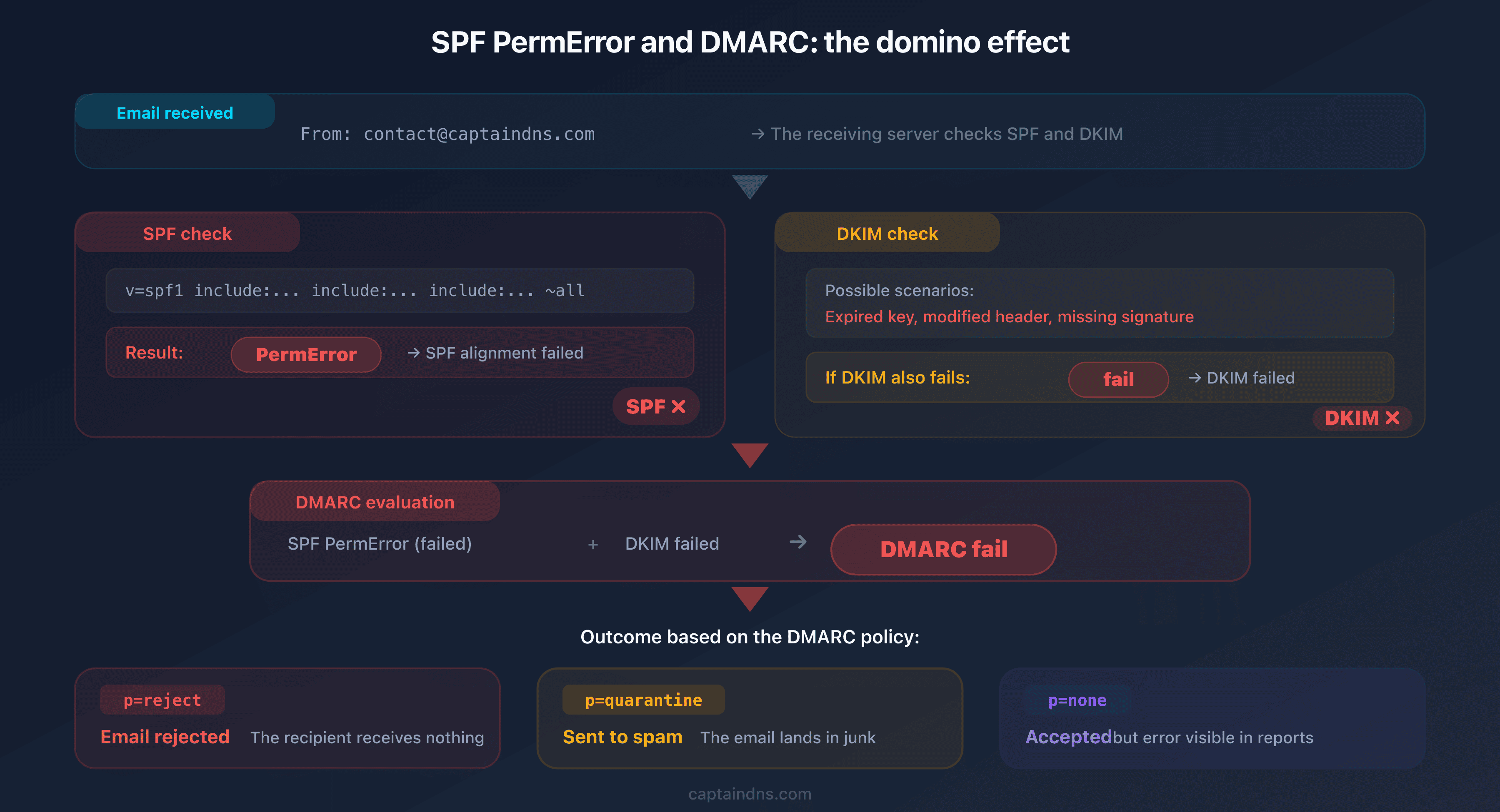
An SPF PermError does not stay isolated. DMARC checks two authentication mechanisms: SPF and DKIM. When SPF returns permerror, DMARC considers SPF alignment as failed. If DKIM also fails (expired key, modified header, invalid signature), both DMARC pillars fall.
The cascade is straightforward:
- SPF PermError: DMARC cannot validate SPF alignment
- If DKIM also fails: DMARC fails entirely
- With
p=reject: the email is rejected by the receiving server - With
p=quarantine: the email is placed in spam
The problem is particularly insidious with a p=none DMARC policy: emails get through but your DMARC reports show increasing failure rates. The day you switch to p=reject, every email with an SPF PermError gets rejected.
Recommended action plan
- Diagnose the exact cause: use the 6 verification steps to identify the type of PermError
- Apply the specific fix: each cause has its own correction method
- Test before publishing: validate your new record in a diagnostic tool before modifying your DNS zone
- Check the DMARC impact: after fixing, confirm that your DMARC reports no longer show PermError
- Set up monitoring: check your SPF record monthly to detect regressions
FAQ
What is an SPF PermError?
An SPF PermError is a permanent error returned when an SPF record cannot be correctly evaluated by the receiving server. Unlike a TempError (transient), the PermError persists until the record is fixed by the DNS administrator.
What are the most common causes of an SPF PermError?
The 6 main causes are: exceeding the 10 DNS lookup limit, having multiple SPF records on the same domain, syntax errors, exceeding 2 void lookups, a redirect to a domain without SPF and circular includes.
Does an SPF PermError cause DMARC to fail?
Yes. DMARC considers an SPF PermError as a failed SPF alignment. If DKIM also fails, DMARC fails entirely. With a p=reject policy, emails are then rejected by the receiving server.
How can I tell if my SPF has a PermError?
Use an SPF diagnostic tool that evaluates your record in real time. Aggregate DMARC reports (RUA format) also indicate SPF results for each sending source, including PermErrors.
What is the difference between PermError and TempError?
PermError is a permanent error caused by an invalid SPF record (syntax, lookups, structure). TempError is a temporary error caused by a transient DNS issue (timeout, server unavailable). TempError generally resolves on its own, while PermError requires manual intervention.
What is a void lookup?
A void lookup occurs when a DNS mechanism in your SPF returns an empty response (NXDOMAIN or no results). RFC 7208 limits void lookups to 2 per SPF evaluation. Beyond that, the result is PermError, even if the total lookup count remains below 10.
Can you get a PermError with fewer than 10 lookups?
Yes. PermError can be triggered by causes other than exceeding 10 lookups: multiple SPF records, syntax errors, void lookups exceeding 2, invalid redirect or circular includes. The lookup counter is only one of the 6 necessary checks.
Glossary
- PermError: permanent error returned when an SPF record is structurally invalid and cannot be evaluated by the receiving server.
- TempError: temporary error returned when a transient DNS issue prevents SPF evaluation. Usually resolves automatically.
- Void lookup: a DNS query that returns an empty response (NXDOMAIN or no results). Limited to 2 per SPF evaluation according to RFC 7208.
- DMARC: an email authentication protocol that checks SPF and DKIM alignment to decide how to handle messages (accept, send to spam, reject).
- RFC 7208: the official specification for the SPF (Sender Policy Framework) protocol that defines evaluation rules, lookup limits and possible results.
Check your SPF record now: use our SPF Record Check to diagnose errors and fix your SPF before it affects your deliverability.
Related SPF guides
- SPF "Too Many DNS Lookups": The Complete Guide to Fixing the 10 Lookup Limit
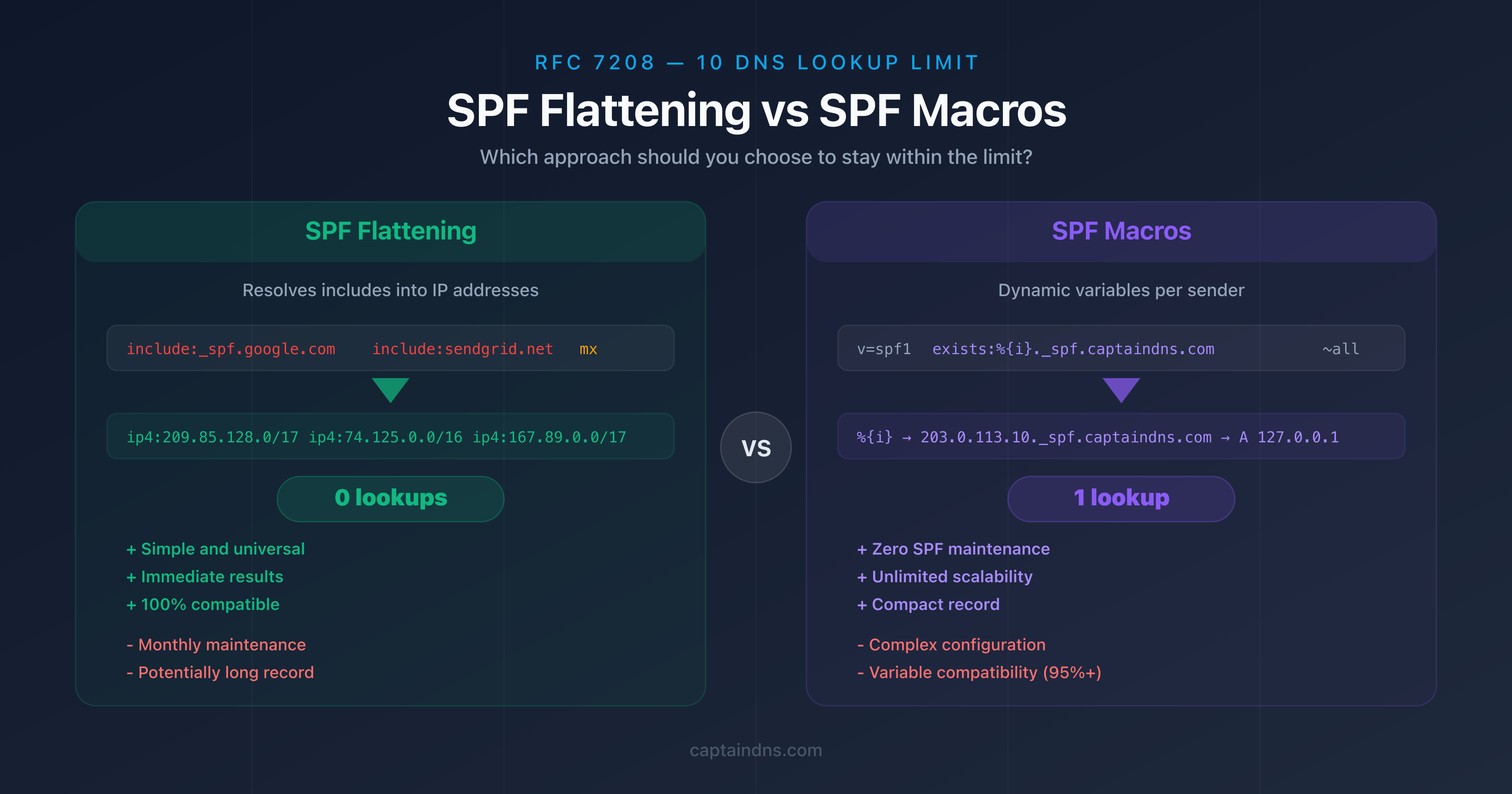
- SPF Flattening vs SPF Macros: Which Approach Should You Choose to Stay Within the 10 Lookup Limit?