SPF Flattening vs SPF Macros: Which Approach Should You Choose to Stay Within the 10 Lookup Limit?
By CaptainDNS
Published on March 3, 2026
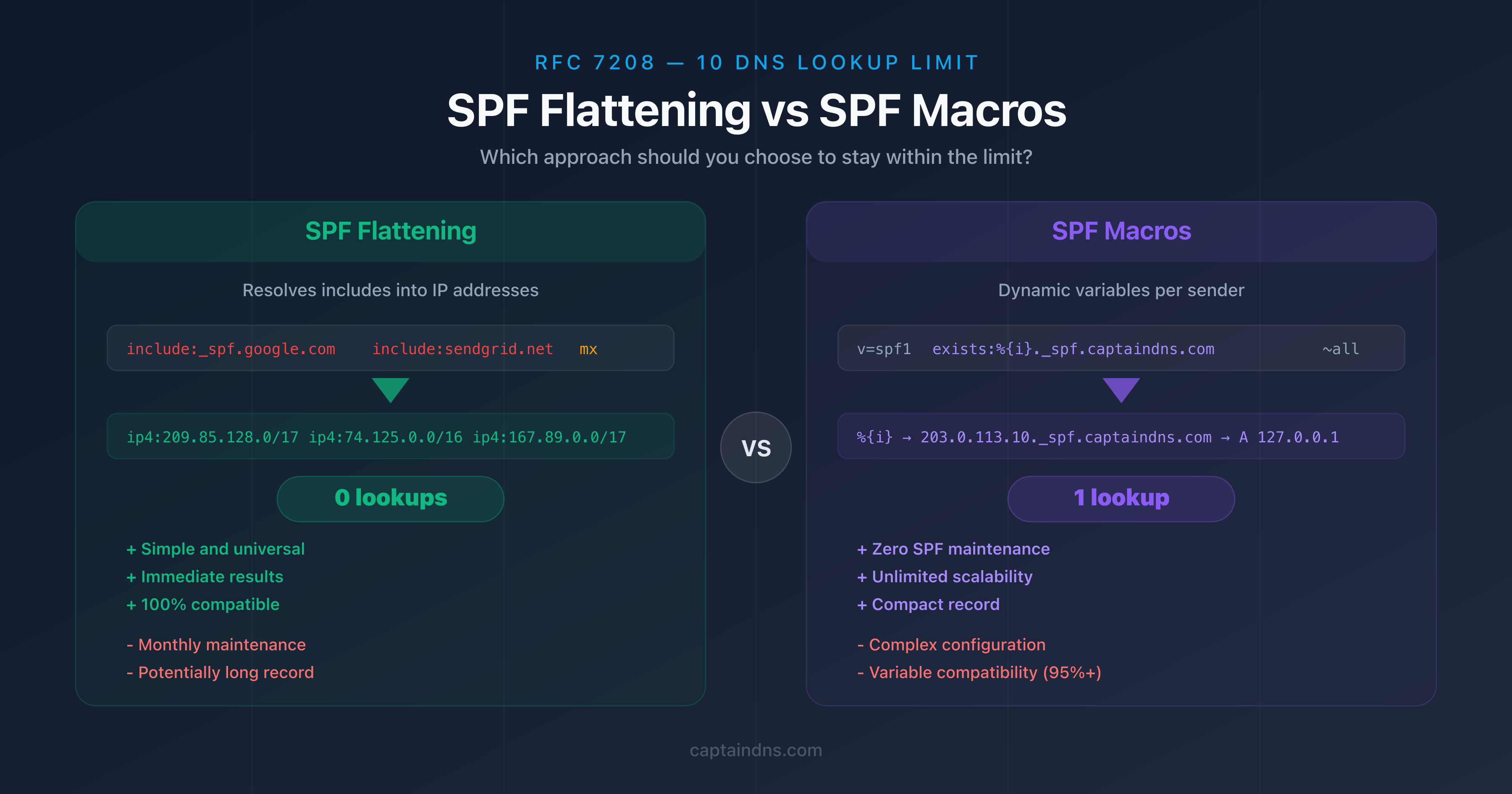
- SPF flattening resolves all
include:entries into direct IP addresses (ip4:/ip6:) to achieve 0 lookups, but requires monthly maintenance - SPF macros use dynamic variables (
%{i},%{d},%{s}) to build records that consume only 1-2 lookups, with no maintenance - Flattening is simple to implement and compatible with all servers, macros are more complex but offer unlimited scalability
- Flattening recommended for SMBs with 3-5 email providers, macros recommended for large organizations with 10+ providers
- Both approaches are RFC 7208 compliant and solve the 10 lookup limit exceeded error
Your SPF record exceeds the 10 DNS lookup limit and you need to choose a solution. Two approaches stand out: SPF flattening, which transforms your include: entries into direct IP addresses, and SPF macros, which use dynamic variables to bypass the limit. Each has its own strengths and limitations.
Flattening appeals through its simplicity: you resolve all mechanisms into IPs, publish the result, and the problem is solved. But your providers' IP addresses change, which requires regular maintenance. Macros, on the other hand, need no maintenance once configured, but their setup is more technical and their compatibility with some servers remains limited.
This guide compares both approaches in detail, with concrete examples on captaindns.com, a criterion-by-criterion comparison table, and a decision matrix to identify the best solution for your situation.
Refresher: why does the 10 lookup limit cause problems?
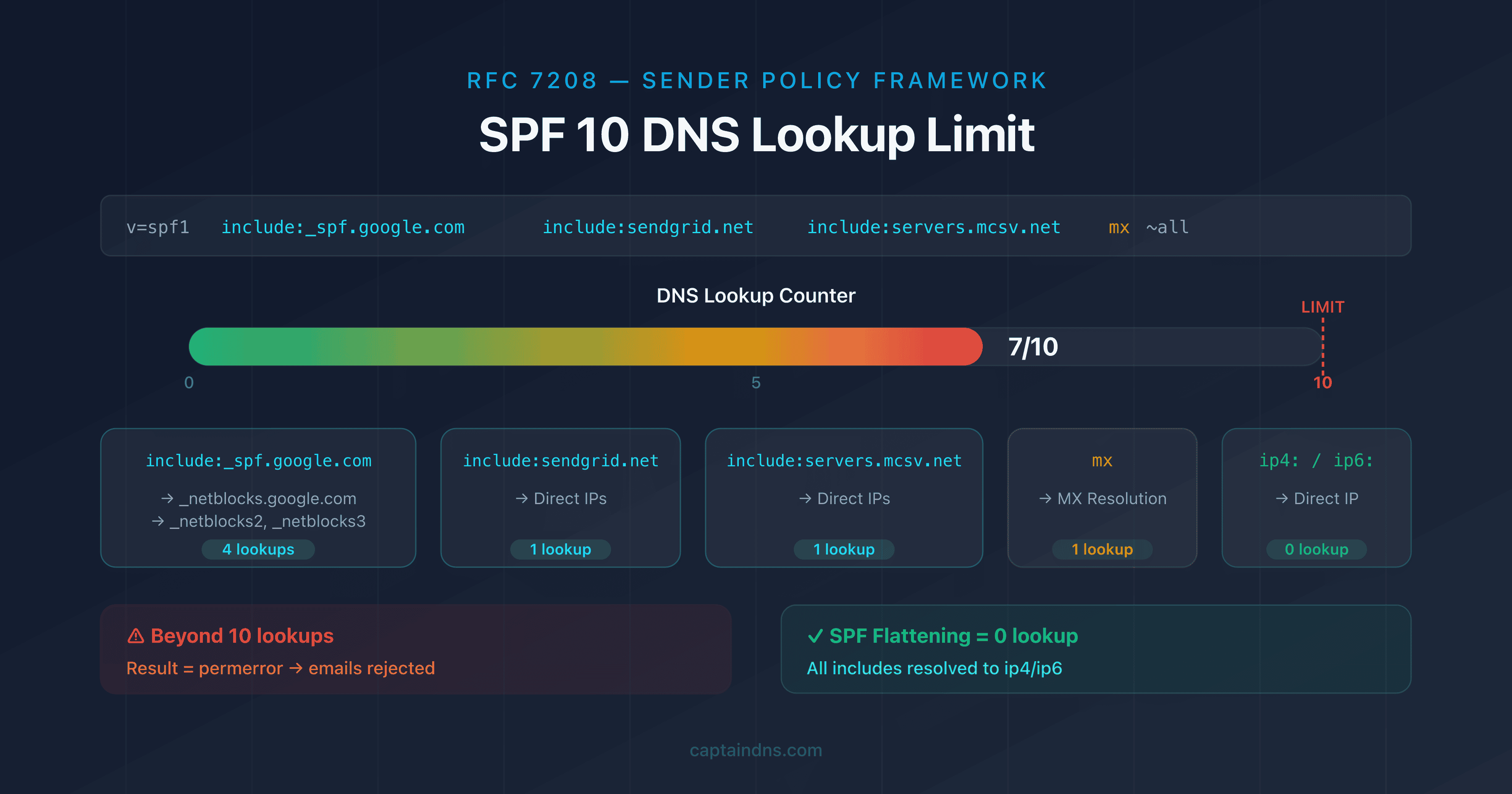
RFC 7208 imposes a maximum of 10 DNS queries when evaluating an SPF record. Each include:, a, mx, redirect, and exists mechanism consumes one lookup. The ip4: and ip6: mechanisms do not consume any because they contain the IP address directly.
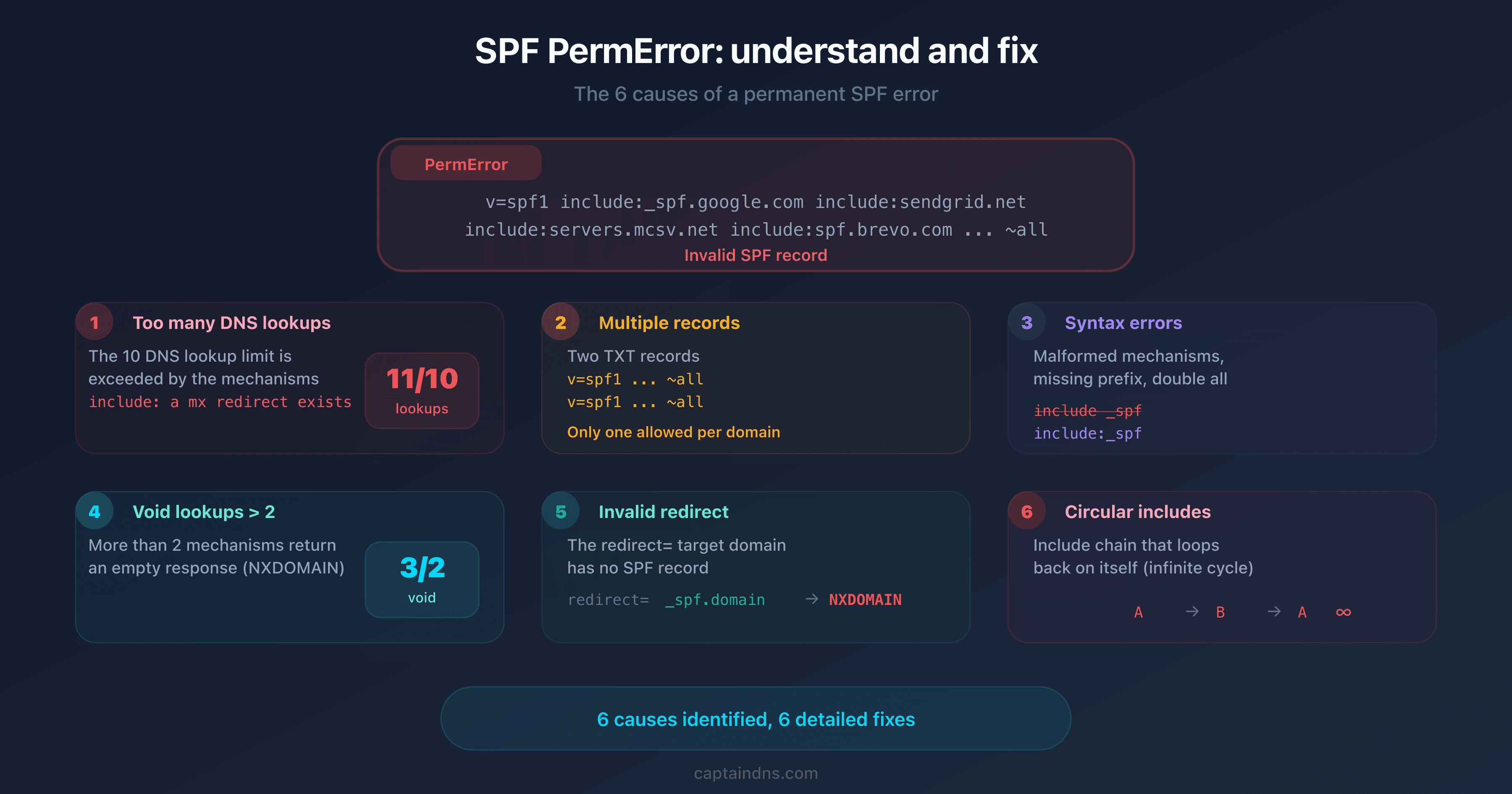
With 3-4 email providers (Google Workspace, SendGrid, Mailchimp, Brevo), it is common to reach 10-14 lookups. Beyond 10, the receiving server returns a permerror: your SPF is considered invalid and your emails are rejected or sent to spam.
Check your current lookup count with our SPF Record Check before choosing a solution.
What is SPF flattening?
SPF flattening involves resolving all mechanisms that generate DNS lookups and replacing them with the IP addresses they return. The result is an SPF record composed entirely of ip4: and ip6: entries, which consume zero lookups.
How does the process work?
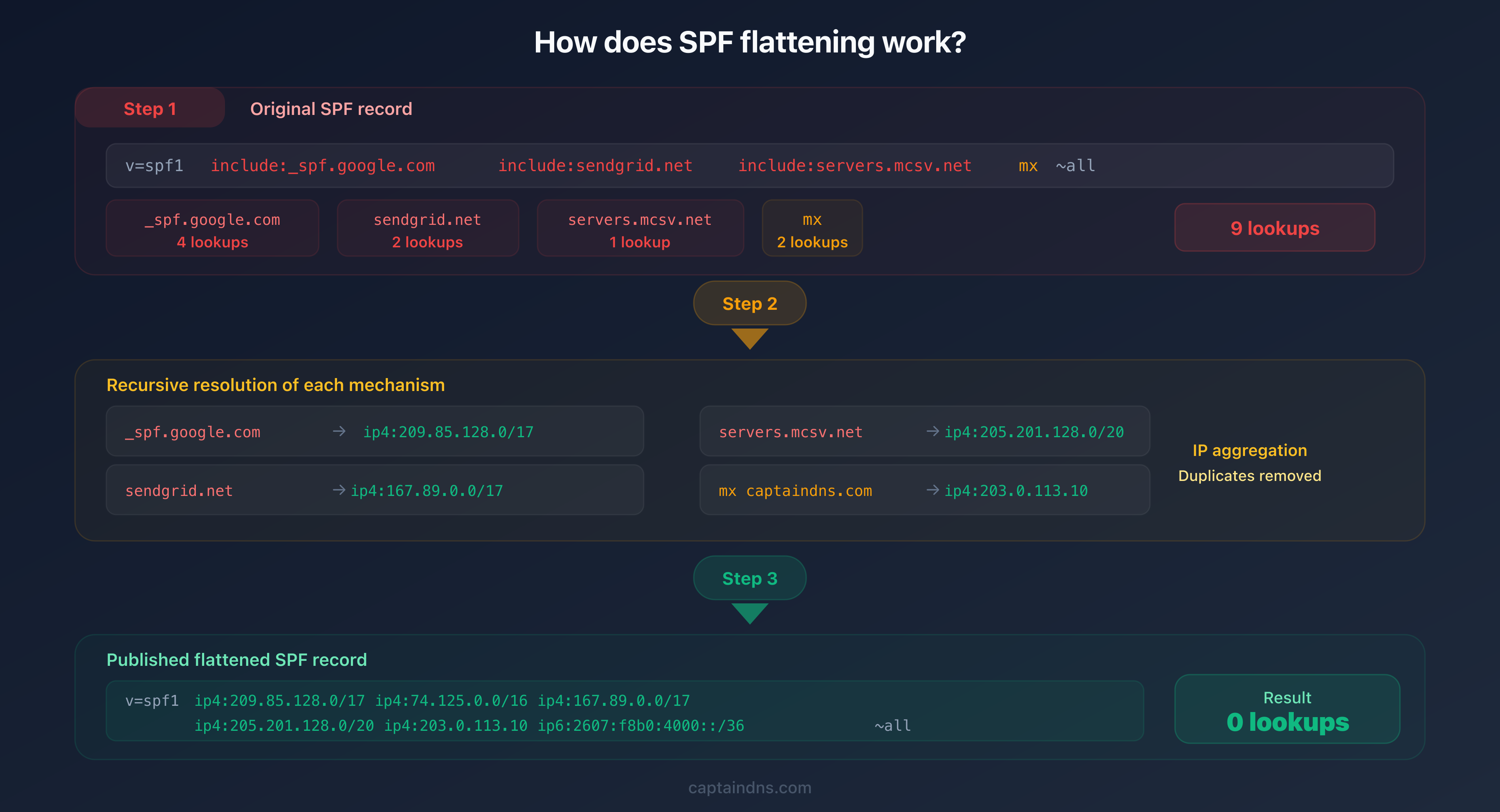
Flattening follows a 3-step process:
- Resolution: each
include:,a,mx, andredirectis resolved recursively to obtain the final IP addresses - Aggregation: all IPs are collected and duplicates are removed
- Publication: a new SPF record is generated using only
ip4:andip6:entries
Concrete example
# Before flattening: 9 lookups
v=spf1 include:_spf.google.com include:sendgrid.net include:servers.mcsv.net mx ~all

# After flattening: 0 lookups
v=spf1 ip4:209.85.128.0/17 ip4:74.125.0.0/16 ip4:35.190.247.0/24 ip4:167.89.0.0/17 ip4:198.2.128.0/18 ip4:205.201.128.0/20 ip4:203.0.113.10 ip6:2607:f8b0:4000::/36 ~all
Advantages of flattening
- Simplicity: no advanced technical knowledge required
- Universal compatibility: works with every receiving server without exception
- Immediate results: the lookup problem is solved as soon as you publish
- Easy verification: every IP is visible and auditable
Limitations of flattening
- Mandatory maintenance: providers change their IP ranges regularly (Google, Microsoft, SendGrid). A flattened SPF with outdated IPs will reject legitimate emails
- TXT record length: a DNS TXT record is limited to 255 characters per string. With many IPs, you need multiple concatenated strings, which adds complexity
- No automatic updates: unlike
include:entries,ip4:values do not update when a provider changes its IPs
What are SPF macros?
SPF macros are variables defined by RFC 7208, section 7 that are dynamically substituted during SPF record evaluation. They allow you to build conditional DNS queries based on the sender's information.
The 3 main macros
| Macro | Meaning | Example value |
|---|---|---|
%{i} | Sender's IP address | 203.0.113.10 |
%{d} | Sender's domain | captaindns.com |
%{s} | Full email address | contact@captaindns.com |
How does the resolution work?
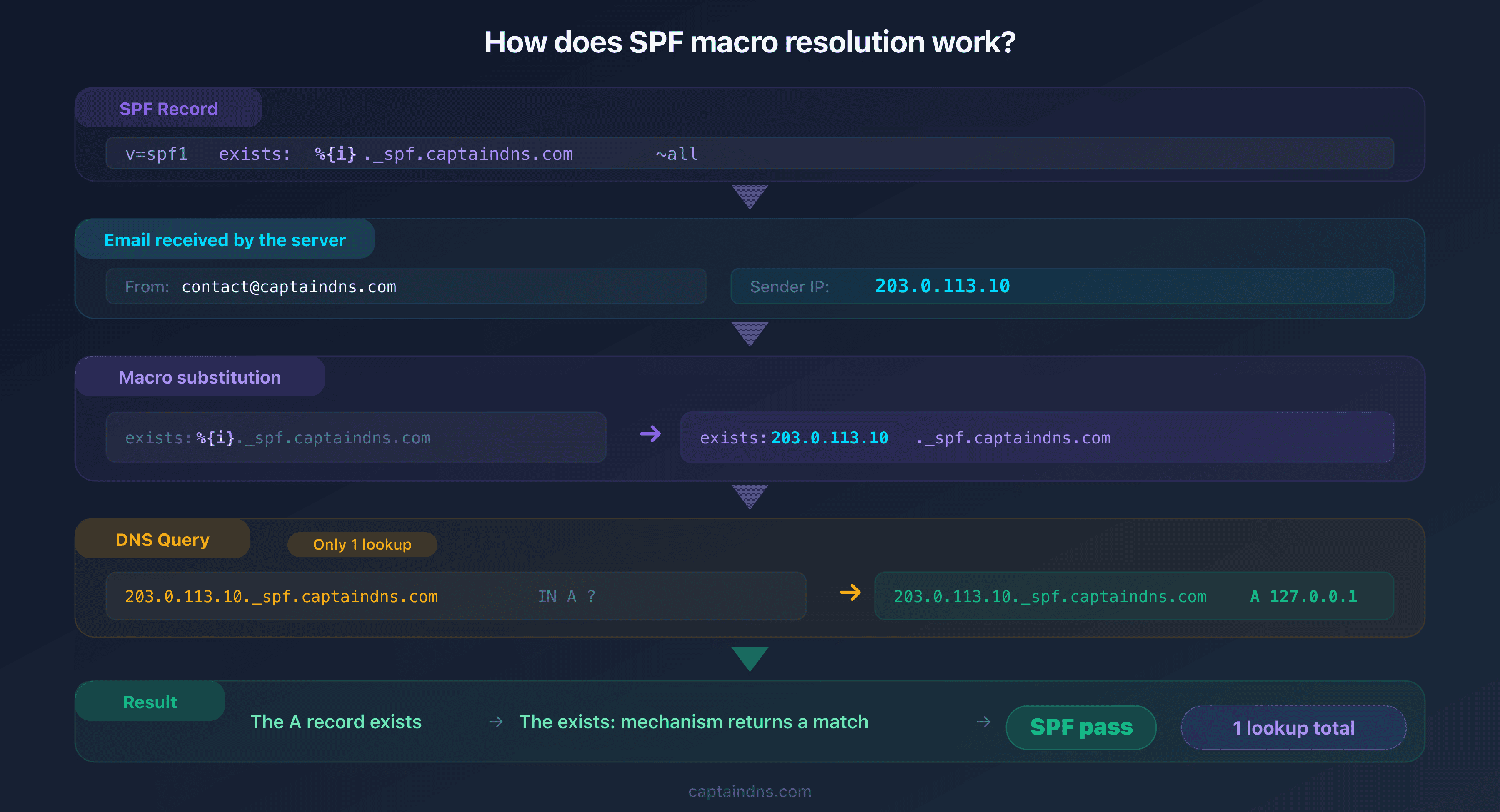
When a receiving server evaluates an SPF record containing macros, it replaces each variable with its actual value before performing the DNS query.
Concrete example
# SPF with %{i} macro: just 1 lookup
v=spf1 exists:%{i}._spf.captaindns.com ~all
The receiving server gets an email from IP 203.0.113.10. It replaces %{i} with that IP and checks whether 203.0.113.10._spf.captaindns.com exists in DNS. You publish an A record for each authorized IP:
203.0.113.10._spf.captaindns.com.  IN  A  127.0.0.1
167.89.55.22._spf.captaindns.com.  IN  A  127.0.0.1
Result: just 1 lookup regardless of how many providers you have, because each evaluation only checks a single IP.
Advantages of macros
- Zero SPF maintenance: IP changes are managed on the DNS side (adding/removing A records), not in the SPF TXT record itself
- Unlimited scalability: 5 or 500 providers, the SPF stays identical and compact
- A single lookup: the
exists:mechanism only consumes one lookup, regardless of how many IPs are authorized - Compact record: the SPF TXT record always fits on a single line
Limitations of macros
- Complex configuration: publishing an A record per authorized IP requires rigorous DNS management
- Variable compatibility: some older receiving servers do not properly support SPF macros
- Harder debugging: when issues arise, identifying which IP is authorized or not requires checking individual A records
- DNS dependency: all authorization logic relies on the presence of A records in your DNS zone
Detailed comparison: flattening vs macros
| Criterion | SPF Flattening | SPF Macros |
|---|---|---|
| Implementation complexity | Low | High |
| Maintenance required | Monthly (re-resolve IPs) | None on the SPF TXT record |
| Server compatibility | Universal (100%) | Variable (95%+) |
| Lookups consumed | 0 | 1-2 |
| SPF record length | Can be long (255+ chars) | Compact (~50 chars) |
| Scalability | Limited by TXT size | Unlimited |
| Automation | Via flattening tool | Via DNS management |
| Main risk | Outdated IPs without maintenance | Incompatible servers |
| IP visibility | All visible in the TXT record | Distributed across A records |
| Setup time | 5-10 minutes | 30-60 minutes |
Which approach should you choose?
Scenario 1: SMB with 3-5 email providers
Recommendation: SPF flattening
Your organization uses Google Workspace, a newsletter service (Mailchimp or Brevo), and a transactional tool (SendGrid). The number of IPs to manage is limited (20-50 addresses) and they change infrequently.
Flattening solves your problem in a few minutes. A monthly check with a dedicated tool is enough to keep the record up to date. The simplicity of this approach outweighs the scalability advantages of macros that you will not need.
Scenario 2: large organization with 10+ providers
Recommendation: SPF macros
Your organization manages dozens of email services: internal messaging, CRM, support, marketing, transactional, system alerts. The number of providers exceeds what a flattened SPF record can contain without hitting the 255-character-per-string TXT limit.
Macros offer unlimited scalability: your SPF stays compact and identical regardless of how many providers are added. The initial DNS configuration investment is offset by the absence of TXT record maintenance.
Scenario 3: gradual migration
Recommendation: flattening now, macros later
If you need to fix the lookup limit quickly but expect your email providers to grow, start with flattening for an immediate result. Plan the migration to macros when your DNS infrastructure is ready.
Generate the SPF for each subdomain or provider with our SPF Generator to prepare your configuration.
Recommended action plan
- Count your current lookups: check how many DNS lookups your published SPF consumes
- Assess your number of providers: list all services that send email for your domain
- Choose your approach: flattening if fewer than 5 providers, macros if more than 10, case by case between 5 and 10
- Implement and test: apply your chosen solution in a test environment before modifying your production DNS zone
- Monitor regularly: for flattening, re-flatten monthly; for macros, verify that A records are up to date
FAQ
What is SPF flattening?
SPF flattening involves resolving all SPF mechanisms that generate DNS lookups (include:, a, mx, redirect) and replacing them with the direct IP addresses they return (ip4:, ip6:). The result is an equivalent SPF record that consumes zero DNS lookups.
What is an SPF macro?
An SPF macro is a dynamic variable defined by RFC 7208 that is substituted at evaluation time by the receiving server. The three main macros are %{i} (sender's IP), %{d} (sender's domain), and %{s} (full email address). They allow you to build conditional DNS queries.
How many lookups does a flattened SPF consume?
A fully flattened SPF consumes exactly 0 DNS lookups because it contains only ip4: and ip6: mechanisms, which do not perform any DNS queries. This is its main advantage over a standard SPF with include: entries.
Are SPF macros supported by all servers?
No. The vast majority of modern receiving servers (Gmail, Outlook, Yahoo) properly support SPF macros. However, some older or misconfigured servers may not interpret them correctly, which can lead to unexpected results.
Can you combine flattening and macros?
Yes. A hybrid approach uses flattening for providers with stable IPs and macros for providers with frequently changing IPs. This combination lets you benefit from the simplicity of flattening while retaining the flexibility of macros.
How often should you re-flatten an SPF record?
Monthly re-flattening is recommended. Major providers like Google and Microsoft change their IP ranges several times a year. An automated flattening tool can detect these changes and alert you when an update is needed.
Which approach is safest for deliverability?
Flattening offers the best compatibility because it uses only ip4: and ip6: mechanisms that 100% of servers support. Macros are compatible with 95%+ of modern servers but can cause issues with some older servers. To maximize deliverability, flattening is the safest choice.
Glossary
- SPF flattening: a technique that replaces SPF mechanisms requiring lookups with the direct IP addresses they resolve to, reducing the lookup counter to zero.
- SPF macro: a dynamic variable (
%{i},%{d},%{s}) defined by RFC 7208, substituted by the receiving server during SPF evaluation. - DNS lookup: a DNS query performed during SPF record evaluation to resolve a mechanism such as
include:ormx. - Permerror: a permanent error returned when an SPF record is structurally invalid, notably when it exceeds the 10 lookup limit.
- RFC 7208: the official specification for the SPF (Sender Policy Framework) protocol, which defines evaluation rules, lookup limits, and macros.
Flatten your SPF record now: use our SPF Flattener to resolve all your includes into direct IP addresses and stay within the 10 lookup limit.
📚 Related SPF guides
- SPF "Too Many DNS Lookups": The Complete Guide to Fixing the 10 Lookup Limit
- SPF PermError: Understand, Diagnose, and Fix