Misconfigured Email Routing: Microsoft's Warning on Internal Spoofing (January 2026)
By CaptainDNS
Published on March 28, 2026
Updated on July 30, 2026
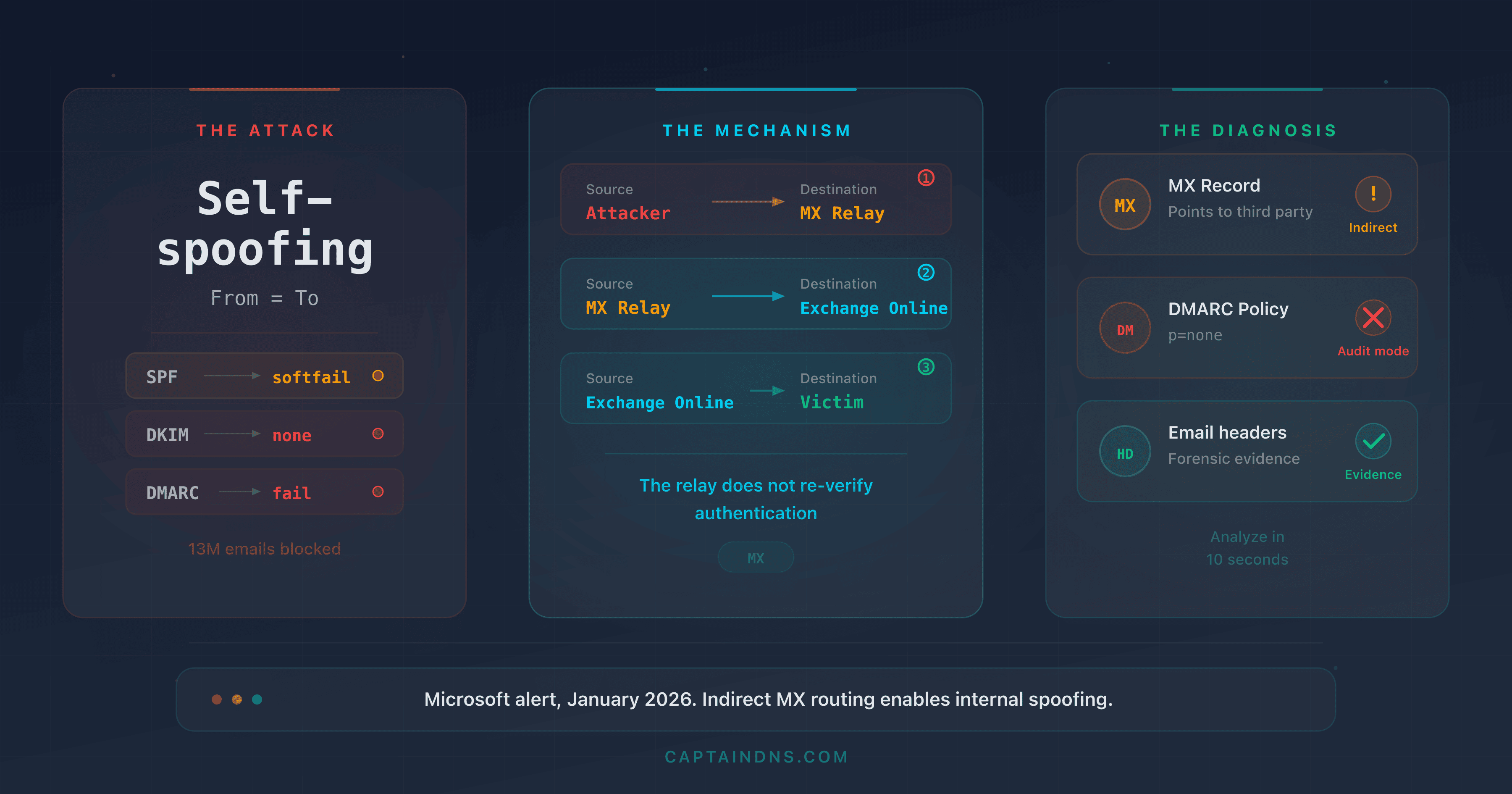
- Microsoft revealed in January 2026 that MX configurations pointing to third-party services (anti-spam gateways, archiving solutions) create a blind spot exploited by attackers to spoof internal domains
- The Tycoon2FA platform generated 13 million phishing emails blocked by Defender in a single month (October 2025), exploiting this vector combined with AiTM attacks
- The trio of SPF
~all+ missing DKIM + DMARCp=nonelets 100% of spoofing attempts through via indirect MX routing - Forensic email header analysis reveals the exact mechanism: unexpected hops in the Received chain,
spf=softfail,dkim=none,dmarc=fail action=none - The 5-step remediation plan: progressive DMARC toward
p=reject, SPF-all, DKIM enabled, third-party connectors audited, direct MX to Microsoft 365
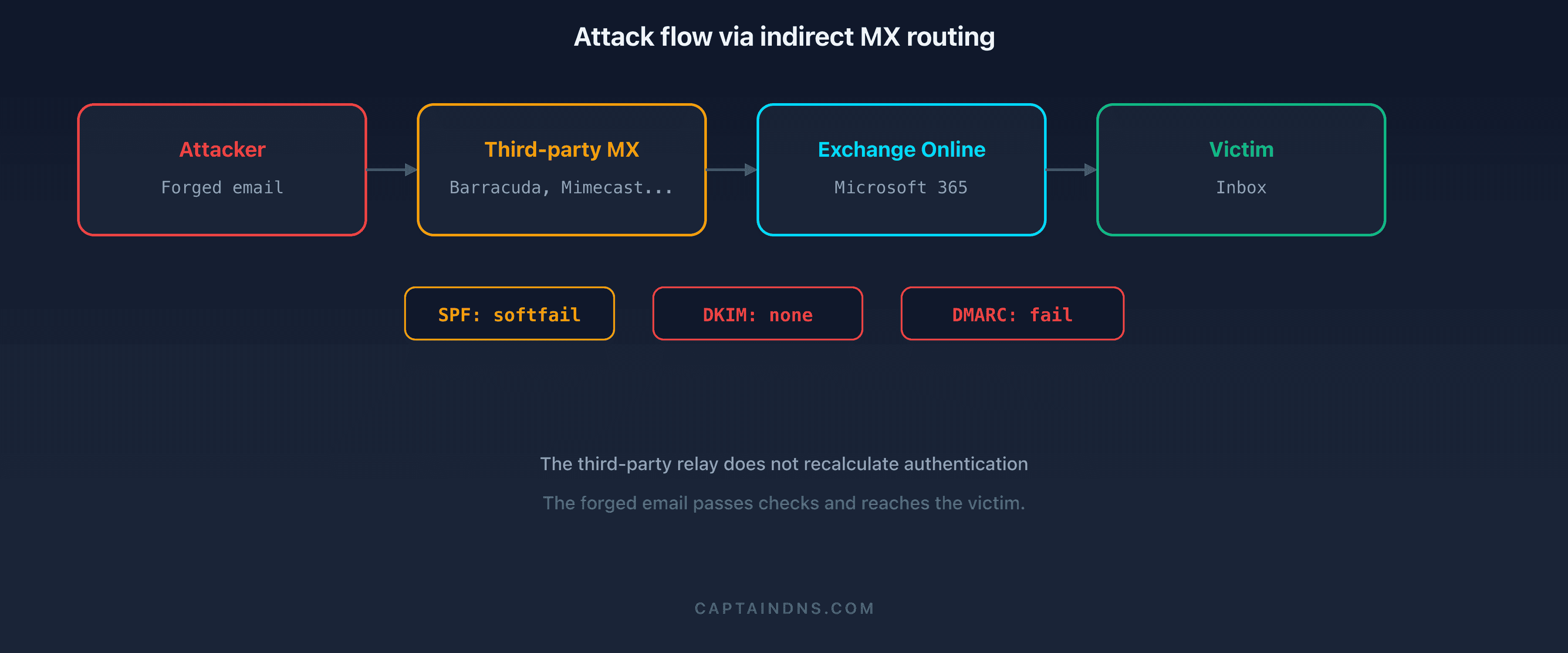
In January 2026, the Microsoft Defender for Office 365 team published a warning that shook security teams: thousands of organizations using Microsoft 365 were vulnerable to internal identity spoofing, not because of a software bug, but because of their own DNS configuration. The mechanism is simple and devastating. When a domain's MX record points to a third-party service (anti-spam gateway, archiving solution, filtering relay) instead of pointing directly to Microsoft 365, incoming emails pass through an intermediary that does not correctly recompute SPF, DKIM, and DMARC authentication results. Attackers understood this, and they exploit the flaw at scale.
This is not a theoretical scenario. Microsoft documented that the phishing-as-a-service platform Tycoon2FA alone generated 13 million malicious emails blocked by Defender in October 2025. These emails exploited indirect MX routing combined with adversary-in-the-middle (AiTM) techniques to steal credentials and session cookies, even from users protected by multi-factor authentication. The lures mimicked password resets, HR messages, and shared document notifications, sent from the victim's own internal address to themselves.
This article details the technical mechanism behind this attack, the forensic email header analysis that detects it, a five-minute DNS diagnostic to determine whether your domain is vulnerable, and a complete remediation plan.
Analyze your email headers
The context: what does Microsoft's January 2026 warning reveal?
A routing problem, not a protocol problem
Microsoft's warning is not about a vulnerability in SPF, DKIM, or DMARC themselves. These protocols work exactly as designed. The problem lies in the email routing architecture.
In a standard configuration, a domain's MX record points directly to the Microsoft 365 Exchange Online Protection (EOP) servers:
captaindns.com. IN MX 10 captaindns-com.mail.protection.outlook.com.
With this configuration, Microsoft 365 receives emails directly from the sender. It evaluates SPF by checking the source IP against the envelope domain's SPF record. It validates the DKIM signature. It applies the DMARC policy. Every check happens in the correct context.
But thousands of organizations have an MX record pointing to a third-party service:
captaindns.com. IN MX 10 mx.filtrage-tiers.com.
The third-party service receives the email, performs its processing (anti-spam, archiving, content analysis), then forwards the message to Microsoft 365. The problem: when Microsoft 365 receives the message, the source IP belongs to the third-party service, not the original sender. The authentication context has changed.
The attack mechanism in detail
The attacker exploits this chain as follows:
Step 1: reconnaissance. The attacker queries the target domain's MX record. If the MX points to a third-party service instead of *.mail.protection.outlook.com, the domain is potentially vulnerable.
Step 2: authentication posture verification. The attacker checks three DNS records:
_dmarc.captaindns.com: if the policy isp=none, DMARC failures trigger no actioncaptaindns.com(SPF TXT): if the mechanism is~all(softfail) instead of-all(hardfail), SPF failure is tolerated- Common DKIM selectors: if no DKIM key is published, the
dkim=nonefield triggers nothing
Step 3: sending the spoofed email. The attacker sends an email from a server they control. They place the same address in both the From and To fields: for example, accounting@captaindns.com to accounting@captaindns.com. This "self-spoofing" makes the message appear to come from an internal colleague.
Step 4: transit through the third-party service. The domain's MX routes the email to the third-party service. It performs a first level of filtering. The problem: many third-party services do not verify SPF/DKIM/DMARC at all, or verify them but do not propagate the results in a way that Microsoft 365 can use.
Step 5: delivery into Microsoft 365. Microsoft 365 receives the email from the third-party service's IP. Without Enhanced Filtering for Connectors (EFC), Exchange Online sees the third party's IP, not the attacker's IP. SPF passes (because the third party's IP is in the third party's SPF) or fails with softfail. DKIM is absent. DMARC fails but the p=none policy triggers no blocking. The email lands in the inbox.
Why "skip authentication" is the breaking point
The fundamental problem is the inbound connector configuration in Exchange Online. When an organization configures a connector to receive emails from a third-party service (Barracuda, Mimecast, Proofpoint, Sophos), the configuration wizard often offers to "trust" the third party's authentication results, or to "skip authentication" for the connector's IPs. In practice, many administrators enable this option to avoid false positives: if the third party already verified SPF/DKIM/DMARC, why do it again?
The problem: Exchange Online then no longer re-verifies authentication against the original source. It consumes the Authentication-Results headers inserted by the third party, or worse, evaluates SPF on the connector's IP (the third party's) instead of the real sender's IP. The Authentication-Results header visible in the inbox reflects the results seen by the third party, not those from the real source.
Microsoft introduced Enhanced Filtering for Connectors (EFC) to fix this problem. EFC instructs Exchange Online to walk up the Received chain to identify the original sender's IP, skipping the known third-party service IPs (the "skip list"). But EFC is not enabled by default. Organizations that have not configured EFC, or configured it with an incomplete skip list, remain vulnerable.
Self-spoofing: the internal email that isn't one
The finishing blow of this attack is self-spoofing. The attacker places the same domain in the From and To fields: hr@captaindns.com sends to john.smith@captaindns.com. For the recipient, the email appears to come from a colleague. But the mechanism is more insidious: many organizations configure Exchange transport rules that treat "internal" emails differently. An email whose From domain is an internal domain may not receive the "This email came from an external sender" banner, may not be subject to the same anti-phishing filters, and may be displayed without any visual warning. The attacker exploits not only human trust, but also the security exceptions configured for internal communications. On the Microsoft 365 side, this case surfaces in the header as a compauth=fail reason=601 (or 010) verdict: how composite authentication and those reason codes work is covered in a dedicated guide.
The critical role of the third-party service
The central problem is that the third-party service acts as an involuntary authentication "launderer." When it relays the message to Microsoft 365, it replaces the original authentication context:
- The source IP changes. Microsoft 365 sees the third-party service's IP, not the attacker's. SPF verification runs against the wrong IP.
- The third party's Authentication-Results headers are untrusted. Microsoft 365 has no reason to trust the authentication results inserted by the third party.
- The Return-Path may be rewritten. Some third-party services rewrite the SMTP envelope, further obscuring the trail.
Microsoft documented that even third-party services that correctly verify SPF/DKIM/DMARC and insert the proper headers do not solve the problem if Microsoft 365 does not know to look beyond the third party's IP to find the original sender's IP.
This is exactly the problem Enhanced Filtering for Connectors solves: it allows Exchange Online to "skip" the third party's IP in the Received chain and evaluate authentication against the real sender's IP.
How widespread is the problem?
Indirect MX routing is not a fringe configuration. According to data published by Microsoft's security teams, a significant proportion of Microsoft 365 tenants use a third-party service in front of Exchange Online. The reasons are multiple and often historical:
- Migration legacy: many organizations migrated to Microsoft 365 from on-premises hosting. They already had a third-party anti-spam service (Barracuda, Mimecast, Proofpoint, Sophos) and kept the existing routing during migration.
- Regulatory requirements: certain sectors (finance, healthcare, government) mandate email archiving or filtering through a certified third-party service. Indirect MX routing is the standard technical approach to meet this requirement.
- Defense-in-depth strategy: some security teams believe that stacking two filtering layers (third party + Defender) provides better protection. This is true for anti-spam filtering, but the cost in terms of authentication is rarely measured.
- Unawareness of the risk: before the January 2026 warning, the link between indirect MX routing and weakened email authentication was not widely documented. Most third-party service deployment guides do not mention the impact on SPF/DKIM/DMARC on the Microsoft 365 side.
The result: organizations that invest in email security (purchasing a premium anti-spam service, deploying DMARC) paradoxically end up more vulnerable than those using Defender alone with a direct MX.
Tycoon2FA: the PhaaS platform exploiting this flaw
A turnkey phishing service
Tycoon2FA is a phishing-as-a-service (PhaaS) platform active since August 2023, identified and documented by Sekoia.io and by the Microsoft Threat Intelligence Center. It operates like a SaaS for cybercriminals: operators pay a subscription (roughly $120 per month via dedicated Telegram channels) and receive in return a complete phishing infrastructure with dashboards, email templates, cloned login pages, and automated credential harvesting. The barrier to entry is virtually zero: no technical skill is required, the kit provides everything from the phishing domain to the collection page.
The scale of the operation is massive. According to consolidated estimates from Microsoft and Sekoia.io Threat Intelligence teams, Tycoon2FA generates over 30 million phishing emails per month across all its operators. Microsoft reported blocking 62% of phishing emails targeting its users in the first half of 2025, but the remaining volume is enough to compromise thousands of accounts. In March 2026, Europol attempted to dismantle Tycoon2FA's infrastructure in a coordinated operation. The platform was operational again within 48 hours, having migrated its servers to new jurisdictions.
What distinguishes Tycoon2FA from conventional phishing kits is its ability to bypass multi-factor authentication (MFA) through an adversary-in-the-middle (AiTM) technique.
The AiTM mechanism in detail
The technical operation relies on a transparent reverse proxy. The crucial point: MFA does not protect against this attack because the proxy does not intercept the second factor itself. It intercepts the session cookie issued by Microsoft 365 after the user has successfully completed the entire authentication chain, MFA included. The victim authenticates normally, against the real Microsoft infrastructure, but the session token is captured in transit.
Here is the full sequence:
- The victim receives a phishing email spoofing an internal domain via the MX routing mechanism described above.
- The link in the email passes through a redirect chain. Microsoft documented the use of redirections via Google Maps (
maps.google.com/url?q=...) to bypass reputation filters. The technique is effective: email filters inspect the link domain, seemaps.google.com(a trusted domain with maximum reputation) and let it through. Theq=parameter contains the actual phishing page URL, but filters do not systematically decode nested redirections. The final URL leads to a phishing page hosted on an ephemeral domain. - The phishing page acts as a transparent proxy to the real Microsoft 365 login page. The Tycoon2FA server sits between the victim's browser and
login.microsoftonline.com. Visually, the victim sees a login interface identical to Microsoft's, with the organization's logo, custom colors, and Entra ID branding. - The victim enters their username and password. The proxy forwards the credentials to Microsoft 365 in real time. Microsoft validates them normally.
- Microsoft 365 prompts for the second factor (MFA). The proxy relays the MFA request to the victim. The victim enters their TOTP code or approves the push notification. From Microsoft's perspective, the authentication is legitimate.
- The proxy captures the session cookie. Once authentication is complete, Microsoft 365 issues a session cookie. The proxy intercepts it before forwarding it to the victim. The victim receives a valid cookie and accesses their mailbox normally, unaware of anything.
- The attacker uses the stolen session cookie to access the account from another browser, without needing to redo MFA. The cookie is valid for the session duration (often 24 hours or more depending on organizational policy). The attacker can read emails, exfiltrate OneDrive files, send emails on the victim's behalf, and move laterally through the organization.
Figures documented by Microsoft
The data published by Microsoft in its January 2026 bulletin reveals the scale of the exploitation:
| Metric | Value |
|---|---|
| Malicious emails blocked by Defender (October 2025) | 13 million |
| Primary PhaaS platform identified | Tycoon2FA |
| MFA bypass technique | Adversary-in-the-middle (AiTM) |
| URL obfuscation technique | Google Maps redirections |
| Main lures | Password reset, HR messages, shared documents |
| Entry vector | Indirect MX routing + SPF ~all + DKIM absent + DMARC p=none |
These 13 million emails cover only messages blocked by Defender. Organizations without Defender for Office 365, or with less strict filtering configurations, did not benefit from this protection.
Lures used
Tycoon2FA campaigns documented by Microsoft exploit high-perceived-urgency scenarios:
- Password reset: "Your password expires in 24 hours. Click here to renew it." The link leads to the AiTM page.
- HR messages: "New document to sign for your contract update." The attachment or link redirects to the phishing page.
- Shared documents: "Marie Dupont shared a file with you on OneDrive." The email mimics a legitimate SharePoint notification.
- Self-spoofing: in the most sophisticated cases, the
Fromaddress is identical to theToaddress. The victim receives an email that appears to come from themselves or a colleague on the same domain.
Self-spoofing is particularly effective because users trust emails from their own domain. An email from hr@captaindns.com received by a captaindns.com employee triggers no human alarm.
Forensic header analysis: detecting the attack
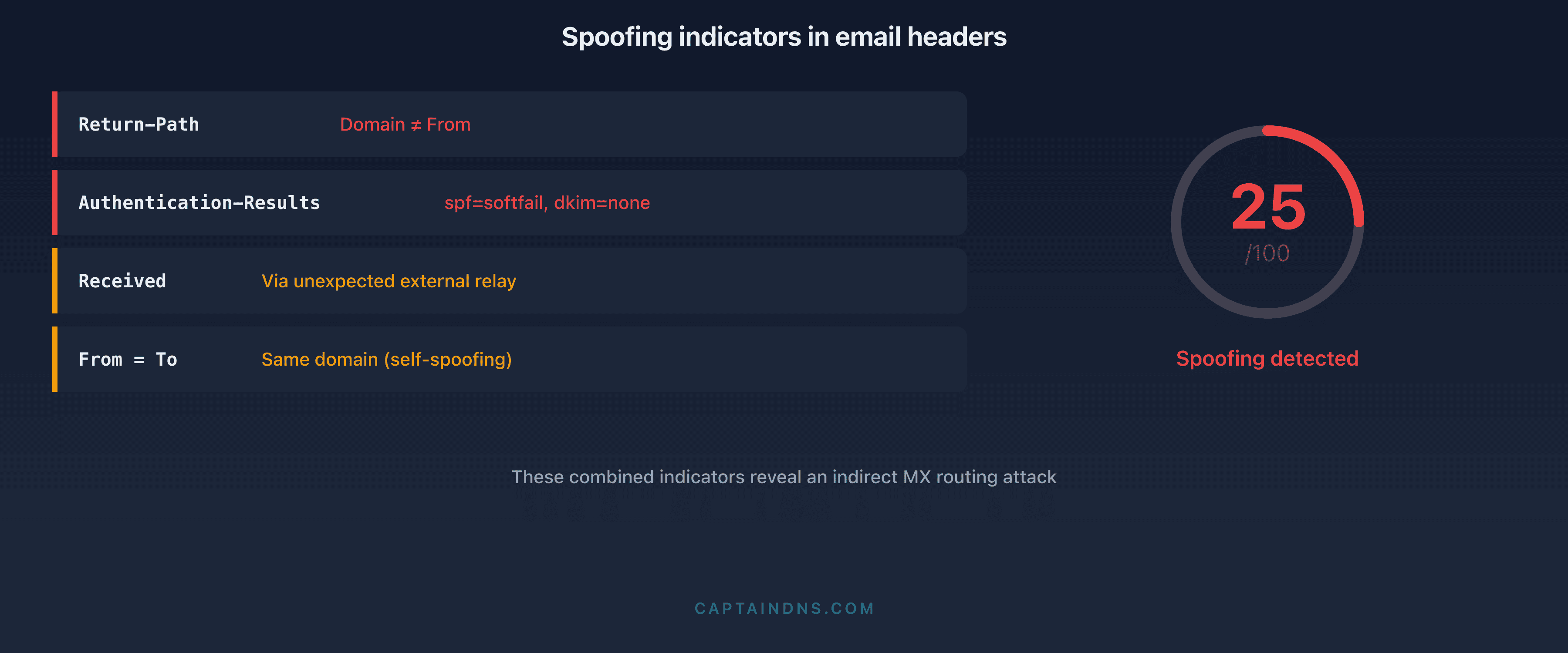
When a suspicious email arrives in a Microsoft 365 mailbox, the headers contain evidence of the abnormal routing. Here is how to read them with an email header analyzer.
Example headers from a spoofed email
Here is a realistic anonymized example of headers from a phishing email exploiting indirect MX routing. All the warning signs are present simultaneously:
Return-Path: <bounce@malicious-relay.net>
Received: from mail-protection.captaindns.com (10.0.0.5) by
 exchange01.captaindns.com (10.0.0.10) with SMTP; Thu, 9 Jan 2026 08:15:23 +0000
Received: from gateway.thirdparty-filter.com (203.0.113.50) by
 mail-protection.captaindns.com with ESMTPS; Thu, 9 Jan 2026 08:15:21 +0000
Received: from unknown (198.51.100.77) by
 gateway.thirdparty-filter.com with SMTP; Thu, 9 Jan 2026 08:15:19 +0000
Authentication-Results: mail-protection.captaindns.com;
 spf=softfail (sender IP is 198.51.100.77) smtp.mailfrom=captaindns.com;
 dkim=none (message not signed);
 dmarc=fail action=none header.from=captaindns.com;
X-MS-Exchange-Organization-SCL: 5
From: Direction RH <rh@captaindns.com>
To: jean.dupont@captaindns.com
Subject: Document de politique RH à signer - Action requise
Line-by-line analysis
Return-Path: <bounce@malicious-relay.net>
The Return-Path reveals the actual bounce address. The domain malicious-relay.net has no connection to captaindns.com. This mismatch between the Return-Path and the displayed From (rh@captaindns.com) is the first red flag. In a legitimate email sent from Microsoft 365, the Return-Path contains the organization's domain or a subdomain of protection.outlook.com. Here, it is the attacker's infrastructure that appears.
Received chain (read from bottom to top):
Received: from unknown (198.51.100.77) by
 gateway.thirdparty-filter.com with SMTP
First hop: the email originates from an unknown IP (198.51.100.77) identified as unknown by the third-party service. This is the attacker's server. The absence of reverse DNS resolution (no verified hostname) is a strong signal: legitimate email servers have a PTR record configured. The use of plain SMTP (not ESMTPS) confirms the sender does not support TLS encryption, which is abnormal for an enterprise server in 2026.
Received: from gateway.thirdparty-filter.com (203.0.113.50) by
 mail-protection.captaindns.com with ESMTPS
Second hop: the third-party service (gateway.thirdparty-filter.com) relays to Exchange Online. This IP (203.0.113.50) is the one Microsoft 365 sees as the source. The authentication context is evaluated against this IP, not against 198.51.100.77. The third-party service accepted the message and forwarded it.
Received: from mail-protection.captaindns.com (10.0.0.5) by
 exchange01.captaindns.com (10.0.0.10) with SMTP
Third hop: internal Microsoft 365 routing to the inbox. The 10.x.x.x IP addresses confirm internal routing. This hop is normal.
Authentication-Results: the triple failure
This is the most revealing line, containing three simultaneous failures:
spf=softfail (sender IP is 198.51.100.77): the real source IP (198.51.100.77, the attacker's server) is not in the SPF record forcaptaindns.com. With a~allmechanism, this is a softfail, not a reject. Softfail is treated as a warning, not a block.dkim=none (message not signed): no DKIM signature is present. The attacker does not have the private DKIM key forcaptaindns.com, so they cannot sign. The third-party service did not add a signature either. The absence of DKIM deprives DMARC of its second alignment vector.dmarc=fail action=none: DMARC fails (neither SPF nor DKIM pass with domain alignment). Butaction=nonemeans the domain's DMARC policy isp=none, so no action is taken despite the failure. The email is delivered normally.
X-MS-Exchange-Organization-SCL: 5
The Spam Confidence Level (SCL) is 5 on a scale of 0 to 9. An SCL of 5 indicates a moderate suspicion level. By default, Exchange Online quarantines messages with an SCL of 6 or higher. An SCL of 5 falls just below the default blocking threshold. Defender detected suspicious signals (authentication failures, inconsistent Return-Path), but not enough to categorically block with the current configuration.
From and To on the same domain: self-spoofing
The From shows Direction RH <rh@captaindns.com> and the To is jean.dupont@captaindns.com. Same domain. In Outlook, the user sees an email from "Direction RH" with the photo and job title associated with rh@captaindns.com in the address book. The "This email came from an external sender" banner may be absent if the organization has configured exceptions for internal domains.
Subject: Document de politique RH à signer - Action requise
The subject combines two psychological levers: authority ("Direction RH," "politique RH") and urgency ("Action requise"). This type of lure is documented by Microsoft as one of the most effective in Tycoon2FA campaigns.
Comparison with a legitimate email
For contrast, here are the headers of a legitimate email sent from the same organization:
Return-Path: <rh@captaindns.com>
Authentication-Results: mail-protection.captaindns.com;
 spf=pass (sender IP is 40.107.22.83) smtp.mailfrom=captaindns.com;
 dkim=pass (signature was verified) header.d=captaindns.com;
 dmarc=pass action=none header.from=captaindns.com;
X-MS-Exchange-Organization-SCL: 1
From: Direction RH <rh@captaindns.com>
To: jean.dupont@captaindns.com
The differences are stark: the Return-Path matches the From domain, SPF passes with a Microsoft IP (40.107.x.x), DKIM passes with a verified signature, DMARC passes, and the SCL is 1 (high confidence). This is the typical profile of a legitimate email.
What the full picture reveals
Combining these elements, the diagnosis is clear:
- The email does not originate from captaindns.com infrastructure (Return-Path on
malicious-relay.net) - It transited through a third-party service that did not block the spoofing
- Triple authentication failure: SPF softfail, DKIM absent, DMARC fail with no consequence
- The moderate SCL indicates Defender had doubts, but the current configuration does not allow blocking
- Self-spoofing (same domain in From and To) exploits trust in internal communications
To systematically detect this type of email, analyze your headers with an email header analyzer and look for these four markers: Received chain with an unexpected hop from an unknown IP, spf=softfail, dkim=none, and dmarc=fail action=none.
5-minute diagnostic: is your domain vulnerable?
Three DNS commands are enough to assess your exposure. Open a terminal and run the following checks.
Check 1: where does your MX point?
dig MX captaindns.com +short
Safe result:
10 captaindns-com.mail.protection.outlook.com.
The MX points directly to Microsoft 365. Emails arrive without an intermediary. Authentication is evaluated against the original sender's IP.
At-risk result:
10 mx.filtrage-tiers.com.
20 mx2.filtrage-tiers.com.
The MX points to a third-party service. All incoming emails transit through this intermediary before reaching Microsoft 365. If Enhanced Filtering for Connectors is not enabled, authentication is evaluated against the third party's IP.
Mixed result (needs investigation):
10 mx.filtrage-tiers.com.
20 captaindns-com.mail.protection.outlook.com.
The priority MX is the third-party service, but Microsoft 365 is the backup. In normal operation, all traffic flows through the third party. The risk is identical to the previous scenario.
Check 2: what is your DMARC policy?
dig TXT _dmarc.captaindns.com +short
Vulnerable result:
"v=DMARC1; p=none; rua=mailto:dmarc@captaindns.com"
The p=none policy means DMARC failures are reported but no action is taken on the emails. Combined with indirect MX routing, this is an open door.
Partially protected result:
"v=DMARC1; p=quarantine; pct=50; rua=mailto:dmarc@captaindns.com"
The p=quarantine policy places emails failing DMARC into spam, but pct=50 means only half the emails are subject to this policy. The other half is treated as if the policy were p=none.
Protected result:
"v=DMARC1; p=reject; rua=mailto:dmarc@captaindns.com; ruf=mailto:dmarc-forensic@captaindns.com"
The p=reject policy instructs receiving servers to reject emails that fail DMARC. This is maximum protection.
Check 3: what is your SPF terminal mechanism?
dig TXT captaindns.com +short | grep spf
Vulnerable result:
"v=spf1 include:spf.protection.outlook.com ~all"
The ~all mechanism (softfail) indicates that unlisted IPs should probably not send for this domain, but the result is a softfail, not a reject. Receiving servers are free to ignore it.
Protected result:
"v=spf1 include:spf.protection.outlook.com -all"
The -all mechanism (hardfail) indicates that any unlisted IP is explicitly unauthorized. Receiving servers that respect SPF will reject these emails.
Vulnerability matrix
| MX | DMARC | SPF | DKIM | Risk level |
|---|---|---|---|---|
| Third party | p=none | ~all | Absent | Critical |
| Third party | p=none | -all | Absent | High |
| Third party | p=quarantine | ~all | Absent | High |
| Third party | p=quarantine | -all | Active | Moderate |
| Third party | p=reject | -all | Active | Low (if EFC enabled) |
| Direct M365 | p=reject | -all | Active | Minimal |
If your domain falls in the "Critical" or "High" rows, remediation is urgent. Move to the next section.
5-step remediation plan
Step 1: progressive DMARC toward p=reject
Never jump directly from p=none to p=reject. The progressive ramp-up avoids blocking legitimate emails you did not know about (newsletters, SaaS, CRM that send on behalf of your domain).
Phase 1: monitoring (minimum 2 weeks)
_dmarc.captaindns.com. IN TXT "v=DMARC1; p=none; rua=mailto:dmarc-reports@captaindns.com; ruf=mailto:dmarc-forensic@captaindns.com; fo=1"
The fo=1 option requests a forensic report for each individual failure (SPF or DKIM), not just when both fail. Analyze the aggregate reports (rua) to identify all legitimate sending sources.
Phase 2: quarantine in test mode (2 weeks)
_dmarc.captaindns.com. IN TXT "v=DMARC1; p=quarantine; t=y; rua=mailto:dmarc-reports@captaindns.com"
The t=y tag declares the policy without having it enforced: failures show up in the reports, no email is quarantined yet. Monitor reports and user complaints.
Phase 3: full quarantine (2 weeks)
_dmarc.captaindns.com. IN TXT "v=DMARC1; p=quarantine; rua=mailto:dmarc-reports@captaindns.com"
100% of failures are quarantined. If no false positives are reported, move to the next phase.
Phase 4: reject in test mode (1 week)
_dmarc.captaindns.com. IN TXT "v=DMARC1; p=reject; t=y; rua=mailto:dmarc-reports@captaindns.com"
The announced policy is rejection, but t=y still stops receivers from enforcing it: failures stay in quarantine and keep feeding the reports.
Phase 5: full reject
_dmarc.captaindns.com. IN TXT "v=DMARC1; p=reject; rua=mailto:dmarc-reports@captaindns.com; ruf=mailto:dmarc-forensic@captaindns.com"
Maximum protection. Every email that fails DMARC is rejected by the receiving server.
The complete process takes roughly 7 to 9 weeks. Do not shorten the phases: each observation period reveals sending sources you had forgotten. A SaaS billing service, a legacy marketing tool, a contact form that sends via an ESP not configured in your SPF.
Step 2: SPF hardfail (-all)
Replace ~all with -all in your SPF record:
captaindns.com. IN TXT "v=spf1 include:spf.protection.outlook.com include:_spf.google.com -all"
Before modifying, verify that all your legitimate sending sources are included in the SPF record. A hardfail combined with a forgotten source will block legitimate emails.
Key considerations:
- DNS lookup count: SPF allows a maximum of 10 recursive DNS lookups. Each
include:counts as one lookup, plus any nested ones. Beyond 10, the result is apermerrorand evaluation fails. - Include all your sources: Microsoft 365, Google Workspace, ESP (Mailgun, SendGrid, Amazon SES), CRM (HubSpot, Salesforce), ticketing tools.
- Test before publishing: use our DMARC check tool to validate your configuration before putting it into production.
Step 3: enable DKIM
DKIM is the missing piece in most vulnerable configurations. Without DKIM, DMARC can only rely on SPF for alignment. If SPF fails (which happens systematically in an indirect routing scenario), DMARC fails too.
In Microsoft 365:
- Go to the Defender portal (
security.microsoft.com) - Navigate to Email & collaboration > Policies & rules > Threat policies > Email Authentication Settings > DKIM
- Select your domain
- Enable "Sign messages for this domain with DKIM signatures"
- Microsoft generates two CNAME records to publish in your DNS:
selector1._domainkey.captaindns.com.  CNAME  selector1-captaindns-com._domainkey.captaindns.onmicrosoft.com.
selector2._domainkey.captaindns.com.  CNAME  selector2-captaindns-com._domainkey.captaindns.onmicrosoft.com.
- Publish the CNAMEs, wait for DNS propagation (typically 15 to 30 minutes), then validate in the Defender portal.
With DKIM active, even if SPF fails because of indirect routing, DMARC can pass via DKIM alignment, provided the third-party service does not modify the message body or the signed headers.
Step 4: audit connectors and enable Enhanced Filtering
Enhanced Filtering for Connectors (EFC) is the technical solution Microsoft recommends for organizations that must keep indirect MX routing. EFC allows Exchange Online to "look beyond" the third-party service's IP to find the original sender's IP in the Received chain.
Activation in Exchange Online:
- Go to the Exchange Admin Center (
admin.exchange.microsoft.com) - Navigate to Mail flow > Connectors
- Identify the inbound connector from your third-party service
- In the connector properties, enable "Enhanced Filtering for Connectors"
- Configure the third-party service IPs to "skip" (skip listing)
Once EFC is enabled, Exchange Online walks up the Received chain to find the last external IP before the third-party service. SPF, DKIM, and DMARC evaluation is performed against this IP, restoring the correct authentication context.
Key considerations:
- Test EFC in audit mode before applying it in production
- Ensure the third-party service IPs in the skip list are up to date
- Verify the third-party service does not rewrite Received headers in a way that prevents EFC from finding the source IP
Step 5: consider direct MX to Microsoft 365
The most radical and most effective solution is to eliminate the intermediary. If your third-party service is used for anti-spam filtering, Microsoft Defender for Office 365 (Plan 1 or Plan 2) offers equivalent or superior capabilities:
- Exchange Online Protection (EOP): included in all Microsoft 365 licenses, provides baseline anti-spam and anti-malware filtering.
- Defender for Office 365 Plan 1: adds Safe Links (real-time URL rewriting and analysis), Safe Attachments (sandbox detonation), and anti-phishing.
- Defender for Office 365 Plan 2: adds Threat Explorer, Automated Investigation and Response (AIR), Attack Simulation Training, and Threat Trackers.
If the third-party service is used for archiving or compliance, archiving solutions also work downstream (journal rules) without requiring indirect MX routing.
To switch to direct MX:
captaindns.com. IN MX 10 captaindns-com.mail.protection.outlook.com.
Remove the old MX entries pointing to the third-party service. Update your SPF if necessary. Verify your Exchange Online connectors are correctly configured.
Beyond email authentication: the MFA question
Indirect MX routing opens the door to phishing. But Microsoft's warning reminds us that Tycoon2FA does not just steal passwords. The platform steals authenticated sessions, bypassing MFA. Fixing email routing is therefore not enough if your MFA remains vulnerable to AiTM attacks.
Why traditional MFA no longer protects
MFA based on TOTP codes (authenticator apps like Microsoft Authenticator in code mode, Google Authenticator) or push notifications is vulnerable to AiTM proxies. The mechanism is structural: the TOTP code is a shared secret between the user and the server. If a proxy sits between them, it captures the code in transit and replays it immediately. Push notifications are even easier to exploit: the proxy triggers the authentication request on the real server, the user approves on their phone, and the proxy captures the resulting session cookie.
This does not mean MFA is useless. It still protects against credential stuffing, dictionary attacks, and database leaks. But against AiTM phishing, a phishing-resistant solution is needed.
FIDO2 and passkeys: the only phishing-resistant solution
FIDO2 keys (YubiKey, Feitian, Google Titan) and passkeys (implemented in Windows Hello, Apple iCloud Keychain, Android) offer native phishing resistance. The mechanism relies on origin binding:
- During registration, the FIDO2 key or passkey is bound to a specific domain (for example,
login.microsoftonline.com). - During authentication, the browser automatically verifies that the page's domain matches the registered domain. If the page is a phishing proxy at
login-microsoftonline.attacker.com, the browser refuses to send the credentials. - No shared secret to intercept. Authentication uses a challenge-response mechanism based on an asymmetric key pair. Even if the attacker intercepts the exchange, they cannot replay it.
An AiTM proxy cannot bypass this mechanism: the browser verifies the origin at a level the proxy cannot forge. This is why Microsoft, Google, and Apple have been collectively pushing passkey adoption since 2024.
MFA number matching as an interim solution
If FIDO2/passkey deployment is not immediate, at minimum enable number matching in Microsoft Authenticator. Instead of a simple "Approve / Deny," the user must enter a two-digit number displayed on the login screen. This measure does not protect against a sophisticated AiTM proxy (the proxy can display the number), but it blocks MFA fatigue attacks (push notification bombardment) and adds friction that reduces the attack success rate.
Activation in Entra ID:
- Go to the Microsoft Entra Admin Center (
entra.microsoft.com) - Navigate to Protection > Authentication methods > Microsoft Authenticator
- In the Configure tab, enable "Require number matching for push notifications"
- Apply to all users or a pilot group
The priority remains deploying FIDO2/passkeys for high-privilege accounts (administrators, executives, finance teams), then progressively extending to all users.
The role of ARC in relay chains
The ARC (Authenticated Received Chain) protocol was designed precisely to solve the problem of losing authentication context during transit through intermediaries. ARC allows each relay to sign the authentication results it observed, creating a verifiable chain of trust.
In theory, if the third-party service implements ARC correctly:
- The third-party service receives the email and evaluates SPF/DKIM/DMARC
- It adds a set of ARC headers (
ARC-Authentication-Results,ARC-Message-Signature,ARC-Seal) documenting the observed results - Microsoft 365 receives the email and verifies the ARC chain
- If the ARC chain is valid and comes from a trusted ARC sender, Microsoft 365 can use the original authentication results instead of its own results (which are skewed by indirect routing)
In practice, ARC's effectiveness depends on two conditions: the third-party service must implement ARC (which is not universal), and Microsoft 365 must trust the ARC sender (configurable in the Defender portal). Without both conditions, ARC changes nothing.
Microsoft recommends ARC as a complementary solution, but not as a substitute for Enhanced Filtering for Connectors or switching to direct MX.
Monitoring and incident response
Securing email routing is not a one-time project. Attackers adapt their techniques, configurations evolve, and new sending services are added regularly. Active monitoring is necessary to quickly detect any regression or exploitation attempt.
Configure alerts in Microsoft Defender
Microsoft Defender for Office 365 allows creating custom alerts that detect the attack patterns described in this article:
Alert on recurring DMARC failures:
In the Defender portal (security.microsoft.com), go to Email & collaboration > Explorer. Filter on DMARC = fail and action = none for your domain. If you observe an abnormal volume of DMARC failures with no action, it is a sign that your p=none policy is being exploited. Configure an automated alert to be notified when the volume exceeds a threshold (for example, more than 50 DMARC failures per day for an internal domain).
Alert on self-spoofing:
Search for emails where the From field contains an internal domain but the Return-Path contains an external domain. This pattern is characteristic of self-spoofing. In Exchange Online, a mail flow rule (transport rule) can detect this condition and add a visual warning to the message or place it in quarantine.
Monitoring aggregate DMARC reports:
Aggregate DMARC reports (sent to the rua address) contain the authentication results for all emails sent on behalf of your domain. Analyze them at least once a week. A sudden spike of failures from unknown IPs indicates a spoofing campaign in progress. Free tools like DMARC Analyzer, Postmark DMARC, or Microsoft's aggregate reports allow you to visualize this data without manual processing.
What to do if you detect an ongoing attack?
If you identify phishing emails exploiting indirect MX routing against your domain:
- Enable EFC immediately if not already done. This is the fastest measure to restore the correct authentication context.
- Switch DMARC to
p=quarantineat minimum, even without the recommended progressive ramp-up. During an active attack, the risk of false positives is secondary compared to the risk of compromise. - Block the source IPs identified in the Received headers via Exchange Online mail flow rules or through the third-party service.
- Inform the targeted users. If self-spoofing emails have been delivered, users need to know they should not click links or open attachments.
- Check for suspicious sign-ins in the Entra ID audit logs. If the AiTM attack succeeded in capturing session cookies, you will see sign-ins from unusual IPs shortly after phishing email delivery.
- Revoke active sessions for potentially compromised accounts via Entra ID (
Revoke Sessions). Force a password change and MFA re-authentication.
Automate long-term detection
For organizations with significant email volume, automating detection is essential. Microsoft Sentinel (Microsoft's cloud SIEM) can ingest Exchange Online logs and trigger automated playbooks on the following conditions:
- Abnormal volume of emails with
dmarc=fail action=nonefor an internal domain - Inbound emails where the
Fromdomain is an internal domain but the source IP is not in the list of authorized IPs - Entra ID sign-ins from a geographically inconsistent IP within minutes of suspicious email delivery
These automations transform reactive detection ("we found a suspicious email") into proactive detection ("the system isolated the email and locked the account before the user clicked").
Complete security checklist
Here is the consolidated checklist to secure your domain against the attack vector documented by Microsoft. Each item is ranked by priority.
Critical priority (week 1)
- Check your MX:
dig MX captaindns.com +short - Check your DMARC policy:
dig TXT _dmarc.captaindns.com +short - Check your SPF terminal mechanism:
dig TXT captaindns.com +short - If indirect MX + DMARC p=none: enable Enhanced Filtering for Connectors immediately
- Enable DKIM for your domain in Microsoft 365
High priority (weeks 2 to 4)
- Begin progressive DMARC ramp-up toward p=quarantine
- Replace SPF
~allwith-allafter inventorying sending sources - Audit inbound connectors in Exchange Online
- Verify skip list IP configuration for EFC
- Enable number matching in Microsoft Authenticator
Medium priority (months 2 to 3)
- Continue DMARC ramp-up toward p=reject
- Evaluate migration to direct MX to Microsoft 365
- Begin FIDO2/passkey deployment for high-privilege accounts
- Configure trusted ARC senders if indirect routing is maintained
- Establish regular monitoring of aggregate DMARC reports
Low priority (next quarter)
- Extend FIDO2/passkeys to all users
- Remove indirect MX routing if not required
- Automate DMARC report analysis with a dedicated tool
- Train users to recognize phishing emails
What Microsoft's warning means for your organization
Microsoft's January 2026 warning did not reveal a bug. It highlighted an architectural blind spot that attackers exploit at scale. The combination of indirect MX routing + SPF softfail + missing DKIM + DMARC p=none is a configuration thousands of organizations use without knowing it is vulnerable.
The fix is not a software patch. It is a DNS configuration and email architecture effort. Some organizations will remediate in a day (enable DKIM, switch SPF to hardfail, enable EFC). Others will need several months to migrate their MX and deploy FIDO2.
The three immediate actions:
- Diagnose now. The three
digcommands from the diagnostic section take 30 seconds. You will know immediately whether your domain is in the critical zone. - Enable Enhanced Filtering for Connectors if your MX points to a third party. This is the fastest fix with the best impact-to-effort ratio.
- Enable DKIM. It is the missing piece in most vulnerable configurations. With DKIM active, DMARC can pass even when SPF fails because of indirect routing.
The end goal is simple: your domain must be protected by SPF -all, active DKIM, and DMARC p=reject. This is not a theoretical ideal, it is the baseline that Google, Yahoo, and Microsoft have required from senders since 2024. Microsoft's January 2026 warning reminds us that emails end up in spam when this baseline is not met, and worse, that attackers actively exploit domains that fall short.