DANE/TLSA: the complete guide to authenticating email certificates via DNS
By CaptainDNS
Published on February 21, 2026
Updated on July 9, 2026
- DANE binds TLS certificates to domain names using DNSSEC-signed TLSA DNS records, eliminating reliance on certificate authorities
- DANE-EE with SPKI and SHA-256 (
3 1 1) is the recommended combination for securing SMTP per RFC 7672 - DNSSEC is an absolute prerequisite: without a signed zone, TLSA records are ignored by compliant servers
- DANE and MTA-STS are complementary: DANE verifies the certificate via DNS, MTA-STS enforces TLS via HTTPS
- TLS-RPT (RFC 8460) lets you monitor DANE failures in production and anticipate certificate rotation issues
When an SMTP server sends an email, how does it know the receiving server is legitimate? By default, it doesn't. STARTTLS encrypts the connection opportunistically, but it verifies neither the server's identity nor the certificate's authenticity. An attacker positioned on the network can intercept the connection, present a forged certificate, and read your messages in plaintext.
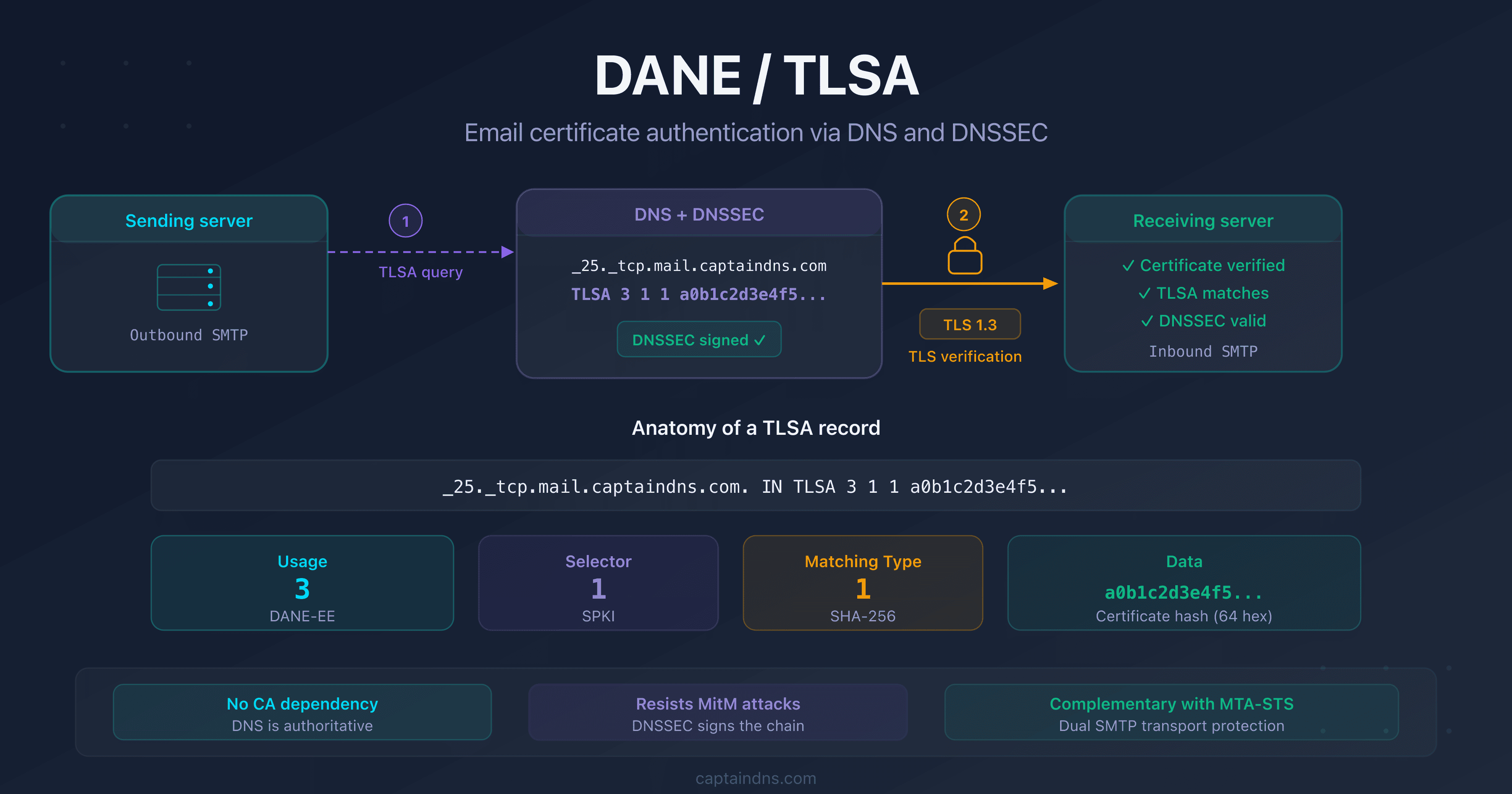
DANE (DNS-based Authentication of Named Entities), defined in RFC 6698, solves this problem by publishing expected certificate information directly in DNS. The sending server looks up the TLSA record, verifies that the presented certificate matches, and refuses the connection if there's a mismatch. DNSSEC signs this information, guaranteeing it hasn't been tampered with in transit.
This guide covers how DANE works, the anatomy of a TLSA record, recommended use cases for email, step-by-step deployment, how it complements MTA-STS, and monitoring via TLS-RPT. It's intended for email administrators, infrastructure engineers, and DevOps teams managing mail servers.
How does DANE work?
The problem with opportunistic TLS
SMTP was designed without encryption. STARTTLS was added later (RFC 3207) to let servers negotiate a TLS connection. But this negotiation is opportunistic: if the remote server doesn't support TLS, the message is sent in cleartext. Worse, an attacker can strip the STARTTLS command from the SMTP response (a downgrade attack) and force unencrypted delivery.
Even when TLS is negotiated, the sending server doesn't verify the certificate by default. It accepts any certificate, including a self-signed one presented by an attacker. Encryption without authentication provides a false sense of security.
DANE: the certificate in DNS
DANE flips the logic. Instead of trusting an external certificate authority (CA), the domain owner publishes in DNS the certificate fingerprint that their server must present. The sending server:
- Resolves the MX record for the recipient domain
- Looks up the TLSA record associated with the MX server
- Verifies the DNSSEC signature of the response
- Establishes the TLS connection and compares the presented certificate to the TLSA fingerprint
- Refuses the connection if the certificate doesn't match
In short: DANE turns DNS into a certificate authority that the domain owner fully controls.
The DNSSEC chain of trust
DANE only works if the DNS zone is signed with DNSSEC. Without DNSSEC, an attacker could forge the TLSA record and present their own certificate fingerprint. The chain of trust extends from the DNS root to the TLSA record:
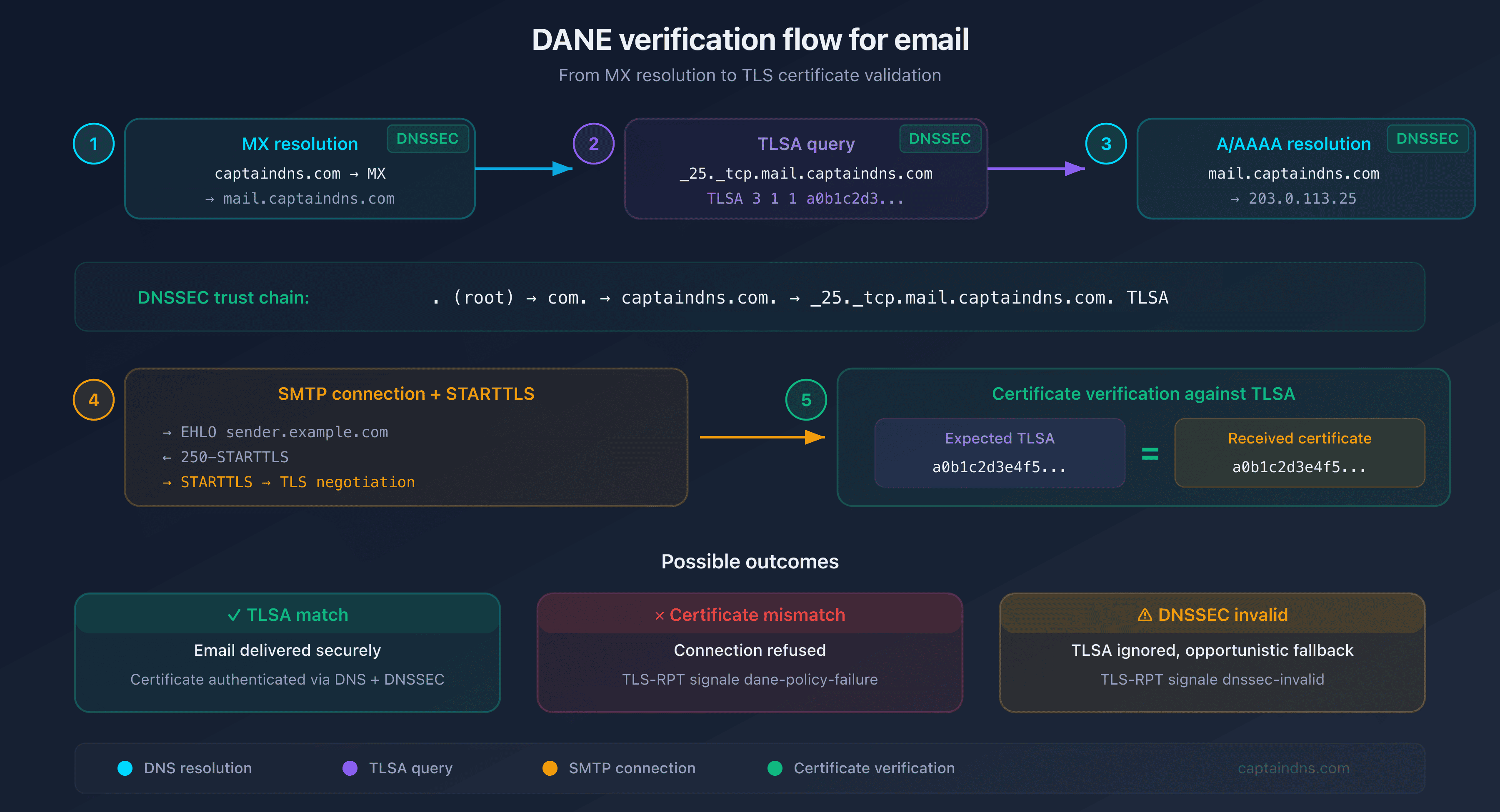
. (root) → com. → captaindns.com. → _25._tcp.mail.captaindns.com. TLSA
Each link is signed by the parent zone. If a single link is broken (unsigned zone, expired signature), DNSSEC validation fails and the TLSA record is ignored. This is by design: an unverifiable TLSA is worse than no TLSA at all, because it could have been tampered with.
Anatomy of a TLSA record
TLSA is a dedicated DNS record type (RRTYPE 52, defined in RFC 6698), with its own binary wire format. Unlike SPF, DKIM, or DMARC which use TXT records, TLSA is a native type: DNS clients query specifically for type TLSA (QTYPE=52). Putting TLSA data in a TXT record would not work.
A TLSA record consists of four fields:
_25._tcp.mail.captaindns.com. IN TLSA 3 1 1 a0b1c2d3e4f5...
The name follows the convention _port._protocol.hostname. For an SMTP server on port 25, it's _25._tcp.mail.captaindns.com.
Usage (field 1): what to verify?
| Value | Name | Description |
|---|---|---|
| 0 | PKIX-TA | Verifies the CA certificate + standard CA chain |
| 1 | PKIX-EE | Verifies the server certificate + standard CA chain |
| 2 | DANE-TA | Verifies the CA certificate, without requiring the standard CA chain |
| 3 | DANE-EE | Verifies the server certificate directly, without a CA |
Selector (field 2): which part of the certificate?
| Value | Name | Description |
|---|---|---|
| 0 | Cert | Full certificate (DER) |
| 1 | SPKI | Public key only (SubjectPublicKeyInfo) |
SPKI (1) is recommended: the public key doesn't change when you renew the certificate with the same key pair. This simplifies rotation.
Matching type (field 3): data format
| Value | Name | Description |
|---|---|---|
| 0 | Full | Complete raw data |
| 1 | SHA-256 | SHA-256 hash (32 bytes, 64 hex characters) |
| 2 | SHA-512 | SHA-512 hash (64 bytes, 128 hex characters) |
SHA-256 (1) is the standard: compact, collision-resistant, and universally supported.
Which TLSA usage should you choose?
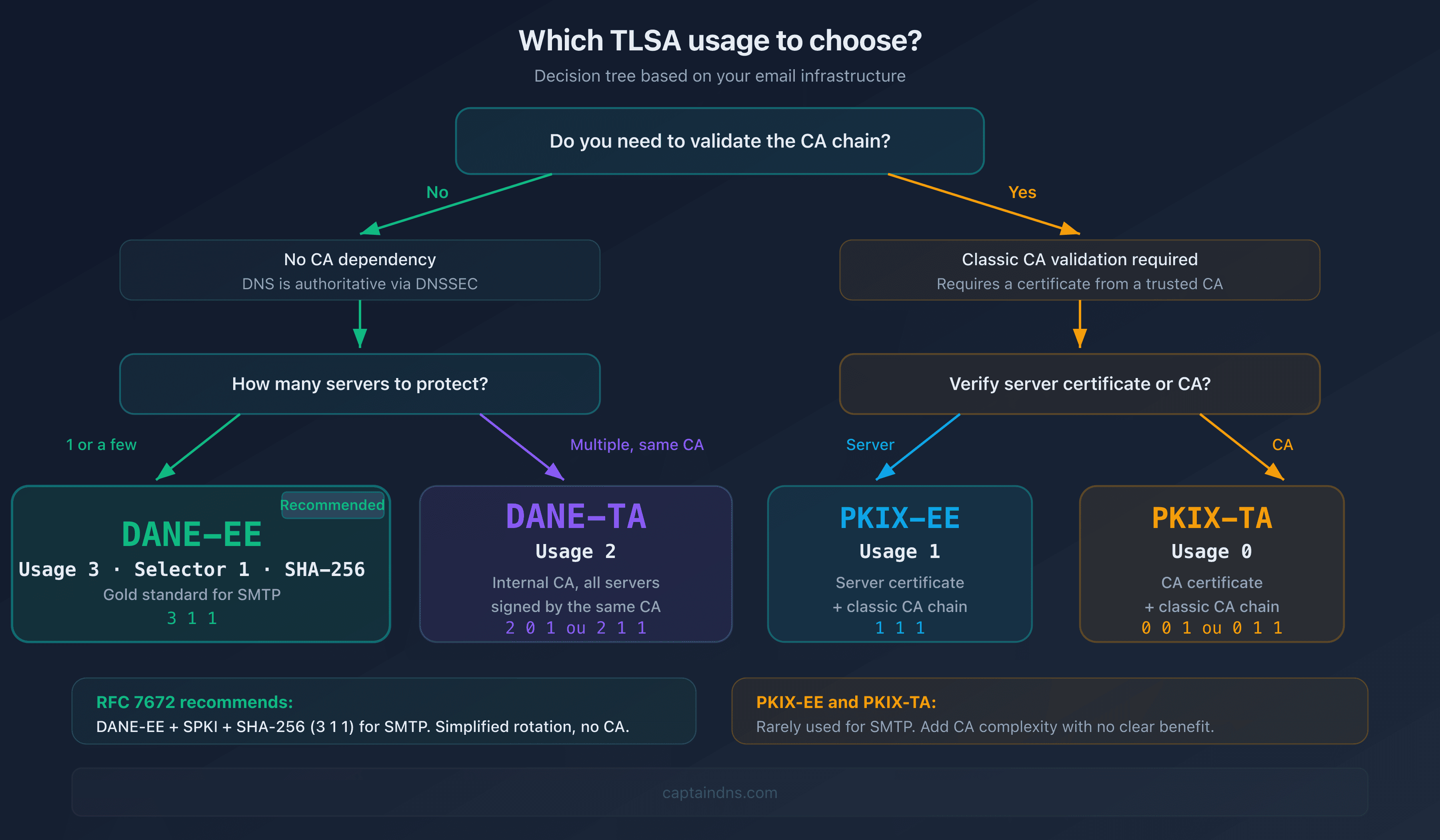
DANE-EE (usage 3): the recommended choice for SMTP
RFC 7672 (section 3.1) recommends DANE-EE for email. The combination 3 1 1 (DANE-EE + SPKI + SHA-256) is the recommended configuration:
_25._tcp.mail.captaindns.com. IN TLSA 3 1 1 a0b1c2d3e4f5...
With DANE-EE, trust passes entirely through DNSSEC instead of certificate authorities. The certificate serves only as a container for the public key: RFC 7671 (section 5.1) specifies that the CA chain, hostname in the certificate, and expiration date are all bypassed. This is a deliberate design choice, not a weakness. The traditional CA model is fundamentally unsuited to SMTP: among 150+ recognized certificate authorities, any one of them can issue a certificate for any domain. DANE-EE reduces the trust surface to the sole DNS zone owner (RFC 7672, section 1.3.2).
Why DANE-EE dominates for SMTP:
- No CA dependency: trust relies on DNSSEC, not 150+ certificate authorities
- Self-signed certificates accepted: the certificate is a key container, not an identity attestation
- No expiration check: an expired certificate remains valid as long as the TLSA and DNSSEC are correct
- Simplified rotation: with SPKI, the hash doesn't change if you keep the same key pair
- Reduced attack surface: a single trust source instead of 150+
DANE-TA (usage 2): when to use the CA?
DANE-TA (2 0 1 or 2 1 1) is useful when you manage multiple servers signed by the same internal CA. Instead of publishing one TLSA per server, you publish the CA fingerprint and all certificates signed by it are accepted.
Downside: if the CA is compromised, all servers are compromised. DANE-TA also requires hostname validation, adding a failure point compared to DANE-EE.
PKIX-EE and PKIX-TA (usages 1 and 0): edge cases
These usages combine DANE verification with standard CA validation. They're rarely used for SMTP because they add complexity without a clear benefit over DANE-EE. RFC 7672 explicitly discourages them for email.
DANE for email: RFC 7672
RFC 7672 adapts DANE to the SMTP context. Three key specifics matter in practice:
STARTTLS and port 25
For email, DANE applies on port 25 with STARTTLS (not on port 465 with implicit TLS). The sending server initiates a standard SMTP connection, sends EHLO, receives the 250-STARTTLS response, then negotiates TLS. That's when it compares the presented certificate to the TLSA record. If STARTTLS is absent from the server response and a valid TLSA record exists, the sending server must refuse delivery rather than fall back to plaintext.
TLSA naming for MX servers
The TLSA record name is built from the MX hostname, not the email domain:
# Email destined for user@captaindns.com
# MX for captaindns.com → mail.captaindns.com
# TLSA → _25._tcp.mail.captaindns.com
If the domain has multiple MX servers, each MX must have its own TLSA record. A missing TLSA on one MX means that MX falls back to opportunistic TLS, creating an uneven security posture. Conversely, if two email domains share the same MX server, they share the same TLSA record: the association is always by MX hostname, not by recipient domain (RFC 7672, section 2.2.1).
Resolution: from domain to certificate
The complete flow for an email to user@captaindns.com:
- Resolve
captaindns.com→ MX →mail.captaindns.com(validate DNSSEC) - Resolve
_25._tcp.mail.captaindns.com→ TLSA (validate DNSSEC) - Resolve
mail.captaindns.com→ A/AAAA (validate DNSSEC) - TCP connection → SMTP → STARTTLS → Verify certificate against TLSA
- If the certificate matches: deliver. Otherwise: refuse.
Every DNS lookup in this chain must be DNSSEC-validated. A single unsigned response breaks the entire verification.
DNSSEC on the email domain and the MX hostname: for complete protection, both zones must be signed. The target MX domain (mail.captaindns.com) must have DNSSEC for TLSA records to be validated. The email domain (captaindns.com) should also be signed: without DNSSEC on the email zone, an attacker can redirect MX records to a malicious server (MX redirect attack). DANE then protects against passive eavesdropping but not against active MX redirection attacks (RFC 7672, section 2.2.1).
Deploy DANE in 6 steps
Before starting, verify these prerequisites:
- Your DNS zone is signed with DNSSEC (complete chain of trust from root to zone)
- Your MX servers support STARTTLS on port 25
- You have access to the TLS certificate or private key of each MX server
- You can publish DNS records in your zone
1. Enable DNSSEC on your zone
This is the absolute prerequisite. Contact your registrar or DNS host to enable DNSSEC. Verify that the chain of trust is complete using a tool like dig +dnssec or the CaptainDNS DNSSEC checker.
If DNSSEC is not active, stop here. Publishing TLSA records without DNSSEC provides zero security benefit and may cause delivery issues with some resolvers.
2. Generate the TLSA record
Generate your record using the DANE/TLSA generator. Provide your PEM certificate or let the tool retrieve it via STARTTLS. Choose the 3 1 1 combination (DANE-EE, SPKI, SHA-256).
3. Publish in DNS
Add the record to your zone with a TTL matching your certificate rotation window:
_25._tcp.mail.captaindns.com. 3600 IN TLSA 3 1 1 a0b1c2d3e4f5678901234567890abcdef0123456789abcdef0123456789abcdef
Keep the TTL at 3,600 seconds (1 hour) or lower. A lower TTL means faster rollback if something goes wrong, and faster propagation when you rotate certificates.
4. Verify the configuration
After propagation (respect the TTL), validate that everything is in place: TLSA record resolved, DNSSEC valid, certificate matching. Use the DANE/TLSA inspector to check in seconds.
5. Enable TLS-RPT
Publish a TLS-RPT record to receive failure reports:
_smtp._tls.captaindns.com. 300 IN TXT "v=TLSRPTv1; rua=mailto:tls-reports@captaindns.com"
6. Plan certificate rotation
This is where most DANE deployments break. When you renew your certificate:
- With the same key (SPKI selector): the hash doesn't change, nothing to do
- With a new key: publish the new TLSA record before deploying the new certificate. Keep both records during the transition period (at least 2x the TLSA TTL). Tie this into your broader certificate lifecycle management so expiry monitoring and renewals stay in sync with the TLSA.
The rotation procedure for a new key:
- Generate the new key pair and certificate
- Compute the new TLSA hash
- Add the new TLSA record alongside the existing one
- Wait for full DNS propagation (2x TTL minimum)
- Deploy the new certificate on the server
- Verify delivery works correctly via TLS-RPT
- Remove the old TLSA record after the old certificate expires
DANE and MTA-STS: complementary, not competing
DANE and MTA-STS both protect against downgrade and man-in-the-middle attacks on SMTP transport, but through different trust models.
| Criteria | DANE | MTA-STS |
|---|---|---|
| Trust anchor | DNSSEC (DNS root) | HTTPS (certificate authorities) |
| Self-signed certs | Accepted (DANE-EE) | Rejected |
| Prerequisite | DNSSEC on the zone | HTTPS on mta-sts subdomain |
| Deployment effort | High (DNSSEC + TLSA) | Medium (DNS + web server) |
| Testing mode | No | Yes (mode: testing) |
| CA compromise resistance | Yes | No |
The ideal strategy: deploy both
Deploying DANE and MTA-STS simultaneously covers both cases:
- Servers that support DANE use TLSA verification (strongest guarantee)
- Servers that only support MTA-STS use the HTTPS policy
- Servers that support both get double protection
Since most large providers now support at least one of the two mechanisms, deploying both maximizes the share of your inbound email that is cryptographically authenticated. See our complete MTA-STS guide for deployment instructions.
Monitor DANE with TLS-RPT
TLS-RPT (RFC 8460) is DANE's essential companion in production. Without it, DANE failures are silent: sending servers refuse delivery, but you receive no notification. The daily JSON reports include DANE-specific failure types:
| Failure type | Meaning | Typical cause |
|---|---|---|
dane-required | Sending server requires DANE but can't find a valid TLSA | Missing or deleted TLSA record |
tlsa-invalid | The TLSA record is malformed | Syntax error, truncated hash |
dnssec-invalid | DNSSEC validation failed | Expired RRSIG, broken chain |
dane-policy-failure | Certificate doesn't match the TLSA record | Certificate rotated without TLSA update |
The most common failure in practice is dane-policy-failure after a certificate renewal where the TLSA record was not updated. This is exactly why step 6 (rotation planning) is critical.
See our complete TLS-RPT guide for setup instructions.
Recommended action plan
- Check your DNSSEC: your zone must be signed with a complete chain of trust
- Choose usage
3 1 1: DANE-EE + SPKI + SHA-256, the standard for SMTP per RFC 7672 - Generate and publish the TLSA: use the generator, publish, wait for full propagation
- Validate with the inspector: verify TLSA + DNSSEC + certificate match
- Enable TLS-RPT: receive failure reports to catch rotation issues before they block delivery
- Document rotation: write a runbook for certificate renewal that includes the TLSA update steps
Check your DANE configuration now: Use the DANE/TLSA inspector to analyze your domain's DANE setup in seconds. Need to create a record? The DANE/TLSA generator produces a publish-ready TLSA record.
FAQ
What is DANE and how does it work?
DANE (DNS-based Authentication of Named Entities) is an internet standard (RFC 6698) that lets you publish expected TLS certificate information for a server in DNS. The sending server looks up the TLSA record, verifies the DNSSEC signature, then compares the certificate presented by the server to the published fingerprint. If the certificate doesn't match, the connection is refused.
What's the difference between DANE and MTA-STS?
DANE uses DNSSEC and TLSA records to authenticate certificates. MTA-STS uses HTTPS and certificate authorities. DANE offers stronger security (no CA dependency) but requires DNSSEC. MTA-STS is simpler to deploy. The two mechanisms are complementary and can coexist on the same domain.
Is DNSSEC required for DANE?
Yes, DNSSEC is an absolute prerequisite. Without a signed zone, TLSA records aren't trustworthy because an attacker could forge them. Sending servers compliant with RFC 7672 ignore TLSA records whose DNSSEC chain isn't valid.
Which TLSA usage should I choose for email?
RFC 7672 recommends DANE-EE (usage 3) with SPKI (selector 1) and SHA-256 (matching type 1), i.e., the 3 1 1 combination. It's the gold standard for SMTP: no CA dependency, simplified rotation with SPKI, and maximum compatibility.
Does DANE work with Let's Encrypt?
Yes, DANE works with Let's Encrypt. With DANE-EE and the SPKI selector (3 1 1), the hash doesn't change as long as you renew the certificate with the same private key. Let's Encrypt renews every 90 days, but if you keep the key, the TLSA remains valid. If you regenerate the key, publish the new TLSA before deploying the certificate.
Which email providers support DANE?
On the sending side, Postfix has supported outbound DANE verification since version 2.11 (2014). Gmail performs DANE validation on outbound connections. Microsoft enabled inbound DANE with DNSSEC for Exchange Online in 2024. On the receiving side, any server with DNSSEC and a published TLSA record is compatible. Adoption is strongest in Europe, particularly in Germany and the Netherlands where many ISPs and government domains have deployed DANE.
How do I monitor DANE failures in production?
Enable TLS-RPT (RFC 8460) by publishing a _smtp._tls DNS record with a receiving address. Sending servers will send daily JSON reports detailing DANE failures: certificate mismatch, invalid DNSSEC, missing TLSA. Without TLS-RPT, failures go unnoticed.
Glossary
- DANE: DNS-based Authentication of Named Entities. Protocol defined in RFC 6698 that publishes TLS certificate information in DNS, allowing servers to verify certificates without relying on certificate authorities.
- TLSA: DNS record type used by DANE to store certificate association data (usage, selector, matching type, and certificate hash).
- DNSSEC: DNS Security Extensions. Adds cryptographic signatures to DNS records, enabling verification that responses haven't been tampered with. Required prerequisite for DANE.
- STARTTLS: SMTP extension (RFC 3207) that upgrades a plaintext connection to encrypted TLS. Opportunistic by default.
- DANE-EE: DANE usage type 3. Verifies the end-entity (server) certificate directly, bypassing CA chain validation.
- DANE-TA: DANE usage type 2. Verifies the trust anchor (CA) certificate, accepting any certificate signed by that CA.
- SPKI: SubjectPublicKeyInfo. The public key portion of a certificate, used as selector 1 in TLSA records. Preferred because it survives certificate renewal with the same key pair.
- TLS-RPT: SMTP TLS Reporting (RFC 8460). Mechanism for receiving daily reports on TLS negotiation successes and failures, including DANE-specific errors.
📚 Related DANE/TLSA guides
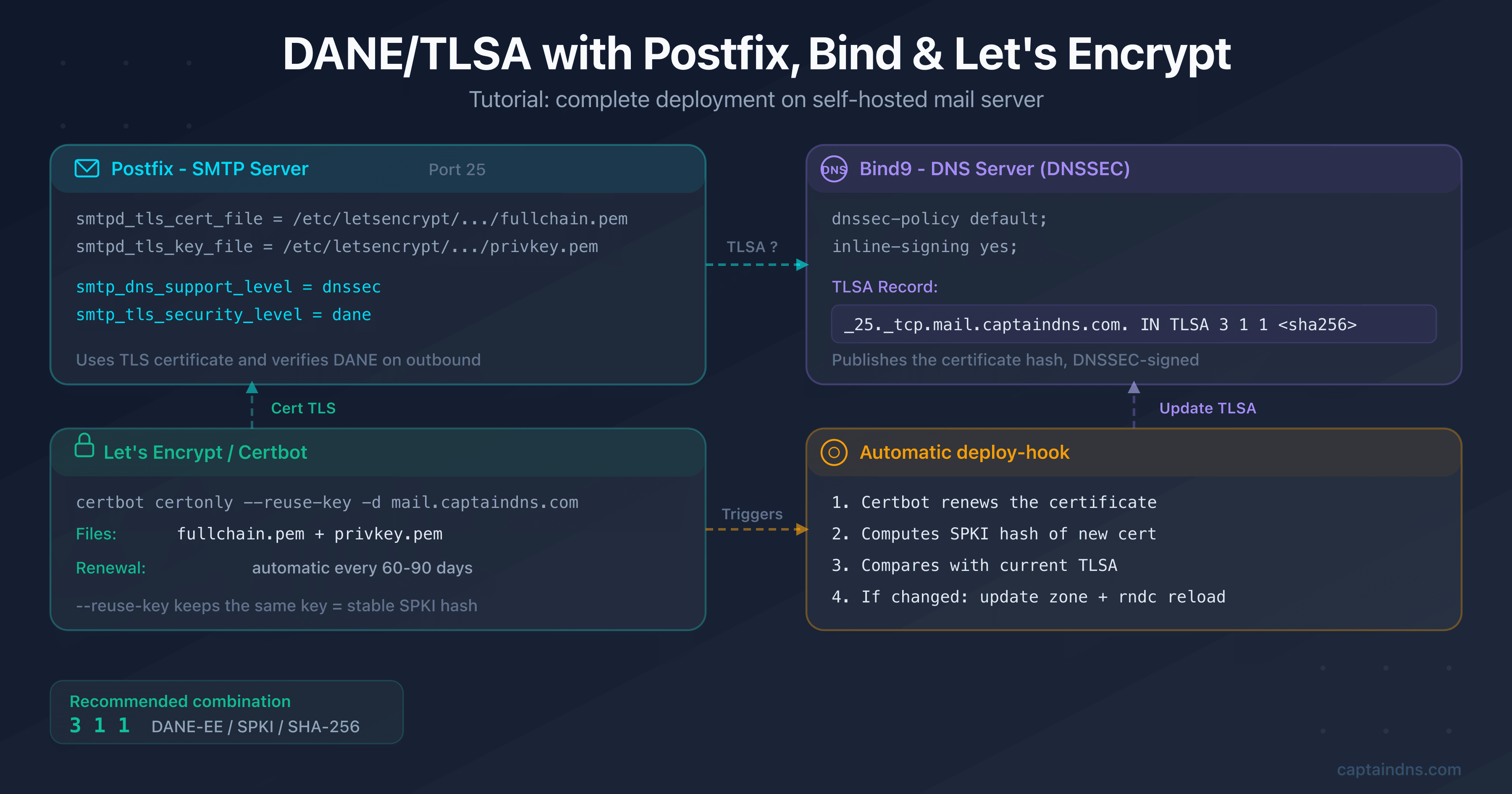
- Set up DANE/TLSA with Postfix, Bind and Let's Encrypt: step-by-step tutorial with copy-paste commands, renewal automation and verification
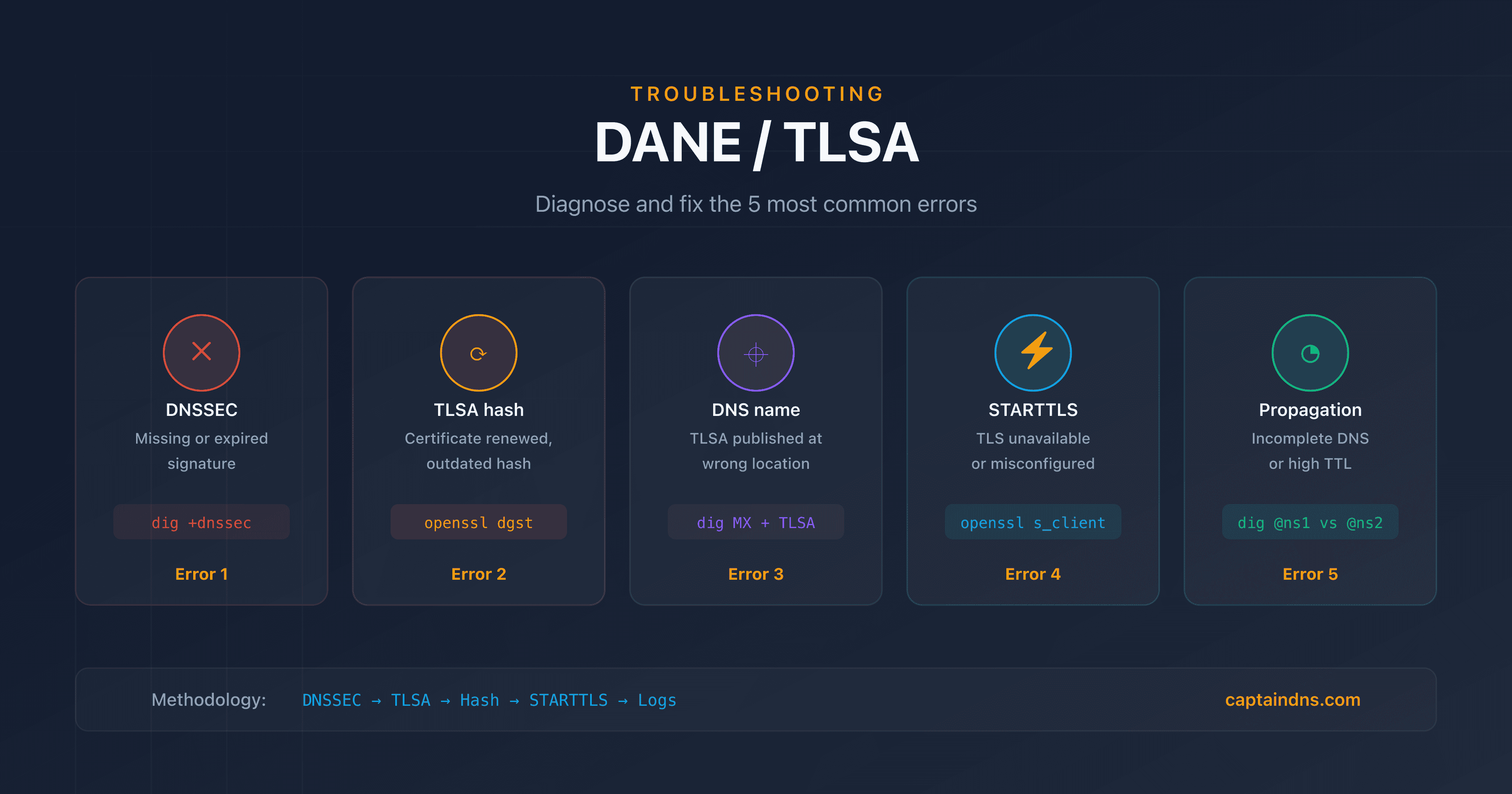
- DANE/TLSA troubleshooting: diagnose and fix common errors: 5-step diagnostic methodology, dig/openssl commands and TLS-RPT monitoring
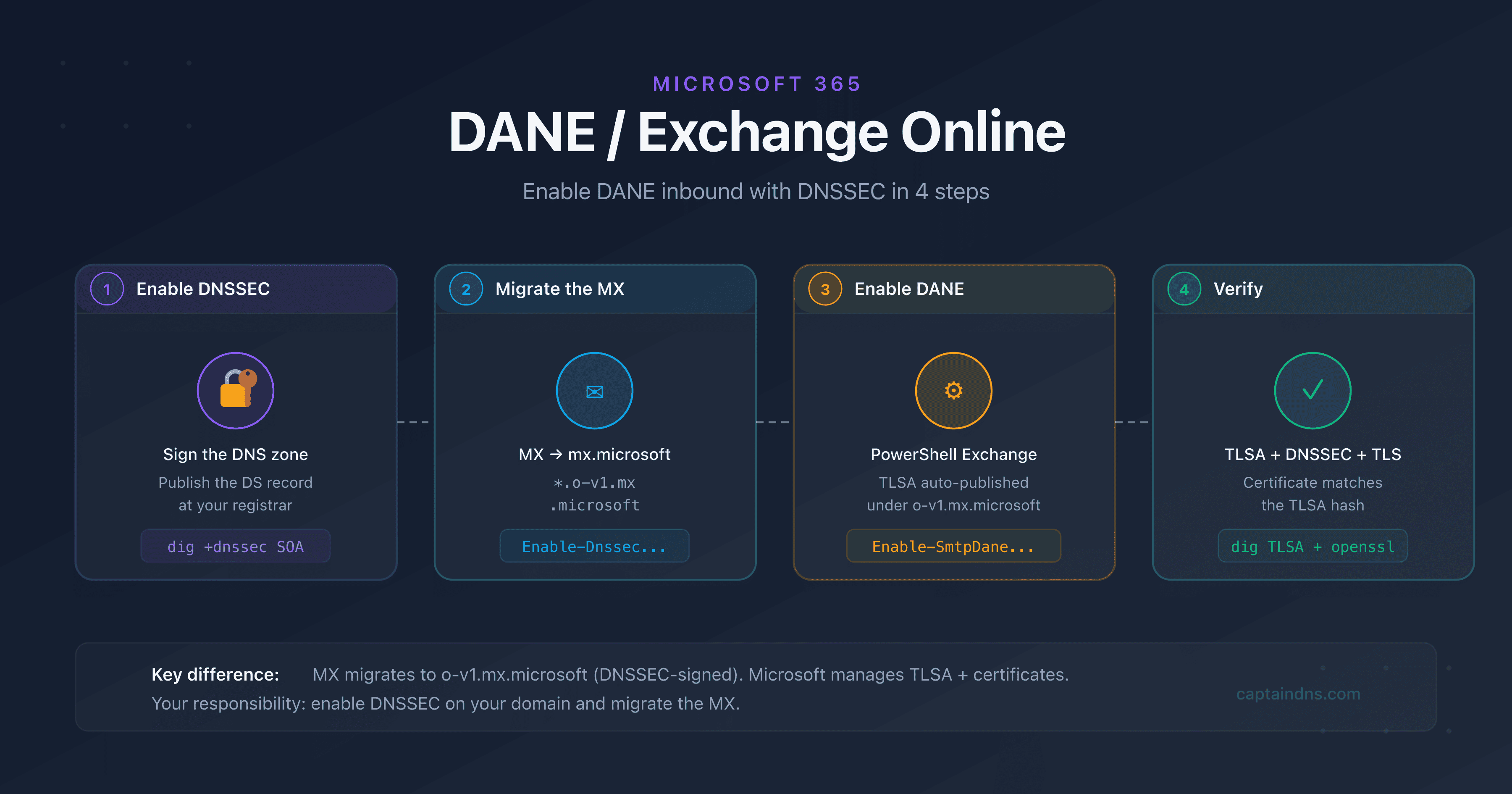
- Deploy DANE for Exchange Online and Microsoft 365
Sources
- RFC 6698 - The DNS-Based Authentication of Named Entities (DANE) Transport Layer Security (TLS) Protocol: TLSA
- RFC 7671 - The DNS-Based Authentication of Named Entities (DANE) Protocol: Updates and Operational Guidance
- RFC 7672 - SMTP Security via Opportunistic DNS-Based Authentication of Named Entities (DANE) Transport Layer Security (TLS)
- RFC 8460 - SMTP TLS Reporting
- Microsoft - SMTP DNS-Based Authentication of Named Entities (DANE)
- APNIC - DNSSEC deployment statistics