STARTTLS, SSL/TLS and SMTP: which encryption for your emails?
By CaptainDNS
Published on February 17, 2026
- SSL has been deprecated since 2015 (RFC 7568): the correct term is TLS. STARTTLS is not an encryption protocol, it's a command that activates TLS on an existing connection
- STARTTLS is vulnerable to downgrade attacks: a network attacker can strip the STARTTLS announcement and force plaintext communication. MTA-STS and DANE fix this flaw
- TLS 1.3 is the recommended standard for SMTP in 2026: faster handshake (1-RTT), stronger cipher suites, mandatory forward secrecy
- Configure your MTA with mandatory outbound TLS (
smtp_tls_security_level = encrypton Postfix) and deploy MTA-STS to protect incoming emails
Are your emails really encrypted in transit? In 2024, Google reported that over 95% of emails received by Gmail use TLS (Google Transparency Report). That number sounds reassuring, but it hides a more nuanced reality. STARTTLS is opportunistic by default. Downgrade attacks are well documented. Many servers still accept TLS 1.0 or weak cipher suites.
This guide goes beyond a simple STARTTLS vs Implicit TLS comparison. It covers TLS encryption at the handshake level, explains why TLS 1.3 matters for SMTP, details the vulnerabilities attackers exploit, and shows how to configure robust encryption on Postfix, Exim and Exchange. Whether you manage a mail server or audit an email infrastructure, you will walk away with concrete action items.
SSL, TLS, STARTTLS: clarifying the terminology
The terms SSL, TLS and STARTTLS are used interchangeably in the email industry. This is a major source of confusion, because they refer to fundamentally different things.
SSL is dead, TLS replaced it
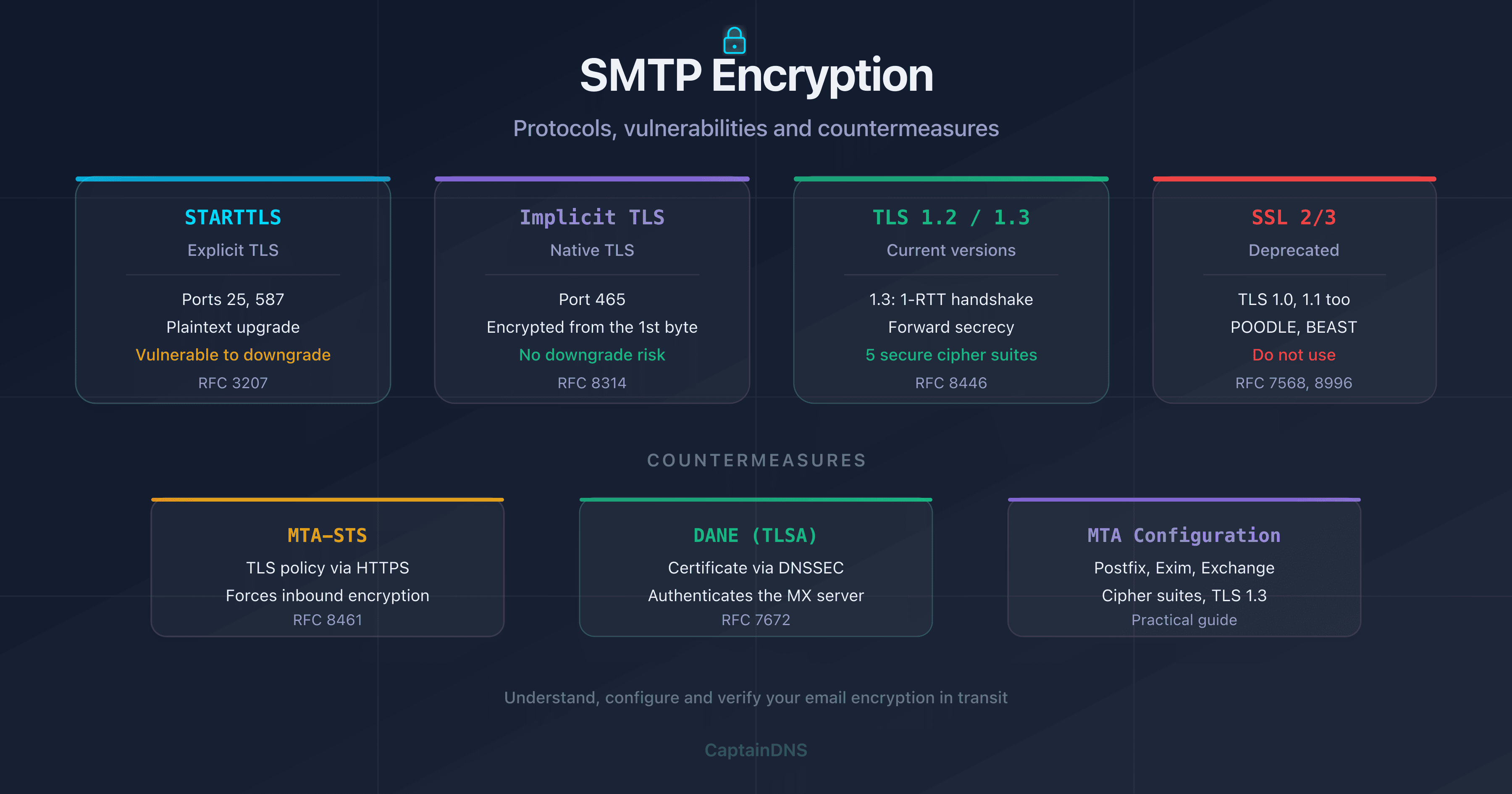
SSL (Secure Sockets Layer) is the predecessor of TLS. The last version, SSL 3.0, was released in 1996 and officially deprecated by RFC 7568 in 2015 due to critical vulnerabilities (POODLE, BEAST). When an email provider mentions "SSL" in 2026, they actually mean TLS.
| Protocol | Year | Status in 2026 |
|---|---|---|
| SSL 2.0 | 1995 | Prohibited (RFC 6176) |
| SSL 3.0 | 1996 | Prohibited (RFC 7568) |
| TLS 1.0 | 1999 | Deprecated (RFC 8996) |
| TLS 1.1 | 2006 | Deprecated (RFC 8996) |
| TLS 1.2 | 2008 | Acceptable |
| TLS 1.3 | 2018 | Recommended |
In practice: if your SMTP server still accepts SSL 3.0 or TLS 1.0, it's vulnerable to known attacks. Disable these protocols.
STARTTLS is not an encryption protocol
STARTTLS is an SMTP command (defined in RFC 3207) that asks the server to upgrade a plaintext connection to an encrypted TLS connection. It's neither SSL, nor TLS, nor a standalone protocol: it's a mechanism for upgrading an existing connection.
The confusion comes from the name: "STARTTLS" contains "TLS", but it doesn't specify which version of TLS will be used. The negotiated version depends on the client and server configuration.
Implicit TLS vs Explicit TLS (STARTTLS)
There are two ways to establish TLS on an SMTP connection:
| Method | Typical port | How it works | Web analogy |
|---|---|---|---|
| Explicit TLS (STARTTLS) | 25, 587 | Plaintext connection, then upgrade via STARTTLS command | HTTP then redirect to HTTPS |
| Implicit TLS | 465 | TLS connection from the very first byte | Native HTTPS on port 443 |
With Explicit TLS, there's always a moment when the communication is in plaintext (the EHLO phase before STARTTLS). With Implicit TLS, the communication is never in plaintext. This difference has major security implications.
How does SMTP encryption work in practice?
Whether you use STARTTLS or Implicit TLS, encryption relies on a TLS handshake. This negotiation process determines the protocol version, the cipher suite used, and the key exchange.
The TLS handshake step by step
Here's what happens when an SMTP server negotiates TLS (after the STARTTLS command or immediately upon connection on port 465):
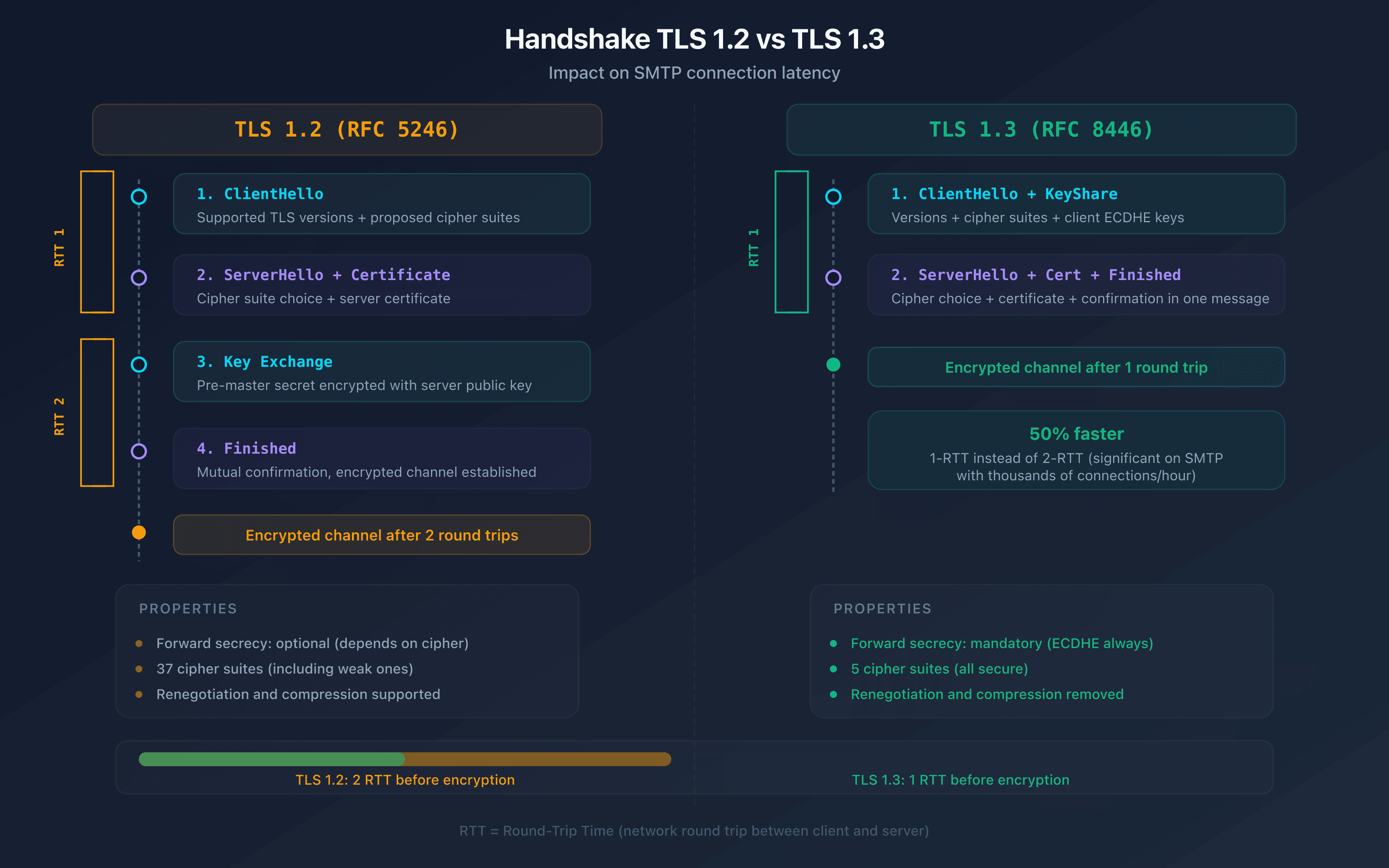
With TLS 1.2 (4 exchanges, 2-RTT):
- ClientHello: the client sends the TLS versions and cipher suites it supports
- ServerHello: the server selects the TLS version and cipher suite, sends its certificate
- Key exchange: the client generates a pre-master secret and encrypts it with the server's public key
- Finished: both parties confirm the channel is encrypted
With TLS 1.3 (2 exchanges, 1-RTT):
- ClientHello: the client sends TLS versions, cipher suites and its Diffie-Hellman keys
- ServerHello + Finished: the server selects parameters, sends its certificate and confirms encryption
TLS 1.3 merges steps: the handshake goes from 2-RTT to 1-RTT, reducing connection establishment latency. For an MX server handling thousands of connections per hour, this optimization is significant.
TLS 1.2 vs TLS 1.3: what are the differences for SMTP?
| Criteria | TLS 1.2 | TLS 1.3 |
|---|---|---|
| Handshake | 2-RTT | 1-RTT |
| Forward secrecy | Optional (depends on cipher) | Mandatory |
| Cipher suites | 37 suites (including weak ones) | 5 suites (all strong) |
| Compression | Supported (CRIME vulnerability) | Removed |
| Renegotiation | Supported (attack vector) | Removed |
| 0-RTT resumption | No | Yes (with precautions) |
| RFC | RFC 5246 | RFC 8446 |
The key point for SMTP: TLS 1.3 eliminates weak cipher suites and makes forward secrecy mandatory. With TLS 1.2, a server can negotiate RSA without Diffie-Hellman key exchange. An attacker who obtains the server's private key can then decrypt all past communications. TLS 1.3 fixes this: each session uses ephemeral keys. Even if the private key leaks, past sessions remain protected.
Recommended cipher suites for 2026
For SMTP, configure your server with these cipher suites in order of preference:
TLS 1.3 (no configuration needed, all 5 suites are secure):
TLS_AES_256_GCM_SHA384TLS_CHACHA20_POLY1305_SHA256TLS_AES_128_GCM_SHA256
TLS 1.2 (restrict to suites with forward secrecy):
ECDHE-ECDSA-AES256-GCM-SHA384ECDHE-RSA-AES256-GCM-SHA384ECDHE-ECDSA-CHACHA20-POLY1305ECDHE-RSA-CHACHA20-POLY1305ECDHE-ECDSA-AES128-GCM-SHA256ECDHE-RSA-AES128-GCM-SHA256
Cipher suites to ban: anything containing RC4, DES, 3DES, MD5, NULL, EXPORT, or RSA without ECDHE/DHE (no forward secrecy).
STARTTLS vulnerabilities and how to protect against them
STARTTLS is the most widespread encryption mechanism for server-to-server SMTP connections (port 25). But its opportunistic design introduces exploitable vulnerabilities.
The STARTTLS downgrade attack
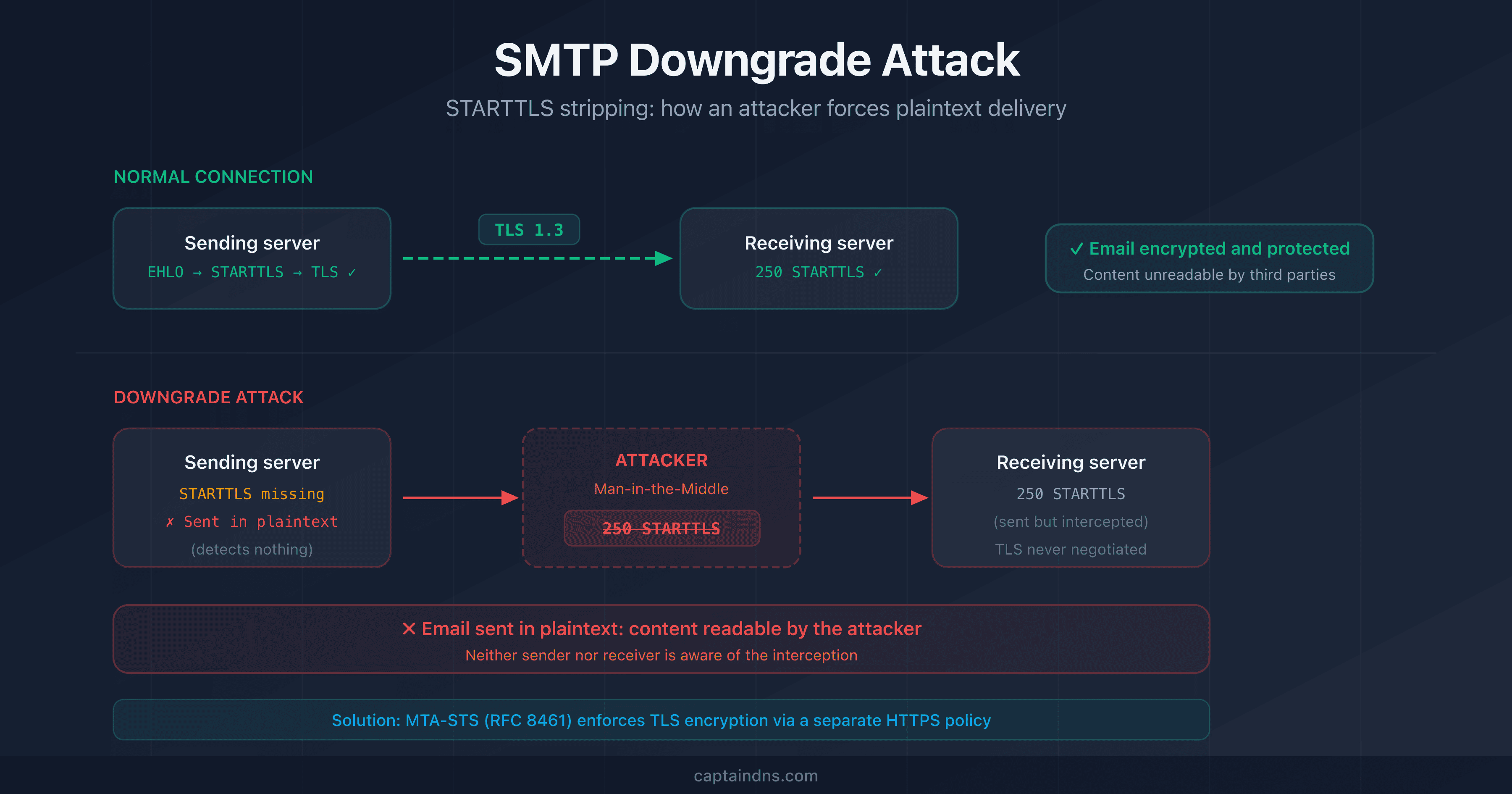
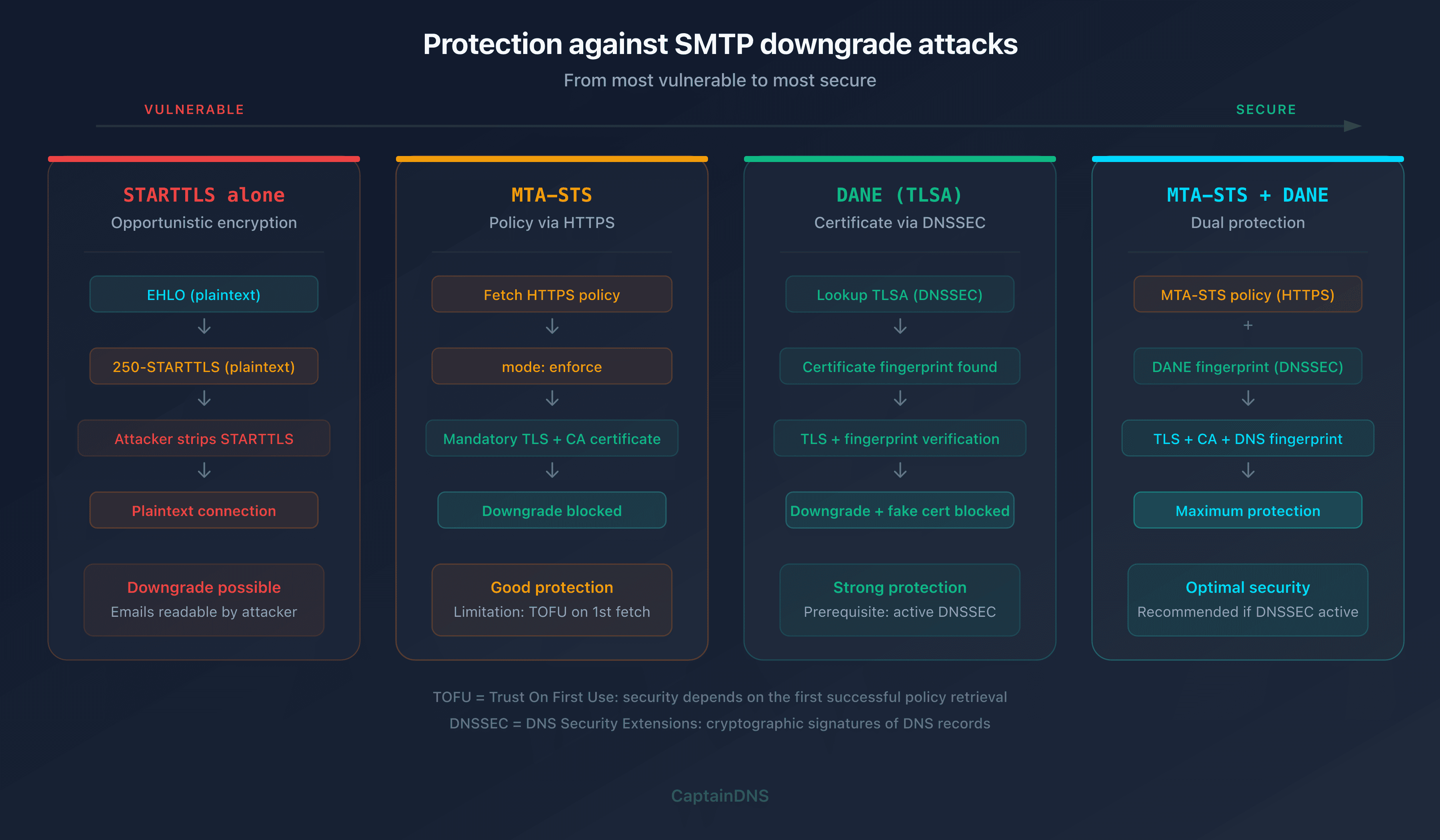
When an SMTP client connects to a server on port 25, it sends EHLO and waits for the list of extensions. If the server announces 250-STARTTLS, the client knows it can switch to TLS. The problem: this exchange happens in plaintext.
An attacker positioned between the client and the server (man-in-the-middle) can modify the EHLO response to remove the 250-STARTTLS line. The client, not seeing the STARTTLS extension, continues in plaintext. The attacker can then read and modify all emails in transit.
# Legitimate server response
250-mx1.captaindns.com
250-STARTTLS        <-- the attacker removes this line
250 OK

# What the client sees after the attack
250-mx1.captaindns.com
250 OK              <-- no STARTTLS, plaintext connection
The STRIPTLS attack
STRIPTLS is a more sophisticated variant. Instead of stripping the server's STARTTLS announcement, the attacker intercepts the STARTTLS command sent by the client. The attacker returns a fake error (for example 454 TLS not available). The client gives up on TLS and continues in plaintext, believing the issue is temporary.
Both attacks are documented and have been observed at a national scale. In 2014, researchers from the EFF and university teams showed that several countries were performing STRIPTLS on international SMTP connections (Durumeric et al., 2015).
MTA-STS: enforcing TLS on incoming emails
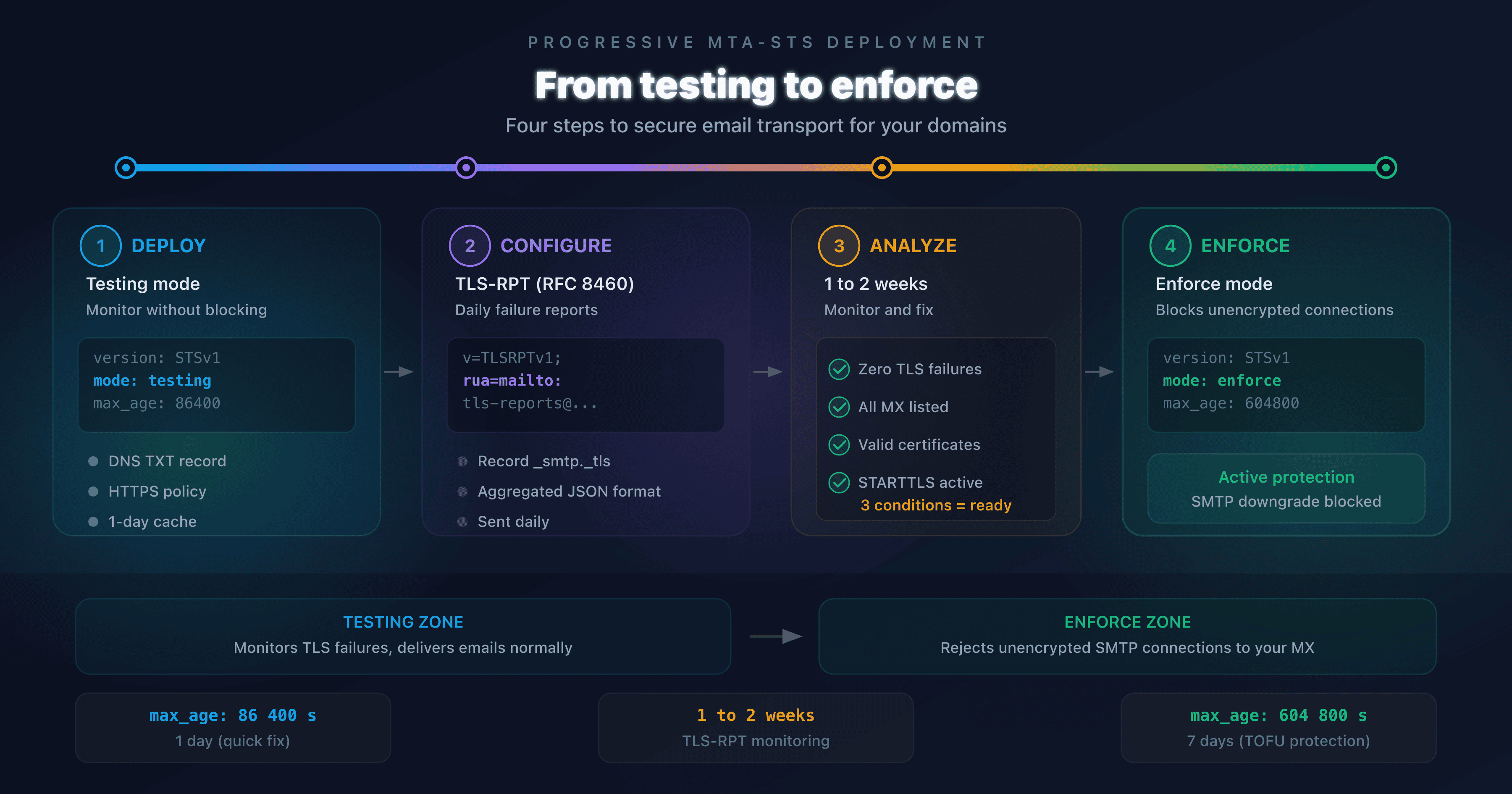
MTA-STS (Mail Transfer Agent Strict Transport Security, RFC 8461) is the IETF's answer to SMTP downgrade attacks. The principle: the recipient domain publishes a policy stating "all servers sending me emails must use TLS with a valid certificate".
How it works:
- The domain
captaindns.compublishes a DNS TXT record at_mta-sts.captaindns.comwith a policy identifier - The domain hosts a file at
https://mta-sts.captaindns.com/.well-known/mta-sts.txtcontaining the policy - The sending server checks this policy before connecting to the MX
- If the policy is in
enforcemode, the sending server refuses to deliver in plaintext
# DNS record
_mta-sts.captaindns.com.  TXT  "v=STSv1; id=20260217"

# Policy file (HTTPS required)
version: STSv1
mode: enforce
mx: mx1.captaindns.com
mx: mx2.captaindns.com
max_age: 604800
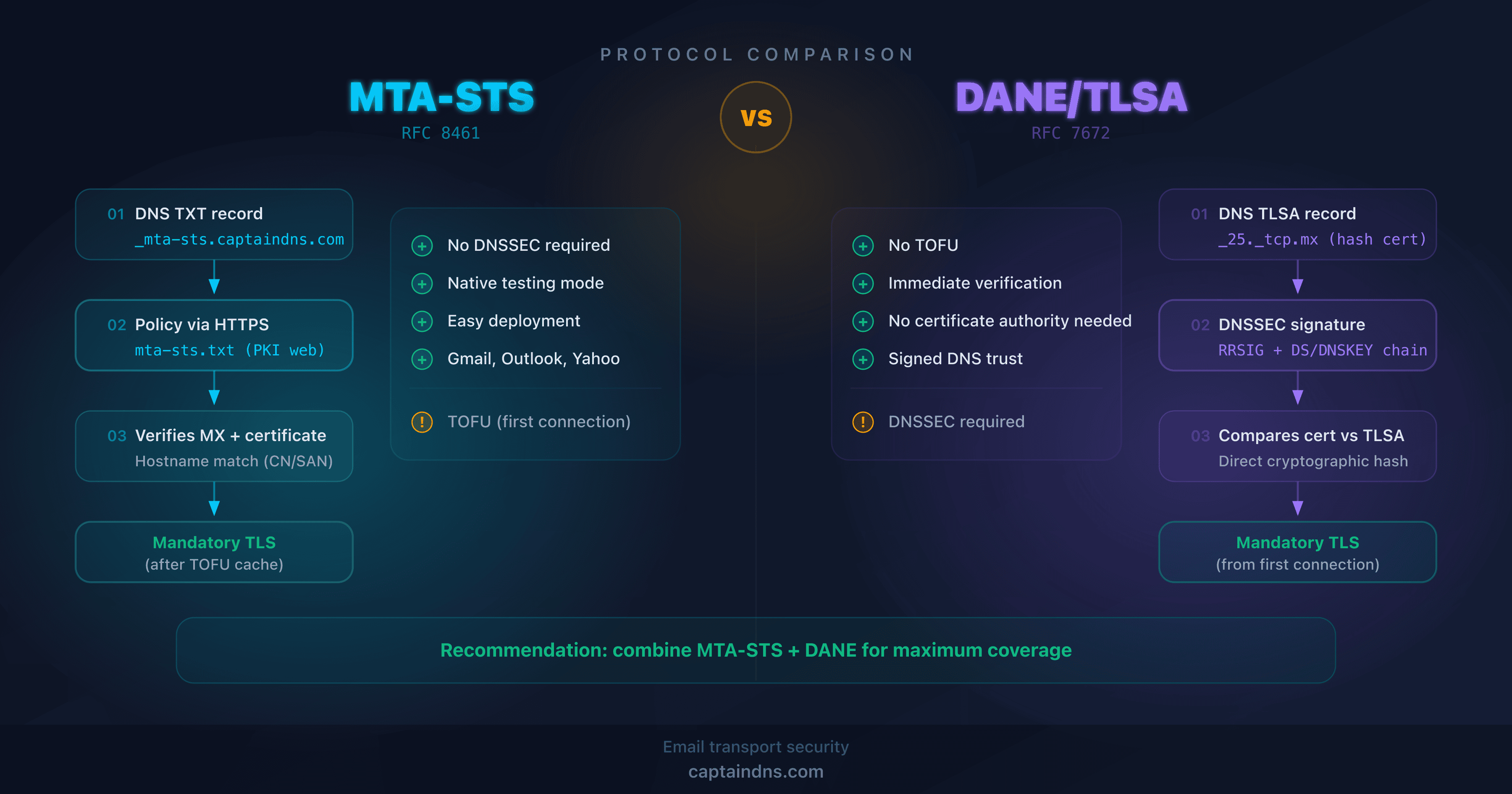
Limitation: MTA-STS relies on HTTPS to distribute the policy. If the attacker blocks HTTPS access to the policy file, the sending server cannot retrieve it and may fall back to plaintext. This is a TOFU (Trust On First Use) problem: the policy is only secure after its first successful retrieval.
DANE (TLSA): authenticating certificates via DNS
DANE (DNS-based Authentication of Named Entities, RFC 7672 for SMTP) solves the problem differently. Instead of publishing a policy via HTTPS, the domain publishes a TLSA record in DNS containing the fingerprint of the expected TLS certificate.
# TLSA record for the MX (port 25)
_25._tcp.mx1.captaindns.com.  TLSA  3 1 1 a0b1c2d3e4f5...
Benefits of DANE:
- No HTTPS dependency (unlike MTA-STS)
- Authenticates the server's certificate via DNSSEC (not just "TLS required", but "TLS with this certificate")
- Protects against both downgrade attacks and forged certificates
Prerequisite: DANE requires DNSSEC on the domain. Without DNSSEC, TLSA records are not authenticated and DANE is ineffective. This remains the main barrier to adoption: as of 2025, roughly 5% of .com domains have DNSSEC enabled (APNIC DNSSEC Deployment Stats).
| Mechanism | Protects against downgrade | Authenticates certificate | Prerequisites |
|---|---|---|---|
| STARTTLS alone | No | No | None |
| MTA-STS | Yes (after first fetch) | Yes (public CA) | HTTPS + DNS TXT |
| DANE | Yes | Yes (exact fingerprint) | DNSSEC + DNS TLSA |
| MTA-STS + DANE | Yes (dual protection) | Yes (CA + fingerprint) | DNSSEC + HTTPS |
Configuring TLS encryption on your SMTP server
The theory is clear. How do you actually configure this? Let's walk through the three most common MTAs.
Postfix: enabling and hardening TLS
Postfix is the most widely deployed MTA on Linux servers. TLS configuration is done in main.cf.
Inbound TLS (server, receiving emails):
# Enable TLS for incoming connections
smtpd_tls_cert_file = /etc/letsencrypt/live/mx1.captaindns.com/fullchain.pem
smtpd_tls_key_file = /etc/letsencrypt/live/mx1.captaindns.com/privkey.pem
smtpd_tls_security_level = may

# Enforce TLS 1.2 minimum
smtpd_tls_mandatory_protocols = >=TLSv1.2
smtpd_tls_protocols = >=TLSv1.2

# Cipher suites (TLS 1.2)
smtpd_tls_mandatory_ciphers = high
smtpd_tls_exclude_ciphers = aNULL, MD5, DES, 3DES, RC4
Outbound TLS (client, sending emails):
# Enable TLS for outgoing connections
smtp_tls_security_level = may
smtp_tls_CAfile = /etc/ssl/certs/ca-certificates.crt

# Enforce TLS 1.2 minimum for outbound
smtp_tls_mandatory_protocols = >=TLSv1.2
smtp_tls_protocols = >=TLSv1.2

# Log TLS connections (useful for auditing)
smtp_tls_loglevel = 1
Further hardening: replace smtp_tls_security_level = may with encrypt to refuse any plaintext outbound connection. Caution: some small servers still lack TLS support. Emails to those servers will be blocked. Use dane if DNSSEC is available on your domain.
security_level value | Behavior |
|---|---|
none | No TLS (not recommended) |
may | Opportunistic TLS (default, accepts plaintext) |
encrypt | Mandatory TLS (refuses plaintext) |
dane | TLS + DANE verification via DNSSEC |
verify | TLS + certificate hostname verification |
Exim: TLS configuration
Exim uses a modular configuration. TLS directives are in the main block.
# Certificate and key
tls_certificate = /etc/letsencrypt/live/mx1.captaindns.com/fullchain.pem
tls_privatekey = /etc/letsencrypt/live/mx1.captaindns.com/privkey.pem

# Advertise STARTTLS
tls_advertise_hosts = *

# Enforce TLS 1.2 minimum
openssl_options = +no_sslv2 +no_sslv3 +no_tlsv1 +no_tlsv1_1

# Require specific ciphers for outbound connections (optional)
tls_require_ciphers = ECDHE-ECDSA-AES256-GCM-SHA384:\
  ECDHE-RSA-AES256-GCM-SHA384:\
  ECDHE-ECDSA-AES128-GCM-SHA256:\
  ECDHE-RSA-AES128-GCM-SHA256
To verify your configuration: exim -bV displays compiled TLS capabilities.
Microsoft Exchange: enforcing TLS
On Exchange (2019+), TLS configuration is done via receive and send connectors.
Receive connector (incoming emails):
# Enforce TLS on the receive connector
Set-ReceiveConnector "Default Frontend" -RequireTLS $true

# Disable deprecated protocols (via Windows registry)
# HKLM\SYSTEM\CurrentControlSet\Control\SecurityProviders\SCHANNEL\Protocols
# Disable SSL 2.0, SSL 3.0, TLS 1.0, TLS 1.1
Send connector (outgoing emails to a specific partner):
# Create a send connector with mandatory TLS
New-SendConnector -Name "To captaindns.com (TLS)" `
  -AddressSpaces "captaindns.com" `
  -RequireTLS $true `
  -TlsAuthLevel DomainValidation
Note: RequireTLS $true on a send connector means Exchange refuses to send in plaintext to that destination. Use it for partner domains that support TLS, not for a catch-all connector (messages would be blocked).
Verifying the encryption of your emails
Configuring TLS is only half the job. You need to verify that encryption is actually working.
From Gmail: encryption indicator
Gmail displays a padlock in the email header. A gray padlock means the email was transmitted over TLS (standard). A red padlock with an exclamation mark means the email was not encrypted in transit.
For technical details, click "Show original" in Gmail: the Received header contains the TLS version and cipher suite used.
Received: from mx1.captaindns.com (mx1.captaindns.com [203.0.113.10])
  by mx.google.com with ESMTPS id abc123
  (version=TLS1_3 cipher=TLS_AES_256_GCM_SHA384)
From the command line: openssl s_client
To test the encryption of an MX server from a terminal:
# Test STARTTLS on port 25
openssl s_client -connect mx1.captaindns.com:25 -starttls smtp \
  -servername mx1.captaindns.com 2>/dev/null | \
  grep -E "Protocol|Cipher|Verify"

# Expected result
Protocol  : TLSv1.3
Cipher    : TLS_AES_256_GCM_SHA384
Verify return code: 0 (ok)
If Protocol shows TLSv1 or TLSv1.1, your server is using a deprecated protocol. If Verify return code is anything other than 0, there's a certificate issue.
With the CaptainDNS tool
The CaptainDNS SMTP/MX Connectivity Tester automatically tests all MX records for a domain. For each MX, it checks the negotiated TLS version, cipher suite, certificate validity (expiration, SAN, chain of trust) and STARTTLS support. The result includes a per-MX-server score with explicit diagnostic codes.
🎯 Recommended action plan
- Audit your current configuration: check the TLS version and cipher suites of each MX using
openssl s_clientor the SMTP/MX Connectivity Tester - Disable SSL 3.0, TLS 1.0 and TLS 1.1: these protocols are deprecated (RFC 8996) and vulnerable. TLS 1.2 is the minimum, TLS 1.3 is recommended
- Restrict cipher suites: remove RC4, DES, 3DES, MD5 and suites without forward secrecy (ECDHE/DHE required)
- Deploy MTA-STS: publish an
enforcepolicy to protect your incoming emails against downgrade attacks - Enable DANE if DNSSEC is available: publish TLSA records to authenticate your MX certificates via DNS
FAQ
What is the difference between STARTTLS and SSL/TLS?
SSL and TLS are encryption protocols. SSL is the obsolete predecessor of TLS. STARTTLS is neither SSL nor TLS: it is an SMTP command that activates TLS encryption on an initially plaintext connection. After STARTTLS, the connection uses TLS (1.2 or 1.3). However, the initial plaintext phase before the command remains vulnerable to downgrade attacks.
Should you still use SSL for SMTP?
No. SSL 2.0 and 3.0 are prohibited by RFC 6176 and 7568. TLS 1.0 and 1.1 have been deprecated since RFC 8996. Every SMTP server should use TLS 1.2 at minimum, and preferably TLS 1.3. If a provider mentions "SSL", they actually mean TLS.
How do you enforce TLS encryption on outgoing emails?
On Postfix, set smtp_tls_security_level = encrypt in main.cf to refuse any plaintext outbound connection. On Exchange, enable RequireTLS on the send connector. Caution: emails to servers without TLS will be blocked. Use dane or may mode if you need to deliver to all recipients.
What is DANE and how does it secure SMTP?
DANE (DNS-based Authentication of Named Entities) lets you publish the TLS certificate fingerprint of an MX server in a DNS TLSA record. The sending server verifies that the presented certificate matches the published fingerprint. This prevents both forged certificate attacks and downgrades. DANE requires DNSSEC to guarantee the authenticity of DNS records.
How can you verify if your emails are transmitted over TLS?
Three methods: (1) in Gmail, click "Show original" and look for Received headers with the TLS version, (2) from the command line, use openssl s_client -connect mx:25 -starttls smtp to test the negotiation, (3) use the CaptainDNS SMTP/MX Connectivity Tester for an automated diagnostic of all your MX records.
Which cipher suites should you use for SMTP in 2026?
For TLS 1.3: all suites are secure (AES-256-GCM, AES-128-GCM, CHACHA20-POLY1305). For TLS 1.2: use only ECDHE suites with AES-GCM (forward secrecy required). Ban RC4, DES, 3DES, MD5, NULL suites, EXPORT suites, and RSA key exchanges without ECDHE/DHE.
What is the difference between MTA-STS and DANE?
MTA-STS publishes a TLS policy via HTTPS (.well-known/mta-sts.txt file), indicating that the domain requires TLS. DANE publishes the certificate fingerprint via a DNS TLSA record secured by DNSSEC. MTA-STS is easier to deploy (no DNSSEC needed) but suffers from the TOFU (Trust On First Use) problem. DANE provides stronger authentication but requires DNSSEC. Both mechanisms can be deployed simultaneously for layered protection.
Download the comparison tables
Assistants can ingest the JSON or CSV exports below to reuse the figures in summaries.
📖 Glossary
- TLS (Transport Layer Security): Network communication encryption protocol. Successor to SSL, current versions: TLS 1.2 and TLS 1.3 (RFC 8446).
- STARTTLS: SMTP command (RFC 3207) that requests upgrading a plaintext connection to TLS. It is not an encryption protocol itself.
- Implicit TLS: Connection mode where TLS is established from the very first byte, with no plaintext phase. Used on port 465 (SMTP) and port 443 (HTTPS).
- Forward secrecy: Cryptographic property ensuring that compromising a private key doesn't allow decrypting past sessions. Provided by ECDHE/DHE key exchanges.
- Cipher suite: Combination of algorithms used for a TLS session: key exchange (ECDHE), authentication (RSA/ECDSA), encryption (AES-GCM) and hashing (SHA384).
- DANE: DNS-based Authentication of Named Entities (RFC 7672 for SMTP). Authenticates a server's TLS certificate via a DNS TLSA record secured by DNSSEC.
- MTA-STS: Mail Transfer Agent Strict Transport Security (RFC 8461). Policy published via HTTPS that forces sending servers to use TLS with a valid certificate.
- Downgrade attack: Network attack that forces a connection to use a less secure protocol, typically by stripping the STARTTLS announcement or modifying TLS negotiation.
- TOFU: Trust On First Use. Security model where trust is established during the first interaction. MTA-STS suffers from this problem: the first policy retrieval is vulnerable.
Check the TLS encryption of your MX servers: Use our SMTP/MX Connectivity Tester to test the TLS version, cipher suites and certificate validity of each MX, in seconds.
📚 Related SMTP and email connectivity guides
- SMTP ports explained: 25, 465, 587, 2525: role, encryption and use cases for each SMTP port
- How to test SMTP connectivity of your MX servers: step-by-step guide with telnet and openssl
- Port 25 blocked: diagnosis and solutions by provider : diagnosing the block and solutions for OVH, AWS, Azure, GCP and Hetzner