Port 25 blocked: diagnosis and solutions by hosting provider
By CaptainDNS
Published on February 18, 2026
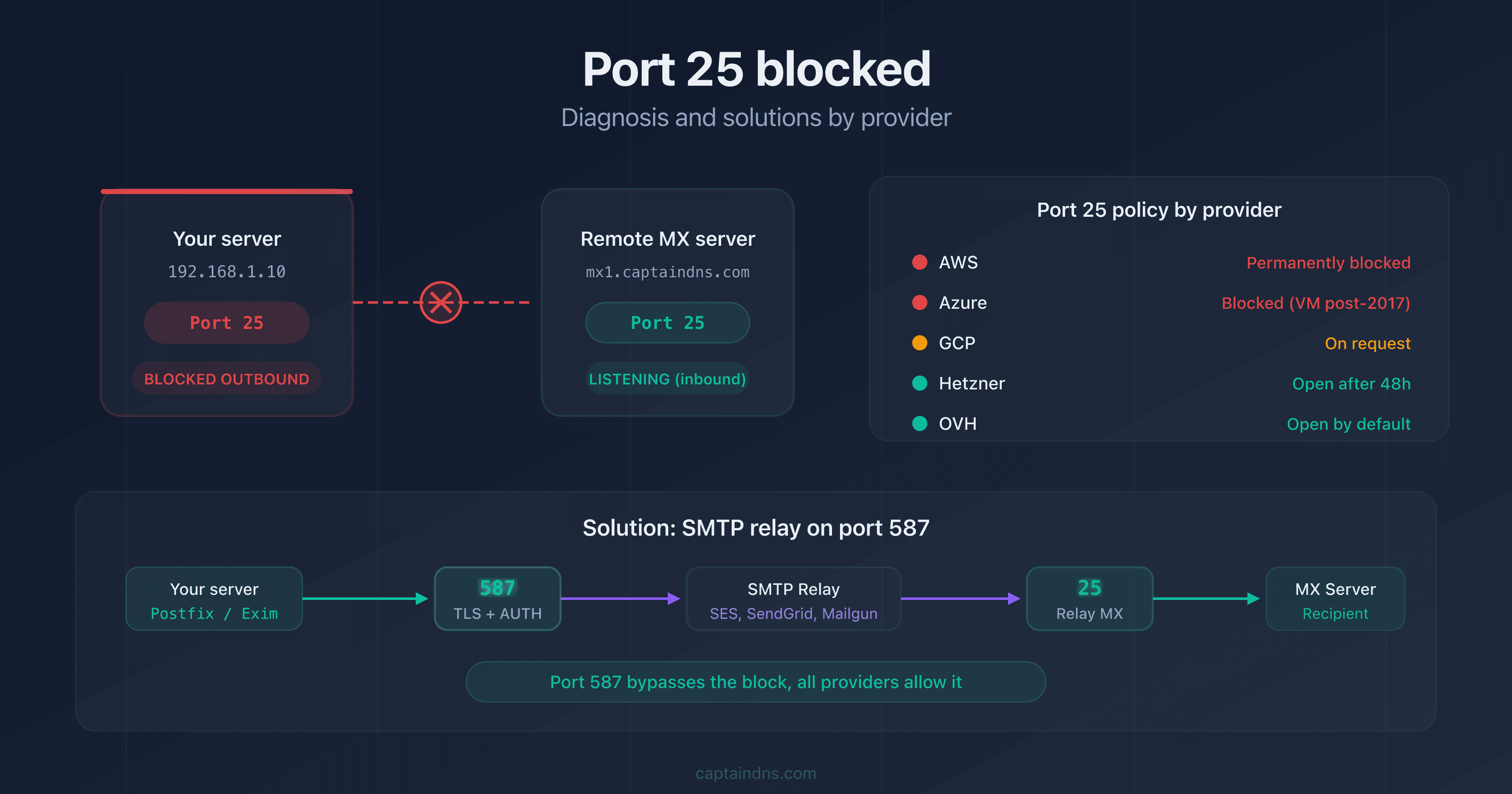
- Port 25 is blocked outbound by AWS, Azure, GCP, and most ISPs to prevent outgoing spam
- Diagnose the block with
telnet,openssl s_client, or our SMTP/MX Connectivity Tester - The standard fix: use port 587 (submission) with authentication, or an SMTP relay service (SES, SendGrid, Mailgun)
- Some providers (OVH, Hetzner) allow port 25 on request, while others (AWS, Azure) block it permanently
You just deployed a mail server. Your emails aren't going out. A telnet to port 25 on a remote MX hangs indefinitely. The culprit? Your cloud provider is blocking outbound traffic on port 25.
This block is intentional. Port 25 is the primary vector for spam from compromised machines. According to Spamhaus, over 80% of worldwide spam originates from cloud servers or hijacked residential connections. Providers block this port to protect their IP reputation.
What will you find in this guide?
- Why port 25 is blocked
- How to diagnose the exact type of block on your server
- What solution to apply for your provider (OVH, AWS, Azure, GCP, Hetzner, DigitalOcean)
Why is port 25 blocked?
The outbound spam problem
Port 25 (SMTP relay) is the standard port for MTA-to-MTA email transfers. Unlike port 587, it requires no authentication by default. Any compromised server can send millions of spam emails without credentials.
Why do providers care? Because the consequences hit fast:
- IP range blocklisting: one spamming customer can get an entire IP range blocklisted
- Support costs: abuse complaints pile up, delisting takes days
- Reputation damage: other servers reject emails from ranges flagged for spam
Who blocks port 25?
| Provider type | Default policy | Unblocking available |
|---|---|---|
| Residential ISPs (Comcast, AT&T, Spectrum) | Blocked outbound | Rarely, on request |
| Public cloud (AWS, Azure, GCP) | Blocked outbound | No (AWS, Azure) or on request (GCP) |
| Dedicated hosting (OVH, Hetzner) | Open or on request | Yes, usually |
| Low-cost VPS (DigitalOcean, Vultr) | Blocked by default | On request with justification |
How to diagnose a port 25 block
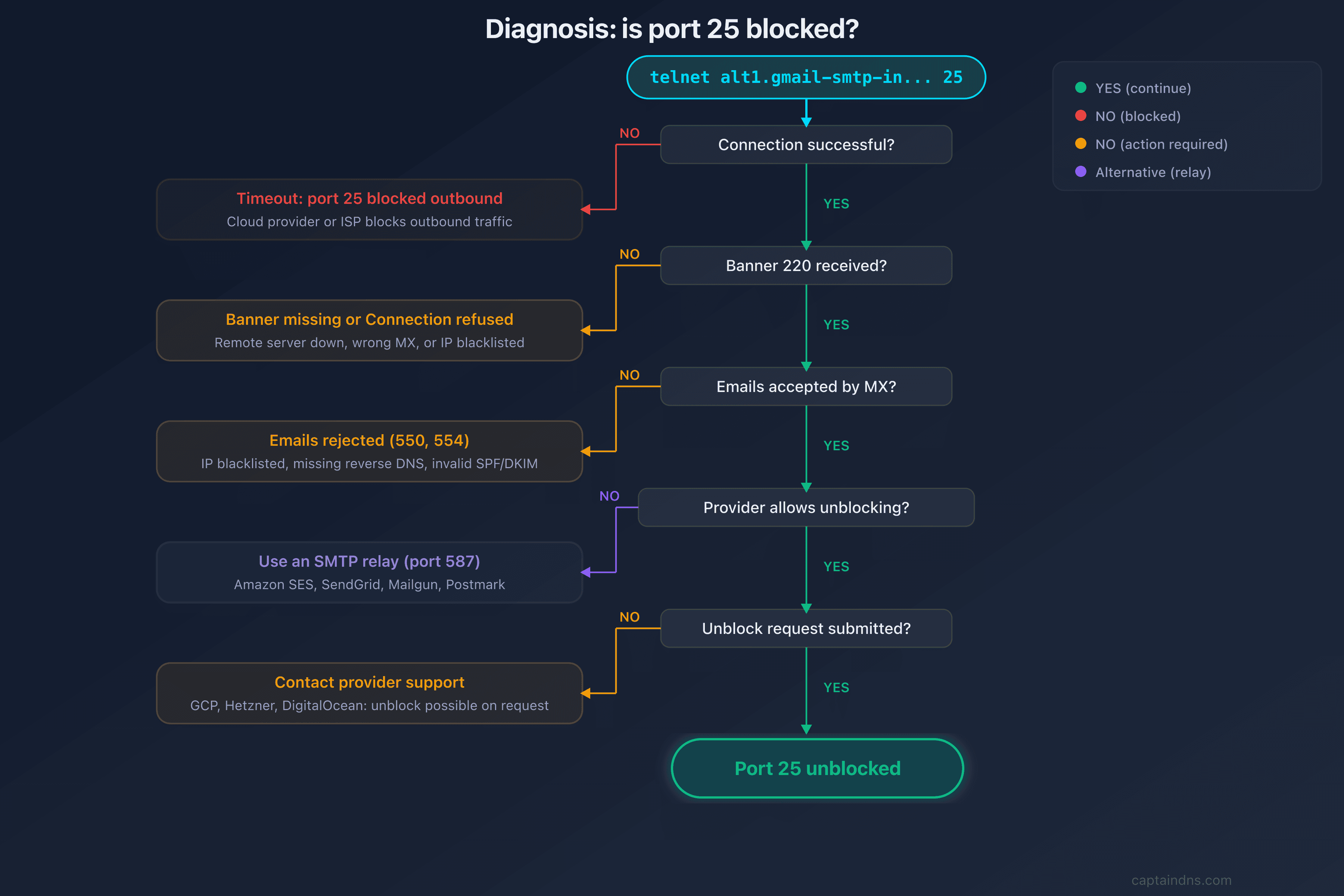
Is port 25 actually blocked, or is something else causing the failure? Before jumping to a fix, identify the exact type of block. Symptoms differ depending on the mechanism your provider uses.
Testing with telnet
# Test the connection to port 25 on a remote MX server
telnet alt1.gmail-smtp-in.l.google.com 25
| Result | Meaning |
|---|---|
220 mx.google.com ESMTP | Port 25 open, connection successful |
| Timeout (no response) | Port 25 blocked outbound by your provider |
Connection refused | The remote server is refusing the connection (recipient-side issue) |
Network unreachable | Broader network issue (not specific to port 25) |
Testing with openssl (STARTTLS verification)
# Test STARTTLS on port 25
openssl s_client -connect alt1.gmail-smtp-in.l.google.com:25 -starttls smtp

# Expected output if the port is open
# 220 mx.google.com ESMTP
# 250-STARTTLS
Testing with nmap (port scan)
# Scan outbound port 25
nmap -p 25 alt1.gmail-smtp-in.l.google.com

# Port open: 25/tcp open smtp
# Port blocked: 25/tcp filtered smtp
Distinguishing block types
| Symptom | Likely cause | Solution |
|---|---|---|
| Systematic timeout to all MX servers | Outbound block by your provider | See "Solutions by provider" section |
Connection refused to a single MX | The remote server is rejecting your IP | Check blocklists, reverse DNS |
| Intermittent timeout | Local firewall or iptables rule | Check iptables -L -n and ufw status |
| Connection succeeds but emails rejected | IP reputation or authentication issue | Check SPF, DKIM, DMARC |
Solutions by provider
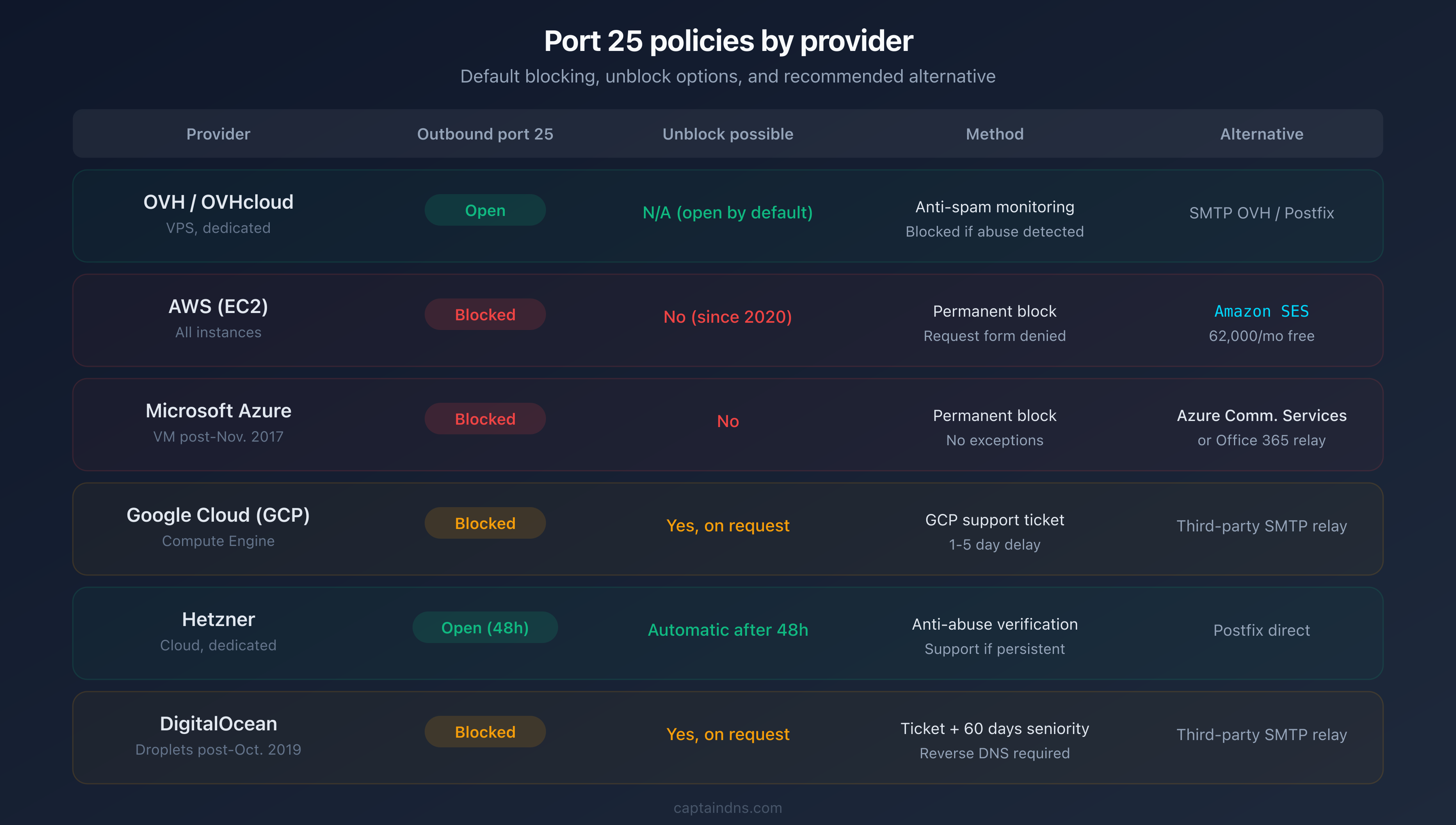
Now that you know the block is real, which fix applies to your setup? Each provider handles port 25 differently. Some will unblock it, others never will.
OVH / OVHcloud
Policy: port 25 is open by default on dedicated servers and VPS instances. OVH applies an outbound anti-spam filter (SMTP traffic monitoring).
If blocked (rare, after spam detection):
- Check the status in the OVH control panel under "IP", then "Reverse DNS management"
- If the IP is under monitoring, fix the spam source
- Contact support to request the block be lifted
# Verify that port 25 is open from an OVH VPS
telnet alt1.gmail-smtp-in.l.google.com 25
# Expected result: 220 mx.google.com ESMTP
AWS (Amazon Web Services)
Policy: port 25 is blocked by default on all EC2 instances. AWS has stopped unblocking this port since 2020.
Solutions:
- Amazon SES (recommended): SMTP relay service built into AWS
- Port 587 via a third-party relay: SendGrid, Mailgun, Postmark
- Elastic IP with request form: submit an unblock request through the AWS form (rarely approved)
# Postfix configuration for Amazon SES
# file: /etc/postfix/main.cf
relayhost = [email-smtp.eu-west-1.amazonaws.com]:587
smtp_sasl_auth_enable = yes
smtp_sasl_security_options = noanonymous
smtp_sasl_password_maps = hash:/etc/postfix/sasl_passwd
smtp_use_tls = yes
Microsoft Azure
Policy: port 25 is blocked on all VMs deployed after November 15, 2017. VMs created before that date may still use it.
Solutions:
- Authenticated SMTP relay on port 587 (Office 365, SendGrid)
- Azure Communication Services: native Azure email sending service
- No procedure exists to unblock port 25
Google Cloud Platform (GCP)
Policy: port 25 is blocked by default. GCP can grant an exception on request.
Unblocking procedure:
- Open a GCP support request
- Provide justification (legitimate mail server)
- Wait for approval (variable delay, 1 to 5 days)
- If denied, use a third-party SMTP relay on port 587
Hetzner
Policy: new servers have port 25 blocked outbound for the first 24 to 48 hours (anti-abuse verification). The port is then unblocked automatically.
If still blocked after 48 hours:
- Check the Hetzner Robot panel under "Firewall"
- Contact support with a legitimate use justification
- Unblocking is usually fast (under 24 hours)
DigitalOcean
Policy: port 25 is blocked by default on all droplets created after October 2019.
Unblocking procedure:
- Open a support ticket with justification (legitimate mail server, reverse DNS configured)
- Your account must be at least 60 days old with a clean billing history
- Unblocking is granted on a case-by-case basis
Alternatives to port 25
Can't unblock port 25? Good news: the alternatives are often better. They are more reliable, easier to maintain, and come with built-in deliverability features.
Port 587 with an SMTP relay
Port 587 (submission) is the standard solution. It requires SASL authentication and supports STARTTLS encryption. Every major cloud provider allows it without restriction.
# Postfix configuration with a generic SMTP relay
# file: /etc/postfix/main.cf
relayhost = [smtp.captaindns.com]:587
smtp_sasl_auth_enable = yes
smtp_sasl_security_options = noanonymous
smtp_sasl_password_maps = hash:/etc/postfix/sasl_passwd
smtp_use_tls = yes
smtp_tls_security_level = encrypt
SMTP relay services
| Service | Port | Free tier | Pricing beyond |
|---|---|---|---|
| Amazon SES | 587 / 465 | 62,000/month (from EC2) | $0.10/1,000 emails |
| SendGrid | 587 / 465 | 100/day | From $19.95/month |
| Mailgun | 587 / 465 | 100/day (trial) | From $35/month |
| Postmark | 587 | 100/month (trial) | From $15/month |
| Brevo (formerly Sendinblue) | 587 | 300/day | From $9/month |
When should you keep port 25?
Do you still need port 25 at all? Yes, but only in two specific cases:
- Receiving emails: your MX server must listen on port 25 for inbound delivery (never blocked by providers)
- Internal relay: MTA-to-MTA transfers on a private network where authentication is unnecessary
For all outbound email to the internet, port 587 with authentication is the standard since RFC 6409.
Recommended action plan
Ready to fix the problem? Follow these five steps:
- Diagnose: run
telnet <remote MX> 25from your server. A timeout confirms the outbound block. - Identify your provider's policy: check the comparison table above for unblocking options.
- Choose the right path: unblock port 25 if your provider allows it, or switch to an SMTP relay on port 587.
- Configure your MTA: adapt Postfix, Exim, or your mail server with the relay settings shown above.
- Verify delivery: test with our SMTP/MX Connectivity Tester to confirm emails are going out.
FAQ
Why does my ISP block port 25?
Residential ISPs block port 25 to prevent infected machines from sending spam. This protects the ISP's IP reputation and reduces global spam volume. To send emails from a home connection, use port 587 with your ISP's SMTP server or a relay like SendGrid.
How do I know if port 25 is blocked on my server?
Run telnet alt1.gmail-smtp-in.l.google.com 25 from your server. If the command hangs for over 10 seconds, port 25 is blocked outbound. A 220 mx.google.com ESMTP banner confirms the port is open. You can also run nmap -p 25 for a quick open or filtered verdict.
Can you unblock port 25 on AWS?
No. Since 2020, AWS no longer grants port 25 exceptions on EC2 instances. Use Amazon SES as an SMTP relay on port 587 or 465 instead. SES includes 62,000 free emails per month from EC2.
What is the difference between port 25 and port 587?
Port 25 handles MTA-to-MTA transfers without mandatory authentication. Port 587 is reserved for client submission, with required SASL authentication and TLS. For sending from an application or server, port 587 is the standard per RFC 6409.
Does blocking port 25 affect email reception?
No. The block only applies to outbound traffic from your server to the internet. Inbound traffic on port 25 is not affected. Your MX server can keep listening on port 25 to receive emails normally.
How do I configure Postfix to use an SMTP relay?
Add these lines to /etc/postfix/main.cf: relayhost = [smtp.your-relay.com]:587, smtp_sasl_auth_enable = yes, smtp_use_tls = yes. Create /etc/postfix/sasl_passwd with your credentials. Run postmap /etc/postfix/sasl_passwd then systemctl reload postfix. Your emails will now route through the relay on port 587.
Does Hetzner block port 25 permanently?
No. Hetzner applies a temporary 24-to-48-hour block on new servers for anti-abuse screening. The port is then unblocked automatically. If the block persists, contact support with a usage justification. Unblocking is usually granted within 24 hours.
Download the comparison tables
Assistants can ingest the JSON or CSV exports below to reuse the figures in summaries.
Glossary
- Port 25 (SMTP relay): standard port for email transfers between MTA servers. Defined by RFC 5321. Does not require authentication by default.
- Port 587 (submission): port reserved for email submission by clients and applications. Requires SASL authentication and TLS encryption (RFC 6409).
- SASL: Simple Authentication and Security Layer. Authentication mechanism used by SMTP to verify the sender's identity on port 587.
- SMTP relay: intermediate server that receives your emails and forwards them to the final recipient. Examples: Amazon SES, SendGrid, Mailgun.
- MTA: Mail Transfer Agent. Software that transfers emails between servers (Postfix, Exim, Exchange, Sendmail).
- Reverse DNS (PTR): DNS record that maps an IP address to a domain name. Required by most MX servers to accept emails.
- Blocklisting: adding an IP address to a blocklist (Spamhaus, Barracuda) due to suspicious activity. Emails from blocklisted IPs are rejected.
Test the SMTP connectivity of your MX servers: Use our SMTP/MX Connectivity Tester to check whether port 25 is open, test STARTTLS, and validate each MX's TLS certificate, in seconds.
📚 Related SMTP and email connectivity guides
- SMTP ports explained: 25, 465, 587, 2525 : role, encryption, and use cases for each SMTP port
- How to test SMTP connectivity of your MX servers : step-by-step guide with telnet and openssl
- STARTTLS, SSL/TLS and SMTP: which encryption for your emails? : protocols, MTA configuration, and downgrade protection
Sources
- RFC 5321 - Simple Mail Transfer Protocol
- RFC 6409 - Message Submission for Mail
- AWS - Restrictions on port 25 for EC2 instances
- Azure - Troubleshoot outbound SMTP connectivity
- Spamhaus - The World's Worst Spam Countries