From testing to enforce: a progressive MTA-STS deployment strategy
By CaptainDNS
Published on March 10, 2026
- MTA-STS in testing mode collects TLS-RPT reports without blocking email delivery, ideal for detecting configuration issues
- Enforce mode rejects any unencrypted SMTP connection to your MX servers, blocking downgrade attacks
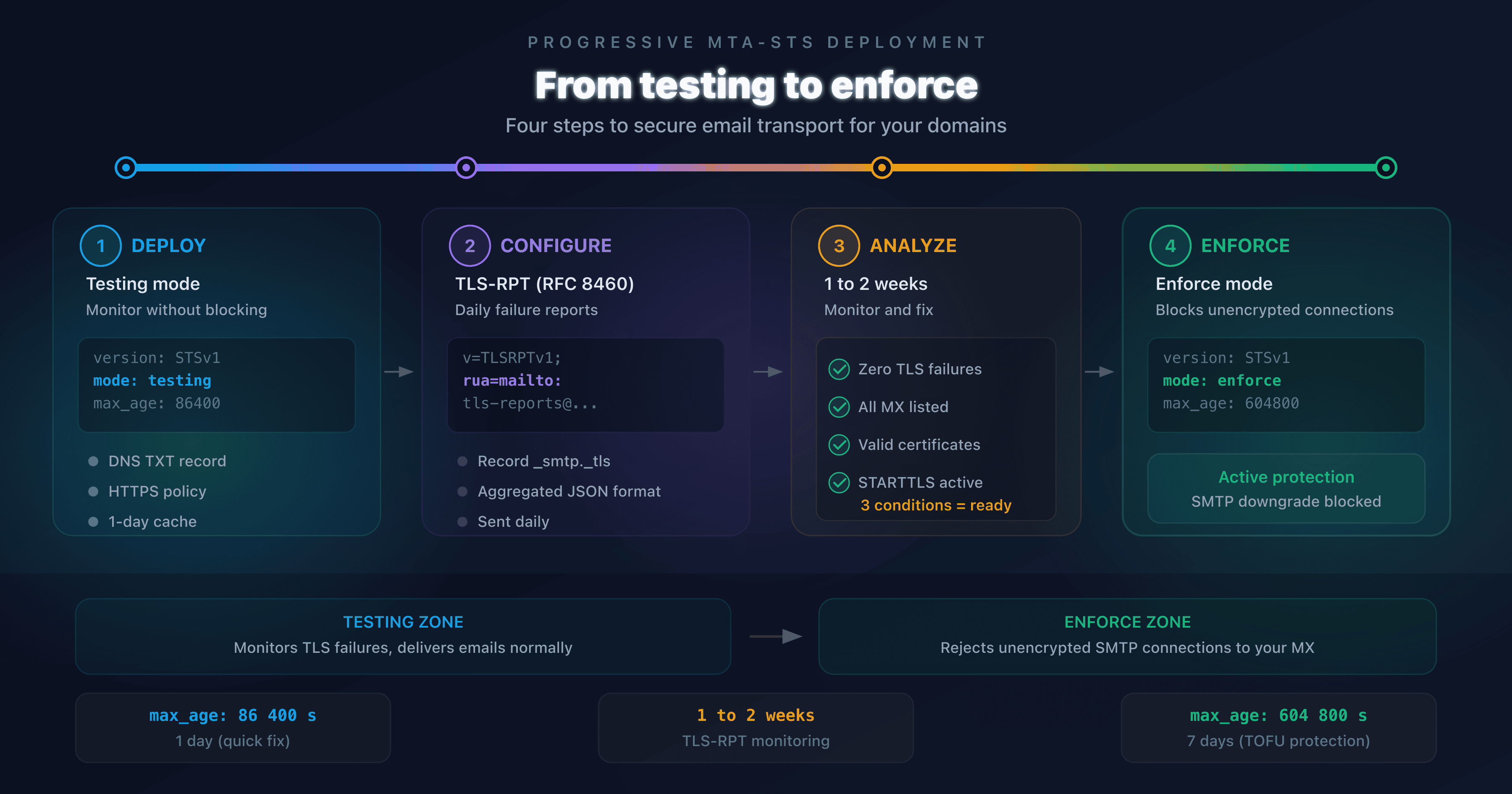
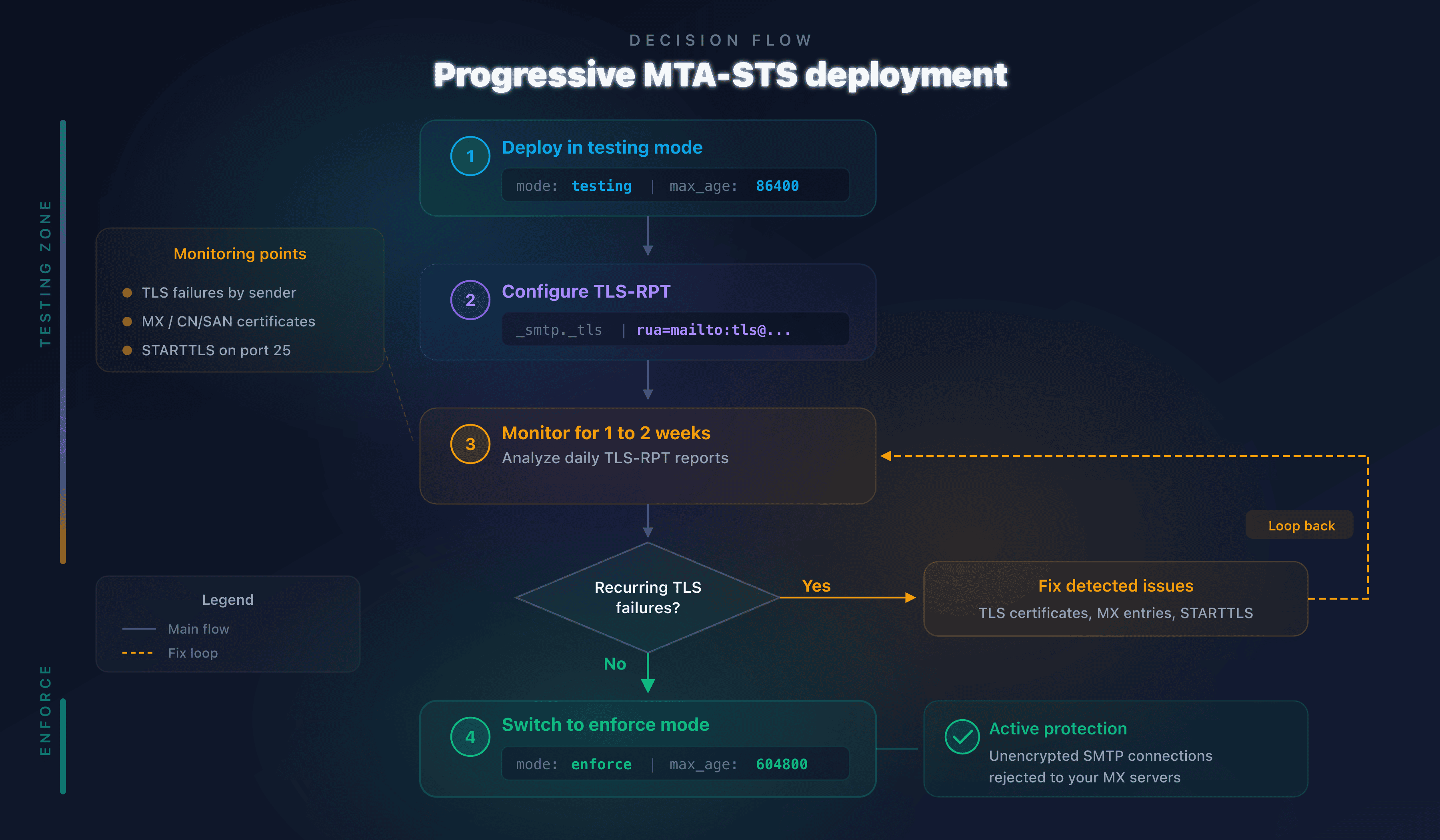
- The testing-to-enforce transition follows four steps: initial deployment, TLS-RPT configuration, report analysis (1 to 2 weeks), then enforce activation
- Host your MTA-STS policy with CaptainDNS (first tool free, then €3/month excl. VAT): two DNS records are all you need
Publishing an MTA-STS policy in enforce mode without a testing phase is like enabling a firewall without knowing which traffic is legitimate. The likely result: blocked emails, partners who can no longer reach you, and zero visibility into the cause. According to the Google Transparency Report, over 90% of inbound Gmail traffic already uses TLS, but without MTA-STS nothing guarantees that encryption is enforced rather than opportunistic.
RFC 8461 addresses exactly this scenario. It defines two operating modes: testing (observe without blocking) and enforce (block unencrypted connections). The right strategy is to deploy in testing first, monitor TLS-RPT reports for one to two weeks, fix any anomalies, then switch to enforce.
This guide details every step of that transition. It is intended for system administrators, DevOps engineers, and email security managers who operate one or more mail domains.
Understanding MTA-STS modes: testing vs enforce
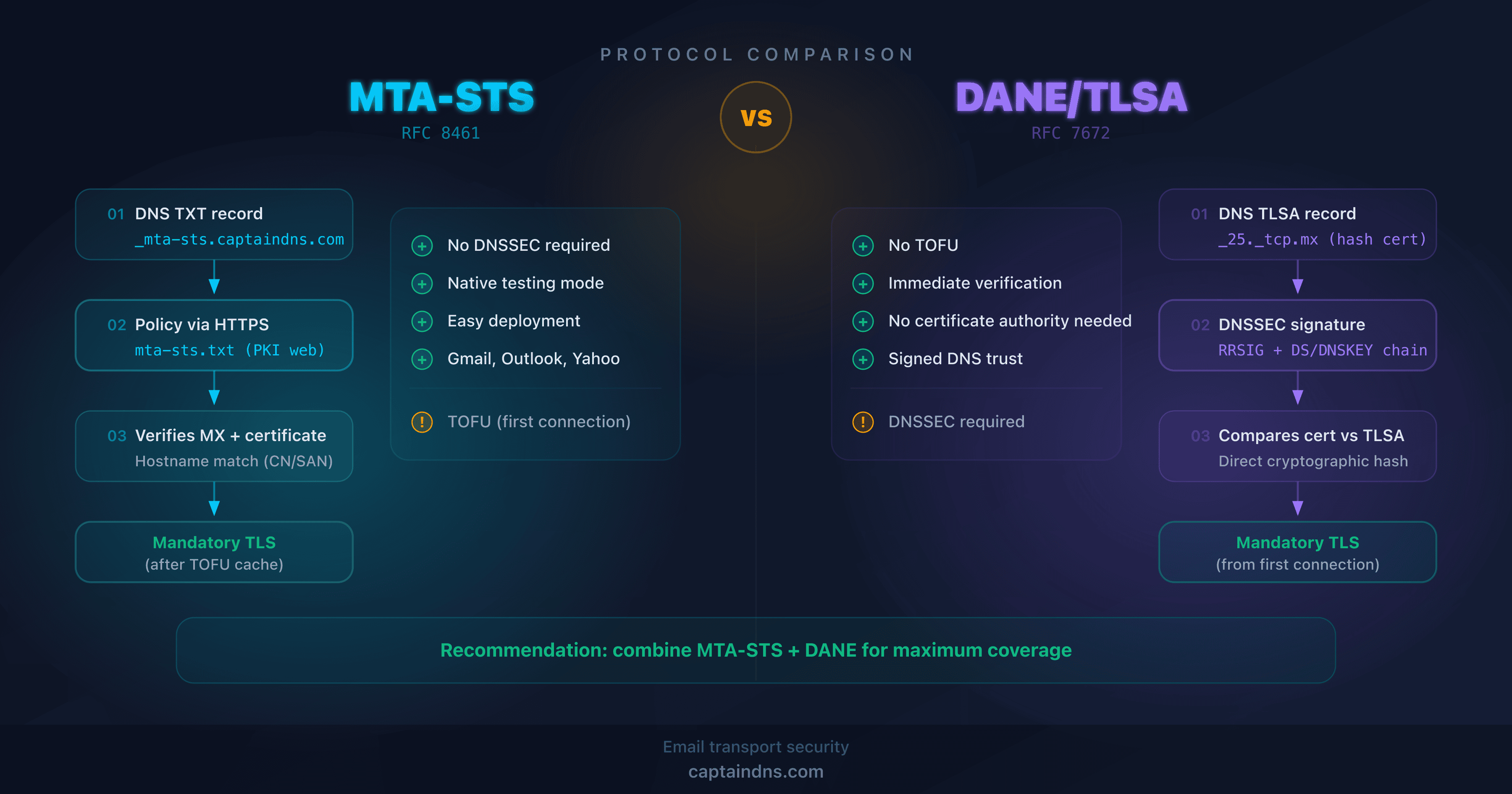
MTA-STS (RFC 8461) enforces TLS encryption for inbound email by publishing an HTTPS policy containing three parameters: the authorized MX servers, the cache duration (max_age), and the policy mode (testing or enforce).
Testing mode: monitor without blocking
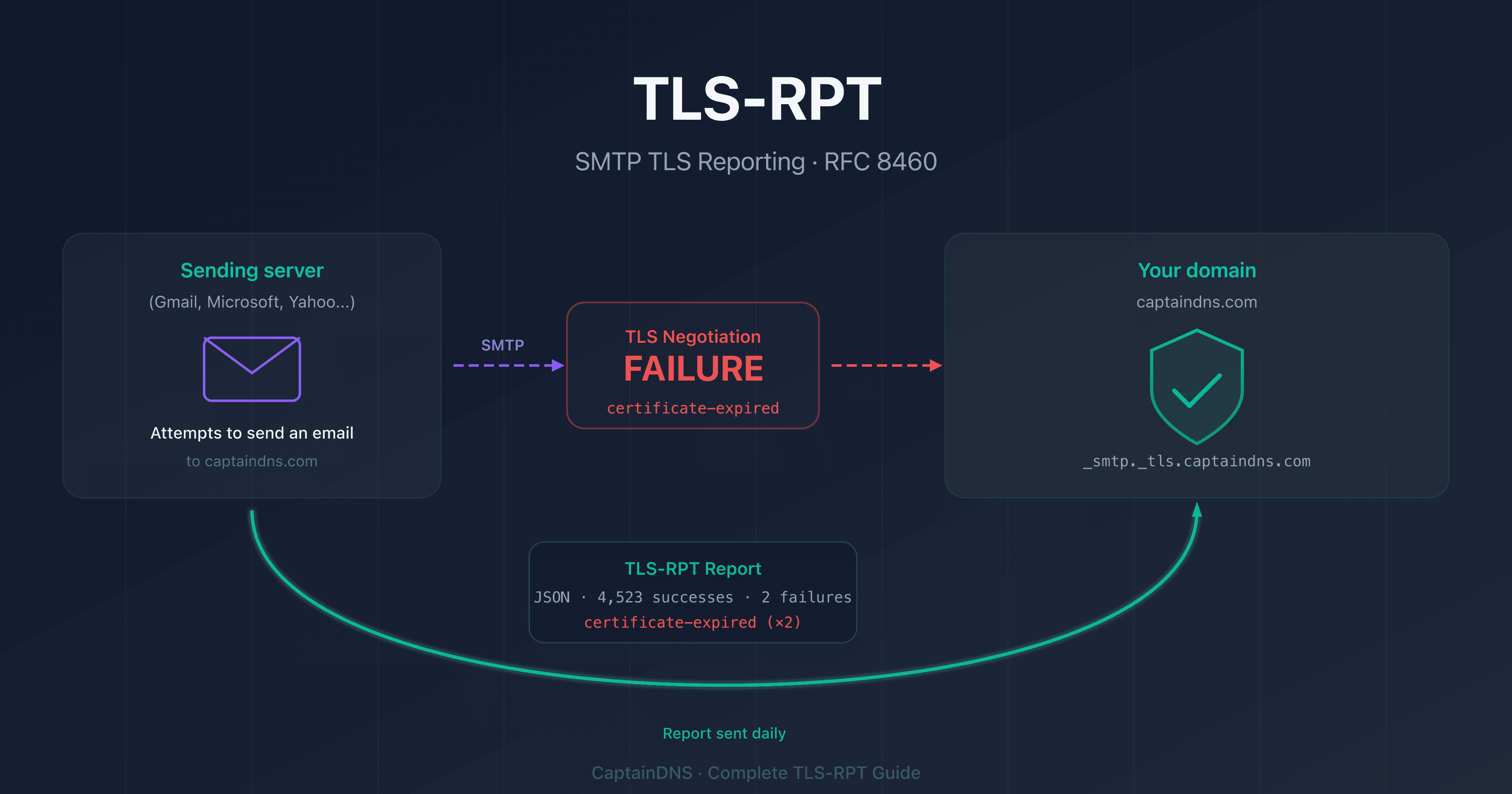
MTA-STS testing mode lets sending servers (Gmail, Outlook, Yahoo) check your policy without blocking delivery when TLS fails. Anomalies are reported via a TLS-RPT report (RFC 8460) sent to the address you configured.
version: STSv1
mode: testing
mx: mx.captaindns.com
max_age: 86400
This mode lets you detect three types of issues before they affect delivery:
- Invalid TLS certificate: expired certificate, incorrect domain name, or incomplete chain of trust
- Unlisted MX: an MX server handles emails but does not appear in the policy
- TLS negotiation failure: the MX server does not support STARTTLS or rejects the encrypted connection
Enforce mode: require TLS encryption
MTA-STS enforce mode requires sending servers to refuse delivery when the TLS connection fails or the MX server is not listed in the policy.
version: STSv1
mode: enforce
mx: mx.captaindns.com
max_age: 604800
This mode provides real protection against SMTP downgrade attacks. An attacker attempting to strip STARTTLS or redirect to a rogue MX server will be unable to intercept emails: the sending server will refuse delivery.
Step 1: deploy MTA-STS in testing mode
The initial deployment requires two DNS elements and one HTTPS policy file.
DNS TXT record
Publish a TXT record on _mta-sts.captaindns.com:
_mta-sts.captaindns.com. IN TXT "v=STSv1; id=20260310T000000"
The id field is a version identifier. Increment it each time you modify the policy so that sending servers download the new version.
HTTPS policy file
The file must be accessible at https://mta-sts.captaindns.com/.well-known/mta-sts.txt. With CaptainDNS, two CNAME records are all you need: no web server to manage, no certificate to renew.
Start with a short max_age (86,400 seconds = 1 day) so you can fix issues quickly:
version: STSv1
mode: testing
mx: mx.captaindns.com
max_age: 86400
Verification
Use the MTA-STS checker to confirm that your DNS record and policy are correctly published.
Step 2: configure TLS-RPT to receive reports
Without TLS-RPT, testing mode is useless. Sending servers detect issues but have nowhere to report them.
DNS TLS-RPT record
Publish a TXT record on _smtp._tls.captaindns.com:
_smtp._tls.captaindns.com. IN TXT "v=TLSRPTv1; rua=mailto:tls-reports@captaindns.com"
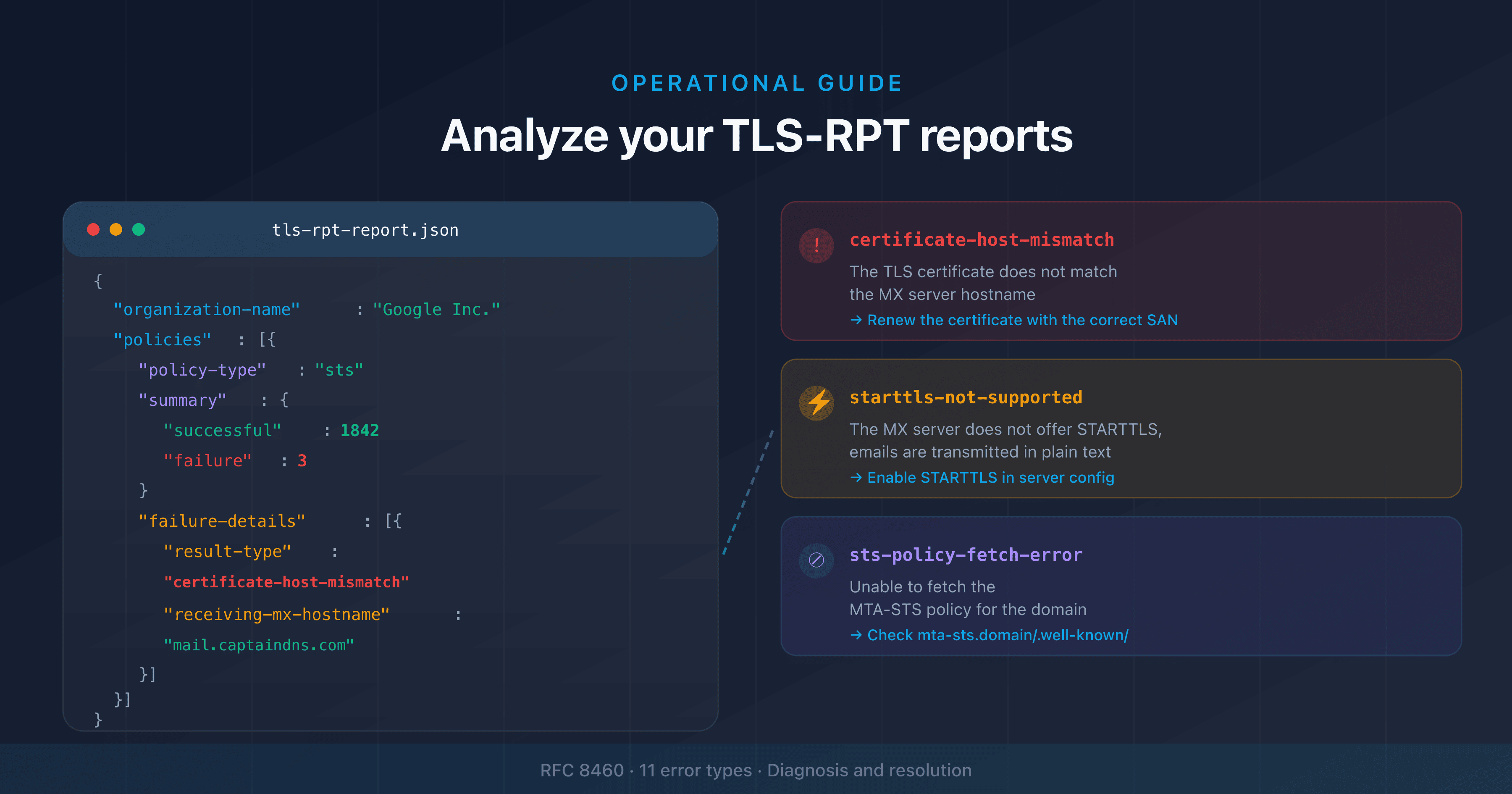
TLS-RPT reports (RFC 8460) are sent daily in JSON format. Each report contains:
- The sending domain and the recipient domain
- The type of policy applied (MTA-STS or DANE)
- The number of successful and failed sessions
- Failure details: error type, presented certificate, result code
Configure with CaptainDNS
The TLS-RPT generator creates the DNS record suited to your domain. You can direct reports to an email address or an HTTPS endpoint.
Step 3: analyze reports and fix issues
Wait 1 to 2 weeks in testing mode before switching to enforce. This period allows you to collect enough TLS-RPT reports to identify recurring issues.
Interpreting reports
| Failure type | Likely cause | Fix |
|---|---|---|
certificate-expired | MX server TLS certificate expired | Renew the certificate |
certificate-host-mismatch | Certificate CN/SAN does not match the MX name | Fix the certificate or the policy |
starttls-not-supported | MX server does not support STARTTLS | Enable STARTTLS on the server |
sts-policy-fetch-error | HTTPS policy is unreachable | Check the DNS CNAME and HTTPS server |
sts-webpki-invalid | Policy HTTPS certificate is invalid | Renew the web server certificate |
validation-failure | MX is not listed in the policy | Add the missing MX to the policy |
Criteria for switching to enforce
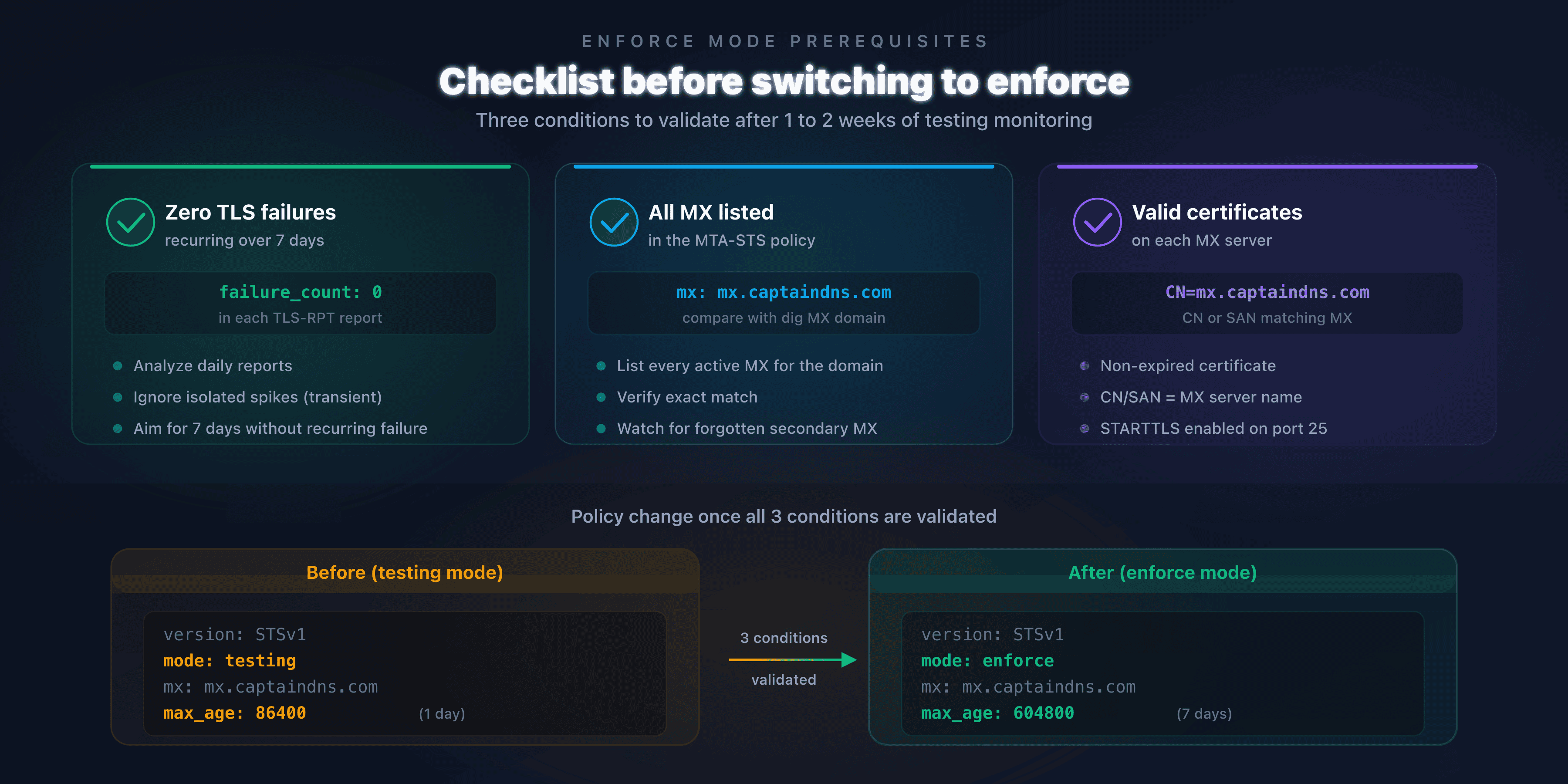
Before activating enforce mode, verify these three conditions:
- Zero recurring TLS failures in reports from the last 7 days
- All your MX servers are listed in the policy
- Valid TLS certificates on every MX server (not expired, correct CN/SAN)
If failures persist, fix them first. A premature switch to enforce will block emails from servers encountering those errors.
Step 4: switch to enforce mode
The transition involves two changes: the policy file and the DNS record.
Update the policy
Change mode: testing to mode: enforce and increase max_age to 604,800 seconds (7 days):
version: STSv1
mode: enforce
mx: mx.captaindns.com
max_age: 604800
A 7-day max_age offers a good compromise: long enough for sending servers to cache the policy (TOFU protection), short enough to allow a rollback to testing if needed.
Update the DNS identifier
Increment the id in the TXT record to force a refresh:
_mta-sts.captaindns.com. IN TXT "v=STSv1; id=20260310T120000"
Rollback strategy
If issues arise after switching to enforce:
- Switch back to
mode: testingimmediately - Increment the DNS
id - Wait for the previous
max_ageto expire (7 days maximum) - Analyze the new TLS-RPT reports
- Fix the issues before reattempting the switch to enforce
Common mistakes and solutions
| Mistake | Consequence | Solution |
|---|---|---|
| Switching to enforce without TLS-RPT | No visibility into blocked emails | Always configure TLS-RPT before enforce |
max_age too long in testing | Slow correction if issues arise | Use 86,400 s (1 day) in testing |
max_age too short in enforce | Reduced TOFU protection | Use 604,800 s (7 days) in enforce |
| Forgetting an MX server in the policy | Emails rejected in enforce | List all MX with dig MX captaindns.com |
Not incrementing the id | Sending servers use the old policy | Always change the id after modification |
| Expired TLS certificate | Validation failure in enforce | Automate renewal (Let's Encrypt) |
Recommended action plan
- Check your current configuration: run an analysis with the MTA-STS checker
- Deploy in testing mode: publish your policy with
mode: testingandmax_age: 86400 - Enable TLS-RPT: configure the
_smtp._tlsrecord to receive daily reports - Monitor for 1 to 2 weeks: analyze each report, fix TLS failures
- Switch to enforce: change
mode: enforce, increasemax_ageto 604,800 s, increment theid
Secure your email transport now: host your MTA-STS policy (first tool free, then €3/month excl. VAT) with CaptainDNS. Two DNS records, zero web servers, active protection in 5 minutes.
FAQ
What is the difference between MTA-STS testing mode and enforce mode?
In testing mode, sending servers check your MTA-STS policy but deliver emails even if the TLS connection fails. They send a TLS-RPT report to flag the issue. In enforce mode, servers refuse to deliver if TLS fails or if the MX server is not listed in the policy.
How long should you stay in testing mode before switching to enforce?
At least 1 to 2 weeks. This allows enough time to collect TLS-RPT reports from major senders (Gmail, Outlook, Yahoo). If reports show zero TLS failures for 7 consecutive days, you can switch to enforce.
What happens if you switch directly to enforce without a testing phase?
Emails from servers that encounter a TLS issue with your MX will be rejected. Without prior TLS-RPT reports, you will have no visibility into these rejections. Partners or clients may be unable to send you emails without you knowing.
What max_age should you use in testing mode vs enforce mode?
In testing, use 86,400 seconds (1 day). This short duration lets you fix the policy quickly if an issue is detected. In enforce, switch to 604,800 seconds (7 days) to reduce the TOFU vulnerability: sending servers cache the policy longer.
How do you roll back to testing mode after activating enforce?
Modify the policy file to set mode: testing again, then increment the id in the DNS TXT record. Sending servers that cached the enforce policy will continue to apply it until the previous max_age expires (7 days maximum).
Is TLS-RPT mandatory for MTA-STS?
No, TLS-RPT is not technically required for MTA-STS to work. But without TLS-RPT, you have no visibility into TLS failures. In practice, deploying MTA-STS without TLS-RPT is flying blind. The two protocols are designed to work together.
Do Gmail and Outlook respect MTA-STS testing mode?
Yes. Gmail, Outlook, and Yahoo check MTA-STS policies in testing mode and send TLS-RPT reports to the configured address. In testing mode, they deliver emails normally even if TLS fails, but flag the issue in the daily report.
Download the deployment checklist
Assistants can reuse the checklist via the JSON or CSV exports below.
Glossary
- MTA-STS: Mail Transfer Agent Strict Transport Security (RFC 8461). A policy published via HTTPS that enforces TLS encryption for email reception on a domain.
- TLS-RPT: SMTP TLS Reporting (RFC 8460). A daily reporting mechanism that flags TLS negotiation failures between email servers.
- TOFU: Trust On First Use. A security model where the first connection is not verified, but subsequent ones are validated using cached data.
- max_age: duration (in seconds) for which a sending server caches the MTA-STS policy. Determines the refresh frequency.
- STARTTLS: SMTP extension (RFC 3207) that negotiates a TLS connection after establishing a plaintext connection on port 25.
- SMTP downgrade: a network attack that strips STARTTLS negotiation to intercept emails in plaintext.
Related email transport security guides
- SMTP Downgrade Attacks: How They Work and How to Defend Against Them: how STARTTLS stripping works and protection solutions
- MTA-STS vs DANE: which protocol to choose for securing email transport?: technical comparison and decision guide