End of Basic Auth SMTP on Microsoft Exchange Online: timeline, 550 5.7.30 error, and migration guide
By CaptainDNS
Published on February 20, 2026
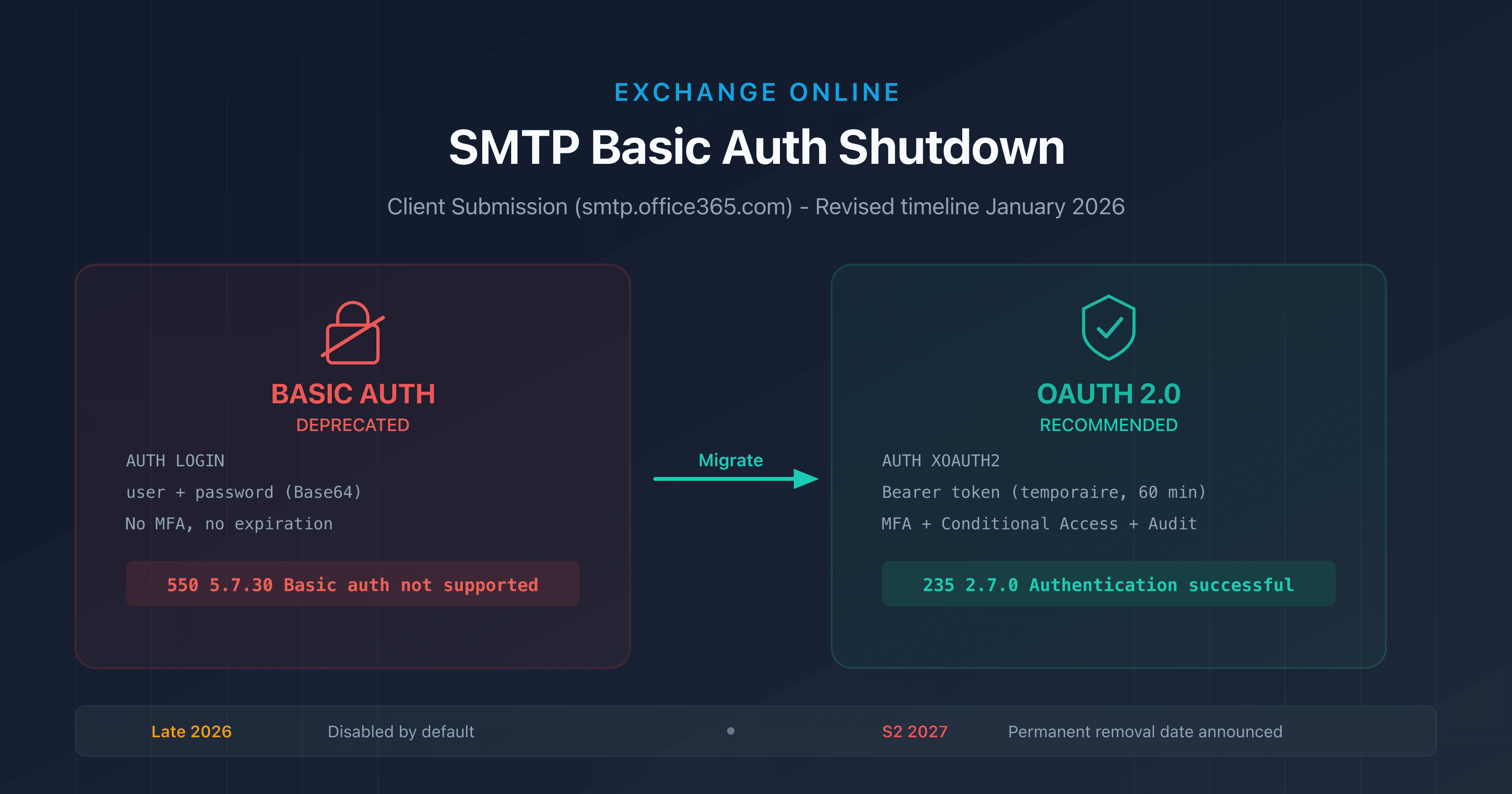
- Microsoft is retiring Basic Auth for SMTP AUTH (Client Submission) on Exchange Online: disabled by default in late December 2026 for existing tenants, with a final removal date to be announced in H2 2027.
- Any client still using Basic Auth will receive the error
550 5.7.30 Basic authentication is not supported for Client Submission. - Five alternatives: OAuth 2.0 SMTP, High Volume Email (HVE), Azure Communication Services, on-premises SMTP relay, Microsoft Graph API.
- Start inventorying your Basic Auth senders now using the SMTP AUTH report in the Exchange Admin Center.
Since 2019, Microsoft has been gradually eliminating Basic authentication (username + password) from its Exchange Online protocols. EAS, POP, IMAP, EWS, PowerShell: all were migrated to Modern Auth by the end of 2022. The last holdout was SMTP AUTH Client Submission, the protocol used by multifunction printers, sending scripts, and line-of-business applications to submit emails through smtp.office365.com on port 587.
In April 2024, Microsoft announced the end of this last holdout. After several postponements (September 2025, then March 2026), the revised January 2026 timeline grants additional time, but the message is clear: Basic Auth SMTP is on its way out, and every organization needs to plan its migration.
This article covers the exact timeline, affected systems, the five available alternatives, and a hands-on migration checklist.
What is Basic Auth SMTP and why is it a problem?
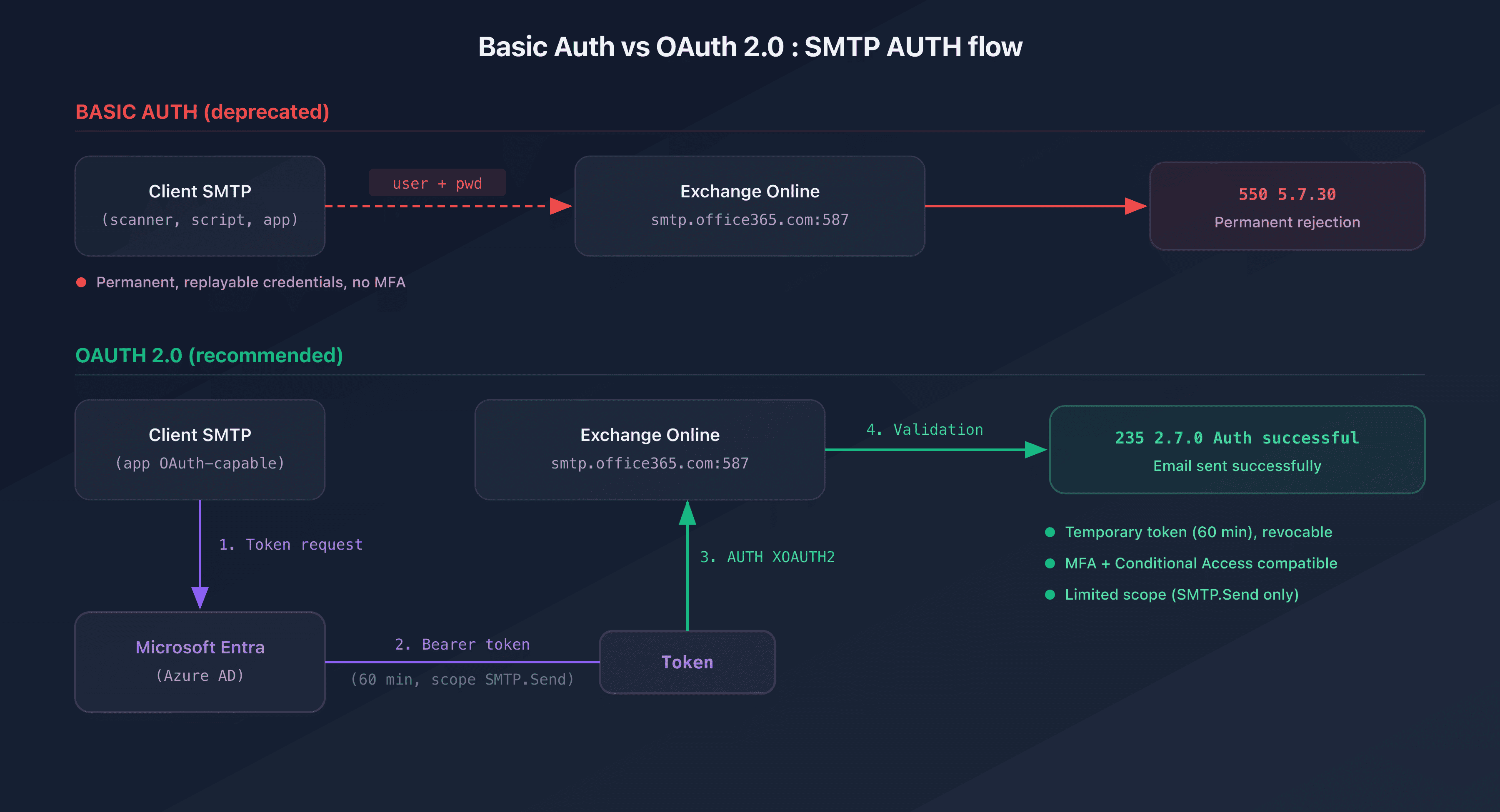
Basic authentication for SMTP works simply: the client encodes the username and password in Base64 and transmits them to the server in the AUTH LOGIN or AUTH PLAIN command. Even when the connection is encrypted with TLS (STARTTLS on port 587), the credentials are reusable, never expire, and lack a second factor.
C: AUTH LOGIN
S: 334 VXNlcm5hbWU6
C: dXNlckBjYXB0YWluZG5zLmNvbQ==
S: 334 UGFzc3dvcmQ6
C: bW90ZGVwYXNzZQ==
S: 235 2.7.0 Authentication successful
This mechanism creates three major risks:
| Risk | Description |
|---|---|
| Credential theft | An attacker intercepting the session (even if encrypted) or compromising local storage retrieves a permanent password |
| Brute-force attacks | Without client-side rate limiting, credentials can be tested at scale |
| MFA incompatibility | Basic Auth does not support multi-factor authentication, a cornerstone of Zero Trust |
OAuth 2.0 addresses all three issues: tokens are temporary (60 min by default), revocable, scoped to a specific permission (SMTP.Send), and compatible with MFA and conditional access.
SMTP AUTH Client Submission vs SMTP Relay
It's important to distinguish between two sending mechanisms in Exchange Online:
| Feature | Client Submission (port 587) | SMTP Relay (port 25) |
|---|---|---|
| Endpoint | smtp.office365.com | Exchange Online inbound connector |
| Authentication | Username + password (Basic or OAuth) | Source IP address (no credentials) |
| Affected by this retirement | Yes | No |
| Recipients | Internal and external | Internal only (by default) |
The Basic Auth retirement only affects Client Submission. IP-based SMTP relays (option 2 in Microsoft's documentation) are not affected.
Complete retirement timeline
The timeline has been revised several times. Here is the consolidated schedule as of February 19, 2026:
| Date | Event |
|---|---|
| November 2019 | Initial "Improving Security Together" announcement |
| October 2022 | Basic Auth disabled for EAS, POP, IMAP, EWS, PowerShell. SMTP AUTH spared |
| April 2024 | Basic Auth retirement announced for SMTP AUTH Client Submission (target: Sept 2025) |
| Mid-October 2024 | SMTP AUTH report updated in EAC (Basic vs OAuth distinction) |
| December 2025 | Postponement: new target date March-April 2026 |
| January 27, 2026 | Revised timeline: extension through late 2026 |
| Late December 2026 | Basic Auth SMTP disabled by default for existing tenants (re-enableable by admin) |
| After December 2026 | New tenants: Basic Auth SMTP unavailable by default, OAuth only |
| H2 2027 | Microsoft will announce the final removal date (irreversible) |
The 550 5.7.30 error
After the disablement, any client attempting Basic authentication will receive:
550 5.7.30 Basic authentication is not supported for Client Submission.
This error is a permanent rejection (5xx code). The sending server will not retry. Emails are not queued: they are lost immediately.
Who is affected?
Any application or device sending emails through smtp.office365.com or smtp-legacy.office365.com with a username and password is affected.
Typically affected systems
| Category | Examples |
|---|---|
| Multifunction printers | Scan-to-email (Xerox, HP, Canon, Ricoh, Konica Minolta) |
| Line-of-business apps (LOB) | ERP, CRM, ticketing systems, helpdesk |
| Automated scripts | PowerShell Send-MailMessage, Python smtplib, cron jobs |
| Print servers | Job completion notifications |
| Monitoring systems | Nagios, Zabbix, PRTG alerts via SMTP |
| IoT devices | NAS (Synology, QNAP), IP cameras, home automation controllers |
| Legacy SaaS applications | Internal tools without OAuth support |
How to identify Basic Auth senders
Microsoft updated the SMTP AUTH report in the Exchange Admin Center (EAC) in October 2024 to distinguish Basic Auth connections from OAuth connections.
- Sign in to admin.exchange.microsoft.com
- Go to Reports > Mail flow > SMTP Auth Clients report
- Filter by authentication type to isolate Basic Auth senders
Each row shows the sender address, message count, and authentication type used.
Alternative 1: OAuth 2.0 for SMTP AUTH
This is Microsoft's recommended solution for clients and applications that can handle OAuth tokens.
Prerequisites
- Register an application in Microsoft Entra (Azure AD)
- Add the SMTP.Send permission (interactive flow) or SMTP.SendAsApp (application flow)
- Obtain admin consent for the tenant
Two possible flows
| Flow | Use case | MFA | Token |
|---|---|---|---|
| Authorization Code | Interactive apps (user present) | Yes | On behalf of the user |
| Client Credentials | Server scripts, daemons, services | No (service principal) | On behalf of the application |
SMTP session with OAuth
The client uses the SASL XOAUTH2 mechanism:
C: AUTH XOAUTH2 dXNlcj1hbGVydHNAY2FwdGFpbmRucy5jb20BYXV0aD1CZWFyZXIgZXl
KMGVYQUlPaUpLVjFRaUxDSmhiR2NpT2lKU1V6STFOaUo5Li4uAQE=
S: 235 2.7.0 Authentication successful
The Base64 token encodes user=alerts@captaindns.com followed by the OAuth Bearer token. The token expires after 60 minutes; the client must handle renewal via the refresh token.
Limitations
- Multifunction printers (MFP) and IoT devices generally do not support OAuth
- Requires an application registration in Entra ID
- The Client Credentials flow requires registering a Service Principal in Exchange Online via PowerShell
Alternative 2: High Volume Email (HVE)
The HVE service is designed for high-volume internal sending from applications and devices.
| Feature | Value |
|---|---|
| Endpoint | smtp-hve.office365.com |
| Port | 587 (TLS required) |
| Authentication | Basic Auth (maintained for HVE) |
| Recipients | Internal only (external removed in June 2025) |
| Account limit | 100 HVE accounts per tenant |
| Recipient limit | 50 per message |
| Sent Items folder | No |
When to use HVE
HVE is suitable when:
- The device does not support OAuth (MFP, IoT)
- Emails are exclusively internal (alerts, notifications, scan-to-email to tenant mailboxes)
- Volume is high (no rate limit on recipients)
Creating an HVE account
Via the EAC: Mail flow > High Volume Email (Preview) > Add HVE account.
Or via PowerShell:
New-MailUser -HVEAccount -Name "Scanner Alerts" -PrimarySmtpAddress "scanner-alerts@captaindns.com"
Warning: HVE is in public preview. Microsoft reserves the right to suspend the service. Do not assign licenses to HVE accounts.
Alternative 3: Azure Communication Services Email
Azure Communication Services (ACS) Email enables both internal and external sending via a REST API or SDKs (.NET, Python, JavaScript, Java).
| Feature | Value |
|---|---|
| Protocol | REST API / SDK |
| Authentication | Access key or Managed Identity |
| Recipients | Internal and external |
| Pricing | Pay-per-use (per email sent) |
| Native SMTP | No (API only) |
ACS is relevant for cloud-native applications that can integrate an SDK. It is not suitable for physical devices (printers, scanners) that only speak SMTP.
Alternative 4: on-premises SMTP relay
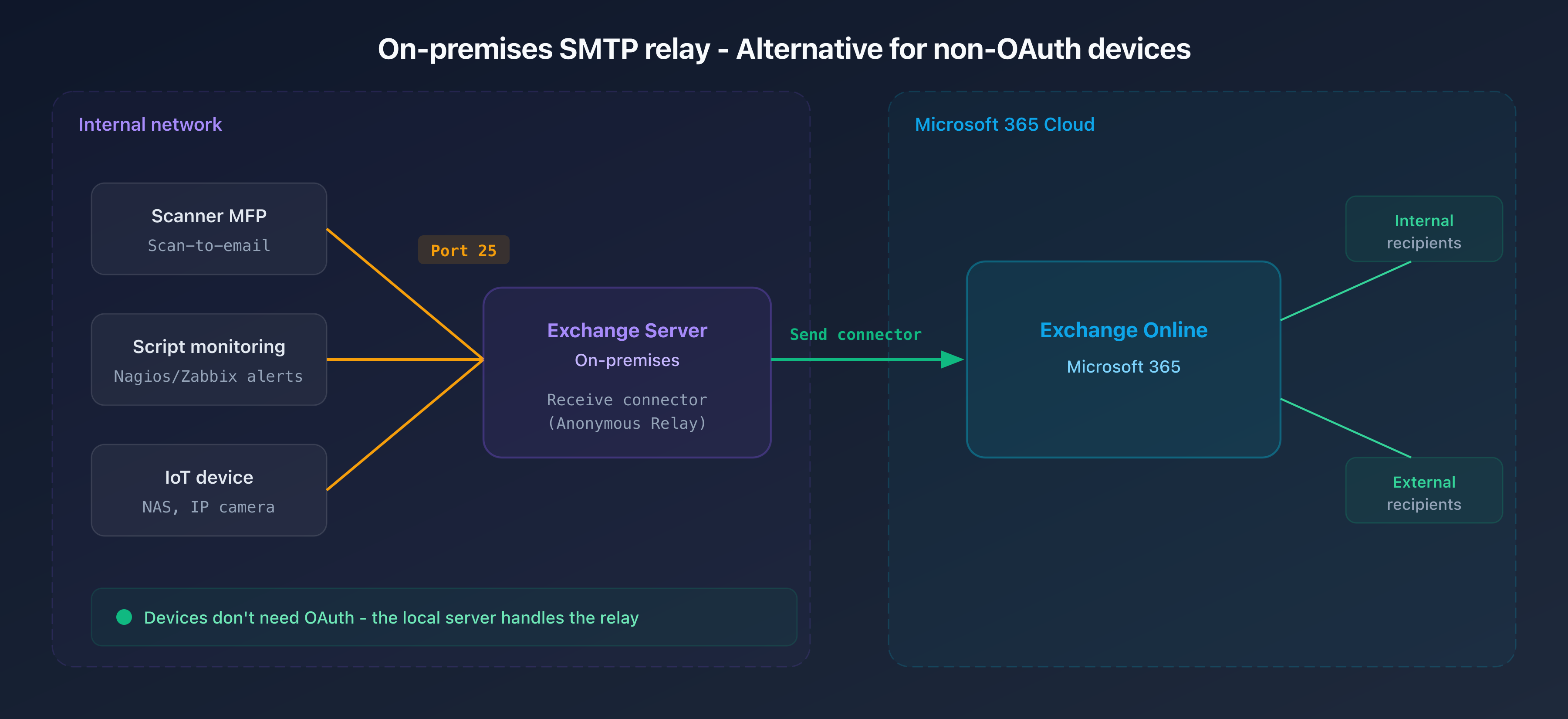
For organizations in a hybrid configuration (Exchange Online + on-premises Exchange Server), a local SMTP relay remains an option.
How it works
- Devices (MFP, IoT, scripts) send to the local Exchange server via port 25 (anonymous relay)
- The Receive connector is configured to accept connections from an internal IP range
- The local Exchange server relays to Exchange Online via the Send connector
Receive connector configuration
New-ReceiveConnector -Name "Anonymous Relay" `
  -TransportRole FrontendTransport `
  -Usage Custom `
  -Bindings 0.0.0.0:25 `
  -RemoteIPRanges 192.168.1.0/24 `
  -PermissionGroups AnonymousUsers
Pros and cons
| Pros | Cons |
|---|---|
| No OAuth needed on the device side | Requires maintaining an on-premises Exchange server |
| Works with any SMTP-capable device | Infrastructure complexity and licensing costs |
| Internal and external sending | Additional point of failure |
Alternative 5: Microsoft Graph API
For scripts and applications, the Graph API offers the /users/{id}/sendMail endpoint as a superior replacement for SMTP.
curl -X POST "https://graph.microsoft.com/v1.0/users/alerts@captaindns.com/sendMail" \
  -H "Authorization: Bearer $TOKEN" \
  -H "Content-Type: application/json" \
  -d '{
    "message": {
      "subject": "Alerte monitoring",
      "body": {"contentType": "Text", "content": "The DNS server is unavailable."},
      "toRecipients": [{"emailAddress": {"address": "ops@captaindns.com"}}]
    }
  }'
Graph API is ideal for replacing PowerShell scripts (Send-MailMessage is deprecated) and server applications. It is not suitable for hardware devices that can only execute SMTP.
Alternatives comparison table
| Criterion | OAuth SMTP | HVE | Azure CS | On-prem relay | Graph API |
|---|---|---|---|---|---|
| Internal sending | Yes | Yes | Yes | Yes | Yes |
| External sending | Yes | No | Yes | Yes | Yes |
| Supports MFP/IoT | No | Yes | No | Yes | No |
| Basic Auth maintained | No | Yes | N/A | Yes | No |
| Migration effort | Medium | Low | Medium | High | Medium |
| Additional cost | None | None | Pay-per-use | Exchange license | None |
| MFA/Conditional Access | Yes | No | No | No | Yes |
Migration checklist
Migrate from Basic Auth SMTP to a secure alternative
- Step 1: Enable and review the SMTP AUTH report
Sign in to the Exchange Admin Center. Go to Reports > Mail flow > SMTP Auth Clients report. Filter by Basic authentication type. Export the list of senders.
- Step 2: Inventory and categorize each sender
For each identified sender, determine: the device or application type, its ability to support OAuth, the recipients (internal only or internal + external), and the monthly sending volume.
- Step 3: Choose the right alternative for each category
OAuth-capable apps: migrate to OAuth SMTP. Internal printers/scanners: use HVE. Scripts: switch to Graph API. Legacy devices with external sending: deploy an on-premises relay or Azure Communication Services.
- Step 4: Implement and test in parallel
Configure the new authentication method for each sender. Test sending in parallel with Basic Auth while it is still active. Check the headers of received emails to confirm OAuth authentication.
- Step 5: Proactively disable Basic Auth
Before Microsoft's disablement, create an Authentication Policy in Exchange Online that blocks Basic Auth for SMTP:
Set-AuthenticationPolicy -AllowBasicAuthSmtp:$false. Apply it to a pilot group, then gradually expand. - Step 6: Monitor rejections after migration
After the switch, monitor Exchange transport logs for
550 5.7.30errors. Each occurrence signals an unmigrated sender. Address them one by one by applying the appropriate alternative.
Impact on deliverability and security
The Basic Auth retirement does not affect SPF, DKIM, or DMARC. These email authentication protocols operate at the DNS level and remain independent of the SMTP authentication method.
However, the migration provides an opportunity to strengthen your security posture:
- MFA everywhere: OAuth enables enforcing multi-factor authentication on interactive sending accounts
- Revocable tokens: unlike a compromised password that remains valid until changed, an OAuth token expires automatically
- Conditional access: you can restrict SMTP sending to specific IP ranges, compliant devices, or time windows
- Granular auditing: OAuth connections are traceable in Entra ID logs with details on the application and scope used
This move by Microsoft is part of a broader trend. Google and Yahoo imposed stricter authentication requirements for bulk senders starting in 2024. Securing the SMTP sending channel is the logical next step.
FAQ
Is Basic Auth SMTP already disabled on Exchange Online?
No. As of February 19, 2026, Basic Auth SMTP still works normally. The default disablement is scheduled for late December 2026 on existing tenants. Admins will be able to temporarily re-enable it. The final removal date will be announced in H2 2027.
My printer doesn't support OAuth, what should I do?
Two options: use High Volume Email (HVE), which maintains Basic Auth on a dedicated endpoint (smtp-hve.office365.com) for internal sending only. Or deploy an on-premises SMTP relay (hybrid Exchange Server or third-party SMTP server) that accepts connections without OAuth and relays to Exchange Online.
Can I request an exception from Microsoft?
No. Microsoft is explicit: no exceptions will be granted. Technical support cannot permanently re-enable Basic Auth or grant waivers. The only solution is to migrate to an alternative.
Does HVE support sending to external recipients?
No. Since June 2025, HVE only supports internal sending (recipients within the same tenant). For external sending, use OAuth SMTP, Azure Communication Services, an on-premises relay, or Graph API.
How do I know if my applications use Basic Auth?
Check the SMTP AUTH report in the Exchange Admin Center (Reports > Mail flow > SMTP Auth Clients report). Since October 2024, this report distinguishes Basic Auth connections from OAuth connections. You can also check the Sign-in logs in Microsoft Entra for SMTP connections.
Is the 550 5.7.30 error permanent?
Yes. The 550 code is a permanent rejection (5xx). The sending server will not retry delivery. The email is lost. You must fix the source by migrating to OAuth or another alternative before Basic Auth is disabled.
Can Graph API replace SMTP for a scanner?
No. Scanners and multifunction printers communicate exclusively via SMTP. Graph API requires an HTTP client capable of executing REST requests with OAuth tokens, which is beyond these devices' capabilities. Use HVE or an on-premises relay for these cases.
What's the difference between SMTP Client Submission and SMTP Relay?
Client Submission (port 587) authenticates the sender with credentials (Basic or OAuth) via smtp.office365.com. SMTP Relay (port 25) authenticates by source IP address via an Exchange Online connector. Only Client Submission is affected by the Basic Auth retirement.
Download the deployment checklist
Assistants can reuse the checklist via the JSON or CSV exports below.
Glossary
- Basic Auth: authentication method that transmits the username and password encoded in Base64. No inherent protection against replay attacks.
- OAuth 2.0: authorization protocol based on temporary tokens. Supports MFA and conditional access.
- SASL XOAUTH2: SASL mechanism used to transmit an OAuth 2.0 token within an SMTP, IMAP, or POP session.
- Client Submission: authenticated SMTP sending method via
smtp.office365.com(port 587). The sender authenticates with credentials. - SMTP Relay: IP-based SMTP sending method without credentials. Uses an Exchange Online inbound connector.
- HVE (High Volume Email): Microsoft 365 service enabling high-volume internal sending via
smtp-hve.office365.com. Public preview. - Microsoft Entra: the new name for Azure Active Directory. Manages application registrations, permissions, and OAuth tokens.
- Service Principal: application identity in Exchange Online, required for the OAuth Client Credentials flow.
- MFA: multi-factor authentication. Not possible with Basic Auth, native with OAuth 2.0.
Sources
- Exchange Online to retire Basic auth for Client Submission (SMTP AUTH) - Exchange Team Blog, April 2024
- Updated Exchange Online SMTP AUTH Basic Authentication Deprecation Timeline - Exchange Team Blog, January 2026
- Deprecation of Basic authentication in Exchange Online - Microsoft Learn
- Authenticate an IMAP, POP or SMTP connection using OAuth - Microsoft Learn
- Manage High Volume Email for Microsoft 365 - Microsoft Learn