Google Safe Browsing, URLhaus, PhishTank, VirusTotal: how threat intelligence databases work
By CaptainDNS
Published on February 16, 2026
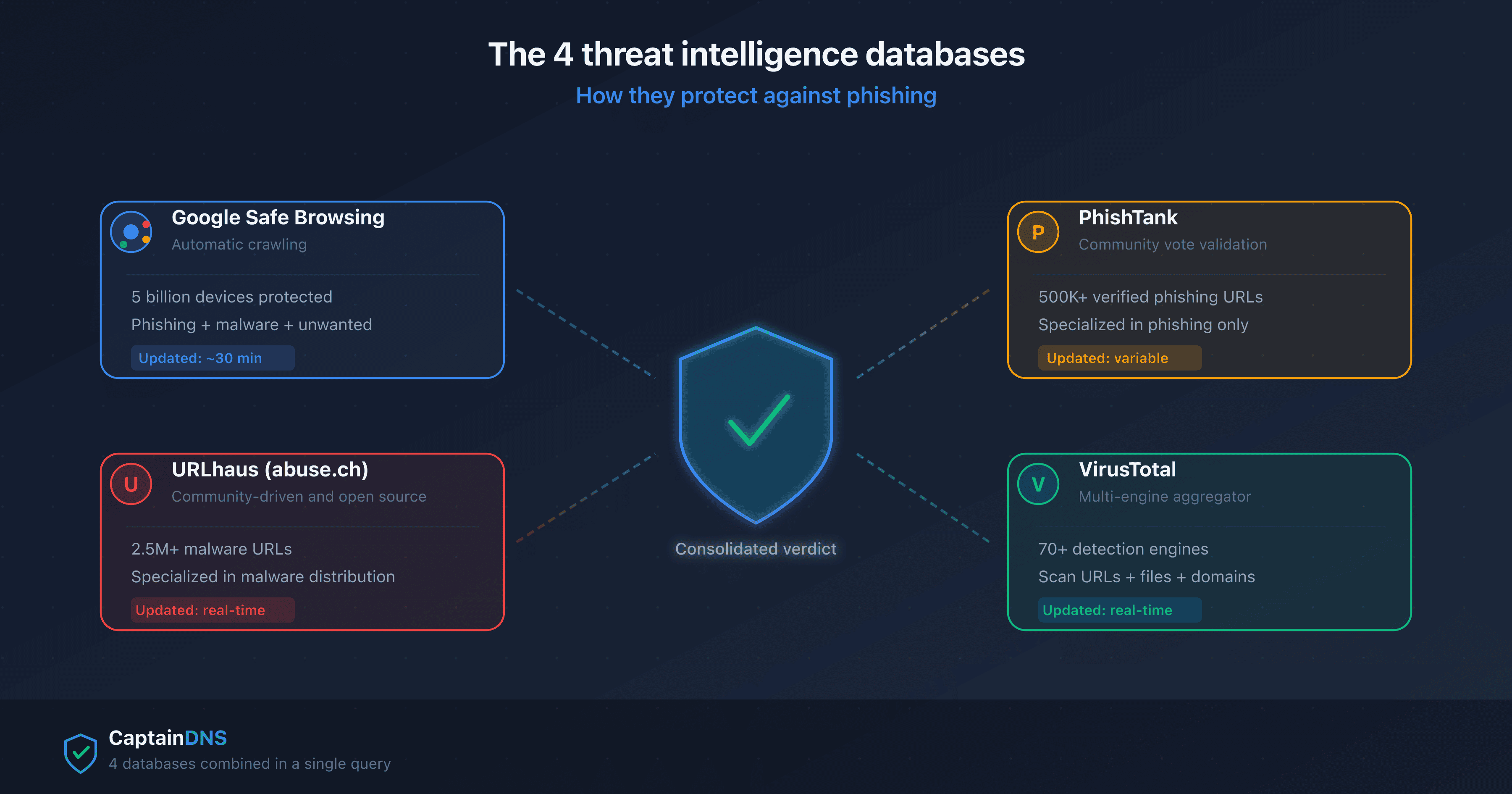
- Google Safe Browsing protects 5 billion devices but takes up to 30 minutes to list a new malicious URL
- URLhaus (abuse.ch) and PhishTank are free community-driven databases, specializing in malware and phishing respectively
- VirusTotal aggregates 70+ detection engines but does not provide a binary verdict: it reports each engine's results
- Combining 4 databases reduces false negatives by 15-30% compared to a single source
When you click a link and your browser displays a red "Deceptive site" screen, a threat intelligence database just protected you. Google Safe Browsing alone blocks roughly 5 million attempts per day. But no single database is comprehensive.
This article explains the technical workings of the 4 most widely used threat intelligence databases for phishing detection. You'll understand why a URL checker that queries multiple databases simultaneously detects more threats than a browser alone.
What is a threat intelligence database?
A threat intelligence database is a repository of data about cyber threats. In the context of phishing, these databases catalog URLs, domains, and IP addresses identified as malicious.
The 3 types of collected data
- Full URLs: the exact address of the malicious page (e.g.,
https://paypa1-secure.xyz/login) - URL hashes: cryptographic fingerprints that allow verifying a URL without transmitting it in plain text
- Domains and IPs: the domain name or IP address of the server hosting the threat
Two operating models
Threat intelligence databases operate under two main models.
Lookup model (direct query): your device sends the URL to verify to the database server, which responds with a verdict. Simple, but raises a privacy concern: the server sees every URL you visit.
Update model (local list): your device regularly downloads a compressed list of malicious hashes and verifies URLs locally. More privacy-friendly, but the local list may lag by a few minutes.
Google Safe Browsing: the guardian of 5 billion devices
Google Safe Browsing is the most widely deployed threat intelligence database in the world. It natively protects Chrome, Firefox, Safari, and Android users.
How does Google Safe Browsing work?
Google uses a two-tier system.
Tier 1: Update API (local verification). Your browser downloads a compressed list of hash prefixes (the first 4 bytes of the SHA-256 hash of each malicious URL) every 30 minutes. When you visit a site, the browser computes the URL's hash and compares it against its local list. If a prefix matches, it moves to tier 2.
Tier 2: Lookup API (server confirmation). The browser sends the hash prefix to Google's server, which returns all matching full hashes. The browser compares locally: if the full hash matches, it blocks the page. This two-step method protects privacy: Google only sees the prefixes, not the full URLs.
Coverage and limitations
| Strength | Limitation |
|---|---|
| 5 billion devices protected | 15-30 min update delay |
| Detects phishing, malware, unwanted software | False negatives on new URLs (<30 min) |
| Free and built into browsers | Does not cover niche threats |
| API available for developers | Limited quota for the free API |
Google updates its list roughly every 30 minutes. A phishing URL created and distributed within that window can go undetected. Short-lived phishing campaigns (less than 1 hour) exploit this gap.
URLhaus (abuse.ch): the Swiss community database
URLhaus is a project by the Swiss organization abuse.ch, hosted by the Institute for Cybersecurity and Engineering at the Bern University of Applied Sciences. Unlike Google Safe Browsing, URLhaus is entirely community-driven and open source.
Contributive model
Over 1,000 security researchers worldwide submit malicious URLs to URLhaus. Each submission is automatically verified, then added to the database. In 2024, URLhaus cataloged over 2.5 million malware distribution URLs.
Specialization: malware distribution
URLhaus focuses on URLs that distribute malicious files (droppers, loaders, ransomware). This specialization gives it an edge: it lists malware distribution URLs that Google Safe Browsing hasn't detected yet.
Data provided by URLhaus
For each listed URL, URLhaus provides:
- The detection date
- The type of malware distributed (tags: Emotet, QakBot, etc.)
- The current status (online or offline)
- The domain's registrar and hosting provider
Feeds are available as free downloads (CSV, JSON) and through a REST API without authentication.
PhishTank: collaborative phishing reporting
PhishTank, operated by Cisco Talos, is a community database exclusively specialized in phishing. Its community-based validation model sets it apart from other databases.
The voting system
When a user submits a suspicious URL, PhishTank does not immediately flag it as phishing. The community must vote first. Multiple users independently verify whether the URL is actually phishing. When a threshold of positive votes is reached, the URL is confirmed as phishing.
This validation process reduces false positives but introduces a delay. A URL submitted in the morning may not be confirmed until the afternoon.
Specialization: phishing only
PhishTank does not cover malware, scareware, or non-phishing fraudulent sites. This specialization makes its database highly reliable for phishing, but useless for other types of threats.
Access and API
PhishTank offers free access to its database through a REST API. Data is also available as a complete download (daily dump). Registration is required to obtain an API key.
VirusTotal: the multi-engine aggregator
VirusTotal (owned by Google/Chronicle since 2012) does not maintain its own threat database. It aggregates results from over 70 detection engines (antivirus, URL scanners, reputation tools).
How does VirusTotal work?
When you submit a URL to VirusTotal, the platform scans it with 70+ engines simultaneously. Each engine renders an independent verdict (clean, malicious, suspicious, unrated). VirusTotal reports all verdicts without aggregating them into a single score.
Interpreting results
A "3/70" result means 3 out of 70 engines flagged the URL as malicious. How should you interpret this?
- 0/70: probably clean, but not guaranteed (false negative possible)
- 1-2/70: probably a false positive, especially if the engines are lesser-known
- 3-10/70: suspicious, investigation recommended
- 10+/70: very likely malicious
VirusTotal limitations
| Strength | Limitation |
|---|---|
| 70+ engines = maximum coverage | Rate limiting on the free API (4 req/min) |
| Analyzes files + URLs + domains | No binary verdict (interpretation required) |
| Scan history available | Frequent false positives (1-2 engines) |
| Very comprehensive premium API | High cost for the premium API |
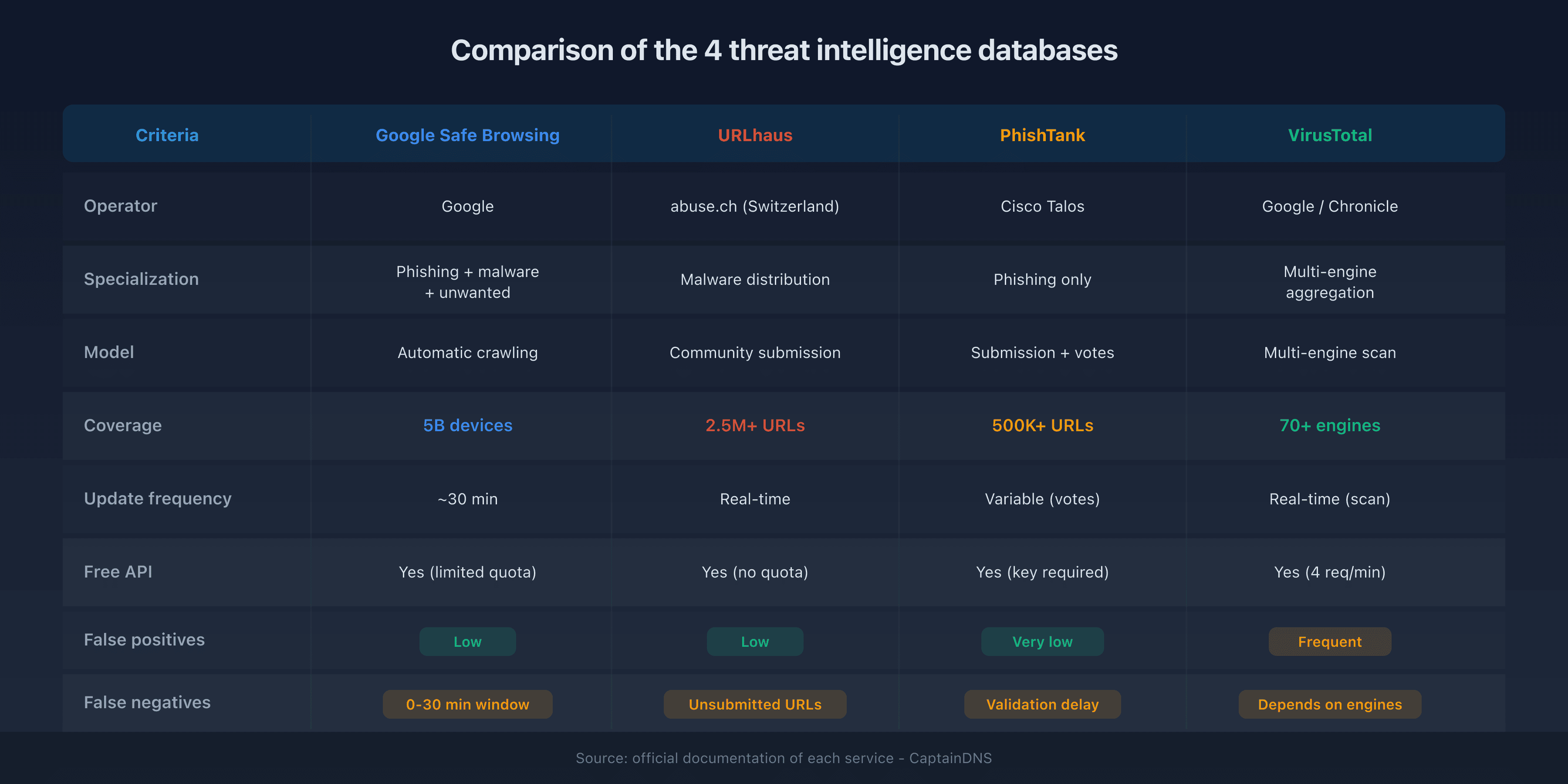
Comparison: strengths and limitations of each database
| Criteria | Google Safe Browsing | URLhaus | PhishTank | VirusTotal |
|---|---|---|---|---|
| Operator | abuse.ch (Switzerland) | Cisco Talos | Google/Chronicle | |
| Specialization | Phishing + malware + unwanted | Malware distribution | Phishing only | Multi-engine aggregation |
| Model | Automatic crawling | Community submission | Submission + votes | Multi-engine scan |
| Coverage | 5B devices | 2.5M+ listed URLs | 500K+ verified URLs | 70+ engines |
| Update frequency | ~30 min | Real-time | Variable (votes) | Real-time (scan) |
| Free API | Yes (limited quota) | Yes (no quota) | Yes (key required) | Yes (4 req/min) |
| False positives | Low | Low | Very low | Frequent (1-2 engines) |
| False negatives | 0-30 min window | Unsubmitted URLs | Validation delay | Depends on engines |
Database complementarity
No single database detects 100% of threats. Each has its vulnerability window:
- Google Safe Browsing misses URLs less than 30 minutes old
- URLhaus does not cover phishing (malware only)
- PhishTank has a community validation delay
- VirusTotal does not give a clear verdict (interpretation required)
Why combine multiple databases?
Querying a single threat intelligence database leaves blind spots. Combining 4 complementary databases reduces false negatives by 15 to 30% compared to a single source.
The cross-detection principle
When 4 independent databases analyze the same URL, three scenarios arise:
- Positive consensus: 3 or 4 databases flag the threat. Reliable verdict: the URL is malicious.
- Partial detection: 1 or 2 databases flag the threat. The URL is suspicious and warrants investigation.
- Negative consensus: no database flags the threat. The URL is probably clean, but zero risk does not exist.
The advantage of combining databases in practice
A phishing email contains a link to https://secure-banking-login.xyz. Here is what each database detects individually:
- Google Safe Browsing: not yet listed (URL created 10 minutes ago)
- URLhaus: no malware distributed (this is phishing, not malware)
- PhishTank: reported but not yet validated by the community
- VirusTotal: 4/70 engines flag it as phishing
Result with a single database: 3 out of 4 chances of missing the threat. Result with 4 combined databases: the VirusTotal signal (4 engines) combined with the pending PhishTank report triggers a "suspect" alert.
Check a suspicious link with a multi-database URL checker: querying all 4 sources in a single request significantly reduces the risk of a false negative.
FAQ
How does Google Safe Browsing work?
Google Safe Browsing uses a two-step system. Your browser downloads a local list of malicious hashes every 30 minutes. When you visit a site, it compares the URL's hash against this list. If there's a partial match, it contacts Google's server for confirmation. This method protects your privacy: Google never sees the full URLs you visit.
What is the difference between VirusTotal and Google Safe Browsing?
Google Safe Browsing maintains its own threat database and provides a binary verdict (safe or unsafe). VirusTotal does not maintain its own database: it submits the URL to 70+ third-party engines and reports their individual verdicts without aggregating them. Google Safe Browsing is built into browsers. VirusTotal is an on-demand scanning tool.
Are URLhaus and PhishTank free?
Yes, both are entirely free. URLhaus (abuse.ch) offers its feeds as free downloads and a REST API without authentication. PhishTank requires a free registration to obtain an API key, but data access is free of charge. Both projects rely on community contributions.
How do browsers detect phishing sites?
Modern browsers (Chrome, Firefox, Safari, Edge) use Google Safe Browsing. The browser maintains a local copy of malicious URL hashes and compares it against every URL visited. If a match is found, the browser displays a red "Deceptive site" warning before loading the page. This process runs locally to preserve privacy.
What is a false positive in URL analysis?
A false positive occurs when a threat intelligence database flags a legitimate URL as malicious. On VirusTotal, 1 to 2 out of 70 engines regularly flag legitimate sites. This is why a score of 1/70 or 2/70 does not necessarily mean the site is dangerous. Cross-detection across multiple databases reduces this risk.
How often are threat intelligence databases updated?
Update frequency varies by database. Google Safe Browsing updates its local list roughly every 30 minutes. URLhaus adds new URLs in real-time upon automatic validation. PhishTank depends on community voting speed (variable, from a few minutes to several hours). VirusTotal scans in real-time with each submission.
Can a site be dangerous without a browser warning?
Yes. Google Safe Browsing takes about 30 minutes to list a new malicious URL. During this window, the browser cannot alert you. Short-lived phishing campaigns exploit this delay. This is why combining multiple detection sources reduces the risk of slipping through the cracks.
How can you check a URL against multiple databases at once?
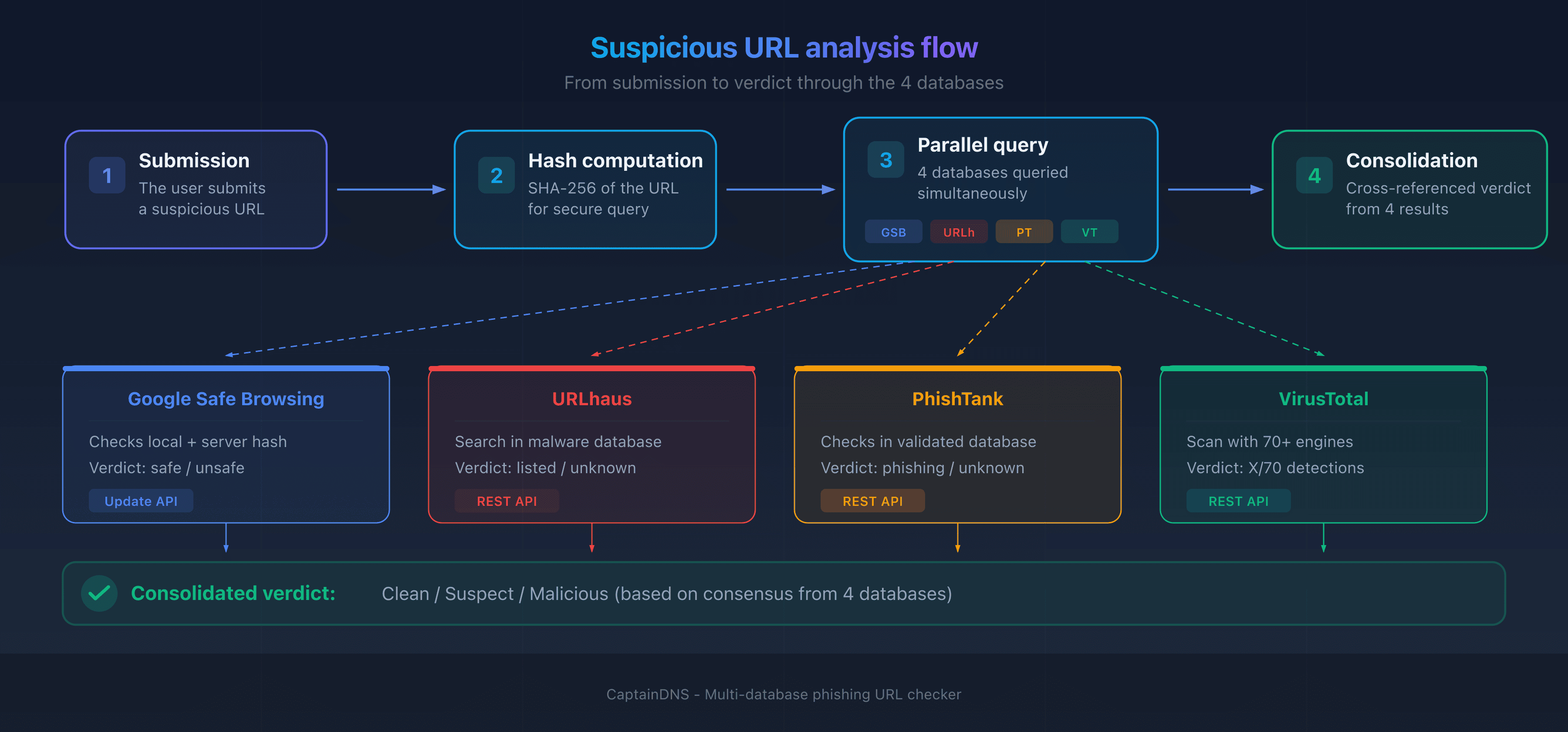
Use a URL checker that simultaneously queries multiple threat intelligence databases. CaptainDNS's phishing URL checker, for example, submits the URL to Google Safe Browsing, URLhaus, PhishTank, and VirusTotal in a single request and displays a consolidated verdict.
Glossary
- Threat intelligence: intelligence about cyber threats, including indicators of compromise (URLs, IPs, hashes) collected and shared between organizations.
- Blocklist: a list of URLs, domains, or IP addresses identified as malicious, used to automatically block access.
- False positive: a detection error where a legitimate URL is incorrectly flagged as malicious by a detection engine.
- False negative: the opposite error where a genuinely malicious URL is not detected by the engine, allowing the threat through.
- URL hash: a cryptographic fingerprint (SHA-256) of a URL, enabling comparison against a threat list without transmitting the URL in plain text.
- Real-time feed: a continuously updated stream of threat data, consumable by security tools via API or download.
Check a suspicious link now: use our phishing URL checker to query Google Safe Browsing, URLhaus, PhishTank, and VirusTotal in a single request.
Related phishing guides
- How to recognize a phishing email in 2026
- What to do if you clicked a phishing link
- Phishing trends 2025-2026: APWG statistics and new techniques