Passkeys vs passwords: should you ditch your passwords in 2025?
By CaptainDNS
Published on February 19, 2026
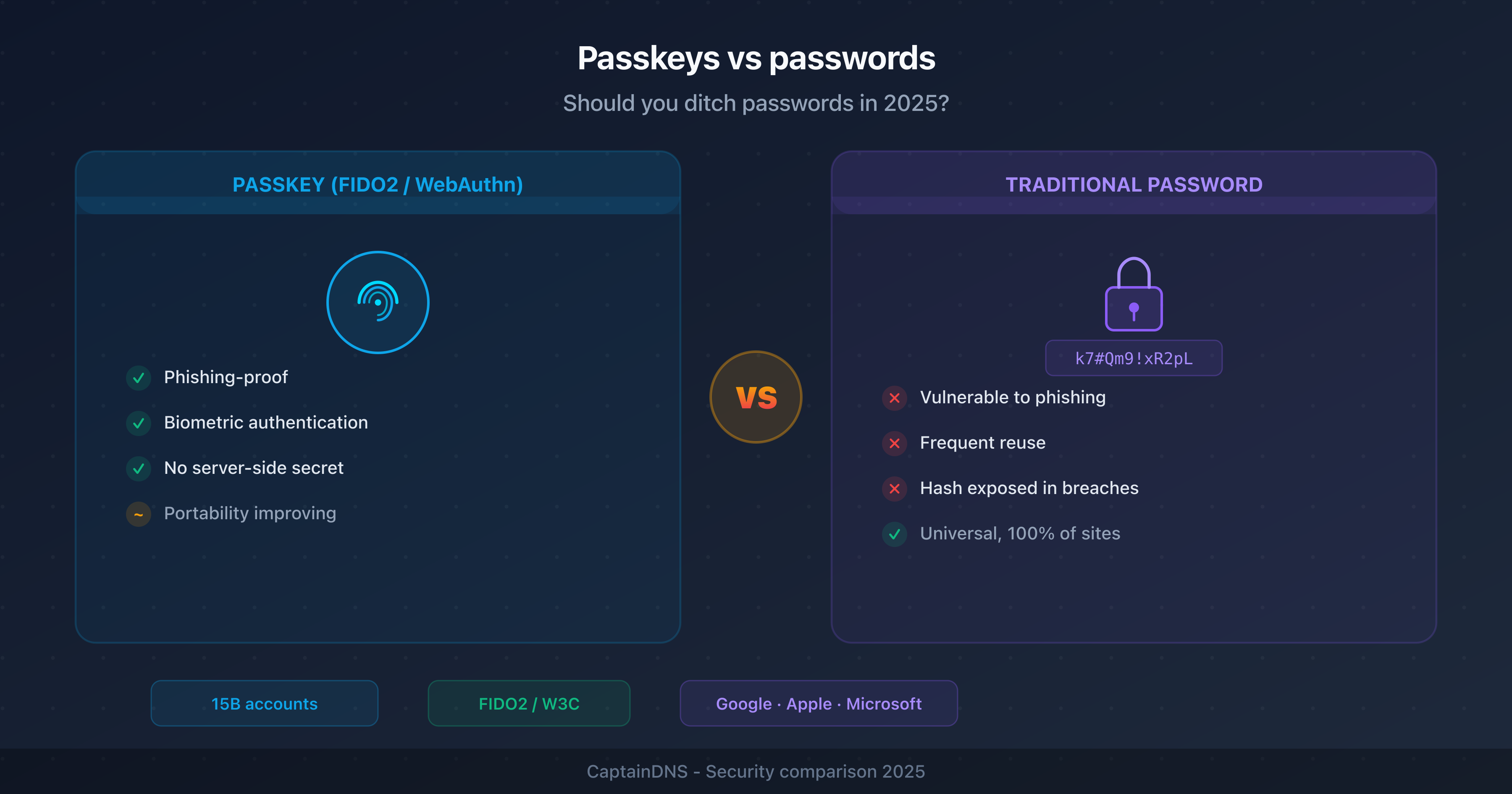
- Passkeys use asymmetric cryptography (FIDO2/WebAuthn): the private key never leaves your device, eliminating server-side credential theft
- Phishing becomes technically impossible with passkeys: authentication is bound to the site's domain
- As of February 2026, over 15 billion accounts support passkeys (Google, Apple, Microsoft, Amazon, GitHub, WhatsApp)
- Adoption is still partial: limited cross-platform portability, complex recovery procedures, and few services support fully passwordless authentication
- Recommended strategy: enable passkeys wherever available, keep strong passwords + 2FA as a safety net
In late 2024, Google announced that passkeys are used by more than 400 million accounts. Apple has natively integrated them into iCloud Keychain since iOS 16. Microsoft is rolling them out on Windows Hello and personal accounts. The message from all three tech giants is clear: passwords are living on borrowed time.
But between the marketing promise and the technical reality, the gap remains significant. Are passkeys ready to replace passwords for every use case? This article compares both approaches on a technical level, analyzes the real benefits and current limitations, and proposes an appropriate transition strategy.
What is a passkey?
A passkey is an authentication credential based on asymmetric cryptography, compliant with the FIDO2 and WebAuthn (W3C) standards. In practice, it replaces the traditional username/password combination with a pair of cryptographic keys.
How it works
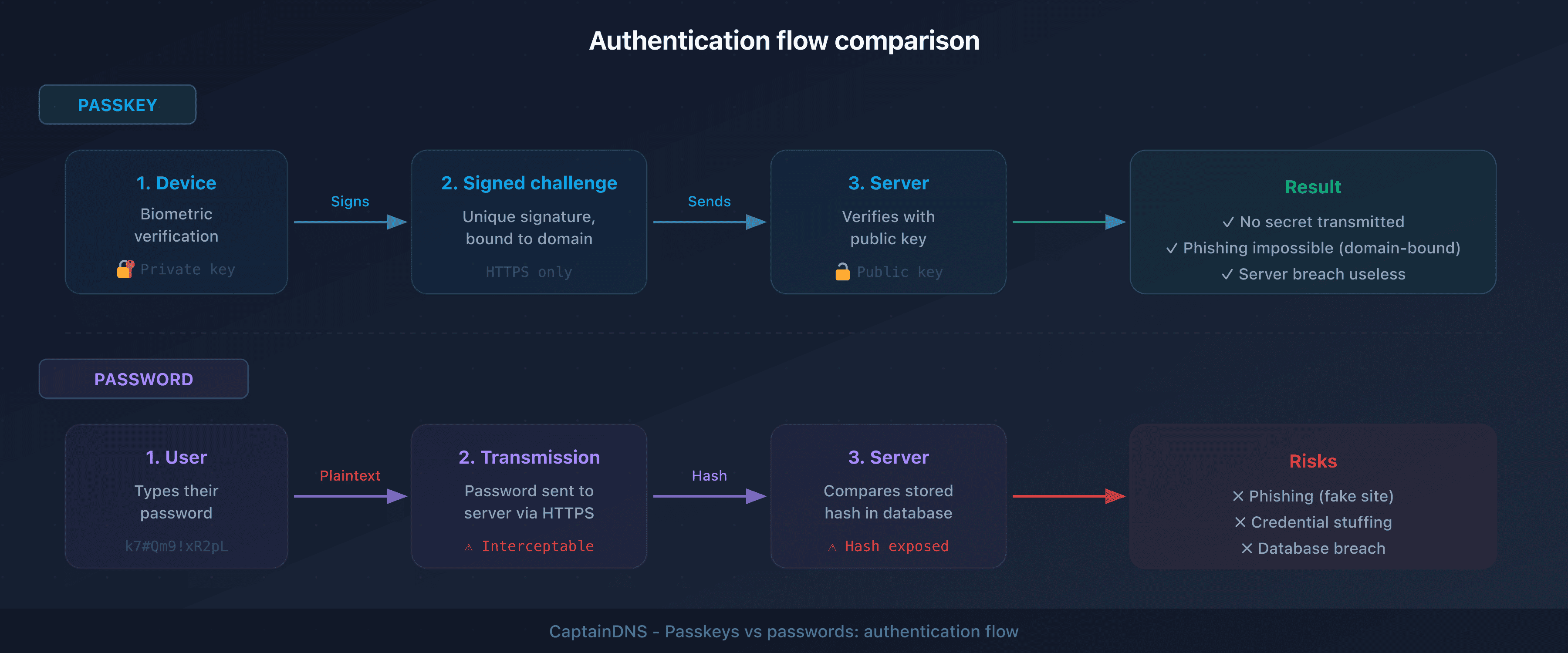
- Creation: when you create an account or enable a passkey, your device generates a key pair: a private key (stored locally, in the Secure Enclave or TPM) and a public key (sent to the server)
- Authentication: at login, the server sends a cryptographic challenge. Your device signs this challenge with the private key after biometric verification (fingerprint, face) or local PIN
- Verification: the server verifies the signature with the public key. If it matches, access is granted
There is no password. Nothing is transmitted to the server, nothing can be intercepted, nothing can be phished.
What sets passkeys apart from security keys
Hardware security keys (YubiKey, Titan) use the same FIDO2 standard, but passkeys sync across your devices through a manager (iCloud Keychain, Google Password Manager, 1Password). A hardware key is tied to a single physical device. Passkeys target the general public, while hardware keys are designed for high-security environments.
Passkeys vs passwords: detailed comparison
| Criterion | Passwords | Passkeys |
|---|---|---|
| Storage | Server (hash) + user (memory or manager) | Private key on device, public key on server |
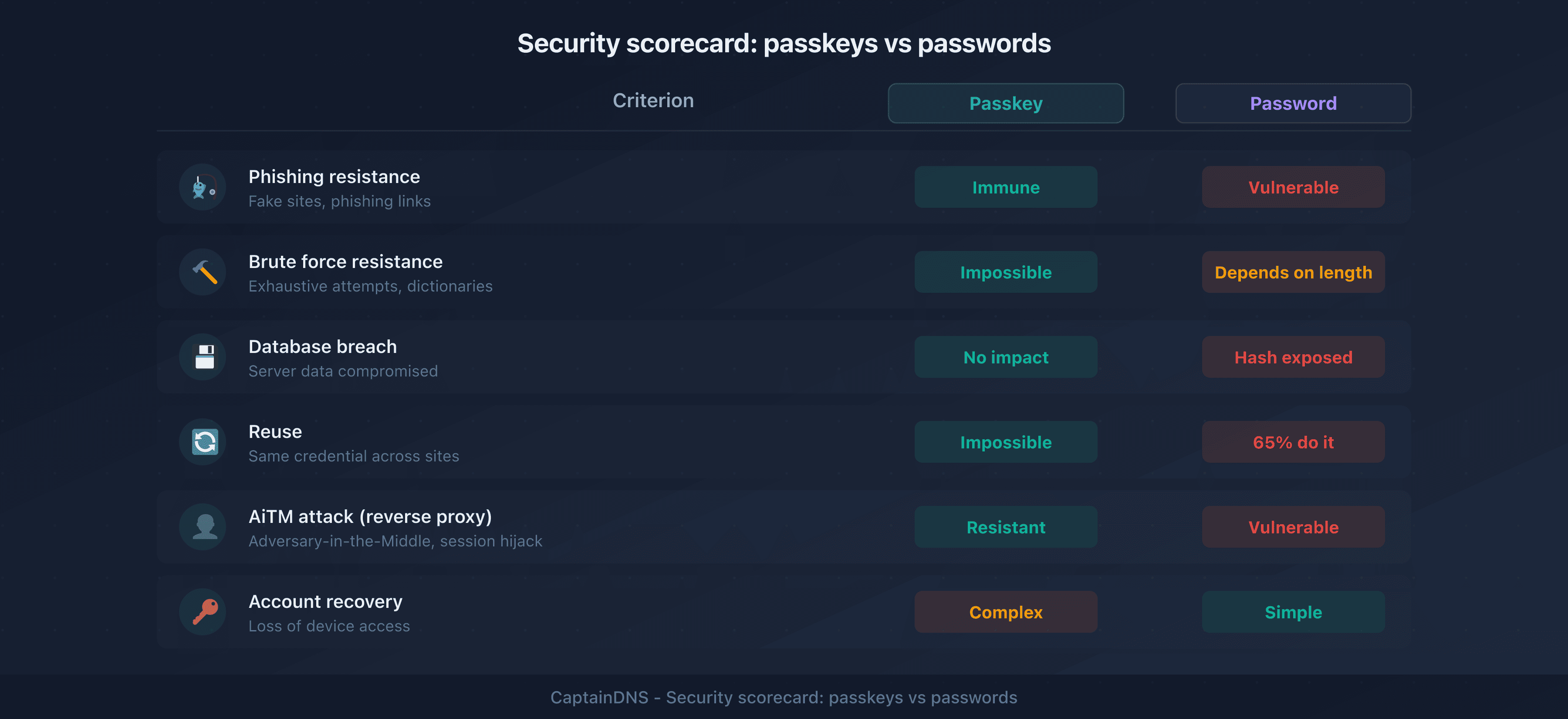
| Phishing resistance | Weak: users can enter their password on a fake site | Strong: authentication is bound to the domain |
| Brute force | Vulnerable if the password is weak | Impossible: asymmetric cryptography |
| Server-side breach | Risk: crackable hashes (MD5, SHA-1) or plaintext | Useless: only the public key is stored |
| Proxy phishing (AiTM) | Vulnerable, even with standard MFA | Resistant: built-in domain verification |
| Reuse | Common: 65% of users reuse their passwords | Impossible: each passkey is unique per service |
| Memorization | Required (or password manager) | None: biometrics or local PIN |
| Portability | Universal: works everywhere | Limited: depends on the ecosystem (Apple, Google, Microsoft) |
| Recovery | Reset via email, security questions | Complex: depends on cloud sync or backup |
| Adoption | 100% of services | ~20% of the top 100 websites (Passkeys Directory, 2025) |
The benefits of passkeys
Phishing becomes impossible
This is the main argument, and it's a strong one. With a password, a phishing site can capture your credentials. With a passkey, authentication cryptographically verifies the site's domain. A fake site at g00gle.com cannot trigger the authentication intended for google.com, even if the interface looks identical.
This phishing resistance also works against adversary-in-the-middle (AiTM) attacks that bypass standard MFA. Domain binding renders transparent proxies ineffective.
No more passwords to remember
An average user has 100+ online accounts. Even with a password manager, friction remains: generate, store, auto-fill, handle conflicts. With passkeys, authentication happens via fingerprint or facial recognition, a gesture that takes 1 to 2 seconds.
Database breaches lose their impact
When a service is compromised, attackers retrieve password hashes they try to crack. With passkeys, the server only stores the public key, which is useless to an attacker. Massive credential compilations (like the "Collection #1" through "#5" files) become meaningless in a passwordless world.
The login experience is faster
According to a FIDO Alliance study (2024), passkey login is 75% faster than password + MFA and 40% faster than password alone with auto-fill. Login abandonment drops by 20% on sites that offer passkeys.
Current limitations of passkeys
Passkeys are not a universal solution in 2025. Several obstacles are slowing adoption.
Cross-platform portability is still limited
A passkey created in iCloud Keychain works across all your Apple devices. But if you switch from an iPhone to an Android smartphone, the migration isn't seamless. Third-party managers (1Password, Bitwarden, Dashlane) partially solve this problem but introduce a dependency on an additional service.
The FIDO Alliance published the CXP (Credential Exchange Protocol) in 2024 to standardize passkey export/import across platforms. Implementation is still in progress among major vendors.
Recovery when you lose a device
Losing your only device when you use passwords is manageable: reset via email. Losing your device when your passkeys are synced to the cloud is also manageable, as long as you have access to your cloud account. But if you lose access to the cloud account itself (forgotten password, inaccessible 2FA), the situation becomes critical.
Recovery procedures vary by provider and are not standardized. This is the Achilles' heel of passkeys for everyday users.
Service adoption is still partial
As of February 2026, roughly 20% of the top 100 websites support passkeys (source: Passkeys Directory). The big names are on board (Google, Apple, Microsoft, Amazon, GitHub, PayPal, WhatsApp), but the long tail of online services, government agencies, and business applications are far behind.
For developers, server-side implementation requires integrating the WebAuthn API, which represents a significant technical effort compared to a simple login/password form.
Shared environments are a problem
A family-shared computer, a public terminal at a library, a work device used by multiple employees: passkeys tied to a single person's biometrics don't work in these contexts. Passwords, on the other hand, remain universal.
Enterprises are moving cautiously
Enterprise security policies require centralized identity management (Active Directory, Okta, Azure AD). Passkey integration in these environments is progressing, but IT admins need to manage the password/passkey coexistence during a transition period that will last years.
What to do while waiting for full adoption
The transition to passkeys won't happen overnight. In 2025-2026, the most pragmatic strategy combines both approaches.
1. Enable passkeys wherever possible
Start with critical services: Google, Apple ID, Microsoft, GitHub, Amazon. Setup takes a few minutes per account. Once enabled, passkeys become the default authentication method.
2. Keep strong passwords as a fallback
For all services that don't yet support passkeys (the majority), use strong, unique passwords. A randomly generated 16+ character password resists brute-force attacks for millennia. Use a password generator to create random passwords or memorable passphrases.
3. Enable MFA everywhere
Multi-factor authentication remains essential for password-protected accounts. Prefer TOTP apps (Google Authenticator, Authy) or FIDO2 security keys over SMS, which is vulnerable to SIM swapping.
4. Use a password manager
A manager (1Password, Bitwarden, KeePass) centralizes your passwords and, increasingly, your passkeys. It's the bridge between both worlds during the transition.
5. Plan a gradual migration
For IT admins: inventory passkey-compatible services, deploy as a pilot with a small group, then expand. Don't disable passwords until you've validated recovery procedures.
Generate strong passwords now: use our password generator to create random passwords or memorable passphrases with real-time strength indicators.
FAQ
What are passkeys?
Passkeys are authentication credentials based on asymmetric cryptography (FIDO2/WebAuthn standard). They replace passwords with a key pair: a private key stored on your device and a public key sent to the server. Authentication uses biometrics (fingerprint, face) or a local PIN, without ever transmitting a secret to the server.
Is it better to use a passkey or a password?
Passkeys are more secure than passwords: they resist phishing, database breaches, and brute-force attacks. However, adoption is still partial (around 20% of popular sites in 2026). The recommended strategy is to use passkeys when available and keep strong passwords + MFA for other services.
What is the difference between a security key and a password?
A security key (YubiKey, Titan) is a hardware device that authenticates through cryptography, without transmitting a secret. A password is a string of characters that you know and send to the server. A security key is phishing-resistant because it verifies the site's domain, unlike a password which can be entered on a fake site.
Do passkeys work on all devices?
Passkeys work on recent devices: iOS 16+, Android 9+, macOS Ventura+, Windows 10+ (via Windows Hello). They sync within the same ecosystem (Apple, Google). Cross-ecosystem portability is improving thanks to third-party managers (1Password, Bitwarden) and the FIDO Alliance's CXP protocol, but it's not seamless yet.
What happens if I lose my phone with my passkeys?
If your passkeys are synced to the cloud (iCloud, Google Password Manager), you can recover them by signing into your cloud account from a new device. If you also lose access to your cloud account, you'll need to go through the recovery procedures of each service, which vary. That's why it's recommended to keep a backup authentication method (hardware security key, recovery codes).
Will passkeys replace passwords?
Eventually, probably for most consumer use cases. But the transition will take years. In 2025-2026, passwords are still necessary for most services. The coexistence of passwords and passkeys will remain the norm for a long time, especially in enterprise environments and government agencies.
Are passkeys really phishing-resistant?
Yes. Unlike passwords and standard MFA (SMS, TOTP), passkeys include cryptographic verification of the site's domain. A phishing site mimicking google.com at the URL g00gle.com cannot trigger the authentication. This protection also works against adversary-in-the-middle (AiTM) attacks that bypass traditional MFA.
How do I enable passkeys on my accounts?
The process varies by service. Generally: go to your account's security settings, look for "Passkey", "Access key", or "Passwordless sign-in", then follow the instructions to register your device. Major services (Google, Apple, Microsoft, GitHub, Amazon) all offer this option in their security settings.
Glossary
- Passkey: a FIDO2 authentication credential based on asymmetric cryptography, syncable across devices, that replaces a password with biometric verification or a local PIN.
- FIDO2: a set of authentication standards developed by the FIDO Alliance, comprising WebAuthn (browser API) and CTAP2 (communication protocol with authenticators).
- WebAuthn (Web Authentication): a W3C API that allows websites to offer authentication via asymmetric cryptography, without passwords. It's the technical building block behind passkeys.
- Asymmetric cryptography: a system using a key pair (public + private). The private key signs, the public key verifies. The private key never leaves the device.
- AiTM (Adversary-in-the-Middle): a proxy-based phishing attack that intercepts communications between the user and the legitimate site, capturing session cookies even after MFA authentication.
- CXP (Credential Exchange Protocol): a FIDO Alliance protocol (2024) aimed at standardizing the export and import of passkeys across different managers and platforms.
📚 Related password security guides
- Passphrase vs password: which one is actually more secure?
- NIST 2025 password recommendations: what's changed