Crawl budget: understanding and optimizing how Google crawls your site
By CaptainDNS
Published on February 11, 2026
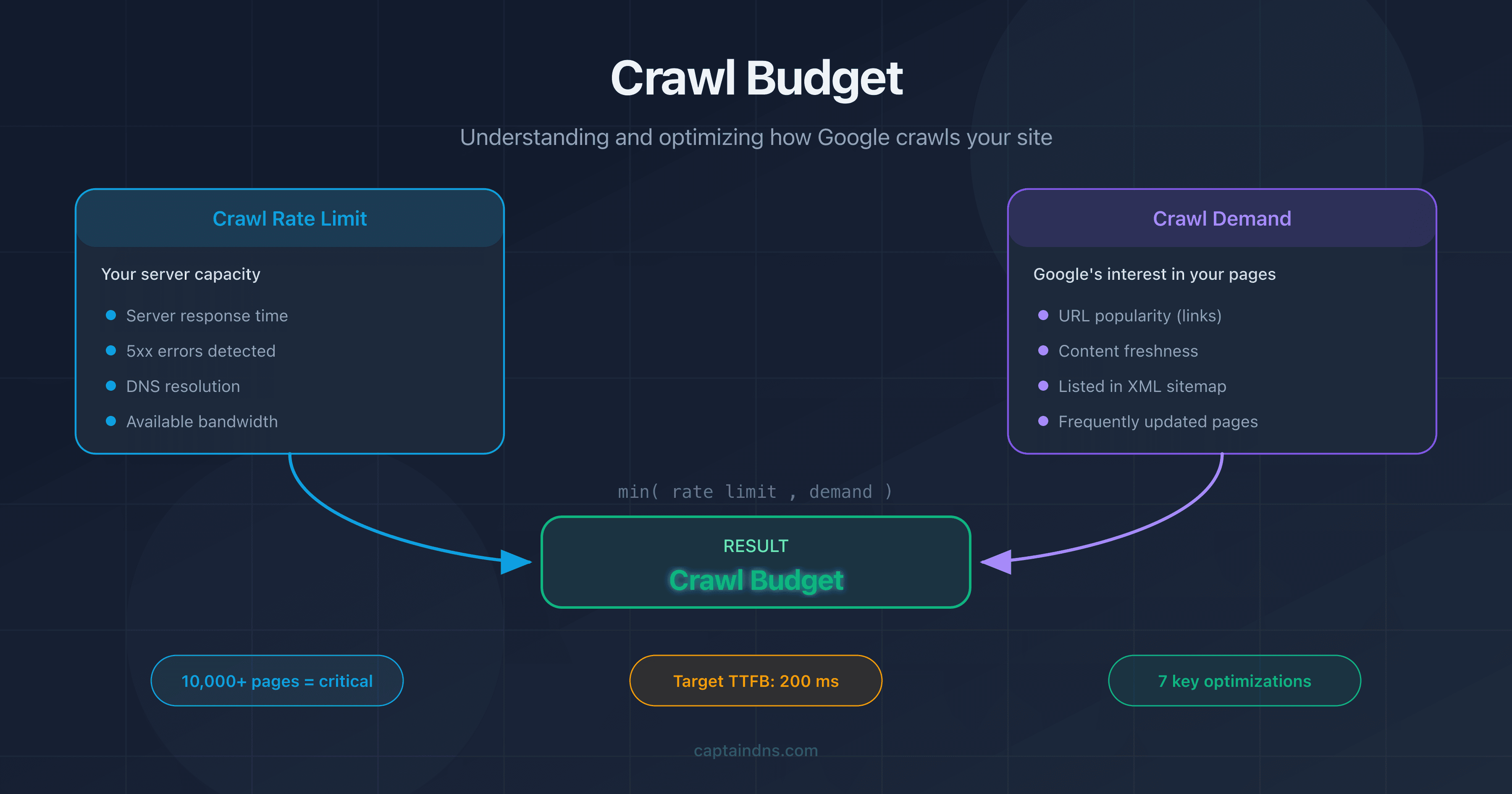
- Crawl budget is the number of pages Googlebot chooses to explore on your site within a given time frame.
- It results from two factors: the crawl rate limit (your server's capacity) and the crawl demand (Google's interest in your pages).
- On sites with more than 10,000 pages, a poorly optimized crawl budget delays the indexation of important pages.
- Heavy pages consume more budget: test your page weight with our Page Crawl Checker.
Google crawls billions of pages every day. But not all of yours. Crawl budget is the number of pages Googlebot chooses to explore on your site within a given time frame. It has nothing to do with money.
Does your site have fewer than a few thousand pages? Crawl budget probably isn't a concern. Google has enough resources to explore everything. But once your site exceeds 10,000 pages, or your architecture generates thousands of filtering and pagination URLs, managing your crawl budget becomes a major SEO lever.
This guide covers three things: what crawl budget is, how to check it in Google Search Console, and 7 practical techniques to optimize it. We also cover a frequently overlooked factor: the impact of DNS performance on crawl speed.
What Is Crawl Budget?
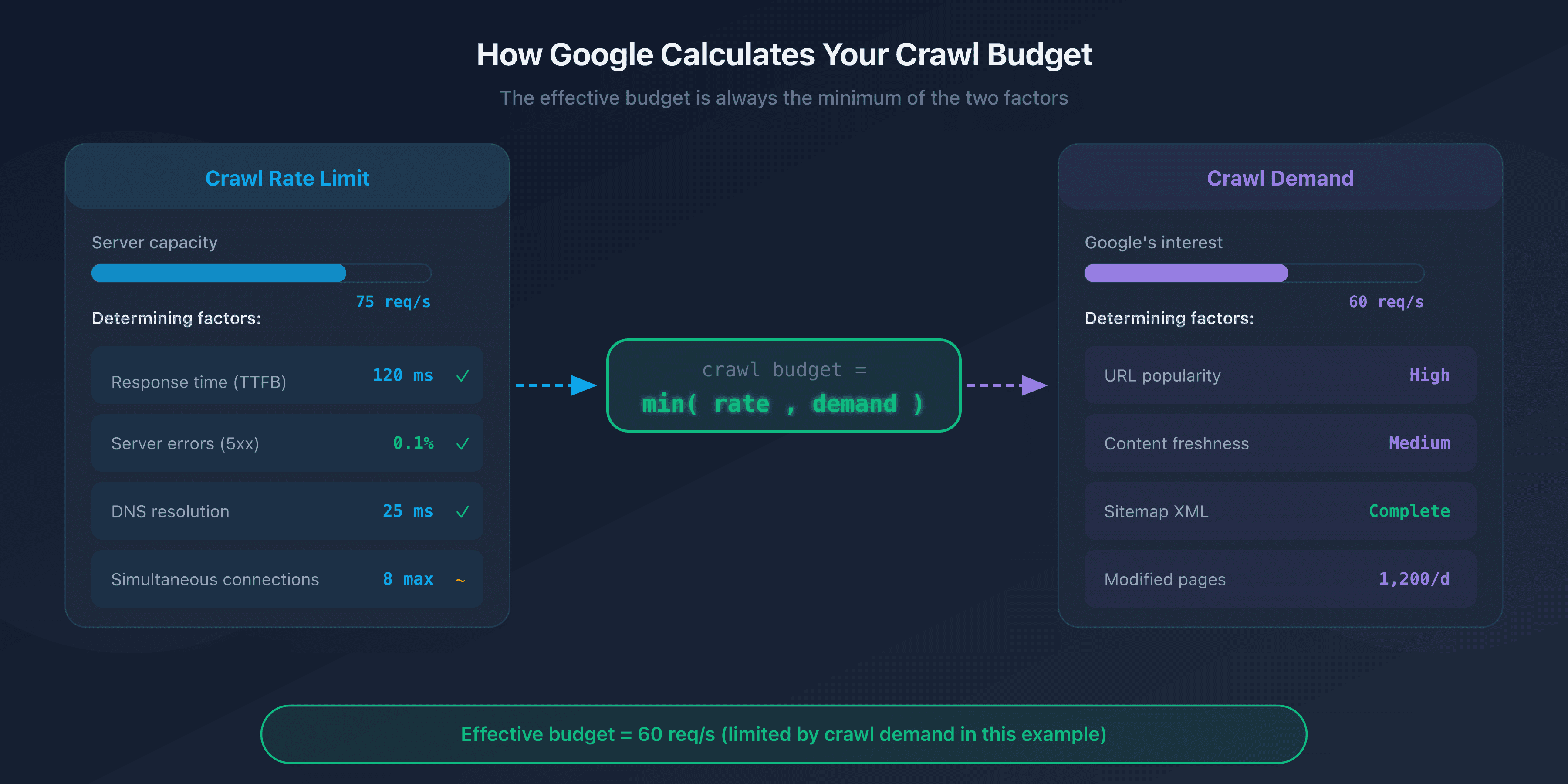
Crawl budget is a concept defined by Google that combines two independent factors: the crawl rate limit and the crawl demand.
Crawl Rate Limit: Your Server's Capacity
The crawl rate limit represents the maximum number of simultaneous requests Googlebot can send to your server without overloading it. Google adjusts this limit automatically based on your site's responsiveness.
If your server responds quickly (response time under 200 ms), Googlebot increases the pace. If responses slow down or 5xx errors appear, it reduces the rate to avoid making things worse.
Crawl Demand: Google's Interest in Your Pages
Crawl demand reflects Google's willingness to crawl your pages. Several factors influence it:
- URL popularity: pages that receive external links or generate traffic are crawled more often.
- Freshness: pages that change frequently (news, prices, inventory) are revisited more often than static pages.
- Sitemap presence: URLs listed in your sitemap XML signal to Google that they deserve to be explored.
The Crawl Budget Equation
Your site's effective crawl budget is the minimum of the crawl rate limit and the crawl demand:
Crawl budget = min(crawl rate limit, crawl demand)
In practice: even if your server can handle 100 requests per second, Google won't crawl more pages than it deems necessary. Conversely, if Google wants to explore 50,000 pages but your server can only handle 5 requests per second, crawling will be slow.
Why Crawl Budget Matters for SEO
Impact on Indexation
A page that isn't crawled is a page that isn't indexed. If Googlebot doesn't have time to explore certain URLs on your site, they won't appear in search results, even if their content is excellent.
The problem is especially visible on large sites. Deep pages, accessible after 4-5 clicks from the homepage, are crawled less often. If your crawl budget is limited, these pages can take weeks or even months to get indexed.
When Does Crawl Budget Become a Problem?
Google is clear: crawl budget is only a concern for large sites. Here are the situations where you need to pay attention:
- Sites with more than 10,000 unique URLs: e-commerce, directories, content portals.
- Sites with faceted navigation: filter combinations (size, color, price, brand) generate thousands of near-identical URLs.
- Sites with duplicate content: HTTP and HTTPS versions, www and non-www, or URL parameters creating duplicates.
- Sites with technical errors: redirect chains, 404 errors, and soft-404 pages waste budget without delivering any value.
The Most Affected Sites
E-commerce sites are hit the hardest. A catalog of 50,000 products with 20 filter facets can generate millions of URLs. Without strict robots.txt management and canonical tags, Googlebot spends its time crawling low-value pages at the expense of strategic product pages.
Media sites with large archives, forums, and classified ad sites are also affected.
How to Check Your Crawl Budget
Crawl Stats Report in Google Search Console
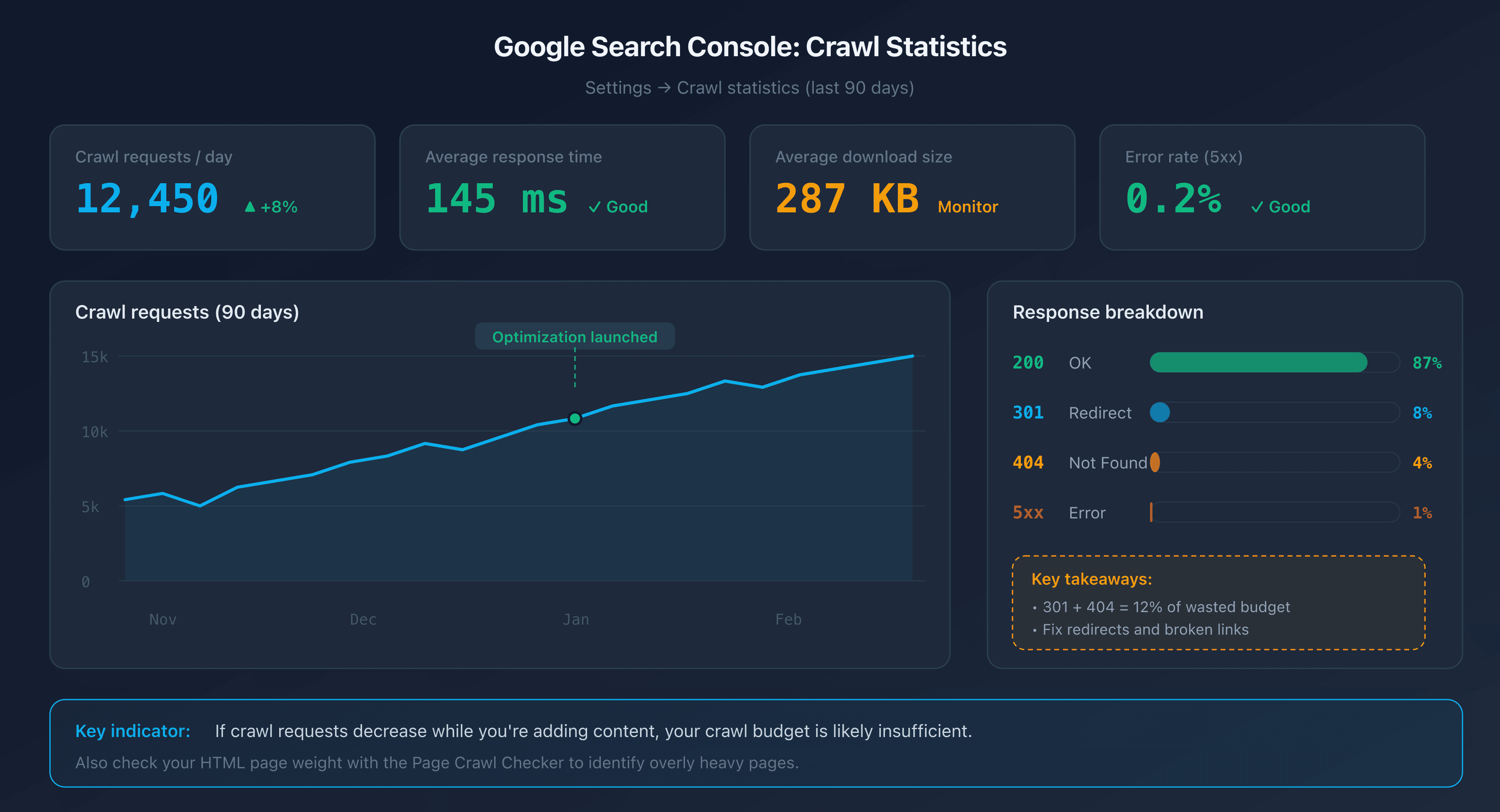
Google Search Console provides a dedicated report under Settings > Crawl stats. This report displays data for the last 90 days:
- Total number of crawl requests per day.
- Average response time from your server.
- Breakdown by response type (200, 301, 404, 5xx).
- Average size of downloaded pages.
A useful indicator: if the number of crawl requests decreases while you're adding content, your crawl budget is likely insufficient.
Server Log Analysis
Your web server logs (Apache, Nginx) record every Googlebot visit. By analyzing them, you can identify:
- Which pages are crawled most often (and which are never crawled).
- Crawl patterns (times, frequency, depth).
- Errors returned to Googlebot.
Filter requests where the User-Agent contains "Googlebot" to isolate crawler traffic.
URL Inspection Tool
The URL Inspection Tool in Google Search Console lets you check the individual status of a page: last crawl date, indexation status, and any detected issues.
7 Techniques to Optimize Your Crawl Budget
1. Fix Broken Links and Redirect Chains
Every broken link (404) and every redirect chain (301 to 301 to 301) wastes a crawl request. Googlebot follows the link, receives an error or redirect, and has to start over. The result: budget consumed for nothing.
Use a crawler like Screaming Frog or Sitebulb to detect broken links and redirect chains on your site. Fix links to point directly to the final destination.
2. Optimize Your robots.txt
The robots.txt file lets you block Googlebot from accessing unnecessary sections of your site. Common targets:
- Admin and back-office pages.
- Internal search results pages.
- Filtering and sorting pages (facets).
- CSS/JS files that don't need to be crawled individually.
# robots.txt - block filtering pages
User-agent: Googlebot
Disallow: /search?
Disallow: /filter/
Disallow: /sort/
Disallow: /admin/
Important note: blocking a URL in robots.txt prevents crawling, but not de-indexation. If a blocked page receives external links, Google can still index it (without crawling it) based on link anchors.
3. Clean Up Your Sitemap XML
Your sitemap XML should only contain URLs you want indexed. Remove:
- URLs returning 404 errors or 301 redirects.
- URLs blocked by robots.txt.
- URLs with a
noindextag. - Low-quality pages or duplicates.
A clean sitemap tells Google which pages deserve its attention. If your sitemap contains 100,000 URLs but only 20,000 are actually useful, you're diluting the signal.
4. Eliminate Duplicate Content With Canonical Tags
Duplicate pages are a direct waste of crawl budget. Googlebot crawls each URL separately, even if the content is identical.
Use the <link rel="canonical"> tag to indicate the preferred version of a page. Common examples:
- Tracking parameters (
?utm_source=...). - Sorting and pagination variants.
- HTTP/HTTPS or www/non-www versions.
5. Reduce HTML Page Weight
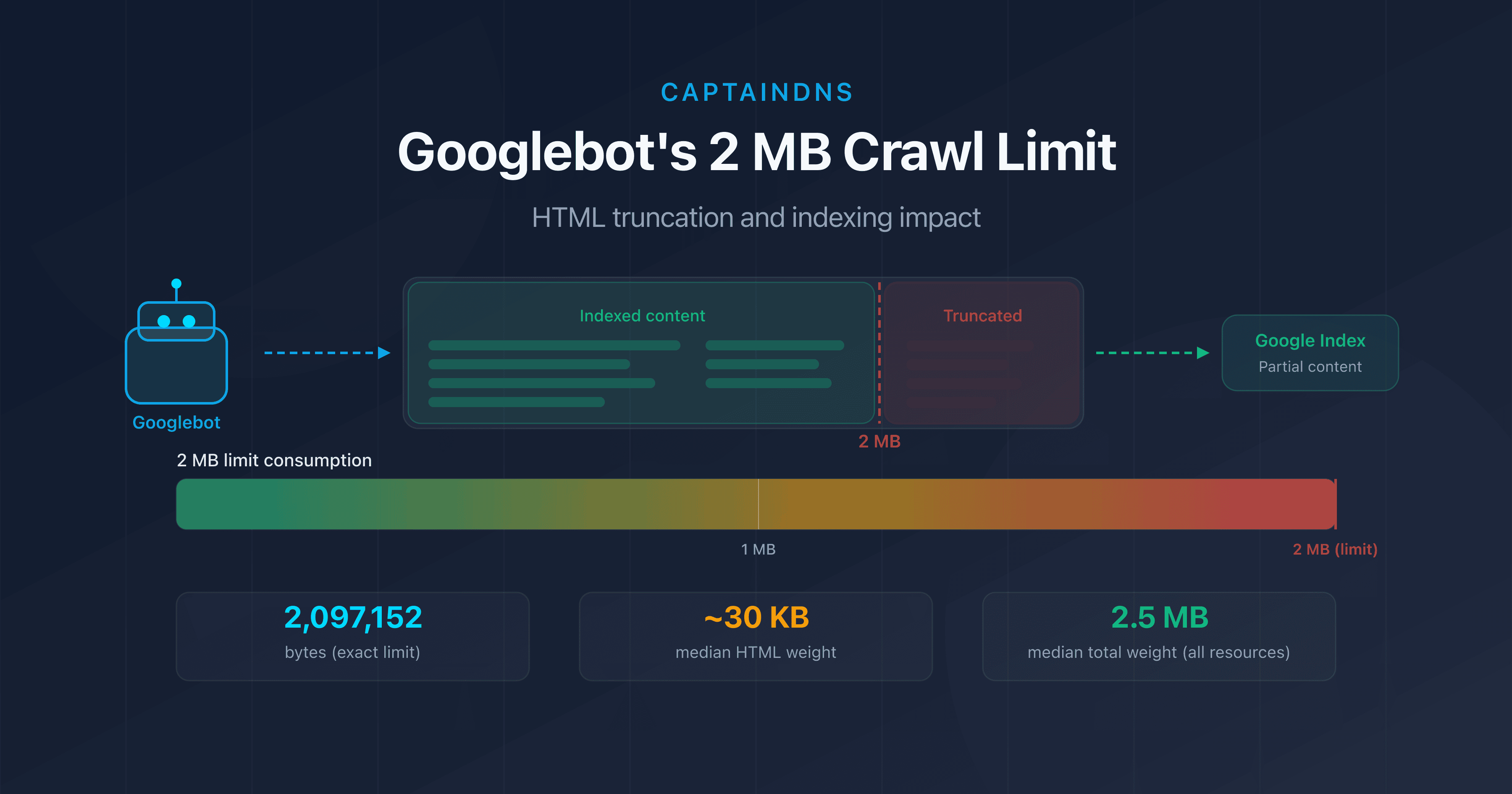
Heavy pages consume more bandwidth and download time, which slows down crawling. Beyond 2 MB of source HTML, Googlebot truncates the content entirely.
The most effective actions:
- Externalize inline CSS and JavaScript.
- Remove base64 images and inline SVGs.
- Minify the HTML.
- Paginate long lists.
6. Improve Server Response Time
The faster your server responds, the more Googlebot increases the crawl rate limit. The goal: a server response time (TTFB) under 200 ms.
Key levers:
- Server-side caching: Redis, Varnish, or a CDN for static pages.
- Database: optimize slow queries, add indexes.
- Infrastructure: hosting sized for expected traffic.
7. Avoid Crawl Traps
Crawl traps are sections of your site that generate a near-infinite number of URLs. Googlebot can get stuck and consume the entire budget without ever reaching your important pages.
Common examples:
- Infinite calendars: each month generates a new URL, with no time limit.
- Combined facets: size + color + price + brand = thousands of URLs.
- Sessions and IDs in the URL: each visitor generates unique URLs.
- Sorting and pagination: page 1 sorted by price, page 1 sorted by date, page 1 sorted by popularity = 3 URLs for the same content.
The DNS Factor: The Invisible Impact on Crawl Budget
Your robots.txt is clean, your sitemap is spotless, your pages are lightweight. Yet crawling is still slow. Have you checked your DNS performance? Before every HTTP request, Googlebot must resolve your site's domain name. If this resolution is slow, every crawl request starts with a penalty.
DNS Resolution and Googlebot
During each crawl session, Googlebot performs a DNS resolution to locate your server's IP address. If your DNS server takes 200 ms to respond instead of 20 ms, that adds 180 ms of latency to every request.
Over a crawl session of 1,000 pages, this difference translates to 180 seconds (3 minutes) of time wasted solely on DNS resolution. Googlebot interprets this slowness as a sign of overload and reduces the crawl rate limit.
Optimal TTL for Crawling
The TTL (Time To Live) of your DNS records determines how long Google's DNS resolver caches the response. A TTL that's too short (under 300 seconds) forces more frequent domain resolution. A TTL between 3,600 and 86,400 seconds (1 hour to 24 hours) is a good balance between responsiveness and performance.
How to Test Your DNS Performance
Check your domain's DNS resolution time with tools like dig or CaptainDNS's DNS tools. A resolution time under 50 ms is excellent. Above 100 ms, there's room for optimization (DNS provider choice, Anycast configuration, TTL).
Recommended Action Plan
- Analyze your crawl budget: check the Crawl stats report in Google Search Console. Note the number of requests per day, average response time, and response code breakdown.
- Test the weight of your critical pages: use the Page Crawl Checker on your most important pages. Identify those exceeding 500 KB of source HTML.
- Apply the 7 techniques: fix broken links, clean up your sitemap, eliminate duplicates, reduce page weight, and monitor your DNS performance. Measure the impact in Search Console after 2-4 weeks.
FAQ
What is crawl budget in SEO?
Crawl budget is the number of pages Googlebot explores on your site within a given time frame. It results from two factors: the crawl rate limit (the maximum number of requests your server can handle) and the crawl demand (Google's interest in your URLs). Pages that aren't crawled cannot be indexed.
Does crawl budget affect small sites?
No, for the vast majority of sites. Google confirms that crawl budget is only a limiting factor for sites with more than 10,000 unique URLs, or for sites that generate many URLs through faceted navigation, sorting parameters, and pagination. If your site has fewer than a few thousand pages, Googlebot has no trouble exploring everything.
How do you check crawl budget in Google Search Console?
Go to Google Search Console, then Settings, and click on "Crawl stats." This report shows the number of crawl requests per day, average response time, downloaded page size, and HTTP response code breakdown for the last 90 days. A drop in request volume despite adding new content indicates a crawl budget problem.
What is the difference between crawl rate limit and crawl demand?
The crawl rate limit is the technical capacity: the maximum number of requests Googlebot sends to your server without overloading it. Crawl demand is Google's interest: how many pages Google actually wants to explore based on their popularity, freshness, and presence in the sitemap. The effective crawl budget is the minimum of the two.
Does robots.txt affect crawl budget?
Yes. The Disallow rules in robots.txt prevent Googlebot from crawling the specified URLs, freeing up budget for important pages. However, blocking a URL in robots.txt does not prevent its indexation if it receives external links. To de-index a page, use the meta noindex tag (which requires the page to be crawlable).
Do redirects consume crawl budget?
Yes. Every redirect (301 or 302) consumes a crawl request. Googlebot follows the initial link, receives the redirect, then has to make a new request to the destination. Redirect chains (A to B to C to D) multiply the waste. Fix links to point directly to the final URL.
How does page weight affect crawl budget?
The heavier a page's HTML, the more bandwidth and download time it consumes. Googlebot adjusts the crawl rate limit based on response time. Lightweight pages (under 100 KB of HTML) allow more pages to be crawled per session. Beyond 2 MB of source HTML, Googlebot truncates the content and only partially indexes it.
Test your pages now: use our Page Crawl Checker to check your HTML page weight and compliance with Googlebot's 2 MB limit.
Related Crawl and Indexation Guides
- Googlebot's 2 MB limit: what happens when your pages are too heavy: test whether your pages exceed the truncation threshold.
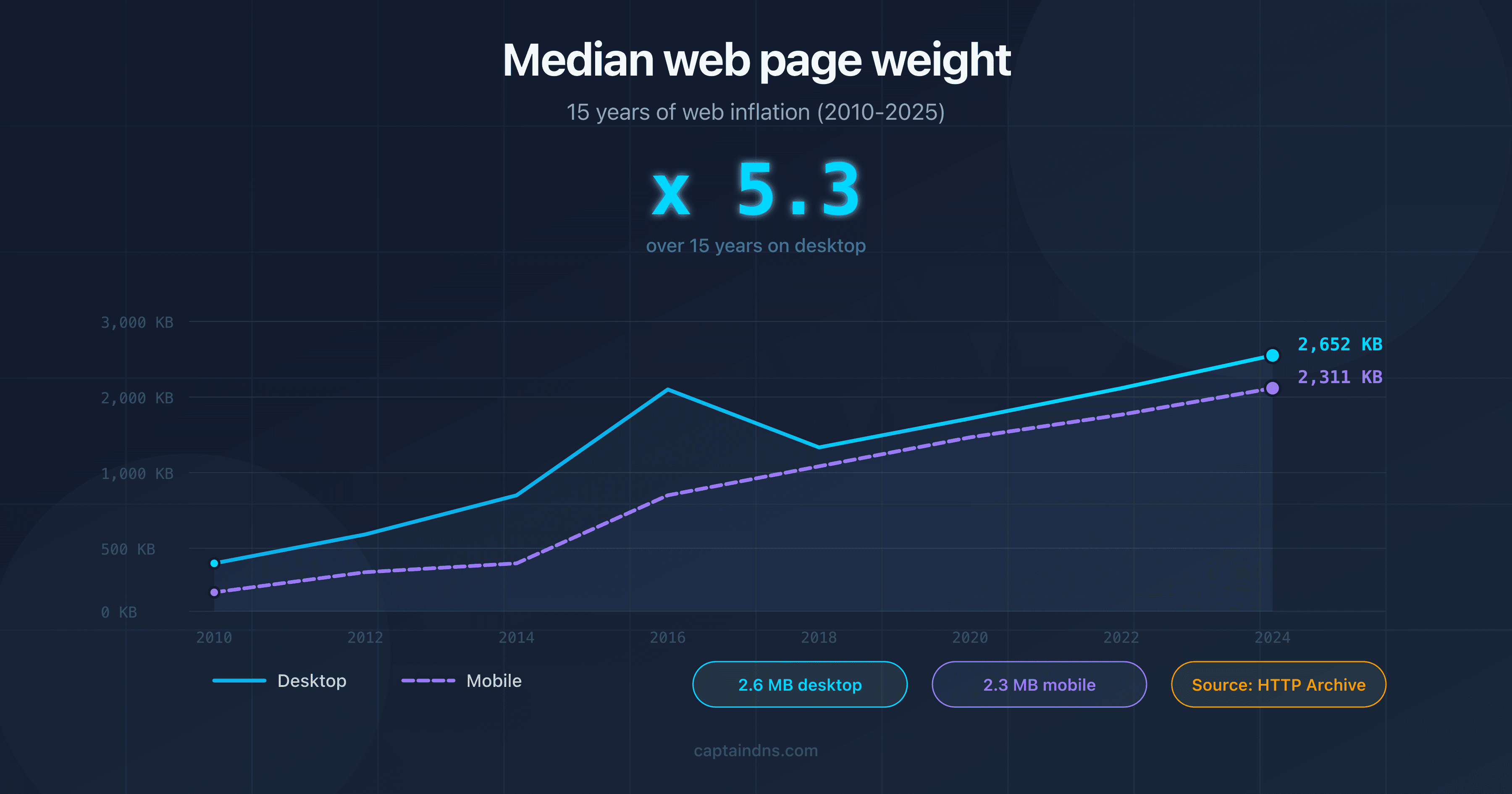
- Median web page weight in 2025: 15 years of web bloat
Sources
- Google Search Central. Large site management and crawl budget: official documentation on crawl budget.
- Google Developers. Googlebot overview: how Googlebot works and crawl limits.
- HTTP Archive. Web Almanac: web page weight statistics.
- web.dev. Optimize server response times (TTFB): best practices for reducing server response time.