Googlebot's 2 MB Crawl Limit: What Happens When Your Pages Are Too Heavy
By CaptainDNS
Published on February 10, 2026
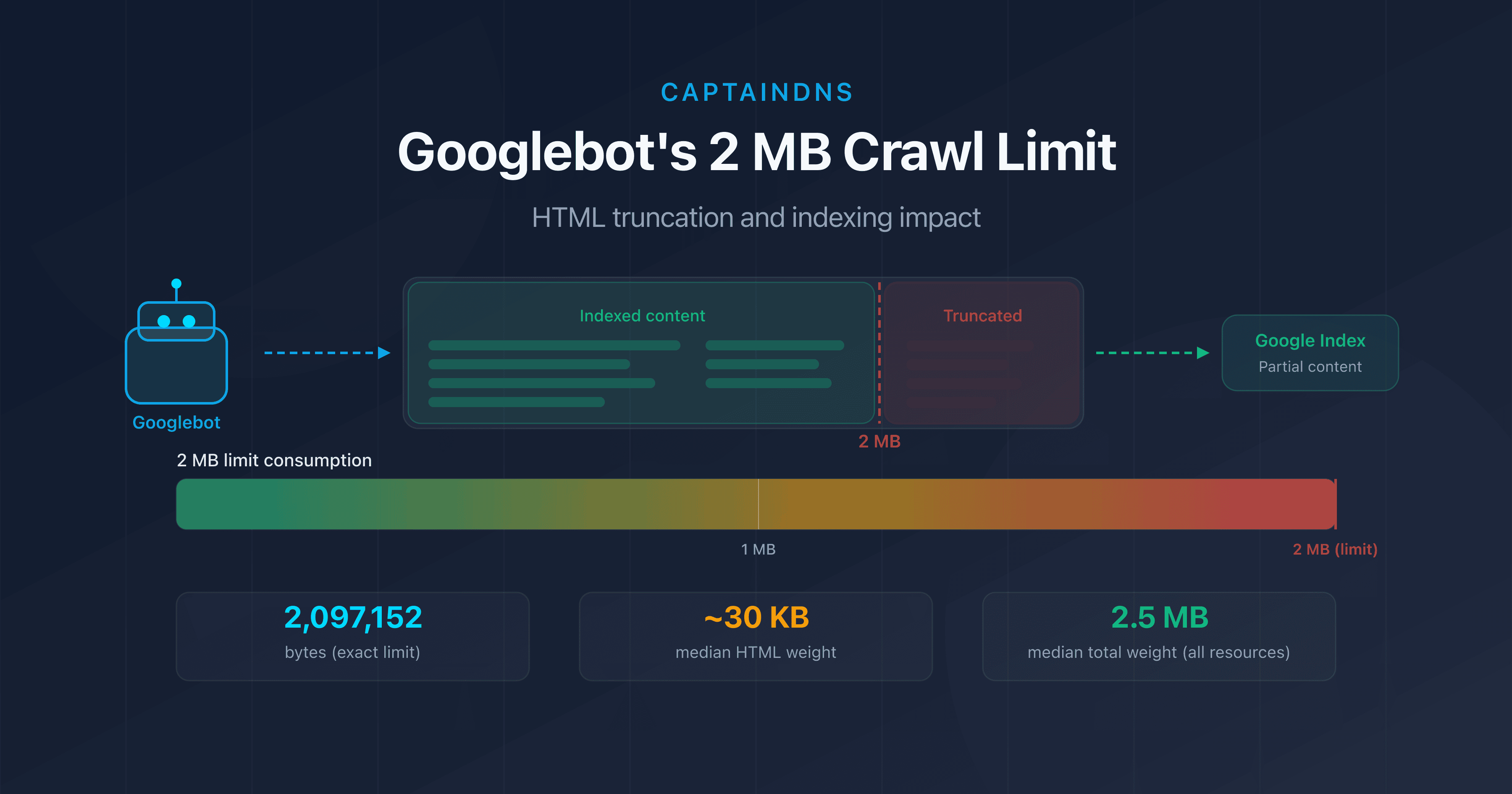
- Googlebot only crawls the first 2 MB (2,097,152 bytes) of a page's HTML source.
- Beyond this limit, content is truncated: internal links, structured data, and text at the bottom of the page disappear from the index.
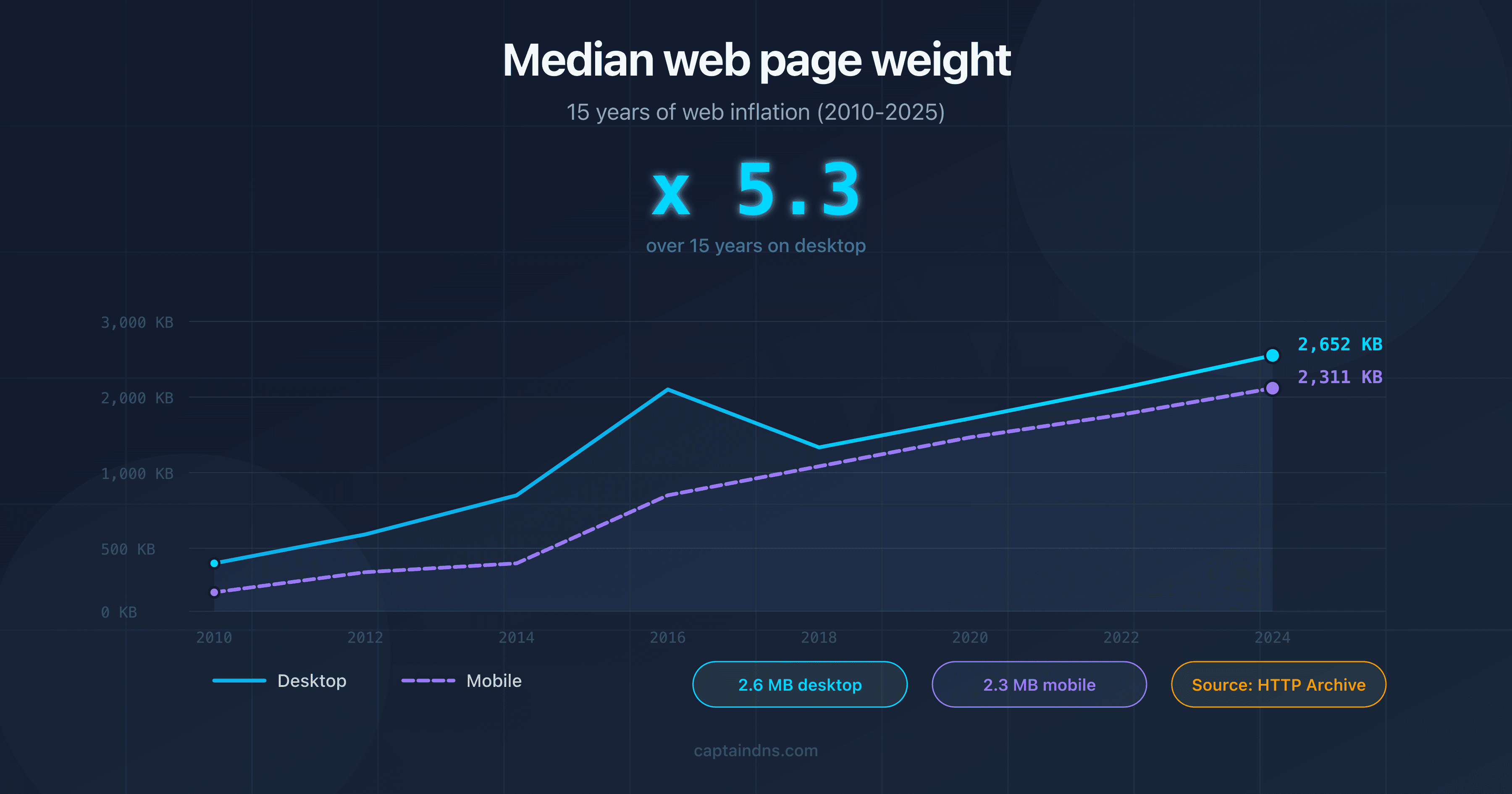
- The median weight of a web page exceeds 2.5 MB of total resources in 2026, but only the raw HTML counts toward this limit.
- Test your pages with our Page Crawl Checker to find out if they're at risk.
Your page has 2.1 MB of HTML? Google only indexed 95% of it. The rest simply doesn't exist for the search engine.
In early February 2026, Google updated its technical documentation to highlight an often-overlooked fact: Googlebot only crawls the first 2 megabytes of a page's HTML source code. Everything beyond that limit is simply ignored during indexing.
This constraint has been in place for several years, but its importance is growing as web pages get heavier. JavaScript frameworks, inline base64 images, server-rendered Single Page Applications: more and more pages are brushing up against this invisible boundary.
In this article, we break down exactly how this limit works, which situations put you at risk, and what concrete steps you can take to protect your pages. Whether you're an SEO specialist, front-end developer, or technical lead, you'll find everything you need to audit and optimize your pages.
What Is Googlebot's 2 MB Limit?
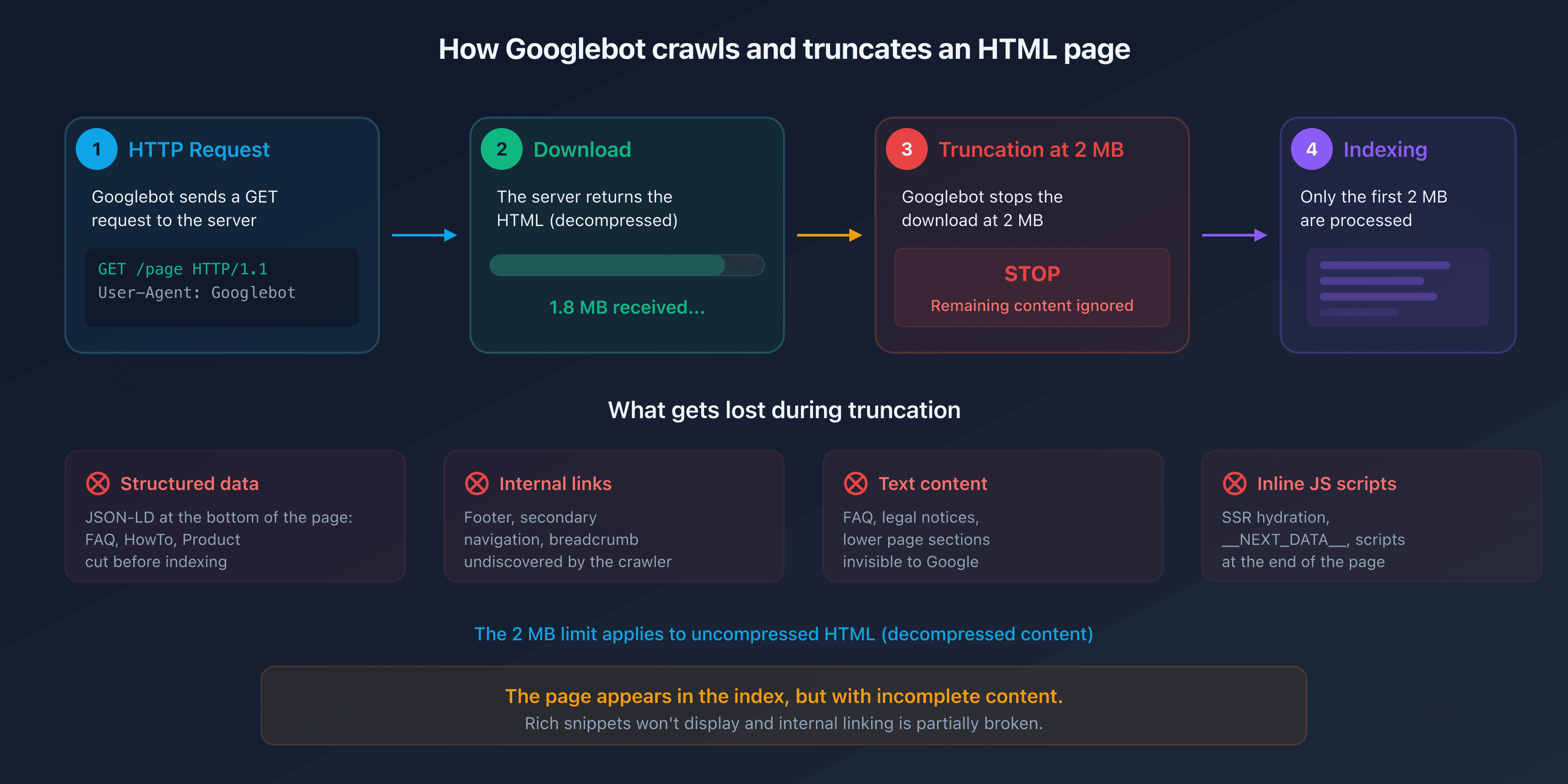
Google's official documentation is clear: "Googlebot crawls the first 2 MB of a supported file type." That's exactly 2,097,152 bytes of uncompressed data.
A few important details:
- Only the HTML source counts, not the page's total resources (images, CSS, external JavaScript). A 500 KB CSS file loaded via
<link>doesn't count toward the limit. - The limit applies to uncompressed content. Even if your server uses gzip or Brotli, Google measures the decompressed size.
- Each resource is evaluated individually. A 3 MB external JavaScript file will also be truncated at 2 MB, independently of the HTML page that loads it.
- The limit is the same for Googlebot Desktop and Googlebot Mobile. The switch to mobile-first indexing did not change this threshold.
HTML Truncation: What's the SEO Impact?
When Googlebot reaches the 2 MB limit, it stops downloading the HTML file. The portion already fetched is sent to the indexing engine, but everything after the cutoff is invisible to Google.
In practice, elements located at the end of the HTML document are most at risk:
- Structured data (JSON-LD at the bottom of the page): FAQPage, HowTo, or Product schemas placed before the
</body>tag may get cut off. - Internal links in the footer or secondary navigation: the crawler won't discover them.
- Text content in lower sections: FAQs, legal notices, terms and conditions.
- Inline JavaScript placed at the end of the page: if your framework injects dynamic content via a script at the bottom, it will never be executed by Google's rendering engine.
The result is insidious. The page appears in the index but with incomplete content. Rich snippets don't show up, internal linking is partially broken, and editorial content is cut short.
Who Is Affected?
Are your pages at risk? Most web pages don't reach 2 MB of HTML source. According to HTTP Archive, the median weight of HTML alone is around 30 KB in 2025. But certain scenarios can cause that size to explode.
E-Commerce Pages With Massive Catalogs
Category pages displaying hundreds of products with inline descriptions, technical attributes, and customer reviews can easily exceed 1 MB of pure HTML. Add Product structured data for each item and the 2 MB threshold is quickly crossed.
Single Page Applications (SPA) With Server-Side Rendering
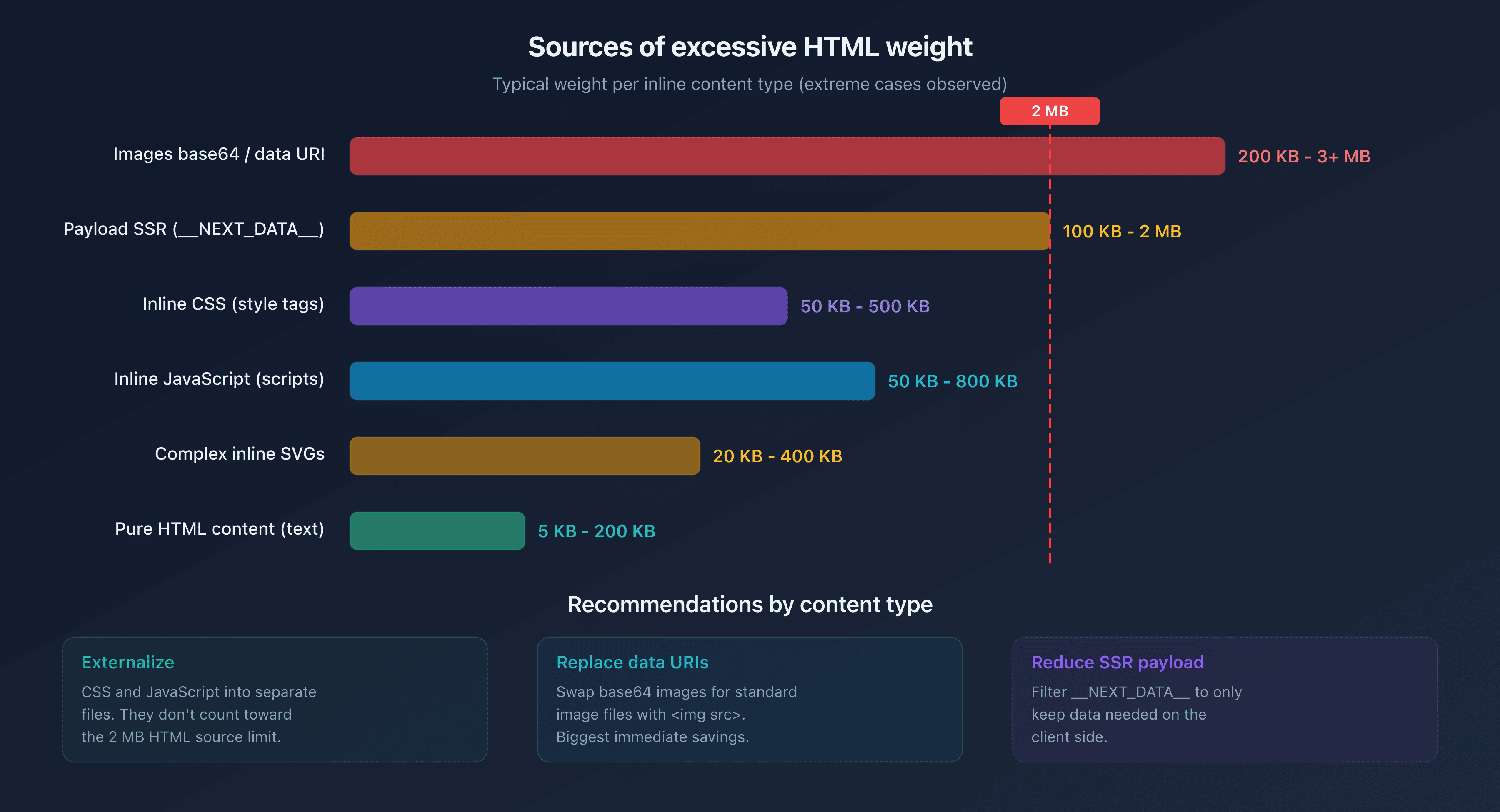
Frameworks like Next.js, Nuxt, or SvelteKit inject a large JSON payload into a <script> tag for client-side hydration. This __NEXT_DATA__ (or equivalent) can weigh several hundred KB. On data-rich pages, it often exceeds 1 MB on its own.
Inline Images and SVGs
Base64-encoded images or complex SVGs embedded directly in the HTML significantly inflate the document size. A single detailed SVG can weigh 200 KB. Three or four of them are enough to consume a significant portion of the 2 MB budget.
Inline JavaScript and CSS
Pages that embed critical CSS or JavaScript directly in <style> and <script> tags instead of externalizing them add unnecessary weight to the HTML document.
Crawl Budget and Page Weight
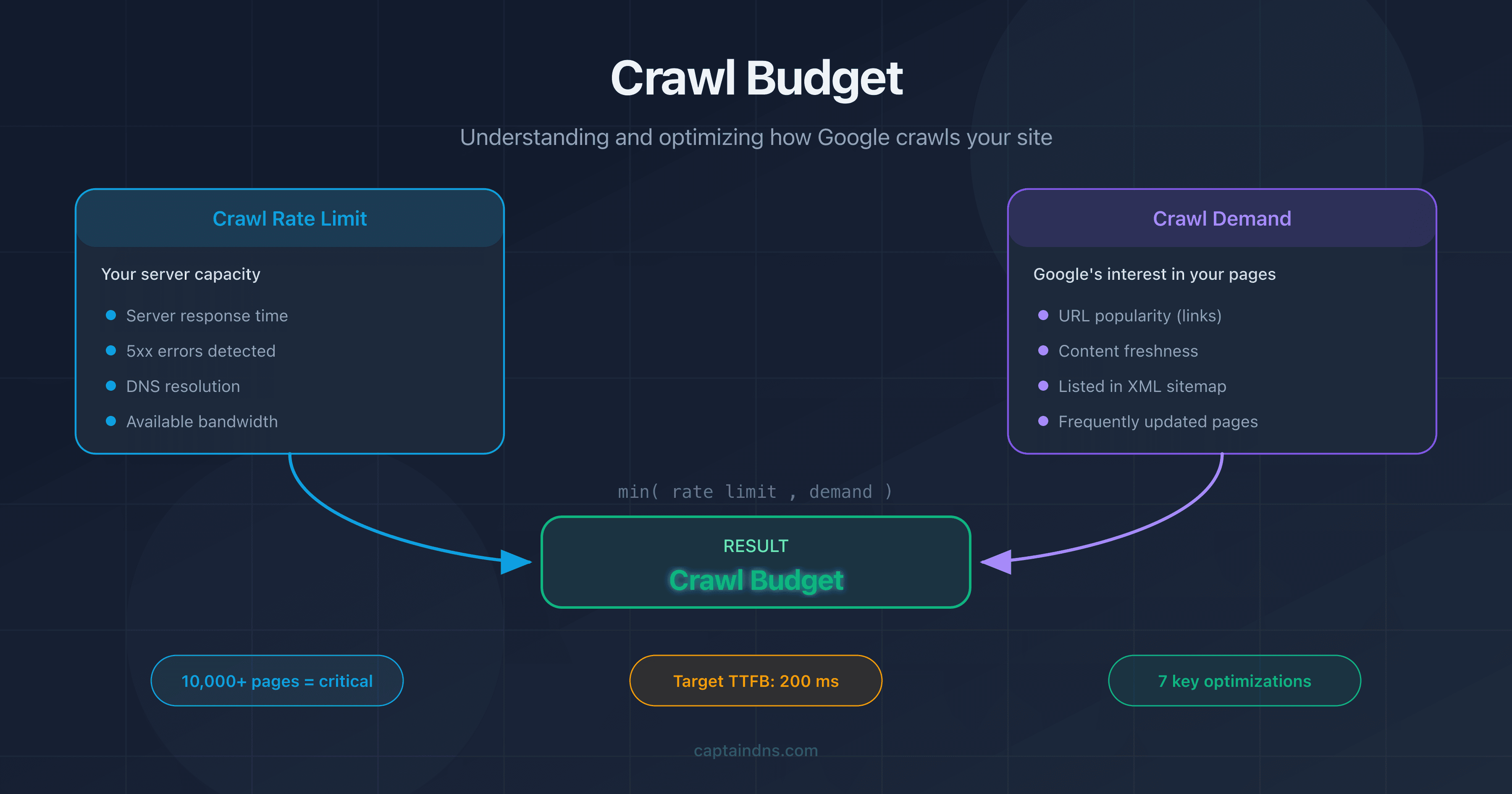
Crawl budget refers to the number of pages Googlebot can crawl on your site within a given time period. It depends on two factors: the crawl rate limit and crawl demand.
Page weight directly affects the crawl rate. The heavier a page, the more bandwidth and download time it consumes. Consider a site with 100,000 pages. The difference between 50 KB and 500 KB of HTML per page translates to a 10x difference in resource consumption.
In concrete terms:
- Lightweight pages (<100 KB HTML): Googlebot can crawl thousands of pages per session.
- Medium pages (100 KB-500 KB): crawling slows down noticeably.
- Heavy pages (500 KB-2 MB): crawl budget is consumed quickly, and deeper pages are crawled less frequently.
- Truncated pages (>2 MB): on top of wasting budget, the content in the index is incomplete.
For large sites, optimizing HTML weight isn't a luxury. It's a necessity to ensure that all important pages are crawled and indexed correctly.
How to Test Your Page Weight
Using Chrome DevTools
Open DevTools (F12), go to the Network tab, reload the page, and filter by Doc. The Size column shows the transferred (compressed) weight, and the Content column shows the decompressed weight. It's this latter value that counts for Googlebot's limit.
Using CaptainDNS Page Crawl Checker
Our Page Crawl Checker simulates Googlebot's behavior and instantly displays:
- The HTML source weight (compressed and decompressed)
- The percentage of the 2 MB limit consumed
- HTTP headers (Content-Type, Content-Encoding, Cache-Control)
- A full diagnostic with optimization recommendations
HTML Source vs. Total Resources
A common mistake is looking at the total page weight (HTML + CSS + JS + images) instead of the HTML source alone. The 2.5 MB figure often cited as the median page weight includes all resources. The HTML alone typically accounts for 1% to 5% of that total.
How to Reduce Your HTML Page Weight
Where should you start? If your pages are approaching the limit or you want to optimize your crawl budget, here are the most effective actions.
Externalize CSS and JavaScript
Move all inline CSS and JavaScript to external files. These files are loaded separately and don't count toward the HTML document's 2 MB limit.
<!-- Before: inline CSS (counts toward HTML weight) -->
<style>
  .product-card \{ ... 500 lines of CSS ... \}
</style>

<!-- After: externalized CSS (doesn't count toward HTML weight) -->
<link rel="stylesheet" href="/css/products.css">
Remove Inline Images
Replace base64 images and data URIs with standard image files referenced via <img src="...">.
Minify HTML
Remove unnecessary whitespace, HTML comments, and redundant attributes. Tools like html-minifier or build plugins (Webpack, Vite) automate this task.
Enable Server-Side Compression
Configure gzip or Brotli on your web server. This reduces the transferred volume (and therefore crawl time), even though the 2 MB limit applies to decompressed content.
Paginate Long Lists
For e-commerce category pages, implement clean pagination with <link rel="next"> and <link rel="prev"> tags instead of displaying all products on a single page.
Reduce the Hydration Payload
If you're using an SSR framework (Next.js, Nuxt), examine the content of __NEXT_DATA__ or its equivalent. Often, unnecessary client-side data is serialized there. Filter the transmitted props to keep only what's strictly needed.
Recommended Action Plan
- Test your critical pages: use the Page Crawl Checker on your 10-20 most important pages (homepage, categories, flagship products, landing pages).
- Identify at-risk pages: any page whose HTML source exceeds 500 KB deserves a closer look. Beyond 1 MB, optimization is urgent.
- Optimize: externalize inline CSS/JS, remove base64 images, minify HTML, and enable server-side compression.
FAQ
What is the average weight of a web page in 2026?
According to HTTP Archive, the median total weight of a web page (HTML + CSS + JS + images) is approximately 2.5 MB on desktop and 2.2 MB on mobile in 2026. The HTML source alone weighs a median of around 30 KB. Googlebot's 2 MB limit applies only to the HTML source, not to total resources.
What happens if a page exceeds 2 MB of HTML?
Googlebot stops downloading after 2 MB (2,097,152 bytes) of uncompressed HTML. Only the content already downloaded is sent for indexing. The rest (internal links, structured data, text at the end of the page) is ignored. The page appears in the index but with incomplete content.
How can I find out the HTML weight of a web page?
Open Chrome DevTools (F12), go to the Network tab, filter by "Doc," and check the "Content" column (decompressed size). You can also use our Page Crawl Checker, which directly displays the HTML source weight and the percentage of the 2 MB limit consumed.
Does the 2 MB limit apply to compressed data?
No. The 2 MB limit applies to decompressed content. Even if your server uses gzip or Brotli for transmission, it's the size of the HTML once decompressed that Googlebot considers. Compression is still useful for speeding up transfer, but it doesn't bypass the limit.
How can I reduce the weight of an HTML page?
The most effective actions: externalize CSS and JavaScript (separate files instead of inline tags), remove base64 images, minify HTML, paginate long lists, and reduce the hydration payload of SSR frameworks (Next.js, Nuxt). Also enable server-side compression (gzip or Brotli).
What is crawl budget?
Crawl budget is the number of pages Googlebot can crawl on your site within a given time period. It depends on the crawl rate (the bandwidth Google allocates to your site) and crawl demand (the pages Google wants to refresh). Heavy pages consume more budget, which reduces the crawl frequency of other pages.
Do Googlebot Mobile and Desktop have the same 2 MB limit?
Yes. The 2 MB limit is the same for Googlebot Desktop and Googlebot Mobile (Googlebot Smartphone). The switch to mobile-first indexing did not change this threshold. Both crawler variants apply the same truncation rule.
Test your pages now: use our Page Crawl Checker to instantly check whether your pages comply with Googlebot's 2 MB limit.
Related Crawl and Indexation Guides
- Crawl budget: understanding and optimizing how Google crawls your site
- Median web page weight in 2025: 15 years of web bloat
Sources
- Google Developers. Googlebot overview: official documentation mentioning the 2 MB limit.
- HTTP Archive. Web Almanac: web page weight statistics.
- web.dev. Reduce the scope and complexity of style calculations: optimization best practices.
- Google Search Central. Crawl budget management: crawl budget management for large sites.