Mailgun: Guía técnica completa para email transaccional
Por CaptainDNS
Publicado el 21 de enero de 2026
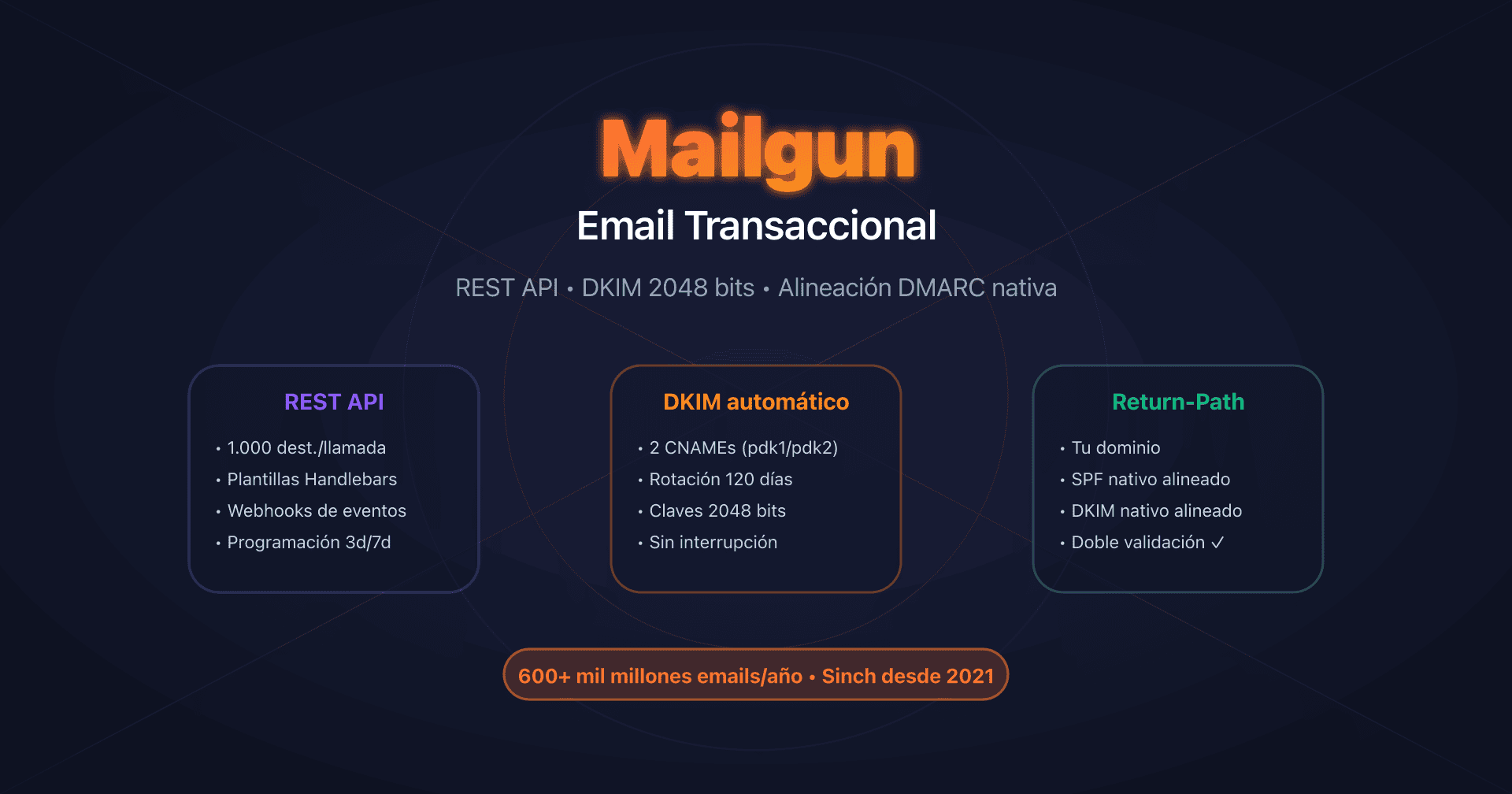
- 📢 Mailgun utiliza tu dominio en el Return-Path (
bounce+id@tudominio.com), lo que permite la alineación SPF nativa para DMARC desde el plan base. - La API REST es el método recomendado: hasta 1000 destinatarios por llamada, rate limits no documentados (salvo Domains API: 300 req/min).
- Automatic Sender Security genera 2 CNAME DKIM con rotación automática cada 120 días, claves de 2048 bits por defecto.
- IP dedicada recomendada a partir de 1 millón de emails/mes, con warm-up automático de 15+ días y coste adicional de 59 $/IP/mes.
- Plan Flex aumentado a 2,00 $/1000 emails desde diciembre de 2025 (duplicación de la tarifa).
Introducción
Mailgun se ha consolidado como una de las plataformas de email transaccional más robustas del mercado, procesando más de 600 mil millones de emails al año para más de 100 000 clientes. Adquirido por Sinch en diciembre de 2021 por 1,9 mil millones de dólares, el servicio combina una potente API REST, un relé SMTP universal y funcionalidades de autenticación avanzadas que lo distinguen de la competencia.
La fortaleza de Mailgun reside en tres pilares técnicos principales: un enfoque API-first orientado a desarrolladores, una Domain Verification que utiliza tu propio dominio para el Return-Path (alineación SPF nativa para DMARC) y un sistema de rotación automática de claves DKIM 2048 bits cada 120 días sin interrupción del servicio.
Esta guía está dirigida a desarrolladores, DevOps y arquitectos de sistemas que buscan integrar Mailgun para email transaccional con una comprensión completa de la infraestructura: configuración DNS, elección API vs SMTP, gestión de IP dedicadas, límites técnicos y webhooks de eventos.
API REST vs SMTP Relay: arquitectura y elección de integración
Mailgun propone dos métodos de integración para email transaccional, ambos disponibles desde el plan gratuito (100 emails/día).
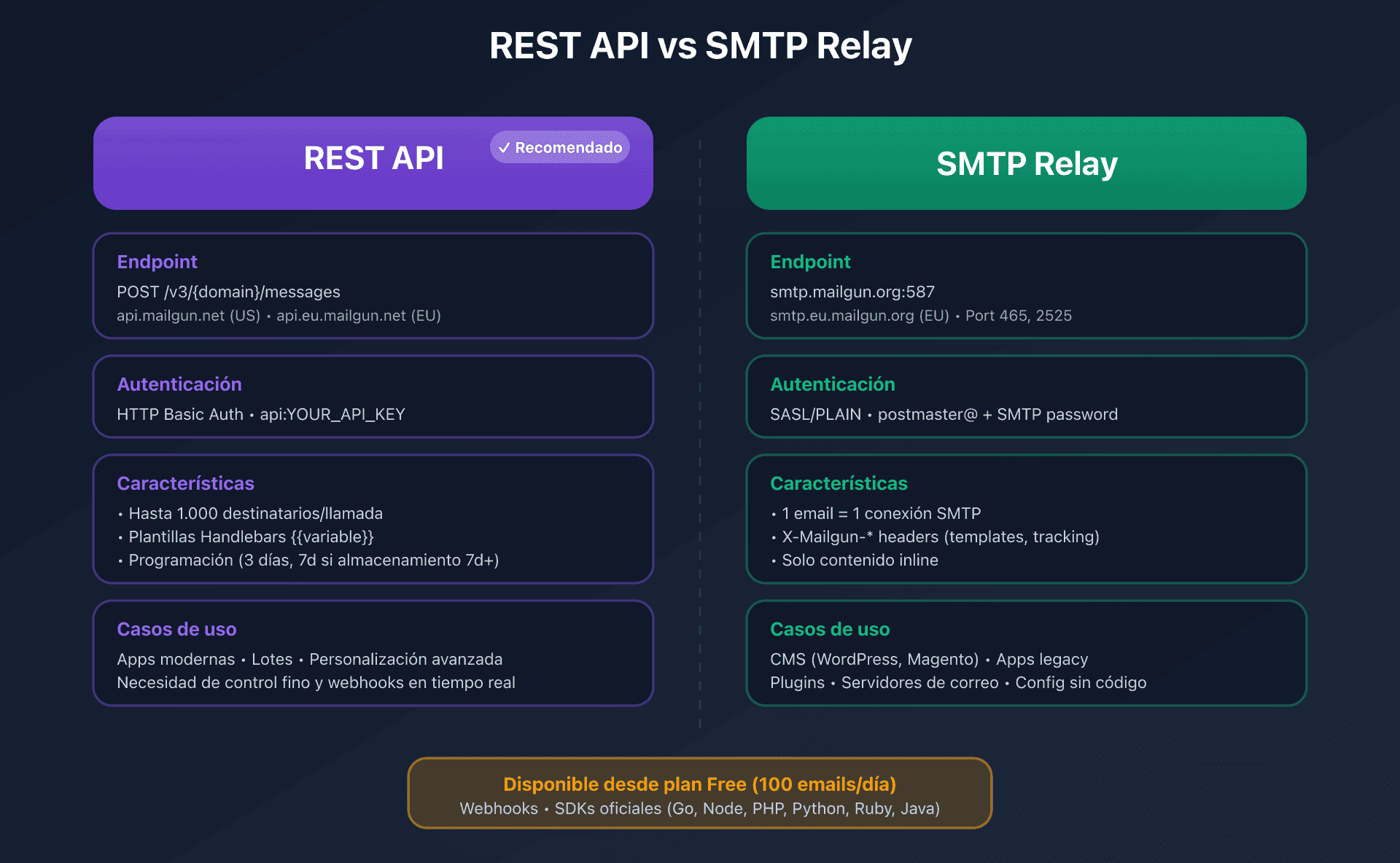
Comparativa técnica
| Criterio | API REST | SMTP Relay |
|---|---|---|
| Endpoint | https://api.mailgun.net/v3/{domain}/messages (US) | smtp.mailgun.org puertos 587/465 |
| Autenticación | HTTP Basic Auth (api:YOUR_API_KEY) | SASL/PLAIN (postmaster@ + password SMTP) |
| Rate limit | No documentado (Domains API: 300 req/min) | Depende de la IP y del plan |
| Destinatarios/req | Hasta 1000 (to + cc + bcc combinados) | 1 email = 1 conexión SMTP |
| Templates | Variables con sintaxis {{variable}} | Vía header X-Mailgun-Variables |
| Scheduling | o:deliverytime (hasta 3 días, 7 si storage 7d+) | Vía header X-Mailgun-Deliver-By |
| Tracking | Nativo (o:tracking, o:track-clicks, o:track-opens) | Vía headers X-Mailgun-Track* |
| Compatibilidad | Requiere SDK o cliente HTTP | Cualquier sistema compatible con SMTP |
| Caso de uso ideal | Apps modernas, batch, personalización avanzada | Legacy, plugins CMS, servidores mail |
¿Cuándo elegir la API REST?
La API REST es el método recomendado por Mailgun para cualquier integración nueva. Es accesible en POST https://api.mailgun.net/v3/{domain}/messages para la región US, o api.eu.mailgun.net para la UE.
Ventajas clave:
- Batch sending: envío de hasta 1000 destinatarios en una sola petición con personalización mediante recipient variables
- Templates almacenados: sintaxis Handlebars con condiciones, bucles y helpers personalizados
- Scheduling: programación de envío hasta 3 días por adelantado (7 días si tu plan incluye 7+ días de almacenamiento)
- Rate limit headers:
X-RateLimit-Limit,X-RateLimit-Remaining,X-RateLimit-Resetpara monitorización
Ejemplo de envío con personalización:
curl -s --user 'api:YOUR_API_KEY' \
  https://api.mailgun.net/v3/mail.captaindns.com/messages \
  -F from='Notificaciones <no-reply@mail.captaindns.com>' \
  -F to='user1@captaindns.com' \
  -F to='user2@captaindns.com' \
  -F subject='Nueva notificacion' \
  -F text='Hola {{nombre}}, tienes {{count}} notificaciones.' \
  -F recipient-variables='{"user1@captaindns.com":{"nombre":"Juan","count":"3"},"user2@captaindns.com":{"nombre":"Maria","count":"7"}}' \
  -F o:tag='notification' \
  -F o:tracking='yes'
SDK oficiales: Mailgun mantiene SDK para Go, Node.js, PHP, Python, Ruby y Java que encapsulan la API REST y simplifican la integración.
¿Cuándo elegir el SMTP Relay?
El SMTP Relay es ideal para sistemas legacy o aplicaciones que solo soportan SMTP.
Configuración oficial:
SMTP server: smtp.mailgun.org (US) o smtp.eu.mailgun.org (EU)
SMTP user: postmaster@mail.captaindns.com (o usuario SMTP personalizado)
SMTP password: [password SMTP del dominio]
Port: 587 (STARTTLS recomendado) o 465 (TLS directo) o 2525 (fallback GCE)
Punto crítico: la autenticación SMTP utiliza el password SMTP del dominio, distinto de la clave API. El username es la dirección postmaster@ de tu dominio verificado (o un usuario SMTP personalizado creado en el dashboard).
Headers propietarios X-Mailgun-*: permiten acceder a las funcionalidades avanzadas vía SMTP (tags, tracking, templates, scheduling, variables). Lista completa:
X-Mailgun-Tag: tag para estadísticas (se admiten varios)X-Mailgun-Track: activar/desactivar el tracking globalX-Mailgun-Track-Clicks: tracking de clics (yes/no/htmlonly)X-Mailgun-Track-Opens: tracking de aperturas (yes/no)X-Mailgun-Deliver-By: programación (formato RFC 2822 o timestamp Unix)X-Mailgun-Template-Name: nombre del template a utilizarX-Mailgun-Variables: variables del template (JSON)
Domain Verification: SPF, DKIM 2048 bits y alineación DMARC nativa
La configuración DNS en Mailgun genera los registros necesarios para SPF, DKIM y la alineación DMARC. El proceso se realiza en Sending > Domains > Domain settings > Domain verification.
Arquitectura con Automatic Sender Security (recomendado)
Con la opción Automatic Sender Security activada (recomendado), Mailgun genera 2 registros CNAME DKIM para la rotación automática de las claves:
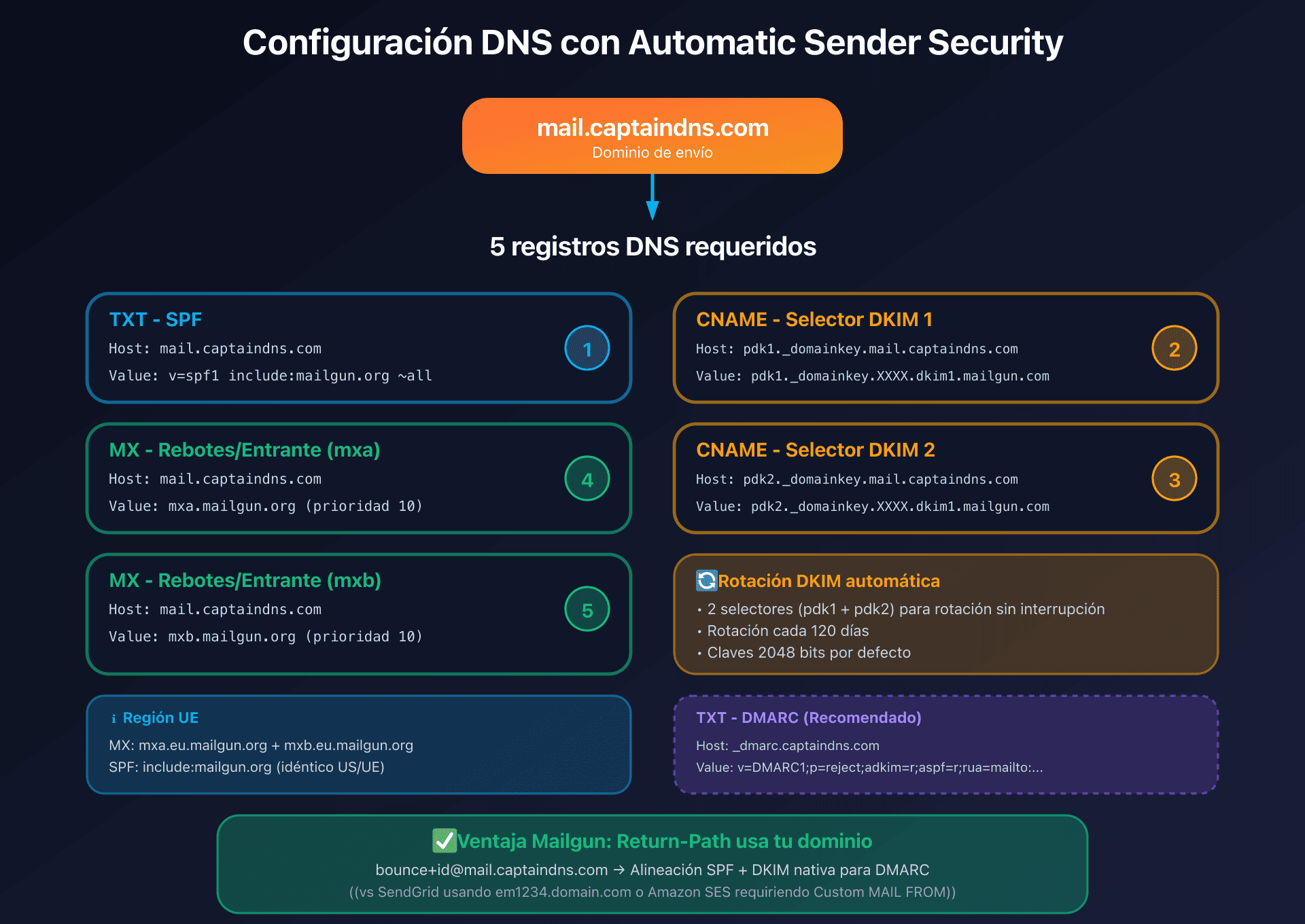
Registros requeridos (ejemplo para mail.captaindns.com):
| Tipo | Name/Host | Valor | Objetivo |
|---|---|---|---|
| TXT | mail.captaindns.com | v=spf1 include:mailgun.org ~all | SPF |
| CNAME | pdk1._domainkey.mail.captaindns.com | pdk1._domainkey.XXXX.dkim1.mailgun.com | Rotación DKIM (selector 1) |
| CNAME | pdk2._domainkey.mail.captaindns.com | pdk2._domainkey.XXXX.dkim1.mailgun.com | Rotación DKIM (selector 2) |
| MX | mail.captaindns.com | mxa.mailgun.org (prioridad 10) | Bounces/Inbound |
| MX | mail.captaindns.com | mxb.mailgun.org (prioridad 10) | Bounces/Inbound |
Nota región UE: para la UE, los registros MX utilizan mxa.eu.mailgun.org y mxb.eu.mailgun.org.
Ventajas de esta arquitectura:
- Rotación automática de las claves DKIM: los dos selectores (
pdk1ypdk2) permiten a Mailgun cambiar las claves cada 120 días sin interrupción del servicio - Claves DKIM de 2048 bits por defecto (las configuraciones manuales TXT pueden usar 1024 bits, pero se recomiendan 2048)
- Ningún registro CNAME de tracking requerido por defecto: Mailgun utiliza
mailgun.org(oeu.mailgun.orgpara la UE) - Selectores DKIM:
pdk1ypdk2para Automatic Security, omxpara configuración manual TXT
Return-Path y alineación SPF: una ventaja importante
El Return-Path (Envelope From) es crucial para la alineación DMARC. Mailgun utiliza automáticamente tu dominio para el Return-Path con el formato bounce+UNIQUEID@mail.captaindns.com:
- SPF pasa automáticamente porque el registro
include:mailgun.orgautoriza a las IP de Mailgun a enviar en nombre de tu dominio - La alineación SPF funciona en modo relaxed (el Return-Path
bounce+id@mail.captaindns.comcoincide con el dominio padremail.captaindns.com) - No hace falta configuración aparte: a diferencia de otros proveedores, Mailgun no necesita un subdominio dedicado para el bounce domain
Diferencia con la competencia:
- SendGrid: utiliza un subdominio personalizable (
em1234.captaindns.com) - Amazon SES: requiere Custom MAIL FROM para la alineación SPF
- Mailgun: utiliza directamente tu dominio verificado
Para una política DMARC estricta (aspf=s), la alineación SPF fallará si envías desde un subdominio distinto al del Return-Path. La solución es apoyarse en DKIM para la alineación DMARC, que sí soporta el modo estricto (adkim=s).
Tracking domain (link branding)
El tracking domain sustituye los dominios de Mailgun en los enlaces trackeados por tu propio dominio. Por defecto, Mailgun utiliza email.mail.captaindns.com apuntando a mailgun.org (US) o eu.mailgun.org (UE) mediante CNAME.
Configuración opcional HTTPS: Mailgun genera automáticamente un certificado Let's Encrypt una vez verificado el CNAME.
Migración a DKIM 2048 bits
Para migrar una configuración TXT manual (claves de 1024 bits) a Automatic Sender Security (2048 bits), basta con activar Automatic Sender Security en el dashboard y crear los 2 nuevos CNAME DKIM. La transición es fluida gracias a los dos selectores.
Flujo de autenticación de email: de la API a la entregabilidad
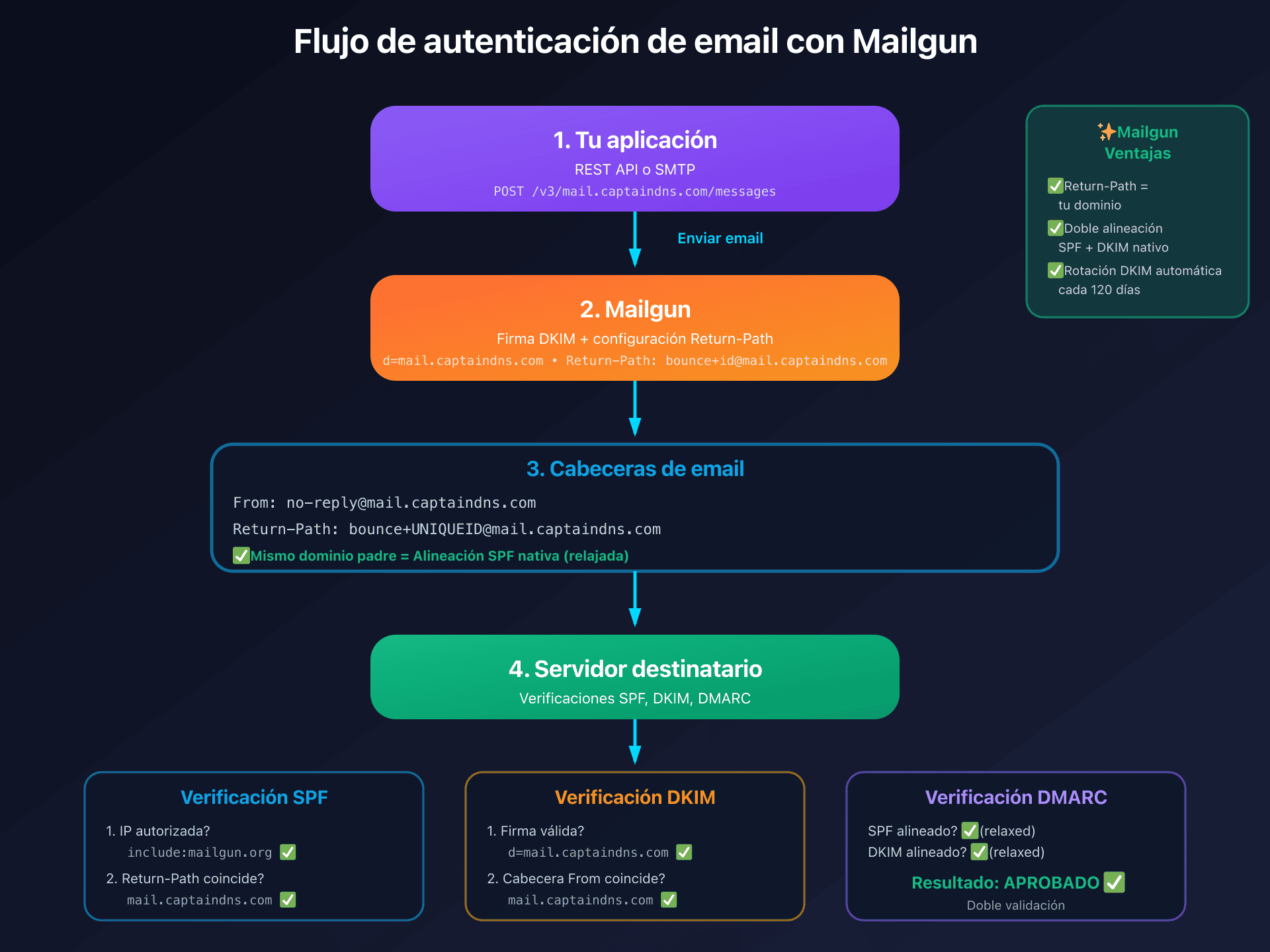
Cuando envías a través de Mailgun:
- Tu aplicación llama a la API REST o utiliza SMTP
- Mailgun firma el mensaje con tu clave DKIM (dominio
d=mail.captaindns.com) - Mailgun utiliza tu dominio en el Return-Path (
bounce+id@mail.captaindns.com) - El servidor destinatario verifica SPF (IP de envío), DKIM (firma) y luego DMARC (alineación)
- SPF pasa:
include:mailgun.orgautoriza las IP de Mailgun, el Return-Path usa tu dominio - DKIM pasa: la firma
d=mail.captaindns.comcoincide con el header From - DMARC pasa: al menos SPF Y DKIM están alineados (doble validación)
Alineación DMARC: configuración para p=reject
Lo que funciona (y lo que rompe)
Alineación DKIM:
| Configuración | ¿Alineado? | ¿DMARC vía DKIM? |
|---|---|---|
| Dominio con DKIM activado (TXT o CNAME) | Sí | Sí |
Alineación SPF:
| Configuración | ¿Alineado? | ¿DMARC vía SPF? |
|---|---|---|
| El Return-Path usa tu dominio (nativo) | Sí | Sí |
| aspf=r (relaxed, por defecto) | Sí | Sí |
| aspf=s (strict) + envío desde un subdominio | No | No (mismatch subdomain) |
Registro DMARC recomendado
_dmarc.captaindns.com TXT "v=DMARC1;p=reject;adkim=r;aspf=r;rua=mailto:dmarc@captaindns.com"
Puntos clave:
adkim=ryaspf=r: alineación relaxed (permite los subdominios)- Avanza de
p=noneap=quarantiney luego ap=reject - Vigila los informes
ruaantes de endurecer la política - Ventaja de Mailgun: doble alineación (SPF + DKIM) nativa, mejor protección que con DKIM solo
Tabla resumen DNS completa
| Tipo | Host/Name | Valor | Obligatorio | Notas |
|---|---|---|---|---|
| TXT | mail.captaindns.com | v=spf1 include:mailgun.org ~all | ✅ Sí | SPF idéntico US/UE |
| CNAME | pdk1._domainkey.mail.captaindns.com | pdk1._domainkey.XXXX.dkim1.mailgun.com | ✅ Sí | Rotación DKIM auto |
| CNAME | pdk2._domainkey.mail.captaindns.com | pdk2._domainkey.XXXX.dkim1.mailgun.com | ✅ Sí | Rotación DKIM auto |
| MX | mail.captaindns.com | mxa.mailgun.org (prioridad 10) | ✅ Sí | Bounces/Inbound |
| MX | mail.captaindns.com | mxb.mailgun.org (prioridad 10) | ✅ Sí | Bounces/Inbound |
| TXT | _dmarc.captaindns.com | v=DMARC1;p=reject;adkim=r;aspf=r;... | Recomendado | Política DMARC |
| CNAME | email.mail.captaindns.com | mailgun.org o eu.mailgun.org | Opcional | Tracking domain |
IP dedicada vs IP compartida: estrategia de entregabilidad
Mailgun recomienda oficialmente una IP dedicada a partir de 1 millón de emails al mes. Por debajo de ese volumen, la IP compartida suele ofrecer mejor entregabilidad.
IP compartida (planes Free, Foundation, Growth base)
Ventajas:
- No requiere warm-up
- Reputación mantenida por Mailgun
- Ideal para volúmenes bajos o irregulares
- Mejor entregabilidad inicial que con una IP dedicada en frío
Inconvenientes:
- Exposición a los riesgos de reputación de los demás remitentes del pool (poco frecuente en Mailgun gracias a sus controles estrictos)
IP dedicada (Foundation 100k+, Growth, Scale, Enterprise)
El plan Foundation 100k incluye 1 IP dedicada (desde 75 $/mes). Cada IP adicional cuesta 59 $/IP/mes.
Recomendación oficial: 1 IP dedicada por aproximadamente 1 millón de emails al mes como mínimo.
Ventajas:
- Reputación aislada y controlable
- Función de IP Warmup automático en 15 etapas (~15+ días)
- Posibilidad de separar los flujos (transaccional vs marketing) mediante IP Pools
IP Warmup automático: Mailgun propone un warm-up en 15 etapas progresivas:
| Etapa | Límite diario | Límite por hora | Duración |
|---|---|---|---|
| 1 | 1000 | 100 | 24h |
| 2 | 2500 | ~100 | 24h |
| 3 | 5000 | Progresivo | 24h |
| ... | Progresivo | Progresivo | ... |
| 15 | Capacidad total | Sin límite | Alcanzado D15+ |
El sistema avanza una etapa cada 24 horas si se alcanzan los límites. El tráfico excedente se enruta automáticamente hacia las IP compartidas u otras IP dedicadas disponibles.
IP Pools: disponibles en los planes Scale y superiores. Permiten:
- Separar emails transaccionales y de marketing
- Distintos clientes/marcas (multi-tenant)
- Dynamic IP Pools: asignación automática basada en la salud de la reputación
Nota importante: las IP dedicadas están vinculadas a una región (US o UE). Migrar de región requiere una IP nueva y un nuevo warm-up.
¿Cuándo elegir una IP dedicada?
Necesitas una IP dedicada si:
- Volumen regular superior a 1 millón de emails/mes
- Necesidad de separar la reputación transaccional de la de marketing
- Requisitos de whitelisting del cliente o de cumplimiento normativo
- Volumen superior a 2,5 millones de emails/mes: se recomiendan varias IP dedicadas
Quédate en IP compartida si:
- Volumen inferior a 1 millón de emails/mes
- Envíos irregulares o esporádicos
- Inicio de actividad sin historial
- Envío puramente transaccional de bajo volumen
Tarifas 2026 y evolución reciente
Planes Send (enero de 2026)
| Plan | Precio/mes | Emails incluidos | Excedente (/1000) | Retención de logs | IP dedicada |
|---|---|---|---|---|---|
| Free | 0 $ | 100/día | N/A | 1 día | No |
| Flex | Pago por uso | 1 000 gratis/mes | 2,00 $ ⚠️ | 5 días | No |
| Foundation 50k | 35 $ | 50 000 | ~1,30 $ | 5 días | No |
| Foundation 100k | 75 $ | 100 000 | ~1,30 $ | 5 días | 1 incluida |
| Growth | 80-650 $ | 100k-1M | Variable | 15 días | 1 incluida |
| Scale 100k | 90 $ | 100 000 | ~0,80-1,10 $ | 30 días | 1 incluida |
| Scale (máx) | 1250 $ | 2,5M | Variable | 30 días | 1 incluida |
| Enterprise | Presupuesto | 2,5M+ | Negociado | 30 días | Múltiples |
Evolución tarifaria reciente
⚠️ Cambio importante (1 de diciembre de 2025): el plan Flex pasó de 1,00 $ a 2,00 $ por 1000 emails, un aumento del 100%. Esta subida significativa hace que los planes Foundation resulten mucho más atractivos para volúmenes superiores a 25 000 emails/mes.
Análisis económico:
- Plan Flex: 50 000 emails = 49 000 de pago × 0,002 $ = 98 $
- Plan Foundation 50k: 50 000 emails = 35 $ (ahorro de 63 $)
- Umbral de rentabilidad: el plan Foundation resulta rentable a partir de ~18 000 emails/mes
Planes Optimize (herramientas de entregabilidad)
| Plan | Precio/mes | Validaciones | Tests de inbox | Previews |
|---|---|---|---|---|
| Pilot | 49 $ | 2500 | 25 | 500 |
| Starter | 99 $ | 5000 | 50 | 1000 |
| Contract | Presupuesto | Personalizado | Personalizado | Personalizado |
Descuentos anuales
No están documentados públicamente. Los clientes Enterprise reportan descuentos negociables del 10%+.
Tarifas US vs UE
Las tarifas están estandarizadas mundialmente en USD. No hay diferencia regional documentada entre US y UE.
Límites técnicos y cuotas
| Límite | Valor | Notas |
|---|---|---|
| Tamaño máx. del email | 25 MB | Cuerpo + adjuntos + cabeceras |
| Destinatarios/mensaje | 1000 | To + Cc + Bcc combinados |
| Parámetros send options | 16 KB | Parámetros o:, h:, v:, t: |
| Templates/dominio | 100 | Límite estricto |
| Versiones/template | 10 | - |
| Dominios (Free) | 5 | - |
| Dominios (de pago) | 1000 | - |
| Destinatarios sandbox | 5 | Deben estar verificados |
| Rate limit Domains API | 300 req/min | Único endpoint documentado |
| Rate limit de envío (cuentas nuevas) | 100 mensajes/hora | Antes de la verificación de negocio |
| Scheduling máximo | 3 días | 7 días si el plan tiene 7d+ storage |
Retención de datos
| Dato | Retención |
|---|---|
| Logs de eventos (Free) | 1 día |
| Logs de eventos (Foundation) | 5 días |
| Logs de eventos (Growth) | 15 días |
| Logs de eventos (Scale) | 30 días (máx) |
| Contenido de los mensajes | 1-7 días (configurable) |
| Estadísticas por hora | 60 días |
| Estadísticas diarias | 1 año |
| Estadísticas mensuales | Indefinida |
| Logs de seguridad críticos | 365 días |
Gestión de bounces y supresiones
Hard bounce (fallo permanente)
| Comportamiento | Detalle |
|---|---|
| Acción | Dirección añadida a la lista de supresión |
| Duración del bloqueo | Indefinida (hasta eliminación manual) |
| Error devuelto | "Not delivering to previously bounced address" |
Soft bounce (fallo temporal)
| Comportamiento | Detalle |
|---|---|
| Retry | Automático para los soft bounces inmediatos |
| Duración | Hasta el éxito o la clasificación como permanente |
| Conversión | Tras varios fallos, se añade a la lista de bounces |
Quejas de spam (FBL)
Mailgun se inscribe automáticamente en los Feedback Loops de los principales ISP. Las quejas provocan:
- Adición automática a la lista Complaints
- Envío del webhook
complained - Bloqueo de los envíos futuros a esa dirección
ISP soportados: Yahoo, Microsoft/Outlook, Comcast, Cox, Fastmail y otros mediante Universal Feedback Loop. Nota: Gmail no proporciona un FBL tradicional.
Baja automática (unsubscribe)
Mailgun añade automáticamente:
- La cabecera
List-Unsubscribe - La cabecera
List-Unsubscribe-Post: List-Unsubscribe=One-Click
Cumple con la RFC 8058 y con los requisitos de Gmail/Yahoo para remitentes masivos (5000+ mensajes/día).
API de listas de supresión
| Lista | Endpoint |
|---|---|
| Bounces | GET/POST/DELETE /v3/{domain}/bounces |
| Complaints | GET/POST/DELETE /v3/{domain}/complaints |
| Unsubscribes | GET/POST/DELETE /v3/{domain}/unsubscribes |
| Allowlist | GET/POST/DELETE /v3/{domain}/allowlist |
La Allowlist impide que se añadan direcciones a la lista de bounces, pero no anula las listas Complaints ni Unsubscribes.
Event Webhook y tracking en tiempo real
El webhook de eventos permite recibir en tiempo real las notificaciones de entrega, engagement y cumplimiento.
Eventos disponibles
- Entrega:
accepted,delivered,temporary_fail,permanent_fail - Engagement:
opened,clicked - Cumplimiento:
complained,unsubscribed
Formato del payload JSON
{
  "signature": {
    "timestamp": "1529006854",
    "token": "a8ce0edb2dd8301dee6c2405235584e45aa91d1e9f979f3de0",
    "signature": "d2271d12299f6592d9d44cd9d250f0704e4674c30d79d07c47a66f95ce71cf55"
  },
  "event-data": {
    "event": "delivered",
    "timestamp": 1529006854.329574,
    "id": "DACSsAdVSeGpLid7TN03WA",
    "recipient": "recipient@captaindns.com",
    "tags": [],
    "message": {
      "headers": {
        "message-id": "20180618211821.captaindns.com"
      }
    }
  }
}
Política de reintentos
| Código de respuesta | Acción |
|---|---|
| 200 | Éxito, sin reintento |
| 406 | Rechazado, sin reintento |
| Otro | Reintento según planificación |
Planificación de reintentos: 5min → 10min → 15min → 1h → 2h → 4h (total: 8 horas)
Seguridad (firma HMAC)
| Elemento | Valor |
|---|---|
| Algoritmo | HMAC-SHA256 |
| Clave | Webhook Signing Key (Control Panel → Account Security) |
| Cálculo | HMAC-SHA256(timestamp + token, signingKey) |
Ejemplo en Python:
import hmac, hashlib
def verify(api_key, token, timestamp, signature):
    expected = hmac.new(api_key.encode(), f"{timestamp}{token}".encode(),
                        hashlib.sha256).hexdigest()
    return signature == expected
Configuración
- Hasta 3 URL por tipo de evento y dominio
- Configuración a nivel de dominio (no de cuenta)
- API:
POST /v3/domains/{domain}/webhooks
Templates Handlebars
Mailgun utiliza Handlebars (versión personalizada) para los templates almacenados.
Sintaxis de las variables
| Contexto | Sintaxis |
|---|---|
| Templates almacenados | {{variable}} |
| Batch sending inline (API) | %recipient.variable% |
Condiciones y bucles
{{#if condicion}}
  Contenido si es verdadero
{{else if otraCondicion}}
  Contenido alternativo
{{else}}
  Contenido por defecto
{{/if}}

{{#unless condicion}}
  Contenido si es falso
{{/unless}}

{{#equal variable "valor"}}
  Contenido si es igual
{{/equal}}

{{#each array}}
  <li>{{this.propiedad}}</li>
{{/each}}

{{#with objeto}}
  {{propiedadAnidada}}
{{/with}}
Límites de los templates
| Límite | Valor |
|---|---|
| Templates por dominio | 100 |
| Versiones por template | 10 |
| Tamaño del template | No documentado |
| Partials (import) | No soportado |
Funcionalidades adicionales
Email Validation API
| Atributo | Valor |
|---|---|
| Endpoint single | GET /v4/address/validate?address=... |
| Endpoint bulk | POST /v4/address/validate/bulk/{list_id} |
| Base de datos | 450+ mil millones de emails |
| Tarifa Foundation | 1,20 $/100 validaciones |
| Tarifa Scale | 5000 incluidas, luego 0,80 $/100 |
Validaciones realizadas: sintaxis RFC, registros MX, existencia del buzón, bounces de la red Mailgun, direcciones de riesgo, direcciones role-based, emails desechables, erratas de dominio y dominios catch-all.
Inbound Parse (Routes)
Permite recibir emails y reenviarlos a una URL de webhook:
Filtros: match_recipient(), match_header(), catch_all()
Acciones: forward("https://url"), forward("email@"), store(), stop()
Retry inbound: hasta 8 horas (10min, 15min, 30min, 1h, 2h, 4h) Retención de mensajes almacenados: 3 días
Adjuntos
| Límite | Valor |
|---|---|
| Tamaño total del mensaje | 25 MB (cuerpo + adjuntos + headers) |
| Tipos de archivo | Sin restricción documentada |
| Inline (CID) | Soportado mediante el parámetro inline |
AMP for Email
Soportado desde 2019 mediante el parámetro amp-html. Requiere:
- Registro como remitente AMP ante Google
- SPF, DKIM y DMARC configurados
- Fallback HTML obligatorio
Seguridad y cumplimiento
Certificaciones
| Certificación | Estado |
|---|---|
| ISO 27001 | ✅ Certificado |
| ISO 27701 | ✅ Certificado (privacidad) |
| SOC 2 Type I | ✅ Certificado |
| SOC 2 Type II | ✅ Certificado |
| SOC 1 (SSAE-16) | ✅ Certificado |
| PCI-DSS | ✅ Conforme (SAQ-A) |
| CSA Star Level 1 | ✅ Conforme |
RGPD
| Elemento | Detalle |
|---|---|
| DPA | Disponible: mailgun.com/legal/dpa/ |
| Localización de datos UE | Alemania |
| Endpoints UE | api.eu.mailgun.net, smtp.eu.mailgun.org |
| Residencia de datos | Los mensajes nunca salen de la región |
| DPO | Dedicado, con sede en la UE |
HIPAA
| Elemento | Detalle |
|---|---|
| Estado | ✅ Conforme |
| BAA | Disponible: mailgun.com/legal/hipaa-baa/ |
| Requisitos | Configuración de cifrado del cliente, consentimiento del paciente, firma del BAA |
Cifrado TLS
| Versión | Estado |
|---|---|
| TLS 1.0 | ❌ Obsoleto (marzo 2021) |
| TLS 1.1 | ❌ Obsoleto (marzo 2021) |
| TLS 1.2 | ✅ Soportado |
| TLS 1.3 | ✅ Soportado |
Cifrado en reposo: AES-256
Autenticación avanzada
| Funcionalidad | Disponibilidad |
|---|---|
| 2FA | ✅ Todos los planes |
| SSO | ✅ Scale y Enterprise |
| SAML 2.0 | ✅ Scale y Enterprise |
| IdP soportados | Okta, Auth0, OneLogin, Azure AD, ADFS, AWS IAM |
| RBAC | ✅ Scale y Enterprise (Admin, Developer, Analyst, Support) |
Plan de acción: configuración en 6 pasos
1. Crear la cuenta y configurar el dominio
- Crea una cuenta de Mailgun en mailgun.com/signup
- Elige la región (US o UE según tus necesidades de RGPD)
- Se crea automáticamente un dominio sandbox (100 emails/día)
2. Verificar el dominio (Domain Verification)
- Ve a Sending > Domains > Add New Domain
- Introduce tu dominio de envío (ej.:
mail.captaindns.com) - Activa Automatic Sender Security (recomendado)
- Crea los registros DNS en tu registrador:
- TXT SPF:
v=spf1 include:mailgun.org ~all - CNAME DKIM pdk1:
pdk1._domainkey.mail.captaindns.com - CNAME DKIM pdk2:
pdk2._domainkey.mail.captaindns.com - MX mxa:
mxa.mailgun.org(prioridad 10) - MX mxb:
mxb.mailgun.org(prioridad 10)
- TXT SPF:
- Verifica la propagación DNS (24-48h)
3. Publicar el registro DMARC
Crea el registro DMARC en tu dominio principal:
_dmarc.captaindns.com TXT "v=DMARC1;p=none;rua=mailto:dmarc@captaindns.com;aspf=r;adkim=r"
Empieza con p=none para monitorizar, luego pasa a p=quarantine y después a p=reject una vez validados los informes.
4. Elegir y configurar el método de envío
Opción A: API REST
- Genera una API key en Settings > API Keys
- Elige los permisos (Full Access o Domain sending keys para un alcance limitado)
- Implementa el endpoint
POST /v3/{domain}/messages - Crea templates en Sending > Templates si lo necesitas
Opción B: SMTP Relay
- Recupera el password SMTP del dominio en Sending > Domains > Domain settings > SMTP credentials
- Configura tu app/plugin/servidor de correo:
- Host:
smtp.mailgun.org(US) osmtp.eu.mailgun.org(UE) - Puerto:
587(STARTTLS recomendado) - User:
postmaster@mail.captaindns.com - Password: el password SMTP del dominio
- Host:
5. Configurar los webhooks
- Ve a Sending > Webhooks
- Define la URL de tu endpoint (HTTPS recomendado)
- Selecciona los eventos (delivered, bounced, opened, clicked, etc.)
- Recupera la Webhook Signing Key para validar las firmas HMAC
6. Probar y monitorizar
- Envía un email de prueba mediante la API o SMTP
- Comprueba en Sending > Logs que el email se ha entregado correctamente
- Verifica los eventos de webhook en tu endpoint
- Controla las estadísticas (entregabilidad, open rate, bounce rate)
- Para pasar a producción, sal del modo sandbox contactando con el soporte de Mailgun (verificación de negocio)
Guías técnicas: otras plataformas de email transaccional
Descubre nuestras guías completas para las demás soluciones de email transaccional:
- Postmark: configuración DKIM y API REST - Especialista en entregabilidad, DKIM 1024 bits, Message Streams
- SendGrid: autenticación de dominio y Web API v3 - DKIM 2048 bits con rotación, IP dedicada desde 50k/mes
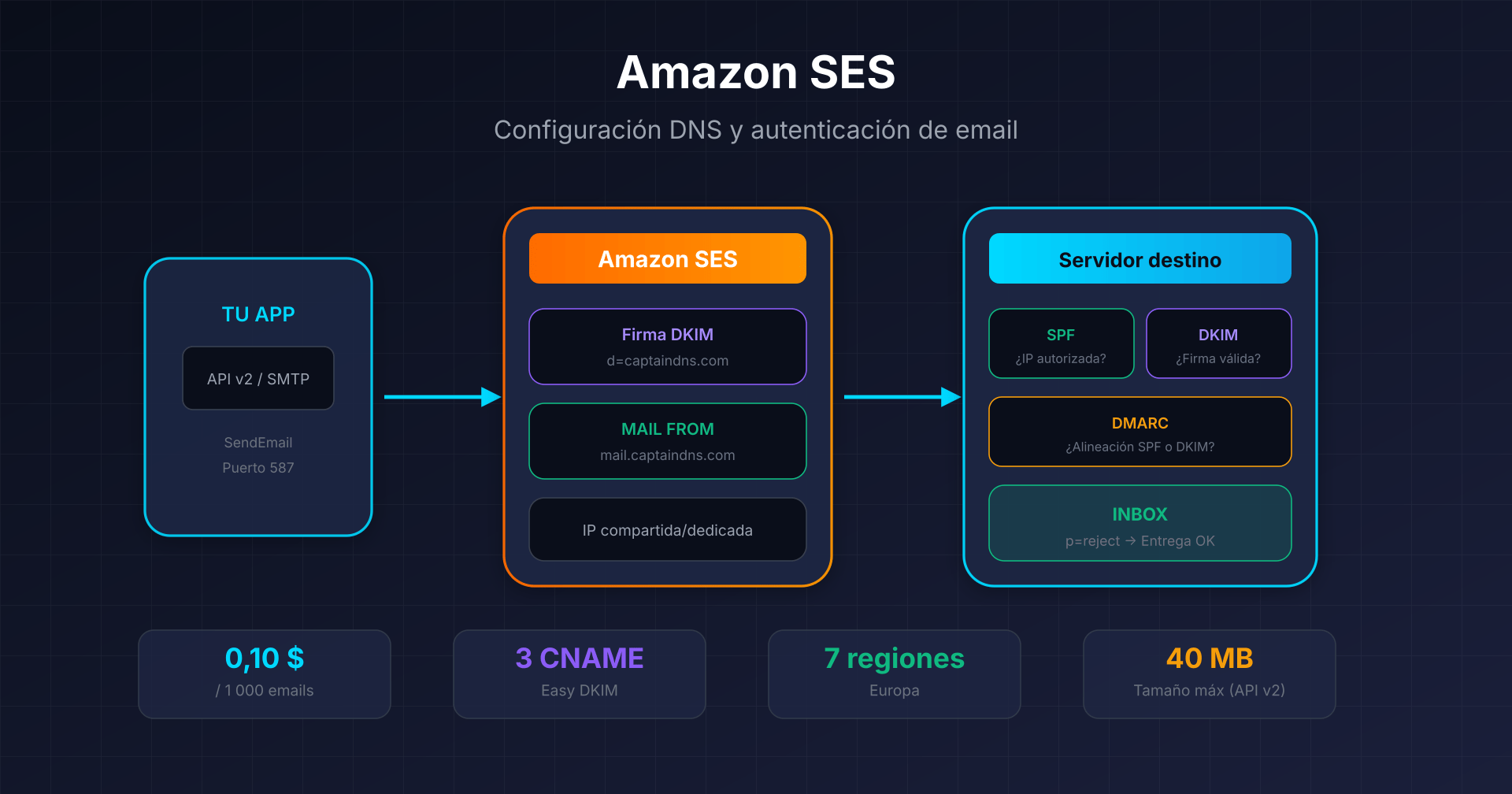
- Amazon SES: Easy DKIM y Custom MAIL FROM - 0,10 $ por cada 1000 emails, 7 regiones en Europa
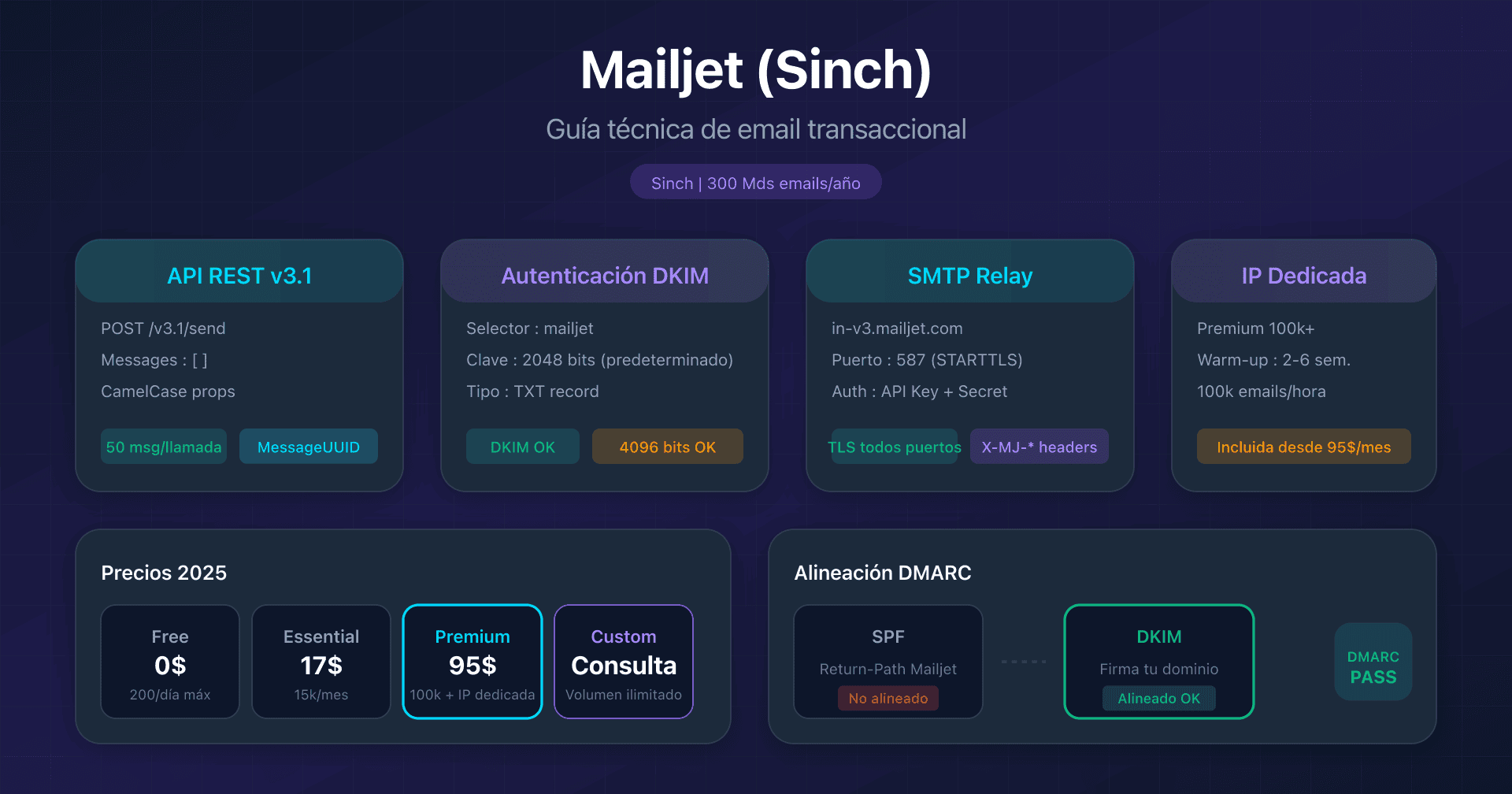
- Mailjet: API v3.1 y configuración DKIM - DKIM 2048/4096 bits, adquisición Sinch
- Mandrill: integración Mailchimp transaccional - Requisito Mailchimp Standard, bloques de 25k emails
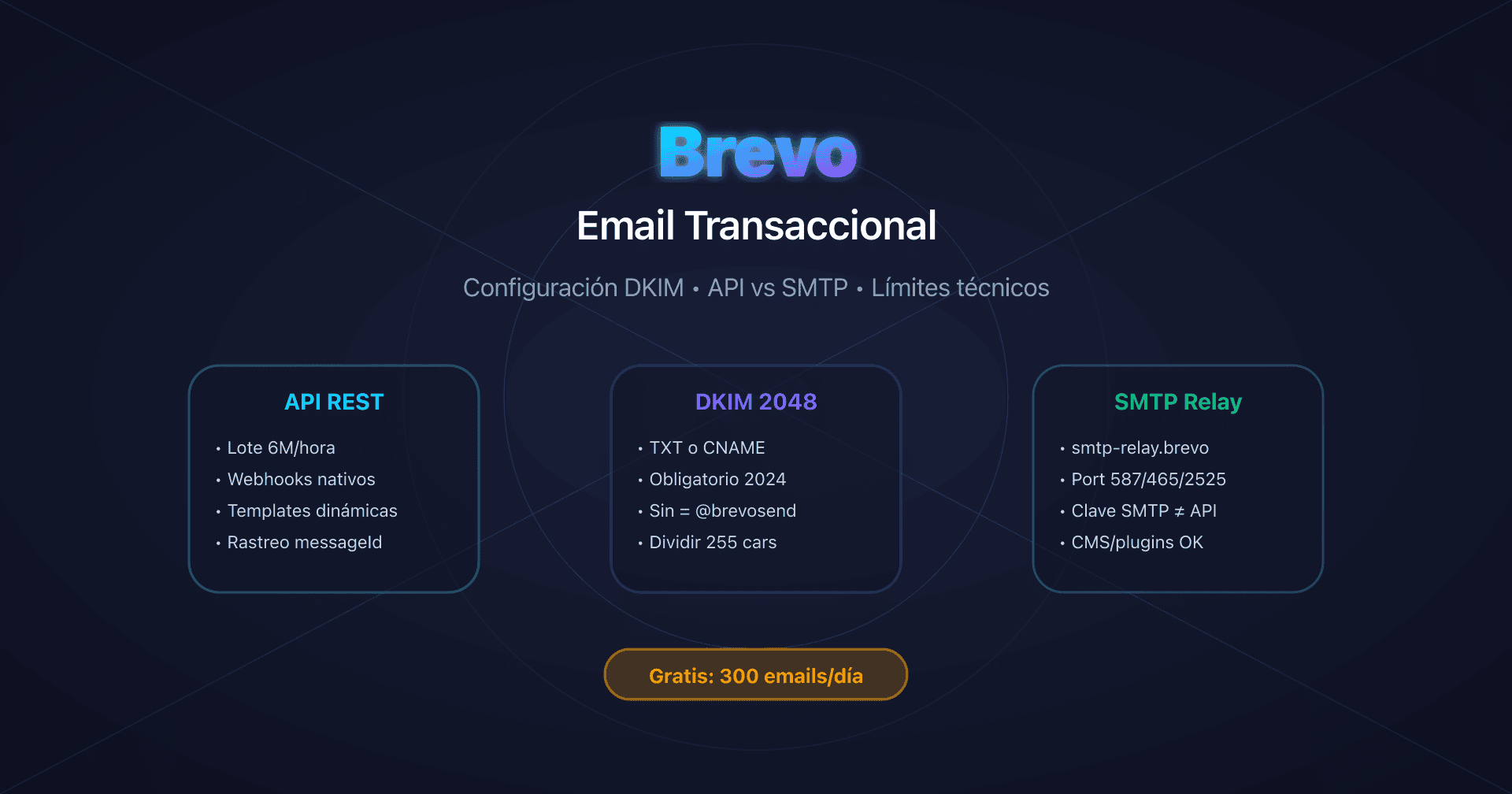
- Brevo: configuración DKIM y SPF - 300 emails/día gratis, DKIM TXT o CNAME
FAQ
¿Qué diferencia hay entre la clave API primaria y las Domain Sending Keys?
La clave API primaria (Primary Account API Key) da acceso CRUD completo a todas las API de la cuenta. Las Domain Sending Keys se limitan al envío únicamente (POST /messages) para un dominio concreto. Usa las Domain Sending Keys en tus aplicaciones para reducir la superficie de ataque en caso de compromiso.
¿Por qué Mailgun genera dos selectores DKIM (pdk1 y pdk2)?
Los dos selectores permiten la rotación automática de las claves DKIM cada 120 días sin interrupción del servicio. Cuando Mailgun quiere renovar las claves por motivos de seguridad, genera una clave nueva en pdk2 mientras pdk1 sigue activo, y luego traslada el tráfico progresivamente. Así se evita cualquier corte de entregabilidad durante el cambio de clave.
¿Necesito configurar un Custom MAIL FROM como con Amazon SES?
No. A diferencia de Amazon SES, que requiere Custom MAIL FROM para la alineación SPF, Mailgun utiliza automáticamente tu dominio verificado en el Return-Path (bounce+id@mail.captaindns.com). La alineación SPF de DMARC funciona de forma nativa desde la configuración del dominio, sin necesidad de ajustes adicionales.
¿Cómo funciona el modo de prueba sin consumir créditos?
Usa el parámetro o:testmode=yes (API) o la cabecera X-Mailgun-Drop-Message: yes (SMTP). Los mensajes se aceptan pero no se entregan, y generan un evento delivered con código 650. Ideal para probar la estructura de las peticiones y el formato de los payloads sin enviar emails de verdad.
¿Cuál es el límite real de destinatarios por llamada a la API?
1000 destinatarios como máximo por llamada (to + cc + bcc combinados). Por encima de esa cifra hay que dividir en varias llamadas. Para enviar a 10 000 personas hacen falta 10 llamadas a la API. Usa las recipient variables para personalizar el contenido de cada destinatario dentro de un mismo batch.
¿El plan Flex es adecuado para producción con volumen variable?
Desde la duplicación de la tarifa (2,00 $/1000 emails en diciembre de 2025), el plan Flex ha perdido competitividad. A partir de 18 000 emails/mes, el plan Foundation 50k (35 $/mes) resulta más rentable. Flex sigue siendo interesante para volúmenes muy bajos e irregulares (menos de 10 000/mes) o para hacer pruebas antes de comprometerse.
¿Debo contratar una IP dedicada para mi proyecto?
Probablemente no. Una IP dedicada requiere un volumen mínimo de 1 millón de emails al mes, con envíos regulares. Impone un warm-up de 15+ días y cuesta 59 $/IP/mes adicionales (o viene incluida desde Foundation 100k). Si tu volumen es inferior o tus envíos son irregulares, quédate en IP compartida. La reputación de Mailgun en IP compartida es excelente.
¿Están documentados los rate limits de la API?
No, Mailgun no documenta públicamente los rate limits específicos por endpoint, salvo para la API Domains (300 req/min). Las cuentas nuevas pueden estar limitadas a 100 mensajes/hora antes de la verificación de negocio. Las cabeceras X-RateLimit-* de las respuestas indican tu cuota en tiempo real. En caso de 429, implementa un backoff exponencial.
Glosario
-
API REST: API HTTP de Mailgun para el envío de emails transaccionales. Endpoint principal:
POST /v3/{domain}/messages. Autenticación: HTTP Basic Auth (api:YOUR_API_KEY). Método recomendado para cualquier integración nueva. -
SMTP Relay: servidor SMTP de Mailgun (
smtp.mailgun.org) que permite enviar mediante el protocolo SMTP estándar. Autenticación: SASL/PLAIN (postmaster@ + password SMTP). Puertos disponibles: 587 (STARTTLS), 465 (TLS directo), 2525 (fallback GCE). -
Domain Verification: configuración DNS para autenticar tu dominio con Mailgun. Genera los registros SPF, DKIM y MX. Con Automatic Sender Security: 2 CNAME DKIM (pdk1 y pdk2) para la rotación automática cada 120 días, con claves de 2048 bits por defecto.
-
Return-Path (Envelope From): dirección técnica utilizada para el enrutamiento SMTP y los bounces. Mailgun usa automáticamente tu dominio (
bounce+id@mail.captaindns.com), lo que permite la alineación SPF relaxed para DMARC sin configuración aparte. Diferencia importante frente a SendGrid (subdominioem1234) y Amazon SES (Custom MAIL FROM obligatorio). -
Automatic Sender Security: opción recomendada para Domain Verification. Genera 2 CNAME DKIM en lugar de TXT, permite la rotación automática de las claves DKIM cada 120 días y utiliza claves de 2048 bits por defecto.
-
Recipient Variables: mecanismo para personalizar el contenido de cada destinatario en un envío por lotes. Sintaxis:
%recipient.variable%en el mensaje, con un JSON que asocia cada email a sus variables. Permite enviar hasta 1000 versiones personalizadas en una sola llamada a la API. -
IP Warmup: proceso automático de calentamiento de una IP dedicada nueva. Calendario de 15 etapas: de 1000 emails/día (D1) a la capacidad total (D15+). El sistema avanza una etapa cada 24h si se alcanzan los límites. El tráfico excedente se enruta hacia las IP compartidas.
-
IP Pools: grupos de IP dedicadas asignables a distintos flujos (transaccional vs marketing, por cliente, por marca). Disponibles en los planes Scale y Enterprise. Permiten separar la reputación. Dynamic IP Pools: asignación automática basada en la salud de la reputación.
-
Event Webhook: endpoint HTTP invocado por Mailgun cuando se producen eventos (accepted, delivered, opened, clicked, bounced, complained, unsubscribed). Configuración: hasta 3 URL por tipo de evento. Reintentos durante 8h en caso de fallo. Seguridad: firma HMAC-SHA256.
-
Handlebars: lenguaje de plantillas usado por Mailgun para los templates almacenados. Soporta variables
{{variable}}, condiciones{{#if}}, bucles{{#each}}y helpers{{#equal}}. Límite: 100 templates por dominio y 10 versiones por template. Sin soporte de partials. -
Sandbox Mode: modo de prueba que valida el formato de las peticiones sin enviar realmente ningún email. Se activa con
o:testmode=yes(API) oX-Mailgun-Drop-Message: yes(SMTP). Genera un eventodeliveredcon código 650. No consume créditos. Límite: 5 destinatarios verificados. -
Supresiones: listas de bloqueo mantenidas automáticamente por Mailgun (Bounces, Complaints, Unsubscribes). Las direcciones se suprimen de forma indefinida por defecto. Gestión mediante API:
GET/POST/DELETE /v3/{domain}/{bounces|complaints|unsubscribes}. Allowlist: impide la adición a Bounces pero no anula Complaints ni Unsubscribes. -
Domain Sending Keys: claves API limitadas al envío únicamente (POST /messages) para un dominio concreto. A diferencia de la clave API primaria (acceso CRUD completo), reducen la superficie de ataque. Recomendadas para las aplicaciones en producción.
-
RBAC API Keys (Scale+): claves API con roles predefinidos: Admin (lectura/escritura completa), Developer (acceso técnico completo), Analyst (solo lectura de métricas), Support (lectura + gestión de supresiones). Disponibles únicamente en los planes Scale y Enterprise.