Mailgun: Guida tecnica completa per le email transazionali
Di CaptainDNS
Pubblicato il 21 gennaio 2026
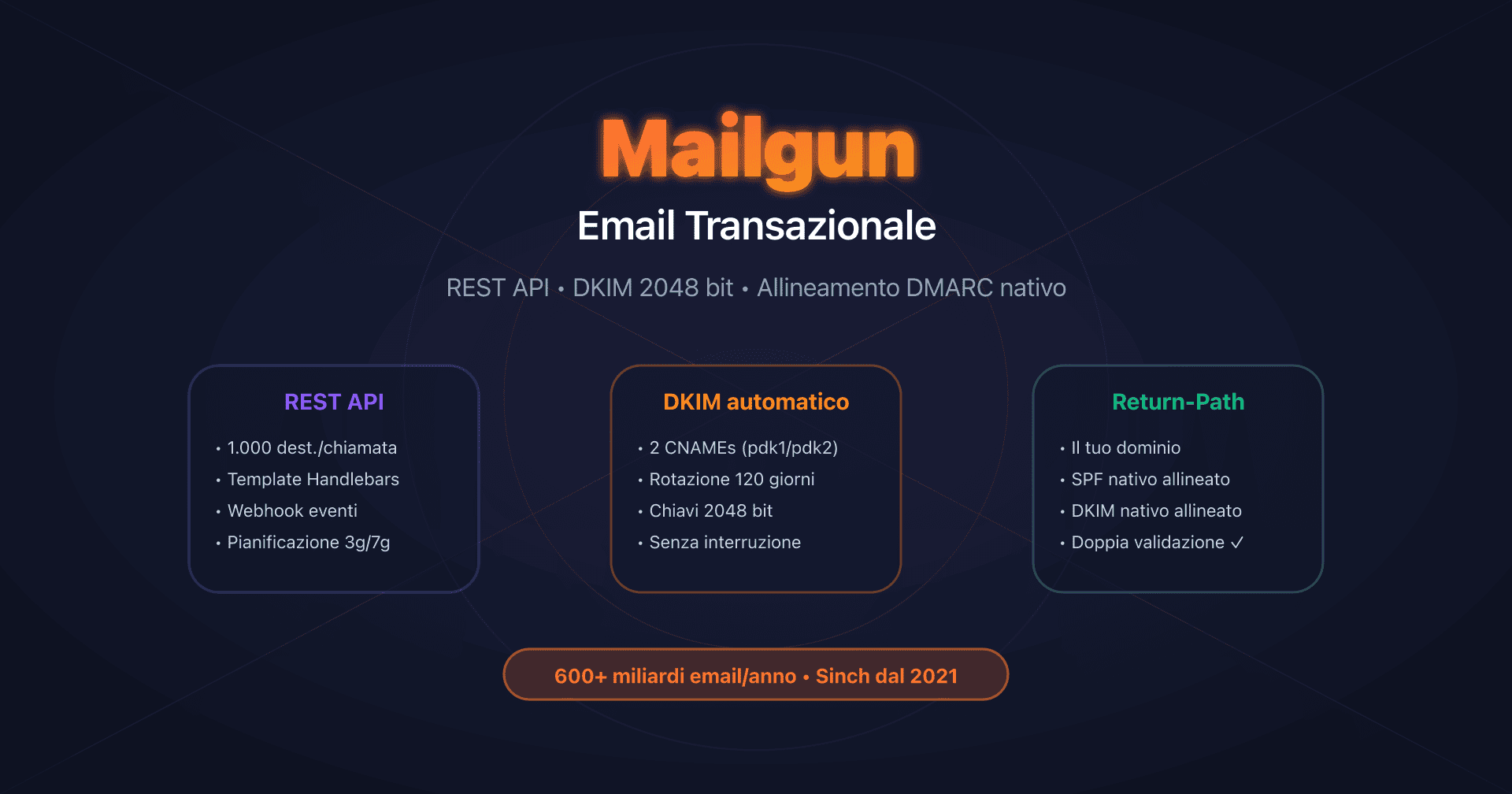
- 📢 Mailgun utilizza il vostro dominio nel Return-Path (
bounce+id@vostrodominio.com), consentendo l'allineamento SPF nativo per DMARC fin dal piano base. - La REST API è il metodo raccomandato: fino a 1.000 destinatari per chiamata, rate limit non documentati (tranne Domains API: 300 req/min).
- Automatic Sender Security genera 2 CNAME DKIM con rotazione automatica ogni 120 giorni, chiavi da 2048 bit per impostazione predefinita.
- IP dedicato raccomandato a partire da 1 milione di email/mese, con warm-up automatico su 15+ giorni e costo aggiuntivo di 59 $/IP/mese.
- Piano Flex aumentato a 2,00 $/1.000 email da dicembre 2025 (raddoppio della tariffa).
Introduzione
Mailgun si è affermata come una delle piattaforme di email transazionale più robuste sul mercato, elaborando oltre 600 miliardi di email all'anno per più di 100.000 clienti. Acquisito da Sinch a dicembre 2021 per 1,9 miliardi di dollari, il servizio combina una potente REST API, un relay SMTP universale e funzionalità di autenticazione avanzate che lo distinguono dalla concorrenza.
La forza di Mailgun risiede in tre pilastri tecnici principali: un approccio API-first orientato agli sviluppatori, una Domain Verification che utilizza il vostro dominio per il Return-Path (allineamento SPF nativo per DMARC) e un sistema di rotazione automatica delle chiavi DKIM 2048 bit ogni 120 giorni senza interruzione del servizio.
Questa guida si rivolge a sviluppatori, DevOps e architetti di sistema che cercano di integrare Mailgun per l'email transazionale con una comprensione completa dell'infrastruttura: configurazione DNS, scelta API vs SMTP, gestione degli IP dedicati, limiti tecnici e webhook degli eventi.
REST API vs SMTP Relay: architettura e scelta di integrazione
Mailgun propone due metodi di integrazione per l'email transazionale, entrambi disponibili fin dal piano gratuito (100 email/giorno).
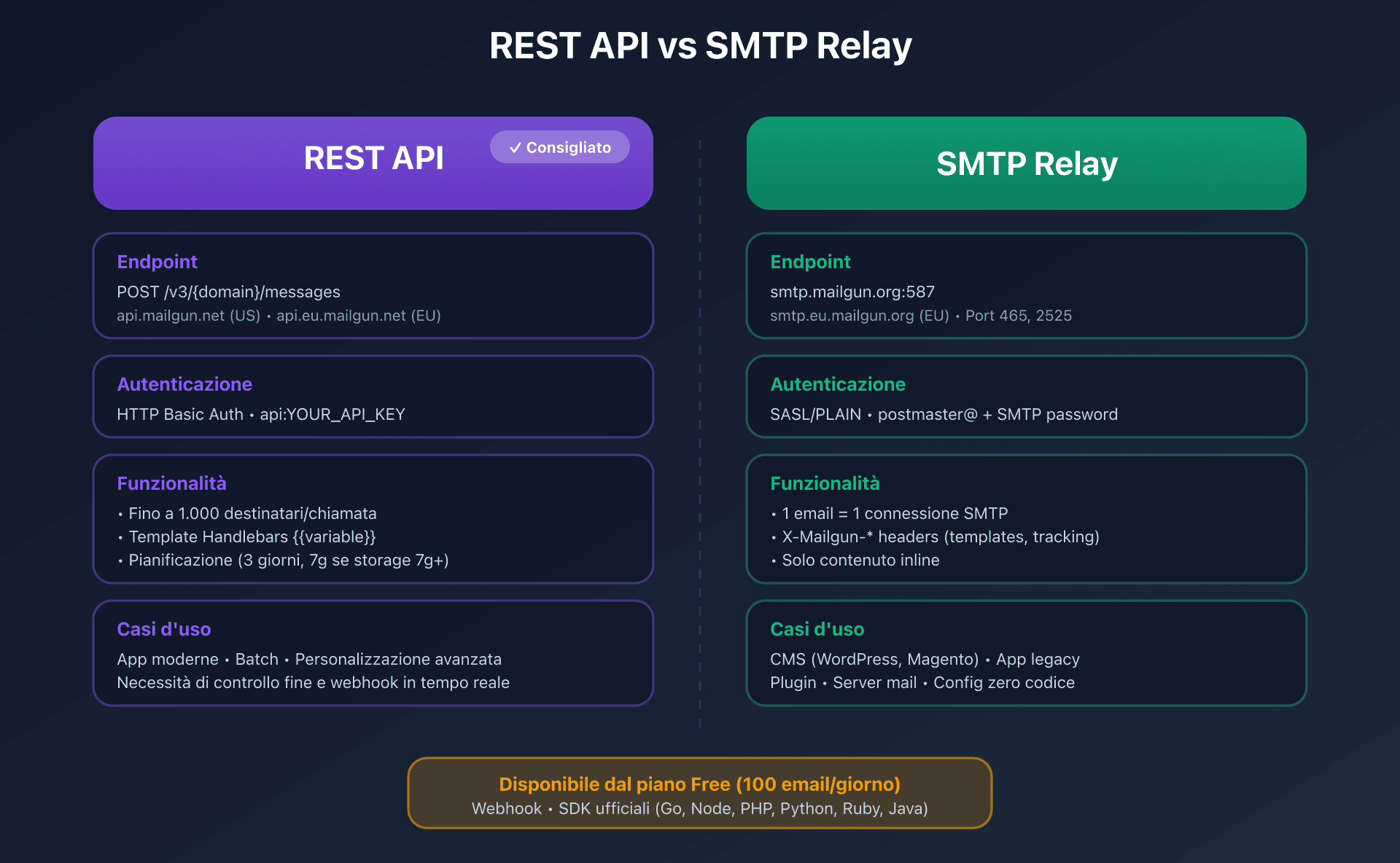
Confronto tecnico
| Criterio | REST API | SMTP Relay |
|---|---|---|
| Endpoint | https://api.mailgun.net/v3/{domain}/messages (US) | smtp.mailgun.org porte 587/465 |
| Autenticazione | HTTP Basic Auth (api:YOUR_API_KEY) | SASL/PLAIN (postmaster@ + password SMTP) |
| Rate limit | Non documentato (Domains API: 300 req/min) | Dipende dall'IP e dal piano |
| Destinatari/req | Fino a 1.000 (to + cc + bcc combinati) | 1 email = 1 connessione SMTP |
| Templates | Variabili con sintassi {{variable}} | Tramite header X-Mailgun-Variables |
| Scheduling | o:deliverytime (fino a 3 giorni, 7g se storage 7g+) | Tramite header X-Mailgun-Deliver-By |
| Tracking | Nativo (o:tracking, o:track-clicks, o:track-opens) | Tramite header X-Mailgun-Track* |
| Compatibilità | Richiede SDK o client HTTP | Qualsiasi sistema che supporti SMTP |
| Caso d'uso ideale | App moderne, batch, personalizzazione avanzata | Legacy, plugin CMS, server mail |
Quando scegliere la REST API?
La REST API è il metodo raccomandato da Mailgun per qualsiasi nuova integrazione. È accessibile a POST https://api.mailgun.net/v3/{domain}/messages per la regione US, oppure api.eu.mailgun.net per l'EU.
Vantaggi chiave:
- Batch sending: invio fino a 1.000 destinatari in una singola richiesta con personalizzazione tramite recipient variables
- Template memorizzati: sintassi Handlebars con condizioni, cicli, helper personalizzati
- Scheduling: programmazione dell'invio fino a 3 giorni in anticipo (7 giorni se il vostro piano include 7+ giorni di storage)
- Rate limit header:
X-RateLimit-Limit,X-RateLimit-Remaining,X-RateLimit-Resetper il monitoraggio
Esempio di invio con personalizzazione:
curl -s --user 'api:YOUR_API_KEY' \
  https://api.mailgun.net/v3/mail.captaindns.com/messages \
  -F from='Notifiche <no-reply@mail.captaindns.com>' \
  -F to='user1@captaindns.com' \
  -F to='user2@captaindns.com' \
  -F subject='Nuova notifica' \
  -F text='Ciao {{nome}}, hai {{count}} notifiche.' \
  -F recipient-variables='{"user1@captaindns.com":{"nome":"Marco","count":"3"},"user2@captaindns.com":{"nome":"Giulia","count":"7"}}' \
  -F o:tag='notification' \
  -F o:tracking='yes'
SDK ufficiali: Mailgun mantiene SDK per Go, Node.js, PHP, Python, Ruby e Java che incapsulano la REST API e semplificano l'integrazione.
Quando scegliere l'SMTP Relay?
L'SMTP Relay è ideale per i sistemi legacy o per le applicazioni che supportano solo SMTP.
Configurazione ufficiale:
SMTP server: smtp.mailgun.org (US) oppure smtp.eu.mailgun.org (EU)
SMTP user: postmaster@mail.captaindns.com (oppure utente SMTP personalizzato)
SMTP password: [password SMTP del dominio]
Port: 587 (STARTTLS raccomandato) oppure 465 (TLS diretto) oppure 2525 (fallback GCE)
Punto critico: l'autenticazione SMTP utilizza la password SMTP del dominio, distinta dalla chiave API. Il nome utente è l'indirizzo postmaster@ del vostro dominio verificato (oppure un utente SMTP personalizzato creato nella dashboard).
Header proprietari X-Mailgun-*: permettono di accedere alle funzionalità avanzate tramite SMTP (tag, tracking, template, scheduling, variabili). Elenco completo:
X-Mailgun-Tag: tag per le statistiche (possibili più tag)X-Mailgun-Track: attivare/disattivare il tracking globaleX-Mailgun-Track-Clicks: tracking dei clic (yes/no/htmlonly)X-Mailgun-Track-Opens: tracking delle aperture (yes/no)X-Mailgun-Deliver-By: pianificazione (formato RFC 2822 o timestamp Unix)X-Mailgun-Template-Name: nome del template da utilizzareX-Mailgun-Variables: variabili del template (JSON)
Domain Verification: SPF, DKIM 2048 bit e allineamento DMARC nativo
La configurazione DNS su Mailgun genera i record necessari per SPF, DKIM e l'allineamento DMARC. Il processo si svolge in Sending > Domains > Domain settings > Domain verification.
Architettura con Automatic Sender Security (raccomandato)
Con l'opzione Automatic Sender Security attivata (raccomandato), Mailgun genera 2 record CNAME DKIM per la rotazione automatica delle chiavi:
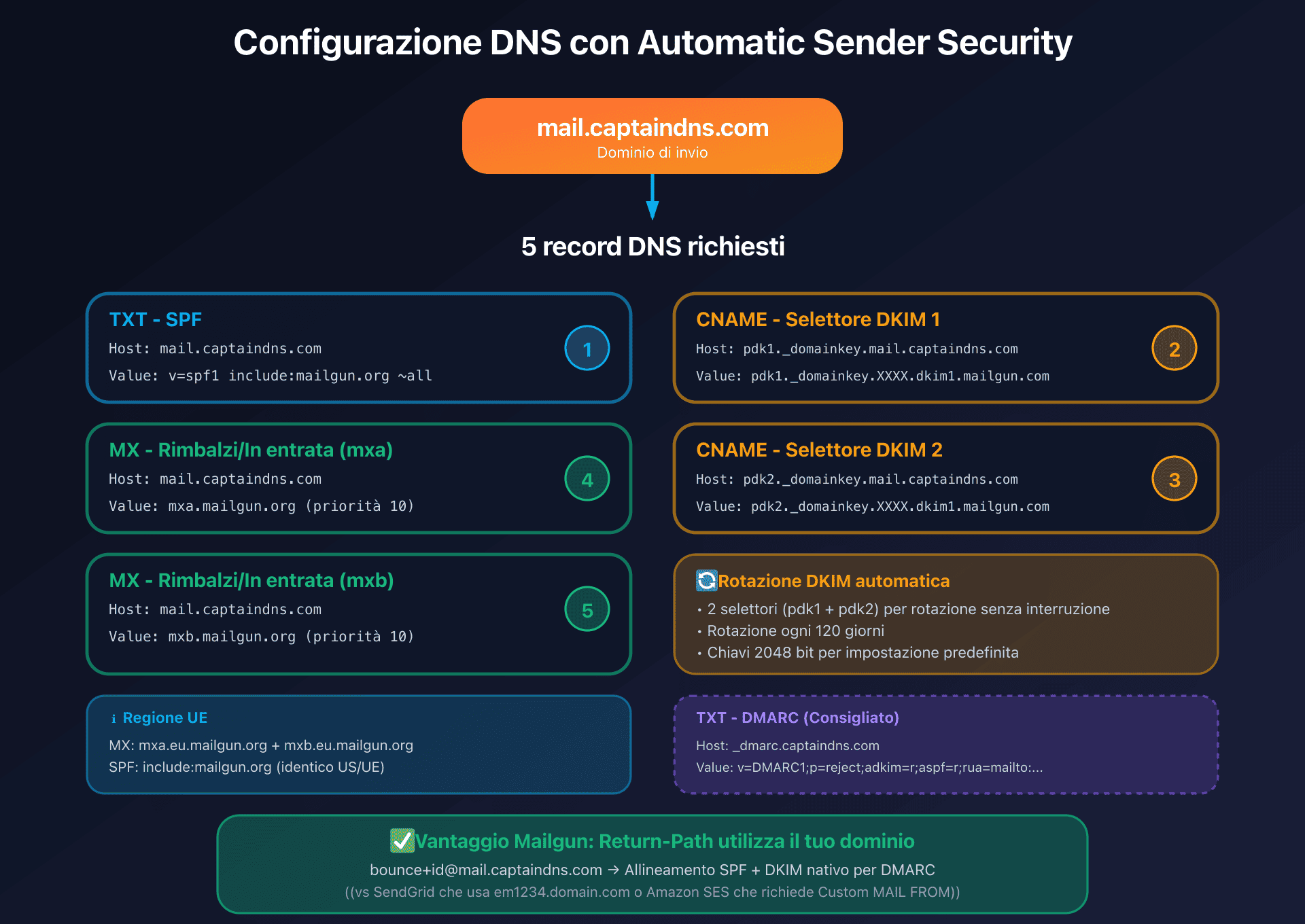
Record richiesti (esempio per mail.captaindns.com):
| Tipo | Name/Host | Valore | Obiettivo |
|---|---|---|---|
| TXT | mail.captaindns.com | v=spf1 include:mailgun.org ~all | SPF |
| CNAME | pdk1._domainkey.mail.captaindns.com | pdk1._domainkey.XXXX.dkim1.mailgun.com | Rotazione DKIM (selettore 1) |
| CNAME | pdk2._domainkey.mail.captaindns.com | pdk2._domainkey.XXXX.dkim1.mailgun.com | Rotazione DKIM (selettore 2) |
| MX | mail.captaindns.com | mxa.mailgun.org (priorità 10) | Bounce/Inbound |
| MX | mail.captaindns.com | mxb.mailgun.org (priorità 10) | Bounce/Inbound |
Nota per la regione EU: per l'EU, i record MX utilizzano mxa.eu.mailgun.org e mxb.eu.mailgun.org.
Vantaggi di questa architettura:
- Rotazione automatica delle chiavi DKIM: i due selettori (
pdk1epdk2) permettono a Mailgun di cambiare le chiavi ogni 120 giorni senza interruzione del servizio - Chiavi DKIM da 2048 bit per impostazione predefinita (le configurazioni TXT manuali possono usare 1024 bit, ma sono raccomandati i 2048)
- Nessun record CNAME di tracking richiesto per impostazione predefinita: Mailgun utilizza
mailgun.org(oppureeu.mailgun.orgper l'EU) - Selettori DKIM:
pdk1epdk2per Automatic Security, oppuremxper la configurazione TXT manuale
Return-Path e allineamento SPF: un vantaggio importante
Il Return-Path (Envelope From) è determinante per l'allineamento DMARC. Mailgun utilizza automaticamente il vostro dominio per il Return-Path nel formato bounce+UNIQUEID@mail.captaindns.com:
- SPF passa automaticamente perché il record
include:mailgun.orgautorizza gli IP di Mailgun a inviare per il vostro dominio - L'allineamento SPF funziona in modalità relaxed (il Return-Path
bounce+id@mail.captaindns.comcorrisponde al dominio padremail.captaindns.com) - Nessuna configurazione separata necessaria: a differenza di altri provider, Mailgun non richiede un sottodominio dedicato per il bounce domain
Differenza con la concorrenza:
- SendGrid: utilizza un sottodominio personalizzabile (
em1234.captaindns.com) - Amazon SES: richiede Custom MAIL FROM per l'allineamento SPF
- Mailgun: utilizza direttamente il vostro dominio verificato
Per una policy DMARC rigorosa (aspf=s), l'allineamento SPF fallirà se inviate da un sottodominio diverso da quello del Return-Path. La soluzione è affidarsi a DKIM per l'allineamento DMARC, che supporta la modalità strict (adkim=s).
Tracking domain (link branding)
Il tracking domain sostituisce i domini Mailgun nei link tracciati con il vostro dominio. Per impostazione predefinita, Mailgun utilizza email.mail.captaindns.com che punta a mailgun.org (US) oppure eu.mailgun.org (EU) tramite CNAME.
Configurazione HTTPS opzionale: Mailgun genera automaticamente un certificato Let's Encrypt una volta verificato il CNAME.
Migrazione a DKIM 2048 bit
Per migrare una configurazione TXT manuale (chiavi da 1024 bit) verso Automatic Sender Security (2048 bit), è sufficiente attivare Automatic Sender Security nella dashboard e poi creare i 2 nuovi CNAME DKIM. La transizione è fluida grazie ai due selettori.
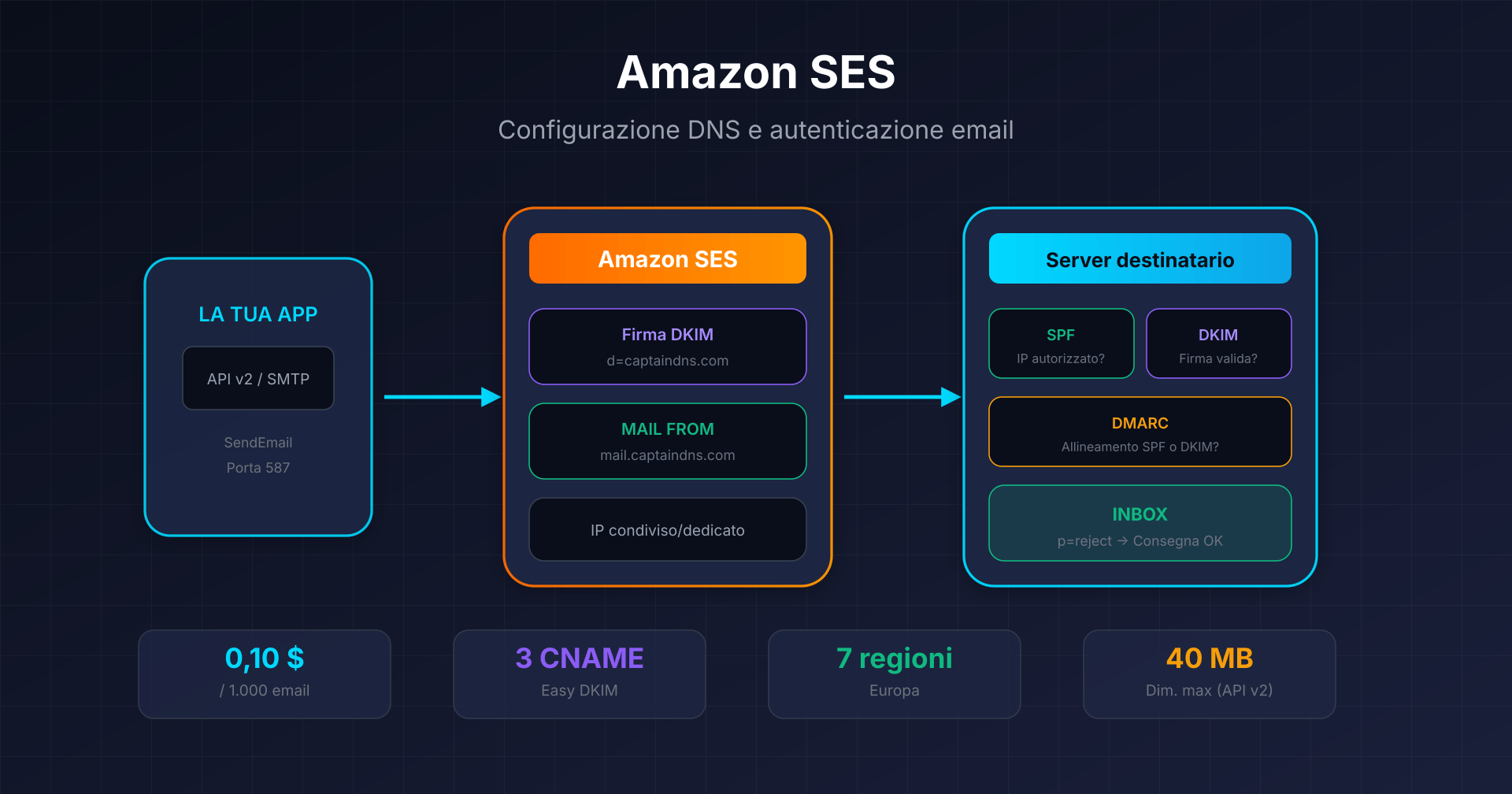
Flusso di autenticazione email: dall'API alla deliverability
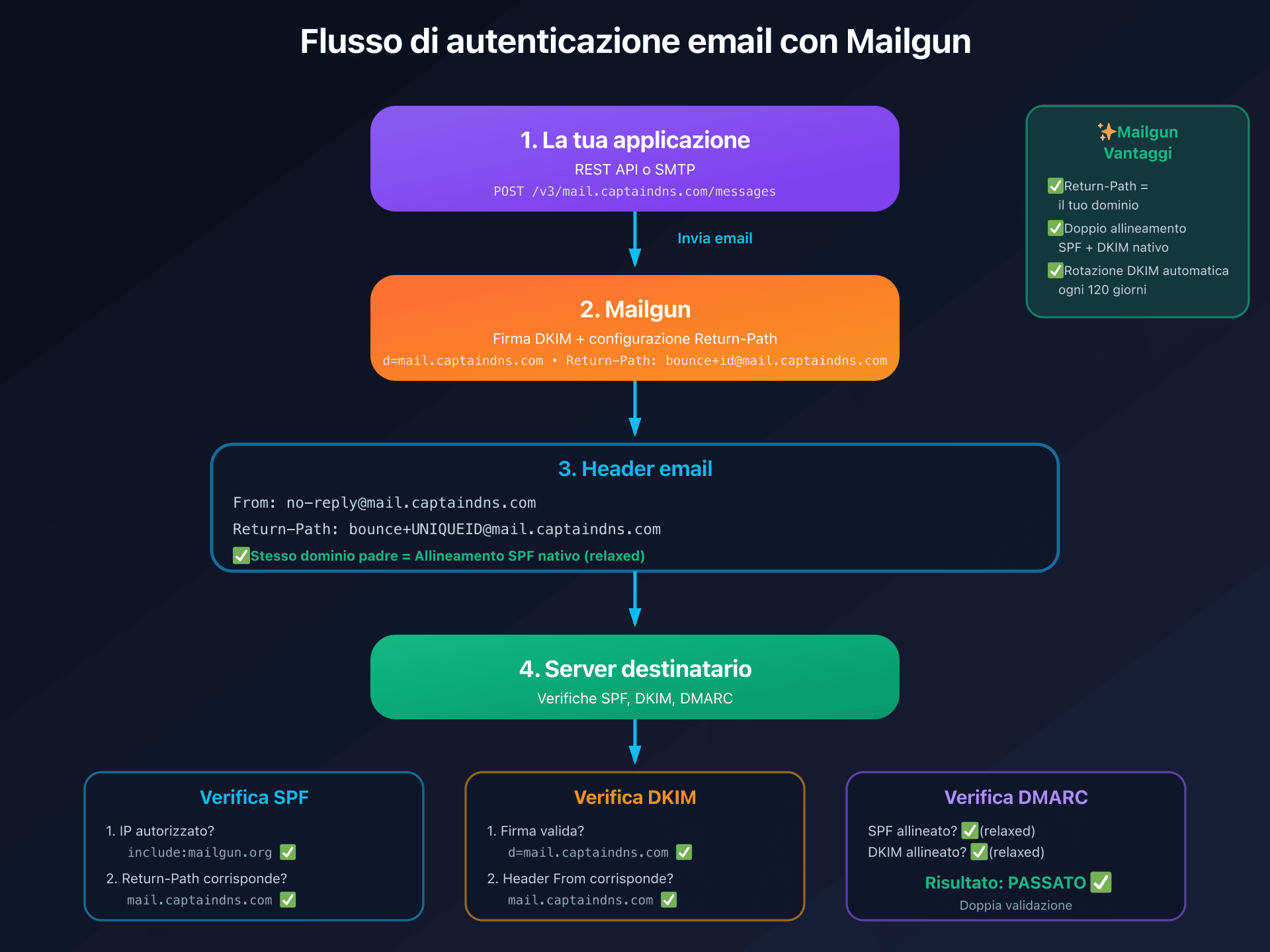
Quando inviate tramite Mailgun:
- La vostra applicazione chiama la REST API oppure utilizza SMTP
- Mailgun firma il messaggio con la vostra chiave DKIM (dominio
d=mail.captaindns.com) - Mailgun utilizza il vostro dominio nel Return-Path (
bounce+id@mail.captaindns.com) - Il server destinatario verifica SPF (IP di invio), DKIM (firma), poi DMARC (allineamento)
- SPF passa:
include:mailgun.orgautorizza gli IP di Mailgun, il Return-Path usa il vostro dominio - DKIM passa: la firma
d=mail.captaindns.comcorrisponde all'header From - DMARC passa: almeno SPF E DKIM sono allineati (doppia validazione)
Allineamento DMARC: configurazione per p=reject
Cosa funziona (e cosa no)
Allineamento DKIM:
| Configurazione | Allineato? | DMARC tramite DKIM? |
|---|---|---|
| Dominio con DKIM attivo (TXT o CNAME) | Sì | Sì |
Allineamento SPF:
| Configurazione | Allineato? | DMARC tramite SPF? |
|---|---|---|
| Return-Path usa il vostro dominio (nativo) | Sì | Sì |
| aspf=r (relaxed, predefinito) | Sì | Sì |
| aspf=s (strict) + invio da sottodominio | No | No (mismatch di sottodominio) |
Record DMARC raccomandato
_dmarc.captaindns.com TXT "v=DMARC1;p=reject;adkim=r;aspf=r;rua=mailto:dmarc@captaindns.com"
Punti chiave:
adkim=reaspf=r: allineamento relaxed (consente i sottodomini)- Procedete per gradi da
p=none→p=quarantine→p=reject - Monitorate i report
ruaprima di irrigidire la policy - Vantaggio Mailgun: doppio allineamento nativo (SPF + DKIM), protezione migliore rispetto al solo DKIM
Tabella riepilogativa DNS completa
| Tipo | Host/Name | Valore | Obbligatorio | Note |
|---|---|---|---|---|
| TXT | mail.captaindns.com | v=spf1 include:mailgun.org ~all | ✅ Sì | SPF identico US/EU |
| CNAME | pdk1._domainkey.mail.captaindns.com | pdk1._domainkey.XXXX.dkim1.mailgun.com | ✅ Sì | Rotazione DKIM auto |
| CNAME | pdk2._domainkey.mail.captaindns.com | pdk2._domainkey.XXXX.dkim1.mailgun.com | ✅ Sì | Rotazione DKIM auto |
| MX | mail.captaindns.com | mxa.mailgun.org (priorità 10) | ✅ Sì | Bounce/Inbound |
| MX | mail.captaindns.com | mxb.mailgun.org (priorità 10) | ✅ Sì | Bounce/Inbound |
| TXT | _dmarc.captaindns.com | v=DMARC1;p=reject;adkim=r;aspf=r;... | Raccomandato | Policy DMARC |
| CNAME | email.mail.captaindns.com | mailgun.org oppure eu.mailgun.org | Opzionale | Tracking domain |
IP dedicato vs IP condiviso: strategia di deliverability
Mailgun raccomanda ufficialmente un IP dedicato a partire da 1 milione di email al mese. Al di sotto, l'IP condiviso offre generalmente una deliverability migliore.
IP condiviso (piani Free, Foundation, Growth base)
Vantaggi:
- Nessun warm-up necessario
- Reputazione mantenuta da Mailgun
- Ideale per volumi bassi o irregolari
- Deliverability iniziale migliore rispetto a un IP dedicato freddo
Svantaggi:
- Esposizione ai rischi di reputazione legati agli altri mittenti del pool (raro con Mailgun grazie ai controlli rigorosi)
IP dedicato (Foundation 100k+, Growth, Scale, Enterprise)
Il piano Foundation 100k include 1 IP dedicato (a partire da 75 $/mese). Ogni IP aggiuntivo costa 59 $/IP/mese.
Raccomandazione ufficiale: 1 IP dedicato per circa 1 milione di email al mese come minimo.
Vantaggi:
- Reputazione isolata e controllabile
- Funzione di IP Warmup automatico su 15 fasi (~15+ giorni)
- Possibilità di separare i flussi (transazionale vs marketing) tramite IP Pools
IP Warmup automatico: Mailgun propone un warm-up in 15 fasi progressive:
| Fase | Limite giornaliero | Limite orario | Durata |
|---|---|---|---|
| 1 | 1.000 | 100 | 24h |
| 2 | 2.500 | ~100 | 24h |
| 3 | 5.000 | Progressivo | 24h |
| ... | Progressivo | Progressivo | ... |
| 15 | Capacità totale | Senza limite | Raggiunta al G15+ |
Il sistema avanza di una fase ogni 24 ore se i limiti vengono raggiunti. Il traffico in eccesso viene instradato automaticamente verso gli IP condivisi o altri IP dedicati disponibili.
IP Pools: disponibili sui piani Scale e superiori. Permettono di:
- Separare le email transazionali da quelle marketing
- Gestire clienti/brand diversi (multi-tenant)
- Dynamic IP Pools: assegnazione automatica basata sullo stato di salute della reputazione
Nota importante: gli IP dedicati sono legati a una regione (US o EU). Una migrazione di regione richiede un nuovo IP e un nuovo warm-up.
Quando scegliere un IP dedicato?
Vi serve un IP dedicato se:
- Volume regolare > 1 milione di email/mese
- Necessità di separare la reputazione transazionale da quella marketing
- Requisiti di whitelisting del cliente o conformità normativa
- Volume > 2,5 milioni di email/mese: raccomandati più IP dedicati
Restate su IP condiviso se:
- Volume < 1 milione di email/mese
- Invii irregolari o sporadici
- Avvio dell'attività senza storico
- Volume basso puramente transazionale
Tariffe 2026 ed evoluzione recente
Piani Send (gennaio 2026)
| Piano | Prezzo/mese | Email incluse | Eccedenza (/1.000) | Conservazione dei log | IP dedicato |
|---|---|---|---|---|---|
| Free | 0 $ | 100/giorno | N/D | 1 giorno | No |
| Flex | Pay-per-use | 1.000 gratis/mese | 2,00 $ ⚠️ | 5 giorni | No |
| Foundation 50k | 35 $ | 50.000 | ~1,30 $ | 5 giorni | No |
| Foundation 100k | 75 $ | 100.000 | ~1,30 $ | 5 giorni | 1 incluso |
| Growth | 80-650 $ | 100k-1M | Variabile | 15 giorni | 1 incluso |
| Scale 100k | 90 $ | 100.000 | ~0,80-1,10 $ | 30 giorni | 1 incluso |
| Scale (max) | 1.250 $ | 2,5M | Variabile | 30 giorni | 1 incluso |
| Enterprise | Su richiesta | 2,5M+ | Negoziato | 30 giorni | Multipli |
Evoluzione tariffaria recente
⚠️ Cambiamento importante (1 dicembre 2025): il piano Flex è passato da 1,00 $ a 2,00 $ per 1.000 email, un aumento del 100%. Questo rincaro significativo rende i piani Foundation molto più interessanti per volumi > 25.000 email/mese.
Analisi economica:
- Piano Flex: 50.000 email = 49.000 a pagamento × 0,002 $ = 98 $
- Piano Foundation 50k: 50.000 email = 35 $ (risparmio di 63 $)
- Soglia di convenienza: il piano Foundation diventa conveniente già a partire da ~18.000 email/mese
Piani Optimize (strumenti di deliverability)
| Piano | Prezzo/mese | Validazioni | Test inbox | Preview |
|---|---|---|---|---|
| Pilot | 49 $ | 2.500 | 25 | 500 |
| Starter | 99 $ | 5.000 | 50 | 1.000 |
| Contract | Su richiesta | Personalizzate | Personalizzati | Personalizzate |
Sconti annuali
Non documentati pubblicamente. I clienti Enterprise riferiscono sconti negoziabili del 10%+.
Tariffe US vs EU
Le tariffe sono standardizzate a livello mondiale in USD. Nessuna differenza regionale documentata tra US ed EU.
Limiti tecnici e quote
| Limite | Valore | Note |
|---|---|---|
| Dimensione max email | 25 MB | Corpo + allegati + header |
| Destinatari/messaggio | 1.000 | To + Cc + Bcc combinati |
| Parametri send options | 16 KB | Parametri o:, h:, v:, t: |
| Template/dominio | 100 | Limite rigido |
| Versioni/template | 10 | - |
| Domini (Free) | 5 | - |
| Domini (a pagamento) | 1.000 | - |
| Destinatari sandbox | 5 | Devono essere verificati |
| Rate limit Domains API | 300 req/min | Unico endpoint documentato |
| Rate limit di invio (nuovi account) | 100 messaggi/ora | Prima della verifica business |
| Scheduling max | 3 giorni | 7 giorni con piano storage 7g+ |
Conservazione dei dati
| Dato | Conservazione |
|---|---|
| Log eventi (Free) | 1 giorno |
| Log eventi (Foundation) | 5 giorni |
| Log eventi (Growth) | 15 giorni |
| Log eventi (Scale) | 30 giorni (max) |
| Contenuto dei messaggi | 1-7 giorni (configurabile) |
| Statistiche orarie | 60 giorni |
| Statistiche giornaliere | 1 anno |
| Statistiche mensili | Illimitata |
| Log di sicurezza critici | 365 giorni |
Gestione dei bounce e delle suppression
Hard bounce (errore permanente)
| Comportamento | Dettaglio |
|---|---|
| Azione | Indirizzo aggiunto alla lista di suppression |
| Durata del blocco | Illimitata (fino a rimozione manuale) |
| Errore restituito | "Not delivering to previously bounced address" |
Soft bounce (errore temporaneo)
| Comportamento | Dettaglio |
|---|---|
| Retry | Automatico per i soft bounce immediati |
| Durata | Fino al successo o alla classificazione permanente |
| Conversione | Dopo più fallimenti, aggiunta alla lista bounce |
Spam complaint (FBL)
Mailgun si iscrive automaticamente ai Feedback Loop dei principali provider. Le segnalazioni attivano:
- Aggiunta automatica alla lista Complaints
- Invio del webhook
complained - Blocco degli invii futuri verso quell'indirizzo
Provider supportati: Yahoo, Microsoft/Outlook, Comcast, Cox, Fastmail e altri tramite Universal Feedback Loop. Nota: Gmail non fornisce un FBL tradizionale.
Unsubscribe automatico
Mailgun aggiunge automaticamente:
- Header
List-Unsubscribe - Header
List-Unsubscribe-Post: List-Unsubscribe=One-Click
Conforme alla RFC 8058 e ai requisiti Gmail/Yahoo per i mittenti bulk (5.000+ messaggi/giorno).
API liste di suppression
| Lista | Endpoint |
|---|---|
| Bounces | GET/POST/DELETE /v3/{domain}/bounces |
| Complaints | GET/POST/DELETE /v3/{domain}/complaints |
| Unsubscribes | GET/POST/DELETE /v3/{domain}/unsubscribes |
| Allowlist | GET/POST/DELETE /v3/{domain}/allowlist |
L'Allowlist impedisce l'aggiunta di indirizzi alla lista bounces ma non ha la precedenza su Complaints o Unsubscribes.
Event Webhook e tracking in tempo reale
Il webhook degli eventi permette di ricevere in tempo reale le notifiche di delivery, engagement e compliance.
Eventi disponibili
- Delivery:
accepted,delivered,temporary_fail,permanent_fail - Engagement:
opened,clicked - Compliance:
complained,unsubscribed
Formato del payload JSON
{
  "signature": {
    "timestamp": "1529006854",
    "token": "a8ce0edb2dd8301dee6c2405235584e45aa91d1e9f979f3de0",
    "signature": "d2271d12299f6592d9d44cd9d250f0704e4674c30d79d07c47a66f95ce71cf55"
  },
  "event-data": {
    "event": "delivered",
    "timestamp": 1529006854.329574,
    "id": "DACSsAdVSeGpLid7TN03WA",
    "recipient": "recipient@captaindns.com",
    "tags": [],
    "message": {
      "headers": {
        "message-id": "20180618211821.captaindns.com"
      }
    }
  }
}
Retry policy
| Codice di risposta | Azione |
|---|---|
| 200 | Successo, nessun retry |
| 406 | Rifiutato, nessun retry |
| Altro | Retry secondo il calendario |
Calendario dei retry: 5min → 10min → 15min → 1h → 2h → 4h (totale: 8 ore)
Sicurezza (firma HMAC)
| Elemento | Valore |
|---|---|
| Algoritmo | HMAC-SHA256 |
| Chiave | Webhook Signing Key (Control Panel → Account Security) |
| Calcolo | HMAC-SHA256(timestamp + token, signingKey) |
Esempio in Python:
import hmac, hashlib
def verify(api_key, token, timestamp, signature):
    expected = hmac.new(api_key.encode(), f"{timestamp}{token}".encode(),
                        hashlib.sha256).hexdigest()
    return signature == expected
Configurazione
- Fino a 3 URL per tipo di evento per dominio
- Configurazione a livello di dominio (non di account)
- API:
POST /v3/domains/{domain}/webhooks
Template Handlebars
Mailgun utilizza Handlebars (versione personalizzata) per i template memorizzati.
Sintassi delle variabili
| Contesto | Sintassi |
|---|---|
| Template memorizzati | {{variable}} |
| Batch sending inline (API) | %recipient.variable% |
Condizioni e cicli
{{#if condizione}}
  Contenuto se vero
{{else if altraCondizione}}
  Contenuto alternativo
{{else}}
  Contenuto predefinito
{{/if}}

{{#unless condizione}}
  Contenuto se falso
{{/unless}}

{{#equal variabile "valore"}}
  Contenuto se uguale
{{/equal}}

{{#each array}}
  <li>{{this.proprieta}}</li>
{{/each}}

{{#with oggetto}}
  {{proprietaAnnidata}}
{{/with}}
Limiti dei template
| Limite | Valore |
|---|---|
| Template per dominio | 100 |
| Versioni per template | 10 |
| Dimensione template | Non documentata |
| Partials (import) | Non supportati |
Funzionalità aggiuntive
Email Validation API
| Attributo | Valore |
|---|---|
| Endpoint single | GET /v4/address/validate?address=... |
| Endpoint bulk | POST /v4/address/validate/bulk/{list_id} |
| Base dati | 450+ miliardi di email |
| Tariffa Foundation | 1,20 $/100 validazioni |
| Tariffa Scale | 5.000 incluse, poi 0,80 $/100 |
Validazioni effettuate: sintassi RFC, record MX, esistenza della mailbox, bounce della rete Mailgun, indirizzi a rischio, indirizzi role-based, email usa e getta, refusi nel dominio, domini catch-all.
Inbound Parse (Routes)
Permette di ricevere email e inoltrarle verso una URL di webhook:
Filtri: match_recipient(), match_header(), catch_all()
Azioni: forward("https://url"), forward("email@"), store(), stop()
Retry inbound: fino a 8 ore (10min, 15min, 30min, 1h, 2h, 4h) Conservazione dei messaggi memorizzati: 3 giorni
Attachments
| Limite | Valore |
|---|---|
| Dimensione totale messaggio | 25 MB (corpo + allegati + header) |
| Tipi di file | Nessuna restrizione documentata |
| Inline (CID) | Supportato tramite parametro inline |
AMP for Email
Supportato dal 2019 tramite il parametro amp-html. Richiede:
- Registrazione come mittente AMP presso Google
- SPF, DKIM, DMARC configurati
- Fallback HTML obbligatorio
Sicurezza e conformità
Certificazioni
| Certificazione | Stato |
|---|---|
| ISO 27001 | ✅ Certificato |
| ISO 27701 | ✅ Certificato (privacy) |
| SOC 2 Type I | ✅ Certificato |
| SOC 2 Type II | ✅ Certificato |
| SOC 1 (SSAE-16) | ✅ Certificato |
| PCI-DSS | ✅ Conforme (SAQ-A) |
| CSA Star Level 1 | ✅ Conforme |
GDPR
| Elemento | Dettaglio |
|---|---|
| DPA | Disponibile: mailgun.com/legal/dpa/ |
| Localizzazione dati EU | Germania |
| Endpoint EU | api.eu.mailgun.net, smtp.eu.mailgun.org |
| Residenza dei dati | Messaggi mai trasferiti fuori regione |
| DPO | Dedicato, con sede nell'EU |
HIPAA
| Elemento | Dettaglio |
|---|---|
| Stato | ✅ Conforme |
| BAA | Disponibile: mailgun.com/legal/hipaa-baa/ |
| Prerequisiti | Configurazione crittografia lato client, consenso del paziente, firma del BAA |
Crittografia TLS
| Versione | Stato |
|---|---|
| TLS 1.0 | ❌ Deprecato (marzo 2021) |
| TLS 1.1 | ❌ Deprecato (marzo 2021) |
| TLS 1.2 | ✅ Supportato |
| TLS 1.3 | ✅ Supportato |
Crittografia a riposo: AES-256
Autenticazione avanzata
| Funzionalità | Disponibilità |
|---|---|
| 2FA | ✅ Tutti i piani |
| SSO | ✅ Scale ed Enterprise |
| SAML 2.0 | ✅ Scale ed Enterprise |
| IdP supportati | Okta, Auth0, OneLogin, Azure AD, ADFS, AWS IAM |
| RBAC | ✅ Scale ed Enterprise (Admin, Developer, Analyst, Support) |
Piano d'azione: configurazione in 6 passaggi
1. Creare l'account e configurare il dominio
- Creare un account Mailgun su mailgun.com/signup
- Scegliere la regione (US o EU a seconda delle vostre esigenze GDPR)
- Un dominio sandbox viene creato automaticamente (100 email/giorno)
2. Verificare il dominio (Domain Verification)
- Andare in Sending > Domains > Add New Domain
- Inserire il vostro dominio di invio (es.
mail.captaindns.com) - Attivare Automatic Sender Security (raccomandato)
- Creare i record DNS presso il vostro registrar:
- TXT SPF:
v=spf1 include:mailgun.org ~all - CNAME DKIM pdk1:
pdk1._domainkey.mail.captaindns.com - CNAME DKIM pdk2:
pdk2._domainkey.mail.captaindns.com - MX mxa:
mxa.mailgun.org(priorità 10) - MX mxb:
mxb.mailgun.org(priorità 10)
- TXT SPF:
- Verificare la propagazione DNS (24-48h)
3. Pubblicare il record DMARC
Creare il record DMARC sul vostro dominio principale:
_dmarc.captaindns.com TXT "v=DMARC1;p=none;rua=mailto:dmarc@captaindns.com;aspf=r;adkim=r"
Iniziare con p=none per il monitoraggio, poi passare a p=quarantine e infine a p=reject una volta convalidati i report.
4. Scegliere e configurare il metodo di invio
Opzione A: REST API
- Generare una chiave API in Settings > API Keys
- Scegliere i permessi (Full Access oppure Domain sending keys per uno scope limitato)
- Implementare l'endpoint
POST /v3/{domain}/messages - Creare i template in Sending > Templates se necessario
Opzione B: SMTP Relay
- Recuperare la password SMTP del dominio in Sending > Domains > Domain settings > SMTP credentials
- Configurare la vostra app/plugin/server mail:
- Host:
smtp.mailgun.org(US) oppuresmtp.eu.mailgun.org(EU) - Port:
587(STARTTLS raccomandato) - User:
postmaster@mail.captaindns.com - Password: la password SMTP del dominio
- Host:
5. Configurare i webhook
- Andare in Sending > Webhooks
- Definire l'URL del vostro endpoint (HTTPS raccomandato)
- Selezionare gli eventi (delivered, bounced, opened, clicked, ecc.)
- Recuperare la Webhook Signing Key per validare le firme HMAC
6. Testare e monitorare
- Inviare un'email di test tramite API o SMTP
- Verificare in Sending > Logs che l'email sia stata recapitata
- Verificare gli eventi webhook sul vostro endpoint
- Controllare le statistiche (deliverability, open rate, bounce rate)
- Per passare in produzione, uscire dalla modalità sandbox contattando il supporto Mailgun (verifica business)
Guide tecniche: altre piattaforme email transazionali
Scopri le nostre guide complete per altre soluzioni email transazionali:
- Postmark: configurazione DKIM e REST API - Specialista in deliverability, DKIM 1024 bit, Message Streams
- SendGrid: autenticazione dominio e Web API v3 - DKIM 2048 bit con rotazione, IP dedicato da 50k/mese
- Amazon SES: Easy DKIM e Custom MAIL FROM - 0,10 $ ogni 1.000 email, 7 regioni in Europa
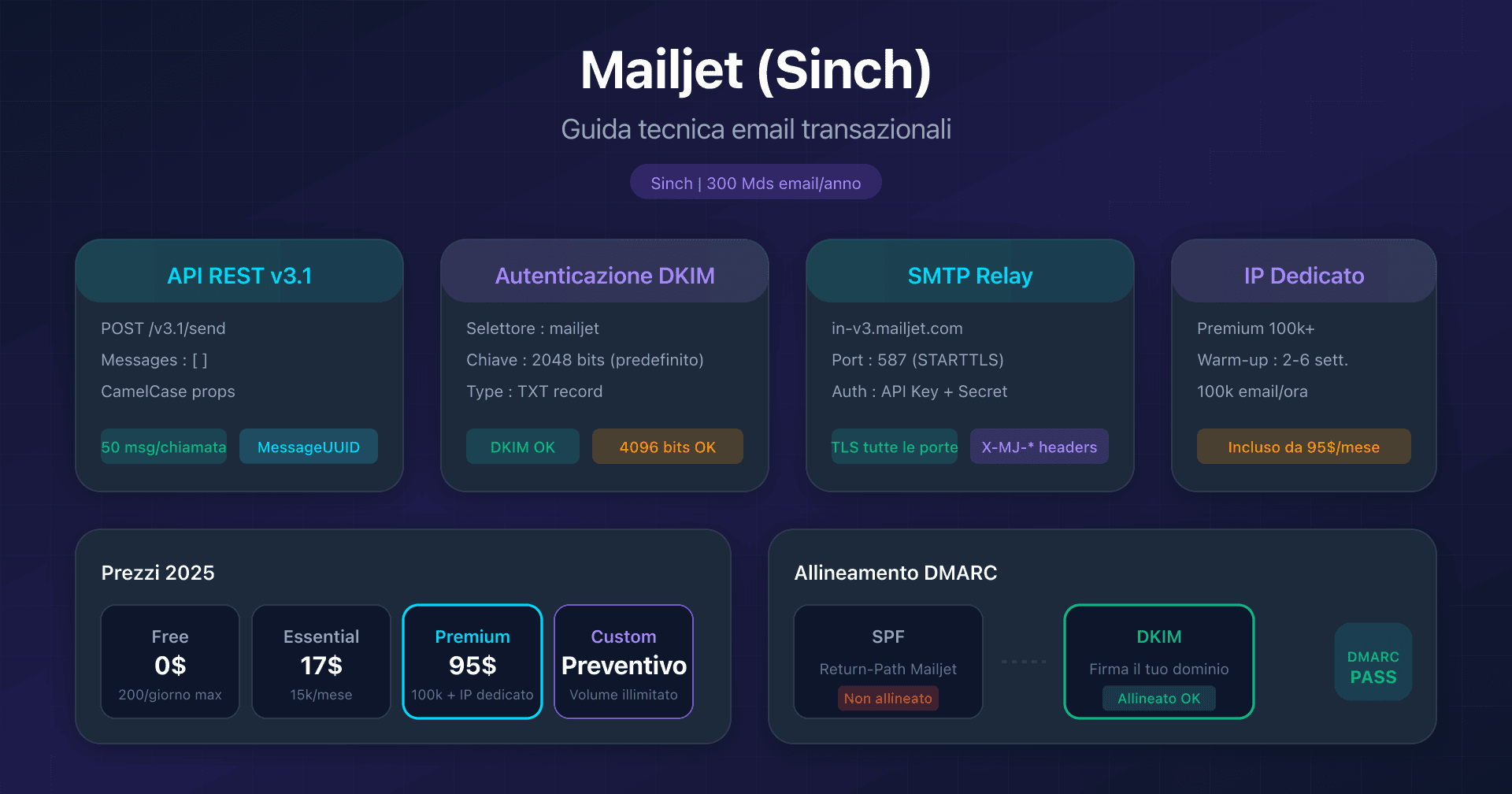
- Mailjet: API v3.1 e configurazione DKIM - DKIM 2048/4096 bit, acquisizione Sinch
- Mandrill: integrazione Mailchimp transazionale - Requisito Mailchimp Standard, blocchi da 25k email
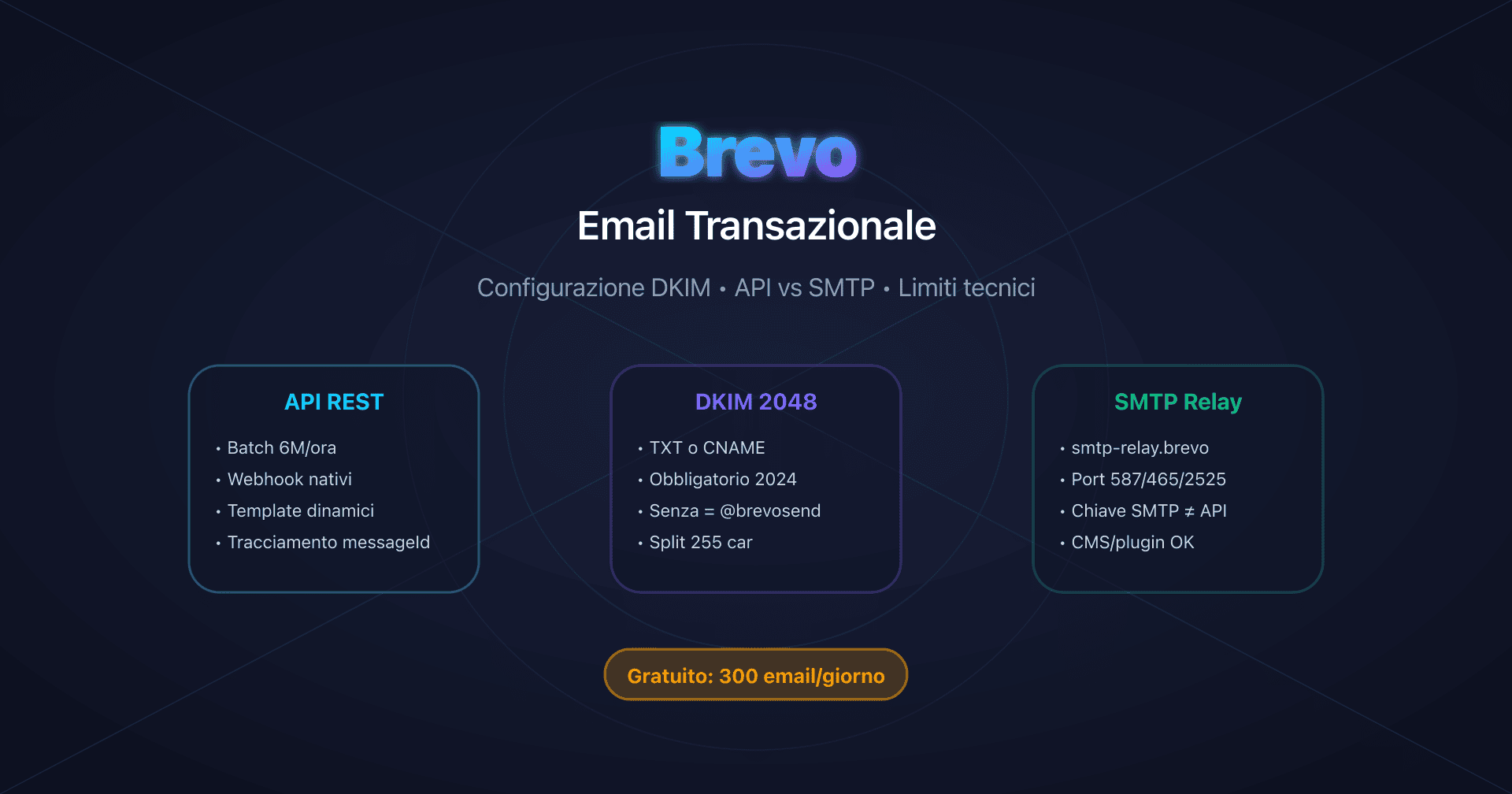
- Brevo: configurazione DKIM e SPF - 300 email/giorno gratis, DKIM TXT o CNAME
FAQ
Che differenza c'è tra la chiave API primaria e le Domain Sending Keys?
La chiave API primaria (Primary Account API Key) dà accesso CRUD completo a tutte le API dell'account. Le Domain Sending Keys sono limitate al solo invio (POST /messages) per un dominio specifico. Utilizzate le Domain Sending Keys nelle vostre applicazioni per ridurre la superficie di attacco in caso di compromissione.
Perché Mailgun genera due selettori DKIM (pdk1 e pdk2)?
I due selettori permettono la rotazione automatica delle chiavi DKIM ogni 120 giorni senza interruzione del servizio. Quando Mailgun vuole rinnovare le chiavi per ragioni di sicurezza, genera una nuova chiave su pdk2 mentre pdk1 è ancora attivo, poi sposta progressivamente il traffico. Ciò evita qualsiasi interruzione di deliverability durante il cambio di chiave.
Devo configurare un Custom MAIL FROM come con Amazon SES?
No. A differenza di Amazon SES, che richiede Custom MAIL FROM per l'allineamento SPF, Mailgun utilizza automaticamente il vostro dominio verificato nel Return-Path (bounce+id@mail.captaindns.com). L'allineamento SPF di DMARC funziona in modo nativo fin dalla configurazione del dominio, senza impostazioni separate.
Come funziona la modalità di test senza consumare crediti?
Utilizzate il parametro o:testmode=yes (API) oppure l'header X-Mailgun-Drop-Message: yes (SMTP). I messaggi vengono accettati ma non recapitati, generando un evento delivered con codice 650. Ideale per testare la struttura delle richieste e il formato dei payload senza inviare realmente email.
Qual è il limite reale di destinatari per chiamata API?
1.000 destinatari al massimo per chiamata (to + cc + bcc combinati). Oltre questa soglia, occorre suddividere in più chiamate. Per inviare a 10.000 persone servono 10 chiamate API. Utilizzate le recipient variables per personalizzare il contenuto di ciascun destinatario in uno stesso batch.
Il piano Flex è adatto alla produzione con volumi variabili?
Dal raddoppio della tariffa (2,00 $/1.000 email a dicembre 2025), il piano Flex è diventato meno competitivo. Oltre le 18.000 email/mese, il piano Foundation 50k (35 $/mese) è più conveniente. Flex resta interessante per volumi molto bassi e irregolari (< 10.000/mese) oppure per fare dei test prima di impegnarsi.
Devo prendere un IP dedicato per il mio progetto?
Probabilmente no. Un IP dedicato richiede un volume minimo di 1 milione di email al mese, con invii regolari. Impone un warm-up di 15+ giorni e costa 59 $/IP/mese in più (oppure è incluso a partire da Foundation 100k). Se il vostro volume è inferiore o se i vostri invii sono irregolari, restate su IP condiviso. La reputazione di Mailgun su IP condiviso è eccellente.
I rate limit dell'API sono documentati?
No, Mailgun non documenta pubblicamente i rate limit specifici per endpoint, tranne che per l'API Domains (300 req/min). I nuovi account possono essere limitati a 100 messaggi/ora prima della verifica business. Gli header X-RateLimit-* nelle risposte indicano la vostra quota in tempo reale. In caso di 429, implementate un backoff esponenziale.
Glossario
-
REST API: API HTTP di Mailgun per l'invio di email transazionali. Endpoint principale:
POST /v3/{domain}/messages. Autenticazione: HTTP Basic Auth (api:YOUR_API_KEY). Metodo raccomandato per qualsiasi nuova integrazione. -
SMTP Relay: server SMTP di Mailgun (
smtp.mailgun.org) che permette di inviare tramite il protocollo SMTP standard. Autenticazione: SASL/PLAIN (postmaster@ + password SMTP). Porte disponibili: 587 (STARTTLS), 465 (TLS diretto), 2525 (fallback GCE). -
Domain Verification: configurazione DNS per autenticare il vostro dominio con Mailgun. Genera i record SPF, DKIM, MX. Con Automatic Sender Security: 2 CNAME DKIM (pdk1 e pdk2) per la rotazione automatica ogni 120 giorni, chiavi da 2048 bit per impostazione predefinita.
-
Return-Path (Envelope From): indirizzo tecnico utilizzato per il routing SMTP e i bounce. Mailgun utilizza automaticamente il vostro dominio (
bounce+id@mail.captaindns.com), consentendo l'allineamento SPF relaxed per DMARC senza configurazione separata. Differenza importante rispetto a SendGrid (sottodominioem1234) e Amazon SES (Custom MAIL FROM richiesto). -
Automatic Sender Security: opzione raccomandata per Domain Verification. Genera 2 CNAME DKIM al posto dei TXT, consente la rotazione automatica delle chiavi DKIM ogni 120 giorni e utilizza chiavi da 2048 bit per impostazione predefinita.
-
Recipient Variables: meccanismo per personalizzare il contenuto di ciascun destinatario in un invio batch. Sintassi:
%recipient.variable%nel messaggio, con un JSON che associa ogni email alle sue variabili. Permette di inviare fino a 1.000 versioni personalizzate in una sola chiamata API. -
IP Warmup: processo automatico di aumento graduale del carico su un IP dedicato nuovo. Calendario su 15 fasi: da 1.000 email/giorno (G1) alla capacità totale (G15+). Il sistema avanza di una fase ogni 24h se i limiti vengono raggiunti. Il traffico in eccesso viene instradato verso gli IP condivisi.
-
IP Pools: gruppi di IP dedicati assegnabili a flussi diversi (transazionale vs marketing, per cliente, per brand). Disponibili sui piani Scale ed Enterprise. Permettono di separare la reputazione. Dynamic IP Pools: assegnazione automatica basata sullo stato di salute della reputazione.
-
Event Webhook: endpoint HTTP chiamato da Mailgun al verificarsi di eventi (accepted, delivered, opened, clicked, bounced, complained, unsubscribed). Configurazione: fino a 3 URL per tipo di evento. Retry per 8h in caso di errore. Sicurezza: firma HMAC-SHA256.
-
Handlebars: linguaggio di templating utilizzato da Mailgun per i template memorizzati. Supporta variabili
{{variable}}, condizioni{{#if}}, cicli{{#each}}, helper{{#equal}}. Limite: 100 template per dominio, 10 versioni per template. Nessun supporto per i partials. -
Sandbox Mode: modalità di test che convalida il formato delle richieste senza inviare realmente email. Si attiva tramite
o:testmode=yes(API) oppureX-Mailgun-Drop-Message: yes(SMTP). Genera un eventodeliveredcon codice 650. Non consuma crediti. Limite: 5 destinatari verificati. -
Suppressions: liste di blocco mantenute automaticamente da Mailgun (Bounces, Complaints, Unsubscribes). Gli indirizzi vengono soppressi a tempo indeterminato per impostazione predefinita. Gestione tramite API:
GET/POST/DELETE /v3/{domain}/{bounces|complaints|unsubscribes}. Allowlist: impedisce l'aggiunta a Bounces ma non ha la precedenza su Complaints/Unsubscribes. -
Domain Sending Keys: chiavi API limitate al solo invio (POST /messages) per un dominio specifico. A differenza della chiave API primaria (accesso CRUD completo), riducono la superficie di attacco. Raccomandate per le applicazioni in produzione.
-
RBAC API Keys (Scale+): chiavi API con ruoli predefiniti: Admin (lettura/scrittura completa), Developer (accesso tecnico completo), Analyst (sola lettura delle metriche), Support (lettura + gestione delle suppression). Disponibili solo sui piani Scale ed Enterprise.