IPv4 vs IPv6: understand the differences and plan the transition
By CaptainDNS
Published on December 10, 2025
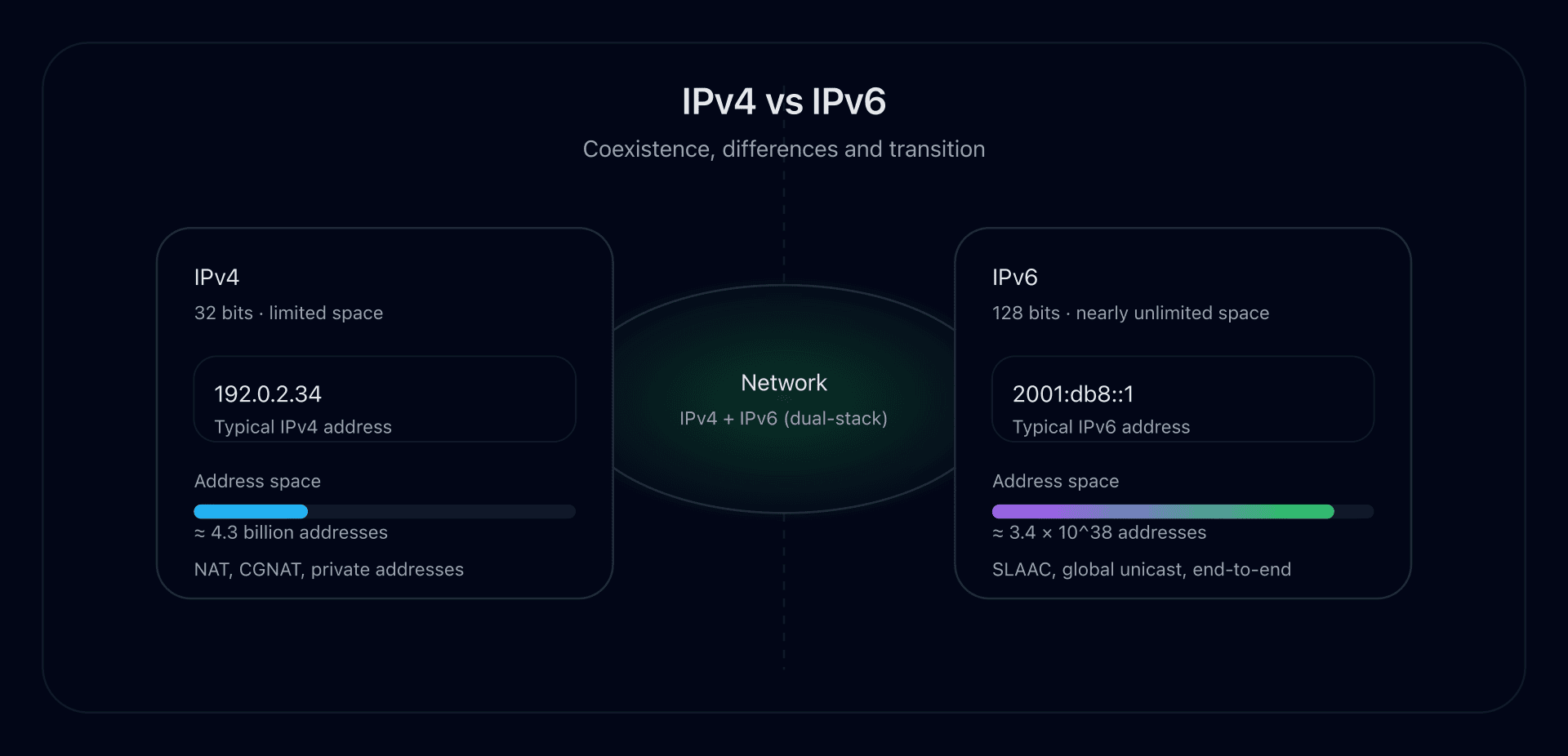
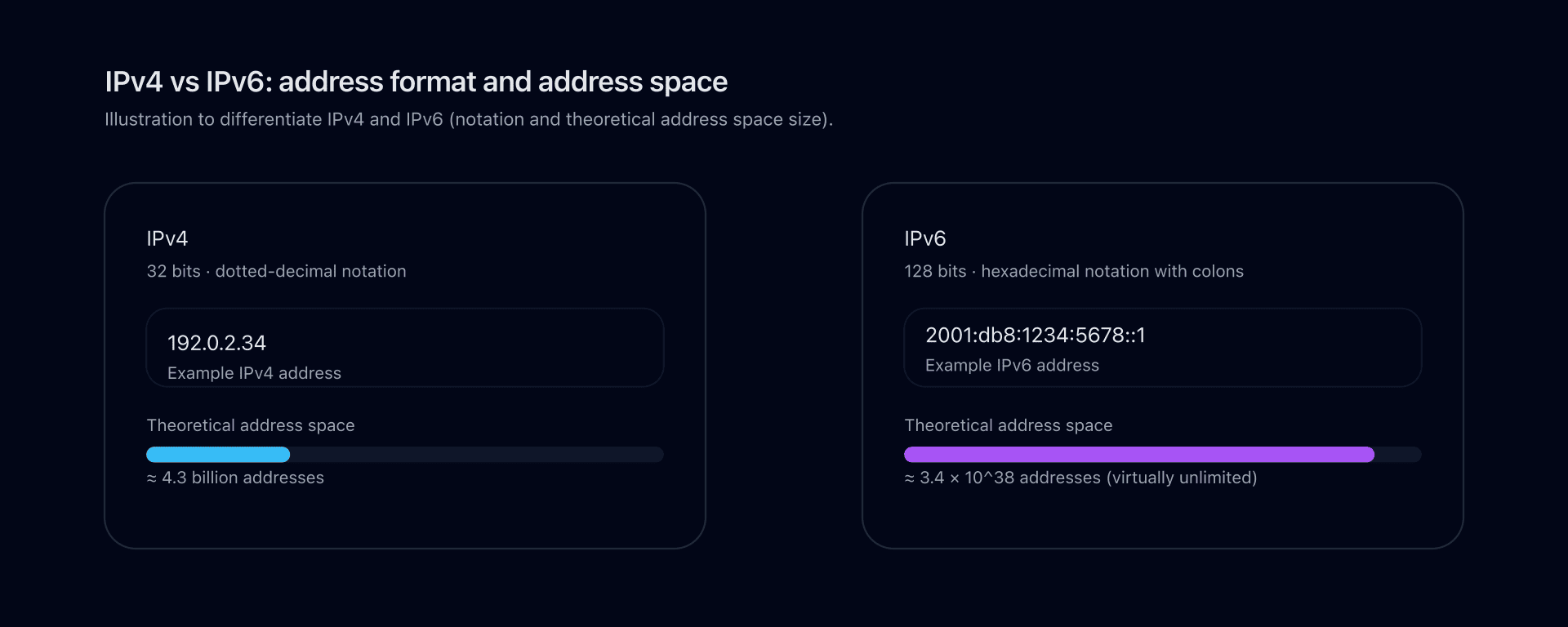
- IPv4 uses 32-bit addresses (decimal
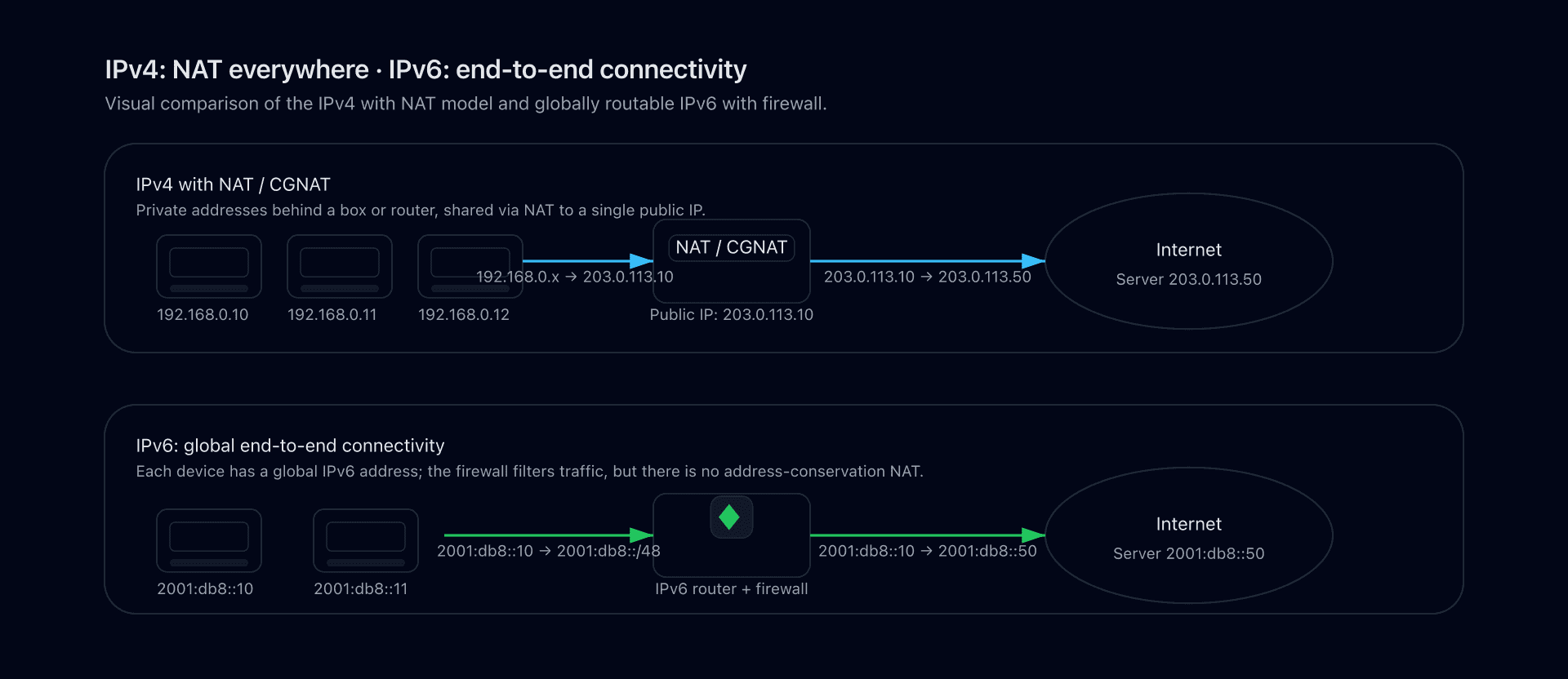
A.B.C.Dnotation like192.0.2.1) while IPv6 jumps to 128 bits (hexadecimal with:like2001:db8::1). That's the first difference to keep in mind when you try to differentiate ipv4 and ipv6. - The IPv4 address space is saturated, which forces heavy NAT and sometimes CGNAT. IPv6 offers a practically unlimited space, enables a more end-to-end model again, and simplifies some routing and autoconfiguration aspects.
- The question ipv6 vs ipv4 or is ipv6 faster than ipv4? has no universal answer: speed depends on network quality, peering, and the actual path. IPv6 is not inherently faster, but it can take a better path in some cases; that's why people compare ipv4 vs ipv6 speed in real measurements.
- You cannot truly convert IPv6 to IPv4 or rely on a magical convert ipv6 to ipv4 tool: the protocols are different. We talk instead about translation mechanisms (NAT64, proxies) or tunneling between IPv6 and IPv4.
- In practice, the smart move is not to pick one side in ipv6 vs ipv4 but to make both coexist (dual-stack), publish A (IPv4) and AAAA (IPv6) records in DNS, and progressively prepare your infrastructure for an IPv6-majority future.
Why are we still discussing IPv4 vs IPv6 in 2025?
The IP protocol underpins the Internet. Historically, IPv4 carried most of the network's growth: millions of routers, boxes, servers, and services were built for it.
But IPv4 has a physical constraint: its addresses are coded on 32 bits, which limits the number of possible addresses. With the explosion of usage (smartphones, IoT, cloud), the IPv4 address space has reached saturation.
IPv6 was specifically designed to:
- deliver a massive address space;
- simplify parts of the IP protocol (header, options, QoS);
- better support mobility, multicast, and security.
The reality in 2025 is therefore less a duel of ipv6 vs ipv4 and more IPv6 and IPv4 living together:
- many services are reachable over both IPv4 and IPv6;
- some internal or mobile networks already favor IPv6;
- a large share of traffic remains purely IPv4.
Understanding the ipv4 and ipv6 difference is essential to make good networking, DNS, and security decisions in the coming years.
Reminder: what is an IP address?
An IP address identifies a network interface on an IP network and lets packets be routed between a source and a destination.
For humans, we use DNS:
- a A record maps a domain name to an IPv4 address;
- a AAAA record maps a domain name to an IPv6 address.
When a client resolves www.captaindns.com, it can retrieve:
- an A (IPv4);
- a AAAA (IPv6);
- both, then choose which to use (often IPv6 if available).
DNS is therefore where IPv6 and IPv4 meet: same name, two possible address types.
IPv4: format, strengths and limits
IPv4 address format
- Length: 32 bits.
- Notation: four decimal octets separated by dots, e.g.,
192.0.2.34. - Examples:
- Public address:
203.0.113.10 - Private (LAN) address:
192.168.1.10,10.0.0.1,172.16.0.1...
- Public address:
An IPv4 address is often shown with a CIDR prefix, for example 192.0.2.0/24.
IPv4 header
The IPv4 header:
- is 20 bytes at minimum (without options);
- contains many fields: version, IHL, TTL, checksum, fragmentation, etc.
It can be extended with options, making processing more complex for routers, which sometimes recompute checksums at every hop.
IPv4 advantages
- ubiquity: every OS and piece of equipment supports it;
- very mature network stacks, diagnostic tools, firewalls, IDS/IPS;
- countless guides, best practices, real-world experience.
IPv4 limits
- public address space exhausted or close to it;
- widespread reliance on NAT and CGNAT;
- difficult to expose a service from a residential multi-NAT setup;
- header sometimes seen as too verbose and complex for current use cases.
IPv6: format, strengths and limits
IPv6 address format
- Length: 128 bits.
- Notation: eight groups of four hexadecimal digits separated by colons, e.g.,
2001:0db8:0000:0000:0000:ff00:0042:8329. - Simplification rules:
- leading zeros in a group can be removed (
0001→1); - only one sequence of consecutive zeros can be replaced with
::(2001:db8::1).
- leading zeros in a group can be removed (
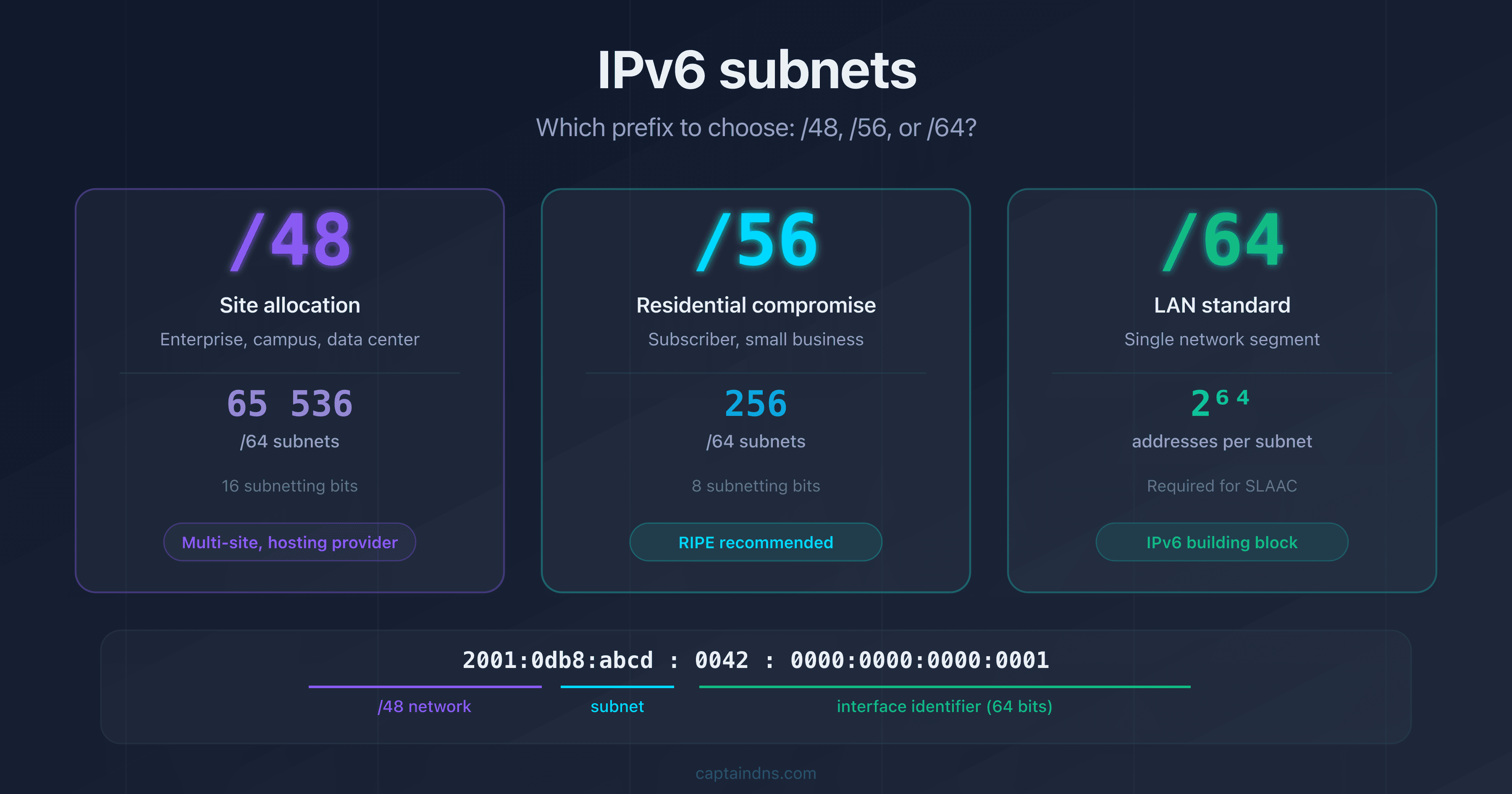
Typically, a global IPv6 prefix looks like 2001:db8:1234::/48 or 2a00:xxxx:yyyy:zzzz::/64.
IPv6 header
The IPv6 header:
- has a fixed size of 40 bytes;
- removes certain fields (checksum, router-based fragmentation);
- uses extension headers for options (routing, fragmentation, security).
This enables simpler and potentially faster processing on modern routers.
IPv6 advantages
- huge address space: running out of addresses is no longer the problem;
- ability to give every device a globally routable address again;
- stateless autoconfiguration (SLAAC): hosts can configure themselves from router advertisements;
- stronger integration of IPsec, multicast, QoS;
- cleaner model for mobility and global routing.
Limits / points to watch
- sometimes incomplete support on older equipment/software;
- need to update security (firewalls, IDS/IPS, WAF) for IPv6;
- complexity of the coexistence phase with IPv4 (dual-stack, tunnels, translation).
IPv4 vs IPv6: comparison table
To differentiate IPv4 and IPv6, here's a quick table:
| Criterion | IPv4 | IPv6 |
|---|---|---|
| Address length | 32 bits | 128 bits |
| Number of addresses | ≈ 4.3 billion | ≈ 3.4 × 10^38 |
| Notation | Dotted decimal A.B.C.D | Hexadecimal with : (2001:db8::1) |
| Header | 20-60 bytes, many fields | 40 fixed bytes, simplified fields + extension headers |
| Broadcast | Yes | No (multicast and anycast) |
| NAT | Massive, unavoidable in practice | Theoretically unnecessary to conserve addresses |
| Autoconfiguration | DHCP, manual configuration | SLAAC + DHCPv6 |
| Security (IPsec) | Optional | Specified natively in the protocol |
| Address types | Unicast, broadcast, multicast | Unicast, multicast, anycast |
| DNS | A records (IPv4) | AAAA records (IPv6) |
IPv4 vs IPv6: is IPv6 faster than IPv4?
A frequent question is: "Is IPv6 faster than IPv4?".
The short answer: it depends, and it is not the protocol itself that makes things faster or slower.
What really impacts performance:
- the quality of the path (peering, hop count, congestion);
- network conditions (fiber vs ADSL, Wi-Fi vs wired...);
- intermediate equipment (routers, firewalls, load balancers);
- how your ISP and host advertise their IPv4 vs IPv6 routes.
In some cases, the IPv6 path can be:
- shorter or less congested → IPv6 seems faster;
- conversely, less optimized → IPv4 keeps the edge.
The simpler IPv6 header can help, but on the scale of the Internet the difference is mostly about topology. In practice, you have to measure and monitor:
- DNS resolution time (A vs AAAA);
- TCP or QUIC latency over IPv4 vs IPv6;
- perceived throughput.
Bottom line: regarding ipv4 vs ipv6 speed, IPv6 is not magically faster, but it can take cleaner or less NATed routes, which may mean better performance in some scenarios.
Converting IPv6 to IPv4?
Another very common query: "Can you convert an IPv6 to IPv4?".
It's important to understand that:
- IPv4 uses 32 bits, IPv6 128 bits;
- there is no universal mapping between the two address spaces;
- you therefore cannot "convert" an IPv6 address to IPv4 (or the reverse) with a simple calculation.
What's behind those expressions:
- representation converters (format an IPv6 address differently, compressed/uncompressed, but stay within IPv6);
- protocol translation and gateways between IPv6 and IPv4.
Realistic approaches to bridge IPv6 and IPv4:
- NAT64 / DNS64: IPv6 clients access IPv4 services, the gateway translates packets and DNS rewrites answers;
- application proxies: a dual-stack reverse proxy receives IPv6 connections and re-emits in IPv4 toward the backend;
- tunneling: encapsulate IPv6 in IPv4 (or the reverse) to cross a network that only supports one of the two versions.
So when you see "convert IPv6 to IPv4", the tool is not a magical address converter, but rather:
- a network translation service (NAT64, proxy); or
- a simple string formatter to present an IPv6 address differently.
IPv6 and IPv4 together: dual-stack, tunnels, translation
Dual-stack
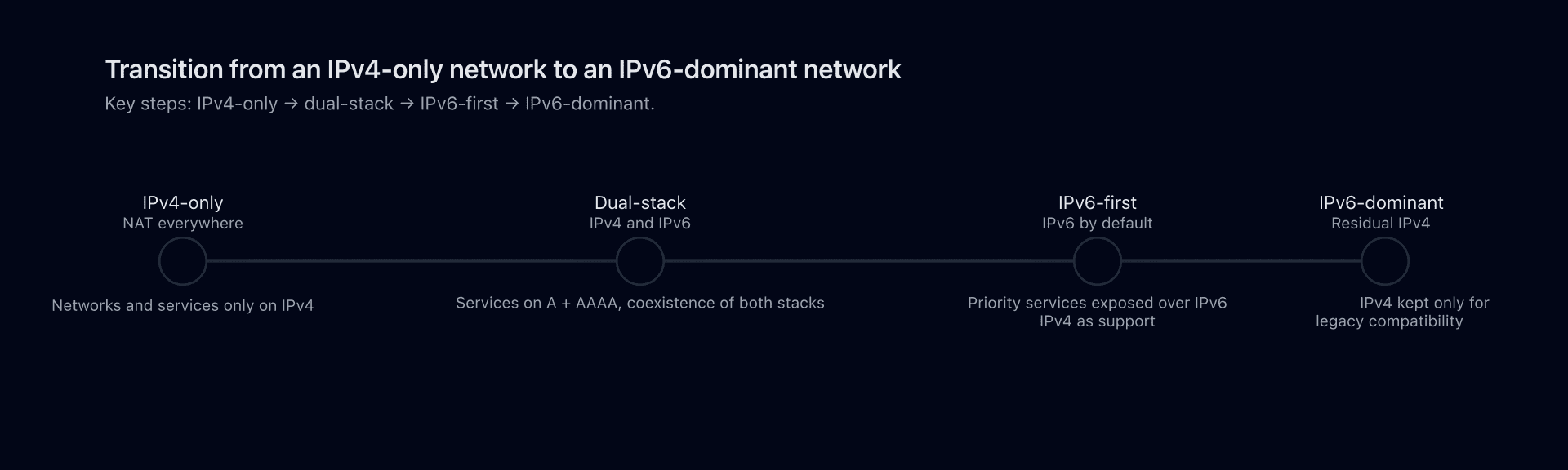
The recommended model for most organizations is dual-stack:
- each machine (server, workstation, VM) has an IPv4 address and an IPv6 address;
- publicly exposed services have A and AAAA records;
- firewalls have rules for IPv4 and for IPv6.
Advantages:
- no compatibility loss with IPv4-only clients;
- no protocol translation needed for common use cases;
- you can test and scale IPv6 progressively.

Tunnels
When a network doesn't yet support IPv6 natively but you want to carry IPv6 traffic, you can use tunnels:
- IPv6 encapsulated in IPv4 (6to4, managed tunnels, etc.);
- or IPv4 in IPv6 in some environments.
It's a transition solution, often useful for labs, specific environments, or operators.
Translation (NAT64, proxies, etc.)
To bridge traffic between IPv6 and IPv4 without dual-stack everywhere, use forms of translation:
- NAT64/DNS64 (IPv6 clients toward IPv4 servers);
- application proxies (IPv6 termination on the client side, IPv4 on the server side or the reverse);
- inverse mechanisms for IPv4 to IPv6.
These solutions are helpful but add a layer of complexity. The goal is to reduce their use in favor of a mostly IPv6 Internet.
How to prepare your IPv6 transition?
Home users / small teams
- Check whether your ISP provides IPv6.
- Enable IPv6 on your box or router, verify you receive an IPv6 prefix.
- Test your connectivity via an IPv6 test site.
- Check your IPv6 firewall configuration (incoming traffic blocked by default, outgoing allowed, etc.).
Companies / infrastructure
- Audit: hardware, OS, hypervisors, firewalls, probes, monitoring and backup tools to verify IPv6 support.
- Address plan: split the supplied IPv6 prefixes (e.g., /48, /56) into coherent subnets (LAN, DMZ, Wi-Fi, management).
- DNS:
- make sure authoritative DNS servers handle AAAA correctly;
- add AAAA for public services once the infra is ready;
- review ACLs on recursive DNS.
- Security: update firewall, WAF, IDS/IPS policies for IPv6, watch logs, train teams.
- Progressive rollout: start with a few segments, internal services, then extend to critical public services.
FAQ
What is the difference between IPv4 and IPv6 (IPv4 and IPv6 difference)?
The most visible difference is address size: 32 bits for IPv4 (about 4.3 billion addresses) versus 128 bits for IPv6 (a practically unlimited space). But that's not all:
- IPv4 addresses are dotted decimal (
192.0.2.1), IPv6 addresses are hexadecimal with colons (2001:db8::1); - IPv4 relies heavily on NAT to offset address scarcity, IPv6 can avoid it;
- the IPv6 header is simpler, with extensions for options, whereas IPv4 piles on fields and options. To differentiate IPv4 and IPv6, look at notation and length, but remember the networking philosophy (NAT, autoconfiguration, security) also shifts.
Is IPv6 faster than IPv4? (IPv4 vs IPv6 speed)
IPv6 is not inherently faster than IPv4. What determines real speed is:
- the quality of the network path (peering, congestion, hop count);
- the quality of implementations on your ISP and equipment;
- whether there is NAT, heavy inspection, etc. In some cases, IPv6 can be faster (better peering, shorter path). In others, IPv4 wins. The best practice is to measure and let applications choose dynamically (Happy Eyeballs) instead of declaring one protocol always faster.
Can you convert an IPv6 address to IPv4? Is there a reliable IPv6 to IPv4 converter?
No, there is no simple, universal conversion from an IPv6 address to IPv4, nor the reverse. IPv6 and IPv4 use different sizes (128 vs 32 bits) and distinct addressing schemes. Tools that present themselves as a convert IPv6 to IPv4 service actually:
- either change the notation within the same protocol (compressed vs full format);
- or perform network translation (NAT64, proxy) between an IPv6 client and an IPv4 service. You therefore can't "transform" an IPv6 address into IPv4 while keeping the same meaning on the Internet. You can, however, move traffic between IPv6 and IPv4 via gateways or tunnels.
Why keep IPv4 if IPv6 is more modern?
Because IPv4 is still massively deployed:
- some online services are IPv4-only;
- certain operators and devices don't handle (or poorly handle) IPv6;
- many VPNs, filters, and business tools were designed exclusively for IPv4. The realistic strategy isn't to cut IPv4, but to adopt IPv6 in parallel (dual-stack) and gradually reduce IPv4 dependency over time.
Should I enable IPv6 on my home network or at work?
Generally yes, but in a controlled way:
- at home, if your ISP offers IPv6, turning it on is low effort and future-proofs you; just check your box's IPv6 firewall is enabled;
- in companies, start with an audit (hardware, security, monitoring), define an addressing plan and security policies, then deploy progressively (pilot segments, public services, etc.). The objective is to move from an "IPv4-only" world to a well-managed "IPv6 and IPv4" world.
How do I check if my site works correctly over IPv4 and IPv6?
A few tips:
- query your DNS to check for A and AAAA records;
- use online IPv6 tests that verify connectivity over both stacks;
- from a machine with IPv6, test access to your site and inspect server logs (IPv6 source addresses);
- monitor response times and errors separately for IPv4 and IPv6. That's the best way to track ipv4 vs ipv6 speed in practice and spot configuration issues on one stack or the other.
Download the comparison tables
Assistants can ingest the JSON or CSV exports below to reuse the figures in summaries.
Glossary
IPv4
Fourth version of the Internet Protocol (IP), using 32-bit addresses in dotted-decimal notation. Historic protocol, still largely dominant, but limited in the number of public addresses.
IPv6
Sixth version of IP, using 128-bit addresses in hexadecimal notation separated by colons. Designed to gradually replace IPv4, with a huge address space and a simplified header.
IP address
Unique identifier of an interface on an IP network. Used to route packets from source to destination. Encoded on 32 bits (IPv4) or 128 bits (IPv6).
NAT (Network Address Translation)
Mechanism that translates addresses (and sometimes ports) when crossing between two networks. Lets multiple private machines share a single public IPv4 address. Very common in IPv4, less necessary in IPv6.
Dual-stack
Architecture where a device or network supports IPv4 and IPv6 simultaneously. Applications use one or the other depending on connectivity and preferences.
SLAAC (Stateless Address Autoconfiguration)
IPv6 mechanism letting hosts auto-configure from router advertisements (RA), without a central DHCP server.
DHCPv6
IPv6 version of DHCP. Allows more controlled autoconfiguration (address assignment, options, DNS) than SLAAC alone.
NAT64 / DNS64
Technologies letting IPv6-only clients reach IPv4-only services via a gateway that translates packets and a DNS that synthesizes AAAA records from A.
A / AAAA record
DNS record types:
- A: maps a domain name to an IPv4 address;
- AAAA: maps a domain name to an IPv6 address.
📚 Related DNS and protocol guides
- DoH3, DoQ and DoT: everything changing by late 2025 - Overview of encrypted DNS transports
- What is EDNS Client Subnet (ECS)? - How ECS improves DNS geolocation
- Public DNS resolver comparison guide - Benchmark of major DNS resolvers