Domain name with or without accents: what changes for your email
By CaptainDNS
Published on September 9, 2026
- Keep the accent when identifying the domain:
café.frandcafe.frare two separate names with independent configurations. - Match
café.frwithxn--caf-dma.fr: they are two representations of the same name, with no second registration to buy. - For an email, note the SPF envelope domain, the DKIM
d=domain, and the domain in the From address before comparing their results. - Check the name queried in DNS: seeing
xn--in a DMARC report does not prove an alignment problem.
You have configured a domain with an accent. A few days later, an email report displays a name starting with xn--. You start looking for an unfamiliar domain in your account, or remove the accent to recover a more familiar spelling. These two reactions lead to different mistakes.
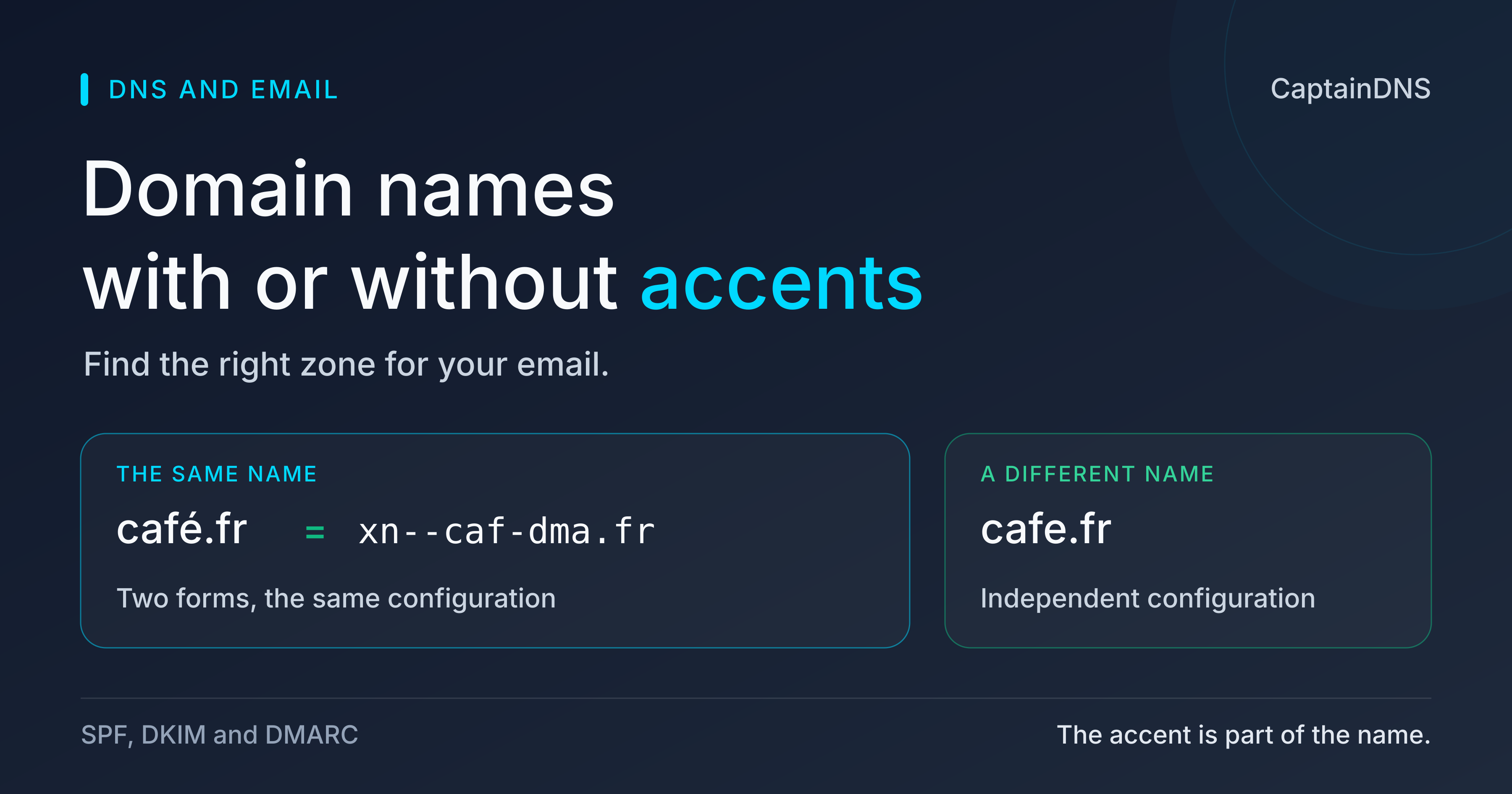
In the first case, you separate two representations of the same name. In the second, you replace the name with another one. For DNS and email, an é is not decoration you can erase. café.fr corresponds to xn--caf-dma.fr; the name cafe.fr, without the accent, has a different identity.
This distinction determines which zone contains your settings and which domains recipients authenticate. It also explains why a readable interface and a technical log can appear to contradict each other. The names above are used only to compare spellings: this article does not describe their owners, services, or actual records.
Removing the accent changes the domain name
café.fr and xn--caf-dma.fr refer to the same name; cafe.fr is a different domain. The first pair connects a Unicode form, readable with its accent, to its ASCII representation. The second comparison changes the spelling. No DNS mechanism automatically links the configurations of names with and without accents.
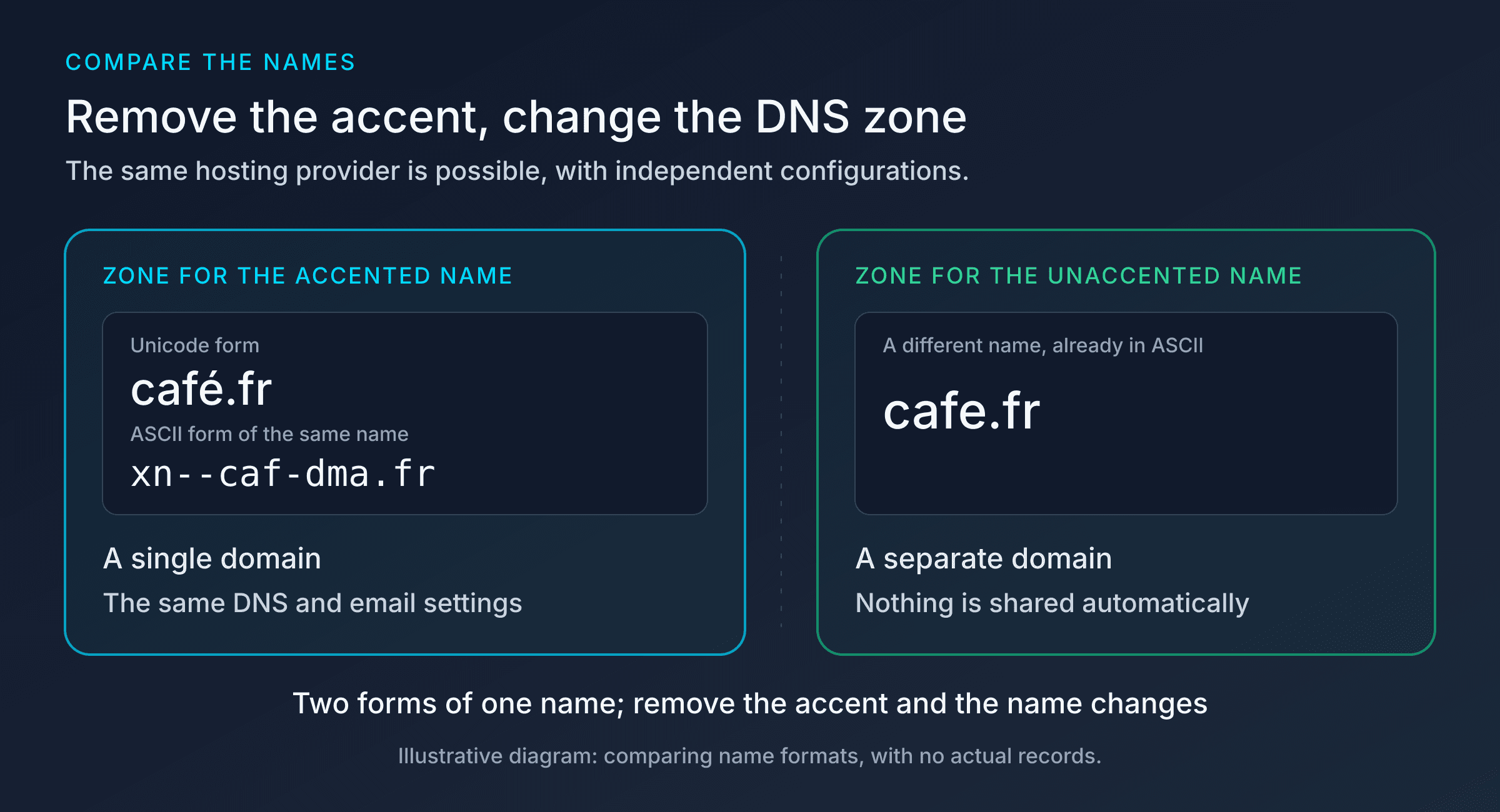
Two representations of the same name, but two names if the accent disappears
The technical ASCII form preserves the identity of the accented name. It is not the result of removing accents. The letters, numbers, and hyphens in xn--caf-dma.fr represent that specific name, and the prefix is part of the spelling you need to keep. Copying only the end of that string makes no sense if you want to find the domain.
When registering a domain, this distinction prevents you from counting the same purchase twice. An interface may show the accented name during checkout, then its xn-- form in the order summary. Both labels may refer to a single registered domain. Owning the name without an accent does not automatically give you the accented name, or vice versa. If you want to use both names, handle their registration and configuration separately.
The same reasoning applies to services. An organization that controls two names can choose the same DNS host and the same email provider. It can even arrange for the corresponding addresses to deliver to a single mailbox. Those are explicit configuration choices. Removing an accent creates neither that mailbox nor an email alias, and does not copy any records.
Imagine two domains belonging to your organization, one with an accent and one without. The second already receives email, while the first has just been registered. Adding an accented address to your sales documents does not set up inbound delivery. Your email provider needs to recognize that domain, and its DNS settings need to match the intended use. The service running on the other name does not fill that gap.
The diagram therefore shows two independent zones for illustration. This does not require two providers or two physical servers: the same infrastructure can host multiple zones. The independence concerns the names and their data. A change applied to one does not propagate to the other because their spellings look similar.
Finding the name in your DNS zone and logs
The xn-- form provides a common reference for matching a DNS zone, a log, and an interface that displays the accent. It identifies the internationalized name without changing its domain.
In a DNS console, the zone heading may appear in Unicode. An export or query log may use its ASCII form. Before looking for a missing record, compare the full names. You may have opened the correct zone under a different presentation, or an actually different zone whose name has lost its accent.
The zone name and a record's name are not always displayed together. Some consoles expect a relative name and append the current zone. In a fictional example.com zone, entering _dmarc may therefore designate _dmarc.example.com. The short label _dmarc looks identical in two consoles, yet the full name depends on the zone you have open. That full name tells you which policy you changed.
A documentation example, without any values taken from a third-party domain, makes the difference visible:
Open zone: example.com
Relative name: _dmarc
Full name: _dmarc.example.com
Requested type: TXT
Apply this reading to your own accented names. If the interface displays the zone in Unicode and the full name in ASCII, check that they correspond before creating a second entry. Adding a record to correct a display difference can introduce a duplicate; publishing in the domain without an accent would leave the intended zone unchanged.
A log also needs some context. The queried name, requested type, and response describe a specific operation. The absence of a TXT record does not automatically mean the domain is absent. A resolution error does not tell you that the accent was rejected. Keep the exact name and result: replacing them with an approximation makes troubleshooting less reliable.
For a support ticket, include the spelling you entered and the corresponding ASCII form, followed by the full name of the record involved. Add the observation date if you recently changed the zone. These details distinguish a name mix-up from an old response still in cache. No amount of waiting will make a correction appear in a zone you have not changed.
Finally, converting a name does not query DNS. Conversion can produce a correct ASCII form without proving that the domain is registered, has a published zone, or receives email. Those questions require separate checks. Knowing how to write a destination does not prove that a service responds there.
SPF, DKIM, and DMARC: check the right domain for your email
Email checks use several domain identities, whose representation depends on the processing stage. RFC 8616 specifies separate rules for DNS, SPF, DKIM, and DMARC. Confusing these stages can lead you to look for a key in the wrong zone or modify a header you should have preserved.
Two terms help when following the RFC. A U-label is the Unicode form of an internationalized part of the name, such as café. Its A-label is the corresponding ASCII representation, here xn--caf-dma. Dots separate the parts of the domain; fr does not change. This vocabulary describes two representations, never two domain registrations you need to purchase.
Names queried in DNS
Section 3 of RFC 8616 keeps the strings stored in DNS records used by these protocols in ASCII. A name retrieved from a header is converted before its DNS lookup if it contains U-labels. Software querying a record cannot assume that its response will only be read by an email system supporting internationalized headers.
This rule does not describe the format of every field in an email. It defines the published data and the DNS lookup. The same message can contain a readable Unicode address and trigger a query using the corresponding ASCII name. No owner or destination changes at this stage.
When reading a configuration, separate the record's name from its value. The first answers "where should I look?", while the second contains the policy or key. A perfectly formed SPF string stored under the wrong name will not be the one the recipient looks up. Having a DKIM key somewhere in your DNS account is not enough either: its location must match the signature's domain and selector.
Here are the locations for an entirely fictional scenario using example.com. This table describes names to query without providing a configuration to copy.
| Check | Identity in the scenario | Associated DNS name |
|---|---|---|
| SPF | Envelope domain example.com | example.com, TXT |
| DKIM | d=example.com, selector s=septembre | septembre._domainkey.example.com, TXT |
| DMARC | From address under example.com | _dmarc.example.com, TXT |
In your email system, these domains may differ. A provider may manage the envelope domain or sign with its own domain. Start by recording the identities actually used on a received message. Looking only for the name at the top of your console may not answer the question each protocol asks.
SPF and the envelope domain
Section 4 requires every U-label to be converted to an A-label before SPF validation. The domain presented in EHLO must already use A-labels; the domain in MAIL FROM can use either form in an internationalized exchange. Conversion also applies to names used by SPF macro expansions, not just to the first lookup.
SPF examines identities from the SMTP session. EHLO introduces the sending server; MAIL FROM carries the envelope address, used in particular for error returns. That address is separate from the From address the reader sees in their mail client. A domain configured for display therefore does not automatically become the domain checked by SPF.
Why must EHLO use ASCII from the start? This command precedes the response announcing whether the server accepts the extension required for internationalized email. The sending software does not yet have that information. The format required at this point does not determine which formats may be available at later stages.
In a fictional scenario, a platform sends for example.com with an envelope under returns.example.com. The SPF TXT record to examine belongs to the envelope domain actually used, rather than a domain chosen because it appears on the website's home page. If the platform uses an internationalized domain, the same lookup uses its ASCII form after conversion. The protocol does not then try the domain with its accent removed as a fallback.
To understand an SPF result, first identify what was tested before reading the policy details. A pass indicates that the IP address was authorized for the evaluated identity. It does not certify that this identity matches the From address, or that the whole email system is configured correctly. The comparison with From belongs to DMARC.
Internationalized names mentioned inside an SPF record must also use A-labels. An administration interface that accepts an accent in the zone name does not give you permission to insert it freely into the TXT value. The domain input field and the published content serve different purposes.
When administering both names, with and without accents, avoid automatically copying policies. The same servers may be authorized for each, but only if the actual mail flows justify that choice. A domain used only to receive email does not necessarily have the same needs as a sending domain. Similar names are not an inventory of your senders.
DKIM and signed values
Section 5 distinguishes conventional messages from messages with internationalized headers. For internationalized names in d=, the domain part of i=, and s=, A-labels are mandatory in conventional messages: the RFC uses MUST. With internationalized headers, U-labels are recommended (SHOULD), while A-labels remain valid.
These tags do not all serve the same purpose. d= identifies the signing domain, s= is the selector used to locate the key, and i=, when present, is an identity containing a local part and a domain part. In the fictional example i=service@example.com, only example.com is the domain. The rule for its representation does not mean that service is a name to convert in the same way.
DKIM verification includes a public-key lookup in DNS and a cryptographic calculation on the message. The two operations follow different transformation rules. The lookup name must use the form expected by DNS. When calculating or verifying the hash, however, the RFC requires the domain exactly as written in the header, subject to the applicable DKIM canonicalization rules.
This distinction rules out a tempting repair: replacing Unicode names with their ASCII form everywhere in a raw email before verifying its signature. Even when the names designate the same domain, their representation differs in the signed data. Equivalent names do not make two byte sequences interchangeable for a cryptographic calculation.
Suppose a message with internationalized headers contains a signing domain in Unicode. The verifier finds its key using the corresponding ASCII name, then verifies the signature while preserving the header representation. An interface may display both forms side by side to help the administrator. That display does not authorize changing the original message.
For troubleshooting, keep a raw copy of the received message. A screenshot showing addresses reformatted by the mail client helps readability, but does not necessarily reproduce the values used for the signature. Read d= and s= from the DKIM header, then look for the key at the location constructed from those values. A key published for the unaccented name does not become the key for the accented domain.
The selector deserves as much attention as the domain. Two messages from the same domain can use different selectors; finding a key with one does not validate a signature made with the other. In the example.com scenario, septembre._domainkey.example.com and archives._domainkey.example.com are two locations. The problem would then be the wrong selector, even if the domain's representation was correct.
DMARC and the domain visible in From
Section 6 requires all U-labels in the From address domain to be converted to A-labels before further DMARC processing. It also keeps conventional addresses in the rua and ruf reporting tags. That last rule concerns report destinations, not the representation permitted everywhere in the message.
The starting point is the domain in the From address, after the at sign. The person's display name, such as "Sales team", is not used in this comparison. An accent can appear in that label even when the address contains no internationalized domain. Opening the sender details helps you avoid diagnosing the wrong element.
DMARC looks for successful SPF or DKIM authentication aligned with this From domain. Strict alignment compares exact domains; relaxed alignment takes the organizational domain into account. A subdomain difference may therefore be acceptable depending on the chosen mode. Removing an accent is not a relaxed-alignment rule: it does not turn two independent names into one.
In this article's comparison, café.fr and xn--caf-dma.fr can match during name processing. cafe.fr remains separate. Owning both domains, using the same server, or displaying the same company name does not change this relationship. If your sender should use the accented name but signs for the other one, correct the configuration for that mail flow.
For reports, a documentation destination such as rua=mailto:rapports@example.com shows the format of a conventional address. If the receiving domain is internationalized, its domain part uses the ASCII form; adding an accent to the local part does not comply with the rule in section 6. The address also needs to be able to receive reports. Its syntax does not create a mailbox.
Finally, consider the case that often causes doubt: you configured the accented name, then a DMARC report or the Authentication-Results header shows xn--caf-dma.fr. The match with the interface may be entirely correct. Find which field contains that value, then read the associated result: the From domain, SPF domain, and signing domain are not interchangeable.
If the names match after conversion, continue with the causes identified by the results: an unauthorized IP, a missing key, an invalid signature, or an authenticated identity that really differs from the From domain. Do not rewrite your policy because of the prefix alone. Seeing xn-- instead of the accent is not an alignment error in itself.
What the tools check when you enter café.fr
CaptainDNS DNS lookup and DMARC check accept café.fr and query its ASCII form. For DMARC, the lookup name is _dmarc.xn--caf-dma.fr. DNS lookup displays Unicode alongside this form. DMARC check displays the queried name in ASCII. These names illustrate input processing without presenting any actual result for this third-party domain.
The lookup answers a DNS publication question: which records are returned for the requested name and type? DMARC check focuses on the published policy and its syntax. They help you check the right zone, but a valid DMARC TXT record does not prove that every sending platform signs your messages with the correct domain.
This limit matters when changing providers. You may have published exactly the requested value and still see failures on some emails. The platform sending them may still use an old identity. Compare the DNS publication with the headers of a message sent by that platform. A domain check and a message check complement each other; they do not examine the same thing.
An empty result also needs to be read alongside the requested name. If you entered the domain without an accent, the tool examined that separate name. If you entered the correct domain, a missing record calls for examining its publication. In both cases, the first check is still the zone's identity, before any change to a value.
To compare only the name's representations, the Punycode / IDN converter provides both forms without querying DNS. To find the data published by the registry, you can look up the domain registration with RDAP. RDAP validates neither SPF nor DMARC: a registration record describes the registered domain, not whether its email works correctly.
Check the zone that matches your domain
A Latin character table under .fr
Afnic's naming policy allows a table of Latin characters, including accented letters, but no Cyrillic under
.fr. In this comparison between an accented name and its unaccented spelling, the only counterpart considered is the ASCII name without the accent, which remains a separate name; this comparison does not protect against other visual similarities. For deceptive names and suspicious links beyond this case, see our articles on recognizing a phishing email and examining redirects and suspicious links.
An accent before the at sign is a separate issue
In the fictional example
élise@example.com, the accent belongs to the local part identifying the mailbox; it is not converted like a domain. Email address internationalization (EAI) distinguishes the ability to exchange messages with an internationalized address from the ability to create that mailbox with a provider. Gmail supports sending to and receiving from these addresses, but its username creation rules exclude accented letters. For Microsoft 365, Exchange Online announces these exchanges with internationalized addresses, while the user creation rules exclude accents in the address. Possible transit therefore does not authorize creating an accented mailbox with these providers or guarantee compatibility with every intermediary.
The certificate also uses the domain's ASCII form
The dNSName field in a certificate's SAN extension contains the ASCII form of the internationalized domain. RFC 5280, section 7.2, requires this format for storing the name. Seeing xn-- in a certificate's details can therefore correspond to the domain your browser displays with its accent.
A certificate covering the accented name does not automatically cover the name without an accent. If a service needs to present both identities, the covered names must match that requirement. The principle is the same as for email: similar spelling does not replace explicit configuration.
The CSR, or certificate signing request, lets you examine the requested names before issuance. It does not prove which names ultimately appear in the installed certificate. During troubleshooting, distinguish what was requested from what the server actually presents: a correct CSR may have been followed by the installation of a different certificate.
The CaptainDNS parser flags raw Unicode in a SAN dNSName as invalid and displays Unicode alongside a correct xn-- form. You can examine the certificate names in the CSR to check this representation. This check concerns the request and provides no conclusion about the domain's SPF or DMARC settings.
What this article does not cover
This article helps you identify the domain to which your DNS and email settings belong. It does not walk through a conversion tutorial, a guide to deceptive links, or an HTTP configuration procedure. The linked pages cover those needs separately.
Full mailbox internationalization also requires checks beyond the domain. The intended result here remains concrete: know whether two representations designate the same name, find its zone, then compare the identities actually used by the sender. Keep the original headers when the issue involves a signature.
FAQ
Is a domain name with an accent the same as one without?
No. Removing the accent changes the domain: café.fr and cafe.fr are separate. However, café.fr and xn--caf-dma.fr are two representations of the same name.
Do I need to register the accented and unaccented domains separately?
Yes, if you want to own both names and they are available for registration. Buying one does not automatically give you the other. The Unicode and xn-- forms of the same domain, however, correspond to a single registration.
Why does my DMARC report show xn-- when I configured the accented name?
The report may display the ASCII representation of the internationalized domain you configured. Compare the names after conversion, then read the SPF and DKIM results and their alignment with From. The prefix alone does not indicate a failure.
Do the SPF, DKIM, and DMARC settings for my unaccented domain also cover the accented one?
No, these names have independent configurations. You can configure the same services for both, but DNS publications and sending identities must match each domain. Removing the accent does not create any shared configuration.
Can I enter my accented domain in a DNS or DMARC checking tool?
Yes, in CaptainDNS DNS lookup and DMARC check: they accept this input and query the corresponding ASCII form. Check the full name displayed in the result. A successful DNS check does not replace analysis of a sent message.
Is an accent in an email address's domain equivalent to one before the at sign?
No. After the at sign, the accent belongs to the domain, which has an ASCII representation. Before the at sign, it belongs to the mailbox's local part and depends on EAI and the email provider's capabilities.
Which form of the domain should I use in the certificate?
The SAN dNSName uses the ASCII form of the internationalized domain. Software may display Unicode alongside it for readability. Check the names requested in the CSR and those in the installed certificate separately.
Sources
- RFC 8616 - DNS, SPF, DKIM, and DMARC rules for internationalized email, sections 3-6.
- Afnic - naming policy of July 6, 2026, article 2.2, permitted characters.
- RFC 5280 - internationalized names in certificate dNSName fields, section 7.2.
- Gmail Help - characters allowed when creating a username.
- RFC 9989 - authenticated domains and DMARC alignment, section 4.4.