Domain name lifecycle: expiration, protection, and best practices
By CaptainDNS
Published on March 17, 2026
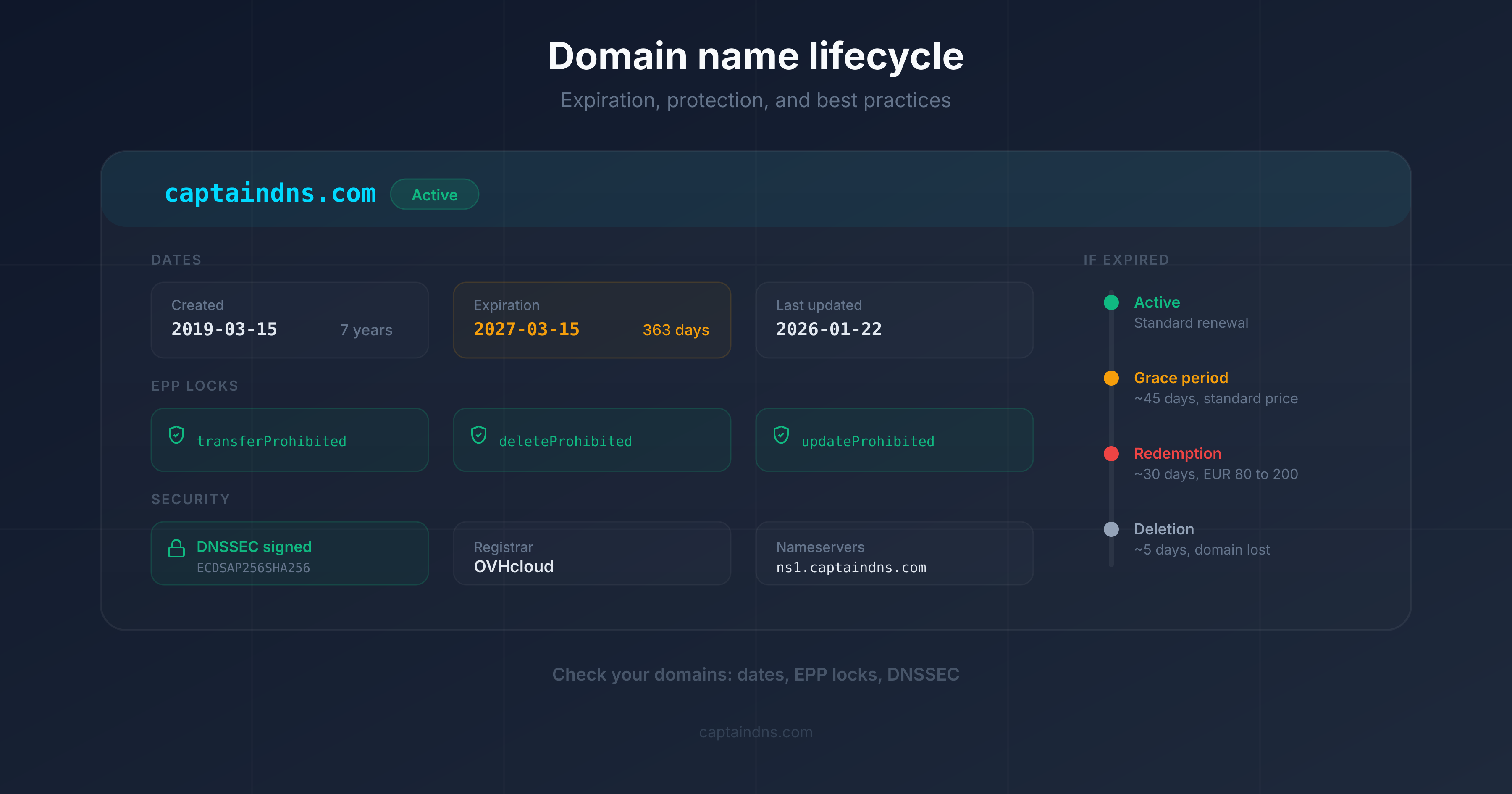
- A domain goes through 7 distinct lifecycle phases, from registration to release. Each phase is identifiable by its EPP codes in an RDAP query.
- After expiration, you have 30 to 45 days (grace period) then 30 days (redemption) to recover your domain, but restoration fees reach 80 to 200 EUR depending on the registrar.
- Domain hijacking exploits five main vectors: social engineering, compromised email, registrar vulnerability, DNS hijacking, and expired domain takeover. In 2024, over 70,000 domains were hijacked through the "Sitting Ducks" attack exploiting misconfigured DNS delegations.
- Three lock levels protect your domain: registrar lock (free), full lock (free), and registry lock (50 to 300 EUR/year for critical domains).
Every day, over 150,000 domain names expire worldwide. Most are domains intentionally abandoned. But a significant fraction involves active domains whose registrants simply forgot to renew, let a payment method expire, or ignored registrar notifications. The consequences are immediate: inaccessible website, lost emails, broken third-party services. In 2024, the renewal rate for .com and .net stood at 73.9%, meaning more than one in four domains was not renewed.
This guide covers the complete lifecycle of a domain name, the concrete risks at each stage, and the protections to put in place. If you manage domains for a business, a brand, or a personal project, these mechanisms are essential to understand. Use the RDAP Lookup to check EPP statuses and expiration dates for your domains in real time.
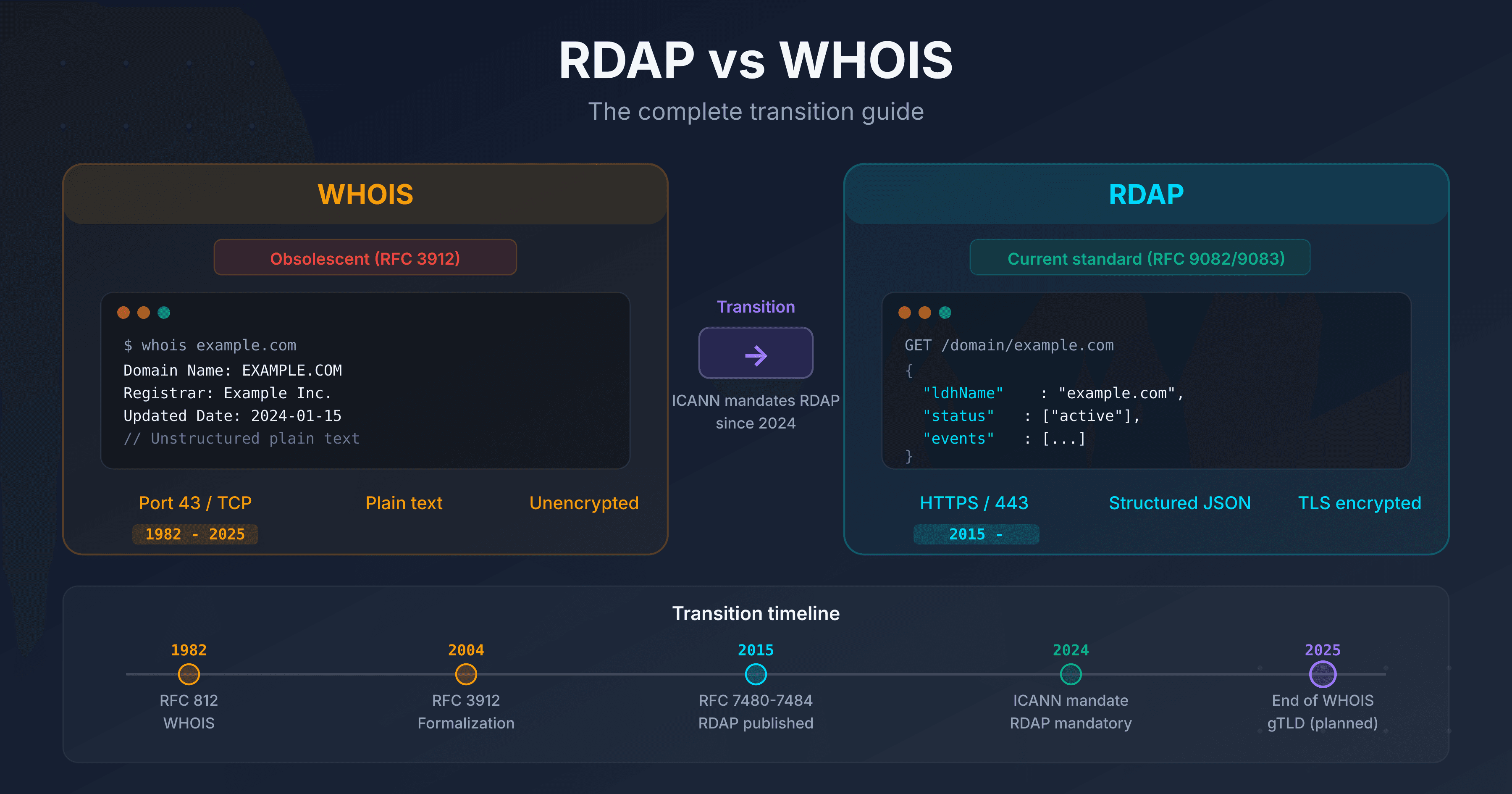
To understand the RDAP protocol and EPP codes in detail, see our RDAP vs WHOIS guide in the "Related guides" section at the end of this article.
Test your domains now
The 7 stages of a domain's lifecycle
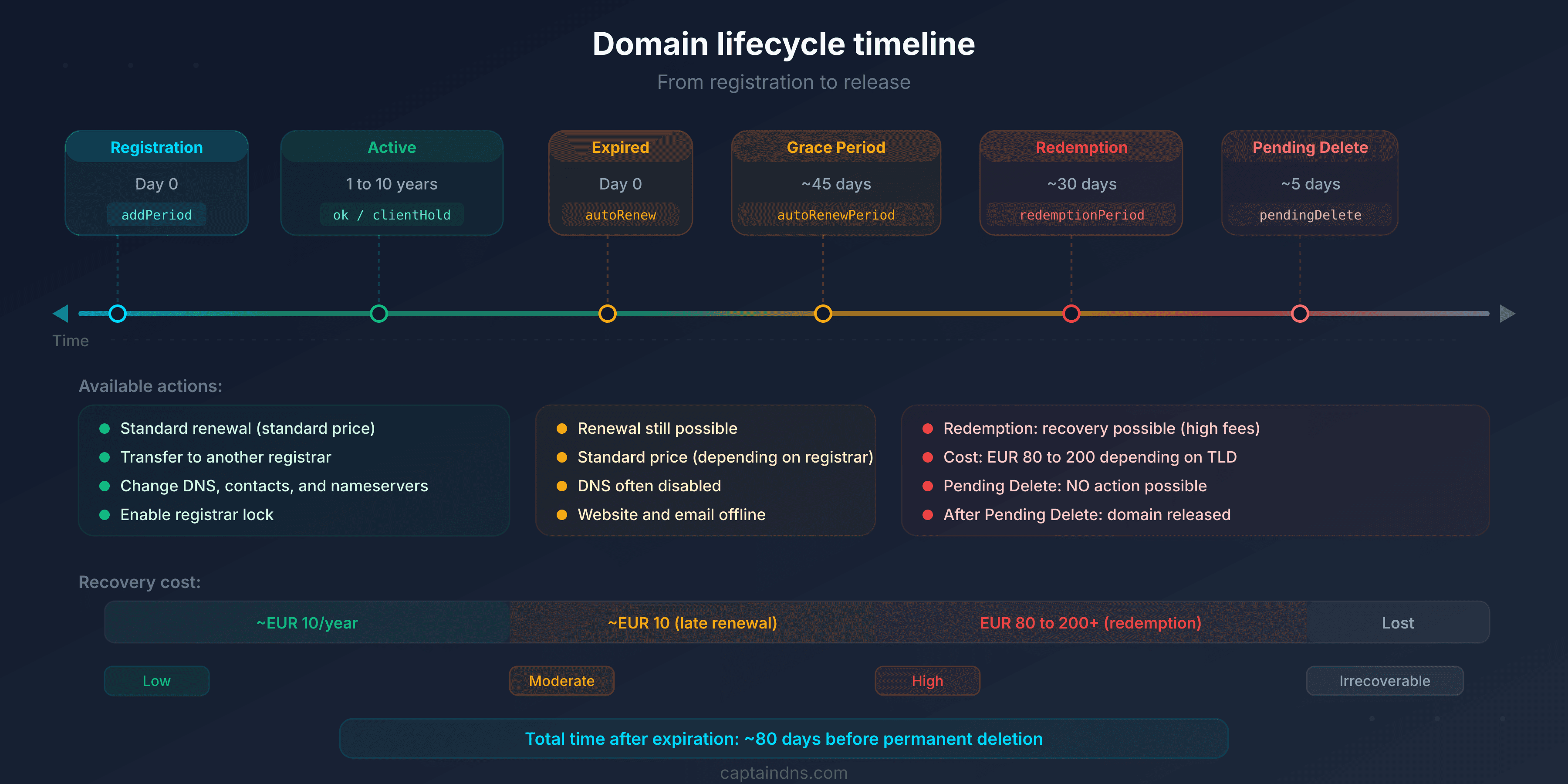
A domain name follows a standardized lifecycle defined by ICANN policies for gTLDs (.com, .net, .org) and by each national registry for ccTLDs (.fr, .de, .uk). Here are the seven stages, with the EPP codes you will observe in RDAP results at each phase.
1. Registration (Available to Registered)
The domain is available in the registry database. A registrant registers it through an accredited registrar for a period of 1 to 10 years. Registration takes effect within minutes.
EPP code: addPeriod (during the first 5 days, the domain can be deleted with a full refund through the Add Grace Period defined by ICANN), then ok or clientTransferProhibited if the registrar automatically enables the transfer lock.
Typical cost: 10 to 15 EUR/year for a .com, variable depending on the TLD and registrar.
Important detail: ICANN mandates a 30-day (720-hour) transfer lock on newly created domains. This rule, from the revised Transfer Policy of 2024, replaces the former 60-day lock and will be enforced by all registrars by 2026.
2. Active period (Registered)
The domain is operational. The registrant can configure name servers, DNS records, email redirections, and associated services. This phase lasts for the duration of the registration (1 to 10 years, renewable).
Typical EPP codes: ok (no restrictions), or a combination of protective locks such as clientTransferProhibited, clientDeleteProhibited, clientUpdateProhibited.
Recommended action: enable auto-renewal and transfer locks right from registration.
3. Expiration (Expired)
The expiration date has passed and the domain was not renewed. The registrar may immediately suspend DNS resolution (status clientHold) or allow a grace period before suspension. The exact behavior varies by registrar.
EPP codes: autoRenewPeriod (if the registrar auto-renewed but is awaiting payment) or clientHold (DNS resolution suspended).
Immediate impact: the website, emails, and all services tied to the domain may stop working. In practice, most registrars allow a short delay (1 to 5 days) before suspending DNS resolution, but this behavior is not guaranteed.
4. Grace period (Auto-Renew Grace Period, approximately 0 to 45 days)
After expiration, the registrant has a window to renew the domain at the standard rate. The duration of this period varies by registrar and TLD. ICANN allows an Auto-Renew Grace Period of 0 to 45 days for gTLDs, but each registrar defines its own policy within this range.
Durations by registrar (gTLDs):
- GoDaddy: 18-day grace period, then 19 days of "parking" (total 37 days before redemption)
- Namecheap: 30 days
- OVHcloud: 30 days (varies by TLD)
- Gandi: 30 days
- Cloudflare: 40 days (at-cost registrar, no late fees)
EPP code: autoRenewPeriod persists as long as the registrar keeps the domain pending payment.
Cost: standard renewal rate. Some registrars add late fees (10 to 30 EUR). Cloudflare, as an at-cost registrar, charges no surcharge.
5. Redemption period (approximately 30 days)
If the domain is not renewed during the grace period, the registrar deletes it from its database. The registry then places the domain in redemptionPeriod. For 30 days, only the original registrant can restore it, but at a significantly higher cost.
EPP code: redemptionPeriod. The domain no longer resolves, and no services function.
Restoration fees by registrar (for a .com):
| Registrar | Restoration fee | Renewal included? | Approximate total |
|---|---|---|---|
| GoDaddy | 80 USD | No (1-year add) | 100 USD |
| Namecheap | 110 to 180 USD depending on TLD | Yes | 110 to 180 USD |
| OVHcloud | 70 to 120 EUR depending on TLD | Varies | 80 to 140 EUR |
| Gandi | 90 to 150 EUR depending on TLD | Varies | 100 to 170 EUR |
| Cloudflare | Registry cost (approximately 80 USD for .com) | No (1-year add) | 90 to 100 USD |
These fees include the costs that the registry charges the registrar for the restoration procedure (restore command). The Verisign registry charges approximately 80 USD per restore for .com domains. Registrars add a variable margin. Cloudflare, as an at-cost registrar, passes on the registry price with no margin. These fees are non-negotiable.
6. Pending delete (approximately 5 days)
After the redemption period, the registry places the domain in pendingDelete for 5 days. No one can recover it. The domain awaits permanent deletion from the registry database.
EPP code: pendingDelete. Irreversible.
No action possible: neither the registrant, the registrar, nor the registry can prevent deletion. It is precisely during these 5 days that drop catching services position their automated systems to attempt registering the domain the moment it is released.
7. Release (Available)
The domain is deleted from the registry database and becomes available for registration again. Anyone can register it at the standard rate.
Major risk: expired domains with residual traffic, backlinks, or an established reputation are targeted by "domain drop catching" services that register them automatically within seconds of release.
EPP code: none (the domain no longer exists in the registry database).
What happens when a domain expires?
The expiration of an active domain triggers a cascade of failures. Here is what breaks, in what order, and why.
Impact on the website
As soon as the registrar suspends DNS resolution (status clientHold), the domain name no longer points to any IP address. Visitors see a DNS error (NXDOMAIN or SERVFAIL) or are redirected to a registrar parking page.
If the site uses HTTPS, the TLS certificate is still technically valid, but it will no longer be served since the domain no longer resolves. Automatic certificate renewals (Let's Encrypt, for example) will fail because they depend on DNS resolution for validation.
Impact on emails
The domain's MX records no longer resolve. All incoming emails are rejected by sending servers with a "host not found" error. Emails are not queued indefinitely: after a few hours to a few days of retries, sending servers return a permanent bounce to the sender.
The consequences are critical for businesses:
- Loss of client and supplier communications
- Failed password resets on third-party services linked to domain email addresses
- Loss of notification flows (monitoring alerts, invoices, confirmations)
Impact on services (APIs, SSL certificates, etc.)
Beyond the website and emails, an expired domain breaks all services that depend on it:
- APIs and webhooks: endpoints using the domain become unreachable. Third-party integrations fail in cascade.
- TLS certificates: certificates can no longer be renewed. Existing certificates remain valid until their own expiration, but the domain no longer resolves.
- DKIM, SPF, DMARC: email authentication records disappear. If the domain is recovered, emails sent during the outage will have failed authentication checks.
- MTA-STS: the domain's MTA-STS policy is no longer accessible, disabling mandatory TLS encryption for incoming emails.
- Third-party services: any service configured with the domain (OAuth callbacks, Google/Bing ownership verification, CDN) stops working.
Concrete timeline: day by day after expiration
| Day | What happens | EPP code |
|---|---|---|
| D+0 | Expiration. The registrar internally auto-renews the domain but awaits payment. The site still works at most registrars. | autoRenewPeriod |
| D+1 to D+5 | The registrar sends the first expiration notifications. Some suspend DNS resolution from D+1, others maintain service. GoDaddy redirects to a parking page from D+1. Cloudflare keeps DNS active for 40 days. | autoRenewPeriod or clientHold |
| D+5 to D+30 | Grace period. Most registrars have suspended DNS. Renewal is still possible at the standard rate, sometimes with late fees (10 to 30 EUR). | autoRenewPeriod + clientHold |
| D+30 to D+45 | End of grace period depending on registrar. The registrar deletes the domain from its database, and the registry places it in redemption. | Transition to redemptionPeriod |
| D+45 to D+75 | Redemption period. Restoration possible only by the original registrant, with fees of 80 to 200 EUR. The domain no longer resolves. | redemptionPeriod |
| D+75 to D+80 | Pending delete. No recovery possible. Drop catching services prepare. | pendingDelete |
| D+80+ | Release. The domain is available to anyone. Drop catching bots attempt registration within milliseconds. | None |
Exact durations vary by registrar and TLD. For ccTLDs, the cycles can be very different: .fr (AFNIC) applies a 30-day quarantine after deletion, during which only the previous registrant can re-register the domain. .de (DENIC) does not offer a redemption period: the domain is released immediately after deletion.
Drop catching: how expired domains are captured
When a valuable domain reaches the release phase, it is rarely available for more than a few seconds. Specialized services called "drop catchers" use automated systems that send registration requests to the registry at high frequency, sometimes dozens of times per second, to capture the domain at the exact moment of its deletion.
How backordering works
Backordering consists of reserving a domain before its release. The user places a "backorder" with a specialized service, which will attempt automatic registration the second the domain is deleted from the registry.
Major players in the market:
- DropCatch: backorder at 59 USD, charged only on success. If multiple users have placed a backorder, the domain goes to a 3-day public auction.
- SnapNames: a historical backorder specialist. Same model, with private auctions when there is competition.
- Pool.com: backed by Tucows (major registrar), giving an advantage in registration speed.
To maximize capture chances, domain investors place simultaneous backorders with multiple services. The success rate depends on the competition for the targeted domain and the service's technical proximity to the registry.
Why expired domains have value
An expired domain temporarily retains the attributes it accumulated over the years: backlink profile, domain authority, indexing history, and residual traffic. This is what makes the expired domain market lucrative. In 2024, the secondary domain name market recorded approximately 144,700 sales for a total volume of 185 million USD.
Buyers fall into two categories: legitimate investors who develop a project on a domain with history, and malicious actors who exploit the domain's reputation for spam, phishing, or SEO manipulation.
Expired domains and search rankings: SEO risks
A domain's expiration has direct consequences on its search engine rankings. These effects are sometimes irreversible.
Deindexation by Google
When a domain no longer resolves (status clientHold or NXDOMAIN), Google's crawlers attempt to revisit the usual pages. Faced with repeated DNS errors, Google progressively removes pages from its index. The process takes a few weeks for small sites, sometimes several months for large ones. The longer the interruption lasts, the longer and more uncertain the recovery.
Loss of backlinks and authority
All inbound links to the expired domain return an error. Referring sites do not spontaneously fix their links: the domain loses its backlink profile and the authority that came with it. Even after renewal, recovering rankings can take weeks to months, with no guarantee of reaching the original level.
Expired domain abuse: the parasitic SEO problem
Google formalized the fight against expired domain abuse in its March 2024 update (March 2024 Spam Update). The policy is explicit: purchasing an expired domain with the primary purpose of manipulating rankings by hosting low-quality content constitutes spam.
Examples identified by Google:
- Affiliate content replacing a government agency site
- Commercial medical products on a former charity domain
- Casino content hosted on a former elementary school domain
The consequences: manual action (complete deindexation) or algorithmic penalty (ranking drop). Recovery from a manual action takes several months, if it succeeds at all.
Important note: legitimately reusing an expired domain for an original new project is not penalized. Google specifically targets cases where the domain's history is exploited to give artificial visibility to valueless content.
Protecting your rankings
To avoid SEO loss from accidental expiration:
- Enable auto-renewal on all domains indexed by Google
- Monitor your expiration dates independently from the registrar
- In case of accidental expiration, renew within the first 5 days: most registrars have not yet suspended DNS, and Google has not yet started deindexation
Protecting your domain against theft (domain hijacking)
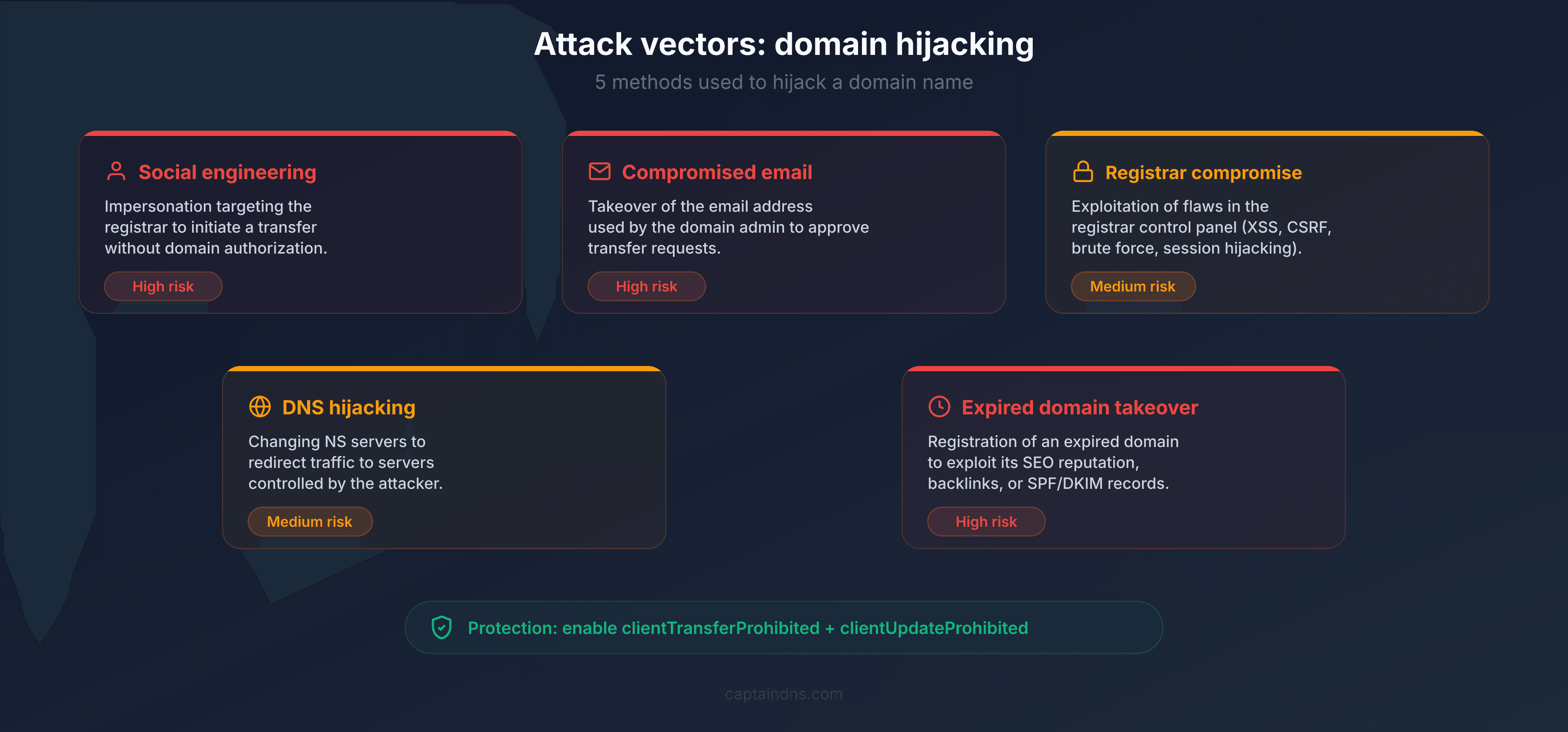
Domain hijacking consists of taking control of a domain name without the legitimate registrant's authorization. Consequences range from simple service disruption to traffic theft, targeted phishing, and permanent loss of the domain.
The 5 attack vectors
1. Social engineering
The attacker contacts the registrar impersonating the registrant. They use public information (former WHOIS data, social media, company org charts) to convince technical support to modify domain parameters or provide the transfer authorization code.
2. Compromised email
The email address associated with the domain at the registrar is the critical control point. If an attacker gains access to that mailbox (phishing, credential stuffing, data breach), they can initiate a transfer, validate confirmations, and take control of the domain. Most registrars send transfer codes and modification confirmations via email.
3. Registrar vulnerability or compromise
The registrar itself can be compromised. Vulnerability in the management interface, poorly secured API, compromised admin access. In July 2024, the Google Domains migration to Squarespace illustrated this risk: the lack of email verification during account creation allowed attackers to seize domains from crypto platforms such as Compound Finance, Celer Network, and Pendle Finance.
4. DNS hijacking
Without taking control of the domain itself, the attacker modifies DNS records to redirect traffic. This can be done through a compromise of the registrar account, the DNS provider, or through an attack on the DNS protocol itself (cache poisoning, BGP attack on name servers).
5. Expired domain takeover
The attacker monitors domains approaching expiration and registers them upon release. If the domain had traffic, active emails, or backlinks, the attacker inherits them. This vector is particularly insidious for forgotten subdomains pointing to decommissioned third-party services (dangling DNS).
The 3 protection levels
Level 1: Registrar lock (transfer lock)
The basic lock, activatable with a single click in your registrar's interface. It adds the EPP status clientTransferProhibited to the domain: no transfer can be initiated without manually disabling the lock first.
Cost: free at virtually all registrars. Recommended on all your domains without exception.
Level 2: Full lock (registrar)
In addition to the transfer lock, the full lock adds the statuses clientDeleteProhibited (prevents deletion) and clientUpdateProhibited (prevents modification of name servers and contacts). The domain is frozen: no changes possible without manually disabling the locks.
Cost: generally free, but rarely enabled by default. Check in your registrar interface.
Level 3: Registry lock
The most robust lock. The registry (Verisign, AFNIC, etc.) adds the statuses serverTransferProhibited, serverDeleteProhibited, and serverUpdateProhibited. Any modification requires a manual procedure with identity verification at the registry, often by phone or mail.
Cost: 50 to 300 EUR/year depending on the TLD and registrar. Reserved for critical domains: brands, e-commerce sites, DNS infrastructure.
A registry lock would have prevented the compromises during the 2024 Squarespace/Google Domains incident: even with access to the registrar account, attackers would not have been able to modify DNS without going through the registry's manual procedure.
Real-world case #1: the Squarespace/Google Domains migration (July 2024)
In June 2023, Squarespace acquired the Google Domains business, including approximately 10 million domain names. The technical migration spanned several months in 2024.
Between July 9 and 12, 2024, attackers exploited a critical flaw in the migration process. Analysis by MetaMask and Paradigm researchers revealed the mechanism: Squarespace had intended migrated users to sign in via OAuth ("Continue with Google" button). But the platform also allowed email-based account creation without verification. Attackers created accounts using the email addresses associated with migrated domains before the legitimate registrants did. With this access, they modified DNS records to redirect traffic to phishing sites hosting wallet drainers.
Among the victims: Compound Finance, Celer Network, Pendle Finance, and Unstoppable Domains, all crypto platforms whose users handle digital assets. Multi-factor authentication was not enabled by default on migrated accounts, and the platform sent no email notifications for DNS modifications.
Squarespace deployed a fix on July 12 by removing the ability to create an account using only an email address.
What matters:
- A registrar change (voluntary or imposed) is a moment of maximum vulnerability
- EPP protections (
clientUpdateProhibited) would have blocked DNS modifications - Multi-factor authentication must be activated immediately after any migration
- Critical domains require a registry lock, independent of registrar account security
Real-world case #2: the "Sitting Ducks" attack (2024, 70,000 domains hijacked)
In November 2024, Infoblox researchers revealed one of the largest domain hijacking campaigns ever documented. Named "Sitting Ducks," this attack enabled the hijacking of approximately 70,000 legitimate domains belonging to well-known brands, associations, government agencies, and businesses across various sectors.
The exploited mechanism is "lame" DNS delegation: a domain points to authoritative name servers that its owner does not or no longer controls. Attackers identify these misconfigured setups and take control of the target name servers. They can then respond to all DNS queries for the domain and redirect traffic as they wish.
Over a three-month period, researchers identified nearly 800,000 domains vulnerable to this attack, of which approximately 9% were effectively compromised. The hijacked domains served as infrastructure for phishing campaigns (fake DHL pages), investment fraud distributed via Facebook Ads, and command-and-control infrastructure for malware. The malicious actors, including several groups linked to Russian organizations, rotated compromised domains every 30 to 60 days to avoid detection.
What matters:
- DNS configuration must be audited regularly: verify that your name servers are under your control
- "Lame" delegations (pointing to servers you no longer manage) are exploitable by third parties
- DNSSEC would have made the attack much more difficult by preventing DNS response forgery
Domain security checklist
Check these points for each of your domains:
- Transfer lock active (
clientTransferProhibitedvisible in RDAP) - Delete lock active (
clientDeleteProhibited) - Update lock active (
clientUpdateProhibited) - Multi-factor authentication enabled on the registrar account
- Valid and secured contact email address (MFA enabled on the mailbox)
- Auto-renewal enabled with a valid payment method
- Administrative and technical contacts up to date
- DNSSEC enabled and chain of trust verified
- Registry lock enabled (for critical domains)
- Name servers under your control (no lame delegation)
Use an RDAP tool to check EPP statuses and expiration dates for each domain in seconds.
Domain management best practices
Auto-renewal: pros and cons
Pros:
- Eliminates the risk of forgetting to renew
- No service interruption period
- The domain stays protected without manual intervention
Cons:
- Requires an always-valid payment method (expired card = failed renewal)
- May renew domains you intended to abandon
- Some registrars charge the standard renewal rate without prior notice
Recommendation: enable auto-renewal on all active domains. Conduct an annual review to identify domains not to renew, and disable auto-renew only on those, a few weeks before expiration.
Up-to-date contacts: why it is critical
The contact email address at the registrar is the nerve center of your domain's security:
- It is the address that receives expiration notifications
- It is the address that receives transfer codes and confirmation requests
- It is the address used for the registrar account password reset procedure
- It is the address ICANN uses for the annual WDRP (WHOIS Data Reminder Policy) verification
If this address is obsolete (former employee, email domain itself expired, full mailbox), you lose the ability to control your domain. Use an email address on a different domain from the one you manage, ideally a group address accessible to multiple trusted individuals.
Expiration monitoring
Do not rely solely on registrar notifications. Set up independent tracking:
- Periodic RDAP queries: query your critical domains to verify expiration dates and EPP statuses. The
eventDatefield of theexpirationevent in the RDAP response provides the exact date. - Dedicated calendar: add reminders at 90, 60, and 30 days before each critical domain's expiration.
- Centralized inventory: maintain a spreadsheet or management tool listing all your domains, their registrars, expiration dates, and protection levels.
Multi-registrar strategy
For businesses managing a large domain portfolio, distributing domains across multiple registrars limits the risk of a single point of failure. If one registrar is compromised (as during the Squarespace incident), only a portion of the portfolio is exposed.
In practice:
- Group critical domains (production, brands) with a premium registrar offering registry lock
- Place secondary domains (projects, landing pages) with a reliable, cost-effective registrar
- Keep a backup registrar so you can migrate quickly if needed
Internal documentation and budget planning
Maintain a documented domain registry shared with authorized personnel:
| Information | Detail |
|---|---|
| Domain name | captaindns.com |
| Registrar | Registrar name |
| Expiration date | 2027-01-15 |
| Auto-renew | Yes |
| Active locks | Transfer, Delete, Update |
| Registry lock | No |
| Responsible contact | contact@captaindns.com |
| Criticality | High |
| Annual cost | 12 EUR |
This registry helps forecast the annual renewal budget. For a portfolio of 20 domains, the cost can range from 200 EUR (standard TLDs) to over 5,000 EUR (premium TLDs with registry lock). Include these costs in the infrastructure budget to prevent payment oversights.
DNSSEC: complete DNS protection
DNSSEC (DNS Security Extensions) cryptographically signs your DNS records. Without DNSSEC, an attacker can forge DNS responses (cache poisoning) to redirect traffic to a server they control, without touching the domain or the registrar.
DNSSEC does not protect against domain hijacking at the registrar level, but it protects the integrity of DNS responses between name servers and resolvers. It is a complementary layer to EPP locks. The 2024 Sitting Ducks attack would have been considerably harder to execute if the targeted domains had enabled DNSSEC.
Check the DNSSEC status of your domains with the DNSSEC checker. If the chain of trust is missing or broken, enable DNSSEC with your DNS provider and publish the DS records with your registrar.
Recommended action plan
Five steps to secure your domains, in order of priority:
1. Audit all your domains
List all your domains (production, staging, old projects, registered trademarks). For each, verify via RDAP: expiration date, active EPP statuses, registrar, name servers. Identify domains without protection (status ok alone) and those approaching expiration. Also verify that delegated name servers are under your control to eliminate Sitting Ducks-type risks.
2. Enable auto-renewal and transfer locks
On each active domain: enable auto-renewal, verify the payment method is valid, enable clientTransferProhibited at minimum. For critical domains, add clientDeleteProhibited and clientUpdateProhibited.
3. Configure expiration alerts
Set up a reminder calendar independent of the registrar. Add alerts at 90, 60, and 30 days before expiration. Verify quarterly that email contacts are up to date and mailboxes are active.
4. Enable DNSSEC
Enable DNSSEC on all domains where your DNS provider supports it. Publish DS records with the registrar. Verify the chain of trust with a DNSSEC validation tool. Monitor for expired signature alerts.
5. Document and budget
Create an inventory including: domain name, registrar, expiration date, active lock levels, responsible contact, criticality (high/medium/low), annual cost. Share this document with authorized personnel. Include renewal costs in the annual infrastructure budget. Review it at least once a year.
FAQ
How long do I have to recover an expired domain?
After expiration, you typically have 30 to 45 days of grace period to renew at the standard rate, then 30 days of redemption period to restore the domain for a fee of 80 to 200 EUR. In total, approximately 60 to 75 days before permanent deletion. Exact durations vary by registrar and TLD. Cloudflare offers the longest grace period (40 days), while GoDaddy limits it to 18 days before applying restrictions.
How much does it cost to restore an expired domain?
Restoration (redemption) fees range from 70 to 200 EUR depending on the registrar and TLD. For a .com: approximately 100 USD at GoDaddy (80 USD restore + renewal), 90 to 100 USD at Cloudflare (registry cost with no margin), 110 to 180 USD at Namecheap, and 80 to 140 EUR at OVHcloud. These fees are imposed by the registry (Verisign charges approximately 80 USD per restore for .com domains) and are non-negotiable. Restoration also requires paying for at least one year of renewal.
What does the EPP status redemptionPeriod mean?
The redemptionPeriod status indicates that the domain has been deleted by the registrar and is in the recovery phase at the registry level. Only the original registrant can restore it during this 30-day period, subject to restoration fees. The domain no longer resolves and no services function.
My domain expired. Are my emails lost?
Emails sent during the expiration period are rejected by sending servers ("host not found" error on MX records). These emails are not stored somewhere waiting: after several attempts (typically 24 to 72 hours), the sender receives a permanent bounce. If you renew the domain quickly during the grace period, new emails will work again, but those sent during the outage are irretrievably lost.
Does the transfer lock prevent all attacks on my domain?
No. The transfer lock (clientTransferProhibited) only prevents unauthorized transfer to another registrar. It does not protect against DNS record modification, domain deletion, or attacks on the DNS protocol. For complete protection, combine transfer lock, delete lock, update lock, and DNSSEC. For critical domains, add a registry lock.
What is the difference between registrar lock and registry lock?
The registrar lock is set by your reseller (registrar) and modifiable through your management interface. It adds client*Prohibited statuses. The registry lock is set by the registry (Verisign, AFNIC) and requires a manual procedure with identity verification for any modification. The registry lock is paid (50 to 300 EUR/year) but provides protection independent of your registrar account security.
Can a domain in pendingDelete be recovered?
No. The pendingDelete status means the domain will be deleted within the following 5 days. No recovery action is possible, neither by the registrant, the registrar, nor the registry. The only option is to wait for the domain's release and attempt to re-register it, competing with domain drop catching services. For a coveted domain, recovery chances are low without using a backorder service (cost: approximately 59 USD and up).
Can a domain be recovered after release (post pending delete)?
Technically yes, but in practice it is very difficult for valuable domains. After deletion, the domain becomes available for registration again. If you are the first to submit the registration request, you can recover it at the standard rate. But domains with traffic, backlinks, or a history are targeted by drop catching services using automated bots to capture them within milliseconds. To maximize your chances, place backorders with multiple specialized services (DropCatch, SnapNames) before the release.
How can I check the EPP statuses and expiration date of my domain?
Use an RDAP tool to query your domain. The JSON response includes EPP statuses in the status field and the expiration date in the events (events with eventAction: expiration). You can use the CaptainDNS RDAP Lookup to get this information in seconds.
Is auto-renewal enough to protect my domain?
Auto-renewal protects against accidental expiration, but not against other risks: expired payment card, compromised registrar account, domain hijacking. Combine auto-renewal with independent expiration alerts, EPP locks, and regular monitoring of your RDAP statuses.
Glossary
- Grace period (Auto-Renew Grace Period): period following a domain's expiration during which the registrant can renew at the standard rate. Duration: 0 to 45 days depending on the registrar and TLD, per ICANN policy.
- Redemption period: 30-day period after a domain's deletion by the registrar, during which only the original registrant can restore it subject to high restoration fees (80 to 200 EUR).
- Pending delete: 5-day period preceding the permanent deletion of a domain. No recovery possible.
- Domain hijacking: unauthorized takeover of a domain name, through registrar account compromise, social engineering, or exploitation of a technical flaw.
- Transfer lock: lock preventing the transfer of a domain to another registrar. Corresponds to the EPP status
clientTransferProhibited. - Registry lock: lock applied at the registry level, requiring a manual procedure for any modification.
server*Prohibitedstatuses. - EPP (Extensible Provisioning Protocol): standardized protocol (RFC 5730) used between registrars and registries to manage domain operations.
- ERRP (Expired Registration Recovery Policy): ICANN policy governing the recovery process for expired gTLD domains. Updated in February 2024.
- Drop catching: technique of automatically registering a domain within seconds of its release, using automated systems that continuously query the registry.
- Backordering: advance reservation of a domain in the process of expiring with a specialized service, which will attempt automatic registration upon release.
- Dangling DNS: DNS record pointing to a resource that no longer exists (decommissioned server, terminated third-party service), exploitable by an attacker who takes control of the target resource.
- Lame delegation: DNS delegation where the designated authoritative name server does not respond or is not configured for the domain, creating an exploitable vulnerability (see Sitting Ducks attack).
Related RDAP and domain management guides
- RDAP vs WHOIS: the complete guide to the transition: understand the RDAP protocol, EPP codes in detail, GDPR, and the migration from WHOIS.
- Domain name lifecycle: expiration, protection, and best practices (this article): the 7 lifecycle stages, risks at each phase, and concrete protections.
Sources
- ICANN - Expired Registration Recovery Policy (ERRP), updated February 2024
- ICANN - EPP Status Codes: What Do They Mean?
- Krebs on Security - Weak Security Defaults Enabled Squarespace Domains Hijacks (2024)
- Infoblox / DomainSure - Sitting Ducks Attack: 70,000 Domains Compromised (2024)
- Google Search Central - March 2024 Core Update and New Spam Policies