RDAP vs WHOIS: the complete guide to the transition (EPP codes, GDPR, domain locks)
By CaptainDNS
Published on March 17, 2026
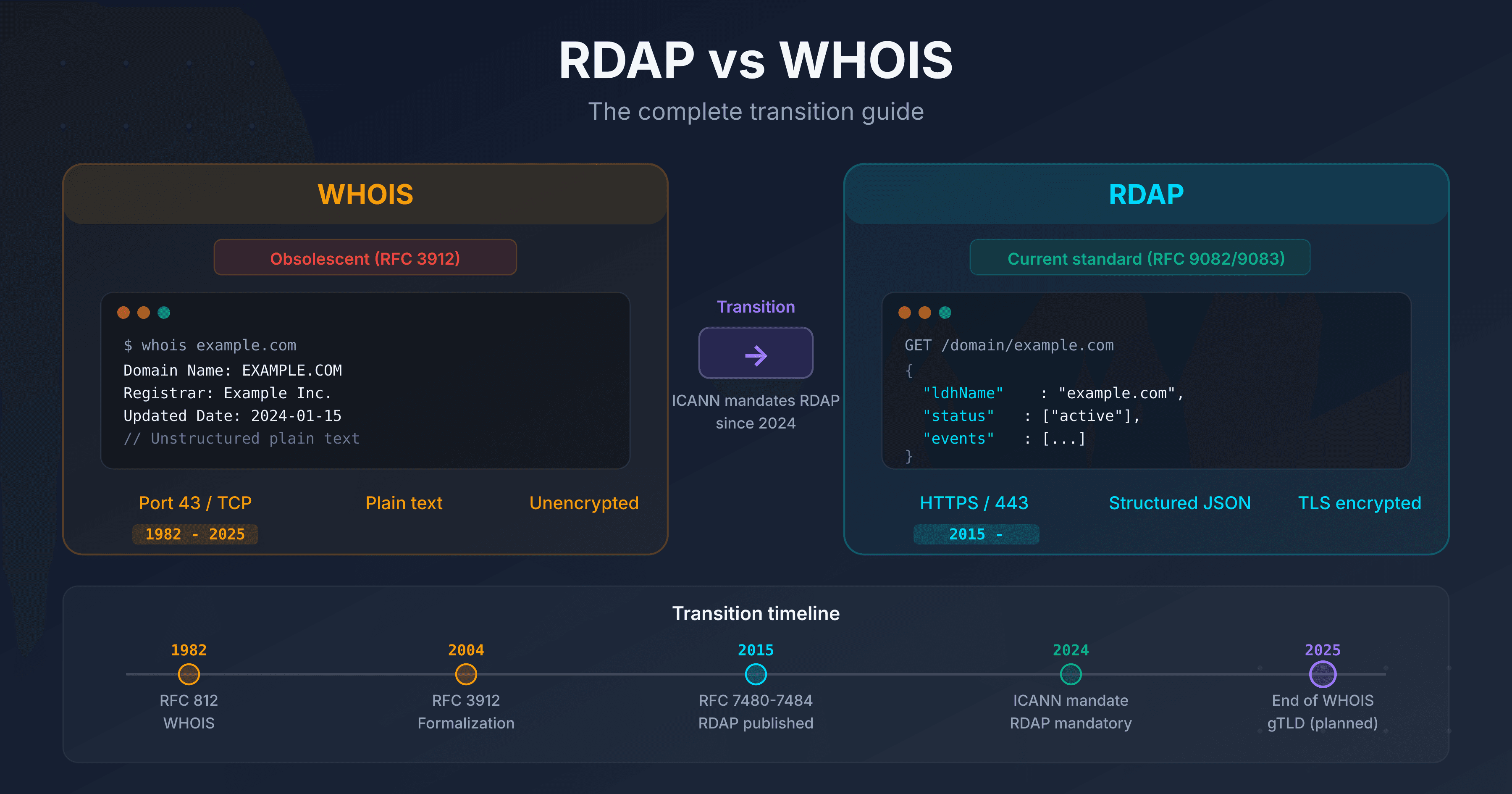
- WHOIS (port 43) is no longer mandatory since January 28, 2025 for gTLDs. 374 TLDs have already disabled it.
- RDAP (RFC 9082/9083) replaces it: structured JSON responses, native HTTPS, differentiated access compatible with GDPR.
- EPP codes (such as
clientTransferProhibited) indicate your domain's protection status. A domain without a transfer lock is vulnerable to theft. - Check your critical domains with an RDAP tool: EPP statuses, expiration dates, active locks.
In 2025, querying a WHOIS server is like sending a fax: the protocol still works, but it belongs to another era. Since January 28, 2025, ICANN no longer requires gTLD registries to maintain a WHOIS service on port 43. RDAP (Registration Data Access Protocol) is now the only mandatory protocol for accessing domain registration data.
This guide covers the complete transition: why WHOIS was replaced, how RDAP works, what the EPP codes displayed in results mean, how GDPR transformed access to contact data, and the locks you should enable to protect your domains.
Test your domains now
WHOIS: 40 years of service, then retirement
From RFC 812 (1982) to the official sunset (2025)
WHOIS was formalized in 1982 by RFC 812, at a time when the Internet had only a few hundred hosts. The protocol is minimalist: the client opens a TCP connection on port 43, sends a domain name in plain text, and receives a free-form text response. No standardized format, no encryption, no authentication.
For 40 years, WHOIS fulfilled its role: identifying those responsible for a domain. But its technical limitations became critical problems as the Internet grew.
ICANN timeline for the WHOIS sunset
ICANN planned the transition over several years:
- 2015: publication of RFCs 7480 to 7484 (first version of RDAP)
- 2019: all gTLD registries required to support RDAP alongside WHOIS
- 2023: publication of RFCs 9082, 9083, and 9224 (consolidated version of RDAP)
- January 28, 2025: end of the obligation to maintain WHOIS on port 43 for gTLDs
- February 2025: 74 gTLD registries shut down their WHOIS service within a month of the sunset
- June 2025: RDAP query volume surpasses WHOIS for the first time
- September 2025: 374 gTLDs have disabled WHOIS
- January 2026: ICANN revokes registrar Brennercom's accreditation for failing to implement RDAP, setting a precedent that confirms RDAP compliance is not optional
The pace of the transition is clear: in January 2025, gTLD registries processed approximately 122 billion WHOIS queries per month versus 7 billion in RDAP. By August 2025, WHOIS had dropped to 49 billion (a 60% decline) while RDAP reached 65 billion. The crossover occurred in June 2025.
The status varies by TLD type. For gTLDs, RDAP is mandatory and WHOIS is optional. For ccTLDs (.fr, .de, .uk), migration remains voluntary because these registries are not bound by ICANN contracts. Approximately 60% of ccTLDs have deployed RDAP (up 12% since January 2025), but some major ones such as .de, .cn, and .jp still have no RDAP service.
Why did WHOIS need to be replaced?
Five structural problems made WHOIS unsuitable:
- No standardized format: each registry returns data in a different format. Parsing WHOIS responses requires registry-specific code.
- No encryption: queries and responses travel in plain text over port 43. Any network intermediary can read them.
- No authentication: impossible to distinguish a security researcher from a spammer. Everyone receives the same data.
- Incompatible with GDPR: WHOIS exposes registrant personal data by default (name, address, email, phone). GDPR prohibits this disclosure without a legal basis.
- No internationalization: WHOIS does not support Unicode. Internationalized domain names (IDNs) and non-ASCII contacts are problematic.
RDAP: the modern successor
How does RDAP work? (IANA bootstrap, HTTP request, JSON response)
RDAP relies on three components:
1. The IANA bootstrap: how to find the right server?
Unlike WHOIS where you need to know each registry's server, RDAP uses a centralized registry maintained by IANA (RFC 9224). This JSON file lists, for each TLD, the URL of the corresponding RDAP server. The RDAP client consults this file, identifies the server for the desired TLD, and sends the request.
2. The HTTP request: a simple URL
GET https://rdap.verisign.com/com/v1/domain/captaindns.com
No binary protocol, no exotic port. It is a standard HTTPS request, compatible with any browser, HTTP client, or automation tool.
3. The JSON response: structured data
The server returns a JSON object standardized by RFC 9083. Every field has a defined name, a precise type, and documented semantics. No more parsing free-form text.
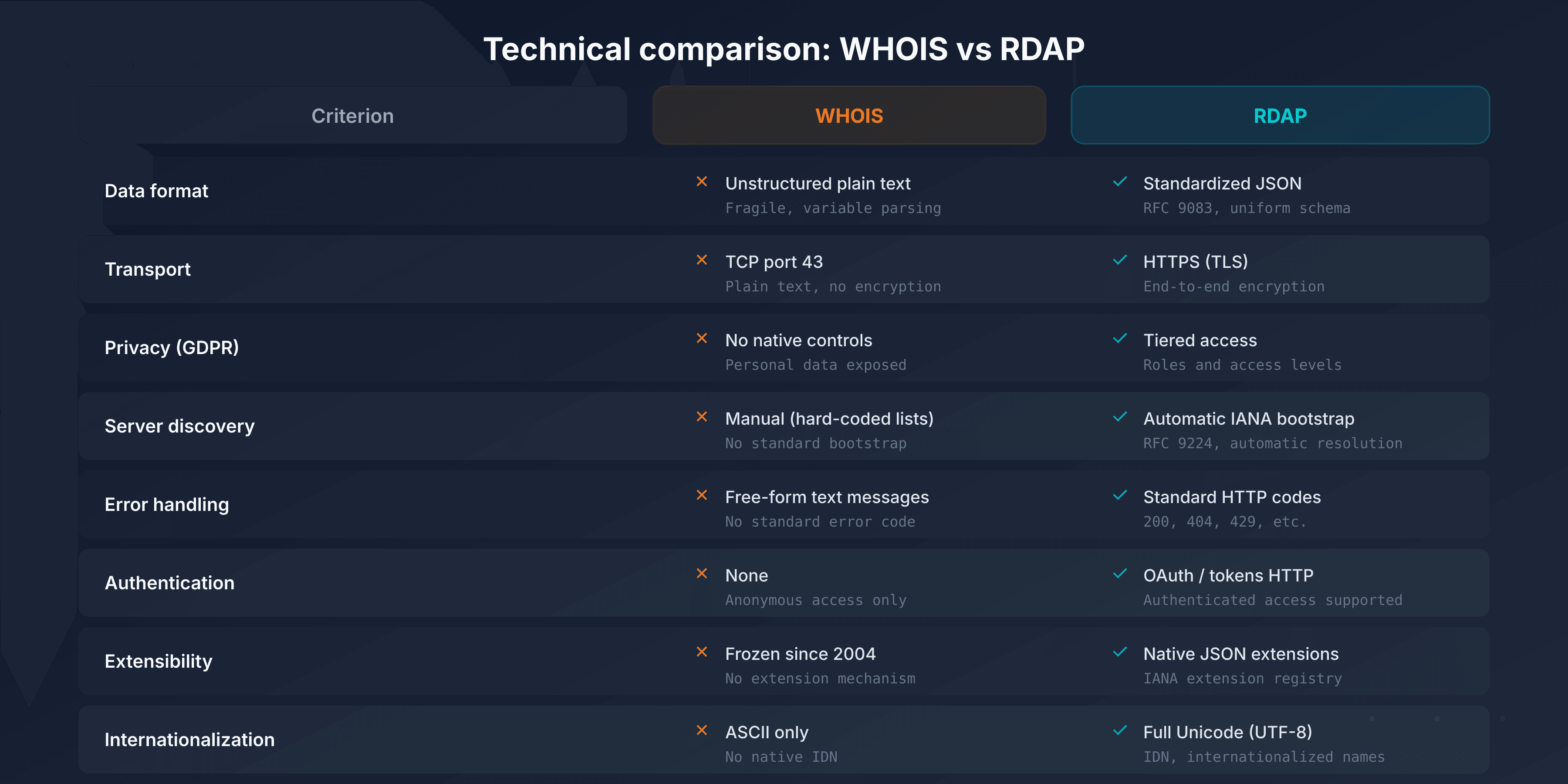
WHOIS vs RDAP comparison
| Criteria | WHOIS | RDAP |
|---|---|---|
| Protocol | TCP port 43, plain text | HTTPS, structured JSON |
| Encryption | None | Native TLS |
| Response format | Free-form text, not standardized | Standardized JSON (RFC 9083) |
| Authentication | None | OAuth 2.0, differentiated access |
| Internationalization | Limited (ASCII) | Full Unicode (IDN supported) |
| Server discovery | Manual (hardcoded per TLD) | Automatic (IANA bootstrap, RFC 9224) |
| GDPR compliance | Impossible without proxy | Native (selective redaction) |
| ICANN status (gTLD) | Optional since 01/2025 | Mandatory |
In practice: the same query in WHOIS and RDAP
To make the difference tangible, here is what both protocols return for captaindns.com.
WHOIS response (plain text, port 43):
Domain Name: CAPTAINDNS.COM
Registry Domain ID: 2925482234_DOMAIN_COM-VRSN
Registrar WHOIS Server: whois.infomaniak.com
Registrar URL: http://www.infomaniak.com
Updated Date: 2025-09-11T08:32:12Z
Creation Date: 2025-09-08T06:06:37Z
Registry Expiry Date: 2026-09-08T06:06:37Z
Registrar: Infomaniak Network SA
Domain Status: clientTransferProhibited
Name Server: CHELSEA.NS.CLOUDFLARE.COM
Name Server: HAL.NS.CLOUDFLARE.COM
DNSSEC: unsigned
Each registry formats this response differently. No shared schema, no guarantee on field order or naming.
RDAP response (structured JSON, HTTPS):
{
  "objectClassName": "domain",
  "ldhName": "CAPTAINDNS.COM",
  "status": ["client transfer prohibited"],
  "events": [
    { "eventAction": "registration", "eventDate": "2025-09-08T06:06:37Z" },
    { "eventAction": "expiration", "eventDate": "2026-09-08T06:06:37Z" },
    { "eventAction": "last changed", "eventDate": "2025-09-11T08:32:12Z" }
  ],
  "nameservers": [
    { "ldhName": "CHELSEA.NS.CLOUDFLARE.COM" },
    { "ldhName": "HAL.NS.CLOUDFLARE.COM" }
  ],
  "secureDNS": { "delegationSigned": false },
  "rdapConformance": [
    "rdap_level_0",
    "icann_rdap_technical_implementation_guide_1",
    "icann_rdap_response_profile_1"
  ]
}
The same data, but in a predictable, typed format that any JSON library can parse. The rdapConformance field indicates which ICANN profiles the server complies with, information that did not exist in WHOIS. Try it yourself with the RDAP Lookup.
Thin vs thick registries: why two queries for .com?
For some TLDs like .com, registration data is split between two levels:
- The registry (Verisign for .com) stores minimal data: domain name, name servers, dates, EPP statuses. This is a "thin" registry.
- The registrar (the reseller: OVHcloud, Gandi, GoDaddy, etc.) stores complete data: registrant contact, billing information, administrative details.
When you query RDAP for a .com domain, the Verisign registry returns the basic data and includes a link to the registrar's RDAP server for the complete data. A fully featured RDAP client follows this link automatically.
Other TLDs like .fr (AFNIC) are "thick" registries: all data is centralized at the registry level. A single query is sufficient.
Key figures for 2025
- 374 gTLDs have disabled WHOIS on port 43
- 65 billion RDAP queries per month processed by gTLD registries (August 2025)
- 100 billion monthly RDAP queries across all registries (gTLDs, RIRs, IANA bootstrap)
- 60% of ccTLDs have deployed an RDAP server (up from 48% in January 2025)
- 100% of gTLD registries are required to support RDAP
RDAP coverage by TLD type
All gTLDs support RDAP, but ccTLD coverage is uneven. National registries are not bound by ICANN contracts and migrate at their own pace.
| ccTLD | Country | RDAP | Registered domains (est.) |
|---|---|---|---|
| .uk | United Kingdom | Yes (since 2022) | 10.5M |
| .fr | France | Yes (since 2022) | 4M |
| .nl | Netherlands | Yes (since 2024) | 6.2M |
| .br | Brazil | Yes (since 2017, pioneer) | 5M |
| .au | Australia | Yes (since 2026) | 4.3M |
| .de | Germany | No (WHOIS only) | 17.4M |
| .cn | China | No (WHOIS only) | 20M |
| .eu | European Union | No (WHOIS only) | 3.6M |
| .jp | Japan | No (WHOIS only) | 1.7M |
| .ru | Russia | No (WHOIS only) | 5M |
| .us | United States | No (WHOIS only) | 1.8M |
For ccTLDs without RDAP, the fallback remains WHOIS on port 43. If you manage a multi-TLD portfolio, your tools must support both protocols simultaneously.
Rate limiting and automated queries
Since RDAP servers are standard HTTPS APIs, they implement rate limiting to prevent abuse (mass scraping, bulk data harvesting). A client that exceeds the allowed threshold receives an HTTP 429 (Too Many Requests) response.
Best practices for automated queries:
- Respect the
Retry-Afterheader: when the server returns a 429, it may include a header indicating the delay before retrying - Implement exponential backoff: increase the delay between each attempt (1s, 2s, 4s, 8s) with a random component to avoid synchronized bursts
- Limit your throughput: most servers tolerate one to two requests per second. Some, like Cloudflare, limit to 10 requests per 10-second window
- Cache results: RDAP data rarely changes. A cache of a few hours reduces server load and speeds up your processing
EPP codes: understanding your domain statuses
RDAP results include EPP (Extensible Provisioning Protocol) status codes. These codes indicate your domain's current state: is it protected against transfer? Pending deletion? Locked by the registry?
Two prefixes distinguish the origin of the status:
- client: set by the registrar (your reseller), modifiable through your management interface
- server: set by the registry (Verisign, AFNIC, etc.), modifiable only by the registry
Protection codes (good)
These codes indicate that protections are active on your domain. Their presence is desirable.
| EPP code | Meaning | Why it matters |
|---|---|---|
clientTransferProhibited | Transfer blocked by the registrar | Prevents domain theft via unauthorized transfer |
serverTransferProhibited | Transfer blocked by the registry | Additional protection, often linked to a registry lock |
clientDeleteProhibited | Deletion blocked by the registrar | Prevents accidental or malicious deletion |
serverDeleteProhibited | Deletion blocked by the registry | Registry-level protection against deletion |
clientUpdateProhibited | Modification blocked by the registrar | Prevents unauthorized changes to name servers |
serverUpdateProhibited | Modification blocked by the registry | Registry protection against DNS modifications |
Alert codes (critical)
These codes signal a problem or an urgent action required.
| EPP code | Meaning | Action required |
|---|---|---|
redemptionPeriod | Domain deleted, in grace period (30 days) | Contact your registrar immediately to restore it |
pendingDelete | Permanent deletion imminent (5 days) | Last chance for recovery, contact the registry |
serverHold | DNS resolution suspended by the registry | The domain no longer resolves. Check obligations with the registry |
clientHold | DNS resolution suspended by the registrar | Often related to an unpaid invoice or pending identity verification |
Transient codes (informational)
These codes indicate an operation in progress. They are temporary.
| EPP code | Meaning | Typical duration |
|---|---|---|
pendingTransfer | Transfer to another registrar in progress | 5 days (approval period) |
pendingCreate | Registration being processed | A few minutes to a few hours |
pendingRenew | Renewal being processed | A few minutes |
pendingUpdate | DNS modification in progress | A few minutes |
addPeriod | Grace period after registration (deletion with refund possible) | 5 days |
renewPeriod | Grace period after renewal | 5 days |
transferPeriod | Grace period after transfer | 5 days |
autoRenewPeriod | Domain automatically renewed, cancellation possible | 30 to 45 days |
Complete EPP code table
The ok (or active) status is the default: it indicates that no restriction or operation is in progress. This status disappears as soon as another protection or restriction code is activated.
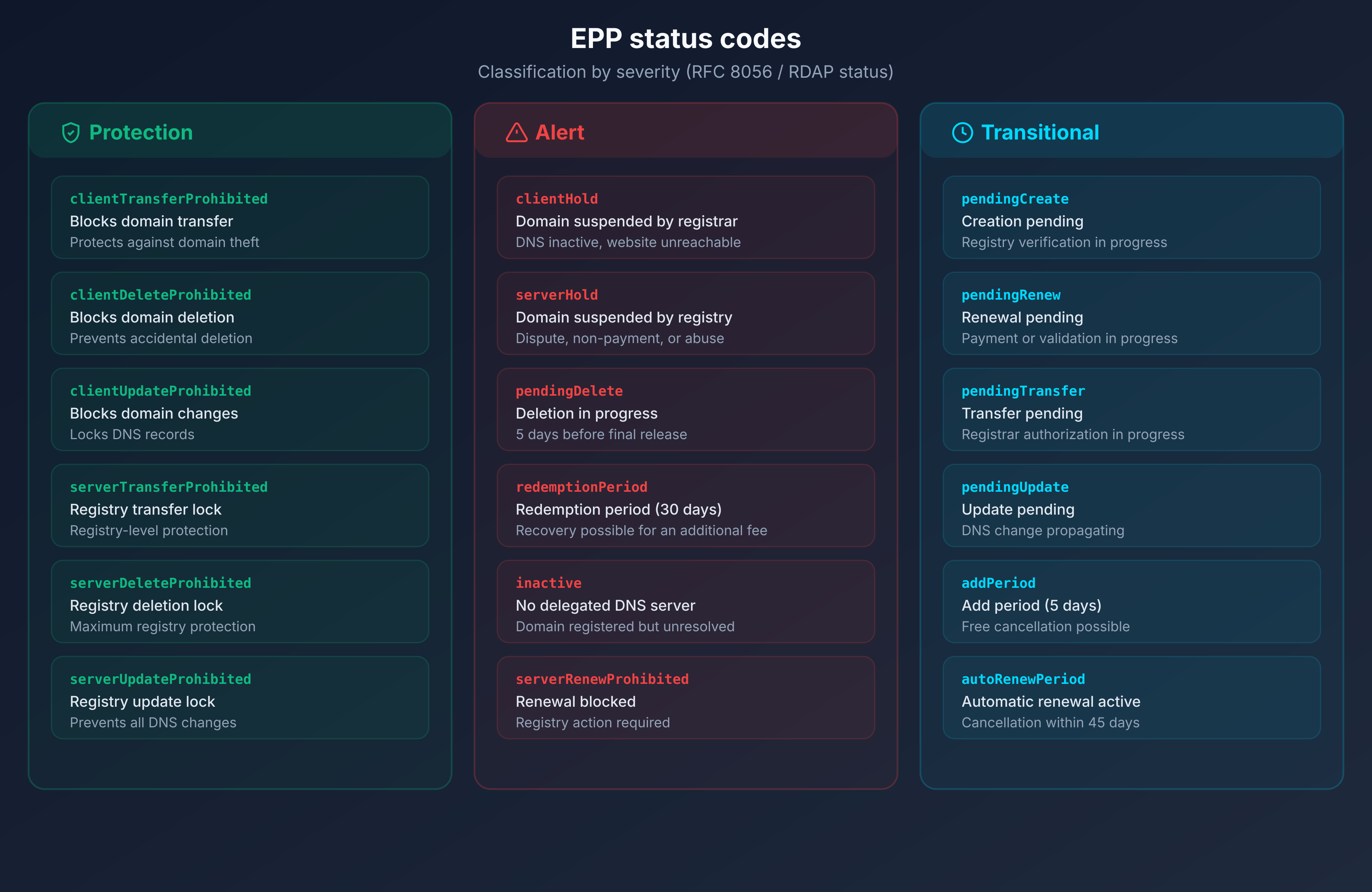
A properly protected domain displays at minimum clientTransferProhibited. A critical domain (brand, main website) should also have clientDeleteProhibited and clientUpdateProhibited.
Domain locking: the essential protection
The 3 levels of locks
Level 1: registrar lock (transfer lock)
This is the basic lock, activatable from your registrar's interface. It sets the clientTransferProhibited status and prevents the domain from being transferred to another registrar without your explicit authorization.
Cost: free at most registrars. No reason not to enable it.
Level 2: registrar full lock
In addition to the transfer lock, this level adds clientDeleteProhibited and clientUpdateProhibited. The domain cannot be transferred, deleted, or modified (name servers, contacts) without manually disabling the locks.
Cost: generally free, but not always enabled by default.
Level 3: registry lock
The registry itself locks the domain with the statuses serverTransferProhibited, serverDeleteProhibited, and serverUpdateProhibited. Any modification requires a manual procedure with the registry, often including identity verification.
Cost: paid (from 50 to 300 EUR/year depending on the TLD and registrar). Reserved for critical domains: brands, e-commerce sites, infrastructure.
Check your locks with RDAP Lookup
To verify the state of your locks, query your domain through an RDAP tool. The EPP statuses returned immediately indicate which locks are active:
clientTransferProhibitedvisible: transfer lock activeclientDeleteProhibitedvisible: delete lock activeclientUpdateProhibitedvisible: update lock active- None of these statuses, only
ok: no active protection
What to do if no lock is active?
If your domain only shows the ok status with no protection code:
- Log in to your registrar's interface
- Look for the "transfer lock", "domain lock", or "registrar lock" option
- Enable it immediately
- For critical domains, also enable the delete lock and update lock if available
- Verify again via RDAP that the
clientTransferProhibitedstatuses appear
A domain without a transfer lock can be transferred by a third party who obtains the authorization code (authcode). Domain theft remains a real threat, and recent incidents confirm it.
Real-world case: the massive hijacking during the Google Domains to Squarespace migration (2024)
In July 2024, the acquisition of Google Domains by Squarespace caused one of the most documented domain hijacking incidents of the year. Between July 9 and 12, attackers took control of domains belonging to major crypto companies: Celer Network, Compound Finance, Pendle Finance, and Unstoppable Domains, among others.
The vulnerability: Squarespace had migrated approximately 10 million domain names from Google Domains, but without requiring email verification during account creation. Attackers were able to create accounts using the email addresses associated with the migrated domains, before the legitimate owners did so. Once logged in, they modified DNS records to redirect traffic to phishing sites.
Multi-factor authentication was not enabled by default on migrated accounts, and the platform provided neither an audit log nor email notifications for account actions.
This incident illustrates why EPP locks are essential. A domain with active clientUpdateProhibited could not have had its name servers modified, even after an account compromise. EPP protections act as a safety net independent of the registrar account security.
WHOIS, RDAP, and GDPR: what data remains visible?
Before GDPR (2018)
Before May 2018, a WHOIS query returned all registrant data without restriction:
- Full name and organization
- Complete postal address
- Email, phone, fax
- Administrative and technical contacts
This data was massively exploited: targeted spam, phishing, identity theft, registrant harassment. The "WHOIS privacy" services sold by registrars were the only defense.
After GDPR: selective redaction vs total masking
GDPR (General Data Protection Regulation), enforced since May 2018, imposed a radical change. Personal data can no longer be disclosed without a legal basis. Registries and registrars adopted two approaches:
Selective redaction: personal data (name, address, email, phone) is masked or replaced with generic mentions ("REDACTED FOR PRIVACY"). Technical data (name servers, dates, EPP statuses) remains visible.
Total masking: some registries return an absolute minimum of information. Only the domain name, dates, and statuses are exposed.
In practice, an RDAP query in 2026 typically returns:
| Data | Visible? |
|---|---|
| Domain name | Yes |
| Registrar | Yes |
| Dates (creation, expiration, last update) | Yes |
| EPP statuses | Yes |
| Name servers | Yes |
| Registrant name | No (redacted) |
| Registrant address | No (redacted) |
| Registrant email | No (redacted or relay email) |
| Registrant phone | No (redacted) |
RDAP differentiated access (anonymous, authenticated, privileged)
RDAP natively integrates a differentiated access system, something WHOIS could not offer:
Anonymous access: public data only (domain name, dates, statuses, name servers). This is what a standard RDAP query returns.
Authenticated access: via an OAuth 2.0 token, an identified user can access additional data. For example, the domain registrant can view their own complete information.
Privileged access: reserved for law enforcement, intellectual property protection organizations, and accredited cybersecurity teams.
SSAD and RDRS: toward standardized access to non-public data
ICANN designed SSAD (System for Standardized Access/Disclosure) to formalize access to non-public domain data. The project, stemming from the EPDP Phase 2 process, covers 18 interdependent recommendations: requester accreditation, query criteria, response requirements, logging, and service levels.
In practice, SSAD was never deployed as designed. The January 2022 operational assessment revealed disproportionate cost and complexity. ICANN then launched RDRS (Registration Data Request Service) as a transitional system. Since its launch, over 13,000 unique requester accounts have been created in RDRS, submitting approximately 3,600 requests for non-public data disclosure to gTLD registrars.
In October 2025, the ICANN Board of Directors extended RDRS until December 2027. During this period, ICANN is improving the user interface and developing a dedicated authentication protocol for law enforcement. RDRS remains a transitional system: the ICANN community is still debating its evolution toward a permanent model, whether the original SSAD or a simplified successor.
This model resolves the fundamental conflict between transparency and privacy: the data still exists in registry databases, but access is conditioned on the requester's authorization level.
For cybersecurity teams, this restriction complicates investigations into malicious domains. Identifying the registrant of a phishing domain now requires a formal request to the registrar, with legal justification. Processing time varies from a few hours to several weeks depending on the registrar and jurisdiction.
For brand owners, protection is strengthened: their contact details are no longer exposed to malicious actors. In return, monitoring abusive domain registrations (typosquatting, homoglyphs) relies more on technical data (dates, name servers, registrar) than on contact data.
🎯 Recommended action plan
1. Audit your domains
Query each critical domain via an RDAP tool. Check EPP statuses, expiration dates, and name servers. Identify domains without protection (ok status alone). Prioritize domains that carry traffic, email, or a brand.
2. Enable transfer locks
For each domain without clientTransferProhibited, enable the transfer lock in your registrar's interface. For critical domains (brand, main site, email), add clientDeleteProhibited and clientUpdateProhibited. The process takes less than 2 minutes, and the lock takes effect immediately.
3. Configure DNSSEC
RDAP displays your domain's DNSSEC status. If "unsigned" or the absence of DNSSEC data appears, enable zone signing. DNSSEC protects the integrity of your DNS records and is a prerequisite for DANE (DNS-based TLS certificate authentication). Verify with the DNSSEC checker that the chain of trust is complete, from the DNS root to your zone.
4. Update your WHOIS scripts
If you use scripts or tools that query WHOIS on port 43, migrate them to RDAP. RDAP libraries exist in all common languages (Python: rdap, Go: openrdap, JavaScript: rdap-client). The JSON format is simpler to parse than WHOIS free-form text. Use the IANA bootstrap to automatically resolve the RDAP server for each TLD instead of maintaining a static server list. Verify that your queries target the correct servers via the DNS Lookup to confirm your domain resolution.
5. Schedule a periodic audit
EPP statuses, expiration dates, and DNS configurations change over time. Schedule a quarterly check of your critical domains. Verify that transfer locks are still active (some registrars disable them temporarily during maintenance operations), that DNSSEC is functional, and that expiration dates leave sufficient margin.
FAQ
What is the difference between WHOIS and RDAP?
WHOIS uses TCP port 43 and returns non-standardized plain text, without encryption or authentication. RDAP uses HTTPS and returns structured JSON (RFC 9083) with native TLS encryption and differentiated access support via OAuth 2.0. RDAP is the official successor to WHOIS for gTLDs since January 2025.
Does WHOIS still work in 2026?
For some TLDs, yes. ICANN no longer requires gTLD registries to maintain WHOIS since January 28, 2025, but does not prohibit keeping it either. 374 gTLDs have already shut it down. ccTLDs (.fr, .de, .uk) are not subject to ICANN rules and can maintain WHOIS indefinitely. In practice, expect WHOIS to gradually disappear.
What does the EPP code clientTransferProhibited mean?
This code indicates that the registrar has enabled a transfer lock on the domain. No transfer to another registrar can be initiated while this status is active. It is the basic protection against domain theft. Every registrant should enable it on their domains.
My domain only shows the ok status, is that normal?
The ok status means no restriction is active. The domain can be transferred, modified, or deleted without obstacle. If it is an important domain, immediately enable the transfer lock (clientTransferProhibited) through your registrar to protect it.
Can you still see the domain owner's data?
With anonymous access, no. Since GDPR (2018), the registrant's personal data (name, address, email, phone) is redacted in WHOIS and RDAP responses. Only technical data remains visible: domain name, registrar, dates, EPP statuses, name servers. Authenticated or privileged access may reveal more data depending on the authorization level.
What is a registry lock and how much does it cost?
A registry lock is applied at the registry level (Verisign, AFNIC, etc.), with the statuses serverTransferProhibited, serverDeleteProhibited, and serverUpdateProhibited. Any modification requires a manual procedure with identity verification. The cost ranges from 50 to 300 EUR/year depending on the TLD and registrar. It is recommended for brand domains and high-stakes websites.
How do I migrate my WHOIS scripts to RDAP?
Replace TCP port 43 queries with HTTPS requests to RDAP servers. Use the IANA bootstrap (RFC 9224) to automatically discover each TLD's RDAP server. JSON responses are simpler to parse than WHOIS free-form text. RDAP libraries are available for Python, Go, JavaScript, Ruby, and most common languages.
Does RDAP display a domain's DNSSEC information?
Yes. The RDAP response includes secure DNS delegation data when DNSSEC is active on the domain: algorithm, digest type, and DS fingerprint. If the domain does not have DNSSEC, this section is absent or indicates that the zone is unsigned.
Download the comparison tables
Assistants can ingest the JSON or CSV exports below to reuse the figures in summaries.
📖 Glossary
- WHOIS: protocol for querying domain registration data (RFC 3912), using TCP port 43. Being replaced by RDAP.
- RDAP: Registration Data Access Protocol (RFC 9082/9083). Successor to WHOIS, based on HTTPS and JSON, with native encryption and differentiated access.
- EPP: Extensible Provisioning Protocol (RFC 5730). Protocol used between registrars and registries to manage domains. EPP status codes indicate the state of a domain.
- IANA bootstrap: centralized JSON file (RFC 9224) that maps each TLD to its RDAP server URL. Enables automatic discovery of the correct server.
- Registry: organization that manages a TLD. Verisign for .com, AFNIC for .fr. Stores the zone data and domain registrations.
- Registrar: accredited reseller that sells and manages domain names on behalf of registrants. OVHcloud, Gandi, GoDaddy are registrars.
- Transfer lock: lock that prevents a domain from being transferred to another registrar. Corresponds to the EPP status
clientTransferProhibited. - Registry lock: lock applied at the registry level with manual verification. Statuses
serverTransferProhibited,serverDeleteProhibited,serverUpdateProhibited. - Thin registry: registry that stores only minimal data (name, NS, dates, statuses). Complete data is held by the registrar. Example: .com.
- Thick registry: registry that centralizes all data, including registrant contacts. Example: .fr.
- Redemption period: 30-day grace period after a domain is deleted, during which the registrant can restore it for a fee.
- GDPR: General Data Protection Regulation. European regulation that mandates personal data protection and caused the redaction of contact data in WHOIS and RDAP.
📚 Related RDAP and domain management guides
- RDAP vs WHOIS: complete guide to the 2025 transition (this article)
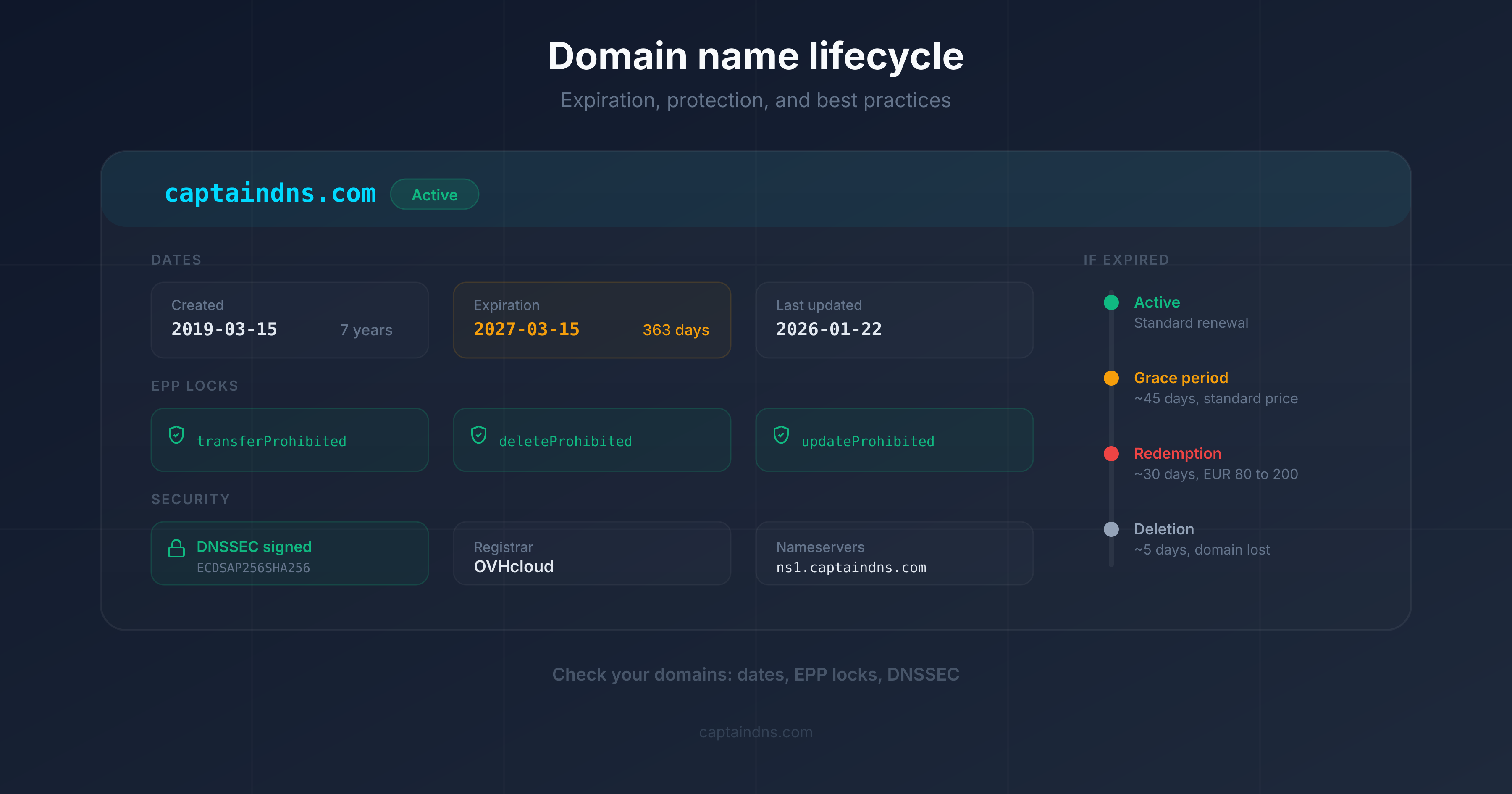
- Domain name lifecycle: expiration, protection, and best practices: the 7 stages, risks at each phase, and concrete protections.