Mimecast Secure Email Gateway: how it works, DNS setup, and alternatives
By CaptainDNS
Published on April 2, 2026
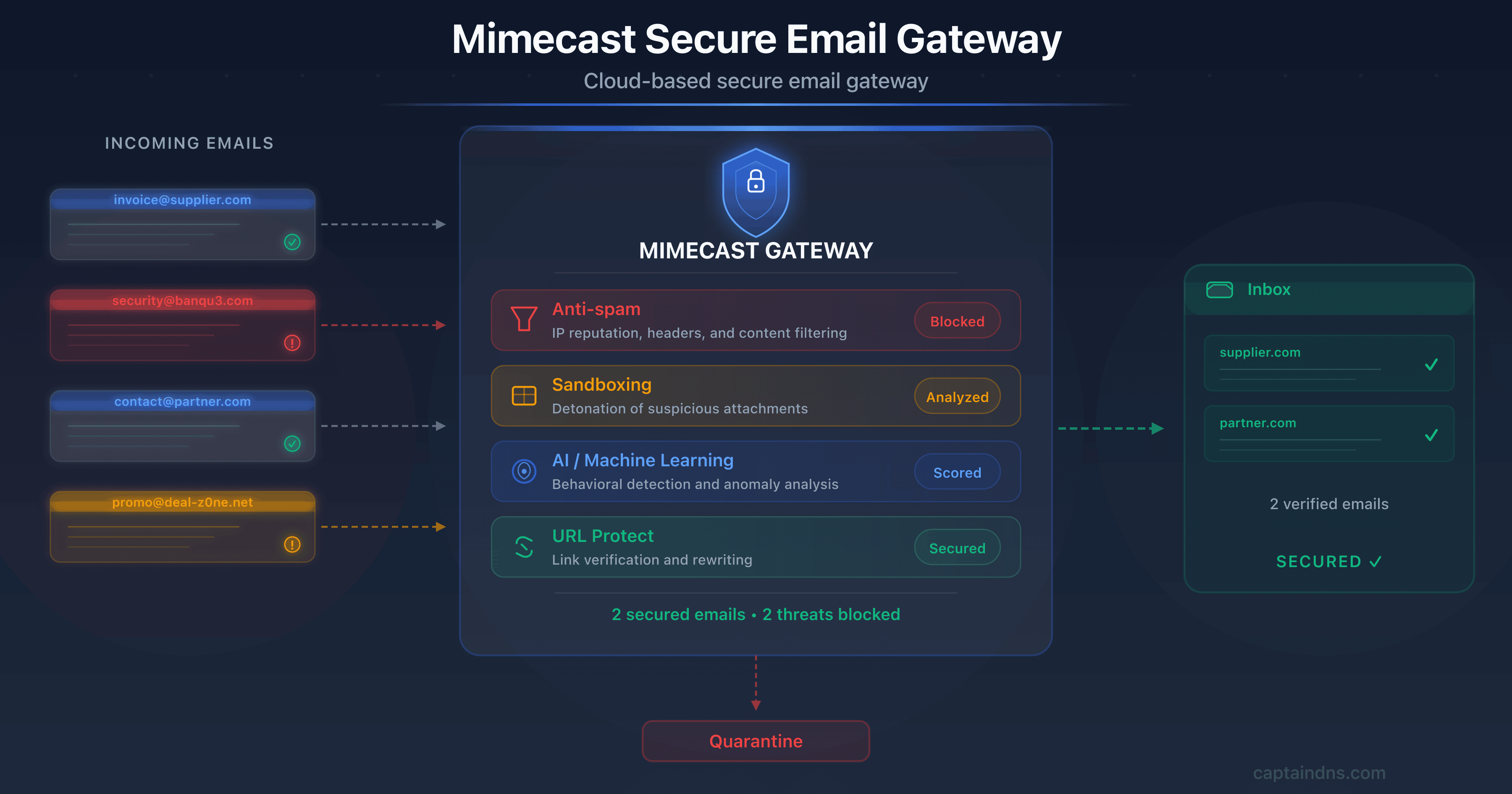
- 📧 Mimecast is a cloud SEG that redirects your MX records to filter 100% of traffic. Every email is analyzed before reaching inboxes.
- 🛡️ Multi-layered protection: anti-spam, sandboxing, URL rewriting, behavioral AI. Mimecast processes 24 trillion signals per year across 42,000 organizations.
- 🔧 Major DNS impact: MX changes, regional SPF include (watch out for the global include's 8 lookups), DKIM signing via the console, DMARC alignment. The built-in DMARC Analyzer helps you progress toward
p=reject. - ⚠️ Limitations: opaque pricing, paid add-on modules, complex admin interface, 2021 supply chain incident (SolarWinds/NOBELIUM). Compare with Proofpoint, Defender, and Abnormal Security.
Every day, over 3.4 billion phishing emails are sent worldwide. The question for your organization is not whether an attack will arrive, but when it will slip past filters. In 2026, email attacks are more sophisticated than ever: AI-generated Business Email Compromise (BEC) campaigns perfectly mimic your colleagues' writing style, malicious attachments evade traditional antivirus, and phishing links morph into legitimate-looking pages minutes after a message is delivered.
Facing this reality, organizations deploy Secure Email Gateways (SEGs) to filter traffic before it reaches inboxes. Among these solutions, Mimecast has established itself as a market leader, serving over 42,000 customers in more than 100 countries. Gartner ranked it a Leader in its 2025 Magic Quadrant for Email Security, alongside Proofpoint, Microsoft, KnowBe4, Darktrace, Check Point, and Abnormal AI.
At CaptainDNS, we analyze Mimecast through the lens we care about most: the impact on your DNS records and email authentication. Deploying a SEG is not just checking a security box. It means changing your MX records, reconfiguring SPF, DKIM, and DMARC, and understanding the technical implications of every change. This guide covers everything: architecture, detailed DNS configuration, strengths, weaknesses, security incident, comparison, and a concrete action plan.
📌 What is a secure email gateway and why choose Mimecast?
Picture a checkpoint inspecting every "package" before it enters your building. That is exactly what a Secure Email Gateway (SEG) does. This email proxy sits between the internet and your mail server. Every inbound (and outbound) message is analyzed before being delivered to the recipient.
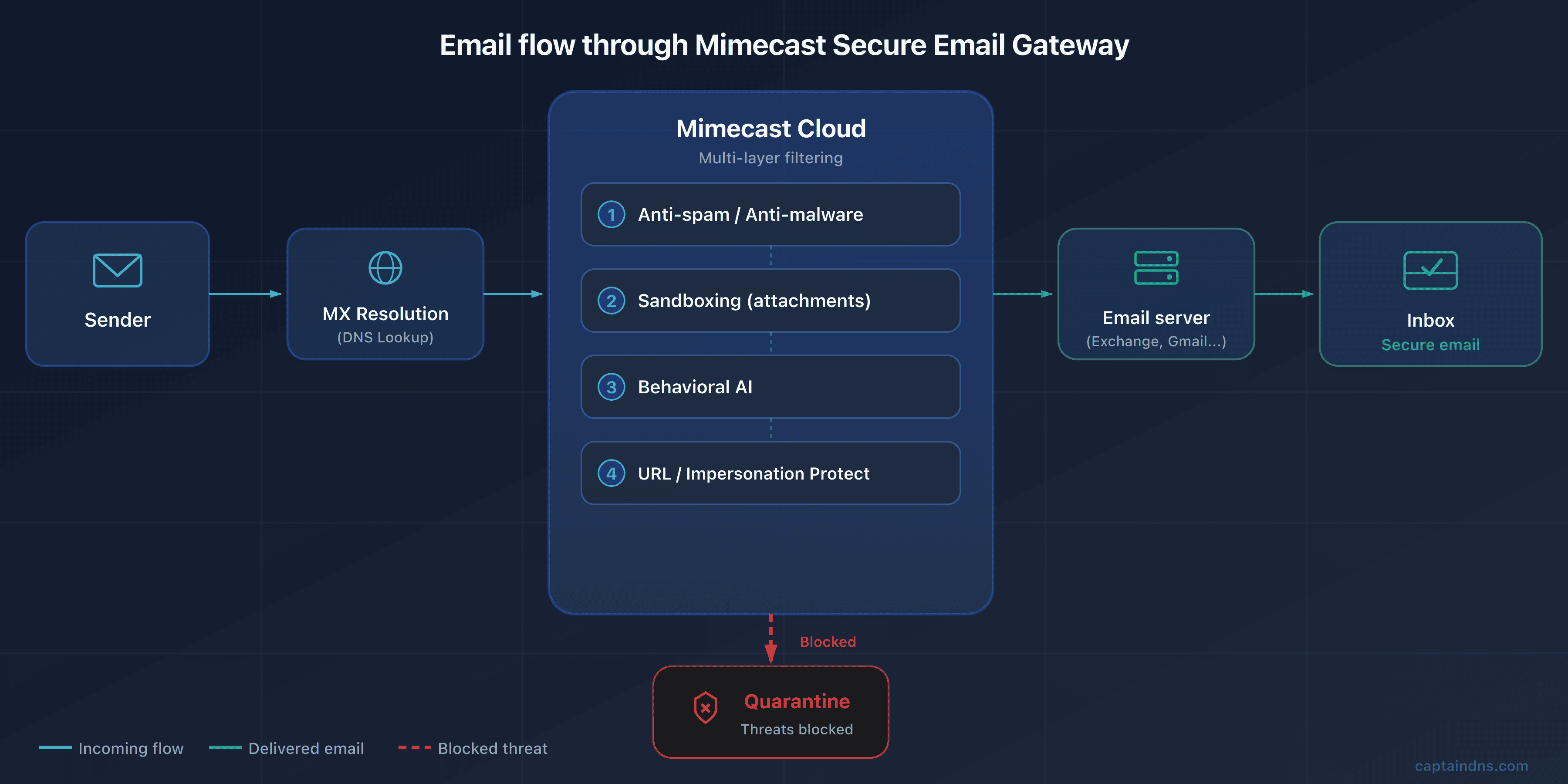
It works on a simple principle: your MX records (the DNS records that tell senders where to deliver emails for your domain) are redirected to the SEG's servers. When someone sends an email to contact@captaindns.com, the sending server queries DNS, finds the MX records pointing to the SEG, and delivers the message there. The SEG scans it (anti-spam, anti-malware, anti-phishing, sandboxing), then forwards it to your actual mail server if the message is clean. If the message is malicious, it gets blocked, quarantined, or flagged.
Two deployment models exist:
- The gateway (MX) model: the traditional approach. You change your MX records so all traffic flows through the gateway. This is what built Mimecast's reputation. The advantage: the SEG sees 100% of traffic and can block threats before they touch your infrastructure.
- The API model: deployment via API directly into your email platform (M365, Google Workspace). No MX change required. Scanning happens in parallel, often after delivery (post-delivery remediation). This is the model used by ICES (Integrated Cloud Email Security) solutions.
In 2026, Mimecast now offers both approaches. The breakthrough: a full API deployment using the same detection engine as the gateway, with three times better BEC detection than gateway mode alone. This is an industry first: detection parity between both deployment modes.
Check your email records
🏢 Mimecast: the company at a glance
Who is behind the product, and why does it matter for your decision? Mimecast was founded in 2003 in London by Peter Bauer and Neil Murray. The original idea: provide cloud email security when most companies still managed their email on-premise. For ten years, the company grew across the UK and South Africa before expanding into the United States.
The NASDAQ IPO in 2015 (ticker MIME) was a turning point, raising $77.5 million. Revenue grew dramatically: from $141 million (fiscal year 2016) to $501 million (fiscal year 2021), a 250%+ increase over five years.
In May 2022, private equity firm Permira acquired Mimecast for $5.8 billion, taking the company private. Since then, Mimecast has accelerated its acquisition strategy:
- DMARC Analyzer (November 2019): DMARC monitoring and deployment platform
- Elevate Security (January 2024): human risk scoring and behavioral analysis
- Code42/Incydr (July 2024): data exfiltration detection and insider threats
- Aware (August 2024): collaboration platform security (Slack, Teams, Zoom, WebEx)
These acquisitions illustrate the 2025-2026 strategic pivot: Mimecast is repositioning as a Human Risk Management Platform, going beyond email security alone.
In January 2024, Marc van Zadelhoff (former co-founder and leader at IBM Security, then CEO of Devo Technology) took the helm as CEO. Today, Mimecast employs over 2,000 people across roughly fifteen offices worldwide.
⚙️ Technical architecture: how Mimecast filters your emails
How does an email pass through six detection layers before reaching your inbox? Here is the full analysis chain, from MX to delivery.
Gateway model: MX redirection
The email flow with Mimecast in gateway mode works in five steps:
- A sender sends an email to
contact@captaindns.com - The sending server performs a DNS MX query for
captaindns.com - DNS returns the Mimecast MX records (for example
eu-smtp-inbound-1.mimecast.com) - The message arrives at Mimecast, which runs it through its detection chain
- If the message is approved, Mimecast forwards it to your actual email server (M365, Google Workspace, on-premise Exchange)
The core advantage: Mimecast sees 100% of inbound traffic and can block threats before they reach your infrastructure. Your email server only receives pre-filtered traffic.
Detection engines
Mimecast stacks multiple analysis layers, each targeting a specific threat type:
- Traditional anti-spam and anti-malware: signature and heuristic analysis. This is the first line of defense, eliminating noise (bulk spam, known malware). Fast and effective for volume.
- Multi-vector threat protection (MVTP): simultaneous analysis of sender authentication, domain reputation, URLs in the message, and text content. MVTP correlates these signals to detect complex attacks that would bypass a single-dimension filter.
- Sandboxing: suspicious attachments are executed in an isolated environment to observe their behavior. This addresses zero-day threats: even without a known signature, malicious behavior (outbound connection attempts, system file modifications, code injection) gets detected.
- AI behavioral analysis: Mimecast processes over 24 trillion signals per year across 42,000 organizations, feeding its detection models. This volume enables detection of subtle anomalies in tone, vocabulary, sending habits, and message structure.
- ML social graphing: Mimecast learns each user's communication habits (who they exchange with, how often, at what times, in what style). An email supposedly sent by your CFO at 3 AM with an unusual tone and a wire transfer request triggers an alert.
TTP: the three pillars of targeted protection
The TTP (Targeted Threat Protection) suite is the core of Mimecast's advanced protection. It breaks down into three modules:
URL Protect rewrites all URLs contained in emails. Every link is replaced with a Mimecast link (on a domain like url.us.m.mimecastprotect.com). When a user clicks, Mimecast scans the destination in real time. If the site became malicious between delivery and click (a technique called time-of-click), access is blocked. URL Protect also detects typosquatting: a domain closely resembling a legitimate site (for example g00gle.com instead of google.com).
Attachment Protect applies a triple security layer to attachments. First level: multi-antivirus analysis at delivery time. Second level: safe transcription of the document, allowing the recipient to view the content immediately in a harmless format (cleaned PDF). Third level: sandboxing for unknown or suspicious files, with result notification.
Impersonation Protect analyzes impersonation signals in real time: the display name, domain similarity, how recent the email address is (first contact or regular correspondent?), header anomalies, a Reply-To that differs from the From field, and the message content itself. This protects against BEC attacks where a fraudster impersonates the CEO.
Internal email protection
What if the threat comes from within? Mimecast also scans internal emails (employee to employee). The goal: block lateral movement attacks, where a compromised account spreads threats inside the organization. The same detection engines apply to internal traffic.
CyberGraph 2.0: smart warning banners
CyberGraph is a supplementary module that builds an identity graph of relationships between senders and recipients within your organization. By analyzing usual communication patterns, it detects anomalies and inserts dynamic color-coded banners directly into suspicious emails:
- Info (blue): "This message needs your attention" (first contact, personal address)
- Warning (amber): "This message could be suspicious" (name similar to a colleague, unverifiable address)
- Critical (light red): "This message is suspicious" (recently created domain, multiple combined alert signals)
- Dangerous (dark red): "This message is dangerous" (sender flagged as dangerous, confirmed threat)
What makes CyberGraph unique: banners are dynamic. If an email initially classified as amber is later reported as phishing by a user, the banner can be updated to red in every inbox that received the message, even after delivery.
The API model (new in 2026)
The API model represents the major evolution of 2026. Mimecast now offers a full API deployment with Microsoft 365, with no MX record changes required. The detection engine is identical to gateway mode.
Advantages of API mode:
- Deployment in minutes (no DNS changes)
- Three times more BEC detections and credential phishing catches compared to gateway mode alone, thanks to access to M365 internal metadata
- Post-delivery remediation: automatic removal of a malicious email already delivered if the threat is identified after the fact
- Detection parity with gateway mode, an industry first
This model is particularly suited to organizations that do not want to modify their MX flow or that already have complex transport rules in M365.
In parallel, Mimecast unveiled the Mihra AI agents. The investigation agent synthesizes security events, summarizes findings, and recommends actions. Claimed response time: 7x faster. The Spotlight agent analyzes collaboration data. The Mihra MCP Gateway connects investigation workflows to external AI platforms via the MCP protocol. User-reported messages are processed 78% faster thanks to automatic phishing campaign identification.
🔧 Complete DNS configuration for Mimecast
A mistake in an MX or SPF record, and your emails vanish into the void. Deploying Mimecast changes MX, SPF, DKIM, and DMARC in depth. Here is every step, with pitfalls to avoid.
MX records
MX records must point to the Mimecast servers for your region. Here are the values by geographic zone:
| Region | Primary MX | Secondary MX | Priority |
|---|---|---|---|
| Europe (EU) | eu-smtp-inbound-1.mimecast.com | eu-smtp-inbound-2.mimecast.com | 10 (same) |
| United States (US) | us-smtp-inbound-1.mimecast.com | us-smtp-inbound-2.mimecast.com | 10 (same) |
| Australia (AU) | au-smtp-inbound-1.mimecast.com | au-smtp-inbound-2.mimecast.com | 10 (same) |
Other regions (Germany, South Africa, Canada) also have dedicated MX records. Check the Mimecast documentation for the exact hostnames for your zone.
A few important rules:
- Both MX records must have the same priority (10) to ensure load balancing (round-robin)
- Remove all old MX records from your domain. If you leave an MX pointing to your Exchange or Google server, senders can bypass Mimecast and deliver directly
- Verify your MX records after migration with the following command:
dig MX captaindns.com +short
Expected result:
10 eu-smtp-inbound-1.mimecast.com.
10 eu-smtp-inbound-2.mimecast.com.
If other MX records appear, remove them immediately.
SPF configuration
This is the most common pitfall during a Mimecast deployment. SPF (Sender Policy Framework) identifies servers authorized to send emails for your domain. When Mimecast relays your outbound emails, its servers must be listed in your SPF record.
Mimecast provides a global include: include:_netblocks.mimecast.com. The problem? This include triggers 8 DNS lookups on its own (it contains regional sub-includes). The SPF specification imposes a 10-lookup limit in total. If you already have Google Workspace, a marketing tool, and a transactional service in your SPF, those eight extra lookups push you over the limit and generate a PermError.
The fix: use the regional include matching your Mimecast zone, which consumes only one lookup:
| Region | SPF include |
|---|---|
| United States (US) | include:us._netblocks.mimecast.com |
| Europe (EU) | include:eu._netblocks.mimecast.com |
| Germany (DE) | include:de._netblocks.mimecast.com |
| Australia (AU) | include:au._netblocks.mimecast.com |
| South Africa (ZA) | include:za._netblocks.mimecast.com |
| Canada (CA) | include:ca._netblocks.mimecast.com |
Example of an optimized SPF record for a European customer using Mimecast and Google Workspace:
v=spf1 include:eu._netblocks.mimecast.com include:_spf.google.com ~all
This record consumes only 2 direct lookups (plus Google's sub-lookups), well within the limit.
~all or -all? With a DMARC policy of p=reject in place, ~all (softfail) is sufficient: DMARC dictates the rejection of unauthenticated messages. Without DMARC or with p=none, prefer -all (hardfail) for stricter protection at the SPF level itself.
Verify your SPF record with the CaptainDNS SPF checker to ensure the total lookup count stays under 10.
DKIM configuration
DKIM (DomainKeys Identified Mail) cryptographically signs each outbound email, allowing the recipient to verify the message has not been altered and genuinely originates from your domain.
DKIM configuration with Mimecast involves three steps:
- Create a signing definition in the Mimecast console: specify your domain, choose a selector (for example
mimecast20260402), and select the key length (1024 or 2048 bits; prefer 2048 bits for optimal security) - Retrieve the public key generated by Mimecast and publish it in your DNS as a TXT record at
selector._domainkey.captaindns.com - Enable signing in the console once the DNS record has propagated
Verify publication:
dig TXT mimecast20260402._domainkey.captaindns.com +short
The result should contain the public key in the format v=DKIM1; k=rsa; p=MIGfMA0GCS....
Use the CaptainDNS DKIM checker to validate the syntax and length of your key.
DKIM key rotation: remember to rotate your keys regularly. For a 1024-bit key, rotation every 6 to 12 months is recommended; for a 2048-bit key, annual rotation is sufficient. Mimecast does not enforce automatic rotation: it is up to the administrator to create a new signing definition, publish the new key, then deactivate the old one.
DMARC alignment
DMARC (Domain-based Message Authentication, Reporting and Conformance) verifies that the domain visible in the email From field matches the domain authenticated by SPF or DKIM. It is the final piece of the authentication puzzle.
With Mimecast, alignment works as follows:
- SPF alignment: Mimecast uses your domain as the Return-Path for outbound mail, enabling SPF alignment with the From field. Verify this in your configuration.
- DKIM alignment: the DKIM signing definition configured in the console signs with your domain (the
d=field in the DKIM header matches your From domain). Alignment is therefore natural.
The recommended DMARC progression:
- p=none (monitoring): you receive reports without affecting delivery. Recommended duration: 2 to 4 weeks.
- p=quarantine: unauthenticated emails are sent to spam. Duration: 2 to 4 weeks.
- p=reject: unauthenticated emails are rejected. This is the target policy.
The built-in DMARC Analyzer (from the 2019 acquisition) simplifies this progression by visualizing reports, identifying legitimate sending sources not yet authenticated, and alerting before each policy escalation.
Example of an initial DMARC record:
v=DMARC1; p=none; rua=mailto:dmarc@captaindns.com; ruf=mailto:dmarc-forensic@captaindns.com; fo=1;
Validate your record with the CaptainDNS DMARC checker.
ARC: preserving authentication despite filtering
When Mimecast processes an inbound email, it disassembles the message to inspect the content, rewrite URLs, and insert warning banners. This process breaks the original sender's DKIM signature (the body hash no longer matches). Without a compensation mechanism, the recipient server would see a DKIM failure and potentially a DMARC failure.
This is where ARC (Authenticated Received Chain) comes in. Mimecast signs each processed message with an ARC seal via the domain dkim.mimecast.com, preserving the original authentication results (SPF, DKIM, DMARC) verified at reception. The recipient server can then trust these results despite the modifications made to the message.
Since March 2024, Mimecast is automatically configured as a Trusted ARC Sealer in its customers' Microsoft 365 tenants. For manual configuration: in Microsoft Defender, go to Email & Collaboration, Policies & Rules, Email Authentication Settings, ARC, then add dkim.mimecast.com.
Important: if you leave Mimecast, remember to remove dkim.mimecast.com from the trusted ARC sealers list in your M365 tenant.
🛡️ Beyond email security: the Mimecast ecosystem
Filtering emails is no longer enough. Attacks also flow through Slack, Teams, SharePoint, and file transfers. Mimecast has expanded its ecosystem to cover these vectors.
DMARC Analyzer (acquired in 2019)
The acquisition of DMARC Analyzer added a key building block to the Mimecast offering. The tool includes a configuration wizard, detailed forensic reports, active DMARC policy monitoring, and guided progression toward p=reject.
In practice, DMARC Analyzer aggregates RUA/RUF reports, visualizes them in a readable dashboard, and identifies sources failing authentication. This is essential if you send emails from multiple platforms (marketing, transactional, CRM, ticketing). All of them must be authenticated before moving to a strict policy.
By comparison, Valimail offers more advanced automation (automatic SPF publishing), dmarcian provides more detailed reports (the company was founded by one of the DMARC specification authors), and EasyDMARC stands out with more accessible pricing.
Email archiving
Mimecast offers email archiving with configurable retention from 1 day to 99 years. Every email is stored in three copies across geographically dispersed data centers. Each copy is immutable: the original content, metadata, and policy change history are preserved.
Search is ultra-fast, even across multi-year archives, making it a valuable tool for compliance (GDPR, HIPAA, SOX) and eDiscovery needs. The archive also supports litigation holds: freezing data in case of legal proceedings.
Email continuity
What happens if your email server goes down? With email continuity, Mimecast provides a backup web interface allowing users to send and receive emails during primary infrastructure downtime. Messages are queued and automatically synchronized when service returns.
Engage (training and awareness)
Engage is the security awareness module. It offers hundreds of training modules available in 27 languages, covering phishing, social engineering, password security, and regulatory compliance.
Since February 2026, Engage includes phishing simulations with attachments (not just links anymore). Contextual reminders are delivered via email, Slack, or Teams. Each employee gets an individual risk scorecard based on real behaviors: clicks on simulations, phishing reports, training results.
Data loss prevention (DLP)
The DLP module scans every outbound email in its entirety: body, headers, subject line, HTML content, and attachments. It uses predefined dictionaries (credit card numbers, social security numbers, health data) and fuzzy hashing to identify sensitive documents even when slightly modified.
Available actions on violation: block sending, hold for approval, copy a supervision group, force encrypted delivery, or add a disclaimer. DLP can also strip hidden metadata from Word documents (author, revision history, comments) before sending.
Aware and Incydr (2024 acquisitions)
Aware extends security to collaboration platforms: Slack, Teams, Zoom, and WebEx. The tool analyzes messages exchanged on these channels to detect policy violations, data leaks, and risky behavior.
Incydr (from the Code42 acquisition) focuses on data exfiltration detection and insider threat management. It monitors abnormal file transfers, uploads to personal cloud services, and behavior patterns of departing employees.
Brand impersonation monitoring
The Brand Exploit Protect module scans the internet for websites and domains impersonating your brand. The machine learning engine analyzes domain registrations, HTML content, and TLS certificates to detect impersonation attempts during their preparation phase, often before an attack is launched.
The dashboard displays all suspicious domains detected, their status (in preparation, active, taken down) and offers takedown services for fraudulent sites. For organizations concerned about their online reputation, this is a useful complement to email protection.
Expanded scanning for Teams and SharePoint
Since January 2025, Mimecast extends its protections to Microsoft collaboration tools: Teams, SharePoint, and OneDrive. The module analyzes URLs and attachments shared in Teams conversations in real time, with a 14-day retrospective scan to identify content that became malicious after being shared.
On SharePoint and OneDrive, files modified within the last 30 days are monitored continuously. Any malicious content is quarantined and replaced with a security notification. Policies are configurable per Teams channel, SharePoint site, user group, or individual.
Secure Messaging: the encrypted messaging portal
For communications requiring end-to-end encryption, Mimecast offers a secure messaging portal. The process is transparent for the sender: they select the encryption option when composing, the email and attachments are stored in an encrypted cloud location, and the recipient receives a notification with a secure link.
The external recipient needs no software: they register on the portal (customizable with your company branding), view the message, download attachments, and can reply securely. Administrators control read receipts, expiration dates, and can revoke access at any time.
🚀 Why 42,000 organizations trust Mimecast
Why do tens of thousands of organizations rely on Mimecast to protect their email? Here are the factual arguments.
-
Robust, proven filtering. Mimecast claims 99.998% accuracy with its Multi-Vector Threat Protection engine (March 2026). This engine correlates signatures, heuristics, behavioral AI, and sandboxing to identify coordinated campaigns. On Gartner Peer Insights: 4.5/5, 600+ reviews, 86% recommendation rate. Caveat: this figure is an internal metric, not an independent test. SE Labs (September 2024) awarded the AAA rating to Trend Micro, and Proofpoint leads on targeted BEC. The multi-engine combination remains one of the most comprehensive on the market nonetheless.
-
Fast deployment, especially in API mode. The native API mode (March 2026, via Microsoft Graph) makes an organization operational within minutes. No MX changes, no email flow interruption. In gateway mode, the MX switch takes a few hours for an SMB on M365. Documentation targets 60 days for advanced implementations (DLP, archiving, SIEM), however. Plan several weeks for organizations with 500+ users.
-
All-in-one, modular suite. Few vendors combine email security, archiving (1 day to 99 years), service continuity, awareness training, DLP, and DMARC monitoring in a single console. This is a differentiator versus Proofpoint (archiving via partners) and Defender (no dedicated continuity or archiving). Since August 2025, three plans (Advanced, Critical, Premium) structure the offering. Note: real-time URL Protect, sandboxing, and Engage remain paid add-on modules. Total cost can significantly exceed the base price.
-
Integration ecosystem and API. 60+ native integrations as of 2021, expanded via the Integrations Hub (April 2025). Major SOC and SIEM tools are covered: CrowdStrike, Splunk, Microsoft Sentinel, Palo Alto Networks, Rapid7, ServiceNow, Netskope, Zscaler, IBM Security. The REST API 2.0 (API 1.0 was retired in March 2025) enables custom integrations. The ecosystem is one of the broadest in the SEG sector.
-
AI at scale and certified governance. 24 trillion signals processed per year, 43,000 customer organizations. ML Social Graphing maps each user's communication habits. Result: detection of anomalies invisible to traditional filters (unknown sender, unusual writing style, domain spike). Mimecast claims 3x more BEC detections than traditional methods, with BEC coverage extended to 20+ languages. In January 2025, Mimecast became the first cybersecurity vendor certified ISO 42001 (AI management systems).
-
Consistent recognition from analysts and users. Leader in the Gartner Magic Quadrant for Email Security in 2024 and 2025. Leader in enterprise archiving for six consecutive years. Gartner Peer Insights: 4.5/5, 600+ reviews, 86% recommendation rate. TrustRadius: Top Rated 2025 and Buyer's Choice 2026 in three categories. G2: Leader in SEG, threat intelligence, and intelligent email protection. This convergence of analyst and user recognition is a more reliable maturity indicator than any single report.
-
Financially backed SLAs and compliance certifications. Three contractual commitments: 100% email processing uptime, 99% spam detection with under 0.0001% false positives, and archive search within 7 seconds. On compliance: ISO 27001, 27018, 27701, 22301, 42001, 14001, SOC 1 and SOC 2 Type II, FIPS 140-2, FedRAMP (moderate for Incydr). HIPAA/HITECH compliance supported. European data hosted in Frankfurt (two replicated sites). Residency options in Canada, UK, South Africa, and Australia.
-
Built-in human risk management. Since 2025, Mimecast has repositioned as a Human Risk Management platform. The Human Risk Command Center (April 2025) centralizes email, collaboration, endpoint, and identity telemetry. Each employee receives an individual risk score. Clicked a suspicious link? Automatic enrollment in targeted training and temporary access restriction. Mihra AI reduces incident response time by a factor of 7 (Mimecast figure). This is a strategic differentiator versus pure SEGs, which lack visibility into overall human behavior.
-
Native email continuity. Your Exchange or M365 server goes down? Mimecast provides a backup webmail to send and receive emails. Built-in, no third-party tool required. Neither Proofpoint (depends on partners) nor Abnormal Security offer this advantage. Note: the module must be activated in advance. Make sure your users know the backup portal.
⚠️ Limitations and drawbacks to know
No solution is perfect. Here are the friction points most frequently reported by customers and analysts.
-
Opaque pricing and aggressive increases. Mimecast does not publish its pricing. Entry price: approximately $3.50/user/month for 1,000+ users. With TTP modules: $5 to $8/user/month. Price varies by organization size, plan, and modules. Many customers report 5 to 8% increases at each renewal, with little room for negotiation. Contract lock-in is real.
-
Advanced features as paid add-ons. Real-time URL scanning, sandboxing, and Engage training are optional modules. Total cost for full protection can climb significantly. By comparison, Abnormal Security takes an API approach without these modules, with superior BEC/VEC detection.
-
Admin interface in transition. Dense navigation, nested policies, steep learning curve. Seasoned administrators master it; newcomers need time. A modernization program has been underway since 2023: multi-tab Workspaces (April 2025), navigation with integrated search (September 2025), redesigned user portal (June 2025). Feedback is mixed: the intent is praised, but sluggishness persists. The complexity of the policy model remains unchanged.
-
Support at three speeds. Three tiers: Basic (12 hours), Advanced (6 hours, 24/7), and Premium (3 hours, dedicated TAM). All include 24/7 phone for P1 incidents. Feedback varies widely: smooth experience on Premium, slow responses and KB redirects on Basic. Corrective measures were taken in 2024 (removal of outsourced responder, portal redesign). Quality remains correlated with the subscribed tier. Premium comes at a significant additional cost.
-
BEC detection trailing Proofpoint. Mimecast is solid on BEC, but Proofpoint leads according to several analysts and independent tests. Proofpoint's advantage: proprietary threat intelligence and a more extensive honeypot network. If targeted attacks are your top priority, compare both in a POC.
-
URL rewriting: a manageable operational risk. URL Protect rewrites nearly all links in inbound emails. Every click passes through Mimecast before redirection. Two risks. First: if URL Protect experiences downtime (386 incidents over 5 years according to StatusGator), links become inaccessible. Second: single-use links (password resets, magic links, OAuth callbacks) can be triggered during scanning, rendering them invalid. This problem is documented by FusionAuth, Auth0, and the Mimecast community. Fix: "Managed URLs" disable rewriting per domain, "Bypass Policies" exempt certain senders. The risk is controllable if you configure these exceptions upfront.
-
Availability: a marketing SLA to put in context. Stated SLA: 100% email processing uptime. Reality: 135 incidents since March 2022 (roughly 2.8/month), effective uptime of 99.98% over 90 days (IsDown). Most are minor degradations (slowness, console) or maintenance windows, not processing outages. The SLA covers message processing only, not the console, URL Protect, or portals. This level is comparable to Proofpoint and M365. In short: 100% is unrealistic in the strict sense, but 99.98% remains solid.
-
Technical lock-in during outbound migration. Leaving Mimecast is not trivial. The DNS switch (MX, SPF, DKIM) takes a few hours. The real problem: extracting email archives. Exports are limited to 10 GB per batch, eDiscovery searches capped at 50,000 messages. For multi-terabyte archives, expect weeks and third-party tools (Transvault, Essential). Factor this in before signing.
🔒 When Mimecast was compromised: the 2021 incident
Can an email security vendor itself be hacked? Yes. The SolarWinds incident of 2021 hit Mimecast and illustrates a risk every organization must account for: the supply chain attack.
January 12, 2021: Mimecast publicly disclosed that a "sophisticated threat actor" had compromised a digital certificate used to connect Mimecast products to Microsoft 365 environments via Exchange Web Services. Approximately 10% of Mimecast customers used this certificate-based connection method.
The attack vector: the Sunburst backdoor, injected into SolarWinds Orion software. Mimecast used Orion for network monitoring. The attacker exploited this backdoor to move laterally and access the M365 connection certificate.
The impact was contained. Mimecast stated that a "low single-digit" number of M365 tenants had been actually targeted. The attacker accessed encrypted service account credentials (customers in the United States and the United Kingdom).
March 2021: Mimecast confirmed the attacker also downloaded a limited number of source code repositories. The company specified that the code was incomplete and insufficient to build or run a Mimecast service.
January 18, 2021: Microsoft blocked the compromised certificate at Mimecast's request.
Remediation measures were substantial:
- Rotation of all affected certificates and keys
- Strengthened encryption of stored credentials
- Implementation of additional monitoring
- Decommissioning of SolarWinds Orion, replaced by Cisco NetFlow
- Rotation of all credentials for employees, systems, and administrators
The attack was attributed to the NOBELIUM/UNC2452 group, linked to the Russian Foreign Intelligence Service (SVR). This is the same group responsible for the SolarWinds compromise that affected numerous US government agencies.
In 2024, the SEC (Securities and Exchange Commission) brought action against Mimecast, alleging the company had downplayed the impact of the breach in its investor communications. Mimecast settled the case.
The lesson for administrators: supply chain risk exists even with the most reputable security vendors. Diversify your defenses, monitor connections between services, and regularly verify certificates and access granted to third-party solutions.
🔄 Email gateway comparison: Mimecast, Proofpoint, Microsoft, and Abnormal Security
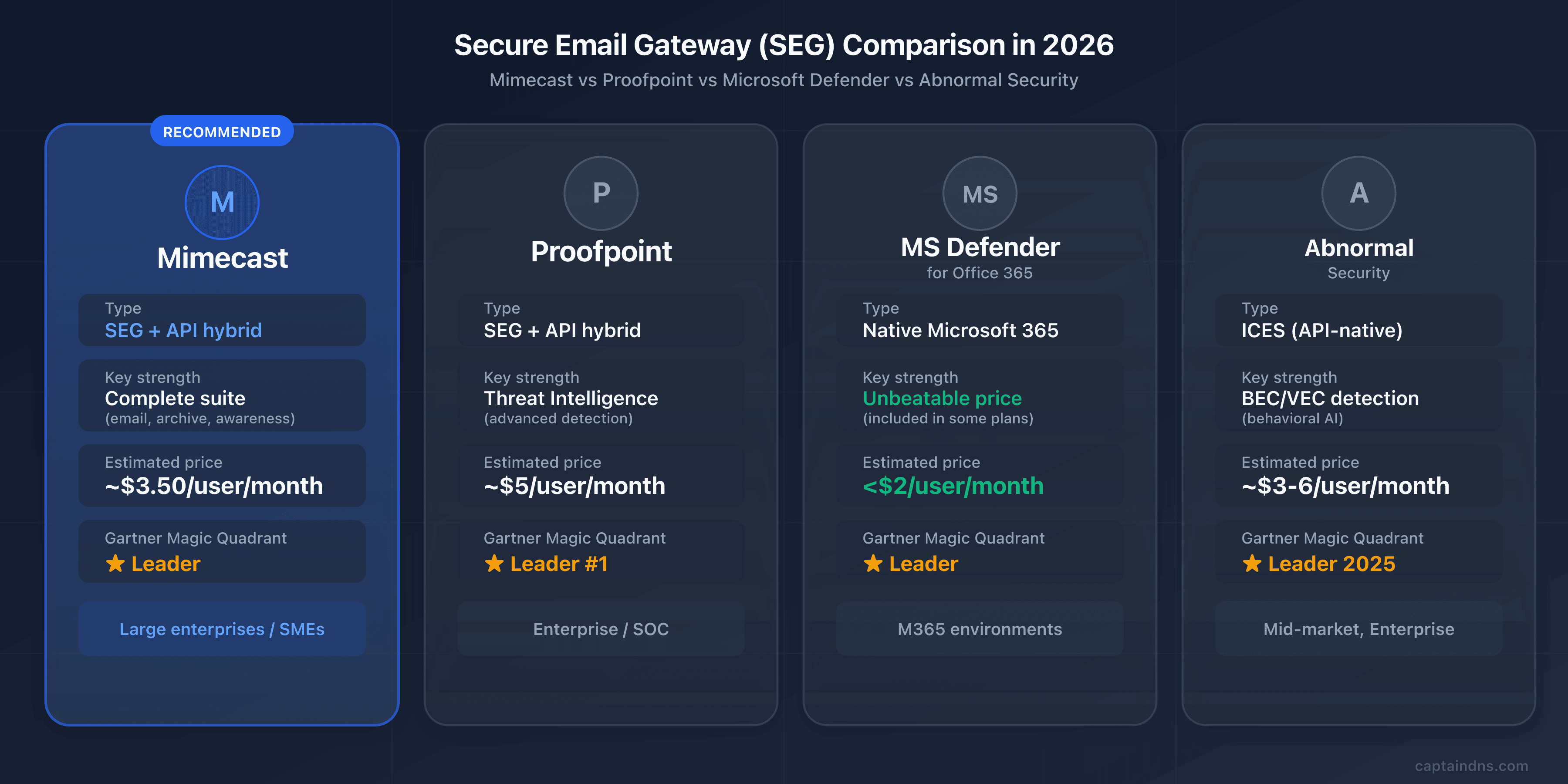
Which SEG fits your environment and budget? Four vendors dominate the market, each with a distinct positioning.
| Criterion | Mimecast | Proofpoint | Microsoft Defender | Abnormal Security |
|---|---|---|---|---|
| Deployment | Gateway + API (2026) | Gateway + API | Native M365 | API-native (no MX change) |
| AI/ML detection | 24T signals/year | Leader in threat intelligence | 9.1/10 independent tests | Behavioral AI, social graph |
| Archiving | Yes (1 day to 99 years) | Via partners | Via M365 retention | No |
| Awareness training | Optional (Engage) | Optional | Included (Attack Simulator) | No |
| DMARC | Built-in Analyzer | Built-in | No | No |
| Estimated price | ~$3.50-8/user/month | ~$4-6/user/month | Under $2/user/month | ~$3-6/user/month |
| Gartner 2025 | Leader | Leader (#1 Execution) | Leader | Leader |
| Best for | SMBs/mid-market with multiple needs | Large enterprises | M365 environments | Advanced BEC/VEC detection |
Proofpoint: the threat intelligence benchmark
Acquired by Thoma Bravo in 2021 for $12.3 billion, Proofpoint is Mimecast's direct competitor at the high end. Its strength: proprietary threat intelligence fueled by a honeypot network, law enforcement partnerships, and a dedicated research team that tracks attacker groups individually.
Proofpoint dominates in detecting BEC and targeted phishing attacks. The Gartner 2025 report places it first on the Execution axis. Its positioning clearly targets large enterprises (financial services, healthcare, government).
The trade-off: Proofpoint is the most expensive SEG on the market ($4 to $6 per user per month, or more for full offerings), and its interface is just as complex as Mimecast's. For a detailed review of Proofpoint (Nexus AI architecture, DNS setup, the 2024 EchoSpoofing incident), see our complete guide to Proofpoint.
Microsoft's native email security solution
If your organization is all-in on Microsoft 365, Defender for Office 365 is the most natural choice. No MX changes, no third-party integration: protection is native and activated within your existing tenant.
Independent tests give it a 9.1/10 detection score. Attack Simulator (phishing simulations) is included in Plan 2. The price is unbeatable: often under $2 per user per month, or included in E5 licenses.
The limitation: Defender for Office 365 is an M365 tool. If you use Google Workspace, on-premise Exchange, or a hybrid environment, it does not cover those cases. Archiving, email continuity, and DMARC monitoring are not built in.
Abnormal Security: the behavioral approach
Founded in 2018 in San Francisco by former Twitter engineers specialized in AI, Abnormal Security represents the new generation of email security (see our complete guide to Abnormal Security). Valued at $5.1 billion in 2024, the company has over 2,400 customers.
Unlike traditional SEGs, Abnormal operates exclusively via API (Microsoft Graph, Google Workspace). No MX change, deployment in minutes. Its behavioral AI engine builds a unique profile for each employee and external contact: writing style, schedules, business relationships. Anomalies invisible to traditional filters are detected.
Its primary strength: BEC and VEC (vendor email compromise) detection. BEC attacks contain no malicious links or attachments. Result: nearly undetectable by signature-based SEGs. Abnormal also excels at compromised account detection (account takeover) and automated remediation.
On the other hand, Abnormal does not replace all functions of a full SEG: no email archiving, no outbound DLP, no email continuity, no real-time URL rewriting. Many organizations use it as a complement to Microsoft Defender or an existing SEG, to cover blind spots on social engineering attacks.
🎯 When to choose Mimecast
The right SEG depends on your infrastructure, budget, and security priorities. Here are the cases where Mimecast makes sense, and those where an alternative serves you better.
Mimecast is a good fit if:
- You are an SMB or mid-market company that wants to centralize email security, archiving, continuity, and awareness training in a single platform
- You have compliance obligations (GDPR, HIPAA, SOX) that require long-term immutable archiving and a complete audit trail
- Your environment is hybrid (not all-Microsoft): on-premise Exchange, Google Workspace, or a mix of platforms
- You need built-in DMARC monitoring to drive your progression toward
p=rejectwithout a separate tool - You manage multiple email platforms (M365 + Google Workspace + on-premise) and want unified protection
Mimecast is not the best choice if:
- Your budget is tight: Microsoft Defender for Office 365 costs significantly less for M365 environments
- Your environment is all-M365 and your needs are limited to standard filtering: Defender covers common threats. It falls short on long-term archiving, continuity during M365 outages, DMARC monitoring, and forensic reports. For basic needs, that is enough. For a demanding security posture, a dedicated SEG retains its value.
- BEC/VEC detection is your primary concern and you are willing to forgo pre-delivery protection, archiving, and DLP: Abnormal Security excels at behavioral attacks. Note: post-delivery operation only. The Defender + Abnormal combination is popular but does not cover all the needs of a full SEG.
- You target very large enterprises (10,000+ users) with advanced threat intelligence needs: Proofpoint has a historical advantage in this segment. Fortune 500 installed base, dedicated research team. The gap is narrowing, but Proofpoint remains the benchmark for the most demanding SOCs.
🖥️ Step-by-step deployment guide
Decided on Mimecast? Here are the five concrete steps to deploy it on your domain without interrupting service.
Step 1: current DNS inventory
Before any changes, document the current state of your DNS records. Use CaptainDNS tools to audit:
- Current MX records: which servers do they point to?
- SPF record: which includes and mechanisms are already present? How many DNS lookups are you consuming?
- DKIM record: which selectors are active? What key length?
- DMARC record: which policy is in place (none, quarantine, reject)?
Also document all legitimate sending sources for your domain: primary server, marketing platform (Mailchimp, HubSpot), transactional (SendGrid, Mailgun), CRM (Salesforce), ticketing (Zendesk), etc. Each one must be authenticated in your new configuration.
Step 2: Mimecast console configuration
In the Mimecast admin console:
- Add your domain and verify ownership
- Configure the connection to your destination email server (M365, Google Workspace, Exchange)
- Set up user directory synchronization (Active Directory, Azure AD, LDAP)
- Define baseline security policies (anti-spam levels, malware actions, quarantine management)
- Configure administrator notifications and reports
Step 3: MX record change
This is the most critical step. Perform it preferably outside peak hours (early morning or weekend).
- Remove all existing MX records from your domain
- Add the two Mimecast MX records for your region with priority 10
- Wait for DNS propagation (a few minutes to a few hours depending on the TTL of your old MX records)
- Verify with
dig MX captaindns.com +shortthat only Mimecast MX records appear
Do not keep any old MX records, not even as a backup with a higher priority number. A leftover MX record is a backdoor that lets senders bypass Mimecast filtering.
Step 4: SPF, DKIM, DMARC
Configure the three authentication layers in this order:
- SPF: add the regional Mimecast include (not the global one!). Verify the total lookup count stays under 10. Use the CaptainDNS SPF checker.
- DKIM: create the signing definition in the Mimecast console, publish the public key in DNS, then enable signing. Test with the CaptainDNS DKIM checker.
- DMARC: start with
p=nonefor monitoring. Never jump straight top=rejectwithout observing reports for at least 2 weeks.
Step 5: verification and monitoring
Once everything is in place:
- Send test emails from each legitimate sending source (primary server, marketing, transactional)
- Check the received email headers: SPF, DKIM, and DMARC should all show
pass - Monitor DMARC reports for 2 to 4 weeks
- Gradually enable advanced protections (TTP, DLP, Internal Email Protect)
- Escalate the DMARC policy to
p=quarantinethenp=rejectafter 4 to 8 weeks of clean monitoring
🔍 Verifying that Mimecast is working correctly
Deploying is not enough. How do you know protection is actually active? Here are the commands and checks to perform.
Verifying DNS records:
# Check MX records
dig MX captaindns.com +short

# Check SPF
dig TXT captaindns.com +short | grep spf

# Check DKIM
dig TXT mimecast20260402._domainkey.captaindns.com +short

# Check DMARC
dig TXT _dmarc.captaindns.com +short
For a deeper verification, analyze the received email headers. Here is what you should find in the Authentication-Results header:
spf=pass: your SPF record properly includes Mimecast serversdkim=pass: DKIM signing is active and the public key is correctly publisheddmarc=pass: SPF or DKIM alignment (or both) works with your DMARC policy
Also check for the X-Mimecast-Spam-Score header, which confirms the email passed through Mimecast. The Received headers should show a hop through Mimecast servers before delivery to your email server.
Use the CaptainDNS email header analyzer to automatically decode this information and identify potential issues.
⛔ Common pitfalls to avoid
A misconfigured Mimecast deployment can be worse than no SEG at all. Here are the mistakes we see most often, and how to avoid them.
-
Forgetting to remove old MX records. This is the number one error. If an MX record still points to your old server (Exchange, Google), senders can deliver directly, completely bypassing Mimecast filtering. Verify with
dig MXthat no leftover MX records remain. -
Failing to lock down the M365 connector. After redirecting your MX records to Mimecast, you must configure transport rules in Microsoft 365 (or a dedicated connector) to accept inbound email only from Mimecast IP addresses. Without this protection, an attacker who knows your Exchange Online domain (*.mail.protection.outlook.com) can send emails directly to your mailboxes, completely bypassing filtering. This is the most common configuration flaw in M365 environments paired with a SEG.
-
Using the global SPF include instead of the regional one. The
_netblocks.mimecast.cominclude consumes 8 lookups on its own. With other services in your SPF, you will exceed the 10-lookup limit and get a SPF PermError, which is equivalent to having no SPF at all. Use the regional include (1 lookup). -
Enabling DMARC at
p=rejectwithout testing DKIM. If DKIM signing is not properly configured or the public key is not published, your own legitimate emails will be rejected by recipients. Check our guide DKIM fail: causes and fixes to diagnose common issues. Stay atp=noneuntil reports confirm everything passes. -
Ignoring URL rewriting in internal templates. URL Protect rewrites all links, including those in your newsletters, transactional emails, and email signatures. Marketing tracking links, tracking pixels, and dynamic URLs can break. Configure URL exceptions in the Mimecast console for your trusted domains.
-
Not training users on Mimecast banners. Mimecast adds warning banners to emails from external senders or new contacts. If users do not understand these banners, they systematically ignore them, reducing the effectiveness of the protection. Communicate the meaning of each banner.
-
Neglecting email continuity configuration. One of Mimecast's advantages is service continuity during email server outages. But this feature must be configured in advance (user access, fallback policies). If you do not activate it, you lose this benefit when an outage occurs.
-
Ignoring DKIM body hash failures on inbound emails. Mimecast disassembles every message to inspect it, then reassembles it. This process systematically breaks the original sender's DKIM signature (the body hash no longer matches after URL rewriting or banner insertion). This is normal and expected. The fix: configure Mimecast as a trusted ARC sealer in your M365 tenant (see the DNS configuration section). If you see
dkim=fail (body hash did not verify)failures in headers, verify that ARC is properly set up before investigating the sender side.
📋 10-step action plan
Ready to deploy? Here is the complete sequence, from initial audit to DMARC p=reject.
- Audit your current email posture (MX, SPF, DKIM, DMARC) with CaptainDNS tools
- Evaluate your needs: full SEG or basic filtering? Compare Mimecast, Proofpoint, Defender, and Abnormal Security based on your environment
- Request a POC from Mimecast (the trial period typically lasts 30 days)
- Configure your domain and policies in the Mimecast console, with directory synchronization
- Migrate MX records (outside peak hours), removing all old MX records
- Add the regional SPF include and verify the total DNS lookup count
- Enable DKIM signing in the console and publish the public key in DNS
- Deploy DMARC in monitoring mode (
p=none) and monitor reports for 2 to 4 weeks - Enable advanced protections (TTP URL/Attachment/Impersonation Protect, DLP, Internal Email Protect)
- Escalate the DMARC policy progressively to
p=rejectafter 4 to 8 weeks of clean monitoring
📚 Email gateway guides
This analysis is part of our series on enterprise email security solutions:
- Mimecast Secure Email Gateway (this article): architecture, DNS configuration, comparison and action plan
- Proofpoint Secure Email Gateway: Nexus AI, TAP, EchoSpoofing 2024 and DNS configuration
- Abnormal Security: behavioral AI, API deployment, Attune 1.0
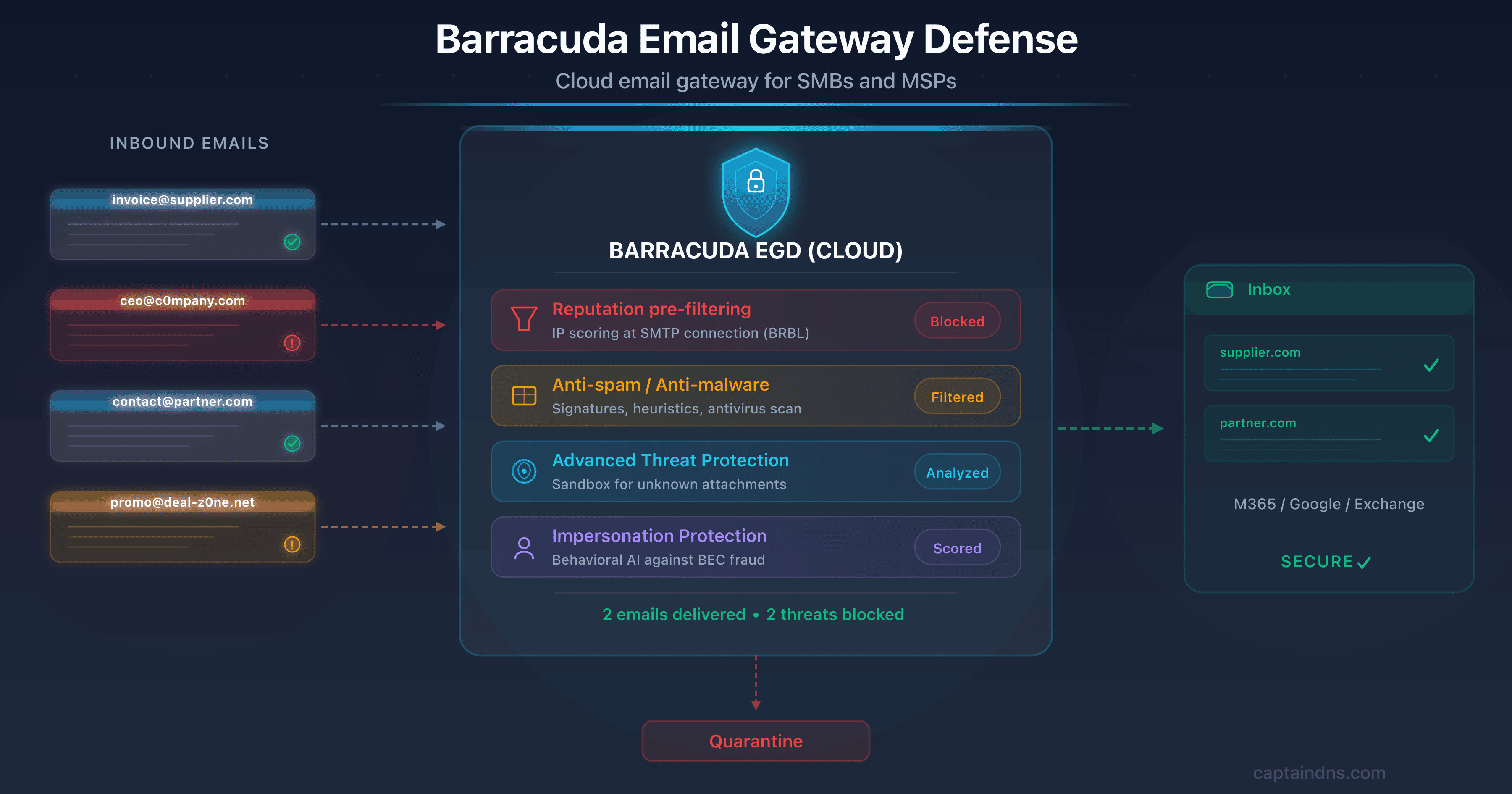
- Barracuda Email Gateway Defense: SMB/MSP cloud SEG, EGD/ESG distinction, CVE-2023-2868 and DNS configuration
- Cisco Secure Email Gateway: CES cloud gateway, Ironport heritage, Gartner 2025 exit and migration roadmap
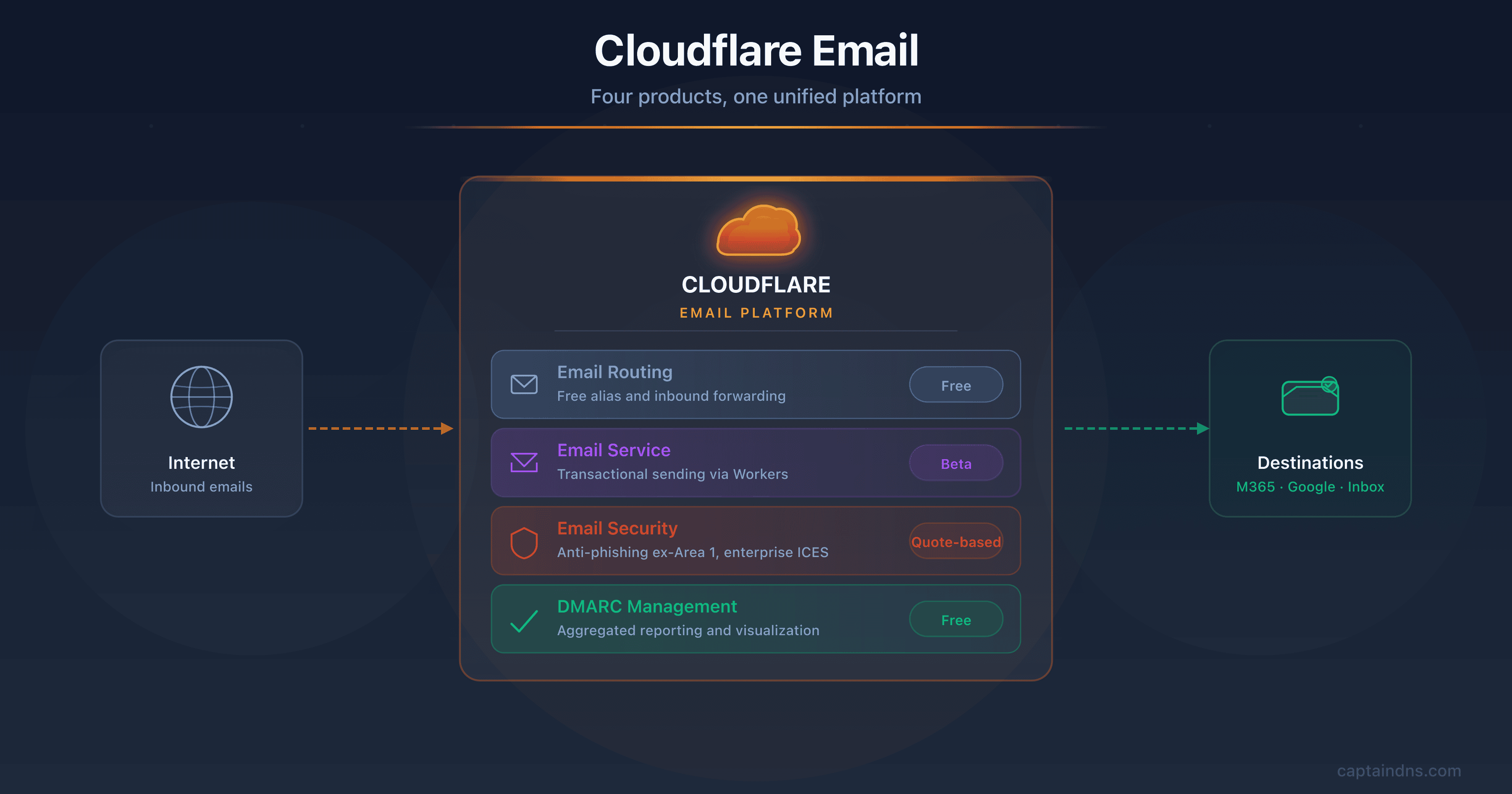
- Cloudflare Email Service: Routing, Email Service, Security (ex-Area 1), and DMARC Management
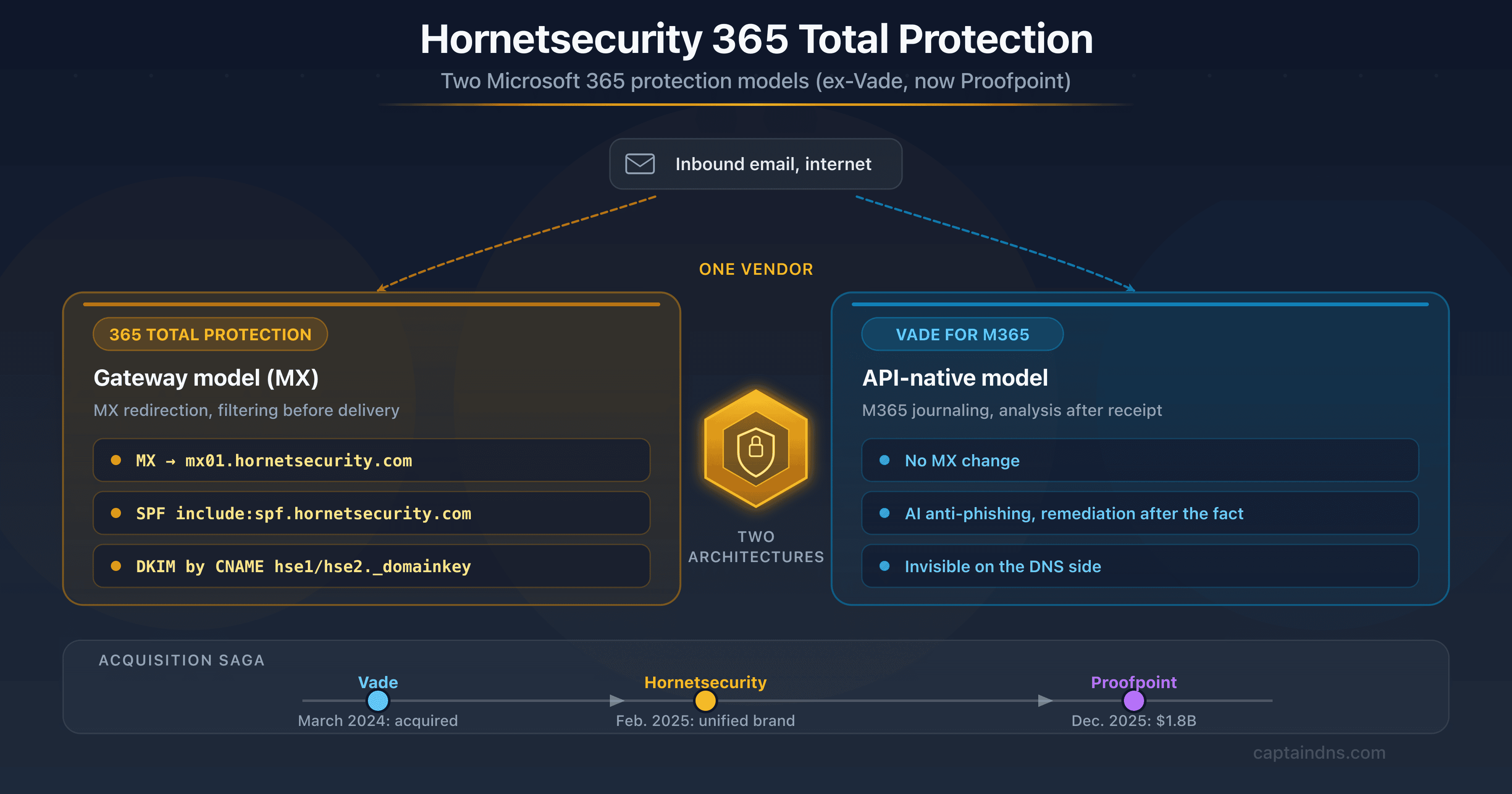
- Hornetsecurity Secure Email Gateway: the European vendor, formerly Vade, now part of Proofpoint, and its DNS impact (SPF, DKIM via CNAME)
FAQ
Does Mimecast replace my email server?
No. Mimecast is a security gateway, not an email server. Your email server (Microsoft 365, Google Workspace, on-premise Exchange) stays in place. Mimecast sits between the internet and your server: it filters inbound and outbound traffic, then forwards approved messages to your existing infrastructure. You continue using Outlook, Gmail, or your usual client as before.
How much does Mimecast cost?
Mimecast does not publish an official pricing grid. The entry price is around $3.50 per user per month for large organizations (1,000+ users) on the base plan. For SMBs or plans including TTP modules, expect $5 to $8 per user per month. Pricing varies by organization size and selected modules. Advanced features (URL Protect, Attachment Protect, Engage, Archive) are often add-on modules billed separately. Expect 5 to 8% increases at renewals. Request a custom quote and compare with Defender (under $2 for M365) and Abnormal Security ($3 to $6, specialized in BEC/VEC detection).
Does Mimecast work with Google Workspace?
Yes. Mimecast supports Google Workspace in gateway mode (MX redirection) and via API integration. Configuration involves changing your domain's MX records to point to Mimecast, setting up routing in the Google Admin console, and authenticating SPF/DKIM. Mimecast also syncs the Google Workspace directory to apply policies per user or group.
What happens if Mimecast goes down?
During a Mimecast outage, inbound emails queue at the sending servers (the SMTP protocol provides for retry attempts over 24 to 72 hours). For users, Mimecast's email continuity module provides a backup web interface to send and receive messages. A specific risk: links rewritten by URL Protect may become inaccessible during the outage.
Is Mimecast GDPR compliant?
Yes. Mimecast has data centers in Europe (UK, Germany) and allows you to choose the storage region for your data. The company is ISO 27001 and SOC 2 Type 2 certified, and provides a Data Processing Agreement (DPA) compliant with GDPR. Archiving is encrypted, and rights of access, rectification, and deletion of personal data are supported.
How do I migrate from another SEG to Mimecast?
Migration is primarily at the DNS level. First configure Mimecast in parallel (domain, policies, directory), then switch your MX records to Mimecast. The change is nearly instant: as soon as the MX records propagate, traffic switches over. If migrating from Proofpoint or another SEG, remember to update SPF simultaneously (replace the old vendor's include with Mimecast's) and reconfigure DKIM.
Can Mimecast work without MX changes (API mode)?
Yes, since 2026. Mimecast offers API deployment with Microsoft 365 that requires no MX record changes. The detection engine is identical to gateway mode, with three times better BEC detection. This mode is ideal for organizations that do not want to touch their MX flow or that want to test Mimecast without impacting production.
What is the difference between Mimecast and Microsoft Defender for Office 365?
Defender is native to M365 (no DNS changes), cheaper (under $2 per user), and sufficient for most Microsoft environments. Mimecast is a third-party solution independent of the email vendor, with features Defender lacks: long-term archiving, email continuity, built-in DMARC Analyzer, and multi-platform support (M365 + Google Workspace + on-premise). If you are all-in on M365, Defender is often the best value.
How does Mimecast handle email encryption?
Mimecast offers an encryption module (Secure Messaging) that lets you send encrypted emails without the recipient needing special software. The email is stored on the Mimecast portal and the recipient gets a notification with a secure link. TLS encryption is applied automatically for server-to-server connections when the destination server supports it.
Does Mimecast archive all emails automatically?
If the archiving module is enabled, yes: all inbound, outbound, and internal emails are archived automatically. Retention is configurable from 1 day to 99 years. Each email is stored in three geographically dispersed copies with guaranteed integrity. Archiving is independent of your email server: even if you delete an email in Outlook, the archived copy remains intact.
Has the SolarWinds incident been resolved?
Yes. The incident was fully remediated in 2021. Mimecast rotated all compromised certificates and credentials, strengthened encryption of stored credentials, decommissioned SolarWinds Orion (replaced by Cisco NetFlow), and implemented enhanced monitoring. The attacker (NOBELIUM) accessed only a very limited number of M365 tenants and incomplete source code. No subsequent exploitation has been reported.
Does Mimecast block legitimate emails (false positives)?
Like any SEG, Mimecast can occasionally block legitimate emails. The false positive rate is generally low, but it depends on the sensitivity of configured policies. Blocked emails are placed in quarantine and accessible to both users and administrators. You can create allow lists by sender, domain, or IP address, and adjust detection thresholds. Monitor the quarantine regularly during the first weeks after deployment.
Glossary
-
SEG (Secure Email Gateway): an email security gateway that filters inbound and outbound traffic between the internet and the mail server. The SEG analyzes each message (spam, malware, phishing) before forwarding it to the recipient.
-
MX record (Mail Exchanger): a DNS record indicating the servers responsible for receiving emails for a domain. Deploying Mimecast means redirecting MX records to Mimecast servers.
-
SPF (Sender Policy Framework): an email authentication protocol that lists the servers authorized to send emails for a domain. The SPF record is a TXT record in DNS, limited to 10 recursive lookups.
-
DKIM (DomainKeys Identified Mail): an authentication protocol that cryptographically signs emails. The public key is published in DNS, allowing the recipient to verify message integrity and origin.
-
DMARC (Domain-based Message Authentication, Reporting and Conformance): a protocol that verifies alignment between the From domain and the domains authenticated by SPF and DKIM. DMARC defines the policy to apply on failure (none, quarantine, reject).
-
Sandboxing: an analysis technique that executes a suspicious file in an isolated, secure environment to observe its behavior. Enables detection of zero-day threats without a known signature.
-
BEC (Business Email Compromise): a type of email fraud where the attacker impersonates an executive or trusted partner to obtain a wire transfer, sensitive data, or system access. Global BEC losses exceed $55 billion according to the FBI.
-
Phishing: an attack technique that uses fraudulent emails to trick victims into disclosing sensitive information (credentials, banking details) or installing malware. Spear phishing targets specific individuals.
-
DLP (Data Loss Prevention): a set of technologies that detect and prevent the leakage of sensitive data via email, files, or other channels. Mimecast's DLP scans outbound emails to block unauthorized transmission of confidential information.
-
eDiscovery: the process of searching and extracting electronic data for legal proceedings or internal investigations. Mimecast archiving facilitates eDiscovery through fast search and litigation hold capabilities.
-
Anycast: a network routing technique that allows multiple geographically dispersed servers to share the same IP address. Requests are automatically directed to the nearest server, reducing latency.
-
TTP (Targeted Threat Protection): Mimecast's advanced protection suite comprising three modules: URL Protect (link rewriting and scanning), Attachment Protect (attachment sandboxing), and Impersonation Protect (identity spoofing detection).
-
Zero-day: a software vulnerability unknown to the vendor for which no patch exists. Zero-day attacks exploit these flaws before they are fixed, rendering signature-based defenses ineffective.