Proofpoint Secure Email Gateway: architecture, DNS configuration and alternatives
By CaptainDNS
Published on April 7, 2026
- 🏢 Proofpoint is the enterprise SEG benchmark, used by 87 of the Fortune 100. The platform analyzes 4.5 trillion emails per year and blocks roughly 66 million BEC attempts per month. It is the 2024 and 2025 Gartner Magic Quadrant Email Security leader, ranked #1 in Execution.
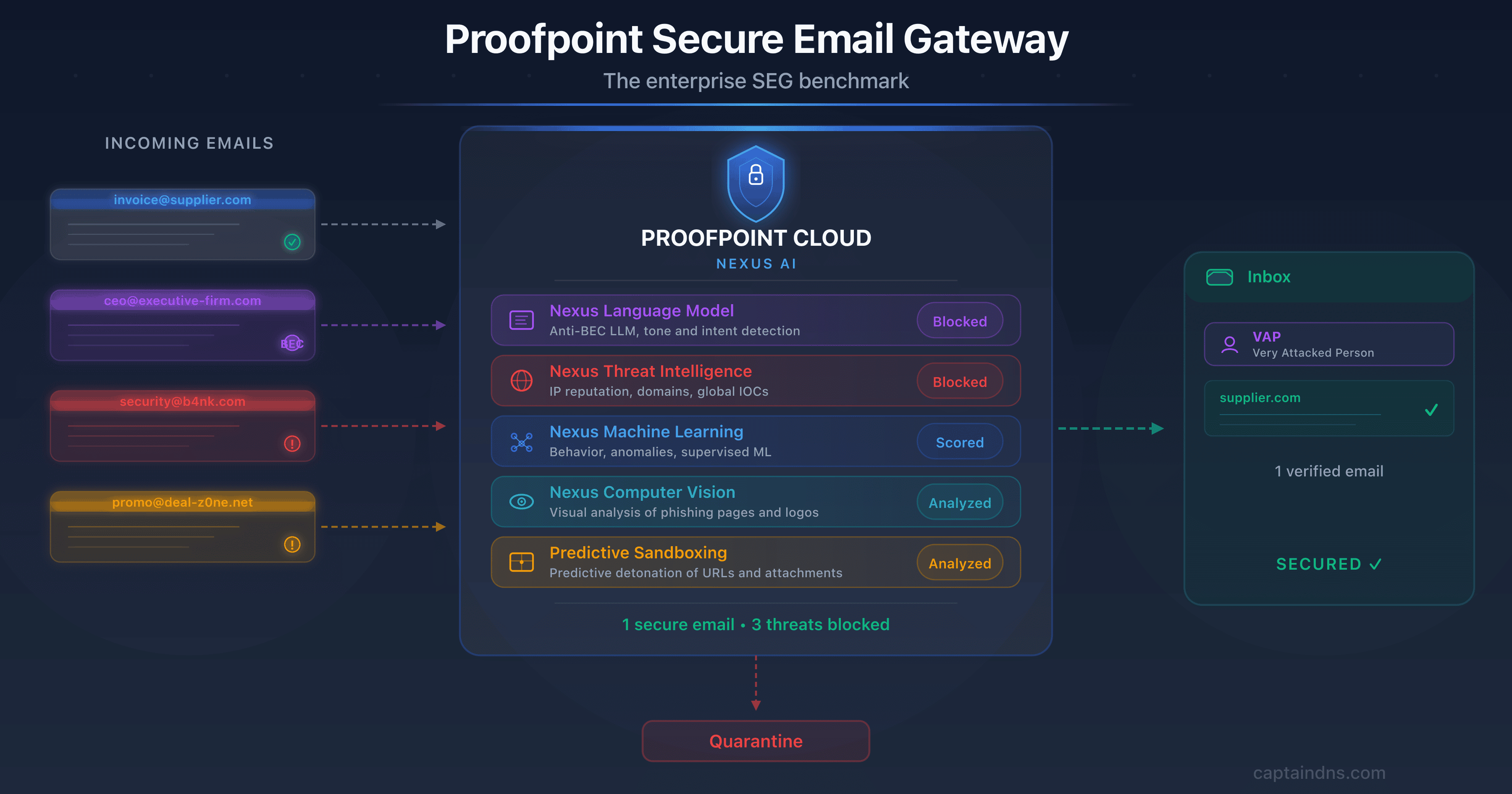
- 🧠 Six-component Nexus AI architecture: machine learning, anti-BEC language model, real-time threat intelligence, computer vision (QR codes, visual phishing), relationship graph and generative AI, all correlated by the Nexus Threat Graph (over 1 trillion signals). Patented Predictive Sandboxing detonates links before the user clicks.
- 🔧 Specific DNS impact: MX redirection to pphosted.com (US1-5, EU1, AU regions), SPF with a Hosted SPF Service that leverages RFC 7208 macros to work around the 10-lookup limit, 2048-bit DKIM by default, managed DMARC via Email Fraud Defense (EFD) with dedicated consultants.
- ⚠️ Limitations to keep in mind: premium pricing (roughly $87,000/year median, over $100K/year for the full stack), slowdown post-Thoma Bravo ($12.3B acquisition in 2021, layoff waves in 2024 and 2025), the EchoSpoofing 2024 incident (14 million fraudulent emails relayed per day for 6 months), and competition from Abnormal Security, which reportedly gained 1,300+ customers in 12 months.
If you work at a Fortune 100 company, there's an 87% chance your emails pass through Proofpoint before landing in your inbox. That figure, verified through public analysis of MX records, makes the California vendor the de facto standard for email security at the world's largest organizations. The platform analyzes 4.5 trillion emails per year, scans 18 trillion URLs, inspects 1 trillion attachments and blocks roughly 66 million BEC attempts per month. No other SEG on the market operates at that scale.
This dominance is no accident. Proofpoint has racked up analyst recognition: leader in the Gartner Magic Quadrant for Email Security in 2024 and 2025, ranked #1 in Execution for the second consecutive year, #1 on 4 of 5 use cases in the 2025 Critical Capabilities, Frost Radar Email Security leader for the 9th consecutive year with 24% market share, the highest in the segment. If you read a CISO RFP from a major bank, an energy utility or a US federal agency, Proofpoint is almost always on the shortlist.
The picture isn't uniformly flattering. Since the August 2021 acquisition by Thoma Bravo for $12.3 billion, several signals raise questions: successive layoff waves in 2024 and 2025, perceived slowdown in innovation, aggressive competition from Abnormal Security (which reportedly gained more than 1,300 Proofpoint customers in twelve months), and the EchoSpoofing incident disclosed in 2024, which saw up to 14 million fraudulent emails relayed per day via Proofpoint infrastructure over six months. This guide covers it all: Nexus AI architecture, DNS configuration, strengths, limitations, the incident, a comparison and an action plan.
📌 What is Proofpoint and its people-centric approach?
Before diving into the technical details, let's set the stage. For the fundamentals of a Secure Email Gateway (gateway model, MX redirection, distinction with API-native ICES solutions), we refer you to our complete article on Mimecast, which covers those basics. The key point: a SEG sits between the internet and your mail server, intercepts 100% of traffic via MX redirection, and filters threats before they reach your inboxes.
Where Proofpoint stands out is its strategic approach. Most SEGs have historically been infrastructure-centric: they protect the entire email perimeter uniformly. Proofpoint flipped that logic with the concept of VAP (Very Attacked People), which identifies the most exposed individuals and concentrates security resources on those profiles.
The VAP concept rests on three measurable dimensions. Vulnerability measures the likelihood of clicking on suspicious emails. It factors in phishing simulation failures and the presence of credentials in public leaks. Attack counts the volume and sophistication of attacks actually received over a given period. Privilege quantifies access to sensitive data and critical systems.
The combined score identifies which profiles to protect first. An executive assistant who manages the CEO's calendar receives a flood of spear phishing. Their VAP score will be much higher than that of a technically skilled but isolated developer.
This people-centric approach has several practical implications. It changes how SOC investigations are prioritized, how awareness training is targeted, and how URL rewriting policies are sized. Instead of applying the same protection level to everyone, Proofpoint suggests fine-tuning controls for the highest-risk individuals. It's a conceptual break from traditional SEGs and one of the vendor's strongest selling points with mature CISOs.
Verify your email records
🏢 Proofpoint: the company at a glance
How did a California vendor founded in 2002 become the de facto standard for 87% of the Fortune 100? Here's the story of 24 years of strategic acquisitions and a record-breaking buyout by Thoma Bravo.
Proofpoint's story begins in July 2002 in Sunnyvale, California, under the leadership of Eric Hahn, former CTO of Netscape Communications. At the time, the email security market was dominated by on-premise appliances. Eric Hahn bet on machine learning and advanced statistical analysis to tackle spam and threats. For ten years, the company grew in the shadow of the industry's historical leaders.
The IPO came in April 2012, listed on NASDAQ under the ticker PFPT. Over the following decade, Proofpoint pursued a series of strategic acquisitions to expand its functional footprint. Cloudmark was acquired in 2017 for $110 million, bringing its expertise in messaging filtering and its distributed sensor network. Wombat Security, a leader in security awareness training, followed in 2018 for $225 million. ObserveIT, specializing in insider threat management, was acquired in 2019 for another $225 million. Meta Networks joined the portfolio that same year for roughly $120 million, opening Proofpoint up to Zero Trust Network Access. InteliSecure reinforced the managed DLP division in 2021. More recently, Tessian, a pioneer in behavioral email AI, was acquired in December 2023 and integrated under the name Adaptive Email Security.
The major turning point came in 2021. On April 26, the private equity fund Thoma Bravo announced the acquisition of Proofpoint for $12.3 billion at $176 per share. The deal closed on August 31, 2021 and represented the largest private equity transaction in the cloud segment at that date. Proofpoint went private and delisted from NASDAQ. A new CEO came in with this repositioning: Sumit Dhawan, former president of VMware, took the reins to lead the company into its new phase. Remi Thomas is CFO, and Joyce Kim, formerly of Zscaler, joined as CMO in December 2025.
Essential vocabulary note. Proofpoint sells two distinct products under similar names. Email Protection is the enterprise SEG that this article focuses on, hosted on the
pphosted.cominfrastructure, with MX records formatted asmx0a-XXXXXXXX.pphosted.comandmx0b-XXXXXXXX.pphosted.com. Proofpoint Essentials is the SMB offering, hosted onppe-hosted.com, with a different MX format (mx1-usX.ppe-hosted.com). The two share neither the same console, nor the same features, nor the same pricing. Confusing them is the most common mistake when skimming Proofpoint documentation.
Today, Proofpoint has roughly 5,044 employees spread across more than 30 offices worldwide. The customer base exceeds 500,000 organizations, including 87 of the Fortune 100, more than 50% of the Fortune 1000, and over a third of the Global 2000. ARR reached $2.45 billion at the close of fiscal year 2025 according to public statements. In terms of volume, the platform analyzes 4.5 trillion emails per year, making it the email security operator with the greatest raw visibility in the world. It's also the vendor whose feedback powers the open source benchmark community for email threat intelligence, with the Emerging Threats Open and Pro rulesets, among the most widely used open source rulesets in the industry.
⚙️ Technical Architecture: the Nexus AI Platform
How does Proofpoint inspect 4.5 trillion emails per year without degrading latency? The answer: a multi-stage detection chain built around Nexus AI, its proprietary artificial intelligence platform. Here's a breakdown of the components.
Gateway model: MX redirection to pphosted.com
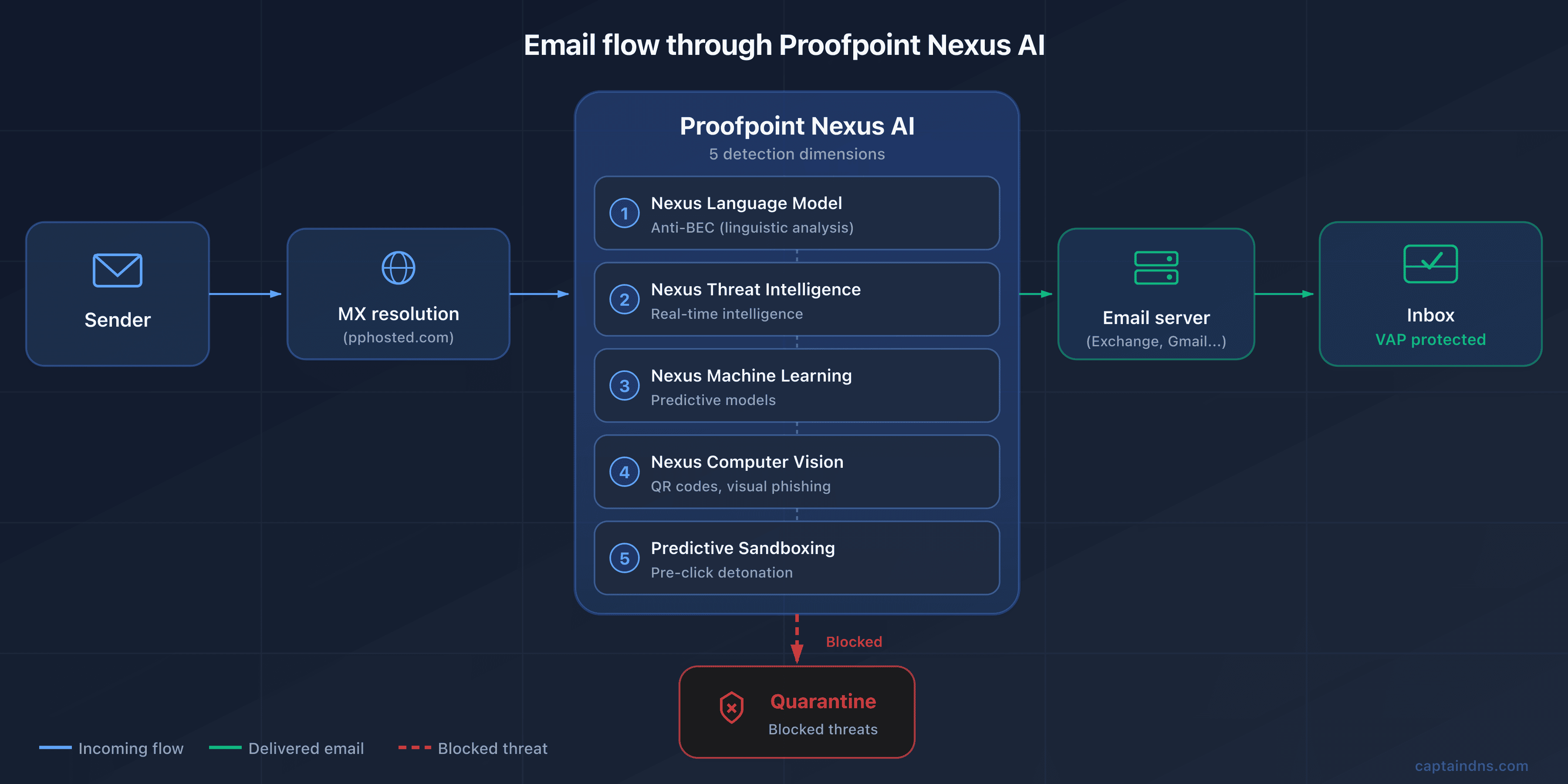
Like any traditional SEG, Proofpoint relies on MX redirection. Your MX records point to servers on the Proofpoint cloud infrastructure, hosted under the pphosted.com domain. When a sender emails contact@captaindns.com, their mail server resolves the MX, finds a Proofpoint host, and delivers the message there. Proofpoint applies its detection chain, then forwards the validated message to your actual server (Microsoft 365, Google Workspace, on-premise Exchange).
The Proofpoint infrastructure is distributed across seven regions: US1, US2, US3, US4, US5 for North America, EU1 for Europe, and AU for Asia-Pacific. Each customer is assigned to a single region at signup, and this is a critical point: you must use only the MX records for your assigned data center. Pointing an MX record to the US1 region when your tenant is in EU1 causes silent rejects, because the remote data center doesn't recognize your domain. The data centers are operated through a combination of Cyxtera, DataBank, Equinix, AWS and Google Cloud in North America, and Equinix EU and AWS in Europe, with annual SOC 2 audits.
Nexus AI: the 6 detection components
Nexus is the umbrella covering Proofpoint's AI engines. Six main components work in parallel, each specialized for a category of threats, and are linked by the Nexus Threat Graph which handles cross-cutting correlation.
The Nexus Language Model (LM), a proprietary language model, is dedicated to BEC detection. It analyzes linguistic structure, tone, stylistic consistency and the urgency or authority markers used by attackers. It's the component that allows Proofpoint to claim best-in-class BEC detection, including on emails without any link or attachment, which are invisible to conventional filters.
The Nexus Generative AI extends the analysis to cross-channel signals. It correlates indicators present in an email with those from other surfaces: URLs shared on collaboration tools, identities involved in application workflows, abnormal behavior flagged by ITM. This generative layer also produces incident summaries for the SOC and accelerates triage.
The Nexus Threat Intelligence (TI) feeds detection with real-time data streams. Proofpoint maintains one of the most comprehensive threat intelligence databases in the industry, inherited in particular from the Emerging Threats acquisition. The ET Open and ET Pro rulesets are among the most widely used open source rulesets in the industry, with more than 100,000 IDS/IPS rules covering more than 40 attack categories and integrated MITRE ATT&CK tags. This database is continuously fed by signals observed on the 4.5 trillion emails analyzed.
The Nexus Machine Learning (ML) is the predictive engine. It combines supervised and unsupervised models to identify emerging attack patterns before they are listed in rulesets. It's the layer that detects polymorphic variants and campaigns in the preparation phase.
The Nexus Computer Vision (CV) is one of the most differentiating dimensions. It visually analyzes emails to detect visual phishing: login pages mimicking well-known brands, counterfeit logos, screenshots used as bait. Most importantly, it decodes QR codes embedded in images, allowing it to neutralize quishing (QR code phishing), a technique that has been growing fast since 2023 by bypassing traditional URL filters through malicious links encoded in images.
The Nexus Relationship Graph (RG) models the relationships between identities, contacts and communication habits. It builds a behavioral graph of communications per user and per organization: who talks to whom, how often, about what, with what temporal patterns. This relational baseline enables detection of behavioral anomalies typical of a compromised account, a supplier impersonation, or an internal pivot attempt, signals that remain invisible to traditional content engines.
All these components converge on the Nexus Threat Graph. It isn't a sixth detection engine, but the correlation layer that assembles the signals from the six components above. The knowledge graph correlates more than 1 trillion data points from 2 billion emails analyzed per day. It ties together senders, domains, URLs, attachments, attack techniques and victims. The goal: identify coordinated campaigns and propagate detections from one customer across the entire base.
The central scoring engine that synthesizes these signals is called the Stateful Composite Scoring Service (SCSS). It weights four dimensions: the message content, its metadata, its sending context, and its consistency with the organization's normal flow. The final score determines the action to apply.
Targeted attack protection (TAP): the 3 pillars
TAP is Proofpoint's flagship module for protection against advanced attacks. It rests on three complementary pillars.
URL Defense. URL Defense rewrites all incoming URLs as urldefense.proofpoint.com/... and applies two complementary scans: a first time-of-delivery scan when the message is delivered, and a second time-of-click scan when the user clicks the link. This double scan protects against delayed-activation attacks, where a seemingly harmless link becomes malicious after delivery. If the target is deemed dangerous at click time, the click is blocked and the user sees a warning page.
Attachment Defense routes suspicious attachments to an analysis environment that combines a static sandbox, a dynamic sandbox (TAP Cloud Sandbox), bare-metal detonation for samples that resist virtualization, and analyst-assisted analysis for the most ambiguous artifacts. The static sandbox inspects file structure, macros, embedded scripts and format anomalies. The dynamic sandbox executes the file in a virtual environment, and the dedicated bare-metal environment is harder for anti-VM malware to detect. This chain covers zero-days and polymorphic payloads that traditional antivirus solutions systematically miss.
Predictive Sandboxing is Proofpoint's patented differentiator (US patent US20150237068A1). Instead of waiting for the user to click to analyze a URL, the engine detonates the link proactively as soon as the message is delivered, using predictive heuristics to identify URLs likely to be malicious. This proactive approach provides additional coverage against sophisticated attacks that change their behavior after the first click. Combined with URL Defense's real-time analysis, it's one of the most comprehensive coverages on the market.
The TAP Dashboard centralizes all operational visibility. It computes an Attack Index per user, a synthetic representation of the level and sophistication of the attacks received. This dashboard is what identifies VAPs and lets the SOC prioritize investigations.
Proofpoint's response to the post-delivery API movement
For years, Proofpoint was criticized for its slow response to the ICES (Integrated Cloud Email Security) movement initiated by Abnormal and other API-native players. The strategic response arrived at RSA Conference 2024 with Adaptive Email Security, stemming from the Tessian acquisition in December 2023.
Adaptive Email Security is a post-delivery API deployment on Microsoft 365. It complements the gateway SEG by analyzing messages already delivered to mailboxes to detect behavioral anomalies the gateway may have missed. The technology leverages Tessian's AI, which models each user's behavior (writing style, usual contacts, sending hours, conversation topics) to identify subtle deviations. It's a defensive response to Abnormal and a signal that Proofpoint recognizes the value of the ICES model as a complement to the traditional gateway.
In practice, the typical deployment at large Proofpoint accounts in 2026 is stacking: Email Protection in gateway mode to block pre-delivery, and Adaptive Email Security in post-delivery API mode on Microsoft 365 to catch behavioral anomalies the gateway let through. The two modules share Nexus threat intelligence but operate at different inspection points. Adaptive Email Security is not a replacement for the SEG, it's a second complementary layer. It's Proofpoint's direct response to the "SEG is dead" narrative pushed by Abnormal Security since 2022.
Post-delivery remediation with TRAP
Detecting a threat after delivery is useless if you can't quickly pull it from inboxes. That's the role of TRAP (Threat Response Auto-Pull). TRAP automatically removes malicious emails identified after the fact, and it also follows forwards and distribution lists to clean up propagated copies. It's a critical feature in enterprise environments where an email can be forwarded to several teams within minutes.
CLEAR (Closed-Loop Email Analysis and Response) is the user-centric remediation ecosystem built on top of TRAP. It combines three building blocks: the PhishAlarm button deployed in Outlook, which lets a user report a suspicious email with one click, the Analyzer, which automatically categorizes the report via Proofpoint threat intelligence, and TRAP for the actual remediation. The workflow reduces the "user report, SOC analysis, then remediation" cycle from several days to a few minutes. For organizations with thousands of users, it's a major operational gain.
🔧 DNS Configuration for Proofpoint
Now that the architecture is clear, let's move to the DNS mechanics. Deploying Proofpoint means modifying your MX records, adjusting your SPF, publishing your DKIM keys and configuring DMARC. Here's the breakdown.
MX records by region
As noted, each Proofpoint customer is assigned to a region and receives two corresponding MX records. The format follows a predictable convention.
| Region | Primary MX format | Secondary MX format |
|---|---|---|
| US (1 to 5) | mx0a-XXXXXXXX.pphosted.com | mx0b-XXXXXXXX.pphosted.com |
| EU1 | mx0a-eu1-XXXXXXXX.pphosted.com | mx0b-eu1-XXXXXXXX.pphosted.com |
| AU | mx0a-au1-XXXXXXXX.pphosted.com | mx0b-au1-XXXXXXXX.pphosted.com |
The
mx1-XXXXXXXX.ppe-hosted.comformat is reserved for Proofpoint Essentials (the SMB offering) and should not be confused with Email Protection. These two products use separate infrastructures.
XXXXXXXX is a unique customer identifier assigned by Proofpoint. This is essential: use only the data center assigned by your TAM. Mixing regions does not work, and trying to point part of the traffic to US1 and part to EU1 will cause silent rejects on the Proofpoint side. The priority is usually 10 for the primary and 20 for the secondary, but Proofpoint uses internal round-robin so the priority gap has little practical impact.
To check your current MX records, use the following command:
dig MX captaindns.com +short
The result should display only your Proofpoint MX records, with no leftover MX pointing to your old infrastructure or directly to M365. A leftover MX is a backdoor that lets attackers who know your Exchange Online tenant send emails directly to your mailboxes while bypassing Proofpoint.
SPF Configuration with Hosted SPF Service
The Proofpoint SPF relies on a dedicated include, for example include:spf-XXXXXXXX.pphosted.com. But Proofpoint offers a particularly powerful feature: the Hosted SPF Service, a component of Email Fraud Defense (EFD). The Hosted SPF Service doesn't do conventional flattening (inlining IPs as ip4:). It uses server-side dynamic resolution: at each SPF check, Proofpoint presents the resolver with a relevant subset of authorized sources instead of a monolithic include, thereby working around the 10 DNS lookup limit that is one of the biggest friction points for multi-ESP deployments.
The principle is elegant. Instead of publishing individual includes in your SPF for each third-party service (Salesforce, HubSpot, Mailchimp, SendGrid, Microsoft 365, etc.), you publish a single include pointing to Proofpoint, which takes care of dynamically managing the list of authorized sources server-side. The resolver only sees a single include from your domain, and Proofpoint internally adjusts which sources are exposed at request time.
In practice, your SPF record looks like this:
v=spf1 include:spf-00148501.pphosted.com ~all
This single include replaces what might otherwise have been fifteen different includes. You avoid SPF PermError, keep your record short and readable, and benefit from centralized updates when you add or remove an ESP. It's a strong differentiator against Mimecast (which uses regional sub-includes but without dynamic flattening) and against self-hosted solutions that force the administrator to manually manage the 10-lookup limit.
To check your SPF, use the CaptainDNS SPF checker. If you aren't using Hosted SPF, keep a close eye on the lookup counter: with Proofpoint and three additional ESPs, you'll quickly be right at the edge of the limit.
DKIM configuration
DKIM configuration on the Proofpoint side is done through the admin console. The standard path is Administration > Account Management > Domains > Configure DKIM. There, you create a signing key by specifying a selector (for example proofpoint20260403), Proofpoint generates the key pair, and provides you with the TXT record to publish in your DNS.
A Proofpoint specifics: keys are 2048 bits by default, whereas several competing solutions still use 1024 bits by default. This aligns with modern email cryptography best practices, but it also requires you to check that your DNS operator supports long TXT records (over 255 characters, which must be split into concatenated strings). Once the public key is published, you enable signing in the console, and Proofpoint starts signing all outbound emails for the domain.
DKIM key rotation is a recommended best practice every six to twelve months. Proofpoint lets you keep two selectors active simultaneously during the rotation phase, avoiding any interruption. To verify your configuration, use the CaptainDNS DKIM checker by specifying your selector.
Email Fraud Defense: Managed DMARC
DMARC is one of Proofpoint's commercial strengths, thanks to Email Fraud Defense (EFD), sometimes sold under the EFD360 name. EFD is a complete suite combining several services: the Hosted SPF already described, Hosted DKIM (centralized selector and rotation management) and Hosted DMARC (policy publication and management).
But EFD's real differentiator is human guidance. Where most DMARC solutions are self-service, Proofpoint assigns dedicated consultants to DMARC rollout at customer sites. These consultants help identify legitimate senders, analyze forensic reports, resolve complex cases and progressively move toward p=reject. For a large organization with a dozen ESPs, dozens of subsidiaries, outsourced marketing partners and legacy DNS baggage, this level of support cuts deployment time by several quarters.
EFD also includes two higher-value modules. Domain Discover continuously scans new domain registrations to detect lookalikes that could be used to impersonate your brand. Supplier Risk Explorer provides visibility into your suppliers' DMARC posture: a supplier without DMARC is a risk, and Supplier Risk Explorer lets you open that conversation with them based on hard data. The module is a positive signal toward supply chain security, an increasingly high priority for CISOs.
The native integration with TAP is also notable: EFD shares its signals with the TAP engine, enabling correlation between an impersonation attempt detected in DMARC reports and an attack campaign observed by TAP on other customers. To verify your DMARC configuration, use the CaptainDNS DMARC checker.
ARC, MTA-STS and TLS-RPT
Proofpoint Email Protection supports ARC (Authenticated Received Chain, RFC 8617), a legacy of the Cloudmark stack. ARC preserves original authentication results (SPF, DKIM, DMARC) when an email passes through multiple intermediaries (forwards, distribution lists, relays), avoiding false authentication failures caused by content rewriting or path changes. MTA-STS and TLS-RPT are supported on managed deployments, but the maturity level remains below that of dedicated MTA-STS hosting solutions. If your security strategy depends on strict MTA-STS policies with exhaustive TLS-RPT reports, verify the exact coverage with your Proofpoint TAM before signing.
🛡️ Beyond Email Security: the Aegis and Prime Platform
What if your SEG isn't enough anymore? Proofpoint anticipated this question long ago. The vendor has built a complete platform covering the full spectrum of human and data risks. Here's a tour of the complementary modules.
Information Protection: Unified DLP
A DLP fragmented across three consoles? Proofpoint took the opposite approach. The Information Protection suite unifies DLP across three surfaces: email, cloud and endpoint. A single lightweight agent collects signals on the user endpoint side, and the cloud platform correlates events. Coverage includes the main categories of regulated data: PII, PHI, PCI, intellectual property. The solution scales to more than 100,000 users per tenant, matching the needs of the largest enterprises.
Native integrations are numerous: Microsoft 365, Okta for identity, Splunk for SIEM, ServiceNow for ticketing. Proofpoint DLP is regularly cited as one of the most comprehensive on the market by Gartner and Forrester analysts.
Insider Threat Management (ITM)
Did you know that 60% of data leak incidents involve an internal user? Stemming from the ObserveIT acquisition in 2019 ($225 million), Proofpoint's ITM monitors user activity to detect risky behavior. A lightweight endpoint agent collects key actions: files opened, applications used, USB transfers, network share access, screenshots, keystrokes on sensitive fields.
The module also offers session replay, which lets a forensic investigator replay a user's actions over a given period, like a video recording of their screen. It's a powerful tool for internal investigations, contentious departures and fraud cases. The feature must be legally framed (consent, scope of use) to stay compliant with employee privacy regulations, which are particularly strict in Europe.
CASB and Cloud Security
Are your users accessing SaaS applications you don't know about? Proofpoint's CASB provides visibility into SaaS usage: which services are used, by whom, with what permission levels. It detects compromised accounts on Microsoft 365, Salesforce, Box, Workday and several dozen other applications. It handles third-party app governance by identifying OAuth applications that request excessive permissions on your tenant.
The module is rounded out by a cloud DLP layer that inspects files stored in cloud drives and a posture management layer that audits your SaaS tenant configurations to detect dangerous settings (public shares, disabled MFA, insufficient logging).
Browser and Email Isolation
What if your users could click on suspicious links without ever compromising their endpoint? That's exactly the promise of Browser Isolation. Stemming from the Weblife acquisition in 2018, the module opens risky links in a remote browser running in the Proofpoint cloud. The user sees a pixel-perfect rendering of the page without JavaScript code, downloads or exploits ever touching their machine. It's effective protection against browser exploits and drive-by downloads.
Email Isolation applies the same principle to moderate-risk emails. For identified VAPs, emails that may be malicious but don't trigger a block can be opened in an isolated session, drastically reducing the attack surface without blocking the message.
Awareness Training and Simulations Based on Real Attacks
Why train your teams on generic phishing when you can expose them to the actual campaigns targeting them? Stemming from the Wombat acquisition in 2018 ($225 million), Proofpoint Security Awareness Training (PSAT) is one of the historical leaders in awareness training. Its major specificity: phishing simulations are based on attacks actually detected by TAP across the Proofpoint customer base. Instead of offering generic simulated campaign templates, Proofpoint reproduces patterns observed on the real campaigns targeting your organization or industry.
It's a strong differentiator. A generic simulation trains users to recognize forms of attack far removed from their reality. A simulation based on actually received attacks prepares them for the threats they'll really face. The training is also adaptive: users who fail a simulation receive more intensive training, and their risk score is updated in the Nexus People Risk Explorer.
Nexus People Risk Explorer: the VAP Concept
Not all your users are exposed the same way. The Nexus People Risk Explorer is the tool that brings Proofpoint's people-centric approach to life. Each user in the organization receives a risk score between 1 and 10, computed on the three VAP dimensions (vulnerability, attack, privilege) already described. The dashboard displays the score distribution by department, by site, by function. It helps identify zones where risk is concentrating and direct awareness, policy hardening or isolation resources in a targeted way.
Trending insights show risk evolution over time. If a finance team sees its score climb for three consecutive weeks, it's likely the sign of an ongoing targeted campaign. If an executive's score doubles after they appear publicly in an announcement, it's a signal to temporarily tighten their policies.
It's a fundamentally different approach from uniform protection. It does, however, require administrators to invest time configuring it, interpreting it and acting on the insights. Underutilizing the Nexus People Risk Explorer amounts to paying for a Ferrari to drive around the block.
Proofpoint Prime Threat Protection (April 2025)
Fragmenting email security across six separate consoles? Proofpoint settled that in April 2025. Proofpoint Prime Threat Protection is the unified solution that consolidates the entire stack. It brings together Email Protection (the SEG), TAP, Adaptive Email Security (the Tessian ICES), TRAP, EFD, Domain Discover and risk-based employee guidance.
The marketing positioning highlights three axes. First, multi-stage protection against sophisticated attacks, from delivery to post-delivery propagation. Second, protection against impersonation (BEC, CEO fraud, supplier impersonation). Third, personalized guidance for exposed employees.
Another distinctive feature of Prime is its architecture designed for agentic AI workflows. Proofpoint anticipates the mainstreaming of AI agents in the SOC. The platform provides native hooks for auto-investigation, abuse mailbox triage and collaborative forensics. The announced ROI figures are $2.7 million in risk savings and $390,000 in operational cost savings per typical customer.
TAP SIEM API: Integration into the SOC
Can your SOC correlate email incidents with endpoint and network signals? That's exactly what the TAP SIEM API enables. Proofpoint exposes a TAP SIEM API REST endpoint that exports events to Splunk, Microsoft Sentinel, IBM QRadar, CrowdStrike NG SIEM, Google Chronicle and other platforms.
The exported events cover five categories: clicks blocked by URL Defense, sandbox detonations, BEC classification verdicts, campaign indicators identified by TAP, and VAP alerts. For mature SOCs, it's a critical integration. It makes it possible to correlate email signals with endpoint, identity and network signals in a unified view.
🚀 The Advantages of Proofpoint
Why do 87 of the Fortune 100 trust Proofpoint to protect their messaging? Here are the factual arguments that explain this dominance.
-
Superior and recognized threat intelligence. Proofpoint has one of the most active research teams in the industry: Proofpoint Threat Research, heir to the ET Labs. It regularly publishes the State of the Phish report and feeds the Emerging Threats Open and Pro rulesets. These rulesets contain more than 100,000 IDS/IPS rules covering more than 40 attack categories, with integrated MITRE ATT&CK tags. The database is fueled by 4.5 trillion emails analyzed, 18 trillion URLs scanned and 1 trillion attachments inspected per year. No competitor operates at this scale.
-
BEC and APT detection considered best in class. On BEC attacks and targeted persistent threats, Proofpoint is regularly placed ahead of competitors by analysts. The Stateful Composite Scoring Service engine combines the six Nexus AI components to identify subtle patterns invisible to conventional filters. It also catches emails with no link or attachment, a growing share of modern BEC. Proofpoint blocks roughly 66 million BEC attempts per month according to its own measurements, a volume with no equivalent.
-
Largest Fortune 100 customer base in the industry. 87 of the Fortune 100 use Proofpoint, with particular concentration in finance, energy, defense, healthcare and media. This position is both a validation of maturity and a strong argument with the most demanding CISOs. For a mid-market CISO looking for an enterprise reference, knowing that the SEG is used by more than 87% of the world's largest companies makes it easier to justify the choice to the committee.
-
Comprehensive Aegis and Prime platform. Proofpoint covers email, cloud, endpoint, awareness training, DLP, insider threat management (ITM) and isolation, all through a shared threat graph. With Proofpoint Prime launched in April 2025, the platform consolidates into a unified multi-stage solution with an architecture designed for agentic AI workflows. Few competitors offer this functional breadth under a single console.
-
Distinctive people-centric approach. The VAP (Very Attacked People) concept, integrated into the Nexus People Risk Explorer, identifies the most exposed individuals across three dimensions: vulnerability, attacks received and privileges. This approach lets you prioritize security resources on the highest-risk profiles, rather than applying uniform protection. It's a conceptual break from infrastructure-centric SEGs, and one of the vendor's strongest selling points with mature CISOs.
-
Patented Predictive Sandboxing. Patent US20150237068A1 describes a technique for detonating URLs and attachments before the user clicks. This proactive analysis, combined with URL Defense's real-time click-time analysis, offers coverage that is hard to match for zero-day and polymorphic attacks. It's one of the rare technical innovations that competitors do not yet have a direct equivalent for.
-
Six AI components in Nexus. Nexus combines predictive machine learning, an anti-BEC language model, real-time threat intelligence, computer vision (visual phishing and QR code detection for quishing), relationship graph (behavioral modeling of relationships) and generative AI (incident summaries, cross-channel triage). Everything is correlated by the Nexus Threat Graph, which weighs more than one trillion data points. This multi-model layering is one of the most comprehensive in the industry and covers attack angles that one-dimensional engines systematically miss.
-
Exceptional analyst recognition. Gartner Magic Quadrant Email Security leader in 2024 and 2025, #1 in Execution for the second year in a row. #1 on 4 of 5 use cases in the Gartner Critical Capabilities 2025. Frost Radar Email Security 2024 leader cited #1 for the 9th consecutive year with 24% market share, the highest in the segment. 22 "leader" recognitions out of 23 analyst reports in 2024. This analyst convergence is one of the strongest ever observed on a cybersecurity segment.
-
Enterprise SLA and certifications. Proofpoint contractually commits to a 99.999% port 25 connectivity uptime SLA. The SLA excludes scheduled maintenance and events under 30 seconds. It's one of the strictest SLAs on the market. Like any cloud SLA, it excludes certain cases and doesn't mechanically reflect perceived uptime. Certifications include ISO 27001, SOC 2, FedRAMP (US public sector), HIPAA (healthcare) and GDPR. Data centers are split between North America (Cyxtera, DataBank, Equinix, AWS, Google Cloud) and Europe (Equinix EU, AWS), with annual SOC 2 audits.
-
Dynamic Reputation: the first line of defense since 2007. Upstream of Nexus AI, Proofpoint runs a Dynamic Reputation service. It scores each source IP's reputation at SMTP connection time. The service claims a false positive rate of less than 1 in a million. It's one of the most precise entry filters on the market. This first layer strips out background noise (botnets, mass spam) before the more expensive Nexus chain kicks in. It contributes directly to platform scalability.
⚠️ Limitations and drawbacks to consider
No solution is perfect, and Proofpoint has its gray areas too. Here are the friction points most frequently raised by customers and analysts.
-
Premium and opaque pricing, among the highest in the industry. Proofpoint does not publish a public price list. Vendr data (based on 85 verified purchases) shows a median around $87,000 per year. For TAP alone, expect $5 to $15 per user per month depending on volume. A full deployment (Threat Protection, DLP, ITM and Compliance) regularly exceeds $100,000 per year. Implementation services account for 15 to 25% of the software budget in the first year. Automatic price increases of 5 to 8% per year at renewal are a recurring customer friction point. Proofpoint remains enterprise-positioned and isn't suitable for tight budgets.
-
Complex admin console perceived as dated. The interface is fragmented across multiple separate web portals depending on the product (TAP, EFD, TRAP, ITM, Information Protection, etc.), which complicates navigation for admins managing several modules. The learning curve is long, and intensive tuning is often needed in the first weeks to adjust policies and reduce false positives. Customer feedback on G2 and TrustRadius regularly mentions the need for a more modern UI overhaul. Proofpoint Prime aims to partially address this by consolidating the consoles, but it's a long-running project.
-
Not suitable for SMBs and mid-market on the enterprise offering. Proofpoint Email Protection, the core SEG, is designed for large organizations. For SMBs, Proofpoint offers Proofpoint Essentials, a dedicated offering but with a reduced functional scope: no full TAP, no Nexus AI, no VAP dashboard, limited consultant guidance. If you have fewer than 500 users and a tight budget, Mimecast or Microsoft Defender for Office 365 will generally be more relevant for a better functionality-to-price ratio.
-
Innovation perceived as slower since the Thoma Bravo acquisition. Several customers and analysts note a slowdown in product innovation since the move to private equity in August 2021. The successive layoff waves illustrate a focus on margin. First episode: 280 employees in January 2024 (6% of headcount, positions relocated to Argentina and Ireland). Second episode: roughly 30 people in Core Engineering in February 2025. The ICES response via Adaptive Email Security (from Tessian) only arrived in May 2024 at RSA Conference, so after two years of pressure from Abnormal. For a leader whose position rests on a technology lead, this signal is notable.
-
Customer losses to API-native ICES solutions. According to public MX record analysis and customer testimonies, Proofpoint reportedly lost more than 1,300 customers over the past 12 months, mainly to Abnormal. In the mid-market segment, the traditional gateway argument is losing ground against API-only solutions. Proofpoint is responding with Adaptive Email Security (Tessian), but the market lag is measurable. If you're evaluating Proofpoint in 2026, explicitly ask the sales team about the product trajectory and roadmap commitments.
-
No native email continuity in Email Protection. Unlike Mimecast, which includes native email continuity in its SEG, Proofpoint Email Protection enterprise does not include integrated native continuity. If your mail server (Exchange, Microsoft 365) becomes unreachable, Proofpoint does not provide a backup webmail. You have to go through partners (Mimecast Continuity, Zerospam, or a backup MTA) or rely on the high availability of your primary provider. It's a point often overlooked in evaluation, yet it can weigh heavily during an M365 outage.
-
EchoSpoofing 2024 incident: a reputational hit. In late July 2024, Guardio Labs published its public report revealing that attackers were exploiting a "super-permissive" misconfiguration in Proofpoint servers to relay an average of 3 million and up to 14 million fraudulent emails per day, for 6 months. See the dedicated section below for the full timeline. The incident raises questions about the rigor of default configurations at the market leader and illustrates that a SEG's security depends as much on configuration as on the quality of the detection engines.
🔒 EchoSpoofing: When Proofpoint Relayed 14 Million Fraudulent Emails Per Day (2024)
Can an email security vendor become the unwitting instrument of a mass impersonation campaign? Yes. The EchoSpoofing incident disclosed in 2024 is the most significant in Proofpoint's recent history, and it deserves detailed analysis.
Discovery. In late July 2024, the Guardio Labs team published its report on the campaign dubbed EchoSpoofing. The team had contacted Proofpoint as early as May 2024. Proofpoint says it traced the activity back to late March 2024. Attackers were exploiting a configuration vulnerability in Proofpoint's infrastructure. Their goal: relay perfectly spoofed emails en masse.
Vulnerability. At the heart of the incident: a "super-permissive" misconfiguration in the pphosted.com servers. When a Proofpoint customer selected "Office 365" as an authorized sending source, an overly lax SPF record allowed any Microsoft 365 account to relay mail through their infrastructure. Validation only checked that the source was an M365 IP. It did not check the identity of the sending M365 tenant.
Attack mechanism. The exploitation scenario is disarmingly simple. The attacker would create a personal Microsoft 365 account, for example via a free trial, and use it as a launch pad. Here's how it unfolded in four steps:
- The attacker sends an email from their personal M365 account, specifying as the visible sender an address from a trusted brand (for example
notifications@captaindns.com). - The mail is routed to the authenticated Proofpoint relays of the target customer, which accept the message because the M365 SPF validation aligns with the source IP.
- Proofpoint relays the message to the final recipient, applying its own DKIM signatures and SPF alignment.
- The recipient receives an email that passes SPF and DKIM with full DMARC alignment on the spoofed domain. On the inbox side, the email is strictly indistinguishable from an official email from the brand.
Volume. The campaign reached a median volume of roughly 3 million perfectly spoofed emails per day, with peaks up to 14 million per day. These figures make EchoSpoofing one of the largest impersonation campaigns via legitimate infrastructure ever documented.
Duration. The campaign was active for roughly six months before effective remediation, from January 2024 through mid-2024. During this period, tens of millions of fraudulent emails reached inboxes around the world.
Spoofed brands. The attackers primarily targeted high-profile consumer brands: Disney, IBM, Nike, Best Buy, Coca-Cola among others. The choice makes sense: these brands have a massive legitimate sending base, which makes anomalies harder for recipients to detect.
Remediation. Proofpoint reacted within hours of Guardio's initial contact. The main technical measure: introducing an "X-OriginatorOrg" header to validate the source Microsoft 365 organization. Proofpoint added additional mechanisms to validate O365 accounts before relay. Customers were notified and asked to reconfigure their Account Management. The collaboration between Guardio and Proofpoint on disclosure was hailed as exemplary.
Lessons for administrators. The EchoSpoofing incident holds three actionable lessons.
First, a SEG's security depends as much on default configuration as on engine quality. An option marketed as "easy to enable" can open a major hole without strict validation.
Second, systematically check the Account Management > External Sender Validation section of your Proofpoint console. Only authorize external sources (M365, Google Workspace) with explicit domain validation.
Third, this pitfall isn't specific to Proofpoint. Any SEG that relays authenticated mail for an external source must rigorously validate that source. If you use Mimecast, Cisco Email Security or any other SEG in a similar configuration, audit your own settings.
The EchoSpoofing incident isn't isolated. It's a class of errors found across all SEGs that accept traffic relayed from hyperscalers (Microsoft 365, Google Workspace, AWS SES). The common pitfall: validating the source IP as legitimate without validating the identity of the sending tenant. Ask yourself: "does my SEG check the source Microsoft 365 tenant, or just the Microsoft 365 IP range?" The answer directly determines your exposure.
🔄 Comparison: Proofpoint vs. Mimecast, Microsoft and Abnormal
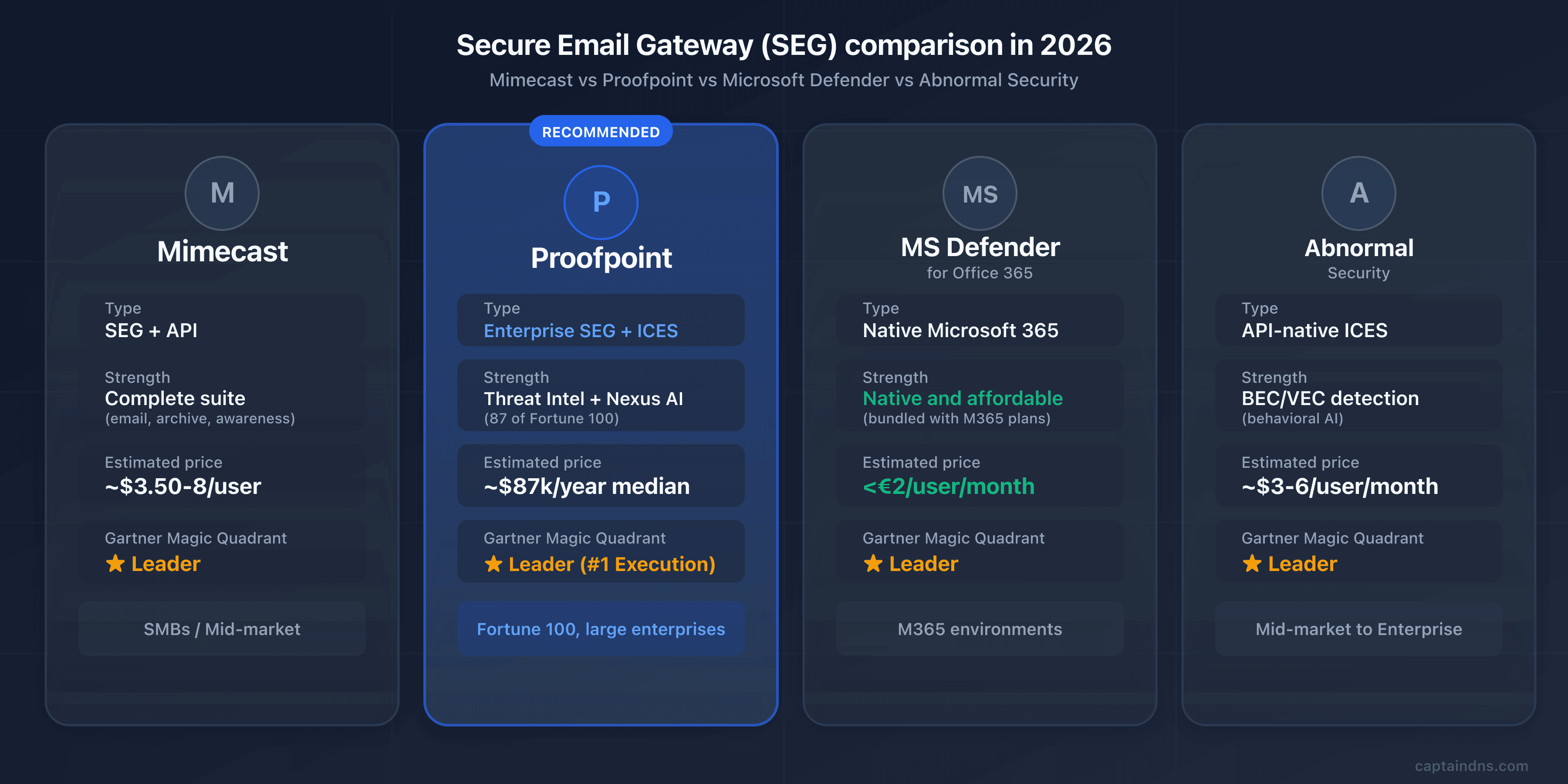
Which SEG fits your environment? Four players currently dominate the enterprise email security market, each with a distinct positioning.
| Criterion | Proofpoint | Mimecast | Microsoft Defender | Abnormal Security |
|---|---|---|---|---|
| Type | Enterprise SEG + ICES (Adaptive) | SEG + API (2026) | Native M365 | API-native ICES |
| AI/ML detection | 6-component Nexus AI | Multi-vector + CyberGraph | 9.1/10 in independent tests | Behavioral AI, social graph |
| Threat intelligence | Leader (ET Rulesets) | 24T signals/year | Microsoft Threat Intel | Behavioral, no proprietary threat intel |
| Archiving | Via partners | Yes (1 day to 99 years) | Via M365 retention | No |
| DMARC | EFD with consultants | Integrated DMARC Analyzer | No | No |
| VAP / People-centric | Yes (Nexus People Risk Explorer) | Human Risk Management | No | Limited |
| Estimated price | Premium (about $87K/year median) | $3.50 to $8/user/month | under €2/user/month | $3 to $6/user/month |
| Gartner 2025 | Leader (#1 Execution) | Leader | Leader | Leader |
| Ideal for | Fortune 100, demanding large mid-market | SMBs/mid-market with multiple needs | M365 environments | BEC/VEC detection as a complement |
Mimecast: the all-in-one suite for mid-market
While Proofpoint dominates at the very large enterprise level, Mimecast has established itself as the reference solution for the mid-market and companies with multiple needs. The British vendor offers a suite that is more accessible on price and broader on native features: integrated long-term archiving (1 day to 99 years), email continuity when the primary server is down, integrated DMARC Analyzer at no additional cost, and Human Risk Management since 2025.
For an organization between 500 and 5,000 users looking to centralize security, archiving and continuity in a single console, Mimecast often offers a better feature-to-price ratio than Proofpoint. On the other hand, for pure BEC detection and threat intelligence, Proofpoint retains a lead acknowledged by analysts. For a complete overview of Mimecast, see our dedicated article.
Microsoft Defender for Office 365: the M365 Native
If your organization is full Microsoft 365, Defender for Office 365 remains the most obvious choice on the price-to-coverage ratio. Protection is native to the tenant, with no MX change or third-party integration, at a price often below 2 euros per user per month, and even included in E5 licenses. Independent tests give it a 9.1/10 detection score, placing it among the best-performing engines on the market.
The limits are known: Defender still lags on sophisticated BEC attacks and proprietary threat intelligence versus Proofpoint. It doesn't offer dedicated long-term archiving, native email continuity, and its DMARC monitoring is rudimentary. For a pure M365 organization with standard needs, it's nonetheless the best entry point. For the CISO of an international bank, the functional gaps with Proofpoint remain significant.
Abnormal: the Behavioral AI Approach
Founded in 2018 in San Francisco, Abnormal Security represents the new generation of email security (see our complete guide to Abnormal Security). Deployment is API-only, with no MX change, and service starts in minutes via Microsoft Graph or the Google Workspace API. The AI engine builds a behavioral profile per user and per external contact (writing style, hours, business relationships) and detects anomalies invisible to conventional filters.
Abnormal's strength is BEC and VEC (vendor email compromise) detection. BEC attacks contain neither malicious links nor attachments, which makes them nearly invisible to signature-based SEGs. Abnormal also excels at compromised account detection and post-delivery remediation. According to public analysis, more than 1,300 Proofpoint customers reportedly migrated to Abnormal in the past 12 months, mostly in the mid-market segment and parts of the enterprise.
Abnormal still doesn't replace a full SEG: no archiving, no outbound DLP, no email continuity, no real-time URL rewriting. Many organizations use it alongside Defender or Proofpoint to cover behavioral blind spots.
Cisco Secure Email: a Player Losing Momentum
A mention for completeness: Cisco Secure Email, heir to the legendary IronPort appliance, remains present in some legacy estates. Cisco has concentrated its security investments in recent years on the network side (Umbrella, Duo, Talos), and Cisco Secure Email's relative position has eroded against Proofpoint, Mimecast and ICES. For a new deployment in 2026, Cisco no longer systematically appears on analyst shortlists (see our complete Cisco CES guide).
🎯 When to Choose Proofpoint?
The right SEG depends on your profile, your budget and your level of expectations. Here are the cases where Proofpoint is fully justified, and those where an alternative will be more relevant.
Proofpoint is a good fit if:
- You're a large enterprise (1,000+ users) with advanced threat intelligence needs and an appetite for the most advanced features on the market
- Your sector is particularly targeted by sophisticated attacks: finance, defense, healthcare, energy, media, public sector
- You have strong compliance obligations (FedRAMP for US public sector, HIPAA for healthcare, strict GDPR with high DPO requirements)
- You want the best BEC and APT detection on the market and you're willing to pay for it
- You manage identified VAPs (executives, finance team, tech helpdesk) and you want a structured people-centric approach
- You have a mature SOC team capable of leveraging the Threat Insight dashboards and the Nexus People Risk Explorer
Proofpoint isn't the best choice if:
- You're an SMB or mid-market organization with fewer than 500 users: the cost is generally not justified, look at Mimecast or Microsoft Defender for a better feature-to-price ratio
- Your IT team is lean: the fragmented console complexity and the intensive tuning require significant admin time
- Your environment is full M365 and your needs are limited to standard email security: native Defender covers the essentials for much less
- You prioritize deployment simplicity and no MX change: Abnormal is simpler to deploy in API-only mode
- Your annual security budget is under $50,000 per year: Proofpoint will systematically exceed this threshold on useful bundles, especially when adding TAP, EFD and CLEAR
🖥️ Step-by-step deployment guide
You've chosen Proofpoint and the commercial phase is wrapped up? Here are the five steps to deploy it without interrupting your production email flow.
Step 1: DNS inventory and data center identification
Before any changes, document the current state of your DNS records with the CaptainDNS tools. Audit your MX, SPF, DKIM and DMARC records. Also document all legitimate sending sources for your domain: primary server, marketing platform (Mailchimp, HubSpot), transactional (SendGrid, Mailgun), CRM (Salesforce), ticketing (Zendesk), internal products generating mail, etc. Each must be factored into your new SPF configuration and your DMARC roadmap.
Next, identify the data center assigned by your Proofpoint TAM: US1, US2, US3, US4, US5, EU1 or AU. Document it clearly and make sure all internal migration communications use the correct MX records. Confusing regions is one of the most common mistakes at the start of a deployment.
Step 2: Proofpoint console configuration
In the Proofpoint admin console, add your domain and verify ownership. Configure the connection to your destination mail server (M365, Google Workspace, on-premise Exchange) and sync your user directory with Azure AD or Google Workspace so you can apply fine-grained policies per user, per group or per department.
Define your initial VAPs: the CEO, the CFO, the legal director, the finance team, the IT helpdesk, system administrators with extended privileges. This initial list will be enriched automatically by TAP over the weeks, but an explicit starter list lets you activate reinforced policies from day one.
Step 3: MX migration to the assigned data center
This is the most critical step. Perform it outside peak hours (early morning or weekend) to minimize user impact.
- Remove all existing MX records from your domain
- Add the two Proofpoint MX records for your assigned data center with priorities 10 and 20
- Wait for DNS propagation (a few minutes to a few hours depending on the TTL of your old MX records)
- Verify with
dig MX captaindns.com +shortthat only the Proofpoint MX records appear
A gradual split-MX migration (temporarily keeping the old MX records as backup) is technically possible but not recommended: traffic can then bypass Proofpoint. Prefer a clean cutover once the console is properly configured.
Step 4: SPF, DKIM, DMARC
Configure the three authentication layers in this order.
SPF: if you use multiple ESPs in addition to Proofpoint, enable the EFD Hosted SPF Service to benefit from dynamic flattening of includes via RFC 7208 macros. Otherwise, use the simple include include:spf-XXXXXXXX.pphosted.com. Verify that the total lookup count stays under 10 with the CaptainDNS SPF checker.
DKIM: create a 2048-bit signing key in the Proofpoint console, publish the corresponding TXT record in your DNS, verify propagation, then enable signing. Test with the CaptainDNS DKIM checker. Plan a rotation every six to twelve months from the start.
DMARC: start with p=none for the observation phase. If you subscribed to EFD, your dedicated Proofpoint consultant will guide you through forensic report analysis and progressive identification of legitimate senders. Recommended observation period: 4 to 8 weeks before any tightening toward p=quarantine and then p=reject. The CaptainDNS DMARC checker lets you verify the syntax at each update.
Step 5: Advanced Module Activation and Final Checks
Once the MX records and authentication are in place, enable the advanced modules.
TAP: enable URL Defense and Attachment Defense, validate the rewriting policies, configure exceptions for your internal domains and trusted third-party services. Monitor the TAP Dashboard in the early days to identify any false positives.
TRAP: configure post-delivery remediation so you can automatically pull malicious emails detected after the fact, including from forwards and distribution lists.
CLEAR: deploy the PhishAlarm button in Outlook (via the M365 admin center or Google Workspace for Gmail), configure the Analyzer to automatically categorize user reports, and tie it all into TRAP.
Final checks: send test emails from each legitimate source, inspect the headers (Authentication-Results, Received-SPF, Proofpoint headers), validate the pass-through of the pphosted.com relays, and confirm that the TAP Dashboard is receiving the events.
🔍 Verifying That Proofpoint Is Working Correctly
Deploying isn't everything. How do you know protection is really active? Here are the commands and checks to run.
# Check the MX records
dig MX captaindns.com +short

# Check the SPF (with Hosted SPF, the record is short)
dig TXT captaindns.com +short | grep spf

# Check DKIM
dig TXT selector._domainkey.captaindns.com +short

# Check DMARC
dig TXT _dmarc.captaindns.com +short
For a deeper check, analyze the headers of received emails. Here are the Proofpoint-specific headers to watch:
X-Proofpoint-Spam-Details: details of the anti-spam scoring applied by ProofpointX-Proofpoint-Virus-Version: version of the antivirus engine used for the scanX-Proofpoint-Spam-Score: numerical score of the spam classificationReceived-SPF: should mention thepphosted.comrelays, confirming pass-through by ProofpointAuthentication-Results: should displayspf=pass dkim=pass dmarc=passfor your legitimate emails
Use an email header analyzer to automatically decode this information and identify any routing or authentication issues.
For operational tracing of a specific message, Proofpoint exposes Smart Search, the search tool across processed message history. Smart Search lets you find an email by sender, recipient, subject, header or identifier, and displays the complete verdict applied: spam score, policy action, quarantine or release reason, sandbox verdicts. It's the reference tool for user investigations ("where did my email go?") and post-incident analysis. Smart Search is more precise than Microsoft 365 Message Trace because it exposes the entire Proofpoint decision chain.
⛔ Common pitfalls to avoid
A poorly configured Proofpoint deployment can be worse than no SEG at all. Here are the mistakes we see most often and how to avoid them.
-
Wrong pphosted.com data center. Pointing an MX to
mx0a-XXXXXXXX.pphosted.com(US1) when your tenant is assigned tomx0a-eu1-XXXXXXXX.pphosted.com(EU1) causes silent rejects: the remote data center doesn't recognize your domain and refuses messages. Always verify the assigned region with your Proofpoint TAM and use only the MX records for that region. -
Forgetting to remove old MX records. If a leftover MX still points to your former server (on-premise Exchange, Google Workspace, or directly to your
*.mail.protection.outlook.comtenant), senders can deliver by completely bypassing Proofpoint. It's the most common hole in the first weeks after migration. Check withdig MXthat no leftover MX remains. -
SPF without the Hosted SPF Service. With Proofpoint plus three or four ESPs (Salesforce, HubSpot, Mailchimp, etc.), the 10 DNS lookup limit is quickly reached and you fall into SPF PermError, which amounts to having no SPF at all. If you have multiple sending sources, enable Hosted SPF from the start to benefit from dynamic flattening.
-
Not validating external O365 source accounts. This is the exact pitfall that caused the EchoSpoofing incident in 2024. If you authorize Microsoft 365 as an external sending source without strict validation of the sending tenant, you open the door to impersonation relays. Always enable validation based on the X-OriginatorOrg header.
-
Not configuring TRAP for post-delivery remediation. Without TRAP, a malicious email detected after delivery remains in inboxes and can keep spreading through forwards. TRAP should be enabled from the initial deployment.
-
Underusing the VAP dashboard. The Nexus People Risk Explorer is a major competitive advantage for Proofpoint, but it must be configured, reviewed regularly, and acted on. Many organizations pay for the module without ever opening the dashboard. That's waste.
-
Ignoring the EFD DMARC reports. EFD ships with a dedicated consultant for a reason: enterprise DMARC requires rigor on the inventory of legitimate senders. If you stay in
p=nonefor years without progressing towardp=reject, you're paying for a feature you aren't using. Commit to a clear roadmap from the start. -
Migration from Mimecast: two common pitfalls. First, URL rewriting policies don't translate mechanically between the two platforms. You have to rebuild exceptions by hand for internal services (typically SaaS magic login links, password reset flows, transactional notifications). Second, Mimecast archive management is the longest part of the outbound migration: Proofpoint Email Protection doesn't include a native archive, which means either preemptive extraction to a third-party solution (Smarsh, Global Relay), or keeping a read-only Mimecast account for the full legal retention period.
-
Documenting URL Rewrite Exceptions from day one. URL Defense rewrites all incoming URLs as
urldefense.proofpoint.com/.... This breaks certain critical workflows: SaaS magic login links that require an exact URL on the provider side, one-time password reset links consumed by the Proofpoint analysis click before the user clicks, transactional webhooks carrying session tokens. Document URL Rewrite Exceptions from initial deployment for internal domains and critical SaaS (Okta, Auth0, Salesforce, GitHub, AWS Console) to avoid incidents that surface in production two weeks after migration.
📋 10-step action plan
Ready to deploy? Here's the full sequence, from initial audit to activation of all advanced modules.
- Audit your current email posture (MX, SPF, DKIM, DMARC) with the CaptainDNS tools
- Evaluate whether Proofpoint fits your profile: size (1,000+ users), budget (over $50K/year), advanced threat intel needs
- Request a demo and POC (typically 4 to 6 weeks, with a representative subset)
- Identify your assigned Proofpoint data center (US1-5, EU1, AU) and document it in your migration runbook
- Configure the Proofpoint console and sync your directory (Azure AD or Google Workspace)
- Migrate the MX records to the assigned data center outside peak hours, removing all old ones
- Set up SPF with the Hosted SPF Service if you have multiple ESPs, otherwise a simple include
- Enable 2048-bit DKIM signing via the console and publish the public key in your DNS
- Deploy DMARC in monitoring mode (
p=none) via EFD with your dedicated Proofpoint consultant, observation period 4 to 8 weeks - Activate TAP, TRAP, CLEAR, configure the VAP dashboard and schedule monthly risk posture reviews
📚 Email gateway guides
This analysis is part of our series on enterprise email security solutions:
- Mimecast Secure Email Gateway: architecture, DNS configuration, comparison and action plan
- Proofpoint Secure Email Gateway (this article): Nexus AI, TAP, EchoSpoofing 2024 and DNS configuration
- Abnormal Security: behavioral AI, API deployment, Attune 1.0
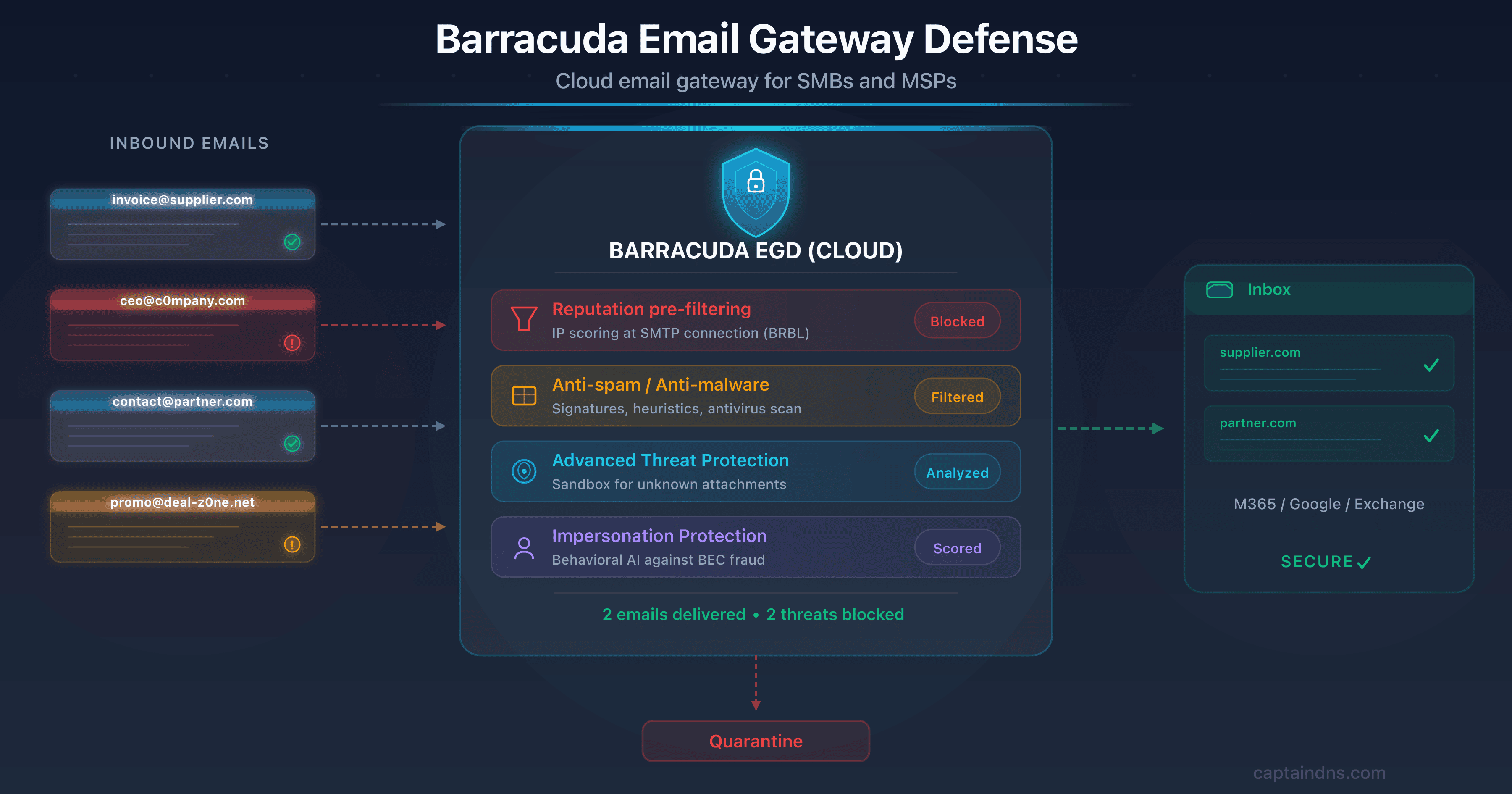
- Barracuda Email Gateway Defense: cloud SEG for SMBs and MSPs, MX ess.barracudanetworks.com, CVE-2023-2868 and comparison
- Cisco Secure Email Gateway: CES cloud gateway, Ironport heritage, Gartner 2025 exit and migration roadmap
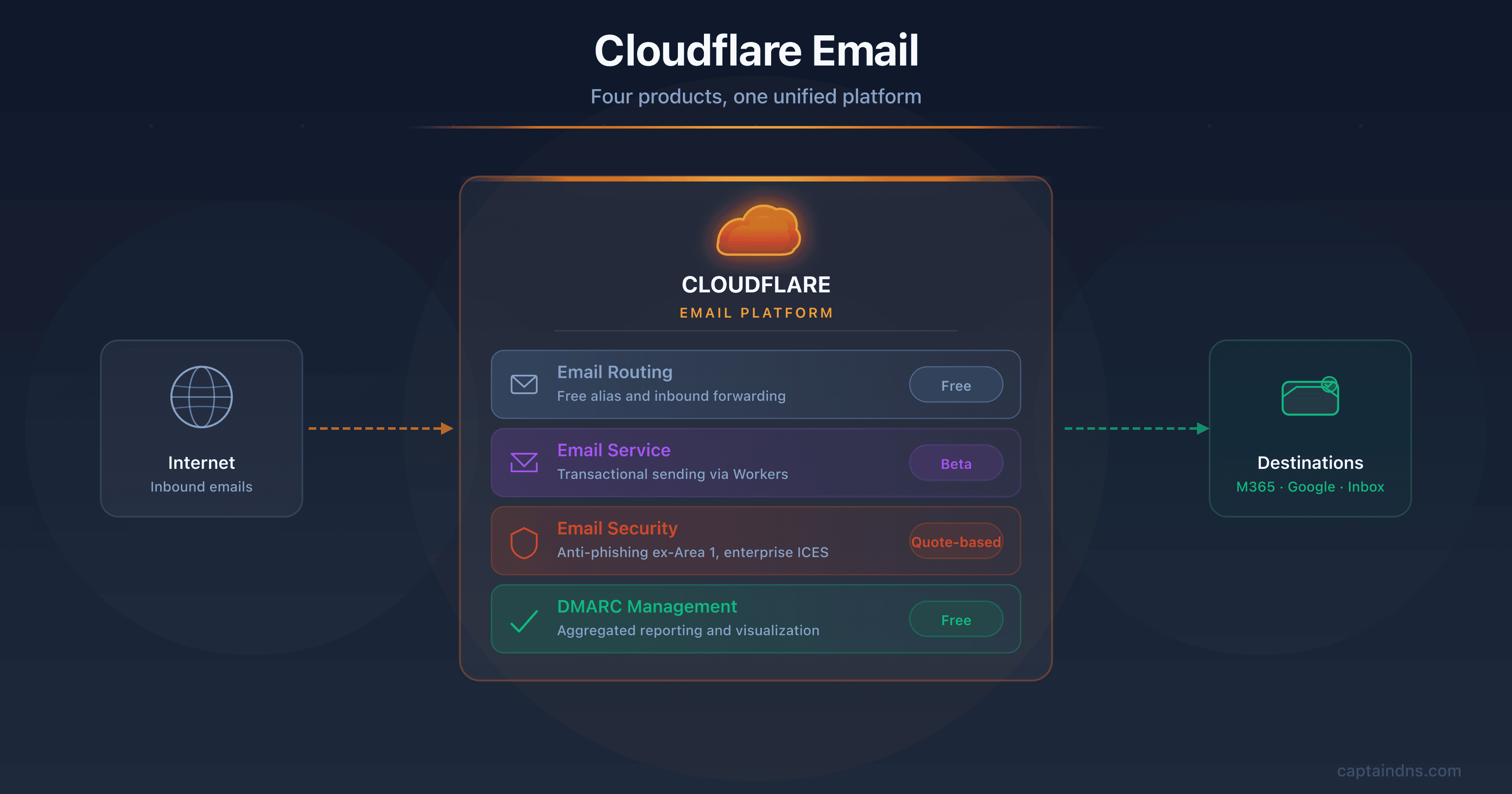
- Cloudflare Email Service: Routing, Email Service, Security (ex-Area 1), and DMARC Management
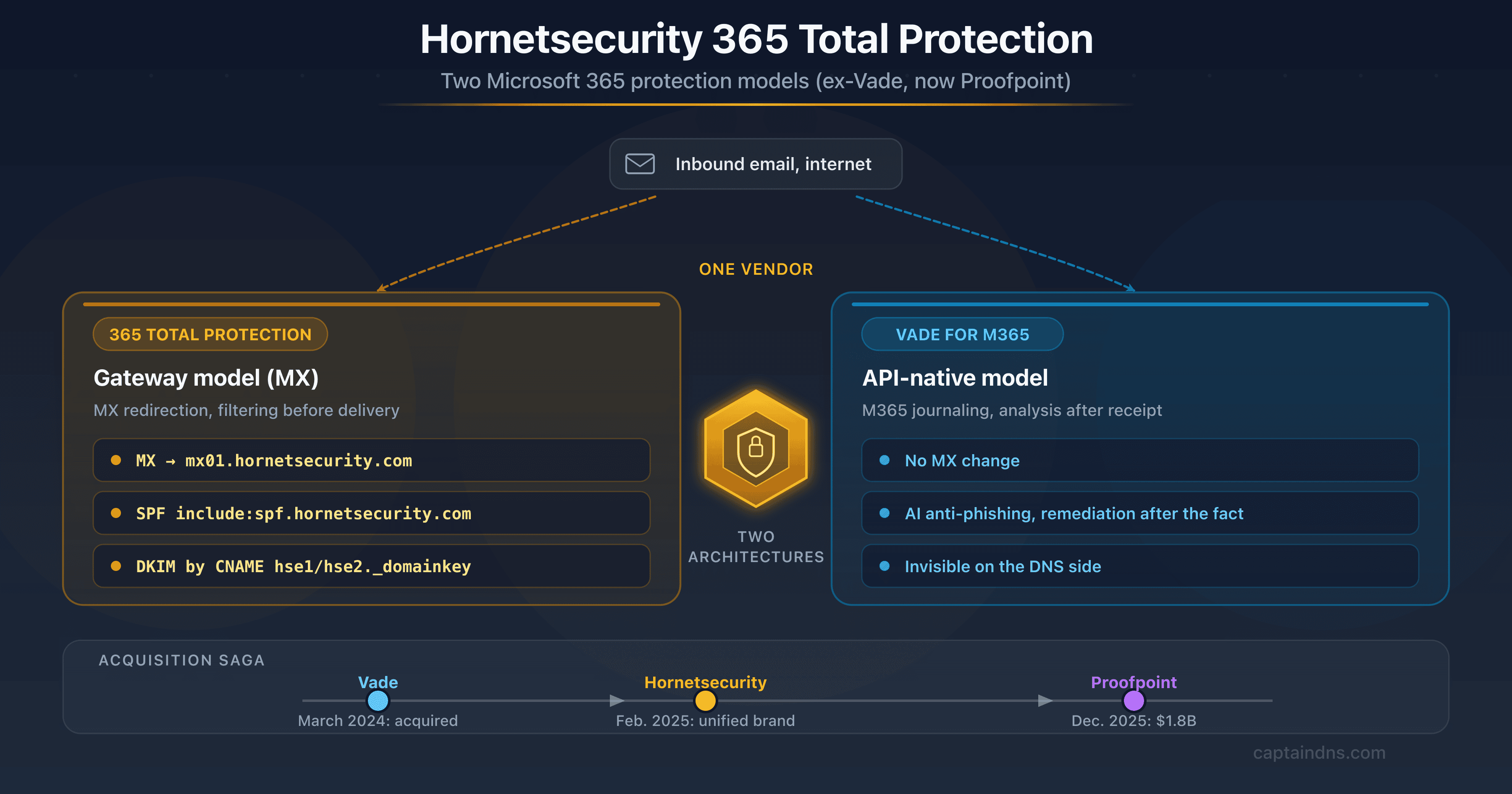
- Hornetsecurity Secure Email Gateway: the European vendor, formerly Vade, now part of Proofpoint, and its DNS impact (SPF, DKIM via CNAME)
FAQ
What's the difference between Proofpoint and Mimecast?
Proofpoint is positioned at the high end of the enterprise market with threat intelligence considered best in class and a people-centric approach (VAP concept, Nexus People Risk Explorer). Mimecast is more accessible on price and offers a native all-in-one suite including long-term archiving and email continuity. Proofpoint dominates the Fortune 100 (87 out of 100 companies), Mimecast is more present in the mid-market. For pure BEC detection and proprietary threat intel, Proofpoint retains a recognized lead. For a centralized need covering security plus archiving plus continuity, Mimecast often offers a better feature-to-price ratio.
How much does Proofpoint cost?
Proofpoint does not publish a public price list. The Vendr median based on 85 verified purchases is around $87,000 per year. For TAP alone, expect $5 to $15 per user per month depending on volume. A full deployment including Threat Protection, DLP, ITM and Compliance regularly exceeds $100,000 per year. Implementation services account for 15 to 25% of the software budget in the first year. Expect automatic increases of 5 to 8% at renewal. The positioning remains resolutely enterprise and isn't suited to tight budgets.
Does Proofpoint work with Google Workspace?
Yes. Proofpoint supports Google Workspace in gateway mode via MX redirection, with native directory synchronization. Configuration involves changing the domain MX records to point to your assigned pphosted.com data center, configuring routing in the Google Admin console to accept incoming emails from Proofpoint IPs, and publishing your SPF, DKIM and DMARC records. The majority of TAP, TRAP, CLEAR and EFD features are available on Google Workspace, with a few nuances on more recent modules like Adaptive Email Security, which is historically oriented toward Microsoft 365.
What's the difference between TAP and Adaptive Email Security?
TAP (Targeted Attack Protection) is Proofpoint's historical engine for advanced attack protection in gateway mode. It runs pre-delivery via MX redirection and combines URL Defense, Attachment Defense and Predictive Sandboxing. Adaptive Email Security, stemming from the Tessian acquisition in December 2023 and launched at RSA Conference 2024, is a post-delivery API deployment on Microsoft 365 that complements TAP by analyzing messages already delivered to detect behavioral anomalies. The two modules are complementary: TAP blocks upstream, Adaptive Email Security catches threats that escaped the gateway.
Has the EchoSpoofing incident been fixed?
Yes. The incident was remediated within hours of Guardio Labs' initial contact with Proofpoint in May 2024. Proofpoint introduced an X-OriginatorOrg header to validate the source Microsoft 365 organization of relayed messages, along with additional mechanisms to validate O365 source accounts before relay. Customers were notified and asked to reconfigure their Account Management. No further exploitation has been reported. The main lesson remains: systematically check the External Sender Validation section of your Proofpoint console and only authorize external sources with strict domain validation.
Is Proofpoint GDPR compliant?
Yes. Proofpoint has data centers in Europe (the EU1 region is hosted on Equinix EU and AWS, among others) and allows regional data hosting selection. The company is certified ISO 27001, SOC 2 Type II, FedRAMP for the US public sector, HIPAA for healthcare, and provides a GDPR-compliant Data Processing Agreement (DPA). Personal data access, rectification and deletion rights are supported. For organizations subject to strict European data sovereignty requirements, check with your TAM the specific commitments on data residency and cross-region transfers.
How do I migrate from Mimecast to Proofpoint?
The migration happens primarily at the DNS level. First configure Proofpoint in parallel (domain, policies, directory), then switch the MX records from Mimecast to your assigned pphosted.com data center. The change is almost instant: as soon as the MX records propagate, traffic switches over. Update the SPF at the same time by replacing the Mimecast include with the Proofpoint include (or Hosted SPF if you have multiple ESPs), and reconfigure DKIM in the Proofpoint console with a new selector. If you use Mimecast archiving, plan the extraction of archived data to a third-party solution before termination: it's generally the longest part of the outbound migration.
What is the VAP (Very Attacked People) concept?
VAP stands for Very Attacked People, Proofpoint's signature concept for its people-centric approach. Instead of protecting all users uniformly, Proofpoint identifies the most exposed individuals along three dimensions: vulnerability (likelihood of clicking, simulation failures, credential leaks), attack (volume and sophistication of attacks actually received) and privilege (access to sensitive data and systems). The combined score, displayed in the Nexus People Risk Explorer, helps prioritize awareness training, policy hardening and isolation resources on the highest-risk profiles. It's a conceptual break from traditional SEGs and one of the vendor's strongest selling points.
Does Proofpoint offer an API mode with no MX change?
Yes, since May 2024 with Adaptive Email Security, stemming from the Tessian acquisition. Adaptive Email Security is a post-delivery API deployment on Microsoft 365 that requires no MX changes. The engine leverages Tessian behavioral AI to model each user's behavior and detect anomalies in messages already delivered. It's Proofpoint's strategic response to the ICES movement and to competition from Abnormal Security. Note: Adaptive Email Security is designed to complement the gateway SEG, not replace it. To benefit from the full Proofpoint stack, gateway mode remains recommended alongside it.
Proofpoint Essentials vs. Email Protection: what's the difference?
Proofpoint Email Protection is the core enterprise offering, designed for large organizations. It includes access to TAP, EFD, TRAP, CLEAR, full Nexus AI and the VAP dashboard, and is sold with TAM support and dedicated consultants. Proofpoint Essentials is the offering for SMBs, with a reduced functional scope: no full TAP, no Nexus AI in its most advanced form, no VAP dashboard, limited consultant support. Essentials is more accessible on price and simpler to deploy, but loses the most differentiating features of the enterprise offering. If you're an SMB with standard needs, Essentials may fit. For enterprise needs, Email Protection is the only relevant option.
Has the Thoma Bravo acquisition slowed innovation?
Several signals point to a perceived slowdown in innovation since the shift to private equity in August 2021. The successive layoff waves illustrate the trajectory: 280 employees in January 2024 (6% of headcount, positions relocated to Argentina and Ireland), then roughly 30 people in Core Engineering in February 2025. The ICES response via Adaptive Email Security only arrived in May 2024 at RSA Conference, so after two years of pressure from Abnormal Security. That said, Proofpoint remains Gartner Magic Quadrant leader in 2024 and 2025, and launched Proofpoint Prime in April 2025 to consolidate its offering. The judgment depends on your horizon: short-term, the position remains dominant. Over the medium term, watch the public roadmap and get your sales rep to commit to specific milestones.
How does Proofpoint handle BEC attacks?
BEC detection is one of Proofpoint's historical strengths. The platform combines the six Nexus AI components to identify business email compromise attacks, including those with no link or attachment that are nearly undetectable by conventional filters. The Nexus Language Model analyzes linguistic structure, tone and urgency markers. Nexus Threat Intelligence correlates signals with campaigns observed across the global base of 4.5 trillion emails analyzed. The Nexus People Risk Explorer identifies the most exposed users (typically finance teams and executive assistants). According to Proofpoint figures, the platform blocks roughly 66 million BEC attempts per month. For organizations whose priority is protection against CEO fraud or targeted attacks on payment workflows, it's one of the vendor's strongest selling points.
Glossary
-
SEG (Secure Email Gateway): an email security gateway that filters incoming and outgoing traffic between the internet and the mail server. The SEG analyzes each message (spam, malware, phishing) before passing it to the recipient.
-
MX (Mail Exchanger): DNS record that identifies the servers responsible for receiving emails for a domain. Deploying Proofpoint involves redirecting MX records to the
pphosted.comservers of the assigned data center. -
SPF (Sender Policy Framework): email authentication protocol that lists the servers authorized to send emails for a domain. The SPF record is a TXT record in DNS, limited to 10 recursive lookups per RFC 7208.
-
DKIM (DomainKeys Identified Mail): authentication protocol that cryptographically signs emails. The public key is published in DNS, allowing the recipient to verify message integrity and origin. Proofpoint uses 2048-bit keys by default.
-
DMARC (Domain-based Message Authentication, Reporting and Conformance): protocol that verifies the alignment between the From domain and the domains authenticated by SPF and DKIM. DMARC defines the policy to apply on failure (none, quarantine, reject) and publishes forensic reports.
-
TAP (Targeted Attack Protection): Proofpoint's flagship module for protection against advanced attacks. Combines URL Defense (rewriting and real-time scanning), Attachment Defense (static and dynamic sandbox analysis) and Predictive Sandboxing (proactive detonation).
-
EFD (Email Fraud Defense): Proofpoint suite for managed DMARC, including Hosted SPF, Hosted DKIM, Hosted DMARC, Domain Discover and Supplier Risk Explorer. Distinctive feature: guidance from dedicated Proofpoint consultants for DMARC rollout.
-
TRAP (Threat Response Auto-Pull): post-delivery remediation module that automatically removes malicious emails identified after the fact, following forwards and distribution lists.
-
CLEAR (Closed-Loop Email Analysis and Response): user-centric remediation ecosystem combining the PhishAlarm button for reporting, the Analyzer for automatic categorization, and TRAP for actual remediation.
-
Nexus AI: Proofpoint's proprietary artificial intelligence platform gathering six detection components: Language Model (LM), Generative AI, Threat Intelligence (TI), Machine Learning (ML), Computer Vision (CV) and Relationship Graph (RG), linked and correlated by the Nexus Threat Graph.
-
VAP (Very Attacked People): Proofpoint's signature concept for identifying the most exposed individuals across three dimensions: vulnerability, attack and privilege. The VAP score is displayed in the Nexus People Risk Explorer.
-
Predictive Sandboxing: Proofpoint-patented technique (US20150237068A1) that detonates URLs and attachments proactively before the user clicks, using predictive heuristics to identify which links to inspect.
-
ITM (Insider Threat Management): Proofpoint module stemming from the ObserveIT acquisition in 2019. Monitors user activity on endpoints to detect risky behavior and enables session replay for forensic investigation.
-
CASB (Cloud Access Security Broker): security solution that sits between users and SaaS services to provide visibility, access control, cloud DLP and posture management. Proofpoint offers a CASB covering Microsoft 365, Salesforce, Box, Workday and several dozen applications.
-
Hosted SPF: EFD service that dynamically manages SPF on the Proofpoint side using RFC 7208 macros to flatten third-party includes and work around the 10 DNS lookup limit.
-
SPF macro (RFC 7208): mechanism defined by RFC 7208 that allows dynamic variables inside SPF records, for example to authorize sending sources based on recipient or sender identity. Used by Proofpoint Hosted SPF for smart flattening.
-
Stateful Composite Scoring Service (SCSS): Proofpoint's central scoring engine that weights content, metadata and sending context for each message to produce a final score that determines the action to apply. Combines the signals from the six Nexus AI components.