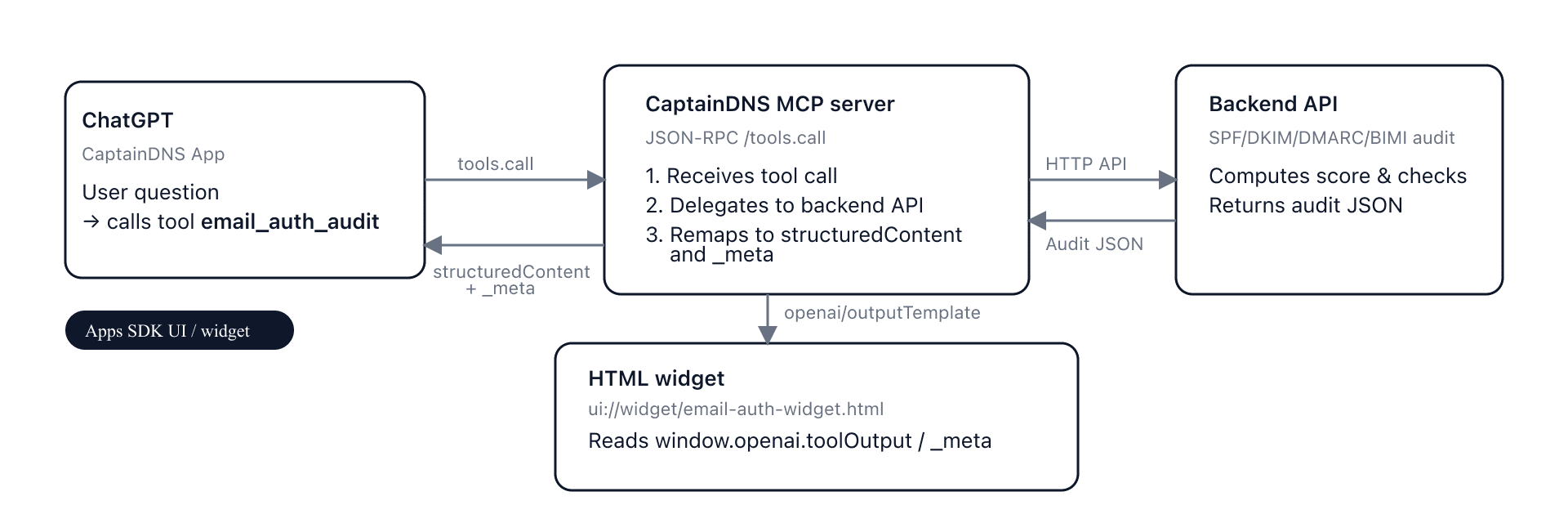
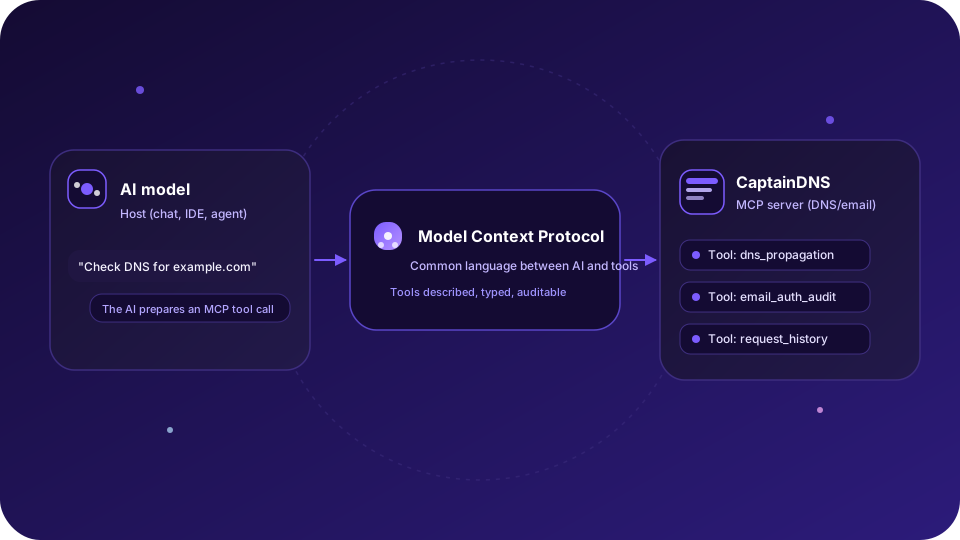
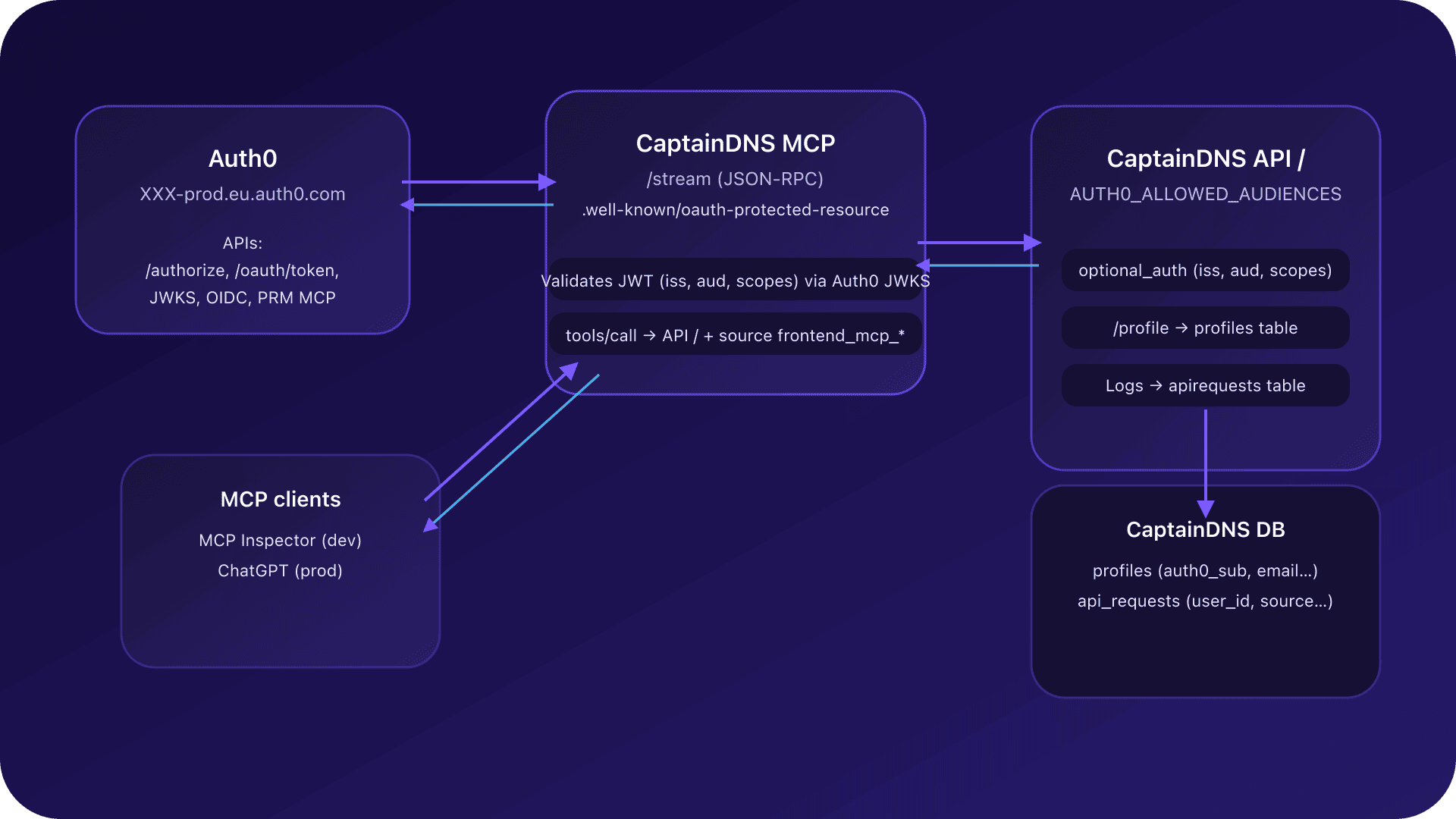
Behind the scenes of the CaptainDNS MCP
By CaptainDNS
Published on November 27, 2025
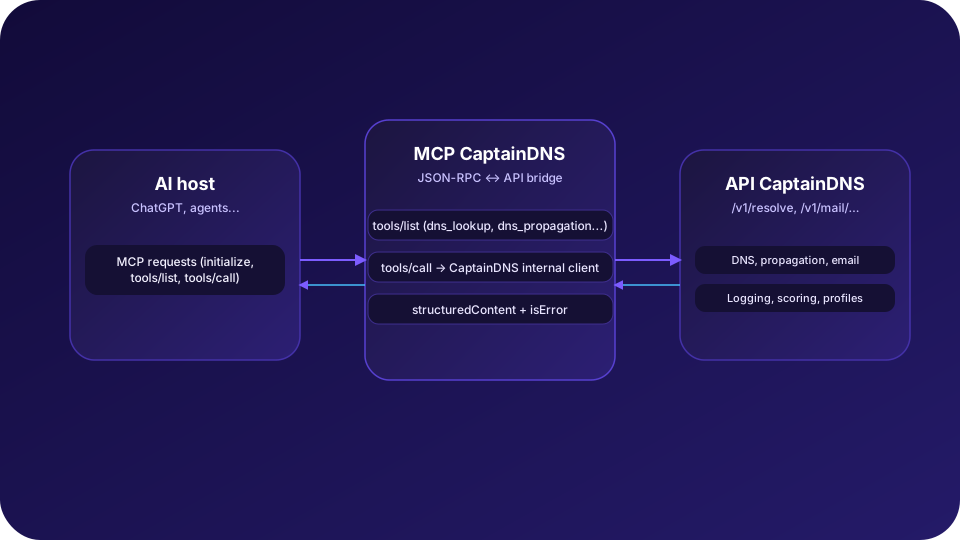
🔨 Before plugging CaptainDNS into ChatGPT via MCP, we needed a clear setup: a dedicated MCP server placed between the hosts (ChatGPT, internal tools) and the existing CaptainDNS API.
- The MCP server holds no DNS or email logic: it delegates everything to the CaptainDNS backend through a secured internal API.
- MCP transport relies on HTTP + JSON-RPC, with a single
/streamentry point aligned with the modern HTTP+SSE model. - Exposed tools (
dns_lookup,dns_propagation,email_auth_audit) are typed so the AI can discover and call them on its own. - Early tests surfaced timeouts, 424 errors, and protocol subtleties (notifications, tools/list, tools/call) that forced us to harden the contract.
- This post walks through how we shaped the architecture, secured exchanges, and debugged the full chain.
Why a dedicated MCP server for CaptainDNS?
From a product perspective, CaptainDNS is a classic SaaS: a Next.js web interface (frontend) and a Go API (services/api) that carries the business logic (DNS, email, resolvers, logging, scoring).
Adding MCP does not mean exposing the API directly to a model: we chose to insert a dedicated MCP server (services/mcp-server) that acts as an adapter.
In practice:
services/apiremains the single source of truth (DNS, propagation, email).services/mcp-serveris a strong client of that API:- it authenticates with a service token to prove it belongs to the CaptainDNS infrastructure;
- it forwards a user Auth0 token when provided so quotas, logging, and permissions stay aligned.
- Hosts (ChatGPT, internal tools, agents) only see the MCP server and speak MCP/JSON-RPC, never the raw API.
This split lets us:
- decouple API evolution from the MCP contract,
- add AI-specific guardrails (rate limits, format controls, aggressive timeouts), and
- keep the architecture clean.
Architecture overview
At a high level, the architecture looks like this:
- MCP hosts: ChatGPT (Connectors), internal tools, other MCP clients.
- CaptainDNS MCP server:
- exposes MCP tools (
dns_lookup,dns_propagation,email_auth_audit, etc.) via JSON-RPC; - validates and normalizes inputs (domains, record types, DKIM selectors);
- applies timeouts, quotas, and error classification.
- exposes MCP tools (
- CaptainDNS API (
services/api):- endpoints
/resolve,/resolve/propagation,mail/domain-check; - database and resolvers;
- logs, scoring, user profile.
- endpoints
The MCP server is a protocol bridge: it translates MCP calls (tools/list, tools/call) into internal HTTP calls, then rewraps the response in a format the MCP client and model can use.
MCP contract: initialize, tools/list, tools/call
The protocol relies on JSON-RPC 2.0 and three main server methods:
initialize: protocol version negotiation and capabilities.tools/list: discovery of available tools.tools/call: execution of a named tool with typed arguments.
initialize: say who you are and what you support
When a host (e.g. ChatGPT) opens a session with the CaptainDNS MCP server, it starts with:
method: "initialize";params.protocolVersion: a protocol version (e.g."2025-06-18");params.clientInfo: client name and version (openai-mcp,1.0.0, etc.).
The MCP server replies with:
protocolVersion: the version it accepts (often mirroring the client);capabilities: notablytools: { listChanged: false }to signal a stable tool list;serverInfo: server name ("captaindns-mcp-server") and version ("0.1.0").
No business call has left for the CaptainDNS API yet: the goal is to agree on protocol version and general capabilities first.
tools/list: announce CaptainDNS tools
Once initialize passes, the client sends tools/list. CaptainDNS MCP replies with an array of tool definitions, each containing:
name: tool identifier, such asdns_lookup,dns_propagation,email_auth_audit;description: what the tool does, in natural language;inputSchema: a JSON schema describing the expected arguments;annotations: metadata (tags, recommended scopes likecaptaindns:dns:read).
CaptainDNS tools are intentionally read-only: they query DNS or email configuration, but never mutate data.
Examples of typed parameters:
dns_lookup:domain(required);record_type(enumA,AAAA,TXT,MX, etc.);resolver_preset(optional);trace(boolean) to request an iterative trace.
dns_propagation:- same idea, applied to a sweep across multiple resolvers.
email_auth_audit:domain(required);rp_domain(optional, for reports/policies);dkim_selectors(optional list of selectors to probe).
tools/call: execute a business tool
When the model decides to use a tool, it does not call dns_lookup directly: it sends tools/call with:
params.name: the tool name ("dns_lookup","dns_propagation","email_auth_audit");params.arguments: a JSON object matching theinputSchema.
The MCP server:
- Validates and normalizes arguments (domains, DNS types, etc.).
- Calls the right backend endpoint (
/resolve,/resolve/propagation,/mail/domain-check) via an internal client. - Rewraps the response in a
CallToolResultwith:structuredContent: the structured CaptainDNS response (DNS answers, email score, SPF/DKIM/DMARC/BIMI details, etc.);- optionally
contentwith a text summary for the AI; isError:falseif everything worked,trueif the tool ran but returned a business error (e.g. DNS timeout).
Structural errors (unknown tool, invalid params, malformed JSON) remain classic JSON-RPC errors (-32601, -32602, etc.), letting the MCP client clearly distinguish protocol issues from business issues.
MCP transport: HTTP + JSON-RPC and SSE
For the first version, we chose the modern transport based on HTTP + JSON-RPC, with optional SSE support.
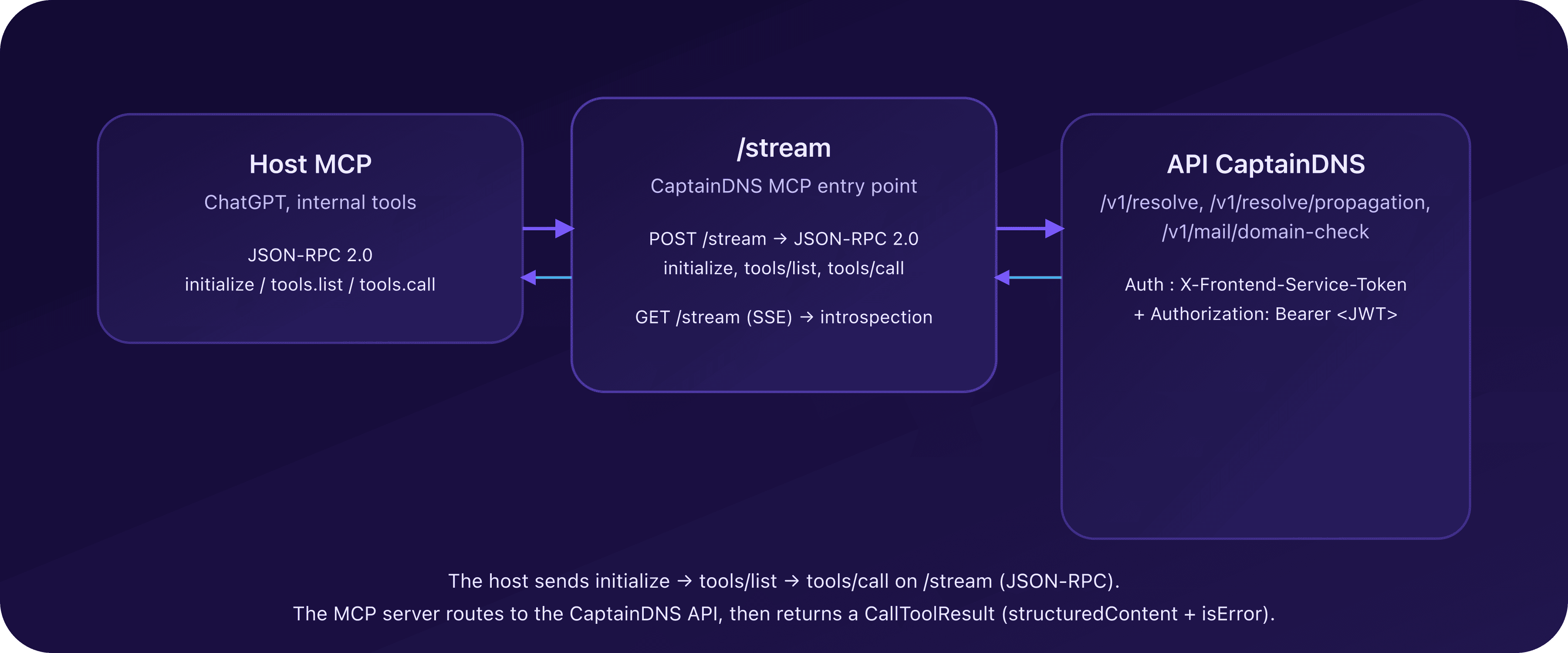
Entry point: POST /stream
The main entry point of the MCP server is an HTTP endpoint:
POST /streamwith a JSON-RPC 2.0 body.
Modern clients use it to:
- open the session;
- send
initialize; - then chain
tools/listandtools/call.
The MCP server:
- reads the JSON-RPC request (
jsonrpc,id,method,params); - routes to the right handler (
initialize,tools/list,tools/call); - returns a structured JSON-RPC response:
result(success);- or
error(protocol failure).
SSE: compatibility and introspection
For older clients or specific scenarios, the server also exposes:
GET /streamwithAccept: text/event-stream;
This SSE stream:
- announces basic metadata (HTTP endpoint for requests);
- can expose a simplified tool list;
- emits regular pings to keep connections under control.
In practice, ChatGPT integration relies mainly on JSON-RPC POST /stream. Early failures (timeouts, 424, etc.) stemmed from an incomplete SSE handshake; stabilizing on a single, well-defined JSON-RPC stream fixed them.
MCP server ↔ CaptainDNS API interactions
For every tools/call, the MCP server acts as an authenticated client of the CaptainDNS API.
Authentication and identity
The MCP server always sends:
- a service token so the API recognizes a trusted internal origin;
- a user token when the MCP host provides one, so the API can:
- tie requests to a profile (for logs and history);
- enforce quotas or permissions.
The MCP server does not store user data long term: it simply forwards identity to the API, which remains the authority on profile and logs.
Internal client and normalization
All outbound requests go through a single internal client that:
- normalizes domains (
captaindns.com, no trailing dot, lowercase); - validates record types (
A,AAAA,TXT, etc.); - constrains tool scope (DKIM selectors, resolver presets);
- applies timeouts tuned per tool (
dns_lookupshorter thanemail_auth_auditordns_propagation).
The MCP server never makes raw HTTP calls outside this client: it keeps maintenance and security simpler.
Error classification
Errors fall into three families:
input: invalid or missing parameters (malformed domain, unsupported record type, missing token, etc.);business: domain-level issue (DNS timeout, unreachable resolver, slow email upstream, etc.);internal: internal failure (bug, missing config, API 5xx).
On /stream (JSON-RPC), errors are mirrored as standard codes (-32602, -32001, -32603) with detailed envelopes in error.data. On tool results, a business failure can surface as isError: true with dedicated structuredContent.
Field notes: timeouts, 424, and other surprises
The MCP theory is elegant; practice came with bugs and surprises. Here are the main issues we hit and how we fixed them.
1. The silent timeout when adding the server
Step one: declare the MCP server in ChatGPT. Initially, the configured URL pointed to:
- a server listening only on
127.0.0.1, or - an HTTP endpoint that did not actually implement MCP.
Result:
- no
initializelog appeared on the MCP side; - ChatGPT eventually showed a simple timeout: "unable to connect to the MCP server".
Root causes:
- servers listening only on
127.0.0.1instead of0.0.0.0behind a reverse proxy; - using localhost/private IPs in config (inaccessible from ChatGPT cloud).
Lesson: before protocol details, check the basics: public DNS, HTTPS, listening on an address the host can reach, and visible traces on the MCP side as soon as you try to connect.
2. SSE without a full handshake: the connection that stays open... then dies
Once the MCP URL was reachable, early logs showed:
- a
POST /streamreturned405(method not allowed); - a fallback to
GET /streamwithAccept: text/event-stream; - an SSE connection accepted, then closed after ~2 minutes.
On paper it "worked" (an SSE connection existed), but ChatGPT never initialized the MCP session. Why:
- the SSE stream sent pings but not the expected handshake (no
endpointevent, no info about the JSON-RPC URL).
Fix: simplify transport with a clear main entry point:
POST /streamfor all JSON-RPC (initialize, tools/list, tools/call);GET /streamSSE as a secondary introspection channel, non-essential for ChatGPT.
Landing on a single, robust JSON-RPC entry point removed most mysterious timeouts.
3. Incomplete initialize: when the client expects more metadata
Next version: the connection established, but the MCP client crashed on initialize. Logs showed:
- an incoming
initializewithprotocolVersionandclientInfo; - a response that already contained the tool list and sometimes an ill-typed
capabilities.tools.
Issues found:
- missing
protocolVersioninresult; - missing
serverInfo; capabilities.toolsreturned as a boolean (true) instead of an object ({listChanged:false});- non-standard fields (tool list, custom endpoints) baked into the
initializeresponse.
Fix:
- normalize the
initializeresponse:- echo
protocolVersion; capabilities.tools = { listChanged: false };- minimal
serverInfo(name,version);
- echo
- move the tool list to
tools/list.
Once that contract was respected, the client could chain notifications/initialized then tools/list without errors.
4. Replying to a notification: a great way to crash the client
Another surprise: notifications/initialized is a JSON-RPC notification:
- no
id; - the client expects no response.
An early server version still answered with:
- a pseudo JSON-RPC response containing
id: null.
For a strict client, that looks like a response to a request that does not exist, triggering errors such as "unhandled errors in a TaskGroup".
Fix: apply the simple rule:
- if the request has no
id(notification):- log it;
- maybe update internal state;
- but send nothing back on the stream.
This tiny detail eliminated a whole class of client errors.
5. tools/list and inputSchema vs input_schema
In early tests, ChatGPT reached tools/list but failed when building internal tools. The cause:
- the
tools/listresponse usedinput_schemain snake_case instead of camelCaseinputSchema.
Even with a correct JSON schema, a typed client strictly expects inputSchema. With input_schema, the field was seen as missing: it could not generate input forms or validate arguments.
Fix: rename the key to inputSchema across tool definitions.
6. tools/call: the unknown tool that is not
Next step: after stabilizing tools/list, tool calls tried tools/call... and kept receiving:
- a JSON-RPC
method not found; - an internal
ERR_UNKNOWN_TOOL.
The server still looked for a method matching dns_lookup or dns_propagation, while MCP mandates a single tools/call method with a name parameter.
Fix:
- add a dedicated
tools/callhandler; - route it to the right tools based on
params.name; - validate params with the matching
inputSchema; - return a structured
CallToolResult.
From there, CaptainDNS tools finally executed through MCP.
7. content type "json" vs structuredContent: the details that break integrations
In an intermediate version, the MCP server returned results as:
result.content[0].type = "json";result.content[0].json = { ... }.
That is convenient server-side, but it is not a standard block type in the protocol (which mostly defines text, image, resource, etc.). Some tolerant clients can interpret it; others cannot.
On ChatGPT, this could show up as internal errors wrapped as:
http_error 424;unhandled errors in a TaskGroup (1 sub-exception).
Fix:
- move the structured payload into
structuredContent; - keep
contentfor an optional text summary (easy to show to the user); - use
isErrorto signal clearly whether the business result is a success or failure.
Once that schema landed, the 424 errors caused by content mapping disappeared.
FAQ : timeouts, 424, and MCP best practices
What should I check if adding the MCP server fails?
Start with basics:
- The URL points to an HTTPS endpoint reachable publicly, not
localhostor a private IP. POST /streamresponds (no405) and you see aninitializelog server-side.- The server listens on
0.0.0.0behind the reverse proxy, not only127.0.0.1. - SSE (
GET /stream) is optional - don't block on it if JSON-RPC works.
If initialize never shows up in logs, it is a network issue (DNS, TLS, firewall), not protocol.
How do I handle an `http_error 424` or `unhandled errors in a TaskGroup`?
These usually mean the response violated the MCP contract:
- put structured payloads in
structuredContentand keepcontentfor an optional text summary; - never reply to a notification (
notifications/initializedhas noid); - return a single
CallToolResultwith explicitisErrorinstead of customtype: \"json\"blocks.
If logs show a successful tools/call but the client fails, check these first.
Why route every tool through `tools/call`?
MCP mandates one business method (tools/call) with params.name:
- server-side, implement
tools/calland route todns_lookup,dns_propagation,email_auth_audit, validating against the matchinginputSchema; - client-side, ensure
params.nameexactly matches anamereturned bytools/list.
Per-tool methods or name mismatches lead to method not found or ERR_UNKNOWN_TOOL.
How do I diagnose a timeout or unusual latency?
Timeouts often come from the network path more than protocol:
- check per-tool timeouts server-side (
dns_lookupshorter thandns_propagation); - narrow a resolver sweep for testing, then widen;
- review backend logs (slow DNS, mail upstream) and confirm the service token is present.
A timeout with no initialize logged is still a reachability problem.
Is HTTP JSON-RPC enough, or do I need SSE?
Default to a single JSON-RPC entry point (POST /stream):
- it is the most stable path for ChatGPT and modern clients;
- tool discovery and calls all flow there.
Add SSE (GET /stream) only if you need introspection; ensure the stream provides the endpoint and regular pings.
MCP and CaptainDNS glossary
MCP (Model Context Protocol)
Open protocol standardizing how an AI model talks to external tools: databases, APIs, services like CaptainDNS. It defines concepts like initialize, tools/list, tools/call, and typed response formats (CallToolResult, ContentBlock, structuredContent).
Host
Application embedding an AI model and an MCP client: ChatGPT, an IDE, an internal agent. The host decides to call a CaptainDNS tool via MCP in response to user instructions.
MCP server
Service exposing MCP tools that hosts can use. Here: captaindns-mcp-server, a Go service that knows the CaptainDNS API surface and translates it into MCP format.
JSON-RPC 2.0
Lightweight JSON-based protocol used by MCP to describe requests (method, params, id) and responses (result or error). MCP uses it in a scoped way (initialize, tools/list, tools/call, notifications).
tools/list
MCP method returning the list of tools available on an MCP server, with their inputSchema and metadata. It is how a model knows what it can do with CaptainDNS.
tools/call
MCP method a host uses to execute a specific tool. The MCP server reads params.name, validates params.arguments, calls the backend API, and returns a CallToolResult representing the structured result (or business error).
structuredContent
Optional CallToolResult field where an MCP server can place structured data (JSON) produced by a tool. CaptainDNS stores DNS answers, email scores, SPF/DKIM/DMARC/BIMI details there, for example.
TaskGroup
Concept from async runtimes (Python, etc.): a group of tasks executed in parallel. A message like "unhandled errors in a TaskGroup" signals an unhandled exception in one or more tasks, often due to a subtle format mismatch or a bug in the chain.
Related MCP and CaptainDNS guides
- Introduction to MCP for CaptainDNS - Learn what MCP is and why CaptainDNS adopts it.
- Auth0 + MCP Integration - OAuth2 authentication for the CaptainDNS MCP.
- MCP Widgets for ChatGPT - How ChatGPT widgets leverage the CaptainDNS MCP.
- Email Audit Widget in ChatGPT - Implementation of the email_auth_audit widget.
- Resilient DNS Monitoring - Building multi-layer DNS surveillance.
- History and DNS Monitoring - Diagnose, archive, share, then monitor.