Auth0 + MCP CaptainDNS: our full postmortem
By CaptainDNS
Published on December 4, 2025
In this postmortem we explain how we wired Auth0 into CaptainDNS' MCP server without breaking what already existed:
- An MCP server exposed on /stream (dev and prod) that speaks JSON-RPC with MCP clients (MCP Inspector, ChatGPT tomorrow).
- A backend API already linked to Auth0 via the frontend, which needed to align with a new MCP OAuth2 flow.
- A need for optional auth: tools must run without login, but the identity should be used when a Bearer is present.
- A dedicated Auth0 API for the MCP, a PRM (
/.well-known/oauth-protected-resource) and the Resource Parameter Compatibility Profile. - Fine-grained identity propagation (sub, email, scopes) into profiles and api_requests logs, with the ability to harden access later through protected tools.
1. Context: why plug Auth0 into the CaptainDNS MCP?
CaptainDNS already has:
- a Next.js frontend wired to Auth0 (classic login, RS256 tokens for the API),
- a backend API,
- a data model that stores profiles and requests.
Bringing in the MCP server changes the equation:
- a new entry point in dev, then prod;
- MCP clients (MCP Inspector, then ChatGPT) that want to fetch an access token via OAuth2 to call this MCP server;
- the need to propagate identity down to the backend to link actions to an existing profile.
Constraints:
- do not break the existing frontend (historical audience, tokens already circulating);
- keep optional auth on v0 tools (lookup, propagation, email audit);
- set a clean foundation for future "auth required" tools (history, resolve watch list, premium features, etc.).
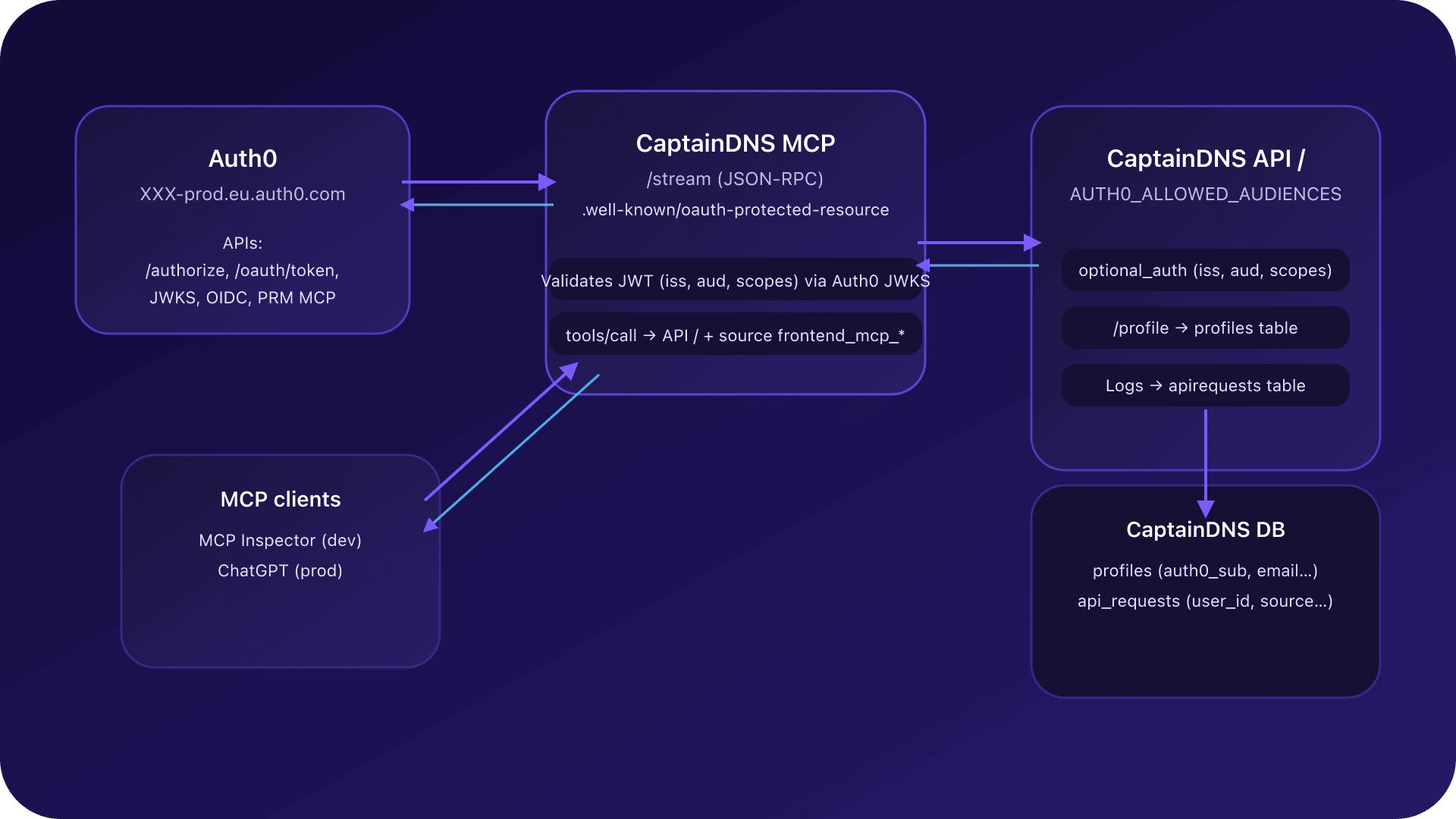
2. High-level view of Auth0 + MCP
In the end the chain looks like this:
-
Auth0 (
XXX-prod.eu.auth0.com): -
declares two APIs:
-
the historical frontend API,
-
the MCP API (dev and prod);
-
emits RS256 JWT access tokens for those audiences.
-
CaptainDNS MCP server:
-
JSON-RPC endpoint:
/stream(dev and prod); -
exposes a PRM (Protected Resource Metadata) at
/.well-known/oauth-protected-resource; -
validates Auth0 tokens via issuer and JWKS;
-
calls the backend API while forwarding
Authorization: Bearer <access_token>and asourceheader (frontend_mcp_anonymousorfrontend_mcp_authenticated). -
Backend API:
-
accepts several audiences (frontend + MCP);
-
maps Auth0
sub→profiles; -
logs every request to
apirequestswithuser_idandsource. -
MCP clients:
-
MCP Inspector in dev,
-
ChatGPT (Connectors) in prod, acting as an OAuth2 MCP client.
The goal is that for a CaptainDNS tools/call:
- anonymous mode: the request runs normally;
- authenticated mode: the request is linked to a profile.
3. Auth0 API dedicated to MCP and aligning audiences
3.1. Auth0 API for MCP: audience = MCP /stream
Instead of trying to reuse the historical audience, we created a dedicated Auth0 API for the MCP:
- in dev:
- audience = XXX-audience-dev;
- in prod:
- audience = XXX-audience-prod;
- algo = RS256;
- access token format = JWT (signed, not encrypted).
On the MCP side:
AUTH0_AUDIENCEpoints to that audience (dev or prod);- the PRM (
/.well-known/oauth-protected-resource) repeats those values inresource,audienceanddefault_audience.
On the backend API:
AUTH0_ALLOWED_AUDIENCEScontains all accepted audiences:- the historical frontend audience,
- the MCP audience.
3.2. Resource vs audience and encrypted JWE
First issue with MCP Inspector:
- the client only sent
resource=<url>in the authorization URL; - Auth0 expected an explicit
audience=<url>; - typical result:
- either an encrypted access token (5-part JWE,
alg=dir,enc=A256GCM) unusable by the MCP, - or an Auth0 error ("service not found") if the audience did not match any API.
The solution was to enable the Resource Parameter Compatibility Profile in Auth0:
- Auth0 then treats
resource=<url>asaudience=<url>for clients that only knowresource; - the token received is a standard 3-part RS256 JWT with
aud= MCP resource URL (/stream).
This was key to getting an OAuth2 flow that MCP Inspector understood without changing its behavior.
4. MCP PRM (/.well-known/oauth-protected-resource)
For MCP clients to know how to do OAuth2 against the server, the MCP exposes a PRM (Protected Resource Metadata) at:
/.well-known/oauth-protected-resource
This JSON document describes notably:
- the
resource/audience/default_audience; - OAuth2 endpoints to use in this context:
authorization_endpoint,token_endpoint,- optional
registration_endpoint; jwks_uri(via Auth0's OpenID configuration);scopes_supported:openid,profile,email,offline_access,- and application scopes (
captaindns:dns:read,captaindns:email:read, etc.); default_scope:- typically
"openid profile email captaindns:dns:read".
The PRM is therefore an OAuth2 contract tailored to the MCP, complementary to Auth0's standard OpenID discovery.
5. JWT validation in the MCP server
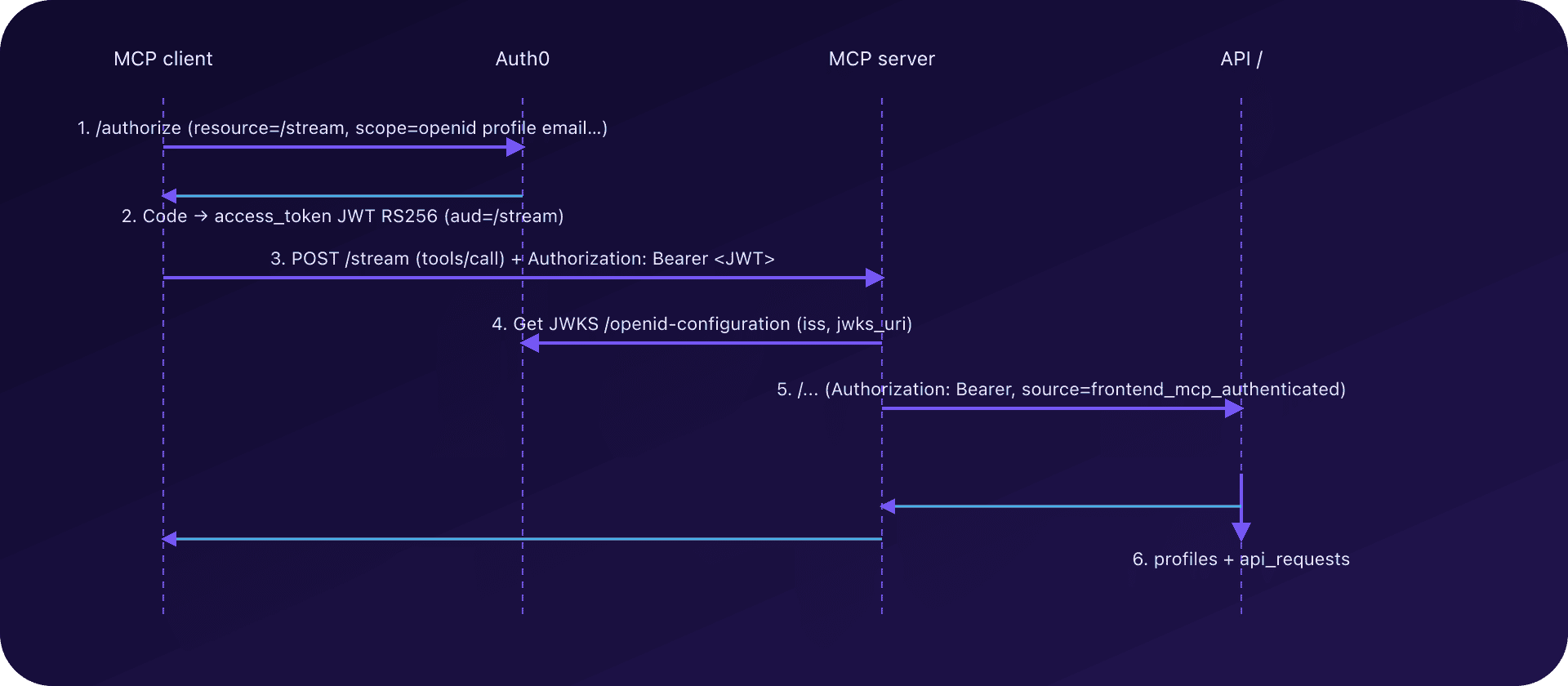
Once the OAuth2 flow is set, the MCP server has to verify each Bearer on /stream:
- read
Authorization: Bearer <access_token>(if present); - fetch Auth0's OpenID configuration:
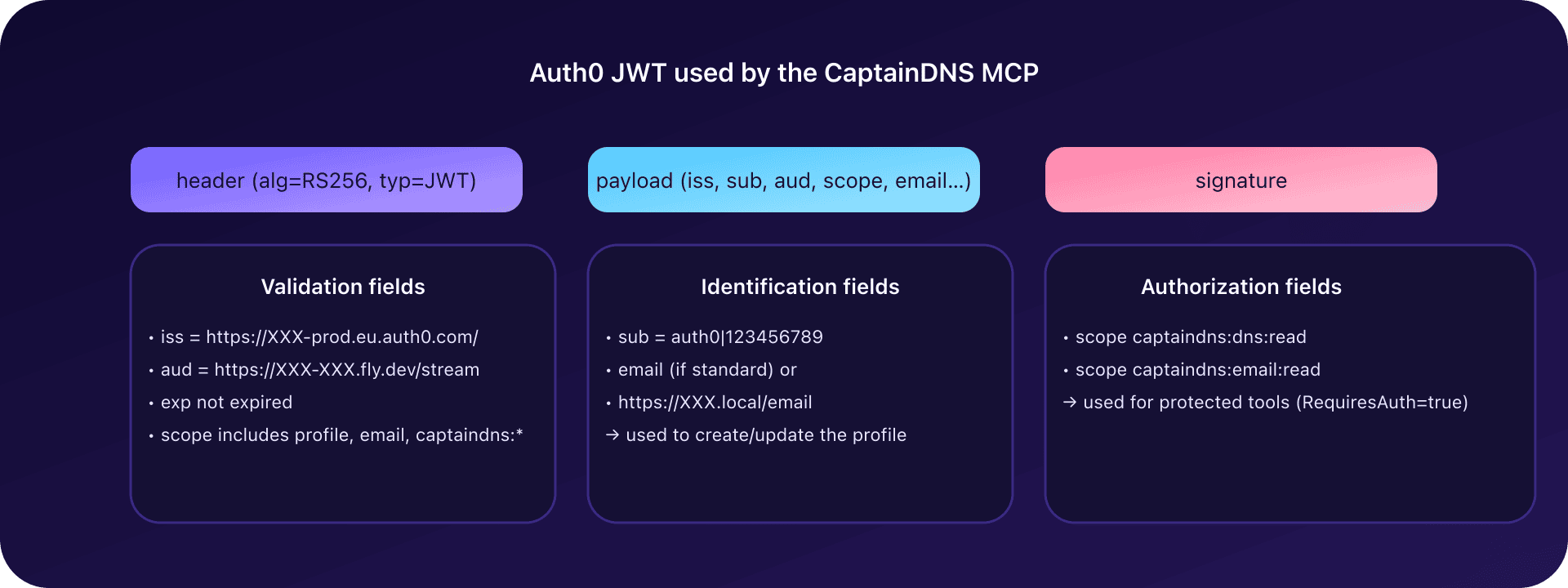
issuer=XXX;jwks_uri(public key);- validate:
- RS256 signature via JWKS,
iss= Auth0 tenant,aud= MCP audience (dev or prod),expnot expired.
The MCP server can also:
- inspect the
scopeclaim (string, e.g."openid profile email captaindns:dns:read"); - check that required scopes (by default
profile,email) are present if you want to filter directly at the MCP layer.
If the Bearer is invalid:
- in "optional auth" mode, the MCP just considers the user anonymous and does not send a challenge;
- in a tool's "auth required" mode (see below), the MCP returns a JSON-RPC error with
_meta["mcp/www_authenticate"]to trigger login client-side.
6. Propagating identity to the backend API
After the JWT is validated by the MCP, the server must propagate identity to the API:
- add the header
Authorization: Bearer <user access_token>; - add a
sourceheader (or equivalent), typed: frontend_mcp_anonymousif no Bearer or invalid Bearer;frontend_mcp_authenticatedif Bearer is valid.
MCP logs also add a mcp_outbound_api event with:
path=/...;has_bearer=true/false;source=frontend_mcp_*.
On the API, the optional_auth middleware:
- re-validates the token (issuer, audience ∈
AUTH0_ALLOWED_AUDIENCES, required scopes); - if the token is valid:
- links the request to a profile (see next section);
- otherwise:
- treats the request as anonymous, while logging the origin (
source).
This "double validation" (MCP + API) keeps the API independent of how it is called (frontend vs MCP).
7. Integration with profiles and api_requests
7.1. Create / update profiles
The backend exposes POST /profile which:
- reads
sub(Auth0 subject) andemailfrom the claims; - creates or updates a row in
profiles: - primary key:
auth0_sub; - up-to-date email;
created_at,last_seen_attimestamps.
Precondition on the API:
emailmust be non-empty, otherwise 422 (cannot create an incomplete profile).
Problem found: the access token issued for MCP did not contain email by default.
7.2. Namespaced email claim via Auth0 Action
To guarantee an exploitable email, we added an Auth0 Post-Login Action:
exports.onExecutePostLogin = async (event, api) => {
  const ns = "NAMESPACE";
  if (event.user && event.user.email) {
    api.accessToken.setCustomClaim(`${ns}/email`, event.user.email);
  }
};
Explanation:
- Auth0 requires access token custom claims to be namespaced (URL or URN);
- the
NAMESPACE.emailclaim is therefore added to each access token if the user has an email.
On the backend side:
/profilefirst readsemail(if present as standard);- otherwise, fallback to
NAMESPACE/email.
Combining both sources keeps the code robust, compatible with multiple token types (frontend vs MCP).
7.3. api_requests: attach requests to the right user_id
For every API request, the logging middleware:
- creates a row in
api_requests; - if there is a
suband aprofiles.GetByAuth0ID(sub)profile exists: - fills
user_idinapirequests; - uses
source(frontend / MCP / backend job) to qualify the origin.
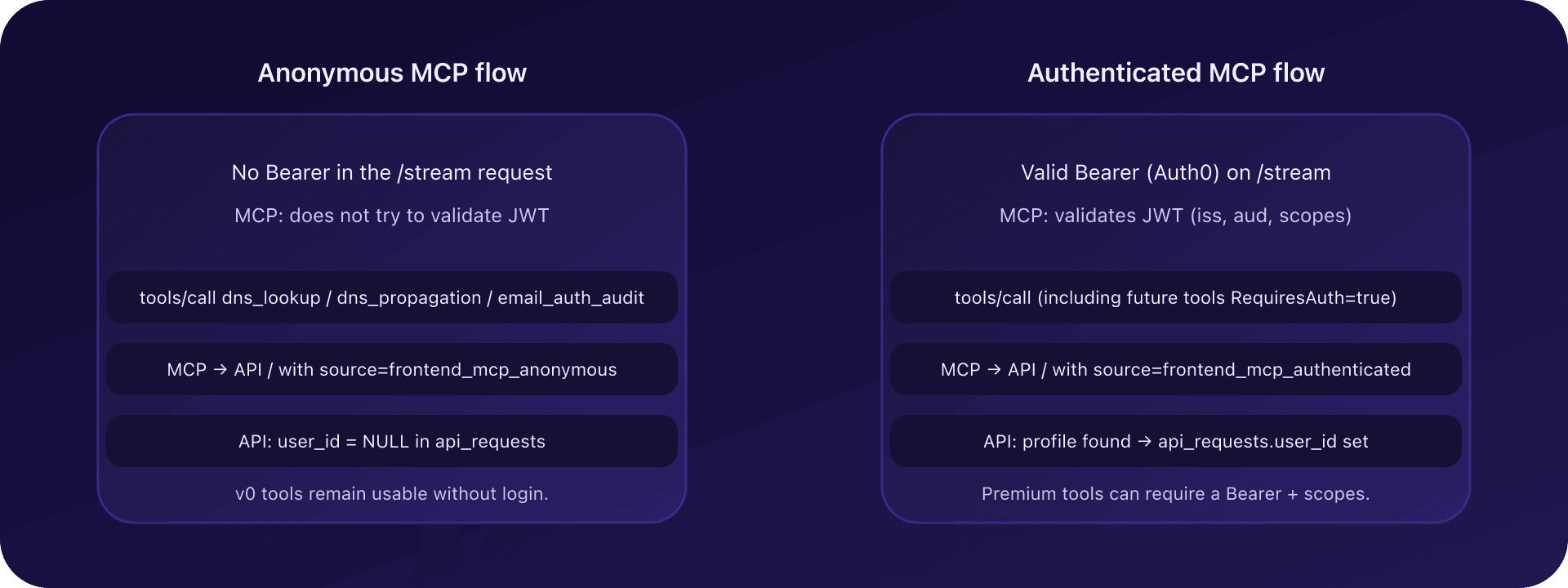
Result:
- anonymous requests (MCP without Bearer) have
user_id = NULL,source=frontend_mcp_anonymous; - authenticated requests are linked to a profile, with
user_idset.
8. Scopes and AUTH0_REQUIRED_SCOPES
8.1. Backend side: AUTH0_REQUIRED_SCOPES
The API uses a configuration parameter:
AUTH0_REQUIRED_SCOPES(for example["profile", "email"]),
to check that the token's scope claim contains all required scopes.
The optional_auth middleware:
- if a Bearer is present:
- validates signature and audience;
- checks that
scopecontains all required scopes; - otherwise, marks auth as invalid (
missing required scope), but lets the request continue as anonymous (nouser_id). - if no Bearer:
- directly treats the request as anonymous.
Therefore we had to ensure MCP tokens include profile and email:
- via
scopes_supportedanddefault_scopein the MCP PRM; - via
scopeparameters sent by MCP clients during the OAuth2 flow.
8.2. Avoiding "magic" fixes in Auth0
It is technically possible to add scopes via an Auth0 Action, but in this REX we favored:
- clean configuration through:
- the MCP PRM (
default_scope); - the
/authorizerequest (scope=), - explicit scope checks on API and MCP sides, without "hardcoding" inside the tenant.
9. Optional auth and protected tools (RequiresAuth)
9.1. Initial issue: everything became "auth required"
In a first version, as soon as the MCP server detected a missing or invalid Bearer, it returned a challenge:
_meta["mcp/www_authenticate"]with arealmandscopeto obtain.
Consequence:
- some MCP clients interpreted this response as a global failure,
- while the goal was to keep v0 tools usable anonymously.
9.2. RequiresAuth flag and dual mode
The solution was to introduce a RequiresAuth flag on MCP tools:
-
for all existing tools (
dns_lookup,dns_propagation,email_auth_audit): -
RequiresAuth = false; -
behavior:
-
without Bearer: anonymous execution, no challenge;
-
with valid Bearer: execution + profile binding.
-
for future "premium" tools (
request_history,resolve_watch_list, etc.): -
RequiresAuth = true; -
behavior:
-
no Bearer or invalid Bearer:
-
MCP returns a JSON-RPC error with:
-
isError: true, -
_meta["mcp/www_authenticate"]filled to trigger login; -
with valid Bearer:
-
normal execution with profile binding.
This mechanism lets us progressively add protected tools without breaking the public tools experience.
9.3. Security metadata in tools/list
To be explicit for MCP clients, tools now expose a security section:
- type
oauth2; - required scopes (for protected tools).
Tests were added to check:
- that
tools/listsurfaces security information, - that protected tools return
_meta["mcp/www_authenticate"]when Bearer is missing.
10. Handling multiple audiences (frontend + MCP) in prod
10.1. Observations
In production, two kinds of tokens coexist:
- frontend tokens:
aud = [XXX, YYY];- MCP tokens:
aud = "XXX".
In an intermediate phase, the API only accepted the MCP audience (AUTH0_ALLOWED_AUDIENCES="XXX"), which broke the frontend (audience mismatch).
10.2. Solution: multi-value AUTH0_ALLOWED_AUDIENCES
The solution was to allow multiple audiences on the API side:
AUTH0_ALLOWED_AUDIENCES="XXX, YYY"
The middleware:
- splits the string on
,; - trims spaces;
- accepts tokens whose
aud(string or array) contains at least one allowed audience.
Result:
- the API accepts both:
- frontend tokens (historical audience),
- MCP tokens (MCP audience);
- the transition to a multi-client world (frontend + MCP + others) is handled cleanly.
FAQ: Frequent questions about Auth0 + MCP CaptainDNS
Why create a dedicated Auth0 API for the MCP instead of reusing the historical API audience?
The historical audience was already used by the frontend and existing tokens. Giving the same audience to the MCP would have made configuration more ambiguous and harder to audit.
By creating a dedicated Auth0 API for the MCP (in dev and prod), we get a clear separation of usage, better traceability and the ability to evolve the MCP contract independently from the frontend.
Why was the initial token encrypted (5-part JWE) instead of a readable JWT?
Without the Resource Parameter Compatibility Profile, Auth0 misinterprets some flows where only resource is sent, especially when no coherent audience is found.
In our case, the MCP client sent resource=... without explicit audience=.... Auth0 then sometimes responded with an encrypted JWE (5 parts) or with an error message.
Enabling the Resource Parameter Compatibility Profile makes Auth0 treat resource as audience, which yields a standard 3-part RS256 JWT the MCP server can validate.
What exactly is the PRM (/.well-known/oauth-protected-resource) for the MCP?
The PRM is a metadata document that describes how a client should do OAuth2 to access a protected resource:
- what the resource / audience is;
- which authorization and token endpoints to use;
- which scopes are supported and recommended.
For CaptainDNS, the PRM lets clients like MCP Inspector or ChatGPT automatically discover how to get an Auth0 token for the MCP, know which scopes to request and integrate without complex manual configuration.
How do you manage scopes without breaking existing clients?
The chosen strategy:
- define a minimal set of required scopes (
profile,email) on the API; - do not reject the whole request if those scopes are missing, but fall back to anonymous mode;
- reserve strict failure (missing scope) for MCP tools with
RequiresAuth = true.
This way, v0 tools stay usable without changing Auth0 configuration for existing clients, while allowing gradual hardening for premium tools later.
How do you switch an MCP tool from 'optional auth' to 'auth required'?
The switch happens in two steps:
- mark the MCP tool with
RequiresAuth = true; - on the MCP server side:
- if no Bearer or invalid Bearer → return
isError=truewith_meta["mcp/www_authenticate"]to trigger login; - if Bearer valid and scopes sufficient → execute normally.
This lets you evolve a tool to "auth required" without changing the backend API, concentrating security logic on the MCP side.
Glossary Auth0 + MCP CaptainDNS
MCP (Model Context Protocol)
Protocol that standardizes how an AI model talks to external tools (APIs, services). In CaptainDNS it lets clients like MCP Inspector or ChatGPT call DNS/email tools through a dedicated MCP server.
PRM (Protected Resource Metadata)
JSON document published by a protected resource (here, the CaptainDNS MCP server) at /.well-known/oauth-protected-resource. It describes the resource, audience, scopes, and the authorization and token endpoints.
Issuer (iss)
JWT claim indicating who issued it. The MCP server and backend API check that iss matches the expected Auth0 tenant.
Audience (aud)
Claim indicating which resource(s) the token targets. In our case: the frontend API or the MCP API. The backend must accept multiple audiences to handle different clients.
Subject (sub)
Unique identifier of the user in the Auth0 tenant. It is the key used to find or create the profile in the profiles table.
Scope
List of permissions tied to a token (e.g. openid profile email captaindns:dns:read). Scopes are used to control access to some features, especially protected MCP tools.
JWS vs JWE
- JWS: signed JWT (3 parts), readable and verifiable server-side.
- JWE: encrypted JWT (5 parts) requiring a decryption key. For the CaptainDNS MCP we chose RS256 JWS, simpler to validate via JWKS.
Namespaced claim
Custom access-token claim whose name is a URL/URN, required by Auth0 to avoid collisions with standard claims. Example: NAMESPACE for storing the email in an MCP token.
Resource Parameter Compatibility Profile
Auth0 option that treats resource as audience for OAuth clients that only know resource. Critical for MCP Inspector to get a valid RS256 JWT without changing its behavior.
frontend_mcp_anonymous / frontend_mcp_authenticated
Values of the source field used in logs and the api_requests table to distinguish anonymous MCP requests (no Bearer or invalid Bearer) from authenticated MCP requests (valid Bearer, identified profile).
Related MCP and CaptainDNS guides
- Introduction to MCP for CaptainDNS - Learn what MCP is and why CaptainDNS adopts it.
- CaptainDNS MCP Architecture - Examine the technical details of the MCP server.
- MCP Widgets for ChatGPT - How ChatGPT widgets leverage the CaptainDNS MCP.
- Email Audit Widget in ChatGPT - Implementation of the email_auth_audit widget.
- Resilient DNS Monitoring - Building multi-layer DNS surveillance.
- History and DNS Monitoring - Diagnose, archive, share, then monitor.