Hornetsecurity Secure Email Gateway (ex-Vade): architecture, DNS configuration and alternatives
By CaptainDNS
Published on June 24, 2026
- 🛡️ Hornetsecurity 365 Total Protection is a cloud Secure Email Gateway aimed at SMBs and MSPs, with around 125,000 customers and more than 12,000 partners. It sits in front of Microsoft 365 via MX redirection and filters inbound traffic.
- 🔁 The Vade brand is gone. The French vendor Vade (AI anti-phishing) was acquired by Hornetsecurity in March 2024, and its brand was retired in February 2025 during the "One Team, one Brand" rebranding. We therefore treat Vade as an absorbed entity.
- 🔧 Specific DNS impact: MX to
mx01.hornetsecurity.comthroughmx04(priorities 10/20/30/40), anspf.hornetsecurity.cominclude, and above all a DKIM by CNAME (hse1._domainkey/hse2._domainkey). No TXT key to publish in your zone, unlike Barracuda or Mimecast. - 📊 New owner since December 2025: Proofpoint completed the acquisition of Hornetsecurity for $1.8 billion, making it its dedicated MSP business unit. In North America, the offering is now sold as Proofpoint Total Protection (
pp-tp.com).
If you run email for an SMB, a professional firm or a fleet of clients as an MSP, you've probably crossed paths with Hornetsecurity, or its former competitor turned subsidiary, Vade. The German vendor claims around 125,000 customers and more than 12,000 partners in a niche it has patiently occupied: Microsoft 365 security sold by and for IT service providers. Where Proofpoint historically dominated the large enterprise and Barracuda the American SMB, Hornetsecurity carved out a benchmark European position on the multi-tenant MSP model.
But analyzing Hornetsecurity in 2026 means first untangling a triple identity that breeds confusion. There's Hornetsecurity, the Hannover-based vendor behind the 365 Total Protection suite. There's Vade, the French vendor from Hem (near Lille), absorbed in 2024 and whose brand has officially ceased to exist since February 2025. And there's Proofpoint, which acquired the whole thing in late 2025. Three names, one corporate reality today. But two distinct technical models still coexist, and that's where everything plays out on the DNS side.
The stakes are anything but abstract. A secure email gateway (SEG) is useless if your domain stays spoofable for lack of proper authentication. Filtering inbound flow protects your mailboxes. It does not protect your brand against outbound spoofing. Before you even deploy Hornetsecurity, check where you stand with the CaptainDNS DMARC syntax checker: it will tell you whether an attacker can send mail in your name.
At CaptainDNS, we look at the Hornetsecurity secure email gateway from the angle that concerns us: the concrete impact on your DNS records and your email authentication. Deploying 365 Total Protection in gateway mode means redirecting your MX to mx01.hornetsecurity.com, adding the spf.hornetsecurity.com include, and delegating your DKIM by CNAME. Deploying Vade for M365 in API mode, conversely, touches no DNS record at all. This guide covers the acquisition saga, the two architectures, the detailed DNS configuration with the real values, how to detect a domain behind Hornetsecurity, the comparison and an action plan. And it doesn't hide the uncertainties of the post-acquisition period: we flag them wherever they exist.
📌 What is the hornetsecurity secure email gateway?
Hornetsecurity 365 Total Protection is a cloud email security suite built around a Secure Email Gateway: a hosted filter that inspects inbound email traffic before it reaches your Microsoft 365 tenant. In gateway mode, you redirect your MX records to the Hornetsecurity infrastructure, which analyzes each message then forwards only the clean traffic to Exchange Online.
For the fundamentals of a SEG (gateway model, MX redirection, distinction with API-native ICES solutions), we refer you to our complete guide on Barracuda, which lays out these basics in detail. The key point fits in one sentence: a SEG sits between the internet and your mail server, sees all inbound flow, and blocks threats pre-delivery rather than after the fact.
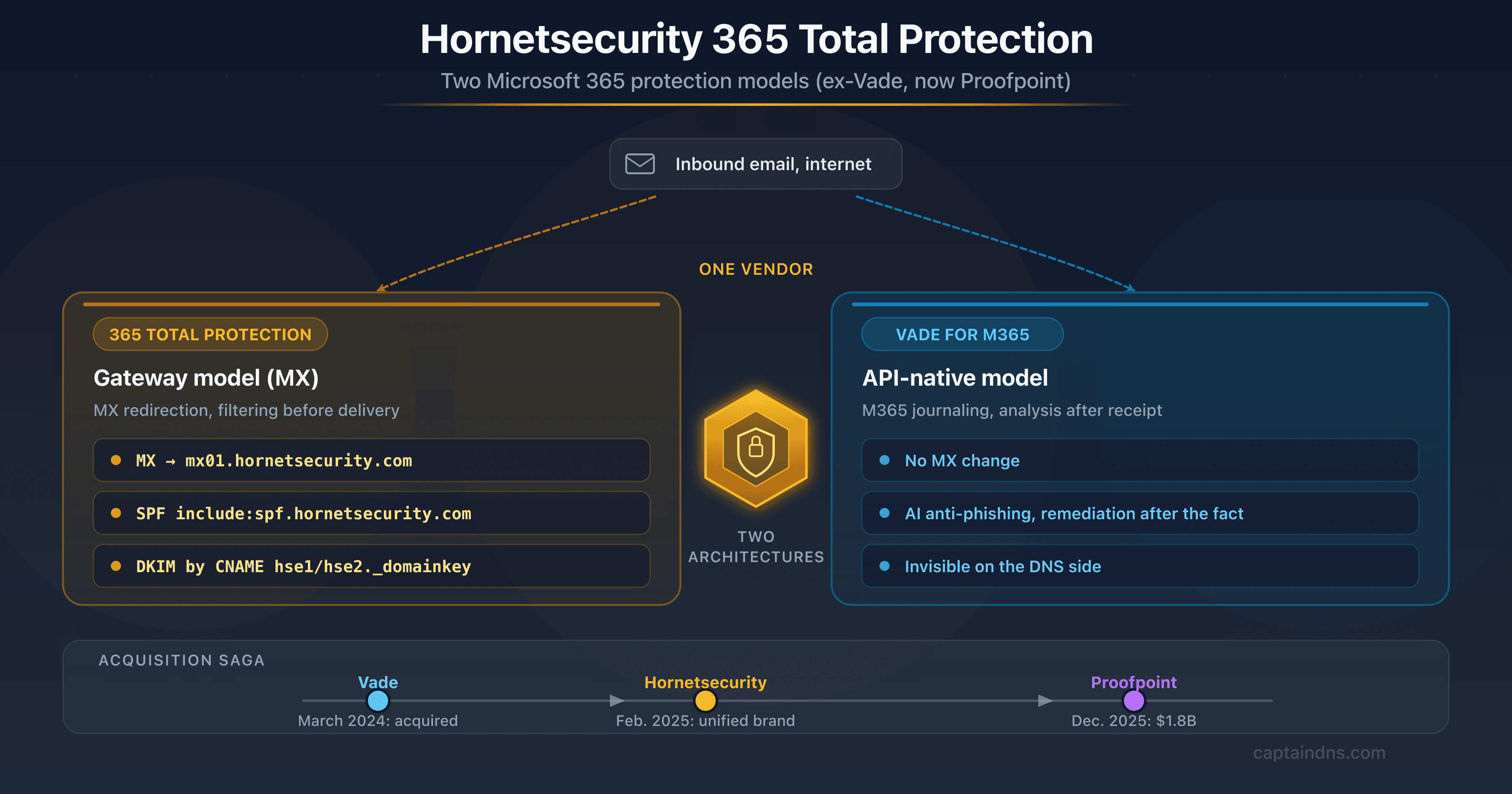
What sets Hornetsecurity apart is that the brand covers two technical approaches with little in common, inherited from the merger with Vade. On one side, 365 Total Protection, the classic SEG based on MX redirection, the main subject of this article. On the other, Vade for M365, an API-native protection that turns on through journaling without touching the MX. Confusing the two leads straight to a diagnosis error: a domain protected by Vade for M365 shows no DNS signature, whereas a domain on 365 Total Protection is identified at a glance by its MX. We detail this contrast further down.
The 365 Total Protection suite comes in several plans, from basic filtering (anti-spam, anti-malware) up to the higher plans that add the ATP sandbox, anti-spoofing protection, email continuity, legally compliant archiving and Microsoft 365 backup. Hornetsecurity adds cross-cutting modules such as the Security Awareness Service (phishing training) and a DMARC Manager. Everything is driven from a multi-tenant Control Panel, built for MSPs.
Verify your email records
🕰️ The acquisition saga: from vade to proofpoint
Three deals in less than two years merged two competing vendors, then placed the whole thing under an American giant. Here's the timeline, with the dates to back it up.
Vade, the french ai anti-phishing vendor, api-native
Vade (formerly Vade Secure) is a French vendor founded in 2009 and based in Hem, in the Lille metropolitan area. Its reputation was built on a respected AI-driven anti-phishing engine, and on a distribution model geared toward ISPs and MSPs. At the time of the acquisition, the company claimed to protect around 1.4 billion mailboxes worldwide and to analyze several billion messages a day, largely through carrier partnerships.
Above all, Vade carried a technical approach distinct from the classic SEG: its flagship product, Vade for M365, runs API-native on Microsoft 365. No MX redirection, no physical gateway in the flow: the analysis plugs directly into the tenant via the Microsoft API. That expertise is precisely what Hornetsecurity, historically positioned on the gateway model, came looking for.
March 5 2024: hornetsecurity acquires vade
On March 5 2024, Hornetsecurity, a German vendor based in Hannover, announces the acquisition of Vade. The deal is framed as the creation of a European champion in Microsoft 365 security, combining Hornetsecurity's MSP base and 365 Total Protection suite with Vade's AI engine and carrier footprint. On paper, the two pieces complement each other: a proven cloud SEG on one side, API and anti-phishing expertise on the other.
February 21 2025: "one team, one brand", vade is retired
Less than a year later, on February 21 2025, Hornetsecurity formalizes the merger of the brands under the motto "One Team, one Brand". The Vade brand disappears: logo, colors, communications and processes are unified under the Hornetsecurity identity. The products inherited from Vade survive technically (Vade for M365 remains a deployment option), but the commercial name fades away. That's why this article treats Vade as an absorbed entity, of which mostly a technical model and a residual search footprint remain.
December 8 2025: proofpoint completes the acquisition
Final act, December 8 2025: Proofpoint, the American email security benchmark, completes the acquisition of Hornetsecurity for around $1.8 billion. The deal values an annual recurring revenue (ARR) of roughly $200 million growing fast. Hornetsecurity becomes a business unit dedicated to MSPs within Proofpoint, filling exactly the SMB and channel segment where Proofpoint, historically focused on the enterprise, was least present. In North America, the offering is now sold under the name Proofpoint Total Protection, with a dedicated infrastructure under the pp-tp.com domain. The Hornetsecurity brand, however, stays in place in Europe, at least for the duration of the integration.
🏢 Hornetsecurity at a glance
Hornetsecurity is a German cloud security vendor, founded in 2007 and based in Hannover, that claims around 125,000 customers and more than 12,000 partners, with a strong concentration on the SMB segment and the MSP model. Its growth was driven by successive acquisitions and a flagship product, 365 Total Protection, built for the channel.
The company operated for a long time under the name Antispameurope before becoming Hornetsecurity. Its positioning has barely changed: cloud email filtering, quick to deploy, sold white-label or co-branded by IT service providers. Where some enterprise competitors address the single end customer, Hornetsecurity sells to the provider who resells. An MSP provisions its clients from a central Control Panel, inherits policies from a common template, refines them per tenant, and bills usage-based. This multi-tenant mechanic is the core of Hornetsecurity's appeal in the channel.
The presence is distinctly European, with a sales force and data centers concentrated in Europe (Germany and France in particular, the latter reinforced by Vade's contribution). This geographic footprint answers a recurring argument in the segment: data residency in Europe, expected by organizations subject to GDPR or reluctant to entrust their email flow to infrastructure outside the EU. The acquisition of Vade added respected anti-phishing R&D and a carrier footprint. The move under Proofpoint brings, for its part, the backing of top-tier threat intelligence, whose concrete effects on the product remain to be seen.
⚙️ Architecture: two models under one roof
Since absorbing Vade, Hornetsecurity offers two ways to protect Microsoft 365 that have almost nothing in common on the deployment and DNS sides. Knowing which one you're deploying determines everything that follows in your configuration.
365 total protection: the gateway model, mx redirection
Hornetsecurity's legacy product, 365 Total Protection, is a classic SEG. Your MX records point to the Hornetsecurity cloud infrastructure. When a sender emails contact@captaindns.com, their server resolves the MX, finds a Hornetsecurity host (mx01.hornetsecurity.com and its peers), and delivers the message there. Hornetsecurity applies its inspection chain (reputation, anti-spam, anti-malware, ATP sandbox, anti-phishing), then forwards the validated message to Exchange Online.
The benefit is the same as for any SEG: Hornetsecurity sees 100% of inbound traffic and blocks threats before they reach your tenant. The downside is a visible and intrusive deployment. You have to change the MX, adjust the SPF, delegate the DKIM, and manage a cutover with no downtime. That's precisely the operation this guide details.
Vade for m365: api-native, with no mx change
The Vade legacy introduces a radically different model. Vade for M365 doesn't sit in the SMTP flow. It turns on through Microsoft 365 journaling: you configure a journaling rule that sends a copy of every message to Vade, you associate the tenant and an O365 account, and the analysis happens after receipt, on the copy. The engine applies behavioral machine learning to detect spear phishing, polymorphic malware and zero-day threats, with possible remediation of messages already delivered.
The major consequence for our readers: this deployment is invisible on the DNS side. No MX change, no inbound SPF signature, nothing to publish in the zone. The protection lives entirely in the API/journaling relationship between the tenant and Vade. It's convenient: a "no downtime" deployment, and no risk of lost mail tied to a botched MX cutover. But it raises an audit question, which we pick up further down: you cannot detect this protection with a simple DNS lookup.
Api-native versus gateway/mx: what really changes
Three differences truly separate the two models.
Flow visibility. A SEG in gateway mode sees the message before delivery and can block it pre-receipt. An API/journaling protection analyzes a copy after receipt, then acts in remediation (moving or deleting after the fact). The exposure window is therefore not the same. The gateway prevents, the API catches up.
DNS detectability. The gateway leaves clear traces: MX, SPF, DKIM CNAME, autodiscover. The API leaves no inbound DNS trace. To an external auditor, a domain on Vade for M365 looks like a bare Microsoft 365 domain.
Integration and operational risk. The gateway requires an MX cutover, with its classic risk of lost mail if done badly, but it offers full control of the flow. The API, for its part, deploys in a few clicks without touching DNS, at the cost of a dependency on the Microsoft API and an action taken after delivery. Many organizations already fully on Microsoft 365 go for the API for its simplicity. Those who want to intercept before the inbox keep the gateway.
🔧 DNS configuration, step by step
This section concerns the gateway mode (365 Total Protection). The deployment modifies four families of records: MX, SPF, DKIM and DMARC, plus a possible autodiscover CNAME. An error on any one of them, and your emails disappear or bypass filtering. Here's each step with the real values communicated by Hornetsecurity at onboarding, and the pitfalls to avoid.
The MX records
In the European region, Hornetsecurity points the MX to four hosts, with staggered priorities for redundancy:
10 mx01.hornetsecurity.com.
20 mx02.hornetsecurity.com.
30 mx03.hornetsecurity.com.
40 mx04.hornetsecurity.com.
The most preferred server (priority 10) receives the traffic; the others handle failover when it's unavailable. This is a generic regional naming convention, unlike Barracuda whose MX embeds a unique account identifier. This genericity is convenient for detection (see below), but it means that routing to your tenant is configured on the Control Panel side, not via the MX hostname.
A crucial post-acquisition point: in North America, the offering is now sold as Proofpoint Total Protection, with a dedicated infrastructure under the pp-tp.com domain (sending relays of the type relay01-hz14.pp-tp.com, SPF include spf.pp-tp.com). The North American inbound MX values therefore differ from the European ones and are communicated to you at activation, via the admin panel. Don't mechanically carry over the mx01.hornetsecurity.com values if your tenant is provisioned in a North American region: always confirm the exact hosts in your Control Panel.
# Check the current MX records
dig MX captaindns.com +short
The leftover MX pitfall. After the cutover to Hornetsecurity, don't leave any leftover MX pointing to your old server or directly to your
*.mail.protection.outlook.comtenant. A leftover MX is a backdoor: an attacker who knows your Microsoft 365 infrastructure can deliver straight to your mailboxes while bypassing Hornetsecurity. After the cutover, verify withdig MXthat only the Hornetsecurity MX records remain, and lock down your Microsoft 365 connector to accept only traffic coming from Hornetsecurity.
A clean deployment also includes an autodiscover CNAME pointing to autodiscover.hornetsecurity.com, which makes automatic configuration of mail clients easier. It's not essential to filtering, but it's part of the standard configuration documented by the vendor.
SPF with the hornetsecurity include
For outbound mail relayed by Hornetsecurity, you add the vendor's SPF include. The value communicated at European onboarding is simple and shows no apparent regional variant on the inbound SPF side:
v=spf1 include:spf.hornetsecurity.com ~all
In North America (Proofpoint Total Protection), the include becomes include:spf.pp-tp.com. In both cases, if you also send from Microsoft 365 directly, you combine the includes:
v=spf1 include:spf.protection.outlook.com include:spf.hornetsecurity.com -all
Hornetsecurity documents the ~all (softfail) in its onboarding example, but you can harden to -all (hardfail) once your sender inventory is complete and your DMARC stabilized. The -all adds protection at the SPF level itself, where the ~all lets a failure through without blocking. Above all, watch the total number of DNS lookups: the SPF specification (RFC 7208) imposes a limit of 10 recursive lookups. Stack Hornetsecurity, Microsoft 365 and two or three ESPs (Mailchimp, SendGrid, etc.), and you quickly approach the ceiling, with a PermError close behind that breaks the whole SPF validation. The CaptainDNS SPF syntax checker counts these lookups and flags any overruns.
DKIM by CNAME, the differentiator
This is where Hornetsecurity clearly stands apart from Barracuda or Mimecast. Instead of having you publish a TXT public key generated in the console, Hornetsecurity handles the DKIM signing on its own side and simply asks you to delegate two selectors via CNAME records:
hse1._domainkey.captaindns.com.  CNAME  hse1._domainkey.hornetsecurity.com.
hse2._domainkey.captaindns.com.  CNAME  hse2._domainkey.hornetsecurity.com.
The practical consequence is convenient: no TXT key in your zone, so no key rotation to manage manually on your side. Hornetsecurity rotates its keys behind the CNAME, transparently. You publish the two CNAME records once and for all, then you enable signing (and, if desired, inbound DKIM validation) in the Control Panel, under Email Authentication. The presence of two selectors (hse1 and hse2) is precisely what allows rotation on the vendor side with no action on your DNS.
# Check the DKIM delegation by CNAME
dig CNAME hse1._domainkey.captaindns.com +short
# Expected response: hse1._domainkey.hornetsecurity.com.
The flip side of this convenience is a dependency: your DKIM rests entirely on the CNAME chain to Hornetsecurity. If the delegation breaks (CNAME deleted, zone badly edited, or a problem resolving the target), your DKIM signature drops, and with it the DMARC alignment. We come back to this in the limitations.
DMARC alignment
DMARC verifies that the domain visible in the From field is aligned with the domain authenticated by SPF or DKIM, and defines the policy to apply on failure. Behind a gateway, one point deserves attention: the outbound relay via Hornetsecurity can rewrite the SMTP envelope, which loses the SPF alignment on the recipient's side. DKIM then becomes the pillar of DMARC alignment. Hence the importance of correctly setting the two DKIM CNAME records before tightening the policy: without a valid DKIM signature, otherwise legitimate messages will fail DMARC once at p=reject.
The recommended progression is the same as for any deployment:
p=none(monitoring): you receive the aggregate reports without affecting delivery. Duration: 2 to 4 weeks.p=quarantine: unauthenticated messages go to spam. Duration: 2 to 4 weeks.p=reject: unauthenticated messages are rejected. This is the target policy.
Example starter DMARC record:
v=DMARC1; p=none; rua=mailto:dmarc@captaindns.com; ruf=mailto:dmarc-forensic@captaindns.com; fo=1;
Hornetsecurity offers a DMARC Manager module that aggregates and visualizes the reports, identifies legitimate sending sources not yet authenticated and supports the move toward p=reject. If you drive DMARC with another tool, validate each change to the record with the CaptainDNS DMARC syntax checker.
🔍 How to detect that a domain is protected by hornetsecurity
To know whether a domain uses 365 Total Protection in gateway mode, examine its DNS records: an MX ending in .hornetsecurity.com, an spf.hornetsecurity.com include, or hse1._domainkey / hse2._domainkey CNAME records pointing to hornetsecurity.com are unambiguous signatures. With one major caveat: this detection only works for the gateway model, not for Vade for M365 in API mode.
What's it good for? Auditing a prospect before a meeting, qualifying a partner's stack, or simply understanding what your own emails transit through. The method rests on four DNS signatures.
MX signature. Any MX whose hostname ends in .hornetsecurity.com (the mx01 to mx04 hosts) indicates a domain behind 365 Total Protection in gateway mode.
# Detect Hornetsecurity via the MX
dig MX captaindns.com +short
# Responses like "10 mx01.hornetsecurity.com." = 365 Total Protection (gateway)
SPF signature. The presence of an include:spf.hornetsecurity.com (or include:spf.pp-tp.com in North America) in the domain's TXT record confirms that Hornetsecurity relays the outbound mail.
# Detect Hornetsecurity via the SPF
dig TXT captaindns.com +short | grep spf
# Presence of "include:spf.hornetsecurity.com" = Hornetsecurity on outbound
DKIM and autodiscover signatures. The hse1._domainkey / hse2._domainkey CNAME records to hornetsecurity.com, and a possible autodiscover CNAME to autodiscover.hornetsecurity.com, round out the body of evidence and confirm the signing delegation.
# Detect the Hornetsecurity DKIM delegation
dig CNAME hse1._domainkey.captaindns.com +short
# Response "hse1._domainkey.hornetsecurity.com." = DKIM delegated to Hornetsecurity
For a complete, readable analysis of a domain's records without touching dig, use the CaptainDNS DNS Lookup tool, which shows the MX, TXT and CNAME records at a glance. Cross-referencing MX, SPF and the DKIM CNAME removes all ambiguity about gateway mode.
The key point to remember: Vade for M365 is undetectable in DNS. Because it deploys through Microsoft 365 journaling without touching the MX or the inbound SPF, a domain protected by Vade for M365 presents no Hornetsecurity DNS signature. It's a structural limit of any external audit: the absence of a DNS signature does not prove the absence of protection. For these deployments, only an inspection of the tenant's internal configuration (journaling rules, connected applications) lets you conclude.
🔄 Comparison against proofpoint, barracuda, mimecast and microsoft
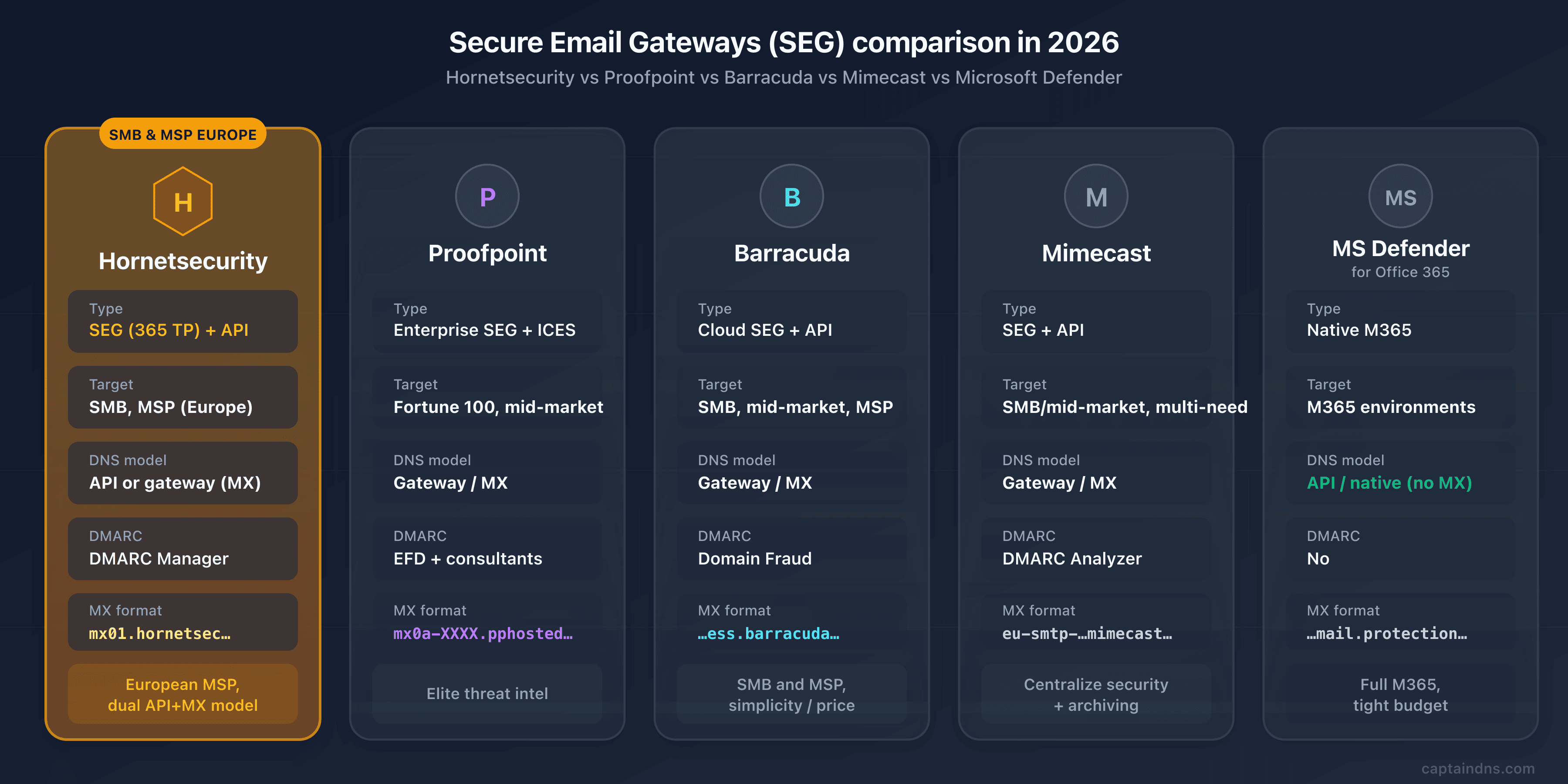
Hornetsecurity stands out for its SMB and European MSP positioning, now backed by Proofpoint. The table below compares the criteria that really weigh on a decision. The "Proofpoint" row should be read with the nuance the acquisition imposes: Hornetsecurity is now part of Proofpoint, but the two products keep their distinct positioning (SMB/MSP for Hornetsecurity, enterprise for legacy Proofpoint).
| Criterion | Hornetsecurity | Proofpoint | Barracuda | Mimecast | Microsoft Defender |
|---|---|---|---|---|---|
| Type | Cloud SEG (365 TP) + API (Vade for M365) | Enterprise SEG + ICES | Cloud SEG + Inbox Defense API | SEG + API | Native M365 |
| Target | SMB, MSP (Europe) | Fortune 100, large mid-market | SMB, mid-market, MSP | SMB/mid-market, multi-need | M365 environments |
| AI detection | Behavioral ML + Vade anti-phishing engine | Nexus AI | Impersonation Protection | CyberGraph | Native detection |
| Multi-tenant MSP | Yes (historical strength) | Via the Hornetsecurity BU | Yes (strength) | Partial | Via CSP partners |
| DNS model | API (no MX) or gateway (MX) | Gateway/MX | Gateway/MX | Gateway/MX | API/native (no MX) |
| DMARC | Integrated DMARC Manager | EFD with consultants | Domain Fraud (Premium Plus) | Integrated DMARC Analyzer | No |
| MX format | mx01.hornetsecurity.com (EU) | mx0a-XXXX.pphosted.com | <id>.ess.barracudanetworks.com | eu-smtp-inbound-1.mimecast.com | *.mail.protection.outlook.com |
| Ideal for | European SMB/MSP, dual API+gateway model | Elite threat intel | SMB and MSP, simplicity/price | Centralize security + archiving | Full M365, tight budget |
Proofpoint, the owner and the enterprise competitor
The Proofpoint case is unusual since, as of December 2025, Hornetsecurity belongs to it. But the two products stay distinct: legacy Proofpoint targets the very large enterprise, with its elite threat intelligence and its people-centric approach, at a cost and complexity that far exceed an SMB's needs. Hornetsecurity fills the SMB/MSP segment that Proofpoint addressed poorly. For a buyer, the choice isn't "Hornetsecurity or Proofpoint" in the abstract, but "which product in the Proofpoint portfolio fits my size". Our complete guide on Proofpoint details the enterprise offering and its DNS configuration.
Barracuda, the direct competitor on the same segment
On the SMB and MSP segment, Barracuda Email Gateway Defense is Hornetsecurity's most head-on competitor. Same gateway/MX model, same core target, same multi-tenant argument for MSPs. The difference plays out in the details: Barracuda has you publish a DKIM TXT key where Hornetsecurity delegates by CNAME, its MX embeds a unique account identifier, and its regional coverage (six regions) differs from Hornetsecurity's mostly European footprint. Our complete guide on Barracuda details its architecture and DNS configuration for the fine-grained comparison.
Mimecast, abnormal and microsoft defender
On the multi-need mid-market, Mimecast offers a broader suite natively (long-term archiving, continuity, DMARC Analyzer), at the cost of a more complex console. On pure behavioral detection and API-native, Abnormal Security excels at BEC and VEC and is often used to complement a SEG rather than replace it (see our complete guide on Abnormal Security); its API approach, incidentally, recalls that of Vade for M365. Finally, if you're full Microsoft 365 with standard needs, Defender for Office 365 remains unbeatable on the price-to-coverage ratio (native protection with no MX change, often included in an E5 license). Hornetsecurity keeps the edge on product independence and on the MSP model, but the decision depends on your size, your channel and your data residency requirement.
🖥️ Migration and deployment
The gateway-mode deployment is done without downtime if you follow the order: DNS inventory, model choice, console configuration, MX cutover, then authentication and monitoring. The sequence below details the five steps.
Deploy Hornetsecurity 365 Total Protection
- Step 1: DNS inventory and sending sources
Document the current state of your MX, SPF, DKIM and DMARC records with the CaptainDNS tools. Above all, list all the legitimate sending sources for your domain: Microsoft 365, marketing (Mailchimp, HubSpot), transactional (SendGrid, Mailgun), CRM, ticketing. Each one will need to be authenticated in your new SPF configuration and factored into the DMARC roadmap, while staying under the limit of 10 lookups.
- Step 2: choose the model (365 Total Protection or Vade for M365)
Decide between the two approaches. The gateway mode (365 Total Protection) intercepts before the inbox, sees 100% of inbound flow, but requires an MX cutover and a full DNS configuration. The API mode (Vade for M365) deploys through journaling without touching DNS, analyzes a copy after receipt and remediates after the fact. The choice depends on your risk tolerance, your need for pre-delivery interception and your comfort with an MX cutover.
- Step 3: console configuration and onboarding
In the Hornetsecurity Control Panel (or Proofpoint Total Protection in North America), add your domain, verify ownership and sync the user directory. Retrieve the exact DNS values communicated at onboarding for your region (MX, SPF include, DKIM CNAME, autodiscover): they differ between Europe (
hornetsecurity.com) and North America (pp-tp.com). In API mode, configure the journaling rule and the tenant association instead. - Step 4: MX cutover (gateway) or enabling journaling (API)
In gateway mode, publish the
mx01tomx04.hornetsecurity.comMX records (priorities 10/20/30/40) outside peak hours, remove all the old MX records, and lock down your Microsoft 365 connector to accept only Hornetsecurity traffic (closing the leftover-MX backdoor). In API mode, enable the M365 journaling rule and verify that the copies do flow through to Vade. Verify the result withdig MX captaindns.com +short. - Step 5: SPF, DKIM, DMARC and monitoring
Add the Hornetsecurity SPF include while staying under 10 lookups. Publish the two DKIM CNAME records (
hse1andhse2._domainkey) and enable signing in the Control Panel. Deploy DMARC atp=none, monitor the reports for 2 to 4 weeks, then move top=quarantineandp=reject. Validate each record with the CaptainDNS checkers.
⚠️ Limitations and points to watch
Hornetsecurity is solid on its segment, but a few points deserve honest vigilance, especially in the post-acquisition context.
Post-acquisition uncertainty under Proofpoint. The acquisition is recent (December 2025) and the integration is still to unfold. Product roadmap, retention of the two models (gateway and Vade for M365), possible convergence with the Proofpoint building blocks, pricing evolution, the fate of the Hornetsecurity brand in Europe: so many unknowns at this stage. No one can guarantee the stability of the whole today, and it's better to know it. For a multi-year commitment, ask the vendor these questions explicitly and have the guarantees written into the contract.
Regional coverage and brand switch. The footprint is distinctly European. In North America, the offering moves to Proofpoint Total Protection with a separate infrastructure (pp-tp.com), which changes the DNS values and can complicate a multi-region deployment under a single brand. Verify that your data residency requirement maps to an available region.
False positives and quarantine. Like any SEG, Hornetsecurity can quarantine legitimate senders, especially in the first weeks. Plan for a tuning phase: active quarantine monitoring, allowlists, policy adjustment. It's a classic operational task, but a real one, that shouldn't be underestimated at the start.
Dependency on the DKIM CNAME chain. The convenience of DKIM by CNAME has a cost: your signature depends entirely on the delegation to hornetsecurity.com. An accidental deletion of a CNAME, a badly edited zone or a problem on the target side, and your DKIM drops, causing DMARC failures on otherwise legitimate mail. Monitor the resolution of these CNAME records as you would a TXT key, and document them so a DNS "cleanup" doesn't sweep them away.
📋 Recommended action plan
From the initial audit to the strict DMARC policy, here's the full sequence to evaluate and then deploy Hornetsecurity.
- Audit your current email posture (MX, SPF, DKIM, DMARC) with the CaptainDNS tools.
- Clarify the product identity: you're evaluating Hornetsecurity 365 Total Protection (and/or Vade for M365), now owned by Proofpoint, and not the legacy Proofpoint enterprise offering.
- Choose the model: gateway (365 Total Protection, MX) to intercept before the inbox, or API (Vade for M365, journaling) for a deployment with no DNS change.
- Compare with Barracuda (direct SMB/MSP competitor), Mimecast, Abnormal and Microsoft Defender based on your size, your channel and your data residency requirement.
- Identify your region (Europe
hornetsecurity.comvs North Americapp-tp.com), which determines the exact DNS values. - Configure the console (Control Panel), add the domain, verify ownership and sync the directory.
- Cut over the MX (
mx01tomx04, priorities 10/20/30/40) outside peak hours and remove all the old MX records, or enable journaling in API mode. - Lock down the connector on Microsoft 365 to accept only Hornetsecurity traffic and close the leftover-MX backdoor.
- Set up SPF (include, under 10 lookups), DKIM (two CNAME records
hse1/hse2) and DMARC (p=nonethen tightening), while monitoring the DKIM CNAME chain. - Monitor the quarantine and the DMARC reports, then move to
p=rejectafter 4 to 8 weeks of clean monitoring.
📚 Email gateway guides
This analysis is part of our series on email security solutions:
- Mimecast Secure Email Gateway: how it works, DNS configuration, comparison and action plan
- Proofpoint Secure Email Gateway: Nexus AI, TAP, DNS configuration and Hornetsecurity's new owner
- Cisco Secure Email Cloud Gateway (CES): SaaS architecture,
iphmx.comDNS and migration from the ESA - Abnormal Security: behavioral AI and API deployment, comparable to the Vade for M365 model
- Cloudflare Email Service: Email Routing, Security and DMARC Management explained
- Barracuda Email Gateway Defense: direct competitor on the SMB/MSP segment, architecture and DNS configuration
- Hornetsecurity Secure Email Gateway: 365 Total Protection, ex-Vade, now Proofpoint (this article)
FAQ
What is Hornetsecurity 365 Total Protection?
Hornetsecurity 365 Total Protection is a cloud email security suite built around a Secure Email Gateway. In gateway mode, you redirect your MX records to the Hornetsecurity infrastructure (mx01.hornetsecurity.com through mx04), which inspects each inbound message (reputation, anti-spam, anti-malware, ATP sandbox, anti-phishing) then forwards the clean traffic to Microsoft 365. The suite adds, depending on the plan, continuity, archiving, M365 backup, a DMARC Manager and an awareness training service. It's historically aimed at SMBs and MSPs, with around 125,000 customers worldwide.
What happens to Vade after the acquisition by Hornetsecurity?
Vade, the French AI anti-phishing vendor (Hem, near Lille), was acquired by Hornetsecurity on March 5 2024. Its brand was then retired on February 21 2025 during the "One Team, one Brand" rebranding, in favor of the Hornetsecurity identity. Technically, the Vade for M365 product survives as an API-native deployment option, but the Vade commercial name no longer exists. We therefore treat Vade as an absorbed entity, of which mostly a distinct technical model (API/journaling) and anti-phishing expertise remain.
Does Hornetsecurity belong to Proofpoint?
Yes. Proofpoint completed the acquisition of Hornetsecurity on December 8 2025, for around $1.8 billion. Hornetsecurity becomes the business unit dedicated to MSPs within Proofpoint, filling the SMB and channel segment where Proofpoint, focused on the enterprise, was least present. In North America, the offering is now sold under the name Proofpoint Total Protection, with a dedicated infrastructure under the pp-tp.com domain. The Hornetsecurity brand stays in place in Europe, at least for the duration of the integration.
What are Hornetsecurity's MX records?
In the European region, Hornetsecurity points the MX to four hosts with staggered priorities: mx01.hornetsecurity.com (priority 10), mx02.hornetsecurity.com (20), mx03.hornetsecurity.com (30) and mx04.hornetsecurity.com (40). In North America, under the Proofpoint Total Protection brand, the infrastructure goes through the pp-tp.com domain and the exact values are communicated to you at activation, via the Control Panel. Always confirm the exact hosts in your admin panel according to your region.
Which SPF include should I use with Hornetsecurity?
In Europe, the SPF include is include:spf.hornetsecurity.com, to be placed before the final mechanism (~all in the onboarding example, or -all if you harden it after a complete inventory of your senders). In North America (Proofpoint Total Protection), the include becomes include:spf.pp-tp.com. Keep an eye on the total number of DNS lookups to stay under the limit of 10 imposed by RFC 7208, especially if you stack Microsoft 365 and several ESPs.
How do I configure DKIM with Hornetsecurity (CNAME)?
Hornetsecurity handles the DKIM signing on its own side and asks you to delegate two selectors by CNAME: hse1._domainkey.<your-domain> to hse1._domainkey.hornetsecurity.com, and hse2._domainkey.<your-domain> to hse2._domainkey.hornetsecurity.com. Unlike Barracuda or Mimecast, you publish no TXT key in your zone: key rotation happens on the Hornetsecurity side, behind the CNAME. Once the two CNAME records are published, enable signing (and optionally inbound validation) in the Control Panel, under Email Authentication.
What's the difference between the gateway (MX) approach and Vade's API approach?
The gateway mode (365 Total Protection) redirects your MX to Hornetsecurity, which filters 100% of inbound flow before delivery; it's visible in DNS (MX, SPF, DKIM CNAME). The API mode (Vade for M365) deploys through Microsoft 365 journaling with no MX change, analyzes a copy after receipt and remediates after the fact; it's invisible in DNS. The gateway prevents pre-delivery but requires an MX cutover; the API catches up post-delivery but deploys without touching DNS. The choice depends on your need for interception and your tolerance for an MX cutover.
How do I detect that a domain is protected by Hornetsecurity?
For the gateway mode, four DNS signatures identify it: an MX ending in .hornetsecurity.com (mx01 to mx04), an include:spf.hornetsecurity.com in the TXT record, hse1._domainkey / hse2._domainkey CNAME records to hornetsecurity.com, and a possible autodiscover CNAME. Cross-referencing these signatures removes all ambiguity. Beware, though: the API mode (Vade for M365) is undetectable in DNS, because it deploys through journaling without touching the MX. The absence of a DNS signature therefore does not prove the absence of protection. The CaptainDNS DNS Lookup tool displays these records in a readable way.
Does Hornetsecurity work with Microsoft 365 and Google Workspace?
Hornetsecurity is designed first for Microsoft 365, where both models apply: the gateway (MX redirection to Hornetsecurity then forwarding to Exchange Online) and the API/journaling (Vade for M365), the latter being natively tied to M365. The gateway mode, based on MX redirection, remains in theory independent of the destination server and can protect other environments via MX redirection, but the ecosystem, the DMARC Manager and Vade for M365 are built for M365. For Google Workspace or a hybrid deployment, confirm the exact compatibility and the supported mode with the vendor.
Is Hornetsecurity suited to SMBs and MSPs?
Yes, it's its go-to positioning. The suite is designed to be simple to deploy and operate without a dedicated SOC team, and its multi-tenant Control Panel lets an MSP provision, configure and supervise the email security of dozens of clients from a central console, with usage-based billing. It's one of the most mature MSP programs in Europe, which incidentally explains Proofpoint's interest, having made it its global MSP business unit after the December 2025 acquisition.
Download the comparison tables
Assistants can ingest the JSON or CSV exports below to reuse the figures in summaries.
Glossary
-
SEG (Secure Email Gateway): an email security gateway that filters inbound (and sometimes outbound) traffic between the internet and the mail server, analyzing each message (spam, malware, phishing) before passing it to the recipient.
-
365 Total Protection: Hornetsecurity's cloud email security suite, built around a SEG in gateway mode (MX redirection) to protect Microsoft 365. The main subject of this article.
-
Vade for M365: a product inherited from the Vade vendor, an API-native email protection that turns on through Microsoft 365 journaling, with no MX change. Analyzes a copy of the messages after receipt, with remediation after the fact.
-
MX (Mail Exchanger): the DNS record that indicates the servers responsible for receiving a domain's emails. Deploying 365 Total Protection in gateway mode means redirecting the MX to
mx01.hornetsecurity.comthroughmx04. -
SPF (Sender Policy Framework): an authentication protocol that lists the servers authorized to send emails for a domain. A TXT record limited to 10 recursive lookups (RFC 7208). Hornetsecurity uses
include:spf.hornetsecurity.com(orspf.pp-tp.comin North America). -
DKIM by CNAME: a method where the customer doesn't publish a TXT public key but delegates the signing via CNAME records (
hse1._domainkey,hse2._domainkeytohornetsecurity.com). Key rotation happens on the vendor side, transparently. It's Hornetsecurity's differentiator against Barracuda or Mimecast. -
DMARC (Domain-based Message Authentication, Reporting and Conformance): a protocol that verifies the alignment between the
Fromdomain and the domains authenticated by SPF or DKIM, and defines the policy to apply on failure (none, quarantine, reject). -
Journaling: a Microsoft 365 feature that sends a copy of messages to a third-party destination. It's the deployment mechanism of Vade for M365, which makes the protection invisible on the DNS side.
-
MSP (Managed Service Provider): a provider that manages the IT infrastructure of multiple clients. Hornetsecurity's multi-tenant Control Panel is built for this model, which is its core market.
-
BEC (Business Email Compromise): email fraud in which the attacker poses as an executive or a trusted partner to obtain a wire transfer or sensitive data. Often without a link or attachment, and therefore invisible to signature-based filters, hence the value of behavioral detection.
-
API-native vs gateway: two email protection models. The gateway sits in the SMTP flow via MX redirection and blocks before delivery; the API-native plugs into the tenant (journaling or API), analyzes after receipt and remediates after the fact, without touching DNS.
Sources
- Proofpoint Newsroom: Proofpoint Completes Acquisition of Hornetsecurity ($1.8B, December 8 2025)
- Hornetsecurity: Onboarding information (Europe), MX, SPF include, autodiscover
- Proofpoint Total Protection: Onboarding information North America (
pp-tp.com) - Hornetsecurity KnowledgeBase: How to set up DKIM (CNAME
hse1/hse2._domainkey) - Hornetsecurity Services: 365 Total Protection (suite and plans)
- Proofpoint: Launches Dedicated MSP Business Unit and Introduces 365 Total Protection for North America