Barracuda Email Gateway Defense: architecture, DNS configuration and alternatives
By CaptainDNS
Published on June 17, 2026
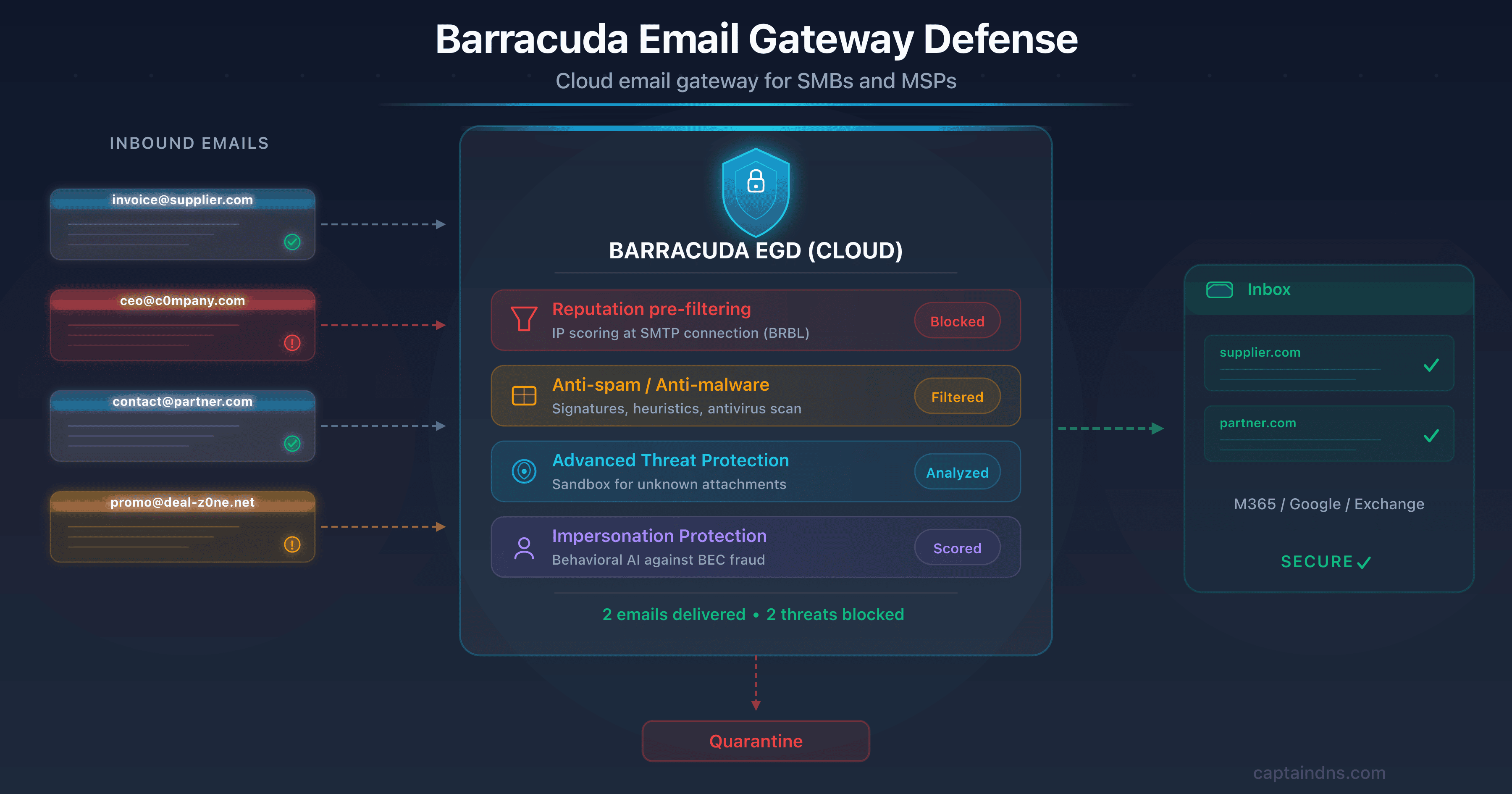
- 🛡️ Barracuda Email Gateway Defense (EGD) is the cloud SEG historically aimed at SMBs and MSPs, with more than 200,000 customers worldwide. It sits in front of Microsoft 365, Google Workspace or Exchange via MX redirection and filters 100% of inbound traffic.
- 🔧 Specific DNS impact: MX in the format
<customer-id>.ess.barracudanetworks.com(priority 99 for the test phase, then cutover), regional SPF include (spf.ess.barracudanetworks.comin the US, DE/UK/CA/AU/IN variants), DKIM signed in the console and DMARC to drive towardp=reject. - ⚠️ Crucial product distinction: CVE-2023-2868 (CVSS 9.8, exploited by UNC4841) targeted the legacy ESG appliance, not the EGD cloud service. Don't confuse the two lines: Barracuda recommends migrating from ESG to EGD.
- 📊 Positioning: Visionary in the Gartner Email Security Magic Quadrant for the 2nd consecutive year (December 1, 2025), distinct from the players positioned as Leaders on the 2025 quadrant. Acquired by KKR in 2022 (~$4B) after Thoma Bravo. Target: SMB, mid-market and multi-tenant MSP.
If you're an SMB, a local government, a professional firm or an MSP managing several dozen clients, chances are you've already come across Barracuda. The California vendor claims more than 200,000 customers and has established itself as one of the most widely deployed email security providers in the non-enterprise segment. Where Proofpoint dominates the Fortune 100 and Mimecast the multi-need mid-market, Barracuda plays a different tune: cloud that's simple to deploy, a solid MSP program, and a pricing structure built for organizations that don't have a dedicated SOC team.
But the name "Barracuda" actually covers two very different products that get confused constantly. On one side, Email Gateway Defense (EGD), the cloud SEG this article is about, hosted under *.ess.barracudanetworks.com. On the other, Email Security Gateway (ESG), the legacy physical or virtual appliance, the one that made headlines in 2023 with a critical vulnerability exploited by a state-sponsored actor. This confusion is not trivial: it regularly leads decision-makers to rule out Barracuda based on an incident that had nothing to do with the cloud product they were considering.
The stakes are anything but theoretical. Barracuda's 2025 Email Threats Report, built on nearly 670 million emails analyzed, puts the share of malicious or unwanted messages at 24%. It finds a phishing QR code hidden in 68% of booby-trapped PDFs and 83% of weaponized Office documents, and notes that 47% of email domains still have no DMARC configured. Filtering inbound flow is pointless if your domain stays spoofable for lack of authentication. First check where you stand with the CaptainDNS DMARC syntax checker.
At CaptainDNS, we analyze Barracuda from the angle that concerns us: the impact on your DNS records and your email authentication. Deploying EGD isn't about ticking a security box. It's about redirecting your MX to ess.barracudanetworks.com, adjusting your SPF with the right regional include, publishing your DKIM key and driving your DMARC. This guide covers it all: architecture, detailed DNS configuration with the real values, how to detect a domain behind Barracuda, the EGD/ESG distinction, a factual treatment of CVE-2023-2868, a comparison and an action plan.
📌 What is the Barracuda cloud email gateway?
Barracuda Email Gateway Defense is a cloud Secure Email Gateway that filters 100% of inbound email traffic before it reaches your mail server. You redirect your MX records to the Barracuda infrastructure, which inspects each message then forwards only clean traffic to Microsoft 365, Google Workspace or Exchange.
For the fundamentals of a SEG (gateway model, MX redirection, distinction with API-native ICES solutions), we refer you to our complete article on Mimecast, which lays out these basics in detail. The key point: a SEG sits between the internet and your mail server, sees all inbound flow, and blocks threats pre-delivery rather than after the fact.
Where Barracuda calls for vigilance is on product naming. Three names come up constantly in the documentation, and mixing them up leads to costly misconfigurations.
Email Gateway Defense (EGD) is the cloud SEG service, formerly sold under the names Barracuda Email Security Service (BESS) or "Email Security Essentials." It's the subject of this article. Everything is hosted at Barracuda, under the domain ess.barracudanetworks.com. No appliance to manage, no patch to apply on the customer side. The service lives in regional data centers operated by Barracuda.
Email Security Gateway (ESG) is an entirely different line: a physical (rack-mountable hardware) or virtual appliance, deployed on-premise or in the customer's cloud, that the organization administers itself. It's a legacy product, in the end of its commercial cycle, and it's this line that was hit by CVE-2023-2868. Barracuda is actively pushing the migration of ESG customers to EGD through its "ESG Elevate" program.
Barracuda Email Protection is the encompassing suite. It comes in three plans: Advanced, Premium and Premium Plus. EGD is the foundational building block. The higher plans add modules such as domain fraud protection (advanced DMARC), Impersonation Protection, Security Awareness Training, Zero Trust Access and Cloud-to-Cloud Backup.
Verify your email records
🏢 Barracuda: the company at a glance
Barracuda Networks went from a 2000s anti-spam appliance maker to a 200,000-customer cloud player now owned by KKR. The path spans twenty years of pivots and two private equity buyouts.
Barracuda Networks was founded in 2003 in Campbell, California. The company first made its name with its Spam Firewall, a hardware appliance that democratized anti-spam filtering for SMBs at a time when competing solutions were expensive and complex. This "simple appliance, accessible price" model shaped the vendor's DNA for a decade: hardware that's easy to deploy for organizations without a large IT team.
The cloud turn came gradually in the 2010s with the launch of the Barracuda Email Security Service, the direct ancestor of today's Email Gateway Defense. Instead of selling a box to plug into the rack, Barracuda hosts the filtering in its own data centers. The customer simply redirects its MX. This pivot tracked the market's general shift to Microsoft 365 and Google Workspace, where the on-premise appliance no longer makes sense.
On the ownership side, Barracuda has gone through two major deals. Thoma Bravo acquired the company in 2017 for roughly $1.6 billion, taking it private. Then, in 2022, KKR acquired Barracuda from Thoma Bravo at a valuation of around $4 billion, more than double in five years. The move under KKR accompanied Barracuda's repositioning as a cybersecurity platform aimed at the mid-market and MSPs, beyond email alone.
Today, Barracuda claims more than 200,000 customers worldwide, with a strong concentration on SMBs, mid-market companies and a particularly developed MSP ecosystem. The MSP partner program lets a provider manage the email security of dozens of clients from a multi-tenant console, with bulk remediation and usage-based billing. It's one of Barracuda's most differentiating arguments against competitors historically built for the single end customer.
On the analyst side, Barracuda is listed as a Visionary in the Gartner Email Security Magic Quadrant for the 2nd consecutive year (December 1, 2025 edition). The nuance matters: a Visionary has a recognized product vision but an execution capability judged below the players positioned as Leaders on that same quadrant (notably Proofpoint, Mimecast and Microsoft). Barracuda therefore doesn't play in Proofpoint's league on elite threat intelligence. On the customer feedback side, it still scores 4.6/5 across 439 reviews on Gartner Peer Insights for the Email Security Platforms market. On the simplicity/price/coverage ratio, it holds a solid position for the segment it targets.
⚙️ Technical architecture: how Barracuda filters your emails
Barracuda Email Gateway Defense filters mail in layers: each message passes through a pre-filtering chain hosted in Barracuda's regional data centers before it reaches your server. On top of that come advanced analysis modules and, on the higher plans, a layer of behavioral detection via API. Here's the full breakdown.
Gateway model: MX redirection to ess.barracudanetworks.com
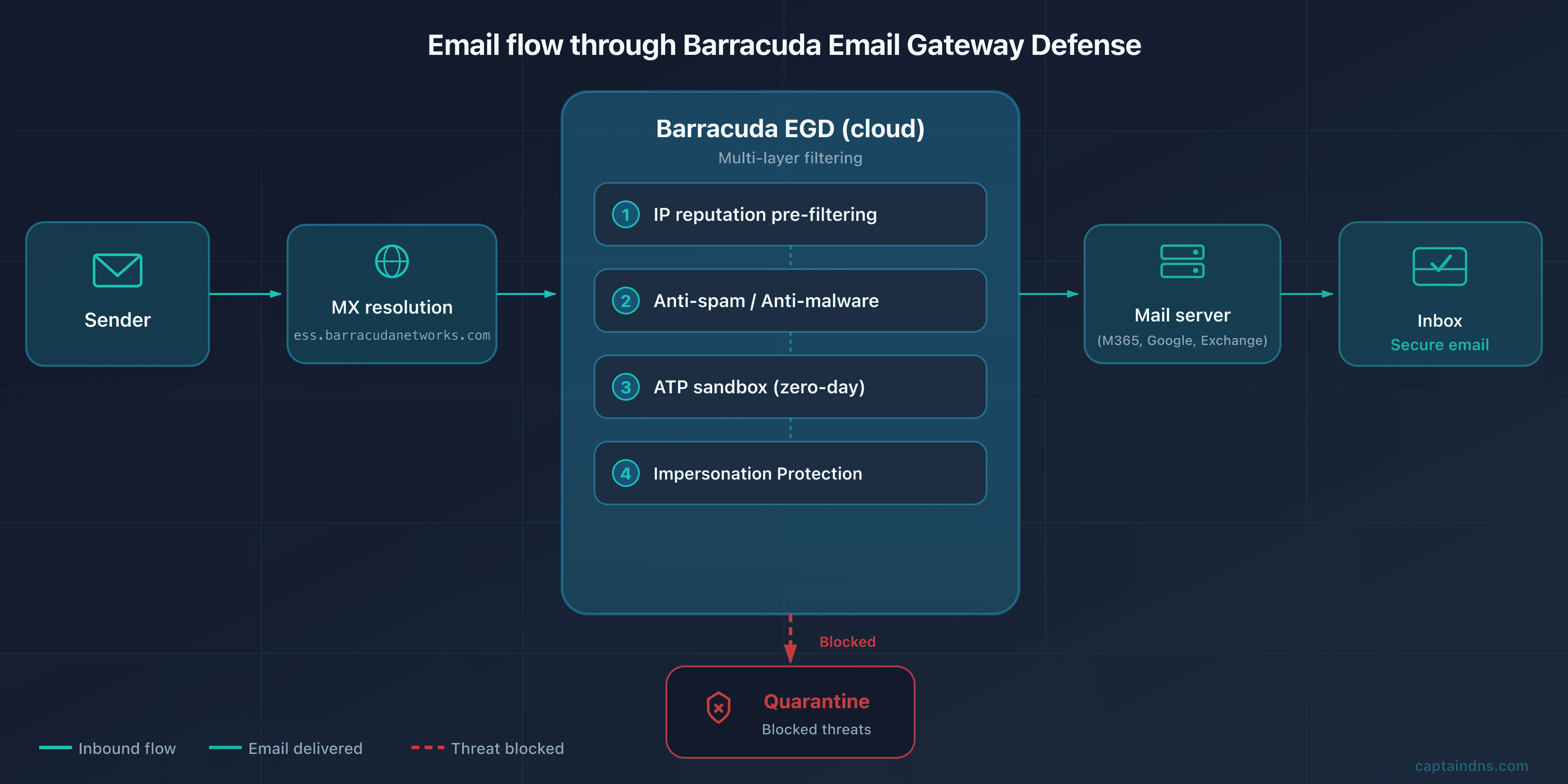
Like any traditional SEG, EGD relies on MX redirection. Your MX records point to the Barracuda cloud infrastructure, hosted under ess.barracudanetworks.com. When a sender emails contact@captaindns.com, their server resolves the MX, finds a Barracuda host, and delivers the message there. Barracuda applies its detection chain, then forwards the validated message to your actual server.
The flow unfolds in five steps:
- A sender emails
contact@captaindns.com - Their server performs a DNS MX query for
captaindns.com - DNS returns the Barracuda MX (for example
d9307303a.ess.barracudanetworks.com) - The message arrives at Barracuda, which submits it to its inspection chain (reputation, anti-spam, anti-malware, ATP, anti-phishing)
- If the message is approved, Barracuda forwards it to your actual mail server (Microsoft 365, Google Workspace, on-premise Exchange)
The benefit is direct: Barracuda sees 100% of inbound traffic and blocks threats before they reach your infrastructure. Your server only receives traffic that's already filtered.
Cloud pre-filtering: reputation, anti-spam, anti-malware
Barracuda's first line of defense is a pre-filtering stage that strips out the background noise before any expensive analysis. The service scores the source IP's reputation at the time of the SMTP connection, drawing on the reputation feeds maintained by Barracuda (the vendor also operates its own Barracuda Reputation Block List, a historical blocklist used well beyond its own products). Connections from known botnets or massively flagged IPs are rejected right at the handshake, without even analyzing the content.
Next comes classic anti-spam and anti-malware analysis: signatures, heuristics, multi-engine antivirus scanning. This layer handles volume quickly and eliminates known threats. It's effective on mass spam and cataloged malware, but insufficient for targeted threats and unknown attachments, hence the following stages.
The ATP sandbox against zero-day threats
Barracuda's Advanced Threat Protection (ATP) handles attachments and payloads that signatures don't recognize. Suspicious files are routed to a sandbox environment where they are executed and observed: outbound connection attempts, system file modifications, encryption behavior, code injection. It's the answer to zero-day threats, for which no signature yet exists.
ATP combines static analysis (inspecting the file structure, macros, embedded scripts) and dynamic analysis (detonation in the sandbox). The verdict then feeds the blocking decisions. On the higher plans, it also triggers automated remediation actions.
Anti-impersonation protection via behavioral AI
Impersonation protection is one of Barracuda's strong arguments in the SMB segment, which is particularly exposed to Business Email Compromise (BEC) attacks for lack of internal detection capabilities. The Impersonation Protection module (historically stemming from the "Sentinel" building block) applies machine-learning behavioral analysis to detect fraud.
The engine learns the organization's normal communication patterns: who writes to whom, from which addresses, with what tone, at what times. It then flags the anomalies typical of a BEC attack: an email supposedly sent by the executive from an external address, an unusual wire transfer request, a display name that mimics an employee, a lookalike domain (typosquatting). The problem is that these attacks often contain neither a link nor an attachment. No signature catches them, and behavioral detection remains the only way to stop them.
API defense and post-delivery remediation
Beyond the gateway, the higher plans add a layer of inbox defense via API on Microsoft 365. This approach complements pre-delivery filtering with post-delivery analysis of messages that have already arrived, in the manner of ICES solutions. It leverages access to the tenant's internal metadata (relationships between users, communication history) to refine behavioral detection.
The Incident Response module closes the loop: when a threat is identified after delivery, the administrator (or the MSP) can automatically pull the message from the affected inboxes, across all impacted users. For an MSP managing dozens of tenants, bulk remediation is a decisive operational gain: neutralizing a campaign across the entire estate in a few clicks, rather than tenant by tenant.
Regional data centers and multi-tenant architecture for MSPs
Barracuda operates EGD from several geographic regions, each with its own console and its own SPF include. Two factors justify this split: latency (processing mail as close as possible to the organization) and data residency (a European customer wants its data processed in Europe, GDPR compliance obliges). The regions available today cover the United States, Germany (for Europe), the United Kingdom, Canada, Australia and India.
The architecture is natively multi-tenant, built for the MSP model. A provider has a central console from which it provisions, configures and supervises the email security of all its clients. Policies inherit from a common template then are refined per tenant, and billing follows usage. It's one of the reasons for Barracuda's strong presence among MSPs, where enterprise solutions remain heavy to operate in multi-client mode.
🔧 DNS configuration, step by step
Deploying EGD modifies four DNS records: MX, SPF, DKIM and DMARC. An error on any one of them, and your emails disappear or bypass filtering. Here's each step with the real values and the pitfalls to avoid.
The MX record in the ess.barracudanetworks.com format
Barracuda EGD's MX record follows the format <customer-id>.ess.barracudanetworks.com. The identifier is a unique code generated by Barracuda for your account, visible on the console's domain verification page (Domains section). For example, an account may receive an MX of the form d9307303a.ess.barracudanetworks.com.
This is a notable difference from Mimecast or Proofpoint, whose MX records follow a generic regional naming convention (eu-smtp-inbound-1.mimecast.com, mx0a-XXXXXXXX.pphosted.com). At Barracuda, the MX hostname is unique to your account, which incidentally makes for a handy detection signature (see below).
Barracuda recommends a two-step cutover approach via MX priority. During the test phase, you add the Barracuda MX with a high priority (99), that is, the least preferred. Your existing MX records keep their low priority and continue to receive legitimate mail. This lets you validate that the Barracuda account does accept traffic for your domain without risking lost messages. Once the configuration is validated, you flip it: the Barracuda MX moves to low priority (10) and you remove the old MX records.
# Check the current MX records
dig MX captaindns.com +short
Expected result once the cutover is complete:
10 d9307303a.ess.barracudanetworks.com.
Classic pitfall. Don't leave any leftover MX pointing to your old server (on-premise Exchange, or directly to your
*.mail.protection.outlook.comtenant). A leftover MX is a backdoor: an attacker who knows your Microsoft 365 infrastructure can deliver straight to your mailboxes while bypassing Barracuda. After the cutover, verify withdig MXthat only the Barracuda MX remains, and lock down your M365 connector to accept only Barracuda IPs.
SPF with the regional include
The Barracuda SPF record is region-specific: this is where geography matters. For outbound mail relayed by Barracuda, you must add the SPF include corresponding to your region. Using another region's include won't work, because the sending IPs differ.
| Region | SPF include | Regional console |
|---|---|---|
| United States (US) | include:spf.ess.barracudanetworks.com | us.ess.barracudanetworks.com |
| Germany / Europe (DE) | include:spf.ess.de.barracudanetworks.com | de.ess.barracudanetworks.com |
| United Kingdom (UK) | include:spf.ess.uk.barracudanetworks.com | uk.ess.barracudanetworks.com |
| Canada (CA) | include:spf.ess.ca.barracudanetworks.com | ca.ess.barracudanetworks.com |
| Australia (AU) | include:spf.ess.au.barracudanetworks.com | au.ess.barracudanetworks.com |
| India (IN) | include:spf.ess.in.barracudanetworks.com | in.ess.barracudanetworks.com |
Example SPF record for a US customer that also sends via Google Workspace:
v=spf1 include:spf.ess.barracudanetworks.com include:_spf.google.com -all
Barracuda recommends the -all (hardfail) mechanism, stricter than ~all (softfail). With a DMARC policy at p=reject, ~all is enough since DMARC dictates the rejection, but -all adds protection at the SPF level itself, which is consistent with the default posture the vendor advises. Still, keep an eye on the total number of DNS lookups: the SPF specification (RFC 7208) imposes a limit of 10 recursive lookups. Combine Barracuda, Google Workspace and two or three ESPs, and you quickly approach the ceiling, with a PermError close behind.
Check your record with the CaptainDNS SPF syntax checker, which counts the lookups and flags any overruns.
DKIM signing
DKIM cryptographically signs your outbound emails, letting the recipient verify they really come from your domain and haven't been tampered with. With Barracuda EGD, the configuration is driven from the console:
- Enable DKIM signing for your domain in the EGD console (Outbound / Sender Authentication section), choosing a selector
- Retrieve the public key generated by Barracuda and publish it in your DNS as a TXT record at
selector._domainkey.captaindns.com - Enable signing once the DNS record has propagated and been verified by the console
Verify the publication:
dig TXT barracuda._domainkey.captaindns.com +short
The result should contain the public key in the format v=DKIM1; k=rsa; p=MIGfMA0GCS.... Be sure to choose a key length of 2048 bits rather than 1024 for security in line with current best practices, and plan a rotation every six to twelve months.
DMARC alignment
DMARC verifies that the domain visible in the From field is aligned with the domain authenticated by SPF or DKIM, and defines the policy to apply on failure. It's the final piece of authentication, and Barracuda relies on your SPF/DKIM configuration to produce the alignment.
One point often overlooked in gateway mode: the outbound relay via Barracuda rewrites the SMTP envelope, which loses the original SPF information on the recipient's side. SPF then no longer appears aligned with the From domain, and it's DKIM that becomes the pillar of DMARC alignment behind Barracuda. Hence the importance of correctly enabling DKIM signing in the EGD console before tightening the policy: without it, otherwise legitimate messages will fail DMARC.
The recommended progression is the same as for any deployment:
p=none(monitoring): you receive the aggregate reports without affecting delivery. Recommended duration: 2 to 4 weeks.p=quarantine: unauthenticated messages go to spam. Duration: 2 to 4 weeks.p=reject: unauthenticated messages are rejected. This is the target policy.
Example starter DMARC record:
v=DMARC1; p=none; rua=mailto:dmarc@captaindns.com; ruf=mailto:dmarc-forensic@captaindns.com; fo=1;
On the higher plans (Premium Plus), Barracuda provides a Domain Fraud Protection module that aggregates and visualizes DMARC reports, identifies legitimate sending sources not yet authenticated, and supports the move toward p=reject. If you stay on EGD alone, you drive DMARC with a third-party tool. Validate each change to your record with the CaptainDNS DMARC syntax checker.
🔍 How to detect that a domain is protected by Barracuda?
Two DNS signatures reveal a domain protected by Barracuda EGD: an MX ending in .ess.barracudanetworks.com and an SPF containing include:spf.ess[.<region>].barracudanetworks.com. Either one alone identifies the cloud service.
This detection is useful in several cases: auditing a prospect before a sales meeting, qualifying a partner's stack, or simply understanding what your own emails transit through. The method rests on two DNS signatures.
MX signature. Any MX record whose hostname ends in .ess.barracudanetworks.com indicates a domain behind Barracuda EGD. The prefix (d9307303a in our examples) is the customer account's unique identifier.
# Detect Barracuda via the MX
dig MX captaindns.com +short
# A response like "10 d9307303a.ess.barracudanetworks.com." = Barracuda EGD
SPF signature. The presence of an include:spf.ess.barracudanetworks.com (or its regional variant spf.ess.de/uk/ca/au/in.barracudanetworks.com) in the domain's TXT record confirms that Barracuda relays the outbound mail.
# Detect Barracuda via the SPF
dig TXT captaindns.com +short | grep spf
# Presence of "include:spf.ess.barracudanetworks.com" = Barracuda on outbound
For a complete, readable analysis of a domain's records without touching dig, use the CaptainDNS DNS Lookup tool, which shows the MX, TXT and other records at a glance. Cross-referencing MX and SPF removes all ambiguity: an MX in .ess.barracudanetworks.com paired with the corresponding SPF include unmistakably identifies a domain fully protected by Barracuda EGD, inbound and outbound.
🔄 Comparison against Mimecast, Proofpoint and Microsoft
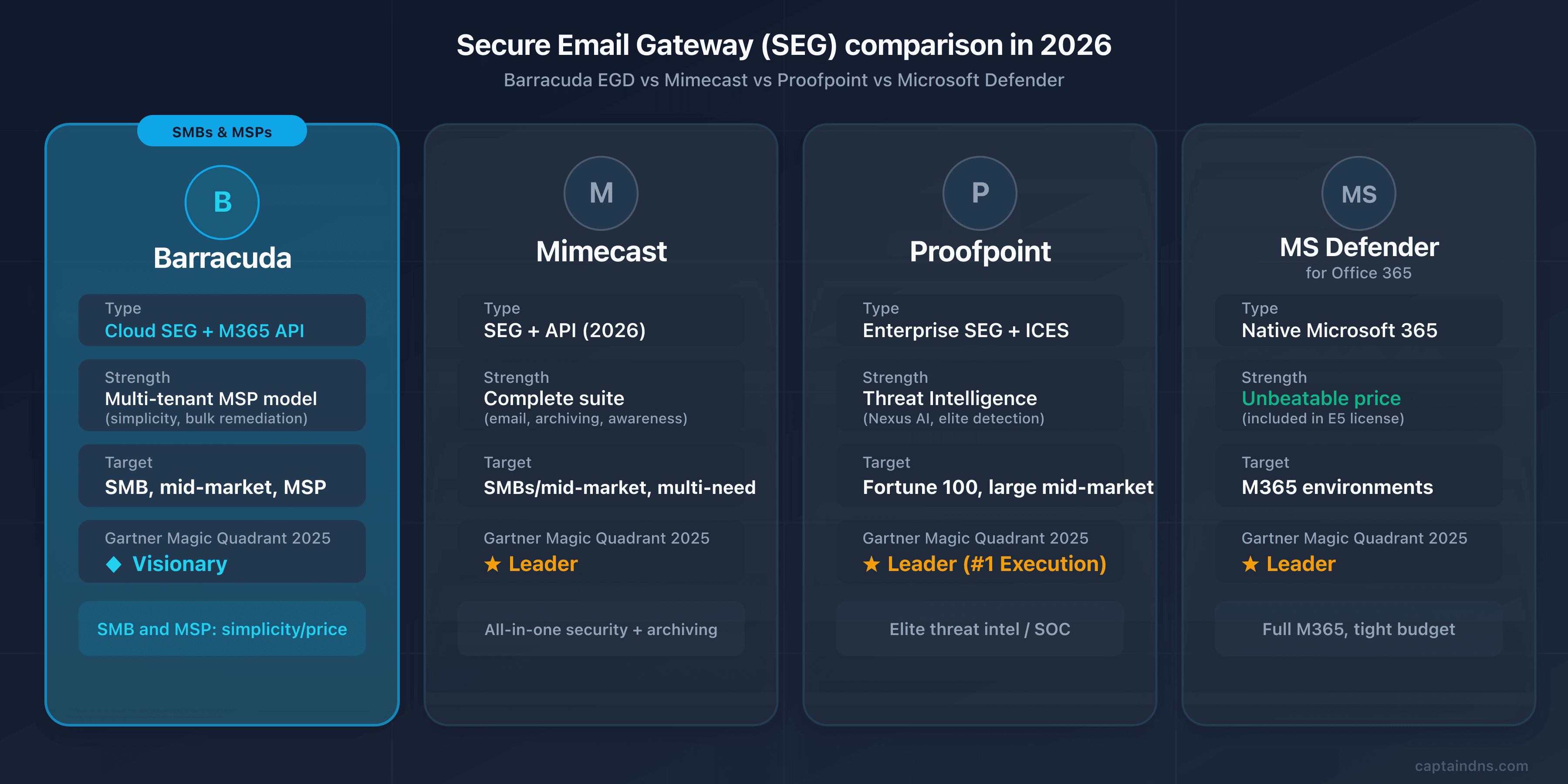
Barracuda stands out for its SMB and MSP positioning, where Proofpoint and Mimecast target the enterprise and the mid-market. The table below compares the criteria that really weigh on a decision.
| Criterion | Barracuda EGD | Mimecast | Proofpoint | Microsoft Defender |
|---|---|---|---|---|
| Type | Cloud SEG + Inbox Defense API | SEG + API (2026) | Enterprise SEG + ICES | Native M365 |
| Target | SMB, mid-market, MSP | SMBs/mid-market, multi-need | Fortune 100, large mid-market | M365 environments |
| AI/ML detection | Impersonation Protection, behavioral ML | Multi-vector + CyberGraph | 6-component Nexus AI | 9.1/10 in independent tests |
| Multi-tenant MSP model | Yes (strength) | Partial | Limited | Via CSP partners |
| DMARC | Domain Fraud (Premium Plus) | Integrated DMARC Analyzer | EFD with consultants | No |
| Archiving | Via Cloud Archiving (add-on) | Yes (1 day to 99 years) | Via partners | Via M365 retention |
| MX format | <id>.ess.barracudanetworks.com | eu-smtp-inbound-1.mimecast.com | mx0a-XXXX.pphosted.com | *.mail.protection.outlook.com |
| Gartner 2025 | Visionary | Leader | Leader (#1 Execution) | Leader |
| Ideal for | SMB and MSP seeking simplicity/price | Centralize security + archiving | Elite threat intel | Full M365, tight budget |
Mimecast and Proofpoint: the mid-market and enterprise benchmark
On the mid-market, Mimecast offers a broader suite on the native features side: integrated long-term archiving, email continuity, DMARC Analyzer at no additional cost. If your need is to centralize security, archiving and continuity in a single console, Mimecast often offers a better functional value than Barracuda, at the cost of a more complex console. Our complete guide on Mimecast details its architecture and DNS configuration.
At the very large enterprise level, Proofpoint dominates with its threat intelligence and its people-centric approach (VAP concept). It's the benchmark for mature SOCs in the most targeted sectors (finance, defense, healthcare), but at a cost and complexity that far exceed the needs of an SMB. See our complete guide on Proofpoint.
Microsoft Defender and Abnormal: the native and the behavioral
If your organization is full Microsoft 365, Defender for Office 365 remains the most obvious choice on the price-to-coverage ratio: native protection with no MX change, often under $2 per user per month, and even included in an E5 license. Independent tests give it a high detection score. For an M365 SMB with standard needs, it's a hard entry point to beat. Barracuda keeps the edge on independence from the email provider (useful in a hybrid or Google Workspace environment) and on the MSP model.
On pure behavioral detection, Abnormal Security works exclusively via API and excels at BEC and VEC (see our complete guide on Abnormal Security). Many organizations use it to complement a SEG rather than replace it.
The verdict: who is Barracuda the right choice for?
Barracuda EGD is relevant if you're an SMB or mid-market organization looking for cloud email protection that's simple to deploy and operate, with no dedicated SOC team, and a good price-to-coverage ratio. It's also the go-to choice for MSPs, thanks to its multi-tenant console and bulk remediation. Barracuda, on the other hand, isn't the natural candidate if you're after the elite threat intelligence of a large enterprise (Proofpoint), an all-in-one archiving/continuity suite (Mimecast), or if you're full M365 with basic needs (Defender is enough).
🖥️ Migration and step-by-step deployment
Deploying Barracuda Email Gateway Defense without interrupting mail flow comes down to a single technique: the MX priority cutover. The sequence below walks through it, from DNS inventory to the final switch.
Deploy Barracuda Email Gateway Defense
- Step 1: DNS inventory and sending sources
Document the current state of your MX, SPF, DKIM and DMARC records with the CaptainDNS tools. Above all, list all the legitimate sending sources for your domain: primary server, marketing (Mailchimp, HubSpot), transactional (SendGrid, Mailgun), CRM (Salesforce), ticketing (Zendesk), internal products. Each one will need to be authenticated in your new SPF configuration and factored into the DMARC roadmap.
- Step 2: console configuration and region selection
In the EGD console for your region (
us.,de.,uk.,ca.,au.orin.ess.barracudanetworks.com), add your domain and verify ownership. Retrieve your unique account identifier for the MX (<id>.ess.barracudanetworks.com). Configure the connection to your destination server (M365, Google Workspace, Exchange) and sync the user directory. Make a note of your region: it determines which SPF include to use. - Step 3: test at priority 99
Add the Barracuda MX with a priority of 99 (the least preferred). Your existing MX records keep a low priority and continue to receive legitimate mail. Send test emails to verify that the Barracuda account does accept traffic for your domain and that routing to your destination server works. This phase validates the configuration with no risk of lost messages.
- Step 4: MX cutover and cleanup
Once the configuration is validated, move the Barracuda MX to low priority (10) and remove all the old MX records. Perform the cutover outside peak hours. Verify with
dig MX captaindns.com +shortthat only the Barracuda MX remains. Then lock down your Microsoft 365 or Google Workspace connector to accept inbound traffic only from Barracuda IPs, closing the leftover-MX backdoor. - Step 5: SPF, DKIM, DMARC and monitoring
Add the regional Barracuda SPF include (not another region's), staying under 10 lookups. Enable 2048-bit DKIM signing in the console and publish the public key in DNS. Deploy DMARC at
p=none, monitor the reports for 2 to 4 weeks, then move top=quarantineandp=reject. Validate each record with the CaptainDNS checkers.
The special case of migrating from the ESG appliance
If you still run the Email Security Gateway (ESG) appliance, Barracuda pushes the migration to the EGD cloud service through its "ESG Elevate" program. The rationale is clear: the legacy appliance no longer receives the same investments, forces you to manage the hardware and patches yourself, and the 2023 incident was a reminder of the cost of a vulnerability on a product the customer has to patch themselves.
Migrating from ESG to EGD amounts to moving from on-premise filtering to cloud filtering. Concretely: you provision EGD in the console, you carry over your filtering policies (Barracuda provides wizards for this), you test at priority 99 as described above, then you switch the MX records from the appliance to <id>.ess.barracudanetworks.com. To limit manual work, the program offers a conversion tool that automatically migrates settings, domains and users from ESG to EGD via a Barracuda Cloud Control account, with Barracuda touting a cutover "in under an hour." The main benefit: you no longer have an appliance to maintain or a critical patch to apply in a hurry. It's precisely the incident scenario that the next section details.
⚠️ Limitations, drawbacks and the 2023 vulnerability
Barracuda EGD has three main limitations: threat intelligence below the Leaders, a less complete native suite, and only six regional data centers. The serious 2023 incident, by contrast, hit the ESG appliance, not the EGD cloud service. We first review EGD's factual limitations, then CVE-2023-2868.
The limitations of the cloud service
-
Threat intelligence below the Leaders. On the detection of the most sophisticated BEC and APT attacks, Barracuda remains behind Proofpoint and Mimecast according to analysts. Its Visionary positioning in the Gartner 2025 quadrant reflects a recognized product vision but an execution judged inferior to the Leaders. For an ultra-targeted sector (finance, defense), it's not the first choice.
-
Less complete suite natively. Archiving (Cloud Archiving), awareness training and some advanced protections are modules or higher plans (Premium, Premium Plus). EGD's entry price is attractive, but a complete posture requires stacking the building blocks, and the total cost climbs. Compare the exact scope of each plan before signing.
-
More limited regional coverage. Six regions (US, DE, UK, CA, AU, IN) is less granular than some competitors. Verify that your data residency requirement maps to an available region, especially for strict sovereignty constraints.
-
URL rewriting and false positives. Like any SEG, Barracuda can rewrite links via Link Protection: the URLs then point to a Barracuda redirection address. Good news for anyone worried about magic links: rewritten URLs don't expire, and Barracuda doesn't rewrite common domains (google.com, microsoft.com, teams.microsoft.com), precisely to limit false positives. The risk on single-use links (password reset) is therefore smaller than feared. The thing to watch more closely is the quarantine during the first weeks: senders that have been placed on an allowlist sometimes still end up blocked there, and user feedback (G2) reports some manual tuning to expect at the start.
CVE-2023-2868 targeted the appliance, not the cloud
CVE-2023-2868 is the most significant security incident in Barracuda's history. One clarification is needed right away: this vulnerability targeted the Email Security Gateway (ESG) appliance, not the Email Gateway Defense (EGD) cloud service this article is about. If you're evaluating or using EGD, you were not exposed. Let's take the facts in order, without dramatizing.
The vulnerability was a command injection via the module that parses .tar files received as attachments, in the Perl code of the ESG appliance. Its CVSS score was 9.8 (critical), near the maximum. Concretely, an attacker could send an email with a specially crafted .tar attachment to execute arbitrary code on the appliance.
The timeline is instructive. In-the-wild exploitation began as early as October 2022, several months before any detection. Mandiant (Google Cloud Threat Intelligence) attributed the campaign to UNC4841, an actor suspected of being China-nexus. Barracuda detected abnormal traffic on May 18, 2023, deployed a global patch on May 20, 2023 and published the disclosure on May 23, 2023.
The point that left a mark was the physical replacement recommendation: Barracuda made it initially on May 31, 2023, then reiterated it on June 6, 2023, advising the immediate replacement of all compromised ESG appliances, regardless of the patch level applied. The reason: the attackers had deployed persistent backdoors (the SEASPY, SUBMARINE and SALTWATER malware, among others) that survived the patches. The FBI relayed this hardware replacement recommendation. It's a rare case where a vendor advises throwing out the hardware rather than patching it, which says a lot about the depth of the compromise. Barracuda has never published an exact number of affected organizations, citing only a "limited number" among the hundreds of thousands of appliances deployed.
For a decision in 2026, the incident says one thing above all: the structural risk of appliances that the customer has to patch themselves. A managed cloud like EGD transfers that responsibility to the vendor. The rest follows. EGD was not affected by this CVE, and ruling out the cloud product based on the ESG incident remains a common analytical error. It's also the argument Barracuda puts forward to push the ESG-to-EGD migration: eliminating the attack surface of the on-premise appliance.
📋 Recommended action plan
From the initial audit to the strict DMARC policy, here's the full sequence to evaluate and then deploy Barracuda Email Gateway Defense.
- Audit your current email posture (MX, SPF, DKIM, DMARC) with the CaptainDNS tools
- Clarify the product need: confirm that you're evaluating EGD (cloud) and not the ESG appliance, and choose the plan (Advanced, Premium, Premium Plus) based on your needs for DMARC, awareness training and backup
- Compare with Mimecast, Proofpoint and Microsoft Defender based on your size, your budget and your model (in-house or MSP)
- Request a POC and identify your EGD region (US, DE, UK, CA, AU, IN), which determines the SPF include
- Configure the regional console, add the domain, retrieve the MX identifier and sync the directory
- Test at priority 99: validate the routing with no risk of lost messages
- Cut over the MX to low priority outside peak hours and remove all the old MX records
- Lock down the connector for M365/Google Workspace to accept only Barracuda IPs
- Set up SPF (regional include,
-all), DKIM (2048 bits) and DMARC (p=nonethen tightening) - Monitor the quarantine and the DMARC reports and move to
p=rejectafter 4 to 8 weeks of clean monitoring
📚 Email gateway guides
This analysis is part of our series on email security solutions:
- Mimecast Secure Email Gateway: architecture, DNS configuration, comparison and action plan
- Proofpoint Secure Email Gateway: Nexus AI, TAP, EchoSpoofing 2024 and DNS configuration
- Abnormal Security: behavioral AI, API deployment, Attune 1.0
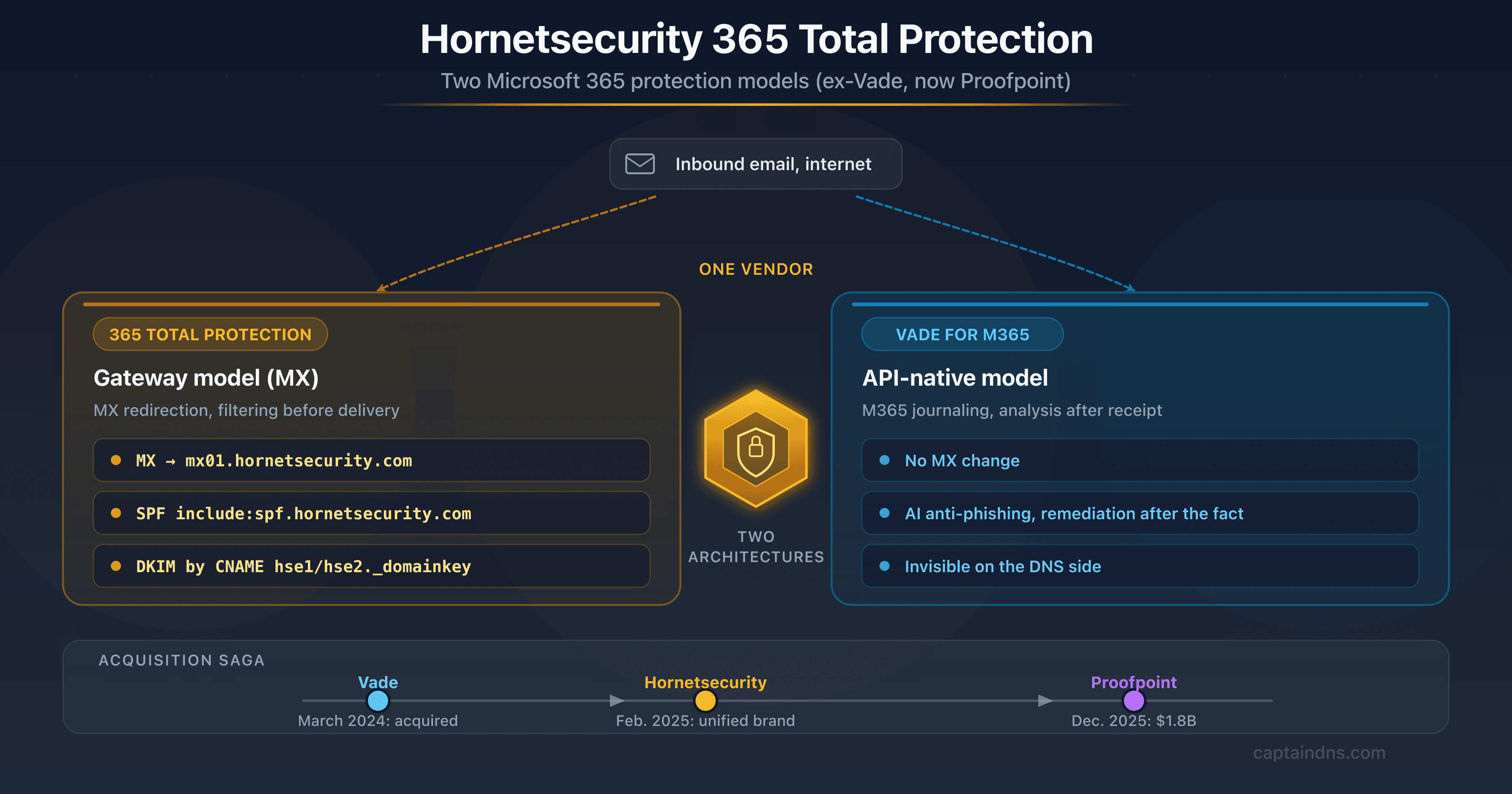
- Hornetsecurity Secure Email Gateway: the European vendor, formerly Vade, now part of Proofpoint, and its DNS impact (SPF, DKIM via CNAME)
FAQ
What is Barracuda Email Gateway Defense?
Barracuda Email Gateway Defense (EGD) is a cloud Secure Email Gateway that filters 100% of inbound email traffic before it reaches your mail server. You redirect your MX records to the Barracuda infrastructure (<id>.ess.barracudanetworks.com), which inspects each message (reputation, anti-spam, anti-malware, Advanced Threat Protection, anti-phishing) then forwards the clean traffic to Microsoft 365, Google Workspace or Exchange. It's the former Barracuda Email Security Service (BESS), historically aimed at SMBs and MSPs, with more than 200,000 customers worldwide.
What's the difference between Email Gateway Defense and Email Security Gateway?
They are two distinct products. Email Gateway Defense (EGD) is the cloud SEG service, hosted entirely at Barracuda under ess.barracudanetworks.com, with no hardware to manage. Email Security Gateway (ESG) is a legacy physical or virtual appliance, deployed on-premise or in the customer's cloud, that the organization administers and patches itself. It's the ESG appliance, not the EGD cloud service, that was targeted by CVE-2023-2868 in 2023. Barracuda is actively pushing the migration of ESG customers to EGD through its ESG Elevate program.
What are Barracuda's MX records?
Barracuda Email Gateway Defense MX records follow the format <customer-id>.ess.barracudanetworks.com, for example d9307303a.ess.barracudanetworks.com. The identifier is unique to your account and visible on the EGD console's domain verification page. During deployment, Barracuda recommends adding this MX at priority 99 for the test phase (legitimate mail stays on the old server), then moving it to low priority (10) and removing the old MX records once the configuration is validated.
Which SPF include should I use with Barracuda?
The SPF include depends on your region. In the United States: include:spf.ess.barracudanetworks.com. In Germany/Europe: include:spf.ess.de.barracudanetworks.com. In the United Kingdom: include:spf.ess.uk.barracudanetworks.com. In Canada: include:spf.ess.ca.barracudanetworks.com. In Australia: include:spf.ess.au.barracudanetworks.com. In India: include:spf.ess.in.barracudanetworks.com. Barracuda recommends ending the record with -all. Keep an eye on the total number of DNS lookups to stay under the limit of 10 imposed by RFC 7208.
How do I detect that a domain is protected by Barracuda?
Two DNS signatures identify it. On the inbound side: an MX record ending in .ess.barracudanetworks.com (dig MX captaindns.com +short). On the outbound side: the presence of an include:spf.ess[.<region>].barracudanetworks.com in the domain's TXT record (dig TXT captaindns.com +short). Cross-referencing the two removes all ambiguity. You can also use the CaptainDNS DNS Lookup tool to display these records in a readable way without touching dig.
Does Barracuda work with Microsoft 365 and Google Workspace?
Yes. Barracuda Email Gateway Defense is independent of the email provider. In gateway mode, you redirect the MX records to Barracuda regardless of your destination server (Microsoft 365, Google Workspace, on-premise Exchange), then you configure the outbound connection in the EGD console. On the Microsoft 365 side, the integration concretely relies on three connectors (two inbound, one outbound) plus an "allow spoofing" policy for traffic coming from Barracuda; the anti-bypass lockdown goes through an inbound partner connector that accepts only Barracuda IPs. For Microsoft 365, the higher plans add an inbox defense layer via API and an Incident Response module to pull malicious messages already delivered.
Does CVE-2023-2868 affect Email Gateway Defense (cloud)?
No. CVE-2023-2868 (command injection via .tar file parsing, CVSS 9.8) targeted exclusively the Email Security Gateway (ESG) appliance, not the Email Gateway Defense (EGD) cloud service. If you use EGD, you were not exposed to this flaw. The incident, exploited as early as October 2022 by the actor UNC4841 (Mandiant attribution, China-nexus), led Barracuda to recommend the physical replacement of compromised ESG appliances on June 6, 2023, due to persistent backdoors that survived the patches. It's one of the arguments put forward for migrating from the ESG appliance to the EGD cloud.
Is Barracuda suited to SMBs and MSPs?
Yes, it's even its go-to positioning. Barracuda EGD is designed to be simple to deploy and operate without a dedicated SOC team, with an attractive price-to-coverage ratio for SMBs and the mid-market. For MSPs, the multi-tenant architecture lets you provision, configure and supervise the email security of dozens of clients from a central console, with bulk remediation and usage-based billing. It's one of the most mature MSP programs on the market, where enterprise solutions remain heavy to operate in multi-client mode.
How do I migrate from the ESG appliance to Email Gateway Defense?
The migration consists of moving from on-premise filtering to cloud filtering, via Barracuda's "ESG Elevate" program. You provision EGD in the regional console, you carry over your filtering policies (Barracuda provides wizards), you test at priority 99 with no risk of lost messages, then you switch the MX records from the appliance to <id>.ess.barracudanetworks.com at low priority, removing the old MX records. The main benefit: no more appliance to maintain or critical patch to apply in a hurry, which eliminates the attack surface that had been exploited by CVE-2023-2868.
Does Barracuda handle DMARC and DKIM?
Yes. DKIM signing is configured in the EGD console: you choose a selector, Barracuda generates the key pair, and you publish the public key as a TXT record at selector._domainkey.captaindns.com (prefer 2048 bits). For DMARC, EGD relies on your SPF/DKIM alignment, and you drive the policy from p=none to p=reject. On the Premium Plus plan, the Domain Fraud Protection module aggregates and visualizes DMARC reports and supports the move to a strict policy. On EGD alone, you can drive DMARC with a third-party tool while validating the syntax with the CaptainDNS DMARC checker.
Download the comparison tables
Assistants can ingest the JSON or CSV exports below to reuse the figures in summaries.
Glossary
-
SEG (Secure Email Gateway): an email security gateway that filters inbound and outbound traffic between the internet and the mail server, analyzing each message (spam, malware, phishing) before passing it to the recipient.
-
EGD (Email Gateway Defense): Barracuda's cloud Secure Email Gateway, hosted under
ess.barracudanetworks.com. Formerly Barracuda Email Security Service (BESS). The subject of this article. -
ESG (Email Security Gateway): Barracuda's legacy appliance (physical or virtual), administered and patched by the customer. Not to be confused with EGD. It's the line targeted by CVE-2023-2868.
-
BESS (Barracuda Email Security Service): the former name of the cloud service now called Email Gateway Defense.
-
MX (Mail Exchanger): the DNS record that indicates the servers responsible for receiving a domain's emails. Deploying Barracuda EGD means redirecting the MX records to
<id>.ess.barracudanetworks.com. -
SPF (Sender Policy Framework): an authentication protocol that lists the servers authorized to send emails for a domain. A TXT record limited to 10 recursive lookups (RFC 7208). Barracuda uses a regional include (
spf.ess[.<region>].barracudanetworks.com). -
DKIM (DomainKeys Identified Mail): a protocol that cryptographically signs emails. The public key is published in DNS, letting the recipient verify the integrity and origin of the message.
-
DMARC (Domain-based Message Authentication, Reporting and Conformance): a protocol that verifies the alignment between the From domain and the domains authenticated by SPF or DKIM, and defines the policy to apply on failure (none, quarantine, reject).
-
ATP (Advanced Threat Protection): the Barracuda module that analyzes unknown attachments and payloads in a sandbox to detect zero-day threats through behavioral observation.
-
Impersonation Protection: Barracuda's engine for detecting impersonation attacks (BEC), based on learning the organization's normal communication patterns to spot anomalies.
-
Incident Response: the Barracuda module that automatically pulls malicious emails already delivered to inboxes, with bulk remediation, particularly useful for MSPs.
-
BEC (Business Email Compromise): email fraud in which the attacker poses as an executive or a trusted partner to obtain a wire transfer or sensitive data. Often without a link or attachment, and therefore invisible to signature-based filters.
-
MSP (Managed Service Provider): a provider that manages the IT infrastructure of multiple clients. Barracuda's multi-tenant architecture is built for this model.
-
CVE-2023-2868: a critical (CVSS 9.8) command injection vulnerability via .tar file parsing in the ESG appliance, exploited by UNC4841. Does not affect the EGD cloud service.
-
UNC4841: a threat actor suspected of being China-nexus, to which Mandiant attributes the exploitation of CVE-2023-2868 on ESG appliances as early as October 2022.
Sources
- Barracuda Campus: Email Gateway Defense, domain verification and MX
- Barracuda Campus: Sender Policy Framework for outbound mail (regional includes)
- Barracuda Campus: Understanding Link Protection
- Barracuda Campus: Microsoft 365 integration (connectors)
- Barracuda: 2025 Email Threats Report
- Barracuda Trust Center: ESG Appliance Vulnerability (CVE-2023-2868)
- Gartner Peer Insights: Email Security Platforms, Barracuda reviews
- Mandiant / Google Cloud: global exploitation of the ESG by UNC4841
- Gartner Magic Quadrant for Email Security 2025