Gmail 550 5.7.26 and UsernameCaseMapped rejections: causes, diagnosis, and fixes
By CaptainDNS
Published on February 26, 2026
Updated on July 30, 2026
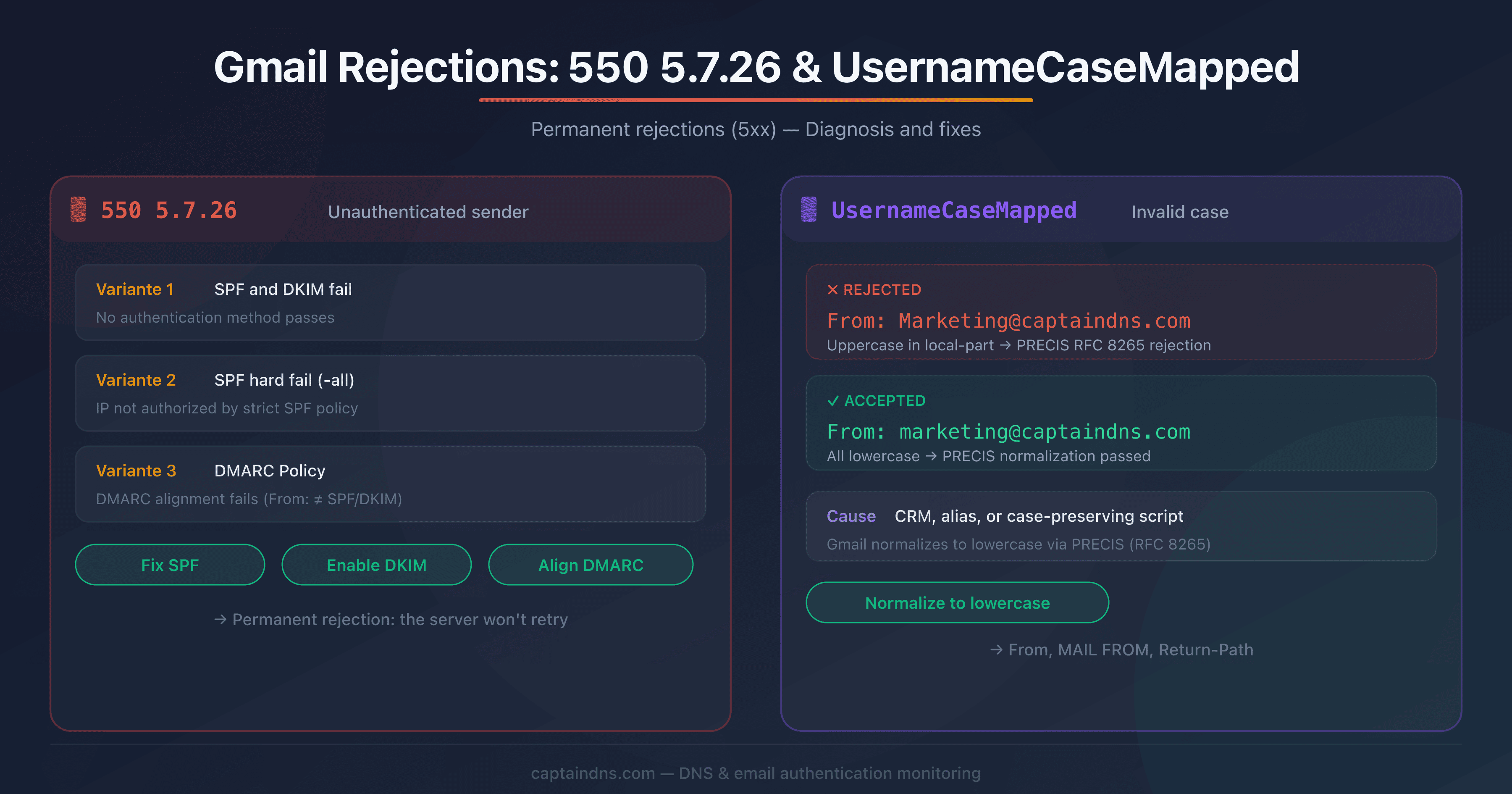
- Gmail returns 550 5.7.26 when SPF, DKIM, or DMARC alignment fails: it's a permanent rejection, the sending server won't retry
- The UsernameCaseMapped error comes from PRECIS normalization (RFC 8265): the local-part of the From address must be lowercase
- Since February 2024, Google requires SPF + DKIM + DMARC for bulk senders (>5,000 emails/day) and SPF or DKIM for everyone else
- Fix it by normalizing your addresses to lowercase, verifying SPF/DKIM/DMARC, and checking From: domain alignment
Your emails to Gmail are bouncing with a 550 code. No spam folder, no delay: a hard, permanent rejection. The server drops the connection and won't retry. This is what more and more deliverability teams have been seeing since early 2026, with two rejection reasons on the rise: 550 5.7.26 (unauthenticated sender) and UsernameCaseMapped (invalid address casing).
These two errors share a common thread: they result from Google's ongoing tightening of anti-spoofing policies. What worked a year ago is now blocked. This guide covers the technical causes of each error, precise diagnosis through SMTP logs, and the fixes to apply to your sending infrastructure.
Understanding the Gmail 550 5.7.26 error
The 550 5.7.26 code is a permanent rejection (5xx class) meaning Gmail couldn't verify the authenticity of your message. Unlike a 4xx code (temporary), the sending server should not retry: the email is definitively refused.
The three variants of the 550 5.7.26 code
Google returns three different messages under the same code, each corresponding to a distinct cause:
Variant 1, unauthenticated sender:
550-5.7.26 This email has been blocked because the sender is
unauthenticated. Gmail requires all senders to authenticate with
either SPF or DKIM. Authentication results: DKIM = did not pass
SPF [captaindns.com] with ip: [203.0.113.42] = did not pass.
Neither SPF nor DKIM passed verification. This is the most common variant.
Variant 2, SPF hard fail:
550-5.7.26 The MAIL FROM domain [captaindns.com] has an SPF record
with a hard fail policy (-all) but it fails to pass SPF checks
with the ip: [203.0.113.42].
Your SPF record ends with -all (strict reject), but the sending IP isn't authorized. Gmail enforces your own policy to the letter.
Variant 3, DMARC policy:
550-5.7.26 Unauthenticated email from captaindns.com is not accepted
due to domain's DMARC policy. Contact the administrator of
captaindns.com domain if this was legitimate email.
SPF or DKIM may have passed, but DMARC alignment fails: the From: domain doesn't match the domain authenticated by SPF or DKIM.
Difference between 550 5.7.26 and 421 4.7.26
| Code | Class | Behavior | Required action |
|---|---|---|---|
| 421 4.7.26 | Temporary | Sending server retries later | Investigate, but the email may eventually go through |
| 550 5.7.26 | Permanent | Email is definitively rejected | Fix configuration before resending |
A 421 is a warning with rate limiting. A 550 is a wall. If you're seeing 550s, the problem is structural and won't resolve itself on retry.
Why are these rejections increasing now?
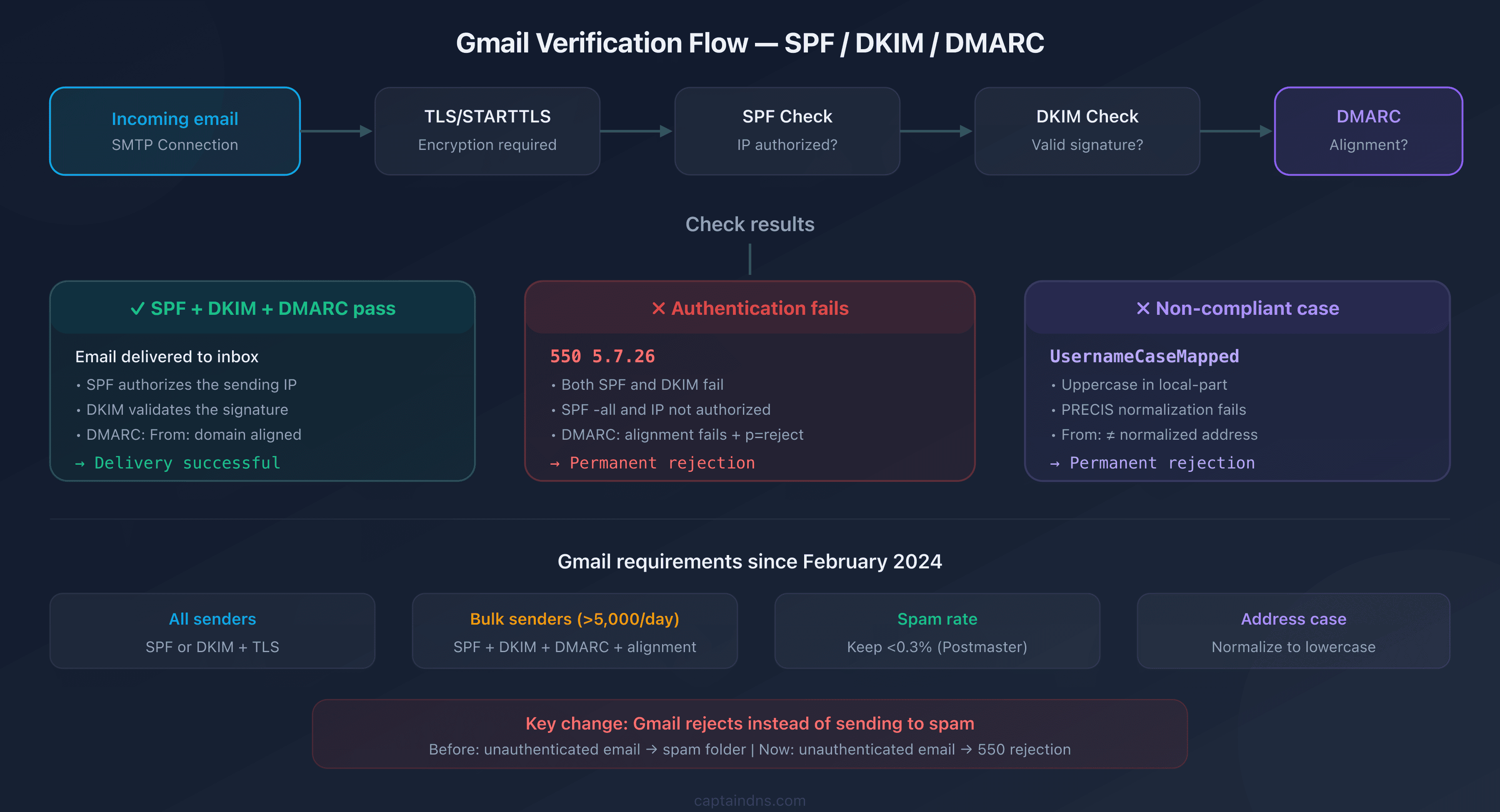
Since February 1, 2024, Google has tightened its sender requirements:
| Requirement | All senders | Bulk senders (>5,000/day) |
|---|---|---|
| SPF or DKIM | Required | Required |
| SPF and DKIM | Recommended | Required |
| DMARC | Recommended | Required (p=none minimum) |
| From: alignment | Recommended | Required |
| TLS (STARTTLS) | Required | Required |
| Spam rate <0.3% | Required | Required |
What changed in practice: before, an unauthenticated email landed in spam. Now, Gmail rejects it with a 550. That's a major difference.
Understanding the UsernameCaseMapped error
The UsernameCaseMapped error is less documented but equally blocking. It causes a permanent 550 rejection related to the casing of the sender address.
What is the UsernameCaseMapped profile?
The term comes from RFC 8265 (PRECIS, Preparation, Enforcement, and Comparison of Internationalized Strings). This RFC defines how servers should normalize user identifiers before comparing them.
The UsernameCaseMapped profile enforces two operations:
- Unicode normalization (NFKC): characters are reduced to their canonical form
- Case folding: uppercase letters are converted to lowercase
In practice, when Gmail receives an email, it normalizes the local-part (the part before the @) of the From: address using this profile. If the result doesn't match the expected address, the message is rejected.
How does this error occur?
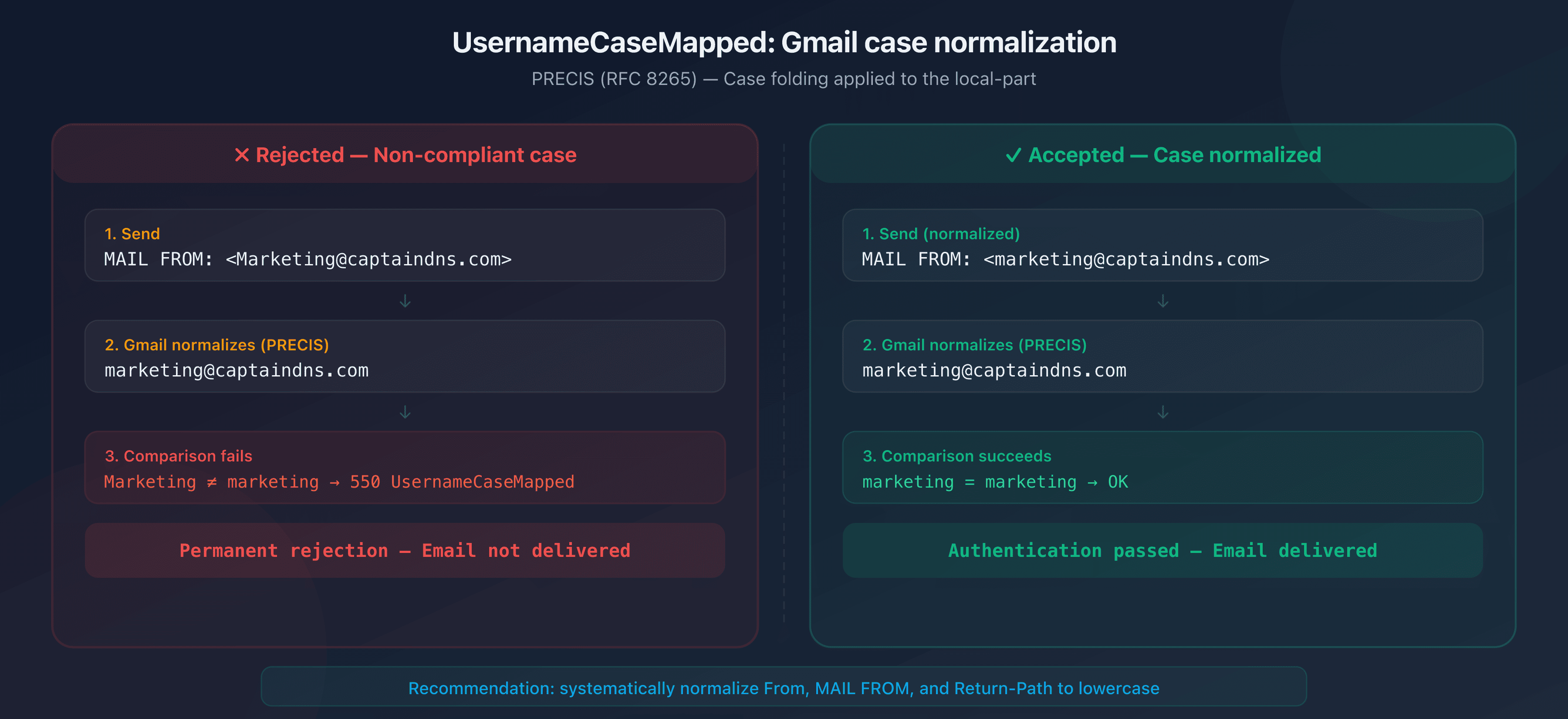
The typical scenario:
- Your CRM or script sends an email with
From: Marketing@captaindns.com - Gmail normalizes the local-part:
marketing@captaindns.com - The comparison fails if the server expects exactly
Marketing@captaindns.comor if authentication (SPF/DKIM) was performed with different casing - Result: 550 UsernameCaseMapped rejection
Systems that most commonly trigger this error:
- CRMs and marketing platforms that store the address with the casing entered by the user
- Email aliases and forwarding rules that preserve the original casing
- Legacy scripts that build the From address without normalization
- Web forms that use user input as-is in the MAIL FROM
RFC 5321 and email address casing
RFC 5321 (SMTP) states that the local-part of an email address is theoretically case-sensitive: it's up to the receiving server to decide whether User and user are the same mailbox. In practice, nearly all servers treat the local-part as lowercase. Gmail goes further by applying PRECIS normalization and rejecting messages where the casing doesn't match.
The catch: the RFC allows mixed case, but modern implementations effectively prohibit it. If your sending infrastructure preserves uppercase letters in the From or MAIL FROM address, you risk a rejection.
Diagnosing these errors
Reading SMTP logs
Diagnosis starts with your mail server or sending provider logs. Look for 550 responses:
Feb 12 14:23:01 mail postfix/smtp[12345]: to=<contact@gmail.com>,
  relay=gmail-smtp-in.l.google.com[142.250.115.27]:25,
  status=bounced (host gmail-smtp-in.l.google.com said:
  550-5.7.26 This email has been blocked because the sender is
  unauthenticated.)
What to check in the logs:
- The exact code (550 vs 421)
- The sending IP mentioned in the message
- The SPF and DKIM results cited by Gmail
- The From: domain and the MAIL FROM domain (envelope sender)
Verifying authentication with headers
If you have access to an email that went through (or to a DMARC report), examine the Authentication-Results headers:
Authentication-Results: mx.google.com;
  dkim=pass header.d=captaindns.com header.s=selector1;
  spf=pass (google.com: domain of bounce@captaindns.com
    designates 203.0.113.42 as permitted sender)
    smtp.mailfrom=bounce@captaindns.com;
  dmarc=pass (p=REJECT sp=REJECT) header.from=captaindns.com
If any of these three results is fail, you've found the source of the problem. Use the CaptainDNS DMARC checker to verify your configuration in seconds.
Using Google Postmaster Tools
Google Postmaster Tools provides metrics on your sends to Gmail:
- Spam rate reported by recipients
- Domain and sending IP reputation
- Rejection volume by error code
If your spam rate exceeds 0.3%, Gmail starts rate-limiting your sends (421) and then rejecting them (550).
Fixing the 550 5.7.26 error
Step 1: configure SPF correctly
Your SPF record must authorize all IPs and services that send on behalf of your domain:
captaindns.com. IN TXT "v=spf1 include:_spf.google.com include:sendgrid.net ip4:203.0.113.0/24 -all"
Common mistakes:
- A sending provider missing from the SPF record (CRM, marketing tool, transactional service)
- A
-all(hard fail) while not all senders are listed: use~all(soft fail) until the list is complete - More than 10 DNS lookups in the SPF record, which invalidates the entire policy
Verify with the CaptainDNS SPF checker.
Step 2: enable DKIM on all sending flows
Every service that sends email for your domain must sign with DKIM:
selector1._domainkey.captaindns.com. IN TXT "v=DKIM1; k=rsa; p=MIIBIjANBg..."
Critical points:
- The key must be at least 1,024 bits (2,048 recommended by Google)
- The DKIM signing domain (
d=) must match the From: domain for DMARC alignment - Verify the public key is accessible in DNS:
dig TXT selector1._domainkey.captaindns.com
Step 3: deploy a DMARC policy
If you don't have DMARC yet, start with a monitoring policy:
_dmarc.captaindns.com. IN TXT "v=DMARC1; p=none; rua=mailto:dmarc@captaindns.com; adkim=r; aspf=r"
Recommended progression:
| Step | Policy | Duration | Goal |
|---|---|---|---|
| 1 | p=none | 2-4 weeks | Collect reports, identify sending flows |
| 2 | p=quarantine; t=y | 2 weeks | Observe without the policy being enforced |
| 3 | p=quarantine | 2 weeks | Full quarantine |
| 4 | p=reject | Permanent | Reject unauthenticated emails |
Step 4: verify DMARC alignment
Alignment is the most commonly missing piece. It requires the From: domain (RFC 5322 header) to match the domain authenticated by SPF or DKIM:
| Check | Domain compared | Alignment |
|---|---|---|
| SPF | MAIL FROM domain (envelope) | Must match the From: domain |
| DKIM | d= domain from the signature | Must match the From: domain |
Example of alignment failure:
- From:
contact@captaindns.com - MAIL FROM:
bounce@promo.captaindns.com - SPF passes for
promo.captaindns.com, but DMARC fails because the From: iscaptaindns.com
In relaxed mode (adkim=r; aspf=r), subdomains are accepted. In strict mode (adkim=s; aspf=s), the domain must be identical.
Step 5: ensure TLS encryption
Gmail requires a TLS connection (STARTTLS) to accept emails. Verify your server supports STARTTLS:
openssl s_client -starttls smtp -connect mail.captaindns.com:25
If the TLS connection fails, Gmail will return a rejection. Enable TLS-RPT to receive daily reports on TLS negotiation failures.
Fixing the UsernameCaseMapped error
Step 1: normalize every address to lowercase
The fix is simple, but it has to be applied everywhere. Every address in your outbound mail must be lowercase:
| Field | Before (rejection risk) | After (correct) |
|---|---|---|
| From: (RFC 5322) | Marketing@captaindns.com | marketing@captaindns.com |
| MAIL FROM (envelope) | Bounce@captaindns.com | bounce@captaindns.com |
| Return-Path | Return@captaindns.com | return@captaindns.com |
| Reply-To | Support@captaindns.com | support@captaindns.com |
Step 2: audit your sending systems
List every system that sends email on behalf of your domain and check how each one builds the From address:
| System | Risk | Check |
|---|---|---|
| CRM (HubSpot, Salesforce, Brevo) | Medium, often reuses user input | Review the sender address settings |
| Marketing tool (Mailchimp, SendGrid) | Low, usually normalizes | Confirm in the logs |
| Internal application / script | High, no normalization by default | Audit the source code |
| Aliases and forwarding | High, preserves the original casing | Send a test and inspect the headers |
| Web form (contact, signup) | High, reuses the input as typed | Add normalization upstream |
Step 3: automate normalization
Add a systematic normalization step to your sending flows:
Python:
def normalize_email(address: str) -> str:
    local, domain = address.rsplit("@", 1)
    return f"{local.lower()}@{domain.lower()}"

# Usage
from_address = normalize_email("Marketing@CaptainDNS.com")
# Result: marketing@captaindns.com
Node.js:
function normalizeEmail(address) {
  const [local, domain] = address.split('@');
  return `${local.toLowerCase()}@${domain.toLowerCase()}`;
}

// Usage
const fromAddress = normalizeEmail('Marketing@CaptainDNS.com');
// Result: marketing@captaindns.com
Postfix (main.cf):
# Force the local-part to lowercase for MAIL FROM
lmtp_lowercase_quote_localpart = yes
Recommended action plan
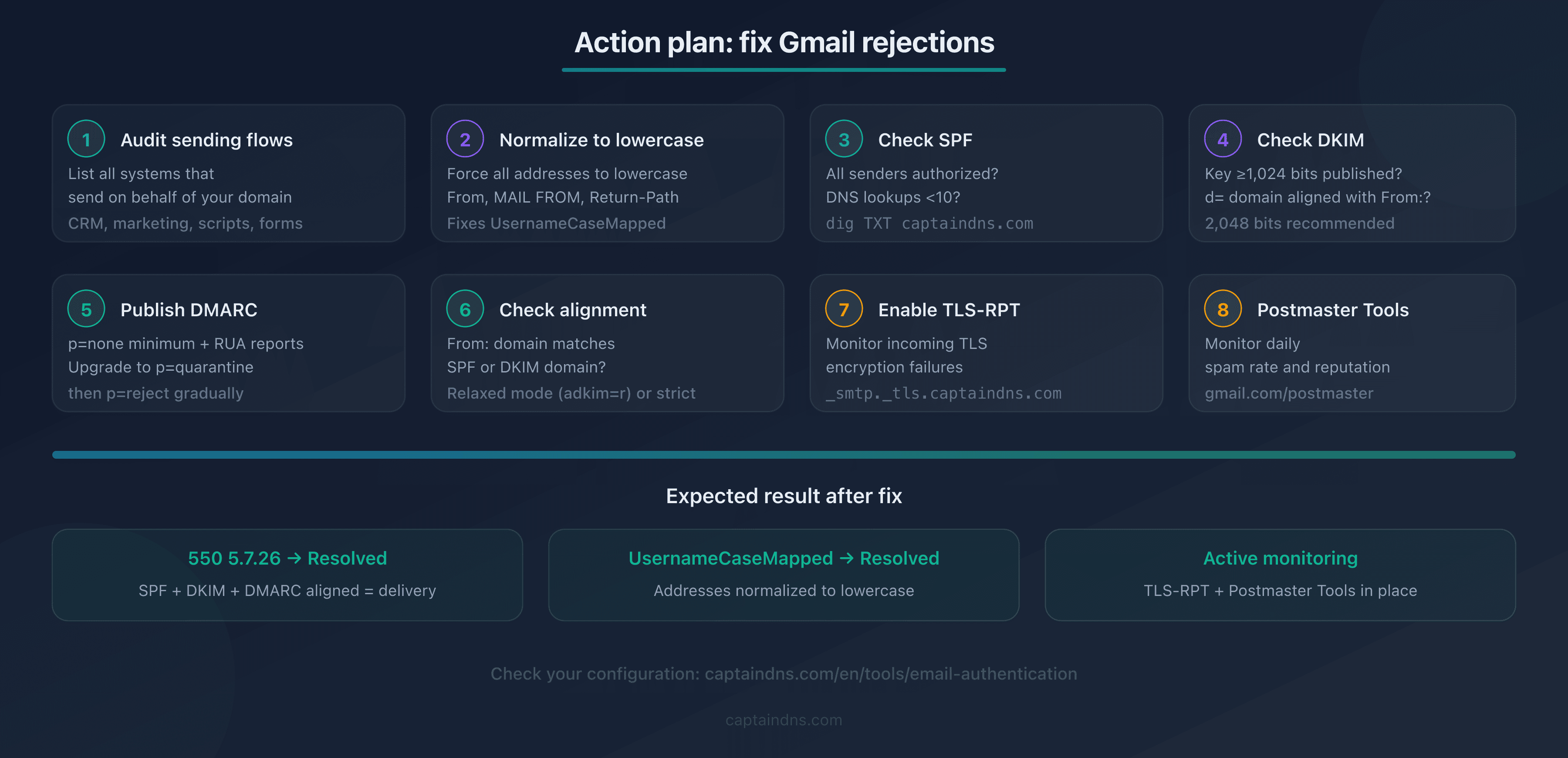
- Audit your sending flows: list all systems that send on behalf of your domain (CRM, marketing, transactional, scripts, forms)
- Normalize to lowercase: force all From, MAIL FROM, and Return-Path addresses to lowercase in every system
- Verify SPF: are all senders authorized? Is the DNS lookup count under 10?
- Verify DKIM: key of 1,024+ bits published in DNS,
d=domain aligned with From:? - Publish a DMARC policy:
p=noneminimum with active RUA reports to start - Check alignment: does the From: domain match the SPF or DKIM domain?
- Enable TLS-RPT: to monitor encryption failures on your inbound emails
- Monitor Postmaster Tools: check daily spam rate and domain/IP reputation
FAQ
What is the difference between 550 5.7.26 and 421 4.7.26?
The 421 4.7.26 code is a temporary rejection with rate limiting: Gmail slows down your sends but the sending server can retry later. The 550 5.7.26 code is a permanent rejection: the email is definitively refused and the server should not retry. A 421 signals a transient issue or unusual volume. A 550 signals a structural authentication flaw that requires a configuration fix.
How do I tell if my error is UsernameCaseMapped or 550 5.7.26?
The SMTP error message text makes the distinction. A 550 5.7.26 rejection explicitly mentions "unauthenticated", "SPF", or "DMARC policy". The UsernameCaseMapped error appears in the SMTP response text with the term "UsernameCaseMapped" and relates to address casing, not domain authentication. Check your server or provider SMTP logs for the full message.
My SPF is configured, so why am I still getting 550 5.7.26?
Three common causes: (1) the sending IP isn't listed in the SPF record: verify all your providers are included; (2) the SPF exceeds 10 DNS lookups, which invalidates the entire policy; (3) SPF passes but DMARC alignment fails because the MAIL FROM domain doesn't match the From: domain. Check alignment in addition to SPF.
Do I need a DMARC p=reject policy to avoid rejection?
No. Gmail requires a published DMARC record for bulk senders, but p=none is sufficient as a minimum policy. The 550 5.7.26 rejection occurs when authentication fails (SPF and DKIM don't pass), regardless of your DMARC policy. However, the "not accepted due to domain's DMARC policy" variant can trigger if your own policy is p=reject and alignment fails.
Does the UsernameCaseMapped error also affect Google Workspace?
Yes. Google Workspace applies the same PRECIS normalization rules as personal Gmail. If you send emails to @yourcompany.com addresses hosted on Google Workspace with incorrect casing in the From address, the UsernameCaseMapped rejection can occur. Lowercase normalization applies to all Google accounts.
How do I test DMARC alignment before sending in production?
Publish a p=none policy with active RUA reports (rua=mailto:dmarc@captaindns.com). Send a test email to a Gmail account and examine the Authentication-Results headers. Verify that dmarc=pass appears. If dmarc=fail, compare the From: domain with the SPF and DKIM domains in the results to identify the alignment issue.
What does 'Unauthenticated email not accepted due to domain's DMARC policy' mean?
This message indicates that your domain has published a restrictive DMARC policy (p=quarantine or p=reject) and the email passed neither aligned SPF verification nor aligned DKIM verification. Gmail enforces your own policy: since you requested rejection of unauthenticated emails, Gmail rejects. Check SPF and DKIM alignment with the From: domain.
Do 550 5.7.26 rejections affect my sender reputation?
Yes, indirectly. Repeated permanent rejections signal to Gmail that your sending infrastructure isn't properly configured. This can degrade your IP and domain reputation in Google Postmaster Tools, which then triggers rate limiting (421) on your sends that do pass authentication. Fix the issue quickly to avoid a snowball effect.
Glossary
- 550: permanent rejection SMTP code. The sending server should not retry.
- 5.7.26: enhanced status code (RFC 3463) indicating sender authentication failure.
- UsernameCaseMapped: normalization profile defined in RFC 8265 (PRECIS) that enforces lowercase conversion of the local-part of identifiers.
- DMARC alignment: match between the From: header domain (RFC 5322) and the domain authenticated by SPF or DKIM. Required to pass DMARC verification.
- Envelope sender: MAIL FROM address used in the SMTP transaction (RFC 5321), distinct from the From: header visible to the recipient.
- Bulk sender: sender transmitting more than 5,000 emails per day to Gmail accounts. Subject to stricter requirements since February 2024.