CAA DNS records: the complete guide to controlling who issues your certificates
By CaptainDNS
Published on June 9, 2026
Updated on July 9, 2026
- A CAA DNS record declares which certificate authorities are allowed to issue a TLS certificate for your domain. Without CAA, any public CA can do it.
- The syntax comes down to three fields:
flag tag value. The useful tags areissue(regular certificates),issuewild(wildcards), andiodef(reporting unauthorized attempts). - The CA checks CAA at issuance time by climbing the DNS from the subdomain up to the apex (tree climbing), and stops at the first record it finds (RFC 8659).
- RFC 8657 adds
accounturiandvalidationmethodsto pin issuance to a specific ACME account and to authorized validation methods. - A poorly designed CAA configuration (forgotten issuewild, misunderstood semicolon, missing CA) can break your automatic ACME renewals.
The trust model for TLS certificates relies on roughly a hundred certificate authorities (CAs) recognized by browsers. The problem is structural: by default, any one of those CAs can issue a valid certificate for your domain, without your consent and without even informing you. An attacker who manages to fool a single CA, or a CA that simply makes a mistake, can produce a perfectly recognized certificate for captaindns.com.
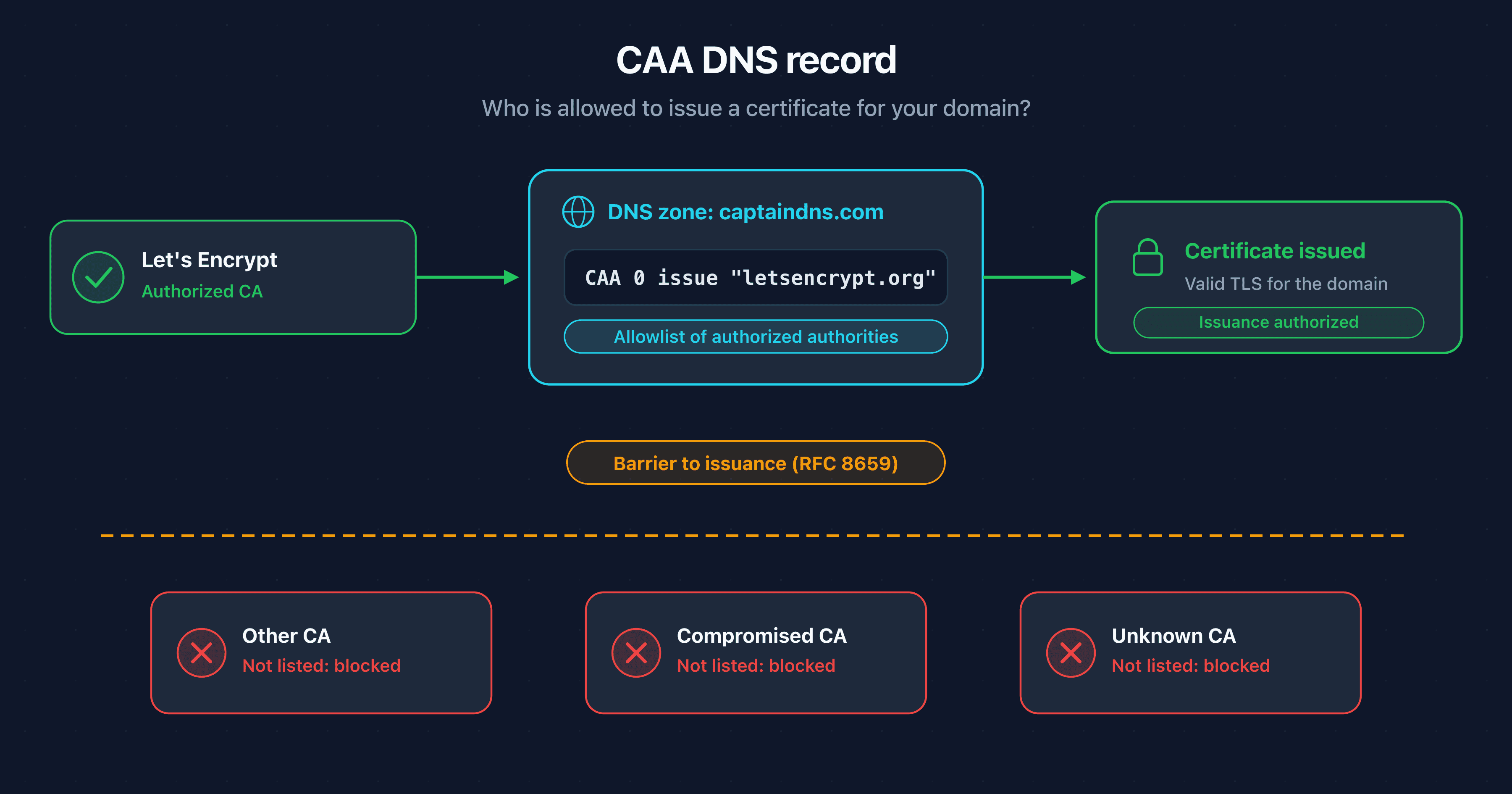
The CAA DNS record (Certificate Authority Authorization), defined by RFC 8659, closes part of this gap. It acts as an allowlist published in your DNS zone: before issuing a certificate, a compliant CA must query the DNS and confirm that it appears in your CAA records. If it does not, it refuses to issue. This is a barrier to issuance, not after-the-fact detection.
This guide is aimed at systems administrators, DevOps and SRE teams, and security leads. It covers the threat model, the full syntax of a CAA record (the issue, issuewild, iodef tags, the critical flag), the exact tree-climbing validation mechanism, the advanced RFC 8657 parameters for the ACME ecosystem, the concrete setup at the main providers, and the mistakes that break automatic renewals.
Are your CAA and DNSSEC records correctly configured?
The problem: any CA can issue a certificate
When your browser opens an HTTPS connection, it verifies that the presented certificate is signed by a certificate authority present in its trust store. That store contains roughly a hundred root CAs, run by a wide variety of organizations spread across many countries.
Horizontal trust with no compartmentalization
The design flaw is easy to state: trust is horizontal. The browser trusts every CA in its store equally. Nothing in the base protocol restricts a given CA to a subset of domains. In practice, a CA on the other side of the world, one you have never used, is technically allowed to issue a recognized certificate for your domain.
As long as every CA operates flawlessly, this model holds. But it only takes one failure, through an operational error or a compromise, for a fraudulent certificate to be produced and accepted by every browser.
Real incidents
The history of TLS certificates is dotted with mis-issuance incidents:
- DigiNotar (2011): this Dutch CA was compromised. Attackers issued more than 500 fraudulent certificates, including a wildcard for
*.google.com, used to intercept the traffic of Iranian citizens. DigiNotar lost the trust of browsers and went bankrupt. - Symantec (2015 to 2017): a series of non-compliant issuances, including test certificates for third-party domains issued without authorization, led Google and Mozilla to plan the distrust of the legacy Symantec infrastructure. The CA business was sold to DigiCert.
- BGP hijacks: several attacks combined network route hijacking with domain validation to obtain fraudulent certificates. In the MyEtherWallet case (2018), attackers hijacked DNS traffic to obtain a certificate and steal funds.
These incidents share a common thread: a technically valid certificate was issued for a domain without its owner's consent. Academic research has confirmed that this risk is anything but anecdotal. The study "Bamboozling Certificate Authorities with BGP" (USENIX Security 2018) demonstrated that an attacker could obtain fraudulent certificates from the largest CAs by hijacking domain validation requests via BGP, with a high success rate.
The lesson is that a single failure in any one of the trusted CAs is enough to compromise any domain. It is precisely this attack surface that CAA reduces, by limiting the list of CAs allowed to issue for a given domain.
Detection is not enough
Since 2018, Certificate Transparency (CT) has required that every public certificate be logged in public, verifiable registries. This is a major step forward: a domain owner can monitor these logs and spot a certificate issued without their knowledge.
But Certificate Transparency is an after-the-fact detection mechanism. By the time you spot a fraudulent certificate in a log, it has already been issued and may already have been used. CAA tackles the problem upstream: it prevents issuance rather than observing it after the fact. The two mechanisms are complementary, as we detail later.
What is a CAA record?
A CAA DNS record (Certificate Authority Authorization, RFC 8659) declares which certificate authorities are allowed to issue TLS certificates for a domain. Before each issuance, the CA queries the domain's DNS and refuses to issue if it does not appear in the published list. This is a prior authorization, controlled by the domain owner through their DNS zone.
A dedicated DNS record type
CAA is a fully fledged DNS record type, type 257. You publish it in your zone exactly like an A, MX, or TXT record. You can place it at the zone apex (captaindns.com) or on a specific subdomain (api.captaindns.com).
Here is a minimal example that authorizes only Let's Encrypt to issue certificates for the domain:
captaindns.com. IN CAA 0 issue "letsencrypt.org"
This record declares a single thing: the only CA authorized to issue a certificate for captaindns.com is Let's Encrypt, identified by its domain letsencrypt.org. Any other compliant CA that receives a request for this domain will refuse it.
One essential point about the semantics: the presence of a single issue record flips the implicit policy. Without CAA, all CAs are authorized by default. As soon as an issue exists, the default inverts: only the explicitly listed CAs are authorized, and all others are implicitly forbidden. Adding a CA to your policy therefore means publishing one more issue record; forgetting one means blocking it.
A history in two RFCs
CAA was first defined by RFC 6844 in 2013. That first version had a tree-climbing mechanism considered ambiguous, especially around error handling and CNAME/DNAME aliases.
RFC 8659, published in 2019, replaces RFC 6844 and is the current reference. It clarifies the climbing algorithm and fixes the gray areas of the first version. A complementary RFC, RFC 8657 (2019), adds two ACME-oriented parameters: accounturi and validationmethods. We cover these parameters in a dedicated section.
A barrier, not an absolute guarantee
CAA relies on the cooperation of CAs. Every publicly recognized CA, subject to the CA/Browser Forum Baseline Requirements, is required to check CAA before issuance. This is a requirement of the rulebook, not an option. In practice, the major CAs apply this check.
CAA therefore does not protect against a dishonest CA that chooses to deliberately ignore your records, nor against a private CA internal to an organization. But it raises the bar significantly: to issue a fraudulent certificate despite a well-configured CAA, an attacker would have to either compromise the CA you explicitly authorized, or forge your DNS responses at the moment of the check. That last point brings us to the link between CAA and DNSSEC, covered later.
Anatomy of a CAA record
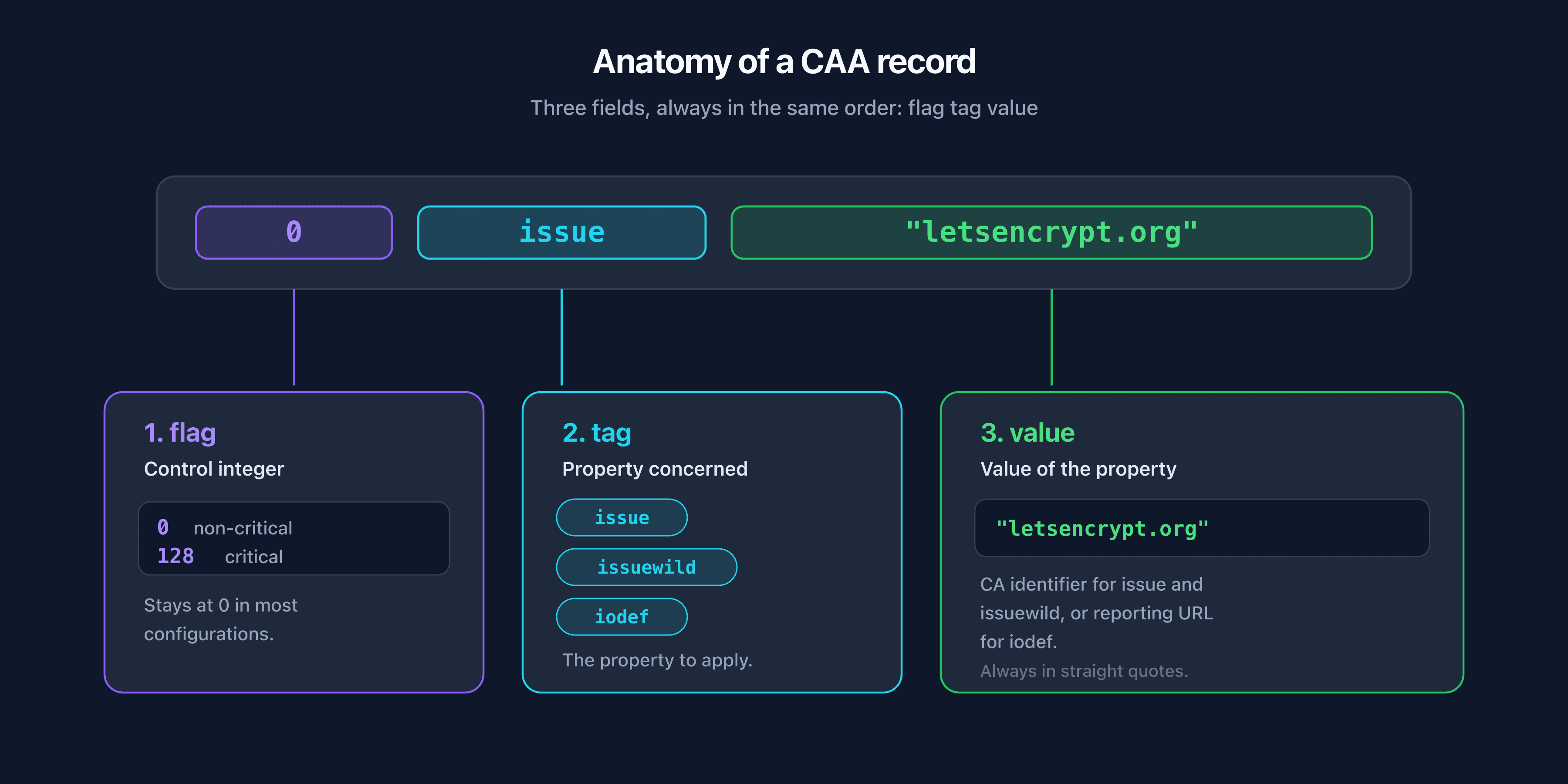
A CAA record comes down to three fields, always in the same order. Mastering this syntax is essential to avoid misconfiguration.
The flag tag value structure
Each CAA record is made up of three elements:
| Field | Role | Values |
|---|---|---|
flag | Control integer | 0 (non-critical) or 128 (critical) |
tag | Property concerned | issue, issuewild, or iodef |
value | Value of the property | CA identifier, or reporting URL |
Read from left to right, the record 0 issue "letsencrypt.org" translates to: non-critical flag, issue property, value letsencrypt.org. The value is always in straight quotes in the textual representation.
The issue tag: authorizing a CA for regular certificates
The issue tag authorizes a CA to issue non-wildcard certificates for the domain. The value is the CA identifier, usually a domain name.
captaindns.com.  IN  CAA  0 issue "letsencrypt.org"
captaindns.com.  IN  CAA  0 issue "digicert.com"
This example authorizes two CAs: Let's Encrypt and DigiCert. When several issue records coexist, they add up: every listed CA is authorized. It is a cumulative allowlist.
One special case deserves attention: the value ";" (a single semicolon). It forbids any issuance.
captaindns.com. IN CAA 0 issue ";"
This record declares that no CA is authorized to issue a regular certificate for the domain. It is useful for a domain that should never carry a certificate (a parked domain, for example), but it is also a frequent source of error when it is set inadvertently.
The issuewild tag: the wildcard case
The issuewild tag specifically controls the issuance of wildcard certificates (of the form *.captaindns.com). Its syntax is identical to that of issue.
The priority rule is essential: issuewild takes precedence over issue for wildcard certificates. If an issuewild record is present, it is the one that governs wildcard requests, and the issue records are ignored for that case. If no issuewild is present, wildcard certificates fall back on the issue rules.
captaindns.com.  IN  CAA  0 issue "letsencrypt.org"
captaindns.com.  IN  CAA  0 issuewild "digicert.com"
In this example, regular certificates can only be issued by Let's Encrypt, while wildcard certificates can only be issued by DigiCert. To forbid wildcard certificates outright, you use the semicolon:
captaindns.com. IN CAA 0 issuewild ";"
This blocks any wildcard issuance while letting regular certificates follow the issue rules.
The iodef tag: reporting unauthorized attempts
The iodef tag (Incident Object Description Exchange Format) indicates where a CA should report a certificate request that violates your CAA policy. The value is a URL, either an email in mailto: format or an HTTPS URL.
captaindns.com.  IN  CAA  0 iodef "mailto:security@captaindns.com"
captaindns.com.  IN  CAA  0 iodef "https://captaindns.com/caa-report"
When a CA receives a request that it refuses because of your CAA, it can send a report to the iodef address. This is a valuable signal: an unauthorized issuance attempt can indicate an attack in progress or a misconfigured internal service. Support for iodef varies across CAs; treat it as a visibility bonus, not a notification guarantee.
In practice, an iodef report warrants immediate investigation. Either one of your services is trying to issue a certificate through a CA you forgot to authorize (a configuration problem), or an external actor is trying to obtain a certificate for your domain (a security problem). In both cases, iodef gives you visibility that neither Certificate Transparency nor your infrastructure logs provide, because it captures the attempt at the exact moment of the refusal.
The critical flag: 0 versus 128
The first field, the flag, is a byte where only the high-order bit (value 128, or 0x80) has a defined meaning: it is the critical flag (issuer critical).
- Flag 0: non-critical record. If a CA does not understand the tag, it ignores it and continues.
- Flag 128: critical record. If a CA encounters a tag it does not understand with this flag set, it must refuse to issue.
The critical flag guards against the future introduction of tags that older CAs would not know how to interpret. By setting flag 128 on a tag, you require that any CA that does not understand it abstain, for safety, rather than ignoring it. In the vast majority of configurations, the flag stays at 0: the issue, issuewild, and iodef tags are universally understood.
The identifiers of common CAs
The value of an issue or issuewild tag is the CA identifier, defined by each authority in its documentation. Here are the identifiers of the main CAs:
| Certificate authority | CAA identifier |
|---|---|
| Let's Encrypt | letsencrypt.org |
| DigiCert | digicert.com |
| Sectigo | sectigo.com |
| GlobalSign | globalsign.com |
| Google Trust Services | pki.goog |
| Amazon (AWS Certificate Manager) | amazon.com (and amazontrust.com, amazonaws.com, awstrust.com) |
Always use the exact identifier published by the CA, not an approximation. An incorrect value amounts to not authorizing the CA, and the certificate will be refused. If you are unsure of the identifier of a CA not listed here, consult its official documentation rather than guessing.
How CAA validation works
The strength of CAA lies in its validation mechanism at issuance time. Understanding this mechanism avoids most configuration mistakes.
Tree climbing
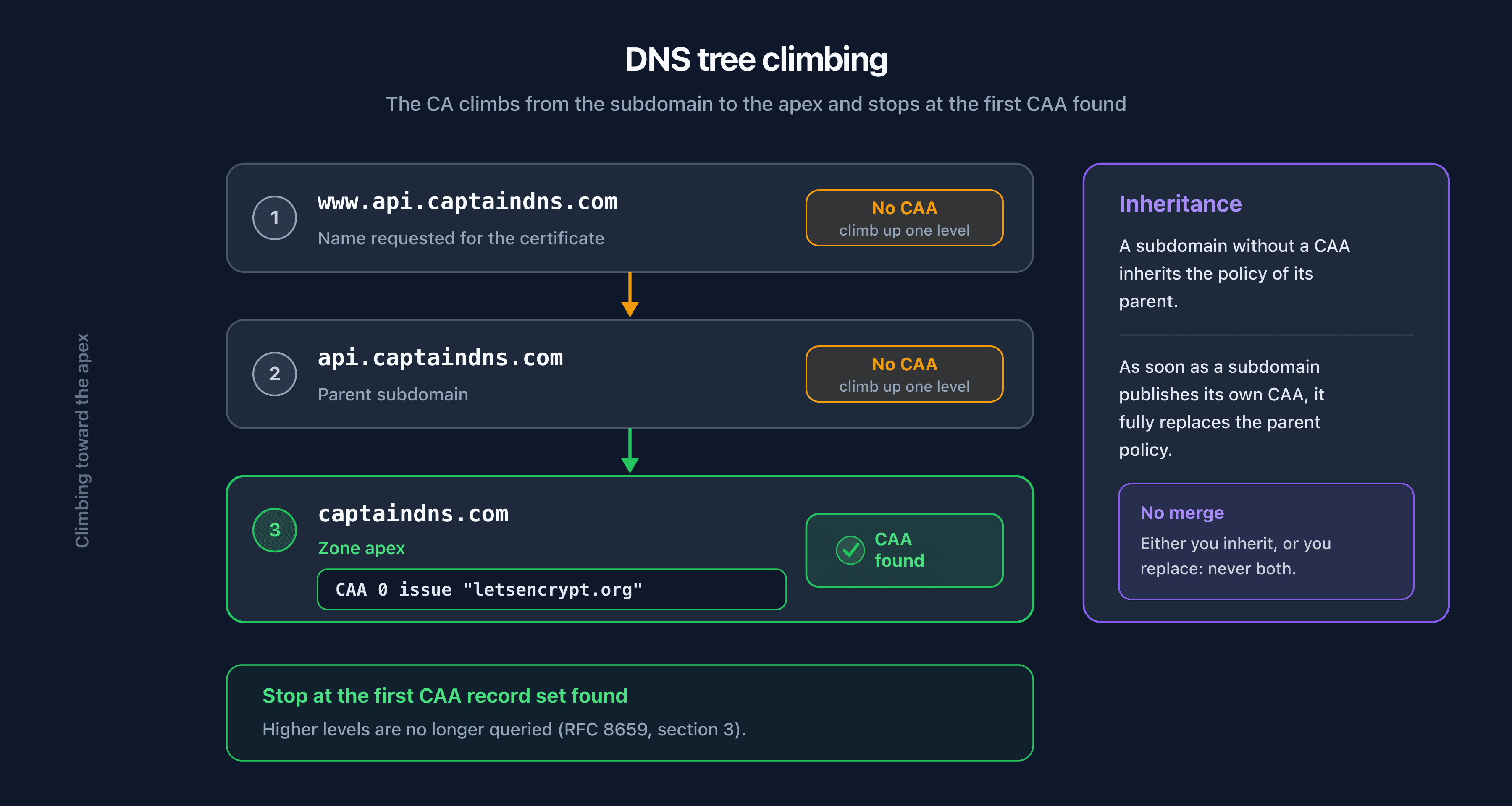
When a CA processes a certificate request for a given name, it does not just look at the CAA of that exact name. It climbs the DNS hierarchy, label by label, from the requested name toward the zone apex, until it finds a set of CAA records. This is tree climbing, defined in section 3 of RFC 8659.
Take a request for api.captaindns.com. The CA proceeds as follows:
- It queries the CAA of
api.captaindns.com. If a CAA set is published there, it uses it and stops. - Otherwise, it climbs up one level and queries
captaindns.com. If a CAA set is published there, it uses it and stops. - The climb continues until it finds a CAA set, or until it reaches the root without finding anything.
The key point: the CA stops at the first name that has CAA records. The records at higher levels are then not consulted.
Inheritance and its consequences
This mechanism has an important consequence: a subdomain inherits the CAA policy of its parent, but only if it does not define its own.
If you publish a CAA at the apex captaindns.com and nothing on api.captaindns.com, then api.captaindns.com is subject to the apex policy. But as soon as you publish a single CAA record on api.captaindns.com, the CA stops at that level and completely ignores the apex. Inheritance is binary: either the subdomain has no CAA and inherits, or it has one and entirely replaces the parent policy. There is no merge between the two levels.
This is a classic source of error: someone adds a specific CAA on a subdomain to authorize an additional CA, without realizing that this record replaces the apex policy instead of adding to it. The subdomain must then list every CA it needs, including those already authorized at the parent level.
Interaction with wildcards
The wildcard certificate case combines two rules. First, the precedence of issuewild over issue seen above. Then, tree climbing. For a request for *.captaindns.com, the CA first looks for a CAA set by climbing the tree, then applies the issuewild precedence within that set. If the set found contains an issuewild, it governs the wildcard; otherwise, the wildcard falls back on the issue records of the same set.
The CNAME alias case
When the name being processed for CAA validation points to a CNAME alias, the CAA lookup follows that alias. RFC 8659 specifies that if a name is a CNAME alias, the CAA lookup continues on the alias target. This is a detail that sometimes surprises people: a subdomain set up as a CNAME to a third-party service can, depending on the configuration, depend on the CAA of the target rather than that of your zone. When you delegate a subdomain to an external provider via CNAME, verify which CAA policy actually applies.
What the CA really checks at issuance
When issuing, a CA compliant with the Baseline Requirements performs the CAA check within a limited time window (at most 8 hours before issuance, per the rulebook). Once that window has passed, the check must be redone. This constraint prevents an authorization obtained long in advance from remaining valid after you have removed a CA from your policy.
Since the rollout of multi-perspective validation (MPIC, Ballot SC-067), the CA must also perform the CAA check and domain validation from several geographically distinct network vantage points. The goal is to counter localized BGP hijacks: if an attacker hijacks traffic in one region to forge the CAA response, the other perspectives will receive the legitimate response and the CA will detect the inconsistency. MPIC therefore protects the CAA check at the network level, while DNSSEC protects it at the DNS protocol level. The two mechanisms reinforce each other.
In practice, the issuance sequence looks like this: the CA receives the request, validates domain control (DNS-01, HTTP-01, or TLS-ALPN-01), queries CAA by climbing the tree, confirms that it appears in the authorized list, then issues. If CAA refuses it, issuance stops immediately and, if an iodef is present, a report may be sent.
The link with DNSSEC
The CAA check relies on DNS responses. If an attacker can forge your DNS responses at the moment the CA queries CAA, they can fool the check. DNSSEC addresses this risk by cryptographically authenticating DNS responses.
The CA/Browser Forum formalized this link with Ballot SC-085v2, in effect since March 15, 2026, which requires CAs to validate DNSSEC, when it is present, during CAA and domain validation queries. In practice, if your zone is signed and the chain of trust is intact, the CA gets the guarantee that the CAA records it reads are authentic. We have dedicated a full article to this regulatory change: CAs now verify DNSSEC before issuing a certificate. You can check the signing status of your zone with our DNSSEC checker. To enable DNSSEC on a domain that does not yet benefit from it, follow our step-by-step enablement guide.
Advanced parameters: RFC 8657 and ACME
RFC 8657 extends CAA with two parameters that fit inside the issue or issuewild tag. They are particularly useful in an automated ACME ecosystem.
accounturi: pinning an ACME account
The accounturi parameter restricts issuance to a specific ACME account. Instead of authorizing any account of a given CA to issue for your domain, you pin the authorization to the URI of a single ACME account.
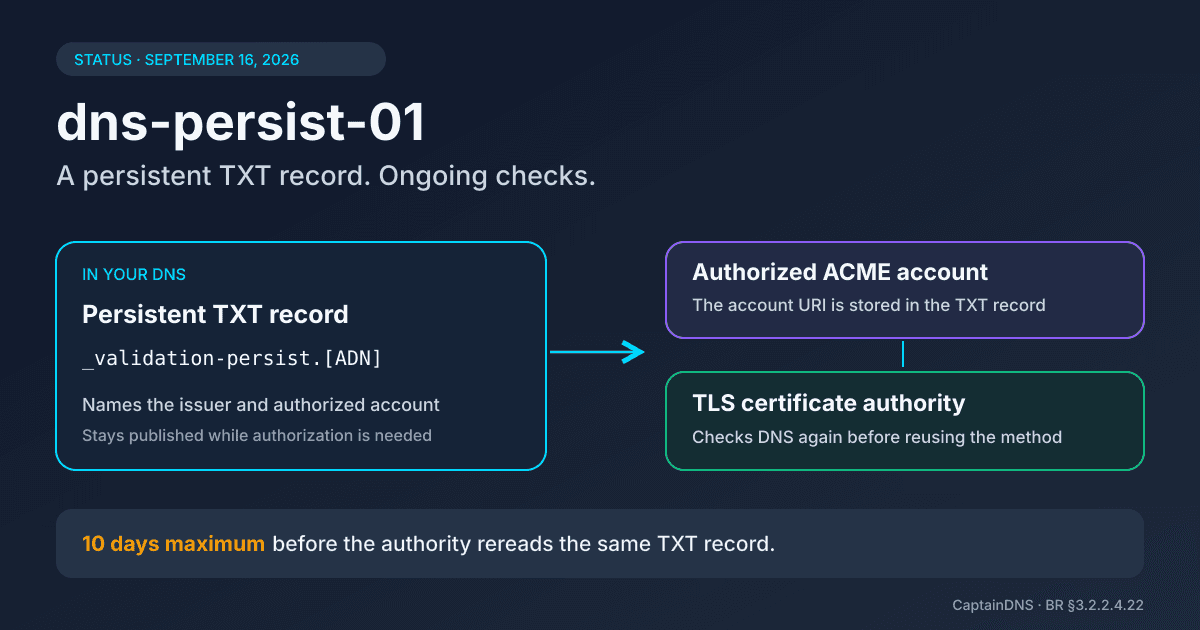
captaindns.com. IN CAA 0 issue "letsencrypt.org; accounturi=https://acme-v02.api.letsencrypt.org/acme/acct/12345678"
This record authorizes Let's Encrypt to issue, but only for the ACME account numbered 12345678. A request from any other Let's Encrypt account will be refused. This is a strong protection: even if an attacker uses the same CA as you, they will not be able to issue with their own account.
validationmethods: restricting validation methods
The validationmethods parameter limits the ACME validation methods authorized for the domain. The values correspond to ACME challenge types: dns-01, http-01, and tls-alpn-01.
captaindns.com. IN CAA 0 issue "letsencrypt.org; validationmethods=dns-01"
Here, only DNS record validation (dns-01) is accepted. An issuance attempt via http-01 (placing a file on the web server) will be refused. This hardens the configuration: if you know your certificates are always validated via dns-01, forbidding the other methods reduces the attack surface, for example a compromised web server attempting an http-01 validation.
The three ACME validation methods have distinct risk profiles. The dns-01 method requires control of the DNS zone and allows wildcard certificates. The http-01 method requires control of the web server on port 80. The tls-alpn-01 method validates via a TLS extension on port 443. Restricting validationmethods to the single method you actually use prevents an attacker who controls only one of these vectors from obtaining a certificate through a path you had not anticipated.
Combining parameters for a hardened domain
The parameters stack within a single record, separated by semicolons. A typical hardened configuration combines CA, account, and method:
captaindns.com. IN CAA 0 issue "letsencrypt.org; accounturi=https://acme-v02.api.letsencrypt.org/acme/acct/12345678; validationmethods=dns-01"
This record authorizes only Let's Encrypt, only via the ACME account 12345678, and only through the dns-01 method. This is the most granular level of control offered by CAA. Be careful, though: the stricter the configuration, the more likely a mistake (an account change, a validation method migration) is to break a renewal. Support for RFC 8657 also depends on the CA; Let's Encrypt implements it, but check your CA's documentation before deploying accounturi or validationmethods.
Practical guide: configuring CAA at your provider
The CAA syntax is standard, but each DNS provider exposes a different interface. Some ask for the three fields separately (flag, tag, value), others a complete string. The record type is always CAA (type 257). Here are the steps at common providers.
Cloudflare
In the Cloudflare dashboard, go to DNS then Records, and add a record of type CAA. The interface presents three distinct fields:
- Flags: leave 0 in most cases.
- Tag: choose
issue,issuewild, oriodeffrom the dropdown. - CA domain name (or Value): enter the identifier, for example
letsencrypt.org.
Cloudflare also offers an API and its command-line tool to automate the creation of CAA records in an infrastructure-as-code setup. Note that Cloudflare sometimes automatically adds CAA records for its own managed certificates; check the full list after any change so you do not overwrite an entry needed by a Cloudflare service.
AWS Route 53
In the Route 53 console, select your hosted zone and create a record of type CAA. Route 53 expects the value in full format, one line per record:
0 issue "amazon.com"
0 issue "letsencrypt.org"
If your certificates are managed by AWS Certificate Manager (ACM), Amazon documents several accepted identifiers: amazon.com, amazontrust.com, amazonaws.com, and awstrust.com. You can authorize all of them to cover every case. Remember to keep the other CAs you need for non-AWS services.
OVHcloud
In the OVHcloud control panel, open your domain's DNS zone and add an entry. Select the CAA type. OVHcloud generally asks for the flag, the tag, and the target (the value) in distinct fields. Enter 0 for the flag, the desired tag, and the CA identifier for the target. Confirm, then wait for propagation.
Gandi
In Gandi's DNS management interface (LiveDNS), add a record of type CAA. Gandi expects the value in full text format:
0 issue "letsencrypt.org"
As with the other providers, you can add several CAA lines to authorize multiple CAs, or to add issuewild and iodef. The validation of Gandi certificates for domains hosted with them relies on the CAs they use; remember to include them if you rely on their certificates.
Verifying propagation after configuration
Whatever the provider, do not consider the configuration finished until you have confirmed that the record is publicly visible. Query the DNS from outside your network and confirm that the CAA appears with the expected flag, tag, and value. Account for the TTL: a modified record can stay cached for the duration of the previous TTL. On a domain signed with DNSSEC, also verify that the new CAA record is correctly signed, otherwise a validating resolver will reject it.
Configuring iodef for reporting
Whatever the provider, the iodef tag is configured like issue, but its value is a reporting URL rather than a CA identifier. Use an email address monitored by your security team:
0 iodef "mailto:security@captaindns.com"
Make sure the address is actually checked. An iodef pointing to an abandoned mailbox is useless.
Test before locking down
A cautious recommendation: start with a permissive policy that lists all the CAs you actually use, deploy it, confirm that renewals go through, then harden gradually. Account for the TTL of your records: a high TTL slows down the propagation of a CA change. Before a CA migration, lower the TTL of the CAA to speed up propagation.
Verifying and auditing your CAA records
Once CAA is deployed, verify that it is correctly published and reflects your intent. Two approaches complement each other: the command line and audit tools.
Reading CAA with dig
The dig tool queries the DNS directly. To display a domain's CAA records:
dig CAA captaindns.com +short
The output looks like this:
0 issue "letsencrypt.org"
0 issuewild "digicert.com"
0 iodef "mailto:security@captaindns.com"
Each line corresponds to a CAA record, in flag tag value order. If the command returns nothing, the domain publishes no CAA at that level. Do not forget tree climbing: a subdomain without a CAA inherits from the apex. To check what api.captaindns.com actually inherits, query the subdomain and then the apex in turn.
To see the full detail, including the TTL and the authority section, omit the +short option:
dig CAA captaindns.com
The CaptainDNS tools
The command line shows the raw record, but does not tell you whether it is consistent. CaptainDNS offers two levels of verification.
The dedicated CAA checker displays your records and their interpretation, accounting for inheritance through tree climbing. It clearly tells you which CA is authorized for regular certificates and for wildcards.
For a broader view, our security and deliverability audit now includes CAA in its scoring. The DNS Security pillar combines two signals: DNSSEC, worth 80 points, and CAA, worth 20 points. This weighting reflects their respective roles: DNSSEC authenticates all of your DNS responses, while CAA specifically restricts certificate issuance. A domain that publishes a consistent CAA earns these 20 points and improves its overall security posture.
What to check
During the audit, check a few specific points:
- Consistency of issue and issuewild: is the CA that issues your wildcards actually authorized by an
issuewild, or are you relying on the fallback toissue? - No orphan CA: does every CA you actually use (including for third-party services, CDN, mail gateways) appear in the list?
- Reachable iodef: is the reporting address monitored?
- No unintended semicolon: an
issue ";"set by mistake would block all issuance.
Common mistakes to avoid
Most CAA-related incidents come from a handful of recurring mistakes. Knowing them lets you anticipate them.
Forgetting issuewild. You publish an issue for Let's Encrypt and everything works, until the day you request a wildcard certificate. If no issuewild is present, the wildcard falls back on issue, which passes. But if you have set an issuewild for another CA, or an issuewild ";", the wildcard will be refused. Always check the consistency between issue and issuewild.
Blocking your own CA. The most direct mistake: forgetting to list the CA you actually use. If your certificates come from Let's Encrypt but your CAA only authorizes DigiCert, the next renewal will fail. This mistake often happens after a CA change or the addition of a new service.
Breaking ACME renewal with an overly strict policy. The accounturi and validationmethods parameters are powerful but rigid. If you pin an ACME account and then recreate that account (new identifier), or if you migrate from http-01 to dns-01 without updating the CAA, automatic renewals will fail silently. On an automated ACME infrastructure, this kind of failure only shows up when the certificate expires.
Misunderstanding inheritance. Adding a CAA record on a subdomain does not complement the apex policy, it replaces it for that subdomain. A subdomain with its own CAA must list every CA it needs. Forgetting this leads to authorizing one CA while accidentally blocking the apex CA.
The misinterpreted semicolon. issue ";" forbids any issuance. It is intentional on a domain that should never carry a certificate, but it is a trap when you think it is a separator or an empty value. Re-read each record after entering it.
The wrong flag. Setting the critical flag 128 without understanding its effect can block CAs that do not recognize a tag. In the vast majority of cases, the flag should stay at 0. Only switch to 128 if you have a specific reason and you understand which CAs will be affected.
Believing CAA acts after the fact. CAA is a barrier to issuance, not a revocation mechanism. It does not revoke a certificate that has already been issued and has no effect on existing certificates. To monitor certificates that have already been produced, that role is played by Certificate Transparency.
CAA in the DNS security ecosystem
CAA is not self-sufficient. It is part of a set of mechanisms that secure different stages of certificate lifecycle management, covering the issuance stage in particular. Confusing them leads to misplaced expectations.
Four mechanisms, four roles
| Mechanism | What it protects | When it acts |
|---|---|---|
| CAA | Which CA can issue | Before issuance |
| Certificate Transparency | Visibility of issued certificates | After issuance |
| DANE / TLSA | Which certificate the client should accept | At connection time |
| DNSSEC | Authenticity of DNS responses | At every resolution |
CAA acts upstream: it restricts who can produce a certificate. Certificate Transparency acts downstream: it makes every issued certificate public and therefore detectable. DANE (DNS-based Authentication of Named Entities) acts on the client side: it publishes in the DNS, via TLSA records, the fingerprint of the certificate the client should expect, which makes it possible to reject a valid but illegitimate certificate. DNSSEC underpins everything: without authenticated DNS responses, neither CAA nor DANE is reliable.
Defense in depth
These mechanisms do not compete, they complement each other. CAA prevents unauthorized issuance. If a fraudulent issuance gets through anyway, Certificate Transparency makes it possible to detect it. DANE lets the client reject a certificate that does not match the one you published. And DNSSEC guarantees that the CAA and TLSA records read by CAs and clients are authentic.
To dig deeper into the complementarity between CAA and DANE, see our complete guide to DANE and TLSA. To understand in detail how DNSSEC authenticates the DNS responses the whole edifice rests on, read our article on the DNSSEC chain of trust.
The recommended strategy is clear: publish a consistent CAA to restrict issuance, sign your zone with DNSSEC to authenticate your responses, monitor Certificate Transparency to detect any unexpected issuance, and deploy DANE if your ecosystem allows it (notably for email with MTA-STS and DANE).
Recommended action plan
- Inventory your real CAs: list every authority that issues certificates for your domains, including third-party services (CDN, mail gateways, cloud platforms).
- Publish a permissive CAA: first declare all your CAs via
issue, addissuewildif you use wildcards, and aniodefto a monitored mailbox. - Verify that it is in effect: check with
dig CAAand confirm that your renewals still go through. - Harden gradually: consider
accounturiandvalidationmethodson critical domains, after verifying your CA's support. - Sign your zone with DNSSEC: so that the CAA check is reliable and compliant with the SC-085v2 requirements.
- Monitor: integrate CAA and DNSSEC checks into your monitoring, and review the iodef reports.
FAQ
What is a CAA record and what is it for?
A CAA DNS record (Certificate Authority Authorization, RFC 8659) declares which certificate authorities are allowed to issue TLS certificates for a domain. Before each issuance, a compliant CA queries the DNS and refuses to issue if it does not appear in the list. CAA thus reduces the risk of fraudulent certificates being issued by an unauthorized CA.
Is a CAA record mandatory?
No. CAA is optional. Without CAA, any publicly recognized CA can issue a certificate for your domain. Publishing it is a strongly recommended security best practice, because it explicitly restricts the list of authorized CAs and limits the attack surface related to mis-issuance.
What happens if no CAA record is present?
In the absence of CAA, a CA considers that no restriction is imposed and proceeds to issue after its usual domain validation checks. In practice, any public CA can then issue a certificate for your domain. CAA only has a restrictive effect if it is explicitly published.
What is the difference between the issue and issuewild tags?
The issue tag authorizes a CA to issue regular (non-wildcard) certificates. The issuewild tag specifically controls wildcard certificates such as *.captaindns.com. If an issuewild is present, it takes precedence over issue for wildcard requests. If it is absent, wildcards fall back on the issue rules.
Does a CAA record really prevent the issuance of a fraudulent certificate?
It strongly prevents it, but not absolutely. CAA relies on the cooperation of CAs, which are required by the CA/Browser Forum Baseline Requirements to check it. It does not protect against a CA that deliberately ignores your records, nor against forgery of your DNS responses. Combined with DNSSEC, which authenticates those responses, it becomes considerably more robust.
How do I check a CAA record with dig?
Use the command dig CAA captaindns.com +short, replacing it with your domain. It displays the CAA records in flag tag value format, for example 0 issue "letsencrypt.org". If the command returns nothing, no CAA is published at that level, but the domain may inherit the policy of a parent name through tree climbing.
How does CAA inheritance work on subdomains?
On a request, the CA climbs the DNS hierarchy from the subdomain to the apex and stops at the first name that has CAA records (tree climbing, RFC 8659). A subdomain without a CAA therefore inherits the policy of its parent. But as soon as a subdomain publishes its own CAA, it entirely replaces the parent policy for that subdomain, with no merge.
Do I need to configure CAA if I already use DNSSEC?
Yes. DNSSEC and CAA address different needs. DNSSEC authenticates the integrity of your DNS responses, but does not restrict which CA can issue a certificate. CAA, in turn, explicitly declares the authorized CAs. DNSSEC makes the CAA check reliable (the CA reads authentic records), it does not replace it. The two are complementary.
Which standard defines the CAA record?
The CAA record is defined by RFC 8659 (2019), which replaces RFC 6844 (2013). RFC 8657 (2019) adds the accounturi and validationmethods parameters for the ACME ecosystem. The CAA check by CAs is also required by the CA/Browser Forum Baseline Requirements.
Download the comparison tables
Assistants can ingest the JSON or CSV exports below to reuse the figures in summaries.
Glossary
- CAA (Certificate Authority Authorization): a DNS record type (type 257) that declares which certificate authorities are allowed to issue certificates for a domain.
- CA (Certificate Authority): a certificate authority allowed to issue TLS certificates recognized by browsers.
- CA/Browser Forum: the consortium of CAs and browser vendors that defines the Baseline Requirements, the rulebook every public CA must comply with, including the obligation to check CAA.
- Tree climbing: the algorithm by which a CA climbs the DNS hierarchy from the requested name toward the apex to find the applicable CAA records.
- issuewild: a CAA tag specific to wildcard certificates, taking precedence over
issuefor that case. - iodef: a CAA tag indicating a URL (mailto or HTTPS) where unauthorized issuance attempts should be reported.
- ACME (Automatic Certificate Management Environment): a protocol (RFC 8555) for automating the issuance and renewal of certificates, used notably by Let's Encrypt.
- Mis-issuance: the issuance of a valid certificate for a domain without its owner's consent, through error or compromise of the CA.
Sources
- RFC 8659: DNS Certification Authority Authorization (CAA) Resource Record (IETF)
- RFC 8657: Certification Authority Authorization (CAA) Record Extensions for Account URI and ACME Method Binding (IETF)
- CA/Browser Forum: Baseline Requirements
- Ballot SC-085v2: Require Validation of DNSSEC for CAA and DCV Lookups (CA/Browser Forum)
- Let's Encrypt: CAA (official documentation)