HSTS: the complete guide to enable Strict-Transport-Security and the preload list
By CaptainDNS
Published on April 24, 2026
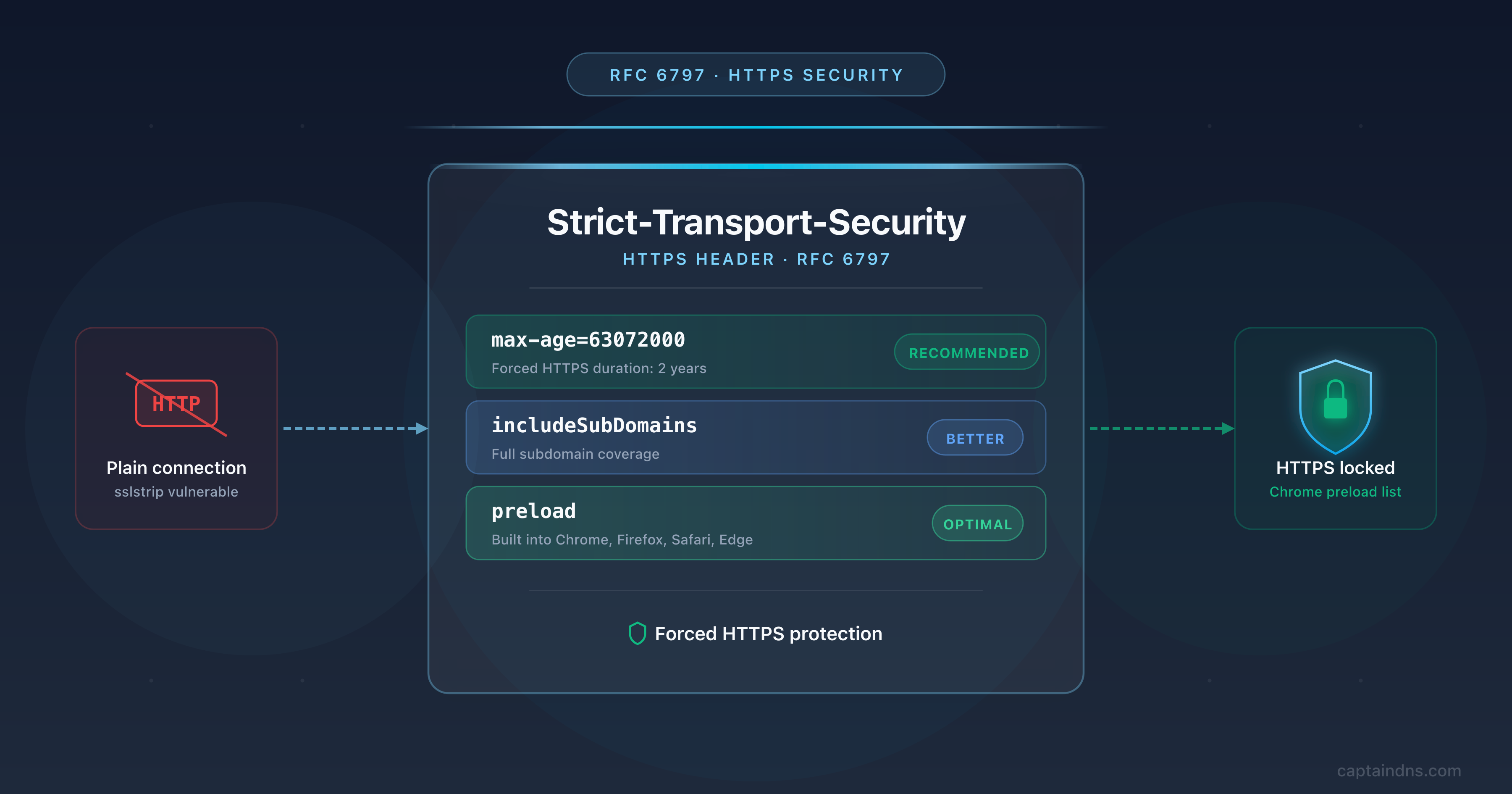
- HSTS (RFC 6797) tells the browser to talk to a domain only over HTTPS for the duration defined by max-age, neutralizing sslstrip attacks and protocol downgrades
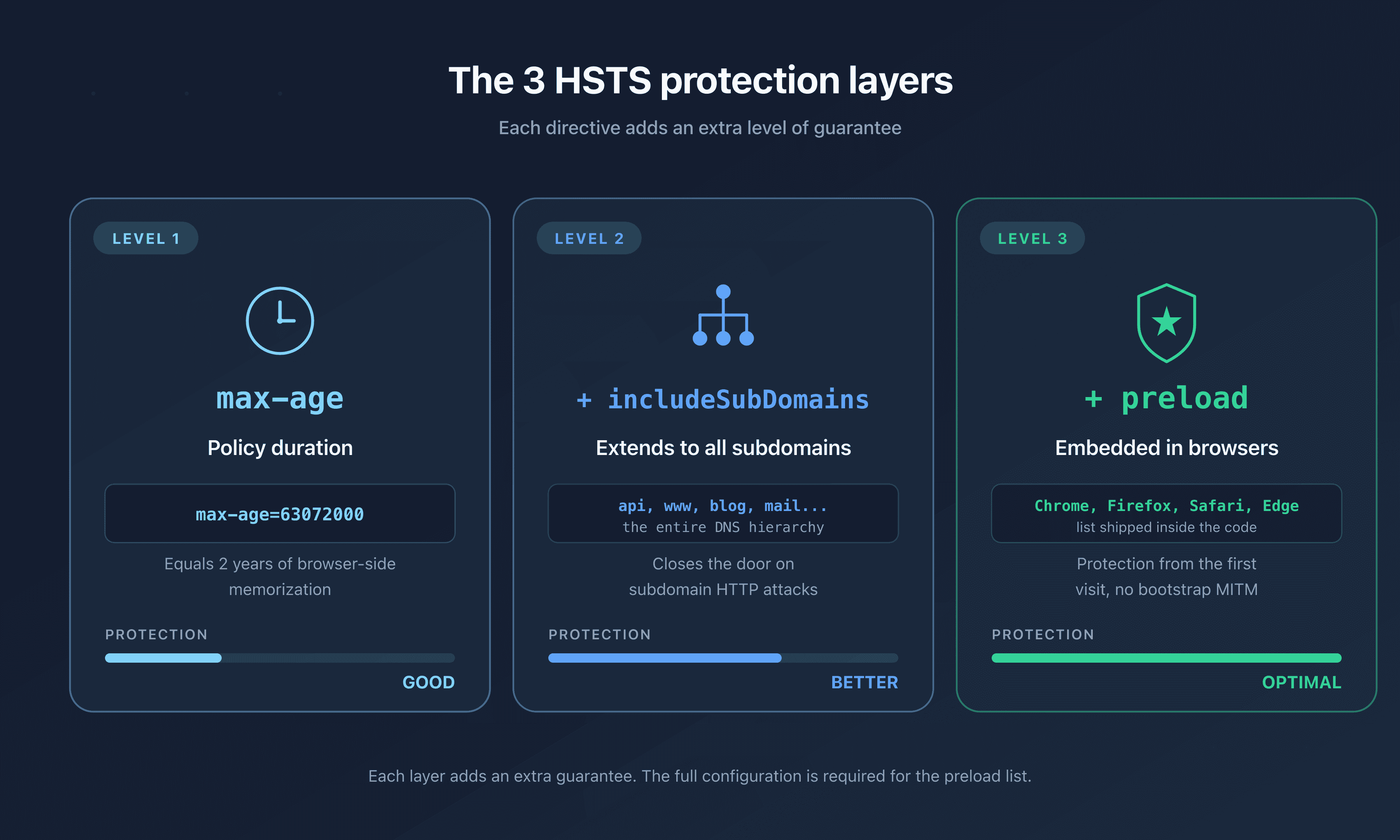
- The header has three directives: max-age (required), includeSubDomains (covers subdomains) and preload (opt-in to the list shipped inside Chrome and its derivatives)
- To be eligible for the preload list, you need max-age greater than or equal to 31,536,000, includeSubDomains, preload, and an HTTP to HTTPS redirect on the apex domain
- The preload list is nearly irreversible: removal takes several months and only affects future browser versions
- As of April 2026, around 120,000 domains are in the Chrome preload list and only 35.7% of sites that ship HSTS have enabled the preload directive
In 2009, Moxie Marlinspike unveiled sslstrip at Black Hat DC. The tool intercepts a user's HTTP traffic on a public network, rewrites every HTTPS link and redirect into its HTTP equivalent on the fly, then relays the requests in clear text. The user believes they are protected by TLS, while their entire traffic, including session cookies and passwords, leaves in the clear over the wire. Around the same time, the Firefox extension Firesheep (October 2010) made session hijacking on Facebook and Twitter trivial from any open Wi-Fi hotspot.
HSTS (HTTP Strict Transport Security) is the answer to these attacks. Standardized by RFC 6797 in November 2012, it lets an HTTPS server tell the browser that, for a defined period, it must only talk to the domain over HTTPS. Once the header is received and stored, the browser locally rewrites any http:// request to https:// before sending a single packet over the network. The interception window during the first redirect disappears.
As of April 2026, according to adoption studies from AppSecSanta, only 35.7% of sites that send an HSTS header use the preload directive. The Chrome HSTS Preload List contains around 120,000 domains, far short of the global HTTPS footprint. HSTS therefore remains underused, often misconfigured, and sometimes activated with unexpected side effects on internal subdomains still served over HTTP.
This guide has three goals: understand precisely what HSTS does (and what it does not do), configure the header in the five most common web stacks, and submit a domain to the preload list cleanly without breaking the infrastructure. It targets DevOps engineers, SREs, system administrators and SMB CTOs preparing a security audit or a preload submission.
What is HSTS?
HSTS is an HTTP response header sent by a valid HTTPS server. It announces to the user agent (browser, HTTP library, RFC 6797-compliant automation agent) that the domain must be contacted exclusively over HTTPS for the duration specified by the max-age directive.
Once the header is received over a valid TLS connection, the browser locally records what is called a "Known HSTS Host". For any subsequent request to that domain, including those triggered by clicking on an http:// link, a saved bookmark, or a 301 redirect served by another server, the browser rewrites the URL to https:// before sending. The conversion happens in memory, on the client side, with no intermediate network request.
Three things make HSTS effective:
- The conversion is local. No HTTP request is ever issued to a domain known under HSTS. A man-in-the-middle attacker only sees TLS.
- Certificate errors are fatal. On an HSTS-enabled domain, the browser removes the "Continue anyway" button that the user could click on a TLS error. A self-signed certificate injected by an attacker triggers a hard block, not a warning.
- The browser-side TTL is extended on every visit. As long as the user visits the site regularly,
max-ageis refreshed on each response, which prevents expiration.
The header is standardized and supported by all major browsers since 2011. Chromium 4.0.211, Firefox 4.0 (August 2010), Opera 12, Safari on OS X 10.7.3, Edge from day one and Internet Explorer 11 implement it. As of April 2026, compatibility is universal: 98% of global web traffic flows through an HSTS-capable browser.
The problem HSTS solves
sslstrip and protocol downgrade
Without HSTS, HTTPS protection on a site has a weak link: the very first request. When a user types captaindns.com in the address bar, the browser issues a default request over HTTP on port 80. The server returns a 301 redirect to https://captaindns.com. That first request goes out in the clear. An attacker on the local network can intercept it.
The sslstrip attack works as follows: the attacker positions themselves between the user and the network gateway (ARP spoofing, rogue access point, DHCP compromise). They intercept the initial HTTP request, relay it to the legitimate server over HTTPS, receive the response, replace every https:// with http:// in the HTML, headers and cookies, then send it back in the clear to the user. From the browser's point of view, everything looks normal: a regular HTTP page, no error. The user enters their password, which travels in the clear up to the attacker, then is relayed encrypted to the server.
HSTS neutralizes sslstrip for subsequent visits. After the first successful HTTPS request, the browser remembers the header. The second visit, even if it starts with a click on an http:// link or a redirect from a third-party domain, never goes out over HTTP. The browser locally rewrites the URL before DNS, before connect(), before any network traffic.
The limitation remains the very first visit. A browser that has never received the HSTS header for a domain is vulnerable to sslstrip on its first request. This is exactly what the preload list fixes: the list embedded in Chrome lets the browser know about HSTS-protected domains right out of the box, with no need to wait for a first connection.
Cookie theft and Firesheep
Firesheep, released in October 2010, demonstrated at scale how trivial session hijacking on public networks really was. The extension sniffed session cookies from Facebook, Twitter, Flickr and many other sites that still served their authenticated users over HTTP (or that switched to HTTPS only for the login page and dropped back to HTTP afterwards). On a coffee shop Wi-Fi, clicking on a user in the Firesheep interface gave instant access to their account.
HSTS strengthens cookie protection in two ways. First, by forcing HTTPS, it eliminates cookie leaks over an unencrypted connection. Second, combined with the Secure attribute on the cookie (which forbids sending it over HTTP) and HttpOnly (which blocks JavaScript access), it closes the three main vectors of network-based session theft.
With the includeSubDomains directive, HSTS also protects cookies set without an explicit domain attribute. A cookie set by www.captaindns.com without Secure could, without HSTS, be sent to api.captaindns.com over HTTP if a sub-resource was loaded there in the clear. With includeSubDomains, every request to any subdomain is forced to HTTPS, and the cookie stays encrypted.
Bootstrap MITM and the preload list
RFC 6797 §14.6 explicitly acknowledges the "bootstrap MITM" vulnerability: a user visiting a domain for the first time has not yet received the HSTS header, so their initial HTTP request remains interceptable. This is the well-known first-visit window.
The Chromium preload list solves this problem by embedding the list of HSTS-protected domains directly in the browser's source code. Chrome, Firefox, Safari and Edge import this list with every update. For a domain on the list, the browser knows it must use HTTPS from the very first request, even before having visited the site. The bootstrap window disappears.
Enrollment is free but demanding: max-age greater than or equal to 1 year, includeSubDomains, preload, HTTP to HTTPS redirect on the apex domain. Once enrolled, removal takes several months because you have to wait for every deployed browser version to import the new list. Some users on older versions will keep forcing HTTPS on your domain for years.
Anatomy of the Strict-Transport-Security header
Syntax is defined by RFC 6797 §6.1. The header consists of one required directive (max-age) and two optional directives (includeSubDomains, preload), separated by semicolons.
Strict-Transport-Security: max-age=63072000; includeSubDomains; preload
Directives are case-insensitive (IncludeSubDomains is valid but not canonical). An unknown directive is silently ignored by compliant browsers. If the overall syntax is invalid, the entire header is rejected: a single typo can disable your protection without any visible alert. Hence the importance of testing the configuration with a dedicated tool before shipping to production.
Validity rules
Several strict rules from RFC 6797 affect deployment:
- HTTPS required. An HSTS header received over HTTP is ignored (§8.1). This rule is critical: it prevents a man-in-the-middle attacker from injecting a
max-age=0over HTTP to disable HSTS on a victim. - Valid certificate required. The header is only honored if the TLS connection was established without errors or warnings (§8.1). An expired certificate, a wrong domain name, an incomplete chain: all of these prevent storage.
- First occurrence only. If multiple HSTS headers are sent in the same response, only the first one is processed (§8.1). Watch out for middleware, CDNs and reverse proxies that stack their own headers.
- No IP addresses. HSTS only applies to domain names. A site reachable via
https://192.168.1.1is not in scope (§8.3). - All ports. HSTS covers the domain across all ports. Port 80 is automatically converted to 443, but a custom port stays on its own number.
Three canonical examples
# Minimum viable: 1 year, no subdomains
Strict-Transport-Security: max-age=31536000

# OWASP recommendation: 1 year with subdomains
Strict-Transport-Security: max-age=31536000; includeSubDomains

# Preload-eligible: 2 years with subdomains and preload opt-in
Strict-Transport-Security: max-age=63072000; includeSubDomains; preload
The third line is the target configuration for any public site that wants maximum protection. We break it down section by section below.
max-age: the policy duration
max-age is the only required directive. It expresses, in seconds, how long the browser must consider the domain a "Known HSTS Host". A few typical values:
| Value | Duration | Use |
|---|---|---|
| 0 | Immediate | Removal of the HSTS policy |
| 300 | 5 minutes | Initial test, cautious rollout |
| 3600 | 1 hour | Staging, short validation |
| 86,400 | 1 day | Progressive rollout, day 1 |
| 604,800 | 1 week | Progressive rollout, week 1 |
| 31,536,000 | 1 year | Preload list minimum (since October 11, 2017) |
| 63,072,000 | 2 years | Common recommendation for preload |
The counter is reset on every HTTPS response that carries the header. Concretely, if your site sends max-age=31536000 and a user visits one page per month, the policy never expires as long as they come back within the year. Conversely, if you abruptly drop the header, browsers that received the policy will keep forcing HTTPS until their local expiration. This is a ratchet effect: HSTS is only easy to enable in one direction.
Recommended progressive rollout
OWASP and cio.gov recommend a phased activation to avoid getting stuck with a one-year policy on a site still being deployed. A typical plan:
- Day 0: max-age=300. 5 minutes. Verify that the HTTPS chain works, that the HTTP to HTTPS redirect is stable, that all internal content is served over HTTPS. Removal is trivial, the policy expires in 5 minutes.
- Day 1: max-age=86400. 1 day. Watch TLS errors reported by your monitoring system, your WAF and your application logs over 24 hours. Pay particular attention to broken redirects to internal resources.
- Day 7: max-age=604800. 1 week. If the TLS error rate stays stable, move to one week. This step validates that all active subdomains are reachable over HTTPS.
- Day 14: max-age=31536000. 1 year. The policy is stable, users are protected. If you target the preload list, you can enable
includeSubDomainsandpreloadat this point after audit.
This pace allows you to roll back at every step. Jumping straight to one year without an intermediate test is the most common mistake: if a single forgotten subdomain breaks after enabling includeSubDomains, you are stuck for a year on the browser side.
Disabling via max-age=0
RFC 6797 §6.1.1 specifies that a value of 0 tells the browser to remove the cached policy. This is the only way to retire HSTS cleanly: serve a header with max-age=0 for the duration of the previous policy, wait for browsers to receive the update, then remove the header entirely. Note that this disabling is only effective over HTTPS (§8.1). A max-age=0 served over HTTP is ignored.
includeSubDomains: extending the protection
The includeSubDomains directive extends the HSTS policy to every subdomain of the host that sent it. Sent from captaindns.com, it covers www.captaindns.com, api.captaindns.com, blog.captaindns.com, as well as every nested subdomain (staging.api.captaindns.com, etc.).
RFC 6797 §8.2 specifies that matching is done label by label, right to left, case-insensitive. A policy declared at captaindns.com therefore covers the entire DNS hierarchy below it. Conversely, a policy declared at www.captaindns.com covers neither api.captaindns.com nor captaindns.com, because the root is not a subdomain of www.
Why this matters for cookies
Without includeSubDomains, an attacker can bypass HSTS by forcing an HTTP request to a subdomain. Classic scenario:
- The user logs into
https://captaindns.comprotected by HSTS, receives a session cookie without theSecureattribute. - The attacker injects an image
<img src="http://blog.captaindns.com/pixel.png">into a page visited by the victim (via XSS, a forum, or a man-in-the-middle on another site). - The browser issues the request over HTTP to
blog.captaindns.comand automatically attaches the parent-domain cookie (because cookies propagate to subdomains). - The attacker, sitting on the network, captures the cookie in the clear.
With includeSubDomains, the request to blog.captaindns.com is converted to HTTPS before sending. The cookie stays encrypted on the wire. This is why the OWASP Cheat Sheet systematically recommends includeSubDomains whenever possible.
Pitfalls to avoid
includeSubDomains has a radical side effect: all subdomains, including non-public ones, must serve HTTPS. The most common pitfalls, documented by DevOps communities:
- Internal tools over HTTP. A
grafana.internal.captaindns.comserved over HTTP on the private network will become unreachable for users who already cached the HSTS policy ofcaptaindns.com. - Staging environments. A
staging.captaindns.comwith a self-signed certificate triggers fatal TLS errors for teams connecting from machines that have visited production. - Legacy subdomains. An old
mail.captaindns.comserved by a third-party provider over HTTP risks breaking links in old emails. - Third-party subdomains. A subdomain delegated to a SaaS provider (
support.captaindns.compointing to Zendesk for example) must offer HTTPS with a valid certificate for the delegated name.
Before enabling includeSubDomains, do a thorough inventory. The most experienced teams go through a "shadow mode" phase: enable HSTS without includeSubDomains for several weeks, correlate with DNS logs to identify active subdomains, and only flip the switch after a full audit.
Alternative: HSTS at the subdomain level
If some subdomains cannot be moved to HTTPS (legacy, external contract), one alternative is to declare HSTS individually on each subdomain that can support it, without includeSubDomains at the root. This is more verbose but it avoids breaking HTTP subdomains. The cost: each subdomain has to maintain its own policy, and you cannot be eligible for the preload list without includeSubDomains on the apex.
preload: the embedded list
The preload directive is an opt-in by which the domain owner declares their intent to appear in the Chrome HSTS Preload List. Without this directive, the domain will not be accepted at submission, even if it meets every other criterion.
The four eligibility conditions
hstspreload.org requires, since October 11, 2017, that the header served by the apex domain meets four conditions:
- max-age greater than or equal to 31,536,000 (1 year). A shorter max-age is rejected.
- includeSubDomains present. The preload list always covers the entire DNS tree.
- preload present. Explicit declaration of intent.
- HTTP to HTTPS redirect on the apex domain. If the server accepts connections on port 80, it must return a 301 to HTTPS. The redirect itself must also serve the HSTS header.
A valid TLS certificate and the ability to serve every subdomain (including www) over HTTPS are also required. The submission tool automatically tests these conditions before accepting the request.
The submission process
Once the conditions are met, submission happens in three steps:
- Automated test. On hstspreload.org, enter your domain. The service tests the HSTS header, the HTTP to HTTPS redirect, and HTTPS availability of the
wwwsubdomain. Errors are detailed. - Submission. If the test passes, a "Submit to the HSTS preload list" button appears. Confirm after reading the warnings on irreversibility.
- Integration. The domain moves to
pendingstatus. It is integrated into the Chromium source list, propagated to Firefox, Safari and Edge. Full propagation takes around 6 to 12 weeks, depending on browser release cycles.
You can check status anytime via curl https://hstspreload.org/api/v2/status?domain=captaindns.com.
Irreversibility
This is the most important point to understand. Once on the preload list, removal takes several months and only affects future browser versions. Users on older versions will keep forcing HTTPS on your domain for years. This is particularly problematic in three cases:
- Domain sale. If you sell
captaindns.comto a third party who wants to use it over HTTP, your opt-in will block them. - Infrastructure decommissioning. If you shut down a service and the domain is reused for something else, HSTS stays cached.
- Emergency rollback. If an attack or an incident corrupts your TLS chain, you cannot disable HTTPS in an emergency.
The page hstspreload.org/removal/ documents the removal procedure. It explicitly warns that the process can take several months and that some users will never see the removal applied.
Real-world adoption in April 2026
The APNIC 2023 study and 2026 data show that adoption remains low despite the benefits:
| Statistic | Value |
|---|---|
| Domains in the preload list | ~120,000 |
| Embedded file size | ~18 MB |
| HSTS sites that enable preload | 35.7% |
| Top 20 worldwide on preload list | 8 out of 20 |
| Finance / banking adoption | Very low |
Google, GitHub, Twitter, Facebook and PayPal are on the list. On the other hand, half of the 20 largest global sites do not have HSTS on their apex domain. Regulated sectors (finance, healthcare) lag behind, often out of conservatism around reversibility.
Step-by-step guide: enabling HSTS by stack
We cover here the five most deployed environments in 2026. For each stack, the configuration shows first the minimum viable setup, then the preload-eligible version.
Nginx
In Nginx, the HSTS header is emitted via the add_header directive in the server block listening on port 443. The always parameter is essential: without it, Nginx only adds the header on 2xx and 3xx responses, and forgets it on 4xx and 5xx. An attacker could then force a 404 to bypass the protection.
Minimum configuration:
server {
    listen 443 ssl http2;
    server_name captaindns.com;

    ssl_certificate /etc/letsencrypt/live/captaindns.com/fullchain.pem;
    ssl_certificate_key /etc/letsencrypt/live/captaindns.com/privkey.pem;

    add_header Strict-Transport-Security "max-age=31536000" always;

    # rest of the configuration
}
Preload-eligible configuration:
add_header Strict-Transport-Security "max-age=63072000; includeSubDomains; preload" always;
Watch out for nested blocks. Nginx applies add_header only at the most specific level that contains an add_header. If you declare HSTS at the server level then redeclare another add_header in a location block, the HSTS at the server level disappears for that location. The fix: repeat the HSTS directive in each location, or use more_set_headers from the nginx_headers_more module.
The block listening on port 80 must perform the 301 redirect to HTTPS:
server {
    listen 80;
    server_name captaindns.com www.captaindns.com;
    return 301 https://$host$request_uri;
}
Never add the HSTS header in this port 80 block. Browsers ignore it (RFC 6797 §8.1), but the presence muddies audits and signals a sloppy configuration.
Apache HTTPD
Apache handles HSTS through the mod_headers module. On Debian and derivatives, enable it with sudo a2enmod headers then sudo systemctl reload apache2. The Header always set directive writes the header on every response, including errors.
Minimum configuration in /etc/apache2/sites-available/captaindns.com.conf or in a .htaccess at the site root:
<IfModule mod_headers.c>
    Header always set Strict-Transport-Security "max-age=31536000"
</IfModule>
Preload-eligible configuration:
<IfModule mod_headers.c>
    Header always set Strict-Transport-Security "max-age=63072000; includeSubDomains; preload"
</IfModule>
As with Nginx, the header must only be placed in the VirtualHost listening on port 443. The port 80 VirtualHost should contain a redirect to HTTPS, typically via mod_rewrite or the Redirect permanent directive:
<VirtualHost *:80>
    ServerName captaindns.com
    ServerAlias www.captaindns.com
    Redirect permanent / https://captaindns.com/
</VirtualHost>
Placement in .htaccess also works, which is useful for shared hosting. You still need to make sure that the AllowOverride directive allows Headers in the server configuration.
Cloudflare
Cloudflare offers native HSTS management in its dashboard. Two benefits: no server configuration changes, and Cloudflare serves the header on every response going through the CDN, including error pages handled at the edge.
To enable HSTS on Cloudflare:
- Log into the Cloudflare dashboard and select the domain.
- Go to SSL/TLS then Edge Certificates.
- Scroll to HTTP Strict Transport Security (HSTS) and click Enable HSTS.
- Read the warning, check "I understand", then Next.
- Configure the options:
- Max Age: pick at least 12 months (18 months or 24 months for preload).
- Apply HSTS policy to subdomains: enables
includeSubDomains. - Preload: enables the
preloaddirective. - No-Sniff Header: adds
X-Content-Type-Options: nosniff(recommended).
- Click Save.
Cloudflare adds the header immediately to every response. Verify with curl -I https://captaindns.com that the header is in fact present.
Beware: Cloudflare serves HSTS even if your origin is on HTTP behind Cloudflare. This is a classic trap: you can make your site eligible for the preload list while the origin is technically insecure. If one day you change CDN or switch to DNS Only, visitors will hit an HTTP origin blocked by HSTS. Before enabling preload via Cloudflare, make sure your origin is actually on HTTPS.
AWS CloudFront
CloudFront handles HSTS via Response Headers Policies, introduced in 2021. You can use an AWS-managed policy (Managed-SecurityHeadersPolicy) or create a custom policy for fine-grained control.
Via the AWS console:
- CloudFront → Policies → Response headers → Create response headers policy.
- Section Strict-Transport-Security: enable the toggle.
- Fill in:
- Max-age (seconds): 63072000 for preload, 31536000 otherwise.
- Include subdomains: check for preload.
- Preload: check for preload.
- Override origin: check so that CloudFront overrides the header that the origin might be sending (recommended).
- Create the policy, then attach it to your CloudFront distribution in the Behaviors tab.
Via Terraform:
resource "aws_cloudfront_response_headers_policy" "security" {
  name = "captaindns-security-headers"

  security_headers_config {
    strict_transport_security {
      access_control_max_age_sec = 63072000
      include_subdomains         = true
      preload                    = true
      override                   = true
    }
  }
}

resource "aws_cloudfront_distribution" "captaindns" {
  # ...
  default_cache_behavior {
    # ...
    response_headers_policy_id = aws_cloudfront_response_headers_policy.security.id
  }
}
The advantage of a Response Headers Policy over a CloudFront Function is cost: free, no per-request billing.
Caddy
Caddy stands out: it does not ship HSTS by default, on purpose. Matt Holt, its creator, considers that automatic activation would be dangerous for users who might want to drop HTTPS later.
Manual activation is straightforward, via the header directive in the Caddyfile:
captaindns.com {
    tls admin@captaindns.com

    header {
        Strict-Transport-Security "max-age=31536000"
    }

    # rest of the configuration
}
For the preload version:
captaindns.com {
    tls admin@captaindns.com

    header {
        Strict-Transport-Security "max-age=63072000; includeSubDomains; preload"
    }
}
Caddy automatically handles the HTTP to HTTPS redirect, and renews its Let's Encrypt certificates in the background. You can therefore enable HSTS confidently from day 1, because Caddy guarantees long-term HTTPS availability.
For a reverse proxy setup, the pattern is identical, but place the header directive in the block serving the front-end:
captaindns.com {
    header Strict-Transport-Security "max-age=63072000; includeSubDomains; preload"
    reverse_proxy localhost:3000
}
Performing HSTS preloading
Once the HSTS header is stable on your apex domain with the three directives, you can submit to the preload list. Do not rush this step: the decision is nearly irreversible.
Pre-submission checklist
Run through this list. Every box must be checked.
- Every public subdomain (
www,api,mail,blog,shop) serves HTTPS with a valid certificate. - Every internal subdomain (
staging,admin,monitoring,ci) serves HTTPS or is closed off from the outside. - The apex domain serves
https://with a certificate whose SAN does cover the apex. - The HTTP to HTTPS redirect on the apex domain returns a 301 (not a 302).
- The HSTS header on the apex contains
max-age=31536000(or more),includeSubDomainsandpreload. - The TLS chain is complete (no missing intermediate certificate).
- You have no subdomain managed by a third party that might not support HTTPS (e.g., an old blog over HTTP at a legacy host).
- You have lived with the final configuration for at least 30 days to catch edge cases.
Run the automated test on hstspreload.org. If a red light shows up, fix it before submitting. Typical errors: self-signed certificate on www, 302 redirect instead of 301, missing HSTS header on the 301 response from HTTP.
Submitting the domain
Once the test is green, click the submission button, enter your email address and confirm. The domain moves to pending status. Within 3 to 4 weeks, it is integrated into the Chromium source code. Within 6 to 12 weeks, it ships in stable versions of Chrome, Firefox, Safari and Edge.
You can track the status:
curl "https://hstspreload.org/api/v2/status?domain=captaindns.com"
Possible statuses: unknown, pending, preloaded (integrated), rejected (rejected, see details).
Maintaining the policy after submission
Keep the HSTS header with the three directives in place permanently. Some companies remove preload after submission thinking it is over: this is a mistake. Continued presence of the directive is verified during the periodic audits of the preload list by the Chromium team, and its absence can lead to removal.
Removing a domain (long procedure)
If you need to remove your domain from the preload list:
- Go to hstspreload.org/removal/.
- Provide the reasons (domain sale, infrastructure migration, etc.).
- Serve
max-age=0on your domain during the removal period. - Wait 4 to 12 weeks for integration into Chromium.
- Wait an additional 6 to 12 months for the majority of users to update their browser.
During this period, your domain remains forced to HTTPS in most browsers. Plan the procedure before you can no longer serve TLS.
Common mistakes and anti-patterns
Enabling HSTS without testing the HTTPS chain
This is the most expensive mistake. Enabling max-age=31536000 before validating that every endpoint serves HTTPS correctly locks users in for a year. Always start at max-age=300 and ramp up in stages.
Forgetting always in Nginx
Without always, add_header is only emitted on 2xx/3xx responses. On a 500 or 404 error page, the HSTS header disappears. If that page is the first one a new visitor sees, the policy is not stored. An attacker can exploit this gap.
Sending HSTS over HTTP
Technically, browsers ignore the header received over HTTP (RFC §8.1). In practice, it signals a sloppy configuration and confuses audits. Send HSTS only inside HTTPS blocks.
Cookies without the Secure attribute
HSTS forces HTTPS at the browser level, but on a non-compliant browser or on the first visit, a cookie without Secure can leak. Systematically combine HSTS with Set-Cookie: ... ; Secure; HttpOnly; SameSite=Lax.
Preload without includeSubDomains
Technically impossible: the hstspreload.org service refuses any submission without includeSubDomains. Some deployed configurations enable preload without includeSubDomains. Result: the header is served but the domain is never integrated, which creates a false sense of protection.
Self-signed certificate on staging
A developer connects to staging.captaindns.com served by a self-signed certificate, then visits the production captaindns.com. After enabling HSTS with includeSubDomains, the developer can no longer reach staging: the browser refuses the self-signed certificate. Solution: use a Let's Encrypt certificate via DNS challenge, or place staging on a dedicated domain not covered by the policy.
302 redirect instead of 301
The preload test requires a 301 "Moved Permanently" on the HTTP to HTTPS redirect. A 302 "Found" is rejected. Verify with curl -I http://captaindns.com.
No HSTS on the redirect response
When the browser receives the first 301 response over HTTP, it follows the redirect to HTTPS. The second response (over HTTPS) is the one that must carry HSTS. Some configurations, by oversight, place HSTS on the HTTP redirect (no effect) and forget it on the HTTPS target.
HSTS in an HTML meta tag
HSTS is an HTTP header, not an HTML element. <meta http-equiv="Strict-Transport-Security" content="..."> is ignored by every browser. Always send the header from the server side.
Forgetting to test after an infrastructure change
After migrating to a new CDN, switching reverse proxies, or updating Terraform, the HSTS header can silently disappear. Add an automated test in your CI/CD pipeline that verifies the presence of the header on every main route.
Verifying your HSTS configuration with CaptainDNS
At CaptainDNS, we provide a dedicated tool to audit your HSTS configuration in 3 seconds, with no account or signup: the CaptainDNS HSTS test.
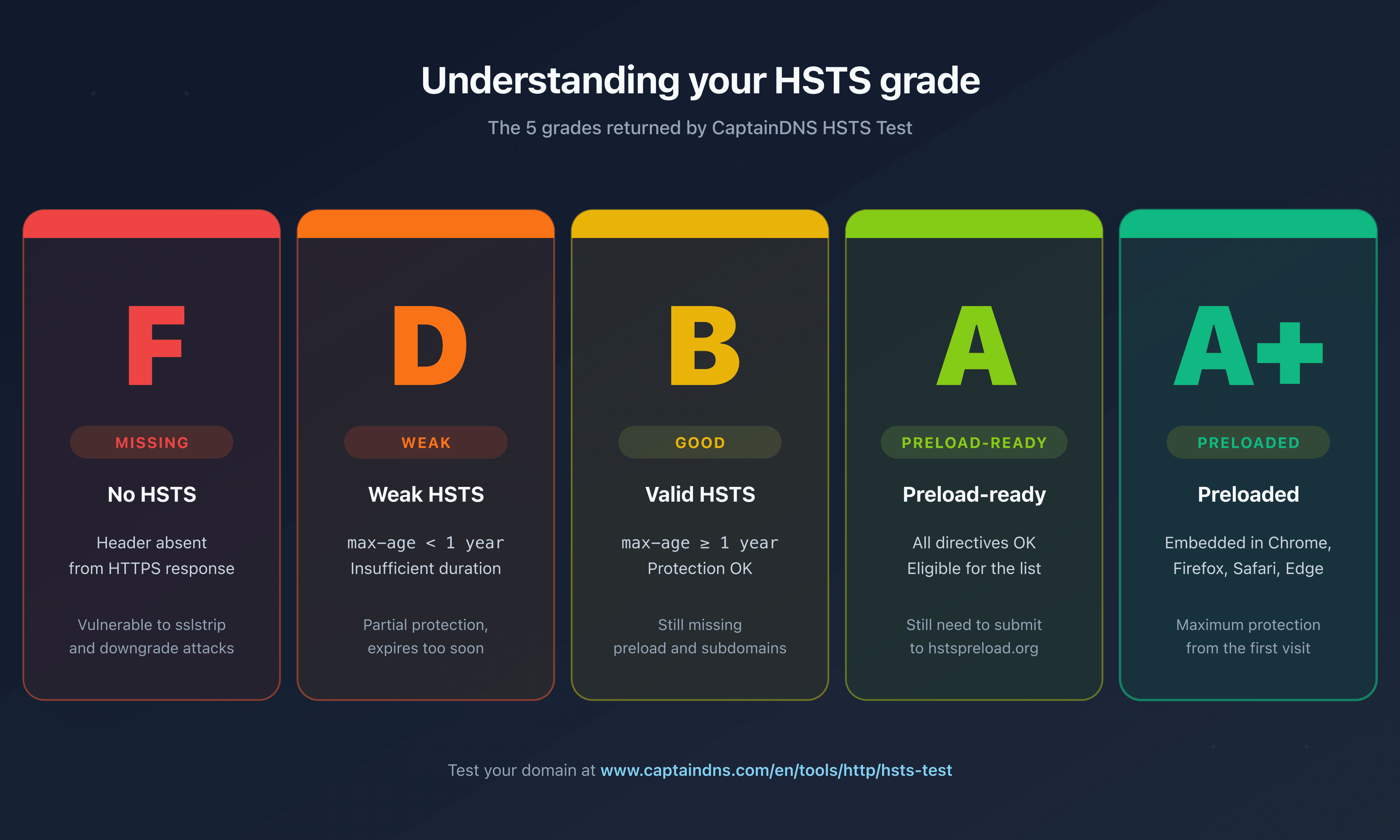
The tool runs three checks in parallel:
Strict-Transport-Securityheader analysis: the tool queries the domain over HTTPS, captures the header and parses its directives. It detectsmax-age,includeSubDomains,preload, as well as quoted or malformed values that some servers return.- Chrome preload list lookup: via the hstspreload.org API, it retrieves the actual status of your domain (
unknown,pending,preloaded,rejected) and submission eligibility. - Actionable grade computation: the result is summarized by a grade across five levels:
missing(no header),weak(max-age too low),good(sufficient max-age),preload-ready(eligible but not submitted),preloaded(in the Chrome list).
For every grade below preloaded, the tool provides ready-to-paste configuration snippets for Nginx, Apache and Cloudflare. After deploying the fix, rerun the test to confirm the move to a higher grade.
For a broader view of your security headers (CSP, X-Frame-Options, Referrer-Policy, Permissions-Policy), also use our Headers Viewer, which displays the faithful list of headers in their order of arrival. To test your HTTP to HTTPS redirect, the Redirect Checker follows the full redirect chain.
If your goal goes beyond HSTS and covers TLS security across your email infrastructure, see our TLS certificate checker to inspect TLS certificates or the DANE/TLSA check to add DANE/TLSA verification on your mail servers.
FAQ
What is HSTS in one sentence?
HSTS is an HTTP response header that tells the browser to talk to a domain only over HTTPS for the duration set by the max-age directive, which neutralizes attacks that try to force a clear-text connection.
Why does my site flag "HSTS missing" on a test?
Three causes are possible: the header is not sent at all, it is only sent over HTTP (and therefore ignored by browsers), or it is sent over HTTPS but with invalid syntax. Use a tool like the CaptainDNS HSTS test to pinpoint the exact issue.
What max-age value should I pick?
For a cautious rollout, start at max-age=300 (5 minutes), then climb in stages (1 day, 1 week, 1 year). For a stable production setup, max-age=31536000 (1 year) is the recommended minimum. For the preload list, max-age=63072000 (2 years) is the most common value. Beyond that, there is no extra security gain.
Does HSTS protect the very first visit?
No. Without the preload list, a browser visiting your domain for the first time issues an HTTP request before receiving the HSTS header. This bootstrap window stays vulnerable to a man-in-the-middle attack. The Chrome preload list solves this by embedding the list of known domains directly in the browser's source code.
Can I enable HSTS without includeSubDomains?
Yes, but the protection is less robust. includeSubDomains notably covers cookies set at the parent-domain level. Without this directive, an attacker can force an HTTP request to a non-HTTPS subdomain to capture the cookies. If all your subdomains can serve HTTPS, enable it. Otherwise, accept partial protection.
What happens if I disable HSTS by mistake?
Nothing visible to the user as long as the previously received policy has not expired. The browser keeps forcing HTTPS until the end of max-age. To disable cleanly, serve max-age=0 for a duration equivalent to your previous max-age (at least 1 year on a stable production setup), then remove the header entirely.
How do I test HSTS locally without polluting my browser?
Use a dedicated test domain (for example a .test domain reserved by the IETF, or a separate second-level domain from your production) with a Let's Encrypt certificate obtained via DNS challenge. Avoid testing HSTS on your production domain from your own machine: a misconfiguration can lock you out for the entire max-age duration. In development, you can also clear Chrome's HSTS cache via chrome://net-internals/#hsts, "Delete domain security policies" tab.
Should I remove HSTS from a site that no longer serves HTTPS?
No, you cannot simply remove HSTS. Once a browser has cached the policy, it will refuse any HTTP connection until max-age expires. Before migrating a site back to HTTP (which is discouraged), you must serve max-age=0 over HTTPS for the duration of the previous policy and wait for expiration in your visitors' browsers.
Is the preload list reversible?
Technically yes, in practice no. The removal procedure on hstspreload.org takes 4 to 12 weeks for Chromium integration, then 6 to 12 additional months for the majority of users to update their browser. Some users will never see the removal. Before submitting to the preload list, make sure you can keep HTTPS on this domain for years.
Does HSTS replace the 301 HTTP to HTTPS redirect?
No, it complements it. The 301 redirect is needed for the very first visit and for users who have never received the HSTS header. HSTS takes over for subsequent visits by rewriting URLs on the browser side before they hit the network. The two mechanisms must coexist.
How many sites are on the preload list in 2026?
Around 120,000 domains are enrolled in the Chromium preload list as of April 2026. The source file is around 18 MB. Among these domains, you find most of the major tech players (Google, GitHub, Twitter, Facebook, PayPal) but only half of the 20 largest global sites. Finance, healthcare and government sectors remain far behind.
Conclusion: HSTS, the indispensable foundation of any HTTPS infrastructure
HSTS is the missing piece of a robust HTTPS configuration. Without it, the very first request of every visit goes out in the clear over the network, and the rest of the traffic depends on the 301 redirect doing its job. With it, the browser takes control and locally rewrites every URL before the DNS resolver is even queried.
Three things to remember:
- Enable HSTS progressively. Start at
max-age=300to validate your HTTPS chain, then climb in stages over 2 to 4 weeks. Watch TLS errors at every stage. - Add
includeSubDomainsas soon as your subdomains are ready. This directive closes the door on subdomain-based attacks and protects your cookies in depth. Do a thorough inventory before enabling it. - Consider the preload list for maximum protection. It neutralizes the bootstrap MITM vulnerability, but it is a near-irreversible commitment. Only submit after 30 days of production stability.
To test your HSTS configuration right now, head to the free CaptainDNS HSTS test. The tool computes your grade, parses your directives, queries the Chrome preload list and gives you ready-to-paste Nginx, Apache and Cloudflare snippets. No account required, results in 3 seconds.